This is an automated email from the ASF dual-hosted git repository.

sylviasu pushed a commit to branch master
in repository https://gitbox.apache.org/repos/asf/apisix.git
The following commit(s) were added to refs/heads/master by this push:
new cd511744d docs: update Architecture docs (#7568)
cd511744d is described below
commit cd511744df9588d4d4b3480c40316a51716057d7
Author: Navendu Pottekkat <[email protected]>
AuthorDate: Wed Aug 24 06:45:07 2022 +0530
docs: update Architecture docs (#7568)
* docs: update Architecture docs
* move deployment guide and reference in installation docs
* add license header
---
docs/en/latest/architecture-design/apisix.md | 34 +++--
.../latest/architecture-design/deployment-role.md | 160 ---------------------
docs/en/latest/config.json | 28 ++--
docs/en/latest/deployment-modes.md | 157 ++++++++++++++++++++
docs/en/latest/installation-guide.md | 4 +
5 files changed, 195 insertions(+), 188 deletions(-)
diff --git a/docs/en/latest/architecture-design/apisix.md
b/docs/en/latest/architecture-design/apisix.md
index 0a6139c6f..2e76aab68 100644
--- a/docs/en/latest/architecture-design/apisix.md
+++ b/docs/en/latest/architecture-design/apisix.md
@@ -1,7 +1,11 @@
---
-title: APISIX
+title: Architecture
+keywords:
+ - API gateway
+ - Apache APISIX
+ - APISIX architecture
+description: Architecture of Apache APISIX—the Cloud Native API Gateway.
---
-
<!--
#
# Licensed to the Apache Software Foundation (ASF) under one or more
@@ -21,25 +25,27 @@ title: APISIX
#
-->
-## Apache APISIX : Software Architecture
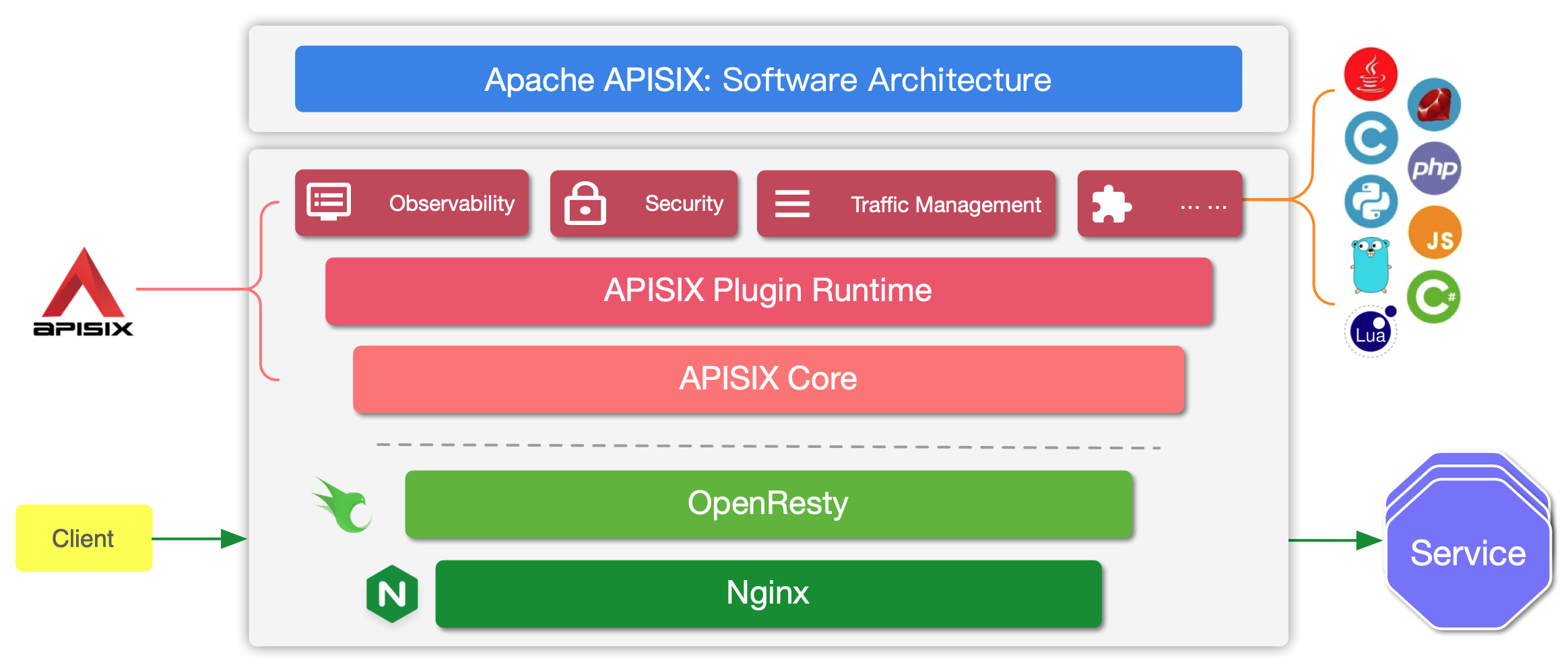
+APISIX is built on top of Nginx and
[ngx_lua](https://github.com/openresty/lua-nginx-module) leveraging the power
offered by LuaJIT. See [Why Apache APISIX chose Nginx and Lua to build API
Gateway?](https://apisix.apache.org/blog/2021/08/25/why-apache-apisix-chose-nginx-and-lua/).
+
+
-
+APISIX has two main parts:
-Apache APISIX is a dynamic, real-time, high-performance cloud-native API
gateway. It is built on top of NGINX + ngx_lua technology and leverages the
power offered by LuaJIT. [Why Apache APISIX chose Nginx and Lua to build API
Gateway?](https://apisix.apache.org/blog/2021/08/25/why-apache-apisix-chose-nginx-and-lua/)
+1. APISIX core, Lua plugin, multi-language Plugin runtime, and the WASM plugin
runtime.
+2. Built-in Plugins that adds features for observability, security, traffic
control, etc.
-APISIX is divided into two main parts:
+The APISIX core handles the important functions like matching Routes, load
balancing, service discovery, configuration management, and provides a
management API. It also includes APISIX Plugin runtime supporting Lua and
multilingual Plugins (Go, Java , Python, JavaScript, etc) including the
experimental WASM Plugin runtime.
-1. APISIX core, including Lua plugin, multi-language plugin runtime, Wasm
plugin runtime, etc.
-2. Feature-rich variety of built-in plugins: including observability,
security, traffic control, etc.
+APISIX also has a set of [built-in
Plugins](https://apisix.apache.org/docs/apisix/plugins/batch-requests) that
adds features like authentication, security, observability, etc. They are
written in Lua.
-In the APISIX core, important functions such as route matching, load
balancing, service discovery, management API, and basic modules such as
configuration management are provided. In addition, APISIX plugin runtime is
also included, providing the runtime framework for native Lua plugins and
multilingual plugins, as well as the experimental Wasm plugin runtime, etc.
APISIX multilingual plugin runtime provides support for various development
languages, such as Golang, Java, Python, JS, etc.
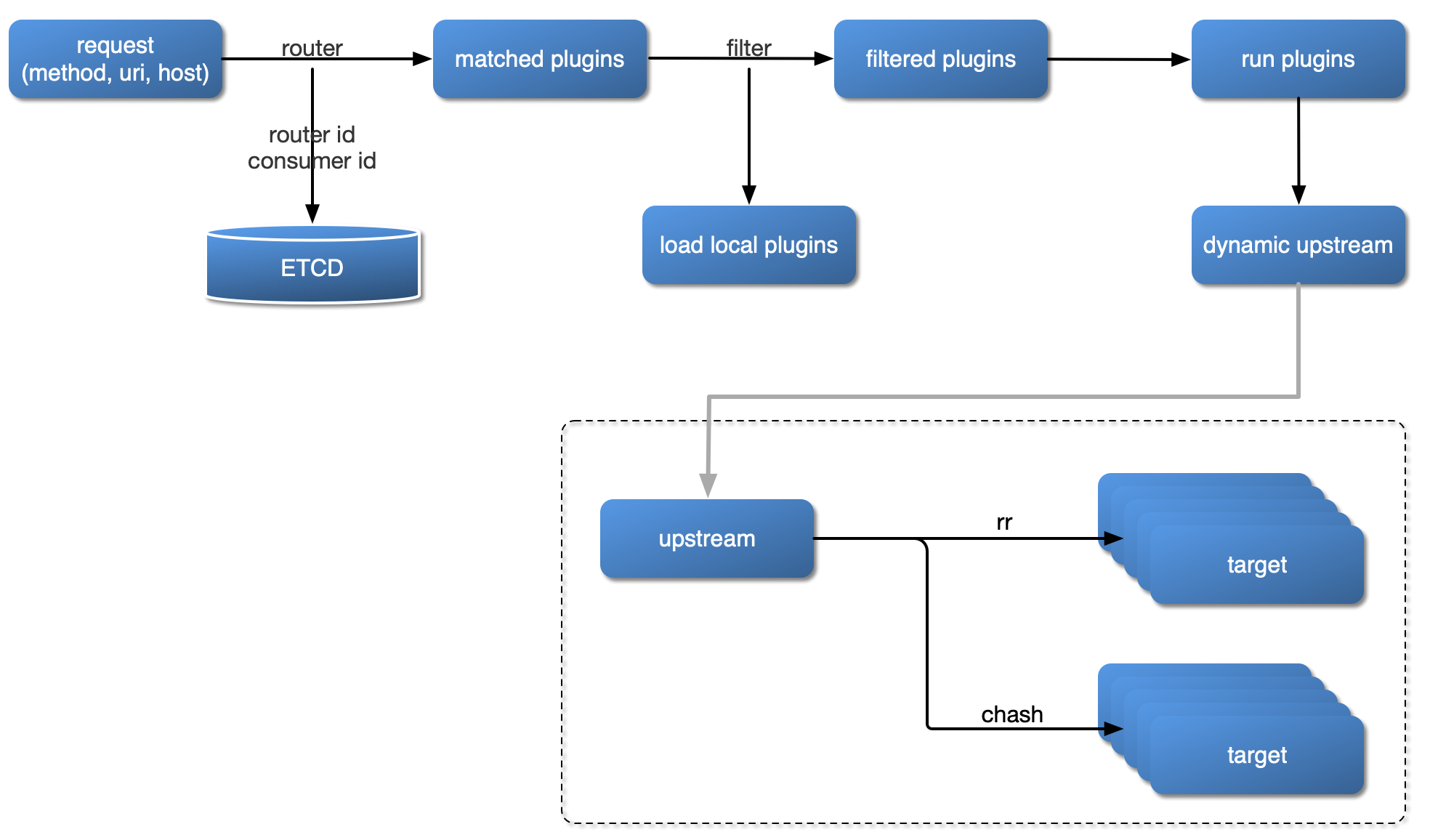
+## Request handling process
-APISIX currently has various plugins built in, covering various areas of API
gateways, such as authentication and authentication, security, observability,
traffic management, multi-protocol access, and so on. The plugins currently
built into APISIX are implemented using native Lua. For the introduction and
usage of each plugin, please check the
[documentation](https://apisix.apache.org/docs/apisix/plugins/batch-requests)
of the relevant plugin.
+The diagram below shows how APISIX handles an incoming request and applies
corresponding Plugins:
-## Plugin Loading Process
+
-
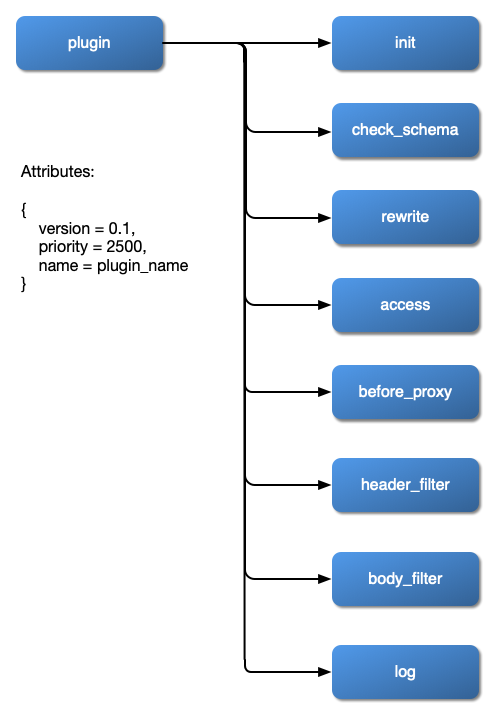
+## Plugin hierarchy
-## Plugin Hierarchy Structure
+The chart below shows the order in which different types of Plugin are applied
to a request:
-
+
diff --git a/docs/en/latest/architecture-design/deployment-role.md
b/docs/en/latest/architecture-design/deployment-role.md
deleted file mode 100644
index 465675e83..000000000
--- a/docs/en/latest/architecture-design/deployment-role.md
+++ /dev/null
@@ -1,160 +0,0 @@
----
-title: Deployment Role
----
-
-<!--
-#
-# Licensed to the Apache Software Foundation (ASF) under one or more
-# contributor license agreements. See the NOTICE file distributed with
-# this work for additional information regarding copyright ownership.
-# The ASF licenses this file to You under the Apache License, Version 2.0
-# (the "License"); you may not use this file except in compliance with
-# the License. You may obtain a copy of the License at
-#
-# http://www.apache.org/licenses/LICENSE-2.0
-#
-# Unless required by applicable law or agreed to in writing, software
-# distributed under the License is distributed on an "AS IS" BASIS,
-# WITHOUT WARRANTIES OR CONDITIONS OF ANY KIND, either express or implied.
-# See the License for the specific language governing permissions and
-# limitations under the License.
-#
--->
-
-## Concept
-
-Previously, the DP (Data Plane) and the CP (Control Plane) are not separate
explicitly.
-
-Although we clearly distinguish the different responsibilities of DP and CP in
the documentation, not everyone has correctly deployed APISIX in the production
environment.
-
-Therefore, we introduce new concepts called deployment modes/roles, to help
users deploy APISIX easily and safely.
-
-APISIX under different deployment modes will act differently.
-
-The table below shows the relationship among deployment modes and roles:
-
-| Deployment Modes | Role | Description
|
-|------------------|----------------------------|------------------------------------------------------------------------------------------|
-| traditional | traditional | DP + CP are deployed
together by default. People need to disable `enable_admin` manually |
-| decoupled | data_plane / control_plane | DP and CP are deployed
independently. |
-| standalone | data_plane | Only DP, load the all
configurations from local yaml file |
-
-## Deployment Modes
-
-### Traditional
-
-
-
-In the traditional deployment mode, one instance can be both DP & CP.
-
-There will be a `conf server` listens on UNIX socket and acts as a proxy
between APISIX and etcd.
-
-Both the DP part and CP part of the instance will connect to the `conf server`
via HTTP protocol.
-
-Here is the example of configuration:
-
-```yaml title="conf/config.yaml"
-deployment:
- role: traditional
- role_traditional:
- config_provider: etcd
- etcd:
- host:
- - http://xxxx
- prefix: /apisix
- timeout: 30
-```
-
-### Decoupled
-
-
-
-The instance deployed as data_plane will:
-
-1. Fetch configurations from the CP, the default port is 9280
-2. Before the DP service starts, it will perform a health check on all CP
addresses
- - If all CP addresses are unavailable, the startup fails and an exception
message is output to the screen.
- - If at least one CP address is available, print the unhealthy CP check
result log, and then start the APISIX service.
- - If all CP addresses are normal, start the APISIX service normally.
-3. Handle user requests.
-
-Here is the example of configuration:
-
-```yaml title="conf/config.yaml"
-deployment:
- role: data_plane
- role_data_plane:
- config_provider: control_plane
- control_plane:
- host:
- - xxxx:9280
- timeout: 30
- certs:
- cert: /path/to/ca-cert
- cert_key: /path/to/ca-cert
- trusted_ca_cert: /path/to/ca-cert
-```
-
-The instance deployed as control_plane will:
-
-1. Listen on 9180 by default, and provide Admin API for Admin user
-2. Provide `conf server` which listens on port 9280 by default. Both the DP
instances and this CP instance will connect to the `conf server` via HTTPS
enforced by mTLS.
-
-Here is the example of configuration:
-
-```yaml title="conf/config.yaml"
-deployment:
- role: control_plane
- role_control_plan:
- config_provider: etcd
- conf_server:
- listen: 0.0.0.0:9280
- cert: /path/to/ca-cert
- cert_key: /path/to/ca-cert
- client_ca_cert: /path/to/ca-cert
- etcd:
- host:
- - https://xxxx
- prefix: /apisix
- timeout: 30
- certs:
- cert: /path/to/ca-cert
- cert_key: /path/to/ca-cert
- trusted_ca_cert: /path/to/ca-cert
-```
-
-As OpenResty <= 1.21.4 doesn't support sending mTLS request, if you need to
accept the connections from APISIX running on these OpenResty versions,
-you need to disable client certificate verification in the CP instance.
-
-Here is the example of configuration:
-
-```yaml title="conf/config.yaml"
-deployment:
- role: control_plane
- role_control_plan:
- config_provider: etcd
- conf_server:
- listen: 0.0.0.0:9280
- cert: /path/to/ca-cert
- cert_key: /path/to/ca-cert
- etcd:
- host:
- - https://xxxx
- prefix: /apisix
- timeout: 30
- certs:
- trusted_ca_cert: /path/to/ca-cert
-```
-
-### Standalone
-
-In this mode, APISIX is deployed as DP and reads configurations from yaml file
in the local file system.
-
-Here is the example of configuration:
-
-```yaml title="conf/config.yaml"
-deployment:
- role: data_plane
- role_data_plane:
- config_provider: yaml
-```
diff --git a/docs/en/latest/config.json b/docs/en/latest/config.json
index 939a5cac9..2e406005d 100644
--- a/docs/en/latest/config.json
+++ b/docs/en/latest/config.json
@@ -2,12 +2,16 @@
"version": "2.15.0",
"sidebar": [
{
- "type": "category",
- "label": "Architecture Design",
- "items": [
- "architecture-design/apisix",
- "architecture-design/deployment-role"
- ]
+ "type": "doc",
+ "id": "getting-started"
+ },
+ {
+ "type": "doc",
+ "id": "installation-guide"
+ },
+ {
+ "type": "doc",
+ "id": "architecture-design/apisix"
},
{
"type": "category",
@@ -25,14 +29,6 @@
"terminology/upstream"
]
},
- {
- "type": "doc",
- "id": "getting-started"
- },
- {
- "type": "doc",
- "id": "installation-guide"
- },
{
"type": "category",
"label": "Plugins",
@@ -244,6 +240,10 @@
"xrpc"
]
},
+ {
+ "type": "doc",
+ "id": "deployment-modes"
+ },
{
"type": "doc",
"id": "health-check"
diff --git a/docs/en/latest/deployment-modes.md
b/docs/en/latest/deployment-modes.md
new file mode 100644
index 000000000..ec26a9047
--- /dev/null
+++ b/docs/en/latest/deployment-modes.md
@@ -0,0 +1,157 @@
+---
+title: Deployment modes
+keywords:
+ - API gateway
+ - Apache APISIX
+ - APISIX deployment modes
+description: Documentation about the three deployment modes of Apache APISIX.
+---
+<!--
+#
+# Licensed to the Apache Software Foundation (ASF) under one or more
+# contributor license agreements. See the NOTICE file distributed with
+# this work for additional information regarding copyright ownership.
+# The ASF licenses this file to You under the Apache License, Version 2.0
+# (the "License"); you may not use this file except in compliance with
+# the License. You may obtain a copy of the License at
+#
+# http://www.apache.org/licenses/LICENSE-2.0
+#
+# Unless required by applicable law or agreed to in writing, software
+# distributed under the License is distributed on an "AS IS" BASIS,
+# WITHOUT WARRANTIES OR CONDITIONS OF ANY KIND, either express or implied.
+# See the License for the specific language governing permissions and
+# limitations under the License.
+#
+-->
+
+APISIX has three different deployment modes for different production use
cases. The table below summarises the deployment modes:
+
+| Deployment mode | Roles | Description
|
+|-----------------|----------------------------|-----------------------------------------------------------------------------------------------------------|
+| traditional | traditional | Data plane and control plane
are deployed together. `enable_admin` attribute should be disabled manually. |
+| decoupled | data_plane / control_plane | Data plane and control plane
are deployed independently. |
+| standalone | data_plane | Only data plane is deployed
and the configurations are loaded from a local YAML file. |
+
+Each of these deployment modes are explained in detail below.
+
+## Traditional
+
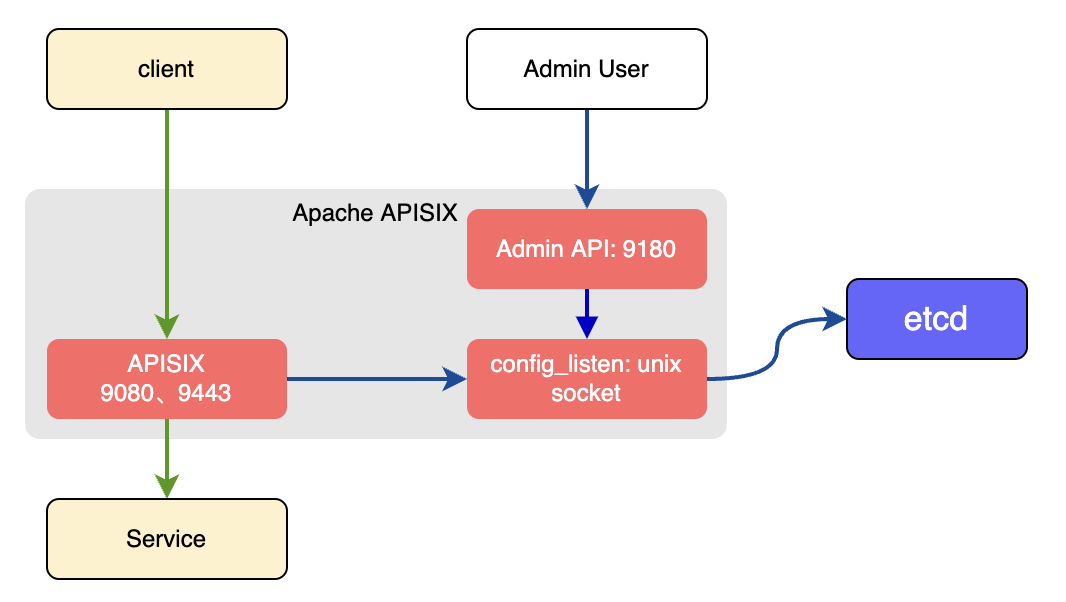
+In the traditional deployment mode, one instance of APISIX will be both the
data plane and the control plane.
+
+
+
+There will be a conf server that listens on the UNIX socket and acts as a
proxy between APISIX and etcd. Both the data and the control planes connect to
this conf server via HTTP.
+
+An example configuration of the traditional deployment mode is shown below:
+
+```yaml title="conf/config.yaml"
+deployment:
+ role: traditional
+ role_traditional:
+ config_provider: etcd
+ etcd:
+ host:
+ - http://${IP}:${Port}
+ prefix: /apisix
+ timeout: 30
+```
+
+## Decoupled
+
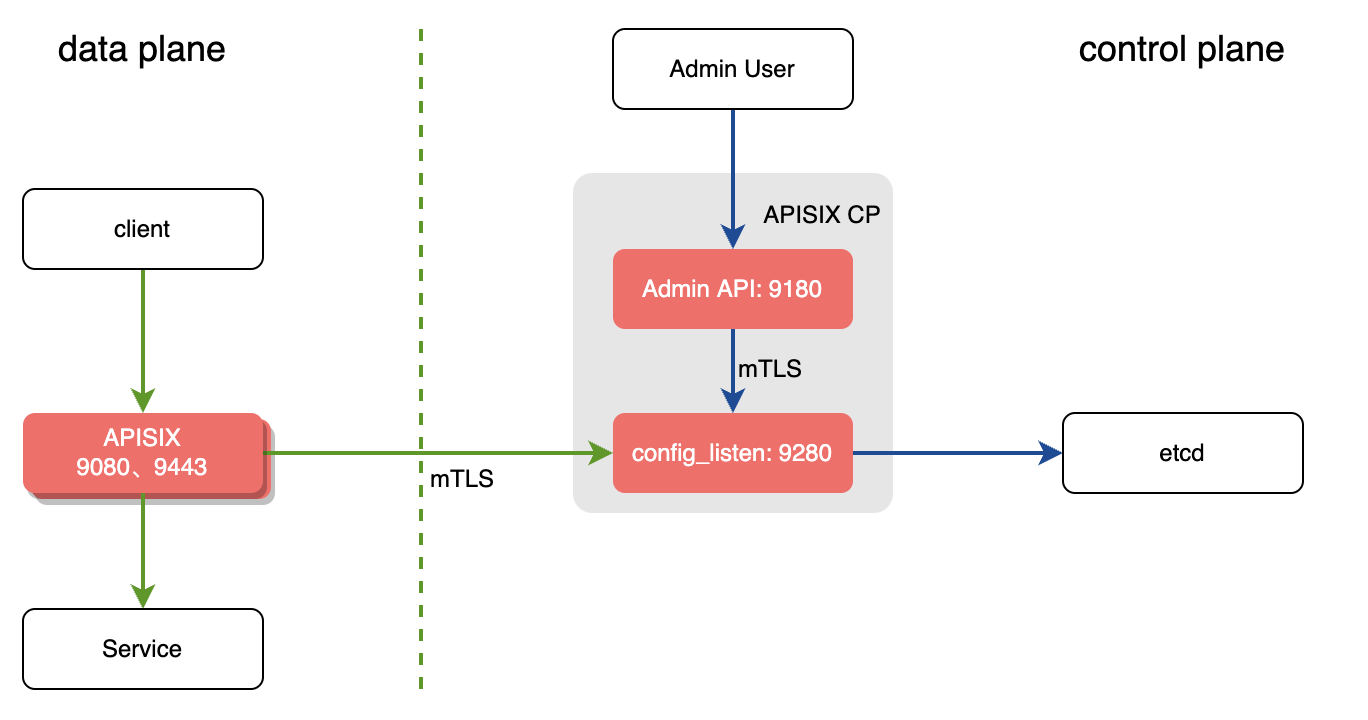
+In the decoupled deployment mode the data plane and control plane instances of
APISIX are deployed separately. i.e one instance of APISIX is configured to be
a data plane and the other to be a control plane.
+
+
+
+The instance of APISIX deployed as the data plane will:
+
+1. Fetch the configuration from the control plane. The default port is `9280`.
+2. Performs a health check on all configured control plane addresses before
starting the service.
+ 1. If the control plane addresses are unavailable, the startup fails and an
exception is thrown.
+ 2. If at least one control plane address is available, it prints the
unhealthy control planes logs, and starts the APISIX service.
+ 3. If all control planes are normal, APISIX service is started normally.
+3. Once the service is started, it will handle the user requests.
+
+The example below shows the configuration of an APISIX instance as data plane
in the decoupled mode:
+
+```yaml title="conf/config.yaml"
+deployment:
+ role: data_plane
+ role_data_plane:
+ config_provider: control_plane
+ control_plane:
+ host:
+ - ${IP}:9280
+ timeout: 30
+ certs:
+ cert: /path/to/ca-cert
+ cert_key: /path/to/ca-cert
+ trusted_ca_cert: /path/to/ca-cert
+```
+
+The instance of APISIX deployeas the control plane will:
+
+1. Listen on port `9180` and handle Admin API requests.
+2. Provide the conf server which will listen on port `9280`. Both the control
plane and the data plane will connect to this via HTTPS enforced by mTLS.
+
+The example below shows the configuration of an APISIX instance as control
plane in the decoupled mode:
+
+```yaml title="conf/config.yaml"
+deployment:
+ role: control_plane
+ role_control_plan:
+ config_provider: etcd
+ conf_server:
+ listen: 0.0.0.0:9280
+ cert: /path/to/ca-cert
+ cert_key: /path/to/ca-cert
+ client_ca_cert: /path/to/ca-cert
+ etcd:
+ host:
+ - https://${IP}:${Port}
+ prefix: /apisix
+ timeout: 30
+ certs:
+ cert: /path/to/ca-cert
+ cert_key: /path/to/ca-cert
+ trusted_ca_cert: /path/to/ca-cert
+```
+
+:::tip
+
+As OpenResty <= 1.21.4 does not support sending mTLS requests, to accept
connections from APISIX running on these OpenResty versions, you need to
disable the client certificate verification in the control plane instance as
shown below:
+
+```yaml title="conf/config.yaml"
+deployment:
+ role: control_plane
+ role_control_plan:
+ config_provider: etcd
+ conf_server:
+ listen: 0.0.0.0:9280
+ cert: /path/to/ca-cert
+ cert_key: /path/to/ca-cert
+ etcd:
+ host:
+ - https://${IP}:${Port}
+ prefix: /apisix
+ timeout: 30
+ certs:
+ trusted_ca_cert: /path/to/ca-cert
+```
+
+:::
+
+## Standalone
+
+In the standalone deployment mode, APISIX is deployed as a data plane and it
reads in configurations from a YAML file (`apisix.yaml`) in the local file
system.
+
+This deployment mode is useful when you have to declaratively define the
configuration or when you are using a different configuration center other than
etcd.
+
+To configure APISIX in standalone mode:
+
+```yaml title="conf/config.yaml"
+deployment:
+ role: data_plane
+ role_data_plane:
+ config_provider: yaml
+```
diff --git a/docs/en/latest/installation-guide.md
b/docs/en/latest/installation-guide.md
index 775ceb5b3..3ba06bb1d 100644
--- a/docs/en/latest/installation-guide.md
+++ b/docs/en/latest/installation-guide.md
@@ -256,6 +256,10 @@ The `conf/nginx.conf` file is automatically generated and
should not be modified
:::
+### APISIX deployment modes
+
+APISIX has three different deployment modes for different use cases. To learn
more and configure deployment modes, see the
[documentation](./deployment-modes.md).
+
### Updating Admin API key
It is recommended to modify the Admin API key to ensure security.





