This is an automated email from the ASF dual-hosted git repository.

sylviasu pushed a commit to branch master
in repository https://gitbox.apache.org/repos/asf/apisix.git
The following commit(s) were added to refs/heads/master by this push:
new 97c704cbf docs(plugin): refactor limit-conn.md (#7857)
97c704cbf is described below
commit 97c704cbff568746e956253ee633546aa106eca3
Author: Yuedong Wu <[email protected]>
AuthorDate: Wed Sep 7 16:06:18 2022 +0800
docs(plugin): refactor limit-conn.md (#7857)
* docs: update limit-conn.md
---
docs/en/latest/plugins/limit-conn.md | 99 +++++++++++++++------------------
docs/zh/latest/plugins/limit-conn.md | 103 +++++++++++++++++------------------
2 files changed, 94 insertions(+), 108 deletions(-)
diff --git a/docs/en/latest/plugins/limit-conn.md
b/docs/en/latest/plugins/limit-conn.md
index 6d40221ca..bc000ad75 100644
--- a/docs/en/latest/plugins/limit-conn.md
+++ b/docs/en/latest/plugins/limit-conn.md
@@ -2,10 +2,9 @@
title: limit-conn
keywords:
- APISIX
- - Plugin
+ - API Gateway
- Limit Connection
- - limit-con
-description: This document contains information about the Apache APISIX
limit-con Plugin.
+description: This document contains information about the Apache APISIX
limit-con Plugin, you can use it to limits the number of concurrent requests to
your services.
---
<!--
@@ -40,7 +39,7 @@ The `limit-con` Plugin limits the number of concurrent
requests to your services
| default_conn_delay | number | True | | default_conn_delay >
0 | Delay in seconds to process the concurrent requests exceeding `conn`
(and `conn` + `burst`).
|
| only_use_default_delay | boolean | False | false | [true,false]
| When set to `true`, the Plugin will always set a delay of
`default_conn_delay` and would not use any other calculations.
|
| key_type | string | False | "var" | ["var",
"var_combination"] | Type of user specified key to use.
|
-| key | string | True | |
| User specified key to base the request limiting on. If the `key_type`
attribute is set to `var`, the key will be treated as a name of variable, like
`remote_addr` or `consumer_name`. If the `key_type` is set to
`var_combination`, the key will be a combination of variables, like
`$remote_addr $consumer_name`. If the value of the key is empty, `remote_addr`
will be set as the default key. |
+| key | string | True | |
| User specified key to base the request limiting on. If the `key_type`
attribute is set to `"var"`, the key will be treated as a name of variable,
like `remote_addr` or `consumer_name`. If the `key_type` is set to
`"var_combination"`, the key will be a combination of variables, like
`$remote_addr $consumer_name`. If the value of the key is empty, `remote_addr`
will be set as the default key. |
| rejected_code | string | False | 503 | [200,...,599]
| HTTP status code returned when the requests exceeding the threshold are
rejected.
|
| rejected_msg | string | False | | non-empty
| Body of the response returned when the requests exceeding the threshold
are rejected.
|
| allow_degradation | boolean | False | false |
| When set to `true` enables Plugin degradation when the Plugin is
temporarily unavailable and allows requests to continue.
|
@@ -49,8 +48,9 @@ The `limit-con` Plugin limits the number of concurrent
requests to your services
You can enable the Plugin on a Route as shown below:
-```bash
-curl http://127.0.0.1:9180/apisix/admin/routes/1 -H 'X-API-KEY:
edd1c9f034335f136f87ad84b625c8f1' -X PUT -d '
+```shell
+curl http://127.0.0.1:9180/apisix/admin/routes/1 \
+-H 'X-API-KEY: edd1c9f034335f136f87ad84b625c8f1' -X PUT -d '
{
"methods": ["GET"],
"uri": "/index.html",
@@ -75,8 +75,9 @@ curl http://127.0.0.1:9180/apisix/admin/routes/1 -H
'X-API-KEY: edd1c9f034335f13
You can also configure the `key_type` to `var_combination` as shown:
-```bash
-curl http://127.0.0.1:9180/apisix/admin/routes/1 -H 'X-API-KEY:
edd1c9f034335f136f87ad84b625c8f1' -X PUT -d '
+```shell
+curl http://127.0.0.1:9180/apisix/admin/routes/1 \
+-H 'X-API-KEY: edd1c9f034335f136f87ad84b625c8f1' -X PUT -d '
{
"methods": ["GET"],
"uri": "/index.html",
@@ -99,19 +100,17 @@ curl http://127.0.0.1:9180/apisix/admin/routes/1 -H
'X-API-KEY: edd1c9f034335f13
}'
```
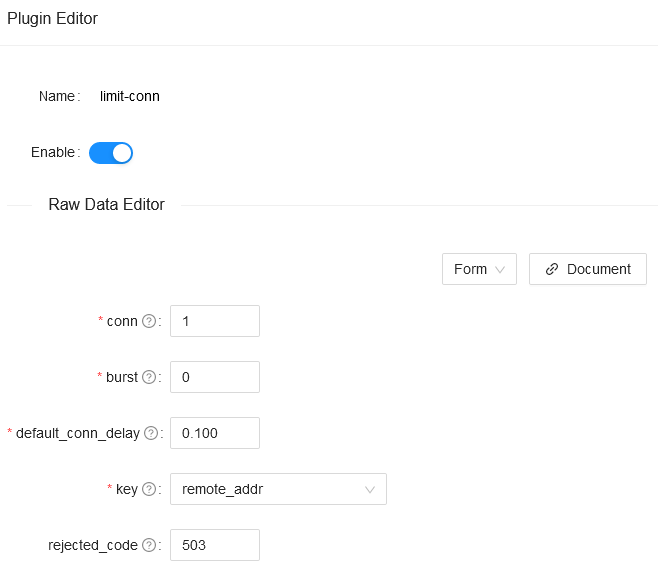
-<!-- 
-->
-
## Example usage
-The example above configures the Plugin to only allow one concurrent request.
When more than one request is received, the Plugin will respond with a 503
status code:
+The example above configures the Plugin to only allow one connection on this
route. When more than one request is received, the Plugin will respond with a
`503` HTTP status code and reject the connection:
-```bash
+```shell
curl -i http://127.0.0.1:9080/index.html?sleep=20 &
curl -i http://127.0.0.1:9080/index.html?sleep=20
```
-```bash
+```shell
<html>
<head><title>503 Service Temporarily Unavailable</title></head>
<body>
@@ -121,35 +120,15 @@ curl -i http://127.0.0.1:9080/index.html?sleep=20
</html>
```
-## Disable Plugin
-
-To disable the `limit-conn` Plugin, you can delete the corresponding JSON
configuration from the Plugin configuration. APISIX will automatically reload
and you do not have to restart for this to take effect.
-
-```bash
-curl http://127.0.0.1:9180/apisix/admin/routes/1 -H 'X-API-KEY:
edd1c9f034335f136f87ad84b625c8f1' -X PUT -d '
-{
- "methods": ["GET"],
- "uri": "/index.html",
- "id": 1,
- "plugins": {
- },
- "upstream": {
- "type": "roundrobin",
- "nodes": {
- "127.0.0.1:1980": 1
- }
- }
-}'
-```
-
## Limit the number of concurrent WebSocket connections
Apache APISIX supports WebSocket proxy, we can use `limit-conn` plugin to
limit the number of concurrent WebSocket connections.
1. Create a Route, enable the WebSocket proxy and the `limit-conn` plugin.
-````shell
-curl http://127.0.0.1:9180/apisix/admin/routes/1 -H 'X-API-KEY:
edd1c9f034335f136f87ad84b625c8f1' -X PUT -d '
+```shell
+curl http://127.0.0.1:9180/apisix/admin/routes/1 \
+-H 'X-API-KEY: edd1c9f034335f136f87ad84b625c8f1' -X PUT -d '
{
"uri": "/ws",
"enable_websocket": true,
@@ -170,13 +149,13 @@ curl http://127.0.0.1:9180/apisix/admin/routes/1 -H
'X-API-KEY: edd1c9f034335f13
}
}
}'
-````
+```
The above route enables the WebSocket proxy on `/ws`, and limits the number of
concurrent WebSocket connections to 1. More than 1 concurrent WebSocket
connection will return `503` to reject the request.
-2. Initiate a WebSocket request, and the connection is established successfully
+2. Initiate a WebSocket request, and the connection is established
successfully.
-````shell
+```shell
curl --include \
--no-buffer \
--header "Connection: Upgrade" \
@@ -189,23 +168,13 @@ curl --include \
```shell
HTTP/1.1 101 Switching Protocols
-Connection: upgrade
-Upgrade: websocket
-Sec-WebSocket-Accept: HSmrc0sMlYUkAGmm5OPpG2HaGWk=
-Server: APISIX/2.15.0
-...
-````
+```
-3. Initiate the WebSocket request again in another terminal, the request will
be rejected
+3. Initiate the WebSocket request again in another terminal, the request will
be rejected.
-````shell
+```shell
HTTP/1.1 503 Service Temporarily Unavailable
-Date: Mon, 01 Aug 2022 03:49:17 GMT
-Content-Type: text/html; charset=utf-8
-Content-Length: 194
-Connection: keep-alive
-Server: APISIX/2.15.0
-
+···
<html>
<head><title>503 Service Temporarily Unavailable</title></head>
<body>
@@ -213,4 +182,26 @@ Server: APISIX/2.15.0
<hr><center>openresty</center>
</body>
</html>
-````
+```
+
+## Disable Plugin
+
+To disable the `limit-conn` Plugin, you can delete the corresponding JSON
configuration from the Plugin configuration. APISIX will automatically reload
and you do not have to restart for this to take effect.
+
+```shell
+curl http://127.0.0.1:9180/apisix/admin/routes/1 \
+-H 'X-API-KEY: edd1c9f034335f136f87ad84b625c8f1' -X PUT -d '
+{
+ "methods": ["GET"],
+ "uri": "/index.html",
+ "id": 1,
+ "plugins": {
+ },
+ "upstream": {
+ "type": "roundrobin",
+ "nodes": {
+ "127.0.0.1:1980": 1
+ }
+ }
+}'
+```
diff --git a/docs/zh/latest/plugins/limit-conn.md
b/docs/zh/latest/plugins/limit-conn.md
index e274a609a..8f5a74dfe 100644
--- a/docs/zh/latest/plugins/limit-conn.md
+++ b/docs/zh/latest/plugins/limit-conn.md
@@ -1,5 +1,10 @@
---
title: limit-conn
+keywords:
+ - APISIX
+ - API 网关
+ - Limit Connection
+description: 本文介绍了 Apache APISIX limit-conn 插件的相关操作,你可以使用此插件限制客户端对服务的并发请求数。
---
<!--
@@ -23,28 +28,29 @@ title: limit-conn
## 描述
-限制并发请求(或并发连接)插件。
+`limit-conn` 插件用于限制客户端对服务的并发请求数。
## 属性
| 名称 | 类型 | 必选项 | 默认值 | 有效值
| 描述
|
| ------------------ | ------- | -------- | ------ |
-----------------------------------------------------------------------------------------
|----------------------------------------------------------------------------------------------------------------------------------------------------------------------------------------------------------|
| conn | integer | 是 | | conn > 0
| 允许的最大并发请求数。超过 `conn`
的限制、但是低于 `conn` + `burst` 的请求,将被延迟处理。
|
-| burst | integer | 是 | | burst >= 0
| 允许被延迟处理的并发请求数。
|
+| burst | integer | 是 | | burst >= 0
| 每秒允许被延迟处理的额外并发请求数。
|
| default_conn_delay | number | 是 | | default_conn_delay > 0
| 默认的典型连接(或请求)的处理延迟时间。
|
-| only_use_default_delay | boolean | 否 | false | [true,false]
| 延迟时间的严格模式。
如果设置为`true`的话,将会严格按照设置的时间来进行延迟
|
-| key_type | string | 否 | "var" | ["var", "var_combination"]
| key 的类型
|
-| key | string | 是 | | | 用来做请求计数的依据。如果 `key_type` 为
"var",那么 key 会被当作变量名称,如 "remote_addr" 和 "consumer_name"。如果 `key_type` 为
"var_combination",那么 key 会当作变量组合,如 "$remote_addr $consumer_name"。如果 key
的值为空,$remote_addr 会被作为默认 key。 |
-| rejected_code | string | 否 | 503 | [200,...,599]
| 当请求超过 `conn` +
`burst` 这个阈值时,返回的 HTTP 状态码
|
-| rejected_msg | string | 否 |
| 非空 | 当请求超过 `conn` + `burst`
这个阈值时,返回的响应体。
|
-| allow_degradation | boolean | 否
| false |
| 当插件功能临时不可用时是否允许请求继续。当值设置为 true 时则自动允许请求继续,默认值是 false。
|
+| only_use_default_delay | boolean | 否 | false | [true,false]
| 延迟时间的严格模式。 当设置为
`true` 时,将会严格按照设置的 `default_conn_delay` 时间来进行延迟处理。
|
+| key_type | string | 否 | "var" | ["var", "var_combination"]
| `key` 的类型
|
+| key | string | 是 | | | 用来做请求计数的依据。如果 `key_type` 为
`"var"`,那么 `key` 会被当作变量名称,如 `remote_addr` 和 `consumer_name`;如果 `key_type` 为
`"var_combination"`,那么 `key` 会当作变量组合,如 `$remote_addr $consumer_name`;如果 `key`
的值为空,`$remote_addr` 会被作为默认 `key`。 |
+| rejected_code | string | 否 | 503 | [200,...,599]
| 当请求数超过 `conn` +
`burst` 阈值时,返回的 HTTP 状态码。
|
+| rejected_msg | string | 否 |
| 非空 | 当请求数超过 `conn` + `burst`
阈值时,返回的响应体。
|
+| allow_degradation | boolean | 否
| false |
| 当设置为 `true` 时,启用插件降级并自动允许请求继续。
|
-## 开启插件
+## 启用插件
-下面是一个示例,在指定的 route 上开启了 limit-conn 插件,并设置 `key_type` 为 `var`:
+以下示例展示了如何在指定路由上启用 `limit-conn` 插件,并设置 `key_type` 为 `"var"`:
```shell
-curl http://127.0.0.1:9180/apisix/admin/routes/1 -H 'X-API-KEY:
edd1c9f034335f136f87ad84b625c8f1' -X PUT -d '
+curl http://127.0.0.1:9180/apisix/admin/routes/1 \
+-H 'X-API-KEY: edd1c9f034335f136f87ad84b625c8f1' -X PUT -d '
{
"methods": ["GET"],
"uri": "/index.html",
@@ -68,10 +74,11 @@ curl http://127.0.0.1:9180/apisix/admin/routes/1 -H
'X-API-KEY: edd1c9f034335f13
}'
```
-下面是一个示例,在指定的路由上开启了 `limit-conn` 插件,并设置 `key_type` 为 `var_combination`:
+你也可以设置 `key_type` 为 `"var_combination"`:
```shell
-curl http://127.0.0.1:9180/apisix/admin/routes/1 -H 'X-API-KEY:
edd1c9f034335f136f87ad84b625c8f1' -X PUT -d '
+curl http://127.0.0.1:9180/apisix/admin/routes/1 \
+-H 'X-API-KEY: edd1c9f034335f136f87ad84b625c8f1' -X PUT -d '
{
"methods": ["GET"],
"uri": "/index.html",
@@ -95,17 +102,17 @@ curl http://127.0.0.1:9180/apisix/admin/routes/1 -H
'X-API-KEY: edd1c9f034335f13
}'
```
-你也可以通过 web 界面来完成上面的操作,先增加一个 route,然后在插件页面中添加 limit-conn 插件:
-
-
## 测试插件
-上面启用的插件的参数表示只允许一个并发请求。 当收到多个并发请求时,将直接返回 503 拒绝请求。
+按上述配置启用插件后,在这条路由资源上,APISIX 将只允许一个连接;当有更多连接进入时,APISIX 会直接返回 `503` HTTP 状态码,拒绝连接。
```shell
curl -i http://127.0.0.1:9080/index.html?sleep=20 &
curl -i http://127.0.0.1:9080/index.html?sleep=20
+```
+
+```shell
<html>
<head><title>503 Service Temporarily Unavailable</title></head>
<body>
@@ -115,36 +122,15 @@ curl -i http://127.0.0.1:9080/index.html?sleep=20
</html>
```
-这就表示 limit-conn 插件生效了。
-
-## 移除插件
-
-当你想去掉 limit-conn 插件的时候,很简单,在插件的配置中把对应的 json 配置删除即可,无须重启服务,即刻生效:
-
-```shell
-curl http://127.0.0.1:9180/apisix/admin/routes/1 -H 'X-API-KEY:
edd1c9f034335f136f87ad84b625c8f1' -X PUT -d '
-{
- "methods": ["GET"],
- "uri": "/index.html",
- "upstream": {
- "type": "roundrobin",
- "nodes": {
- "127.0.0.1:1980": 1
- }
- }
-}'
-```
-
-现在就已经移除了 limit-conn 插件了。其他插件的开启和移除也是同样的方法。
-
## 限制 WebSocket 连接的并发数
Apache APISIX 支持 WebSocket 代理,我们可以使用 `limit-conn` 插件限制 WebSocket 连接的并发数。
-1、创建路由并启用 WebSocket 代理和 `limit-conn` 插件
+1、创建路由并启用 WebSocket 代理和 `limit-conn` 插件。
```shell
-curl http://127.0.0.1:9180/apisix/admin/routes/1 -H 'X-API-KEY:
edd1c9f034335f136f87ad84b625c8f1' -X PUT -d '
+curl http://127.0.0.1:9180/apisix/admin/routes/1 \
+-H 'X-API-KEY: edd1c9f034335f136f87ad84b625c8f1' -X PUT -d '
{
"uri": "/ws",
"enable_websocket": true,
@@ -169,7 +155,7 @@ curl http://127.0.0.1:9180/apisix/admin/routes/1 -H
'X-API-KEY: edd1c9f034335f13
上述路由在 `/ws` 上开启了 WebSocket 代理,并限制了 WebSocket 连接并发数为 1,超过 1 个并发的 WebSocket
连接将返回 `503` 拒绝请求。
-2、发起 WebSocket 请求,连接建立成功
+2、发起 WebSocket 请求,返回 `101` HTTP 状态码表示连接建立成功。
```shell
curl --include \
@@ -184,23 +170,13 @@ curl --include \
```shell
HTTP/1.1 101 Switching Protocols
-Connection: upgrade
-Upgrade: websocket
-Sec-WebSocket-Accept: HSmrc0sMlYUkAGmm5OPpG2HaGWk=
-Server: APISIX/2.15.0
-...
```
-3、在另一个终端中再次发起 WebSocket 请求,请求将被拒绝
+3、在另一个终端中再次发起 WebSocket 请求,返回 `503` HTTP 状态码表示请求将被拒绝。
```shell
HTTP/1.1 503 Service Temporarily Unavailable
-Date: Mon, 01 Aug 2022 03:49:17 GMT
-Content-Type: text/html; charset=utf-8
-Content-Length: 194
-Connection: keep-alive
-Server: APISIX/2.15.0
-
+···
<html>
<head><title>503 Service Temporarily Unavailable</title></head>
<body>
@@ -209,3 +185,22 @@ Server: APISIX/2.15.0
</body>
</html>
```
+
+## 禁用插件
+
+当你需要禁用该插件时,可以通过以下命令删除相应的 JSON 配置,APISIX 将会自动重新加载相关配置,无需重启服务:
+
+```shell
+curl http://127.0.0.1:9180/apisix/admin/routes/1 \
+-H 'X-API-KEY: edd1c9f034335f136f87ad84b625c8f1' -X PUT -d '
+{
+ "methods": ["GET"],
+ "uri": "/index.html",
+ "upstream": {
+ "type": "roundrobin",
+ "nodes": {
+ "127.0.0.1:1980": 1
+ }
+ }
+}'
+```

