This is an automated email from the ASF dual-hosted git repository.

juzhiyuan pushed a commit to branch master
in repository https://gitbox.apache.org/repos/asf/apisix.git
The following commit(s) were added to refs/heads/master by this push:
new 8807a505b docs: Add How-to guides section with the first guide (#7921)
8807a505b is described below
commit 8807a505bba58fc36b6d37c5fe62fc1e98ff2cda
Author: Livermore <[email protected]>
AuthorDate: Thu Sep 15 16:03:01 2022 +0300
docs: Add How-to guides section with the first guide (#7921)
Co-authored-by: boburumurzokov <[email protected]>
Co-authored-by: Sylvia <[email protected]>
---
docs/en/latest/config.json | 7 +
docs/en/latest/how-to-guides/observe-your-api.md | 251 +++++++++++++++++++++++
2 files changed, 258 insertions(+)
diff --git a/docs/en/latest/config.json b/docs/en/latest/config.json
index 73a13c23f..35e3db07f 100644
--- a/docs/en/latest/config.json
+++ b/docs/en/latest/config.json
@@ -13,6 +13,13 @@
"type": "doc",
"id": "architecture-design/apisix"
},
+ {
+ "type": "category",
+ "label": "How-to Guides",
+ "items": [
+ "how-to-guides/observe-your-api"
+ ]
+ },
{
"type": "category",
"label": "Terminology",
diff --git a/docs/en/latest/how-to-guides/observe-your-api.md
b/docs/en/latest/how-to-guides/observe-your-api.md
new file mode 100644
index 000000000..d79114c37
--- /dev/null
+++ b/docs/en/latest/how-to-guides/observe-your-api.md
@@ -0,0 +1,251 @@
+---
+title: Observer your APIs
+keywords:
+ - API gateway
+ - Apache APISIX
+ - Observability
+ - Monitor
+ - Plugins
+description: Apache APISIX Observability Plugins and take a look at how to set
up these plugins.
+---
+
+<!--
+#
+# Licensed to the Apache Software Foundation (ASF) under one or more
+# contributor license agreements. See the NOTICE file distributed with
+# this work for additional information regarding copyright ownership.
+# The ASF licenses this file to You under the Apache License, Version 2.0
+# (the "License"); you may not use this file except in compliance with
+# the License. You may obtain a copy of the License at
+#
+# http://www.apache.org/licenses/LICENSE-2.0
+#
+# Unless required by applicable law or agreed to in writing, software
+# distributed under the License is distributed on an "AS IS" BASIS,
+# WITHOUT WARRANTIES OR CONDITIONS OF ANY KIND, either express or implied.
+# See the License for the specific language governing permissions and
+# limitations under the License.
+#
+-->
+
+In this guide, we can leverage the power of some [Apache
APISIX](https://apisix.apache.org/) Observability Plugins and take a look at
how to set up these plugins, how to use them to understand API behavior, and
later solve problems that impact our users.
+
+## API Observability
+
+Nowadays **API Observability** is already a part of every API development as
it addresses many problems related to API consistency, reliability, and the
ability to quickly iterate on new API features. When you design for full-stack
observability, you get everything you need to find issues and catch breaking
changes.
+
+API observability can help every team in your organization:
+
+- Sales and growth teams to monitor your API usage, free trials, observe
expansion opportunities and ensure that API serves the correct data.
+
+- Engineering teams to monitor and troubleshoot API issues.
+
+- Product teams to understand API usage and business value.
+
+- Security teams to detect and protect from API threats.
+
+
+
+## A central point for observation
+
+We know that **an API gateway** offers a central control point for incoming
traffic to a variety of destinations but it can also be a central point for
observation as well since it is uniquely qualified to know about all the
traffic moving between clients and our service networks.
+
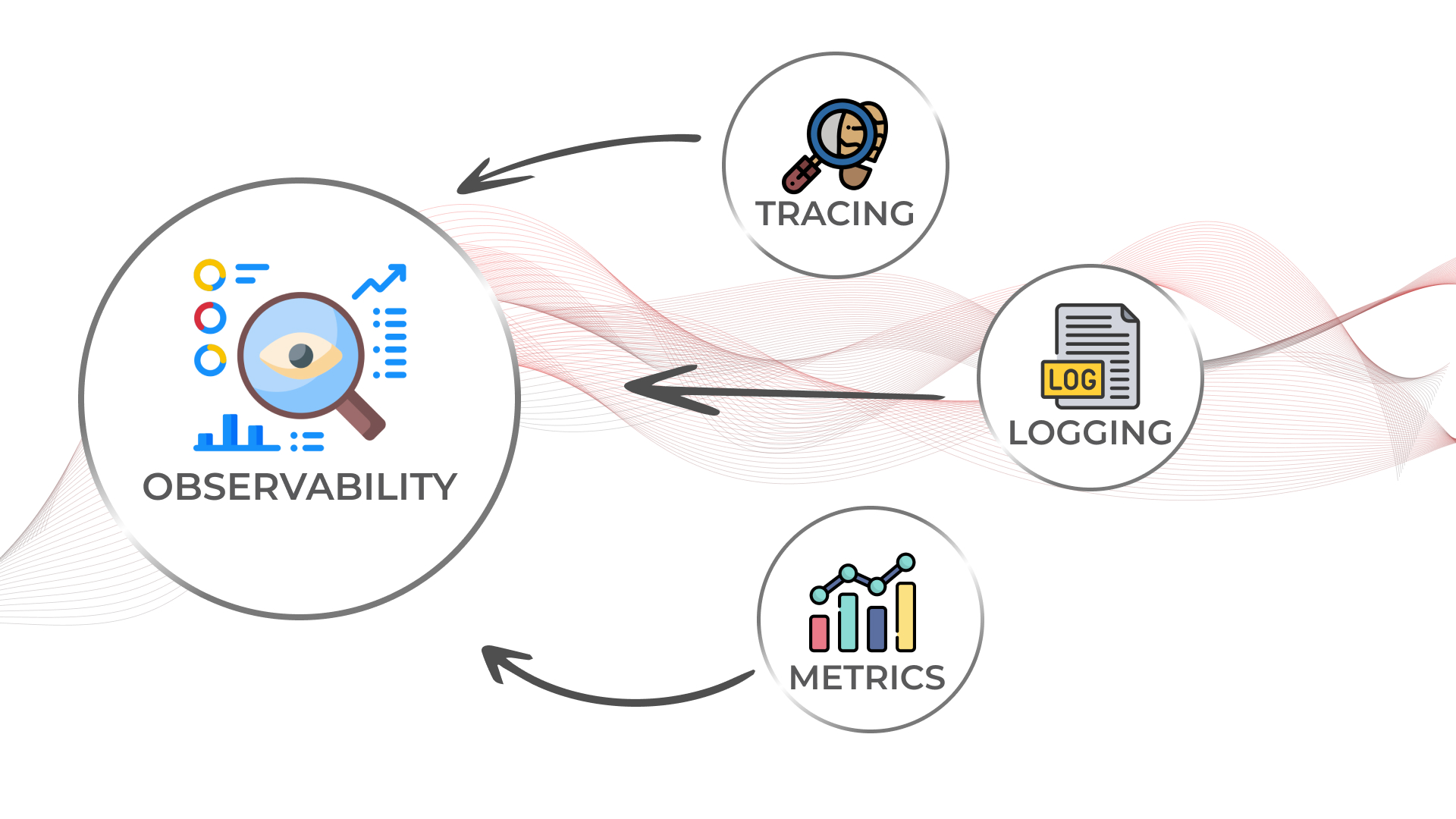
+The core of observability breaks down into _three key areas_: structured logs,
metrics, and traces. Let’s break down each pillar of API observability and
learn how with Apache APISIX Plugins we can simplify these tasks and provides a
solution that you can use to better understand API usage.
+
+
+
+## Prerequisites
+
+Before enabling our plugins we need to install Apache APISIX, create a route,
an upstream, and map the route to the upstream. You can simply follow [getting
started guide](https://apisix.apache.org/docs/apisix/getting-started) provided
on the website.
+
+## Logs
+
+**Logs** are also easy to instrument and trivial steps of API observability,
they can be used to inspect API calls in real-time for debugging, auditing, and
recording time-stamped events that happened over time. There are several logger
plugins Apache APISIX provides such as:
+
+- [http-logger](https://apisix.apache.org/docs/apisix/plugins/http-logger/)
+
+-
[skywalking-logger](https://apisix.apache.org/docs/apisix/plugins/skywalking-logger/)
+
+- [tcp-logger](https://apisix.apache.org/docs/apisix/plugins/tcp-logger)
+
+- [kafka-logger](https://apisix.apache.org/docs/apisix/plugins/kafka-logger)
+
+-
[rocketmq-logger](https://apisix.apache.org/docs/apisix/plugins/rocketmq-logger)
+
+- [udp-logger](https://apisix.apache.org/docs/apisix/plugins/udp-logger)
+
+-
[clickhouse-logger](https://apisix.apache.org/docs/apisix/plugins/clickhouse-logger)
+
+-
[error-logger](https://apisix.apache.org/docs/apisix/plugins/error-log-logger)
+
+-
[google-cloud-logging](https://apisix.apache.org/docs/apisix/plugins/google-cloud-logging)
+
+And you can see the [full
list](https://apisix.apache.org/docs/apisix/plugins/zipkin) on the official
website of Apache APISIX. Now for demo purposes, let's choose a simple but
mostly used _http-logger_ plugin that is capable of sending API Log data
requests to HTTP/HTTPS servers or sends as JSON objects to Monitoring tools. We
can assume that a route and an upstream are created. You can learn how to set
up them in the **[Getting started with Apache
APISIX](https://youtu.be/dUOjJkb61so) [...]
+
+You can generate a mock HTTP server at [mockbin.com](https://mockbin.org/) to
record and view the logs. Note that we also bind the route to an upstream (You
can refer to this documentation to learn about more [core concepts of Apache
APISIX](https://apisix.apache.org/docs/apisix/architecture-design/apisix)).
+
+The following is an example of how to enable the http-logger for a specific
route.
+
+```shell
+
+curl http://127.0.0.1:9080/apisix/admin/routes/1 -H 'X-API-KEY:
edd1c9f034335f136f87ad84b625c8f1' -X PUT -d '
+{
+ "plugins": {
+ "http-logger": {
+ "uri": "http://mockbin.org/bin/5451b7cd-af27-41b8-8df1-282ffea13a61";
+ }
+ },
+ "upstream_id": "1",
+ "uri": "/get"
+}'
+
+```
+
+> To http-logger plugin settings, your can just put your mock server URI
address like below:
+
+```json
+{
+ "uri": "http://mockbin.org/bin/5451b7cd-af27-41b8-8df1-282ffea13a61";
+}
+```
+
+Once we get a successful response from APISIX server, we can send a request to
this _get_ endpoint to generate logs.
+
+```shell
+
+curl -i http://127.0.0.1:9080/get
+
+```
+
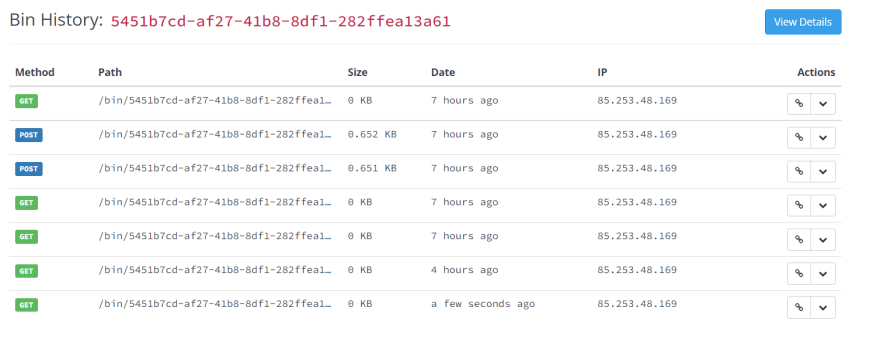
+Then if you click and navigate to the following our [mock server
link](http://mockbin.org/bin/5451b7cd-af27-41b8-8df1-282ffea13a61/log) some
recent logs are sent and we can see them:
+
+
+
+## Metrics
+
+**Metrics** are a numeric representation of data measured over intervals of
time. You can also aggregate this data into daily or weekly frequency and run
queries against a distributed system like
[Elasticsearch](https://www.elastic.co/). Or sometimes based on metrics you
trigger alerts to take any action later. Once API metrics are collected, you
can track them with metrics tracking tools such as
[Prometheus](https://prometheus.io/).
+
+Apache APISIX API Gateway also offers
[prometheus-plugin](https://apisix.apache.org/docs/apisix/plugins/prometheus/)
to fetch your API metrics and expose them in Prometheus. Behind the scene,
Apache APISIX downloads the Grafana dashboard meta, imports it to
[Grafana](https://grafana.com/), and fetches real-time metrics from the
Prometheus plugin.
+
+Let’s enable prometheus-plugin for our route:
+
+```shell
+curl http://127.0.0.1:9080/apisix/admin/routes/1 -H 'X-API-KEY:
edd1c9f034335f136f87ad84b625c8f1' -X PUT -d '
+{
+ "uri": "/get",
+ "plugins": {
+ "prometheus": {}
+ },
+ "upstream_id": "1"
+}'
+```
+
+We fetch the metric data from the specified URL `/apisix/prometheus/`metrics.
+
+```shell
+curl -i http://127.0.0.1:9091/apisix/prometheus/metrics
+```
+
+You will get a response with Prometheus metrics something like below:
+
+```text
+HTTP/1.1 200 OK
+Server: openresty
+Content-Type: text/plain; charset=utf-8
+Transfer-Encoding: chunked
+Connection: keep-alive
+
+# HELP apisix_batch_process_entries batch process remaining entries
+# TYPE apisix_batch_process_entries gauge
+apisix_batch_process_entries{name="http
logger",route_id="1",server_addr="172.19.0.8"} 0
+# HELP apisix_etcd_modify_indexes Etcd modify index for APISIX keys
+# TYPE apisix_etcd_modify_indexes gauge
+apisix_etcd_modify_indexes{key="consumers"} 17819
+apisix_etcd_modify_indexes{key="global_rules"} 17832
+apisix_etcd_modify_indexes{key="max_modify_index"} 20028
+apisix_etcd_modify_indexes{key="prev_index"} 18963
+apisix_etcd_modify_indexes{key="protos"} 0
+apisix_etcd_modify_indexes{key="routes"} 20028
+...
+```
+
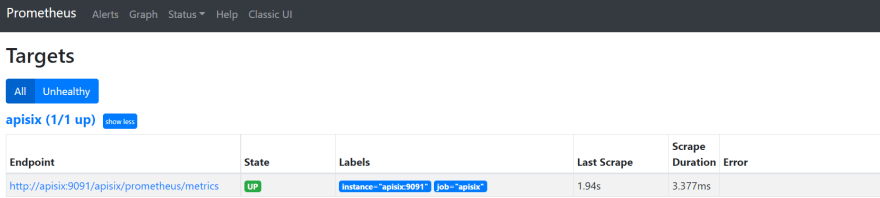
+And we can also check the status of our endpoint at the Prometheus dashboard
by pointing to this URL `http://localhost:9090/targets`
+
+
+
+As you can see, Apache APISIX exposed metrics endpoint is upon and running.
+
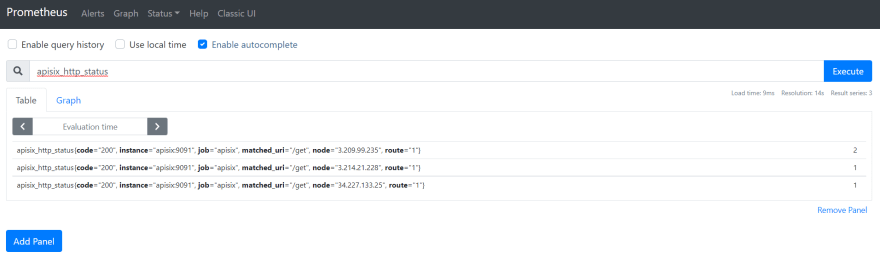
+Now you can query metrics for `apisix_http_status` to see what HTTP requests
are handled by API Gateway and what was the outcome.
+
+
+
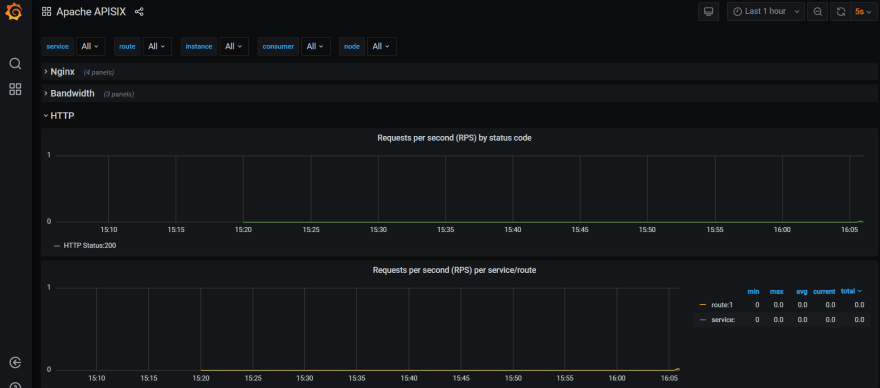
+In addition to this, you can view the Grafana dashboard running in your local
instance. Go to `http://localhost:3000/`
+
+
+
+You can also check two other plugins for metrics:
+
+- [Node status
Plugin](https://apisix.apache.org/docs/apisix/plugins/node-status/)
+
+- [Datadog Plugin](https://apisix.apache.org/docs/apisix/plugins/opentelemetry)
+
+## Tracing
+
+The third is **tracing** or distributed tracing allows you to understand the
life of a request as it traverses your service network and allows you to answer
questions like what service has this request touched and how much latency was
introduced. Traces enable you to further explore which logs to look at for a
particular session or related set of API calls.
+
+[Zipkin](https://zipkin.io/) an open-source distributed tracing system.
[APISIX plugin](https://apisix.apache.org/docs/apisix/plugins/zipkin) is
supported to collect tracing and report to Zipkin Collector based on [Zipkin
API specification](https://zipkin.io/pages/instrumenting.html).
+
+Here’s an example to enable the _zipkin plugin_ on the specified route:
+
+```shell
+curl http://127.0.0.1:9080/apisix/admin/routes/1 -H 'X-API-KEY:
edd1c9f034335f136f87ad84b625c8f1' -X PUT -d '
+{
+ "methods": [
+ "GET"
+ ],
+ "uri": "/get",
+ "plugins": {
+ "zipkin": {
+ "endpoint": "http://127.0.0.1:9411/api/v2/spans";,
+ "sample_ratio": 1
+ }
+ },
+ "upstream_id": "1"
+}'
+```
+
+We can test our example by simply running the following curl command:
+
+```shell
+curl -i http://127.0.0.1:9080/get
+```
+
+As you can see, there are some additional trace identifiers (like traceId,
spanId, parentId) were appended to the headers:
+
+```text
+"X-B3-Parentspanid": "61bd3f4046a800e7",
+"X-B3-Sampled": "1",
+"X-B3-Spanid": "855cd5465957f414",
+"X-B3-Traceid": "e18985df47dab632d62083fd96626692",
+```
+
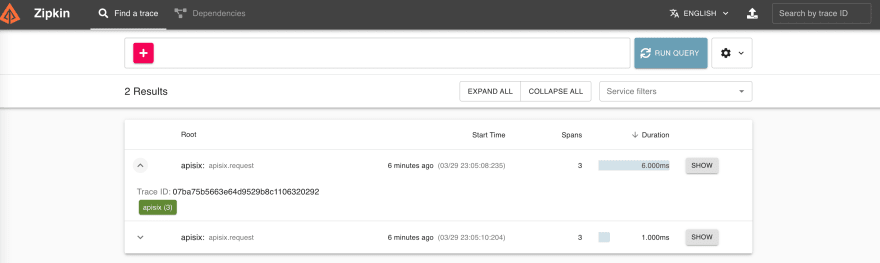
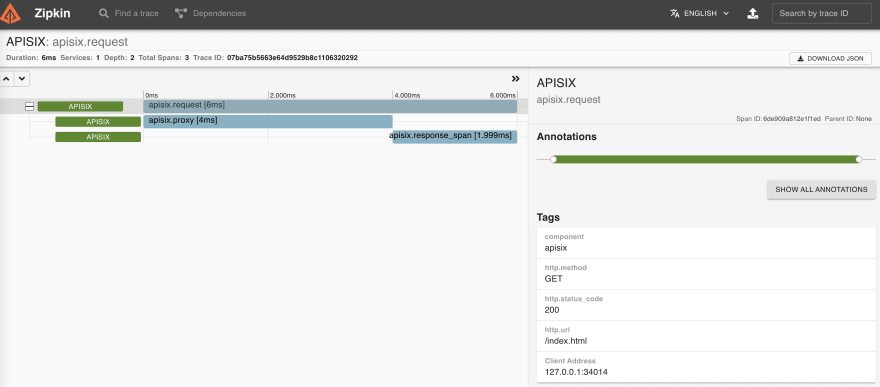
+Then you can use a browser to access `http://127.0.0.1:9411/zipkin`, see
traces on the Web UI of Zipkin.
+
+> Note that you need to run the Zipkin instance in order to install Zipkin Web
UI. For example, by using docker you can simply run it:
+>`docker run -d -p 9411:9411 openzipkin/zipkin`
+
+
+
+
+
+As you noticed, the recent traces were exposed in the above pictures.
+
+You can also check two other plugins for tracing:
+
+- [Skywalking-plugin](https://apisix.apache.org/docs/apisix/plugins/skywalking)
+
+-
[Opentelemetry-plugin](https://apisix.apache.org/docs/apisix/plugins/opentelemetry)
+
+## Summary
+
+As we learned, API Observability is a sort of framework for managing your
applications in an API world and Apache APISIX API Gateway plugins can help
when observing modern API-driven applications by integrating to several
observability platforms. So, you can make your development work focused on core
business features instead of building a custom integration for observability
tools.








