This is an automated email from the ASF dual-hosted git repository.

yilinzeng pushed a commit to branch master
in repository https://gitbox.apache.org/repos/asf/apisix-website.git
The following commit(s) were added to refs/heads/master by this push:
new 71b6e36015e docs: Add new blog post APISIX deployment on Scaleway
cloud (#1365)
71b6e36015e is described below
commit 71b6e36015e006dae21657a373af451758333173
Author: Livermore <[email protected]>
AuthorDate: Thu Oct 20 03:35:54 2022 +0300
docs: Add new blog post APISIX deployment on Scaleway cloud (#1365)
---
.../2022/10/19/deploy-apisix-on-scaleway-cloud.md | 293 +++++++++++++++++++++
1 file changed, 293 insertions(+)
diff --git a/blog/en/blog/2022/10/19/deploy-apisix-on-scaleway-cloud.md
b/blog/en/blog/2022/10/19/deploy-apisix-on-scaleway-cloud.md
new file mode 100644
index 00000000000..59e031e5249
--- /dev/null
+++ b/blog/en/blog/2022/10/19/deploy-apisix-on-scaleway-cloud.md
@@ -0,0 +1,293 @@
+---
+title: "Deploy and Run Apache APISIX on Scaleway Cloud"
+authors:
+ - name: Bobur Umurzokov
+ title: Author
+ url: https://github.com/Boburmirzo
+ image_url: https://avatars.githubusercontent.com/u/14247607
+keywords:
+- API Gateway
+- Apache APISIX
+- API
+- Scaleway
+- Cloud
+- Deployment
+description: In this post, you will learn how easily deploy and run both
Apache APISIX API Gateway and Ingress Controller on Scaleway Cloud Managed
Kubernetes to efficiently manage, protect and observe your APIs in the cloud.
+tags: [Case Studies]
+---
+
+> In this post, you will learn how easily deploy and run both [Apache APISIX
API Gateway](https://apisix.apache.org/docs/apisix/getting-started/) and
[Ingress
Controller](https://apisix.apache.org/docs/ingress-controller/getting-started/)
on [Scaleway Cloud Managed Kubernetes](https://www.scaleway.com/en/docs/) to
efficiently manage, protect and observe your APIs in the cloud.
+
+<!--truncate-->
+
+
+
+Today, more and more developers are looking at how they can bring their
existing applications to the cloud—or at how to build new cloud-native
applications. Many organizations have significant investments in the migration
of mission-critical applications running on-premises to fully supported
environments to run these apps in the cloud. This post explains how to deploy
and run both [Apache APISIX API
Gateway](https://apisix.apache.org/docs/apisix/getting-started/) and [Ingress
Controller [...]
+
+Firstly, let’s understand what is Apache APISIX and Scaleway, how you can
leverage both solutions to serve your needs. Or you can just skip the intro
sections and start with the tutorial.
+
+## What’s Apache APISIX?
+
+[Apache APISIX](https://apisix.apache.org/) is an open-source **API Gateway**
under [Apache Software Foundation](https://www.apache.org/) that is
lightweight, independently deployable, and scalable that can run anywhere that
allows developers to manage API endpoints. You can also leverage APISIX as
[Kubernetes Ingress Controller](url) to deliver high performance and get the
benefits of stateful load balancing, traffic split, hot reloading, and
expansion capabilities by means of its offe [...]
+
+
+
+It is also possible to install Apache APISIX by [different
methods](https://apisix.apache.org/docs/apisix/installation-guide/)
([Docker](https://www.docker.com/), [Helm](https://helm.sh/), or
[RPM](https://rpm.org/)) and run it in the various public cloud providers
because of its
[cloud-native](https://learn.microsoft.com/en-us/dotnet/architecture/cloud-native/definition)
behavior.
+
+## What is Scaleway?
+
+[Scaleway](https://www.scaleway.com/en/) is a cloud provider with a variety of
services. The public cloud Scaleway elements offer all the important components
of a general cloud provider such as
[serverless](https://www.scaleway.com/en/serverless-functions/),
[containers](https://www.scaleway.com/en/kubernetes-kapsule/), [storage &
database](https://www.scaleway.com/en/database/), [virtual
machines](https://www.scaleway.com/en/virtual-instances/),
[networking](https://www.scaleway.com/en [...]
+
+
+
+Scaleway is the most complete cloud ecosystem trusted by 25000+ businesses in
the EU market. It is also playing an active role in improving the open-source
ecosystem which already includes many well-known open-source projects such as
[NodeJS](https://nodejs.org/en/), [CentOS](https://www.centos.org/),
[OpenSuse](https://www.opensuse.org/), and others. You might also want to learn
about [the Scaleway Open Source Program
here](https://www.scaleway.com/en/about-us/open-source-program/).
+
+## Apache APISIX as an API Management solution in the Scaleway Cloud
+
+Apache APISIX is also a part of this cloud computing partnership program as it
is a community project. The main purpose of being a part of the program is to
give customers of Scaleway prospect to accelerate their business with an
API-first approach by ready-to-use open-source API management solution for
building, managing, securing, and observing all internal and external APIs.
+
+We found out that currently, Scaleway does not provide any API management and
analysis software in their cloud. As a result, we decided to become partners to
connect with thousands of developers from all over the world to get answers and
share knowledge, invest in our communities, and give them full control of
services with the cloud tools to do what they love. For example, similar to
well-known cloud vendors offering API Management solutions like [AWS API
Gateway](https://aws.amazon.com [...]
+
+With a small background knowledge of Apache APISIX and Scaleway Cloud, we can
jump in to get started guide to bring APISIX and run it with Scaleway’s
Kubernetes
[Kapsule](https://www.scaleway.com/en/docs/compute/kubernetes/concepts/#kubernetes-kapsule)
or
[Kosmos](https://www.scaleway.com/en/docs/compute/kubernetes/concepts/#kubernetes-kosmos).
+
+> **Note:** _Kubernetes Kapsule and Kosmos_ are two different cluster types
that provide a managed environment to create, configure and run a cluster of
preconfigured machines for containerized applications. This allows you to
create Kubernetes clusters without the complexity of managing the
infrastructure.
+
+## Prerequisites
+
+- For local host environment, you might need to install
[Kubectl](https://kubernetes.io/docs/tasks/tools/) and
[Helm](https://helm.sh/docs/intro/install/#from-the-helm-project). It is
required to connect to the Kubernetes's cluster.
+- You have an account and are logged into the [Scaleway
console](https://console.scaleway.com/).
+- You need create a Kubernetes cluster using the Scaleway Cloud by simply
following the [Scaleway’s Kubernetes
Quickstart](https://www.scaleway.com/en/docs/compute/kubernetes/quickstart/)
guide. You can use the [comprehensive
documentation](https://www.scaleway.com/en/docs/) to help you go with console.
+
+## Deploy Apache APISIX and Ingress Controller
+
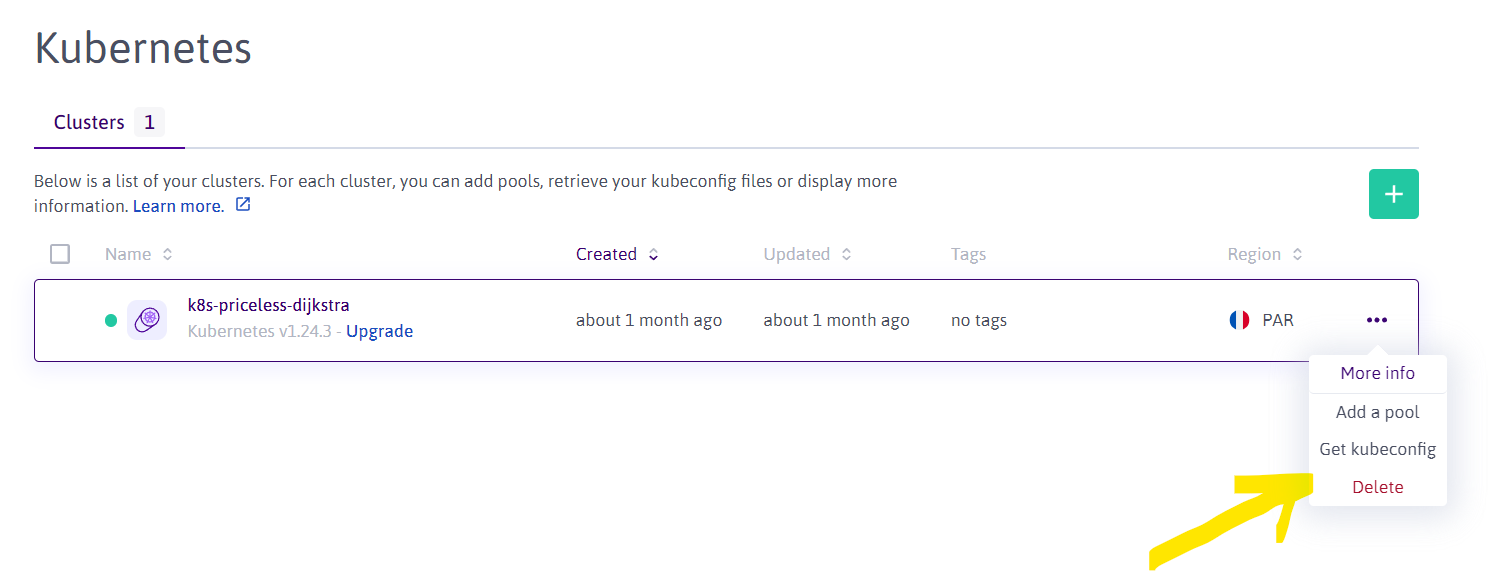
+At this point, I can assume that you created a Kubernetes cluster type of
**Kapsule**. Then, you need to open the **Scaleway console**, navigate to the
**Kubernetes cluster** you created and download the cluster configuration file
`kubeconfig` from the **Kubernetes cluster** and copy it to the local
computer's `~/.kube/config` (the default path of kubectl).
+
+> Note: If you have configured the KUBECONFIG environment variable before,
`kubectl` will load the KUBECONFIG environment variable first instead of
~/.kube/config. Please note when using.
+
+
+
+### Connect to a cluster with kubectl
+
+Once your cluster is created and the `.kubeconfig` file is downloaded, you
can use this with `kubectl`, the Kubernetes command line tool, allowing you to
run commands against your Kubernetes clusters. You can use kubectl from a
terminal on your local computer to deploy applications, inspect and manage
cluster resources, and view logs. See how to [connect to a cluster with
kubectl](https://www.scaleway.com/en/docs/compute/kubernetes/how-to/connect-cluster-kubectl/)
for more info.
+
+Below you can find two kinds of deployment command examples, one for deploying
APISIX and another for Ingress Controller.
+
+### Deploy and run APISIX
+
+To install APISIX via Helm, run:
+
+``` shell
+$ helm repo add apisix https://charts.apiseven.com
+$ helm repo add bitnami https://charts.bitnami.com/bitnami
+$ helm repo update
+$ helm install apisix apisix/apisix --create-namespace --namespace apisix
--set gateway.type=LoadBalancer
+```
+
+As an output, you will get the following with the notes:
+
+``` shell
+NAME: apisix
+LAST DEPLOYED: Thu Sep 15 01:14:12 2022
+NAMESPACE: apisix
+STATUS: deployed
+REVISION: 1
+TEST SUITE: None
+NOTES:
+1. Get the application URL by running these commands:
+ NOTE: It may take a few minutes for the LoadBalancer IP to be available.
+ You can watch the status of by running 'kubectl get --namespace
apisix svc -w apisix-gateway'
+ export SERVICE_IP=$(kubectl get svc --namespace apisix apisix-gateway
--template "{{ range (index .status.loadBalancer.ingress 0) }}{{.}}{{ end }}")
+ echo http://$SERVICE_IP:80
+```
+
+As it is mentioned in the notes, you should run the blow commands to get
application IP/URL address:
+
+``` shell
+$ export SERVICE_IP=$(kubectl get svc --namespace apisix apisix-gateway
--template "{{ range (index .status.loadBalancer.ingress 0) }}{{.}}{{ end }}")
+$ echo http://$SERVICE_IP:80
+
+http://51.159.10.6:80
+```
+
+You can check anytime the deployment status of APISIX:
+
+``` shell
+$ kubectl get pods -n apisix # All resources are ready
+
+NAME READY STATUS RESTARTS AGE
+apisix-656ff547f4-vvcdg 1/1 Running 0 3m9s
+apisix-etcd-0 1/1 Running 0 3m9s
+apisix-etcd-1 1/1 Running 0 3m9s
+apisix-etcd-2 1/1 Running 0 3m9s
+
+$ kubectl get service -n apisix
+
+NAME TYPE CLUSTER-IP EXTERNAL-IP PORT(S)
AGE
+apisix-admin ClusterIP 10.33.189.212 <none> 9180/TCP
3m29s
+apisix-etcd ClusterIP 10.43.213.105 <none>
2379/TCP,2380/TCP 3m29s
+apisix-etcd-headless ClusterIP None <none>
2379/TCP,2380/TCP 3m29s
+apisix-gateway LoadBalancer 10.35.46.143 51.159.10.6
80:30345/TCP 3m29s
+
+```
+
+After we make sure that APISIX is upon and running, we can verify it by
creating a sample
[Upstream](https://apisix.apache.org/docs/apisix/terminology/upstream/) (which
targets an external mock service such as `httpbin.org`) and a
[Route](https://apisix.apache.org/docs/apisix/terminology/route/).
+
+First, let's apply some changes to our Kubernetes manifest file to have APISIX
pod access to the external service (`httpbin.org`). To do so, you can run the
following command:
+
+``` shell
+$ kubectl apply -f - <<EOF
+kind: Service
+apiVersion: v1
+metadata:
+ name: httpbin-external
+spec:
+ type: ExternalName
+ externalName: httpbin.org
+EOF
+```
+
+Next, we can create our first test route with an upstream (backend service
that is pointing to `httpbin.org`).
+
+> You need to replace `APISIX_POD` with the name of APISIX's pod.
+
+``` shell
+kubectl exec -it ${APISIX_POD} -n apisix -- curl
"http://127.0.0.1:9180/apisix/admin/routes/1"; -H "X-API-KEY:
edd1c9f034335f136f87ad84b625c8f1" -X PUT -d '
+{
+ "host": "httpbin.org",
+ "uri": "/*",
+ "upstream": {
+ "type": "roundrobin",
+ "nodes": {
+ "httpbin-external.default.svc.cluster.local:80": 1
+ }
+ }
+}'
+```
+
+Then, we can verify access and if the newly created route is functioning
correctly by running another final command:
+
+``` shell
+$ curl http://51.159.10.6:80/get -H 'Host: httpbin.org'
+{
+ "headers": {
+ "Accept": "*/*",
+ "Host": "httpbin.org",
+ "User-Agent": "curl/7.68.0",
+ "X-Amzn-Trace-Id": "Root=1-63228c4e-0388e1b61255180620195210",
+ "X-Forwarded-Host": "httpbin.org"
+ }
+}
+```
+
+Here we go, APISIX Admin API is responding to our requests in the Scaleway
Cloud and the request is forwarded to the external service.
+
+### Deploy and run APISIX Ingress Controller
+
+Next, we will try to install and verify [Apache APISIX Ingress
Controller](https://apisix.apache.org/docs/ingress-controller/getting-started/)
is running in the Scaleway Cloud and we do very similar steps as we did for
APISIX.
+
+To install APISIX Ingress with helm:
+
+``` shell
+$ helm repo add apisix https://charts.apiseven.com
+$ helm repo add bitnami https://charts.bitnami.com/bitnami
+$ helm repo update
+
+$ kubectl create ns ingress-apisix
+$ helm install apisix apisix/apisix \
+ --set gateway.type=LoadBalancer \
+ --set ingress-controller.enabled=true \
+ --namespace ingress-apisix \
+ --set ingress-controller.config.apisix.serviceNamespace=ingress-apisix
+
+```
+
+Then, check the deployment status:
+
+``` shell
+$ kubectl get pods -n ingress-apisix
+
+NAME READY STATUS RESTARTS AGE
+apisix-5bcf68b548-qrsqb 1/1 Running 0 1m
+apisix-etcd-0 1/1 Running 0 1m
+apisix-etcd-1 1/1 Running 0 1m
+apisix-etcd-2 1/1 Running 0 1m
+apisix-ingress-controller-75bd4d9b9b-7xfn5 1/1 Running 0 1m
+
+$ kubectl get svc -n ingress-apisix
+
+apisix-admin ClusterIP 10.36.120.143 <none>
9180/TCP 82m
+apisix-etcd ClusterIP 10.47.39.201 <none>
2379/TCP,2380/TCP 82m
+apisix-etcd-headless ClusterIP None <none>
2379/TCP,2380/TCP 82m
+apisix-gateway LoadBalancer 10.45.241.11 51.159.206.46
80:30197/TCP 82m
+apisix-ingress-controller ClusterIP 10.47.236.40 <none>
80/TCP 82m
+```
+
+Afterward, we can deploy mock server `htttbin` to the default namespace in
order to test the ingress controller:
+
+``` shell
+kubectl run httpbin --image kennethreitz/httpbin --port 80
+kubectl expose pod httpbin --port 80
+```
+
+Now we are ready to test ingress by creating a new route the same as below:
+
+``` shell
+kubectl apply -f - <<EOF
+apiVersion: apisix.apache.org/v2
+kind: ApisixRoute
+metadata:
+ name: httpbin-route
+spec:
+ http:
+ - name: rule1
+ match:
+ hosts:
+ - httpbin.org
+ paths:
+ - "/*"
+ backends:
+ - serviceName: httpbin
+ servicePort: 80
+EOF
+```
+
+Finally, we can verify the route is working correctly by running the following
command:
+
+``` shell
+$ curl http://51.159.206.46:80/get -H 'Host: httpbin.org'
+{
+ "headers": {
+ "Accept": "*/*",
+ "Host": "httpbin.org",
+ "User-Agent": "curl/7.68.0",
+ "X-Forwarded-Host": "httpbin.org"
+ }
+}
+```
+
+## What’s next
+
+Up to now, we learnt how to deploy its Apache APISIX and Ingress Controller to
Scaleway Cloud by using Kubernetes Kapsule. From this stage, you can create a
route, upstream and manage the traffic to your backend services with the
available built-in plugins if you want to take advantage of more APISIX's
features.
+
+### Recommended content
+
+➔ Watch Video Tutorial:
+
+- [Getting Started with Apache APISIX](https://youtu.be/dUOjJkb61so).
+
+- [APIs security with Apache APISIX](https://youtu.be/hMFjhwLMtQ8).
+
+- [Implementing resilient applications with API Gateway (Circuit
breaker)](https://youtu.be/aWzo0ysH__c).
+
+➔ Read the blog posts:
+
+- [Implementing resilient applications with API Gateway (Health
Check)](https://dev.to/apisix/implementing-resilient-applications-with-api-gateway-health-check-338c).
+
+- [Overview of Apache APISIX API Gateway
Plugins](https://dev.to/apisix/overview-of-apache-apisix-api-gateway-plugins-2m8o).
+
+### Community⤵️
+
+- 🙋 [Join the Apache APISIX
Community](https://apisix.apache.org/docs/general/join/)
+- 🐦 [Follow us on Twitter](https://twitter.com/ApacheAPISIX)
+- 📝 [Find us on
Slack](https://join.slack.com/t/the-asf/shared_invite/zt-vlfbf7ch-HkbNHiU_uDlcH_RvaHv9gQ)
+- 📧 [Mail to us]([email protected]) with your questions.




