This is an automated email from the ASF dual-hosted git repository.

young pushed a commit to branch master
in repository https://gitbox.apache.org/repos/asf/apisix-website.git
The following commit(s) were added to refs/heads/master by this push:
new d315b4cdb05 docs: Add Web resource caching: Server-Side post (#1425)
d315b4cdb05 is described below
commit d315b4cdb052c78af15887c35635dd840919ad7a
Author: Nicolas Frankel <[email protected]>
AuthorDate: Tue Dec 13 06:21:13 2022 +0200
docs: Add Web resource caching: Server-Side post (#1425)
---
blog/en/blog/2022/12/14/web-caching-server.md | 153 ++++++++++++++++++++++++++
1 file changed, 153 insertions(+)
diff --git a/blog/en/blog/2022/12/14/web-caching-server.md
b/blog/en/blog/2022/12/14/web-caching-server.md
new file mode 100644
index 00000000000..ea246a4523f
--- /dev/null
+++ b/blog/en/blog/2022/12/14/web-caching-server.md
@@ -0,0 +1,153 @@
+---
+title: "Web resource caching: Server-Side"
+authors:
+ - name: Nicolas Fränkel
+ title: Author
+ url: https://github.com/nfrankel
+ image_url: https://avatars.githubusercontent.com/u/752258
+keywords:
+ - Web
+ - HTTP
+ - Cache
+ - Performance
+description: "The subject of Web resource caching is as old as the World Wide
Web itself. However, I'd like to offer an as-exhaustive-as-possible catalog of
how one can improve performance by caching. Web resource caching can happen in
two different places: client-side - on the browser and server side. In the
previous post, I explained the former; this post focuses on the latter."
+tags: [Case Studies]
+image:
https://blog.frankel.ch/assets/resources/web-caching/pexels-tom-fisk-3063470.jpg
+---
+
+>The subject of Web resource caching is as old as the World Wide Web itself.
However, I'd like to offer an as-exhaustive-as-possible catalog of how one can
improve performance by caching. Web resource caching can happen in two
different places: client-side - on the browser and server side. In the
[previous post](https://blog.frankel.ch/web-caching/client/), I explained the
former; this post focuses on the latter.
+
+<!--truncate-->
+
+<head>
+ <link rel="canonical" href="https://blog.frankel.ch/web-caching/server/"; />
+</head>
+
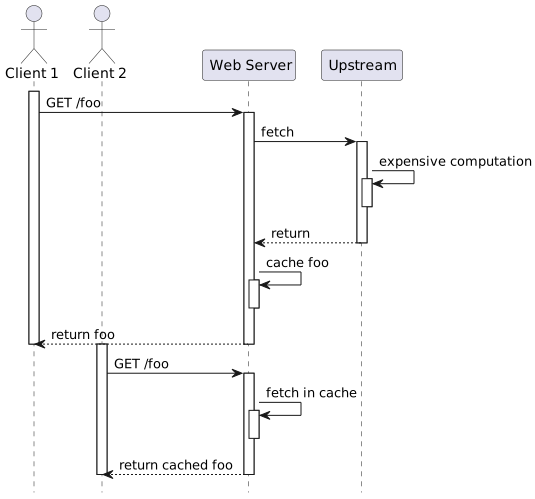
+While client-side caching works well, it has one central issue: to serve the
resource locally, it must first have it in the cache. Thus, each client needs
its cached resource. If the requested resource is intensive to compute, it
doesn't scale. The idea behind server-side caching is to compute the resource
once and serve it from the cache to all clients.
+
+
+
+A couple of dedicated server-side resource caching solutions have emerged over
the years: [Memcached](https://memcached.org/),
[Varnish](https://varnish-cache.org/), [Squid](http://www.squid-cache.org/),
etc. Other solutions are less focused on web resource caching and more generic,
_e.g._, [Redis](https://redis.io/) or [Hazelcast](https://hazelcast.com/).
+
+If you want to dive deeper into generic caching solutions, please check these
[two](https://blog.frankel.ch/choose-cache/1/)
[posts](https://blog.frankel.ch/choose-cache/2/) on the subject.
+
+To continue with the sample from last week, I'll use Apache APISIX to demo
server-side caching. APISIX relies on the
[proxy-cache](https://apisix.apache.org/docs/apisix/plugins/proxy-cache/)
plugin for caching. Unfortunately, at the moment, APISIX doesn't integrate with
any third-party caching solution. It offers two options: memory-based and
disk-based.
+
+In general, the former is faster, but memory is expensive, while the latter is
slower, but disk storage is cheap. Within OpenResty, however, the disk option
may be faster because of how LuaJIT handles memory. You should probably start
with the disk, and if it's not fast enough, mount
[/dev/shm](https://datacadamia.com/os/linux/shared_memory).
+
+Here are my new routes:
+
+```yaml
+routes:
+ - uri: /cache
+ upstream_id: 1
+ plugins:
+ proxy-rewrite:
+ regex_uri: ["/cache(.*)", "/$1"]
+ proxy-cache: ~
+```
+
+Note that the default cache key is the host and the request URI, which
includes query parameters.
+
+The default `proxy-cache` configuration uses the default disk-based
[configuration](https://github.com/apache/apisix/blob/master/conf/config-default.yaml#L53-L69):
+
+```yaml
+ proxy_cache: # Proxy Caching configuration
+ cache_ttl: 10s # The default caching time in disk if the
upstream does not specify the cache time
+ zones: # The parameters of a cache
+ - name: disk_cache_one # The name of the cache, administrator can
specify
+ # which cache to use by name in the admin
api (disk|memory)
+ memory_size: 50m # The size of shared memory, it's used to
store the cache index for
+ # disk strategy, store cache content for
memory strategy (disk|memory)
+ disk_size: 1G # The size of disk, it's used to store the
cache data (disk)
+ disk_path: /tmp/disk_cache_one # The path to store the cache data
(disk)
+ cache_levels: 1:2 # The hierarchy levels of a cache (disk)
+ - name: memory_cache
+ memory_size: 50m
+```
+
+We can test the setup with `curl`:
+
+```bash
+curl -v localhost:9080/cache
+```
+
+The response is interesting:
+
+```
+< HTTP/1.1 200 OK
+< Content-Type: text/html; charset=utf-8
+< Content-Length: 147
+< Connection: keep-alive
+< Date: Tue, 29 Nov 2022 13:17:00 GMT
+< Last-Modified: Wed, 23 Nov 2022 13:58:55 GMT
+< ETag: "637e271f-93"
+< Server: APISIX/3.0.0
+< Apisix-Cache-Status: MISS #1
+< Accept-Ranges: bytes
+```
+
+1. Because the cache is empty, APISIX has a cache miss. Hence, the response is
from the upstream
+
+If we `curl` again before the default cache expiration period (300 seconds),
the response is from the cache:
+
+```
+< HTTP/1.1 200 OK
+...
+< Apisix-Cache-Status: HIT
+```
+
+After the expiration period, the response is from the upstream, but the header
is explicit:
+
+```
+< HTTP/1.1 200 OK
+...
+< Apisix-Cache-Status: EXPIRED
+```
+
+Note that we can explicitly purge the entire cache by using the custom `PURGE`
HTTP method:
+
+```bash
+curl localhost:9080/cache -X PURGE
+```
+
+After purging the cache, the above cycle starts anew.
+
+Note that it's also possible to bypass the cache, _e.g._, for testing
purposes. We can configure the plugin accordingly:
+
+```yaml
+routes:
+ - uri: /cache*
+ upstream_id: 1
+ proxy-cache:
+ cache_bypass: ["$arg_bypass"] #1
+```
+
+1. Bypass the cache if you send a `bypass` query parameter with a non-`0` value
+
+```bash
+curl -v localhost:9080/cache?bypass=please
+```
+
+It serves the resource from the upstream regardless of the cache status:
+
+```
+< HTTP/1.1 200 OK
+...
+< Apisix-Cache-Status: BYPASS
+```
+
+For more details on all available configuration parameters, check the
[proxy-cache](https://apisix.apache.org/docs/apisix/plugins/proxy-cache/)
plugin.
+
+## Conclusion
+
+This post was relatively straightforward. The most challenging issue with
server-side caching is the configuration: what to cache, for how long, etc.
Unfortunately, it depends significantly on your context, problems, and
available resources. You probably need to apply <abbr title="Plan Do Check
Act">PDCA</abbr>: guesstimate a relevant configuration, apply it, measure the
performance, and rinse and repeat until you find your sweet spot.
+
+I hope that with an understanding of both client-side and server-side caching,
you'll be able to improve the performance of your applications.
+
+The source code is available on
[GitHub](https://github.com/ajavageek/web-caching).
+
+**To go further:**
+
+* [Cache API
responses](https://apisix.apache.org/docs/apisix/tutorials/cache-api-responses/)
+* [proxy-cache
plugin](https://apisix.apache.org/docs/apisix/plugins/proxy-cache/)