This is an automated email from the ASF dual-hosted git repository.

juzhiyuan pushed a commit to branch master
in repository https://gitbox.apache.org/repos/asf/apisix.git
The following commit(s) were added to refs/heads/master by this push:
new 4aa3ad8f2 docs: Add new tutorial for managing multiple API version
(#8522)
4aa3ad8f2 is described below
commit 4aa3ad8f24c70344cb870ce5a8abcf3b8e4abf90
Author: Livermore <[email protected]>
AuthorDate: Wed Dec 28 05:12:03 2022 +0200
docs: Add new tutorial for managing multiple API version (#8522)
Co-authored-by: boburumurzokov <[email protected]>
---
docs/en/latest/config.json | 1 +
.../latest/tutorials/add-multiple-api-versions.md | 243 +++++++++++++++++++++
2 files changed, 244 insertions(+)
diff --git a/docs/en/latest/config.json b/docs/en/latest/config.json
index 8e3dbb3d4..7f23824f9 100644
--- a/docs/en/latest/config.json
+++ b/docs/en/latest/config.json
@@ -22,6 +22,7 @@
"tutorials/observe-your-api",
"tutorials/manage-api-consumers",
"tutorials/cache-api-responses",
+ "tutorials/add-multiple-api-versions",
"tutorials/health-check",
"tutorials/client-to-apisix-mtls"
]
diff --git a/docs/en/latest/tutorials/add-multiple-api-versions.md
b/docs/en/latest/tutorials/add-multiple-api-versions.md
new file mode 100644
index 000000000..398954d18
--- /dev/null
+++ b/docs/en/latest/tutorials/add-multiple-api-versions.md
@@ -0,0 +1,243 @@
+---
+title: Add multiple API versions
+keywords:
+ - API Versioning
+ - Multiple APIs
+ - Proxy rewrite
+ - Request redirect
+ - Route API requests
+description: In this tutorial, you will learn how to publish and manage
multiple versions of your API with Apache APISIX.
+---
+
+<!--
+#
+# Licensed to the Apache Software Foundation (ASF) under one or more
+# contributor license agreements. See the NOTICE file distributed with
+# this work for additional information regarding copyright ownership.
+# The ASF licenses this file to You under the Apache License, Version 2.0
+# (the "License"); you may not use this file except in compliance with
+# the License. You may obtain a copy of the License at
+#
+# http://www.apache.org/licenses/LICENSE-2.0
+#
+# Unless required by applicable law or agreed to in writing, software
+# distributed under the License is distributed on an "AS IS" BASIS,
+# WITHOUT WARRANTIES OR CONDITIONS OF ANY KIND, either express or implied.
+# See the License for the specific language governing permissions and
+# limitations under the License.
+#
+-->
+
+## What is API versioning?
+
+**API versioning** is the practice of managing changes to an API and ensuring
that these changes are made without disrupting clients. A good API versioning
strategy clearly communicates the changes made and allows API consumers to
decide when to upgrade to the latest version at their own pace.
+
+## Types of API versioning
+
+#### URI Path
+
+The most common way to version an API is in the URI path and is often done
with the prefix "v". This method employs URI routing to direct requests to a
specific version of the API.
+
+```shell
+http://apisix.org/v1/hello
+http://apisix.org/v2/hello
+```
+
+#### Query parameters
+
+In this method, the version number is included in the URI, but as a query
parameter instead of in the path.
+
+```shell
+http://apisix.org/hello?version=1
+http://apisix.org/hello?version=2
+```
+
+#### Custom request Header
+
+You can also set the version number using custom headers in requests and
responses. This leaves the URI of your resources unchanged.
+
+```shell
+http://apisix.org/hello -H 'Version: 1'
+http://apisix.org/hello -H 'Version: 2'
+```
+
+The primary goal of versioning is to provide users of an API with the most
functionality possible while causing minimal inconvenience. Keeping this goal
in mind, let’s have a look in this tutorial at how to _publish and manage
multiple versions of your API_ with Apache APISIX.
+
+**In this tutorial**, you learn how to:
+
+- Create a route and upstream for our sample API.
+- Add a new version to the existing API.
+- Use
[proxy-rewrite](https://apisix.apache.org/docs/apisix/plugins/proxy-rewrite/)
plugin to rewrite the path in a plugin configuration.
+- Route API requests from the old version to the new one.
+
+## Prerequisites
+
+For the demo case, we will leverage the sample repository [Evolve
APIs](https://github.com/nfrankel/evolve-apis) on GitHub built on the Spring
boot that demonstrates our API. You can see the complete source code there.
+
+To execute and customize the example project per your need shown in this
tutorial, here are the minimum requirements you need to install in your system:
+
+- [Docker](https://docs.docker.com/desktop/windows/install/) - you need
[Docker](https://www.docker.com/products/docker-desktop/) installed locally to
complete this tutorial. It is available for
[Windows](https://desktop.docker.com/win/edge/Docker%20Desktop%20Installer.exe)
or [macOS](https://desktop.docker.com/mac/edge/Docker.dmg).
+
+Also, complete the following steps to run the sample project with Docker.
+
+Use [git](https://git-scm.com/downloads) to clone the repository:
+
+``` shell
+git clone 'https://github.com/nfrankel/evolve-apis'
+```
+
+Go to root directory of _evolve-apis_
+
+``` shell
+cd evolve-apis
+```
+
+Now we can start our application by running `docker compose up` command from
the root folder of the project:
+
+``` shell
+docker compose up -d
+```
+
+### Create a route and upstream for the API.
+
+You first need to
[Route](https://apisix.apache.org/docs/apisix/terminology/route/) your HTTP
requests from the gateway to an
[Upstream](https://apisix.apache.org/docs/apisix/terminology/upstream/) (your
API). With APISIX, you can create a route by sending an HTTP request to the
gateway.
+
+```shell
+curl http://apisix:9080/apisix/admin/routes/1 -H 'X-API-KEY: xyz' -X PUT -d '
+{
+ "name": "Direct Route to Old API",
+ "methods": ["GET"],
+ "uris": ["/hello", "/hello/", "/hello/*"],
+ "upstream": {
+ "type": "roundrobin",
+ "nodes": {
+ "oldapi:8081": 1
+ }
+ }
+}'
+```
+
+At this stage, we do not have yet any version and you can query the gateway as
below:
+
+```shell
+curl http://apisix.org/hello
+```
+
+```shell title="output"
+Hello world
+```
+
+```shell
+curl http://apisix.org/hello/Joe
+```
+
+```shell title="output"
+Hello Joe
+```
+
+In the previous step, we created a route that wrapped an upstream inside its
configuration. Also, APISIX allows us to create an upstream with a dedicated ID
to reuse it across several routes.
+
+Let's create the shared upstream by running below curl cmd:
+
+```shell
+curl http://apisix:9080/apisix/admin/upstreams/1 -H 'X-API-KEY: xyz' -X PUT -d
'
+{
+ "name": "Old API",
+ "type": "roundrobin",
+ "nodes": {
+ "oldapi:8081": 1
+ }
+}'
+```
+
+### Add a new version
+
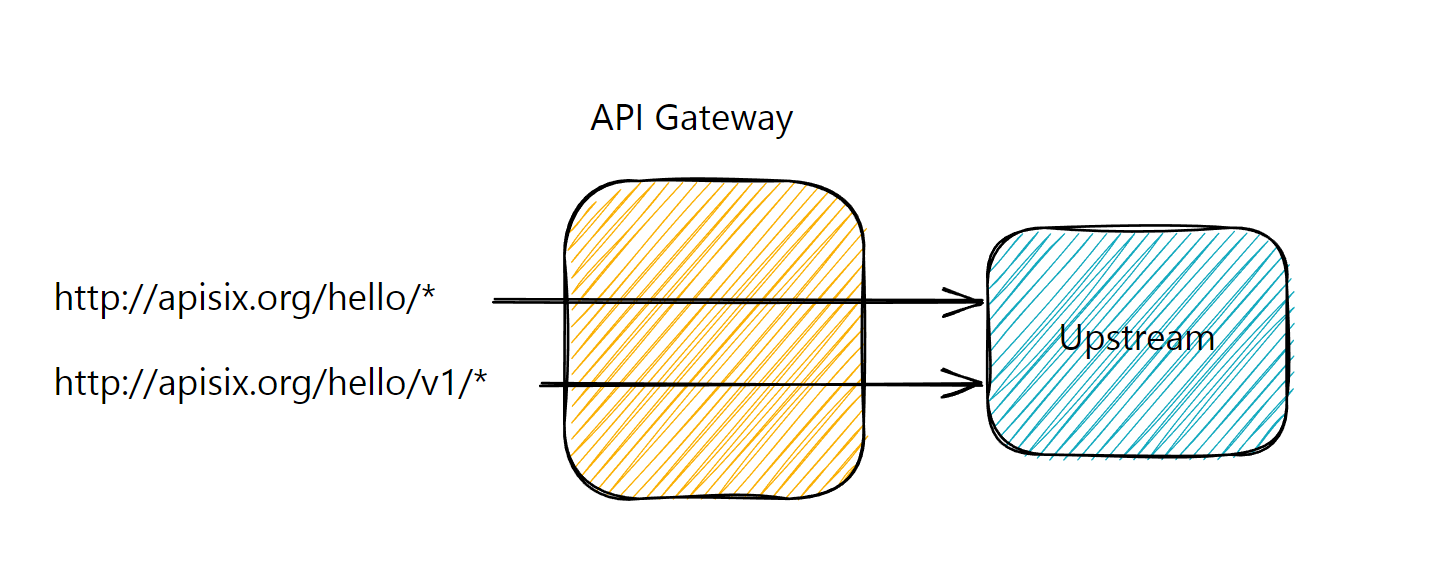
+In the scope of this tutorial, we will use _URI path-based versioning_ because
it’s the most widespread. We are going to add `v1` version for our existing
`oldapi` in this section.
+
+ 
+
+Before introducing the new version, we also need to rewrite the query that
comes to the API gateway before forwarding it to the upstream. Because both the
old and new versions should point to the same upstream and the upstream exposes
endpoint `/hello`, not `/v1/hello`. Let’s create a plugin configuration to
rewrite the path:
+
+```shell
+curl http://apisix:9080/apisix/admin/plugin_configs/1 -H 'X-API-KEY: xyz' -X
PUT -d '
+{
+ "plugins": {
+ "proxy-rewrite": {
+ "regex_uri": ["/v1/(.*)", "/$1"]
+ }
+ }
+}'
+```
+
+We can now create the second versioned route that references the existing
upstream and plugin config.
+
+> Note that we can create routes for different API versions.
+
+```shell
+curl http://apisix:9080/apisix/admin/routes/2 -H 'X-API-KEY: xyz' -X PUT -d '
+{
+ "name": "Versioned Route to Old API",
+ "methods": ["GET"],
+ "uris": ["/v1/hello", "/v1/hello/", "/v1/hello/*"],
+ "upstream_id": 1,
+ "plugin_config_id": 1
+}'
+```
+
+At this stage, we have configured two routes, one versioned and the other
non-versioned:
+
+```shell
+curl http://apisix.org/hello
+```
+
+```shell title="output"
+Hello world
+```
+
+```shell
+curl http://apisix.org/v1/hello
+```
+
+```shell title="output"
+Hello world
+```
+
+## Route API requests from the old version to the new one
+
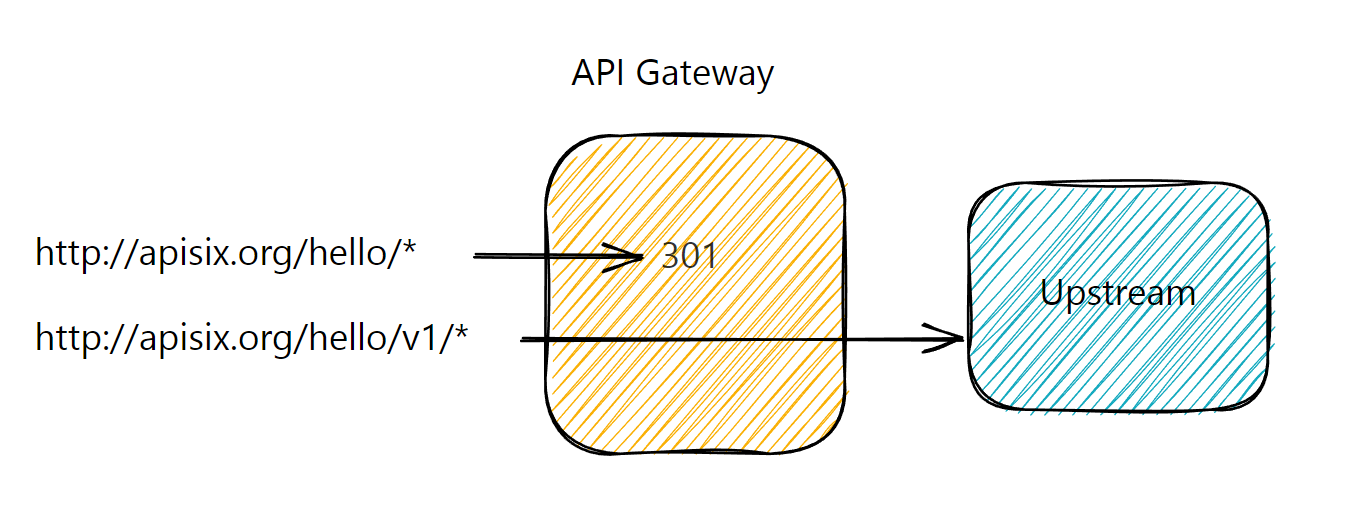
+We have versioned our API, but our API consumers probably still use the legacy
non-versioned API. We want them to migrate, but we cannot just delete the
legacy route as our users are unaware of it. Fortunately, the `301 HTTP` status
code is our friend: we can let users know that the resource has moved from
`http://apisix.org/hello` to `http://apisix.org/v1/hello`. It requires
configuring the [redirect
plugin](https://apisix.apache.org/docs/apisix/plugins/redirect/) on the initial
route:
+
+```shell
+curl http://apisix:9080/apisix/admin/routes/1 -H 'X-API-KEY: xyz' -X PATCH -d '
+{
+ "plugins": {
+ "redirect": {
+ "uri": "/v1$uri",
+ "ret_code": 301
+ }
+ }
+}'
+```
+
+
+
+Now when we try to request the first non-versioned API endpoint, you will get
an expected output:
+
+```shell
+curl http://apisix.org/hello
+
+<html>
+<head><title>301 Moved Permanently</title></head>
+<body>
+<center><h1>301 Moved Permanently</h1></center>
+<hr><center>openresty</center>
+</body>
+</html>
+```
+
+Either API consumers will transparently use the new endpoint because they will
follow, or their integration breaks and they will notice the 301 status and the
new API location to use.
+
+## Next steps
+
+As you followed throughout the tutorial, it is very easy to publish multiple
versions of your API with Apache APISIX and it does not require setting up
actual API endpoints for each version of your API in the backend. It also
allows your clients to switch between two versions without any downtime and
save assets if there’s ever an update.
+
+Learn more about how to [manage](./manage-api-consumers.md) API consumers and
[protect](./protect-api.md) your APIs.


