This is an automated email from the ASF dual-hosted git repository.

navendu pushed a commit to branch master
in repository https://gitbox.apache.org/repos/asf/apisix.git
The following commit(s) were added to refs/heads/master by this push:
new 5c50ffd30 docs: consolidate deployment modes guides (#8724)
5c50ffd30 is described below
commit 5c50ffd306cfae35cd731502313c28de0c2a7132
Author: Pratyay Banerjee <[email protected]>
AuthorDate: Fri Feb 24 09:16:06 2023 +0530
docs: consolidate deployment modes guides (#8724)
Co-authored-by: Navendu Pottekkat <[email protected]>
Co-authored-by: Nicolas Fränkel <[email protected]>
---
README.md | 2 +-
docs/en/latest/config.json | 12 +-
docs/en/latest/deployment-modes.md | 293 +++++++++++++++++++++++++++++++++--
docs/en/latest/stand-alone.md | 293 -----------------------------------
docs/en/latest/terminology/plugin.md | 2 +-
docs/zh/latest/config.json | 4 -
docs/zh/latest/stand-alone.md | 291 ----------------------------------
7 files changed, 286 insertions(+), 611 deletions(-)
diff --git a/README.md b/README.md
index 44fbc224c..b3dbfdfe5 100644
--- a/README.md
+++ b/README.md
@@ -130,7 +130,7 @@ A/B testing, canary release, blue-green deployment, limit
rate, defense against
- [Dashboard](https://github.com/apache/apisix-dashboard)
- Version Control: Supports rollbacks of operations.
- CLI: start\stop\reload APISIX through the command line.
- - [Stand-Alone](docs/en/latest/stand-alone.md): Supports to load route rules
from local YAML file, it is more friendly such as under the kubernetes(k8s).
+ - [Stand-Alone](docs/en/latest/deployment-modes.md#stand-alone): Supports to
load route rules from local YAML file, it is more friendly such as under the
kubernetes(k8s).
- [Global Rule](docs/en/latest/terminology/global-rule.md): Allows to run
any plugin for all request, eg: limit rate, IP filter etc.
- High performance: The single-core QPS reaches 18k with an average delay of
fewer than 0.2 milliseconds.
- [Fault Injection](docs/en/latest/plugins/fault-injection.md)
diff --git a/docs/en/latest/config.json b/docs/en/latest/config.json
index 27dbbddca..9d6d9cd3b 100644
--- a/docs/en/latest/config.json
+++ b/docs/en/latest/config.json
@@ -256,6 +256,10 @@
}
]
},
+ {
+ "type": "doc",
+ "id": "deployment-modes"
+ },
{
"type": "doc",
"id": "FAQ"
@@ -294,18 +298,10 @@
"xrpc"
]
},
- {
- "type": "doc",
- "id": "deployment-modes"
- },
{
"type": "doc",
"id": "router-radixtree"
},
- {
- "type": "doc",
- "id": "stand-alone"
- },
{
"type": "doc",
"id": "stream-proxy"
diff --git a/docs/en/latest/deployment-modes.md
b/docs/en/latest/deployment-modes.md
index c92129efd..12188f2b4 100644
--- a/docs/en/latest/deployment-modes.md
+++ b/docs/en/latest/deployment-modes.md
@@ -31,13 +31,13 @@ APISIX has three different deployment modes for different
production use cases.
|-----------------|----------------------------|-----------------------------------------------------------------------------------------------------------|
| traditional | traditional | Data plane and control plane
are deployed together. `enable_admin` attribute should be disabled manually. |
| decoupled | data_plane / control_plane | Data plane and control plane
are deployed independently. |
-| standalone | data_plane | Only data plane is deployed
and the configurations are loaded from a local YAML file. |
+| standalone | data_plane | Only `data_plane` is deployed
and the configurations are loaded from a local YAML file. |
Each of these deployment modes are explained in detail below.
## Traditional
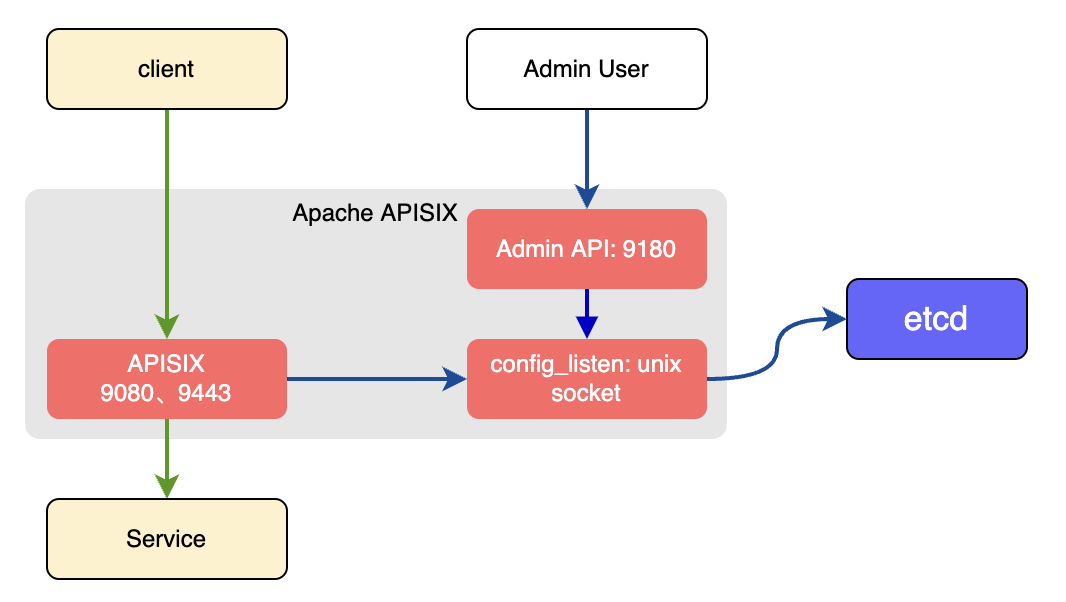
-In the traditional deployment mode, one instance of APISIX will be both the
data plane and the control plane.
+In the traditional deployment mode, one instance of APISIX will be both the
`data_plane` and the `control_plane`.
@@ -61,6 +61,7 @@ deployment:
- http://${etcd_IP}:${etcd_Port}
prefix: /apisix
timeout: 30
+#END
```
The instance of APISIX deployed as the traditional role will:
@@ -70,20 +71,20 @@ The instance of APISIX deployed as the traditional role
will:
## Decoupled
-In the decoupled deployment mode the data plane and control plane instances of
APISIX are deployed separately. i.e one instance of APISIX is configured to be
a data plane and the other to be a control plane.
+In the decoupled deployment mode the `data_plane` and `control_plane`
instances of APISIX are deployed separately, i.e., one instance of APISIX is
configured to be a *data plane* and the other to be a *control plane*.
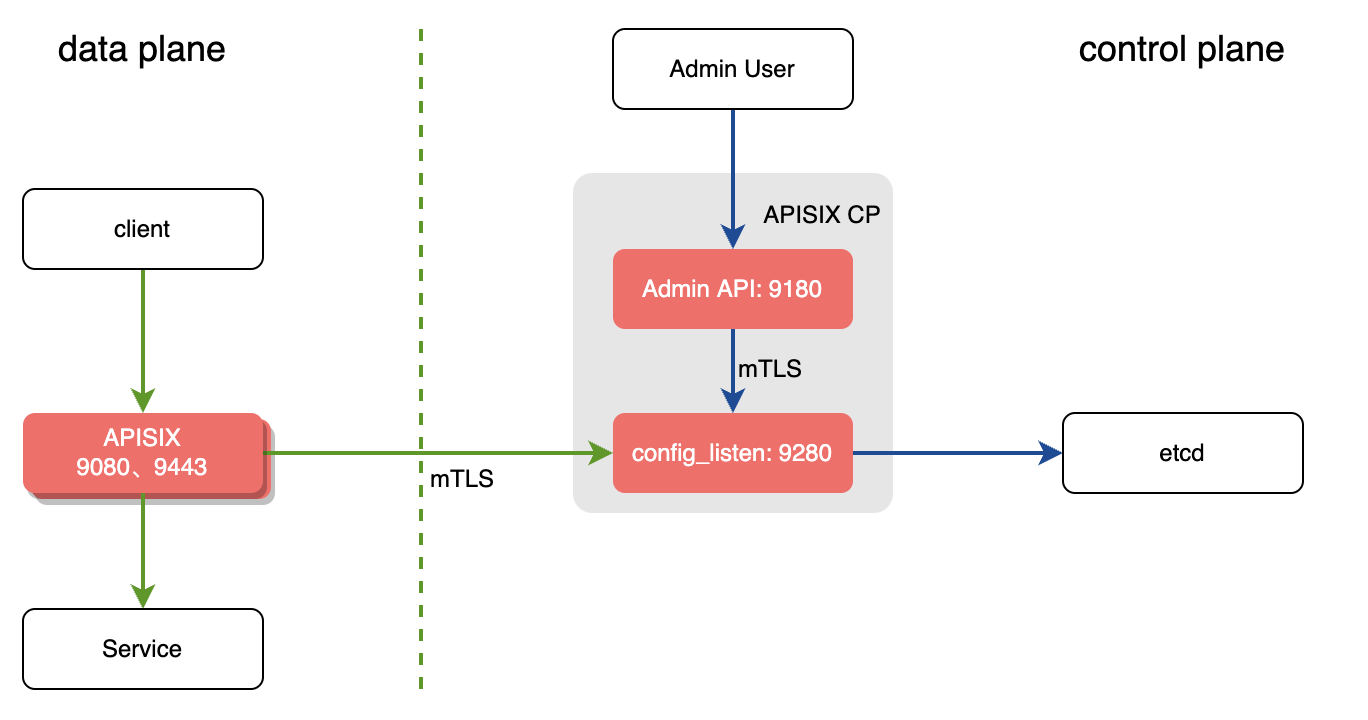
The instance of APISIX deployed as the data plane will:
-1. Fetch the configuration from the control plane. The default port is `9280`.
+1. Fetch the configuration from the *control plane*. The default port is
`9280`.
2. Performs a health check on all configured control plane addresses before
starting the service.
1. If the control plane addresses are unavailable, the startup fails and an
exception is thrown.
2. If at least one control plane address is available, it prints the
unhealthy control planes logs, and starts the APISIX service.
3. If all control planes are normal, APISIX service is started normally.
3. Once the service is started, it will handle the user requests.
-The example below shows the configuration of an APISIX instance as data plane
in the decoupled mode:
+The example below shows the configuration of an APISIX instance as *data
plane* in the decoupled mode:
```yaml title="conf/config.yaml"
deployment:
@@ -99,6 +100,7 @@ deployment:
cert: /path/to/ca-cert
cert_key: /path/to/ca-cert
trusted_ca_cert: /path/to/ca-cert
+#END
```
The instance of APISIX deployed as the control plane will:
@@ -106,7 +108,7 @@ The instance of APISIX deployed as the control plane will:
1. Listen on port `9180` and handle Admin API requests.
2. Provide the conf server which will listen on port `9280`. Both the control
plane and the data plane will connect to this via HTTPS enforced by mTLS.
-The example below shows the configuration of an APISIX instance as control
plane in the decoupled mode:
+The example below shows the configuration of an APISIX instance as *control
plane* in the decoupled mode:
```yaml title="conf/config.yaml"
deployment:
@@ -127,6 +129,7 @@ deployment:
cert: /path/to/ca-cert
cert_key: /path/to/ca-cert
trusted_ca_cert: /path/to/ca-cert
+#END
```
:::tip
@@ -149,21 +152,285 @@ deployment:
timeout: 30
certs:
trusted_ca_cert: /path/to/ca-cert
+#END
```
:::
## Standalone
-In the standalone deployment mode, APISIX is deployed as a data plane and it
reads in configurations from a YAML file (`apisix.yaml`) in the local file
system.
+Turning on the APISIX node in Stand-alone mode will no longer use the default
etcd as the configuration center.
-This deployment mode is useful when you have to declaratively define the
configuration or when you are using a different configuration center other than
etcd.
+This method is more suitable for two types of users:
-To configure APISIX in standalone mode:
+1. Kubernetes(k8s):Declarative API that dynamically updates the routing rules
with a full yaml configuration.
+2. Different configuration centers: There are many implementations of the
configuration center, such as Consul, etc., using the full yaml file for
intermediate conversion.
-```yaml title="conf/config.yaml"
+The routing rules in the `conf/apisix.yaml` file are loaded into memory
immediately after the APISIX node service starts. And every time interval
(default 1 second), will try to detect whether the file content is updated, if
there is an update, reload the rule.
+
+*Note*: Reloading and updating routing rules are all hot memory updates. There
is no replacement of working processes, since it's a hot update.
+
+Since the current Admin API is based on the etcd configuration center
solution, enable Admin API is not allowed when the Stand-alone mode is enabled.
+
+Standalone mode can only be enabled when we set the role of APISIX as data
plane. We set `deployment.role` to `data_plane` and
`deployment.role_data_plane.config_provider` to `yaml`.
+
+Refer to the example below:
+
+```yaml
deployment:
- role: data_plane
- role_data_plane:
- config_provider: yaml
+ role: data_plane
+ role_data_plane:
+ config_provider: yaml
+#END
+```
+
+### How to configure rules
+
+All of the rules are stored in one file which named `conf/apisix.yaml`,
+APISIX checks if this file has any change **every second**.
+If the file is changed & it ends with `#END`,
+APISIX loads the rules from this file and updates its memory.
+
+Here is a mini example:
+
+```yaml
+routes:
+ -
+ uri: /hello
+ upstream:
+ nodes:
+ "127.0.0.1:1980": 1
+ type: roundrobin
+#END
+```
+
+*WARNING*: APISIX will not load the rules into memory from file
`conf/apisix.yaml` if there is no `#END` at the end.
+
+### How to configure Router
+
+Single Router:
+
+```yaml
+routes:
+ -
+ uri: /hello
+ upstream:
+ nodes:
+ "127.0.0.1:1980": 1
+ type: roundrobin
+#END
+```
+
+Multiple Router:
+
+```yaml
+routes:
+ -
+ uri: /hello
+ upstream:
+ nodes:
+ "127.0.0.1:1980": 1
+ type: roundrobin
+ -
+ uri: /hello2
+ upstream:
+ nodes:
+ "127.0.0.1:1981": 1
+ type: roundrobin
+#END
+```
+
+### How to configure Router + Service
+
+```yml
+routes:
+ -
+ uri: /hello
+ service_id: 1
+services:
+ -
+ id: 1
+ upstream:
+ nodes:
+ "127.0.0.1:1980": 1
+ type: roundrobin
+#END
+```
+
+### How to configure Router + Upstream
+
+```yml
+routes:
+ -
+ uri: /hello
+ upstream_id: 1
+upstreams:
+ -
+ id: 1
+ nodes:
+ "127.0.0.1:1980": 1
+ type: roundrobin
+#END
+```
+
+### How to configure Router + Service + Upstream
+
+```yml
+routes:
+ -
+ uri: /hello
+ service_id: 1
+services:
+ -
+ id: 1
+ upstream_id: 2
+upstreams:
+ -
+ id: 2
+ nodes:
+ "127.0.0.1:1980": 1
+ type: roundrobin
+#END
+```
+
+### How to configure Plugins
+
+```yml
+# plugins listed here will be hot reloaded and override the boot configuration
+plugins:
+ - name: ip-restriction
+ - name: jwt-auth
+ - name: mqtt-proxy
+ stream: true # set 'stream' to true for stream plugins
+#END
+```
+
+### How to enable SSL
+
+```yml
+ssls:
+ -
+ cert: |
+ -----BEGIN CERTIFICATE-----
+ MIIDrzCCApegAwIBAgIJAI3Meu/gJVTLMA0GCSqGSIb3DQEBCwUAMG4xCzAJBgNV
+ BAYTAkNOMREwDwYDVQQIDAhaaGVqaWFuZzERMA8GA1UEBwwISGFuZ3pob3UxDTAL
+ BgNVBAoMBHRlc3QxDTALBgNVBAsMBHRlc3QxGzAZBgNVBAMMEmV0Y2QuY2x1c3Rl
+ ci5sb2NhbDAeFw0yMDEwMjgwMzMzMDJaFw0yMTEwMjgwMzMzMDJaMG4xCzAJBgNV
+ BAYTAkNOMREwDwYDVQQIDAhaaGVqaWFuZzERMA8GA1UEBwwISGFuZ3pob3UxDTAL
+ BgNVBAoMBHRlc3QxDTALBgNVBAsMBHRlc3QxGzAZBgNVBAMMEmV0Y2QuY2x1c3Rl
+ ci5sb2NhbDCCASIwDQYJKoZIhvcNAQEBBQADggEPADCCAQoCggEBAJ/qwxCR7g5S
+ s9+VleopkLi5pAszEkHYOBpwF/hDeRdxU0I0e1zZTdTlwwPy2vf8m3kwoq6fmNCt
+ tdUUXh5Wvgi/2OA8HBBzaQFQL1Av9qWwyES5cx6p0ZBwIrcXQIsl1XfNSUpQNTSS
+ D44TGduXUIdeshukPvMvLWLezynf2/WlgVh/haWtDG99r/Gj3uBdjl0m/xGvKvIv
+ NFy6EdgG9fkwcIalutjrUnGl9moGjwKYu4eXW2Zt5el0d1AHXUsqK4voe0p+U2Nz
+ quDmvxteXWdlsz8o5kQT6a4DUtWhpPIfNj9oZfPRs3LhBFQ74N70kVxMOCdec1lU
+ bnFzLIMGlz0CAwEAAaNQME4wHQYDVR0OBBYEFFHeljijrr+SPxlH5fjHRPcC7bv2
+ MB8GA1UdIwQYMBaAFFHeljijrr+SPxlH5fjHRPcC7bv2MAwGA1UdEwQFMAMBAf8w
+ DQYJKoZIhvcNAQELBQADggEBAG6NNTK7sl9nJxeewVuogCdMtkcdnx9onGtCOeiQ
+ qvh5Xwn9akZtoLMVEdceU0ihO4wILlcom3OqHs9WOd6VbgW5a19Thh2toxKidHz5
+ rAaBMyZsQbFb6+vFshZwoCtOLZI/eIZfUUMFqMXlEPrKru1nSddNdai2+zi5rEnM
+ HCot43+3XYuqkvWlOjoi9cP+C4epFYrxpykVbcrtbd7TK+wZNiK3xtDPnVzjdNWL
+ geAEl9xrrk0ss4nO/EreTQgS46gVU+tLC+b23m2dU7dcKZ7RDoiA9bdVc4a2IsaS
+ 2MvLL4NZ2nUh8hAEHiLtGMAV3C6xNbEyM07hEpDW6vk6tqk=
+ -----END CERTIFICATE-----
+ key: |
+ -----BEGIN PRIVATE KEY-----
+ MIIEvgIBADANBgkqhkiG9w0BAQEFAASCBKgwggSkAgEAAoIBAQCf6sMQke4OUrPf
+ lZXqKZC4uaQLMxJB2DgacBf4Q3kXcVNCNHtc2U3U5cMD8tr3/Jt5MKKun5jQrbXV
+ FF4eVr4Iv9jgPBwQc2kBUC9QL/alsMhEuXMeqdGQcCK3F0CLJdV3zUlKUDU0kg+O
+ Exnbl1CHXrIbpD7zLy1i3s8p39v1pYFYf4WlrQxvfa/xo97gXY5dJv8RryryLzRc
+ uhHYBvX5MHCGpbrY61JxpfZqBo8CmLuHl1tmbeXpdHdQB11LKiuL6HtKflNjc6rg
+ 5r8bXl1nZbM/KOZEE+muA1LVoaTyHzY/aGXz0bNy4QRUO+De9JFcTDgnXnNZVG5x
+ cyyDBpc9AgMBAAECggEAatcEtehZPJaCeClPPF/Cwbe9YoIfe4BCk186lHI3z7K1
+ 5nB7zt+bwVY0AUpagv3wvXoB5lrYVOsJpa9y5iAb3GqYMc/XDCKfD/KLea5hwfcn
+ BctEn0LjsPVKLDrLs2t2gBDWG2EU+udunwQh7XTdp2Nb6V3FdOGbGAg2LgrSwP1g
+ 0r4z14F70oWGYyTQ5N8UGuyryVrzQH525OYl38Yt7R6zJ/44FVi/2TvdfHM5ss39
+ SXWi00Q30fzaBEf4AdHVwVCRKctwSbrIOyM53kiScFDmBGRblCWOxXbiFV+d3bjX
+ gf2zxs7QYZrFOzOO7kLtHGua4itEB02497v+1oKDwQKBgQDOBvCVGRe2WpItOLnj
+ SF8iz7Sm+jJGQz0D9FhWyGPvrN7IXGrsXavA1kKRz22dsU8xdKk0yciOB13Wb5y6
+ yLsr/fPBjAhPb4h543VHFjpAQcxpsH51DE0b2oYOWMmz+rXGB5Jy8EkP7Q4njIsc
+ 2wLod1dps8OT8zFx1jX3Us6iUQKBgQDGtKkfsvWi3HkwjFTR+/Y0oMz7bSruE5Z8
+ g0VOHPkSr4XiYgLpQxjbNjq8fwsa/jTt1B57+By4xLpZYD0BTFuf5po+igSZhH8s
+ QS5XnUnbM7d6Xr/da7ZkhSmUbEaMeHONSIVpYNgtRo4bB9Mh0l1HWdoevw/w5Ryt
+ L/OQiPhfLQKBgQCh1iG1fPh7bbnVe/HI71iL58xoPbCwMLEFIjMiOFcINirqCG6V
+ LR91Ytj34JCihl1G4/TmWnsH1hGIGDRtJLCiZeHL70u32kzCMkI1jOhFAWqoutMa
+ 7obDkmwraONIVW/kFp6bWtSJhhTQTD4adI9cPCKWDXdcCHSWj0Xk+U8HgQKBgBng
+ t1HYhaLzIZlP/U/nh3XtJyTrX7bnuCZ5FhKJNWrYjxAfgY+NXHRYCKg5x2F5j70V
+ be7pLhxmCnrPTMKZhik56AaTBOxVVBaYWoewhUjV4GRAaK5Wc8d9jB+3RizPFwVk
+ V3OU2DJ1SNZ+W2HBOsKrEfwFF/dgby6i2w6MuAP1AoGBAIxvxUygeT/6P0fHN22P
+ zAHFI4v2925wYdb7H//D8DIADyBwv18N6YH8uH7L+USZN7e4p2k8MGGyvTXeC6aX
+ IeVtU6fH57Ddn59VPbF20m8RCSkmBvSdcbyBmqlZSBE+fKwCliKl6u/GH0BNAWKz
+ r8yiEiskqRmy7P7MY9hDmEbG
+ -----END PRIVATE KEY-----
+ snis:
+ - "yourdomain.com"
+#END
+```
+
+### How to configure global rule
+
+```yaml
+global_rules:
+ -
+ id: 1
+ plugins:
+ response-rewrite:
+ body: "hello\n"
+#END
+```
+
+### How to configure consumer
+
+```yaml
+consumers:
+ - username: jwt
+ plugins:
+ jwt-auth:
+ key: user-key
+ secret: my-secret-key
+#END
+```
+
+### How to configure plugin metadata
+
+```yaml
+upstreams:
+ - id: 1
+ nodes:
+ "127.0.0.1:1980": 1
+ type: roundrobin
+routes:
+ -
+ uri: /hello
+ upstream_id: 1
+ plugins:
+ http-logger:
+ batch_max_size: 1
+ uri: http://127.0.0.1:1980/log
+plugin_metadata:
+ - id: http-logger # note the id is the plugin name
+ log_format:
+ host: "$host",
+ remote_addr: "$remote_addr"
+#END
+```
+
+### How to configure stream route
+
+```yaml
+stream_routes:
+ - server_addr: 127.0.0.1
+ server_port: 1985
+ id: 1
+ upstream_id: 1
+ plugins:
+ mqtt-proxy:
+ protocol_name: "MQTT"
+ protocol_level: 4
+upstreams:
+ - nodes:
+ "127.0.0.1:1995": 1
+ type: roundrobin
+ id: 1
+#END
```
diff --git a/docs/en/latest/stand-alone.md b/docs/en/latest/stand-alone.md
deleted file mode 100644
index 6779f3c78..000000000
--- a/docs/en/latest/stand-alone.md
+++ /dev/null
@@ -1,293 +0,0 @@
----
-title: Stand-alone mode
----
-
-<!--
-#
-# Licensed to the Apache Software Foundation (ASF) under one or more
-# contributor license agreements. See the NOTICE file distributed with
-# this work for additional information regarding copyright ownership.
-# The ASF licenses this file to You under the Apache License, Version 2.0
-# (the "License"); you may not use this file except in compliance with
-# the License. You may obtain a copy of the License at
-#
-# http://www.apache.org/licenses/LICENSE-2.0
-#
-# Unless required by applicable law or agreed to in writing, software
-# distributed under the License is distributed on an "AS IS" BASIS,
-# WITHOUT WARRANTIES OR CONDITIONS OF ANY KIND, either express or implied.
-# See the License for the specific language governing permissions and
-# limitations under the License.
-#
--->
-
-Turning on the APISIX node in Stand-alone mode will no longer use the default
etcd as the configuration center.
-
-This method is more suitable for two types of users:
-
-1. kubernetes(k8s):Declarative API that dynamically updates the routing rules
with a full yaml configuration.
-2. Different configuration centers: There are many implementations of the
configuration center, such as Consul, etc., using the full yaml file for
intermediate conversion.
-
-The routing rules in the `conf/apisix.yaml` file are loaded into memory
immediately after the APISIX node service starts. And every time interval
(default 1 second), will try to detect whether the file content is updated, if
there is an update, reload the rule.
-
-*Note*: When reloading and updating routing rules, they are all hot memory
updates, and there will be no replacement of working processes, it is a hot
update.
-
-Since the current Admin API is based on the etcd configuration center
solution, enable Admin API is not allowed when the Stand-alone mode is enabled.
-
-The Stand-alone mode can only be enabled when set the role of APISIX as data
plane. We can set `deployment.role` to `data_plane` and
`deployment.role_data_plane.config_provider` to `yaml`.
-
-Refer to the example below:
-
-```yaml
-deployment:
- role: data_plane
- role_data_plane:
- config_provider: yaml
-```
-
-### How to configure rules
-
-All of the rules are stored in one file which named `conf/apisix.yaml`,
-the APISIX will check if this file has any changed every second.
-If the file changed and we found `#END` at the end of the file,
-APISIX will load the rules in this file and update to memory of APISIX.
-
-Here is a mini example:
-
-```yaml
-routes:
- -
- uri: /hello
- upstream:
- nodes:
- "127.0.0.1:1980": 1
- type: roundrobin
-#END
-```
-
-*NOTE*: APISIX will not load the rules into memory from file
`conf/apisix.yaml` if there is no `#END` at the end.
-
-### How to configure Router
-
-Single Router:
-
-```yaml
-routes:
- -
- uri: /hello
- upstream:
- nodes:
- "127.0.0.1:1980": 1
- type: roundrobin
-#END
-```
-
-Multiple Router:
-
-```yaml
-routes:
- -
- uri: /hello
- upstream:
- nodes:
- "127.0.0.1:1980": 1
- type: roundrobin
- -
- uri: /hello2
- upstream:
- nodes:
- "127.0.0.1:1981": 1
- type: roundrobin
-#END
-```
-
-### How to configure Router + Service
-
-```yml
-routes:
- -
- uri: /hello
- service_id: 1
-services:
- -
- id: 1
- upstream:
- nodes:
- "127.0.0.1:1980": 1
- type: roundrobin
-#END
-```
-
-### How to configure Router + Upstream
-
-```yml
-routes:
- -
- uri: /hello
- upstream_id: 1
-upstreams:
- -
- id: 1
- nodes:
- "127.0.0.1:1980": 1
- type: roundrobin
-#END
-```
-
-### How to configure Router + Service + Upstream
-
-```yml
-routes:
- -
- uri: /hello
- service_id: 1
-services:
- -
- id: 1
- upstream_id: 2
-upstreams:
- -
- id: 2
- nodes:
- "127.0.0.1:1980": 1
- type: roundrobin
-#END
-```
-
-### How to configure Plugins
-
-```yml
-# plugins listed here will be hot reloaded and override the boot configuration
-plugins:
- - name: ip-restriction
- - name: jwt-auth
- - name: mqtt-proxy
- stream: true # set 'stream' to true for stream plugins
-#END
-```
-
-### How to enable SSL
-
-```yml
-ssls:
- -
- cert: |
- -----BEGIN CERTIFICATE-----
- MIIDrzCCApegAwIBAgIJAI3Meu/gJVTLMA0GCSqGSIb3DQEBCwUAMG4xCzAJBgNV
- BAYTAkNOMREwDwYDVQQIDAhaaGVqaWFuZzERMA8GA1UEBwwISGFuZ3pob3UxDTAL
- BgNVBAoMBHRlc3QxDTALBgNVBAsMBHRlc3QxGzAZBgNVBAMMEmV0Y2QuY2x1c3Rl
- ci5sb2NhbDAeFw0yMDEwMjgwMzMzMDJaFw0yMTEwMjgwMzMzMDJaMG4xCzAJBgNV
- BAYTAkNOMREwDwYDVQQIDAhaaGVqaWFuZzERMA8GA1UEBwwISGFuZ3pob3UxDTAL
- BgNVBAoMBHRlc3QxDTALBgNVBAsMBHRlc3QxGzAZBgNVBAMMEmV0Y2QuY2x1c3Rl
- ci5sb2NhbDCCASIwDQYJKoZIhvcNAQEBBQADggEPADCCAQoCggEBAJ/qwxCR7g5S
- s9+VleopkLi5pAszEkHYOBpwF/hDeRdxU0I0e1zZTdTlwwPy2vf8m3kwoq6fmNCt
- tdUUXh5Wvgi/2OA8HBBzaQFQL1Av9qWwyES5cx6p0ZBwIrcXQIsl1XfNSUpQNTSS
- D44TGduXUIdeshukPvMvLWLezynf2/WlgVh/haWtDG99r/Gj3uBdjl0m/xGvKvIv
- NFy6EdgG9fkwcIalutjrUnGl9moGjwKYu4eXW2Zt5el0d1AHXUsqK4voe0p+U2Nz
- quDmvxteXWdlsz8o5kQT6a4DUtWhpPIfNj9oZfPRs3LhBFQ74N70kVxMOCdec1lU
- bnFzLIMGlz0CAwEAAaNQME4wHQYDVR0OBBYEFFHeljijrr+SPxlH5fjHRPcC7bv2
- MB8GA1UdIwQYMBaAFFHeljijrr+SPxlH5fjHRPcC7bv2MAwGA1UdEwQFMAMBAf8w
- DQYJKoZIhvcNAQELBQADggEBAG6NNTK7sl9nJxeewVuogCdMtkcdnx9onGtCOeiQ
- qvh5Xwn9akZtoLMVEdceU0ihO4wILlcom3OqHs9WOd6VbgW5a19Thh2toxKidHz5
- rAaBMyZsQbFb6+vFshZwoCtOLZI/eIZfUUMFqMXlEPrKru1nSddNdai2+zi5rEnM
- HCot43+3XYuqkvWlOjoi9cP+C4epFYrxpykVbcrtbd7TK+wZNiK3xtDPnVzjdNWL
- geAEl9xrrk0ss4nO/EreTQgS46gVU+tLC+b23m2dU7dcKZ7RDoiA9bdVc4a2IsaS
- 2MvLL4NZ2nUh8hAEHiLtGMAV3C6xNbEyM07hEpDW6vk6tqk=
- -----END CERTIFICATE-----
- key: |
- -----BEGIN PRIVATE KEY-----
- MIIEvgIBADANBgkqhkiG9w0BAQEFAASCBKgwggSkAgEAAoIBAQCf6sMQke4OUrPf
- lZXqKZC4uaQLMxJB2DgacBf4Q3kXcVNCNHtc2U3U5cMD8tr3/Jt5MKKun5jQrbXV
- FF4eVr4Iv9jgPBwQc2kBUC9QL/alsMhEuXMeqdGQcCK3F0CLJdV3zUlKUDU0kg+O
- Exnbl1CHXrIbpD7zLy1i3s8p39v1pYFYf4WlrQxvfa/xo97gXY5dJv8RryryLzRc
- uhHYBvX5MHCGpbrY61JxpfZqBo8CmLuHl1tmbeXpdHdQB11LKiuL6HtKflNjc6rg
- 5r8bXl1nZbM/KOZEE+muA1LVoaTyHzY/aGXz0bNy4QRUO+De9JFcTDgnXnNZVG5x
- cyyDBpc9AgMBAAECggEAatcEtehZPJaCeClPPF/Cwbe9YoIfe4BCk186lHI3z7K1
- 5nB7zt+bwVY0AUpagv3wvXoB5lrYVOsJpa9y5iAb3GqYMc/XDCKfD/KLea5hwfcn
- BctEn0LjsPVKLDrLs2t2gBDWG2EU+udunwQh7XTdp2Nb6V3FdOGbGAg2LgrSwP1g
- 0r4z14F70oWGYyTQ5N8UGuyryVrzQH525OYl38Yt7R6zJ/44FVi/2TvdfHM5ss39
- SXWi00Q30fzaBEf4AdHVwVCRKctwSbrIOyM53kiScFDmBGRblCWOxXbiFV+d3bjX
- gf2zxs7QYZrFOzOO7kLtHGua4itEB02497v+1oKDwQKBgQDOBvCVGRe2WpItOLnj
- SF8iz7Sm+jJGQz0D9FhWyGPvrN7IXGrsXavA1kKRz22dsU8xdKk0yciOB13Wb5y6
- yLsr/fPBjAhPb4h543VHFjpAQcxpsH51DE0b2oYOWMmz+rXGB5Jy8EkP7Q4njIsc
- 2wLod1dps8OT8zFx1jX3Us6iUQKBgQDGtKkfsvWi3HkwjFTR+/Y0oMz7bSruE5Z8
- g0VOHPkSr4XiYgLpQxjbNjq8fwsa/jTt1B57+By4xLpZYD0BTFuf5po+igSZhH8s
- QS5XnUnbM7d6Xr/da7ZkhSmUbEaMeHONSIVpYNgtRo4bB9Mh0l1HWdoevw/w5Ryt
- L/OQiPhfLQKBgQCh1iG1fPh7bbnVe/HI71iL58xoPbCwMLEFIjMiOFcINirqCG6V
- LR91Ytj34JCihl1G4/TmWnsH1hGIGDRtJLCiZeHL70u32kzCMkI1jOhFAWqoutMa
- 7obDkmwraONIVW/kFp6bWtSJhhTQTD4adI9cPCKWDXdcCHSWj0Xk+U8HgQKBgBng
- t1HYhaLzIZlP/U/nh3XtJyTrX7bnuCZ5FhKJNWrYjxAfgY+NXHRYCKg5x2F5j70V
- be7pLhxmCnrPTMKZhik56AaTBOxVVBaYWoewhUjV4GRAaK5Wc8d9jB+3RizPFwVk
- V3OU2DJ1SNZ+W2HBOsKrEfwFF/dgby6i2w6MuAP1AoGBAIxvxUygeT/6P0fHN22P
- zAHFI4v2925wYdb7H//D8DIADyBwv18N6YH8uH7L+USZN7e4p2k8MGGyvTXeC6aX
- IeVtU6fH57Ddn59VPbF20m8RCSkmBvSdcbyBmqlZSBE+fKwCliKl6u/GH0BNAWKz
- r8yiEiskqRmy7P7MY9hDmEbG
- -----END PRIVATE KEY-----
- snis:
- - "yourdomain.com"
-#END
-```
-
-### How to configure global rule
-
-```yaml
-global_rules:
- -
- id: 1
- plugins:
- response-rewrite:
- body: "hello\n"
-```
-
-### How to configure consumer
-
-```yaml
-consumers:
- - username: jwt
- plugins:
- jwt-auth:
- key: user-key
- secret: my-secret-key
-```
-
-### How to configure plugin metadata
-
-```yaml
-upstreams:
- - id: 1
- nodes:
- "127.0.0.1:1980": 1
- type: roundrobin
-routes:
- -
- uri: /hello
- upstream_id: 1
- plugins:
- http-logger:
- batch_max_size: 1
- uri: http://127.0.0.1:1980/log
-plugin_metadata:
- - id: http-logger # note the id is the plugin name
- log_format:
- host: "$host",
- remote_addr: "$remote_addr"
-```
-
-### How to configure stream route
-
-```yaml
-stream_routes:
- - server_addr: 127.0.0.1
- server_port: 1985
- id: 1
- upstream_id: 1
- plugins:
- mqtt-proxy:
- protocol_name: "MQTT"
- protocol_level: 4
-upstreams:
- - nodes:
- "127.0.0.1:1995": 1
- type: roundrobin
- id: 1
-```
diff --git a/docs/en/latest/terminology/plugin.md
b/docs/en/latest/terminology/plugin.md
index 3ae73d86c..bbff2f798 100644
--- a/docs/en/latest/terminology/plugin.md
+++ b/docs/en/latest/terminology/plugin.md
@@ -278,4 +278,4 @@ If a configured Plugin is disabled, then its execution will
be skipped.
### Hot reload in stand-alone mode
-For hot-reloading in stand-alone mode, see the plugin related section in
[stand alone mode](../stand-alone.md).
+For hot-reloading in stand-alone mode, see the plugin related section in
[stand alone mode](../deployment-modes.md#stand-alone).
diff --git a/docs/zh/latest/config.json b/docs/zh/latest/config.json
index 8699cfb02..d50f22770 100644
--- a/docs/zh/latest/config.json
+++ b/docs/zh/latest/config.json
@@ -256,10 +256,6 @@
"type": "doc",
"id": "router-radixtree"
},
- {
- "type": "doc",
- "id": "stand-alone"
- },
{
"type": "doc",
"id": "stream-proxy"
diff --git a/docs/zh/latest/stand-alone.md b/docs/zh/latest/stand-alone.md
deleted file mode 100644
index 961d68a9a..000000000
--- a/docs/zh/latest/stand-alone.md
+++ /dev/null
@@ -1,291 +0,0 @@
----
-title: Stand-alone mode
----
-
-<!--
-#
-# Licensed to the Apache Software Foundation (ASF) under one or more
-# contributor license agreements. See the NOTICE file distributed with
-# this work for additional information regarding copyright ownership.
-# The ASF licenses this file to You under the Apache License, Version 2.0
-# (the "License"); you may not use this file except in compliance with
-# the License. You may obtain a copy of the License at
-#
-# http://www.apache.org/licenses/LICENSE-2.0
-#
-# Unless required by applicable law or agreed to in writing, software
-# distributed under the License is distributed on an "AS IS" BASIS,
-# WITHOUT WARRANTIES OR CONDITIONS OF ANY KIND, either express or implied.
-# See the License for the specific language governing permissions and
-# limitations under the License.
-#
--->
-
-开启 Stand-alone 模式的 APISIX 节点,将不再使用默认的 etcd 作为配置中心。
-
-这种方式比较适合两类用户:
-
-1. kubernetes(k8s):声明式 API 场景,通过全量 yaml 配置来动态更新修改路由规则。
-2. 不同配置中心:配置中心的实现有很多,比如 Consul 等,使用全量 yaml 做中间转换桥梁。
-
-APISIX 节点服务启动后会立刻加载 `conf/apisix.yaml` 文件中的路由规则到内存,并且每间隔一定时间(默认 1
秒钟),都会尝试检测文件内容是否有更新,如果有更新则重新加载规则。
-
-*注意*:重新加载规则并更新时,均是内存热更新,不会有工作进程的替换过程,是个热更新过程。
-
-由于目前 Admin API 都是基于 etcd 配置中心解决方案,当开启 Stand-alone 模式后,
-Admin API 将不再被允许使用。
-
-只有当 APISIX 的角色设置为 data plane 时,才能开启 Stand-alone 模式。通过设置 `deployment.role` 为
`data_plane`,设置 `deployment.role_data_plane.config_provider` 为 `yaml` 即可启用
Stand-alone 模式。
-
-参考下面示例:
-
-```yaml
-deployment:
- role: data_plane
- role_data_plane:
- config_provider: yaml
-```
-
-### 如何配置规则
-
-所有的路由规则均存放在 `conf/apisix.yaml` 这一个文件中,APISIX
会以每秒(默认)频率检查文件是否有变化,如果有变化,则会检查文件末尾是否能找到 `#END` 结尾,找到后则重新加载文件更新到内存。
-
-下面就是个最小的示例:
-
-```yaml
-routes:
- -
- uri: /hello
- upstream:
- nodes:
- "127.0.0.1:1980": 1
- type: roundrobin
-#END
-```
-
-*注意*:如果 `conf/apisix.yaml` 末尾不能找到 `#END`,那么 APISIX 将不会加载这个文件规则到内存。
-
-### 配置 Router
-
-单个 Router:
-
-```yaml
-routes:
- -
- uri: /hello
- upstream:
- nodes:
- "127.0.0.1:1980": 1
- type: roundrobin
-#END
-```
-
-多个 Router:
-
-```yaml
-routes:
- -
- uri: /hello
- upstream:
- nodes:
- "127.0.0.1:1980": 1
- type: roundrobin
- -
- uri: /hello2
- upstream:
- nodes:
- "127.0.0.1:1981": 1
- type: roundrobin
-#END
-```
-
-### 配置 Router + Service
-
-```yml
-routes:
- -
- uri: /hello
- service_id: 1
-services:
- -
- id: 1
- upstream:
- nodes:
- "127.0.0.1:1980": 1
- type: roundrobin
-#END
-```
-
-### 配置 Router + Upstream
-
-```yml
-routes:
- -
- uri: /hello
- upstream_id: 1
-upstreams:
- -
- id: 1
- nodes:
- "127.0.0.1:1980": 1
- type: roundrobin
-#END
-```
-
-### 配置 Router + Service + Upstream
-
-```yml
-routes:
- -
- uri: /hello
- service_id: 1
-services:
- -
- id: 1
- upstream_id: 2
-upstreams:
- -
- id: 2
- nodes:
- "127.0.0.1:1980": 1
- type: roundrobin
-#END
-```
-
-### 配置 Plugins
-
-```yml
-# 列出的插件会被热加载并覆盖掉启动时的配置
-plugins:
- - name: ip-restriction
- - name: jwt-auth
- - name: mqtt-proxy
- stream: true # stream 插件需要设置 stream 属性为 true
-#END
-```
-
-### 启用 SSL
-
-```yml
-ssls:
- -
- cert: |
- -----BEGIN CERTIFICATE-----
- MIIDrzCCApegAwIBAgIJAI3Meu/gJVTLMA0GCSqGSIb3DQEBCwUAMG4xCzAJBgNV
- BAYTAkNOMREwDwYDVQQIDAhaaGVqaWFuZzERMA8GA1UEBwwISGFuZ3pob3UxDTAL
- BgNVBAoMBHRlc3QxDTALBgNVBAsMBHRlc3QxGzAZBgNVBAMMEmV0Y2QuY2x1c3Rl
- ci5sb2NhbDAeFw0yMDEwMjgwMzMzMDJaFw0yMTEwMjgwMzMzMDJaMG4xCzAJBgNV
- BAYTAkNOMREwDwYDVQQIDAhaaGVqaWFuZzERMA8GA1UEBwwISGFuZ3pob3UxDTAL
- BgNVBAoMBHRlc3QxDTALBgNVBAsMBHRlc3QxGzAZBgNVBAMMEmV0Y2QuY2x1c3Rl
- ci5sb2NhbDCCASIwDQYJKoZIhvcNAQEBBQADggEPADCCAQoCggEBAJ/qwxCR7g5S
- s9+VleopkLi5pAszEkHYOBpwF/hDeRdxU0I0e1zZTdTlwwPy2vf8m3kwoq6fmNCt
- tdUUXh5Wvgi/2OA8HBBzaQFQL1Av9qWwyES5cx6p0ZBwIrcXQIsl1XfNSUpQNTSS
- D44TGduXUIdeshukPvMvLWLezynf2/WlgVh/haWtDG99r/Gj3uBdjl0m/xGvKvIv
- NFy6EdgG9fkwcIalutjrUnGl9moGjwKYu4eXW2Zt5el0d1AHXUsqK4voe0p+U2Nz
- quDmvxteXWdlsz8o5kQT6a4DUtWhpPIfNj9oZfPRs3LhBFQ74N70kVxMOCdec1lU
- bnFzLIMGlz0CAwEAAaNQME4wHQYDVR0OBBYEFFHeljijrr+SPxlH5fjHRPcC7bv2
- MB8GA1UdIwQYMBaAFFHeljijrr+SPxlH5fjHRPcC7bv2MAwGA1UdEwQFMAMBAf8w
- DQYJKoZIhvcNAQELBQADggEBAG6NNTK7sl9nJxeewVuogCdMtkcdnx9onGtCOeiQ
- qvh5Xwn9akZtoLMVEdceU0ihO4wILlcom3OqHs9WOd6VbgW5a19Thh2toxKidHz5
- rAaBMyZsQbFb6+vFshZwoCtOLZI/eIZfUUMFqMXlEPrKru1nSddNdai2+zi5rEnM
- HCot43+3XYuqkvWlOjoi9cP+C4epFYrxpykVbcrtbd7TK+wZNiK3xtDPnVzjdNWL
- geAEl9xrrk0ss4nO/EreTQgS46gVU+tLC+b23m2dU7dcKZ7RDoiA9bdVc4a2IsaS
- 2MvLL4NZ2nUh8hAEHiLtGMAV3C6xNbEyM07hEpDW6vk6tqk=
- -----END CERTIFICATE-----
- key: |
- -----BEGIN PRIVATE KEY-----
- MIIEvgIBADANBgkqhkiG9w0BAQEFAASCBKgwggSkAgEAAoIBAQCf6sMQke4OUrPf
- lZXqKZC4uaQLMxJB2DgacBf4Q3kXcVNCNHtc2U3U5cMD8tr3/Jt5MKKun5jQrbXV
- FF4eVr4Iv9jgPBwQc2kBUC9QL/alsMhEuXMeqdGQcCK3F0CLJdV3zUlKUDU0kg+O
- Exnbl1CHXrIbpD7zLy1i3s8p39v1pYFYf4WlrQxvfa/xo97gXY5dJv8RryryLzRc
- uhHYBvX5MHCGpbrY61JxpfZqBo8CmLuHl1tmbeXpdHdQB11LKiuL6HtKflNjc6rg
- 5r8bXl1nZbM/KOZEE+muA1LVoaTyHzY/aGXz0bNy4QRUO+De9JFcTDgnXnNZVG5x
- cyyDBpc9AgMBAAECggEAatcEtehZPJaCeClPPF/Cwbe9YoIfe4BCk186lHI3z7K1
- 5nB7zt+bwVY0AUpagv3wvXoB5lrYVOsJpa9y5iAb3GqYMc/XDCKfD/KLea5hwfcn
- BctEn0LjsPVKLDrLs2t2gBDWG2EU+udunwQh7XTdp2Nb6V3FdOGbGAg2LgrSwP1g
- 0r4z14F70oWGYyTQ5N8UGuyryVrzQH525OYl38Yt7R6zJ/44FVi/2TvdfHM5ss39
- SXWi00Q30fzaBEf4AdHVwVCRKctwSbrIOyM53kiScFDmBGRblCWOxXbiFV+d3bjX
- gf2zxs7QYZrFOzOO7kLtHGua4itEB02497v+1oKDwQKBgQDOBvCVGRe2WpItOLnj
- SF8iz7Sm+jJGQz0D9FhWyGPvrN7IXGrsXavA1kKRz22dsU8xdKk0yciOB13Wb5y6
- yLsr/fPBjAhPb4h543VHFjpAQcxpsH51DE0b2oYOWMmz+rXGB5Jy8EkP7Q4njIsc
- 2wLod1dps8OT8zFx1jX3Us6iUQKBgQDGtKkfsvWi3HkwjFTR+/Y0oMz7bSruE5Z8
- g0VOHPkSr4XiYgLpQxjbNjq8fwsa/jTt1B57+By4xLpZYD0BTFuf5po+igSZhH8s
- QS5XnUnbM7d6Xr/da7ZkhSmUbEaMeHONSIVpYNgtRo4bB9Mh0l1HWdoevw/w5Ryt
- L/OQiPhfLQKBgQCh1iG1fPh7bbnVe/HI71iL58xoPbCwMLEFIjMiOFcINirqCG6V
- LR91Ytj34JCihl1G4/TmWnsH1hGIGDRtJLCiZeHL70u32kzCMkI1jOhFAWqoutMa
- 7obDkmwraONIVW/kFp6bWtSJhhTQTD4adI9cPCKWDXdcCHSWj0Xk+U8HgQKBgBng
- t1HYhaLzIZlP/U/nh3XtJyTrX7bnuCZ5FhKJNWrYjxAfgY+NXHRYCKg5x2F5j70V
- be7pLhxmCnrPTMKZhik56AaTBOxVVBaYWoewhUjV4GRAaK5Wc8d9jB+3RizPFwVk
- V3OU2DJ1SNZ+W2HBOsKrEfwFF/dgby6i2w6MuAP1AoGBAIxvxUygeT/6P0fHN22P
- zAHFI4v2925wYdb7H//D8DIADyBwv18N6YH8uH7L+USZN7e4p2k8MGGyvTXeC6aX
- IeVtU6fH57Ddn59VPbF20m8RCSkmBvSdcbyBmqlZSBE+fKwCliKl6u/GH0BNAWKz
- r8yiEiskqRmy7P7MY9hDmEbG
- -----END PRIVATE KEY-----
- snis:
- - "yourdomain.com"
-#END
-```
-
-### 配置 global rule
-
-```yaml
-global_rules:
- -
- id: 1
- plugins:
- response-rewrite:
- body: "hello\n"
-```
-
-### 配置 consumer
-
-```yaml
-consumers:
- - username: jwt
- plugins:
- jwt-auth:
- key: user-key
- secret: my-secret-key
-```
-
-### 配置 plugin metadata
-
-```yaml
-upstreams:
- - id: 1
- nodes:
- "127.0.0.1:1980": 1
- type: roundrobin
-routes:
- -
- uri: /hello
- upstream_id: 1
- plugins:
- http-logger:
- batch_max_size: 1
- uri: http://127.0.0.1:1980/log
-plugin_metadata:
- - id: http-logger # 注意 id 是插件名称
- log_format:
- host: "$host",
- remote_addr: "$remote_addr"
-```
-
-### 配置 stream route
-
-```yaml
-stream_routes:
- - server_addr: 127.0.0.1
- server_port: 1985
- id: 1
- upstream_id: 1
- plugins:
- mqtt-proxy:
- protocol_name: "MQTT"
- protocol_level: 4
-upstreams:
- - nodes:
- "127.0.0.1:1995": 1
- type: roundrobin
- id: 1
-```


