This is an automated email from the ASF dual-hosted git repository.

monkeydluffy pushed a commit to branch release/3.2
in repository https://gitbox.apache.org/repos/asf/apisix.git
The following commit(s) were added to refs/heads/release/3.2 by this push:
new 626ec62b9 ci: fix chinese lint action (#9379) (#9549)
626ec62b9 is described below
commit 626ec62b9b4aaf16f59e26dced0ddd87265ff06b
Author: leslie <[email protected]>
AuthorDate: Fri May 26 15:16:28 2023 +0800
ci: fix chinese lint action (#9379) (#9549)
---
.github/actions/autocorrect | 1 +
.github/workflows/doc-lint.yml | 6 ++++--
.gitmodules | 3 +++
docs/zh/latest/discovery/dns.md | 2 +-
docs/zh/latest/discovery/kubernetes.md | 6 +++---
docs/zh/latest/discovery/nacos.md | 8 ++++----
docs/zh/latest/getting-started.md | 4 ++--
docs/zh/latest/installation-guide.md | 4 ++--
docs/zh/latest/plugins/authz-casdoor.md | 2 +-
docs/zh/latest/plugins/authz-keycloak.md | 2 +-
docs/zh/latest/plugins/aws-lambda.md | 2 +-
docs/zh/latest/plugins/batch-requests.md | 2 +-
docs/zh/latest/plugins/clickhouse-logger.md | 2 +-
docs/zh/latest/plugins/cors.md | 2 +-
docs/zh/latest/plugins/dubbo-proxy.md | 2 +-
docs/zh/latest/plugins/file-logger.md | 2 +-
docs/zh/latest/plugins/gm.md | 2 +-
docs/zh/latest/plugins/http-logger.md | 2 +-
docs/zh/latest/plugins/key-auth.md | 2 +-
docs/zh/latest/plugins/limit-count.md | 6 +++---
docs/zh/latest/plugins/log-rotate.md | 2 +-
docs/zh/latest/plugins/loggly.md | 4 ++--
docs/zh/latest/plugins/proxy-cache.md | 2 +-
docs/zh/latest/plugins/redirect.md | 2 +-
docs/zh/latest/plugins/request-id.md | 6 +++---
docs/zh/latest/plugins/skywalking.md | 2 +-
docs/zh/latest/plugins/traffic-split.md | 2 +-
docs/zh/latest/terminology/secret.md | 4 ++--
docs/zh/latest/tutorials/observe-your-api.md | 3 +--
29 files changed, 47 insertions(+), 42 deletions(-)
diff --git a/.github/actions/autocorrect b/.github/actions/autocorrect
new file mode 160000
index 000000000..2aefcaa00
--- /dev/null
+++ b/.github/actions/autocorrect
@@ -0,0 +1 @@
+Subproject commit 2aefcaa0048021cfade67c6cae2b9503f97243f9
diff --git a/.github/workflows/doc-lint.yml b/.github/workflows/doc-lint.yml
index 7a8b19904..18e7baa3a 100644
--- a/.github/workflows/doc-lint.yml
+++ b/.github/workflows/doc-lint.yml
@@ -48,7 +48,9 @@ jobs:
timeout-minutes: 1
steps:
- uses: actions/checkout@v3
+ with:
+ submodules: recursive
- name: Check Chinese copywriting
- uses: huacnlee/[email protected]
+ uses: ./.github/actions/autocorrect
with:
- args: --lint --no-diff-bg-color docs/zh/latest/**.md
+ args: autocorrect --lint --no-diff-bg-color ./docs/zh/latest/
diff --git a/.gitmodules b/.gitmodules
index 3c8ed44e4..981985528 100644
--- a/.gitmodules
+++ b/.gitmodules
@@ -4,3 +4,6 @@
[submodule ".github/actions/action-semantic-pull-request"]
path = .github/actions/action-semantic-pull-request
url = https://github.com/amannn/action-semantic-pull-request.git
+[submodule ".github/actions/autocorrect"]
+ path = .github/actions/autocorrect
+ url = https://github.com/huacnlee/autocorrect.git
diff --git a/docs/zh/latest/discovery/dns.md b/docs/zh/latest/discovery/dns.md
index e7abeb414..b1f99eef2 100644
--- a/docs/zh/latest/discovery/dns.md
+++ b/docs/zh/latest/discovery/dns.md
@@ -143,4 +143,4 @@ Upstream 配置是这样的:
我们把权重为 0 的记录当作权重为 1,因此节点“被选中的可能性很小”,这也是处理此类记录的常用方法。
对于端口为 0 的 SRV 记录,我们会使用上游协议的默认端口。
-你也可以在 “service_name” 字段中直接指定端口,比如 “srv.blah.service:8848”。
+你也可以在“service_name”字段中直接指定端口,比如“srv.blah.service:8848”。
diff --git a/docs/zh/latest/discovery/kubernetes.md
b/docs/zh/latest/discovery/kubernetes.md
index 5e6d3e040..7892b65d2 100644
--- a/docs/zh/latest/discovery/kubernetes.md
+++ b/docs/zh/latest/discovery/kubernetes.md
@@ -128,7 +128,7 @@ discovery:
nodes(service_name)
**说明:**
-service_name 必须满足格式: [namespace]/[name]:[portName]
+service_name 必须满足格式:[namespace]/[name]:[portName]
+ namespace: Endpoints 所在的命名空间
@@ -237,7 +237,7 @@ discovery:
nodes(service_name)
**说明:**
-service_name 必须满足格式: [id]/[namespace]/[name]:[portName]
+service_name 必须满足格式:[id]/[namespace]/[name]:[portName]
+ id: Kubernetes 服务发现配置中定义的集群 id 值
@@ -336,7 +336,7 @@ subjects:
**Q: 怎样获取指定
[_ServiceAccount_](https://kubernetes.io/docs/tasks/configure-pod-container/configure-service-account/)
的 Token 值?**
-A: 假定你指定的
[_ServiceAccount_](https://kubernetes.io/docs/tasks/configure-pod-container/configure-service-account/)
资源名为 “kubernetes-discovery“, 命名空间为 “apisix”, 请按如下步骤获取其 Token 值。
+A: 假定你指定的
[_ServiceAccount_](https://kubernetes.io/docs/tasks/configure-pod-container/configure-service-account/)
资源名为“kubernetes-discovery“, 命名空间为“apisix”, 请按如下步骤获取其 Token 值。
1. 获取 _Secret_ 资源名。执行以下命令,输出的第一列内容就是目标 _Secret_ 资源名:
diff --git a/docs/zh/latest/discovery/nacos.md
b/docs/zh/latest/discovery/nacos.md
index b30e1dbd3..4eef8b723 100644
--- a/docs/zh/latest/discovery/nacos.md
+++ b/docs/zh/latest/discovery/nacos.md
@@ -59,7 +59,7 @@ discovery:
#### 七层
例如,转发 URI 匹配 "/nacos/*" 的请求到一个上游服务,
-该服务在 Nacos 中的服务名是 APISIX-NACOS ,查询地址是
http://192.168.33.1:8848/nacos/v1/ns/instance/list?serviceName=APISIX-NACOS
,创建路由时指定服务发现类型为 nacos 。
+该服务在 Nacos 中的服务名是 APISIX-NACOS,查询地址是
http://192.168.33.1:8848/nacos/v1/ns/instance/list?serviceName=APISIX-NACOS,创建路由时指定服务发现类型为
nacos。
```shell
$ curl http://127.0.0.1:9180/apisix/admin/routes/1 -H 'X-API-KEY:
edd1c9f034335f136f87ad84b625c8f1' -X PUT -i -d '
@@ -126,7 +126,7 @@ $ curl http://127.0.0.1:9180/apisix/admin/stream_routes/1
-H 'X-API-KEY: edd1c9f
#### 指定命名空间
例如,转发 URI 匹配 "/nacosWithNamespaceId/*" 的请求到一个上游服务,
-该服务在 Nacos 中的服务名是 APISIX-NACOS,命名空间是 test_ns,查询地址是
http://192.168.33.1:8848/nacos/v1/ns/instance/list?serviceName=APISIX-NACOS&namespaceId=test_ns
,创建路由时指定服务发现类型为 nacos 。
+该服务在 Nacos 中的服务名是 APISIX-NACOS,命名空间是 test_ns,查询地址是
http://192.168.33.1:8848/nacos/v1/ns/instance/list?serviceName=APISIX-NACOS&namespaceId=test_ns,创建路由时指定服务发现类型为
nacos。
```shell
$ curl http://127.0.0.1:9180/apisix/admin/routes/2 -H 'X-API-KEY:
edd1c9f034335f136f87ad84b625c8f1' -X PUT -i -d '
@@ -175,7 +175,7 @@ $ curl http://127.0.0.1:9180/apisix/admin/routes/2 -H
'X-API-KEY: edd1c9f034335f
#### 指定组
例如,转发 URI 匹配 "/nacosWithGroupName/*" 的请求到一个上游服务,
-该服务在 Nacos 中的服务名是 APISIX-NACOS,组名是 test_group,查询地址是
http://192.168.33.1:8848/nacos/v1/ns/instance/list?serviceName=APISIX-NACOS&groupName=test_group
,创建路由时指定服务发现类型为 nacos 。
+该服务在 Nacos 中的服务名是 APISIX-NACOS,组名是 test_group,查询地址是
http://192.168.33.1:8848/nacos/v1/ns/instance/list?serviceName=APISIX-NACOS&groupName=test_group,创建路由时指定服务发现类型为
nacos。
```shell
$ curl http://127.0.0.1:9180/apisix/admin/routes/3 -H 'X-API-KEY:
edd1c9f034335f136f87ad84b625c8f1' -X PUT -i -d '
@@ -224,7 +224,7 @@ $ curl http://127.0.0.1:9180/apisix/admin/routes/3 -H
'X-API-KEY: edd1c9f034335f
#### 同时指定命名空间和组
例如,转发 URI 匹配 "/nacosWithNamespaceIdAndGroupName/*" 的请求到一个上游服务,
-该服务在 Nacos 中的服务名是 APISIX-NACOS,命名空间是 test_ns,组名是 test_group,查询地址是
http://192.168.33.1:8848/nacos/v1/ns/instance/list?serviceName=APISIX-NACOS&namespaceId=test_ns&groupName=test_group
,创建路由时指定服务发现类型为 nacos 。
+该服务在 Nacos 中的服务名是 APISIX-NACOS,命名空间是 test_ns,组名是 test_group,查询地址是
http://192.168.33.1:8848/nacos/v1/ns/instance/list?serviceName=APISIX-NACOS&namespaceId=test_ns&groupName=test_group,创建路由时指定服务发现类型为
nacos。
```shell
$ curl http://127.0.0.1:9180/apisix/admin/routes/4 -H 'X-API-KEY:
edd1c9f034335f136f87ad84b625c8f1' -X PUT -i -d '
diff --git a/docs/zh/latest/getting-started.md
b/docs/zh/latest/getting-started.md
index 9ab54e44e..9e7ca50cc 100644
--- a/docs/zh/latest/getting-started.md
+++ b/docs/zh/latest/getting-started.md
@@ -143,13 +143,13 @@ curl -sL https://run.api7.ai/apisix/quickstart | sh
curl "http://127.0.0.1:9080"; --head | grep Server
```
-I如果一切顺利,将输出如下信息。
+如果一切顺利,将输出如下信息。
```text
Server: APISIX/3.1.0
```
-现在,你已经成功安装并运行了 APISIX !
+现在,你已经成功安装并运行了 APISIX!
## 创建路由
diff --git a/docs/zh/latest/installation-guide.md
b/docs/zh/latest/installation-guide.md
index 08ce789f0..ede268699 100644
--- a/docs/zh/latest/installation-guide.md
+++ b/docs/zh/latest/installation-guide.md
@@ -101,7 +101,7 @@ helm install apisix apisix/apisix --create-namespace
--namespace apisix
<TabItem value="rpm">
-该安装方法适用于 CentOS 7 和 CentOS 8。如果你选择该方法安装 APISIX,需要先安装 etcd。具体安装方法请参考[安装
etcd](#安装-etcd)。
+该安装方法适用于 CentOS 7 和 CentOS 8。如果你选择该方法安装 APISIX,需要先安装 etcd。具体安装方法请参考 [安装
etcd](#安装-etcd)。
### 通过 RPM 仓库安装
@@ -197,7 +197,7 @@ apisix start
<TabItem value="source code">
-如果你想要使用源码构建 APISIX,请参考[源码安装 APISIX](./building-apisix.md)。
+如果你想要使用源码构建 APISIX,请参考 [源码安装 APISIX](./building-apisix.md)。
</TabItem>
</Tabs>
diff --git a/docs/zh/latest/plugins/authz-casdoor.md
b/docs/zh/latest/plugins/authz-casdoor.md
index 1ad294805..f256a9bff 100644
--- a/docs/zh/latest/plugins/authz-casdoor.md
+++ b/docs/zh/latest/plugins/authz-casdoor.md
@@ -44,7 +44,7 @@ description: 本篇文档介绍了 Apache APISIX auth-casdoor 插件的相关信
:::info IMPORTANT
-指定 `endpoint_addr` 和 `callback_url` 属性时不要以 “/” 来结尾。
+指定 `endpoint_addr` 和 `callback_url` 属性时不要以“/”来结尾。
`callback_url` 必须是路由的 URI。具体细节可查看下方示例内容,了解相关配置。
diff --git a/docs/zh/latest/plugins/authz-keycloak.md
b/docs/zh/latest/plugins/authz-keycloak.md
index 811baaa3b..bfebf816e 100644
--- a/docs/zh/latest/plugins/authz-keycloak.md
+++ b/docs/zh/latest/plugins/authz-keycloak.md
@@ -54,7 +54,7 @@ description: 本文介绍了关于 Apache APISIX `authz-keycloak` 插件的基
| lazy_load_paths | boolean | 否 | false
| [true, false]
| 当设置为 true 时,使用资源注册端点而不是静态权限将请求 URI 动态解析为资源。
|
| http_method_as_scope | boolean | 否 | false
| [true, false]
| 设置为 true 时,将 HTTP 请求类型映射到同名范围并添加到所有请求的权限。
|
| timeout | integer | 否 | 3000
| [1000, ...]
| 与 Identity Server 的 HTTP 连接超时(毫秒)。
|
-| access_token_expires_in | integer | 否 | 300
| [1, ...]
| 访问令牌的有效期。 token.
|
+| access_token_expires_in | integer | 否 | 300
| [1, ...]
| 访问令牌的有效期。token.
|
| access_token_expires_leeway | integer | 否 | 0
| [0, ...]
| access_token 更新的到期余地。设置后,令牌将在到期前几秒更新
access_token_expires_leeway。这避免了 access_token 在到达 OAuth 资源服务器时刚刚过期的情况。 |
| refresh_token_expires_in | integer | 否 | 3600
| [1, ...]
| 刷新令牌的失效时间。
|
| refresh_token_expires_leeway | integer | 否 | 0
| [0, ...]
| refresh_token 更新的到期余地。设置后,令牌将在到期前几秒刷新
refresh_token_expires_leeway。这样可以避免在到达 OAuth 资源服务器时 refresh_token 刚刚过期的错误。 |
diff --git a/docs/zh/latest/plugins/aws-lambda.md
b/docs/zh/latest/plugins/aws-lambda.md
index 52190cafb..f3a79e336 100644
--- a/docs/zh/latest/plugins/aws-lambda.md
+++ b/docs/zh/latest/plugins/aws-lambda.md
@@ -42,7 +42,7 @@ description: 本文介绍了关于 Apache APISIX aws-lambda 插件的基本信
| function_uri | string | 是 | | | 触发
lambda serverless 函数的 AWS API Gateway 端点。 |
| authorization | object | 否 | | |
访问云函数的授权凭证。 |
| authorization.apikey | string | 否 | | | 生成的 API
密钥,用于授权对 AWS Gateway 端点的请求。 |
-| authorization.iam | object | 否 | | | 用于通过 AWS
v4 请求签名执行的基于 AWS IAM 角色的授权。 请参考 [IAM 授权方案](#iam-授权方案)。 |
+| authorization.iam | object | 否 | | | 用于通过 AWS
v4 请求签名执行的基于 AWS IAM 角色的授权。请参考 [IAM 授权方案](#iam-授权方案)。 |
| timeout | integer | 否 | 3000 | [100,...] |
代理请求超时(以毫秒为单位)。 |
| ssl_verify | boolean | 否 | true | true/false | 当设置为
`true` 时执行 SSL 验证。 |
| keepalive | boolean | 否 | true | true/false | 当设置为
`true` 时,保持连接的活动状态以便重复使用。 |
diff --git a/docs/zh/latest/plugins/batch-requests.md
b/docs/zh/latest/plugins/batch-requests.md
index 1a02bf17b..afe65c051 100644
--- a/docs/zh/latest/plugins/batch-requests.md
+++ b/docs/zh/latest/plugins/batch-requests.md
@@ -66,7 +66,7 @@ plugins:
## 配置插件
-默认情况下,可以发送到 `/apisix/batch-requests` 的最大请求体不能大于 1 MiB。 你可以通过
`apisix/admin/plugin_metadata/batch-requests` 更改插件的此配置:
+默认情况下,可以发送到 `/apisix/batch-requests` 的最大请求体不能大于 1 MiB。你可以通过
`apisix/admin/plugin_metadata/batch-requests` 更改插件的此配置:
```shell
curl http://127.0.0.1:9180/apisix/admin/plugin_metadata/batch-requests \
diff --git a/docs/zh/latest/plugins/clickhouse-logger.md
b/docs/zh/latest/plugins/clickhouse-logger.md
index f78cf936c..4e8a1f3c1 100644
--- a/docs/zh/latest/plugins/clickhouse-logger.md
+++ b/docs/zh/latest/plugins/clickhouse-logger.md
@@ -40,7 +40,7 @@ description: 本文介绍了 API 网关 Apache APISIX 如何使用 clickhouse-lo
| database | string | 是 | | |
使用的数据库。 |
| logtable | string | 是 | | |
写入的表名。 |
| user | string | 是 | | |
ClickHouse 的用户。 |
-| password | string | 是 | | |
ClickHouse 的密码 。 |
+| password | string | 是 | | |
ClickHouse 的密码。 |
| timeout | integer | 否 | 3 | [1,...] |
发送请求后保持连接活动的时间。 |
| name | string | 否 | "clickhouse logger" | | 标识
logger 的唯一标识符。 |
| ssl_verify | boolean | 否 | true | [true,false] |
当设置为 `true` 时,验证证书。 |
diff --git a/docs/zh/latest/plugins/cors.md b/docs/zh/latest/plugins/cors.md
index c966a0424..b08ba9b85 100644
--- a/docs/zh/latest/plugins/cors.md
+++ b/docs/zh/latest/plugins/cors.md
@@ -37,7 +37,7 @@ description: 本文介绍了 Apache APISIX cors 插件的基本信息及使用
| allow_origins | string | 否 | "*" | 允许跨域访问的 Origin,格式为
`scheme://host:port`,示例如 `https://somedomain.com:8081`。如果你有多个 Origin,请使用 `,`
分隔。当 `allow_credential` 为 `false` 时,可以使用 `*` 来表示允许所有 Origin 通过。你也可以在启用了
`allow_credential` 后使用 `**` 强制允许所有 Origin 均通过,但请注意这样存在安全隐患。 |
| allow_methods | string | 否 | "*" | 允许跨域访问的 Method,比如:`GET`,`POST`
等。如果你有多个 Method,请使用 `,` 分割。当 `allow_credential` 为 `false` 时,可以使用 `*` 来表示允许所有
Method 通过。你也可以在启用了 `allow_credential` 后使用 `**` 强制允许所有 Method 都通过,但请注意这样存在安全隐患。 |
| allow_headers | string | 否 | "*" | 允许跨域访问时请求方携带哪些非 `CORS 规范` 以外的
Header。如果你有多个 Header,请使用 `,` 分割。当 `allow_credential` 为 `false` 时,可以使用 `*`
来表示允许所有 Header 通过。你也可以在启用了 `allow_credential` 后使用 `**` 强制允许所有 Header
都通过,但请注意这样存在安全隐患。 |
-| expose_headers | string | 否 | "*" | 允许跨域访问时响应方携带哪些非 `CORS 规范` 以外的
Header。如果你有多个 Header,请使用 `,` 分割。当 `allow_credential` 为 `false` 时,可以使用 `*`
来表示允许任意 Header 。你也可以在启用了 `allow_credential` 后使用 `**` 强制允许任意
Header,但请注意这样存在安全隐患。 |
+| expose_headers | string | 否 | "*" | 允许跨域访问时响应方携带哪些非 `CORS 规范` 以外的
Header。如果你有多个 Header,请使用 `,` 分割。当 `allow_credential` 为 `false` 时,可以使用 `*`
来表示允许任意 Header。你也可以在启用了 `allow_credential` 后使用 `**` 强制允许任意 Header,但请注意这样存在安全隐患。
|
| max_age | integer | 否 | 5 | 浏览器缓存 CORS
结果的最大时间,单位为秒。在这个时间范围内,浏览器会复用上一次的检查结果,`-1` 表示不缓存。请注意各个浏览器允许的最大时间不同,详情请参考
[Access-Control-Max-Age -
MDN](https://developer.mozilla.org/en-US/docs/Web/HTTP/Headers/Access-Control-Max-Age#directives)。
|
| allow_credential | boolean | 否 | false | 是否允许跨域访问的请求方携带凭据(如 Cookie 等)。根据
CORS 规范,如果设置该选项为 `true`,那么将不能在其他属性中使用 `*`。 |
| allow_origins_by_regex | array | 否 | nil | 使用正则表达式数组来匹配允许跨域访问的 Origin,如
`[".*\.test.com"]` 可以匹配任何 `test.com` 的子域名 `*`。 |
diff --git a/docs/zh/latest/plugins/dubbo-proxy.md
b/docs/zh/latest/plugins/dubbo-proxy.md
index 4bd2597fc..0d53b04f4 100644
--- a/docs/zh/latest/plugins/dubbo-proxy.md
+++ b/docs/zh/latest/plugins/dubbo-proxy.md
@@ -132,7 +132,7 @@ $ curl http://127.0.0.1:9180/apisix/admin/routes/1 -H
'X-API-KEY: edd1c9f034335
}'
```
-现在 `dubbo-proxy` 插件就已经被禁用了。 此方法同样适用于其他插件。
+现在 `dubbo-proxy` 插件就已经被禁用了。此方法同样适用于其他插件。
如果你想彻底禁用 `dubbo-proxy` 插件,
你需要在 `config.yaml` 中注释掉以下内容:
diff --git a/docs/zh/latest/plugins/file-logger.md
b/docs/zh/latest/plugins/file-logger.md
index df591df4e..34f3dcd72 100644
--- a/docs/zh/latest/plugins/file-logger.md
+++ b/docs/zh/latest/plugins/file-logger.md
@@ -50,7 +50,7 @@ description: API 网关 Apache APISIX file-logger 插件可用于将日志数据
| path | string | 是 | 自定义输出文件路径。例如:`logs/file.log`。 |
| log_format | object | 否 | 以 JSON 格式的键值对来声明日志格式。对于值部分,仅支持字符串。如果是以
`$` 开头,则表明是要获取 [APISIX 变量](../apisix-variable.md) 或 [NGINX
内置变量](http://nginx.org/en/docs/varindex.html)。 |
| include_resp_body | boolean | 否 | 当设置为 `true` 时,生成的文件包含响应体。
|
-| include_resp_body_expr | array | 否 | 当 `include_resp_body` 属性设置为
`true` 时,使用该属性并基于 [lua-resty-expr](https://github.com/api7/lua-resty-expr)
进行过滤。 如果存在,则仅在表达式计算结果为 `true` 时记录响应。 |
+| include_resp_body_expr | array | 否 | 当 `include_resp_body` 属性设置为
`true` 时,使用该属性并基于 [lua-resty-expr](https://github.com/api7/lua-resty-expr)
进行过滤。如果存在,则仅在表达式计算结果为 `true` 时记录响应。 |
## 插件元数据设置
diff --git a/docs/zh/latest/plugins/gm.md b/docs/zh/latest/plugins/gm.md
index 75dd8e072..e2fcdeb89 100644
--- a/docs/zh/latest/plugins/gm.md
+++ b/docs/zh/latest/plugins/gm.md
@@ -78,7 +78,7 @@ apisix:
...
ssl:
...
- # 可按实际情况调整。错误的 cipher 会导致 “no shared cipher” 或 “no ciphers available” 报错。
+ # 可按实际情况调整。错误的 cipher 会导致“no shared cipher”或“no ciphers available”报错。
ssl_ciphers: HIGH:!aNULL:!MD5
```
diff --git a/docs/zh/latest/plugins/http-logger.md
b/docs/zh/latest/plugins/http-logger.md
index 92f8d02ed..747faa7cb 100644
--- a/docs/zh/latest/plugins/http-logger.md
+++ b/docs/zh/latest/plugins/http-logger.md
@@ -43,7 +43,7 @@ description: 本文介绍了 API 网关 Apache APISIX 的 http-logger 插件。
| log_format | object | 否 | | | 以 JSON
格式的键值对来声明日志格式。对于值部分,仅支持字符串。如果是以 `$` 开头,则表明是要获取 [APISIX
变量](../apisix-variable.md) 或 [NGINX
内置变量](http://nginx.org/en/docs/varindex.html)。 |
| include_req_body | boolean | 否 | false | [false, true]
| 当设置为 `true` 时,将请求体包含在日志中。如果请求体太大而无法保存在内存中,由于 NGINX 的限制,无法记录。 |
| include_resp_body | boolean | 否 | false | [false, true]
| 当设置为 `true` 时,包含响应体。
|
-| include_resp_body_expr | array | 否 | |
| 当 `include_resp_body` 属性设置为 `true` 时,使用该属性并基于
[lua-resty-expr](https://github.com/api7/lua-resty-expr) 进行过滤。 如果存在,则仅在表达式计算结果为
`true` 时记录响应。 |
+| include_resp_body_expr | array | 否 | |
| 当 `include_resp_body` 属性设置为 `true` 时,使用该属性并基于
[lua-resty-expr](https://github.com/api7/lua-resty-expr) 进行过滤。如果存在,则仅在表达式计算结果为
`true` 时记录响应。 |
| concat_method | string | 否 | "json" | ["json",
"new_line"] | 枚举类型: **json**:对所有待发日志使用 `json.encode`
编码。**new_line**:对每一条待发日志单独使用 `json.encode` 编码并使用 `\n` 连接起来。 |
| ssl_verify | boolean | 否 | false | [false, true]
| 当设置为 `true` 时验证证书。 |
diff --git a/docs/zh/latest/plugins/key-auth.md
b/docs/zh/latest/plugins/key-auth.md
index 17f71e1f1..10f928893 100644
--- a/docs/zh/latest/plugins/key-auth.md
+++ b/docs/zh/latest/plugins/key-auth.md
@@ -49,7 +49,7 @@ Router 端:
| ----------------- | ------ | ----- | ------
|----------------------------------------------------------------------------------------------------------------------------------------------------------|
| header | string | 否 | apikey | 设置我们从哪个 header 获取 key。
|
| query | string | 否 | apikey | 设置我们从哪个 query string 获取
key,优先级低于 `header`。
|
-| hide_credentials | bool | 否 | false | 当设置为 `false` 时将含有认证信息的 header 或
query string 传递给 Upstream。 如果为 `true` 时将删除对应的 header 或 query
string,具体删除哪一个取决于是从 header 获取 key 还是从 query string 获取 key。 |
+| hide_credentials | bool | 否 | false | 当设置为 `false` 时将含有认证信息的 header 或
query string 传递给 Upstream。如果为 `true` 时将删除对应的 header 或 query string,具体删除哪一个取决于是从
header 获取 key 还是从 query string 获取 key。 |
## 启用插件
diff --git a/docs/zh/latest/plugins/limit-count.md
b/docs/zh/latest/plugins/limit-count.md
index b70f4631a..15e1f32b1 100644
--- a/docs/zh/latest/plugins/limit-count.md
+++ b/docs/zh/latest/plugins/limit-count.md
@@ -33,8 +33,8 @@ description: 本文介绍了 Apache APISIX limit-count 插件的相关操作,
## 属性
-| 名称 | 类型 | 必选项 | 默认值 | 有效值
| 描述
|
-| ------------------- | ------- | ---------- | ------------- |
--------------------------------------- |
-----------------------------------------------------------------------------------------------------------------------------------------------------------------------------
|
+| 名称 | 类型 | 必选项 | 默认值 | 有效值
| 描述
|
+| ------------------- | ------- | ---------- | ------------- |
--------------------------------------- |
----------------------------------------------------------------------------------------------------------------------------------------------------------------------------
|
| count | integer | 是 | | count > 0
| 每个客户端在指定时间窗口内的总请求数量阈值。|
| time_window | integer | 是 | | time_window > 0
| 时间窗口的大小(以秒为单位)。超过该属性定义的时间,则会重新开始计数。|
| key_type | string | 否 | "var" | ["var",
"var_combination", "constant"] | key 的类型。 |
@@ -52,7 +52,7 @@ description: 本文介绍了 Apache APISIX limit-count 插件的相关操作,
| redis_timeout | integer | 否 | 1000 | [1,...]
| 当 `policy` 设置为 `redis` 或 `redis-cluster` 时,Redis
服务节点的超时时间(以毫秒为单位)。|
| redis_cluster_nodes | array | 否 | |
| 当使用 `redis-cluster` 限速策略时,Redis
集群服务节点的地址列表(至少需要两个地址)。**当 `policy` 属性设置为 `redis-cluster` 时必选。**|
| redis_cluster_name | string | 否 | |
| 当使用 `redis-cluster` 限速策略时,Redis 集群服务节点的名称。**当 `policy`
设置为 `redis-cluster` 时必选。**|
-| redis_cluster_ssl | boolean | 否 | false |
| 当使用 `redis-cluster` 限速策略时, 如果设置为 true,则使用 SSL 连接到
`redis-cluster` |
+| redis_cluster_ssl | boolean | 否 | false |
| 当使用 `redis-cluster` 限速策略时,如果设置为 true,则使用 SSL 连接到
`redis-cluster` |
| redis_cluster_ssl_verify | boolean | 否 | false |
| 当使用 `redis-cluster` 限速策略时,如果设置为 true,则验证服务器
SSL 证书的有效性 |
## 启用插件
diff --git a/docs/zh/latest/plugins/log-rotate.md
b/docs/zh/latest/plugins/log-rotate.md
index 14f01c837..8ecb3c608 100644
--- a/docs/zh/latest/plugins/log-rotate.md
+++ b/docs/zh/latest/plugins/log-rotate.md
@@ -39,7 +39,7 @@ description: 云原生 API 网关 Apache APISIX log-rotate 插件用于定期切
| ------------------ | ------- | ------ | ------- | ------------- |
---------------------------------------------------------------------------- |
| interval | integer | 是 | 60 * 60 | |
每间隔多长时间切分一次日志,以秒为单位。 |
| max_kept | integer | 是 | 24 * 7 | |
最多保留多少份历史日志,超过指定数量后,自动删除老文件。 |
-| max_size | integer | 否 | -1 | |
日志文件超过指定大小时进行切分,单位为 Byte 。如果 `max_size` 小于 0 或者根据 `interval` 计算的时间到达时,将不会根据
`max_size` 切分日志。 |
+| max_size | integer | 否 | -1 | |
日志文件超过指定大小时进行切分,单位为 Byte。如果 `max_size` 小于 0 或者根据 `interval` 计算的时间到达时,将不会根据
`max_size` 切分日志。 |
| enable_compression | boolean | 否 | false | [false, true] | 当设置为 `true`
时,启用日志文件压缩。该功能需要在系统中安装 `tar` 。 |
开启该插件后,就会按照参数自动切分日志文件了。比如以下示例是根据 `interval: 10` 和 `max_kept: 10` 得到的样本。
diff --git a/docs/zh/latest/plugins/loggly.md b/docs/zh/latest/plugins/loggly.md
index e02f640b9..df0376092 100644
--- a/docs/zh/latest/plugins/loggly.md
+++ b/docs/zh/latest/plugins/loggly.md
@@ -38,7 +38,7 @@ description: API 网关 Apache APISIX loggly 插件可用于将日志转发到 S
| 名称 | 类型 | 必选项 | 默认值 | 描述
|
|------------------------|---------------|----------|---------|---------------------------------------------------------------------------------------------------------------------------------------------------|
| customer_token | string | 是 | | 将日志发送到 Loggly
时使用的唯一标识符,以确保将日志发送到正确的组织帐户。
|
-| severity | string (enum) | 否 | INFO | Syslog
日志事件的严重性级别。 包括:`DEBUG`、`INFO`、`NOTICE`、`WARNING`、`ERR`、`CRIT`、`ALERT` 和
`EMEGR`。 |
+| severity | string (enum) | 否 | INFO | Syslog
日志事件的严重性级别。包括:`DEBUG`、`INFO`、`NOTICE`、`WARNING`、`ERR`、`CRIT`、`ALERT` 和 `EMEGR`。
|
| severity_map | object | 否 | nil | 一种将上游 HTTP
响应代码映射到 Syslog 中的方法。 `key-value`,其中 `key` 是 HTTP 响应代码,`value`是 Syslog
严重级别。例如`{"410": "CRIT"}`。 |
| tags | array | 否 | |
元数据将包含在任何事件日志中,以帮助进行分段和过滤。
|
| log_format | object | 否 | | | 以 JSON
格式的键值对来声明日志格式。对于值部分,仅支持字符串。如果是以 `$` 开头,则表明是要获取 [APISIX
变量](../apisix-variable.md) 或 [NGINX
内置变量](http://nginx.org/en/docs/varindex.html)。 |
@@ -57,7 +57,7 @@ description: API 网关 Apache APISIX loggly 插件可用于将日志转发到 S
| 名称 | 类型 | 必选项 | 默认值 | 有效值 |
描述 |
|------------|---------|-------|----------------------|--------------------------------|---------------------------------------------------------------------|
| host | string | 否 | "logs-01.loggly.com" |
| 发送日志的主机的端点。 |
-| port | integer | 否 | 514 |
| 要连接的 Loggly 端口。 仅用于 `syslog` 协议。 |
+| port | integer | 否 | 514 |
| 要连接的 Loggly 端口。仅用于 `syslog` 协议。 |
| timeout | integer | 否 | 5000 |
| 发送数据请求超时时间(以毫秒为单位)。 |
| protocol | string | 否 | "syslog" | [ "syslog", "http",
"https" ] | 将日志发送到 Loggly 的协议。 |
| log_format | object | 否 | nil |
| 以 JSON 格式的键值对来声明日志格式。对于值部分,仅支持字符串。如果是以 `$` 开头,则表明是要获取 [APISIX
变量](../../../en/latest/apisix-variable.md) 或 [NGINX
内置变量](http://nginx.org/en/docs/varindex.html)。 |
diff --git a/docs/zh/latest/plugins/proxy-cache.md
b/docs/zh/latest/plugins/proxy-cache.md
index 0fb5c9acb..27820cc8e 100644
--- a/docs/zh/latest/plugins/proxy-cache.md
+++ b/docs/zh/latest/plugins/proxy-cache.md
@@ -48,7 +48,7 @@ description: 本文介绍了 Apache APISIX proxy-cache 插件的相关操作,
:::note 注意
- 对于基于磁盘的缓存,不能动态配置缓存的过期时间,只能通过后端服务响应头 `Expires` 或 `Cache-Control`
来设置过期时间,当后端响应头中没有 `Expires` 或 `Cache-Control` 时,默认缓存时间为 10 秒钟
-- 当上游服务不可用时, APISIX 将返回 `502` 或 `504` HTTP 状态码,默认缓存时间为 10 秒钟;
+- 当上游服务不可用时,APISIX 将返回 `502` 或 `504` HTTP 状态码,默认缓存时间为 10 秒钟;
- 变量以 `$` 开头,不存在时等价于空字符串。也可以使用变量和字符串的结合,但是需要以数组的形式分开写,最终变量被解析后会和字符串拼接在一起。
:::
diff --git a/docs/zh/latest/plugins/redirect.md
b/docs/zh/latest/plugins/redirect.md
index 9b28146de..1055e1355 100644
--- a/docs/zh/latest/plugins/redirect.md
+++ b/docs/zh/latest/plugins/redirect.md
@@ -36,7 +36,7 @@ description: 本文介绍了关于 Apache APISIX `redirect` 插件的基本信
|---------------------|---------------|-----|-------|--------------|-----------------------------------------------------------------------------------------------------------------------------------------------------------------------------------------------------|
| http_to_https | boolean | 否 | false | [true,false] | 当设置为
`true` 并且请求是 HTTP 时,它将被重定向具有相同 URI 和 301 状态码的 HTTPS,原 URI 的查询字符串也将包含在 Location
头中。
|
| uri | string | 否 | | | 要重定向到的
URI,可以包含 NGINX
变量。例如:`/test/index.htm`,`$uri/index.html`,`${uri}/index.html`,`https://example.com/foo/bar`。如果你引入了一个不存在的变量,它不会报错,而是将其视为一个空变量。
|
-| regex_uri | array[string] | 否 | | | 将来自客户端的
URL 与正则表达式匹配并重定向。当匹配成功后使用模板替换发送重定向到客户端,如果未匹配成功会将客户端请求的 URI 转发至上游。 和 `regex_uri`
不可以同时存在。例如:["^/iresty/(.)/(.)/(.*)","/$1-$2-$3"] 第一个元素代表匹配来自客户端请求的 URI
正则表达式,第二个元素代表匹配成功后发送重定向到客户端的 URI 模板。 |
+| regex_uri | array[string] | 否 | | | 将来自客户端的
URL 与正则表达式匹配并重定向。当匹配成功后使用模板替换发送重定向到客户端,如果未匹配成功会将客户端请求的 URI 转发至上游。和 `regex_uri`
不可以同时存在。例如:["^/iresty/(.)/(.)/(.*)","/$1-$2-$3"] 第一个元素代表匹配来自客户端请求的 URI
正则表达式,第二个元素代表匹配成功后发送重定向到客户端的 URI 模板。 |
| ret_code | integer | 否 | 302 | [200, ...] | HTTP 响应码
|
| encode_uri | boolean | 否 | false | [true,false] | 当设置为
`true` 时,对返回的 `Location` Header 按照
[RFC3986](https://datatracker.ietf.org/doc/html/rfc3986) 的编码格式进行编码。
|
| append_query_string | boolean | 否 | false | [true,false] | 当设置为
`true` 时,将原始请求中的查询字符串添加到 `Location` Header。如果已配置 `uri` 或 `regex_uri`
已经包含查询字符串,则请求中的查询字符串将附加一个`&`。如果你已经处理过查询字符串(例如,使用 NGINX 变量
`$request_uri`),请不要再使用该参数以避免重复。 |
diff --git a/docs/zh/latest/plugins/request-id.md
b/docs/zh/latest/plugins/request-id.md
index 88cbba76b..6a4e8afe8 100644
--- a/docs/zh/latest/plugins/request-id.md
+++ b/docs/zh/latest/plugins/request-id.md
@@ -59,10 +59,10 @@ description: 本文介绍了 Apache APISIX request-id 插件的相关操作,
| 名称 | 类型 | 必选项 | 默认值 | 描述
|
| ------------------- | ------- | -------- | -------------- |
------------------------------ |
-| enable | boolean | 否 | false | 当设置为 `true` 时,
启用 `snowflake` 算法。 |
+| enable | boolean | 否 | false | 当设置为 `true`
时,启用 `snowflake` 算法。 |
| snowflake_epoc | integer | 否 | 1609459200000 |
起始时间戳,以毫秒为单位。默认为 `2021-01-01T00:00:00Z`, 可以支持 `69 年`到 `2090-09-07 15:47:35Z`。 |
-| data_machine_bits | integer | 否 | 12 | 最多支持的机器(进程)数量。
与 `snowflake` 定义中 `workerIDs` 和 `datacenterIDs` 的集合对应,插件会为每一个进程分配一个 unique
ID。最大支持进程数为 `pow(2, data_machine_bits)`。即对于默认值 `12 bits`,最多支持的进程数为 `4096`。|
-| sequence_bits | integer | 否 | 10 | 每个节点每毫秒内最多产生的
ID 数量。 每个进程每毫秒最多产生 `1024` 个 ID。 |
+| data_machine_bits | integer | 否 | 12 | 最多支持的机器(进程)数量。与
`snowflake` 定义中 `workerIDs` 和 `datacenterIDs` 的集合对应,插件会为每一个进程分配一个 unique
ID。最大支持进程数为 `pow(2, data_machine_bits)`。即对于默认值 `12 bits`,最多支持的进程数为 `4096`。|
+| sequence_bits | integer | 否 | 10 | 每个节点每毫秒内最多产生的
ID 数量。每个进程每毫秒最多产生 `1024` 个 ID。 |
| data_machine_ttl | integer | 否 | 30 | etcd 中
`data_machine` 注册有效时间,以秒为单位。 |
| data_machine_interval | integer | 否 | 10 | etcd 中
`data_machine` 续约间隔时间,以秒为单位。 |
diff --git a/docs/zh/latest/plugins/skywalking.md
b/docs/zh/latest/plugins/skywalking.md
index e9a22cec9..eecc1d45a 100644
--- a/docs/zh/latest/plugins/skywalking.md
+++ b/docs/zh/latest/plugins/skywalking.md
@@ -30,7 +30,7 @@ description: 本文将介绍 API 网关 Apache APISIX 如何通过 skywalking
`skywalking` 插件用于与 [Apache SkyWalking](https://github.com/apache/skywalking)
集成。
-SkyWalking 使用其原生的 NGINX Lua tracer 从服务和 URI 角度提供了分布式追踪、拓扑分析以及 metrics 。
+SkyWalking 使用其原生的 NGINX Lua tracer 从服务和 URI 角度提供了分布式追踪、拓扑分析以及 metrics。
服务端目前支持 HTTP 和 gRPC 两种协议,在 APISIX 中目前只支持 HTTP 协议。
diff --git a/docs/zh/latest/plugins/traffic-split.md
b/docs/zh/latest/plugins/traffic-split.md
index 97e87fd47..e43146131 100644
--- a/docs/zh/latest/plugins/traffic-split.md
+++ b/docs/zh/latest/plugins/traffic-split.md
@@ -168,7 +168,7 @@ curl http://127.0.0.1:9180/apisix/admin/routes/1 \
### 灰度发布
-灰度发布(又名金丝雀发布)是指在已经上线与未上线服务之间,能够平滑过渡的一种发布方式。 在其上可以进行 A/B 测试,即让一部分用户继续用产品特性
A,一部分用户开始用产品特性 B。如果用户对特性 B 没有什么反对意见,那么逐步扩大范围,把所有用户都迁移到特性 B 上面来。
+灰度发布(又名金丝雀发布)是指在已经上线与未上线服务之间,能够平滑过渡的一种发布方式。在其上可以进行 A/B 测试,即让一部分用户继续用产品特性
A,一部分用户开始用产品特性 B。如果用户对特性 B 没有什么反对意见,那么逐步扩大范围,把所有用户都迁移到特性 B 上面来。
以下示例展示了如何通过配置 `weighted_upstreams` 的 `weight` 属性来实现流量分流。按 3:2 的权重流量比例进行划分,其中
60% 的流量到达运行在 `1981` 端口上的上游服务,40% 的流量到达运行在 `1980` 端口上的上游服务:
diff --git a/docs/zh/latest/terminology/secret.md
b/docs/zh/latest/terminology/secret.md
index 95f84067e..ddb15e504 100644
--- a/docs/zh/latest/terminology/secret.md
+++ b/docs/zh/latest/terminology/secret.md
@@ -125,9 +125,9 @@ $secret://$manager/$id/$secret_name/$key
```
- manager: 密钥管理服务,可以是 Vault、AWS 等
-- APISIX Secret 资源 ID, 需要与添加 APISIX Secret 资源时指定的 ID 保持一致
+- APISIX Secret 资源 ID,需要与添加 APISIX Secret 资源时指定的 ID 保持一致
- secret_name: 密钥管理服务中的密钥名称
-- key: 密钥管理服务中密钥对应的 key
+- key:密钥管理服务中密钥对应的 key
### 示例:在 key-auth 插件中使用
diff --git a/docs/zh/latest/tutorials/observe-your-api.md
b/docs/zh/latest/tutorials/observe-your-api.md
index 81c086910..1afd35695 100644
--- a/docs/zh/latest/tutorials/observe-your-api.md
+++ b/docs/zh/latest/tutorials/observe-your-api.md
@@ -172,7 +172,7 @@ apisix_etcd_modify_indexes{key="routes"} 20028
**链路追踪**就是将一次请求还原成调用链路,并将该请求的调用情况使用拓扑的方式展现,比如展示各个微服务节点上的耗时,请求具体经过了哪些服务器以及每个服务节点的请求状态等内容。
-[Zipkin](https://zipkin.io/) 一个开源的分布式追踪系统。 APISIX 的 [zipkin
插件](../plugins/zipkin.md) 支持根据 [Zipkin API
规范](https://zipkin.io/pages/instrumenting.html) 收集链路信息并报告给 Zipkin Collector。
+[Zipkin](https://zipkin.io/) 一个开源的分布式追踪系统。APISIX 的[zipkin
插件](../plugins/zipkin.md) 支持根据 [Zipkin API
规范](https://zipkin.io/pages/instrumenting.html) 收集链路信息并报告给 Zipkin Collector。
:::tip 提示
@@ -223,7 +223,6 @@ curl -i http://127.0.0.1:9080/get

-
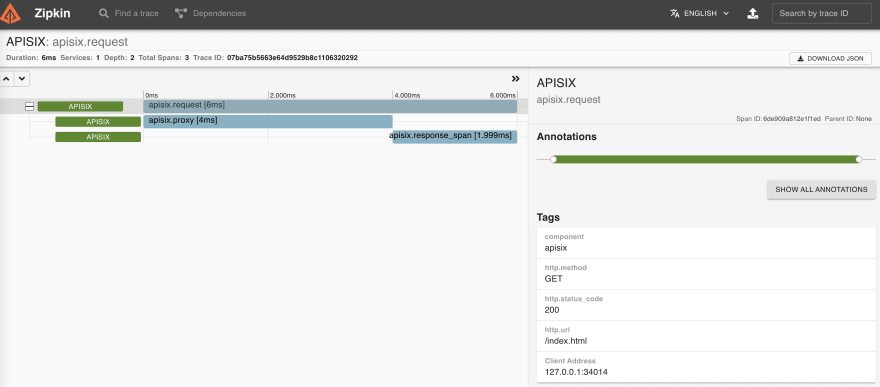
你也可以通过另外两个插件进行链路追踪:


