This is an automated email from the ASF dual-hosted git repository.

guoqi pushed a commit to branch master
in repository https://gitbox.apache.org/repos/asf/apisix-website.git
The following commit(s) were added to refs/heads/master by this push:
new 9ab693b324f blog: Add Authenticate with OpenID Connect and Apache
APISIX post (#1518)
9ab693b324f is described below
commit 9ab693b324f8eec85106d3ba2f46bb0d0696508b
Author: Nicolas Fränkel <[email protected]>
AuthorDate: Wed Jun 14 08:33:09 2023 +0200
blog: Add Authenticate with OpenID Connect and Apache APISIX post (#1518)
---
.../blog/2023/03/09/authenticate-openid-connect.md | 195 +++++++++++++++++++++
1 file changed, 195 insertions(+)
diff --git a/blog/en/blog/2023/03/09/authenticate-openid-connect.md
b/blog/en/blog/2023/03/09/authenticate-openid-connect.md
new file mode 100644
index 00000000000..d31c714842e
--- /dev/null
+++ b/blog/en/blog/2023/03/09/authenticate-openid-connect.md
@@ -0,0 +1,195 @@
+---
+title: Authenticate with OpenID Connect and Apache APISIX
+authors:
+ - name: Nicolas Fränkel
+ title: Author
+ url: https://github.com/nfrankel
+ image_url: https://avatars.githubusercontent.com/u/752258
+keywords:
+ - Authentication
+ - OAuth 2.0
+ - OpenID Connect
+ - Google Cloud
+description: >
+ Lots of companies are eager to provide their identity provider: Twitter,
Facebook, Google, etc. For smaller businesses, not having to manage identities
is a benefit. However, we want to avoid being locked into one provider. In this
post, I want to demo how to use OpenID Connect using Google underneath and then
switch to Azure.
+tags: [Ecosystem]
+image:
https://static.apiseven.com/uploads/2023/06/13/OZebsxXL_eye-gd82fef23c.jpg
+---
+
+>Lots of companies are eager to provide their identity provider: Twitter,
Facebook, Google, etc. For smaller businesses, not having to manage identities
is a benefit. However, we want to avoid being locked into one provider. In this
post, I want to demo how to use OpenID Connect using Google underneath and then
switch to Azure.
+
+<!--truncate-->
+
+<head>
+ <link rel="canonical"
href="https://blog.frankel.ch/authenticate-openid-connect/"; />
+</head>
+
+## OpenID Connect
+
+The idea of an _authorization_ open standard started with
[OAuth](https://en.wikipedia.org/wiki/OAuth) around 2006. Because of a security
issue, OAuth 2.0 superseded the initial version. OAuth 2.0 became an <abbr
title="Internet Engineering Task Force">IETF</abbr> <abbr title="Request For
Comments">RFC</abbr> in 2012:
+
+>The OAuth 2.0 authorization framework enables a third-party
+>application to obtain limited access to an HTTP service, either on
+>behalf of a resource owner by orchestrating an approval interaction
+>between the resource owner and the HTTP service, or by allowing the
+>third-party application to obtain access on its own behalf
+>
+>-- [RFC 7469 - The OAuth 2.0 Authorization
Framework](https://www.rfc-editor.org/rfc/rfc6749)
+
+OAuth focuses mostly on _authorization_;
+the _authentication_ part is pretty light:
+it contains a section about Client Password authentication and one Other
Authentication Methods.
+
+>The authorization server MAY support any suitable HTTP authentication
+>scheme matching its security requirements. When using other
+>authentication methods, the authorization server MUST define a
+>mapping between the client identifier (registration record) and
+>authentication scheme.
+>
+>-- [2.3.2. Other Authentication
Methods](https://www.rfc-editor.org/rfc/rfc6749#section-2.3.2)
+
+OpenID Connect uses OAuth 2.0 and adds the _authentication_ part:
+
+>OpenID Connect 1.0 is a simple identity layer on top of the OAuth 2.0
protocol. It allows Clients to verify the identity of the End-User based on the
authentication performed by an Authorization Server, as well as to obtain basic
profile information about the End-User in an interoperable and REST-like manner.
+>
+>OpenID Connect allows clients of all types, including Web-based, mobile, and
JavaScript clients, to request and receive information about authenticated
sessions and end-users. The specification suite is extensible, allowing
participants to use optional features such as encryption of identity data,
discovery of OpenID Providers, and logout, when it makes sense for them.
+>
+>-- [What is OpenID Connect?](https://openid.net/connect/)
+
+Here are a couple of identity providers that are compatible with OpenID
Connect:
+
+* GitHub
+* Google
+* Microsoft
+* Apple
+* Facebook
+* Twitter
+* Spotify
+
+In the following, we will start with Google and switch to Azure to validate
our setup.
+
+## Setting up OpenID Connect with Apache APISIX
+
+Imagine we have a web app behind Apache APISIX that we want to secure with
OpenID Connect. Here's the corresponding Docker Compose file:
+
+```yaml
+version: "3"
+
+services:
+ apisix:
+ image: apache/apisix:3.1.0-debian #1
+ ports:
+ - "9080:9080"
+ volumes:
+ - ./apisix/config.yml:/usr/local/apisix/conf/config.yaml:ro #2
+ - ./apisix/apisix.yml:/usr/local/apisix/conf/apisix.yaml:ro #3
+ env_file:
+ - .env
+ httpbin:
+ image: kennethreitz/httpbin #4
+```
+
+1. Apache APISIX API Gateway
+2. APISIX configuration - used to configure it statically in the following line
+3. Configure the single route
+4. Webapp to protect. Any will do
+
+Apache APISIX offers a plugin-based architecture. One such plugin is the
[openid-connect](https://apisix.apache.org/docs/apisix/plugins/openid-connect/)
plugin, which allows using OpenID Connect.
+
+Let's configure it:
+
+```yaml
+routes:
+ - uri: /*
#1
+ upstream:
+ nodes:
+ "httpbin:80": 1
#1
+ plugins:
+ openid-connect:
+ client_id: ${{OIDC_CLIENTID}}
#2
+ client_secret: ${{OIDC_SECRET}}
#2
+ discovery: https://${{OIDC_ISSUER}}/.well-known/openid-configuration
#2-3
+ redirect_uri: http://localhost:9080/callback
#4
+ scope: openid
#5
+ session:
+ secret: ${{SESSION_SECRET}}
#6
+#END
+```
+
+1. Catch-all route to the underlying web app
+2. Plugin configuration parameters. Values depend on the exact provider (see
below)
+3. OpenID Connect can use a Discovery endpoint to get all necessary OAuth
endpoints. See [OpenID Connect Discovery 1.0
spec](https://openid.net/specs/openid-connect-discovery-1_0.html#ProviderConfig)
for more information
+4. Where to redirect when the authentication is successful. It mustn't clash
with any of the explicitly defined routes. The plugin creates a dedicated route
there to work its magic.
+5. Default scope
+6. Key to encrypt session data. Put whatever you want.
+
+## Configuring Google for OIDC
+
+Like all Cloud Providers, Google offers a full-fledged Identity Management
solution, which may be daunting for newcomers. In this section, I'll only
detail the necessary steps required to configure it for <abbr title="OpenID
Connect">OIDC</abbr>.
+
+On the [Cloud Console](https://console.cloud.google.com/), create a dedicated
project (or use an existing one).
+
+If you didn't do it already, customize the [OAuth Consent
Screen](https://console.cloud.google.com/apis/credentials/consent).
+
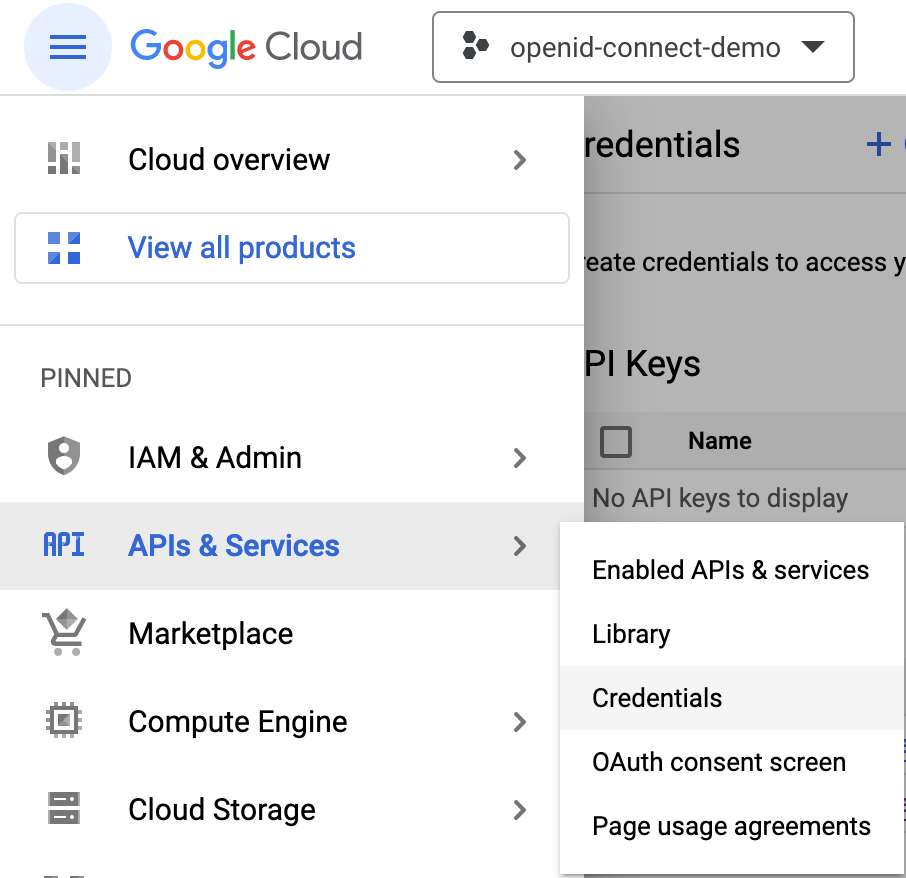
+In the project context, navigate _APIs & Services | Credentials_.
+
+
+
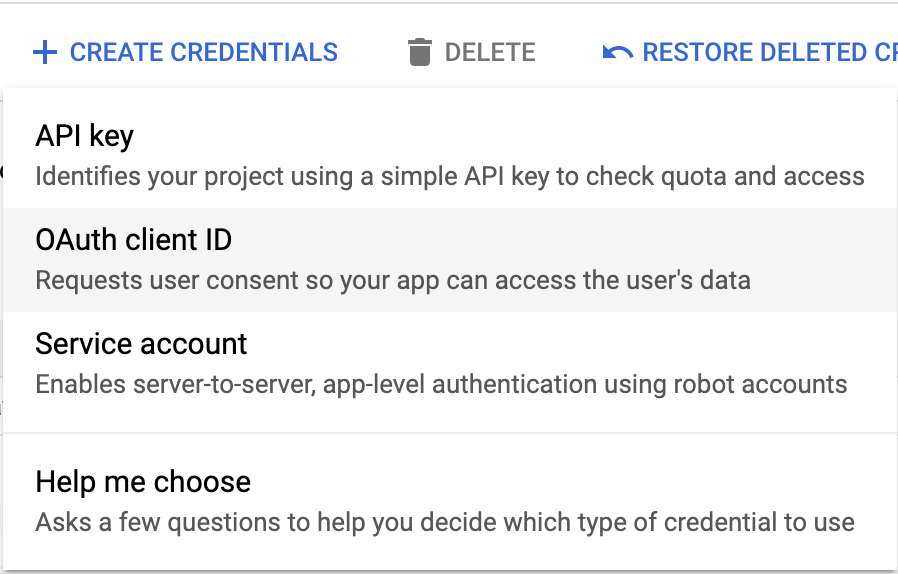
+Then, press the _+ CREATE CREDENTIALS_ button in the upper menu bar.
+
+
+
+Select _OAuth Client Id_ in the scrolling menu.
+
+
+
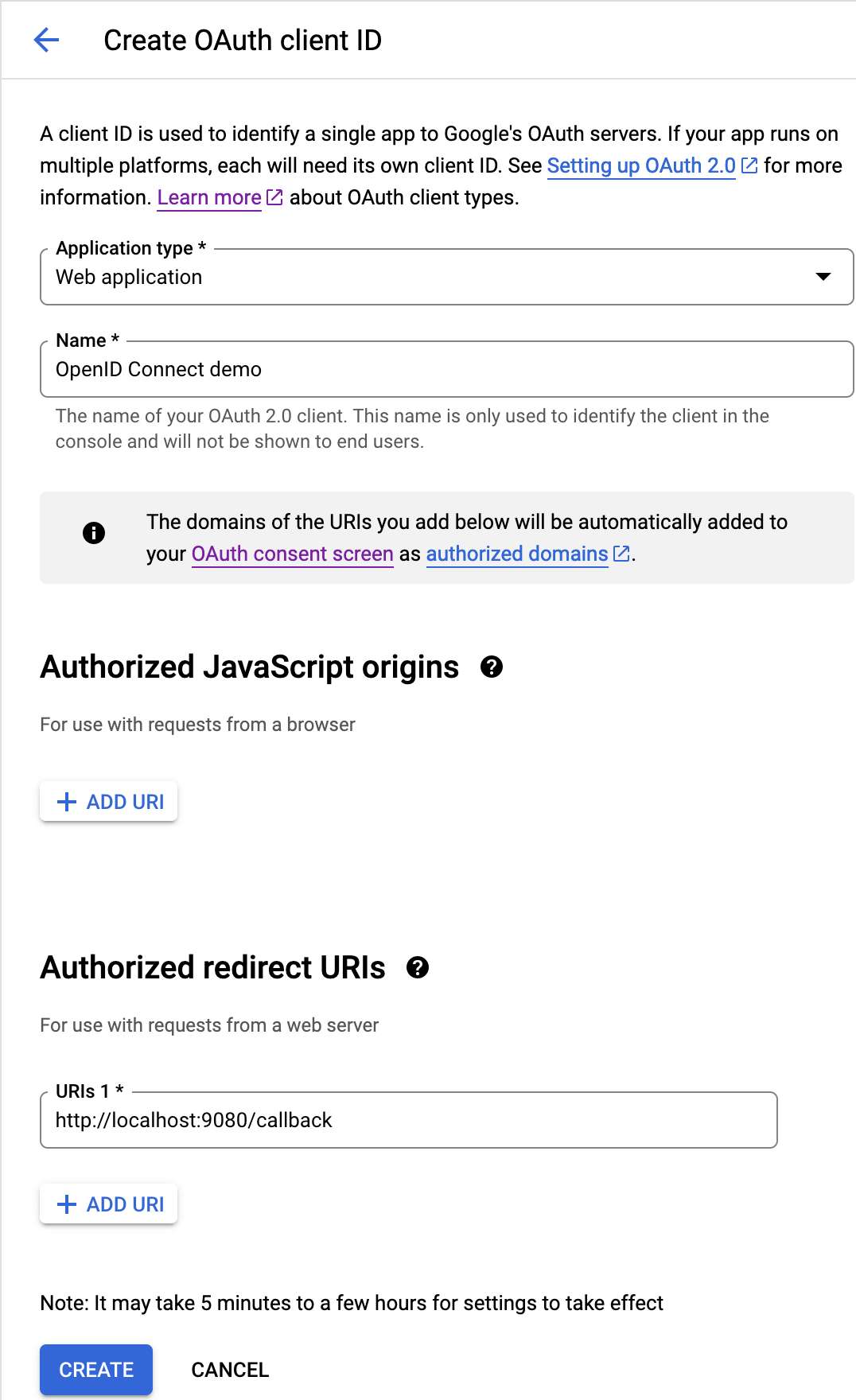
+Fill in the fields:
+
+* Application type: Web application
+* Name: whatever you want
+* Authorized redirect URIs: `<URL>/callback`, _e.g._,
`http://localhost:9080/callback`
+
+
+
+`URL` should be the URL of the web application. Likewise, `/callback` should
match the `openid-connect` plugin configuration above. Note that Google doesn't
allow relative URLs, so if you need to reuse the application in different
environments, you need to add the URL of each environment. Click the _Create_
button.
+
+
+
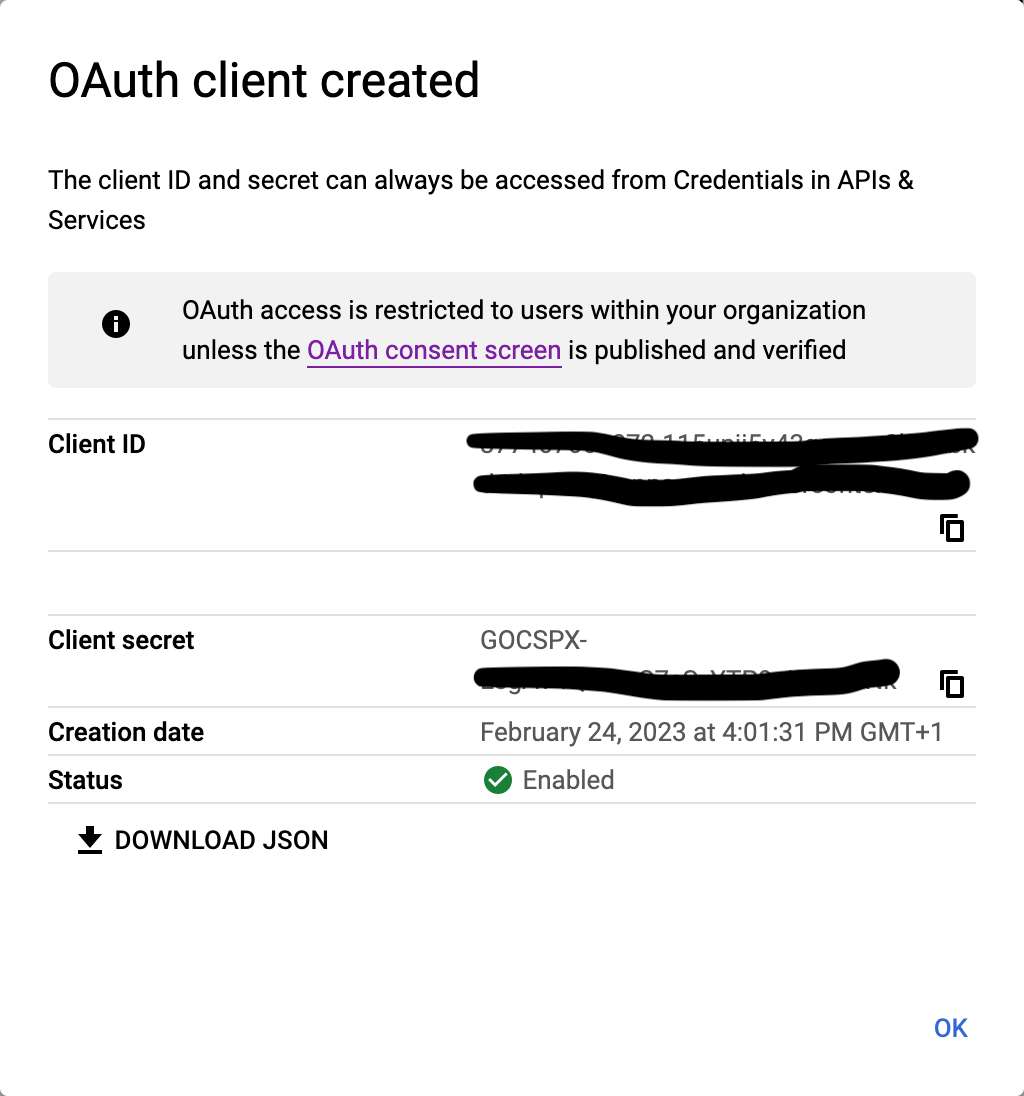
+In the Docker Compose configuration above, use the Client ID and Client Secret
as `OIDC_CLIENTID` and `OIDC_SECRET`. I wrote them down as environment
variables in a `.env` file.
+
+The last missing variable is `OIDC_ISSUER`: it's `accounts.google.com`. If you
navigate to <https://accounts.google.com/.well-known/openid-configuration>,
you'll see all data required by OAuth 2.0 (and more).
+
+At this point, we can start our setup with `docker compose up`. When we
navigate to <http://localhost:9080/>, the browser redirects us to the Google
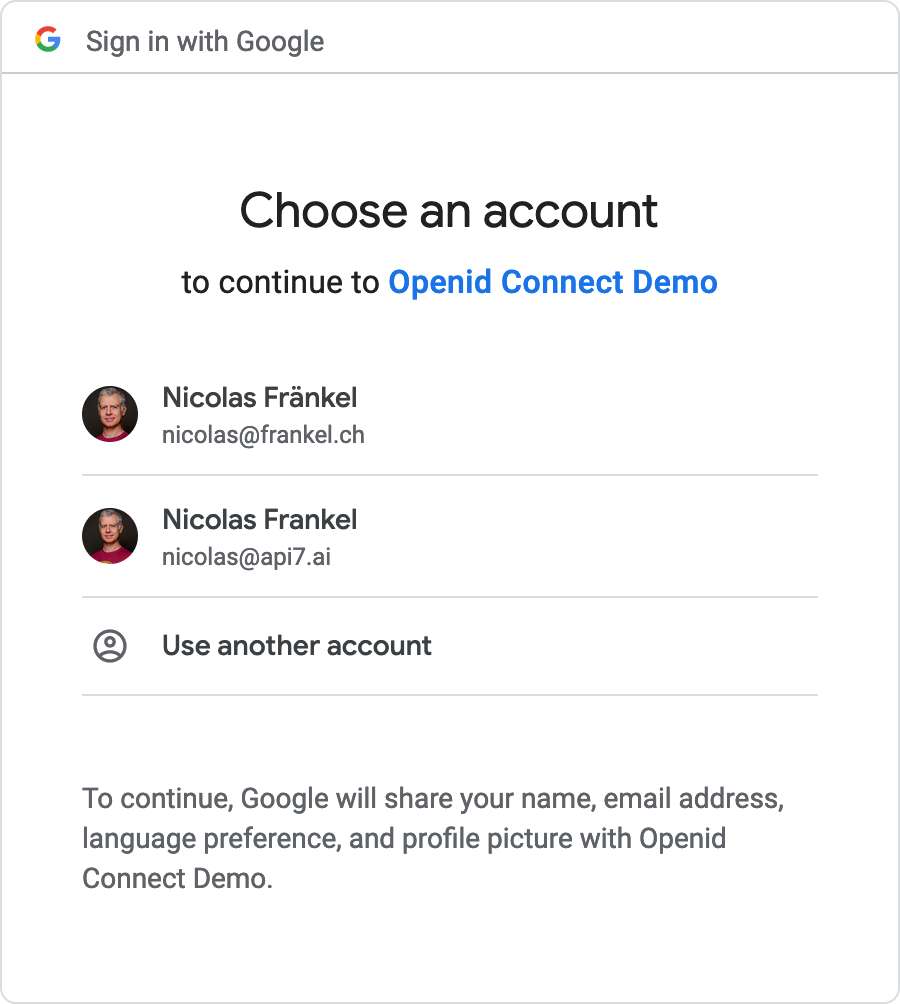
authentication page. Since I'm already authenticated, I can choose my ID - and
I need one bound to the organization of the project I created above.
+
+
+
+Then, I can freely access the resource.
+
+## Configuring Azure for OIDC
+
+My colleague Bobur has already [described
everything](https://dev.to/apisix/api-security-with-oidc-by-using-apache-apisix-and-microsoft-azure-ad-50h3)
you need to do to configure Azure for OIDC.
+
+We only need to change the OIDC parameters:
+
+* `OIDC_CLIENTID`
+* `OIDC_SECRET`
+* `OIDC_ISSUER`: on Azure, it should look something like
`login.microsoftonline.com/<TENANT_ID>/v2.0`
+
+If you restart Docker Compose with the new parameters, the root page is now
protected by Azure login.
+
+## Conclusion
+
+Externalizing your authentication process to a third party may be sensible,
but you want to avoid binding your infrastructure to its proprietary process.
OpenID Connect is an industry standard that allows switching providers easily.
+
+Apache APISIX offers a plugin that integrates OIDC so that you can protect
your applications with the latter. There's no reason not to use it, as all
dedicated identity providers, such as Okta and Keycloak, are OIDC-compatible.
+
+The complete source code for this post can be found on
[GitHub](https://github.com/ajavageek/openid-authentication).
+
+**To go further:**
+
+* [OpenID Connect](https://openid.net/connect/)
+* [OpenID Connect Discovery 1.0
specification](https://openid.net/specs/openid-connect-discovery-1_0.html)
+* [Apache APISIX OIDC
plugin](https://apisix.apache.org/docs/apisix/plugins/openid-connect/)
+* [API Security with OIDC by using Apache APISIX and Microsoft Azure
AD](https://dev.to/apisix/api-security-with-oidc-by-using-apache-apisix-and-microsoft-azure-ad-50h3)
+* [Use Keycloak with API Gateway to secure
APIs](https://apisix.apache.org/blog/2022/07/06/use-keycloak-with-api-gateway-to-secure-apis/)
+* [How to Use Apache APISIX Auth With
Okta](https://api7.ai/blog/how-to-use-apisix-auth-with-okta)