This is an automated email from the ASF dual-hosted git repository.

guoqi pushed a commit to branch master
in repository https://gitbox.apache.org/repos/asf/apisix-website.git
The following commit(s) were added to refs/heads/master by this push:
new 3f234d0bfe5 blog: APISIX MQTT proxy (#1623)
3f234d0bfe5 is described below
commit 3f234d0bfe52d81a72ff98b401d7bb57e631c565
Author: Navendu Pottekkat <[email protected]>
AuthorDate: Thu Jul 6 07:05:02 2023 +0530
blog: APISIX MQTT proxy (#1623)
---
blog/en/blog/2023/06/30/apisix-mqtt-proxy.md | 213 +++++++++++++++++++++++++++
1 file changed, 213 insertions(+)
diff --git a/blog/en/blog/2023/06/30/apisix-mqtt-proxy.md
b/blog/en/blog/2023/06/30/apisix-mqtt-proxy.md
new file mode 100644
index 00000000000..e86cd92d19e
--- /dev/null
+++ b/blog/en/blog/2023/06/30/apisix-mqtt-proxy.md
@@ -0,0 +1,213 @@
+---
+title: Connecting IoT Devices to the Cloud with APISIX MQTT Proxy
+authors:
+ - name: Navendu Pottekkat
+ title: Author
+ url: https://github.com/navendu-pottekkat
+ image_url: https://avatars.githubusercontent.com/u/49474499
+keywords:
+ - IoT
+ - MQTT
+ - Cloud
+ - TLS
+description: A guide to using Apache APISIX as an MQTT proxy to connect IoT
devices to the cloud.
+tags: [Plugins]
+image:
https://static.apiseven.com/uploads/2023/06/23/kdd9TigM_mqtt-apisix-cover.png
+---
+
+> APISIX's support for [stream
routes](https://apisix.apache.org/docs/apisix/stream-proxy/) and, in extension,
the MQTT protocol is often overlooked. Let's change this by looking at an
end-to-end example of how APISIX can act as an MQTT proxy.
+
+<!--truncate-->
+
+<head>
+ <link rel="canonical" href="https://navendu.me/posts/iot-to-cloud/"; />
+</head>
+
+People typically use the [MQTT protocol](https://mqtt.org/) when transferring
data from IoT devices because of its low overhead and ease of implementation.
+
+MQTT was created for sending small chunks of data over unreliable networks and
uses a binary format rather than the typical text-based format used in
protocols like HTTP or SMTP. With [client
libraries](https://mqtt.org/software/) in multiple programming languages, you
are unlikely to have to implement the protocol on your own but use an existing
library.
+
+As your IoT devices move to the cloud, you face a different challenge of
managing multiple protocols seamlessly. Questions arise like "How can I use a
single entry point for all my traffic?", "How do I decouple my IoT and cloud
infrastructure with little overhead?", and "How can I do all this securely?"
+
+This article attempts to answer these questions using Apache APISIX, which
supports HTTP and MQTT protocols, to proxy requests between your devices,
message brokers, and the cloud.
+
+## Why an MQTT Proxy?
+
+[APISIX](https://apisix.apache.org/) is primarily used as an API gateway for
routing HTTP traffic.
+
+As an IoT developer recently pointed out, APISIX's support for [stream
routes](https://apisix.apache.org/docs/apisix/stream-proxy/) and, in extension,
the MQTT protocol is often overlooked. Let's change this by looking at an
end-to-end example of how APISIX can act as an MQTT proxy.
+
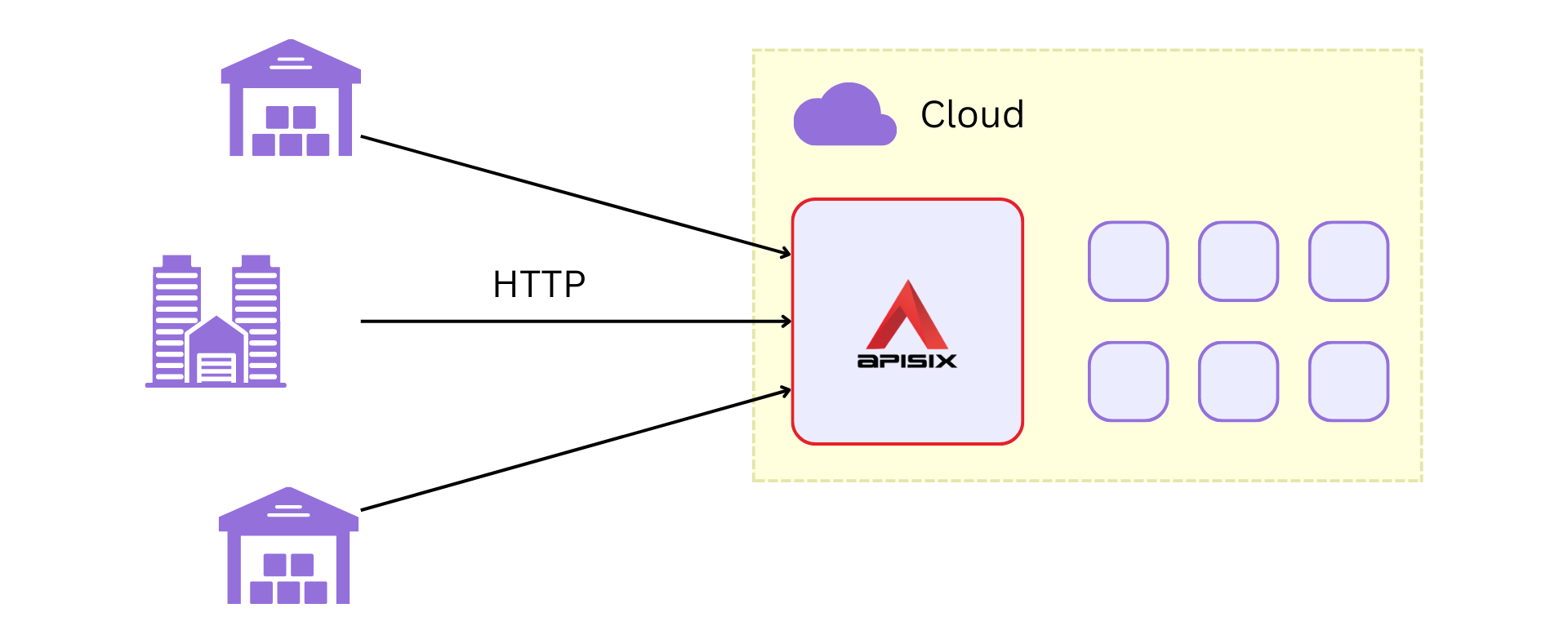
+In this example, you own two warehouses and an office. Data from your
warehouses and the office are sent to the storage, monitoring, and analytics
services deployed in your cloud through APISIX over HTTP. We will refer to this
as "the system."
+
+
+
+_Apache APISIX will route all requests from your warehouses and office to
appropriate services in your cloud backend._
+
+You now decide to add two IoT devices to improve the efficiency of the system:
+
+1. A flow meter to measure the flow rate of water in your warehouses.
+2. A light sensor to measure the illuminance in your office and warehouses.
+
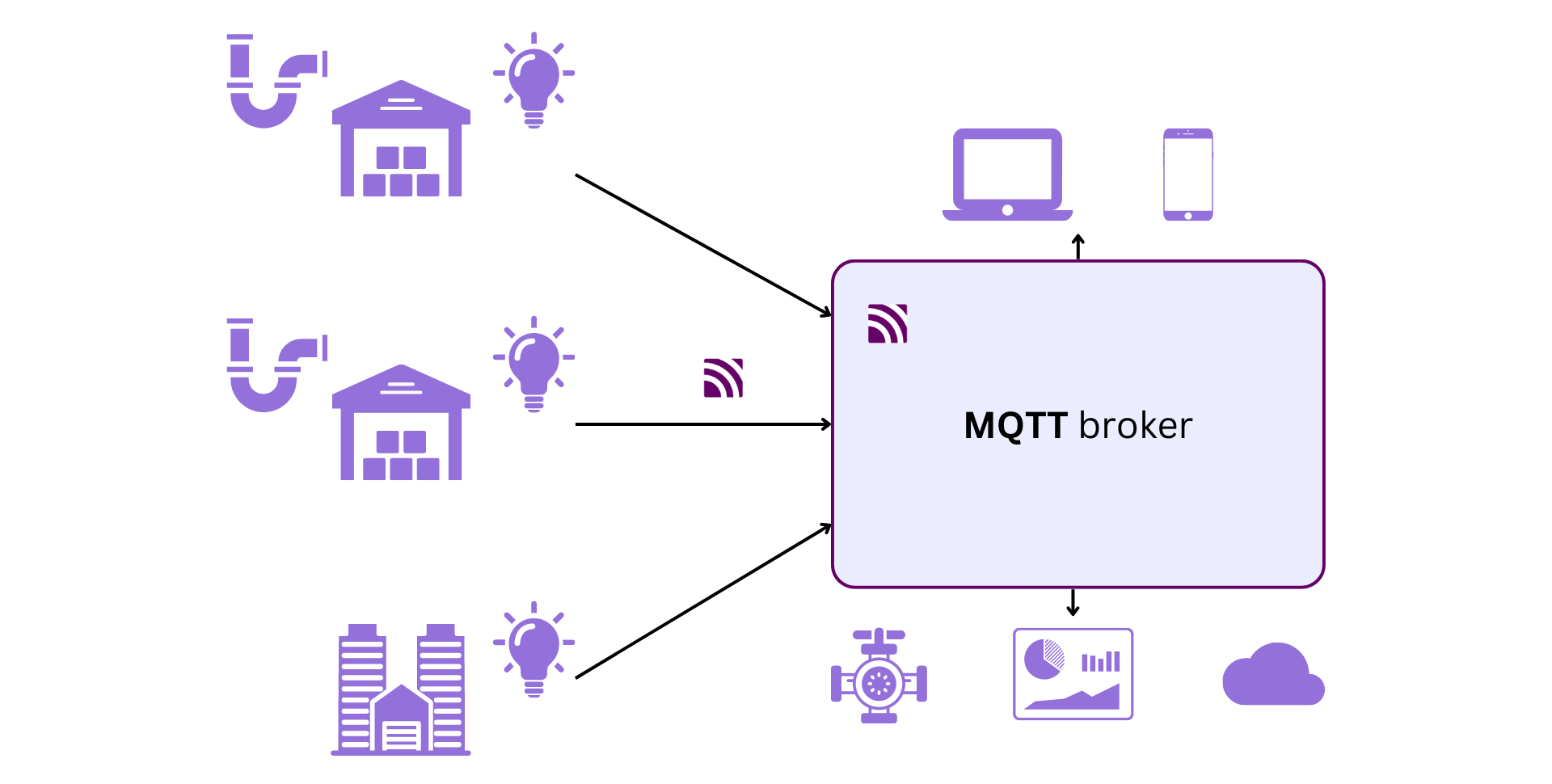
+These devices are small, energy-efficient, and support the MQTT protocol. The
measurements from the flow meter are used by an automatic valve to control the
water flow rate, and the light sensor is used to maintain optimal lighting.
+
+
+
+_Here, the devices will send messages directly to your MQTT broker. Multiple
clients including phones, PCs, valves, and your cloud services are subscribed
to the broker._
+
+As shown above, you can deploy this system independently from your cloud
infrastructure. But the toll of maintaining separate infrastructures for your
IoT devices and cloud can also be pretty high both in terms of cost and effort.
+
+However, combining the two systems is not a trivial task. You must work with
multiple protocols but use a single entry point to reduce infrastructure costs
and maintenance overhead. This is where being pragmatic and using APISIX pays
you off.
+
+## A Unified Entry Point
+
+Apache APISIX supports MQTT and HTTP protocols and can work as a proxy between
your IoT devices and the cloud. APISIX supports this through the
[mqtt-proxy](https://apisix.apache.org/docs/apisix/plugins/mqtt-proxy/) plugin,
which allows it to load balance and route MQTT messages between brokers.
+
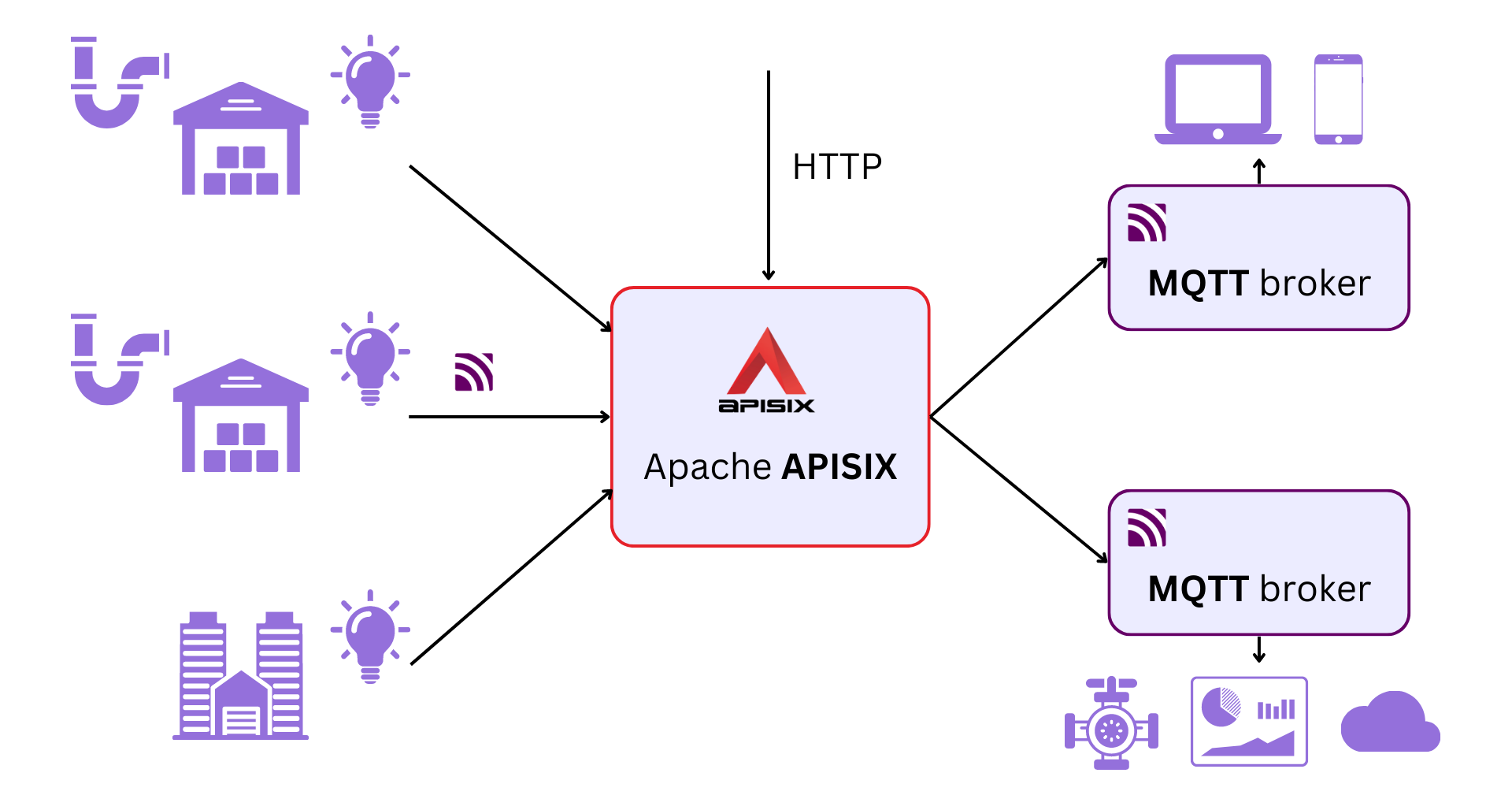
+With the APISIX MQTT proxy, your system can look something like this:
+
+
+
+_Now in addition to your HTTP traffic, APISIX also manages your MQTT traffic
and can route it between your message brokers._
+
+APISIX will do all the heavy lifting and process both HTTP and MQTT requests,
removing any additional overhead from your cloud or IoT devices.
+
+Routing MQTT messages is useful when you want to use multiple brokers. The
`mqtt-proxy` plugin routes the messages based on its `clientId` using a
consistent hashing algorithm. This allows you to send messages from different
clients to different brokers dynamically. For example, you can send messages
from the flow meters and light sensors to different brokers.
+
+In practice, you can configure this in the `mqtt-proxy` plugin. The example
below shows the configuration in [standalone
mode](https://apisix.apache.org/docs/apisix/deployment-modes/#standalone):
+
+```yaml title="config.yaml"
+apisix:
+ enable_admin: false
+ stream_proxy:
+ only: false # allow HTTP as well
+ tcp:
+ - addr: 9000
+ tls: false
+deployment:
+ role: data_plane # deploy APISIX in standalone mode as a data plane
+ role_data_plane:
+ config_provider: yaml
+stream_plugins:
+ - mqtt-proxy # enable the mqtt-proxy plugin
+#END
+```
+
+```yaml title="apisix.yaml"
+stream_routes:
+ - id: 1
+ upstream_id: 1
+ plugins:
+ mqtt-proxy:
+ protocol_name: "MQTT"
+ protocol_level: 5 # use MQTT 5.0
+upstreams:
+ # configure multiple brokers
+ - nodes:
+ "host.docker.internal:1883": 1
+ "host.docker.internal:1884": 1
+ type: chash
+ key: mqtt_client_id
+ id: 1
+#END
+```
+
+You can also use the [Admin
API](https://apisix.apache.org/docs/apisix/admin-api/) to configure this on the
fly:
+
+```shell
+curl http://127.0.0.1:9180/apisix/admin/stream_routes/1 -H 'X-API-KEY:
edd1c9f034335f136f87ad84b625c8f1' -X PUT -d '
+{
+ "plugins": {
+ "mqtt-proxy": {
+ "protocol_name": "MQTT",
+ "protocol_level": 5
+ }
+ },
+ "upstream": {
+ "type": "chash",
+ "key": "mqtt_client_id",
+ "nodes": [
+ {
+ "host": "host.docker.internal",
+ "port": 1883,
+ "weight": 1
+ },
+ {
+ "host": "host.docker.internal",
+ "port": 1884,
+ "weight": 1
+ }
+ ]
+ }
+}'
+```
+
+## Decoupling from the Cloud
+
+Using multiple message brokers is a straightforward way to separate the cloud
from your IoT devices while keeping them connected.
+
+In our example, you can deploy a broker locally with the IoT devices and use a
different broker for the cloud. APISIX will be able to route traffic between
the two as shown below:
+
+
+
+_The broker in the local network will communicate with the valve and rest of
the clients in the local network. APISIX will route the required messages to
the broker deployed in your cloud which different clients in the cloud can
subscribe to._
+
+Decoupling has its benefits. Now APISIX can handle the communication with the
cloud, and your devices can communicate with APISIX instead of directly with
the cloud.
+
+## TLS All the Way!
+
+Another critical requirement for any communication system is security.
+
+With APISIX as the MQTT proxy, security would mean securing the IoT
device-to-APISIX and APISIX-to-cloud channels. The diagram below illustrates
how APISIX achieves this through TLS authentication:
+
+
+
+_APISIX can secure the client-to-APISIX and APISIX-to-broker communication._
+
+In practice, we can update our configuration files to enable mutual TLS for
the route (IoT-to-APISIX) and the upstream (APISIX-to-cloud):
+
+```yaml {title="config.yaml"}
+apisix:
+ enable_admin: false
+ stream_proxy:
+ only: false # allow HTTP as well
+ tcp:
+ - addr: 9000
+ tls: true # enable TLS authentication
+deployment:
+ role: data_plane # deploy APISIX in standalone mode as a data plane
+ role_data_plane:
+ config_provider: yaml
+stream_plugins:
+ - mqtt-proxy # enable the mqtt-proxy plugin
+#END
+```
+
+```yaml {title="apisix.yaml"}
+stream_routes:
+ - id: 1
+ upstream_id: 1
+ sni: mqtt.navendu.me
+ plugins:
+ mqtt-proxy:
+ protocol_name: "MQTT"
+ protocol_level: 5 # use MQTT 5.0
+upstreams:
+ # configure multiple brokers
+ - nodes:
+ "host.docker.internal:1883": 1
+ "host.docker.internal:1884": 1
+ scheme: tls # enable TLS on upstream
+ type: chash
+ key: mqtt_client_id
+ id: 1
+#END
+```
+
+For a complete guide on configuring TLS, [refer to the
documentation](https://apisix.apache.org/docs/apisix/next/stream-proxy/#accept-tls-over-tcp-connection).
+
+## Improving the MQTT Proxy
+
+One of the key features of Apache APISIX is that it is [entirely open
source](https://github.com/apache/apisix) and
[extensible](https://apisix.apache.org/plugins/). You can add more features
like MQTT transcoding to the [MQTT
plugin](https://github.com/apache/apisix/blob/master/apisix/stream/plugins/mqtt-proxy.lua)
or [create new plugins](https://apisix.apache.org/docs/apisix/plugin-develop/)
for your specific MQTT proxy.
+
+We are seeing more users using APISIX for its MQTT support, which is bound to
increase further as MQTT becomes the default protocol for communication between
IoT devices.
+
+_A special thank you to [Alfonso González](https://github.com/alfonsogonz) for
his input and review. Alfonso and his team use APISIX's MQTT proxy features in
production._