This is an automated email from the ASF dual-hosted git repository.

monkeydluffy pushed a commit to branch master
in repository https://gitbox.apache.org/repos/asf/apisix.git
The following commit(s) were added to refs/heads/master by this push:
new 146751408 docs: update disable plugin section in plugin docs (#9894)
146751408 is described below
commit 1467514082b17d12d00566681cbbe95e27b198bb
Author: Traky Deng <[email protected]>
AuthorDate: Wed Jul 26 10:34:51 2023 +0800
docs: update disable plugin section in plugin docs (#9894)
---
docs/en/latest/plugins/api-breaker.md | 4 ++--
docs/en/latest/plugins/authz-casbin.md | 4 ++--
docs/en/latest/plugins/authz-casdoor.md | 4 ++--
docs/en/latest/plugins/authz-keycloak.md | 4 ++--
docs/en/latest/plugins/aws-lambda.md | 4 ++--
docs/en/latest/plugins/azure-functions.md | 4 ++--
docs/en/latest/plugins/basic-auth.md | 4 ++--
docs/en/latest/plugins/batch-requests.md | 2 +-
docs/en/latest/plugins/body-transformer.md | 4 ++--
docs/en/latest/plugins/cas-auth.md | 4 ++--
docs/en/latest/plugins/clickhouse-logger.md | 4 ++--
docs/en/latest/plugins/client-control.md | 4 ++--
docs/en/latest/plugins/consumer-restriction.md | 4 ++--
docs/en/latest/plugins/cors.md | 4 ++--
docs/en/latest/plugins/csrf.md | 4 ++--
docs/en/latest/plugins/datadog.md | 4 ++--
docs/en/latest/plugins/degraphql.md | 4 ++--
docs/en/latest/plugins/dubbo-proxy.md | 4 ++--
docs/en/latest/plugins/echo.md | 4 ++--
docs/en/latest/plugins/elasticsearch-logger.md | 4 ++--
docs/en/latest/plugins/error-log-logger.md | 4 ++--
docs/en/latest/plugins/ext-plugin-post-resp.md | 4 ++--
docs/en/latest/plugins/ext-plugin-pre-req.md | 4 ++--
docs/en/latest/plugins/fault-injection.md | 4 ++--
docs/en/latest/plugins/file-logger.md | 4 ++--
docs/en/latest/plugins/forward-auth.md | 4 ++--
docs/en/latest/plugins/google-cloud-logging.md | 4 ++--
docs/en/latest/plugins/grpc-transcode.md | 4 ++--
docs/en/latest/plugins/grpc-web.md | 4 ++--
docs/en/latest/plugins/gzip.md | 4 ++--
docs/en/latest/plugins/hmac-auth.md | 4 ++--
docs/en/latest/plugins/http-logger.md | 2 +-
docs/en/latest/plugins/inspect.md | 2 +-
docs/en/latest/plugins/ip-restriction.md | 4 ++--
docs/en/latest/plugins/jwt-auth.md | 4 ++--
docs/en/latest/plugins/kafka-logger.md | 4 ++--
docs/en/latest/plugins/kafka-proxy.md | 4 ++--
docs/en/latest/plugins/key-auth.md | 4 ++--
docs/en/latest/plugins/ldap-auth.md | 4 ++--
docs/en/latest/plugins/limit-conn.md | 4 ++--
docs/en/latest/plugins/limit-count.md | 4 ++--
docs/en/latest/plugins/limit-req.md | 4 ++--
docs/en/latest/plugins/log-rotate.md | 2 +-
docs/en/latest/plugins/loggly.md | 4 ++--
docs/en/latest/plugins/mocking.md | 4 ++--
docs/en/latest/plugins/mqtt-proxy.md | 4 ++--
docs/en/latest/plugins/node-status.md | 2 +-
docs/en/latest/plugins/opa.md | 4 ++--
docs/en/latest/plugins/openfunction.md | 4 ++--
docs/en/latest/plugins/opentelemetry.md | 4 ++--
docs/en/latest/plugins/openwhisk.md | 4 ++--
docs/en/latest/plugins/prometheus.md | 4 ++--
docs/en/latest/plugins/proxy-cache.md | 4 ++--
docs/en/latest/plugins/proxy-control.md | 4 ++--
docs/en/latest/plugins/proxy-mirror.md | 4 ++--
docs/en/latest/plugins/proxy-rewrite.md | 4 ++--
docs/en/latest/plugins/public-api.md | 4 ++--
docs/en/latest/plugins/real-ip.md | 4 ++--
docs/en/latest/plugins/redirect.md | 4 ++--
docs/en/latest/plugins/referer-restriction.md | 4 ++--
docs/en/latest/plugins/request-id.md | 4 ++--
docs/en/latest/plugins/request-validation.md | 4 ++--
docs/en/latest/plugins/response-rewrite.md | 4 ++--
docs/en/latest/plugins/rocketmq-logger.md | 4 ++--
docs/en/latest/plugins/server-info.md | 4 ++--
docs/en/latest/plugins/serverless.md | 4 ++--
docs/en/latest/plugins/skywalking-logger.md | 4 ++--
docs/en/latest/plugins/skywalking.md | 4 ++--
docs/en/latest/plugins/sls-logger.md | 4 ++--
docs/en/latest/plugins/splunk-hec-logging.md | 4 ++--
docs/en/latest/plugins/syslog.md | 4 ++--
docs/en/latest/plugins/tcp-logger.md | 4 ++--
docs/en/latest/plugins/tencent-cloud-cls.md | 2 +-
docs/en/latest/plugins/traffic-split.md | 4 ++--
docs/en/latest/plugins/ua-restriction.md | 4 ++--
docs/en/latest/plugins/udp-logger.md | 4 ++--
docs/en/latest/plugins/uri-blocker.md | 4 ++--
docs/en/latest/plugins/wolf-rbac.md | 4 ++--
docs/en/latest/plugins/workflow.md | 4 ++--
docs/en/latest/plugins/zipkin.md | 4 ++--
docs/zh/latest/plugins/api-breaker.md | 2 +-
docs/zh/latest/plugins/authz-casbin.md | 2 +-
docs/zh/latest/plugins/authz-casdoor.md | 2 +-
docs/zh/latest/plugins/authz-keycloak.md | 2 +-
docs/zh/latest/plugins/aws-lambda.md | 4 ++--
docs/zh/latest/plugins/azure-functions.md | 4 ++--
docs/zh/latest/plugins/basic-auth.md | 2 +-
docs/zh/latest/plugins/batch-requests.md | 2 +-
docs/zh/latest/plugins/clickhouse-logger.md | 4 ++--
docs/zh/latest/plugins/client-control.md | 4 ++--
docs/zh/latest/plugins/consumer-restriction.md | 4 ++--
docs/zh/latest/plugins/cors.md | 2 +-
docs/zh/latest/plugins/csrf.md | 4 ++--
docs/zh/latest/plugins/datadog.md | 2 +-
docs/zh/latest/plugins/dubbo-proxy.md | 2 +-
docs/zh/latest/plugins/echo.md | 2 +-
docs/zh/latest/plugins/elasticsearch-logger.md | 6 +++---
docs/zh/latest/plugins/error-log-logger.md | 2 +-
docs/zh/latest/plugins/ext-plugin-post-resp.md | 2 +-
docs/zh/latest/plugins/ext-plugin-pre-req.md | 2 +-
docs/zh/latest/plugins/fault-injection.md | 2 +-
docs/zh/latest/plugins/file-logger.md | 4 ++--
docs/zh/latest/plugins/forward-auth.md | 2 +-
docs/zh/latest/plugins/gm.md | 2 +-
docs/zh/latest/plugins/google-cloud-logging.md | 4 ++--
docs/zh/latest/plugins/grpc-transcode.md | 2 +-
docs/zh/latest/plugins/grpc-web.md | 2 +-
docs/zh/latest/plugins/gzip.md | 2 +-
docs/zh/latest/plugins/hmac-auth.md | 4 ++--
docs/zh/latest/plugins/http-logger.md | 4 ++--
docs/zh/latest/plugins/ip-restriction.md | 2 +-
docs/zh/latest/plugins/jwt-auth.md | 2 +-
docs/zh/latest/plugins/kafka-logger.md | 4 ++--
docs/zh/latest/plugins/key-auth.md | 2 +-
docs/zh/latest/plugins/ldap-auth.md | 2 +-
docs/zh/latest/plugins/limit-conn.md | 4 ++--
docs/zh/latest/plugins/limit-count.md | 4 ++--
docs/zh/latest/plugins/limit-req.md | 4 ++--
docs/zh/latest/plugins/log-rotate.md | 2 +-
docs/zh/latest/plugins/loggly.md | 4 ++--
docs/zh/latest/plugins/mocking.md | 2 +-
docs/zh/latest/plugins/mqtt-proxy.md | 4 ++--
docs/zh/latest/plugins/node-status.md | 2 +-
docs/zh/latest/plugins/opa.md | 2 +-
docs/zh/latest/plugins/openfunction.md | 2 +-
docs/zh/latest/plugins/opentelemetry.md | 2 +-
docs/zh/latest/plugins/openwhisk.md | 4 ++--
docs/zh/latest/plugins/prometheus.md | 2 +-
docs/zh/latest/plugins/proxy-cache.md | 4 ++--
docs/zh/latest/plugins/proxy-control.md | 4 ++--
docs/zh/latest/plugins/proxy-mirror.md | 4 ++--
docs/zh/latest/plugins/proxy-rewrite.md | 2 +-
docs/zh/latest/plugins/public-api.md | 4 ++--
docs/zh/latest/plugins/real-ip.md | 2 +-
docs/zh/latest/plugins/redirect.md | 2 +-
docs/zh/latest/plugins/referer-restriction.md | 4 ++--
docs/zh/latest/plugins/request-id.md | 4 ++--
docs/zh/latest/plugins/request-validation.md | 4 ++--
docs/zh/latest/plugins/response-rewrite.md | 2 +-
docs/zh/latest/plugins/rocketmq-logger.md | 4 ++--
docs/zh/latest/plugins/server-info.md | 2 +-
docs/zh/latest/plugins/serverless.md | 4 ++--
docs/zh/latest/plugins/skywalking-logger.md | 4 ++--
docs/zh/latest/plugins/skywalking.md | 2 +-
docs/zh/latest/plugins/sls-logger.md | 2 +-
docs/zh/latest/plugins/splunk-hec-logging.md | 4 ++--
docs/zh/latest/plugins/syslog.md | 4 ++--
docs/zh/latest/plugins/tcp-logger.md | 4 ++--
docs/zh/latest/plugins/tencent-cloud-cls.md | 4 ++--
docs/zh/latest/plugins/traffic-split.md | 4 ++--
docs/zh/latest/plugins/ua-restriction.md | 2 +-
docs/zh/latest/plugins/udp-logger.md | 4 ++--
docs/zh/latest/plugins/uri-blocker.md | 2 +-
docs/zh/latest/plugins/wolf-rbac.md | 2 +-
docs/zh/latest/plugins/workflow.md | 2 +-
docs/zh/latest/plugins/zipkin.md | 2 +-
156 files changed, 265 insertions(+), 265 deletions(-)
diff --git a/docs/en/latest/plugins/api-breaker.md
b/docs/en/latest/plugins/api-breaker.md
index 3393b39c2..64b80c976 100644
--- a/docs/en/latest/plugins/api-breaker.md
+++ b/docs/en/latest/plugins/api-breaker.md
@@ -108,9 +108,9 @@ HTTP/1.1 502 Bad Gateway
</html>
```
-## Disable Plugin
+## Delete Plugin
-To disable the `api-breaker` Plugin, you can delete the corresponding JSON
configuration from the Plugin configuration. APISIX will automatically reload
and you do not have to restart for this to take effect.
+To remove the `api-breaker` Plugin, you can delete the corresponding JSON
configuration from the Plugin configuration. APISIX will automatically reload
and you do not have to restart for this to take effect.
```shell
curl http://127.0.0.1:9180/apisix/admin/routes/1 \
diff --git a/docs/en/latest/plugins/authz-casbin.md
b/docs/en/latest/plugins/authz-casbin.md
index 3a70cf175..b405cb4dd 100644
--- a/docs/en/latest/plugins/authz-casbin.md
+++ b/docs/en/latest/plugins/authz-casbin.md
@@ -234,9 +234,9 @@ And only users with admin privileges can access the
endpoints:
curl -i http://127.0.0.1:9080/res -H 'user: alice' -X GET
```
-## Disable Plugin
+## Delete Plugin
-To disable the `authz-casbin` Plugin, you can delete the corresponding JSON
configuration from the Plugin configuration. APISIX will automatically reload
and you do not have to restart for this to take effect.
+To remove the `authz-casbin` Plugin, you can delete the corresponding JSON
configuration from the Plugin configuration. APISIX will automatically reload
and you do not have to restart for this to take effect.
```shell
curl http://127.0.0.1:9180/apisix/admin/routes/1 -H 'X-API-KEY:
edd1c9f034335f136f87ad84b625c8f1' -X PUT -d '
diff --git a/docs/en/latest/plugins/authz-casdoor.md
b/docs/en/latest/plugins/authz-casdoor.md
index 63d6ca873..7a8985212 100644
--- a/docs/en/latest/plugins/authz-casdoor.md
+++ b/docs/en/latest/plugins/authz-casdoor.md
@@ -89,9 +89,9 @@ After successfully logging in, Casdoor will redirect this
user to the `callback_
Once this is done, the user is redirected to the original URL they wanted to
visit.
-## Disable Plugin
+## Delete Plugin
-To disable the `authz-casdoor` Plugin, you can delete the corresponding JSON
configuration from the Plugin configuration. APISIX will automatically reload
and you do not have to restart for this to take effect.
+To remove the `authz-casdoor` Plugin, you can delete the corresponding JSON
configuration from the Plugin configuration. APISIX will automatically reload
and you do not have to restart for this to take effect.
```shell
curl http://127.0.0.1:9180/apisix/admin/routes/1 -H 'X-API-KEY:
edd1c9f034335f136f87ad84b625c8f1' -X PUT -d '
diff --git a/docs/en/latest/plugins/authz-keycloak.md
b/docs/en/latest/plugins/authz-keycloak.md
index 2b7ac39da..d656e7095 100644
--- a/docs/en/latest/plugins/authz-keycloak.md
+++ b/docs/en/latest/plugins/authz-keycloak.md
@@ -200,9 +200,9 @@ The image below shows how the policies are configured in
the Keycloak server:
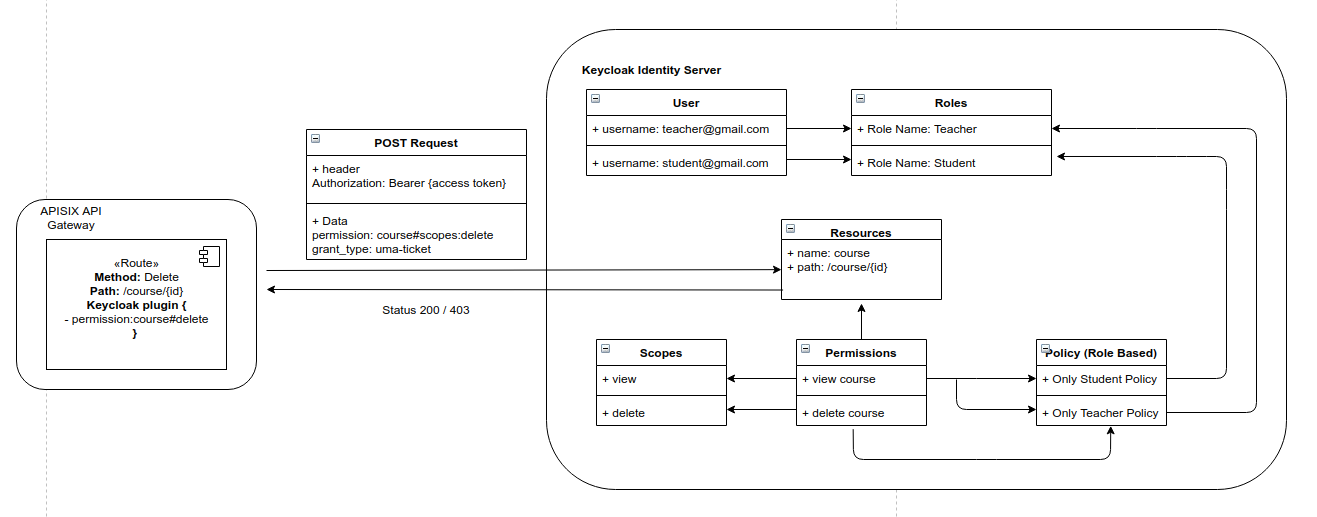
-## Disable Plugin
+## Delete Plugin
-To disable the `authz-keycloak` Plugin, you can delete the corresponding JSON
configuration from the Plugin configuration. APISIX will automatically reload
and you do not have to restart for this to take effect.
+To remove the `authz-keycloak` Plugin, you can delete the corresponding JSON
configuration from the Plugin configuration. APISIX will automatically reload
and you do not have to restart for this to take effect.
```shell
curl http://127.0.0.1:9180/apisix/admin/routes/5 -H 'X-API-KEY:
edd1c9f034335f136f87ad84b625c8f1' -X PUT -d '
diff --git a/docs/en/latest/plugins/aws-lambda.md
b/docs/en/latest/plugins/aws-lambda.md
index 268f0abc1..0281c8e31 100644
--- a/docs/en/latest/plugins/aws-lambda.md
+++ b/docs/en/latest/plugins/aws-lambda.md
@@ -194,9 +194,9 @@ Server: APISIX/2.11.0
"Hello, APISIX!"
```
-## Disable Plugin
+## Delete Plugin
-To disable the `aws-lambda` Plugin, you can delete the corresponding JSON
configuration from the Plugin configuration. APISIX will automatically reload
and you do not have to restart for this to take effect.
+To remove the `aws-lambda` Plugin, you can delete the corresponding JSON
configuration from the Plugin configuration. APISIX will automatically reload
and you do not have to restart for this to take effect.
```shell
curl http://127.0.0.1:9180/apisix/admin/routes/1 -H 'X-API-KEY:
edd1c9f034335f136f87ad84b625c8f1' -X PUT -d '
diff --git a/docs/en/latest/plugins/azure-functions.md
b/docs/en/latest/plugins/azure-functions.md
index 350f630e1..22f531ba0 100644
--- a/docs/en/latest/plugins/azure-functions.md
+++ b/docs/en/latest/plugins/azure-functions.md
@@ -171,9 +171,9 @@ Server: APISIX/2.11.0
Hello, APISIX
```
-## Disable Plugin
+## Delete Plugin
-To disable the `azure-functions` Plugin, you can delete the corresponding JSON
configuration from the Plugin configuration. APISIX will automatically reload
and you do not have to restart for this to take effect.
+To remove the `azure-functions` Plugin, you can delete the corresponding JSON
configuration from the Plugin configuration. APISIX will automatically reload
and you do not have to restart for this to take effect.
```shell
curl http://127.0.0.1:9180/apisix/admin/routes/1 -H 'X-API-KEY:
edd1c9f034335f136f87ad84b625c8f1' -X PUT -d '
diff --git a/docs/en/latest/plugins/basic-auth.md
b/docs/en/latest/plugins/basic-auth.md
index 58731d03a..997bc610a 100644
--- a/docs/en/latest/plugins/basic-auth.md
+++ b/docs/en/latest/plugins/basic-auth.md
@@ -125,9 +125,9 @@ HTTP/1.1 401 Unauthorized
{"message":"Invalid user authorization"}
```
-## Disable Plugin
+## Delete Plugin
-To disable the `jwt-auth` Plugin, you can delete the corresponding JSON
configuration from the Plugin configuration. APISIX will automatically reload
and you do not have to restart for this to take effect.
+To remove the `jwt-auth` Plugin, you can delete the corresponding JSON
configuration from the Plugin configuration. APISIX will automatically reload
and you do not have to restart for this to take effect.
```shell
curl http://127.0.0.1:9180/apisix/admin/routes/1 -H 'X-API-KEY:
edd1c9f034335f136f87ad84b625c8f1' -X PUT -d '
diff --git a/docs/en/latest/plugins/batch-requests.md
b/docs/en/latest/plugins/batch-requests.md
index c4e851eae..9c7daba6e 100644
--- a/docs/en/latest/plugins/batch-requests.md
+++ b/docs/en/latest/plugins/batch-requests.md
@@ -211,6 +211,6 @@ This will give a response:
]
```
-## Disable Plugin
+## Delete Plugin
You can remove `batch-requests` from your list of Plugins in your
configuration file (`conf/config.yaml`).
diff --git a/docs/en/latest/plugins/body-transformer.md
b/docs/en/latest/plugins/body-transformer.md
index 4c954c841..650e59adb 100644
--- a/docs/en/latest/plugins/body-transformer.md
+++ b/docs/en/latest/plugins/body-transformer.md
@@ -257,9 +257,9 @@ curl -s http://127.0.0.1:9080/ws -H 'content-type:
application/json' -X POST -d
}
```
-## Disable Plugin
+## Delete Plugin
-To disable the `body-transformer` Plugin, you can delete the corresponding
JSON configuration from the Plugin configuration. APISIX will automatically
reload and you do not have to restart for this to take effect.
+To remove the `body-transformer` Plugin, you can delete the corresponding JSON
configuration from the Plugin configuration. APISIX will automatically reload
and you do not have to restart for this to take effect.
```shell
curl http://127.0.0.1:9180/apisix/admin/routes/test_ws \
diff --git a/docs/en/latest/plugins/cas-auth.md
b/docs/en/latest/plugins/cas-auth.md
index 76dc04790..08173ac97 100644
--- a/docs/en/latest/plugins/cas-auth.md
+++ b/docs/en/latest/plugins/cas-auth.md
@@ -88,9 +88,9 @@ or path only (e.g. `/anything/logout`), but it is recommended
to be path only to
These uris need to be captured by the route where the current APISIX is
located.
For example, if the `uri` of the current route is `/api/v1/*`,
`cas_callback_uri` can be filled in as `/api/v1/cas_callback`.
-## Disable Plugin
+## Delete Plugin
-To disable the `cas-auth` Plugin, you can delete the corresponding JSON
configuration from the Plugin configuration. APISIX will automatically reload
and you do not have to restart for this to take effect.
+To remove the `cas-auth` Plugin, you can delete the corresponding JSON
configuration from the Plugin configuration. APISIX will automatically reload
and you do not have to restart for this to take effect.
```shell
curl http://127.0.0.1:9180/apisix/admin/routes/cas1 -H 'X-API-KEY:
edd1c9f034335f136f87ad84b625c8f1' -X PUT -d '
diff --git a/docs/en/latest/plugins/clickhouse-logger.md
b/docs/en/latest/plugins/clickhouse-logger.md
index 5d0a68352..2f3a66e0c 100644
--- a/docs/en/latest/plugins/clickhouse-logger.md
+++ b/docs/en/latest/plugins/clickhouse-logger.md
@@ -135,9 +135,9 @@ curl
'http://localhost:8123/?query=select%20*%20from%20default.test'
127.0.0.1 127.0.0.1 1 2023-05-08T19:15:53+05:30
```
-## Disable Plugin
+## Delete Plugin
-To disable the `clickhouse-logger` Plugin, you can delete the corresponding
JSON configuration from the Plugin configuration. APISIX will automatically
reload and you do not have to restart for this to take effect.
+To remove the `clickhouse-logger` Plugin, you can delete the corresponding
JSON configuration from the Plugin configuration. APISIX will automatically
reload and you do not have to restart for this to take effect.
```shell
curl http://127.0.0.1:9180/apisix/admin/routes/1 -H 'X-API-KEY:
edd1c9f034335f136f87ad84b625c8f1' -X PUT -d '
diff --git a/docs/en/latest/plugins/client-control.md
b/docs/en/latest/plugins/client-control.md
index 7951ce8fa..fd226f7b2 100644
--- a/docs/en/latest/plugins/client-control.md
+++ b/docs/en/latest/plugins/client-control.md
@@ -85,9 +85,9 @@ HTTP/1.1 413 Request Entity Too Large
</html>
```
-## Disable Plugin
+## Delete Plugin
-To disable the `client-control` Plugin, you can delete the corresponding JSON
configuration from the Plugin configuration. APISIX will automatically reload,
and you do not have to restart for this to take effect.
+To remove the `client-control` Plugin, you can delete the corresponding JSON
configuration from the Plugin configuration. APISIX will automatically reload,
and you do not have to restart for this to take effect.
```shell
curl http://127.0.0.1:9180/apisix/admin/routes/1 \
diff --git a/docs/en/latest/plugins/consumer-restriction.md
b/docs/en/latest/plugins/consumer-restriction.md
index a3e4f5291..cffe6bb98 100644
--- a/docs/en/latest/plugins/consumer-restriction.md
+++ b/docs/en/latest/plugins/consumer-restriction.md
@@ -315,9 +315,9 @@ HTTP/1.1 403 Forbidden
{"message":"The service_id is forbidden."}
```
-## Disable Plugin
+## Delete Plugin
-To disable the `consumer-restriction` Plugin, you can delete the corresponding
JSON configuration from the Plugin configuration. APISIX will automatically
reload and you do not have to restart for this to take effect.
+To remove the `consumer-restriction` Plugin, you can delete the corresponding
JSON configuration from the Plugin configuration. APISIX will automatically
reload and you do not have to restart for this to take effect.
```shell
curl http://127.0.0.1:9180/apisix/admin/routes/1 -H 'X-API-KEY:
edd1c9f034335f136f87ad84b625c8f1' -X PUT -d '
diff --git a/docs/en/latest/plugins/cors.md b/docs/en/latest/plugins/cors.md
index 344ab4e35..7d46c7a5a 100644
--- a/docs/en/latest/plugins/cors.md
+++ b/docs/en/latest/plugins/cors.md
@@ -95,9 +95,9 @@ curl http://127.0.0.1:9080/hello -v
...
```
-## Disable Plugin
+## Delete Plugin
-To disable the `cors` Plugin, you can delete the corresponding JSON
configuration from the Plugin configuration. APISIX will automatically reload
and you do not have to restart for this to take effect.
+To remove the `cors` Plugin, you can delete the corresponding JSON
configuration from the Plugin configuration. APISIX will automatically reload
and you do not have to restart for this to take effect.
```shell
curl http://127.0.0.1:9180/apisix/admin/routes/1 -H 'X-API-KEY:
edd1c9f034335f136f87ad84b625c8f1' -X PUT -d '
diff --git a/docs/en/latest/plugins/csrf.md b/docs/en/latest/plugins/csrf.md
index 3278bb213..7211fcd99 100644
--- a/docs/en/latest/plugins/csrf.md
+++ b/docs/en/latest/plugins/csrf.md
@@ -127,9 +127,9 @@ curl -i http://127.0.0.1:9080/hello -X POST -H
'apisix-csrf-token: eyJyYW5kb20iO
HTTP/1.1 200 OK
```
-## Disable Plugin
+## Delete Plugin
-To disable the `csrf` Plugin, you can delete the corresponding JSON
configuration from the Plugin configuration. APISIX will automatically reload
and you do not have to restart for this to take effect.
+To remove the `csrf` Plugin, you can delete the corresponding JSON
configuration from the Plugin configuration. APISIX will automatically reload
and you do not have to restart for this to take effect.
```shell
curl http://127.0.0.1:9180/apisix/admin/routes/1 -H 'X-API-KEY:
edd1c9f034335f136f87ad84b625c8f1' -X PUT -d '
diff --git a/docs/en/latest/plugins/datadog.md
b/docs/en/latest/plugins/datadog.md
index f6a0989b4..d5ca42ccf 100644
--- a/docs/en/latest/plugins/datadog.md
+++ b/docs/en/latest/plugins/datadog.md
@@ -135,9 +135,9 @@ curl http://127.0.0.1:9180/apisix/admin/routes/1 -H
'X-API-KEY: edd1c9f034335f13
Now, requests to the endpoint `/hello` will generate metrics and push it to
the DogStatsD server.
-## Disable Plugin
+## Delete Plugin
-To disable the `datadog` Plugin, you can delete the corresponding JSON
configuration from the Plugin configuration. APISIX will automatically reload
and you do not have to restart for this to take effect.
+To remove the `datadog` Plugin, you can delete the corresponding JSON
configuration from the Plugin configuration. APISIX will automatically reload
and you do not have to restart for this to take effect.
```shell
curl http://127.0.0.1:9180/apisix/admin/routes/1 -H 'X-API-KEY:
edd1c9f034335f136f87ad84b625c8f1' -X PUT -d '
diff --git a/docs/en/latest/plugins/degraphql.md
b/docs/en/latest/plugins/degraphql.md
index 269df7be3..b0eaaf83b 100644
--- a/docs/en/latest/plugins/degraphql.md
+++ b/docs/en/latest/plugins/degraphql.md
@@ -308,9 +308,9 @@ curl
'http://localhost:9080/graphql?name=Niek&githubAccount=npalm'
In the GET request, the variables are passed in the query string.
-## Disable Plugin
+## Delete Plugin
-To disable the `degraphql` Plugin, you can delete the corresponding JSON
configuration from the Plugin configuration. APISIX will automatically reload
and you do not have to restart for this to take effect.
+To remove the `degraphql` Plugin, you can delete the corresponding JSON
configuration from the Plugin configuration. APISIX will automatically reload
and you do not have to restart for this to take effect.
```shell
curl http://127.0.0.1:9180/apisix/admin/routes/1 -H 'X-API-KEY:
edd1c9f034335f136f87ad84b625c8f1' -X PUT -d '
diff --git a/docs/en/latest/plugins/dubbo-proxy.md
b/docs/en/latest/plugins/dubbo-proxy.md
index 9575a9ab7..90459040c 100644
--- a/docs/en/latest/plugins/dubbo-proxy.md
+++ b/docs/en/latest/plugins/dubbo-proxy.md
@@ -118,9 +118,9 @@ header2: value2
body of the message
```
-## Disable Plugin
+## Delete Plugin
-To disable the `dubbo-proxy` Plugin, you can delete the corresponding JSON
configuration from the Plugin configuration. APISIX will automatically reload
and you do not have to restart for this to take effect.
+To remove the `dubbo-proxy` Plugin, you can delete the corresponding JSON
configuration from the Plugin configuration. APISIX will automatically reload
and you do not have to restart for this to take effect.
```shell
curl http://127.0.0.1:9180/apisix/admin/routes/1 -H 'X-API-KEY:
edd1c9f034335f136f87ad84b625c8f1' -X PUT -d '
diff --git a/docs/en/latest/plugins/echo.md b/docs/en/latest/plugins/echo.md
index b6264e973..f4babdfe4 100644
--- a/docs/en/latest/plugins/echo.md
+++ b/docs/en/latest/plugins/echo.md
@@ -86,9 +86,9 @@ HTTP/1.1 200 OK
before the body modification hello world
```
-## Disable Plugin
+## Delete Plugin
-To disable the `echo` Plugin, you can delete the corresponding JSON
configuration from the Plugin configuration. APISIX will automatically reload
and you do not have to restart for this to take effect.
+To remove the `echo` Plugin, you can delete the corresponding JSON
configuration from the Plugin configuration. APISIX will automatically reload
and you do not have to restart for this to take effect.
```shell
curl http://127.0.0.1:9180/apisix/admin/routes/1 \
diff --git a/docs/en/latest/plugins/elasticsearch-logger.md
b/docs/en/latest/plugins/elasticsearch-logger.md
index 87074bb7a..f6e37671a 100644
--- a/docs/en/latest/plugins/elasticsearch-logger.md
+++ b/docs/en/latest/plugins/elasticsearch-logger.md
@@ -271,9 +271,9 @@ curl
http://127.0.0.1:9180/apisix/admin/plugin_metadata/elasticsearch-logger \
-H 'X-API-KEY: edd1c9f034335f136f87ad84b625c8f1' -X DELETE
```
-## Disable Plugin
+## Delete Plugin
-To disable the `elasticsearch-logger` Plugin, you can delete the corresponding
JSON configuration from the Plugin configuration. APISIX will automatically
reload and you do not have to restart for this to take effect.
+To remove the `elasticsearch-logger` Plugin, you can delete the corresponding
JSON configuration from the Plugin configuration. APISIX will automatically
reload and you do not have to restart for this to take effect.
```shell
curl http://127.0.0.1:9180/apisix/admin/routes/1 \
diff --git a/docs/en/latest/plugins/error-log-logger.md
b/docs/en/latest/plugins/error-log-logger.md
index 3e3f9fc6f..889ea7f25 100644
--- a/docs/en/latest/plugins/error-log-logger.md
+++ b/docs/en/latest/plugins/error-log-logger.md
@@ -153,9 +153,9 @@ curl
http://127.0.0.1:9180/apisix/admin/plugin_metadata/error-log-logger \
}'
```
-## Disable Plugin
+## Delete Plugin
-To disable the Plugin, you can remove it from your configuration file
(`conf/config.yaml`):
+To remove the Plugin, you can remove it from your configuration file
(`conf/config.yaml`):
```yaml title="conf/config.yaml"
plugins:
diff --git a/docs/en/latest/plugins/ext-plugin-post-resp.md
b/docs/en/latest/plugins/ext-plugin-post-resp.md
index 9a2f6142d..1692eacb7 100644
--- a/docs/en/latest/plugins/ext-plugin-post-resp.md
+++ b/docs/en/latest/plugins/ext-plugin-post-resp.md
@@ -89,9 +89,9 @@ curl -i http://127.0.0.1:9080/index.html
This will reach the configured Plugin Runner and the `ext-plugin-A` will be
executed.
-## Disable Plugin
+## Delete Plugin
-To disable the `ext-plugin-post-resp` Plugin, you can delete the corresponding
JSON configuration from the Plugin configuration. APISIX will automatically
reload and you do not have to restart for this to take effect.
+To remove the `ext-plugin-post-resp` Plugin, you can delete the corresponding
JSON configuration from the Plugin configuration. APISIX will automatically
reload and you do not have to restart for this to take effect.
```shell
curl http://127.0.0.1:9180/apisix/admin/routes/1 -H 'X-API-KEY:
edd1c9f034335f136f87ad84b625c8f1' -X PUT -d '
diff --git a/docs/en/latest/plugins/ext-plugin-pre-req.md
b/docs/en/latest/plugins/ext-plugin-pre-req.md
index 63d6b67a5..766713ab3 100644
--- a/docs/en/latest/plugins/ext-plugin-pre-req.md
+++ b/docs/en/latest/plugins/ext-plugin-pre-req.md
@@ -80,9 +80,9 @@ curl -i http://127.0.0.1:9080/index.html
This will reach the configured Plugin Runner and the `ext-plugin-A` will be
executed.
-## Disable Plugin
+## Delete Plugin
-To disable the `ext-plugin-pre-req` Plugin, you can delete the corresponding
JSON configuration from the Plugin configuration. APISIX will automatically
reload and you do not have to restart for this to take effect.
+To remove the `ext-plugin-pre-req` Plugin, you can delete the corresponding
JSON configuration from the Plugin configuration. APISIX will automatically
reload and you do not have to restart for this to take effect.
```shell
curl http://127.0.0.1:9180/apisix/admin/routes/1 -H 'X-API-KEY:
edd1c9f034335f136f87ad84b625c8f1' -X PUT -d '
diff --git a/docs/en/latest/plugins/fault-injection.md
b/docs/en/latest/plugins/fault-injection.md
index 4519dbf97..11edcb5af 100644
--- a/docs/en/latest/plugins/fault-injection.md
+++ b/docs/en/latest/plugins/fault-injection.md
@@ -265,9 +265,9 @@ Server: APISIX/2.2
Fault Injection!
```
-## Disable Plugin
+## Delete Plugin
-To disable the `fault-injection` Plugin, you can delete the corresponding JSON
configuration from the Plugin configuration. APISIX will automatically reload
and you do not have to restart for this to take effect.
+To remove the `fault-injection` Plugin, you can delete the corresponding JSON
configuration from the Plugin configuration. APISIX will automatically reload
and you do not have to restart for this to take effect.
```shell
curl http://127.0.0.1:9180/apisix/admin/routes/1 -H 'X-API-KEY:
edd1c9f034335f136f87ad84b625c8f1' -X PUT -d '
diff --git a/docs/en/latest/plugins/file-logger.md
b/docs/en/latest/plugins/file-logger.md
index 932777819..f335a7acb 100644
--- a/docs/en/latest/plugins/file-logger.md
+++ b/docs/en/latest/plugins/file-logger.md
@@ -151,9 +151,9 @@ curl -i http://127.0.0.1:9080/hello?name=rose
Log records cannot be seen in `logs/file.log`.
-## Disable Plugin
+## Delete Plugin
-To disable the `file-logger` Plugin, you can delete the corresponding JSON
configuration from the Plugin configuration. APISIX will automatically reload
and you do not have to restart for this to take effect.
+To remove the `file-logger` Plugin, you can delete the corresponding JSON
configuration from the Plugin configuration. APISIX will automatically reload
and you do not have to restart for this to take effect.
```shell
curl http://127.0.0.1:9180/apisix/admin/routes/1 -H 'X-API-KEY:
edd1c9f034335f136f87ad84b625c8f1' -X PUT -d '
diff --git a/docs/en/latest/plugins/forward-auth.md
b/docs/en/latest/plugins/forward-auth.md
index 5cff46bea..2fe89d39b 100644
--- a/docs/en/latest/plugins/forward-auth.md
+++ b/docs/en/latest/plugins/forward-auth.md
@@ -156,9 +156,9 @@ HTTP/1.1 403 Forbidden
Location: http://example.com/auth
```
-## Disable Plugin
+## Delete Plugin
-To disable the `forward-auth` Plugin, you can delete the corresponding JSON
configuration from the Plugin configuration. APISIX will automatically reload
and you do not have to restart for this to take effect.
+To remove the `forward-auth` Plugin, you can delete the corresponding JSON
configuration from the Plugin configuration. APISIX will automatically reload
and you do not have to restart for this to take effect.
```shell
curl http://127.0.0.1:9180/apisix/admin/routes/1 -H 'X-API-KEY:
edd1c9f034335f136f87ad84b625c8f1' -X PUT -d '
diff --git a/docs/en/latest/plugins/google-cloud-logging.md
b/docs/en/latest/plugins/google-cloud-logging.md
index 4ddb77a0f..8b4bb81ad 100644
--- a/docs/en/latest/plugins/google-cloud-logging.md
+++ b/docs/en/latest/plugins/google-cloud-logging.md
@@ -164,9 +164,9 @@ curl -i http://127.0.0.1:9080/hello
You can then login and view the logs in [Google Cloud Logging
Service](https://console.cloud.google.com/logs/viewer).
-## Disable Plugin
+## Delete Plugin
-To disable the `google-cloud-logging` Plugin, you can delete the corresponding
JSON configuration from the Plugin configuration. APISIX will automatically
reload and you do not have to restart for this to take effect.
+To remove the `google-cloud-logging` Plugin, you can delete the corresponding
JSON configuration from the Plugin configuration. APISIX will automatically
reload and you do not have to restart for this to take effect.
```shell
curl http://127.0.0.1:9180/apisix/admin/routes/1 -H 'X-API-KEY:
edd1c9f034335f136f87ad84b625c8f1' -X PUT -d '
diff --git a/docs/en/latest/plugins/grpc-transcode.md
b/docs/en/latest/plugins/grpc-transcode.md
index c96a5c1c5..4a84f2e3c 100644
--- a/docs/en/latest/plugins/grpc-transcode.md
+++ b/docs/en/latest/plugins/grpc-transcode.md
@@ -375,9 +375,9 @@ Server: APISIX web server
{"error":{"details":[{"type":"service","message":"The server is out of
service","code":1}],"message":"Out of service","code":14}}
```
-## Disable Plugin
+## Delete Plugin
-To disable the `grpc-transcode` Plugin, you can delete the corresponding JSON
configuration from the Plugin configuration. APISIX will automatically reload
and you do not have to restart for this to take effect.
+To remove the `grpc-transcode` Plugin, you can delete the corresponding JSON
configuration from the Plugin configuration. APISIX will automatically reload
and you do not have to restart for this to take effect.
```shell
curl http://127.0.0.1:9180/apisix/admin/routes/111 -H 'X-API-KEY:
edd1c9f034335f136f87ad84b625c8f1' -X PUT -d '
diff --git a/docs/en/latest/plugins/grpc-web.md
b/docs/en/latest/plugins/grpc-web.md
index c2ef96838..a834e0e95 100644
--- a/docs/en/latest/plugins/grpc-web.md
+++ b/docs/en/latest/plugins/grpc-web.md
@@ -75,9 +75,9 @@ The supported `Content-Type` includes `application/grpc-web`,
`application/grpc-
:::
-## Disable Plugin
+## Delete Plugin
-To disable the `grpc-web` Plugin, you can delete the corresponding JSON
configuration from the Plugin configuration. APISIX will automatically reload
and you do not have to restart for this to take effect.
+To remove the `grpc-web` Plugin, you can delete the corresponding JSON
configuration from the Plugin configuration. APISIX will automatically reload
and you do not have to restart for this to take effect.
```shell
curl http://127.0.0.1:9180/apisix/admin/routes/1 -H 'X-API-KEY:
edd1c9f034335f136f87ad84b625c8f1' -X PUT -d '
diff --git a/docs/en/latest/plugins/gzip.md b/docs/en/latest/plugins/gzip.md
index a77fdacc8..b812de4da 100644
--- a/docs/en/latest/plugins/gzip.md
+++ b/docs/en/latest/plugins/gzip.md
@@ -95,9 +95,9 @@ Warning: curl to output it to your terminal anyway, or
consider "--output
Warning: <FILE>" to save to a file.
```
-## Disable Plugin
+## Delete Plugin
-To disable the `gzip` Plugin, you can delete the corresponding JSON
configuration from the Plugin configuration. APISIX will automatically reload
and you do not have to restart for this to take effect.
+To remove the `gzip` Plugin, you can delete the corresponding JSON
configuration from the Plugin configuration. APISIX will automatically reload
and you do not have to restart for this to take effect.
```shell
curl http://127.0.0.1:9180/apisix/admin/routes/1 -H 'X-API-KEY:
edd1c9f034335f136f87ad84b625c8f1' -X PUT -d '
diff --git a/docs/en/latest/plugins/hmac-auth.md
b/docs/en/latest/plugins/hmac-auth.md
index 29d5bc439..5940a52df 100644
--- a/docs/en/latest/plugins/hmac-auth.md
+++ b/docs/en/latest/plugins/hmac-auth.md
@@ -357,9 +357,9 @@ Accept-Ranges: bytes
<html lang="cn">
```
-## Disable Plugin
+## Delete Plugin
-To disable the `hmac-auth` Plugin, you can delete the corresponding JSON
configuration from the Plugin configuration. APISIX will automatically reload
and you do not have to restart for this to take effect.
+To remove the `hmac-auth` Plugin, you can delete the corresponding JSON
configuration from the Plugin configuration. APISIX will automatically reload
and you do not have to restart for this to take effect.
```shell
curl http://127.0.0.1:9180/apisix/admin/routes/1 -H 'X-API-KEY:
edd1c9f034335f136f87ad84b625c8f1' -X PUT -d '
diff --git a/docs/en/latest/plugins/http-logger.md
b/docs/en/latest/plugins/http-logger.md
index e6994ce4c..0f26bd51e 100644
--- a/docs/en/latest/plugins/http-logger.md
+++ b/docs/en/latest/plugins/http-logger.md
@@ -121,7 +121,7 @@ Now, if you make a request to APISIX, it will be logged in
your mockbin server:
curl -i http://127.0.0.1:9080/hello
```
-## Disable Plugin
+## Delete Plugin
To disable this Plugin, you can delete the corresponding JSON configuration
from the Plugin configuration. APISIX will automatically reload and you do not
have to restart for this to take effect.
diff --git a/docs/en/latest/plugins/inspect.md
b/docs/en/latest/plugins/inspect.md
index 86681120f..8b891b82d 100644
--- a/docs/en/latest/plugins/inspect.md
+++ b/docs/en/latest/plugins/inspect.md
@@ -162,7 +162,7 @@ stack traceback:
2022/09/01 00:55:52 [info] 2754534#2754534: *4070 [lua]
resty_inspect_hooks.lua:6: conf_key=remote_addr, client: 127.0.0.1, server: _,
request: "GET /get HTTP/1.1", host: "127.0.0.1:9080"
```
-## Disable plugin
+## Delete Plugin
To remove the `inspect` Plugin, you can remove it from your configuration file
(`conf/config.yaml`):
diff --git a/docs/en/latest/plugins/ip-restriction.md
b/docs/en/latest/plugins/ip-restriction.md
index e52a14c51..0f9e4769f 100644
--- a/docs/en/latest/plugins/ip-restriction.md
+++ b/docs/en/latest/plugins/ip-restriction.md
@@ -135,9 +135,9 @@ curl http://127.0.0.1:9180/apisix/admin/routes/1 -H
'X-API-KEY: edd1c9f034335f13
}'
```
-## Disable Plugin
+## Delete Plugin
-To disable the `ip-restriction` Plugin, you can delete the corresponding JSON
configuration from the Plugin configuration. APISIX will automatically reload
and you do not have to restart for this to take effect.
+To remove the `ip-restriction` Plugin, you can delete the corresponding JSON
configuration from the Plugin configuration. APISIX will automatically reload
and you do not have to restart for this to take effect.
```shell
curl http://127.0.0.1:9180/apisix/admin/routes/1 -H 'X-API-KEY:
edd1c9f034335f136f87ad84b625c8f1' -X PUT -d '
diff --git a/docs/en/latest/plugins/jwt-auth.md
b/docs/en/latest/plugins/jwt-auth.md
index d77950643..41919d4c1 100644
--- a/docs/en/latest/plugins/jwt-auth.md
+++ b/docs/en/latest/plugins/jwt-auth.md
@@ -249,9 +249,9 @@ Accept-Ranges: bytes
...
```
-## Disable Plugin
+## Delete Plugin
-To disable the `jwt-auth` Plugin, you can delete the corresponding JSON
configuration from the Plugin configuration. APISIX will automatically reload
and you do not have to restart for this to take effect.
+To remove the `jwt-auth` Plugin, you can delete the corresponding JSON
configuration from the Plugin configuration. APISIX will automatically reload
and you do not have to restart for this to take effect.
```shell
curl http://127.0.0.1:9180/apisix/admin/routes/1 -H 'X-API-KEY:
edd1c9f034335f136f87ad84b625c8f1' -X PUT -d '
diff --git a/docs/en/latest/plugins/kafka-logger.md
b/docs/en/latest/plugins/kafka-logger.md
index c3f05f868..5d62fc758 100644
--- a/docs/en/latest/plugins/kafka-logger.md
+++ b/docs/en/latest/plugins/kafka-logger.md
@@ -218,9 +218,9 @@ Now, if you make a request to APISIX, it will be logged in
your Kafka server:
curl -i http://127.0.0.1:9080/hello
```
-## Disable Plugin
+## Delete Plugin
-To disable the `kafka-logger` Plugin, you can delete the corresponding JSON
configuration from the Plugin configuration. APISIX will automatically reload
and you do not have to restart for this to take effect.
+To remove the `kafka-logger` Plugin, you can delete the corresponding JSON
configuration from the Plugin configuration. APISIX will automatically reload
and you do not have to restart for this to take effect.
```shell
curl http://127.0.0.1:9180/apisix/admin/routes/1 -H 'X-API-KEY:
edd1c9f034335f136f87ad84b625c8f1' -X PUT -d '
diff --git a/docs/en/latest/plugins/kafka-proxy.md
b/docs/en/latest/plugins/kafka-proxy.md
index 6345a543d..303886514 100644
--- a/docs/en/latest/plugins/kafka-proxy.md
+++ b/docs/en/latest/plugins/kafka-proxy.md
@@ -78,6 +78,6 @@ curl -X PUT 'http://127.0.0.1:9180/apisix/admin/routes/r1' \
Now, we can test it by connecting to the `/kafka` endpoint via websocket.
-## Disable Plugin
+## Delete Plugin
-To disable the `kafka-proxy` Plugin, you can delete the corresponding JSON
configuration from the Plugin configuration. APISIX will automatically reload
and you do not have to restart for this to take effect.
+To remove the `kafka-proxy` Plugin, you can delete the corresponding JSON
configuration from the Plugin configuration. APISIX will automatically reload
and you do not have to restart for this to take effect.
diff --git a/docs/en/latest/plugins/key-auth.md
b/docs/en/latest/plugins/key-auth.md
index 2ccab8a2e..f8dd177db 100644
--- a/docs/en/latest/plugins/key-auth.md
+++ b/docs/en/latest/plugins/key-auth.md
@@ -145,9 +145,9 @@ HTTP/1.1 401 Unauthorized
{"message":"Invalid API key in request"}
```
-## Disable Plugin
+## Delete Plugin
-To disable the `key-auth` Plugin, you can delete the corresponding JSON
configuration from the Plugin configuration. APISIX will automatically reload
and you do not have to restart for this to take effect.
+To remove the `key-auth` Plugin, you can delete the corresponding JSON
configuration from the Plugin configuration. APISIX will automatically reload
and you do not have to restart for this to take effect.
```shell
curl http://127.0.0.1:9180/apisix/admin/routes/1 -H 'X-API-KEY:
edd1c9f034335f136f87ad84b625c8f1' -X PUT -d '
diff --git a/docs/en/latest/plugins/ldap-auth.md
b/docs/en/latest/plugins/ldap-auth.md
index 8a5c052d6..dac081dc5 100644
--- a/docs/en/latest/plugins/ldap-auth.md
+++ b/docs/en/latest/plugins/ldap-auth.md
@@ -139,9 +139,9 @@ HTTP/1.1 401 Unauthorized
{"message":"Invalid user authorization"}
```
-## Disable Plugin
+## Delete Plugin
-To disable the `ldap-auth` Plugin, you can delete the corresponding JSON
configuration from the Plugin configuration. APISIX will automatically reload
and you do not have to restart for this to take effect.
+To remove the `ldap-auth` Plugin, you can delete the corresponding JSON
configuration from the Plugin configuration. APISIX will automatically reload
and you do not have to restart for this to take effect.
```shell
curl http://127.0.0.1:9180/apisix/admin/routes/1 -H 'X-API-KEY:
edd1c9f034335f136f87ad84b625c8f1' -X PUT -d '
diff --git a/docs/en/latest/plugins/limit-conn.md
b/docs/en/latest/plugins/limit-conn.md
index e2e312e9d..0f463873c 100644
--- a/docs/en/latest/plugins/limit-conn.md
+++ b/docs/en/latest/plugins/limit-conn.md
@@ -120,9 +120,9 @@ curl -i http://127.0.0.1:9080/index.html?sleep=20
</html>
```
-## Disable Plugin
+## Delete Plugin
-To disable the `limit-conn` Plugin, you can delete the corresponding JSON
configuration from the Plugin configuration. APISIX will automatically reload
and you do not have to restart for this to take effect.
+To remove the `limit-conn` Plugin, you can delete the corresponding JSON
configuration from the Plugin configuration. APISIX will automatically reload
and you do not have to restart for this to take effect.
```shell
curl http://127.0.0.1:9180/apisix/admin/routes/1 \
diff --git a/docs/en/latest/plugins/limit-count.md
b/docs/en/latest/plugins/limit-count.md
index cc30308c6..ae34ad372 100644
--- a/docs/en/latest/plugins/limit-count.md
+++ b/docs/en/latest/plugins/limit-count.md
@@ -304,9 +304,9 @@ Server: APISIX web server
{"error_msg":"Requests are too frequent, please try again later."}
```
-## Disable Plugin
+## Delete Plugin
-To disable the `limit-count` Plugin, you can delete the corresponding JSON
configuration from the Plugin configuration. APISIX will automatically reload
and you do not have to restart for this to take effect.
+To remove the `limit-count` Plugin, you can delete the corresponding JSON
configuration from the Plugin configuration. APISIX will automatically reload
and you do not have to restart for this to take effect.
```shell
curl http://127.0.0.1:9180/apisix/admin/routes/1 \
diff --git a/docs/en/latest/plugins/limit-req.md
b/docs/en/latest/plugins/limit-req.md
index 915360c33..77fd1cf18 100644
--- a/docs/en/latest/plugins/limit-req.md
+++ b/docs/en/latest/plugins/limit-req.md
@@ -186,9 +186,9 @@ Server: APISIX web server
{"error_msg":"Requests are too frequent, please try again later."}
```
-## Disable Plugin
+## Delete Plugin
-To disable the `limit-req` Plugin, you can delete the corresponding JSON
configuration from the Plugin configuration. APISIX will automatically reload
and you do not have to restart for this to take effect.
+To remove the `limit-req` Plugin, you can delete the corresponding JSON
configuration from the Plugin configuration. APISIX will automatically reload
and you do not have to restart for this to take effect.
```shell
curl http://127.0.0.1:9180/apisix/admin/routes/1 -H 'X-API-KEY:
edd1c9f034335f136f87ad84b625c8f1' -X PUT -d '
diff --git a/docs/en/latest/plugins/log-rotate.md
b/docs/en/latest/plugins/log-rotate.md
index fb6e22202..4f3fd82b7 100644
--- a/docs/en/latest/plugins/log-rotate.md
+++ b/docs/en/latest/plugins/log-rotate.md
@@ -108,7 +108,7 @@ total 10.5K
-rw-r--r--. 1 resty resty 1.5K Mar 20 21:31 error.log
```
-## Disable plugin
+## Delete Plugin
To remove the `log-rotate` Plugin, you can remove it from your configuration
file (`conf/config.yaml`):
diff --git a/docs/en/latest/plugins/loggly.md b/docs/en/latest/plugins/loggly.md
index 4602ca763..cee32c8fc 100644
--- a/docs/en/latest/plugins/loggly.md
+++ b/docs/en/latest/plugins/loggly.md
@@ -148,9 +148,9 @@ You can then view the logs on your Loggly Dashboard:

-## Disable Plugin
+## Delete Plugin
-To disable the `file-logger` Plugin, you can delete the corresponding JSON
configuration from the Plugin configuration. APISIX will automatically reload
and you do not have to restart for this to take effect.
+To remove the `file-logger` Plugin, you can delete the corresponding JSON
configuration from the Plugin configuration. APISIX will automatically reload
and you do not have to restart for this to take effect.
```shell
curl http://127.0.0.1:9180/apisix/admin/routes/1 -H 'X-API-KEY:
edd1c9f034335f136f87ad84b625c8f1' -X PUT -d '
diff --git a/docs/en/latest/plugins/mocking.md
b/docs/en/latest/plugins/mocking.md
index 852fa4fa4..eaadc0b45 100644
--- a/docs/en/latest/plugins/mocking.md
+++ b/docs/en/latest/plugins/mocking.md
@@ -222,9 +222,9 @@ x-mock-by: APISIX/2.10.0
{"a":1,"b":2}
```
-## Disable Plugin
+## Delete Plugin
-To disable the `mocking` Plugin, you can delete the corresponding JSON
configuration from the Plugin configuration. APISIX will automatically reload
and you do not have to restart for this to take effect.
+To remove the `mocking` Plugin, you can delete the corresponding JSON
configuration from the Plugin configuration. APISIX will automatically reload
and you do not have to restart for this to take effect.
```shell
curl http://127.0.0.1:9180/apisix/admin/routes/1 -H 'X-API-KEY:
edd1c9f034335f136f87ad84b625c8f1' -X PUT -d '
diff --git a/docs/en/latest/plugins/mqtt-proxy.md
b/docs/en/latest/plugins/mqtt-proxy.md
index 4cbbe3717..85cdcdfcf 100644
--- a/docs/en/latest/plugins/mqtt-proxy.md
+++ b/docs/en/latest/plugins/mqtt-proxy.md
@@ -151,9 +151,9 @@ curl 127.0.0.1:9180/apisix/admin/stream_routes/1 -H
'X-API-KEY: edd1c9f034335f13
The `sni` name must match one or more of the SNIs provided to the SSL object
that you created with the CA and server certificates.
-## Disable Plugin
+## Delete Plugin
-To disable the `mqtt-proxy` Plugin you can remove the corresponding
configuration as shown below:
+To remove the `mqtt-proxy` Plugin you can remove the corresponding
configuration as shown below:
```shell
curl http://127.0.0.1:9180/apisix/admin/stream_routes/1 -H 'X-API-KEY:
edd1c9f034335f136f87ad84b625c8f1' -X DELETE
diff --git a/docs/en/latest/plugins/node-status.md
b/docs/en/latest/plugins/node-status.md
index 7ccb472bc..7ad41f42a 100644
--- a/docs/en/latest/plugins/node-status.md
+++ b/docs/en/latest/plugins/node-status.md
@@ -99,7 +99,7 @@ The parameters in the response are described below:
| reading | Number of connections where APISIX is reading the request
header. |
| id | UID of APISIX instance saved in `apisix/conf/apisix.uid`.
|
-## Disable Plugin
+## Delete Plugin
To remove the Plugin, you can remove it from your configuration file
(`conf/config.yaml`):
diff --git a/docs/en/latest/plugins/opa.md b/docs/en/latest/plugins/opa.md
index 860219350..cddc9bb4f 100644
--- a/docs/en/latest/plugins/opa.md
+++ b/docs/en/latest/plugins/opa.md
@@ -298,9 +298,9 @@ curl -X GET 127.0.0.1:9080/get
}
```
-## Disable Plugin
+## Delete Plugin
-To disable the `opa` Plugin, you can delete the corresponding JSON
configuration from the Plugin configuration. APISIX will automatically reload
and you do not have to restart for this to take effect.
+To remove the `opa` Plugin, you can delete the corresponding JSON
configuration from the Plugin configuration. APISIX will automatically reload
and you do not have to restart for this to take effect.
```shell
curl http://127.0.0.1:9180/apisix/admin/routes/1 -H 'X-API-KEY:
edd1c9f034335f136f87ad84b625c8f1' -X PUT -d '
diff --git a/docs/en/latest/plugins/openfunction.md
b/docs/en/latest/plugins/openfunction.md
index a211ce1fc..098cf238f 100644
--- a/docs/en/latest/plugins/openfunction.md
+++ b/docs/en/latest/plugins/openfunction.md
@@ -142,9 +142,9 @@ curl http://127.0.0.1:9080/hello/123
Hello, 123!
```
-## Disable Plugin
+## Delete Plugin
-To disable the `openfunction` Plugin, you can delete the corresponding JSON
configuration from the Plugin configuration. APISIX will automatically reload
and you do not have to restart for this to take effect.
+To remove the `openfunction` Plugin, you can delete the corresponding JSON
configuration from the Plugin configuration. APISIX will automatically reload
and you do not have to restart for this to take effect.
```shell
curl http://127.0.0.1:9180/apisix/admin/routes/1 -H 'X-API-KEY:
edd1c9f034335f136f87ad84b625c8f1' -X PUT -d '
diff --git a/docs/en/latest/plugins/opentelemetry.md
b/docs/en/latest/plugins/opentelemetry.md
index 7274b693b..eca682a06 100644
--- a/docs/en/latest/plugins/opentelemetry.md
+++ b/docs/en/latest/plugins/opentelemetry.md
@@ -124,9 +124,9 @@ curl http://127.0.0.1:9180/apisix/admin/routes/1 -H
'X-API-KEY: edd1c9f034335f1
}'
```
-## Disable Plugin
+## Delete Plugin
-To disable the `opentelemetry` Plugin, you can delete the corresponding JSON
configuration from the Plugin configuration. APISIX will automatically reload
and you do not have to restart for this to take effect.
+To remove the `opentelemetry` Plugin, you can delete the corresponding JSON
configuration from the Plugin configuration. APISIX will automatically reload
and you do not have to restart for this to take effect.
```shell
curl http://127.0.0.1:9180/apisix/admin/routes/1 -H 'X-API-KEY:
edd1c9f034335f136f87ad84b625c8f1' -X PUT -d '
diff --git a/docs/en/latest/plugins/openwhisk.md
b/docs/en/latest/plugins/openwhisk.md
index 1b9cde502..333d0aea2 100644
--- a/docs/en/latest/plugins/openwhisk.md
+++ b/docs/en/latest/plugins/openwhisk.md
@@ -111,9 +111,9 @@ This will give back the response from the action:
{ "ready": true }
```
-## Disable Plugin
+## Delete Plugin
-To disable the `openwhisk` Plugin, you can delete the corresponding JSON
configuration from the Plugin configuration. APISIX will automatically reload
and you do not have to restart for this to take effect.
+To remove the `openwhisk` Plugin, you can delete the corresponding JSON
configuration from the Plugin configuration. APISIX will automatically reload
and you do not have to restart for this to take effect.
```shell
curl http://127.0.0.1:9180/apisix/admin/routes/1 -H 'X-API-KEY:
edd1c9f034335f136f87ad84b625c8f1' -X PUT -d '
diff --git a/docs/en/latest/plugins/prometheus.md
b/docs/en/latest/plugins/prometheus.md
index 2a51612c0..71927fc3b 100644
--- a/docs/en/latest/plugins/prometheus.md
+++ b/docs/en/latest/plugins/prometheus.md
@@ -359,9 +359,9 @@
apisix_upstream_status{name="/apisix/routes/1",ip="100.24.156.8",port="80"} 0
apisix_upstream_status{name="/apisix/routes/1",ip="52.86.68.46",port="80"} 1
```
-## Disable Plugin
+## Delete Plugin
-To disable the `prometheus` Plugin, you can delete the corresponding JSON
configuration from the Plugin configuration. APISIX will automatically reload
and you do not have to restart for this to take effect.
+To remove the `prometheus` Plugin, you can delete the corresponding JSON
configuration from the Plugin configuration. APISIX will automatically reload
and you do not have to restart for this to take effect.
```shell
curl http://127.0.0.1:9180/apisix/admin/routes/1 -H 'X-API-KEY:
edd1c9f034335f136f87ad84b625c8f1' -X PUT -d '
diff --git a/docs/en/latest/plugins/proxy-cache.md
b/docs/en/latest/plugins/proxy-cache.md
index d4d0f05bf..52586cdec 100644
--- a/docs/en/latest/plugins/proxy-cache.md
+++ b/docs/en/latest/plugins/proxy-cache.md
@@ -146,9 +146,9 @@ If the response code is `200`, the deletion is successful.
If the cached data is
:::
-## Disable Plugin
+## Delete Plugin
-To disable the `proxy-cache` Plugin, you can delete the corresponding JSON
configuration from the Plugin configuration. APISIX will automatically reload
and you do not have to restart for this to take effect.
+To remove the `proxy-cache` Plugin, you can delete the corresponding JSON
configuration from the Plugin configuration. APISIX will automatically reload
and you do not have to restart for this to take effect.
```shell
curl http://127.0.0.1:9180/apisix/admin/routes/1 \
diff --git a/docs/en/latest/plugins/proxy-control.md
b/docs/en/latest/plugins/proxy-control.md
index 477945a1a..e97d0dc5c 100644
--- a/docs/en/latest/plugins/proxy-control.md
+++ b/docs/en/latest/plugins/proxy-control.md
@@ -75,9 +75,9 @@ curl -i http://127.0.0.1:9080/upload -d @very_big_file
It's expected to not find a message "a client request body is buffered to a
temporary file" in the error log.
-## Disable Plugin
+## Delete Plugin
-To disable the `proxy-control` Plugin, you can delete the corresponding JSON
configuration from the Plugin configuration. APISIX will automatically reload
and you do not have to restart for this to take effect.
+To remove the `proxy-control` Plugin, you can delete the corresponding JSON
configuration from the Plugin configuration. APISIX will automatically reload
and you do not have to restart for this to take effect.
```shell
curl -i http://127.0.0.1:9180/apisix/admin/routes/1 \
diff --git a/docs/en/latest/plugins/proxy-mirror.md
b/docs/en/latest/plugins/proxy-mirror.md
index c40647bb7..73b65f8e1 100644
--- a/docs/en/latest/plugins/proxy-mirror.md
+++ b/docs/en/latest/plugins/proxy-mirror.md
@@ -129,9 +129,9 @@ HTTP/1.1 200 OK
hello world
```
-## Disable Plugin
+## Delete Plugin
-To disable the `proxy-mirror` Plugin, you can delete the corresponding JSON
configuration from the Plugin configuration. APISIX will automatically reload
and you do not have to restart for this to take effect.
+To remove the `proxy-mirror` Plugin, you can delete the corresponding JSON
configuration from the Plugin configuration. APISIX will automatically reload
and you do not have to restart for this to take effect.
```shell
curl http://127.0.0.1:9180/apisix/admin/routes/1 \
diff --git a/docs/en/latest/plugins/proxy-rewrite.md
b/docs/en/latest/plugins/proxy-rewrite.md
index 132eddd81..d1b4fdca2 100644
--- a/docs/en/latest/plugins/proxy-rewrite.md
+++ b/docs/en/latest/plugins/proxy-rewrite.md
@@ -103,9 +103,9 @@ Once you send the request, you can check the Upstream
`access.log` for its outpu
127.0.0.1 - [26/Sep/2019:10:52:20 +0800] iresty.com GET /test/home.html
HTTP/1.1 200 38 - curl/7.29.0 - 0.000 199 107
```
-## Disable Plugin
+## Delete Plugin
-To disable the `proxy-rewrite` Plugin, you can delete the corresponding JSON
configuration from the Plugin configuration. APISIX will automatically reload
and you do not have to restart for this to take effect.
+To remove the `proxy-rewrite` Plugin, you can delete the corresponding JSON
configuration from the Plugin configuration. APISIX will automatically reload
and you do not have to restart for this to take effect.
```shell
curl http://127.0.0.1:9180/apisix/admin/routes/1 -H 'X-API-KEY:
edd1c9f034335f136f87ad84b625c8f1' -X PUT -d '
diff --git a/docs/en/latest/plugins/public-api.md
b/docs/en/latest/plugins/public-api.md
index 0098a86e6..1c275ff23 100644
--- a/docs/en/latest/plugins/public-api.md
+++ b/docs/en/latest/plugins/public-api.md
@@ -134,9 +134,9 @@ curl -i 'http://127.0.0.1:9080/gen_token?key=user-key'
HTTP/1.1 401 Unauthorized
```
-## Disable Plugin
+## Delete Plugin
-To disable the `public-api` Plugin, you can delete the corresponding JSON
configuration from the Plugin configuration. APISIX will automatically reload
and you do not have to restart for this to take effect.
+To remove the `public-api` Plugin, you can delete the corresponding JSON
configuration from the Plugin configuration. APISIX will automatically reload
and you do not have to restart for this to take effect.
```shell
curl http://127.0.0.1:9180/apisix/admin/routes/1 -H 'X-API-KEY:
edd1c9f034335f136f87ad84b625c8f1' -X PUT -d '
diff --git a/docs/en/latest/plugins/real-ip.md
b/docs/en/latest/plugins/real-ip.md
index 764cc876a..1ee464540 100644
--- a/docs/en/latest/plugins/real-ip.md
+++ b/docs/en/latest/plugins/real-ip.md
@@ -96,9 +96,9 @@ remote-addr: 1.2.3.4
remote-port: 9080
```
-## Disable Plugin
+## Delete Plugin
-To disable the `real-ip` Plugin, you can delete the corresponding JSON
configuration from the Plugin configuration. APISIX will automatically reload
and you do not have to restart for this to take effect.
+To remove the `real-ip` Plugin, you can delete the corresponding JSON
configuration from the Plugin configuration. APISIX will automatically reload
and you do not have to restart for this to take effect.
```shell
curl http://127.0.0.1:9180/apisix/admin/routes/1 -H 'X-API-KEY:
edd1c9f034335f136f87ad84b625c8f1' -X PUT -d '
diff --git a/docs/en/latest/plugins/redirect.md
b/docs/en/latest/plugins/redirect.md
index b2c7569a2..0b725451d 100644
--- a/docs/en/latest/plugins/redirect.md
+++ b/docs/en/latest/plugins/redirect.md
@@ -144,9 +144,9 @@ Location: https://127.0.0.1:9443/hello
...
```
-## Disable Plugin
+## Delete Plugin
-To disable the `redirect` Plugin, you can delete the corresponding JSON
configuration from the Plugin configuration. APISIX will automatically reload
and you do not have to restart for this to take effect.
+To remove the `redirect` Plugin, you can delete the corresponding JSON
configuration from the Plugin configuration. APISIX will automatically reload
and you do not have to restart for this to take effect.
```shell
curl http://127.0.0.1:9180/apisix/admin/routes/1 -H 'X-API-KEY:
edd1c9f034335f136f87ad84b625c8f1' -X PUT -d '
diff --git a/docs/en/latest/plugins/referer-restriction.md
b/docs/en/latest/plugins/referer-restriction.md
index 64cb52c93..fb3d358a0 100644
--- a/docs/en/latest/plugins/referer-restriction.md
+++ b/docs/en/latest/plugins/referer-restriction.md
@@ -107,9 +107,9 @@ HTTP/1.1 200 OK
...
```
-## Disable Plugin
+## Delete Plugin
-To disable the `referer-restriction` Plugin, you can delete the corresponding
JSON configuration from the Plugin configuration. APISIX will automatically
reload and you do not have to restart for this to take effect.
+To remove the `referer-restriction` Plugin, you can delete the corresponding
JSON configuration from the Plugin configuration. APISIX will automatically
reload and you do not have to restart for this to take effect.
```shell
curl http://127.0.0.1:9180/apisix/admin/routes/1 -H 'X-API-KEY:
edd1c9f034335f136f87ad84b625c8f1' -X PUT -d '
diff --git a/docs/en/latest/plugins/request-id.md
b/docs/en/latest/plugins/request-id.md
index 949545b34..95dd565b1 100644
--- a/docs/en/latest/plugins/request-id.md
+++ b/docs/en/latest/plugins/request-id.md
@@ -84,9 +84,9 @@ HTTP/1.1 200 OK
X-Request-Id: fe32076a-d0a5-49a6-a361-6c244c1df956
```
-## Disable Plugin
+## Delete Plugin
-To disable the `request-id` Plugin, you can delete the corresponding JSON
configuration from the Plugin configuration. APISIX will automatically reload
and you do not have to restart for this to take effect.
+To remove the `request-id` Plugin, you can delete the corresponding JSON
configuration from the Plugin configuration. APISIX will automatically reload
and you do not have to restart for this to take effect.
```shell
curl http://127.0.0.1:9180/apisix/admin/routes/5 \
diff --git a/docs/en/latest/plugins/request-validation.md
b/docs/en/latest/plugins/request-validation.md
index 45721533d..8ff5e3a66 100644
--- a/docs/en/latest/plugins/request-validation.md
+++ b/docs/en/latest/plugins/request-validation.md
@@ -265,9 +265,9 @@ curl --header "Content-Type: application/json" \
http://127.0.0.1:9080/get
```
-## Disable Plugin
+## Delete Plugin
-To disable the `request-validation` Plugin, you can delete the corresponding
JSON configuration from the Plugin configuration. APISIX will automatically
reload and you do not have to restart for this to take effect.
+To remove the `request-validation` Plugin, you can delete the corresponding
JSON configuration from the Plugin configuration. APISIX will automatically
reload and you do not have to restart for this to take effect.
```shell
curl http://127.0.0.1:9180/apisix/admin/routes/5 \
diff --git a/docs/en/latest/plugins/response-rewrite.md
b/docs/en/latest/plugins/response-rewrite.md
index 7a05cc1b4..392d36725 100644
--- a/docs/en/latest/plugins/response-rewrite.md
+++ b/docs/en/latest/plugins/response-rewrite.md
@@ -226,9 +226,9 @@ X-Server-id: 3
```
-## Disable Plugin
+## Delete Plugin
-To disable the `response-rewrite` Plugin, you can delete the corresponding
JSON configuration from the Plugin configuration. APISIX will automatically
reload and you do not have to restart for this to take effect.
+To remove the `response-rewrite` Plugin, you can delete the corresponding JSON
configuration from the Plugin configuration. APISIX will automatically reload
and you do not have to restart for this to take effect.
```shell
curl http://127.0.0.1:9180/apisix/admin/routes/1 -H 'X-API-KEY:
edd1c9f034335f136f87ad84b625c8f1' -X PUT -d '
diff --git a/docs/en/latest/plugins/rocketmq-logger.md
b/docs/en/latest/plugins/rocketmq-logger.md
index 602008343..be3245aee 100644
--- a/docs/en/latest/plugins/rocketmq-logger.md
+++ b/docs/en/latest/plugins/rocketmq-logger.md
@@ -196,9 +196,9 @@ Now, if you make a request to APISIX, it will be logged in
your RocketMQ server:
curl -i http://127.0.0.1:9080/hello
```
-## Disable Plugin
+## Delete Plugin
-To disable the `rocketmq-logger` Plugin, you can delete the corresponding JSON
configuration from the Plugin configuration. APISIX will automatically reload
and you do not have to restart for this to take effect.
+To remove the `rocketmq-logger` Plugin, you can delete the corresponding JSON
configuration from the Plugin configuration. APISIX will automatically reload
and you do not have to restart for this to take effect.
```shell
curl http://127.0.0.1:9180/apisix/admin/routes/1 -H 'X-API-KEY:
edd1c9f034335f136f87ad84b625c8f1' -X PUT -d '
diff --git a/docs/en/latest/plugins/server-info.md
b/docs/en/latest/plugins/server-info.md
index fc5f4f895..9e9005639 100644
--- a/docs/en/latest/plugins/server-info.md
+++ b/docs/en/latest/plugins/server-info.md
@@ -102,9 +102,9 @@ You can also view the server info report through the
[APISIX Dashboard](/docs/da
:::
-## Disable Plugin
+## Delete Plugin
-To disable the Plugin, you can remove `server-info` from the list of Plugins
in your configuration file:
+To remove the Plugin, you can remove `server-info` from the list of Plugins in
your configuration file:
```yaml title="conf/config.yaml"
plugins:
diff --git a/docs/en/latest/plugins/serverless.md
b/docs/en/latest/plugins/serverless.md
index 2fbbbb566..11f3c7c63 100644
--- a/docs/en/latest/plugins/serverless.md
+++ b/docs/en/latest/plugins/serverless.md
@@ -116,9 +116,9 @@ curl -i http://127.0.0.1:9080/index.html
You will find a message "serverless pre-function" and "match uri /index.html"
in the error.log.
-## Disable Plugin
+## Delete Plugin
-To disable the `serverless` Plugin, you can delete the corresponding JSON
configuration from the Plugin configuration. APISIX will automatically reload
and you do not have to restart for this to take effect.
+To remove the `serverless` Plugin, you can delete the corresponding JSON
configuration from the Plugin configuration. APISIX will automatically reload
and you do not have to restart for this to take effect.
```shell
curl http://127.0.0.1:9180/apisix/admin/routes/1 -H 'X-API-KEY:
edd1c9f034335f136f87ad84b625c8f1' -X PUT -d '
diff --git a/docs/en/latest/plugins/skywalking-logger.md
b/docs/en/latest/plugins/skywalking-logger.md
index f2dfae1e4..127cffbb5 100644
--- a/docs/en/latest/plugins/skywalking-logger.md
+++ b/docs/en/latest/plugins/skywalking-logger.md
@@ -111,9 +111,9 @@ Now, if you make a request to APISIX, it will be logged in
your SkyWalking OAP s
curl -i http://127.0.0.1:9080/hello
```
-## Disable Plugin
+## Delete Plugin
-To disable the `skywalking-logger` Plugin, you can delete the corresponding
JSON configuration from the Plugin configuration. APISIX will automatically
reload and you do not have to restart for this to take effect.
+To remove the `skywalking-logger` Plugin, you can delete the corresponding
JSON configuration from the Plugin configuration. APISIX will automatically
reload and you do not have to restart for this to take effect.
```shell
curl http://127.0.0.1:9180/apisix/admin/routes/1 -H 'X-API-KEY:
edd1c9f034335f136f87ad84b625c8f1' -X PUT -d '
diff --git a/docs/en/latest/plugins/skywalking.md
b/docs/en/latest/plugins/skywalking.md
index 935905111..c9d292032 100644
--- a/docs/en/latest/plugins/skywalking.md
+++ b/docs/en/latest/plugins/skywalking.md
@@ -197,9 +197,9 @@ You should also be able to see traces from all services:

-## Disable Plugin
+## Delete Plugin
-To disable the `skywalking` Plugin, you can delete the corresponding JSON
configuration from the Plugin configuration. APISIX will automatically reload
and you do not have to restart for this to take effect.
+To remove the `skywalking` Plugin, you can delete the corresponding JSON
configuration from the Plugin configuration. APISIX will automatically reload
and you do not have to restart for this to take effect.
```shell
curl http://127.0.0.1:9180/apisix/admin/routes/1 -H 'X-API-KEY:
edd1c9f034335f136f87ad84b625c8f1' -X PUT -d '
diff --git a/docs/en/latest/plugins/sls-logger.md
b/docs/en/latest/plugins/sls-logger.md
index c75bf5c28..c76ebbbed 100644
--- a/docs/en/latest/plugins/sls-logger.md
+++ b/docs/en/latest/plugins/sls-logger.md
@@ -126,9 +126,9 @@ Now if you check your Ali Cloud log server, you will be
able to see the logs:

-## Disable Plugin
+## Delete Plugin
-To disable the `sls-logger` Plugin, you can delete the corresponding JSON
configuration from the Plugin configuration. APISIX will automatically reload
and you do not have to restart for this to take effect.
+To remove the `sls-logger` Plugin, you can delete the corresponding JSON
configuration from the Plugin configuration. APISIX will automatically reload
and you do not have to restart for this to take effect.
```shell
curl http://127.0.0.1:9180/apisix/admin/routes/1 -H 'X-API-KEY:
edd1c9f034335f136f87ad84b625c8f1' -X PUT -d '
diff --git a/docs/en/latest/plugins/splunk-hec-logging.md
b/docs/en/latest/plugins/splunk-hec-logging.md
index 7f0009228..d8a847d2a 100644
--- a/docs/en/latest/plugins/splunk-hec-logging.md
+++ b/docs/en/latest/plugins/splunk-hec-logging.md
@@ -152,9 +152,9 @@ You should be able to login and search these logs from your
Splunk dashboard:

-## Disable Plugin
+## Delete Plugin
-To disable the `splunk-hec-logging` Plugin, you can delete the corresponding
JSON configuration from the Plugin configuration. APISIX will automatically
reload and you do not have to restart for this to take effect.
+To remove the `splunk-hec-logging` Plugin, you can delete the corresponding
JSON configuration from the Plugin configuration. APISIX will automatically
reload and you do not have to restart for this to take effect.
```shell
curl http://127.0.0.1:9180/apisix/admin/routes/1 -H 'X-API-KEY:
edd1c9f034335f136f87ad84b625c8f1' -X PUT -d '
diff --git a/docs/en/latest/plugins/syslog.md b/docs/en/latest/plugins/syslog.md
index 88ea74f61..4a38f9728 100644
--- a/docs/en/latest/plugins/syslog.md
+++ b/docs/en/latest/plugins/syslog.md
@@ -116,9 +116,9 @@ Now, if you make a request to APISIX, it will be logged in
your Syslog server:
curl -i http://127.0.0.1:9080/hello
```
-## Disable Plugin
+## Delete Plugin
-To disable the `syslog` Plugin, you can delete the corresponding JSON
configuration from the Plugin configuration. APISIX will automatically reload
and you do not have to restart for this to take effect.
+To remove the `syslog` Plugin, you can delete the corresponding JSON
configuration from the Plugin configuration. APISIX will automatically reload
and you do not have to restart for this to take effect.
```shell
curl http://127.0.0.1:9180/apisix/admin/routes/1 -H 'X-API-KEY:
edd1c9f034335f136f87ad84b625c8f1' -X PUT -d '
diff --git a/docs/en/latest/plugins/tcp-logger.md
b/docs/en/latest/plugins/tcp-logger.md
index 9227fe825..3b4158224 100644
--- a/docs/en/latest/plugins/tcp-logger.md
+++ b/docs/en/latest/plugins/tcp-logger.md
@@ -117,9 +117,9 @@ Now, if you make a request to APISIX, it will be logged in
your TCP server:
curl -i http://127.0.0.1:9080/hello
```
-## Disable Plugin
+## Delete Plugin
-To disable the `tcp-logger` Plugin, you can delete the corresponding JSON
configuration from the Plugin configuration. APISIX will automatically reload
and you do not have to restart for this to take effect.
+To remove the `tcp-logger` Plugin, you can delete the corresponding JSON
configuration from the Plugin configuration. APISIX will automatically reload
and you do not have to restart for this to take effect.
```shell
curl http://127.0.0.1:9180/apisix/admin/routes/1 -H 'X-API-KEY:
edd1c9f034335f136f87ad84b625c8f1' -X PUT -d '
diff --git a/docs/en/latest/plugins/tencent-cloud-cls.md
b/docs/en/latest/plugins/tencent-cloud-cls.md
index ccdbc36ac..da9ec84f4 100644
--- a/docs/en/latest/plugins/tencent-cloud-cls.md
+++ b/docs/en/latest/plugins/tencent-cloud-cls.md
@@ -125,7 +125,7 @@ Now, if you make a request to APISIX, it will be logged in
your cls topic:
curl -i http://127.0.0.1:9080/hello
```
-## Disable Plugin
+## Delete Plugin
To disable this Plugin, you can delete the corresponding JSON configuration
from the Plugin configuration. APISIX will automatically reload and you do not
have to restart for this to take effect.
diff --git a/docs/en/latest/plugins/traffic-split.md
b/docs/en/latest/plugins/traffic-split.md
index 5ab1badda..7c45aa9e7 100644
--- a/docs/en/latest/plugins/traffic-split.md
+++ b/docs/en/latest/plugins/traffic-split.md
@@ -616,9 +616,9 @@ curl http://127.0.0.1:9080/hello -H 'x-api-id: 3'
1980
```
-## Disable Plugin
+## Delete Plugin
-To disable the `traffic-split` Plugin, you can delete the corresponding JSON
configuration from the Plugin configuration. APISIX will automatically reload
and you do not have to restart for this to take effect.
+To remove the `traffic-split` Plugin, you can delete the corresponding JSON
configuration from the Plugin configuration. APISIX will automatically reload
and you do not have to restart for this to take effect.
```shell
curl http://127.0.0.1:9180/apisix/admin/routes/1 \
diff --git a/docs/en/latest/plugins/ua-restriction.md
b/docs/en/latest/plugins/ua-restriction.md
index 538bf9950..070f08ba6 100644
--- a/docs/en/latest/plugins/ua-restriction.md
+++ b/docs/en/latest/plugins/ua-restriction.md
@@ -116,9 +116,9 @@ HTTP/1.1 403 Forbidden
{"message":"Not allowed"}
```
-## Disable Plugin
+## Delete Plugin
-To disable the `ua-restriction` Plugin, you can delete the corresponding JSON
configuration from the Plugin configuration. APISIX will automatically reload
and you do not have to restart for this to take effect.
+To remove the `ua-restriction` Plugin, you can delete the corresponding JSON
configuration from the Plugin configuration. APISIX will automatically reload
and you do not have to restart for this to take effect.
```shell
curl http://127.0.0.1:9180/apisix/admin/routes/1 -H 'X-API-KEY:
edd1c9f034335f136f87ad84b625c8f1' -X PUT -d '
diff --git a/docs/en/latest/plugins/udp-logger.md
b/docs/en/latest/plugins/udp-logger.md
index 9c8012b72..8b4eb7f23 100644
--- a/docs/en/latest/plugins/udp-logger.md
+++ b/docs/en/latest/plugins/udp-logger.md
@@ -114,9 +114,9 @@ Now, if you make a request to APISIX, it will be logged in
your UDP server:
curl -i http://127.0.0.1:9080/hello
```
-## Disable Plugin
+## Delete Plugin
-To disable the `udp-logger` Plugin, you can delete the corresponding JSON
configuration from the Plugin configuration. APISIX will automatically reload
and you do not have to restart for this to take effect.
+To remove the `udp-logger` Plugin, you can delete the corresponding JSON
configuration from the Plugin configuration. APISIX will automatically reload
and you do not have to restart for this to take effect.
```shell
curl http://127.0.0.1:9180/apisix/admin/routes/1 -H 'X-API-KEY:
edd1c9f034335f136f87ad84b625c8f1' -X PUT -d '
diff --git a/docs/en/latest/plugins/uri-blocker.md
b/docs/en/latest/plugins/uri-blocker.md
index f85fbbed2..18be67c04 100644
--- a/docs/en/latest/plugins/uri-blocker.md
+++ b/docs/en/latest/plugins/uri-blocker.md
@@ -93,9 +93,9 @@ Server: APISIX web server
{"error_msg":"access is not allowed"}
```
-## Disable Plugin
+## Delete Plugin
-To disable the `uri-blocker` Plugin, you can delete the corresponding JSON
configuration from the Plugin configuration. APISIX will automatically reload
and you do not have to restart for this to take effect.
+To remove the `uri-blocker` Plugin, you can delete the corresponding JSON
configuration from the Plugin configuration. APISIX will automatically reload
and you do not have to restart for this to take effect.
```shell
curl http://127.0.0.1:9180/apisix/admin/routes/1 -H 'X-API-KEY:
edd1c9f034335f136f87ad84b625c8f1' -X PUT -d '
diff --git a/docs/en/latest/plugins/wolf-rbac.md
b/docs/en/latest/plugins/wolf-rbac.md
index bb2414842..954c894eb 100644
--- a/docs/en/latest/plugins/wolf-rbac.md
+++ b/docs/en/latest/plugins/wolf-rbac.md
@@ -266,9 +266,9 @@ HTTP/1.1 200 OK
{"message":"success to change password"}
```
-## Disable Plugin
+## Delete Plugin
-To disable the `wolf-rbac` Plugin, you can delete the corresponding JSON
configuration from the Plugin configuration. APISIX will automatically reload
and you do not have to restart for this to take effect.
+To remove the `wolf-rbac` Plugin, you can delete the corresponding JSON
configuration from the Plugin configuration. APISIX will automatically reload
and you do not have to restart for this to take effect.
```shell
curl http://127.0.0.1:9180/apisix/admin/routes/1 -H 'X-API-KEY:
edd1c9f034335f136f87ad84b625c8f1' -X PUT -d '
diff --git a/docs/en/latest/plugins/workflow.md
b/docs/en/latest/plugins/workflow.md
index 11ebb8340..6448d0224 100644
--- a/docs/en/latest/plugins/workflow.md
+++ b/docs/en/latest/plugins/workflow.md
@@ -147,9 +147,9 @@ curl http://127.0.0.1:0080/hello/fake -i
HTTP/1.1 200 OK
```
-## Disable Plugin
+## Delete Plugin
-To disable the `workflow` plugin, you can delete the corresponding JSON
configuration from the Plugin configuration. APISIX will automatically reload
and you do not have to restart for this to take effect.
+To remove the `workflow` plugin, you can delete the corresponding JSON
configuration from the Plugin configuration. APISIX will automatically reload
and you do not have to restart for this to take effect.
```shell
curl http://127.0.0.1:9180/apisix/admin/routes/1 \
diff --git a/docs/en/latest/plugins/zipkin.md b/docs/en/latest/plugins/zipkin.md
index 9f3846519..2a772e608 100644
--- a/docs/en/latest/plugins/zipkin.md
+++ b/docs/en/latest/plugins/zipkin.md
@@ -216,9 +216,9 @@ You can access the Jaeger UI to view the traces in endpoint
[http://127.0.0.1:16

-## Disable Plugin
+## Delete Plugin
-To disable the `zipkin` Plugin, you can delete the corresponding JSON
configuration from the Plugin configuration. APISIX will automatically reload
and you do not have to restart for this to take effect.
+To remove the `zipkin` Plugin, you can delete the corresponding JSON
configuration from the Plugin configuration. APISIX will automatically reload
and you do not have to restart for this to take effect.
```shell
curl http://127.0.0.1:9180/apisix/admin/routes/1 -H 'X-API-KEY:
edd1c9f034335f136f87ad84b625c8f1' -X PUT -d '
diff --git a/docs/zh/latest/plugins/api-breaker.md
b/docs/zh/latest/plugins/api-breaker.md
index 9f522d8e2..ff46dfff9 100644
--- a/docs/zh/latest/plugins/api-breaker.md
+++ b/docs/zh/latest/plugins/api-breaker.md
@@ -108,7 +108,7 @@ HTTP/1.1 502 Bad Gateway
</html>
```
-## 禁用插件
+## 删除插件
当你需要禁用该插件时,可以通过以下命令删除相应的 JSON 配置,APISIX 将会自动重新加载相关配置,无需重启服务:
diff --git a/docs/zh/latest/plugins/authz-casbin.md
b/docs/zh/latest/plugins/authz-casbin.md
index 8908456bf..d9fa29305 100644
--- a/docs/zh/latest/plugins/authz-casbin.md
+++ b/docs/zh/latest/plugins/authz-casbin.md
@@ -241,7 +241,7 @@ HTTP/1.1 403 Forbidden
curl -i http://127.0.0.1:9080/res -H 'user: alice' -X GET
```
-## 禁用插件
+## 删除插件
当你需要禁用 `authz-casbin` 插件时,可以通过以下命令删除相应的 JSON 配置,APISIX 将会自动重新加载相关配置,无需重启服务:
diff --git a/docs/zh/latest/plugins/authz-casdoor.md
b/docs/zh/latest/plugins/authz-casdoor.md
index 64d931578..6cc5551f0 100644
--- a/docs/zh/latest/plugins/authz-casdoor.md
+++ b/docs/zh/latest/plugins/authz-casdoor.md
@@ -85,7 +85,7 @@ curl "http://127.0.0.1:9180/apisix/admin/routes/1"; -H
"X-API-KEY: edd1c9f034335f
上述操作完成后,用户就会被重定向到目标 URL。
-## 禁用插件
+## 删除插件
当需要禁用 `authz-casdoor` 插件时,可以通过以下命令删除相应的 JSON 配置,APISIX 将会自动重新加载相关配置,无需重启服务:
diff --git a/docs/zh/latest/plugins/authz-keycloak.md
b/docs/zh/latest/plugins/authz-keycloak.md
index 986a1cdce..18979ad48 100644
--- a/docs/zh/latest/plugins/authz-keycloak.md
+++ b/docs/zh/latest/plugins/authz-keycloak.md
@@ -173,7 +173,7 @@ curl http://127.0.0.1:9080/get \
-H 'Authorization: Bearer {JWT Token}'
```
-## 禁用插件
+## 删除插件
当你需要禁用 `authz-keycloak` 插件时,可以通过以下命令删除相应的 JSON 配置,APISIX 将会自动重新加载相关配置,无需重启服务:
diff --git a/docs/zh/latest/plugins/aws-lambda.md
b/docs/zh/latest/plugins/aws-lambda.md
index ea536f31e..5163b05a9 100644
--- a/docs/zh/latest/plugins/aws-lambda.md
+++ b/docs/zh/latest/plugins/aws-lambda.md
@@ -199,9 +199,9 @@ Content-Type: application/json
"Hello, APISIX!"
```
-## 禁用插件
+## 删除插件
-当你需要禁用该插件时,可以通过如下命令删除相应的 JSON 配置,APISIX 将会自动重新加载相关配置,无需重启服务:
+当你需要删除该插件时,可以通过如下命令删除相应的 JSON 配置,APISIX 将会自动重新加载相关配置,无需重启服务:
```shell
curl http://127.0.0.1:9180/apisix/admin/routes/1 \
diff --git a/docs/zh/latest/plugins/azure-functions.md
b/docs/zh/latest/plugins/azure-functions.md
index c2eb94a89..99b4439eb 100644
--- a/docs/zh/latest/plugins/azure-functions.md
+++ b/docs/zh/latest/plugins/azure-functions.md
@@ -185,9 +185,9 @@ Content-Type: text/plain; charset=utf-8
Hello, APISIX
```
-## 禁用插件
+## 删除插件
-当你需要禁用该插件时,可以通过如下命令删除相应的 JSON 配置,APISIX 将会自动重新加载相关配置,无需重启服务:
+当你需要删除该插件时,可以通过如下命令删除相应的 JSON 配置,APISIX 将会自动重新加载相关配置,无需重启服务:
```shell
curl http://127.0.0.1:9180/apisix/admin/routes/1 \
diff --git a/docs/zh/latest/plugins/basic-auth.md
b/docs/zh/latest/plugins/basic-auth.md
index c094d60d0..eaded4128 100644
--- a/docs/zh/latest/plugins/basic-auth.md
+++ b/docs/zh/latest/plugins/basic-auth.md
@@ -129,7 +129,7 @@ HTTP/1.1 401 Unauthorized
{"message":"Invalid user authorization"}
```
-## 禁用插件
+## 删除插件
当你需要禁用 `basic-auth` 插件时,可以通过以下命令删除相应的 JSON 配置,APISIX 将会自动重新加载相关配置,无需重启服务:
diff --git a/docs/zh/latest/plugins/batch-requests.md
b/docs/zh/latest/plugins/batch-requests.md
index 276dd805c..58a4b37c2 100644
--- a/docs/zh/latest/plugins/batch-requests.md
+++ b/docs/zh/latest/plugins/batch-requests.md
@@ -214,7 +214,7 @@ curl --location --request POST
'http://127.0.0.1:9080/apisix/batch-requests' \
]
```
-## 禁用插件
+## 删除插件
如果你想禁用插件,可以将 `batch-requests` 从配置文件中的插件列表删除,重新加载 APISIX 后即可生效。
diff --git a/docs/zh/latest/plugins/clickhouse-logger.md
b/docs/zh/latest/plugins/clickhouse-logger.md
index b3851377c..09b07f0b6 100644
--- a/docs/zh/latest/plugins/clickhouse-logger.md
+++ b/docs/zh/latest/plugins/clickhouse-logger.md
@@ -134,9 +134,9 @@ curl
'http://localhost:8123/?query=select%20*%20from%20default.test'
127.0.0.1 127.0.0.1 1 2023-05-08T19:15:53+05:30
```
-## 禁用插件
+## 删除插件
-当你需要禁用该插件时,可通过以下命令删除相应的 JSON 配置,APISIX 将会自动重新加载相关配置,无需重启服务:
+当你需要删除该插件时,可通过以下命令删除相应的 JSON 配置,APISIX 将会自动重新加载相关配置,无需重启服务:
```shell
curl http://127.0.0.1:9180/apisix/admin/routes/1 \
diff --git a/docs/zh/latest/plugins/client-control.md
b/docs/zh/latest/plugins/client-control.md
index a86cdb95d..581d6c687 100644
--- a/docs/zh/latest/plugins/client-control.md
+++ b/docs/zh/latest/plugins/client-control.md
@@ -87,9 +87,9 @@ HTTP/1.1 413 Request Entity Too Large
</html>
```
-## 禁用插件
+## 删除插件
-当你需要禁用该插件时,可以通过以下命令删除相应的 JSON 配置,APISIX 将会自动重新加载相关配置,无需重启服务:
+当你需要删除该插件时,可以通过以下命令删除相应的 JSON 配置,APISIX 将会自动重新加载相关配置,无需重启服务:
```shell
curl http://127.0.0.1:9180/apisix/admin/routes/1 \
diff --git a/docs/zh/latest/plugins/consumer-restriction.md
b/docs/zh/latest/plugins/consumer-restriction.md
index 6a4b5f841..255981026 100644
--- a/docs/zh/latest/plugins/consumer-restriction.md
+++ b/docs/zh/latest/plugins/consumer-restriction.md
@@ -320,9 +320,9 @@ HTTP/1.1 403 Forbidden
{"message":"The service_id is forbidden."}
```
-## 禁用插件
+## 删除插件
-当你需要禁用该插件时,可以通过以下命令删除相应的 JSON 配置,APISIX 将会自动重新加载相关配置,无需重启服务:
+当你需要删除该插件时,可以通过以下命令删除相应的 JSON 配置,APISIX 将会自动重新加载相关配置,无需重启服务:
```shell
curl http://127.0.0.1:9180/apisix/admin/routes/1 -H 'X-API-KEY:
edd1c9f034335f136f87ad84b625c8f1' -X PUT -d '
diff --git a/docs/zh/latest/plugins/cors.md b/docs/zh/latest/plugins/cors.md
index 48a627a55..e9c60d465 100644
--- a/docs/zh/latest/plugins/cors.md
+++ b/docs/zh/latest/plugins/cors.md
@@ -99,7 +99,7 @@ curl http://127.0.0.1:9080/hello -v
...
```
-## 禁用插件
+## 删除插件
当你需要禁用 `cors` 插件时,可以通过以下命令删除相应的 JSON 配置,APISIX 将会自动重新加载相关配置,无需重启服务:
diff --git a/docs/zh/latest/plugins/csrf.md b/docs/zh/latest/plugins/csrf.md
index 7476babfe..555b0038b 100644
--- a/docs/zh/latest/plugins/csrf.md
+++ b/docs/zh/latest/plugins/csrf.md
@@ -127,9 +127,9 @@ curl -i http://127.0.0.1:9080/hello -X POST -H
'apisix-csrf-token: eyJyYW5kb20iO
HTTP/1.1 200 OK
```
-## 禁用插件
+## 删除插件
-当你需要禁用该插件时,可以通过以下命令删除相应的 JSON 配置,APISIX 将会自动重新加载相关配置,无需重启服务:
+当你需要删除该插件时,可以通过以下命令删除相应的 JSON 配置,APISIX 将会自动重新加载相关配置,无需重启服务:
```shell
curl http://127.0.0.1:9180/apisix/admin/routes/1 -H 'X-API-KEY:
edd1c9f034335f136f87ad84b625c8f1' -X PUT -d '
diff --git a/docs/zh/latest/plugins/datadog.md
b/docs/zh/latest/plugins/datadog.md
index b2e0f6f16..76219dad5 100644
--- a/docs/zh/latest/plugins/datadog.md
+++ b/docs/zh/latest/plugins/datadog.md
@@ -106,7 +106,7 @@ curl http://127.0.0.1:9180/apisix/admin/routes/1 -H
'X-API-KEY: edd1c9f034335f13
现在,任何对 uri `/hello` 的请求都会生成上述指标,并推送到 Datadog Agent 的 DogStatsD 服务器。
-### 禁用插件
+### 删除插件
删除插件配置中相应的 JSON 配置以禁用 `datadog`。
APISIX 插件是支持热加载的,所以不用重新启动 APISIX,配置就能生效。
diff --git a/docs/zh/latest/plugins/dubbo-proxy.md
b/docs/zh/latest/plugins/dubbo-proxy.md
index b92509c3c..f8900c759 100644
--- a/docs/zh/latest/plugins/dubbo-proxy.md
+++ b/docs/zh/latest/plugins/dubbo-proxy.md
@@ -114,7 +114,7 @@ header2: value2
blahblah # "body" will be the body
```
-## 禁用插件
+## 删除插件
当你想在某个路由或服务中禁用 `dubbo-proxy` 插件,非常简单,你可以直接删除插件配置中的 `json` 配置,不需要重启服务就能立即生效:
diff --git a/docs/zh/latest/plugins/echo.md b/docs/zh/latest/plugins/echo.md
index 020c1553d..4ce489f09 100644
--- a/docs/zh/latest/plugins/echo.md
+++ b/docs/zh/latest/plugins/echo.md
@@ -92,7 +92,7 @@ HTTP/1.1 200 OK
before the body modification hello world
```
-## 禁用插件
+## 删除插件
当你需要禁用 `echo` 插件时,可通过以下命令删除相应的 JSON 配置,APISIX 将会自动重新加载相关配置,无需重启服务:
diff --git a/docs/zh/latest/plugins/elasticsearch-logger.md
b/docs/zh/latest/plugins/elasticsearch-logger.md
index ae69e5cee..d81e41be9 100644
--- a/docs/zh/latest/plugins/elasticsearch-logger.md
+++ b/docs/zh/latest/plugins/elasticsearch-logger.md
@@ -255,16 +255,16 @@ curl -X GET "http://127.0.0.1:9200/services/_search"; | jq
.
}
```
-### 禁用插件元数据
+### 删除插件元数据
```shell
curl http://127.0.0.1:9180/apisix/admin/plugin_metadata/elasticsearch-logger \
-H 'X-API-KEY: edd1c9f034335f136f87ad84b625c8f1' -X DELETE
```
-## 禁用插件
+## 删除插件
-当你需要禁用该插件时,可以通过如下命令删除相应的 JSON 配置,APISIX 将会自动重新加载相关配置,无需重启服务:
+当你需要删除该插件时,可以通过如下命令删除相应的 JSON 配置,APISIX 将会自动重新加载相关配置,无需重启服务:
```shell
curl http://127.0.0.1:9180/apisix/admin/routes/1 \
diff --git a/docs/zh/latest/plugins/error-log-logger.md
b/docs/zh/latest/plugins/error-log-logger.md
index 8ca4ee771..cc3a34b41 100644
--- a/docs/zh/latest/plugins/error-log-logger.md
+++ b/docs/zh/latest/plugins/error-log-logger.md
@@ -162,7 +162,7 @@ curl
http://127.0.0.1:9180/apisix/admin/plugin_metadata/error-log-logger \
}'
```
-## 禁用插件
+## 删除插件
当你不再需要该插件时,只需要在 `./conf/config.yaml` 中删除或注释该插件即可。
diff --git a/docs/zh/latest/plugins/ext-plugin-post-resp.md
b/docs/zh/latest/plugins/ext-plugin-post-resp.md
index 11c4b8565..35fb72f7a 100644
--- a/docs/zh/latest/plugins/ext-plugin-post-resp.md
+++ b/docs/zh/latest/plugins/ext-plugin-post-resp.md
@@ -90,7 +90,7 @@ curl -i http://127.0.0.1:9080/index.html
在返回结果中可以看到刚刚配置的 Plugin Runner 已经被触发,同时 `ext-plugin-A` 插件也已经被执行。
-## 禁用插件
+## 删除插件
当你需要禁用 `ext-plugin-post-resp` 插件时,可通过以下命令删除相应的 JSON 配置,APISIX
将会自动重新加载相关配置,无需重启服务:
diff --git a/docs/zh/latest/plugins/ext-plugin-pre-req.md
b/docs/zh/latest/plugins/ext-plugin-pre-req.md
index c3971e85d..3ad41500a 100644
--- a/docs/zh/latest/plugins/ext-plugin-pre-req.md
+++ b/docs/zh/latest/plugins/ext-plugin-pre-req.md
@@ -81,7 +81,7 @@ curl -i http://127.0.0.1:9080/index.html
在返回结果中可以看到刚刚配置的 Plugin Runner 已经被触发,同时 `ext-plugin-A` 插件也已经被执行。
-## 禁用插件
+## 删除插件
当你需要禁用 `ext-plugin-pre-req` 插件时,可通过以下命令删除相应的 JSON 配置,APISIX
将会自动重新加载相关配置,无需重启服务:
diff --git a/docs/zh/latest/plugins/fault-injection.md
b/docs/zh/latest/plugins/fault-injection.md
index 102851d9f..9ef8be668 100644
--- a/docs/zh/latest/plugins/fault-injection.md
+++ b/docs/zh/latest/plugins/fault-injection.md
@@ -269,7 +269,7 @@ Server: APISIX/2.2
Fault Injection!
```
-## 禁用插件
+## 删除插件
当你需要禁用 `fault-injection` 插件时,可以通过以下命令删除相应的 JSON 配置,APISIX 将会自动重新加载相关配置,无需重启服务:
diff --git a/docs/zh/latest/plugins/file-logger.md
b/docs/zh/latest/plugins/file-logger.md
index 607d222ba..313cf9e25 100644
--- a/docs/zh/latest/plugins/file-logger.md
+++ b/docs/zh/latest/plugins/file-logger.md
@@ -165,9 +165,9 @@ curl -i http://127.0.0.1:9080/hello?name=rose
在 `logs/file.log` 中看不到日志记录
-## 禁用插件
+## 删除插件
-当你需要禁用该插件时,可以通过如下命令删除相应的 JSON 配置,APISIX 将会自动重新加载相关配置,无需重启服务:
+当你需要删除该插件时,可以通过如下命令删除相应的 JSON 配置,APISIX 将会自动重新加载相关配置,无需重启服务:
```shell
curl http://127.0.0.1:9180/apisix/admin/routes/1 \
diff --git a/docs/zh/latest/plugins/forward-auth.md
b/docs/zh/latest/plugins/forward-auth.md
index 80fc7e3c4..a7babfe46 100644
--- a/docs/zh/latest/plugins/forward-auth.md
+++ b/docs/zh/latest/plugins/forward-auth.md
@@ -157,7 +157,7 @@ HTTP/1.1 403 Forbidden
Location: http://example.com/auth
```
-## 禁用插件
+## 删除插件
当你需要禁用 `forward-auth` 插件时,可以通过以下命令删除相应的 JSON 配置,APISIX 将会自动重新加载相关配置,无需重启服务:
diff --git a/docs/zh/latest/plugins/gm.md b/docs/zh/latest/plugins/gm.md
index 49f6d7ad5..68c3d48dd 100644
--- a/docs/zh/latest/plugins/gm.md
+++ b/docs/zh/latest/plugins/gm.md
@@ -186,6 +186,6 @@ New, NTLSv1.1, Cipher is ECDHE-SM2-SM4-CBC-SM3
...
```
-## 禁用插件
+## 删除插件
如果不再使用此插件,可将 `gm` 插件从 `./conf/config.yaml` 配置文件中移除,然后重启 APISIX
或者通过插件热加载的接口触发插件的卸载。
diff --git a/docs/zh/latest/plugins/google-cloud-logging.md
b/docs/zh/latest/plugins/google-cloud-logging.md
index c5c1c8acb..c720fa515 100644
--- a/docs/zh/latest/plugins/google-cloud-logging.md
+++ b/docs/zh/latest/plugins/google-cloud-logging.md
@@ -170,9 +170,9 @@ hello, world
访问成功后,你可以登录 [Google Cloud Logging
Service](https://console.cloud.google.com/logs/viewer) 查看相关日志。
-## 禁用插件
+## 删除插件
-当你需要禁用该插件时,可以通过如下命令删除相应的 JSON 配置,APISIX 将会自动重新加载相关配置,无需重启服务:
+当你需要删除该插件时,可以通过如下命令删除相应的 JSON 配置,APISIX 将会自动重新加载相关配置,无需重启服务:
```shell
curl http://127.0.0.1:9180/apisix/admin/routes/1 \
diff --git a/docs/zh/latest/plugins/grpc-transcode.md
b/docs/zh/latest/plugins/grpc-transcode.md
index 35ef481c8..1089d8e27 100644
--- a/docs/zh/latest/plugins/grpc-transcode.md
+++ b/docs/zh/latest/plugins/grpc-transcode.md
@@ -376,7 +376,7 @@ Server: APISIX web server
{"error":{"details":[{"type":"service","message":"The server is out of
service","code":1}],"message":"Out of service","code":14}}
```
-## 禁用插件
+## 删除插件
当你需要禁用 `grpc-transcode` 插件时,可以通过以下命令删除相应的 JSON 配置,APISIX 将会自动重新加载相关配置,无需重启服务:
diff --git a/docs/zh/latest/plugins/grpc-web.md
b/docs/zh/latest/plugins/grpc-web.md
index b64b74385..48077a1c2 100644
--- a/docs/zh/latest/plugins/grpc-web.md
+++ b/docs/zh/latest/plugins/grpc-web.md
@@ -76,7 +76,7 @@ curl http://127.0.0.1:9180/apisix/admin/routes/1 \
:::
-## 禁用插件
+## 删除插件
当你需要禁用 `grpc-web` 插件时,可以通过如下命令删除相应的 `JSON` 配置,APISIX 将会自动重新加载相关配置,无需重启服务:
diff --git a/docs/zh/latest/plugins/gzip.md b/docs/zh/latest/plugins/gzip.md
index 7cd485f53..c97072d27 100644
--- a/docs/zh/latest/plugins/gzip.md
+++ b/docs/zh/latest/plugins/gzip.md
@@ -96,7 +96,7 @@ Warning: curl to output it to your terminal anyway, or
consider "--output
Warning: <FILE>" to save to a file.
```
-## 禁用插件
+## 删除插件
当你需要禁用 `gzip` 插件时,可以通过以下命令删除相应的 JSON 配置,APISIX 将会自动重新加载相关配置,无需重启服务:
diff --git a/docs/zh/latest/plugins/hmac-auth.md
b/docs/zh/latest/plugins/hmac-auth.md
index de043f2f3..c5a07f5f1 100644
--- a/docs/zh/latest/plugins/hmac-auth.md
+++ b/docs/zh/latest/plugins/hmac-auth.md
@@ -381,9 +381,9 @@ Accept-Ranges: bytes
<html lang="cn">
```
-## 禁用插件
+## 删除插件
-当你需要禁用该插件时,可以通过以下命令删除相应的 JSON 配置,APISIX 将会自动重新加载相关配置,无需重启服务:
+当你需要删除该插件时,可以通过以下命令删除相应的 JSON 配置,APISIX 将会自动重新加载相关配置,无需重启服务:
```shell
curl http://127.0.0.1:9180/apisix/admin/routes/1 \
diff --git a/docs/zh/latest/plugins/http-logger.md
b/docs/zh/latest/plugins/http-logger.md
index 53cc67083..b9bb7674b 100644
--- a/docs/zh/latest/plugins/http-logger.md
+++ b/docs/zh/latest/plugins/http-logger.md
@@ -115,9 +115,9 @@ curl http://127.0.0.1:9180/apisix/admin/routes/1 \
curl -i http://127.0.0.1:9080/hello
```
-## 禁用插件
+## 删除插件
-当你需要禁用该插件时,可以通过如下命令删除相应的 JSON 配置,APISIX 将会自动重新加载相关配置,无需重启服务:
+当你需要删除该插件时,可以通过如下命令删除相应的 JSON 配置,APISIX 将会自动重新加载相关配置,无需重启服务:
```shell
curl http://127.0.0.1:9180/apisix/admin/routes/1 \
diff --git a/docs/zh/latest/plugins/ip-restriction.md
b/docs/zh/latest/plugins/ip-restriction.md
index e2ac77cc0..66db9829a 100644
--- a/docs/zh/latest/plugins/ip-restriction.md
+++ b/docs/zh/latest/plugins/ip-restriction.md
@@ -139,7 +139,7 @@ curl http://127.0.0.1:9180/apisix/admin/routes/1 -H
'X-API-KEY: edd1c9f034335f13
}'
```
-## 禁用插件
+## 删除插件
当你需要禁用 `ip-restriction` 插件时,可以通过以下命令删除相应的 JSON 配置,APISIX 将会自动重新加载相关配置,无需重启服务:
diff --git a/docs/zh/latest/plugins/jwt-auth.md
b/docs/zh/latest/plugins/jwt-auth.md
index bc5ba62d4..c06f9e59b 100644
--- a/docs/zh/latest/plugins/jwt-auth.md
+++ b/docs/zh/latest/plugins/jwt-auth.md
@@ -252,7 +252,7 @@ Accept-Ranges: bytes
...
```
-## 禁用插件
+## 删除插件
当你需要禁用 `jwt-auth` 插件时,可以通过以下命令删除相应的 JSON 配置,APISIX 将会自动重新加载相关配置,无需重启服务:
diff --git a/docs/zh/latest/plugins/kafka-logger.md
b/docs/zh/latest/plugins/kafka-logger.md
index dee551076..a704bfbf8 100644
--- a/docs/zh/latest/plugins/kafka-logger.md
+++ b/docs/zh/latest/plugins/kafka-logger.md
@@ -214,9 +214,9 @@ curl http://127.0.0.1:9180/apisix/admin/routes/1 \
curl -i http://127.0.0.1:9080/hello
```
-## 禁用插件
+## 删除插件
-当你需要禁用该插件时,可以通过如下命令删除相应的 JSON 配置,APISIX 将会自动重新加载相关配置,无需重启服务:
+当你需要删除该插件时,可以通过如下命令删除相应的 JSON 配置,APISIX 将会自动重新加载相关配置,无需重启服务:
```shell
curl http://127.0.0.1:9180/apisix/admin/routes/1 \
diff --git a/docs/zh/latest/plugins/key-auth.md
b/docs/zh/latest/plugins/key-auth.md
index 6a3232b3f..f4a568ec8 100644
--- a/docs/zh/latest/plugins/key-auth.md
+++ b/docs/zh/latest/plugins/key-auth.md
@@ -151,7 +151,7 @@ HTTP/1.1 401 Unauthorized
{"message":"Invalid API key in request"}
```
-## 禁用插件
+## 删除插件
当你需要禁用 `key-auth` 插件时,可以通过以下命令删除相应的 JSON 配置,APISIX 将会自动重新加载相关配置,无需重启服务:
diff --git a/docs/zh/latest/plugins/ldap-auth.md
b/docs/zh/latest/plugins/ldap-auth.md
index 8a7d049e4..2a4af09be 100644
--- a/docs/zh/latest/plugins/ldap-auth.md
+++ b/docs/zh/latest/plugins/ldap-auth.md
@@ -137,7 +137,7 @@ HTTP/1.1 401 Unauthorized
{"message":"Invalid user authorization"}
```
-## 禁用插件
+## 删除插件
当你需要禁用 `ldap-auth` 插件时,可以通过以下命令删除相应的 JSON 配置。APISIX 将自动重新加载,无需重启服务:
diff --git a/docs/zh/latest/plugins/limit-conn.md
b/docs/zh/latest/plugins/limit-conn.md
index c51ba2eb1..794835e42 100644
--- a/docs/zh/latest/plugins/limit-conn.md
+++ b/docs/zh/latest/plugins/limit-conn.md
@@ -122,9 +122,9 @@ curl -i http://127.0.0.1:9080/index.html?sleep=20
</html>
```
-## 禁用插件
+## 删除插件
-当你需要禁用该插件时,可以通过以下命令删除相应的 JSON 配置,APISIX 将会自动重新加载相关配置,无需重启服务:
+当你需要删除该插件时,可以通过以下命令删除相应的 JSON 配置,APISIX 将会自动重新加载相关配置,无需重启服务:
```shell
curl http://127.0.0.1:9180/apisix/admin/routes/1 \
diff --git a/docs/zh/latest/plugins/limit-count.md
b/docs/zh/latest/plugins/limit-count.md
index ff4e5a724..675ecb660 100644
--- a/docs/zh/latest/plugins/limit-count.md
+++ b/docs/zh/latest/plugins/limit-count.md
@@ -299,9 +299,9 @@ Server: APISIX web server
{"error_msg":"Requests are too frequent, please try again later."}
```
-## 禁用插件
+## 删除插件
-当你需要禁用该插件时,可以通过以下命令删除相应的 JSON 配置,APISIX 将会自动重新加载相关配置,无需重启服务:
+当你需要删除该插件时,可以通过以下命令删除相应的 JSON 配置,APISIX 将会自动重新加载相关配置,无需重启服务:
```shell
curl http://127.0.0.1:9180/apisix/admin/routes/1 \
diff --git a/docs/zh/latest/plugins/limit-req.md
b/docs/zh/latest/plugins/limit-req.md
index 2de947cbf..6f844611d 100644
--- a/docs/zh/latest/plugins/limit-req.md
+++ b/docs/zh/latest/plugins/limit-req.md
@@ -213,9 +213,9 @@ HTTP/1.1 403 Forbidden
</html>
```
-## 禁用插件
+## 删除插件
-当你需要禁用该插件时,可以通过以下命令删除相应的 JSON 配置,APISIX 将会自动重新加载相关配置,无需重启服务:
+当你需要删除该插件时,可以通过以下命令删除相应的 JSON 配置,APISIX 将会自动重新加载相关配置,无需重启服务:
```shell
curl http://127.0.0.1:9180/apisix/admin/routes/1 \
diff --git a/docs/zh/latest/plugins/log-rotate.md
b/docs/zh/latest/plugins/log-rotate.md
index 61a6e5b37..61a2b9684 100644
--- a/docs/zh/latest/plugins/log-rotate.md
+++ b/docs/zh/latest/plugins/log-rotate.md
@@ -99,7 +99,7 @@ plugin_attr:
配置完成,你需要重新加载 APISIX。
-## 禁用插件
+## 删除插件
当你不再需要该插件时,只需要在 `./conf/config.yaml` 中删除或注释该插件即可。
diff --git a/docs/zh/latest/plugins/loggly.md b/docs/zh/latest/plugins/loggly.md
index df0376092..9c5b74010 100644
--- a/docs/zh/latest/plugins/loggly.md
+++ b/docs/zh/latest/plugins/loggly.md
@@ -147,9 +147,9 @@ curl -i http://127.0.0.1:9080/index.html

-## 禁用插件
+## 删除插件
-当你需要禁用该插件时,可以通过如下命令删除相应的 JSON 配置,APISIX 将会自动重新加载相关配置,无需重启服务:
+当你需要删除该插件时,可以通过如下命令删除相应的 JSON 配置,APISIX 将会自动重新加载相关配置,无需重启服务:
```shell
curl http://127.0.0.1:9180/apisix/admin/routes/1 \
diff --git a/docs/zh/latest/plugins/mocking.md
b/docs/zh/latest/plugins/mocking.md
index 842c4e757..c6ea804c7 100644
--- a/docs/zh/latest/plugins/mocking.md
+++ b/docs/zh/latest/plugins/mocking.md
@@ -225,7 +225,7 @@ Server: APISIX/2.10.0
{"a":1,"b":2}
```
-## 禁用插件
+## 删除插件
当你需要禁用 `mocking` 插件时,可以通过以下命令删除相应的 JSON 配置,APISIX 将会自动重新加载相关配置,无需重启服务:
diff --git a/docs/zh/latest/plugins/mqtt-proxy.md
b/docs/zh/latest/plugins/mqtt-proxy.md
index 518974d6c..edee5b141 100644
--- a/docs/zh/latest/plugins/mqtt-proxy.md
+++ b/docs/zh/latest/plugins/mqtt-proxy.md
@@ -154,9 +154,9 @@ curl 127.0.0.1:9180/apisix/admin/stream_routes/1 \
:::
-## 禁用插件
+## 删除插件
-当你需要禁用该插件时,可以通过以下命令删除相应的 JSON 配置,APISIX 将会自动重新加载相关配置,无需重启服务:
+当你需要删除该插件时,可以通过以下命令删除相应的 JSON 配置,APISIX 将会自动重新加载相关配置,无需重启服务:
```shell
curl http://127.0.0.1:9180/apisix/admin/stream_routes/1 \
diff --git a/docs/zh/latest/plugins/node-status.md
b/docs/zh/latest/plugins/node-status.md
index 824751d32..34231f0d7 100644
--- a/docs/zh/latest/plugins/node-status.md
+++ b/docs/zh/latest/plugins/node-status.md
@@ -97,7 +97,7 @@ Server: APISIX web server
| reading | 当前正在读取请求头的连接数。 |
| id | APISIX UID 信息,保存在 `./conf/apisix.uid` 文件中。 |
-## 禁用插件
+## 删除插件
如果你不再需要该插件,可以从配置文件 (`./conf/config.yaml`) 中删除它:
diff --git a/docs/zh/latest/plugins/opa.md b/docs/zh/latest/plugins/opa.md
index 1f02964c4..8ca473876 100644
--- a/docs/zh/latest/plugins/opa.md
+++ b/docs/zh/latest/plugins/opa.md
@@ -299,7 +299,7 @@ curl -X GET 127.0.0.1:9080/get
}
```
-## 禁用插件
+## 删除插件
当你需要禁用 `opa` 插件时,可以通过以下命令删除相应的 JSON 配置,APISIX 将会自动重新加载相关配置,无需重启服务:
diff --git a/docs/zh/latest/plugins/openfunction.md
b/docs/zh/latest/plugins/openfunction.md
index 2b3eb8df7..cc88feb6f 100644
--- a/docs/zh/latest/plugins/openfunction.md
+++ b/docs/zh/latest/plugins/openfunction.md
@@ -142,7 +142,7 @@ curl http://127.0.0.1:9080/hello/123
Hello, 123!
```
-## 禁用插件
+## 删除插件
当你需要禁用 `openfunction` 插件时,可以通过以下命令删除相应的 JSON 配置,APISIX 将会自动重新加载相关配置,无需重启服务:
diff --git a/docs/zh/latest/plugins/opentelemetry.md
b/docs/zh/latest/plugins/opentelemetry.md
index adb7ca551..e4794c8e2 100644
--- a/docs/zh/latest/plugins/opentelemetry.md
+++ b/docs/zh/latest/plugins/opentelemetry.md
@@ -124,7 +124,7 @@ curl http://127.0.0.1:9180/apisix/admin/routes/1 \
}'
```
-## 禁用插件
+## 删除插件
当你需要禁用 `opentelemetry` 插件时,可以通过以下命令删除相应的 JSON 配置,APISIX 将会自动重新加载相关配置,无需重启服务:
diff --git a/docs/zh/latest/plugins/openwhisk.md
b/docs/zh/latest/plugins/openwhisk.md
index d69747fa4..061c2955b 100644
--- a/docs/zh/latest/plugins/openwhisk.md
+++ b/docs/zh/latest/plugins/openwhisk.md
@@ -118,9 +118,9 @@ curl -i http://127.0.0.1:9080/hello
{ "ready": true }
```
-## 禁用插件
+## 删除插件
-当你需要禁用该插件时,可以通过如下命令删除相应的 JSON 配置,APISIX 将会自动重新加载相关配置,无需重启服务:
+当你需要删除该插件时,可以通过如下命令删除相应的 JSON 配置,APISIX 将会自动重新加载相关配置,无需重启服务:
```shell
curl http://127.0.0.1:9180/apisix/admin/routes/1 \
diff --git a/docs/zh/latest/plugins/prometheus.md
b/docs/zh/latest/plugins/prometheus.md
index f386d681e..ea0a9d096 100644
--- a/docs/zh/latest/plugins/prometheus.md
+++ b/docs/zh/latest/plugins/prometheus.md
@@ -329,7 +329,7 @@
apisix_upstream_status{name="/apisix/routes/1",ip="100.24.156.8",port="80"} 0
apisix_upstream_status{name="/apisix/routes/1",ip="52.86.68.46",port="80"} 1
```
-## 禁用插件
+## 删除插件
当你需要禁用 `prometheus` 插件时,可以通过以下命令删除相应的 JSON 配置,APISIX 将会自动重新加载相关配置,无需重启服务:
diff --git a/docs/zh/latest/plugins/proxy-cache.md
b/docs/zh/latest/plugins/proxy-cache.md
index 27820cc8e..9783d99fa 100644
--- a/docs/zh/latest/plugins/proxy-cache.md
+++ b/docs/zh/latest/plugins/proxy-cache.md
@@ -146,9 +146,9 @@ HTTP/1.1 200 OK
:::
-## 禁用插件
+## 删除插件
-当你需要禁用该插件时,可以通过以下命令删除相应的 JSON 配置,APISIX 将会自动重新加载相关配置,无需重启服务:
+当你需要删除该插件时,可以通过以下命令删除相应的 JSON 配置,APISIX 将会自动重新加载相关配置,无需重启服务:
```shell
curl http://127.0.0.1:9180/apisix/admin/routes/1 \
diff --git a/docs/zh/latest/plugins/proxy-control.md
b/docs/zh/latest/plugins/proxy-control.md
index 50e6f00c9..a64603043 100644
--- a/docs/zh/latest/plugins/proxy-control.md
+++ b/docs/zh/latest/plugins/proxy-control.md
@@ -75,9 +75,9 @@ curl -i http://127.0.0.1:9080/upload -d @very_big_file
如果在错误日志中没有找到关于 "a client request body is buffered to a temporary file"
的信息,则说明插件生效。
-## 禁用插件
+## 删除插件
-当你需要禁用该插件时,可以通过以下命令删除相应的 JSON 配置,APISIX 将会自动重新加载相关配置,无需重启服务:
+当你需要删除该插件时,可以通过以下命令删除相应的 JSON 配置,APISIX 将会自动重新加载相关配置,无需重启服务:
```shell
curl http://127.0.0.1:9180/apisix/admin/routes/1 \
diff --git a/docs/zh/latest/plugins/proxy-mirror.md
b/docs/zh/latest/plugins/proxy-mirror.md
index e1c7af5e5..5b39a556f 100644
--- a/docs/zh/latest/plugins/proxy-mirror.md
+++ b/docs/zh/latest/plugins/proxy-mirror.md
@@ -115,9 +115,9 @@ HTTP/1.1 200 OK
hello world
```
-## 禁用插件
+## 删除插件
-当你需要禁用该插件时,可以通过以下命令删除相应的 JSON 配置,APISIX 将会自动重新加载相关配置,无需重启服务:
+当你需要删除该插件时,可以通过以下命令删除相应的 JSON 配置,APISIX 将会自动重新加载相关配置,无需重启服务:
```shell
curl http://127.0.0.1:9180/apisix/admin/routes/1 \
diff --git a/docs/zh/latest/plugins/proxy-rewrite.md
b/docs/zh/latest/plugins/proxy-rewrite.md
index 9716fd491..1b5de57d2 100644
--- a/docs/zh/latest/plugins/proxy-rewrite.md
+++ b/docs/zh/latest/plugins/proxy-rewrite.md
@@ -103,7 +103,7 @@ curl -X GET http://127.0.0.1:9080/test/index.html
127.0.0.1 - [26/Sep/2019:10:52:20 +0800] iresty.com GET /test/home.html
HTTP/1.1 200 38 - curl/7.29.0 - 0.000 199 107
```
-## 禁用插件
+## 删除插件
当你需要禁用 `proxy-rewrite` 插件时,可以通过以下命令删除相应的 JSON 配置,APISIX 将会自动重新加载相关配置,无需重启服务:
diff --git a/docs/zh/latest/plugins/public-api.md
b/docs/zh/latest/plugins/public-api.md
index c6ffbe451..303fd3c04 100644
--- a/docs/zh/latest/plugins/public-api.md
+++ b/docs/zh/latest/plugins/public-api.md
@@ -156,9 +156,9 @@ curl -i 'http://127.0.0.1:9080/gen_token?key=user-key'
HTTP/1.1 401 Unauthorized
```
-## 禁用插件
+## 删除插件
-当你需要禁用该插件时,可以通过以下命令删除相应的 JSON 配置,APISIX 将会自动重新加载相关配置,无需重启服务:
+当你需要删除该插件时,可以通过以下命令删除相应的 JSON 配置,APISIX 将会自动重新加载相关配置,无需重启服务:
```shell
curl http://127.0.0.1:9180/apisix/admin/routes/1 -H 'X-API-KEY:
edd1c9f034335f136f87ad84b625c8f1' -X PUT -d '
diff --git a/docs/zh/latest/plugins/real-ip.md
b/docs/zh/latest/plugins/real-ip.md
index 3fa52484b..b01291787 100644
--- a/docs/zh/latest/plugins/real-ip.md
+++ b/docs/zh/latest/plugins/real-ip.md
@@ -97,7 +97,7 @@ remote-addr: 1.2.3.4
remote-port: 9080
```
-## 禁用插件
+## 删除插件
当你需要禁用 `real-ip` 插件时,可以通过以下命令删除相应的 JSON 配置,APISIX 将会自动重新加载相关配置,无需重启服务:
diff --git a/docs/zh/latest/plugins/redirect.md
b/docs/zh/latest/plugins/redirect.md
index adf45f167..e700a36d5 100644
--- a/docs/zh/latest/plugins/redirect.md
+++ b/docs/zh/latest/plugins/redirect.md
@@ -147,7 +147,7 @@ Location: https://127.0.0.1:9443/hello
...
```
-## 禁用插件
+## 删除插件
当你需要禁用 `redirect` 插件时,可以通过如下命令删除相应的 JSON 配置,APISIX 将会自动重新加载相关配置,无需重启服务:
diff --git a/docs/zh/latest/plugins/referer-restriction.md
b/docs/zh/latest/plugins/referer-restriction.md
index 430f8c112..73c60b1de 100644
--- a/docs/zh/latest/plugins/referer-restriction.md
+++ b/docs/zh/latest/plugins/referer-restriction.md
@@ -113,9 +113,9 @@ HTTP/1.1 200 OK
...
```
-## 禁用插件
+## 删除插件
-当你需要禁用该插件时,可以通过以下命令删除相应的 JSON 配置,APISIX 将会自动重新加载相关配置,无需重启服务:
+当你需要删除该插件时,可以通过以下命令删除相应的 JSON 配置,APISIX 将会自动重新加载相关配置,无需重启服务:
```shell
curl http://127.0.0.1:9180/apisix/admin/routes/1 -H 'X-API-KEY:
edd1c9f034335f136f87ad84b625c8f1' -X PUT -d '
diff --git a/docs/zh/latest/plugins/request-id.md
b/docs/zh/latest/plugins/request-id.md
index a44dfc97c..01b49ee9f 100644
--- a/docs/zh/latest/plugins/request-id.md
+++ b/docs/zh/latest/plugins/request-id.md
@@ -86,9 +86,9 @@ HTTP/1.1 200 OK
X-Request-Id: fe32076a-d0a5-49a6-a361-6c244c1df956
```
-## 禁用插件
+## 删除插件
-当你需要禁用该插件时,可以通过以下命令删除相应的 JSON 配置,APISIX 将会自动重新加载相关配置,无需重启服务:
+当你需要删除该插件时,可以通过以下命令删除相应的 JSON 配置,APISIX 将会自动重新加载相关配置,无需重启服务:
```shell
curl http://127.0.0.1:9180/apisix/admin/routes/5 \
diff --git a/docs/zh/latest/plugins/request-validation.md
b/docs/zh/latest/plugins/request-validation.md
index ac49c50ec..9ea38161c 100644
--- a/docs/zh/latest/plugins/request-validation.md
+++ b/docs/zh/latest/plugins/request-validation.md
@@ -265,9 +265,9 @@ curl --header "Content-Type: application/json" \
现在只允许符合已配置规则的有效请求到达上游服务。不符合配置的请求将被拒绝,并返回 `400` 或自定义状态码。
-## 禁用插件
+## 删除插件
-当你需要禁用该插件时,可以通过以下命令删除相应的 JSON 配置,APISIX 将会自动重新加载相关配置,无需重启服务:
+当你需要删除该插件时,可以通过以下命令删除相应的 JSON 配置,APISIX 将会自动重新加载相关配置,无需重启服务:
```shell
curl http://127.0.0.1:9180/apisix/admin/routes/5 \
diff --git a/docs/zh/latest/plugins/response-rewrite.md
b/docs/zh/latest/plugins/response-rewrite.md
index c7d992ee5..a59c34f54 100644
--- a/docs/zh/latest/plugins/response-rewrite.md
+++ b/docs/zh/latest/plugins/response-rewrite.md
@@ -225,7 +225,7 @@ X-Server-id: 3
```
-## 禁用插件
+## 删除插件
当你需要禁用 `response-rewrite` 插件时,可以通过以下命令删除相应的 JSON 配置,APISIX 将会自动重新加载相关配置,无需重启服务:
diff --git a/docs/zh/latest/plugins/rocketmq-logger.md
b/docs/zh/latest/plugins/rocketmq-logger.md
index 9428e80f5..afdd40e52 100644
--- a/docs/zh/latest/plugins/rocketmq-logger.md
+++ b/docs/zh/latest/plugins/rocketmq-logger.md
@@ -193,9 +193,9 @@ curl http://127.0.0.1:9180/apisix/admin/routes/1 \
curl -i http://127.0.0.1:9080/hello
```
-## 禁用插件
+## 删除插件
-当你需要禁用该插件时,可以通过如下命令删除相应的 JSON 配置,APISIX 将会自动重新加载相关配置,无需重启服务:
+当你需要删除该插件时,可以通过如下命令删除相应的 JSON 配置,APISIX 将会自动重新加载相关配置,无需重启服务:
```shell
curl http://127.0.0.1:9180/apisix/admin/routes/1 \
diff --git a/docs/zh/latest/plugins/server-info.md
b/docs/zh/latest/plugins/server-info.md
index 9d52c3d01..9fa5aac84 100644
--- a/docs/zh/latest/plugins/server-info.md
+++ b/docs/zh/latest/plugins/server-info.md
@@ -102,7 +102,7 @@ curl http://127.0.0.1:9090/v1/server_info -s | jq .
:::
-## 禁用插件
+## 删除插件
如果你想禁用插件,可以将 `server-info` 从配置文件中的插件列表删除,重新加载 APISIX 后即可生效。
diff --git a/docs/zh/latest/plugins/serverless.md
b/docs/zh/latest/plugins/serverless.md
index 058e03758..97d6ee6a8 100644
--- a/docs/zh/latest/plugins/serverless.md
+++ b/docs/zh/latest/plugins/serverless.md
@@ -117,9 +117,9 @@ curl -i http://127.0.0.1:9080/index.html
如果你在 `./logs/error.log` 中发现 `serverless pre function` 和 `match uri
/index.html` 两个 error 级别的日志,表示指定的函数已经生效。
-## 禁用插件
+## 删除插件
-当你需要禁用该插件时,可以通过如下命令删除相应的 JSON 配置,APISIX 将会自动重新加载相关配置,无需重启服务:
+当你需要删除该插件时,可以通过如下命令删除相应的 JSON 配置,APISIX 将会自动重新加载相关配置,无需重启服务:
```shell
curl http://127.0.0.1:9180/apisix/admin/routes/1 \
diff --git a/docs/zh/latest/plugins/skywalking-logger.md
b/docs/zh/latest/plugins/skywalking-logger.md
index 0b69d614f..9c3d282bd 100644
--- a/docs/zh/latest/plugins/skywalking-logger.md
+++ b/docs/zh/latest/plugins/skywalking-logger.md
@@ -117,9 +117,9 @@ curl -i http://127.0.0.1:9080/hello
完成上述步骤后,你可以在 SkyWalking UI 查看到相关日志。
-## 禁用插件
+## 删除插件
-当你需要禁用该插件时,可通过以下命令删除相应的 JSON 配置,APISIX 将会自动重新加载相关配置,无需重启服务:
+当你需要删除该插件时,可通过以下命令删除相应的 JSON 配置,APISIX 将会自动重新加载相关配置,无需重启服务:
```shell
curl http://127.0.0.1:9180/apisix/admin/routes/1 \
diff --git a/docs/zh/latest/plugins/skywalking.md
b/docs/zh/latest/plugins/skywalking.md
index d135b6716..324e10817 100644
--- a/docs/zh/latest/plugins/skywalking.md
+++ b/docs/zh/latest/plugins/skywalking.md
@@ -199,7 +199,7 @@ OK

-## 禁用插件
+## 删除插件
当你需要禁用 `skywalking` 插件时,可通过以下命令删除相应的 JSON 配置,APISIX 将会自动重新加载相关配置,无需重启服务:
diff --git a/docs/zh/latest/plugins/sls-logger.md
b/docs/zh/latest/plugins/sls-logger.md
index b4d21a463..16d520521 100644
--- a/docs/zh/latest/plugins/sls-logger.md
+++ b/docs/zh/latest/plugins/sls-logger.md
@@ -121,7 +121,7 @@ hello, world
* 查看阿里云日志服务上传记录

-## 禁用插件
+## 删除插件
想要禁用“sls-logger”插件,是非常简单的,将对应的插件配置从 json 配置删除,就会立即生效,不需要重新启动服务:
diff --git a/docs/zh/latest/plugins/splunk-hec-logging.md
b/docs/zh/latest/plugins/splunk-hec-logging.md
index 7a67f3aad..57ea2fc37 100644
--- a/docs/zh/latest/plugins/splunk-hec-logging.md
+++ b/docs/zh/latest/plugins/splunk-hec-logging.md
@@ -157,9 +157,9 @@ hello, world

-## 禁用插件
+## 删除插件
-当你需要禁用该插件时,可以通过如下命令删除相应的 JSON 配置,APISIX 将会自动重新加载相关配置,无需重启服务:
+当你需要删除该插件时,可以通过如下命令删除相应的 JSON 配置,APISIX 将会自动重新加载相关配置,无需重启服务:
```shell
curl http://127.0.0.1:9180/apisix/admin/routes/1 \
diff --git a/docs/zh/latest/plugins/syslog.md b/docs/zh/latest/plugins/syslog.md
index 8e16fe69b..357c3038d 100644
--- a/docs/zh/latest/plugins/syslog.md
+++ b/docs/zh/latest/plugins/syslog.md
@@ -92,9 +92,9 @@ HTTP/1.1 200 OK
hello, world
```
-## 禁用插件
+## 删除插件
-当你需要禁用该插件时,可通过以下命令删除相应的 JSON 配置,APISIX 将会自动重新加载相关配置,无需重启服务:
+当你需要删除该插件时,可通过以下命令删除相应的 JSON 配置,APISIX 将会自动重新加载相关配置,无需重启服务:
```shell
curl http://127.0.0.1:9180/apisix/admin/routes/1 \
diff --git a/docs/zh/latest/plugins/tcp-logger.md
b/docs/zh/latest/plugins/tcp-logger.md
index 81dbc98ba..c6a967958 100644
--- a/docs/zh/latest/plugins/tcp-logger.md
+++ b/docs/zh/latest/plugins/tcp-logger.md
@@ -120,9 +120,9 @@ HTTP/1.1 200 OK
hello, world
```
-## 禁用插件
+## 删除插件
-当你需要禁用该插件时,可通过以下命令删除相应的 JSON 配置,APISIX 将会自动重新加载相关配置,无需重启服务:
+当你需要删除该插件时,可通过以下命令删除相应的 JSON 配置,APISIX 将会自动重新加载相关配置,无需重启服务:
```shell
curl http://127.0.0.1:9180/apisix/admin/routes/1 \
diff --git a/docs/zh/latest/plugins/tencent-cloud-cls.md
b/docs/zh/latest/plugins/tencent-cloud-cls.md
index b32bff50d..70ca669e5 100644
--- a/docs/zh/latest/plugins/tencent-cloud-cls.md
+++ b/docs/zh/latest/plugins/tencent-cloud-cls.md
@@ -129,9 +129,9 @@ HTTP/1.1 200 OK
hello, world
```
-## 禁用插件
+## 删除插件
-当你需要禁用该插件时,可通过以下命令删除相应的 JSON 配置,APISIX 将会自动重新加载相关配置,无需重启服务:
+当你需要删除该插件时,可通过以下命令删除相应的 JSON 配置,APISIX 将会自动重新加载相关配置,无需重启服务:
```shell
curl http://127.0.0.1:9180/apisix/admin/routes/1 \
diff --git a/docs/zh/latest/plugins/traffic-split.md
b/docs/zh/latest/plugins/traffic-split.md
index e43146131..68e52baac 100644
--- a/docs/zh/latest/plugins/traffic-split.md
+++ b/docs/zh/latest/plugins/traffic-split.md
@@ -623,9 +623,9 @@ curl http://127.0.0.1:9080/hello -H 'x-api-id: 3'
1980
```
-## 禁用插件
+## 删除插件
-当你需要禁用该插件时,可以通过以下命令删除相应的 JSON 配置,APISIX 将会自动重新加载相关配置,无需重启服务:
+当你需要删除该插件时,可以通过以下命令删除相应的 JSON 配置,APISIX 将会自动重新加载相关配置,无需重启服务:
```shell
curl http://127.0.0.1:9180/apisix/admin/routes/1 \
diff --git a/docs/zh/latest/plugins/ua-restriction.md
b/docs/zh/latest/plugins/ua-restriction.md
index d8e21b62f..e65a55a89 100644
--- a/docs/zh/latest/plugins/ua-restriction.md
+++ b/docs/zh/latest/plugins/ua-restriction.md
@@ -120,7 +120,7 @@ HTTP/1.1 403 Forbidden
{"message":"Not allowed"}
```
-## 禁用插件
+## 删除插件
当你需要禁用 `ua-restriction` 插件时,可以通过以下命令删除相应的 JSON 配置,APISIX 将会自动重新加载相关配置,无需重启服务:
diff --git a/docs/zh/latest/plugins/udp-logger.md
b/docs/zh/latest/plugins/udp-logger.md
index d9fd580c2..703b3ab53 100644
--- a/docs/zh/latest/plugins/udp-logger.md
+++ b/docs/zh/latest/plugins/udp-logger.md
@@ -118,9 +118,9 @@ HTTP/1.1 200 OK
hello, world
```
-## 禁用插件
+## 删除插件
-当你需要禁用该插件时,可通过以下命令删除相应的 JSON 配置,APISIX 将会自动重新加载相关配置,无需重启服务:
+当你需要删除该插件时,可通过以下命令删除相应的 JSON 配置,APISIX 将会自动重新加载相关配置,无需重启服务:
```shell
curl http://127.0.0.1:9180/apisix/admin/routes/1 -H 'X-API-KEY:
edd1c9f034335f136f87ad84b625c8f1' -X PUT -d '
diff --git a/docs/zh/latest/plugins/uri-blocker.md
b/docs/zh/latest/plugins/uri-blocker.md
index b58a0e692..33c92dbf3 100644
--- a/docs/zh/latest/plugins/uri-blocker.md
+++ b/docs/zh/latest/plugins/uri-blocker.md
@@ -89,7 +89,7 @@ Server: APISIX web server
...
```
-## 禁用插件
+## 删除插件
当你需要禁用 `uri-blocker` 插件时,可以通过以下命令删除相应的 JSON 配置,APISIX 将会自动重新加载相关配置,无需重启服务:
diff --git a/docs/zh/latest/plugins/wolf-rbac.md
b/docs/zh/latest/plugins/wolf-rbac.md
index 231ea0836..dad4f26d1 100644
--- a/docs/zh/latest/plugins/wolf-rbac.md
+++ b/docs/zh/latest/plugins/wolf-rbac.md
@@ -269,7 +269,7 @@ HTTP/1.1 200 OK
{"message":"success to change password"}
```
-## 禁用插件
+## 删除插件
当你需要禁用 `wolf-rbac` 插件时,可以通过以下命令删除相应的 JSON 配置,APISIX 将会自动重新加载相关配置,无需重启服务:
diff --git a/docs/zh/latest/plugins/workflow.md
b/docs/zh/latest/plugins/workflow.md
index e4c0b082c..0c7228a9e 100644
--- a/docs/zh/latest/plugins/workflow.md
+++ b/docs/zh/latest/plugins/workflow.md
@@ -147,7 +147,7 @@ curl http://127.0.0.1:0080/hello/fake -i
HTTP/1.1 200 OK
```
-## Disable Plugin
+## Delete Plugin
当你需要禁用 `workflow` 插件时,可以通过以下命令删除相应的 JSON 配置,APISIX 将会自动重新加载相关配置,无需重启服务:
diff --git a/docs/zh/latest/plugins/zipkin.md b/docs/zh/latest/plugins/zipkin.md
index 6721fe8cf..6f6e0d2b8 100644
--- a/docs/zh/latest/plugins/zipkin.md
+++ b/docs/zh/latest/plugins/zipkin.md
@@ -216,7 +216,7 @@ HTTP/1.1 200 OK

-## 禁用插件
+## 删除插件
当你需要禁用 `zipkin` 插件时,可以通过以下命令删除相应的 JSON 配置,APISIX 将会自动重新加载相关配置,无需重启服务:

