nfrankel commented on code in PR #1654:
URL: https://github.com/apache/apisix-website/pull/1654#discussion_r1274410404
########## blog/en/blog/2023/07/28/request-validation.md: ########## @@ -0,0 +1,410 @@ +--- +title: Your API Requests Should Be Validated +authors: + - name: "Navendu Pottekkat" Review Comment: Nitpick: why the unnecessary double quotes? ########## blog/en/blog/2023/07/28/request-validation.md: ########## @@ -0,0 +1,410 @@ +--- +title: Your API Requests Should Be Validated +authors: + - name: "Navendu Pottekkat" + title: "Author" + url: "https://github.com/navendu-pottekkat"; + image_url: "https://avatars.githubusercontent.com/u/49474499"; +keywords: + - Request validation + - Best practice + - JSON schema +description: A tutorial on using the APISIX request-validation plugin and why you might need to use it. +tags: [Plugins] +image: https://static.apiseven.com/uploads/2023/07/25/hB8seVHP_request-validation.png +--- + +> Adding a new layer of validation within your API gateway can be a useful design practice for a myriad of reasons. This article explores how you can configure this in Apache APISIX. + +<!--truncate--> + +<head> + <link rel="canonical" href="https://navendu.me/posts/request-validation/"; /> Review Comment: Careful if the post is not available when Google indexes the site ########## blog/en/blog/2023/07/28/request-validation.md: ########## @@ -0,0 +1,410 @@ +--- +title: Your API Requests Should Be Validated +authors: + - name: "Navendu Pottekkat" + title: "Author" + url: "https://github.com/navendu-pottekkat"; + image_url: "https://avatars.githubusercontent.com/u/49474499"; +keywords: + - Request validation + - Best practice + - JSON schema +description: A tutorial on using the APISIX request-validation plugin and why you might need to use it. +tags: [Plugins] +image: https://static.apiseven.com/uploads/2023/07/25/hB8seVHP_request-validation.png +--- + +> Adding a new layer of validation within your API gateway can be a useful design practice for a myriad of reasons. This article explores how you can configure this in Apache APISIX. + +<!--truncate--> + +<head> + <link rel="canonical" href="https://navendu.me/posts/request-validation/"; /> +</head> + +One of the most overlooked aspects while designing APIs is request validation. + +An API gateway like [Apache APISIX](https://apisix.apache.org/), predominantly used for fine-grained traffic control, can also validate your API requests. This new layer of validation within the API gateway, along with client-side and application-side validations, can be a useful design practice for many reasons, like: + +1. Preventing invalid requests from being sent to backend services, reducing unnecessary load and thereby optimizing performance and reducing cost. +2. Allowing application developers to focus solely on application/business-specific validations in their services. +3. Adding another layer of security in front of your backend services, fending off malicious requests from ever reaching your services. + +In this article, you will learn how you can configure APISIX to validate requests with JSON schemas before forwarding them to your upstream services. + +## Creating the Schema + +For this example, our request will contain a purchase request sent from a client application to the payment service through the APISIX API gateway. A valid request body will look like this: + +```json +{ + "uid": 2374, + "item": "pin", + "quantity": 5, + "price": 5.0 +} +``` + +Each key in this request represents the following: + +- `uid`: Unique ID of the user. It will be empty for a guest user. +- `item`: Item being purchased. It can be one of "sticker," "t-shirt," or "pin." +- `quantity`: Quantity of the item being purchased. +- `price`: Price of the item being purchased. + +There are a lot of tools available, like the one from [JSON formatter](https://jsonformatter.org/json-to-jsonschema) that converts JSON to JSON schema. But we will write our own schema to be more accurate: + +```json +{ + "type": "object", + "required": ["quantity", "price", "item"], + "properties": { + "uid": { + "type": "integer" + }, + "item": { + "type": "string", + "enum": ["sticker", "t-shirt", "pin"] + }, + "quantity": { + "type": "integer", + "minimum": 1, + "maximum": 50 + }, + "price": { + "type": "number", + "minimum": 1.0, + "maximum": 50.0 + } + } +} +``` + +You can learn more about writing JSON schemas from the [official website](https://json-schema.org/). + +## Setting Up APISIX + +Since this article focuses on request validation at the API gateway level, we will deploy a simple setup consisting of Apache APISIX and the sample [HTTPBin](https://httpbin.org/) service: + +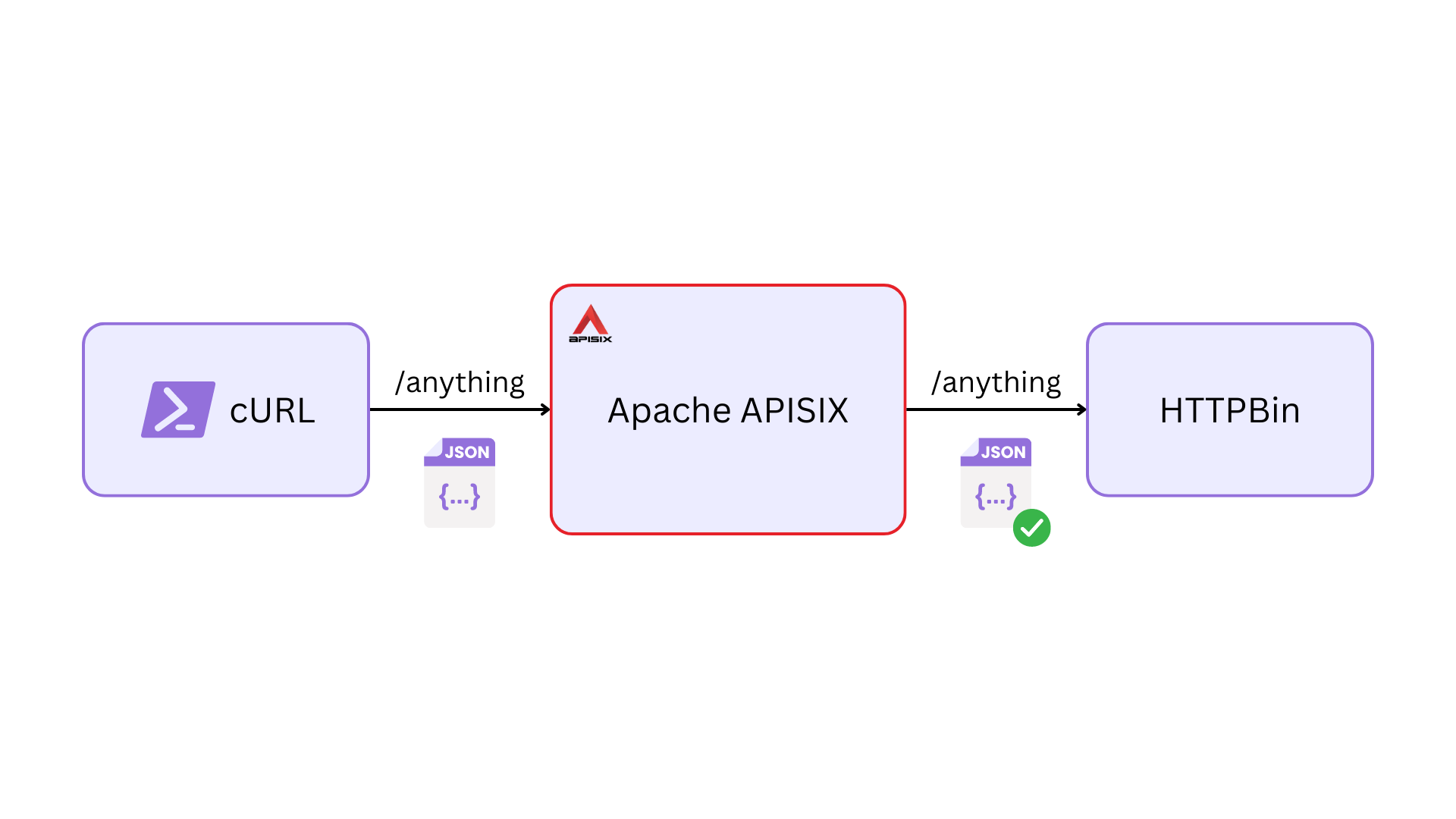 + +APISIX will forward the request to HTTPBin only if the request is validated. HTTPBin then [sends a response](https://httpbin.org/#/Anything/post_anything) containing all the data from the request, which we can validate. + +The Docker Compose file below sets everything up as described above: + +```yaml title="docker-compose.yaml" +version: "3" + +services: + apisix: + image: apache/apisix:3.4.1-debian + volumes: + - ./apisix/config.yml:/usr/local/apisix/conf/config.yaml:ro + - ./apisix/apisix.yml:/usr/local/apisix/conf/apisix.yaml:ro + ports: + - "9080:9080" + - "9180:9180" + httpbin: + image: kennethreitz/httpbin + ports: + - "80:80" +``` + +APISIX performs request validation through, you guessed it, the [request-validation](https://apisix.apache.org/docs/apisix/plugins/request-validation/#enum-validation) plugin. To use the plugin, you have to enable it in your `config.yaml` file. For this example, I have deployed APISIX in [standalone mode](https://apisix.apache.org/docs/apisix/deployment-modes/#standalone). So my entire `config.yaml` file looks like this: + +```yaml title="config.yaml" +deployment: + role: data_plane + role_data_plane: + config_provider: yaml +plugins: + - request-validation +#END +``` + +## Configuring Request Validation + +We can now create a route in APISIX with the `request-validation` plugin. We will configure the plugin using the schema we created before. Since I'm configuring APISIX through a static configuration file in standalone mode, my configuration will look like this: + +```yaml title="apisix.yaml" +routes: + - uri: /anything/* + upstream: + type: roundrobin + nodes: + "httpbin:80": 1 + plugins: + request-validation: + body_schema: + type: object + required: + - quantity + - price + - item + properties: + uid: + type: integer + item: + type: string + enum: + - sticker + - t-shirt + - pin + quantity: + type: integer + price: + type: number +#END +``` + +You can also use the Admin API for this exact configuration: + +```shell +curl "http://127.0.0.1:9180/apisix/admin/routes"; -X PUT -d ' +{ + "id": "valid-route", + "uri": "/anything/*", + "plugins": { + "request-validation": { + "body_schema": { + "type": "object", + "required": ["quantity", "price", "item"], + "properties": { + "uid": { + "type": "integer" + }, + "item": { + "type": "string", + "enum": ["sticker", "t-shirt", "pin"] + }, + "quantity": { + "type": "integer", + }, + "price": { + "type": "number", + } + } + } + } + }, + "upstream": { + "type": "roundrobin", + "nodes": { + "httpbin:80": 1 + } + } +}' +``` + +## Testing the Configuration + +Now we can send a request to the created route. We can first try a request with an invalid body: + +```shell +curl localhost:9080/anything/anything -H "Content-Type: application/json" -d ' +{ "uid": 2374, "item": "hoodie", "quantity": 5, "price": 10.99 }' +``` + +You should get back a 400 response as expected: + +```text title="output" +property "item" validation failed: matches none of the enum values +``` + +Now if you send a valid request, you will get back the response from HTTPBin: + +```shell +curl localhost:9080/anything/anything -H "Content-Type: application/json" -d ' +{ "uid": 4639, "item": "sticker", "quantity": 20, "price": 20.0 }' +``` + +```json title="output" +{ + "args": {}, + "data": "{\"price\":20,\"quantity\":20,\"uid\":4639,\"item\":\"sticker\"}", + "files": {}, + "form": {}, + "headers": { + "Accept": "*/*", + "Content-Length": "54", + "Content-Type": "application/json", + "Host": "localhost:9080", + "User-Agent": "curl/7.88.1", + "X-Forwarded-Host": "localhost" + }, + "json": { + "item": "sticker", + "price": 20, + "quantity": 20, + "uid": 4639 + }, + "method": "POST", + "origin": "172.22.0.1, 223.239.0.41", + "url": "http://localhost/anything/anything"; +} +``` + +## Non-trivial Vulnerabilities + +Different services might use different JSON parsing implementations. Sometimes, this could lead to different parsed JSON in different services. This can open up a lot of non-trivial interoperability vulnerabilities. + +For example, a client can send a malicious request with duplicate keys, and two different services might end up using two different keys: Review Comment: Good stuff! ########## blog/en/blog/2023/07/28/request-validation.md: ########## @@ -0,0 +1,410 @@ +--- +title: Your API Requests Should Be Validated +authors: + - name: "Navendu Pottekkat" + title: "Author" + url: "https://github.com/navendu-pottekkat"; + image_url: "https://avatars.githubusercontent.com/u/49474499"; +keywords: + - Request validation + - Best practice + - JSON schema +description: A tutorial on using the APISIX request-validation plugin and why you might need to use it. +tags: [Plugins] +image: https://static.apiseven.com/uploads/2023/07/25/hB8seVHP_request-validation.png +--- + +> Adding a new layer of validation within your API gateway can be a useful design practice for a myriad of reasons. This article explores how you can configure this in Apache APISIX. + +<!--truncate--> + +<head> + <link rel="canonical" href="https://navendu.me/posts/request-validation/"; /> +</head> + +One of the most overlooked aspects while designing APIs is request validation. + +An API gateway like [Apache APISIX](https://apisix.apache.org/), predominantly used for fine-grained traffic control, can also validate your API requests. This new layer of validation within the API gateway, along with client-side and application-side validations, can be a useful design practice for many reasons, like: + +1. Preventing invalid requests from being sent to backend services, reducing unnecessary load and thereby optimizing performance and reducing cost. +2. Allowing application developers to focus solely on application/business-specific validations in their services. +3. Adding another layer of security in front of your backend services, fending off malicious requests from ever reaching your services. + +In this article, you will learn how you can configure APISIX to validate requests with JSON schemas before forwarding them to your upstream services. + +## Creating the Schema + +For this example, our request will contain a purchase request sent from a client application to the payment service through the APISIX API gateway. A valid request body will look like this: + +```json +{ + "uid": 2374, + "item": "pin", + "quantity": 5, + "price": 5.0 +} +``` + +Each key in this request represents the following: + +- `uid`: Unique ID of the user. It will be empty for a guest user. +- `item`: Item being purchased. It can be one of "sticker," "t-shirt," or "pin." +- `quantity`: Quantity of the item being purchased. +- `price`: Price of the item being purchased. + +There are a lot of tools available, like the one from [JSON formatter](https://jsonformatter.org/json-to-jsonschema) that converts JSON to JSON schema. But we will write our own schema to be more accurate: + +```json +{ + "type": "object", + "required": ["quantity", "price", "item"], + "properties": { + "uid": { + "type": "integer" + }, + "item": { + "type": "string", + "enum": ["sticker", "t-shirt", "pin"] + }, + "quantity": { + "type": "integer", + "minimum": 1, + "maximum": 50 + }, + "price": { + "type": "number", + "minimum": 1.0, + "maximum": 50.0 + } + } +} +``` + +You can learn more about writing JSON schemas from the [official website](https://json-schema.org/). + +## Setting Up APISIX + +Since this article focuses on request validation at the API gateway level, we will deploy a simple setup consisting of Apache APISIX and the sample [HTTPBin](https://httpbin.org/) service: + + + +APISIX will forward the request to HTTPBin only if the request is validated. HTTPBin then [sends a response](https://httpbin.org/#/Anything/post_anything) containing all the data from the request, which we can validate. + +The Docker Compose file below sets everything up as described above: + +```yaml title="docker-compose.yaml" +version: "3" + +services: + apisix: + image: apache/apisix:3.4.1-debian + volumes: + - ./apisix/config.yml:/usr/local/apisix/conf/config.yaml:ro + - ./apisix/apisix.yml:/usr/local/apisix/conf/apisix.yaml:ro + ports: + - "9080:9080" + - "9180:9180" + httpbin: + image: kennethreitz/httpbin + ports: + - "80:80" +``` + +APISIX performs request validation through, you guessed it, the [request-validation](https://apisix.apache.org/docs/apisix/plugins/request-validation/#enum-validation) plugin. To use the plugin, you have to enable it in your `config.yaml` file. For this example, I have deployed APISIX in [standalone mode](https://apisix.apache.org/docs/apisix/deployment-modes/#standalone). So my entire `config.yaml` file looks like this: + +```yaml title="config.yaml" +deployment: + role: data_plane + role_data_plane: + config_provider: yaml +plugins: + - request-validation +#END +``` + +## Configuring Request Validation + +We can now create a route in APISIX with the `request-validation` plugin. We will configure the plugin using the schema we created before. Since I'm configuring APISIX through a static configuration file in standalone mode, my configuration will look like this: + +```yaml title="apisix.yaml" +routes: + - uri: /anything/* + upstream: + type: roundrobin + nodes: + "httpbin:80": 1 + plugins: + request-validation: + body_schema: + type: object + required: + - quantity + - price + - item + properties: + uid: + type: integer + item: + type: string + enum: + - sticker + - t-shirt + - pin + quantity: + type: integer + price: + type: number +#END +``` + +You can also use the Admin API for this exact configuration: + +```shell +curl "http://127.0.0.1:9180/apisix/admin/routes"; -X PUT -d ' +{ + "id": "valid-route", + "uri": "/anything/*", + "plugins": { + "request-validation": { + "body_schema": { + "type": "object", + "required": ["quantity", "price", "item"], + "properties": { + "uid": { + "type": "integer" + }, + "item": { + "type": "string", + "enum": ["sticker", "t-shirt", "pin"] + }, + "quantity": { + "type": "integer", + }, + "price": { + "type": "number", + } + } + } + } + }, + "upstream": { + "type": "roundrobin", + "nodes": { + "httpbin:80": 1 + } + } +}' +``` + +## Testing the Configuration + +Now we can send a request to the created route. We can first try a request with an invalid body: + +```shell +curl localhost:9080/anything/anything -H "Content-Type: application/json" -d ' +{ "uid": 2374, "item": "hoodie", "quantity": 5, "price": 10.99 }' +``` + +You should get back a 400 response as expected: + +```text title="output" +property "item" validation failed: matches none of the enum values +``` + +Now if you send a valid request, you will get back the response from HTTPBin: + +```shell +curl localhost:9080/anything/anything -H "Content-Type: application/json" -d ' +{ "uid": 4639, "item": "sticker", "quantity": 20, "price": 20.0 }' +``` + +```json title="output" +{ + "args": {}, + "data": "{\"price\":20,\"quantity\":20,\"uid\":4639,\"item\":\"sticker\"}", + "files": {}, + "form": {}, + "headers": { + "Accept": "*/*", + "Content-Length": "54", + "Content-Type": "application/json", + "Host": "localhost:9080", + "User-Agent": "curl/7.88.1", + "X-Forwarded-Host": "localhost" + }, + "json": { + "item": "sticker", + "price": 20, + "quantity": 20, + "uid": 4639 + }, + "method": "POST", + "origin": "172.22.0.1, 223.239.0.41", + "url": "http://localhost/anything/anything"; +} +``` + +## Non-trivial Vulnerabilities + +Different services might use different JSON parsing implementations. Sometimes, this could lead to different parsed JSON in different services. This can open up a lot of non-trivial interoperability vulnerabilities. + +For example, a client can send a malicious request with duplicate keys, and two different services might end up using two different keys: + +```json {6} +{ + "uid": 8495, + "item": "sticker", + "quantity": 20, + "price": 20.0, + "price": 0.0 +} +``` + +Now if this happens in a shopping cart and a payment service, i.e., the shopping cart has the price of `20.0`, and the payments service has the price of `0.0`, a malicious user could effectively make purchases for free! + +An obvious solution here would be to configure better validation. For example, you can update the configuration to check for minimum and maximum values to ensure such malicious requests are rejected: + +```yaml title="apisix.yaml" {26-27,30-31} +routes: + - uri: /anything/* + upstream: + type: roundrobin + nodes: + "httpbin:80": 1 + plugins: + request-validation: + body_schema: Review Comment: Is it possible to refer to an external file instead? ########## blog/en/blog/2023/07/28/request-validation.md: ########## @@ -0,0 +1,410 @@ +--- +title: Your API Requests Should Be Validated +authors: + - name: "Navendu Pottekkat" + title: "Author" + url: "https://github.com/navendu-pottekkat"; + image_url: "https://avatars.githubusercontent.com/u/49474499"; +keywords: + - Request validation + - Best practice + - JSON schema +description: A tutorial on using the APISIX request-validation plugin and why you might need to use it. +tags: [Plugins] +image: https://static.apiseven.com/uploads/2023/07/25/hB8seVHP_request-validation.png +--- + +> Adding a new layer of validation within your API gateway can be a useful design practice for a myriad of reasons. This article explores how you can configure this in Apache APISIX. + +<!--truncate--> + +<head> + <link rel="canonical" href="https://navendu.me/posts/request-validation/"; /> +</head> + +One of the most overlooked aspects while designing APIs is request validation. + +An API gateway like [Apache APISIX](https://apisix.apache.org/), predominantly used for fine-grained traffic control, can also validate your API requests. This new layer of validation within the API gateway, along with client-side and application-side validations, can be a useful design practice for many reasons, like: + +1. Preventing invalid requests from being sent to backend services, reducing unnecessary load and thereby optimizing performance and reducing cost. +2. Allowing application developers to focus solely on application/business-specific validations in their services. +3. Adding another layer of security in front of your backend services, fending off malicious requests from ever reaching your services. + +In this article, you will learn how you can configure APISIX to validate requests with JSON schemas before forwarding them to your upstream services. + +## Creating the Schema + +For this example, our request will contain a purchase request sent from a client application to the payment service through the APISIX API gateway. A valid request body will look like this: + +```json +{ + "uid": 2374, + "item": "pin", + "quantity": 5, + "price": 5.0 +} +``` + +Each key in this request represents the following: + +- `uid`: Unique ID of the user. It will be empty for a guest user. +- `item`: Item being purchased. It can be one of "sticker," "t-shirt," or "pin." +- `quantity`: Quantity of the item being purchased. +- `price`: Price of the item being purchased. + +There are a lot of tools available, like the one from [JSON formatter](https://jsonformatter.org/json-to-jsonschema) that converts JSON to JSON schema. But we will write our own schema to be more accurate: + +```json +{ + "type": "object", + "required": ["quantity", "price", "item"], + "properties": { + "uid": { + "type": "integer" + }, + "item": { + "type": "string", + "enum": ["sticker", "t-shirt", "pin"] + }, + "quantity": { + "type": "integer", + "minimum": 1, + "maximum": 50 + }, + "price": { + "type": "number", + "minimum": 1.0, + "maximum": 50.0 + } + } +} +``` + +You can learn more about writing JSON schemas from the [official website](https://json-schema.org/). + +## Setting Up APISIX + +Since this article focuses on request validation at the API gateway level, we will deploy a simple setup consisting of Apache APISIX and the sample [HTTPBin](https://httpbin.org/) service: + + + +APISIX will forward the request to HTTPBin only if the request is validated. HTTPBin then [sends a response](https://httpbin.org/#/Anything/post_anything) containing all the data from the request, which we can validate. + +The Docker Compose file below sets everything up as described above: + +```yaml title="docker-compose.yaml" +version: "3" + +services: + apisix: + image: apache/apisix:3.4.1-debian + volumes: + - ./apisix/config.yml:/usr/local/apisix/conf/config.yaml:ro + - ./apisix/apisix.yml:/usr/local/apisix/conf/apisix.yaml:ro + ports: + - "9080:9080" + - "9180:9180" + httpbin: + image: kennethreitz/httpbin + ports: + - "80:80" +``` + +APISIX performs request validation through, you guessed it, the [request-validation](https://apisix.apache.org/docs/apisix/plugins/request-validation/#enum-validation) plugin. To use the plugin, you have to enable it in your `config.yaml` file. For this example, I have deployed APISIX in [standalone mode](https://apisix.apache.org/docs/apisix/deployment-modes/#standalone). So my entire `config.yaml` file looks like this: + +```yaml title="config.yaml" +deployment: + role: data_plane + role_data_plane: + config_provider: yaml +plugins: + - request-validation +#END +``` + +## Configuring Request Validation + +We can now create a route in APISIX with the `request-validation` plugin. We will configure the plugin using the schema we created before. Since I'm configuring APISIX through a static configuration file in standalone mode, my configuration will look like this: + +```yaml title="apisix.yaml" +routes: + - uri: /anything/* + upstream: + type: roundrobin + nodes: + "httpbin:80": 1 + plugins: + request-validation: + body_schema: + type: object + required: + - quantity + - price + - item + properties: + uid: + type: integer + item: + type: string + enum: + - sticker + - t-shirt + - pin + quantity: + type: integer + price: + type: number +#END +``` + +You can also use the Admin API for this exact configuration: Review Comment: Please add that if it applies only if not in standalone-mode ########## blog/en/blog/2023/07/28/request-validation.md: ########## @@ -0,0 +1,410 @@ +--- +title: Your API Requests Should Be Validated +authors: + - name: "Navendu Pottekkat" + title: "Author" + url: "https://github.com/navendu-pottekkat"; + image_url: "https://avatars.githubusercontent.com/u/49474499"; +keywords: + - Request validation + - Best practice + - JSON schema +description: A tutorial on using the APISIX request-validation plugin and why you might need to use it. +tags: [Plugins] +image: https://static.apiseven.com/uploads/2023/07/25/hB8seVHP_request-validation.png +--- + +> Adding a new layer of validation within your API gateway can be a useful design practice for a myriad of reasons. This article explores how you can configure this in Apache APISIX. + +<!--truncate--> + +<head> + <link rel="canonical" href="https://navendu.me/posts/request-validation/"; /> +</head> + +One of the most overlooked aspects while designing APIs is request validation. + +An API gateway like [Apache APISIX](https://apisix.apache.org/), predominantly used for fine-grained traffic control, can also validate your API requests. This new layer of validation within the API gateway, along with client-side and application-side validations, can be a useful design practice for many reasons, like: + +1. Preventing invalid requests from being sent to backend services, reducing unnecessary load and thereby optimizing performance and reducing cost. +2. Allowing application developers to focus solely on application/business-specific validations in their services. +3. Adding another layer of security in front of your backend services, fending off malicious requests from ever reaching your services. + +In this article, you will learn how you can configure APISIX to validate requests with JSON schemas before forwarding them to your upstream services. + +## Creating the Schema + +For this example, our request will contain a purchase request sent from a client application to the payment service through the APISIX API gateway. A valid request body will look like this: + +```json +{ + "uid": 2374, + "item": "pin", + "quantity": 5, + "price": 5.0 +} +``` + +Each key in this request represents the following: + +- `uid`: Unique ID of the user. It will be empty for a guest user. +- `item`: Item being purchased. It can be one of "sticker," "t-shirt," or "pin." +- `quantity`: Quantity of the item being purchased. +- `price`: Price of the item being purchased. + +There are a lot of tools available, like the one from [JSON formatter](https://jsonformatter.org/json-to-jsonschema) that converts JSON to JSON schema. But we will write our own schema to be more accurate: + +```json +{ + "type": "object", + "required": ["quantity", "price", "item"], + "properties": { + "uid": { + "type": "integer" + }, + "item": { + "type": "string", + "enum": ["sticker", "t-shirt", "pin"] + }, + "quantity": { + "type": "integer", + "minimum": 1, + "maximum": 50 + }, + "price": { + "type": "number", + "minimum": 1.0, + "maximum": 50.0 + } + } +} +``` + +You can learn more about writing JSON schemas from the [official website](https://json-schema.org/). + +## Setting Up APISIX + +Since this article focuses on request validation at the API gateway level, we will deploy a simple setup consisting of Apache APISIX and the sample [HTTPBin](https://httpbin.org/) service: + + + +APISIX will forward the request to HTTPBin only if the request is validated. HTTPBin then [sends a response](https://httpbin.org/#/Anything/post_anything) containing all the data from the request, which we can validate. + +The Docker Compose file below sets everything up as described above: + +```yaml title="docker-compose.yaml" +version: "3" + +services: + apisix: + image: apache/apisix:3.4.1-debian + volumes: + - ./apisix/config.yml:/usr/local/apisix/conf/config.yaml:ro + - ./apisix/apisix.yml:/usr/local/apisix/conf/apisix.yaml:ro + ports: + - "9080:9080" + - "9180:9180" + httpbin: + image: kennethreitz/httpbin + ports: + - "80:80" +``` + +APISIX performs request validation through, you guessed it, the [request-validation](https://apisix.apache.org/docs/apisix/plugins/request-validation/#enum-validation) plugin. To use the plugin, you have to enable it in your `config.yaml` file. For this example, I have deployed APISIX in [standalone mode](https://apisix.apache.org/docs/apisix/deployment-modes/#standalone). So my entire `config.yaml` file looks like this: + +```yaml title="config.yaml" +deployment: + role: data_plane + role_data_plane: + config_provider: yaml +plugins: + - request-validation +#END +``` + +## Configuring Request Validation + +We can now create a route in APISIX with the `request-validation` plugin. We will configure the plugin using the schema we created before. Since I'm configuring APISIX through a static configuration file in standalone mode, my configuration will look like this: + +```yaml title="apisix.yaml" +routes: + - uri: /anything/* + upstream: + type: roundrobin + nodes: + "httpbin:80": 1 + plugins: + request-validation: + body_schema: + type: object + required: + - quantity + - price + - item + properties: + uid: + type: integer + item: + type: string + enum: + - sticker + - t-shirt + - pin + quantity: + type: integer + price: + type: number +#END +``` + +You can also use the Admin API for this exact configuration: + +```shell +curl "http://127.0.0.1:9180/apisix/admin/routes"; -X PUT -d ' +{ + "id": "valid-route", + "uri": "/anything/*", + "plugins": { + "request-validation": { + "body_schema": { + "type": "object", + "required": ["quantity", "price", "item"], + "properties": { + "uid": { + "type": "integer" + }, + "item": { + "type": "string", + "enum": ["sticker", "t-shirt", "pin"] + }, + "quantity": { + "type": "integer", + }, + "price": { + "type": "number", + } + } + } + } + }, + "upstream": { + "type": "roundrobin", + "nodes": { + "httpbin:80": 1 + } + } +}' +``` + +## Testing the Configuration + +Now we can send a request to the created route. We can first try a request with an invalid body: + +```shell +curl localhost:9080/anything/anything -H "Content-Type: application/json" -d ' +{ "uid": 2374, "item": "hoodie", "quantity": 5, "price": 10.99 }' +``` + +You should get back a 400 response as expected: + +```text title="output" +property "item" validation failed: matches none of the enum values +``` + +Now if you send a valid request, you will get back the response from HTTPBin: + +```shell +curl localhost:9080/anything/anything -H "Content-Type: application/json" -d ' +{ "uid": 4639, "item": "sticker", "quantity": 20, "price": 20.0 }' +``` + +```json title="output" +{ + "args": {}, + "data": "{\"price\":20,\"quantity\":20,\"uid\":4639,\"item\":\"sticker\"}", + "files": {}, + "form": {}, + "headers": { + "Accept": "*/*", + "Content-Length": "54", + "Content-Type": "application/json", + "Host": "localhost:9080", + "User-Agent": "curl/7.88.1", + "X-Forwarded-Host": "localhost" + }, + "json": { + "item": "sticker", + "price": 20, + "quantity": 20, + "uid": 4639 + }, + "method": "POST", + "origin": "172.22.0.1, 223.239.0.41", + "url": "http://localhost/anything/anything"; +} +``` + +## Non-trivial Vulnerabilities + +Different services might use different JSON parsing implementations. Sometimes, this could lead to different parsed JSON in different services. This can open up a lot of non-trivial interoperability vulnerabilities. + +For example, a client can send a malicious request with duplicate keys, and two different services might end up using two different keys: + +```json {6} +{ + "uid": 8495, + "item": "sticker", + "quantity": 20, + "price": 20.0, + "price": 0.0 +} +``` + +Now if this happens in a shopping cart and a payment service, i.e., the shopping cart has the price of `20.0`, and the payments service has the price of `0.0`, a malicious user could effectively make purchases for free! + +An obvious solution here would be to configure better validation. For example, you can update the configuration to check for minimum and maximum values to ensure such malicious requests are rejected: + +```yaml title="apisix.yaml" {26-27,30-31} +routes: + - uri: /anything/* + upstream: + type: roundrobin + nodes: + "httpbin:80": 1 + plugins: + request-validation: + body_schema: + type: object + required: + - quantity + - price + - item + properties: + uid: + type: integer + item: + type: string + enum: + - sticker + - t-shirt + - pin + quantity: + type: integer + minimum: 1 + maximum: 50 + price: + type: number + minimum: 1.0 + maximum: 50.0 +#END +``` + +But APISIX handles this vulnerability in a more robust way by only forwarding the validated request body. This means that APISIX parses the request body, validates it, encodes the validated body, and forwards it to the upstream. Now every service after APISIX uses the same validated request body from APISIX: + +```shell {7} +curl localhost:9080/anything/anything -H "Content-Type: application/json" -d ' +{ + "uid": 8495, + "item": "sticker", + "quantity": 20, + "price": 20.0, + "price": 1.0 +}' +``` + +```json title="output" {16} +{ + "args": {}, + "data": "{\"quantity\":20,\"uid\":4639,\"price\":1,\"item\":\"sticker\"}", + "files": {}, + "form": {}, + "headers": { + "Accept": "*/*", + "Content-Length": "53", + "Content-Type": "application/json", + "Host": "localhost:9080", + "User-Agent": "curl/7.88.1", + "X-Forwarded-Host": "localhost" + }, + "json": { + "item": "sticker", + "price": 1, + "quantity": 20, + "uid": 4639 + }, + "method": "POST", + "origin": "172.22.0.1, 223.239.0.41", + "url": "http://localhost/anything/anything"; +} +``` + +This [excellent blog post](https://bishopfox.com/blog/json-interoperability-vulnerabilities) sums up some more JSON interoperability vulnerabilities. + +## Complex Validation + +What we discussed so far only included some basic validation. But APISIX has much more capabilities. + +You can also configure a schema for validating headers, set a custom response code/message, and validate strings using regular expressions: + +```yaml title="apisix.yaml" {9-10,11,18} +routes: + - uri: /anything/* + upstream: + type: roundrobin + nodes: + "httpbin:80": 1 + plugins: + request-validation: + rejected_code: 418 + rejected_message: "I'm an intelligent Teapot!" + header_schema: + type: object + required: + - Content-Type + properties: + Content-Type: + type: string + pattern: "^application\/json$" + body_schema: + type: object + required: + - quantity + - price + - item + properties: + uid: + type: integer + item: + type: string + enum: + - sticker + - t-shirt + - pin + quantity: + type: integer + minimum: 1 + maximum: 50 + price: + type: number + minimum: 1.0 + maximum: 50.0 +#END +``` + +You can also set the specific version of the JSON schema used from draft 4, draft 6, and draft 7 to ensure accurate parsing by adding this key: + +```text +"$schema": "http://json-schema.org/draft-04/schema#"; +``` + +## ~~Why~~ Where to Validate? + +It is fair to assume that you now understand why request validation might be necessary. However, you could still argue that validation can be done on the client side or within your backend services. + +A key point is that you might not always own your clients, or modifying client requests might be relatively easy. Adding validation in a layer you have absolute control of is the better alternative. + +So why can't you validate requests in your services directly? Well, after a point, it becomes too complex for the application developer to configure both request validation and application/business-specific validation. Without an API gateway layer, invalid requests still end up adding load to your backend services. Review Comment: On that, I completely disagree. On the opposite, I think that's the main argument you need to make in the introduction. Validation is business logic. You want to avoid as much business logic as possible in the gateway because of deployment synchronization issue. Putting something as trivial as body validation in the API Gateway causes sync problems for not much value - a trip from the gateway to the upstream (they should be close anyway). Validating headers, however, is much more useful (for security) and is much less business related. ########## blog/en/blog/2023/07/28/request-validation.md: ########## @@ -0,0 +1,410 @@ +--- +title: Your API Requests Should Be Validated +authors: + - name: "Navendu Pottekkat" + title: "Author" + url: "https://github.com/navendu-pottekkat"; + image_url: "https://avatars.githubusercontent.com/u/49474499"; +keywords: + - Request validation + - Best practice + - JSON schema +description: A tutorial on using the APISIX request-validation plugin and why you might need to use it. +tags: [Plugins] +image: https://static.apiseven.com/uploads/2023/07/25/hB8seVHP_request-validation.png +--- + +> Adding a new layer of validation within your API gateway can be a useful design practice for a myriad of reasons. This article explores how you can configure this in Apache APISIX. + +<!--truncate--> + +<head> + <link rel="canonical" href="https://navendu.me/posts/request-validation/"; /> +</head> + +One of the most overlooked aspects while designing APIs is request validation. + +An API gateway like [Apache APISIX](https://apisix.apache.org/), predominantly used for fine-grained traffic control, can also validate your API requests. This new layer of validation within the API gateway, along with client-side and application-side validations, can be a useful design practice for many reasons, like: + +1. Preventing invalid requests from being sent to backend services, reducing unnecessary load and thereby optimizing performance and reducing cost. +2. Allowing application developers to focus solely on application/business-specific validations in their services. +3. Adding another layer of security in front of your backend services, fending off malicious requests from ever reaching your services. + +In this article, you will learn how you can configure APISIX to validate requests with JSON schemas before forwarding them to your upstream services. + +## Creating the Schema + +For this example, our request will contain a purchase request sent from a client application to the payment service through the APISIX API gateway. A valid request body will look like this: + +```json +{ + "uid": 2374, + "item": "pin", + "quantity": 5, + "price": 5.0 +} +``` + +Each key in this request represents the following: + +- `uid`: Unique ID of the user. It will be empty for a guest user. +- `item`: Item being purchased. It can be one of "sticker," "t-shirt," or "pin." +- `quantity`: Quantity of the item being purchased. +- `price`: Price of the item being purchased. + +There are a lot of tools available, like the one from [JSON formatter](https://jsonformatter.org/json-to-jsonschema) that converts JSON to JSON schema. But we will write our own schema to be more accurate: + +```json +{ + "type": "object", + "required": ["quantity", "price", "item"], + "properties": { + "uid": { + "type": "integer" + }, + "item": { + "type": "string", + "enum": ["sticker", "t-shirt", "pin"] + }, + "quantity": { + "type": "integer", + "minimum": 1, + "maximum": 50 + }, + "price": { + "type": "number", + "minimum": 1.0, + "maximum": 50.0 + } + } +} +``` + +You can learn more about writing JSON schemas from the [official website](https://json-schema.org/). + +## Setting Up APISIX + +Since this article focuses on request validation at the API gateway level, we will deploy a simple setup consisting of Apache APISIX and the sample [HTTPBin](https://httpbin.org/) service: + + + +APISIX will forward the request to HTTPBin only if the request is validated. HTTPBin then [sends a response](https://httpbin.org/#/Anything/post_anything) containing all the data from the request, which we can validate. + +The Docker Compose file below sets everything up as described above: + +```yaml title="docker-compose.yaml" +version: "3" + +services: + apisix: + image: apache/apisix:3.4.1-debian + volumes: + - ./apisix/config.yml:/usr/local/apisix/conf/config.yaml:ro + - ./apisix/apisix.yml:/usr/local/apisix/conf/apisix.yaml:ro + ports: + - "9080:9080" + - "9180:9180" + httpbin: + image: kennethreitz/httpbin + ports: + - "80:80" +``` + +APISIX performs request validation through, you guessed it, the [request-validation](https://apisix.apache.org/docs/apisix/plugins/request-validation/#enum-validation) plugin. To use the plugin, you have to enable it in your `config.yaml` file. For this example, I have deployed APISIX in [standalone mode](https://apisix.apache.org/docs/apisix/deployment-modes/#standalone). So my entire `config.yaml` file looks like this: + +```yaml title="config.yaml" +deployment: + role: data_plane + role_data_plane: + config_provider: yaml +plugins: + - request-validation +#END +``` + +## Configuring Request Validation + +We can now create a route in APISIX with the `request-validation` plugin. We will configure the plugin using the schema we created before. Since I'm configuring APISIX through a static configuration file in standalone mode, my configuration will look like this: + +```yaml title="apisix.yaml" +routes: + - uri: /anything/* + upstream: + type: roundrobin + nodes: + "httpbin:80": 1 + plugins: + request-validation: + body_schema: + type: object + required: + - quantity + - price + - item + properties: + uid: + type: integer + item: + type: string + enum: + - sticker + - t-shirt + - pin + quantity: + type: integer + price: + type: number +#END +``` + +You can also use the Admin API for this exact configuration: + +```shell +curl "http://127.0.0.1:9180/apisix/admin/routes"; -X PUT -d ' +{ + "id": "valid-route", + "uri": "/anything/*", + "plugins": { + "request-validation": { + "body_schema": { + "type": "object", + "required": ["quantity", "price", "item"], + "properties": { + "uid": { + "type": "integer" + }, + "item": { + "type": "string", + "enum": ["sticker", "t-shirt", "pin"] + }, + "quantity": { + "type": "integer", + }, + "price": { + "type": "number", + } + } + } + } + }, + "upstream": { + "type": "roundrobin", + "nodes": { + "httpbin:80": 1 + } + } +}' +``` + +## Testing the Configuration + +Now we can send a request to the created route. We can first try a request with an invalid body: + +```shell +curl localhost:9080/anything/anything -H "Content-Type: application/json" -d ' +{ "uid": 2374, "item": "hoodie", "quantity": 5, "price": 10.99 }' +``` + +You should get back a 400 response as expected: + +```text title="output" +property "item" validation failed: matches none of the enum values +``` + +Now if you send a valid request, you will get back the response from HTTPBin: + +```shell +curl localhost:9080/anything/anything -H "Content-Type: application/json" -d ' +{ "uid": 4639, "item": "sticker", "quantity": 20, "price": 20.0 }' +``` + +```json title="output" +{ + "args": {}, + "data": "{\"price\":20,\"quantity\":20,\"uid\":4639,\"item\":\"sticker\"}", + "files": {}, + "form": {}, + "headers": { + "Accept": "*/*", + "Content-Length": "54", + "Content-Type": "application/json", + "Host": "localhost:9080", + "User-Agent": "curl/7.88.1", + "X-Forwarded-Host": "localhost" + }, + "json": { + "item": "sticker", + "price": 20, + "quantity": 20, + "uid": 4639 + }, + "method": "POST", + "origin": "172.22.0.1, 223.239.0.41", + "url": "http://localhost/anything/anything"; +} +``` + +## Non-trivial Vulnerabilities + +Different services might use different JSON parsing implementations. Sometimes, this could lead to different parsed JSON in different services. This can open up a lot of non-trivial interoperability vulnerabilities. + +For example, a client can send a malicious request with duplicate keys, and two different services might end up using two different keys: + +```json {6} +{ + "uid": 8495, + "item": "sticker", + "quantity": 20, + "price": 20.0, + "price": 0.0 +} +``` + +Now if this happens in a shopping cart and a payment service, i.e., the shopping cart has the price of `20.0`, and the payments service has the price of `0.0`, a malicious user could effectively make purchases for free! + +An obvious solution here would be to configure better validation. For example, you can update the configuration to check for minimum and maximum values to ensure such malicious requests are rejected: + +```yaml title="apisix.yaml" {26-27,30-31} +routes: + - uri: /anything/* + upstream: + type: roundrobin + nodes: + "httpbin:80": 1 + plugins: + request-validation: + body_schema: + type: object + required: + - quantity + - price + - item + properties: + uid: + type: integer + item: + type: string + enum: + - sticker + - t-shirt + - pin + quantity: + type: integer + minimum: 1 + maximum: 50 + price: + type: number + minimum: 1.0 + maximum: 50.0 +#END +``` + +But APISIX handles this vulnerability in a more robust way by only forwarding the validated request body. This means that APISIX parses the request body, validates it, encodes the validated body, and forwards it to the upstream. Now every service after APISIX uses the same validated request body from APISIX: + +```shell {7} +curl localhost:9080/anything/anything -H "Content-Type: application/json" -d ' +{ + "uid": 8495, + "item": "sticker", + "quantity": 20, + "price": 20.0, + "price": 1.0 +}' +``` + +```json title="output" {16} +{ + "args": {}, + "data": "{\"quantity\":20,\"uid\":4639,\"price\":1,\"item\":\"sticker\"}", + "files": {}, + "form": {}, + "headers": { + "Accept": "*/*", + "Content-Length": "53", + "Content-Type": "application/json", + "Host": "localhost:9080", + "User-Agent": "curl/7.88.1", + "X-Forwarded-Host": "localhost" + }, + "json": { + "item": "sticker", + "price": 1, + "quantity": 20, + "uid": 4639 + }, + "method": "POST", + "origin": "172.22.0.1, 223.239.0.41", + "url": "http://localhost/anything/anything"; +} +``` + +This [excellent blog post](https://bishopfox.com/blog/json-interoperability-vulnerabilities) sums up some more JSON interoperability vulnerabilities. + +## Complex Validation + +What we discussed so far only included some basic validation. But APISIX has much more capabilities. + +You can also configure a schema for validating headers, set a custom response code/message, and validate strings using regular expressions: + +```yaml title="apisix.yaml" {9-10,11,18} +routes: + - uri: /anything/* + upstream: + type: roundrobin + nodes: + "httpbin:80": 1 + plugins: + request-validation: + rejected_code: 418 + rejected_message: "I'm an intelligent Teapot!" + header_schema: + type: object + required: + - Content-Type + properties: + Content-Type: + type: string + pattern: "^application\/json$" + body_schema: + type: object + required: + - quantity + - price + - item + properties: + uid: + type: integer + item: + type: string + enum: + - sticker + - t-shirt + - pin + quantity: + type: integer + minimum: 1 + maximum: 50 + price: + type: number + minimum: 1.0 + maximum: 50.0 +#END +``` + +You can also set the specific version of the JSON schema used from draft 4, draft 6, and draft 7 to ensure accurate parsing by adding this key: + +```text +"$schema": "http://json-schema.org/draft-04/schema#"; +``` + +## ~~Why~~ Where to Validate? + +It is fair to assume that you now understand why request validation might be necessary. However, you could still argue that validation can be done on the client side or within your backend services. + +A key point is that you might not always own your clients, or modifying client requests might be relatively easy. Adding validation in a layer you have absolute control of is the better alternative. + +So why can't you validate requests in your services directly? Well, after a point, it becomes too complex for the application developer to configure both request validation and application/business-specific validation. Without an API gateway layer, invalid requests still end up adding load to your backend services. + +Ideally, you should validate requests in all three layers with only business-specific validation in your services. The [APISIX Dashboard](https://apisix.apache.org/docs/dashboard/USER_GUIDE/) can export the configured routes to [OpenAPI format](https://spec.openapis.org/oas/latest.html), which can be used for client-side validation. Review Comment: No, definitely. Especially since you may not be in charge of the client. -- This is an automated message from the Apache Git Service. To respond to the message, please log on to GitHub and use the URL above to go to the specific comment. To unsubscribe, e-mail: [email protected] For queries about this service, please contact Infrastructure at: [email protected]