This is an automated email from the ASF dual-hosted git repository.

bzp2010 pushed a commit to branch master
in repository https://gitbox.apache.org/repos/asf/apisix-website.git
The following commit(s) were added to refs/heads/master by this push:
new c81441ed406 blog: rate limit with APISIX (#1660)
c81441ed406 is described below
commit c81441ed4063cd9293010fe6fb401b0793bec41a
Author: Navendu Pottekkat <[email protected]>
AuthorDate: Mon Aug 14 12:28:01 2023 +0530
blog: rate limit with APISIX (#1660)
Signed-off-by: Navendu Pottekkat <[email protected]>
---
blog/en/blog/2023/08/14/rate-limit.md | 284 ++++++++++++++++++++++++++++++++++
1 file changed, 284 insertions(+)
diff --git a/blog/en/blog/2023/08/14/rate-limit.md
b/blog/en/blog/2023/08/14/rate-limit.md
new file mode 100644
index 00000000000..24eb657bdc0
--- /dev/null
+++ b/blog/en/blog/2023/08/14/rate-limit.md
@@ -0,0 +1,284 @@
+---
+title: Rate Limit Your APIs With Apache APISIX
+authors:
+ - name: Navendu Pottekkat
+ title: Author
+ url: https://github.com/navendu-pottekkat
+ image_url: https://avatars.githubusercontent.com/u/49474499
+keywords:
+ - Rate limit
+ - APISIX
+ - Redis
+ - Traffic control
+description: A guide to using the rate limit plugins in Apache APISIX with
some practical examples.
+tags: [Plugins]
+image: https://static.apiseven.com/uploads/2023/08/07/jIphRpzX_rate-limit.png
+---
+
+> In this article, we will look at examples of how we can use the rate
limiting plugins in APISIX.
+
+<!--truncate-->
+
+<head>
+ <link rel="canonical" href="https://navendu.me/posts/rate-limit/"; />
+</head>
+
+Setting up rate limits is a solid way to improve the reliability of your
services.
+
+You can ensure your services are not overloaded by setting up rate limits,
providing consistent performance for the end users. It can also help enhance
security by preventing denial-of-service (DoS) attacks which can take down your
services.
+
+Rate limiting can also be part of your business requirement where you want
separate quotas for different tiers of users. For example, you can have a free
version of your API where users can only make a small number of API calls and a
paid version that allows ample API usage.
+
+If you are using [Apache APISIX](https://apisix.apache.org) as your API
gateway, you can leverage the rate limiting plugins,
[limit-req](https://apisix.apache.org/docs/apisix/plugins/limit-req/),
[limit-conn](https://apisix.apache.org/docs/apisix/plugins/limit-conn/), and
[limit-count](https://apisix.apache.org/docs/apisix/plugins/limit-count/) to
achieve this.
+
+You can always set this up in your services directly without configuring it in
APISIX. But as the number of your services increases, with each service having
different constraints, setting up and managing different rate limits and
updating them in each of these services becomes a pain point for development
teams.
+
+In this article, we will look at examples of how we can use the rate limiting
plugins in APISIX. You can find the complete configuration files and
instructions to deploy for this article in [this
repository](https://github.com/navendu-pottekkat/rate-limit).
+
+## Rate Limit All Requests
+
+Setting up a rate limit for all your requests is a good place to start.
+
+APISIX allows configuring [global
rules](https://apisix.apache.org/docs/apisix/terminology/global-rule/) that are
applied on all requests to APISIX. We can configure a global rule with the
`limit-req` plugin, as shown below:
+
+```shell
+curl localhost:9180/apisix/admin/global_rules/rate_limit_all -X PUT -d '
+{
+ "plugins": {
+ "limit-req": {
+ "rate": 30,
+ "burst": 30,
+ "key_type": "var",
+ "key": "remote_addr",
+ "rejected_code": 429,
+ "rejected_msg": "rate limit exceeded!"
+ }
+ }
+}'
+```
+
+The configuration above will allow 30 requests per second (rate) to your
upstream services. When the number of requests exceeds 30 but is under 60
(burst), the additional requests are delayed to match the 30 requests per
second limit. If the number of requests exceeds 60, the additional requests are
rejected. In short, the upstream services will always have a maximum of 30
requests per second.
+
+A global rate limit can be helpful when you want to set hard limits on the
number of requests your upstream should receive in a second. But sometimes, you
might want to rate limit the requests to a particular route instead of all
requests.
+
+To do this, you can configure the plugin on a specific route. The example
below shows how you can configure the `limit-count` plugin on a particular
route:
+
+```shell
+curl localhost:9180/apisix/admin/routes/rate_limit_route -X PUT -d '
+{
+ "uri": "/api",
+ "upstream": {
+ "type": "roundrobin",
+ "nodes": {
+ "upstream:80": 1
+ }
+ },
+ "plugins": {
+ "limit-count": {
+ "count": 10,
+ "time_window": 60,
+ "key_type": "var",
+ "key": "remote_addr",
+ "policy": "local",
+ "rejected_code": 429,
+ "rejected_msg": "rate limit exceeded!"
+ }
+ }
+}'
+```
+
+This will allow only ten requests in a minute, and this will be reset every
minute.
+
+A global and route level limit combo can be used to set hard limits on top of
use case-specific limits, which is particularly helpful in many practical
scenarios. For example, you can configure the `limit-rate` plugin in a global
rule based on how much traffic your upstream services can handle and then
configure `limt-count` plugins on specific routes to handle business specific
rate limits.
+
+If the same plugin is configured globally and at a route level, the lower of
the two is used by APISIX.
+
+## Limits for Consumers
+
+Rate limiting all requests is cool, but most of you readers might want to be
more granular with your limits. A typical scenario is configuring different
limits for different consumers of your API. And APISIX achieves this through
the aptly-named
[consumer](https://apisix.apache.org/docs/apisix/terminology/consumer/) object.
+
+For this example, we can create a consumer and use the [basic key
authentication](https://apisix.apache.org/docs/apisix/plugins/key-auth/)
provided by APISIX. We will then add the `limit-conn` plugin to this consumer.
To create the consumer, send a request to the Admin API as shown:
+
+```shell
+curl localhost:9180/apisix/admin/consumers -X PUT -d '
+{
+ "username": "alice",
+ "plugins": {
+ "key-auth": {
+ "key": "beautifulalice"
+ },
+ "limit-conn": {
+ "conn": 5,
+ "burst": 3,
+ "default_conn_delay": 0.1,
+ "key_type": "var",
+ "key": "remote_addr",
+ "rejected_code": 429,
+ "rejected_msg": "too many concurrent requests!"
+ }
+ }
+}'
+```
+
+In the route, we will just enable the `key-auth` plugin:
+
+```shell
+curl localhost:9180/apisix/admin/routes/rate_limit_consumer -X PUT -d '
+{
+ "uri": "/api",
+ "upstream": {
+ "type": "roundrobin",
+ "nodes": {
+ "upstream:80": 1
+ }
+ },
+ "plugins": {
+ "key-auth": {}
+ }
+}'
+```
+
+We can create a different consumer and set up a different rate limit as well:
+
+```shell
+curl localhost:9180/apisix/admin/consumers -X PUT -d '
+{
+ "username": "bob",
+ "plugins": {
+ "key-auth": {
+ "key": "bobisawesome"
+ },
+ "limit-conn": {
+ "conn": 2,
+ "burst": 1,
+ "default_conn_delay": 0.1,
+ "key_type": "var",
+ "key": "remote_addr",
+ "rejected_code": 429,
+ "rejected_msg": "too many concurrent requests! please upgrade to
increase this limit."
+ }
+ }
+}'
+```
+
+Now APISIX will limit the number of concurrent requests these consumers can
make independently as desired.
+
+## Grouping Consumers
+
+Configuring each consumer individually can be a tedious process. In addition
to supporting third-party authentication providers like
[Keycloak](https://apisix.apache.org/docs/apisix/plugins/authz-keycloak/) and
[Casdoor](https://apisix.apache.org/docs/apisix/plugins/authz-casdoor/), APISIX
has a consumer group object that lets you group individual consumers and apply
configurations to the group.
+
+So to apply rate limits to a group of consumers, we can create a consumer
group object and add the `limit-count` plugin to it, as shown below:
+
+```shell
+curl localhost:9180/apisix/admin/consumer_groups/team_acme -X PUT -d '
+{
+ "plugins": {
+ "limit-count": {
+ "count": 10,
+ "time_window": 60,
+ "key_type": "var",
+ "key": "remote_addr",
+ "policy": "local",
+ "rejected_code": 429,
+ "group": "team_acme"
+ }
+ }
+}'
+```
+
+We can also create a consumer group for consumers who are from another team on
a different plan:
+
+```shell
+curl localhost:9180/apisix/admin/consumer_groups/team_rocket -X PUT -d '
+{
+ "plugins": {
+ "limit-count": {
+ "count": 100,
+ "time_window": 60,
+ "key_type": "var",
+ "key": "remote_addr",
+ "policy": "local",
+ "rejected_code": 429,
+ "group": "team_rocket"
+ }
+ }
+}'
+```
+
+We can add consumers to these groups to attach the rate limit configuration:
+
+```shell
+curl localhost:9180/apisix/admin/consumers -X PUT -d '
+{
+ "username": "eva",
+ "plugins": {
+ "key-auth": {
+ "key": "everydayeva"
+ }
+ },
+ "group_id": "team_acme"
+}'
+```
+
+Now consumers in the `team_acme` group can only send ten requests per minute
to your API, while consumers in the `team_rocket` group can send 100. So when
`alice` from `team_acme` sends nine requests in a minute another user in the
team, `bob` can only send one more request before the rate-limit quota is met.
+
+## Multi-Node Rate Limits
+
+In many practical scenarios, you will have multiple instances of APISIX
deployed for high availability. This could mean that a consumer of your API
might be routed to different instances of APISIX for each request by the load
balancer in front. In the context of rate limiting, what could go wrong here?
+
+Well, generally, APISIX tracks the rate limit in memory. And this could be
problematic when using the `limit-count` plugin, where a consumer might be able
to bypass the limit when there is a large enough number of APISIX nodes.
+
+A trivial solution here might be to set up sticky sessions in the load
balancer so that each request gets sent to exactly a single node (on a side
note, [this article](https://blog.frankel.ch/sticky-sessions-apache-apisix/1/)
is excellent for learning how to set up sticky sessions with APISIX). But this
could limit the scalability we are trying to achieve.
+
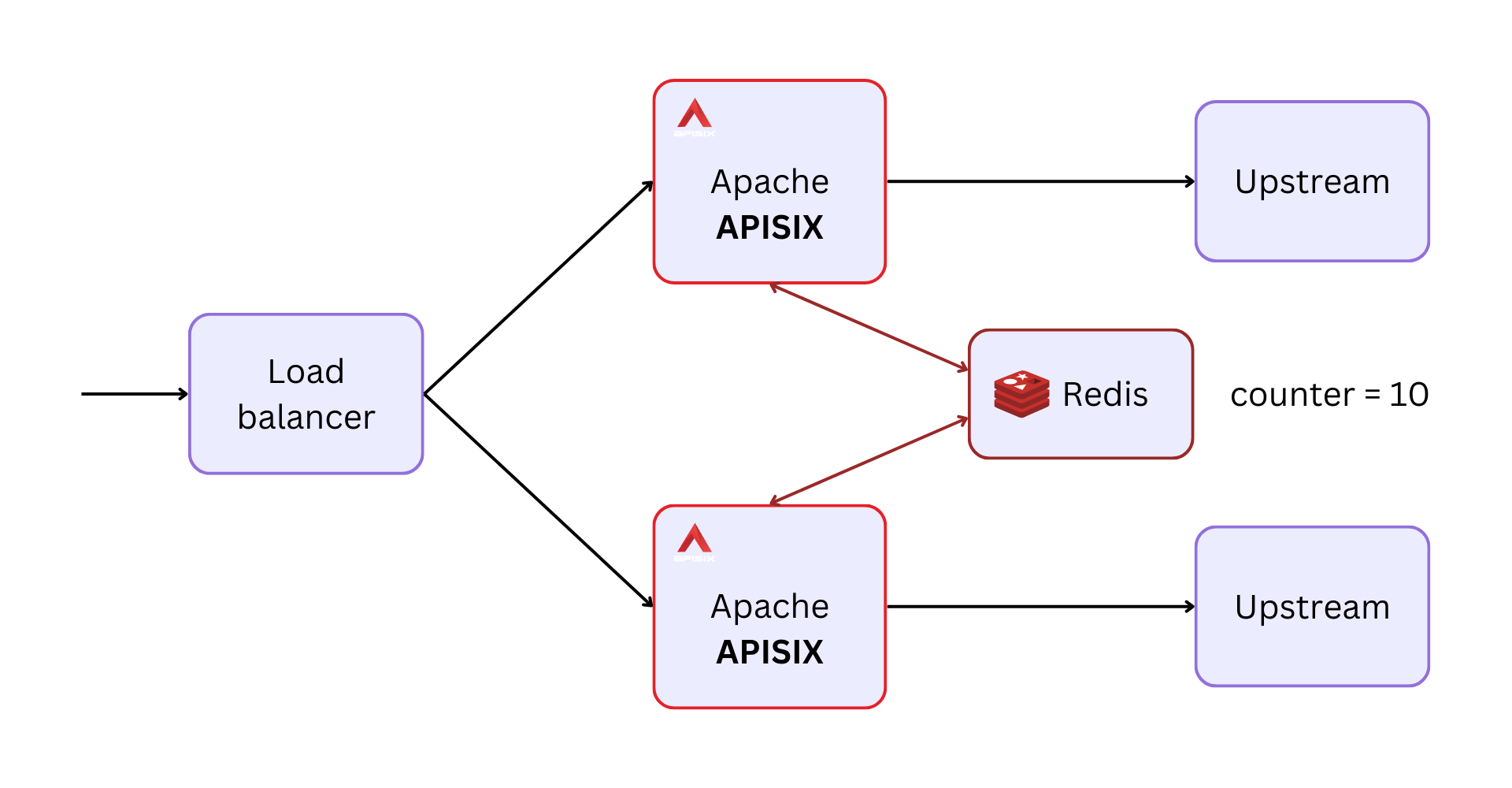
+A better way is to store the counter in a central location and have all APISIX
nodes access it. So even if the load balancer routes to different nodes in each
request, the same counter would be incremented each time. APISIX does this
through [Redis](https://redis.io/).
+
+
+
+The example below shows how you can configure this in a consumer group object:
+
+```shell
+curl localhost:9180/apisix/admin/consumer_groups/team_edward -X PUT -d '
+{
+ "plugins": {
+ "limit-count": {
+ "count": 10,
+ "time_window": 60,
+ "key_type": "var",
+ "key": "remote_addr",
+ "policy": "redis",
+ "redis_host": "redis",
+ "redis_port": 6379,
+ "redis_password": "password",
+ "redis_database": 1,
+ "redis_timeout": 1001,
+ "rejected_code": 429,
+ "group": "team_edward"
+ }
+ }
+}'
+```
+
+You can also use a Redis cluster instead of a single Redis service to make
this more fault-tolerant:
+
+```shell
+curl localhost:9180/apisix/admin/consumer_groups/team_edward -X PUT -d '
+{
+ "plugins": {
+ "limit-count": {
+ "count": 10,
+ "time_window": 60,
+ "key_type": "var",
+ "key": "remote_addr",
+ "policy": "redis-cluster",
+ "redis_cluster_nodes": ["127.0.0.1:5000", "127.0.0.1:5001"],
+ "redis_password": "password",
+ "redis_cluster_name": "redis-cluster-1",
+ "redis_timeout": 1001,
+ "rejected_code": 429,
+ "group": "team_edward"
+ }
+ }
+}'
+```
+
+That's a lot for this article! In the upcoming article, we will examine how
APISIX implements rate limiting under the hood and its implications. To learn
more about the rate limit plugins, see the documentation at
[apisix.apache.org](https://apisix.apache.org/docs/apisix/next/plugins/limit-req/).


