This is an automated email from the ASF dual-hosted git repository.

shreemaanabhishek pushed a commit to branch master
in repository https://gitbox.apache.org/repos/asf/apisix-website.git
The following commit(s) were added to refs/heads/master by this push:
new b81007409bd blog: Add Down the rabbit hole of an Apache APISIX plugin
post (#1692)
b81007409bd is described below
commit b81007409bd22a21a6d00df8661a788b525a8a24
Author: Nicolas Fränkel <[email protected]>
AuthorDate: Thu Oct 5 12:12:15 2023 +0200
blog: Add Down the rabbit hole of an Apache APISIX plugin post (#1692)
---
.../blog/2023/09/28/rabbit-hole-apisix-plugin.md | 130 +++++++++++++++++++++
1 file changed, 130 insertions(+)
diff --git a/blog/en/blog/2023/09/28/rabbit-hole-apisix-plugin.md
b/blog/en/blog/2023/09/28/rabbit-hole-apisix-plugin.md
new file mode 100644
index 00000000000..396afa83de7
--- /dev/null
+++ b/blog/en/blog/2023/09/28/rabbit-hole-apisix-plugin.md
@@ -0,0 +1,130 @@
+---
+title: Down the rabbit hole of an Apache APISIX plugin
+authors:
+ - name: Nicolas Fränkel
+ title: Author
+ url: https://github.com/nfrankel
+ image_url: https://avatars.githubusercontent.com/u/752258
+keywords:
+ - DevOps
+ - Analysis
+ - plugin
+ - Lua
+description: >
+ My demo, Evolving your APIs, features a custom Apache APISIX plugin.
+ I believe that the process of creating a custom plugin is relatively
well-documented.
+ However, I wanted to check the parameters of the `_M.access(conf, ctx)`
function, especially the `ctx` one.
+tags: [Ecosystem]
+image:
https://static.apiseven.com/uploads/2023/09/22/7BPpDQyu_falling-5472195.jpg
+---
+
+>My demo, Evolving your APIs, features a custom Apache APISIX plugin. I
believe that the process of [creating a custom
plugin](https://apisix.apache.org/docs/apisix/plugin-develop/) is relatively
well-documented. However, I wanted to check the parameters of the
`_M.access(conf, ctx)` function, especially the `ctx` one.
+
+<!--truncate-->
+
+<head>
+ <link rel="canonical"
href="https://blog.frankel.ch/rabbit-hole-apisix-plugin/"; />
+</head>
+
+The documentation states:
+
+>The `ctx` parameter caches data information related to the request. You can
use `core.log.warn(core.json.encode(ctx, true))` to output it to `error.log`
for viewing.
+
+Unfortunately, `core.log` ultimately depends on nginx's logging, and its
buffer is limited in size. Thanks to my colleague
[Abhishek](https://twitter.com/shreemaan_abhi) for finding [the
info](http://nginx.org/en/docs/dev/development_guide.html#logging). For this
reason, the `ctx` display is (heavily) truncated. I had to log data bit by bit;
however, it was instructive.
+
+## The context
+
+The `ctx` parameter is a Lua table. In Lua, table data structures are used for
regular indexed access (akin to arrays) and key access (like hash maps). A
single `ctx` instance is used for each _request_.
+
+The Apache APISIX engine reads and writes data in the `ctx` table. It's
responsible for forwarding the latter from plugin to plugin. In turn, each
plugin can also read and write data.
+
+I resorted to a custom plugin to conditionally apply rate-limiting in the
demo. The custom plugin is a copy-paste of the
[limit-count](https://apisix.apache.org/docs/apisix/plugins/limit-count/)
plugin. Note that the analysis is done in a specific context. Refrain from
assuming the same data is available in your own. However, it should be a good
starting point.
+
+## Overview of the `ctx` parameter
+
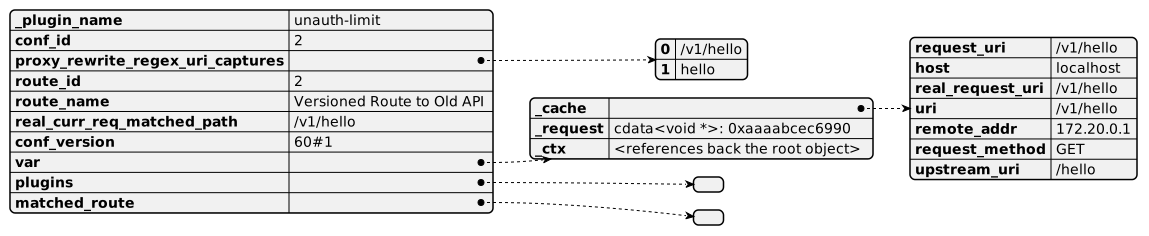
+The data available in the `ctx` parameter is overwhelming. To better
understand it, we shall go from the more general to the more particular. Let's
start from the overview.
+
+
+
+* `_plugin_name`: self-explanatory
+* `conf_id`: either route ID or service ID
+* `proxy_rewrite_regex_uri_capture`: data set by the
[proxy-rewrite](https://github.com/apache/apisix/blob/a82a2f3c439119ade45b4afffb5a251cd7bb65d2/apisix/plugins/proxy-rewrite.lua#L46C2)
plugin.
+* `route_id`: route ID the plugin is applied to
+* `route_name`: route name the plugin is applied to
+* `real_current_req_matched_path`: URI for which matching was done
+* `conf_version`: etcd-related revision - see below
+* `var`: references the `ctx` object and a cache of data about the request,
_e.g._, URI, method, etc.
+* `matched_route`: the route that was matched based on host header/URI and/or
`remote_addr`; see below
+* `plugins`: pairs of plugin/data - see below
+
+## Matched route
+
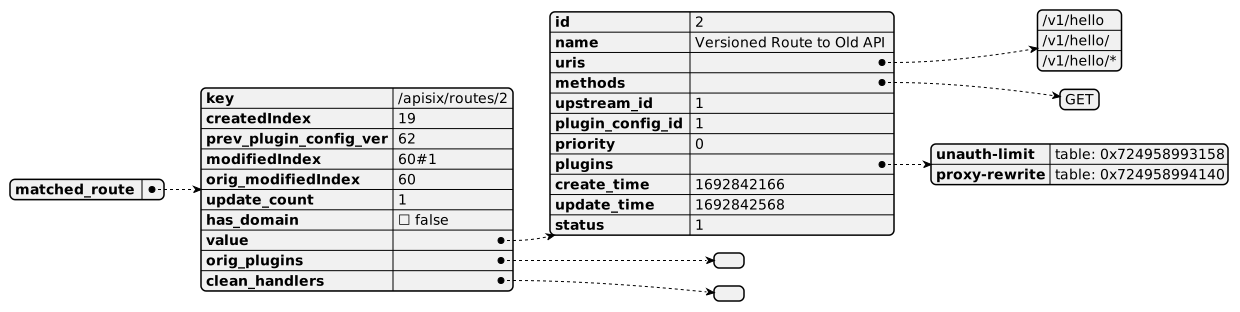
+The `matched_route` row is a complex data tree that deserves a detailed
description.
+
+
+
+* `key`: access key in the `etcd` datastore
+* `created_index`, `modifiedIndex` and `orig_modifiedIndex`: these attributes
are related to etcd and how it stores metadata associated with revisions.
Different revisions of a single key are logged in the `create_revision` and
`pre_revision` fields. The former points to the initial created row ID and is
constant throughout the changes, while the latter points to the row ID of the
previous value.
+
+ Apache APISIX maps them respectively to the `created_index` and
`modifiedIndex` values and uses them for caching. In many places,
`created_index` is later assigned to `conf_version` - see above.
+* `prev_plugin_config_ver`: after a plugin configuration is merged with the
route configuration, the current `modifiedIndex` is assigned to
`prev_plugin_config_ver`. It allows saving CPU cycles if one attempts to apply
the same plugin config later in the call chain.
+* `update_count`: replaced with `modifiedIndex`
+* `has_domain`: whether the matched route references an upstream with a
domain, _e.g._, `http://httpbin.org`, or not, _e.g._, `192.168.0.1`
+* `orig_plugins`: temporary placeholder used if a route has plugins defined
directly and reference a plugins config
+* `clean_handlers`: list of functions scheduled to be called after a plugin
has been created
+* `value` has keys related to how the route was created, as well as a couple
of others:
+
+ ```bash
+ curl http://apisix:9180/apisix/admin/routes/2 -H 'X-API-KEY:
edd1c9f034335f136f87ad84b625c8f1' -X PUT -d '
+ {
+ "name": "Versioned Route to Old API",
+ "methods": ["GET"],
+ "uris": ["/v1/hello", "/v1/hello/", "/v1/hello/*"],
+ "upstream_id": 1,
+ "plugin_config_id": 1
+ }'
+ ```
+
+* `priority`: since we didn't set it, it has a default value 0.
[Priority](https://apisix.apache.org/docs/apisix/admin-api/#request-body-parameters)
is essential when multiple routes match to determine which one to apply.
+* `create_time`: self-explanatory
+* `update_time`: self-explanatory
+* `plugins`: references to plugin's function
+* `status`: I couldn't find this
+
+## Plugins
+
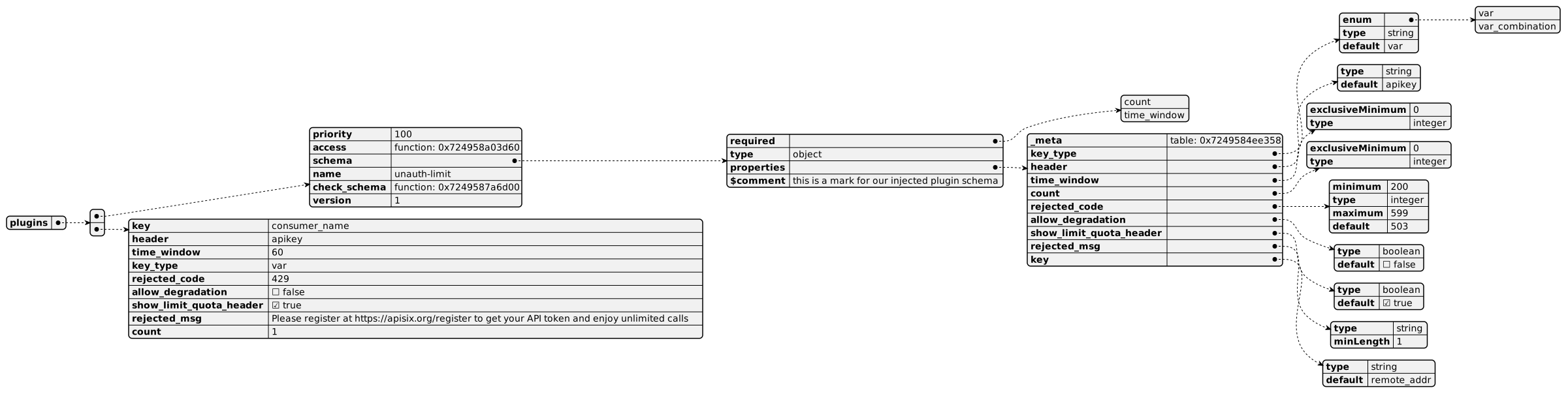
+The `plugins` value contains plugin-related data in an indexed-based Lua
table. Each plugin has two entries: the first (even-indexed) entry contains
data related to the plugin in general, _e.g._, its schema; while the second
(odd-index) entry data is related to its configuration in the current route.
+
+My setup has two plugins, hence four entries, but to keep things simpler, I
kept only a single plugin in the following diagram:
+
+
+
+Key values match directly to the plugin schema and configuration; you can
check the whole descriptions directly in the plugin.
+
+## A final trick
+
+I initially had issues printing the `ctx` table because of the nginx buffer
limit and had to do it bit by bit. However, you can print it to a file.
+
+Here's the function, courtesy of my colleague [Zeping
Bai](https://github.com/bzp2010):
+
+```lua
+local file, err = io.open("conf/ctx.json", "w+")
+if not file then
+ ngx.log(ngx.ERR, "failed to open file: ", err)
+ return
+end
+file.write(core.json.encode(ctx, true) .. "\n")
+file.close()
+```
+
+Here's the whole [data representation with
PlantUML](https://www.plantuml.com/plantuml/svg/xLfVSzis4d_Nfy3myj2ciaKfjc9vEhrwNFVYQHff4YSplKRbGCHAH4m2AlxuJpt-xaVIa49lQCDmgaiVel6BYH-0tovs5mjWVzI6AlD1Iz6vwf3o5oNBt2wuI0Gj8DedaHNKccmhvmKtKVS6aqenJpYhcWUhRqibBouJ1UUA6qWKBE0YiOedALqQgq2Nu9iPQdHSzUsTzNiPvBcint0j_QhbvclzyTgDhwGrW2Pr7rTKtu7IN0fWv7NrdHX9nZaZ1vFZDSbQjehBxwiP6woS75mgRYvBJ3-EzxgtMvryrMnpAr9JJhTFueldWvtHxjxk7jtPsujGbxCRLb69s-wZDfrcKD2rQX0HkGHbU5Dr66DrfMgQ9mh-jA1DhN4hD9q3weGwCj2fuajJ4wl78
[...]
+
+## Conclusion
+
+In this post, I described the structure of the `ctx` parameter in the
`access()` function. While specific entries vary from configuration to
configuration, it gives a good entry point into data manipulated by plugins.
+
+It's also a good reminder that even if you're not fluent in a language or a
codebase, you can get quite a lot of information by logging some variables.
+
+**To go further:**
+
+* [ctx
parameter](https://apisix.apache.org/docs/apisix/plugin-develop/#ctx-parameter)