This is an automated email from the ASF dual-hosted git repository.

nfrankel pushed a commit to branch master
in repository https://gitbox.apache.org/repos/asf/apisix-website.git
The following commit(s) were added to refs/heads/master by this push:
new f879d06d37e blog: Add Dynamic watermarking with imgproxy and Apache
APISIX post (#1805)
f879d06d37e is described below
commit f879d06d37e687ccc61726dde0e9f47c9c7d5a24
Author: Nicolas Fränkel <[email protected]>
AuthorDate: Thu Jul 11 07:55:52 2024 +0200
blog: Add Dynamic watermarking with imgproxy and Apache APISIX post (#1805)
---
.../blog/2024/07/11/watermarking-infrastructure.md | 75 ++++++++++++++++++++++
1 file changed, 75 insertions(+)
diff --git a/blog/en/blog/2024/07/11/watermarking-infrastructure.md
b/blog/en/blog/2024/07/11/watermarking-infrastructure.md
new file mode 100644
index 00000000000..3526b153f80
--- /dev/null
+++ b/blog/en/blog/2024/07/11/watermarking-infrastructure.md
@@ -0,0 +1,75 @@
+---
+title: Dynamic watermarking with imgproxy and Apache APISIX
+authors:
+ - name: Nicolas Fränkel
+ title: Author
+ url: https://github.com/nfrankel
+ image_url: https://avatars.githubusercontent.com/u/752258
+keywords:
+ - APISIX
+ - watermarking
+ - image processing
+ - imgproxy
+description: >
+ Last week, I described how to add a dynamic watermark to your images on the
JVM. I didn't find any library, so I had to develop the feature, or, more
precisely, an embryo of a feature, by myself. Depending on your tech stack, you
must search for an existing library or roll up your sleeves. For example, Rust
offers such an out-of-the-box library. Worse, this approach might be impossible
to implement if you don't have access to the source image.
+ Another alternative is to use ready-made components, namely imgproxy and
Apache APISIX. I already combined them to resize images on-the-fly.
+tags: [Ecosystem]
+image:
https://static.apiseven.com/uploads/2024/07/04/j2xS06dA_faucet-1684902.jpg
+---
+
+<head>
+ <link rel="canonical"
href="https://blog.frankel.ch/dynamic-watermarking/2/"; />
+</head>
+
+>Last week, I described [how to add a dynamic watermark to your images on the
JVM](https://blog.frankel.ch/dynamic-watermarking/1/). I didn't find any
library, so I had to develop the feature, or, more precisely, an embryo of a
feature, by myself. Depending on your tech stack, you must search for an
existing library or roll up your sleeves. For example, Rust offers such an
out-of-the-box library. Worse, this approach might be impossible to implement
if you don't have access to the source image.
+>
+>Another alternative is to use ready-made components, namely
[imgproxy](https://imgproxy.net/) and [Apache
APISIX](https://apisix.apache.org/). I already combined them to [resize images
on-the-fly](https://blog.frankel.ch/resize-images-on-the-fly/).
+
+<!--truncate-->
+
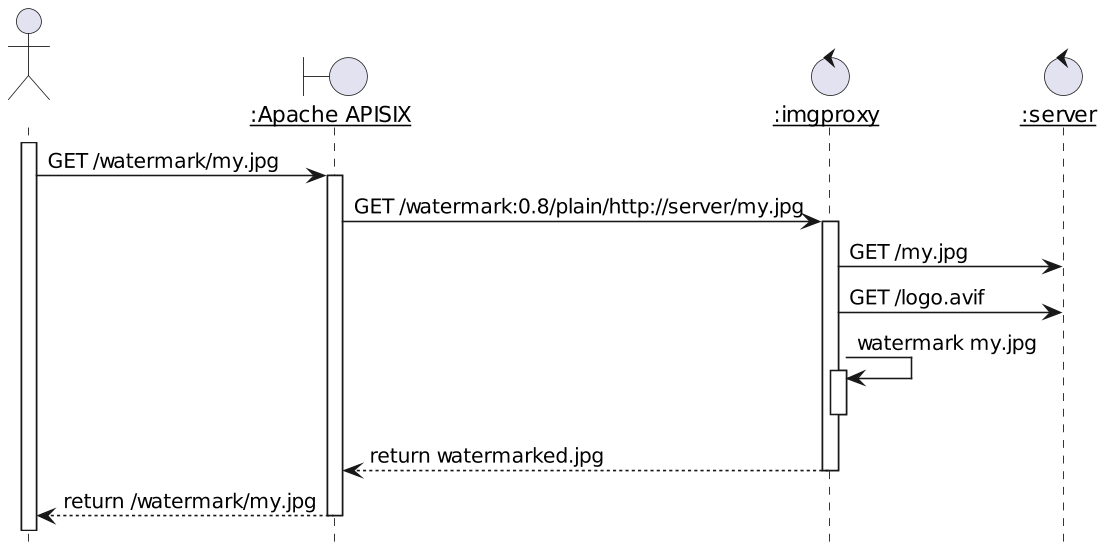
+Here's the general sequence flow of the process:
+
+
+
+* When APISIX receives a specific pattern, it calls `imgproxy` with the
relevant parameters
+* `imgproxy` fetches the original image and the watermark to apply
+* It watermarks the original image and returns the result to APISIX
+
+Let's say the pattern is `/watermark/*`.
+
+We can define two routes:
+
+```yaml
+routes:
+ - uri: "*"
#1
+ upstream:
+ nodes:
+ "server:3000": 1
+ - uri: /watermark/*
#2
+ plugins:
+ proxy-rewrite:
#3
+ regex_uri:
+ - /watermark/(.*)
+ -
/dummy_sig/watermark:0.8:nowe:20:20:0.2/plain/http://server:3000/$1 #4
+ upstream:
+ nodes:
+ "imgproxy:8080": 1
#5
+```
+
+1. Catch-all route that forwards to the web server
+2. Watermark images route
+3. Rewrite the URL...
+4. ...with an `imgproxy`-configured route and...
+5. ...forward to `imageproxy`
+
+You can find the exact rewritten URL syntax in
[imgproxy](https://docs.imgproxy.net/features/watermark) documentation. The
watermark itself is configured via a single environment variable. You should
buy `imgproxy`'s Pro version if you need different watermarks. As a poor man's
alternative, you could also set up different instances, each with its
watermark, and configure APISIX to route the request to the desired instance.
+
+In this post, we implemented a watermarking feature with the help of
`imgproxy`. The more I think about it, the more I think they make a match made
in Heaven.
+
+The complete source code for this post can be found on
[GitHub](https://github.com/ajavageek/watermark-on-the-fly).
+
+**To go further:**
+
+* [Digital watermarking](https://en.wikipedia.org/wiki/Digital_watermarking)
+* [imgproxy documentation](https://docs.imgproxy.net/)
+* [imgproxy interactive demo](https://imgproxy.net/)