Yilialinn commented on code in PR #1880:
URL: https://github.com/apache/apisix-website/pull/1880#discussion_r2022070375
########## blog/en/blog/2025/04/01/embrace-intelligent-api-management-with-ai-and-mcp.md: ########## @@ -0,0 +1,195 @@ +--- +title: "APISIX-MCP: Embracing Intelligent API Management with AI + MCP" +authors: + - name: Zhihuang Lin + title: API7 Engineer + url: https://github.com/oil-oil + image_url: https://github.com/oil-oil.png + - name: Yilia Lin + title: Technical Writer + url: https://github.com/Yilialinn + image_url: https://github.com/Yilialinn.png +keywords: + - API Gateway + - APISIX AI Gateway + - Apache APISIX + - MCP + - Model Context Protocol +description: "The MCP protocol provides standardized connectivity for AI models. APISIX-MCP simplifies API management through natural language interaction, enabling intelligent configuration and automated workflows, thereby improving operational efficiency." +image: https://static.api7.ai/uploads/2025/04/01/b53YPObN_apisix-mcp.webp +tags: [Ecosystem] +--- + +> This article introduces the MCP protocol and its application in APISIX-MCP. APISIX-MCP simplifies API management through natural language interaction, supporting the creation, updating, and deletion of resources. +<!--truncate--> + +## Preface + +With the explosive growth of large-scale AI model applications, many traditional systems are eager to integrate AI capabilities quickly. However, the current landscape of AI tools lacks unified standards, resulting in severe fragmentation. Different models vary in capability and integration methods, creating significant challenges for traditional applications during adoption. + +Against this backdrop, in late 2024, Anthropic—the company behind the renowned Claude model—introduced the **Model Context Protocol (MCP)**. MCP positions itself as the **"USB-C interface" for AI applications**. Just as USB-C standardizes connections for peripherals and accessories, MCP provides a standardized approach for AI models to connect with diverse data sources and tools. + +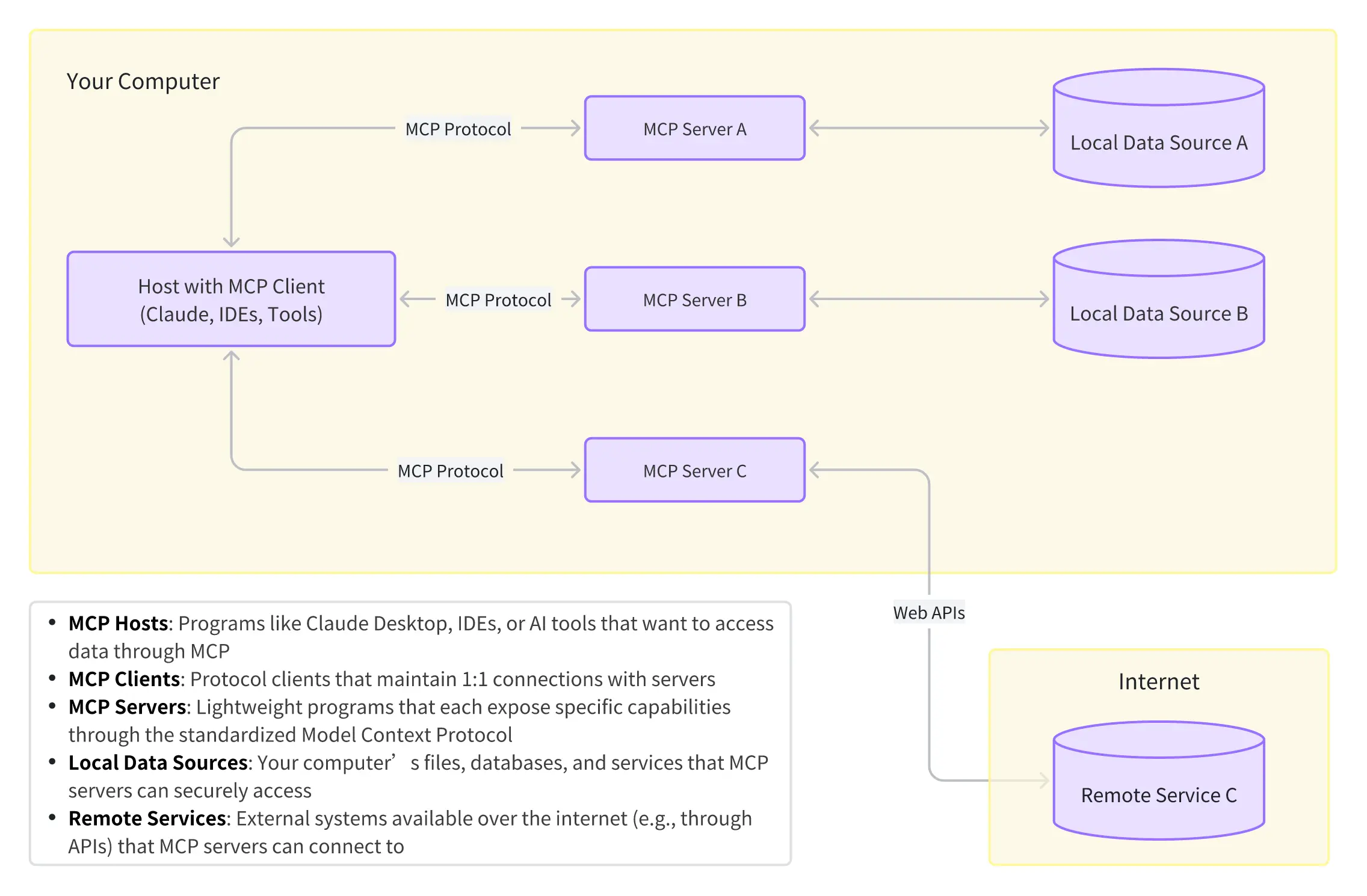 + +Numerous services and applications have already adopted MCP. For example: + +- **GitHub-MCP** enables natural language code submissions and PR creation. +- **Figma MCP** allows AI to generate UI designs directly. +- With **Browser-tools-MCP**, tools like Cursor can debug code by interacting with DOM elements and console logs. + +The official MCP repository includes implementations for Google Drive, Slack, Git, and various databases. As an open standard, MCP has gained widespread recognition in the AI community, attracting third-party developers who contribute hundreds of new MCP services daily. Anthropic, as the founder, actively drives MCP’s evolution by refining the protocol and educating developers. + +## About APISIX-MCP + +The rise of MCP offers traditional applications a new technical pathway. Leveraging MCP’s standardized integration capabilities, we developed [**APISIX-MCP**](https://github.com/api7/apisix-mcp), which bridges large language models with Apache APISIX’s Admin API through natural language interaction. The current implementation supports the following operations: + +### General Operations + +- `get_resource`: Retrieve resources by type (routes, services, upstreams, etc.). +- `delete_resource`: Delete resources by ID. + +### API Resource Management + +- `create_route`/`update_route`/`delete_route`: Manage routes. +- `create_service`/`update_service`/`delete_service`: Manage services. +- `create_upstream`/`update_upstream`/`delete_upstream`: Manage upstreams. +- `create_ssl`/`update_ssl`/`delete_ssl`: Manage SSL certificates. +- `create_or_update_proto`: Manage Protobuf definitions. +- `create_or_update_stream_route`: Manage stream routes. + +### Plugin Operations + +- `get_all_plugin_names`: List all available plugins. +- `get_plugin_info`/`get_plugins_by_type`/`get_plugin_schema`: Fetch plugin configurations. +- `create_plugin_config`/`update_plugin_config`: Manage plugin configurations. +- `create_global_rule`/`update_global_rule`: Manage global plugin rules. +- `get_plugin_metadata`/`create_or_update_plugin_metadata`/`delete_plugin_metadata`: Manage plugin metadata. + +### Security Configuration + +- `get_secret_by_id`/`create_secret`/`update_secret`: Manage secrets. +- `create_or_update_consumer`/`delete_consumer`: Manage consumers. +- `get_credential`/`create_or_update_credential`/`delete_credential`: Manage consumer credentials. +- `create_consumer_group`/`delete_consumer_group`: Manage consumer groups. + +## How to Use APISIX-MCP + +APISIX-MCP is now open-sourced and available on [npm](https://www.npmjs.com/package/apisix-mcp) and [GitHub](https://github.com/api7/apisix-mcp). It can be configured via any MCP-compatible AI client, such as Claude Desktop, Cursor, or the Cline plugin for VSCode. + +Below is a step-by-step guide using **Cursor**: + +1. Open Cursor, click the settings icon, and navigate to the settings page. + + 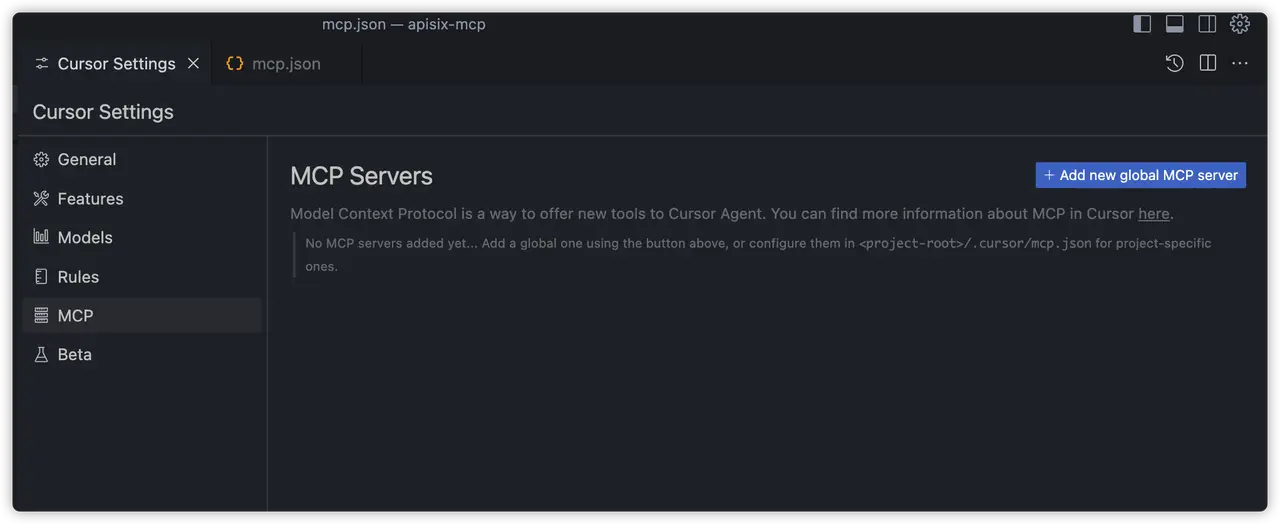 + +2. Click **"Add new global MCP server"** to edit the `mcp.json` configuration file: + + ```json + { + "mcpServers": { + "apisix-mcp": { + "command": "npx", + "args": ["-y", "apisix-mcp"], + "env": { + "APISIX_SERVER_HOST": "your-apisix-server-host", + "APISIX_ADMIN_API_PORT": "your-apisix-admin-api-port", + "APISIX_ADMIN_API_PREFIX": "your-apisix-admin-api-prefix", + "APISIX_ADMIN_KEY": "your-apisix-api-key" + } + } + } + } + ``` + +In the `mcpServers` field of the configuration file, add a service `apisix-mcp`, which can be changed. Then configure the commands of running MCP service. + +- **`command`**: `npx` (Node.js package executor). +- **`args`**: `-y` (auto-install dependencies) and `apisix-mcp` (package name). +- **`env`**: Customize APISIX connection settings (defaults below): + +In the `env` field, you can specify the APISIX service access address, Admin API port, prefix, and authentication key. These environment variables have default values, so if you start APISIX without any custom configuration, you can omit the `env` field entirely. The default values for each variable are as follows: + + | Variable | Description | Default Value | + |---------------------------|--------------------------------------|-----------------------------| + | `APISIX_SERVER_HOST` | APISIX server host | `http://127.0.0.1` | + | `APISIX_ADMIN_API_PORT` | Admin API port | `9180` | + | `APISIX_ADMIN_API_PREFIX` | Admin API prefix | `/apisix/admin` | + | `APISIX_ADMIN_KEY` | Admin API authentication key | `edd1c9f034335f136f87ad84b625c8f1` | + +3. Upon successful configuration, the MCP Servers list will show a green indicator for `apisix-mcp`, along with available tools. + + 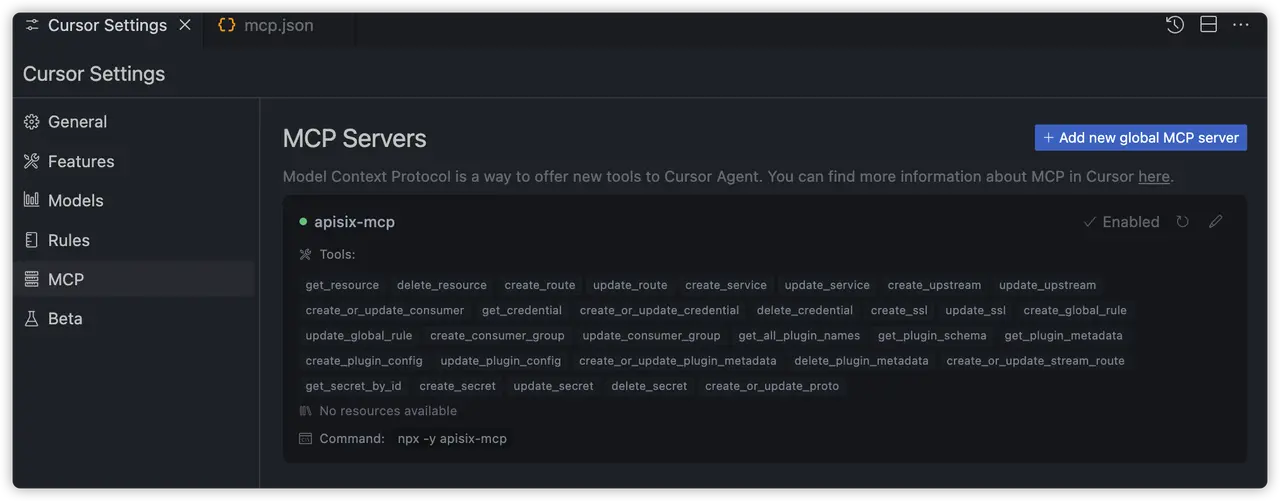 + + > Note: If setup fails, refer to the [APISIX-MCP GitHub](https://github.com/api7/apisix-mcp) documentation for manual builds. + +4. In the chat panel, select **Agent** mode and choose a model (e.g., Claude Sonnet 3.5/3.7 or GPT-4o). + +  + +5. Next, we can enter relevant operational commands to verify if the MCP service is functioning correctly. Following the workflow in APISIX's Getting Started documentation, we input the following into the dialog box, and send the message: + + > *"Help me create a route with path `/api` for accessing `https://httpbin.org` upstream, with CORS and rate-limiting plugins. Print the route details after configuration."* + +6. Next, in Cursor, you will see a process similar to the MCP tool invocation demonstrated in the video below. Due to the inherent randomness of large AI model responses, the exact operations performed may vary from the example shown. + + <video width="100%" controls> + <source src="https://static.api7.ai/uploads/2025/04/01/iRjDmNSS_mcp-demo.avi"; type="video/avi"> + </video> Review Comment: Can the video be rendered properly? @guoqqqi -- This is an automated message from the Apache Git Service. To respond to the message, please log on to GitHub and use the URL above to go to the specific comment. To unsubscribe, e-mail: [email protected] For queries about this service, please contact Infrastructure at: [email protected]