This is an automated email from the ASF dual-hosted git repository.

guoqi pushed a commit to branch master
in repository https://gitbox.apache.org/repos/asf/apisix-website.git
The following commit(s) were added to refs/heads/master by this push:
new 3e5dfdff154 blog: add Tencent Timi Use Case (en) (#1914)
3e5dfdff154 is described below
commit 3e5dfdff1545bc336b3c29a774da22c8da24a720
Author: Yilia Lin <[email protected]>
AuthorDate: Fri May 16 09:09:49 2025 +0800
blog: add Tencent Timi Use Case (en) (#1914)
---
.../07/apisix-gateway-practice-in-tencent-timi.md | 368 +++++++++++++++++++++
.../07/apisix-gateway-practice-in-tencent-timi.md | 32 +-
2 files changed, 392 insertions(+), 8 deletions(-)
diff --git a/blog/en/blog/2025/05/07/apisix-gateway-practice-in-tencent-timi.md
b/blog/en/blog/2025/05/07/apisix-gateway-practice-in-tencent-timi.md
new file mode 100644
index 00000000000..ddb0fae9770
--- /dev/null
+++ b/blog/en/blog/2025/05/07/apisix-gateway-practice-in-tencent-timi.md
@@ -0,0 +1,368 @@
+---
+title: "APISIX Gateway Practices in Tencent Games"
+authors:
+ - name: Zemiao Yang
+ title: Author
+ - name: Yilia Lin
+ title: Technical Writer
+ url: https://github.com/Yilialinn
+ image_url: https://github.com/Yilialinn.png
+keywords:
+ - open source
+ - API gateway
+ - Apache APISIX
+ - Tencent
+ - Timi Studio Group
+ - API gateway use case
+description: Tencent Timi Studio Group developed TAPISIX based on APISIX,
exploring gateway extension, deployment, and operations.
+tags: [Case Studies]
+image:
https://static.api7.ai/uploads/2025/05/07/Em3otYyD_tencent-timi-uses-apisix.webp
+---
+
+> Authors: Zemiao Yang, Backend Development Engineer at Tencent Timi Studio
Group. This article is based on his presentation at the APISIX Shenzhen Meetup
on April 12, 2025.
+<!--truncate-->
+
+## About Timi Studio Group
+
+TiMi is a subsidiary of Tencent Games and the developer of several popular
mobile games, including *Call of Duty: Mobile*, *Pokémon Unite*, *Arena of
Valor*, and *Honor of Kings*.
+
+*Honor of Kings* is one of the world's most popular MOBA mobile games. As of
December 2023, it has recorded up to 160 million daily active users, 3 million
concurrent online users, over 3.8 billion downloads, and over 300 million
registered users. In May 2017, it topped the global mobile game revenue chart.
(Source: Wikipedia)
+
+## TAPISIX API Gateway
+
+Our team primarily uses the Golang language for development and also takes on
some operational responsibilities. Given our limited experience in operations
and our desire to control costs, we aim to unify the handling of multiple tasks
such as authentication and traffic recording through an API gateway.
Additionally, due to the frequent infrastructure migration required for our
overseas business, we cannot rely on cloud-based solutions and require all data
and components to be migratable.
+
+### Introduction to TAPISIX
+
+Although Apache APISIX is fully open-source with a rich plugin ecosystem, we
need to balance the integration with existing infrastructure, such as internal
service discovery, log standards, and trace reporting. These functions are
company-specific and cannot be directly merged into the open-source upstream.
Therefore, we have developed a customized version, TAPISIX, based on APISIX,
adding a series of plugins designed for our internal environment.
+
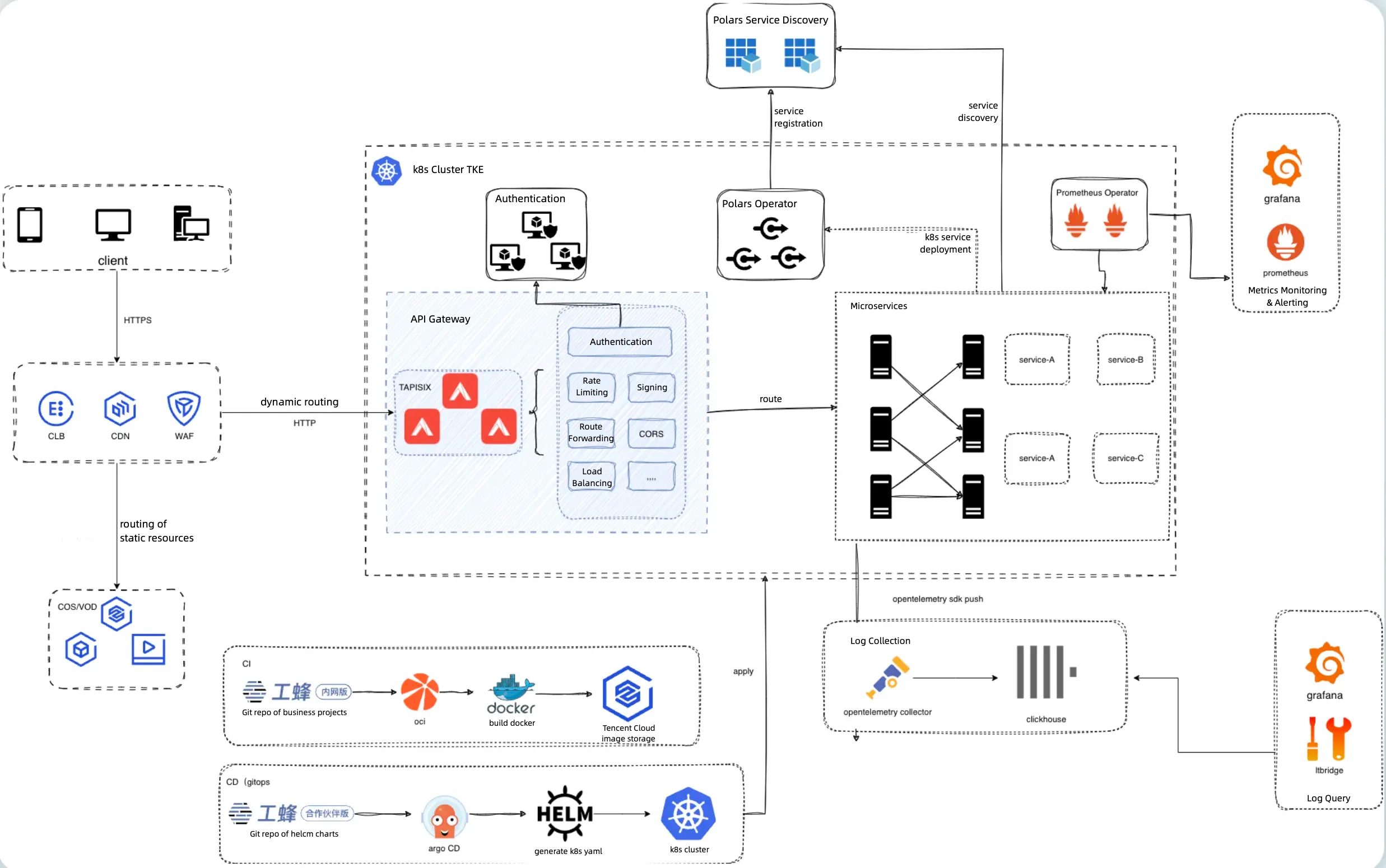
+Our services run on Kubernetes (k8s) clusters, with APISIX serving as the
traffic entry point and connecting to internal business services. Service
discovery utilizes the company's internal Polaris system, metric monitoring is
achieved through the Prometheus provided by APISIX, and log and trace
collection are performed via OpenTelemetry and ClickHouse. For CI tools, we use
OCI (similar to GitHub Actions), which supports pipeline definition through
YAML; for CD tools, we select Argo CD, [...]
+
+Due to the stringent compliance requirements of our overseas business, many
internal company components cannot be directly implemented.
+
+
+
+This presentation will cover the following four aspects:
+
+1. Gateway Feature Extension: How to extend gateway features based on business
needs.
+2. Deployment and Operations: Practices for gateway deployment and daily
operations.
+3. Runtime Operations: Maintenance and optimization of the runtime environment.
+4. Other Experiences: Practical experience accumulated by the team in gateway
operations.
+
+## Gateway Feature Extension
+
+### Goals and Challenges
+
+Our goal is to build a business-targeted gateway that leverages APISIX's
plugins to meet customized requirements. As a business-oriented team, we face
the following challenges:
+
+1. High Development Threshold: Frontline developers are familiar with Golang
but lack familiarity with the Lua language and APISIX plugin development,
leading to a high learning curve.
+
+2. Plugin Reliability: Ensuring that developed plugins can be safely and
stably deployed.
+
+#### Core Issues
+
+1. How to reduce the development threshold?
+2. How to quickly verify plugin functionality?
+3. How to ensure plugin reliability?
+
+#### Solutions
+
+To address the above issues, we have taken the following four approaches:
+
+1. Development Standards (Maintainability)
+2. Local Quick Running and Testing
+3. Pipeline Construction (Build Process)
+4. Reliability Assurance
+
+### 1. Development Standards
+
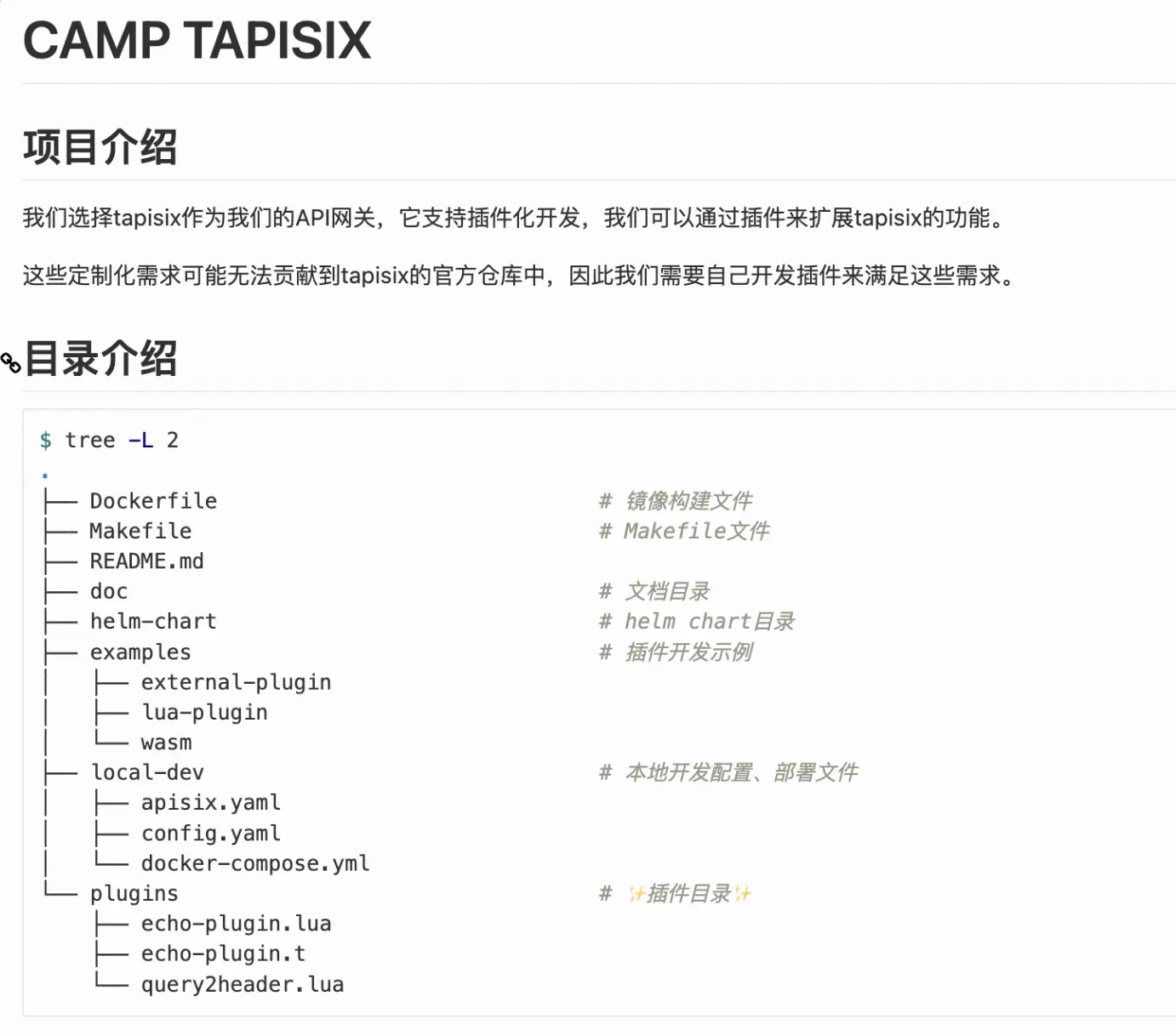
+Development standards are easy to understand. We need to define a library,
specify the storage path for plugins, and require plugins to adopt a
single-file format, consistent with APISIX's single-file plugin mechanism, to
facilitate management and maintenance.
+
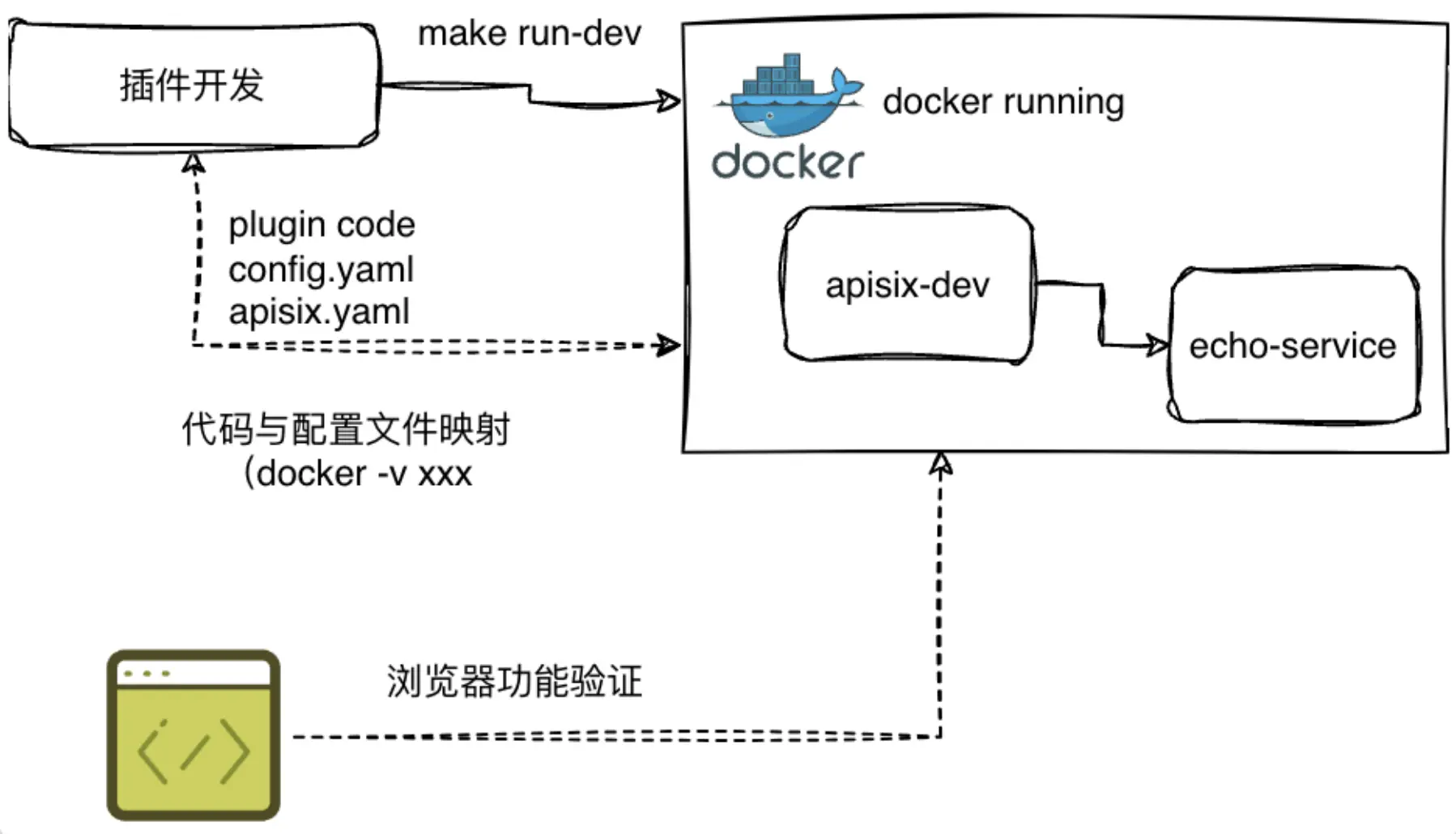
+To lower the development threshold, we support local quick running and
testing. By utilizing APISIX's Docker image, local plugins can be mounted into
containers via volume mapping for convenient deployment. Additionally, by
leveraging the downstream echo-service (a service developed based on
open-source Node.js), upstream behavior can be simulated. This service can
return all content of a request, such as request headers. By adding specific
parameters in the request (e.g., HTTP status co [...]
+
+<div align="center">
+<img alt="TAPISIX Project Introduction" style="width: 80%"
src="https://static.api7.ai/uploads/2025/05/15/1r4TMUK9_timi-2.webp";></img>
+</div>
+
+### 2. Local Quick Running and Testing
+
+To reduce the development threshold and accelerate verification, we provide
convenient local development environment support:
+
+1. **File Mapping**: By mounting local plugin files into Docker containers,
developers can test plugin changes in real-time.
+
+2. **Makefile Build**: Construct a Makefile to support quick startup of the
plugin testing environment via the `make run-dev` command, ensuring seamless
connection between local files and containers.
+
+3. **Direct Browser Access**: Developers can directly verify plugin
functionality by accessing relevant interfaces in a browser, without additional
deployment or configuration.
+
+<div align="center">
+<img alt="Run and Test" style="width: 60%"
src="https://static.api7.ai/uploads/2025/05/15/bdMFTb0b_timi-3.webp";></img>
+</div>
+
+By defining development standards and providing local quick development
support, we have effectively lowered the development threshold and accelerated
the plugin verification process. Developers can focus on feature implementation
without worrying about complex deployment and testing procedures, thereby
improving overall development efficiency.
+
+### 3. Pipeline Construction (Build Process)
+
+During pipeline construction, it is essential to ensure reliability and
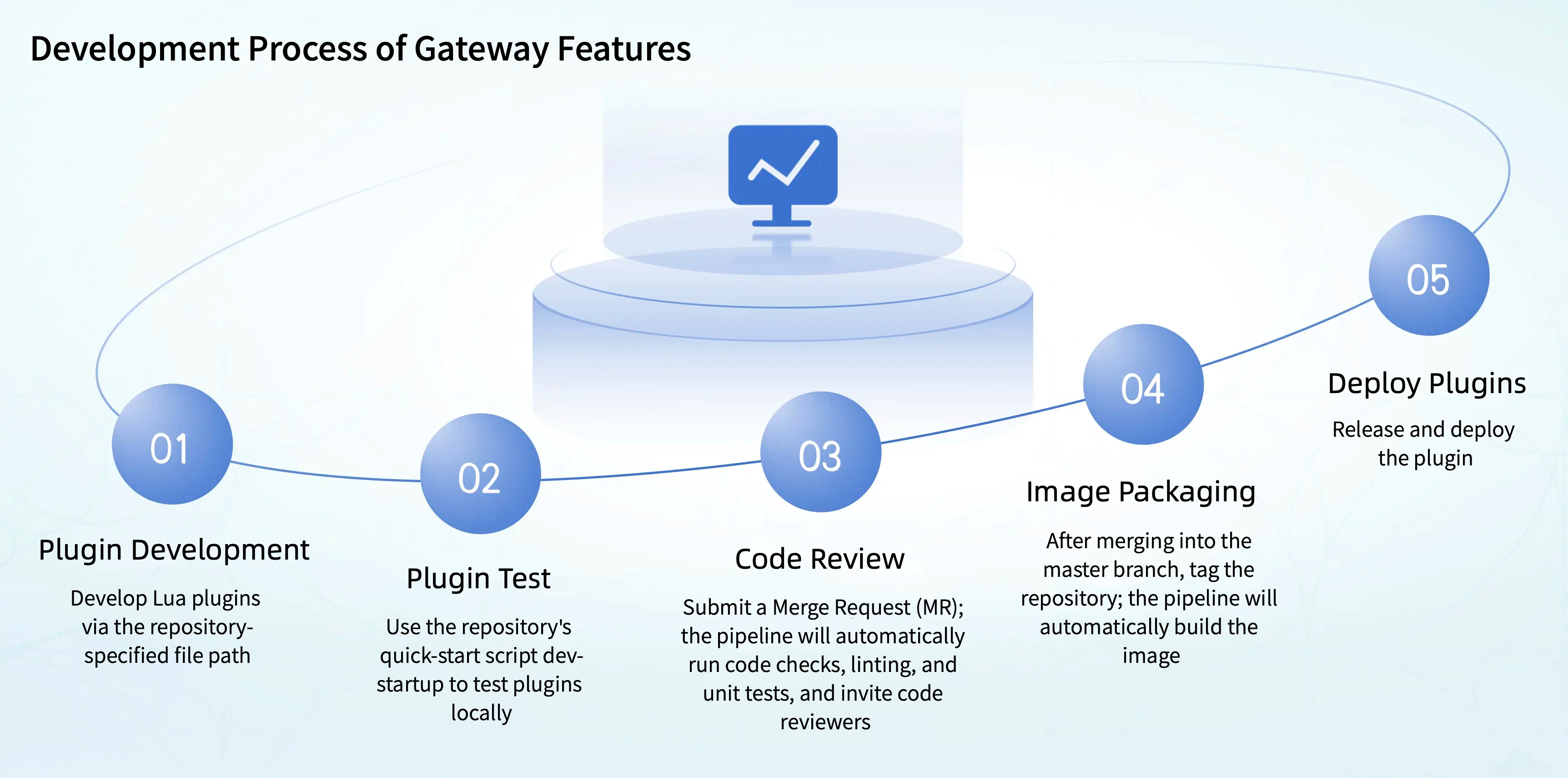
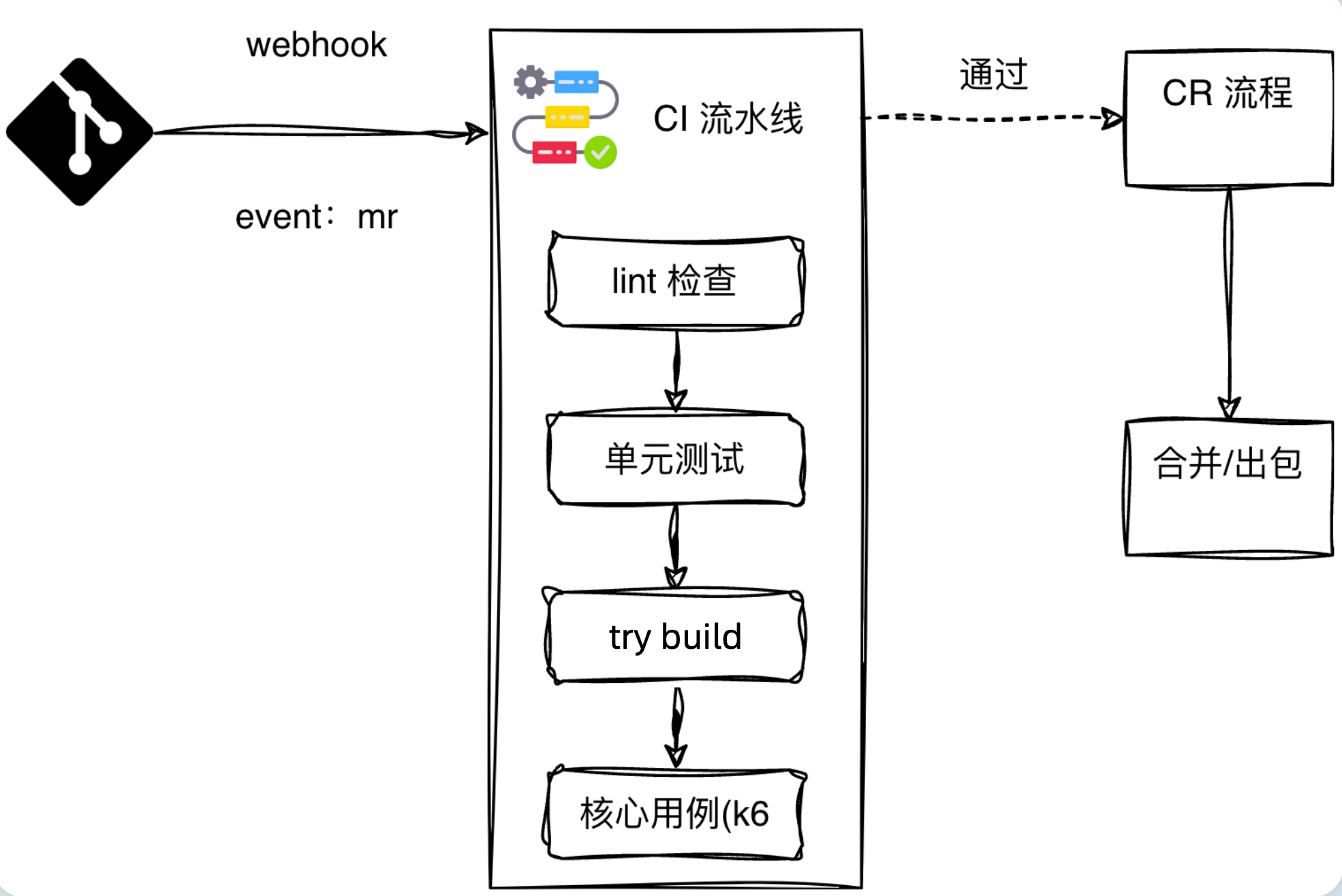
stability in plugin development. The development process is as follows:
+
+1. Branch Management and Pull Request (PR) Process:
+
+ a. Developers create a new branch from the master branch for development.
+
+ b. After completing development, they submit a PR to the master branch.
+
+2. Webhook Triggering: After submitting a PR, the system automatically
triggers a Webhook to start the pipeline.
+
+3. Pipeline Inspection:
+
+ a. Lint Check: Primarily checks code formatting standards.
+
+ b. Unit Testing: Runs unit tests to verify whether plugin functionality
meets expectations.
+
+ c. Try Build: Constructs an image using the source code to verify its
buildability.
+
+<div align="center">
+<img alt="Pipeline Building" style="width: 50%"
src="https://static.api7.ai/uploads/2025/05/15/VAFUteFJ_timi-4.webp";></img>
+</div>
+
+### 4. Reliability Assurance (CR, lint, unit testing, black-box testing)
+
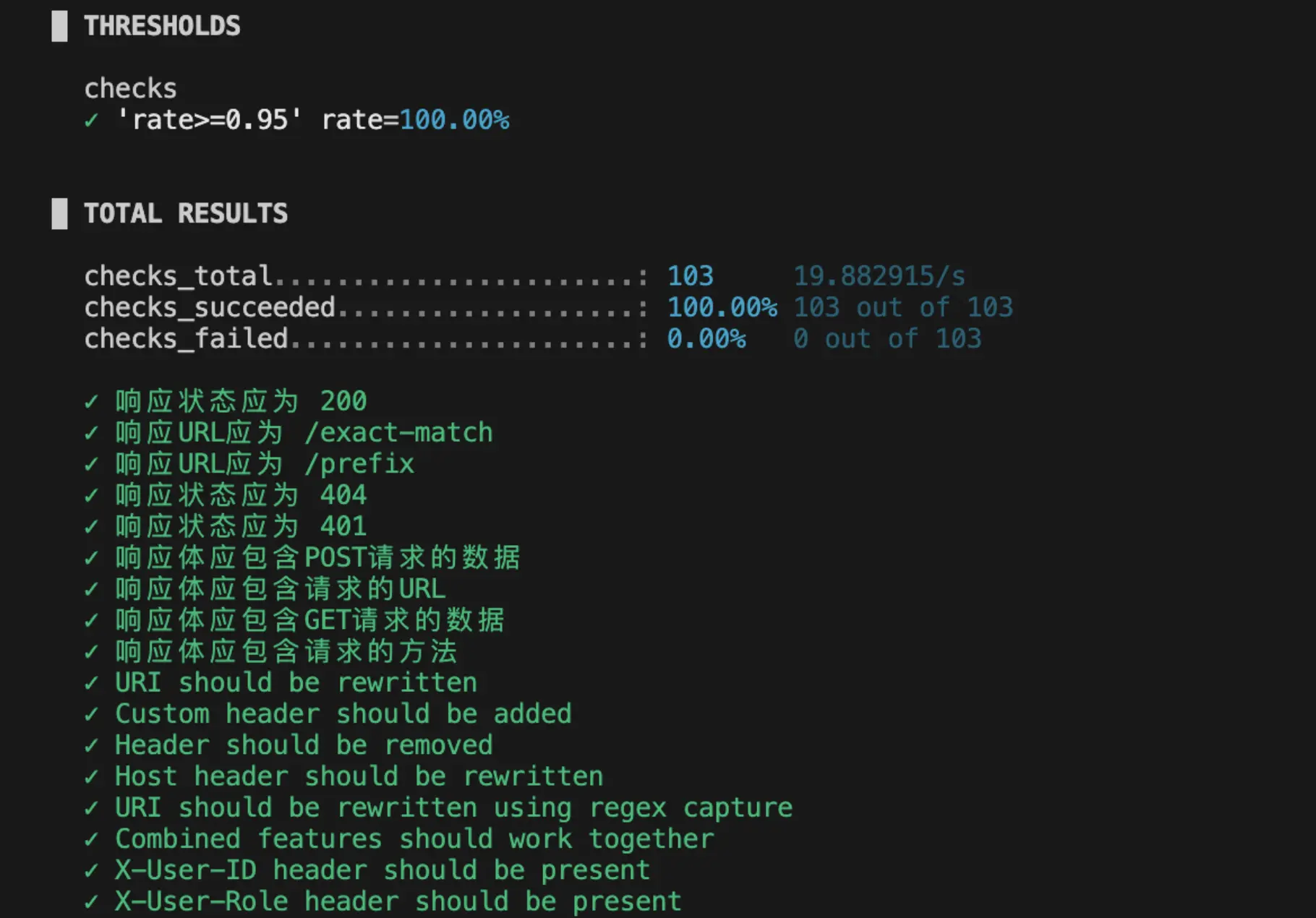
+We utilize the k6 testing framework from Grafana to validate core test cases.
The k6 framework supports writing test case declaratively and covers various
scenarios. We regularly replay these test cases to check interface
functionality. For instance, even if only a plugin is modified, we conduct
comprehensive replay testing, including parsing and service discovery.
+
+#### Core Test Cases and the k6 Testing Framework
+
+k6 Test Cases: Comprising hundreds of test cases covering core processes to
ensure plugin reliability.
+
+<div align="center">
+<img alt="K6 Test" style="width: 80%"
src="https://static.api7.ai/uploads/2025/05/15/80NTJpcY_timi-5.webp";></img>
+</div>
+
+Through the complete process of local development, quick validation, MR
submission, pipeline inspection, reliability assurance, and packaging
deployment, we ensure that every stage of plugin development and deployment
undergoes strict quality control.
+
+
+
+## Deployment and Operations
+
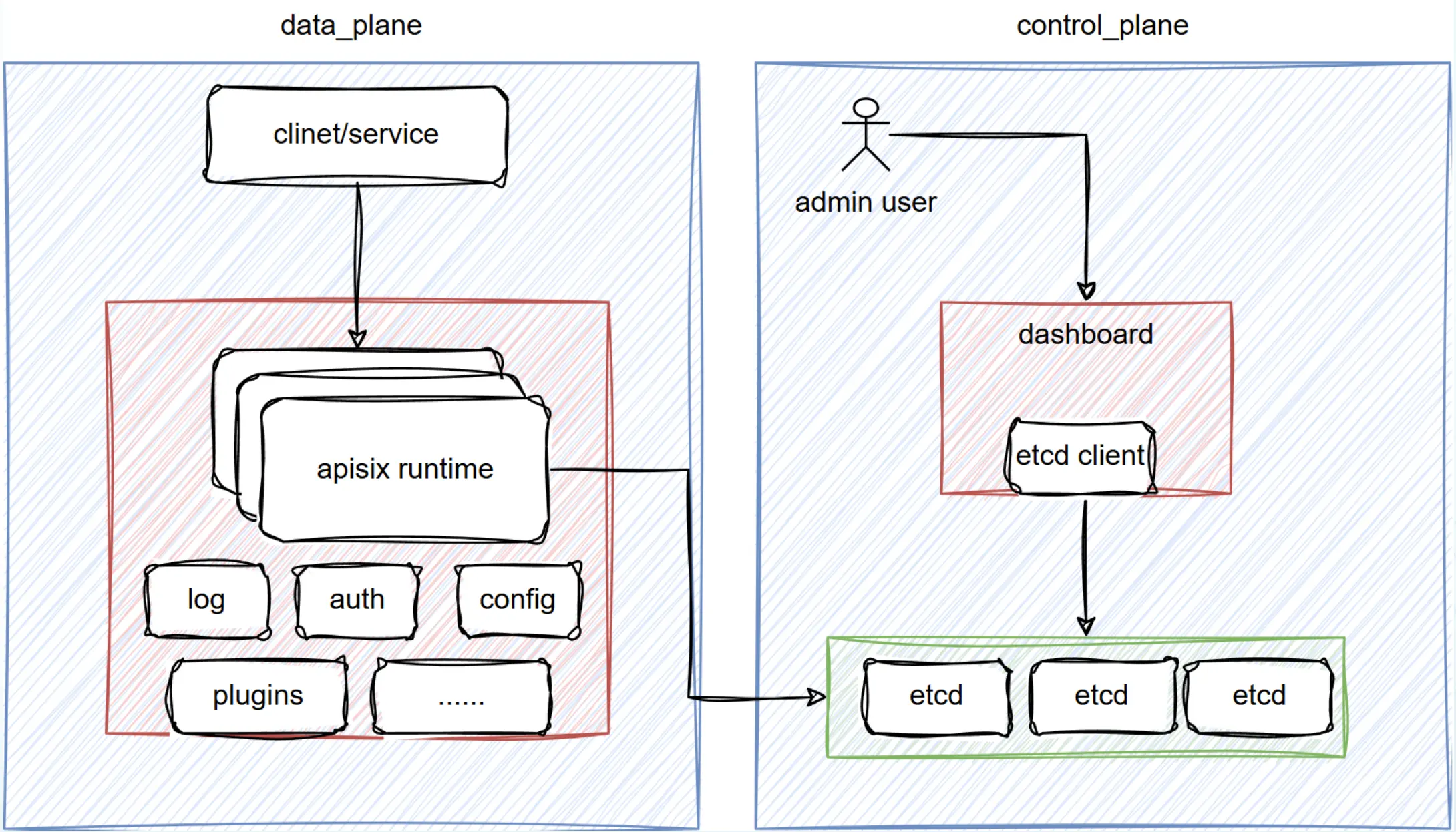
+Next, we briefly introduce the deployment modes of APISIX, which are divided
into the data plane and control plane. The data plane is responsible for proxy,
while the control plane manages configurations, including the management
interface and other functionalities, writing configurations to etcd. The data
plane reads configurations from etcd and loads them into memory to complete
routing functions.
+
+APISIX offers three deployment methods to accommodate the needs of different
production environments:
+
+1. **Traditional Mode**: The data plane and control plane are deployed within
a single instance.
+
+2. **Separated Mode**: The data plane and control plane are deployed
independently. Even if the data plane fails, the control plane can still
operate and make modifications.
+
+3. **Standalone Mode**: Only the data plane is deployed, with configurations
loaded from local YAML files, eliminating dependence on etcd.
+
+We utilize the standalone mode that retains only the data plane. All
configurations are stored locally, avoiding reliance on etcd. This mode is more
suitable for overseas scenarios. Since etcd is a database, some cloud providers
do not offer etcd services. Given the stringent overseas data compliance
requirements and our k8s-based deployment environment, we have also implemented
a configuration management approach that is k8s-friendly.
+
+<div align="center">
+<img alt="APISIX Deployment" style="width: 75%"
src="https://static.api7.ai/uploads/2025/05/07/99nRuGCG_7-dp-and-cp.webp";></img>
+</div>
+
+- YAML Configuration: All configurations are directly stored in YAML files for
easy management and automated deployment.
+- ConfigMap Storage: YAML files are directly placed in k8s ConfigMaps to
ensure configuration versioning and traceability.
+
+We define the gateway as immutable infrastructure, with infrequent changes
during daily operations. Even route changes are considered as change operations.
+
+### Kubernetes Configuration Management and Deployment Practices
+
+**Backgrounds and Challenges**
+
+When managing config.yaml, we found that Kubernetes deployments actually rely
on a series of complex configuration files, such as Service.yaml,
ConfigMap.yaml, and Workload. These numerous and detailed configuration files
can lead to complex management and potential errors.
+
+**Solution**
+
+The Kubernetes community proposes Helm Charts as a solution. Helm Charts
template Kubernetes configuration files, significantly simplifying
configuration management. The official APISIX Helm Chart enables us to
efficiently manage core configurations (e.g., node counts) without manually
filling out numerous YAML files. Currently, Helm Charts have effectively
addressed the issue of configuration complexity.
+
+**Follow-up Problem**
+
+However, a key follow-up issue arises: how to deploy Helm Charts or YAML files
to a Kubernetes cluster.
+
+**Solution**
+
+To address this, we adopted the GitOps model, deploying YAML files to a
Kubernetes cluster via pipelines. Under the GitOps model, all configurations
are stored in Git as code. By triggering CI/CD processes via Git, we achieve
automated deployment. Both `config.yaml` and other configuration files are
stored in Git, ensuring versioned management and traceability of
configurations. This approach not only simplifies configuration management but
also automates and standardizes the deployment [...]
+
+### Deployment Process Example
+
+<div align="center">
+<img alt="Deployment Workflow" style="width: 80%"
src="https://static.api7.ai/uploads/2025/05/15/S2R27TnZ_timi-8.webp";></img>
+</div>
+
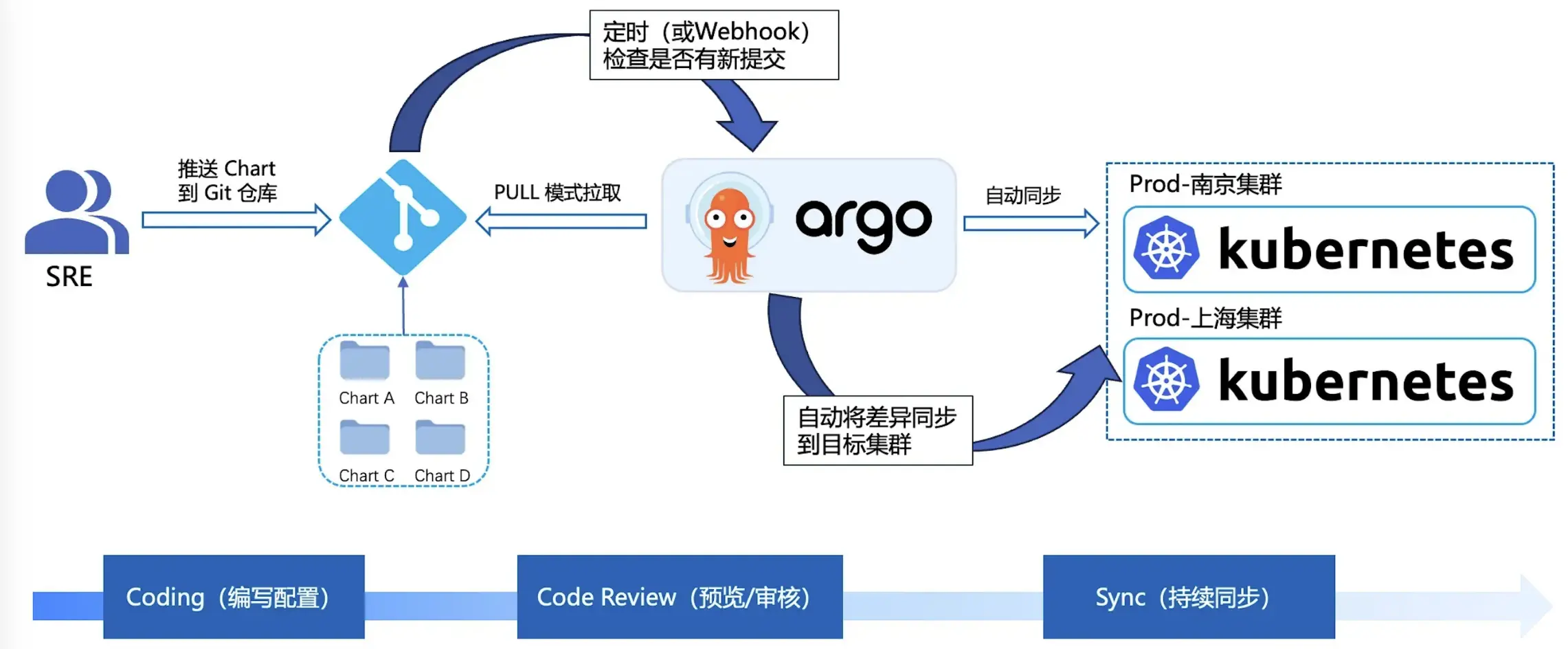
+In the deployment process illustrated above, SREs (Site Reliability Engineers)
manage configurations on behalf of users. Any modifications, such as route
changes or image updates, must be implemented by altering the Helm Chart
repository. After the change, Argo CD automatically detects it and triggers the
pipeline to pull the latest configuration for deployment. Additionally, a
strong synchronization is established between Git and Kubernetes, ensuring
configuration consistency and reliability.
+
+For instance, after deployment, if I have full access to the k8s cluster and
modify the `service.yaml` file, Argo CD continuously monitors the cluster
status. If it detects discrepancies between actual resources and the
configurations in the Git repository, it automatically triggers
synchronization, overriding the cluster configuration with the content from the
Git repository.
+
+### Advantages of GitOps
+
+This management model offers numerous benefits:
+
+- **Configuration Consistency**: All configuration changes are made through
Git, ensuring system configuration consistency.
+- **Security**: Reduces the risk of manual modifications, with all changes
traceable.
+- **Automated Deployment**: Achieves automated deployment and canary releases
based on version changes in Argo CD or Git.
+
+In deployment, we only need to maintain two repositories: the code repository
(for application code) and the deployment repository (for all
deployment-related configuration files). This simplified model renders many
traditional management platforms unnecessary, making the entire process more
efficient and streamlined. When deploying applications to other clusters,
simply pull the corresponding branch from the deployment repository and apply
it to the target cluster. The entire process is [...]
+
+
+
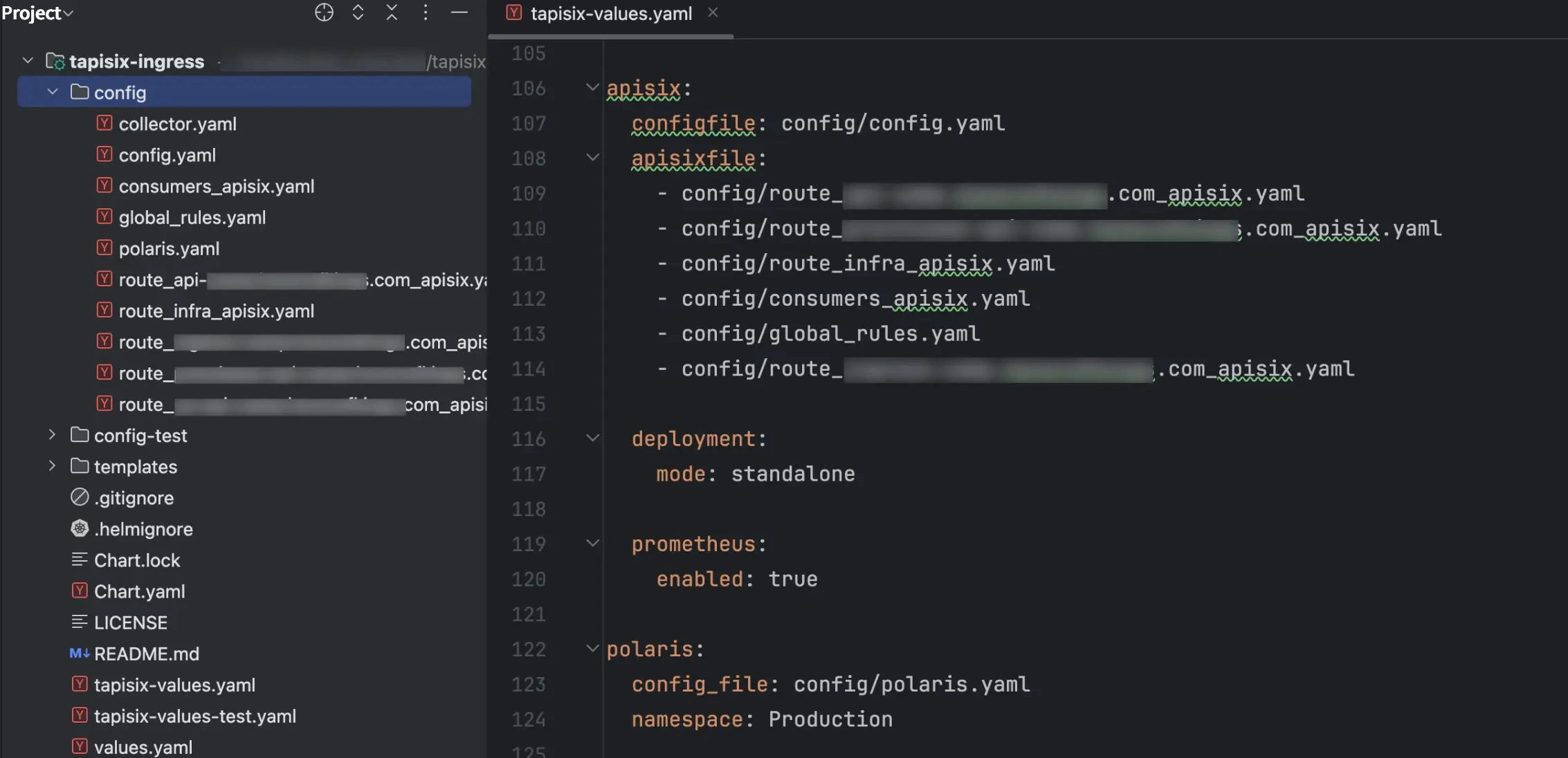
+In our deployment practices, key APISIX configuration files (e.g., routing
configurations and `config.yaml` startup configurations) are integrated into a
single Helm Chart repository for unified management and deployment. However,
this deployment approach may also present an issue: it essentially treats
APISIX as a regular service for deployment.
+
+## Why Not Use the APISIX Ingress Controller?
+
+
+
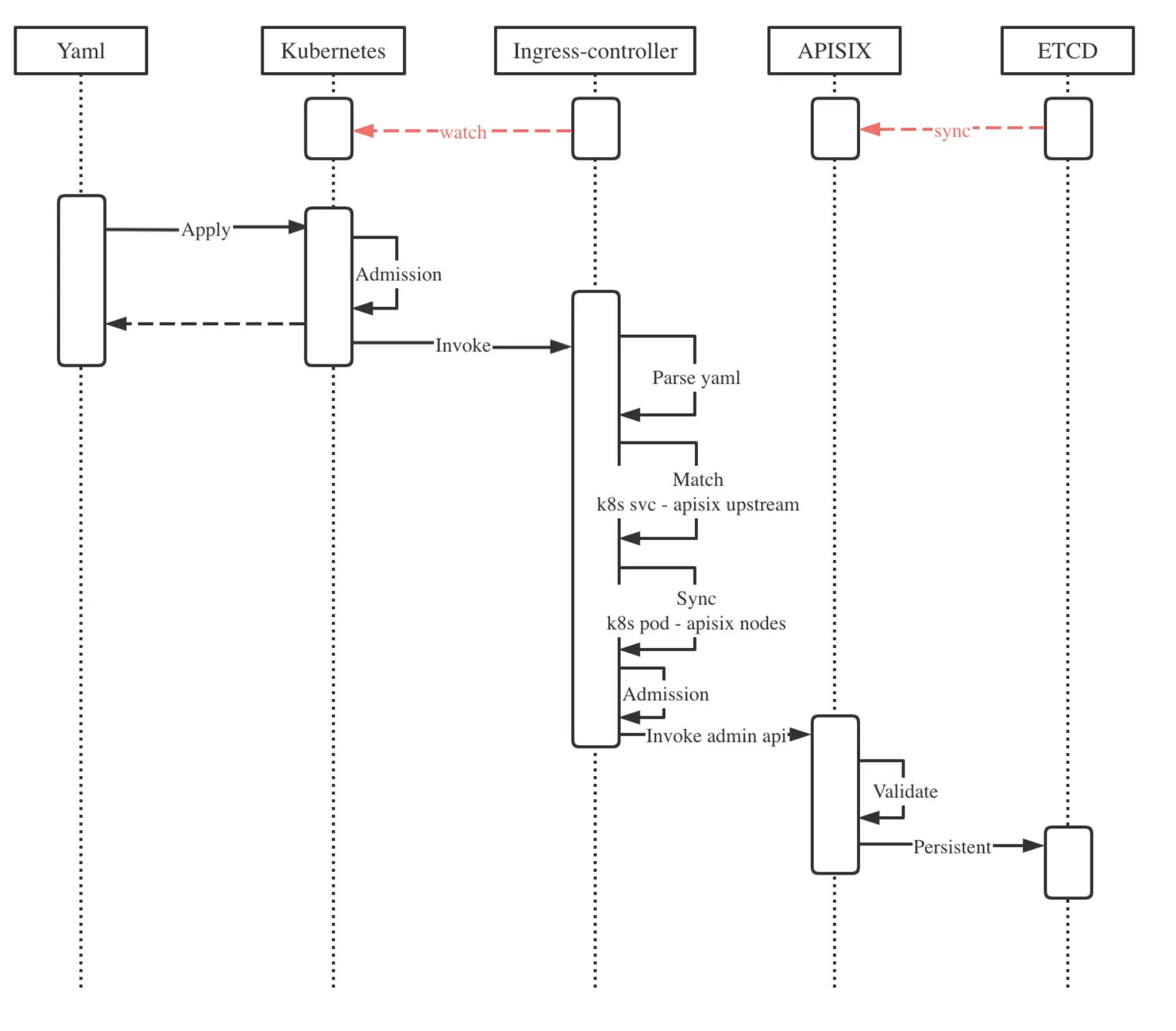
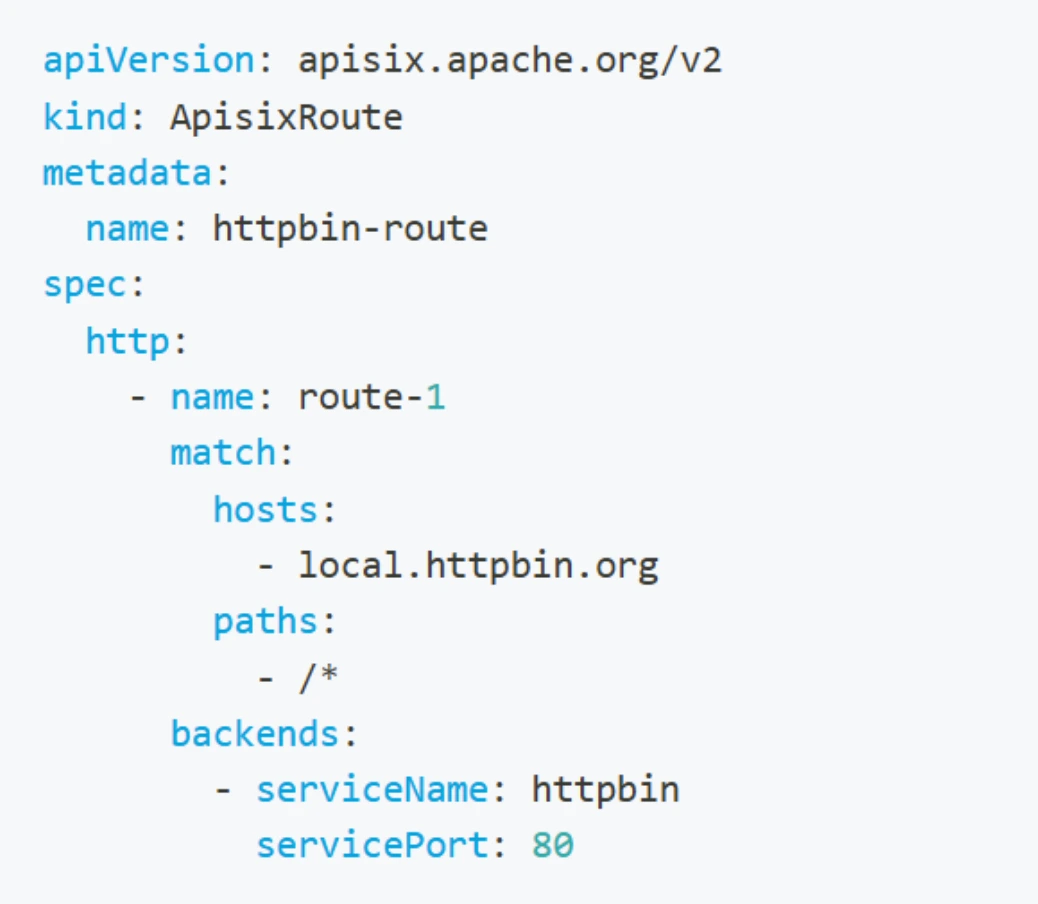
+The APISIX Ingress Controller, as the official community solution for k8s,
follows this core process: By defining custom resources such as APISIXRoute,
routing and other configurations are described in YAML files within k8s.
+
+After deploying these CRDs to the k8s cluster, the Ingress Controller
continuously monitors the relevant CRD resources. It parses the configuration
information from the CRDs and synchronizes the configurations to APISIX by
invoking APISIX's Admin API. The Ingress Controller primarily facilitates
deployment between CRDs and APISIX, ultimately writing data to etcd.
+
+<div align="center">
+<img alt="APISIX Ingress Controller" style="width: 50%"
src="https://static.api7.ai/uploads/2025/05/07/XbjN7Bky_11-ingress-controller.webp";></img>
+</div>
+
+After careful evaluation, we found that the deployment and operational model
of the APISIX Ingress Controller does not fully align with our team's
requirements for the following reasons:
+
+1. **Business-Oriented Gateway Positioning**: As a business-oriented gateway,
we focus on reducing development and operational thresholds to enhance
usability and development efficiency.
+
+2. **Operational Cost**: Introducing the Ingress Controller adds an extra
layer of operational complexity. It requires deep integration with k8s,
involving additional Golang code and k8s API calls, which increases operational
difficulty and cost.
+
+3. **Environment Consistency**: Due to reliance on the k8s environment,
discrepancies between local development and online deployment environments may
lead to inconsistencies such as "works locally but fails online," complicating
fault diagnosis and resolution.
+
+4. **Version Coupling**: There is a strong coupling between APISIX and Ingress
Controller versions. Since our APISIX is a customized version, we only maintain
compatibility with specific versions. This may result in unsupported APIs or
compatibility issues, affecting system stability and reliability.
+
+5. **Configuration Opacity**: With the Ingress Controller approach, the final
configurations still need to be written to etcd, which may cause inconsistent
configuration states. For example, Ingress Controller monitoring failures or
poor etcd status may trigger issues like excessive connections, making the
entire architecture chain more opaque and complex. In contrast, Helm Charts
offers a comprehensive and auditable YAML file containing all routing
configurations, making routing states [...]
+
+For these reasons, we opted not to use the APISIX Ingress Controller.
+
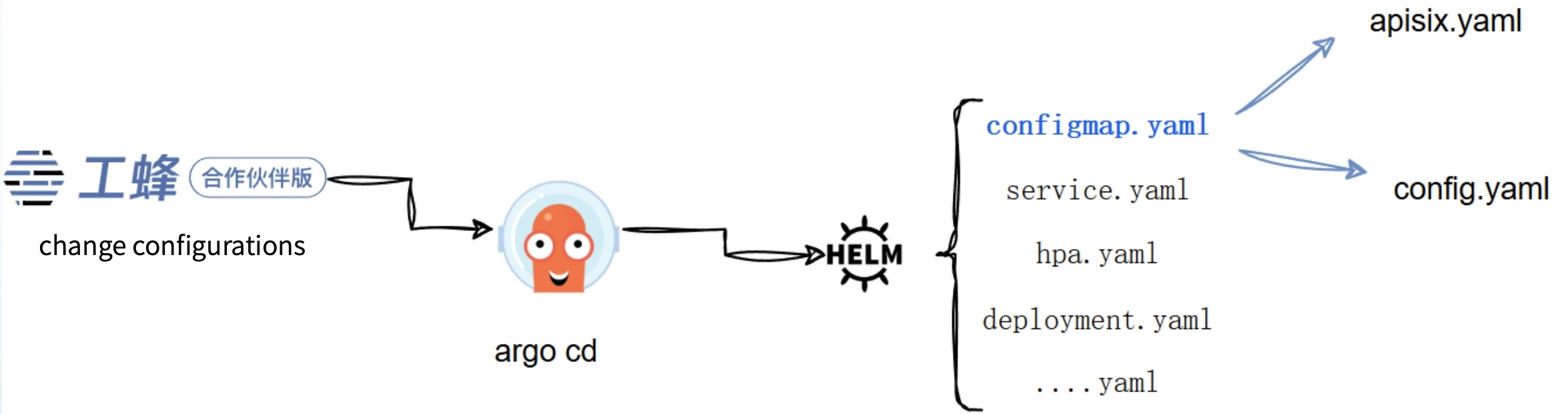
+### How to Achieve Hot Reloading of Configurations?
+
+When deploying APISIX in a k8s environment, hot configuration updates are
crucial for ensuring system stability and availability. APISIX configurations
are primarily divided into two categories:
+
+1. **APISIX Routing Configuration** (`apisix.yaml`): Uses traditional loading
methods to define routing configurations, including upstream routing and
corresponding forwarding rules.
+
+2. **Startup Configuration** (`config.yaml`): Serves as the startup
configuration file, specifying key parameters such as the APISIX runtime port.
Changes to certain configuration items require a service restart to take effect.
+
+
+
+### k8s Resource Deployment Process
+
+1. **Modify Git configuration**: Make changes to the aforementioned Git
configurations.
+2. **Deliver to Argo CD**: Submit the modified configurations to Argo CD.
+3. **Generate resource files**: Based on the modified configurations, Argo CD
generates corresponding resource files such as ConfigMap and Service YAML via
the Helm Chart.
+
+In the k8s environment, resources like `apisix.yaml` and `config.yaml` exist
in the form of ConfigMaps.
+
+### APISIX Configuration Change Handling Mechanism
+
+**Backgrounds and Challenges**
+
+When APISIX-related configurations change, the corresponding ConfigMap is
updated. However, the Deployment (i.e., the APISIX deployment instance) itself
remains unchanged.
+
+**Solution**
+
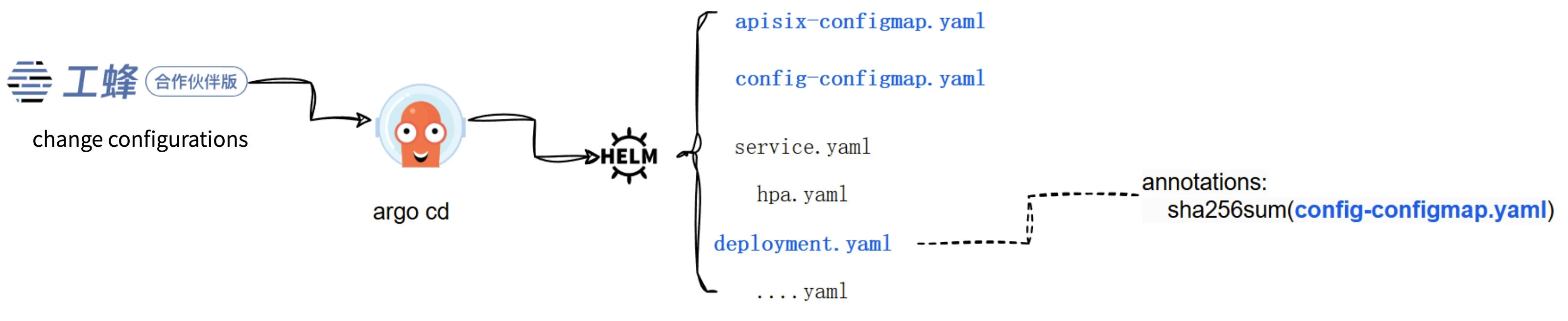
+To address this issue, the k8s community proposes a solution that involves
splitting configurations and utilizing hash and annotation methods. The content
of the ConfigMap that needs to be changed is injected into the Deployment as
annotations, thereby achieving dynamic configuration updates.
+
+- `apisix-configmap.yaml`: Primarily stores APISIX's core configurations, such
as routing rules. When this type of ConfigMap is modified, due to the built-in
timer mechanism in APISIX, it periodically reads and updates the in-memory
configuration information from the local file. Therefore, the APISIX service
does not need to be restarted for the configuration to take effect.
+
+- `config-configmap.yaml`: Mainly includes basic configurations such as the
APISIX runtime environment. When this type of ConfigMap is modified, as it
involves the basic runtime environment settings of the APISIX service, a
restart of the APISIX deployment instance is required to ensure the new
configurations are correctly loaded and applied.
+
+**Update Trigger Mechanism**
+
+To automatically detect configuration changes and trigger the update process,
we annotate the ConfigMap content with a hash and write the hash value into the
`deployment.yaml` file. When configuration changes cause the hash value to
update, the `deployment.yaml` file also changes. The k8s system detects this
change and automatically triggers the update process, ensuring that the APISIX
deployment instance promptly applies the new configurations.
+
+
+
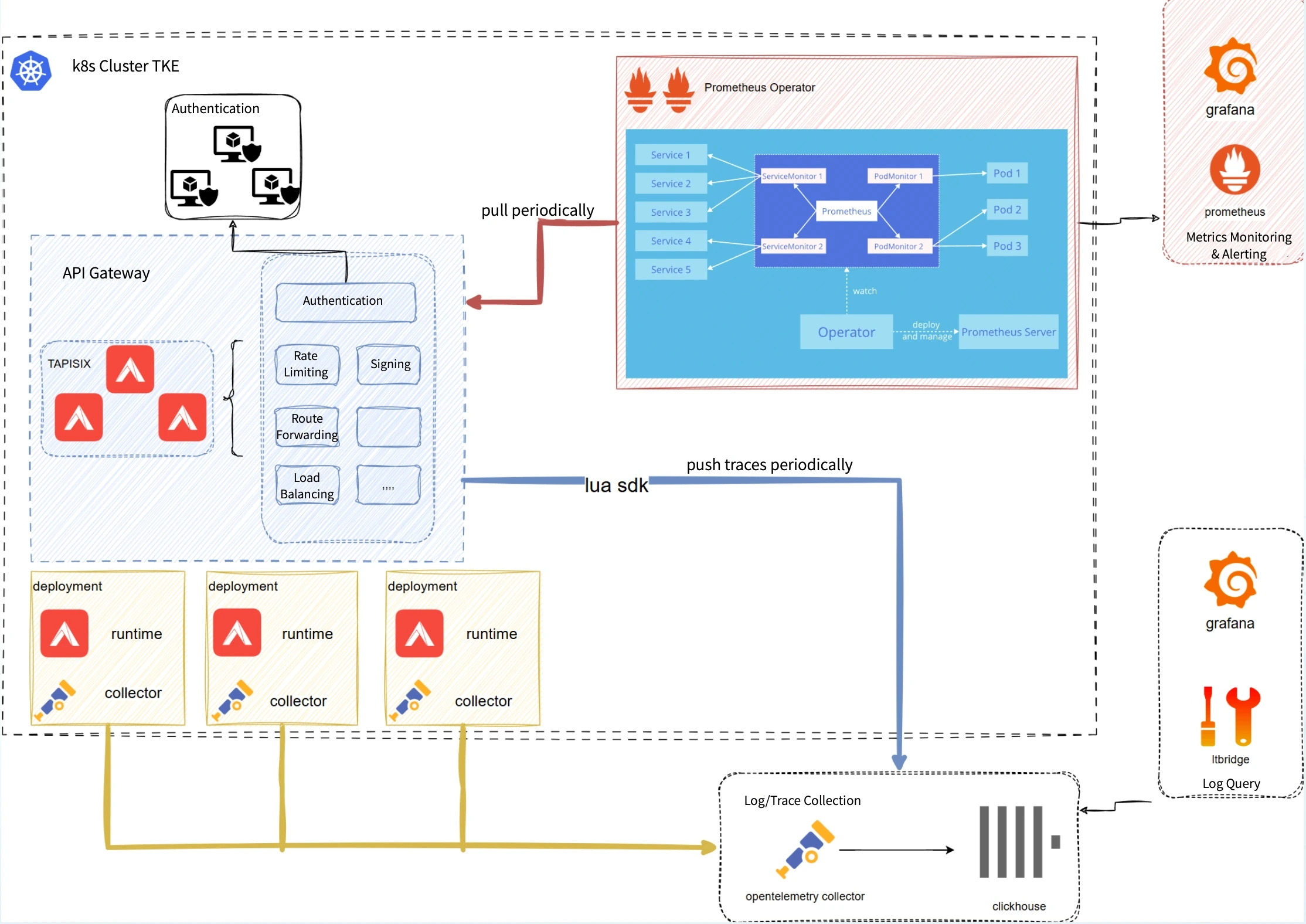
+## Runtime Operations
+
+Runtime operations are primarily divided into three parts: metrics collection,
trace reporting, and log collection.
+
+
+
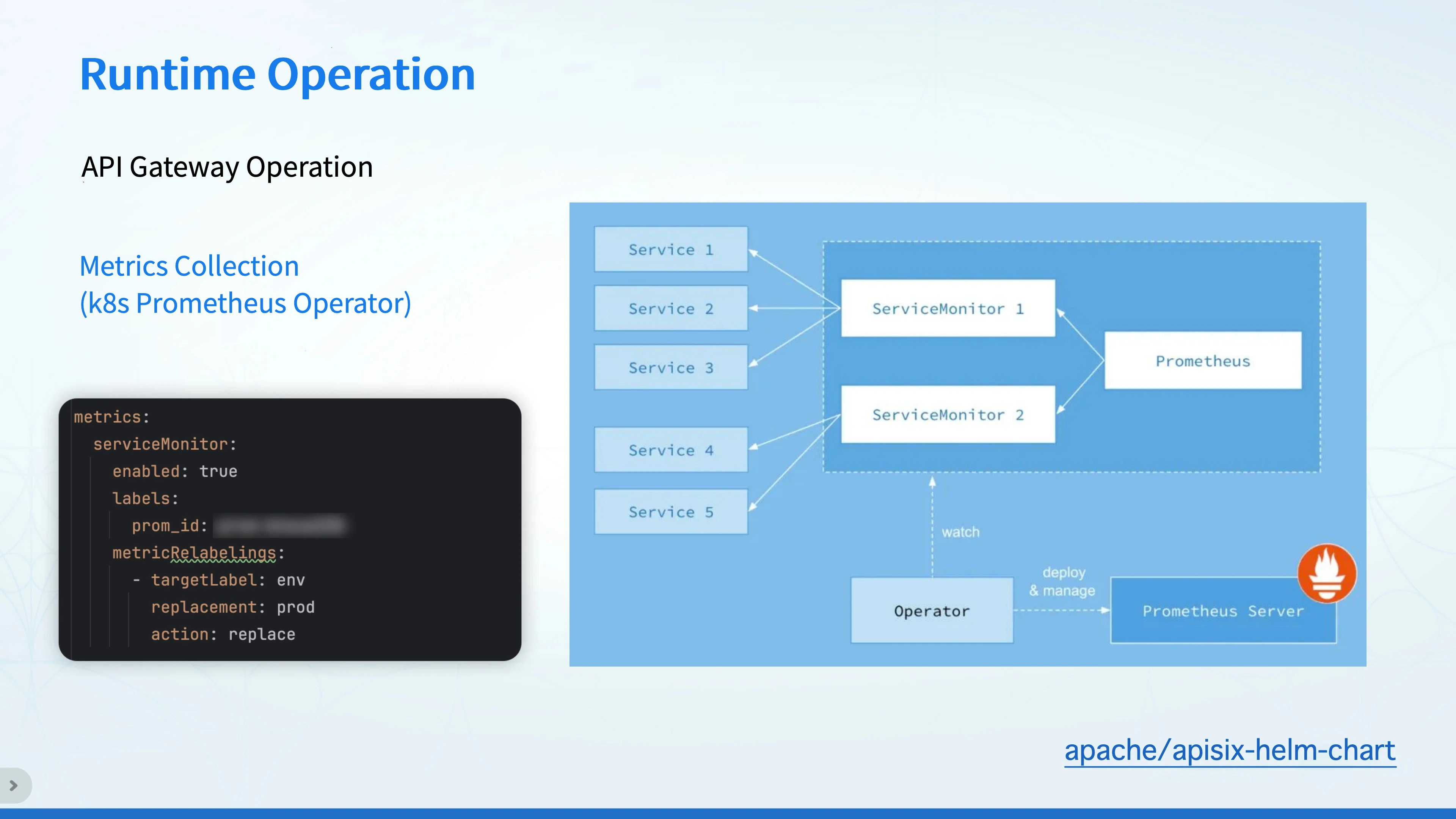
+### 1. Metrics Collection
+
+k8s clusters offer an official metrics collection solution called the
Kubernetes Prometheus Operator. By periodically scraping metrics ports and
information exposed by services, data is regularly reported to external systems
such as Prometheus. Since this part has not been deeply customized, it will not
be detailed here. Related k8s configurations are fully described in APISIX's
Helm Chart.
+
+
+
+### 2. Trace Reporting
+
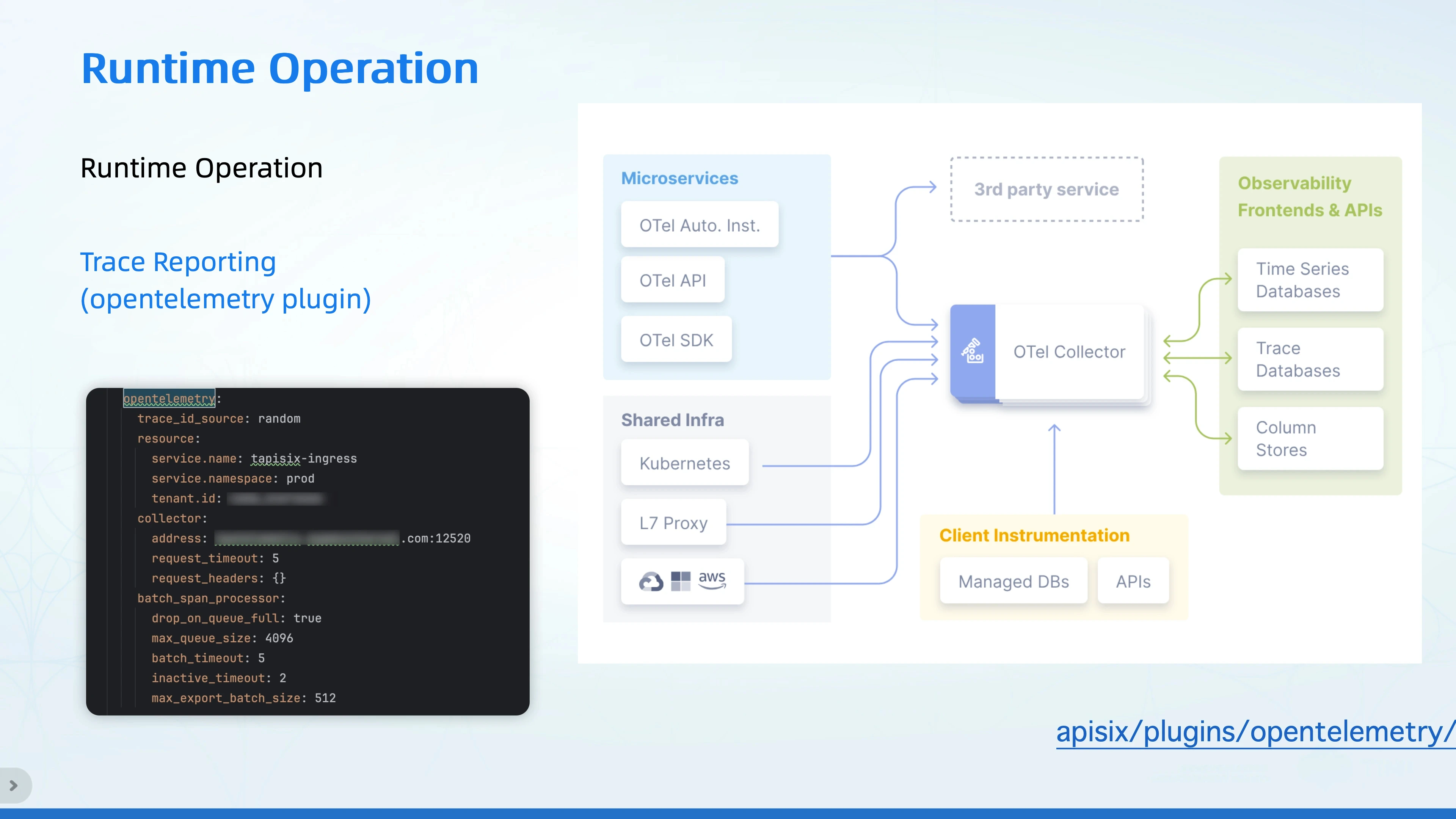
+Trace reporting is implemented based on the OpenTelemetry plugin provided by
APISIX. This plugin sends data to the OpenTelemetry Collector via the
OpenTelemetry protocol, which ultimately writes the data to ClickHouse for
trace data collection and storage.
+
+
+
+### 3. Log Collection
+
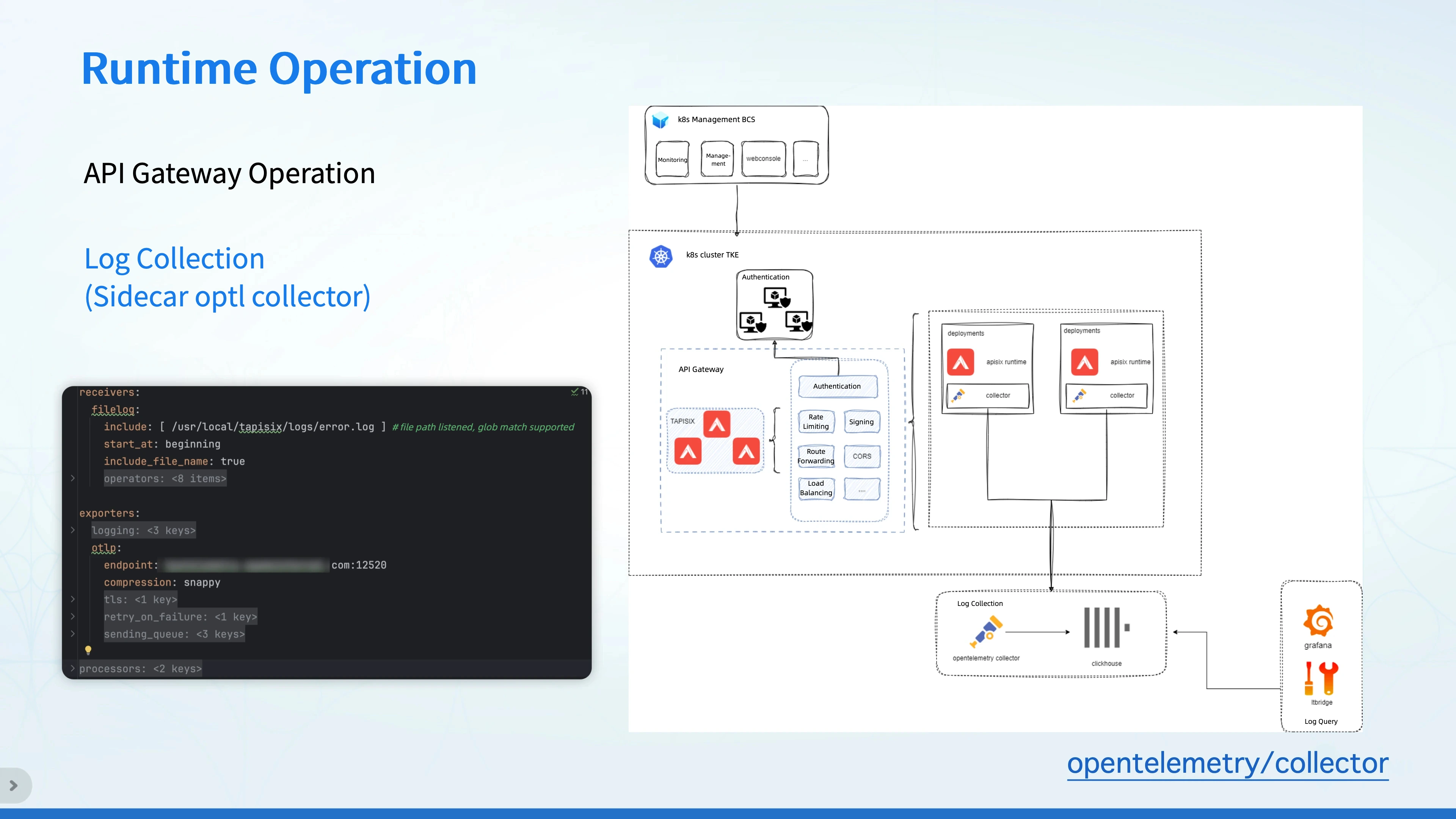
+Log collection also utilizes the OpenTelemetry protocol. However, the
OpenTelemetry plugin in the APISIX community edition only supports trace
reporting and does not include log reporting. Therefore, we recommend using
local log storage. By employing a sidecar mode, APISIX logs are written to a
shared folder. In the Deployment, another Pod is mounted, which shares the same
log folder as the APISIX Pod, thereby achieving log collection and reporting
via the OpenTelemetry protocol.
+
+
+
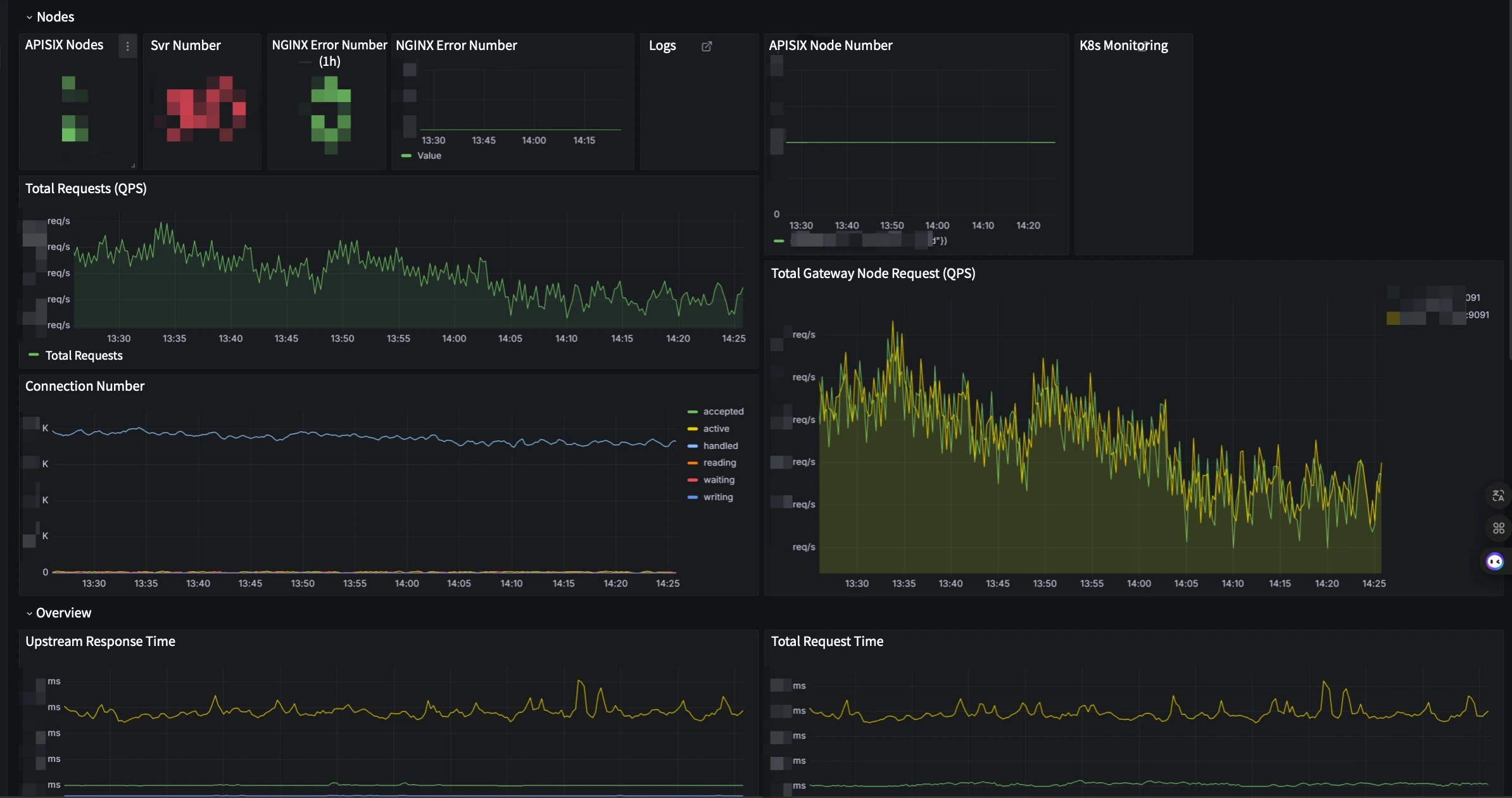
+Additionally, the monitoring dashboard provided by APISIX are relatively
general-purpose and lack specificity. Therefore, we have custom-developed
dedicated monitoring panels based on the collected metric data to meet specific
monitoring requirements. The alerting system is built using Grafana's
open-source solution, leveraging its powerful visualization and alerting
capabilities to achieve real-time monitoring and alerting of APISIX's
operational status.
+
+
+
+## Other Experiences
+
+### Standalone Route Management
+
+In our initial approach to route management, we consolidated all route
configurations into a single YAML file. However, as our business expanded and
the number of routes increased, this monolithic configuration became unwieldy
and challenging to maintain. This scenario is humorously encapsulated in the
industry jest that Kubernetes operations engineers are essentially "YAML
engineers," highlighting the overwhelming nature of managing extensive YAML
configurations.
+
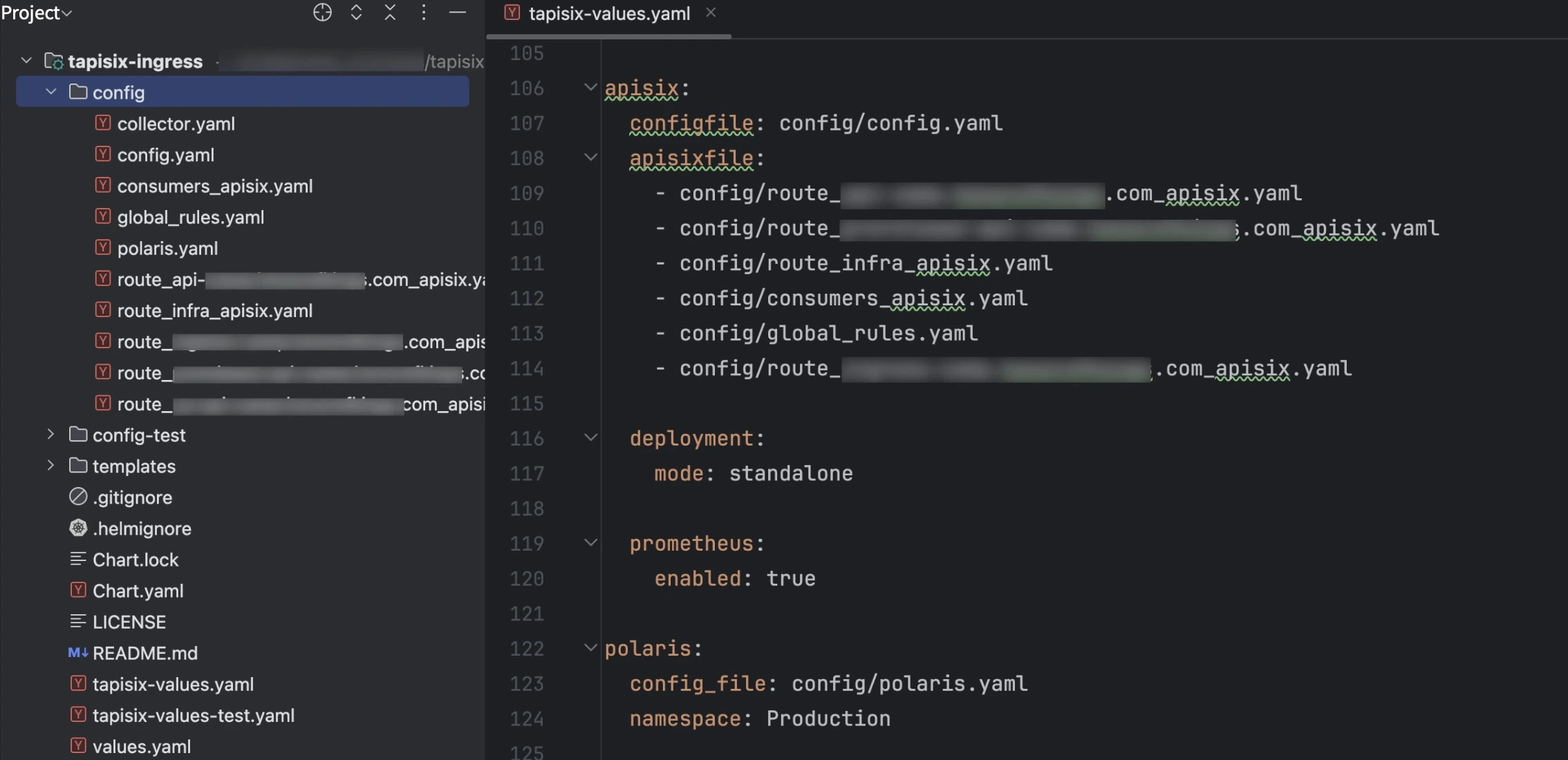
+To address these challenges, we implemented a two-pronged strategy to optimize
our route management:
+
+- Modular Decomposition: Following APISIX's routing specifications, we
segmented the configurations into collector and consumer configuration modules,
achieving functional decoupling and categorized management.
+
+- Domain-Based Segmentation: We further refined our route files by organizing
them based on domain names, making route configurations more refined and
organized for easier maintenance and expansion.
+
+
+
+### Reuse of Route Configurations
+
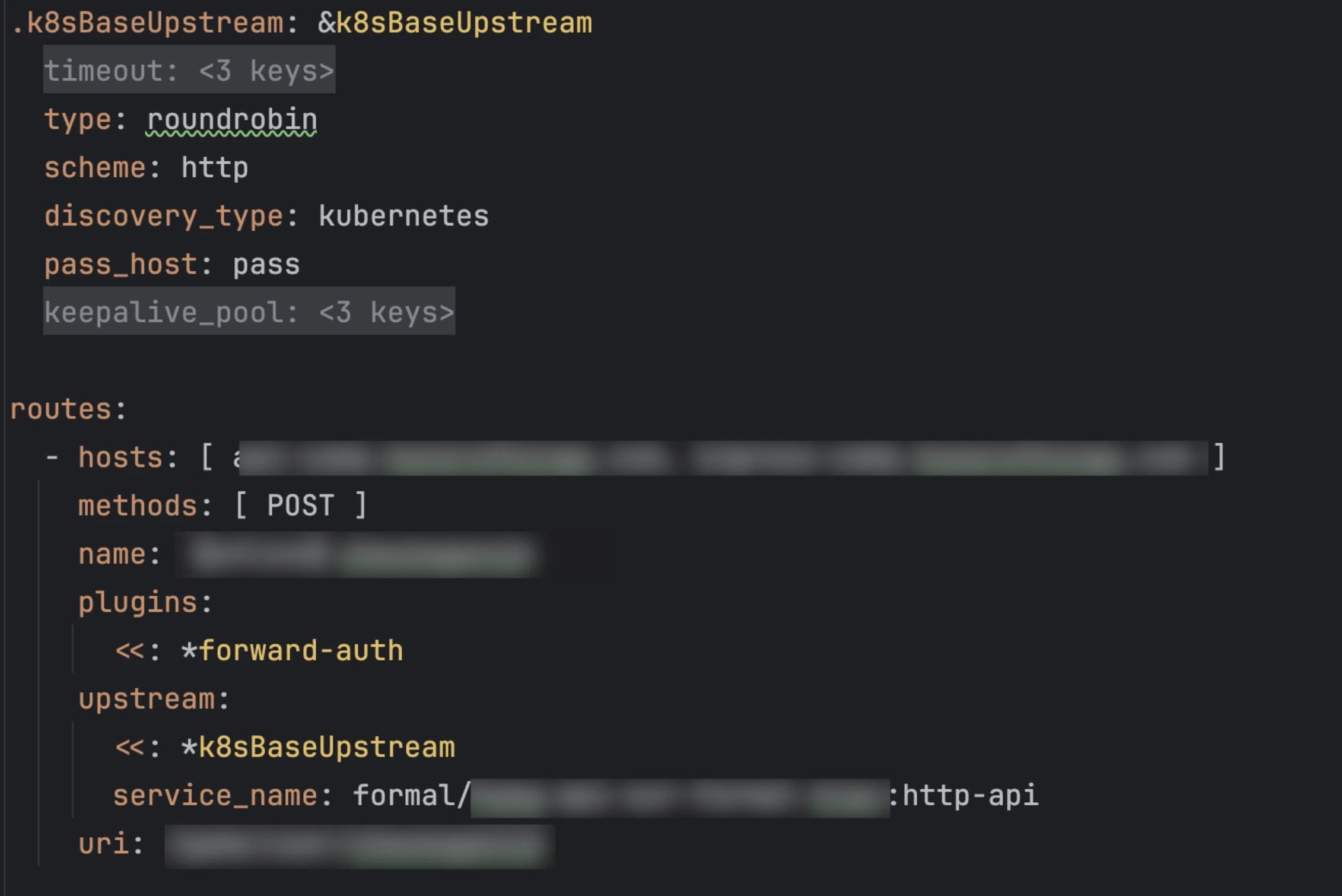
+In k8s upstream configurations, there are various types, differed solely by
the service name. After introducing a new version and updating the Lua package,
we effectively addressed the issue of duplicated configurations by fully
utilizing leveraged YAML's anchor (&) and alias (*) features. Through the
anchor mechanism, we abstracted and reused common configuration parts, reducing
duplicated configurations by approximately 70% in practical applications. This
significantly improved the eff [...]
+
+<div align="center">
+<img alt="Duplicated Route Configuration" style="width: 60%"
src="https://static.api7.ai/uploads/2025/05/07/hbEPdHAf_20-duplicated-route-configuration.webp";></img>
+</div>
+
+## Migration Practices of APISIX Replacing Ingress
+
+### Initial Architecture and Background
+
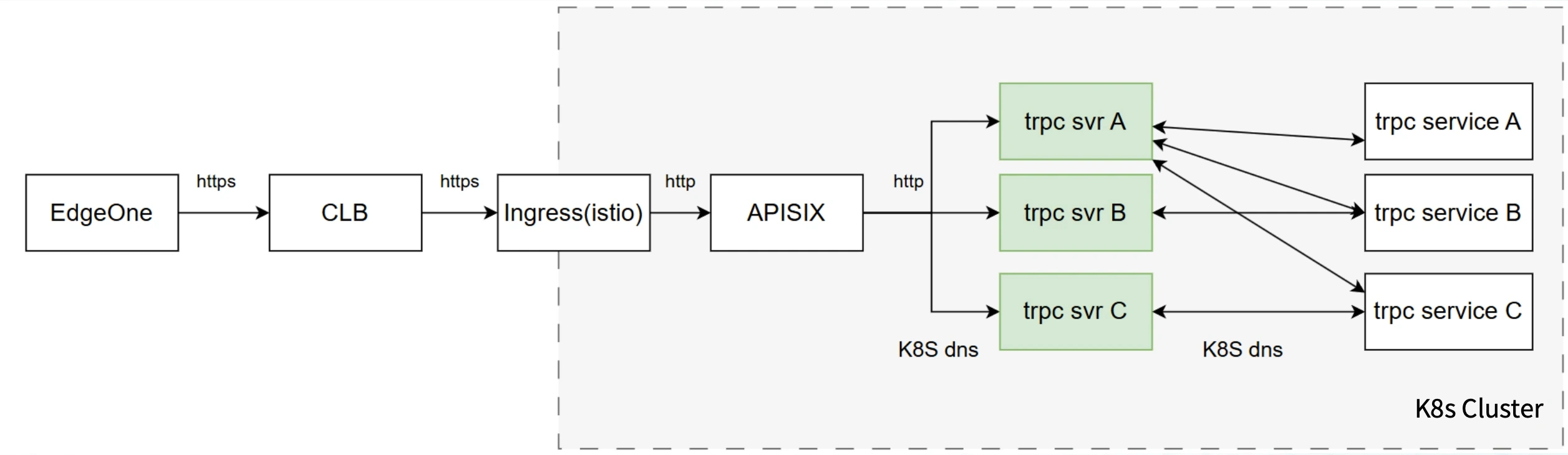
+Our original traffic architecture was structured as follows:
+
+1. EdgeOne served as the Content Delivery Network (CDN), handling initial
traffic ingress.
+2. Traffic was then forwarded by Cloud Load Balancer (CLB) to the Ingress
layer, which utilized Istio.
+3. Finally, requests reached the internal APISIX gateway for processing.
+
+The inclusion of the Ingress layer, specifically Istio, was primarily due to
historical decisions. At the time, Istio was selected as the service mesh
solution in our cloud environment.
+
+However, as our business evolved and technology advanced, we recognized the
need for a more efficient and flexible traffic management system. Consequently,
we plan to replace the existing Ingress layer with APISIX, leveraging it as the
Kubernetes Ingress Controller.
+
+
+
+### Migration Solution Evaluation
+
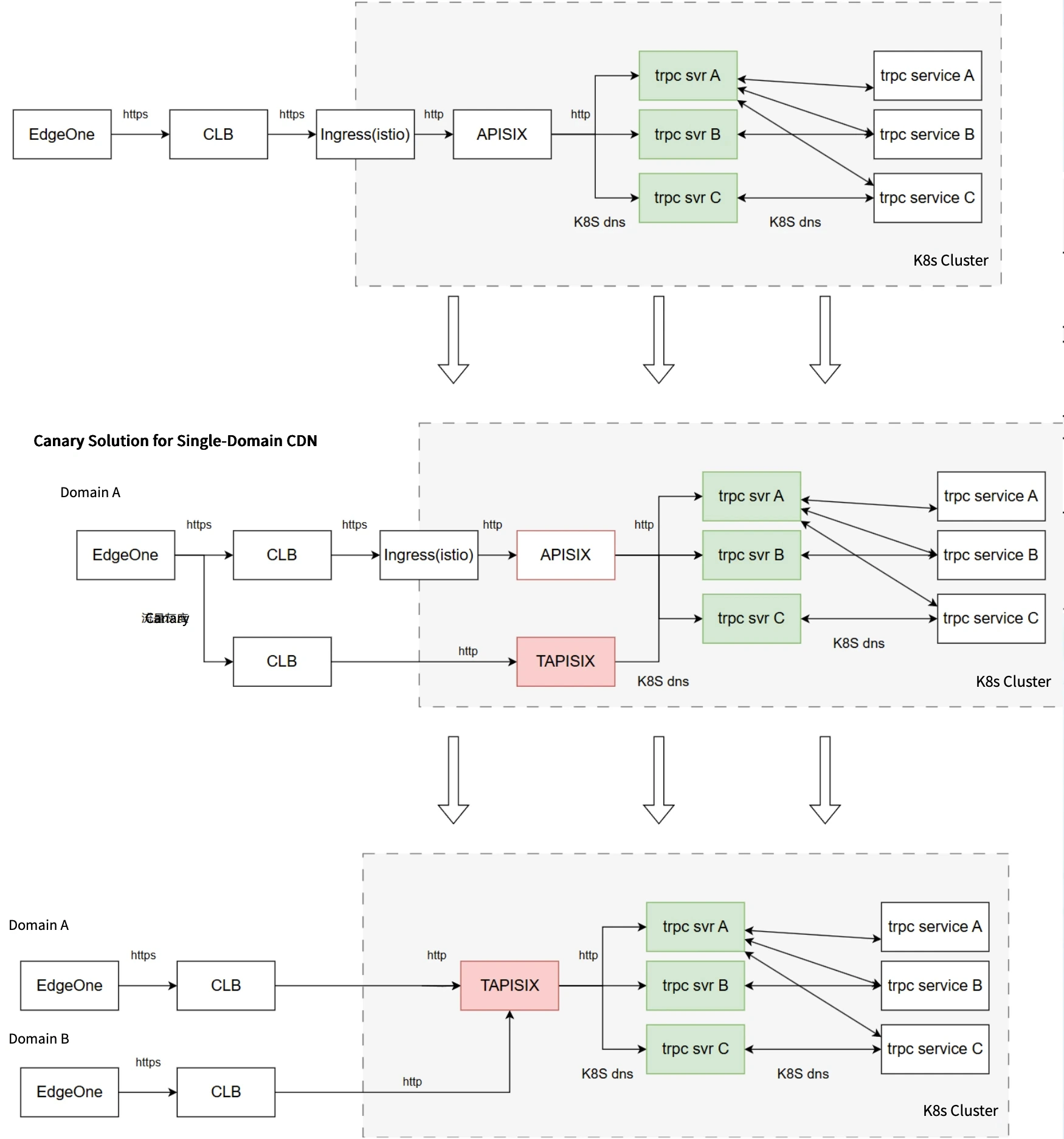
+During the migration process, we evaluated two primary migration solutions:
+
+- **Solution One: CDN Canary and Dual Domains** – Deploy a new APISIX instance
alongside the existing architecture to direct new traffic to this instance.
However, this solution's drawback is the need to modify the front-end domain,
which may impact user access and business continuity. After careful
consideration, we temporarily set aside this solution.
+
+- **Solution Two: CDN Traffic Steering** – This approach allows configuring
multiple CLB routes and achieving traffic push based on percentages. Its
advantage lies in the ability to gradually switch traffic to the new APISIX
instance without changing the user access entry point. Additionally, the
traffic ratio can be flexibly adjusted based on actual conditions, facilitating
observation and evaluation of the migration effects.
+
+
+
+### Implementation and Advantages of the Final Solution
+
+We ultimately chose Solution Two, successfully establishing a new traffic
path: new traffic reaches APISIX directly through canary deployment. This new
architecture offers the following significant advantages:
+
+- **No Front-end Changes**: The domain names and entry points accessed by
front-end users remain unchanged, ensuring uninterrupted user experience and
avoiding potential user confusion or access interruptions caused by domain
changes.
+
+- **Full Backend Autonomy**: The backend gains autonomous control and
management over traffic switching, enabling flexible adjustment of traffic
distribution based on business needs and system status without reliance on
external coordination.
+
+- **Rapid Rollback Capability**: With canary release feature, any issues
discovered during migration can be quickly rolled back to the original path,
minimizing migration risks and ensuring stable business operations.
+
+- **User-Transparent Migration**: The entire migration process is transparent
to users, who remain unaware of backend architectural changes during business
access, ensuring a smooth and seamless migration.
+
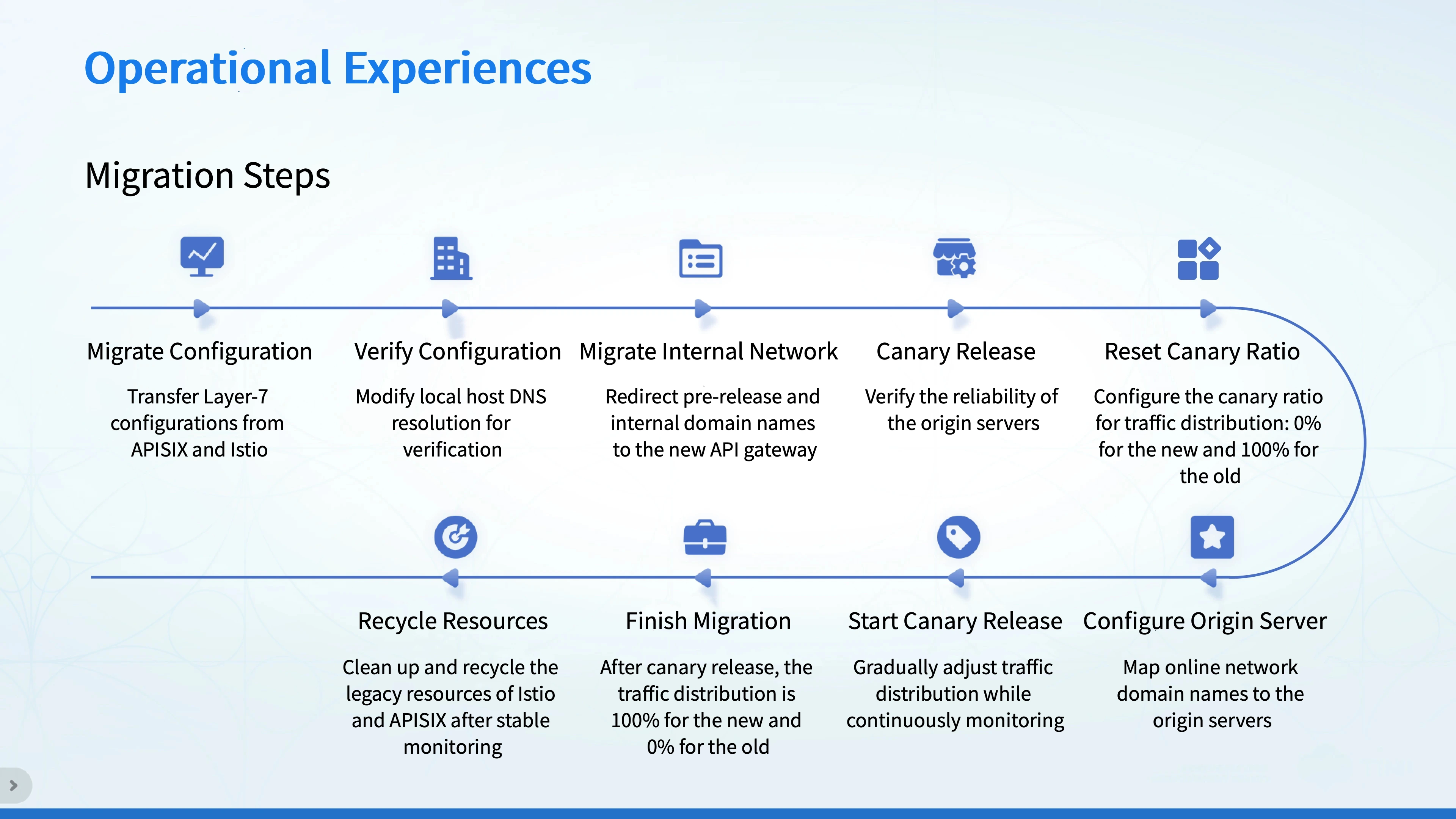
+Below is the overall migration process.
+
+
+
+## Conclusion
+
+Our team has developed the business-oriented API gateway TAPISIX based on
APISIX. As the core component of our gateway architecture, APISIX has been
instrumental in meeting stringent international compliance requirements,
reducing development and operational overhead, and enhancing system flexibility
and reliability.
+
+APISIX's robust features—such as high-performance routing, dynamic
configuration capabilities, and a rich plugin ecosystem—have enabled us to
build a highly efficient, stable, and adaptable gateway platform. Looking
ahead, we are excited to continue our collaboration with the APISIX community,
exploring innovative application scenarios and unlocking greater value for our
business.
diff --git a/blog/zh/blog/2025/05/07/apisix-gateway-practice-in-tencent-timi.md
b/blog/zh/blog/2025/05/07/apisix-gateway-practice-in-tencent-timi.md
index c55cb372be0..acaefc5235c 100644
--- a/blog/zh/blog/2025/05/07/apisix-gateway-practice-in-tencent-timi.md
+++ b/blog/zh/blog/2025/05/07/apisix-gateway-practice-in-tencent-timi.md
@@ -81,7 +81,9 @@ image:
https://static.api7.ai/uploads/2025/05/07/Em3otYyD_tencent-timi-uses-apis
为降低开发门槛,我们支持本地快速运行与测试。借助 APISIX 的 Docker 镜像,可将本地插件通过卷映射至容器中,实现便捷部署。同时,利用下游的
echo-service(基于开源 Node.js 开发的服务),可模拟上游行为。该服务能够返回请求的所有内容,如请求头等。通过在请求中添加特定参数(如
HTTP 状态码 500),可模拟上游的异常行为,从而全面验证插件功能。
-
+<div align="center">
+<img alt="TAPISIX Project Introduction" style="width: 80%"
src="https://static.api7.ai/uploads/2025/05/07/BPa5r4Tr_2-tapisix-project.webp";></img>
+</div>
### 2. 本地快速运行与测试
@@ -91,7 +93,9 @@ image:
https://static.api7.ai/uploads/2025/05/07/Em3otYyD_tencent-timi-uses-apis
2. **Makefile 构建**:构建 Makefile 文件,支持通过 make run-dev 命令快速启动插件测试环境,确保本地文件与容器无缝连接。
3. **浏览器直接访问**:开发人员只需在浏览器中访问相关接口,即可直接验证插件功能,无需额外部署或配置。
-
+<div align="center">
+<img alt="Run and Test" style="width: 60%"
src="https://static.api7.ai/uploads/2025/05/07/vlmK6Cls_3-run-and-test.webp";></img>
+</div>
通过定义开发规范和提供本地快速开发支持,我们有效降低了开发门槛,加速了插件的验证过程。开发人员可以专注于功能实现,而无需担心复杂的部署和测试流程,从而提高了整体开发效率。
@@ -115,7 +119,9 @@ image:
https://static.api7.ai/uploads/2025/05/07/Em3otYyD_tencent-timi-uses-apis
c. **Try Build**:使用源代码构建镜像,验证代码的可构建性。
-
+<div align="center">
+<img alt="Pipeline Building" style="width: 50%"
src="https://static.api7.ai/uploads/2025/05/07/7QGbMcLK_4-pipeline-inspection.webp";></img>
+</div>
### 4. 可靠性保障(CR、lint、单侧、黑盒测试)
@@ -125,7 +131,9 @@ image:
https://static.api7.ai/uploads/2025/05/07/Em3otYyD_tencent-timi-uses-apis
k6 测试用例:包含几百个测试用例,覆盖了核心流程,确保插件的可靠性。
-
+<div align="center">
+<img alt="K6 Test" style="width: 80%"
src="https://static.api7.ai/uploads/2025/05/07/DbmDfZFS_5-k6.webp";></img>
+</div>
通过本地开发、快速验证、MR 提交、流水线检测、可靠性保障以及打包部署的完整流程,我们确保了插件从开发到上线的每个环节都经过严格的质量控制。
@@ -143,7 +151,9 @@ APISIX 提供了三种部署方式,以适应不同的生产环境需求:
只保留数据面的独立模式也是我们使用的方式,所有的配置都存储在本地,避免了对 etcd 的依赖。这种模式更适用于海外场景。由于 etcd
属于数据库选型,部分云厂商不提供 etcd 服务,且海外对数据合规性要求严格,并且我们的部署环境在 k8s,因此也采用了对 k8s 友好的配置管理方式。
-
+<div align="center">
+<img alt="APISIX Deployment" style="width: 75%"
src="https://static.api7.ai/uploads/2025/05/07/99nRuGCG_7-dp-and-cp.webp";></img>
+</div>
- **YAML 配置**:所有配置直接存储在 YAML 文件中,便于管理和自动化部署。
- **ConfigMap 存储**:将 yaml 文件直接放置在 k8s 的 ConfigMap 中,确保配置的版本化和可追溯性。
@@ -162,7 +172,9 @@ APISIX 提供了三种部署方式,以适应不同的生产环境需求:
### 部署流程示例
-
+<div align="center">
+<img alt="Deployment Workflow" style="width: 80%"
src="https://static.api7.ai/uploads/2025/05/07/KdOcfic9_8-deployment-workflow.webp";></img>
+</div>
在上图展示的部署流程中,SRE(Site Reliability Engineer)代表用户进行配置管理。任何修改,如路由变更或镜像更新,都需要通过修改
Helm Chart 仓库来实现。修改后,Argo CD 会自动检测到变更并触发流水线,拉取最新的配置完成部署。另外,Git 和 Kubernetes
之间建立了强同步关系,确保配置的一致性和可靠性。
@@ -192,7 +204,9 @@ APISIX Ingress Controller 作为社区为 k8s 提供的官方解决方案,其
将这些 CRD 部署到 k8s 集群后,Ingress Controller 会持续监听相关的 CRD 资源。解析 CRD 中的配置信息,并通过调用
APISIX 的 Admin API 将配置同步到 APISIX 中。Ingress Controller 主要为了进行 CRD 和 APISIX
之间的部署,最终还是将数据写入etcd。
-
+<div align="center">
+<img alt="APISIX Ingress Controller" style="width: 50%"
src="https://static.api7.ai/uploads/2025/05/07/XbjN7Bky_11-ingress-controller.webp";></img>
+</div>
经过审慎评估,我们发现 APISIX Ingress Controller 的部署和运维模式并不完全适配我们的团队需求,主要有以下原因:
@@ -286,7 +300,9 @@ Trace 上报基于 APISIX 提供的 OpenTelemetry 插件实现。该插件通过
在 k8s 的 upstream 配置中,存在多种类型,这些不同类型配置间的差异往往仅体现在 service name 这一关键要素上。在引入新版本并更新
Lua 包后,我们充分利用其支持的锚点功能,对重复配置问题进行了有效治理。通过锚点机制,实现了对共性配置部分的抽象与复用,在实际应用中成功减少了约 70%
的重复配置内容,极大地提升了配置管理的效率与简洁性,降低了因重复配置而引入错误的风险。
-
+<div align="center">
+<img alt="Duplicated Route Configuration" style="width: 60%"
src="https://static.api7.ai/uploads/2025/05/07/hbEPdHAf_20-duplicated-route-configuration.webp";></img>
+</div>
## APISIX 替换 Ingress 迁移实践