This is an automated email from the ASF dual-hosted git repository.

yilialin pushed a commit to branch master
in repository https://gitbox.apache.org/repos/asf/apisix-website.git
The following commit(s) were added to refs/heads/master by this push:
new 65c9b9aaf7b blog: add load-balancing-between-ai-ml-api-with-apisix
(#1940)
65c9b9aaf7b is described below
commit 65c9b9aaf7b806554719cbd91a50bbe465441ced
Author: Yilia Lin <[email protected]>
AuthorDate: Wed Jul 30 14:22:35 2025 +0800
blog: add load-balancing-between-ai-ml-api-with-apisix (#1940)
---
...load-balancing-between-ai-ml-api-with-apisix.md | 230 +++++++++++++++++++++
1 file changed, 230 insertions(+)
diff --git
a/blog/en/blog/2025/07/31/load-balancing-between-ai-ml-api-with-apisix.md
b/blog/en/blog/2025/07/31/load-balancing-between-ai-ml-api-with-apisix.md
new file mode 100644
index 00000000000..c045b8942e6
--- /dev/null
+++ b/blog/en/blog/2025/07/31/load-balancing-between-ai-ml-api-with-apisix.md
@@ -0,0 +1,230 @@
+---
+title: "Load Balancing AI/ML API with Apache APISIX"
+authors:
+ - name: "Sergey Nuzhnyy"
+ title: "Author"
+ url: "https://github.com/OctavianTheI";
+ image_url: "https://github.com/OctavianTheI.png";
+ - name: "Yilia Lin"
+ title: "Technical Writer"
+ url: "https://github.com/Yilialinn";
+ image_url: "https://github.com/Yilialinn.png";
+keywords:
+- API gateway
+- Apache APISIX
+- AI
+- AI/ML API
+- traffic management
+description: This blog provides a step-by-step guide to configure Apache
APISIX for AI traffic splitting and load balancing between API versions,
covering security setup, canary testing, and deployment monitoring.
+tags: [Ecosystem]
+image: https://static.api7.ai/uploads/2025/07/23/d1O3mllW_apisix-ai-ml-api.webp
+---
+
+> This blog provides a step-by-step guide to configure Apache APISIX for AI
traffic splitting and load balancing between API versions, covering security
setup, canary testing, and deployment monitoring.
+
+<!--truncate-->
+
+## Overview
+
+[**AI/ML API**](https://aimlapi.com/) is a one-stop, OpenAI-compatible
endpoint that is trusted by 150,000+ developers to 300+ state-of-the-art
models—chat, vision, image/video/music generation, embeddings, OCR, and
more—from Google, Meta, OpenAI, Anthropic, Mistral, and others.
+
+[**Apache APISIX**](https://github.com/apache/apisix) is a dynamic, real-time,
high-performance API Gateway. APISIX API Gateway provides rich traffic
management features and can serve as an AI Gateway through its flexible plugin
system.
+
+Modern AI workloads often require smooth version migrations, A/B testing, and
rolling updates. This guide shows you how to:
+
+1. **Install** Apache APISIX with Docker quickstart.
+2. **Secure** the Admin API with keys and IP whitelisting.
+3. **Define** separate routes for API versions v1 and v2.
+4. **Implement** weighted traffic splitting (50/50) via the `traffic-split`
plugin.
+5. **Verify** the newly created split endpoint functionality.
+6. **Load test** and **monitor** distribution accuracy.
+
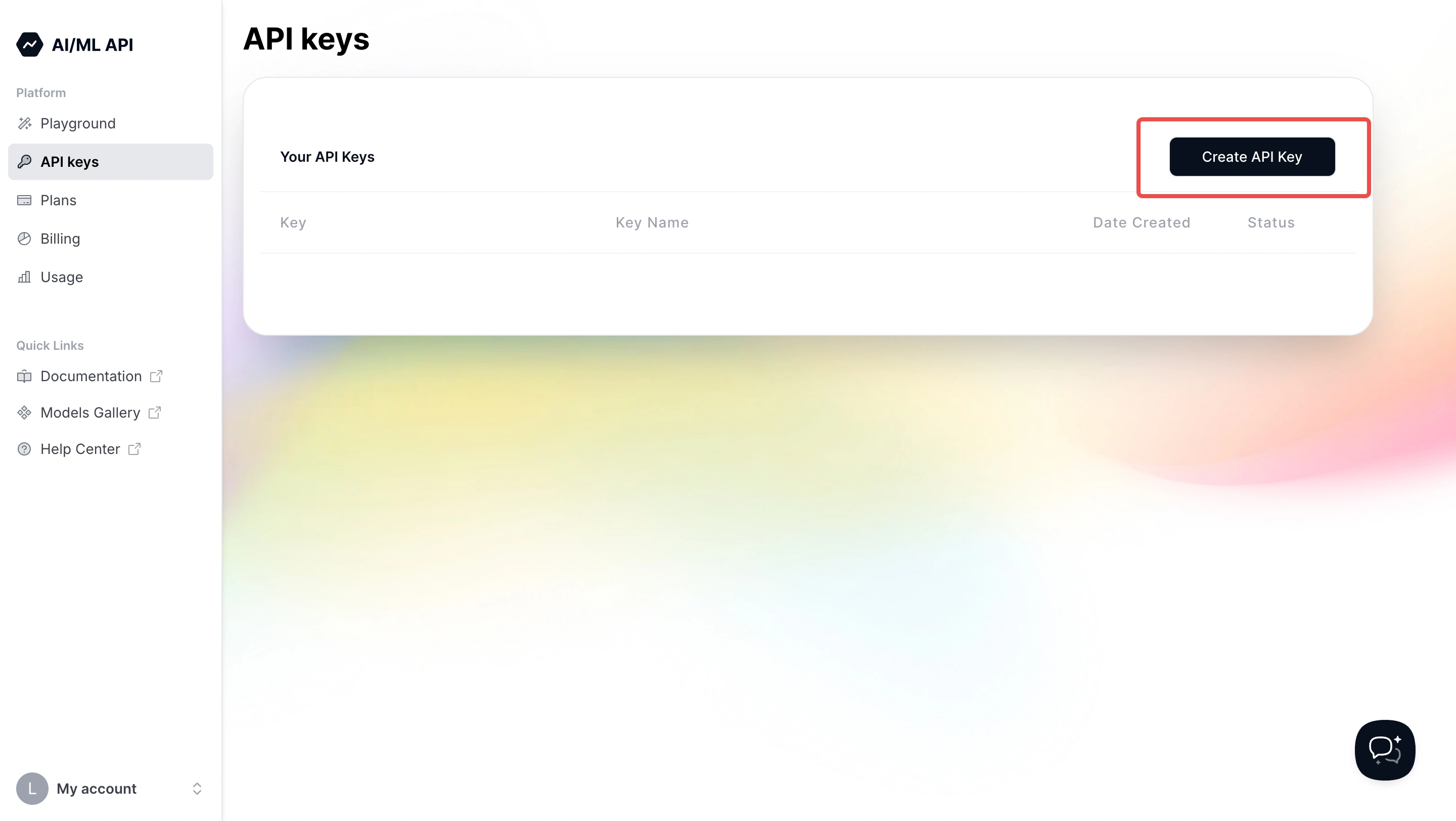
+To perform authenticated requests, you'll need an AI/ML API key. You can get
one at
[https://aimlapi.com/app/keys/](https://aimlapi.com/app/keys?utm_source=apisix&utm_medium=guide&utm_campaign=integration)
and use it as a Bearer token in your Authorization headers.
+
+
+
+## Quickstart Installation
+
+```bash
+# 1. Download and run the quickstart script (includes etcd + APISIX)
+curl -sL https://run.api7.ai/apisix/quickstart | sh
+
+# 2. Confirm APISIX is up and running
+curl -I http://127.0.0.1:9080 | grep Server
+# ➜ Server: APISIX/3.13.0
+```
+
+> **Tip:** If you encounter port conflicts, adjust Docker host networking or
map to different ports in the quickstart script.
+
+## Secure the Admin API
+
+By default, quickstart bypasses Admin API authentication. For any
non-development environment, enforce security:
+
+### 1. Set an Admin Key
+
+Edit `conf/config.yaml` inside the APISIX container or local install
directory, replacing the example key with your own API key obtained from the
link above:
+
+```yaml
+apisix:
+ enable_admin: true # Enable Admin API
+ admin_key_required: true # Reject unauthenticated Admin requests
+ admin_key:
+ - name: admin
+ key: YOUR_ADMIN_KEY_HERE # Generated admin key - you can replace this
with a secure key as you wish
+ role: admin
+```
+
+> **Security Best Practice:** Use at least 32 characters, mix
letters/numbers/symbols, and rotate keys quarterly.
+
+### 2. Whitelist Management IPs (allow\_admin)
+
+Add your management or local networks under the `admin:` section:
+
+```yaml
+admin:
+ allow_admin:
+ - 127.0.0.0/24 # Localhost & host network
+ - 0.0.0.0/0 # Allow all (temporary/testing only)
+```
+
+> **Warning:** `0.0.0.0/0` opens Admin API to the world! Lock this down to
specific subnets in production.
+
+### 3. Restart APISIX
+
+```bash
+docker restart apisix-quickstart
+```
+
+> **Check Logs:** `docker logs apisix-quickstart --tail 50` to ensure no
errors about admin authentication.
+
+## Define Basic Routes for v1 and v2
+
+Before splitting traffic, ensure each version works individually.
+
+### 1. Route for v1
+
+```bash
+curl -i http://127.0.0.1:9180/apisix/admin/routes/test-v1 \
+ -X PUT \
+ -H "X-API-KEY: YOUR_ADMIN_KEY_HERE" \
+ -d '{
+ "uri": "/test/v1",
+ "upstream": {
+ "type": "roundrobin",
+ "nodes": {"api.aimlapi.com:443": 1},
+ "scheme": "https",
+ "pass_host": "node"
+ }
+ }'
+```
+
+> **Tip:** Use `id` fields if you want to manage or delete routes easily later.
+
+### 2. Route for v2
+
+```bash
+curl -i http://127.0.0.1:9180/apisix/admin/routes/test-v2 \
+ -X PUT \
+ -H "X-API-KEY: YOUR_ADMIN_KEY_HERE" \
+ -d '{
+ "uri": "/test/v2",
+ "upstream": {
+ "type": "roundrobin",
+ "nodes": {"api.aimlapi.com:443": 1},
+ "scheme": "https",
+ "pass_host": "node"
+ }
+ }'
+```
+
+## Implement Traffic Splitting (50/50)
+
+Use the
[`traffic-split`](https://apisix.apache.org/docs/apisix/plugins/traffic-split/)
plugin for controlled distribution between v1 and v2. In the admin request
below, replace `YOUR_ADMIN_KEY_HERE` with your actual key.
+
+```bash
+curl -i http://127.0.0.1:9180/apisix/admin/routes/aimlapi-split \
+ -X PUT \
+ -H "X-API-KEY: YOUR_ADMIN_KEY_HERE" \
+ -d '{
+ "id": "aimlapi-split",
+ "uri": "/chat/completions",
+ "upstream": {
+ "type": "roundrobin",
+ "nodes": {"api.aimlapi.com:443": 1},
+ "scheme": "https",
+ "pass_host": "node"
+ },
+ "plugins": {
+ "traffic-split": {
+ "rules": [
+ {
+ "weight": 50,
+ "upstream":
{"type":"roundrobin","nodes":{"api.aimlapi.com:443":1},"scheme":"https","pass_host":"node"},
+ "rewrite": {"uri":"/v1/chat/completions"}
+ },
+ {
+ "weight": 50,
+ "upstream":
{"type":"roundrobin","nodes":{"api.aimlapi.com:443":1},"scheme":"https","pass_host":"node"},
+ "rewrite": {"uri":"/v2/chat/completions"}
+ }
+ ]
+ }
+ }
+ }'
+```
+
+> **Tip:** Adjust the `weight` values to shift traffic ratios (e.g., 80/20 for
canary).
+>
+> **Note:** `rewrite` must match the internal API path exactly.
+
+## Verify Split Endpoint Functionality
+
+Test the `/chat/completions` endpoint you just created. Replace
`<AIML_API_KEY>` with the key obtained earlier and use it as a Bearer token:
+
+```bash
+curl -v -X POST http://127.0.0.1:9080/chat/completions \
+ -H "Authorization: Bearer <AIML_API_KEY>" \
+ -H "Content-Type: application/json" \
+ -d '{"model":"gpt-4","messages":[{"role":"user","content":"ping"}]}'
+```
+
+**Expected Output:**
+
+```json
+{"content":"Pong! How can I assist you today?"}
+```
+
+> **Tip:** Use `-v` for verbose output to troubleshoot headers or TLS issues.
+
+## Load Test & Distribution Validation
+
+After configuring the split route, use the following commands to validate
distribution. Replace `<AIML_API_KEY>` with your Bearer token.
+
+```bash
+# 1. Send 100 test requests
+time seq 100 | xargs -I {} curl -s -o /dev/null -X POST
http://127.0.0.1:9080/chat/completions \
+ -H "Authorization: Bearer <AIML_API_KEY>" \
+ -H "Content-Type: application/json" \
+ -d '{"model":"gpt-4","messages":[{"role":"user","content":"ping"}]}'
+
+# 2. Check APISIX logs for upstream hits (replace IPs with actual resolved IPs)
+echo "v1 hits: $(docker logs apisix-quickstart --since 5m | grep -c
'188.114.97.3:443')"
+echo "v2 hits: $(docker logs apisix-quickstart --since 5m | grep -c
'188.114.96.3:443')"
+```
+
+**Expected:** Approximately 50 requests to each upstream.
+
+> **Tip:** Use Prometheus or OpenTelemetry plugins for real‑time metrics
instead of manual log parsing.
+
+## Best Practices & Next Steps
+
+* **Rate Limiting & Quotas**: Add
[`limit-count`](https://apisix.apache.org/docs/apisix/plugins/limit-count/)
plugin to protect your upstream from spikes.
+* **Authentication**: Layer on the
[`key-auth`](https://apisix.apache.org/docs/apisix/plugins/key-auth/) plugin
for consumer management.
+* **Circuit Breaker**: Prevent cascading failures with the
[`api-breaker`](https://apisix.apache.org/docs/apisix/plugins/api-breaker/)
plugin.
+* **Observability**: Integrate Prometheus, Skywalking, or Loki for dashboards
and alerts.
+* **Infrastructure as Code**: Consider managing APISIX config via Kubernetes
CRDs or ADC for reproducibility.
+
+## References
+
+* [APISIX Load Balancing
Documentation](https://apisix.apache.org/docs/apisix/getting-started/load-balancing/)
+* [AI/ML API
Documentation](https://docs.aimlapi.com/?utm_source=apisix&utm_medium=guide&utm_campaign=integration)