This is an automated email from the ASF dual-hosted git repository.

juzhiyuan pushed a commit to branch master
in repository https://gitbox.apache.org/repos/asf/apisix-website.git
The following commit(s) were added to refs/heads/master by this push:
new 8eae2d9 docs: added cypress blog (#171)
8eae2d9 is described below
commit 8eae2d9ffa78f7e644cb5c245d2fa8bbf123f9cb
Author: litesun <[email protected]>
AuthorDate: Mon Feb 8 18:14:38 2021 +0800
docs: added cypress blog (#171)
---
...1-02-08-stable-product-delivery-with-cypress.md | 127 +++++++++++++++++++++
1 file changed, 127 insertions(+)
diff --git a/website/blog/2021-02-08-stable-product-delivery-with-cypress.md
b/website/blog/2021-02-08-stable-product-delivery-with-cypress.md
new file mode 100644
index 0000000..aebf0b1
--- /dev/null
+++ b/website/blog/2021-02-08-stable-product-delivery-with-cypress.md
@@ -0,0 +1,127 @@
+---
+title: "Stable Product Delivery with Cypress"
+author: Yi Sun
+authorURL: "https://github.com/LiteSun";
+authorImageURL:
"https://avatars.githubusercontent.com/u/31329157?s=400&u=e81b4bb4db2be162c1fcac6d188f5b0f82f71920&v=4";
+---
+
+> [@LiteSun](https://github.com/LiteSun), Apache APISIX Committer from
[Shenzhen Zhiliu Technology Co.](https://www.apiseven.com/)
+>
+> Source:
+>
+> - https://github.com/apache/apisix
+> - https://github.com/apache/apisix-dashboard
+
+## Background
+
+The Apache APISIX Dashboard is designed to make it as easy as possible for
users to operate Apache APISIX through a front-end interface, and since the
project's inception, there have been 552 commits and 10 releases. With such
rapid product iteration, it is important to ensure the quality of the
open-source product. For this reason, we have introduced an E2E testing module
to ensure stable product delivery.
+
+## What is Front-End E2E?
+
+E2E, which stands for "End to End", can be translated as "end-to-end" testing.
It mimics user behavior, starting with an entry point and executing actions
step-by-step until a job is completed. Sound testing prevents code changes from
breaking the original logic.
+
+## Why Cypress
+
+We used Taiko, Puppeteer, TestCafe, and Cypress to write test cases for
creating routes during the selection research period, and we used each testing
framework to write cases to experience their respective features.
+
+Taiko is characterized by smart selector, which can intelligently locate the
elements that you want to operate based on text content and location relations,
and has a low start-up cost, so you can finish the test cases quickly. However,
it is not user-friendly when writing test cases. When the user exits the
terminal by mistake, all the written test cases are lost, and if you want to
run a complete test case, you need to use it together with other test runners,
which undoubtedly increase [...]
+
+Puppeteer has the best performance. However, testing is not the focus of
Puppeteer. It is widely used for web crawlers. Our project started with
Puppeteer, the official E2E testing framework recommended by ANTD, and after
using it for a while we found that Puppeteer did not look so friendly to
non-front-end developers and it was hard to get other users involved. When
users write test cases, the lack of intelligent element positioning makes the
learning curve very high.
+
+TestCafe is surprisingly easy to install, it has a built-in waiting mechanism
so that users don't have to actively sleep waiting for page interactions, and
it supports concurrent multi-browser testing, which is helpful for
multi-browser compatibility testing. The disadvantage is that its debugging
process is not so user-friendly, and you have to run a new use case after each
test case change. For the developers, they need to have some basic Javascript
syntax. Secondly, its running speed [...]
+
+After a comprehensive comparison, we finally chose Cypress as our front-end
E2E framework, listing four main reasons:
+
+1. Simple syntax
+
+The syntax used in Cypress tests is very simple and easy to read and write.
With a little practice, you can master creating test cases, which is important
for open source projects because it allows the community interested in E2E test
cases to participate in writing test cases with minimal learning cost.
+
+2. Easy debugging
+
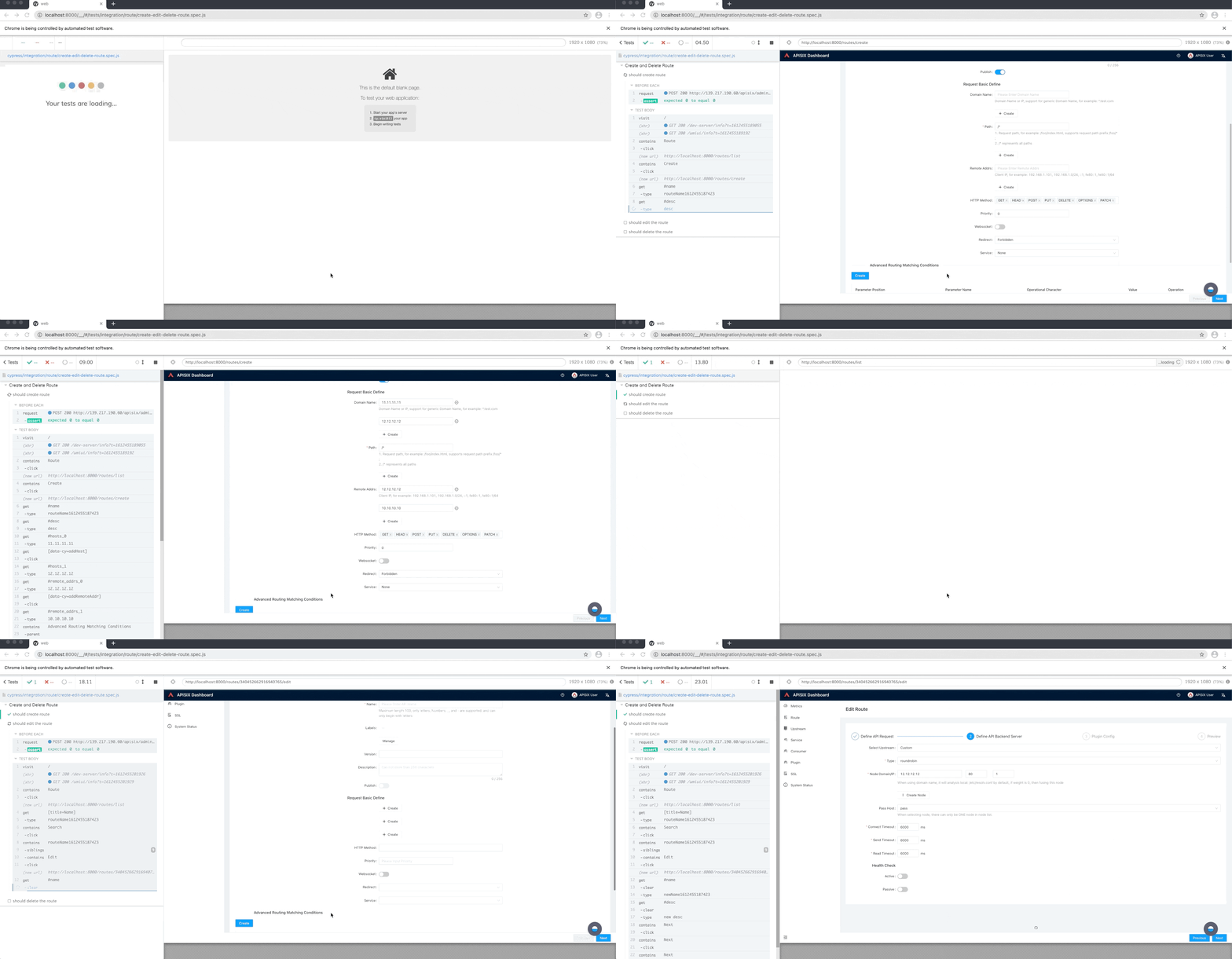
+When debugging test cases, we can use Cypress's Test Runner, which presents
multi-dimensional data that allows us to quickly pinpoint the problem.
+
+- Showing the status of the test case execution, including the number of
successes, failures, and runs in progress.
+- Displaying the total time spent on the execution of the entire test set.
+- A built-in Selector Playground to help locate elements.
+- shows each step of execution for each use case and forms a snapshot that can
show information about each execution step after it is completed.
+
+3. Active community
+
+Cypress has a large community of users, and there are always many people
inside the community sharing their experiences and ideas.
+
+This is helpful when encountering problems, and you are likely to encounter
problems that others have encountered before. Also, when new features are
requested, we can participate in the community by discussing and adding
features to Cypress that we want to add, just like we do in the APISIX
community: listening to the community and feeding it back.
+
+4. Clear documentation
+
+Cypress's documentation structure is clearer and more comprehensive. In the
early stages of use, we were able to quickly introduce Cypress into our project
and write our first case based on the official documentation guidelines. In
addition, there is a large amount of documentation available on the
documentation site that gives users good guidance on what is best practice.
+
+## Cypress and APISIX Dashboard
+
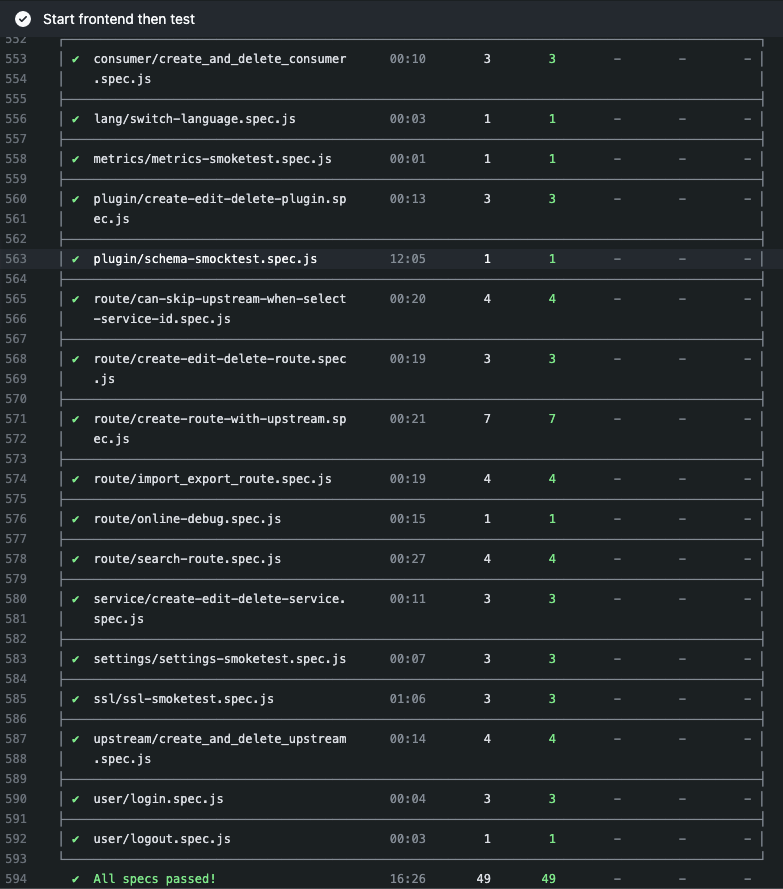
+There are currently 49 test cases written for the APISIX Dashboard. We
configured the corresponding CI in GitHub Action to ensure that the code passes
before each merge to ensure code quality. We share the use of Cypress in APISIX
Dashboard with you by referring to Cypress best practices and combining them
with our project.
+
+
+
+
+
+1. Commonly used functions are encapsulated into commands.
+
+Take login as an example, login is an essential part of entering the system,
so we encapsulate it as a command, so that the login command can be called
before each case run.
+
+```javaScript
+Cypress.Commands.add("login", () => {
+ cy.request(
+ "POST",
+ 'http://127.0.0.1/apisix/admin/user/login',
+ {
+ username: "user",
+ password: "user",
+ }
+ ).then((res) => {
+ expect(res.body.code).to.equal(0);
+ localStorage.setItem("token", res.body.data.token);
+ });
+});
+```
+
+```javaScript
+beforeEach(() => {
+ // init login
+ cy.login();
+})
+```
+
+2. Extract the selector and data as public variables.
+
+To make it more intuitive for the user to understand the meaning of the test
code, we extract selcector and data as public variables.
+
+```javaScript
+ const data = {
+ name: 'hmac-auth',
+ deleteSuccess: 'Delete Plugin Successfully',
+ };
+ const domSelector = {
+ tableCell: '.ant-table-cell',
+ empty: '.ant-empty-normal',
+ refresh: '.anticon-reload',
+ codemirror: '.CodeMirror',
+ switch: '#disable',
+ deleteBtn: '.ant-btn-dangerous',
+ };
+```
+
+3. Remove cy.wait(someTime)
+
+We used cy.wait(someTime) in the early days of Cypress, but found that
cy.wait(someTime) relies too much on the network environment and the
performance of the test machine, which can cause test cases to report errors
when the network environment or machine performance is poor. The recommended
practice is to use it in conjunction with cy.intercpet() to explicitly specify
the network resources to wait for.
+
+```javascript
+cy.intercept("https://apisix.apache.org/";).as("fetchURL");
+cy.wait("@fetchURL");
+```
+
+## Summary
+
+At present, APISIX Dashboard has written 49 test cases. In the future, we will
continue to enhance the front-end E2E coverage, and require the community to
agree to write test cases for each new feature or bugfix submission to ensure
the stability of the product.
+
+Welcome to join us to polish the world-class gateway product.
+
+Project address:
[https://github.com/apache/apisix-dashboard](https://github.com/apache/apisix-dashboard)


