This is an automated email from the ASF dual-hosted git repository.

juzhiyuan pushed a commit to branch master
in repository https://gitbox.apache.org/repos/asf/apisix-website.git
The following commit(s) were added to refs/heads/master by this push:
new 02d5d99 docs: add opa blog (#825)
02d5d99 is described below
commit 02d5d99ec117bda208290257627ad8e5644b2dee
Author: yilinzeng <[email protected]>
AuthorDate: Fri Dec 24 18:01:00 2021 +0800
docs: add opa blog (#825)
---
website/blog/2021/12/24/open-policy-agent.md | 242 +++++++++++++++++++++
.../2021/12/24/open-policy-agent.md | 242 +++++++++++++++++++++
2 files changed, 484 insertions(+)
diff --git a/website/blog/2021/12/24/open-policy-agent.md
b/website/blog/2021/12/24/open-policy-agent.md
new file mode 100644
index 0000000..488f7f6
--- /dev/null
+++ b/website/blog/2021/12/24/open-policy-agent.md
@@ -0,0 +1,242 @@
+---
+title: "Apache APISIX integrates with Open Policy Agent to enrich its
ecosystem"
+authors:
+ - name: "Zeping Bai"
+ title: "Author"
+ url: "hhttps://github.com/bzp2010";
+ image_url: "https://avatars.githubusercontent.com/u/8078418?v=4";
+ - name: "Yilin Zeng"
+ title: "Technical Writer"
+ url: "https://github.com/yzeng25";
+ image_url: "https://avatars.githubusercontent.com/u/36651058?v=4";
+keywords:
+- Apache APISIX
+- Open Policy Agent
+- OPA
+- API Gateway
+description: This article introduces the opa plug-in as an example of HTTP API
and details how to integrate Apache APISIX with OPA to decouple the
authentication authorization of back-end services.
+tags: [Technology]
+---
+
+> This article introduces the `opa` plug-in as an example of HTTP API and
details how to integrate Apache APISIX with OPA to decouple the authentication
authorization of back-end services.
+
+<!--truncate-->
+
+
+
+Open Policy Agent (OPA) is an open source lightweight general-purpose policy
engine that can replace the built-in policy function module in software and
help users decouple services from the policy engine. Thanks to [OPA's
well-established
ecosystem](https://www.openpolicyagent.org/docs/latest/ecosystem/), users can
easily integrate OPA with other services, such as program libraries, HTTP APIs,
etc.
+
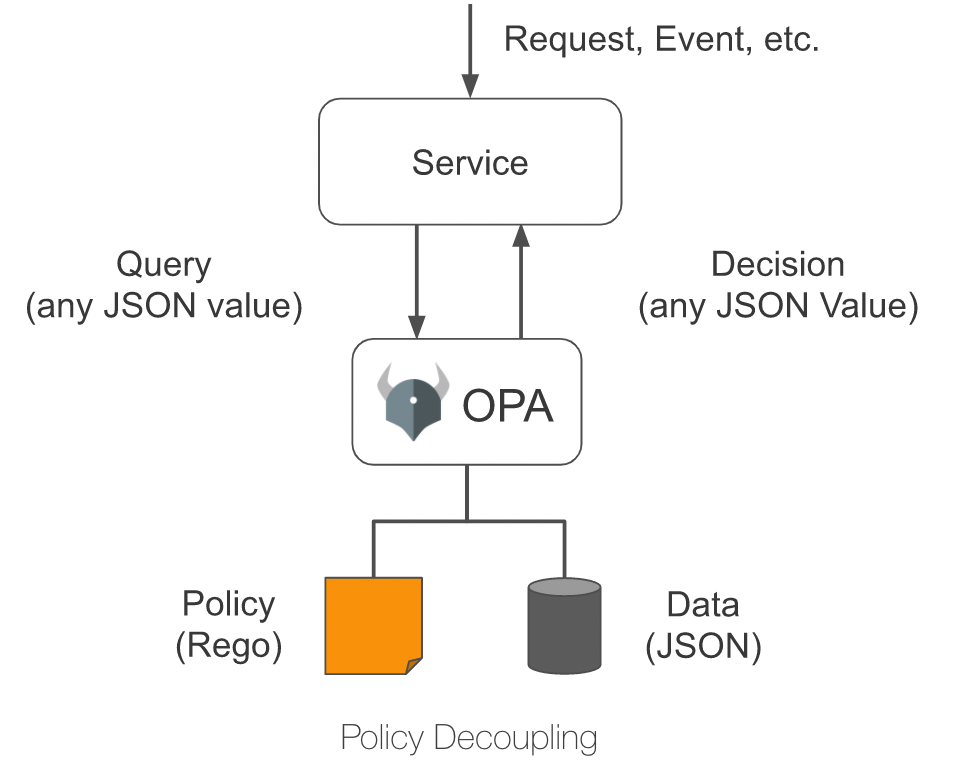
+As shown in the figure below, OPA first describes the policy through the
policy language Rego; then stores the policy data through JSON, after which the
user can send a query request. After receiving the query request, OPA will
combine the policy, data and user input to generate a policy decision and send
the decision to the service.
+
+
+
+## Plugin Introduction
+
+Apache APISIX provides an `opa` plug-in that allows users to conveniently
introduce the policy capabilities provided by OPA to Apache APISIX to enable
flexible authentication and access control features.
+
+After configuring the `opa` plug-in on a route, Apache APISIX assembles
request information, connection information, etc. into JSON data and sends it
to the policy decision API address when processing response requests. As long
as the policy deployed in OPA conforms to the data specification set by Apache
APISIX, functions such as pass request, reject request, custom status code,
custom response header, custom response header, etc. can be implemented.
+
+This article takes HTTP API as an example to introduce the `opa` plug-in and
details how to integrate Apache APISIX with OPA to decouple authentication
authorization for back-end services.
+
+## How to use
+
+### Build test environment
+
+1. Use Docker to build OPA services.
+
+ ```shell
+ # Running OPA with Docker
+ docker run -d --name opa -p 8181:8181 openpolicyagent/opa:0.35.0 run -s
+ ```
+
+2. Create an `example` policy.
+
+ ```shell
+ # Create policy
+ curl -XPUT 'localhost:8181/v1/policies/example' \
+ --header 'Content-Type: text/plain' \
+ --data-raw 'package example
+
+ import input.request
+ import data.users
+
+ default allow = false
+
+ allow {
+ # has the name test-header with the value only-for-test request header
+ request.headers["test-header"] == "only-for-test"
+ # The request method is GET
+ request.method == "GET"
+ # The request path starts with /get
+ startswith(request.path, "/get")
+ # GET parameter test exists and is not equal to abcd
+ request.query["test"] != "abcd"
+ # GET parameter user exists
+ request.query["user"]
+ }
+
+ reason = users[request.query["user"]].reason {
+ not allow
+ request.query["user"]
+ }
+
+ headers = users[request.query["user"]].headers {
+ not allow
+ request.query["user"]
+ }
+
+ status_code = users[request.query["user"]].status_code {
+ not allow
+ request.query["user"]
+ }'
+ ```
+
+3. Create `users` data.
+
+ ```shell
+ # Create test user data
+ curl -XPUT 'localhost:8181/v1/data/users' \
+ --header 'Content-Type: application/json' \
+ --data-raw '{
+ "alice": {
+ "headers": {
+ "Location": "http://example.com/auth";
+ },
+ "status_code": 302
+ },
+ "bob": {
+ "headers": {
+ "test": "abcd",
+ "abce": "test"
+ }
+ },
+ "carla": {
+ "reason": "Give you a string reason"
+ },
+ "dylon": {
+ "headers": {
+ "Content-Type": "application/json"
+ },
+ "reason": {
+ "code": 40001,
+ "desc": "Give you a object reason"
+ }
+ }
+ }'
+ ```
+
+### Create a route and enable the plugin
+
+Run the following command to create the route and enable the `opa` plugin.
+
+```shell
+curl -XPUT 'http://127.0.0.1:9080/apisix/admin/routes/r1' \
+--header 'X-API-KEY: <api-key>' \
+--header 'Content-Type: application/json' \
+--data-raw '{
+ "uri": "/*",
+ "methods": [
+ "GET",
+ "POST",
+ "PUT",
+ "DELETE"
+ ],
+ "plugins": {
+ "opa": {
+ "host": "http://127.0.0.1:8181";,
+ "policy": "example"
+ }
+ },
+ "upstream": {
+ "nodes": {
+ "httpbin.org:80": 1
+ },
+ "type": "roundrobin"
+ }
+}'
+```
+
+### Test Requests
+
+Next, run the following command to send a request to the `opa` plugin to test
the plugin's running status.
+
+```shell
+# Allow requests
+curl -XGET '127.0.0.1:9080/get?test=none&user=dylon' \
+ --header 'test-header: only-for-test'
+{
+ "args": {
+ "test": "abcd1",
+ "user": "dylon"
+ },
+ "headers": {
+ "Test-Header": "only-for-test",
+ "with": "more"
+ },
+ "origin": "127.0.0.1",
+ "url": "http://127.0.0.1/get?test=abcd1&user=dylon";
+}
+
+# Reject the request and rewrite the status code and response headers
+curl -XGET '127.0.0.1:9080/get?test=abcd&user=alice' \
+ --header 'test-header: only-for-test'
+
+HTTP/1.1 302 Moved Temporarily
+Date: Mon, 20 Dec 2021 09:37:35 GMT
+Content-Type: text/html
+Content-Length: 142
+Connection: keep-alive
+Location: http://example.com/auth
+Server: APISIX/2.11.0
+
+# Rejects the request and returns a custom response header
+curl -XGET '127.0.0.1:9080/get?test=abcd&user=bob' \
+ --header 'test-header: only-for-test'
+
+HTTP/1.1 403 Forbidden
+Date: Mon, 20 Dec 2021 09:38:27 GMT
+Content-Type: text/html; charset=utf-8
+Content-Length: 150
+Connection: keep-alive
+abce: test
+test: abcd
+Server: APISIX/2.11.0
+
+# Rejects the request and returns a custom response (string)
+curl -XGET '127.0.0.1:9080/get?test=abcd&user=carla' \
+ --header 'test-header: only-for-test'
+
+HTTP/1.1 403 Forbidden
+Date: Mon, 20 Dec 2021 09:38:58 GMT
+Content-Type: text/plain; charset=utf-8
+Transfer-Encoding: chunked
+Connection: keep-alive
+Server: APISIX/2.11.0
+
+Give you a string reason
+
+# Rejects the request and returns a custom response (JSON)
+curl -XGET '127.0.0.1:9080/get?test=abcd&user=dylon' \
+ --header 'test-header: only-for-test'
+
+HTTP/1.1 403 Forbidden
+Date: Mon, 20 Dec 2021 09:42:12 GMT
+Content-Type: application/json
+Transfer-Encoding: chunked
+Connection: keep-alive
+Server: APISIX/2.11.0
+
+{"code":40001,"desc":"Give you a object reason"}
+```
+
+### Disable the plugin
+
+Thanks to the dynamic nature of Apache APISIX, the OPA plug-in on a route can
be turned off by simply removing the `opa` plug-in related configuration from
the route configuration and saving it.
+
+## Summary
+
+This article describes the detailed steps for interfacing Apache APISIX and
Open Policy Agent. We hope this article will give you a clearer understanding
of using Open Policy Agent in Apache APISIX and facilitate the subsequent
hands-on operation.
+
+Apache APISIX is not only committed to maintaining its own high performance,
but also has always attached great importance to the construction of open
source ecology. At present, Apache APISIX has 10+ authentication
authorization-related plug-ins that support interfacing with mainstream
authentication authorization services in the industry.
+
+If you have the need to interface with other authentication authorities, visit
Apache APISIX's [GitHub](https://github.com/apache/apisix/issues) and leave
your suggestions via issue; or subscribe to Apache APISIX's [mailing
list](https://apisix.apache.org/zh/docs/general/subscribe-guide) to express
your ideas via email.
diff --git
a/website/i18n/zh/docusaurus-plugin-content-blog/2021/12/24/open-policy-agent.md
b/website/i18n/zh/docusaurus-plugin-content-blog/2021/12/24/open-policy-agent.md
new file mode 100644
index 0000000..38c6344
--- /dev/null
+++
b/website/i18n/zh/docusaurus-plugin-content-blog/2021/12/24/open-policy-agent.md
@@ -0,0 +1,242 @@
+---
+title: "再接再厉!Apache APISIX 集成 Open Policy Agent"
+authors:
+ - name: "白泽平"
+ title: "Author"
+ url: "hhttps://github.com/bzp2010";
+ image_url: "https://avatars.githubusercontent.com/u/8078418?v=4";
+ - name: "曾奕霖"
+ title: "Technical Writer"
+ url: "https://github.com/yzeng25";
+ image_url: "https://avatars.githubusercontent.com/u/36651058?v=4";
+keywords:
+- Apache APISIX
+- Open Policy Agent
+- OPA
+- API 网关
+description: 本文以 HTTP API 为例为大家介绍 opa 插件,并详细说明如何将 Apache APISIX 与 OPA
进行集成,实现后端服务的认证授权解耦。
+tags: [Technology]
+---
+
+> 本文以 HTTP API 为例为大家介绍 `opa` 插件,并详细说明如何将 Apache APISIX 与 OPA
进行集成,实现后端服务的认证授权解耦。
+
+<!--truncate-->
+
+
+
+Open Policy Agent(OPA)是一个开源的轻量级通用策略引擎,可以代替软件中内置的策略功能模块,帮助用户实现服务与策略引擎的解耦。得益于
[OPA
完善的生态系统](https://www.openpolicyagent.org/docs/latest/ecosystem/),用户可以很容易地集成 OPA
和其他服务,例如程序库、HTTP API 等。
+
+如下图所示,OPA 首先通过策略语言 Rego 描述策略;然后通过 JSON 存储策略数据,之后用户就可以发送查询请求。收到查询请求后,OPA
将结合策略、数据和用户输入的查询请求内容生成策略决策,并将决策发送至服务。
+
+
+
+## 插件介绍
+
+Apache APISIX 提供了一个 `opa` 插件,用户可以使用这个插件,便捷地将 OPA 提供的策略能力引入到 Apache
APISIX,实现灵活的身份认证与准入控制功能。
+
+将 `opa` 插件配置在路由上后,Apache APISIX 会在处理响应请求时,将请求信息、连接信息等组装成 JSON 数据,并将其发送到策略决策
API 地址。只要在 OPA 中部署的策略符合 Apache APISIX
设定的数据规范,就可以实现如通过请求、拒绝请求、自定义状态码、自定义响应头、自定义响应头等功能。
+
+本文以 HTTP API 为例为大家介绍 `opa` 插件,并详细说明如何将 Apache APISIX 与 OPA
进行集成,实现后端服务的认证授权解耦。
+
+## 如何使用
+
+### 搭建测试环境
+
+1. 使用 Docker 构建 OPA 服务。
+
+ ```shell
+ # 使用 Docker 运行 OPA
+ docker run -d --name opa -p 8181:8181 openpolicyagent/opa:0.35.0 run -s
+ ```
+
+2. 创建 `example` 策略。
+
+ ```shell
+ # 创建策略
+ curl -XPUT 'localhost:8181/v1/policies/example' \
+ --header 'Content-Type: text/plain' \
+ --data-raw 'package example
+
+ import input.request
+ import data.users
+
+ default allow = false
+
+ allow {
+ # 具有名为 test-header 值为 only-for-test请求头
+ request.headers["test-header"] == "only-for-test"
+ # 请求方法为 GET
+ request.method == "GET"
+ # 请求路径以 /get 开头
+ startswith(request.path, "/get")
+ # GET 参数 test 存在且不等于 abcd
+ request.query["test"] != "abcd"
+ # GET 参数 user 存在
+ request.query["user"]
+ }
+
+ reason = users[request.query["user"]].reason {
+ not allow
+ request.query["user"]
+ }
+
+ headers = users[request.query["user"]].headers {
+ not allow
+ request.query["user"]
+ }
+
+ status_code = users[request.query["user"]].status_code {
+ not allow
+ request.query["user"]
+ }'
+ ```
+
+3. 创建 `users` 数据。
+
+ ```shell
+ # 创建测试用户数据
+ curl -XPUT 'localhost:8181/v1/data/users' \
+ --header 'Content-Type: application/json' \
+ --data-raw '{
+ "alice": {
+ "headers": {
+ "Location": "http://example.com/auth";
+ },
+ "status_code": 302
+ },
+ "bob": {
+ "headers": {
+ "test": "abcd",
+ "abce": "test"
+ }
+ },
+ "carla": {
+ "reason": "Give you a string reason"
+ },
+ "dylon": {
+ "headers": {
+ "Content-Type": "application/json"
+ },
+ "reason": {
+ "code": 40001,
+ "desc": "Give you a object reason"
+ }
+ }
+ }'
+ ```
+
+### 创建路由并启用插件
+
+运行以下命令,创建路由,并启用 `opa` 插件。
+
+```shell
+curl -XPUT 'http://127.0.0.1:9080/apisix/admin/routes/r1' \
+--header 'X-API-KEY: <api-key>' \
+--header 'Content-Type: application/json' \
+--data-raw '{
+ "uri": "/*",
+ "methods": [
+ "GET",
+ "POST",
+ "PUT",
+ "DELETE"
+ ],
+ "plugins": {
+ "opa": {
+ "host": "http://127.0.0.1:8181";,
+ "policy": "example"
+ }
+ },
+ "upstream": {
+ "nodes": {
+ "httpbin.org:80": 1
+ },
+ "type": "roundrobin"
+ }
+}'
+```
+
+### 测试请求
+
+接下来,请运行以下命令,向 `opa` 插件发送请求,测试插件运行状态。
+
+```shell
+# 允许请求
+curl -XGET '127.0.0.1:9080/get?test=none&user=dylon' \
+ --header 'test-header: only-for-test'
+{
+ "args": {
+ "test": "abcd1",
+ "user": "dylon"
+ },
+ "headers": {
+ "Test-Header": "only-for-test",
+ "with": "more"
+ },
+ "origin": "127.0.0.1",
+ "url": "http://127.0.0.1/get?test=abcd1&user=dylon";
+}
+
+# 拒绝请求并重写状态码和响应头
+curl -XGET '127.0.0.1:9080/get?test=abcd&user=alice' \
+ --header 'test-header: only-for-test'
+
+HTTP/1.1 302 Moved Temporarily
+Date: Mon, 20 Dec 2021 09:37:35 GMT
+Content-Type: text/html
+Content-Length: 142
+Connection: keep-alive
+Location: http://example.com/auth
+Server: APISIX/2.11.0
+
+# 拒绝请求并返回自定义响应头
+curl -XGET '127.0.0.1:9080/get?test=abcd&user=bob' \
+ --header 'test-header: only-for-test'
+
+HTTP/1.1 403 Forbidden
+Date: Mon, 20 Dec 2021 09:38:27 GMT
+Content-Type: text/html; charset=utf-8
+Content-Length: 150
+Connection: keep-alive
+abce: test
+test: abcd
+Server: APISIX/2.11.0
+
+# 拒绝请求并返回自定义响应(字符串)
+curl -XGET '127.0.0.1:9080/get?test=abcd&user=carla' \
+ --header 'test-header: only-for-test'
+
+HTTP/1.1 403 Forbidden
+Date: Mon, 20 Dec 2021 09:38:58 GMT
+Content-Type: text/plain; charset=utf-8
+Transfer-Encoding: chunked
+Connection: keep-alive
+Server: APISIX/2.11.0
+
+Give you a string reason
+
+# 拒绝请求并返回自定义响应(JSON)
+curl -XGET '127.0.0.1:9080/get?test=abcd&user=dylon' \
+ --header 'test-header: only-for-test'
+
+HTTP/1.1 403 Forbidden
+Date: Mon, 20 Dec 2021 09:42:12 GMT
+Content-Type: application/json
+Transfer-Encoding: chunked
+Connection: keep-alive
+Server: APISIX/2.11.0
+
+{"code":40001,"desc":"Give you a object reason"}
+```
+
+### 关闭插件
+
+得益于 Apache APISIX 的动态化特性,只需要移除路由配置中 `opa` 插件相关配置并保存,即可关闭路由上的 OPA 插件。
+
+## 总结
+
+本文为大家描述了 Apache APISIX 和 Open Policy Agent 对接的详细操作步骤,希望通过本文可以让大家对于在 Apache
APISIX 中使用 Open Policy Agent 有了更清晰的理解,方便后续进行上手实操。
+
+Apache APISIX 不仅致力于保持自身的高性能,也一直非常重视开源生态的建设。目前 Apache APISIX 已经拥有了 10+
个认证授权相关的插件,支持与业界主流的认证授权服务对接。
+
+如果你有对接其他认证授权的需求,不妨访问 Apache APISIX 的
[GitHub](https://github.com/apache/apisix/issues),通过 issue 留下你的建议;或订阅 Apache
APISIX
的[邮件列表](https://apisix.apache.org/zh/docs/general/subscribe-guide),通过邮件表达你的想法。


