This is an automated email from the ASF dual-hosted git repository.

bzp2010 pushed a commit to branch master
in repository https://gitbox.apache.org/repos/asf/apisix-website.git
The following commit(s) were added to refs/heads/master by this push:
new 58cf46e docs: add authing blog (#832)
58cf46e is described below
commit 58cf46e9439fcd696dfcd0dfca6daee05a5cc1ae
Author: yilinzeng <[email protected]>
AuthorDate: Wed Jan 5 11:50:04 2022 +0800
docs: add authing blog (#832)
---
...-APISIX-not-affected-by-NGINX-CVE-2021-23017.md | 2 +-
.../blog/2021/06/28/why-we-need-Apache-APISIX.md | 4 +-
...ina-Weibo-API-gateway-based-on-Apache-APISIX.md | 30 +--
.../blog/2021/07/21/Apache-APISIX-Kubernetes.md | 2 +-
...apisix-to-improve-the-observability-of-nginx.md | 2 +-
.../08/18/Auth-with-Casbin-in-Apache-APISIX.md | 2 +-
...onnect-Plugin-for-Centralized-Authentication.md | 4 +-
website/blog/2021/08/30/weekly-report.md | 2 +-
website/blog/2021/09/07/iQIYI-usercase.md | 2 +-
.../blog/2021/09/13/china-mobile-cloud-usercase.md | 2 +-
website/blog/2021/09/15/weekly-report.md | 2 +-
website/blog/2021/10/09/apisix-ingress-techblog.md | 6 +-
website/blog/2021/10/26/APISIX-Ingress.md | 4 +-
.../blog/2021/12/15/deploy-apisix-in-kubernetes.md | 2 +-
.../blog/2021/12/16/apisix-with-rocketmq-meetup.md | 4 +-
.../12/24/apisix-integrate-openwhisk-plugin.md | 2 +-
.../blog/2021/12/30/apisix-proxy-grpc-service.md | 2 +-
website/blog/2022/01/04/authing.md | 255 ++++++++++++++++++++
.../2022/01/04/authing.md | 257 +++++++++++++++++++++
19 files changed, 549 insertions(+), 37 deletions(-)
diff --git
a/website/blog/2021/06/07/Apache-APISIX-not-affected-by-NGINX-CVE-2021-23017.md
b/website/blog/2021/06/07/Apache-APISIX-not-affected-by-NGINX-CVE-2021-23017.md
index 947109e..ac3c7e1 100644
---
a/website/blog/2021/06/07/Apache-APISIX-not-affected-by-NGINX-CVE-2021-23017.md
+++
b/website/blog/2021/06/07/Apache-APISIX-not-affected-by-NGINX-CVE-2021-23017.md
@@ -37,7 +37,7 @@ are all implemented by Apache APISIX instead of the built-in
mechanism of NGINX,
## Apache APISIX
-Apache APISIX is a dynamic, real-time, high-performance API gateway that
provides rich traffic management features such as load balancing, dynamic
upstream, grayscale publishing, service meltdown , authentication ,
observability and so on.
+Apache APISIX is a dynamic, real-time, high-performance API gateway that
provides rich traffic management features such as load balancing, dynamic
upstream, canary release, service meltdown , authentication , observability and
so on.
You can use Apache APISIX to handle traditional north-south traffic, as well
as east-west traffic between services.
diff --git a/website/blog/2021/06/28/why-we-need-Apache-APISIX.md
b/website/blog/2021/06/28/why-we-need-Apache-APISIX.md
index 1b2542e..2da70cd 100644
--- a/website/blog/2021/06/28/why-we-need-Apache-APISIX.md
+++ b/website/blog/2021/06/28/why-we-need-Apache-APISIX.md
@@ -68,7 +68,7 @@ When we have few tools at hand, we always have to compromise
between functionali
As you can see, these are NGINX drawbacks, such as NGINX's low activity
community. While we could invest more resources at the corporate level, his
community is really unfriendly, and how unfriendly is it? As you can see in the
picture above, the NGINX repository in Github is only a mirror, the issue
function is closed, it is impossible to submit an issue, and even if you submit
a PR the official will not merge it.
-In addition, NGINX is weak in its own routing, for example, I want to do
grayscale based on a request parameter such as id, you will find that NGINX is
completely unable to achieve. So we can see a lot of small open source systems,
as long as the above grayscale scenario is solved, it can be an independent
open source project. In addition, gRPC calls are becoming more and more popular
in microservice calls, but NGINX support for it is only "simple to use".
+In addition, NGINX is weak in its own routing, for example, I want to do
canary release based on a request parameter such as id, you will find that
NGINX is completely unable to achieve. So we can see a lot of small open source
systems, as long as the above canary release scenario is solved, it can be an
independent open source project. In addition, gRPC calls are becoming more and
more popular in microservice calls, but NGINX support for it is only "simple to
use".
Finally, the NGINX cluster management, almost every Internet vendor has its
own NGINX configuration management system, although the system is similar but
there is no unified solution, more than a decade has been blank.
@@ -136,7 +136,7 @@ You may be wondering if APISIX is going to support so many
scenarios. Here I wil
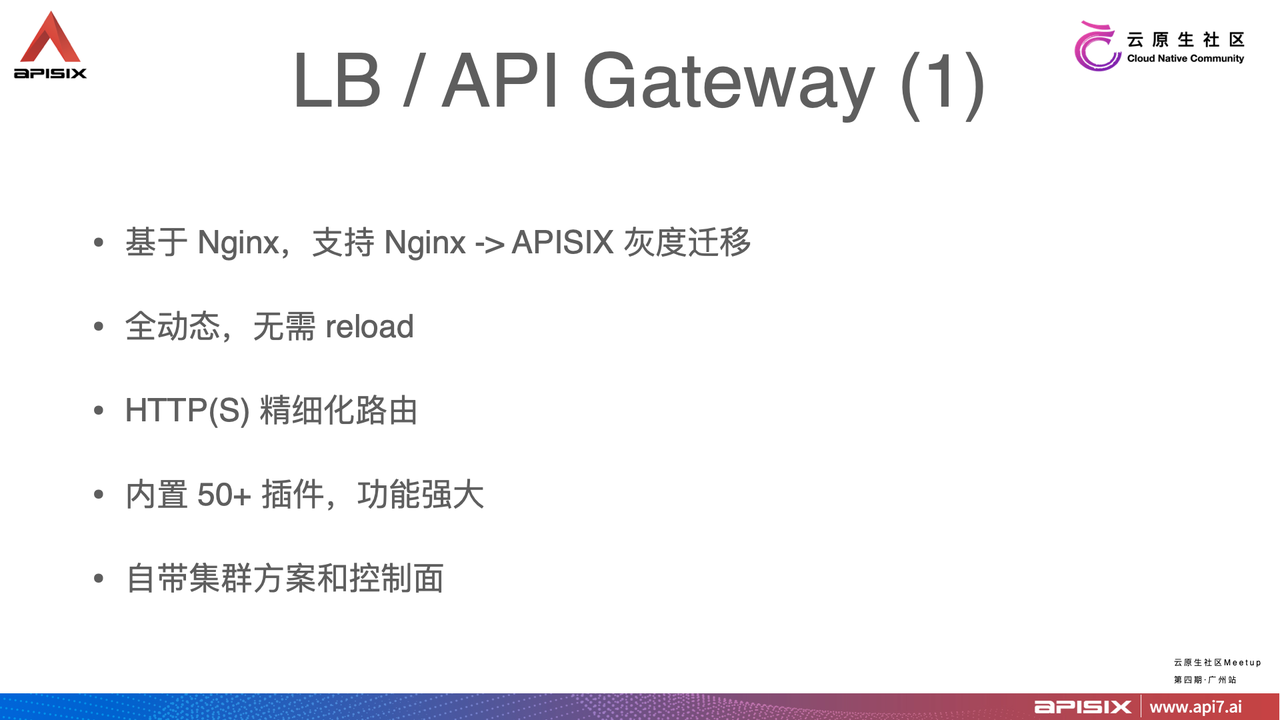
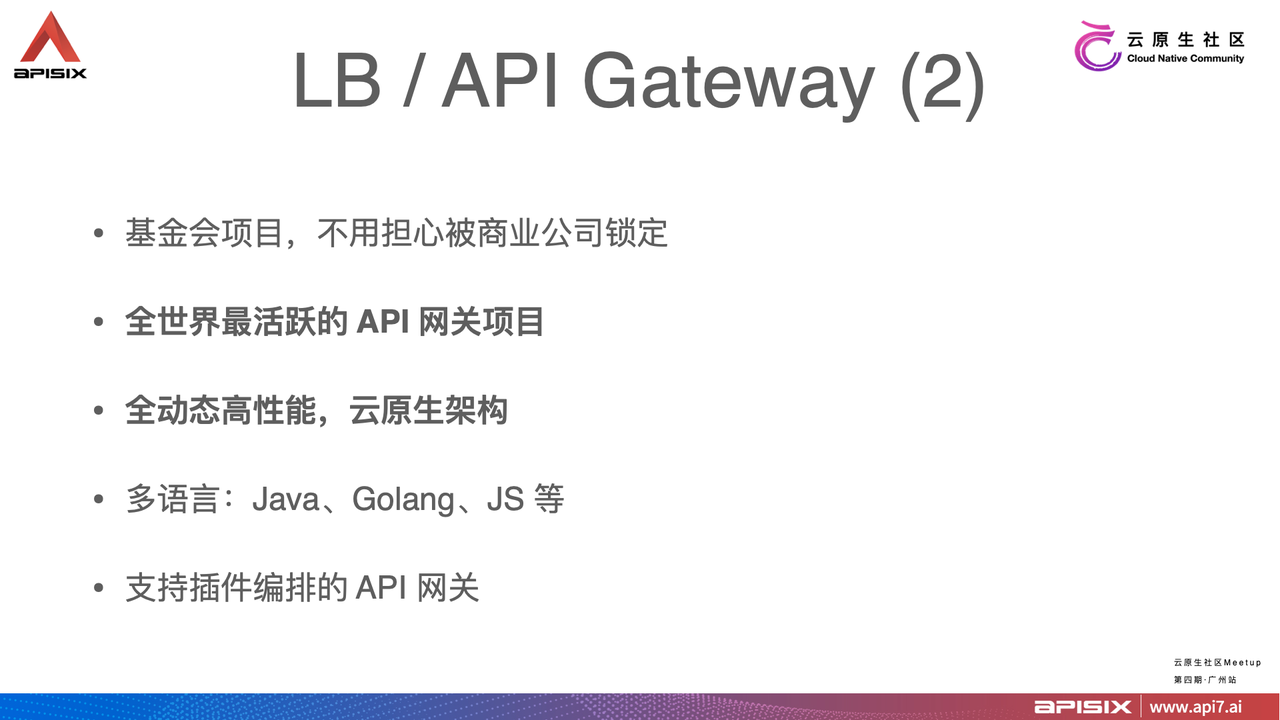
-For traditional LB and API Gateway scenarios, APISIX has the advantage of
going from static to all dynamic, no more reloads, as many tech companies start
with a half hour NGINX reload. The aforementioned grayscale scenario of
moduloing based on request id can be easily done in APISIX using fine-grained
routing.
+For traditional LB and API Gateway scenarios, APISIX has the advantage of
going from static to all dynamic, no more reloads, as many tech companies start
with a half hour NGINX reload. The aforementioned canary release scenario of
moduloing based on request id can be easily done in APISIX using fine-grained
routing.
diff --git
a/website/blog/2021/07/14/the-road-to-customization-of-Sina-Weibo-API-gateway-based-on-Apache-APISIX.md
b/website/blog/2021/07/14/the-road-to-customization-of-Sina-Weibo-API-gateway-based-on-Apache-APISIX.md
index 789d038..11b00ff 100644
---
a/website/blog/2021/07/14/the-road-to-customization-of-Sina-Weibo-API-gateway-based-on-Apache-APISIX.md
+++
b/website/blog/2021/07/14/the-road-to-customization-of-Sina-Weibo-API-gateway-based-on-Apache-APISIX.md
@@ -27,7 +27,7 @@ The whole process is long and inefficient, and cannot meet
the trend of low-code
After some research, we chose the closest to the expected cloud-based
micro-services API gateway: Apache APISIX.
-1. Based on Nginx, the technology stack is unified before and after the
grayscale upgrade, security, stability, etc. are guaranteed.
+1. Based on Nginx, the technology stack is unified before and after the canary
release upgrade, security, stability, etc. are guaranteed.
1. Built-in unified control surface, unified management of multiple proxy
services.
1. Dynamic API call, you can complete the common resource modifications in
real time, compared to the traditional Nginx configuration + reload way
progress is obvious.
1. Rich routing options to meet the needs of Sina Weibo routing.
@@ -42,7 +42,7 @@ In the actual business situation, we cannot use Apache APISIX
directly for the f
1. Apache APISIX does not support SaaS multi-tenancy, and there are many
upper-layer applications that actually need to be operated and maintained, and
each business line development or operation and maintenance student only needs
to manage and maintain their own rules, upstreams and other rules, which are
not associated with each other.
1. When the routing rules are published online, they need fast roll back
support if problems arise.
-1. When creating or editing existing routing rules, we are not so sure about
publishing them directly to the wire, and then we need it to be able to support
grayscale publishing to a specified gateway instance for simulation or local
testing.
+1. When creating or editing existing routing rules, we are not so sure about
publishing them directly to the wire, and then we need it to be able to support
canary release to a specified gateway instance for simulation or local testing.
1. The need for API gateways to be able to support Consul KV-style service
registration and discovery mechanisms.
None of these requirements are currently supported built-in by Apache APISIX,
so custom development is the only way to make Apache APISIX truly usable within
Weibo.
@@ -89,38 +89,38 @@ The internal processing flow of a single route roll back is
shown in the followi
We need to create version database storage for each release of a single route.
This way, when we do a full release after the audit, each release will generate
a version number and the corresponding full configuration data; then the
version list grows. When we need to roll back, go to the version list and
select a corresponding version to rollback; in a sense, the roll back is
actually a special form of full release.
-### Support Grayscale Release
+### Support Canary Release
-Our custom-developed grayscale release feature is different from what the
community generally understands as grayscale release, and is less risky
compared to full deployment. When a change to a routing rule is large, we can
choose to publish and take effect only on a specific limited number of gateway
instances, instead of publishing and taking effect on all gateway instances,
thus reducing the scope of the release, lowering the risk, and enabling fast
trial and error.
+Our custom-developed canary release feature is different from what the
community generally understands as canary release, and is less risky compared
to full deployment. When a change to a routing rule is large, we can choose to
publish and take effect only on a specific limited number of gateway instances,
instead of publishing and taking effect on all gateway instances, thus reducing
the scope of the release, lowering the risk, and enabling fast trial and error.
-Although grayscale release is a low-frequency behavior, there is still a state
transition between it and full volume release.
+Although canary release is a low-frequency behavior, there is still a state
transition between it and full volume release.
-
+
-When the percentage of gray release decreases to 0%, it is the state of full
release; when the gray release rises to 100%, it is the next full release, and
this is its state transition.
-The full grayscale publishing feature requires some API support exposed on the
gateway instance in addition to the administrative backend support.
+When the percentage of canary release decreases to 0%, it is the state of full
release; when the canary release rises to 100%, it is the next full release,
and this is its state transition.
+The full canary release feature requires some API support exposed on the
gateway instance in addition to the administrative backend support.
-
+
-The above screenshot shows the screenshot when operating Grayscale Publishing
to select a specific gateway instance.
+The above screenshot shows the screenshot when operating canary release to
select a specific gateway instance.
-The full grayscale publishing feature requires some API support exposed on the
gateway instance in addition to the administrative backend support.
+The full canary release feature requires some API support exposed on the
gateway instance in addition to the administrative backend support.
-
+
-Grayscale publishing API fixed URI, the unified path is
/admin/services/gray/{SAAS_ID}/ routes. Different HTTP Method presents
different business meanings, POST means create, DELETE means to stop grayscale,
GET means to view.
+Canary release API fixed URI, the unified path is
/admin/services/gray/{SAAS_ID}/ routes. Different HTTP Method presents
different business meanings, POST means create, DELETE means to stop canary
release, GET means to view.
#### Activation Process

-An API is published from the gateway level, and after receiving the data the
worker process checks the legitimacy of the data sent, and the legitimate data
is broadcast to all worker processes via events. Then the grayscale publishing
API is called and the grayscale rules are added and take effect when the next
request is processed.
+An API is published from the gateway level, and after receiving the data the
worker process checks the legitimacy of the data sent, and the legitimate data
is broadcast to all worker processes via events. Then the canary release API is
called and the canary release rules are added and take effect when the next
request is processed.
#### Deactivation Process

-The deactivation process is basically the same as the grayscale distribution
process. The API for grayscale distribution is called by the DELETE method and
broadcasted to all work processes. If it exists in the route table, delete it
and try to restore it from the ETCD. If the grayscale is deactivated, make sure
that the original ETCD can be restored without affecting the normal service.
+The deactivation process is basically the same as the canary release
distribution process. The API for canary release distribution is called by the
DELETE method and broadcasted to all work processes. If it exists in the route
table, delete it and try to restore it from the ETCD. If the canary release is
deactivated, make sure that the original ETCD can be restored without affecting
the normal service.
### Support Fast Import
diff --git a/website/blog/2021/07/21/Apache-APISIX-Kubernetes.md
b/website/blog/2021/07/21/Apache-APISIX-Kubernetes.md
index 1801574..b372934 100644
--- a/website/blog/2021/07/21/Apache-APISIX-Kubernetes.md
+++ b/website/blog/2021/07/21/Apache-APISIX-Kubernetes.md
@@ -35,7 +35,7 @@ He is also the author of Kubernetes Hands-on and Docker Core
Knowledge.
## About Apache APISIX
-Apache APISIX is a dynamic, real-time, high-performance open source API
gateway that provides rich traffic management features such as load balancing,
dynamic upstream, grayscale publishing, service fusion, authentication,
observability, etc. Apache APISIX can help enterprises quickly and securely
handle API and microservice traffic, including gateways, Kubernetes Ingress and
Service Grid.
+Apache APISIX is a dynamic, real-time, high-performance open source API
gateway that provides rich traffic management features such as load balancing,
dynamic upstream, canary release, service fusion, authentication,
observability, etc. Apache APISIX can help enterprises quickly and securely
handle API and microservice traffic, including gateways, Kubernetes Ingress and
Service Grid.
Apache APISIX has been used by hundreds of enterprises worldwide to handle
business-critical traffic, including finance, Internet, manufacturing, retail,
carriers, and more, such as NASA, the European Union's Digital Factory, China
Airlines, China Mobile, Tencent, Huawei, Weibo, NetEase, Shell, 360, Taikang,
and Nespresso Tea.
diff --git
a/website/blog/2021/08/06/using-apache-apisix-to-improve-the-observability-of-nginx.md
b/website/blog/2021/08/06/using-apache-apisix-to-improve-the-observability-of-nginx.md
index 57e5b45..722f570 100644
---
a/website/blog/2021/08/06/using-apache-apisix-to-improve-the-observability-of-nginx.md
+++
b/website/blog/2021/08/06/using-apache-apisix-to-improve-the-observability-of-nginx.md
@@ -93,7 +93,7 @@ The table shows a comparison of Apache APISIX and Nginx
features. Apache APISIX
### Apache APISIX Introduction
-Apache APISIX is a dynamic, real-time, high-performance API gateway that
provides load balancing, dynamic upstream, grayscale publishing, service
meltdown, authentication, observability, and other rich traffic management
features. Apache APISIX is also the world's most active open source API gateway
project, and is a production-ready, high-performance gateway. Hundreds of
enterprises around the world have used Apache APISIX to handle
business-critical traffic, covering finance, Internet, [...]
+Apache APISIX is a dynamic, real-time, high-performance API gateway that
provides load balancing, dynamic upstream, canary release, service meltdown,
authentication, observability, and other rich traffic management features.
Apache APISIX is also the world's most active open source API gateway project,
and is a production-ready, high-performance gateway. Hundreds of enterprises
around the world have used Apache APISIX to handle business-critical traffic,
covering finance, Internet, manuf [...]
### Apache APISIX Solution
diff --git a/website/blog/2021/08/18/Auth-with-Casbin-in-Apache-APISIX.md
b/website/blog/2021/08/18/Auth-with-Casbin-in-Apache-APISIX.md
index 2721e6e..dbd5737 100644
--- a/website/blog/2021/08/18/Auth-with-Casbin-in-Apache-APISIX.md
+++ b/website/blog/2021/08/18/Auth-with-Casbin-in-Apache-APISIX.md
@@ -19,7 +19,7 @@ tags: [Practical Case]
### Apache APISIX
-[Apache APISIX](https://github.com/apache/apisix) is a dynamic, real-time,
high-performance API gateway that provides load balancing, dynamic upstream,
grayscale publishing, fine-grained routing, flow and speed limiting, service
degradation, service meltdown, authentication, observability, and hundreds of
other features. You can use Apache APISIX for traditional north-south traffic,
as well as east-west traffic between services, or as a [k8s ingress
controller](https://github.com/apache/ [...]
+[Apache APISIX](https://github.com/apache/apisix) is a dynamic, real-time,
high-performance API gateway that provides load balancing, dynamic upstream,
canary release, fine-grained routing, flow and speed limiting, service
degradation, service meltdown, authentication, observability, and hundreds of
other features. You can use Apache APISIX for traditional north-south traffic,
as well as east-west traffic between services, or as a [k8s ingress
controller](https://github.com/apache/apisix [...]
### Casbin
diff --git
a/website/blog/2021/08/25/Using-the-Apache-APISIX-OpenID-Connect-Plugin-for-Centralized-Authentication.md
b/website/blog/2021/08/25/Using-the-Apache-APISIX-OpenID-Connect-Plugin-for-Centralized-Authentication.md
index 0261e65..491f1c6 100644
---
a/website/blog/2021/08/25/Using-the-Apache-APISIX-OpenID-Connect-Plugin-for-Centralized-Authentication.md
+++
b/website/blog/2021/08/25/Using-the-Apache-APISIX-OpenID-Connect-Plugin-for-Centralized-Authentication.md
@@ -19,7 +19,7 @@ tags: [Practical Case]
## What is Apache APISIX
-[Apache APISIX](https://apisix.apache.org/) is a dynamic, real-time,
high-performance API gateway that provides rich traffic management features
such as load balancing, dynamic upstream, grayscale publishing, service
meltdown, authentication, observability, and more. Apache APISIX's OpenID
Connect plug-in supports OpenID, which allows users to replace authentication
from traditional authentication mode to centralized authentication mode.
+[Apache APISIX](https://apisix.apache.org/) is a dynamic, real-time,
high-performance API gateway that provides rich traffic management features
such as load balancing, dynamic upstream, canary release, service meltdown,
authentication, observability, and more. Apache APISIX's OpenID Connect plug-in
supports OpenID, which allows users to replace authentication from traditional
authentication mode to centralized authentication mode.
## What is authentication
@@ -249,7 +249,7 @@ Okta is a customizable, secure centralized authentication
solution. Okta can add
## About Apache APISIX
-Apache APISIX is a dynamic, real-time, high-performance API gateway that
provides load balancing, dynamic upstream, grayscale publishing, service
meltdown, authentication, observability, and other rich traffic management
features. You can use Apache APISIX for traditional north-south traffic, as
well as east-west traffic between services, or as a [Kubernetes Ingress
Controller](https://github.com/apache/apisix-ingress-controller).
+Apache APISIX is a dynamic, real-time, high-performance API gateway that
provides load balancing, dynamic upstream, canary release, service meltdown,
authentication, observability, and other rich traffic management features. You
can use Apache APISIX for traditional north-south traffic, as well as east-west
traffic between services, or as a [Kubernetes Ingress
Controller](https://github.com/apache/apisix-ingress-controller).
Hundreds of enterprises worldwide have used Apache APISIX to handle
business-critical traffic, covering finance, Internet, manufacturing, retail,
carriers, and more, such as NASA, the EU's Digital Factory, China Airlines,
China Mobile, Tencent, Huawei, Sina Weibo, NetEase, Ke, 360, Taikang, Nayuki,
and more.
diff --git a/website/blog/2021/08/30/weekly-report.md
b/website/blog/2021/08/30/weekly-report.md
index a7e80c4..945a0fe 100644
--- a/website/blog/2021/08/30/weekly-report.md
+++ b/website/blog/2021/08/30/weekly-report.md
@@ -82,7 +82,7 @@ We've also put together some issues for those new to the
community! If you are i
## Recommended blog posts of the week
-- [Centralized Authentication with the OpenID Connect Plugin for Apache
APISIX](https://apisix.apache.org/blog/2021/08/25/Using-the-Apache-APISIX-OpenID-Connect-Plugin-for-Centralized-Authentication/):
Apache APISIX is a dynamic, real-time, high-performance API gateway that
provides rich traffic management features such as load balancing, dynamic
upstream, grayscale publishing, service meltdown, authentication,
observability, etc. Apache APISIX not only supports plug-in dynamic changes a
[...]
+- [Centralized Authentication with the OpenID Connect Plugin for Apache
APISIX](https://apisix.apache.org/blog/2021/08/25/Using-the-Apache-APISIX-OpenID-Connect-Plugin-for-Centralized-Authentication/):
Apache APISIX is a dynamic, real-time, high-performance API gateway that
provides rich traffic management features such as load balancing, dynamic
upstream, canary release, service meltdown, authentication, observability, etc.
Apache APISIX not only supports plug-in dynamic changes and Apa [...]
- [Why did APISIX choose the Nginx + Lua technology
stack?](https://apisix.apache.org/blog/2021/08/25/Why-Apache-APISIX-chose-Nginx-and-Lua):
Provides the historical background and advantages of the Nginx + Lua
technology stack chosen by APISIX, noting that " High performance +
flexibility" is what makes APISIX stand out from other gateways.
diff --git a/website/blog/2021/09/07/iQIYI-usercase.md
b/website/blog/2021/09/07/iQIYI-usercase.md
index 014fe9b..b539531 100644
--- a/website/blog/2021/09/07/iQIYI-usercase.md
+++ b/website/blog/2021/09/07/iQIYI-usercase.md
@@ -80,7 +80,7 @@ When the instance changes, the corresponding node is first
unlogged from Consul
The gateway is multi-location deployment, build a set of multi-location backup
link in advance, at the same time suggest the user back-end service is also
multi-location deployment nearby. Then the user creates an API service on the
Skywalker Gateway platform, the Controller deploys the API routing on the
entire DC gateway cluster, and the business domain defaults to CNAME on the
unified gateway domain name.
-It provides multi-local access, disaster preparedness and handoff capability
for business directly, and also supports user-defined resolution routing. For
the user’s own fault-cut flow, blue-green deployment, gray-scale publishing
needs, users can use the uuid domain name to customize the resolution of
routing configuration, but also to support the back-end service discovery
custom scheduling.
+It provides multi-local access, disaster preparedness and handoff capability
for business directly, and also supports user-defined resolution routing. For
the user’s own fault-cut flow, blue-green deployment, canary release needs,
users can use the uuid domain name to customize the resolution of routing
configuration, but also to support the back-end service discovery custom
scheduling.
### Scenario 5: Multi-site Multi-level Disaster Tolerance
diff --git a/website/blog/2021/09/13/china-mobile-cloud-usercase.md
b/website/blog/2021/09/13/china-mobile-cloud-usercase.md
index d01c89f..ba009ac 100644
--- a/website/blog/2021/09/13/china-mobile-cloud-usercase.md
+++ b/website/blog/2021/09/13/china-mobile-cloud-usercase.md
@@ -66,7 +66,7 @@ Here we first give you a brief description of the current
Object Storage EOS nod
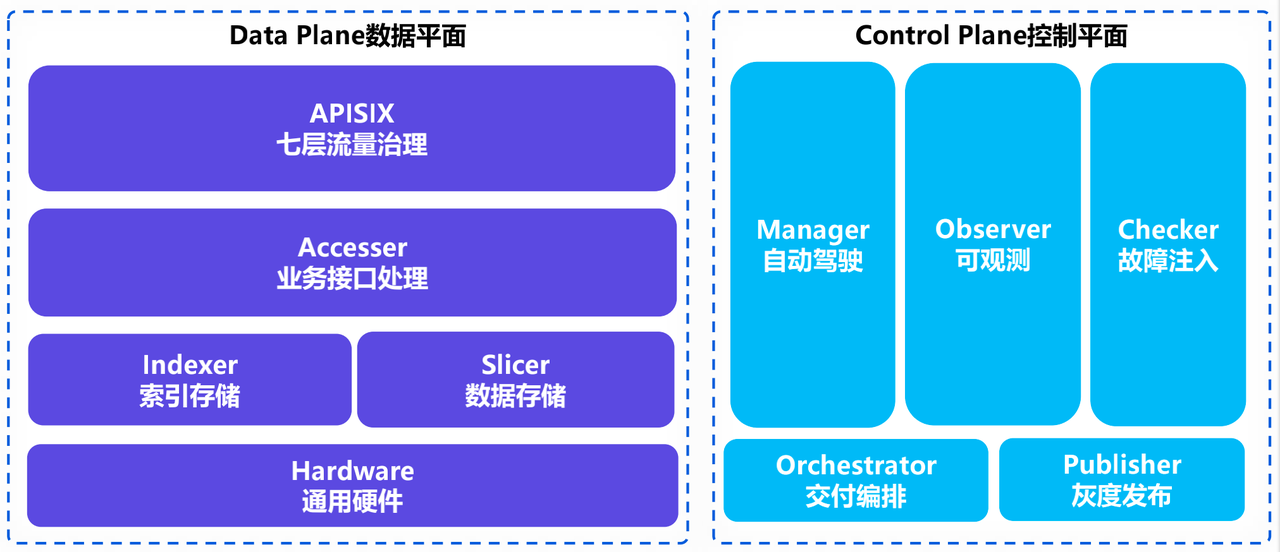
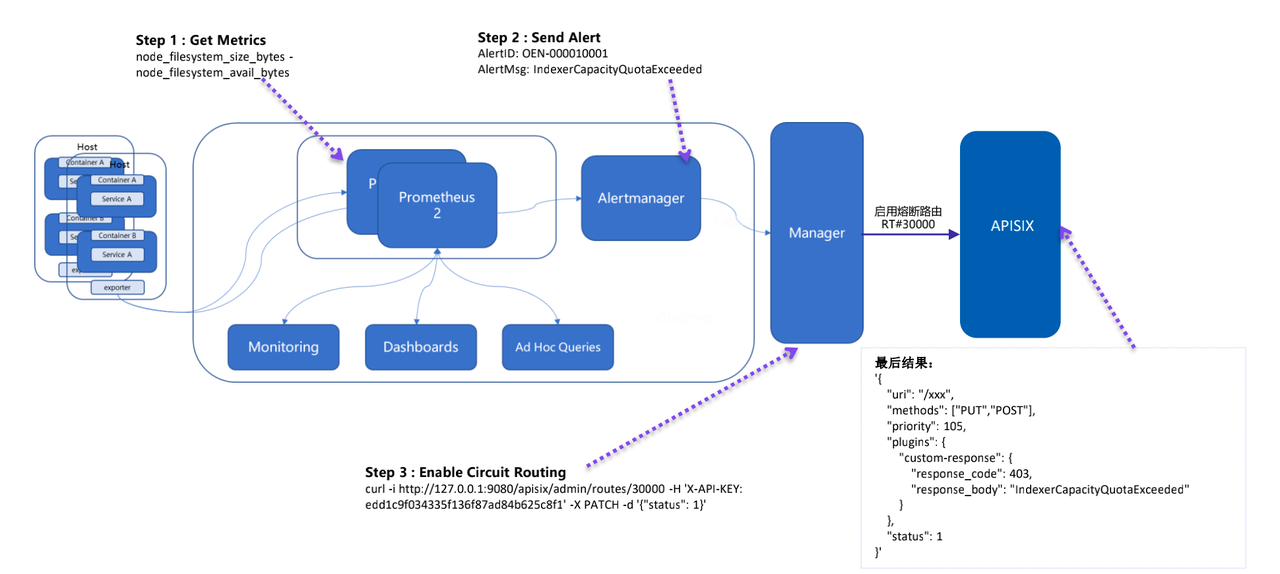
-The control plane has several main services, including the autopilot service
Manager, the observable system Observer, and the chaos engineering fault
injection module Checker. there is also an additional overall interaction
orchestration system Orchestrator and a grayscale publishing platform Publisher.
+The control plane has several main services, including the autopilot service
Manager, the observable system Observer, and the chaos engineering fault
injection module Checker. there is also an additional overall interaction
orchestration system Orchestrator and a canary release platform Publisher.
diff --git a/website/blog/2021/09/15/weekly-report.md
b/website/blog/2021/09/15/weekly-report.md
index 3645ec9..4989858 100644
--- a/website/blog/2021/09/15/weekly-report.md
+++ b/website/blog/2021/09/15/weekly-report.md
@@ -121,7 +121,7 @@ The Apache APISIX project website and the issue on Github
have accumulated a wea
## About Apache APISIX
-Apache APISIX is a dynamic, real-time, high-performance open source API
gateway that provides rich traffic management features such as load balancing,
dynamic upstream, grayscale publishing, service meltdown, authentication,
observability, etc. Apache APISIX helps enterprises quickly and securely handle
API and microservice traffic, including gateways, Kubernetes Ingress and
Service Grid.
+Apache APISIX is a dynamic, real-time, high-performance open source API
gateway that provides rich traffic management features such as load balancing,
dynamic upstream, canary release, service meltdown, authentication,
observability, etc. Apache APISIX helps enterprises quickly and securely handle
API and microservice traffic, including gateways, Kubernetes Ingress and
Service Grid.
Apache APISIX has been used by hundreds of enterprises worldwide to handle
business-critical traffic, including finance, Internet, manufacturing, retail,
carriers, and more, such as NASA, the European Union's Digital Factory, China
Airlines, China Mobile, Tencent, Huawei, Weibo, NetEase, Shell, 360, Taikang,
and Nespresso Tea.
diff --git a/website/blog/2021/10/09/apisix-ingress-techblog.md
b/website/blog/2021/10/09/apisix-ingress-techblog.md
index a416cdb..c17c8b1 100644
--- a/website/blog/2021/10/09/apisix-ingress-techblog.md
+++ b/website/blog/2021/10/09/apisix-ingress-techblog.md
@@ -34,7 +34,7 @@ We mentioned earlier that APISIX Ingress uses Apache APISIX
as the data surface
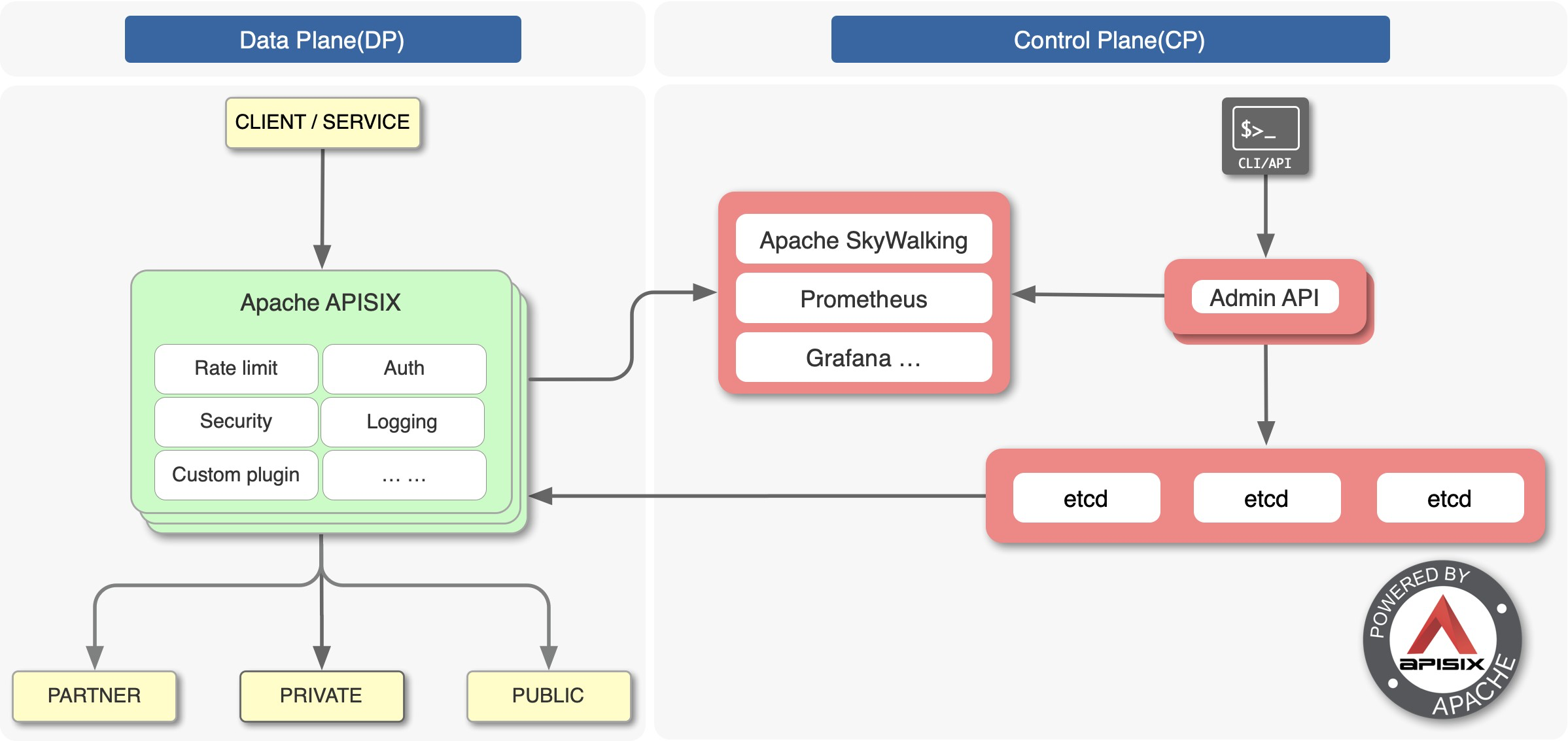
-Apache APISIX is the top open source project of the Apache Foundation and is
currently the most active open source gateway project. As a dynamic, real-time,
high-performance open source API gateway, Apache APISIX provides rich traffic
management features such as load balancing, dynamic upstream, grayscale
publishing, service meltdown, authentication, observability, and more.
+Apache APISIX is the top open source project of the Apache Foundation and is
currently the most active open source gateway project. As a dynamic, real-time,
high-performance open source API gateway, Apache APISIX provides rich traffic
management features such as load balancing, dynamic upstream, canary release,
service meltdown, authentication, observability, and more.
Apache APISIX helps enterprises handle API and microservice traffic quickly
and securely with features such as flow-limiting authentication, logging
security features, and support for rich custom plug-ins. There are also
currently relevant integrations with many open source projects such as Apache
SkyWalking, Prometheus and other such components.
@@ -44,7 +44,7 @@ Since I am involved in the development and maintenance of
both APISIX Ingress an
### Configuration level
-In APISIX Ingress, we have added some rich and flexible configurations, such
as grayscale deployment through a single configuration file. However, in K8s
Ingress Nginx, you need at least two Ingress resource files to achieve the
above effect.
+In APISIX Ingress, we have added some rich and flexible configurations, such
as canary release deployment through a single configuration file. However, in
K8s Ingress Nginx, you need at least two Ingress resource files to achieve the
above effect.
### Richness
@@ -148,7 +148,7 @@ Configure `subset` and `weight` in `backends` to split the
incoming user request
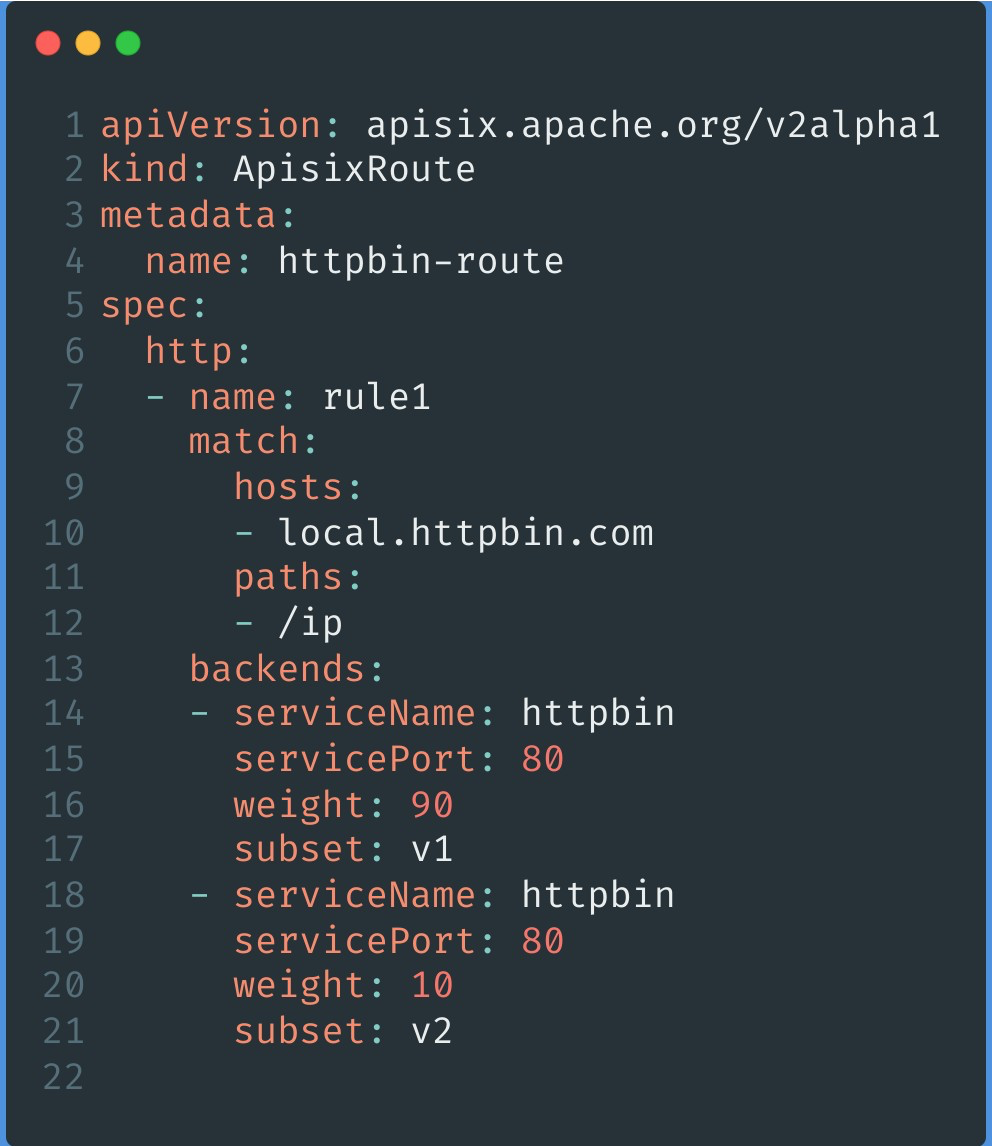
-With the above two steps, it is very easy to slice and dice traffic
proportionally to achieve scenarios like grayscale publishing.
+With the above two steps, it is very easy to slice and dice traffic
proportionally to achieve scenarios like canary release.
For more details, please refer to: [Traffic Segmentation in Apache APISIX
Ingress
Controller](https://www.apiseven.com/zh/blog/traffic-split-in-apache-apisix-ingress-controller).
### Practice Scenario 2: Configuring Authentication
diff --git a/website/blog/2021/10/26/APISIX-Ingress.md
b/website/blog/2021/10/26/APISIX-Ingress.md
index a725a72..d741829 100644
--- a/website/blog/2021/10/26/APISIX-Ingress.md
+++ b/website/blog/2021/10/26/APISIX-Ingress.md
@@ -32,7 +32,7 @@ As you can see in the figure above, APISIX Ingress is
deployed in a Kubernetes c
We mentioned earlier that APISIX Ingress uses Apache APISIX as the actual data
plane to carry business traffic, so what is Apache APISIX?
-Apache APISIX is the top open source project of the Apache Foundation and the
most active open source gateway project, and is currently certified as a
trusted open source project by the China Academy of Information and
Communications Technology. As a dynamic, real-time, high-performance open
source API gateway, Apache APISIX provides rich traffic management features
such as load balancing, dynamic upstream, grayscale publishing, service
meltdown, authentication, observability, and more.
+Apache APISIX is the top open source project of the Apache Foundation and the
most active open source gateway project, and is currently certified as a
trusted open source project by the China Academy of Information and
Communications Technology. As a dynamic, real-time, high-performance open
source API gateway, Apache APISIX provides rich traffic management features
such as load balancing, dynamic upstream, canary release, service meltdown,
authentication, observability, and more.
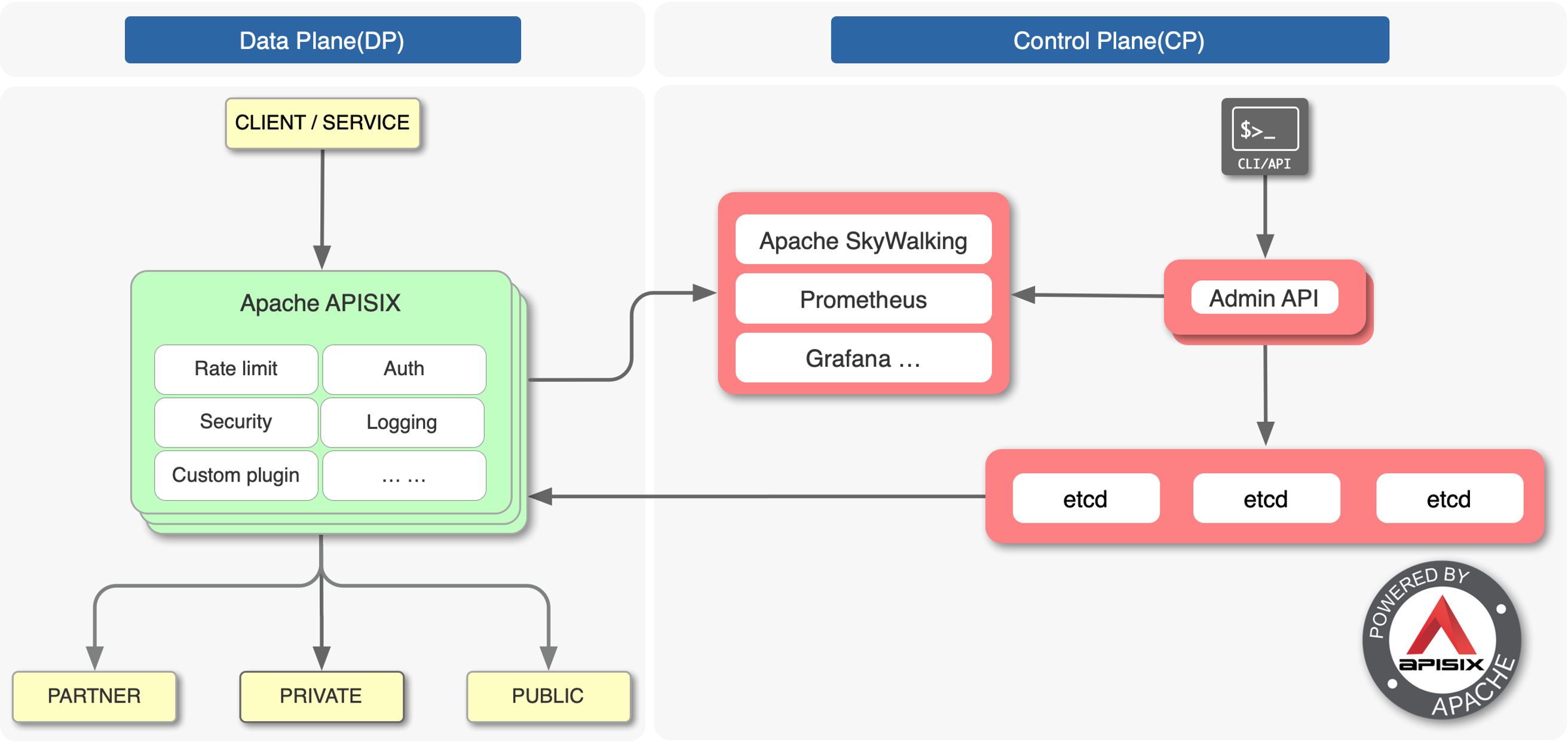
@@ -104,7 +104,7 @@ Most of these contributions come from community members
using APISIX Ingress to
- Admission Hook
- Ingress' own Prometheus Metrics
- mTLs
-- Improvements to the grayscale function
+- Improvements to the canary release function
- Additional product documentation
More features [click here to
view](https://github.com/apache/apisix-ingress-controller/#readme).
diff --git a/website/blog/2021/12/15/deploy-apisix-in-kubernetes.md
b/website/blog/2021/12/15/deploy-apisix-in-kubernetes.md
index 7112f53..c047989 100644
--- a/website/blog/2021/12/15/deploy-apisix-in-kubernetes.md
+++ b/website/blog/2021/12/15/deploy-apisix-in-kubernetes.md
@@ -23,7 +23,7 @@ tags: [Technology]
<!--truncate-->
-Apache APISIX is a dynamic, real-time, high-performance open source API
gateway that provides rich traffic management features such as load balancing,
dynamic upstream, grayscale publishing, service meltdown, authentication,
observability, and more.
+Apache APISIX is a dynamic, real-time, high-performance open source API
gateway that provides rich traffic management features such as load balancing,
dynamic upstream, canary release, service meltdown, authentication,
observability, and more.
And Kubernetes, an open source system for automatically deploying, scaling,
and managing containerized applications, is designed to provide users with
support for automatic deployment **across host clusters**, scaling, and related
features such as running application containers. Here we have compiled two
easy-to-follow installation ideas on how to quickly deploy Apache APISIX in K8s
and present related information via Dashboard.
diff --git a/website/blog/2021/12/16/apisix-with-rocketmq-meetup.md
b/website/blog/2021/12/16/apisix-with-rocketmq-meetup.md
index d876f18..0759f5e 100644
--- a/website/blog/2021/12/16/apisix-with-rocketmq-meetup.md
+++ b/website/blog/2021/12/16/apisix-with-rocketmq-meetup.md
@@ -54,7 +54,7 @@ In this lightning talk, we will demonstrate how to run Go and
Rust code inside A
This talk will provide a repeatable understanding of WASM, including its
advantages and limitations, and how to introduce WASM into your own system.
-### The road to grayscale and cloud-native governance for Zhengcaiyun
messaging middleware
+### The road to canary release and cloud-native governance for Zhengcaiyun
messaging middleware
#### Speaker
@@ -64,7 +64,7 @@ Lin Zeng, the person in charge of Zhengcaiyun infrastructure
platform, mainly re
This sharing will introduce how RocketMQ helps Zhengcaiyun companies to cope
with the complex cloud and island hybrid cloud scenario of government
procurement business.
-This presentation will provide a full understanding of how to use RocketMQ for
grayscale and traffic staining, delayed message personalization, and the
implementation of RocketMQ-based cloud-native operational transformation and
other practical experience sharing.
+This presentation will provide a full understanding of how to use RocketMQ for
canary release and traffic staining, delayed message personalization, and the
implementation of RocketMQ-based cloud-native operational transformation and
other practical experience sharing.
### Building a Better Kubernetes Ingress Controller
diff --git a/website/blog/2021/12/24/apisix-integrate-openwhisk-plugin.md
b/website/blog/2021/12/24/apisix-integrate-openwhisk-plugin.md
index f35c92b..3d7223b 100644
--- a/website/blog/2021/12/24/apisix-integrate-openwhisk-plugin.md
+++ b/website/blog/2021/12/24/apisix-integrate-openwhisk-plugin.md
@@ -30,7 +30,7 @@ In this article, we will introduce `openwhisk`, a new plug-in
for Apache APISIX,
### Apache APISIX
-[Apache APISIX](https://apisix.apache.org/) is a dynamic, real-time,
high-performance API gateway that provides rich traffic management features
such as load balancing, dynamic upstream, grayscale publishing, service fusion,
authentication, observability, etc. Apache APISIX not only supports plug-in
dynamic changes and hot-plugging, but also has many useful plug-ins.
+[Apache APISIX](https://apisix.apache.org/) is a dynamic, real-time,
high-performance API gateway that provides rich traffic management features
such as load balancing, dynamic upstream, canary release, service fusion,
authentication, observability, etc. Apache APISIX not only supports plug-in
dynamic changes and hot-plugging, but also has many useful plug-ins.
### Apache OpenWhisk
diff --git a/website/blog/2021/12/30/apisix-proxy-grpc-service.md
b/website/blog/2021/12/30/apisix-proxy-grpc-service.md
index a6b0f3e..f59a23d 100644
--- a/website/blog/2021/12/30/apisix-proxy-grpc-service.md
+++ b/website/blog/2021/12/30/apisix-proxy-grpc-service.md
@@ -27,7 +27,7 @@ tags: [Technology]
### Apache APISIX
-[Apache APISIX](https://apisix.apache.org/) is a dynamic, real-time,
high-performance API gateway that provides load balancing, dynamic upstream,
grayscale publishing, service fusion, authentication, observability, and other
rich traffic management features. Apache APISIX not only supports dynamic
change and hot-plugging of plug-ins, but also has a rich library of plug-in
resources.
+[Apache APISIX](https://apisix.apache.org/) is a dynamic, real-time,
high-performance API gateway that provides load balancing, dynamic upstream,
canary release, service fusion, authentication, observability, and other rich
traffic management features. Apache APISIX not only supports dynamic change and
hot-plugging of plug-ins, but also has a rich library of plug-in resources.
### gRPC
diff --git a/website/blog/2022/01/04/authing.md
b/website/blog/2022/01/04/authing.md
new file mode 100644
index 0000000..6bfd2ea
--- /dev/null
+++ b/website/blog/2022/01/04/authing.md
@@ -0,0 +1,255 @@
+---
+title: "Using Apache APISIX and Authing to implement Centralized
Authentication Management"
+authors:
+ - name: "Xinxin Zhu"
+ title: "Author"
+ url: "https://github.com/starsz";
+ image_url: "https://avatars.githubusercontent.com/u/25628854?v=4";
+ - name: "Yilin Zeng"
+ title: "Technical Writer"
+ url: "https://github.com/yzeng25";
+ image_url: "https://avatars.githubusercontent.com/u/36651058?v=4";
+keywords:
+- Apache APISIX
+- Authing
+- OpenID
+- Authentication
+- Ecosystem
+description: This article describes the detailed steps for interfacing Apache
APISIX and Authing.
+tags: [Technology]
+---
+
+> This article describes the detailed steps for interfacing Apache APISIX and
Authing.
+
+<!--truncate-->
+
+
+
+## Introduction
+
+### About Apache APISIX
+
+[Apache APISIX](https://github.com/apache/apisix) is a dynamic, real-time,
high-performance API gateway that provides rich traffic management features
such as load balancing, dynamic upstream, canary release, service meltdown,
authentication, observability, etc. Apache APISIX not only supports dynamic
plug-in changes and hot-plugging, but also has a number of useful
plug-ins.OpenID Connect Plug-in for Apache APISIX With support for the OpenID
Connect protocol, users can use this plug-in [...]
+
+### About Authing
+
+[Authing](https://www.authing.cn/) is the first developer-centered full-scene
identity cloud product in China, integrating all mainstream identity protocols
and providing complete and secure user authentication and access management
services for enterprises and developers. With "API First" as the cornerstone of
the product, all common functions in the identity field are modularly
encapsulated, and all capabilities are APIed to developers through a full-scene
programming language SDK. At [...]
+
+## What is Centralized Authentication
+
+### Traditional Authentication Mode
+
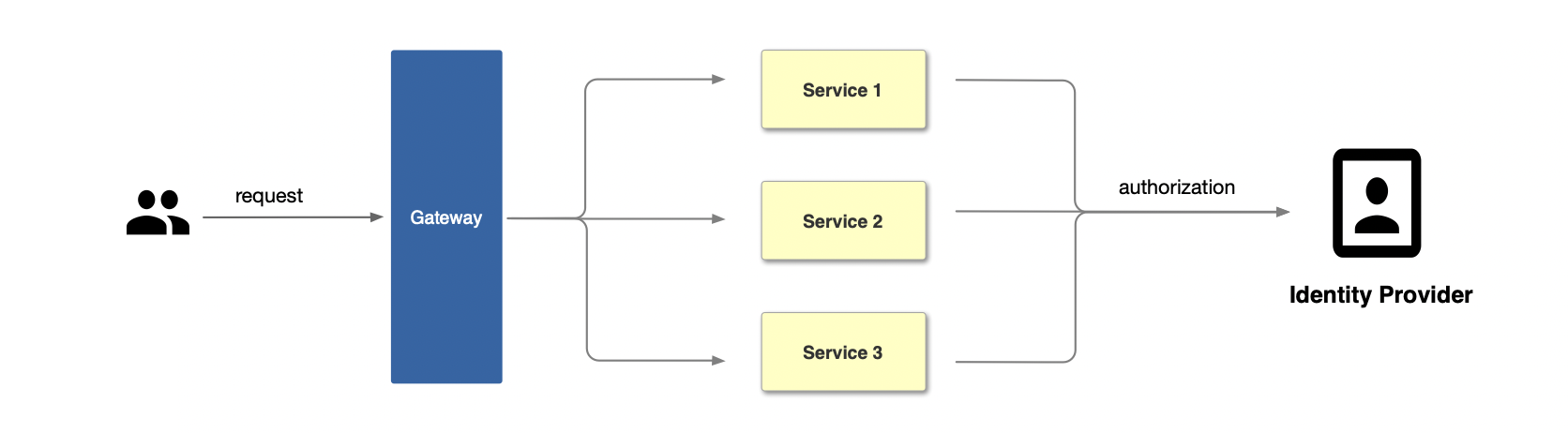
+In the traditional authentication mode, each back-end application service
needs to develop separate functions to support the authentication function,
such as interacting with the identity provider and obtaining the user's
identity information.
+
+
+
+### Centralized Identity Authentication Mode
+
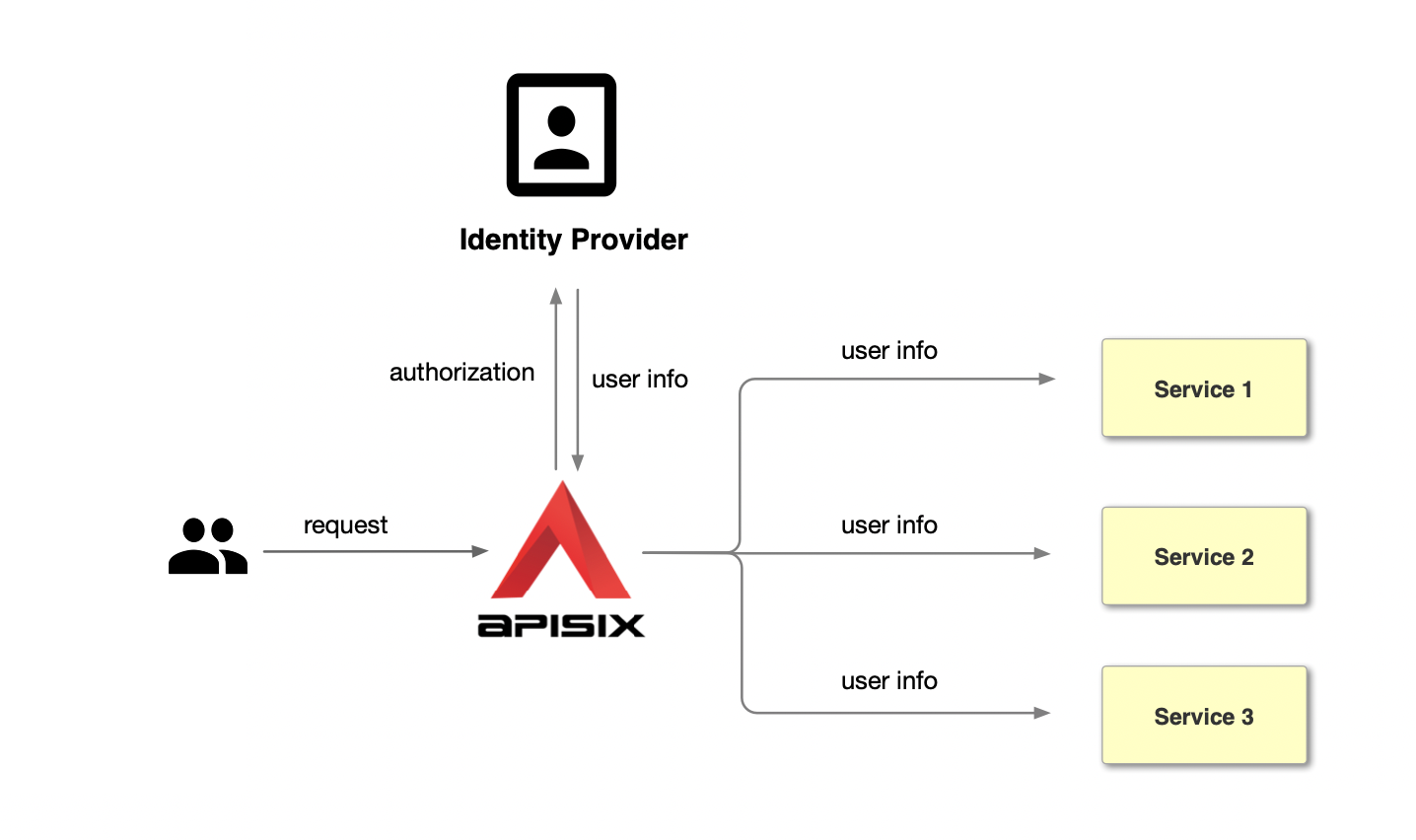
+Unlike the traditional authentication mode, the centralized authentication
mode takes the user authentication out of the application service. Take Apache
APISIX as an example, the process of centralized authentication is shown in the
figure above: first, the user initiates a request, and then the front gateway
is responsible for the user authentication process, interfacing with the
identity provider and sending an authorization request to the identity
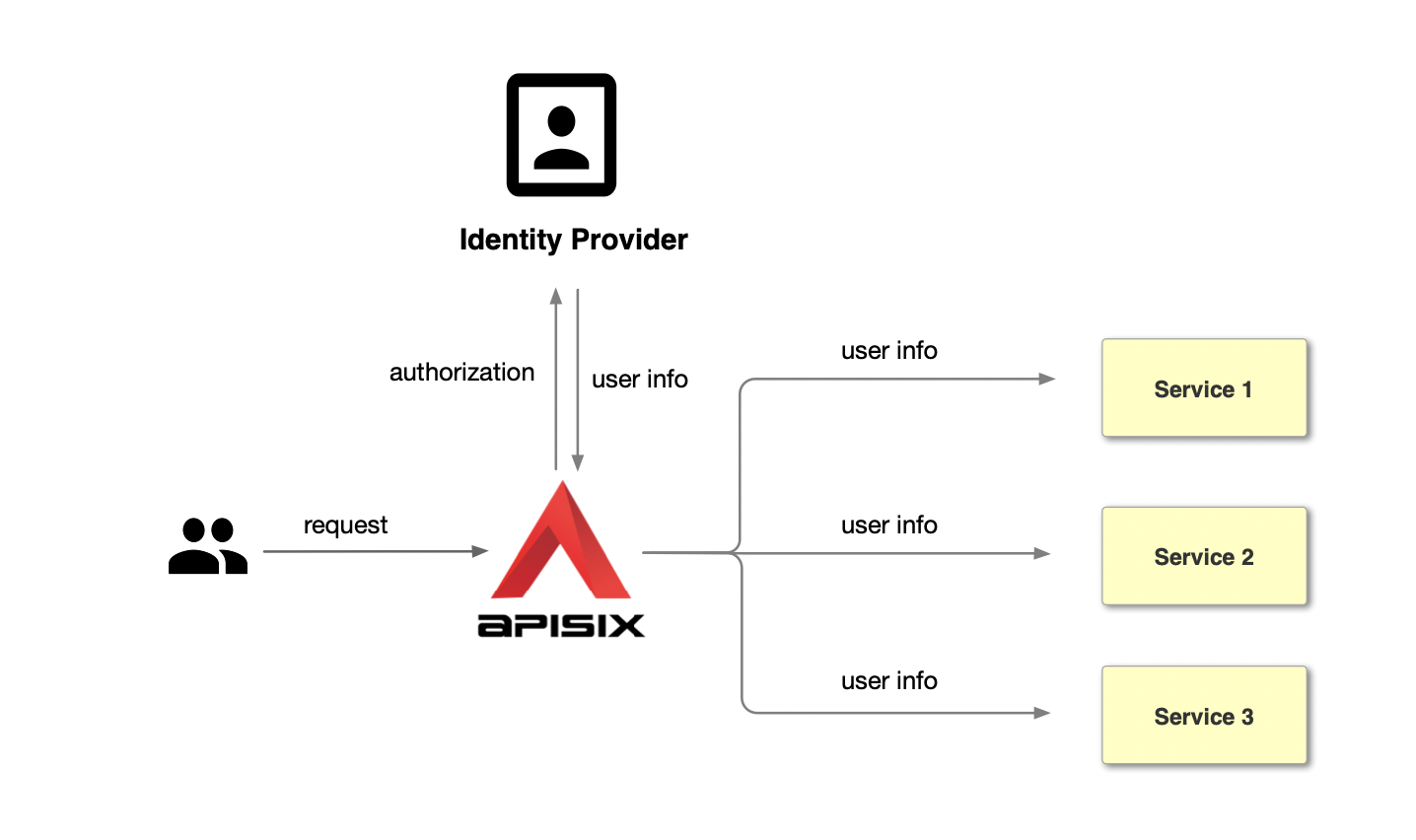
provider. The identity provider retu [...]
+
+
+
+### Advantages of Centralized Identity Authentication Mode
+
+Compared with the traditional authentication mode, the centralized
authentication mode has the following advantages.
+
+1. Simplify the application development process, reduce the development of
application workload and maintenance costs, and avoid repeated development of
authentication logic for each application.
+2. Improve business security, centralized authentication mode at the gateway
level can intercept unauthenticated requests in time to protect back-end
applications.
+
+At the same time, combined with Authing's powerful authentication management
functions, the following functions can be achieved.
+
+1. Lifecycle management of authentication services through the console,
including creation, enablement, disablement, etc.
+2. Real-time, visual application monitoring, including: the number of
interface requests, interface call latency and interface error information, and
real-time alarm notification.
+3. Centralized logging to easily view user login, logout, and information
about adjustments and modifications to the application.
+
+More details can be found in [Authing Access
Gateway](https://www.authing.cn/gateway-integration).
+
+## How to implement Centralized Identity Authentication using Apache APISIX
and Authing
+
+### Step 1: Configure Authing
+
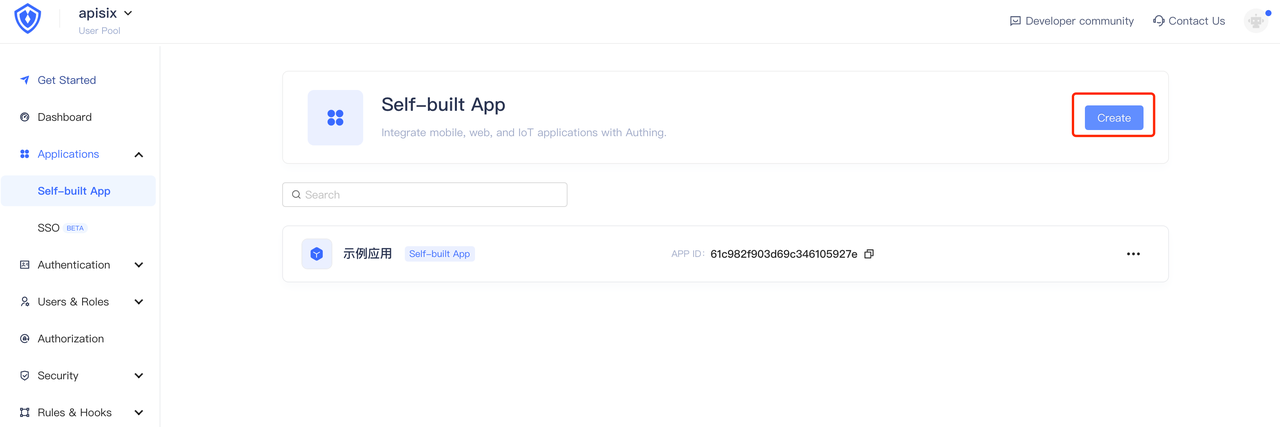
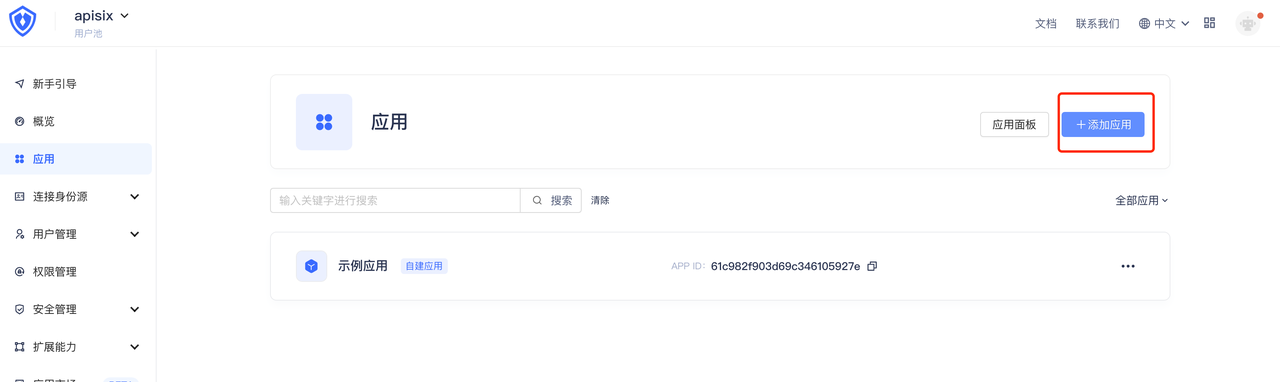
+1. Login to your Authing account, select Build your own app and fill in the
app name and authentication address. If you do not have an Authing account,
please visit [Authing](https://www.authing.cn/), click on "Login/Register" in
the upper right corner to register an Authing account.
+ 
+
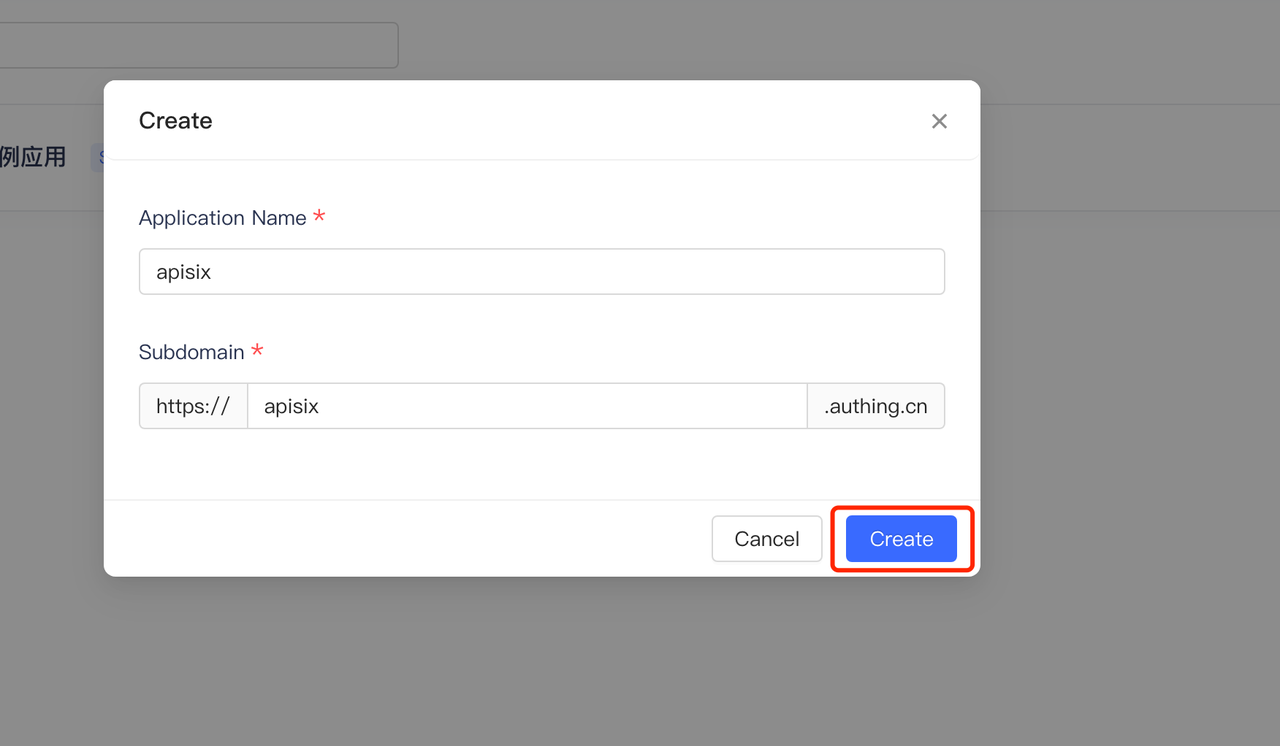
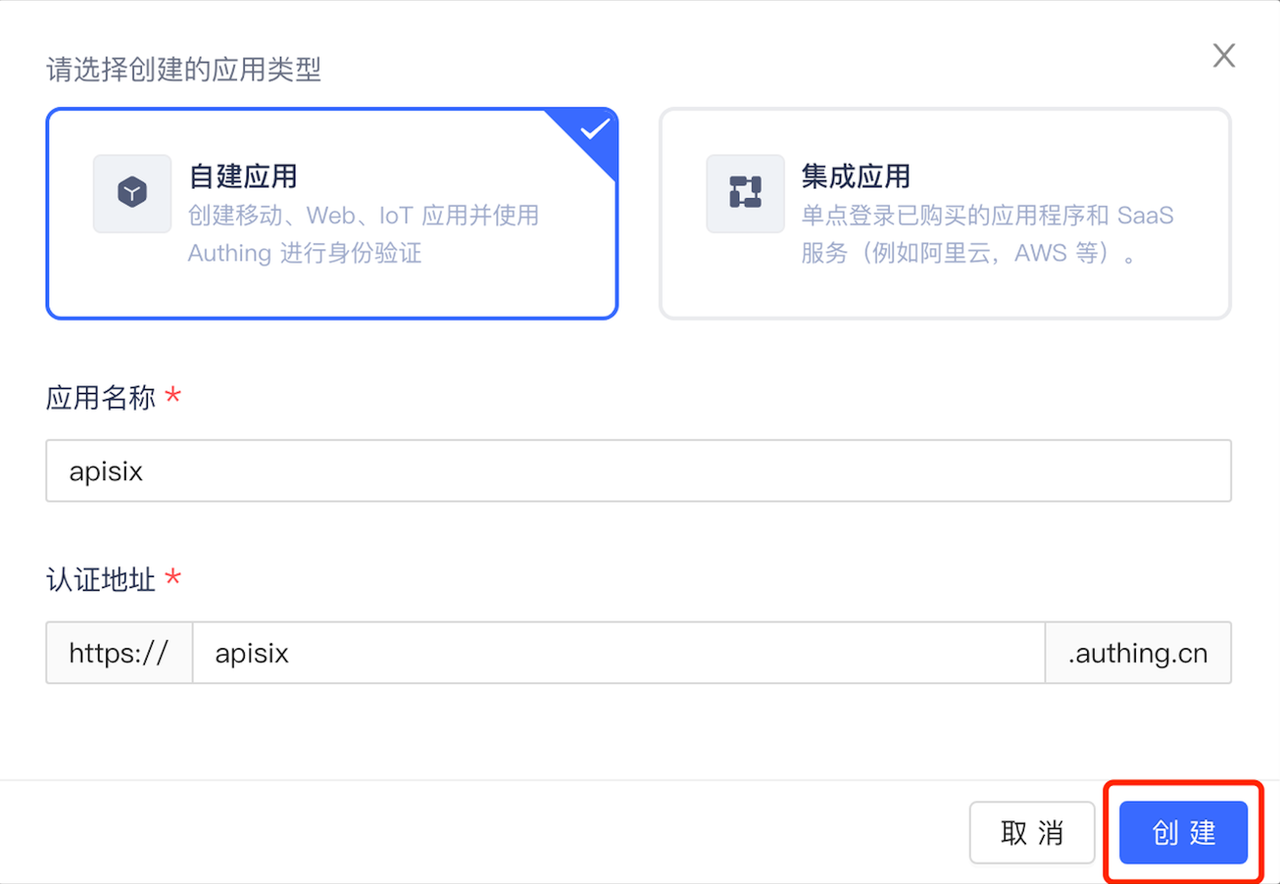
+2. Click Create to create an Authing application.
+ 
+
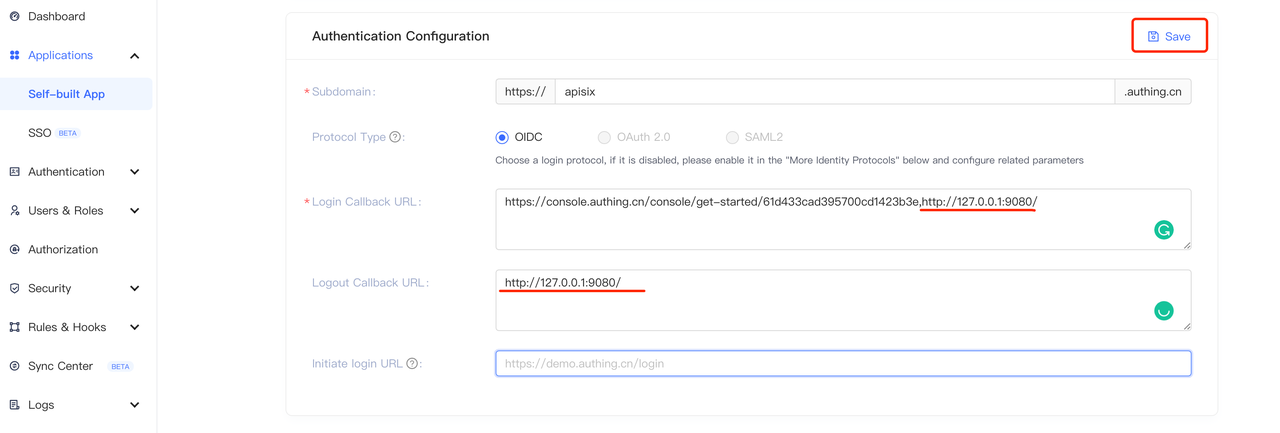
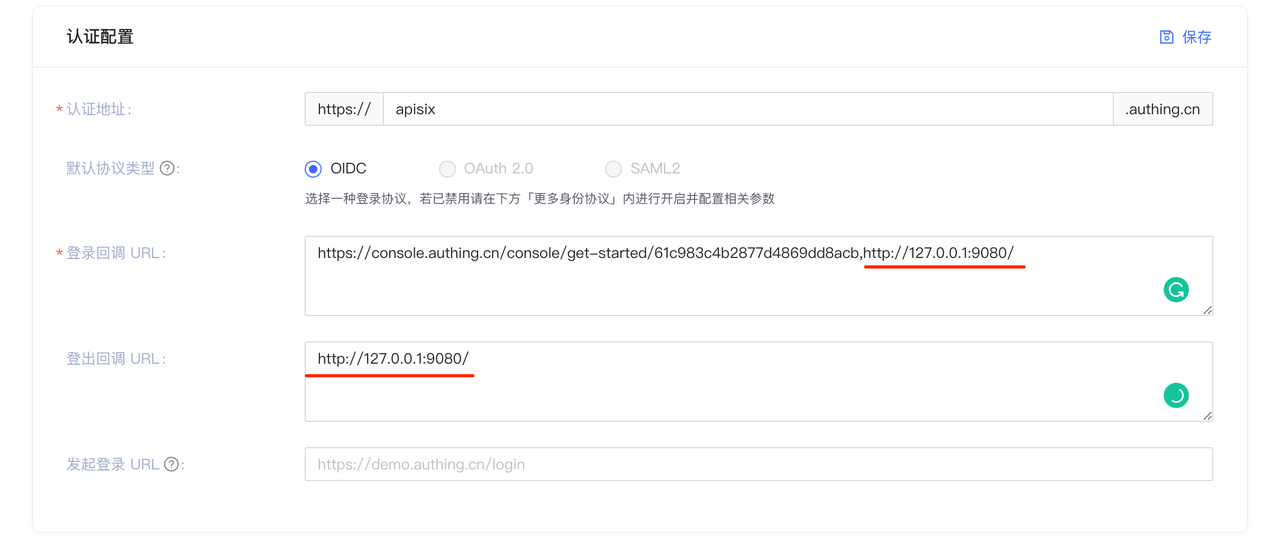
+3. During the authentication process, Authing will reject callback URLs other
than the configured ones. Since this is a local test, the login callback URL
and the logout callback URL are both set to the APISIX access address
http://127.0.0.1:9080/.
+ 
+
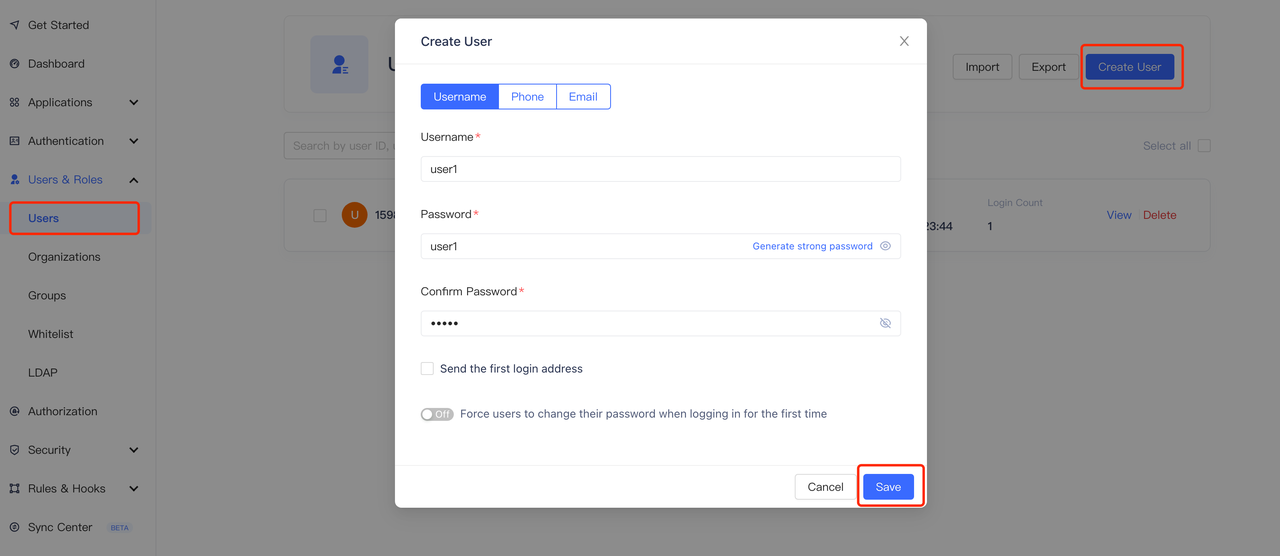
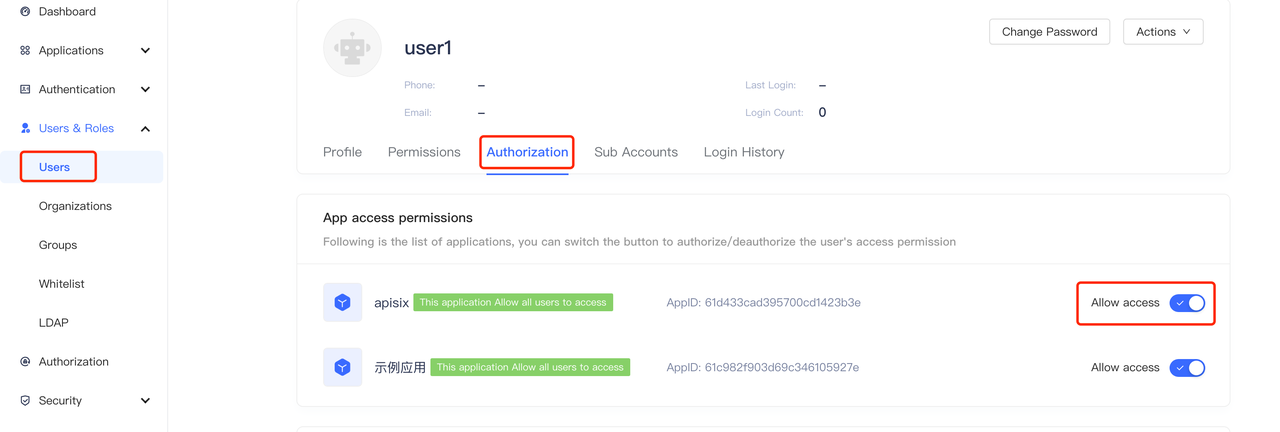
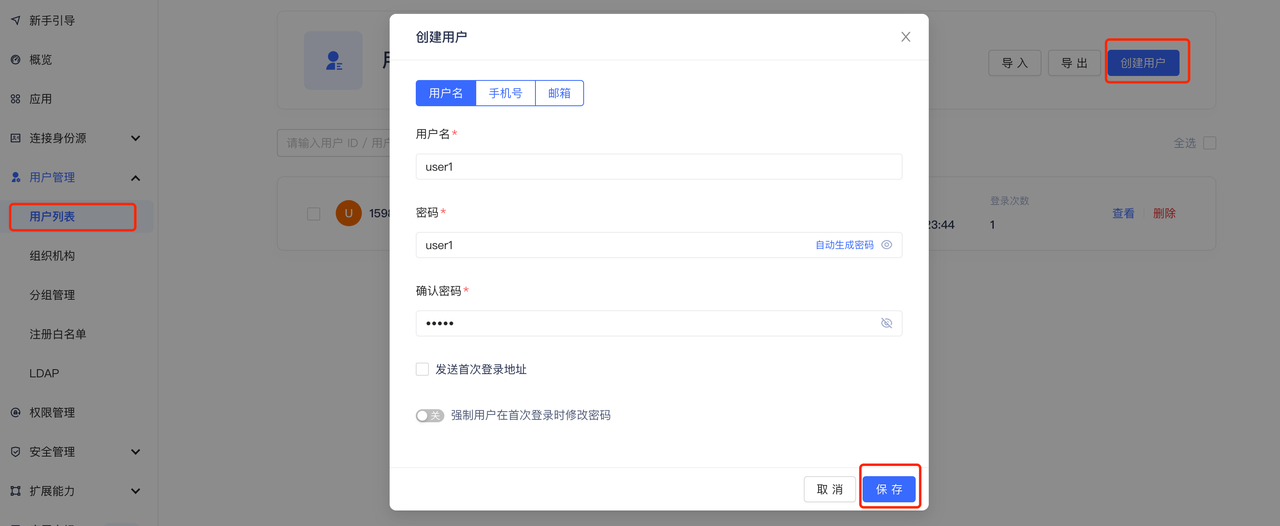
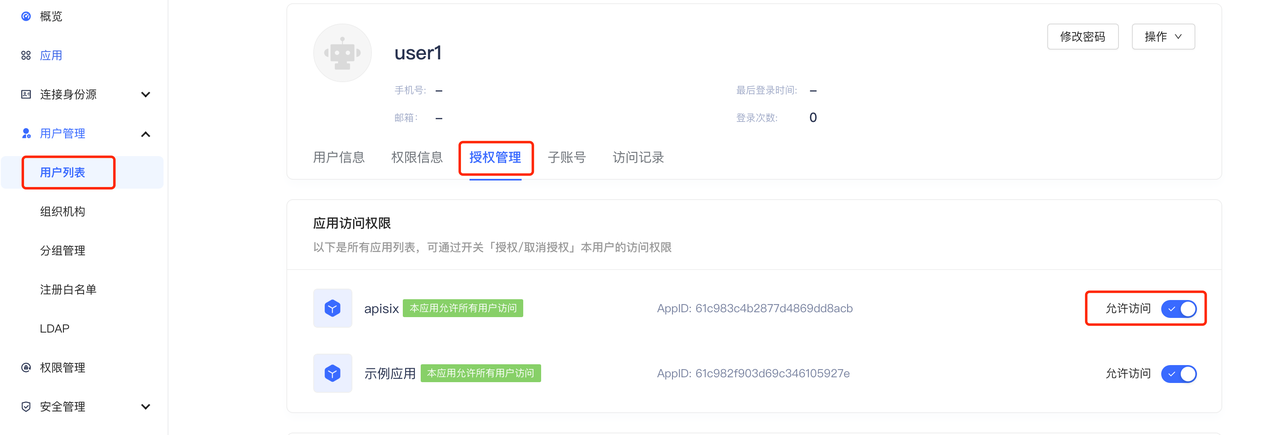
+4. Create user (optional). On the user list page, create a user with the
account password user1/user1, and you can set whether to allow access to the
application in the "User Information - Authorization Management" page (the
default is to allow).
+ 
+ 
+
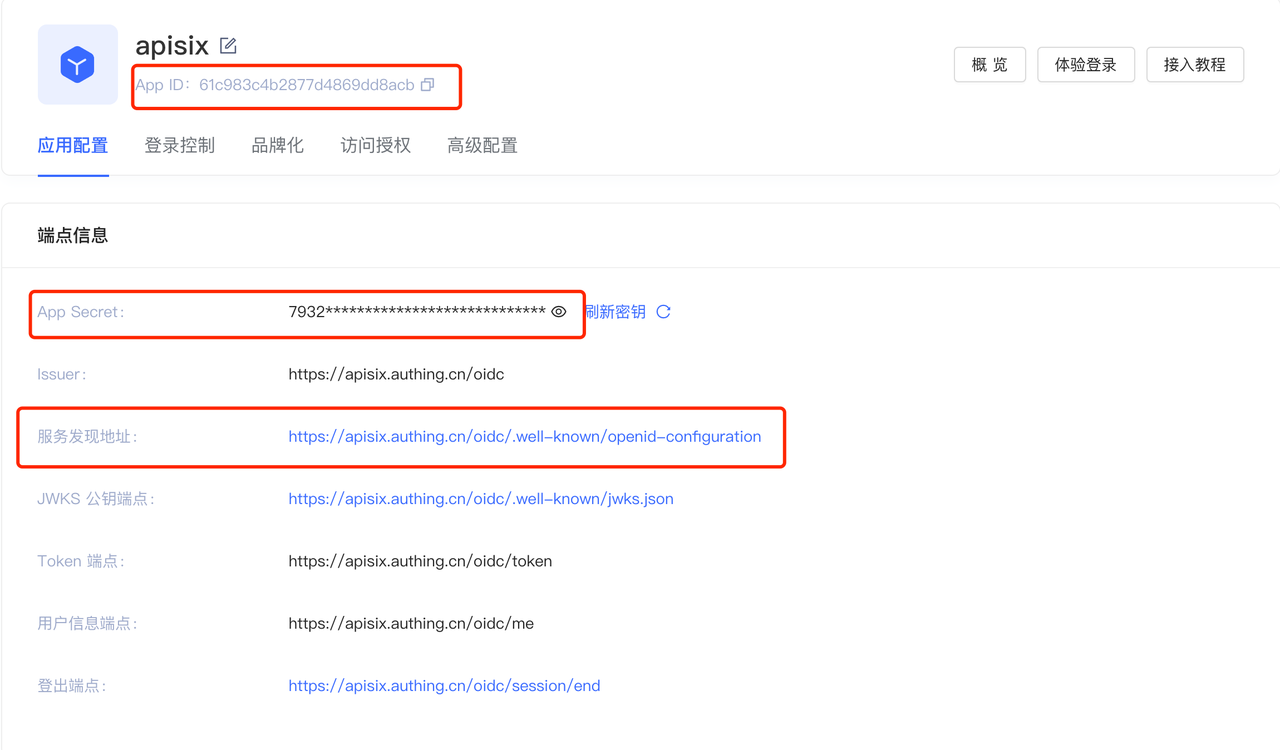
+5. Visit the application page for the following configuration, which is
required when configuring Apache APISIX OpenID Connect.
+ 1. App ID: OAuth client ID, i.e. the ID of the application, corresponding
to `client_id` and `{YOUR_CLIENT_ID}` below.
+ 2. App secret: OAuth client secret, i.e. the application key. Corresponds
to `client_secret` and `{YOUR_CLIENT_SECRET}` below.
+ 3. Service_discovery_address: The address of the application service
discovery. Corresponds to `{YOUR_DISCOVERY}` below.
+
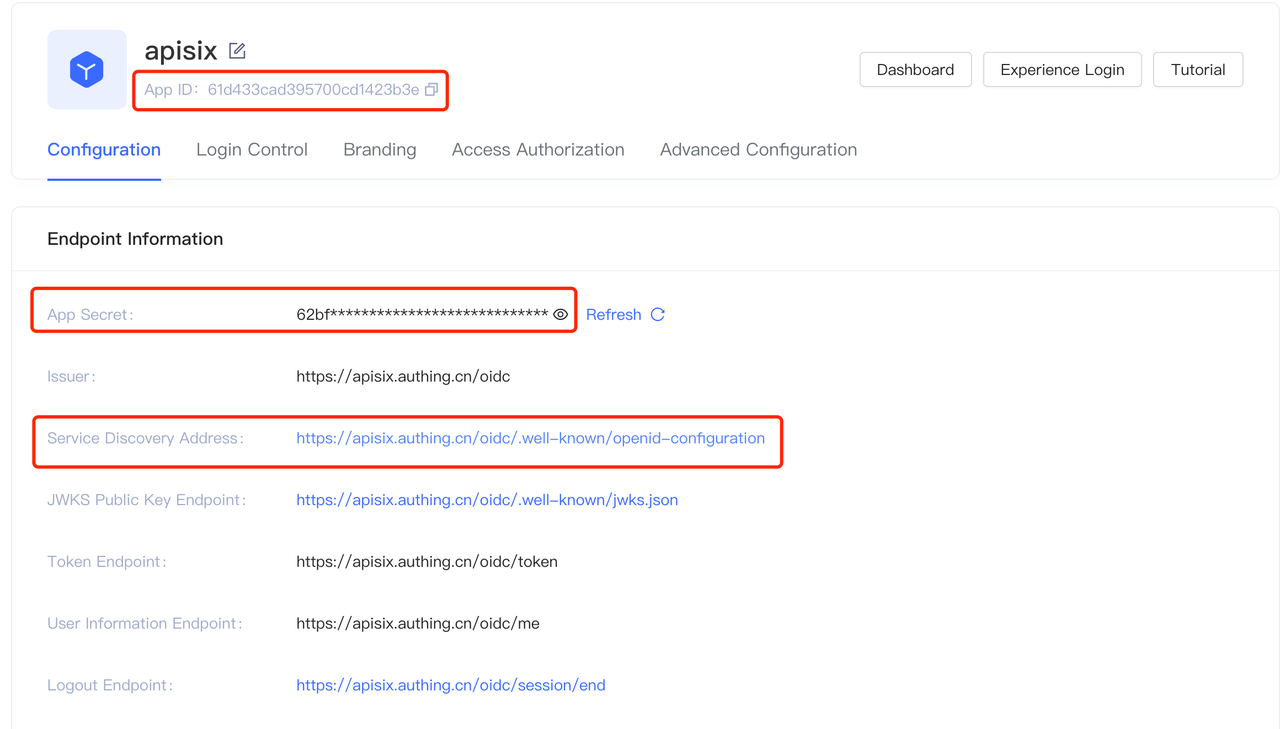
+
+### Step 2: Install Apache APISIX
+
+You can install Apache APISIX in a variety of ways including source packages,
Docker, Helm Chart, etc.
+
+#### Install dependencies
+
+The Apache APISIX runtime environment requires dependencies on NGINX and etcd.
+
+Before installing Apache APISIX, please install dependencies according to the
operating system you are using. We provide the dependencies installation
instructions for CentOS7, Fedora 31 and 32, Ubuntu 16.04 and 18.04, Debian 9
and 10, and macOS. Please refer to [Install
Dependencies](https://apisix.apache.org/docs/apisix/install-dependencies/) for
more details.
+
+#### Installation via RPM Package (CentOS 7)
+
+This installation method is suitable for CentOS 7; please run the following
command to install Apache APISIX.
+
+```shell
+sudo yum install -y
https://github.com/apache/apisix/releases/download/2.7/apisix-2.7-0.x86_64.rpm
+```
+
+#### Installation via Docker
+
+Please refer to [Installing Apache APISIX with
Docker](https://hub.docker.com/r/apache/apisix).
+
+#### Installation via Helm Chart
+
+Please refer to [Installing Apache APISIX with Helm
Chart](https://github.com/apache/apisix-helm-chart).
+
+#### Installation via source release
+
+1. Create a directory named `apisix-2.7`.
+
+```shell
+mkdir apisix-2.7
+```
+
+2. Download Apache APISIX Release source package.
+
+```shell
+wget https://downloads.apache.org/apisix/2.7/apache-apisix-2.7-src.tgz
+```
+
+You can also download the Apache APISIX release source package from the Apache
APISIX website. The [Apache APISIX Official Website - Download
Page](https://apisix.apache.org/downloads/) also provides source packages for
Apache APISIX, APISIX Dashboard, and APISIX Ingress Controller.
+
+3. Unzip the Apache APISIX Release source package.
+
+```shell
+tar zxvf apache-apisix-2.7-src.tgz -C apisix-2.7
+```
+
+4. Install the runtime-dependent Lua libraries.
+
+```shell
+# Switch to the apisix-2.7 directory
+cd apisix-2.7
+# Create dependencies
+make deps
+```
+
+#### Initializing Dependencies
+
+Run the following command to initialize the NGINX configuration file and etcd.
+
+```shell
+# initialize NGINX config file and etcd
+make init
+```
+
+### Step 3: Start Apache APISIX and configure route
+
+1. Run the following command to start Apache APISIX.
+
+ ```shell
+ apisix start
+ ```
+
+2. Create routes and configure the OpenID Connect plug-in. the OpenID Connect
configuration list is as follows.
+
+|Field|Default Value|Description|
+|:--------|:--------|:---------------|
+|client_id|N/A|OAuth client ID|
+|client_secret|N/A|OAuth client secret key|
+|discovery|N/A|Service discovery endpoints for identity providers|
+|scope|openid|Need to access resource scope|
+|relm|apisix|Specify the WWW-Authenticate response header authentication
information|
+|bearer_only|false|Whether to check the token in the request header|
+|logout_path|/logout|Logout URI|
+|redirect_uri|request_uri|The URI that the identity provider bounces back to,
defaulting to the request address|
+|timeout|3|Request timeout time in seconds|
+|ssl_verify|false|Whether the identity provider's checksum ssl certificate|
+|introspection_endpoint|N/A|The URL of the identity provider's token
authentication endpoint, which will be extracted from the discovery response if
left blank.|
+|introspection_endpoint_auth_method|client_secret_basic|Name of the
authentication method for token introspection|
+|public_key|N/A|Public key for authentication token|
+|token_signing_alg_values_expected|N/A|Algorithm for authentication tokens|
+|set_access_token_header|true|Whether to carry the access token in the request
header|
+|access_token_in_authorization_header|false|The access token is placed in the
Authorization header when true, and in the X-Access-Token header when false.|
+|set_id_token_header|false|No to carry the ID token to the X-ID-Token request
header|
+|set_userinfo_header|false|Whether to carry user information in the X-Userinfo
request header|
+
+The following code example creates a route through the Apache APISIX Admin
API, setting the route upstream to [httpbin.org](http://httpbin.org).
`httpbin.org` is a simple backend service for receiving and responding to
requests, the `get` page of `httpbin.org` will be used below, refer to [http
bin get](http://httpbin.org/#/HTTP_Methods/get_get).
+
+For specific configuration items, please refer to [Apache APISIX OpenID
Connect
Plugin](https://apisix.apache.org/zh/docs/apisix/plugins/openid-connect/).
+
+```shell
+curl -XPOST 127.0.0.1:9080/apisix/admin/routes -H "X-Api-Key:
edd1c9f034335f136f87ad84b625c8f1" -d '{
+ "uri":"/*",
+ "plugins":{
+ "openid-connect":{
+ "client_id":"{YOUR_CLIENT_ID}",
+ "client_secret":"{YOUR_CLIENT_SECRET}",
+ "discovery":"https://{YOUR_DISCOVERY}";,
+ "scope":"openid profile",
+ "bearer_only":false,
+ "realm":"apisix",
+ "introspection_endpoint_auth_method":"client_secret_post",
+ "redirect_uri":"http://127.0.0.1:9080/";
+ }
+ },
+ "upstream":{
+ "type":"roundrobin",
+ "nodes":{
+ "httpbin.org:80":1
+ }
+ }
+}'
+```
+
+### Step 4: Access Apache APISIX
+
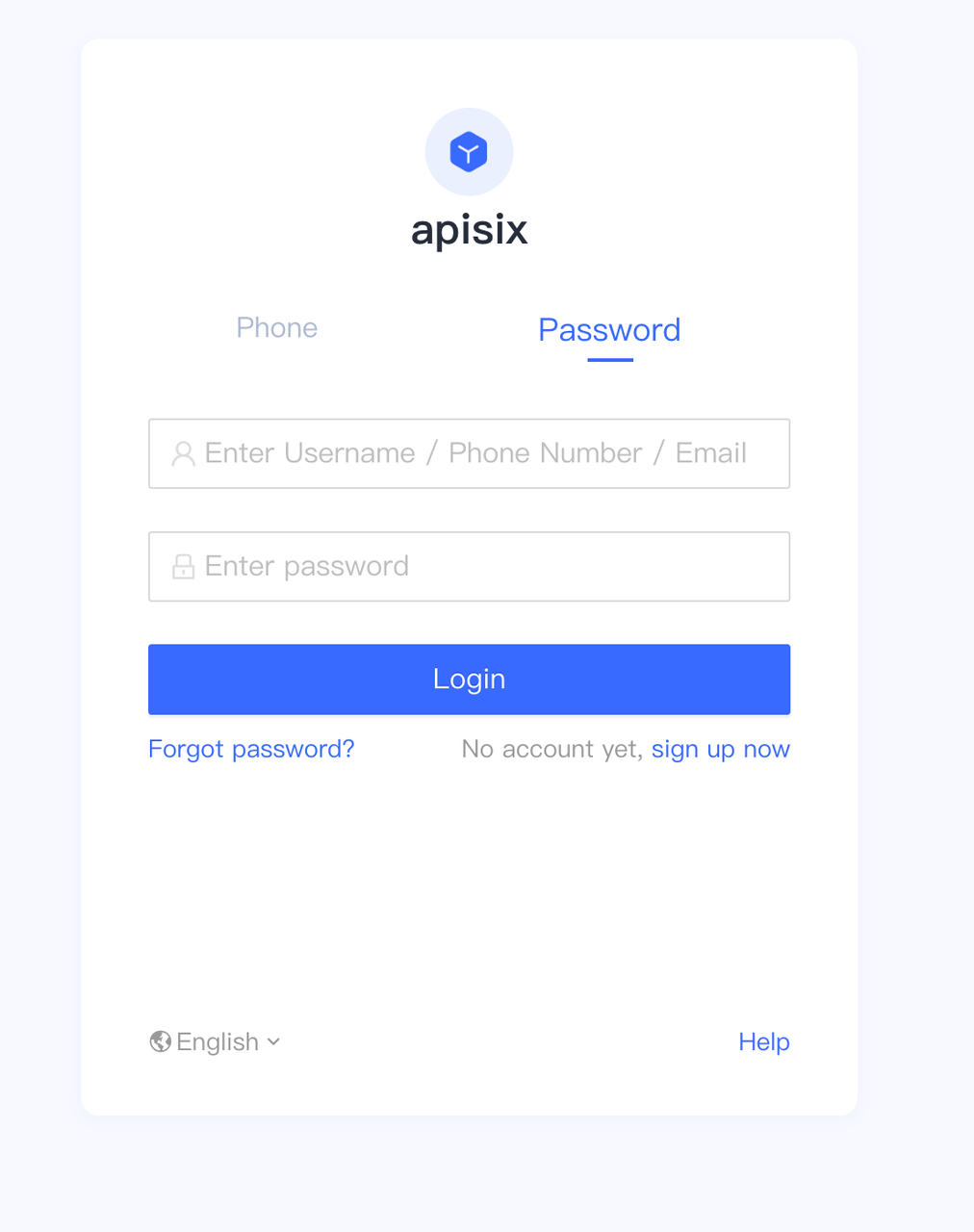
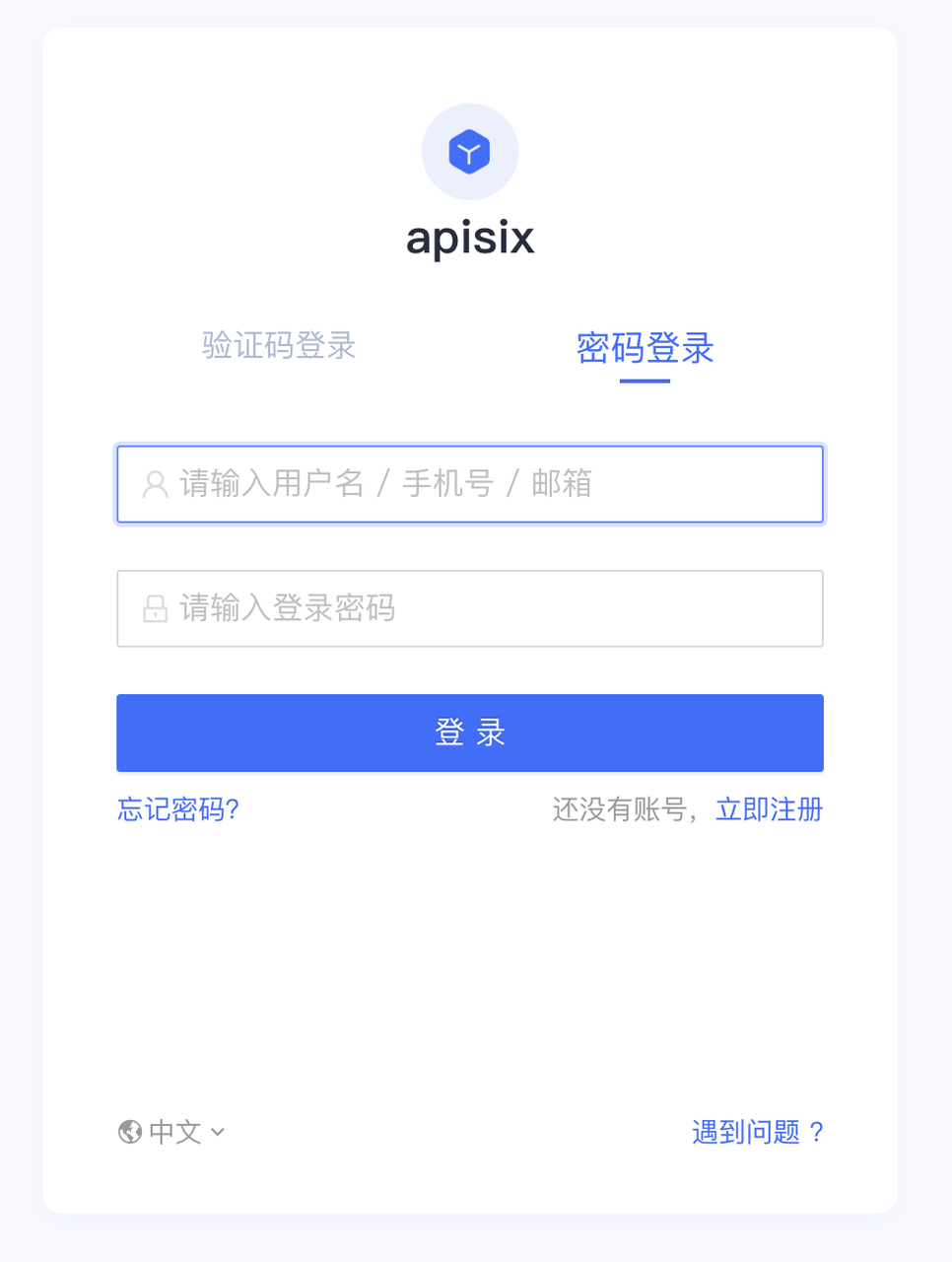
+1. Visit "http://127.0.0.1:9080/get"; and the page is redirected to the Authing
login page as the OpenID Connect plugin is already enabled (this page can be
customized in the Authing console under "Applications - Branding").
+ 
+
+2. Enter the password for the user's account registered with Authing, or the
user user1/user1 created in Step 1, and click Login to log in to the Authing
account.
+
+3. After a successful login, you can successfully access the get page in
httpbin.org. The httpbin.org/get page will return the requested data as follows.
+
+ ```shell
+ ...
+ "X-Access-Token":
"eyJhbGciOiJSUzI1NiIsInR5cCI6IkpXVCIsImtpZCI6InFqeU55aVdVd2NhbUFxdEdVRUNCeFNsTWxQSWtTR2N1NmkyZzhEUk1OSGsifQ.eyJqdGkiOiJjTy16a0pCS0NSRFlHR2kyWkJhY0oiLCJzdWIiOiI2MWM5OGFmOTg0MjI4YWU0OTYyMDU4NTIiLCJpYXQiOjE2NDA1OTg4NTgsImV4cCI6MTY0MTgwODQ1OCwic2NvcGUiOiJvcGVuaWQgcHJvZmlsZSIsImlzcyI6Imh0dHBzOi8vYXBpc2l4LmF1dGhpbmcuY24vb2lkYyIsImF1ZCI6IjYxYzk4M2M0YjI4NzdkNDg2OWRkOGFjYiJ9.l2V8vDWcCObB1LjIhKs2ARG4J7WuB-0c-bnYZG2GP2zcpl6PMAPcId2B76CaXCU58ajGcfRmOlWJ67UaHrfWKv8IM4vcYN1gwhKdo
[...]
+ "X-Id-Token":
"eyJhdF9oYXNoIjoiRl8tRjZaUVgtWVRDNEh0TldmcHJmUSIsImJpcnRoZGF0ZSI6bnVsbCwiZmFtaWx5X25hbWUiOm51bGwsImdlbmRlciI6IlUiLCJnaXZlbl9uYW1lIjpudWxsLCJpc3MiOiJodHRwczpcL1wvYXBpc2l4LmF1dGhpbmcuY25cL29pZGMiLCJwaWN0dXJlIjoiaHR0cHM6XC9cL2ZpbGVzLmF1dGhpbmcuY29cL2F1dGhpbmctY29uc29sZVwvZGVmYXVsdC11c2VyLWF2YXRhci5wbmciLCJwcmVmZXJyZWRfdXNlcm5hbWUiOm51bGwsInVwZGF0ZWRfYXQiOiIyMDIxLTEyLTI3VDA5OjU0OjE3Ljc3M1oiLCJ3ZWJzaXRlIjpudWxsLCJ6b25laW5mbyI6bnVsbCwibmFtZSI6bnVsbCwiaWF0IjoxNjQwNTk4ODU4LCJua
[...]
+ "X-Userinfo":
"eyJ3ZWJzaXRlIjpudWxsLCJ6b25laW5mbyI6bnVsbCwibmFtZSI6bnVsbCwicHJvZmlsZSI6bnVsbCwibmlja25hbWUiOm51bGwsInN1YiI6IjYxYzk4YWY5ODQyMjhhZTQ5NjIwNTg1MiIsImxvY2FsZSI6bnVsbCwiYmlydGhkYXRlIjpudWxsLCJmYW1pbHlfbmFtZSI6bnVsbCwiZ2VuZGVyIjoiVSIsImdpdmVuX25hbWUiOm51bGwsIm1pZGRsZV9uYW1lIjpudWxsLCJwaWN0dXJlIjoiaHR0cHM6XC9cL2ZpbGVzLmF1dGhpbmcuY29cL2F1dGhpbmctY29uc29sZVwvZGVmYXVsdC11c2VyLWF2YXRhci5wbmciLCJwcmVmZXJyZWRfdXNlcm5hbWUiOm51bGwsInVwZGF0ZWRfYXQiOiIyMDIxLTEyLTI3VDA5OjU0OjE3Ljc3M1oifQ=="
+ ...
+ ```
+
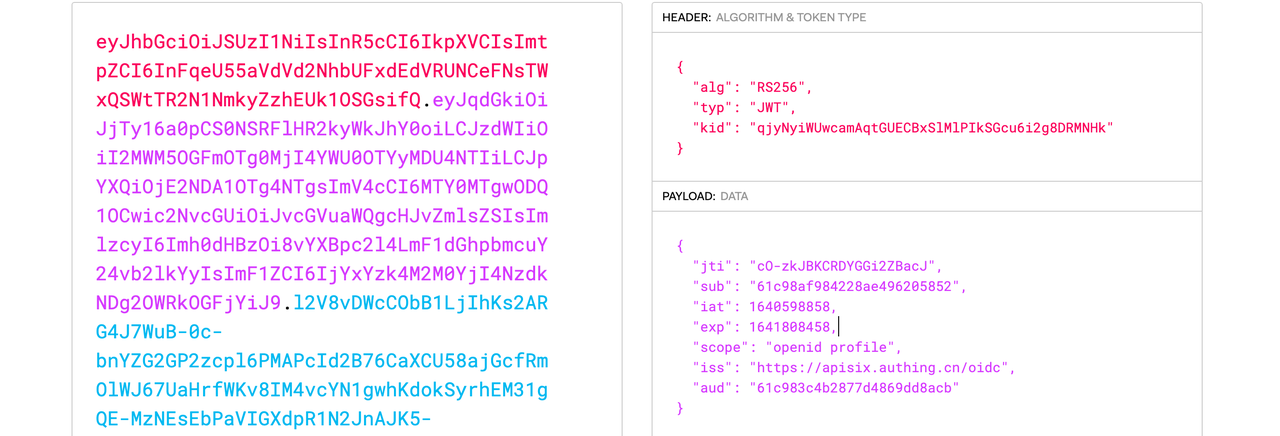
+ **X-Access-Token**: Apache APISIX puts the access token obtained from the
user provider into the `X-Access-Token` request header, optionally in the
Authorization request header via `access_token_in_authorization_header` in the
plugin configuration.
+
+
+
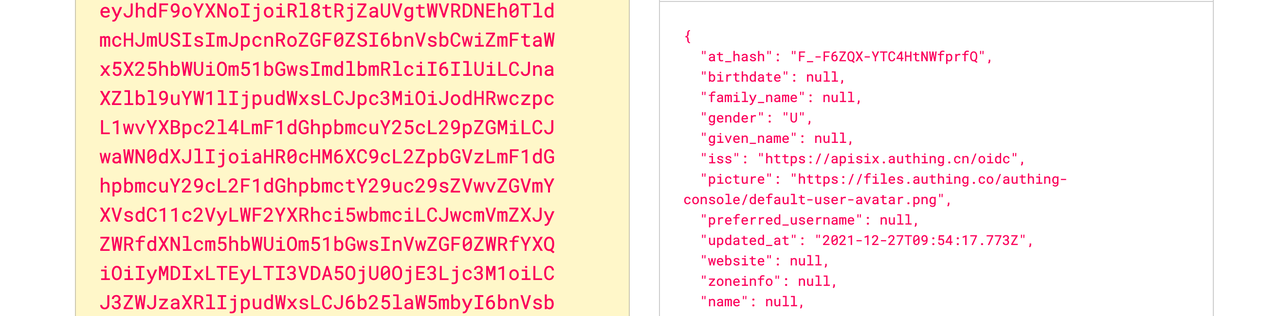
+ **X-Id-Token**: Apache APISIX puts the ID token obtained from the user
provider into the X-Id-Token request header after base64 encoding, which can be
enabled or disabled by `set_id_token_header` in the plugin configuration.
+
+
+
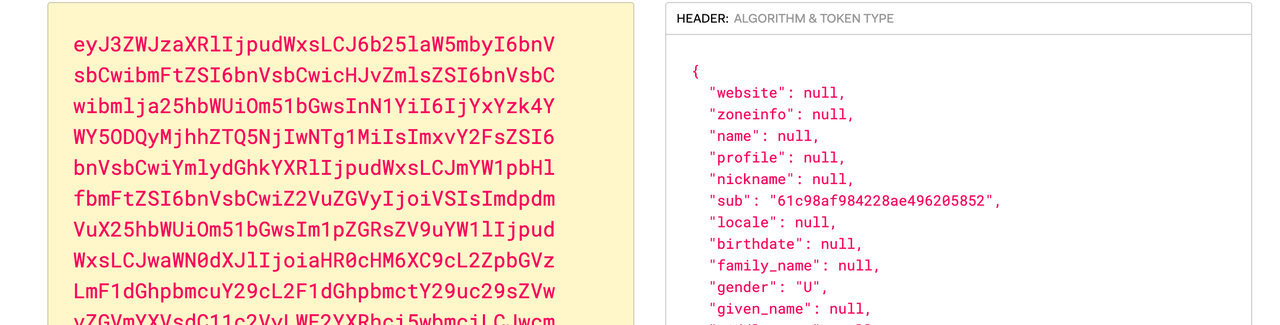
+ **X-Userinfo**: Apache APISIX puts the user information obtained from the
user provider into X-Userinfo after encoding it in base64. You can choose
whether to enable this feature by using `set_userinfo_header` in the plugin
configuration.
+
+
+
+ As you can see, Apache APISIX will carry `X-Access-Token`, `X-Id-Token`
and `X-Userinfo` request headers to the upstream. The upstream can parse these
headers to get the user ID information and the user metadata.
+
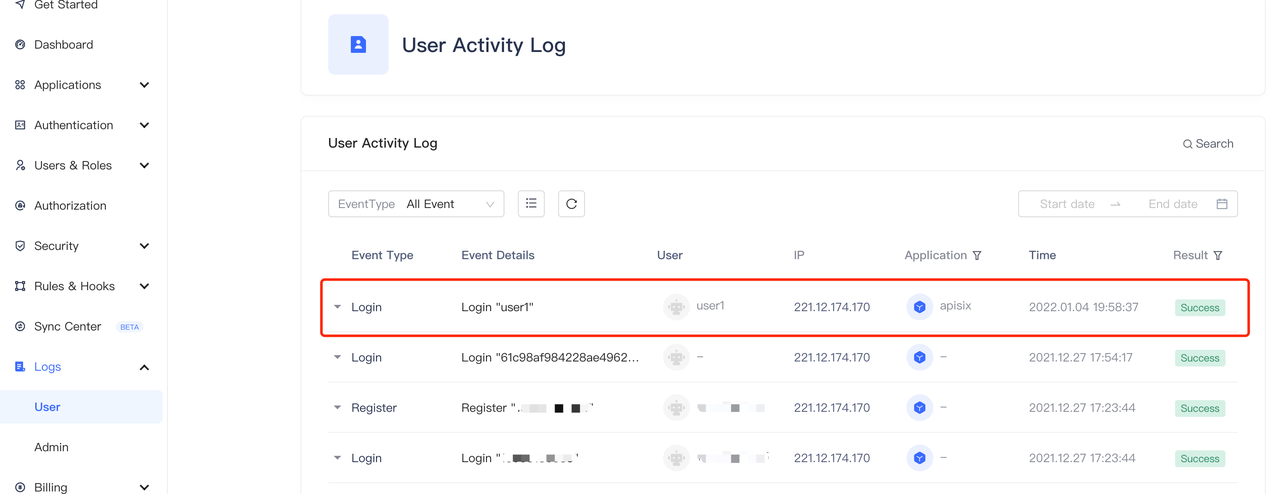
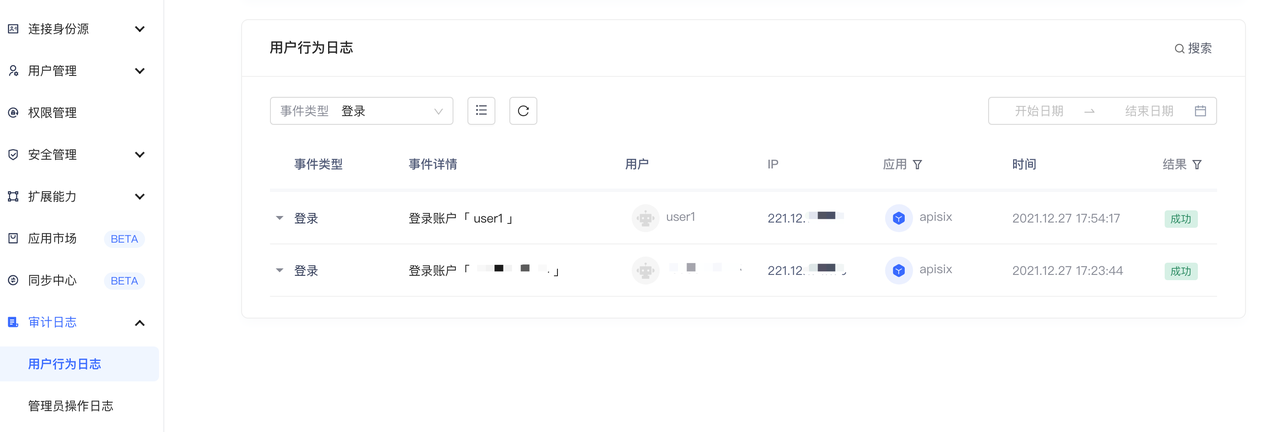
+4. In the "Audit Log - User Behavior Log" in the Authing console, you can
observe that user1 login information.
+ 
+
+## Summary
+
+This article describes the detailed steps for interfacing Apache APISIX with
Authing.
+
+Apache APISIX is not only committed to maintaining its own high performance,
but also has always attached great importance to the construction of open
source ecology. At present, Apache APISIX has 10+ authentication
authorization-related plug-ins that support interfacing with mainstream
authentication authorization services in the industry.
+
+If you have a need to interface to other authentication authorities, visit
Apache APISIX's [GitHub](https://github.com/apache/apisix/issues) and leave
your suggestions via issue; or subscribe to Apache APISIX's [mailing
list](https://apisix.apache.org/zh/docs/general/subscribe-guide) to express
your thoughts via email.
diff --git
a/website/i18n/zh/docusaurus-plugin-content-blog/2022/01/04/authing.md
b/website/i18n/zh/docusaurus-plugin-content-blog/2022/01/04/authing.md
new file mode 100644
index 0000000..028ef3a
--- /dev/null
+++ b/website/i18n/zh/docusaurus-plugin-content-blog/2022/01/04/authing.md
@@ -0,0 +1,257 @@
+---
+title: "Apache APISIX 结合 Authing 实现集中式身份认证管理"
+authors:
+ - name: "朱欣欣"
+ title: "Author"
+ url: "https://github.com/starsz";
+ image_url: "https://avatars.githubusercontent.com/u/25628854?v=4";
+ - name: "曾奕霖"
+ title: "Technical Writer"
+ url: "https://github.com/yzeng25";
+ image_url: "https://avatars.githubusercontent.com/u/36651058?v=4";
+keywords:
+- Apache APISIX
+- Authing
+- OpenID
+- Authentication
+- 插件
+description: 本文为大家描述了 Apache APISIX 和 Authing 对接的详细操作步骤,通过阅读本文,大家对于在 Apache
APISIX 中使用 Authing 有了更清晰的理解。
+tags: [Technology]
+---
+
+> 本文为大家描述了 Apache APISIX 和 Authing 对接的详细操作步骤,通过阅读本文,大家会对于在 Apache APISIX 中使用
Authing 有更清晰的理解。
+
+<!--truncate-->
+
+
+
+## 项目介绍
+
+### 关于 Apache APISIX
+
+[Apache APISIX](https://github.com/apache/apisix) 是一个动态、实时、高性能的 API
网关,提供负载均衡、动态上游、灰度发布、服务熔断、身份认证、可观测性等丰富的流量管理功能。Apache APISIX
不仅支持插件动态变更和热插拔,而且拥有众多实用的插件。Apache APISIX 的 OpenID Connect 插件支持 OpenID Connect
协议,用户可以使用该插件让 Apache APISIX 对接 Authing 服务,作为集中式认证网关部署于企业中。
+
+### 关于 Authing
+
+[Authing](https://www.authing.cn/)
是国内首款以开发者为中心的全场景身份云产品,集成了所有主流身份认证协议,为企业和开发者提供完善安全的用户认证和访问管理服务。以「API
First」作为产品基石,把身份领域所有常用功能都进行了模块化的封装,通过全场景编程语言 SDK 将所有能力 API 化提供给开发者。同时,用户可以灵活的使用
Authing 开放的 RESTful APIs 进行功能拓展,满足不同企业不同业务场景下的身份管理需求。
+
+## 什么是集中式身份认证
+
+### 传统身份认证
+
+在传统认证模式下,各个后端应用服务需要单独开发功能以支持身份认证功能,例如与身份提供商进行交互、获取用户的身份信息等功能。
+
+
+
+### 集中式身份认证
+
+与传统认证模式不同,集中身份认证模式把用户认证从应用服务中抽离了出来。以 Apache APISIX
为例,集中认证的流程如上图所示:首先由用户发起请求(request),然后由前置的网关负责用户认证流程,与身份提供方对接,向身份提供方发送身份认证(authorization)请求。身份提供方返回用户身份信息(user
info)。网关完成用户身份识别后,将用户身份信息通过请求头的形式转发至后端应用。
+
+
+
+### 集中式身份认证的优点
+
+相比较传统认证模式,集中认证模式下有如下优点:
+
+1. 简化应用开发流程,降低开发应用工作量和维护成本,避免各个应用重复开发身份认证逻辑。
+2. 提高业务的安全性,集中身份认证模式在网关层面能够及时拦截未经身份认证的请求,保护后端的应用。
+
+同时结合 Authing 强大的身份认证管理功能,可实现如下功能:
+
+1. 通过控制台对身份认证服务进行生命周期管理,包括创建、启用、禁用等。
+2. 提供实时、可视化的应用监控,包括:接口请求次数、接口调用延迟和接口错误信息,并且进行实时告警通知。
+3. 集中式日志,可以方便地查看用户登录、登出以及对应用的调整和修改信息。
+
+更多具体内容可参考 [Authing 应用集成网关](https://www.authing.cn/gateway-integration)。
+
+## 如何使用
+
+### 步骤一:配置 Authing
+
+1. 登录 Authing 账号,选择自建应用,并填入应用名称和认证地址。如果你没有 Authing 账号,请访问 [Authing
官网](https://www.authing.cn/),单击右上角 “登录/注册”,注册一个 Authing 账号。
+ 
+
+2. 单击“创建”,创建一个 Authing 应用。
+ 
+
+3. 设置登录和登出的跳转 URL。在认证过程中,Authing 将会拒绝除配置以外的回调 URL,由于本次为本地测试,所以将登录回调 URL 和登出回调
URL 都设置为 APISIX 访问地址 http://127.0.0.1:9080/ 。
+ 
+
+4. 创建用户(可选)。在用户列表页面,创建用户,账号密码分别为
user1/user1,并且可以在「用户信息-授权管理」页面中设置是否允许应用的访问(默认为允许)。
+
+
+
+5. 访问应用页面,获取以下配置,配置 Apache APISIX OpenID Connect 时需要提供这些信息:
+ 1. App ID: OAuth client ID,即应用的 ID。与下文的 `client_id` 和 `{YOUR_CLIENT_ID}` 对应。
+ 2. App secret:OAuth client secret,即应用密钥。与下文的 `client_secret` 和
`{YOUR_CLIENT_SECRET}` 对应。
+ 3. 服务发现地址:应用服务发现的地址。与下文的 `{YOUR_DISCOVERY}` 对应。
+
+
+### 步骤二:安装 Apache APISIX
+
+你可以通过源码包、Docker、Helm Chart 等多种方式来安装 Apache APISIX。
+
+#### 安装依赖
+
+Apache APISIX 的运行环境需要依赖 NGINX 和 etcd,所以在安装 Apache APISIX
前,请根据您使用的操作系统安装对应的依赖。我们提供了 CentOS7、Fedora 31 & 32 、Ubuntu 16.04 & 18.04、 Debian
9 & 10 和 MacOS
上的依赖安装操作步骤,详情请参考[安装依赖](https://apisix.apache.org/zh/docs/apisix/install-dependencies/)。
+
+通过 Docker 或 Helm Chart 安装 Apache APISIX 时,已经包含了所需的 NGINX 和 etcd,请参照各自对应的文档。
+
+#### 通过 RPM 包安装(CentOS 7)
+
+这种安装方式适用于 CentOS 7 操作系统,请运行以下命令安装 Apache APISIX。
+
+```shell
+sudo yum install -y
https://github.com/apache/apisix/releases/download/2.7/apisix-2.7-0.x86_64.rpm
+```
+
+#### 通过 Docker 安装
+
+详情请参考:[使用 Docker 安装 Apache APISIX](https://hub.docker.com/r/apache/apisix)。
+
+#### 通过 Helm Chart 安装
+
+详情请参考:[使用 Helm Chart 安装 Apache
APISIX](https://github.com/apache/apisix-helm-chart)。
+
+#### 通过源码包安装
+
+1. 创建一个名为 `apisix-2.7` 的目录:
+
+ ```shell
+ mkdir apisix-2.7
+ ```
+
+2. 下载 Apache APISIX Release 源码包:
+
+ ```shell
+ wget https://downloads.apache.org/apisix/2.7/apache-apisix-2.7-src.tgz
+ ```
+
+ 您也可以通过 Apache APISIX 官网下载 Apache APISIX Release 源码包。 Apache APISIX 官网也提供了
Apache APISIX、APISIX Dashboard 和 APISIX Ingress Controller 的源码包,详情请参考 [Apache
APISIX 官网-下载页](https://apisix.apache.org/zh/downloads)。
+
+3. 解压 Apache APISIX Release 源码包:
+
+ ```shell
+ tar zxvf apache-apisix-2.7-src.tgz -C apisix-2.7
+ ```
+
+4. 安装运行时依赖的 Lua 库:
+
+ ```shell
+ # 切换到 apisix-2.7 目录
+ cd apisix-2.7
+ # 创建依赖
+ make deps
+ ```
+
+#### 初始化依赖
+
+运行以下命令初始化 NGINX 配置文件和 etcd。
+
+```shell
+# initialize NGINX config file and etcd
+make init
+```
+
+### 步骤三:启动 Apache APISIX 并配置对应的路由
+
+1. 运行以下命令,启动 Apache APISIX。
+
+ ```shell
+ apisix start
+ ```
+
+2. 创建路由并配置 OpenID Connect 插件。OpenID Connect 配置列表如下。
+
+|字段|默认值|使用说明|
+|:--------|:--------|:---------------|
+|client_id|N/A|OAuth 客户端 ID|
+|client_secret|N/A|OAuth 客户端密钥|
+|discovery|N/A|身份提供商的服务发现端点|
+|scope|openid|需要访问资源范围|
+|relm|apisix|指定 WWW-Authenticate 响应头验证信息|
+|bearer_only|false|是否检查请求头中的 token|
+|logout_path|/logout|登出的 URI|
+|redirect_uri|request_uri|身份提供商跳转回来的 URI,默认为请求地址|
+|timeout|3|请求超时时间,单位为秒|
+|ssl_verify|false|是否身份提供商的校验 ssl 证书|
+|introspection_endpoint|N/A|身份提供商的令牌验证端点的 URL,不填则将从 discovery 响应中提取。|
+|introspection_endpoint_auth_method|client_secret_basic|令牌自省的认证方法名称|
+|public_key|N/A|验证令牌的公钥|
+|token_signing_alg_values_expected|N/A|验证令牌的算法|
+|set_access_token_header|true|是否在请求头中携带 access token|
+|access_token_in_authorization_header|false|true 时将 access token 放置在
Authorization 头中,false 时将 access token 放置在 X-Access-Token 头中。|
+|set_id_token_header|false|是否将 ID token 携带至 X-ID-Token 请求头|
+|set_userinfo_header|false|是否将用户信息携带至 X-Userinfo 请求头|
+
+以下代码示例通过 Apache APISIX Admin API 进行创建路由,设置路由的上游为
[httpbin.org](http://httpbin.org)。`httpbin.org` 是一个简单的用于接收请求和响应请求的后端服务,下文将使用
`httpbin.org` 的 `get` 页面,参考 [http bin
get](http://httpbin.org/#/HTTP_Methods/get_get)。
+
+具体配置项请参考 [Apache APISIX OpenID Connect
Plugin](https://apisix.apache.org/zh/docs/apisix/plugins/openid-connect/)。
+
+```shell
+curl -XPOST 127.0.0.1:9080/apisix/admin/routes -H "X-Api-Key:
edd1c9f034335f136f87ad84b625c8f1" -d '{
+ "uri":"/*",
+ "plugins":{
+ "openid-connect":{
+ "client_id":"{YOUR_CLIENT_ID}",
+ "client_secret":"{YOUR_CLIENT_SECRET}",
+ "discovery":"https://{YOUR_DISCOVERY}";,
+ "scope":"openid profile",
+ "bearer_only":false,
+ "realm":"apisix",
+ "introspection_endpoint_auth_method":"client_secret_post",
+ "redirect_uri":"http://127.0.0.1:9080/";
+ }
+ },
+ "upstream":{
+ "type":"roundrobin",
+ "nodes":{
+ "httpbin.org:80":1
+ }
+ }
+}'
+```
+
+### 步骤四:访问 Apache APISIX
+
+1. 访问 "http://127.0.0.1:9080/get",由于已经开启了 OpenID Connect 插件,所以页面被重定向到 Authing
登录页面(可在 Authing 控制台中 「应用-品牌化」对该页面进行定制)。
+ 
+
+2. 输入用户在 Authing 注册的账号密码,或者在步骤一中创建的用户 user1/user1 ,单击“登录”,登录 Authing 账户。
+
+3. 登录成功之后,能成功访问到 httpbin.org 中的 get 页面。该 httpbin.org/get 页面将返回请求的数据如下:
+
+ ```shell
+ ...
+ "X-Access-Token":
"eyJhbGciOiJSUzI1NiIsInR5cCI6IkpXVCIsImtpZCI6InFqeU55aVdVd2NhbUFxdEdVRUNCeFNsTWxQSWtTR2N1NmkyZzhEUk1OSGsifQ.eyJqdGkiOiJjTy16a0pCS0NSRFlHR2kyWkJhY0oiLCJzdWIiOiI2MWM5OGFmOTg0MjI4YWU0OTYyMDU4NTIiLCJpYXQiOjE2NDA1OTg4NTgsImV4cCI6MTY0MTgwODQ1OCwic2NvcGUiOiJvcGVuaWQgcHJvZmlsZSIsImlzcyI6Imh0dHBzOi8vYXBpc2l4LmF1dGhpbmcuY24vb2lkYyIsImF1ZCI6IjYxYzk4M2M0YjI4NzdkNDg2OWRkOGFjYiJ9.l2V8vDWcCObB1LjIhKs2ARG4J7WuB-0c-bnYZG2GP2zcpl6PMAPcId2B76CaXCU58ajGcfRmOlWJ67UaHrfWKv8IM4vcYN1gwhKdo
[...]
+ "X-Id-Token":
"eyJhdF9oYXNoIjoiRl8tRjZaUVgtWVRDNEh0TldmcHJmUSIsImJpcnRoZGF0ZSI6bnVsbCwiZmFtaWx5X25hbWUiOm51bGwsImdlbmRlciI6IlUiLCJnaXZlbl9uYW1lIjpudWxsLCJpc3MiOiJodHRwczpcL1wvYXBpc2l4LmF1dGhpbmcuY25cL29pZGMiLCJwaWN0dXJlIjoiaHR0cHM6XC9cL2ZpbGVzLmF1dGhpbmcuY29cL2F1dGhpbmctY29uc29sZVwvZGVmYXVsdC11c2VyLWF2YXRhci5wbmciLCJwcmVmZXJyZWRfdXNlcm5hbWUiOm51bGwsInVwZGF0ZWRfYXQiOiIyMDIxLTEyLTI3VDA5OjU0OjE3Ljc3M1oiLCJ3ZWJzaXRlIjpudWxsLCJ6b25laW5mbyI6bnVsbCwibmFtZSI6bnVsbCwiaWF0IjoxNjQwNTk4ODU4LCJua
[...]
+ "X-Userinfo":
"eyJ3ZWJzaXRlIjpudWxsLCJ6b25laW5mbyI6bnVsbCwibmFtZSI6bnVsbCwicHJvZmlsZSI6bnVsbCwibmlja25hbWUiOm51bGwsInN1YiI6IjYxYzk4YWY5ODQyMjhhZTQ5NjIwNTg1MiIsImxvY2FsZSI6bnVsbCwiYmlydGhkYXRlIjpudWxsLCJmYW1pbHlfbmFtZSI6bnVsbCwiZ2VuZGVyIjoiVSIsImdpdmVuX25hbWUiOm51bGwsIm1pZGRsZV9uYW1lIjpudWxsLCJwaWN0dXJlIjoiaHR0cHM6XC9cL2ZpbGVzLmF1dGhpbmcuY29cL2F1dGhpbmctY29uc29sZVwvZGVmYXVsdC11c2VyLWF2YXRhci5wbmciLCJwcmVmZXJyZWRfdXNlcm5hbWUiOm51bGwsInVwZGF0ZWRfYXQiOiIyMDIxLTEyLTI3VDA5OjU0OjE3Ljc3M1oifQ=="
+ ...
+ ```
+
+ 其中:
+
+ **X-Access-Token**:Apache APISIX 将从用户提供商获取到的 access token 放入
X-Access-Token 请求头,可以通过插件配置中的 `access_token_in_authorization_header` 来选择是否放入
Authorization 请求头中。
+
+

+
+ **X-Id-Token**:Apache APISIX 将从用户提供商获取到的 ID token 通过 base64 编码之后放入
X-Id-Token 请求头,可以通过插件配置中的 `set_id_token_header` 来选择是否开启该功能,默认为为开启状态。
+
+

+
+ **X-Userinfo**: Apache APISIX 将从用户提供商获取到的用户信息,通过 base64 编码之后放入
X-Userinfo,你可以通过插件配置中的 `set_userinfo_header` 来选择是否开启该功能,默认为开启状态。
+
+

+
+ 由此可以看到,Apache APISIX 将会携带 `X-Access-Token`、`X-Id-Token` 和 `X-Userinfo`
三个请求头传递至上游。上游可以通过解析这几个头部,从而获取到用户 ID 信息和用户的元数据。
+
+4. 在 Authing 控制台中的 「审计日志-用户行为日志」中可以观察到 user1 的登录信息。
+
+
+## 总结
+
+本文为大家描述了 Apache APISIX 和 Authing 对接的详细操作步骤,通过阅读本文,大家对于在 Apache APISIX 中使用
Authing 有了更清晰的理解。
+
+Apache APISIX 不仅致力于保持自身的高性能,也一直非常重视开源生态的建设。目前 Apache APISIX 已经拥有了 10+
个认证授权相关的插件,支持与业界主流的认证授权服务对接。
+
+如果你有对接其他认证授权的需求,不妨访问 Apache APISIX 的
[GitHub](https://github.com/apache/apisix/issues),通过 issue 留下你的建议;或订阅 Apache
APISIX
的[邮件列表](https://apisix.apache.org/zh/docs/general/subscribe-guide),通过邮件表达你的想法。

































