SylviaBABY commented on a change in pull request #852:
URL: https://github.com/apache/apisix-website/pull/852#discussion_r790447941
########## File path: website/blog/2022/01/21/apisix-hashicorp-vault-integration.md ########## @@ -0,0 +1,373 @@ +--- +title: "HashiCorp Vault Secure Storage Backend in Apache APISIX Ecosystem" +authors: + - name: "Bisakh Mondal" + title: "Author" + url: "https://github.com/bisakhmondal"; + image_url: "https://avatars.githubusercontent.com/u/41498427?v=4"; + - name: "Yilin Zeng" + title: "Technical Writer" + url: "https://github.com/yzeng25"; + image_url: "https://avatars.githubusercontent.com/u/36651058?v=4"; +keywords: +- Apache APISIX +- HashiCorp +- Vault +- jwt-auth +- Ecosystem +description: This article brings you the upcoming release of the Vault-Apache APISIX integration and related details. +tags: [Technology,Ecosystem,Authentication] +--- + +> This article brings you the upcoming release of the Vault-Apache APISIX integration and related details. + +<!--truncate--> + +With the rise of microservice-based architecture, keeping things secure has become much more challenging than earlier. We are far beyond the point where our 100 instances of backend servers are accessing our database server with a single static secret credential because if in case of a credential leakage the whole system is compromised and revocation of that credential causes a massive service outage (now no one can access anything unless the instances are reconfigured). We can't eliminate the possibility of a security breach because sometimes unexpected does happen. Instead, it's totally up to us to control the blast radius in these situations. To tackle scenarios like this, a popular solution like [HashiCorp Vault](https://www.vaultproject.io/) comes into the picture in a production environment to act as an identity-based secrets and encryption management system. In this article, I have demonstrated how to integrate Vault with Apache APISIX (a cloud-native API Gateway) [jwt-auth p lugin](https://apisix.apache.org/docs/apisix/plugins/jwt-auth) to effectively use excellence from both worlds. + +## What is Vault + +HashiCorp Vault is designed to help organizations manage access to secrets and transmit them safely within an organization. Secrets are defined as any form of sensitive credentials that need to be tightly controlled and monitored and can be used to unlock sensitive information. Secrets could be in the form of passwords, API keys, SSH keys, RSA tokens, or OTP. In the real world where it is very common to have a secret sprawl where secrets get stored into the config file or as a variable in actual program code which as a consequence sometimes even end up in a version control system like GitHub, BitBucket or GitLab, possess a major threat in security. Vault solves this problem by centralizing secrets. It provides encrypted storage for static secrets, generation of dynamic secrets with a TTL lease, authentication of users (machines or humans) to make sure they’re authorized to access a particular secret and many more. So that even in case of a security breach the blast radius is much small and contained. + +Vault makes it very easy to control and manage access by providing us with a unilateral interface to manage every secret in your infrastructure. Not only that, it also provides the flexibility to create detailed audit logs and keep track of who accessed what. + +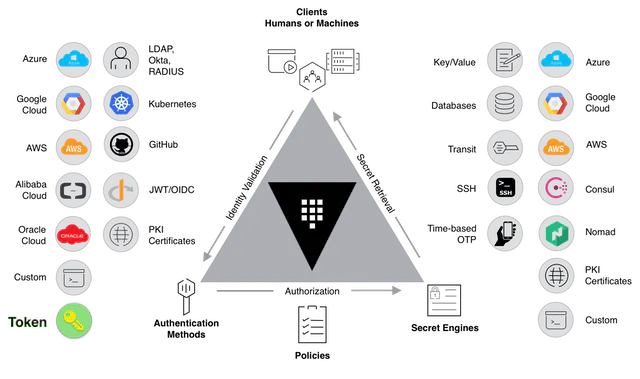 + +## About APISIX jwt-auth Plugin + +It is an authentication plugin that can be attached to any APISIX route to perform JWT (JSON web token, [read more](https://jwt.io/introduction)) authentication before the request gets forwarded to the upstream URI. In short, it is a secure authentication mechanism that leads to authorization to critical resources. Typically, a private key, or a text secret, is used by the issuer to sign the JWT. The receiver of the JWT will verify the signature to ensure that the token hasn’t been altered after it was signed by the issuer. The total integrity of the whole jwt mechanism depends on the signing secret (may it be a text secret of RSA keypairs). That makes it difficult for unauthenticated sources to guess the signing key and attempt to change the claims within the JWT. + +So the storage of these keys in a secure environment is extremely crucial. Falling into wrong hands may jeopardize the security of the whole infrastructure. Though we from the APISIX side take all the means to follow standard SecOps practices, it's quite natural in the production environment to have a centralized key management solution like HashiCorp vault to have elaborate audit trails, periodic key rotation, key revocation etc. And it would be quite a troublesome issue if each time you have to update Apache APISIX configuration whenever a key rotation occurs throughout the infrastructure. + +## Steps to Use Vault with Apache APISIX + +For integration with Vault, Apache APISIX needs to be loaded with vault configuration at [config.yaml](https://github.com/apache/apisix/blob/master/conf/config.yaml). + +Internally, APISIX communicates with vault server [KV secret engine v1](https://www.vaultproject.io/docs/secrets/kv/kv-v1) HTTP [APIs](https://www.vaultproject.io/api/secret/kv/kv-v1). As most enterprise solution prefers to stick with KV Secrets Engine - Version 1 in their production environment, during the initial phase of APISIX-Vault support we have gone with version 1 only. In later releases, we will add the support of K/V version 2. + +The main idea of using vault, instead of the APISIX etcd backend is the security concern in a low trust environment. We, the APISIX developers, understand your priorities seriously. That's why we recommend using vault access tokens that are short scoped and can grant APISIX server limited access. + +### Configure Vault + +If you have already a Vault instance running with the necessary privileges, feel free to skip this section. This section shares the best practices to use Vault inside the Apache APISIX ecosystem. Please follow the steps mentioned below. + +#### Step 1: Spin Up a Vault Server + +Here you have multiple options, feel free to choose between docker, precompiled binary or building from source. As to communicate with the vault server, you need a vault CLI client, I would prefer going with precompiled binary instead of the Docker approach. Anyway, it's totally up to you (feel free to consult [Vault's official installation docs](https://www.vaultproject.io/docs/install)). To spin up a development server, please run the following command. + +```shell +$ vault server -dev -dev-root-token-id=root +… +WARNING! dev mode is enabled! In this mode, Vault runs entirely in-memory +and starts unsealed with a single unseal key. The root token is already +authenticated to the CLI, so you can immediately begin using Vault. +You may need to set the following environment variable: +export VAULT_ADDR='http://127.0.0.1:8200' +The unseal key and root token are displayed below in case you want to +seal/unseal the Vault or re-authenticate. +Unseal Key: 12hURx2eDPKK1tzK+8TkgH9pPhPNJFpyfc/imCLgJKY= +Root Token: root +Development mode should NOT be used in production installations! +``` + +Set your current CLI with the correct environment variables. + +```shell +$ export VAULT_ADDR='http://127.0.0.1:8200' +$ export VAULT_TOKEN='root' +``` + +Enable vault k/v version 1 secret engine backend with a suitable path prefix. In this demo, we are going to choose the `kv` path so that we don't have a collision with the vault default secret path for kv version 2. + +```shell +$ vault secrets enable -path=kv -version=1 kv +Success! Enabled the kv secrets engine at: kv/ + + +# To reconfirm the status, run +$ vault secrets list +Path Type Accessor Description +---- ---- -------- ----------- +cubbyhole/ cubbyhole cubbyhole_4eeb394c per-token private secret storage +identity/ identity identity_5ca6201e identity store +kv/ kv kv_92cd6d37 n/a +secret/ kv kv_6dd46a53 key/value secret storage +sys/ system system_2045ddb1 system endpoints used for control, policy and debugging +``` + +#### Step 2: Generate a Vault Access Token for APISIX + +This article is regarding using vault in jwt-auth plugin perspective. So, for an APISIX consumer (if you are unfamiliar with consumers in the APISIX ecosystem, please read the [document about Apache APISIX Consumer](https://apisix.apache.org/docs/apisix/architecture-design/consumer)) with username `jack` the jwt-auth plugin looks up (if enabled with vault configuration) for secret/s at `<vault.prefix inside config.yaml>/consumer/<consumer.username>/jwt-auth` into vault kv storage. In this context, if you are assigning `kv/apisix` namespace (vault path) as `vault.prefix` inside config.yaml for all apisix related data retrieval, we suggest you to create a policy for path `kv/apisix/consumer/*`. The extra asterisk (*) at the end ensure the policy allows read for any path that has a `kv/apisix/consumer` prefix. Review comment: ```suggestion This article is regarding using vault in `jwt-auth` plugin perspective. So, for an APISIX consumer (if you are unfamiliar with consumers in the APISIX ecosystem, please read the [document about Apache APISIX Consumer](https://apisix.apache.org/docs/apisix/architecture-design/consumer)) with username `jack` the `jwt-auth` plugin looks up (if enabled with vault configuration) for secret/s at `<vault.prefix inside config.yaml>/consumer/<consumer.username>/jwt-auth` into vault kv storage. In this context, if you are assigning `kv/apisix` namespace (vault path) as `vault.prefix` inside config.yaml for all apisix related data retrieval, we suggest you to create a policy for path `kv/apisix/consumer/*`. The extra asterisk (*) at the end ensure the policy allows read for any path that has a `kv/apisix/consumer` prefix. ``` -- This is an automated message from the Apache Git Service. To respond to the message, please log on to GitHub and use the URL above to go to the specific comment. To unsubscribe, e-mail: [email protected] For queries about this service, please contact Infrastructure at: [email protected]

