This is an automated email from the ASF dual-hosted git repository.

bzp2010 pushed a commit to branch master
in repository https://gitbox.apache.org/repos/asf/apisix-website.git
The following commit(s) were added to refs/heads/master by this push:
new b0c30a6 docs: add grpc-web blog (#857)
b0c30a6 is described below
commit b0c30a6ba5baaf04527d6452037afee1fe7b66e2
Author: yilinzeng <[email protected]>
AuthorDate: Wed Jan 26 16:54:39 2022 +0800
docs: add grpc-web blog (#857)
---
.../blog/2022/01/25/apisix-grpc-web-integration.md | 306 +++++++++++++++++++++
.../01/21/apisix-hashicorp-vault-integration.md | 3 +-
.../2022/01/25/apisix-grpc-web-integration.md | 304 ++++++++++++++++++++
3 files changed, 611 insertions(+), 2 deletions(-)
diff --git a/website/blog/2022/01/25/apisix-grpc-web-integration.md
b/website/blog/2022/01/25/apisix-grpc-web-integration.md
new file mode 100644
index 0000000..68b1d56
--- /dev/null
+++ b/website/blog/2022/01/25/apisix-grpc-web-integration.md
@@ -0,0 +1,306 @@
+---
+title: "Integrating Apache APISIX with gRPC-Web"
+authors:
+ - name: "Jinchao Shuai"
+ title: "Author"
+ url: "https://github.com/shuaijinchao";
+ image_url: "https://avatars.githubusercontent.com/u/8529452?v=4";
+ - name: "Yilin Zeng"
+ title: "Technical Writer"
+ url: "https://github.com/yzeng25";
+ image_url: "https://avatars.githubusercontent.com/u/36651058?v=4";
+keywords:
+- Apache APISIX
+- gRPC
+- gRPC-Web
+- Ecology
+description: Apache APISIX already supports gRPC protocol proxies, as well as
HTTP(s) to gRPC Server proxies via the gRPC Transcode plugin. Through active
community discussion and contributions, Apache APISIX has broadened the scope
of support for the gRPC ecosystem, support for the gRPC Web Protocol Request
Proxy.
+tags: [Technology,Ecosystem]
+---
+
+> Apache APISIX already supports gRPC protocol proxies, as well as HTTP(s) to
gRPC Server proxies via the gRPC Transcode plugin. Through active community
discussion and contributions, Apache APISIX has broadened the scope of support
for the gRPC ecosystem: support for the gRPC Web Protocol Request Proxy.
+
+<!--truncate-->
+
+## gRPC Web Introduction
+
+Originally developed by Google, gRPC is a high-performance remote procedure
call framework implemented on HTTP/2. However, because browsers do not directly
expose HTTP/2, Web applications cannot use gRPC directly. gRPC Web is a
standardized protocol that solves this problem.
+
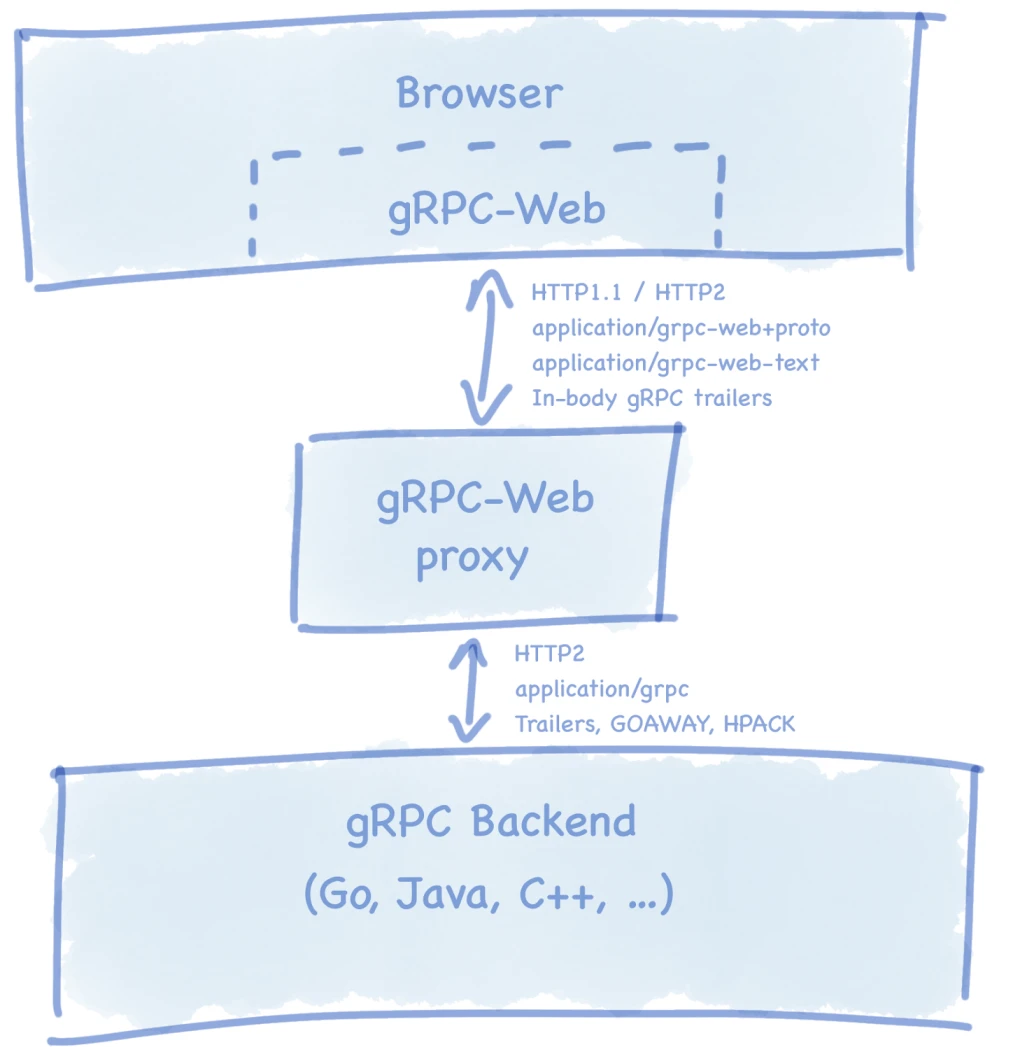
+The first gRPC-web implementation was released in 2018 as a JavaScript library
through which Web applications can communicate directly with the gRPC service.
The principle is to create an end-to-end gRPC pipeline compatible with HTTP/1.1
and HTTP/2. The browser then sends a regular HTTP request, and a gRPC-Web proxy
located between the browser and the server translates the request and response.
Similar to gRPC, gRPC Web uses a predefined contract between the Web client and
the back-end g [...]
+
+
+
+With gRPC Web, users can call back-end gRPC applications directly using a
browser or Node client. However, there are some limitations to using gRPC-Web
on the browser side to call gRPC services.
+
+- Client-side streaming and bi-directional streaming calls are not supported.
+- Calling gRPC services across domains requires CORS to be configured on the
server side.
+- The gRPC server side must be configured to support gRPC-Web, or a
third-party service agent must be available to translate the call between the
browser and the server.
+
+## Apache APISIX gRPC Web Proxy
+
+Apache APISIX supports the proxy of gRPC Web protocol by means of a plug-in,
which completes the protocol conversion and data codec work when gRPC Web
communicates with gRPC Server in the `grpc-web` plug-in, and its communication
process is as follows.
+
+gRPC Web Client -> Apache APISIX (protocol conversion & data codec) -> gRPC
server
+
+The following is a complete example showing how to build a gRPC Web Client and
proxy gRPC Web requests through Apache APISIX. In the following example, we
will use Go as the gRPC Server server handler and Node as the gRPC Web client
requestor.
+
+## Configure Protocol Buffer
+
+The first step is to install the Protocol Buffer compiler and related plug-ins.
+
+1. Install `protoc` and `proto-grpc-*`.
+
+ The Protocol Buffer compiler `protoc` and the `protoc-gen-go` and
`protoc-gen-grpc-web` plugins for generating Go, JavaScript, and gRPC web
interface code for `.proto` need to be installed on your system before writing
client and server-side applications.
+
+ Please run the following script to install the above components.
+
+ ```bash
+ #!/usr/bin/env bash
+
+ set -ex
+
+ PROTOBUF_VERSION="3.19.0"
+ wget
https://github.com/protocolbuffers/protobuf/releases/download/v${PROTOBUF_VERSION}/protoc-${PROTOBUF_VERSION}-linux-x86_64.zip
+ unzip protoc-${PROTOBUF_VERSION}-linux-x86_64.zip
+ mv bin/protoc /usr/local/bin/protoc
+ mv include/google /usr/local/include/
+ chmod +x /usr/local/bin/protoc
+
+ PROTO_GO_PLUGIN_VER="1.2.0"
+ wget
https://github.com/grpc/grpc-go/releases/download/cmd/protoc-gen-go-grpc/v${PROTO_GO_PLUGIN_VER}/protoc-gen-go-grpc.v${PROTO_GO_PLUGIN_VER}.linux.amd64.tar.gz
+ tar -zxvf protoc-gen-go-grpc.v${PROTO_GO_PLUGIN_VER}.linux.amd64.tar.gz
+ mv protoc-gen-go-grpc /usr/local/bin/protoc-gen-go
+ chmod +x /usr/local/bin/protoc-gen-go
+
+ PROTO_JS_PLUGIN_VER="1.3.0"
+ wget
https://github.com/grpc/grpc-web/releases/download/${PROTO_JS_PLUGIN_VER}/protoc-gen-grpc-web-${PROTO_JS_PLUGIN_VER}-linux-x86_64
+ mv protoc-gen-grpc-web-${PROTO_JS_PLUGIN_VER}-linux-x86_64
/usr/local/bin/protoc-gen-grpc-web
+ chmod +x /usr/local/bin/protoc-gen-grpc-web
+ ```
+
+2. Create the `SayHello` example `proto` file.
+
+ ```go
+ // a6/echo.proto
+
+ syntax = "proto3";
+
+ package a6;
+
+ option go_package = "./;a6";
+
+ message EchoRequest {
+ string message = 1;
+ }
+
+ message EchoResponse {
+ string message = 1;
+ }
+
+ service EchoService {
+ rpc Echo(EchoRequest) returns (EchoResponse);
+ }
+ ```
+
+## Configure the server-side application
+
+1. Generate server-side Go raw messages and service/client stubs.
+
+ ```bash
+ protoc -I./a6 echo.proto --go_out=plugins=grpc:./a6
+ ```
+
+2. Implement the server-side handler interface.
+
+ ```go
+ // a6/echo.impl.go
+
+ package a6
+
+ import (
+ "errors"
+ "golang.org/x/net/context"
+ )
+
+ type EchoServiceImpl struct {
+ }
+
+ func (esi *EchoServiceImpl) Echo(ctx context.Context, in *EchoRequest)
(*EchoResponse, error) {
+ if len(in.Message) <= 0 {
+ return nil, errors.New("message invalid")
+ }
+ return &EchoResponse{Message: "response: " + in.Message}, nil
+ }
+ ```
+
+3. The server-side application runtime entry file.
+
+ ```go
+ // server.go
+ package main
+
+ import (
+ "fmt"
+ "log"
+ "net"
+
+ "apisix.apache.org/example/a6"
+ "google.golang.org/grpc"
+ )
+
+ func main() {
+ lis, err := net.Listen("tcp", fmt.Sprintf(":%d", 50001))
+ if err != nil {
+ log.Fatalf("failed to listen: %v", err)
+ }
+
+ grpcServer := grpc.NewServer()
+ a6.RegisterEchoServiceServer(grpcServer, &a6.EchoServiceImpl{})
+
+ if err = grpcServer.Serve(lis); err != nil {
+ log.Fatalf("failed to serve: %s", err)
+ }
+ }
+ ```
+
+4. Compile and start the server-side service.
+
+ ```bash
+ go build -o grpc-server server.go
+ ./grpc-server
+ ```
+
+## Configure client programs
+
+1. Generate client-side `proto` code.
+
+ Generate client-side JavaScript raw messages, service/client stubs and
interface code for gRPC Web's JavaScript.
+
+ The `proto` plugin for gRPC Web provides two modes of code generation.
+
+ 1. mode=grpcwebtext: The default generated code sends the payload in
grpc-web-text format.
+
+ - Content-type: application/grpc-web-text
+ - Payload uses base64 encoding
+ - Supports monadic and server streaming calls
+
+ 1. mode=grpcweb: send payload in binary protobuf format.
+
+ - Content-type: application/grpc-web+proto
+ - Payload is in binary protobuf format
+ - Currently only monadic calls are supported
+
+ ```bash
+ $ protoc -I=./a6 echo.proto --js_out=import_style=commonjs:./a6
--grpc-web_out=import_style=commonjs,mode=grpcweb:./a6
+ ```
+
+2. Installing client-side dependencies.
+
+ ```shell
+ $ npm i grpc-web
+ $ npm i google-protobuf
+ ```
+
+3. Execute entry file on client-side.
+
+ ```shell
+ // client.js
+ const {EchoRequest} = require('./a6/echo_pb');
+ const {EchoServiceClient} = require('./a6/echo_grpc_web_pb');
+ // connect to the entrance of Apache APISIX
+ let echoService = new EchoServiceClient('http://127.0.0.1:9080');
+
+ let request = new EchoRequest();
+ request.setMessage("hello")
+
+ echoService.echo(request, {}, function (err, response) {
+ if (err) {
+ console.log(err.code);
+ console.log(err.message);
+ } else {
+ console.log(response.getMessage());
+ }
+ });
+ ```
+
+4. Final project structure
+
+ ```bash
+ $ tree .
+ ├── a6
+ │ ├── echo.impl.go
+ │ ├── echo.pb.go
+ │ ├── echo.proto
+ │ ├── echo_grpc_web_pb.js
+ │ └── echo_pb.js
+ ├── client.js
+ ├── server.go
+ ├── go.mod
+ ├── go.sum
+ ├── package.json
+ └── package-lock.json
+ ```
+
+After completing the above steps, you have configured the gRPC Server server
application and the gRPC Web client application, and started the server
application, which will receive requests on port `50001`.
+
+## Configure Apache APISIX
+
+Next, simply enable the `grpc-web` plugin in the Apache APISIX routing plugin
configuration to proxy gRPC web requests.
+
+1. Enable the `grpc-web` proxy plugin.
+
+ Routing must use **prefix matching** (e.g., `/* or /grpc/example/*`),
because the gRPC web client passes the package name, service interface name,
method name, etc. declared in `proto` in the URI (e.g.,
`/path/a6.EchoService/Echo`), **using absolute match will prevent the plugin
from extracting `proto` information from the URI**.
+
+ ```shell
+ $ curl http://127.0.0.1:9080/apisix/admin/routes/1 -H 'X-API-KEY:
edd1c9f034335f136f87ad84b625c8f1' -X PUT -d '
+ {
+ "uri":"/*", // prefix matching mode
+ "plugins":{
+ "grpc-web":{} // enable gRPC Web plugin
+ },
+ "upstream":{
+ "scheme":"grpc",
+ "type":"roundrobin",
+ "nodes":{
+ "127.0.0.1:50001":1 // gRPC Server Listen 地址和端口
+ }
+ }
+ }'
+ ```
+
+2. Validate gRPC Web Proxy Requests.
+
+ The gRPC Web protocol request can be sent to Apache APISIX by executing
`client.js` from Node.
+
+ The above client-side and server-side processing logic are respectively:
the client sends a message to the server with the content `hello`, the server
receives the message and responds with `response: hello`, and the execution
result is as follows.
+
+ ```shell
+ $ node client.js
+ response: hello
+ ```
+
+3. Disable the `grpc-web` proxy plugin.
+
+ Simply remove the grpc-web attribute from the routing plugin configuration.
+
+ ```shell
+ $ curl http://127.0.0.1:9080/apisix/admin/routes/1 -H 'X-API-KEY:
edd1c9f034335f136f87ad84b625c8f1' -X PUT -d '
+ {
+ "uri":"/*",
+ "plugins":{
+ },
+ "upstream":{
+ "scheme":"grpc",
+ "type":"roundrobin",
+ "nodes":{
+ "127.0.0.1:50001":1
+ }
+ }
+ }'
+ ```
+
+## Summary
+
+This article brings you hands-on experience about using `grpc-web` in Apache
APISIX.
+
+Feel free to start a discussion in [GitHub
Discussions](https://github.com/apache/apisix/discussions) or communicate via
the [mailing list](https://apisix.apache.org/zh/docs/general/subscribe-guide).
diff --git
a/website/i18n/zh/docusaurus-plugin-content-blog/2022/01/21/apisix-hashicorp-vault-integration.md
b/website/i18n/zh/docusaurus-plugin-content-blog/2022/01/21/apisix-hashicorp-vault-integration.md
index 21b531b..27cef49 100644
---
a/website/i18n/zh/docusaurus-plugin-content-blog/2022/01/21/apisix-hashicorp-vault-integration.md
+++
b/website/i18n/zh/docusaurus-plugin-content-blog/2022/01/21/apisix-hashicorp-vault-integration.md
@@ -323,8 +323,7 @@ Apache APISIX `jwt-auth` 插件可以被配置为从 Vault 存储中获取简单
}'
```
- The plugin looks up for `public_key` and `private_key` keys inside vault kv
path (`<vault.prefix from conf.yaml>/consumer/jim/jwt-auth`) for `jim`
mentioned inside plugin vault configuration. If not found, authentication fails.
- 该插件在 Vault 键值对 路径(`<vault.prefix from
conf.yaml>/consumer/jim/jwt-auth`)中为插件 Vault 配置中提到的用户 `jim` 查找 `public_key` 和
`private_key`。如果没有找到,认证失败。
+ 该插件在 Vault 键值对路径(`<vault.prefix from conf.yaml>/consumer/jim/jwt-auth`)中为插件
Vault 配置中提到的用户 `jim` 查找 `public_key` 和 `private_key`。如果没有找到,认证失败。
如果你不确定如何将公钥和私钥存储到 Vault 键值对中,请使用这个命令。
diff --git
a/website/i18n/zh/docusaurus-plugin-content-blog/2022/01/25/apisix-grpc-web-integration.md
b/website/i18n/zh/docusaurus-plugin-content-blog/2022/01/25/apisix-grpc-web-integration.md
new file mode 100644
index 0000000..a71b234
--- /dev/null
+++
b/website/i18n/zh/docusaurus-plugin-content-blog/2022/01/25/apisix-grpc-web-integration.md
@@ -0,0 +1,304 @@
+---
+title: "Apache APISIX 新技能,代理 gRPC-Web 请求"
+authors:
+ - name: "帅进超"
+ title: "Author"
+ url: "https://github.com/shuaijinchao";
+ image_url: "https://avatars.githubusercontent.com/u/8529452?v=4";
+ - name: "曾奕霖"
+ title: "Technical Writer"
+ url: "https://github.com/yzeng25";
+ image_url: "https://avatars.githubusercontent.com/u/36651058?v=4";
+keywords:
+- Apache APISIX
+- gRPC
+- gRPC-Web
+- Ecology
+description: Apache APISIX 已经支持了 gRPC 协议代理,以及通过 gRPC Transcode 插件支持了 HTTP(s) 到
gRPC Server 的代理。通过社区的积极讨论和贡献,Apache APISIX 又拓宽了 gRPC 生态的支持范围:支持 gRPC Web 协议请求代理。
+tags: [Technology,Ecosystem]
+---
+
+> Apache APISIX 已经支持了 gRPC 协议代理,以及通过 gRPC Transcode 插件支持了 HTTP(s) 到 gRPC
Server 的代理。通过社区的积极讨论和贡献,Apache APISIX 又拓宽了 gRPC 生态的支持范围:支持 gRPC Web 协议请求代理。
+
+<!--truncate-->
+
+## gRPC Web 背景介绍
+
+gRPC 最初由谷歌开发,是一个基于 HTTP/2 实现的高性能远程过程调用框架。但由于浏览器没有直接暴露 HTTP/2,所以 Web 应用程序不能直接使用
gRPC。gRPC Web 是一个标准化协议,它解决了这个问题。
+
+第一个 gRPC-web 实现是在 2018 年作为一个 JavaScript 库发布的,Web 应用程序可以通过它直接与 gRPC
服务通信。其原理是创建与 HTTP/1.1 和 HTTP/2 兼容的端到端 gRPC 管道,然后浏览器发送常规的 HTTP 请求,位于浏览器和服务器之间的
gRPC-Web 代理对请求和响应进行转换。与 gRPC 类似,gRPC Web 在 Web 客户端和后端 gRPC
服务之间使用预定义的契约。Protocol Buffers 被用来序列化和编码消息。
+
+
+
+有了 gRPC Web,用户可以使用浏览器或 Node 客户端直接调用后端的 gRPC 应用程序。不过,在浏览器端使用 gRPC-Web 调用 gRPC
服务也存在一些限制:
+
+- 不支持客户端流和双向流调用。
+- 跨域调用 gRPC 服务需要在服务器端配置 CORS。
+- gRPC 服务器端必须配置为支持 gRPC-Web,或者必须有第三方服务代理在浏览器和服务器之间对调用进行转换。
+
+## Apache APISIX gRPC Web Proxy
+
+Apache APISIX 通过插件的方式支持 gRPC Web 协议的代理,在 `grpc-web` 插件中完成了 gRPC Web与 gRPC
Server 通讯时的协议转换及数据编解码工作,其通讯的过程如下:
+
+gRPC Web Client -> Apache APISIX(protocol conversion & data codec) -> gRPC
server
+
+接下来通过一个完整的示例向大家演示怎样构建一个 gRPC Web 客户端,并通过 Apache APISIX 进行 gRPC Web
请求的代理。在以下的示例中,我们会将 Go 作为 gRPC Server 服务端处理程序,Node 作为 gRPC Web 客户端请求程序。
+
+## 配置 Protocol Buffer
+
+首先进行第一步,安装 Protocol Buffer 编译器及相关插件。
+
+1. 安装 `protoc` 和 `proto-grpc-*` 插件。
+
+ 在编写客户端和服务端程序前,需要在系统中安装 Protocol Buffer 编译器 `protoc` 和 用于生成 `.proto` 的
Go、JavaScript、gRPC Web 接口代码的 `protoc-gen-go` 和 `protoc-gen-grpc-web` 插件。
+
+ 请运行以下脚本,安装上述组件。
+
+ ```bash
+ #!/usr/bin/env bash
+
+ set -ex
+
+ PROTOBUF_VERSION="3.19.0"
+ wget
https://github.com/protocolbuffers/protobuf/releases/download/v${PROTOBUF_VERSION}/protoc-${PROTOBUF_VERSION}-linux-x86_64.zip
+ unzip protoc-${PROTOBUF_VERSION}-linux-x86_64.zip
+ mv bin/protoc /usr/local/bin/protoc
+ mv include/google /usr/local/include/
+ chmod +x /usr/local/bin/protoc
+
+ PROTO_GO_PLUGIN_VER="1.2.0"
+ wget
https://github.com/grpc/grpc-go/releases/download/cmd/protoc-gen-go-grpc/v${PROTO_GO_PLUGIN_VER}/protoc-gen-go-grpc.v${PROTO_GO_PLUGIN_VER}.linux.amd64.tar.gz
+ tar -zxvf protoc-gen-go-grpc.v${PROTO_GO_PLUGIN_VER}.linux.amd64.tar.gz
+ mv protoc-gen-go-grpc /usr/local/bin/protoc-gen-go
+ chmod +x /usr/local/bin/protoc-gen-go
+
+ PROTO_JS_PLUGIN_VER="1.3.0"
+ wget
https://github.com/grpc/grpc-web/releases/download/${PROTO_JS_PLUGIN_VER}/protoc-gen-grpc-web-${PROTO_JS_PLUGIN_VER}-linux-x86_64
+ mv protoc-gen-grpc-web-${PROTO_JS_PLUGIN_VER}-linux-x86_64
/usr/local/bin/protoc-gen-grpc-web
+ chmod +x /usr/local/bin/protoc-gen-grpc-web
+ ```
+
+2. 创建 `SayHello` 示例 `proto` 文件。
+
+ ```go
+ // a6/echo.proto
+
+ syntax = "proto3";
+
+ package a6;
+
+ option go_package = "./;a6";
+
+ message EchoRequest {
+ string message = 1;
+ }
+
+ message EchoResponse {
+ string message = 1;
+ }
+
+ service EchoService {
+ rpc Echo(EchoRequest) returns (EchoResponse);
+ }
+ ```
+
+## 配置服务端程序
+
+1. 生成服务端 Go 原始消息和服务/客户端存根。
+
+ ```bash
+ protoc -I./a6 echo.proto --go_out=plugins=grpc:./a6
+ ```
+
+2. 实现服务端处理程序接口。
+
+ ```go
+ // a6/echo.impl.go
+
+ package a6
+
+ import (
+ "errors"
+ "golang.org/x/net/context"
+ )
+
+ type EchoServiceImpl struct {
+ }
+
+ func (esi *EchoServiceImpl) Echo(ctx context.Context, in *EchoRequest)
(*EchoResponse, error) {
+ if len(in.Message) <= 0 {
+ return nil, errors.New("message invalid")
+ }
+ return &EchoResponse{Message: "response: " + in.Message}, nil
+ }
+ ```
+
+3. 服务端程序运行入口文件。
+
+ ```go
+ // server.go
+ package main
+
+ import (
+ "fmt"
+ "log"
+ "net"
+
+ "apisix.apache.org/example/a6"
+ "google.golang.org/grpc"
+ )
+
+ func main() {
+ lis, err := net.Listen("tcp", fmt.Sprintf(":%d", 50001))
+ if err != nil {
+ log.Fatalf("failed to listen: %v", err)
+ }
+
+ grpcServer := grpc.NewServer()
+ a6.RegisterEchoServiceServer(grpcServer, &a6.EchoServiceImpl{})
+
+ if err = grpcServer.Serve(lis); err != nil {
+ log.Fatalf("failed to serve: %s", err)
+ }
+ }
+ ```
+
+4. 编译并启动服务端服务。
+
+ ```bash
+ go build -o grpc-server server.go
+ ./grpc-server
+ ```
+
+## 配置客户端程序
+
+1. 生成客户端 `proto` 代码
+
+ 生成客户端 JavaScript 原始消息、服务/客户端存根和 gRPC Web 的 JavaScript 的接口代码。
+ gRPC Web 的 `proto` 插件提供了两种代码生成模式:
+
+ 1. mode=grpcwebtext: 默认生成的代码以 grpc-web-text 格式发送 payload
+
+ - Content-type: application/grpc-web-text
+ - Payload 使用 base64 编码
+ - 支持一元和服务器流式调用
+
+ 1. mode=grpcweb:以二进制 protobuf 格式发送 payload
+
+ - Content-type: application/grpc-web+proto
+ - Payload 采用二进制 protobuf 格式
+ - 目前仅支持一元调用
+
+ ```bash
+ $ protoc -I=./a6 echo.proto --js_out=import_style=commonjs:./a6
--grpc-web_out=import_style=commonjs,mode=grpcweb:./a6
+ ```
+
+2. 安装客户端依赖库
+
+ ```shell
+ $ npm i grpc-web
+ $ npm i google-protobuf
+ ```
+
+3. 客户端执行入口文件
+
+ ```shell
+ // client.js
+ const {EchoRequest} = require('./a6/echo_pb');
+ const {EchoServiceClient} = require('./a6/echo_grpc_web_pb');
+ // 连接到 Apache APISIX 的入口
+ let echoService = new EchoServiceClient('http://127.0.0.1:9080');
+
+ let request = new EchoRequest();
+ request.setMessage("hello")
+
+ echoService.echo(request, {}, function (err, response) {
+ if (err) {
+ console.log(err.code);
+ console.log(err.message);
+ } else {
+ console.log(response.getMessage());
+ }
+ });
+ ```
+
+4. 最终项目结构
+
+ ```bash
+ $ tree .
+ ├── a6
+ │ ├── echo.impl.go
+ │ ├── echo.pb.go
+ │ ├── echo.proto
+ │ ├── echo_grpc_web_pb.js
+ │ └── echo_pb.js
+ ├── client.js
+ ├── server.go
+ ├── go.mod
+ ├── go.sum
+ ├── package.json
+ └── package-lock.json
+ ```
+
+完成上述的步骤之后,你已经配置了把 gRPC Server 的服务端程序和 gRPC Web 的客户端程序,并且启动了服务端程序,它将通过 `50001`
端口接收请求。
+
+## 配置 Apache APISIX
+
+接下来只需在 Apache APISIX 路由的插件配置中启用 `grpc-web` 插件,即可进行 gRPC Web 请求的代理。
+
+1. 启用 `grpc-web` 代理插件
+
+ 启用 `grpc-web` 代理插件,路由必须使用**前缀匹配**模式(例如:`/* 或 /grpc/example/*`), 因 gRPC Web
客户端会在 URI 中传递 `proto`
中声明的包名称、服务接口名称、方法名称等信息(例如:`/path/a6.EchoService/Echo`),**使用绝对匹配时会使插件无法从 URI 中提取
`proto` 信息**。
+
+ ```shell
+ $ curl http://127.0.0.1:9080/apisix/admin/routes/1 -H 'X-API-KEY:
edd1c9f034335f136f87ad84b625c8f1' -X PUT -d '
+ {
+ "uri":"/*", // 前缀匹配模式
+ "plugins":{
+ "grpc-web":{} //开启 gRPC Web 代理
+ },
+ "upstream":{
+ "scheme":"grpc",
+ "type":"roundrobin",
+ "nodes":{
+ "127.0.0.1:50001":1 // gRPC Server Listen 地址和端口
+ }
+ }
+ }'
+ ```
+
+2. 验证 gRPC Web 代理请求
+
+ 通过 Node 执行 `client.js` 即可向 Apache APISIX 发送 gRPC Web 协议请求。
+ 上述客户端和服务端的处理逻辑分别是:客户端向服务端发送一条消息内容是 `hello`,服务端收到消息后响应 `response:
hello`,执行结果如下。
+
+ ```shell
+ $ node client.js
+ response: hello
+ ```
+
+3. 关闭 `grpc-web` 代理插件
+
+ 只需将路由插件配置中的 grpc-web 属性移除即可。
+
+ ```shell
+ $ curl http://127.0.0.1:9080/apisix/admin/routes/1 -H 'X-API-KEY:
edd1c9f034335f136f87ad84b625c8f1' -X PUT -d '
+ {
+ "uri":"/*",
+ "plugins":{
+ },
+ "upstream":{
+ "scheme":"grpc",
+ "type":"roundrobin",
+ "nodes":{
+ "127.0.0.1:50001":1
+ }
+ }
+ }'
+ ```
+
+## 总结
+
+本文为大家带来了 Apache APISIX 的 `grpc-web` 插件讲解及实战案例。
+
+欢迎随时在 [GitHub Discussions](https://github.com/apache/apisix/discussions)
中发起讨论,或通过[邮件列表](https://apisix.apache.org/zh/docs/general/subscribe-guide)进行交流。

