This is an automated email from the ASF dual-hosted git repository.

yilinzeng pushed a commit to branch master
in repository https://gitbox.apache.org/repos/asf/apisix-website.git
The following commit(s) were added to refs/heads/master by this push:
new 4c01d2d docs: Removed typos and grammatical errors from Blog
Contributing Guide page (#891)
4c01d2d is described below
commit 4c01d2da50eff209b03e29d7ceb84616a480beda
Author: Bhavya Verma <[email protected]>
AuthorDate: Mon Feb 21 07:32:17 2022 +0530
docs: Removed typos and grammatical errors from Blog Contributing Guide
page (#891)
---
website/docs/general/blog-contributing-guide.md | 66 ++++++++++++-------------
1 file changed, 33 insertions(+), 33 deletions(-)
diff --git a/website/docs/general/blog-contributing-guide.md
b/website/docs/general/blog-contributing-guide.md
index 8376f66..14dd45c 100644
--- a/website/docs/general/blog-contributing-guide.md
+++ b/website/docs/general/blog-contributing-guide.md
@@ -12,35 +12,35 @@ description: This article is a set of guidelines for
contributors who want to wr
## Overview
-This guideline will teach you how to contribute if you want to add a new blog,
or modify existing blog contents.
+This guideline will teach you how to contribute if you want to add a new blog
or modify existing blog content.
-If you find an issue on current documents, please feel free to [file an
issue](https://github.com/apache/apisix-website/issues/new) and let the
community know about it, or you can [sumbit a pull
request](https://github.com/apache/apisix-website/pulls) to fix or update. Both
actions are welcome and recommended.
+If you find an issue on current documents, please feel free to [file an
issue](https://github.com/apache/apisix-website/issues/new) and let the
community know about it, or you can [submit a pull
request](https://github.com/apache/apisix-website/pulls) to fix or update. Both
actions are welcome and recommended.
The blogs are written in two languages: English and Chinese. We encourage
contributors to add blogs in their preferred language. It is completely up to
you. We can handle translations and ask you to do a pull request review later.
-English blogs are located in the `website/blog` directory, in which they are
categorized by year, month and date. For example,
`website/blog/2021/11/22/develop-apisix-ingress-with-nocalhost-in-kubernetes.md`
means that a blog named
`develop-apisix-ingress-with-nocalhost-in-kubernetes.md` was published on
November 22nd, 2021, and it is located in the `website/blog/2021/11/22`
directory. Once it is reviewed and megered, the URL should be:
`https://apisix.apache.org/blog/2021/11/22/develop- [...]
+English blogs are located in the `website/blog` directory, in which they are
categorized by year, month and date. For example,
`website/blog/2021/11/22/develop-apisix-ingress-with-nocalhost-in-kubernetes.md`
means that a blog named
`develop-apisix-ingress-with-nocalhost-in-kubernetes.md` was published on
November 22nd, 2021, and it is located in the `website/blog/2021/11/22`
directory. Once it is reviewed and merged, the URL should be:
`https://apisix.apache.org/blog/2021/11/22/develop-a [...]
Similarly, Chinese blogs are located in
`website/i18n/zh/docusaurus-plugin-content-blog` directory and follow the same
patterns described above.
## What you can contribute
-We encourge contributors and users to write blogs about how they contribute or
use Apache APISIX, or help us fix typos and update contents in existing blogs.
+We encourage contributors and users to write blogs about how they contribute
or use Apache APISIX, or help us fix typos and update content in existing blogs.
### Add a new blog
To add a new blog, please perform the following steps:
1. Find the right place to store your blog.
- 1. If you plan to submit a blog written in **English**, please create a
markdown file under `website/blog` directory.
+ 1. If you plan to submit a blog written in **English**, please create a
markdown file under the `website/blog` directory.
2. If you plan to submit a blog written in **Chinese**, please create a
markdown file under `website/i18n/zh/docusaurus-plugin-content-blog` directory.
- 3. If you cannot find an existing year, month, or date directory that fits
your desired published date, you can go ahead and create such directory on your
own.
+ 3. If you cannot find an existing year, month, or date directory that fits
your desired published date, you can go ahead and create such a directory on
your own.
-2. Create a markdown file in the directory. Please make sure that the file
name is written in English with **NO** capitalized letters. During review
session, we may suggest changing it to achieve better SEO performance (Yes,
currently some files names contain capitalized letters, we are working on it,
see [Issue #713](https://github.com/apache/apisix-website/issues/713)).
+2. Create a markdown file in the directory. Please make sure that the file
name is written in English with **NO** capitalized letters. During the review
session, we may suggest changing it to achieve better SEO performance (Yes,
currently some files names contain capitalized letters, we are working on it,
see [Issue #713](https://github.com/apache/apisix-website/issues/713)).
3. Add text, images, diagrams, charts to the markdown file.
1. There is nothing much to say about adding text.
- 2. To add images, please upload images to by using [this public image CDN
service](https://markdown.apiseven.com) , and copy the links from there.
- 3. To add charts or diagrams, we are happy to see any sort of charts and
diagrams. From previous experience, charts with 4 columns or less are the
perfect size displayed on screen.
+ 2. To add images, please upload images by using [this public image CDN
service](https://markdown.apiseven.com), and copy the links from there.
+ 3. To add charts or diagrams, we are happy to see any sort of charts and
diagrams. From previous experience, charts with 4 columns or less are the
perfect size displayed on the screen.
4. Optional: run it locally to inspect any typos or formatting issues left
behind. Although we implemented lint and error checks in the repository, we
suggest running it locally to avoid repeated work. To run it locally, please
run `cd website`, and then run `yarn start` commands in your terminal.
@@ -52,7 +52,7 @@ To add a new blog, please perform the following steps:
Our blogs start with a header sections containing fields such as `title`,
`authors`, `authors.name`, `authors.title`, `authors.url`, `authors.image_url`,
`description`, and `tags`.
-Some fields might be a bit confusing for first-time contributors. Explanation
of each field is mentioned below. Please note that these fields could change
over time.
+Some fields might be a bit confusing for first-time contributors. An
explanation of each field is mentioned below. Please note that these fields
could change over time.
```markdown
title: "blog's title"
@@ -73,7 +73,7 @@ tags: [tag1,tag2,...,tagn]
##### Co-author template
-[Co-author](https://docusaurus.io/docs/next/blog#blog-post-authors) feature is
added, since translating and editing articles is also time-consuming, we would
like to give credit to translators and technical writers as well.
+[Co-author](https://docusaurus.io/docs/next/blog#blog-post-authors) feature is
added since translating and editing articles is also time-consuming, we would
like to give credit to translators and technical writers as well.
```markdown
title: "blog's title"
@@ -106,24 +106,24 @@ The required field for co-author template. When a blog is
co-authored by 2 peopl
##### keywords
-Required field, keyword, which is used to enhance better SEO performance.
Usually the first three keywords are "APISIX", "Apache APISIX", "API Gateway",
and the last two are the article's own keywords.
+Required field, keyword, which is used to enhance better SEO performance.
Usually, the first three keywords are "APISIX", "Apache APISIX", "API Gateway",
and the last two are the article's keywords.
##### description
-Required field, the description, which is used to enhance better SEO
performance. Usually you can summarize the first or last paragraph of the
article, forming about 120 words of text, and put it here.
+Required field, the description, which is used to enhance better SEO
performance. Usually, you can summarize the first or last paragraph of the
article, forming about 120 words of text, and put it here.
##### tags
-Required field, tag, which is used to categorize the blog. Each post can have
more than one tag. The available tags and explanations are as follows. If none
of the tags below fits, please leave a comment in your pull request, and we
will handle it together. Please note that these tags and rules of applying tags
could change over time.
+Required field, tag, which is used to categorize the blog. Each post can have
more than one tag. The available tags and explanations are as follows. If none
of the tags below fits, please leave a comment in your pull request, and we
will handle it together. Please note that these tags and the rules of applying
tags could change over time.
-- **Community**: community related, e.g. "How to contribute to an open source
project without writing code?"
-- **Events**: event-related, for example: online live stream, event previews,
meetups, and online meeting, etc.
+- **Community**: community-related, e.g. "How to contribute to an open-source
project without writing code?"
+- **Events**: event-related, for example, online live stream, event previews,
meetups, online meeting, etc.
- **Interview**: Interviews, e.g., Dr. Yang Li interview, Summer of
Programming interview.
-- **Practical Case**: Best practices, easily confused with Technology. The
factors that determine whether an article is a Technology or a Practical Case
are: the content of the article and the subject of the description. For
example, if the article is about "Running Apache APISIX on xxx platform", then
it is a Practical Case; for example, if the article is about technical stuff,
"Apache APISIX v.s. Envoy", then it is Technology.
+- **Practical Case**: Best practices, easily confused with Technology. The
factors that determine whether an article is a Technology or a Practical Case
are the content of the article and the subject of the description. For example,
if the article is about "Running Apache APISIX on the xxx platform", then it is
a Practical Case; for example, if the article is about technical stuff, "Apache
APISIX v.s. Envoy", then it is Technology.
- **Release**: Release notes, this is better understood. It should be noted
that the release notes inside the blog are polished, while the release notes
inside the release are written by developers.
- **Security**: Security vulnerability notification and methods to bypass
security vulnerabilities, currently there are only two articles, very good to
identify, generally have CVE-xxxxxxx is it.
-- **Technology**: Technical articles, easily confused with Practical Case. The
factors that determine whether an article is a Technology or a Practical Case
are: the content of the article and the subject of the description. For
example, if the article is about "Running Apache APISIX on xxx platform", then
it is a Practical Case; for example, if the article is about technical stuff,
"Apache APISIX v.s. Envoy", then it is Technology.
-- **User Case**: User Case, this is also very straightforward. Please tell us
how you use Apache APISIX and your feelings about Apache APISIX.
+- **Technology**: Technical articles, easily confused with Practical Case. The
factors that determine whether an article is a Technology or a Practical Case
are the content of the article and the subject of the description. For example,
if the article is about "Running Apache APISIX on the xxx platform", then it is
a Practical Case; for example, if the article is about technical stuff, "Apache
APISIX v.s. Envoy", then it is Technology.
+- **User Case**: User Case, is also very straightforward. Please tell us how
you use Apache APISIX and your feelings about Apache APISIX.
We can help authors to use a better category once a pull request is submitted.
@@ -131,7 +131,7 @@ We can help authors to use a better category once a pull
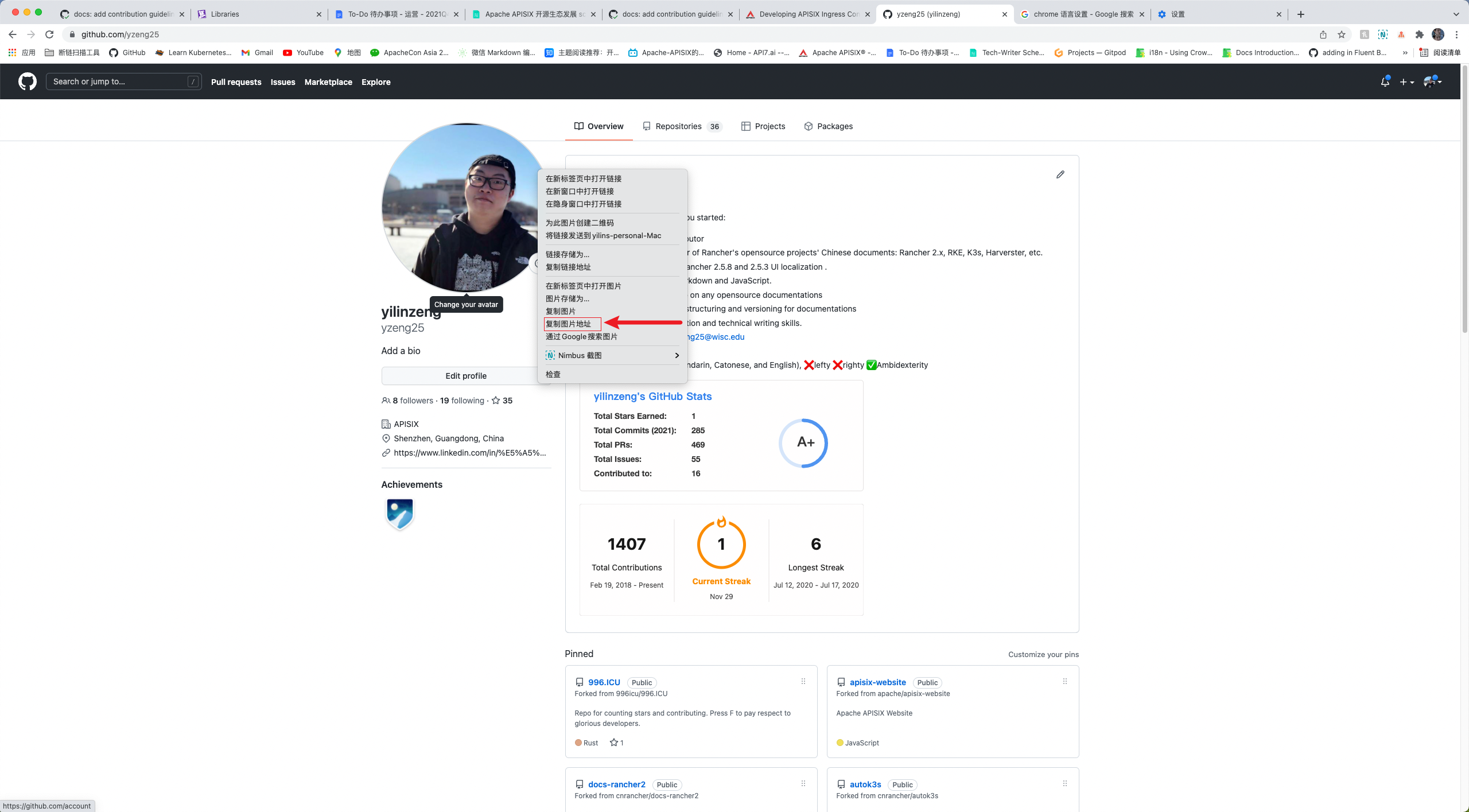
request is submitted.
1. Open Chrome or your preferred browser.
2. Enter the author's GitHub address to access the author's GitHub home page.
-3. Right click on the author's avatar, and click "copy image address".
+3. Right-click on the author's avatar, and click "copy image address".
4. Paste image address to the authors.image_url field.
@@ -143,11 +143,11 @@ We can help authors to use a better category once a pull
request is submitted.
<!--truncate-->
```
-An overview is entered starting with `>` and a space followed by texts. The
overview can be your own summary of the article, or it can be the first
paragraph of the article with a summary description. When you are done, type
`<! --truncate-->`. `<! --truncate--->` serves to display the `<!
--truncate--->` above the blog overview, or if there is no overview, nothing
will be displayed; if there is an overview but no `<! --truncate--->`, it will
show the whole thing. For more information, p [...]
+An overview is entered starting with `>` and a space followed by texts. The
overview can be your summary of the article, or it can be the first paragraph
of the article with a summary description. When you are done, type `<!
--truncate-->`. `<! --truncate--->` serves to display the `<! --truncate--->`
above the blog overview, or if there is no overview, nothing will be displayed;
if there is an overview but no `<! --truncate--->`, it will show the whole
thing. For more information, pleas [...]
#### Difference between Description and Overview
-Some people may ask: why should we add the same contents in two fields? First
of all, they are indeed both summary text. Second, they are different in the
following way: description is used for SEO enhancements, overview is used to
display contents on the blog page.
+Some people may ask: why should we add the same contents in two fields? First
of all, they are indeed both summary texts. Second, they are different in the
following way: description is used for SEO enhancements, the overview is used
to display content on the blog page.
### Fix typos or formats
@@ -160,20 +160,20 @@ Some people may ask: why should we add the same contents
in two fields? First of
### Commit message style
1. The initial/first commit message should follow this style: `docs: type in
your actual commit message`. Otherwise, the CI tests would fail and you would
need to modify the commit message.
-2. The later commit messages would be nice if you follow these style (it is
totally fine if you do it your way):
+2. The later commit messages would be nice if you follow these styles (it is
totally fine if you do it your way):
1. `update: type in your actual commit message`
2. `fix: type in your actual commit message`
### Pull request title guide
-Pull request title is usually generated from the first commit message, this is
why we need a uniformed message for the first commit message. It is easier to
maintain this way. Remember this is repository for website and blog, titles
start with prefix `docs:` can help us track down particular pull requests.
+Pull request title is usually generated from the first commit message, this is
why we need a uniform message for the first commit message. It is easier to
maintain this way. Remember this is the repository for website and blog, titles
start with prefix `docs:` can help us track down particular pull requests.
## How to contribute via git command line
### Local repository configuration
1. Open your browser and visit https://github.com/apache/apisix-website.
-2. Click 'fork' in the upper right corner to fork it to your own repository.
+2. Click 'fork' in the upper right corner to fork it to your repository.
3. Copy your own remote repository address.
4. Open your terminal, and type in the following commands. Change to your
desired directory to store the files, and git clone it from remote.
@@ -182,7 +182,7 @@ Pull request title is usually generated from the first
commit message, this is w
git clone 'https://github.com/{your GitHub Username}/apisix-website' #
After forking the repo to your own GitHub, please clone your own repo to local
```
-5. View the relationship between your repository and your remote repository.
The reuslt should be two lines containing 'origin' messages only.
+5. View the relationship between your repository and your remote repository.
The result should be two lines containing 'origin' messages only.
```sh
git remote -v
@@ -196,7 +196,7 @@ Pull request title is usually generated from the first
commit message, this is w
To verify that 'upstream' is added: run git remote -v , the result should
be 4 lines, 2 with 'origin' and 2 with 'upstream'.
-These steps conclude the process of adding and configuring a local repository.
Next, let's see how to add a new blog, modify contents, and how to resolve
conflicts.
+These steps conclude the process of adding and configuring a local repository.
Next, let's see how to add a new blog, modify content, and how to resolve
conflicts.
### Add a new blog
@@ -220,7 +220,7 @@ These steps conclude the process of adding and configuring
a local repository. N
git checkout -b {branch name} upstream/master # replace {branch name} with
actual branch name
```
-4. Pull the latest changes from the master branch in main repository.
+4. Pull the latest changes from the master branch in the main repository.
```sh
git fetch upstream master
@@ -232,7 +232,7 @@ These steps conclude the process of adding and configuring
a local repository. N
git rebase
```
-6. Add new blog.
+6. Add a new blog.
7. When you're done editing blogs, run `git add` command to temporarily store
them.
@@ -243,7 +243,7 @@ These steps conclude the process of adding and configuring
a local repository. N
8. Then run `git commit` to record your changes.
```sh
- git commit -m "docs: brief message about this change" # message should be
concise and shorter than 50 characters
+ git commit -m "docs: a brief message about this change" # message should
be concise and shorter than 50 characters
```
9. Finally, run git push to push the changes to the remote repository.
@@ -252,7 +252,7 @@ These steps conclude the process of adding and configuring
a local repository. N
git push origin
```
-10. Visit GitHub website in your browser, create a pull request, and edit the
change information.
+10. Visit the GitHub website in your browser, create a pull request, and edit
the change information.
11. Complete your pull request.
@@ -278,7 +278,7 @@ These steps conclude the process of adding and configuring
a local repository. N
git checkout -b {branch name} upstream/master # replace {branch name} with
actual branch name
```
-4. Pull the latest changes from the master branch in main repository.
+4. Pull the latest changes from the master branch in the main repository.
```sh
git fetch upstream master
@@ -301,7 +301,7 @@ These steps conclude the process of adding and configuring
a local repository. N
8. Then run `git commit` to record your changes.
```sh
- git commit -m "docs: brief message about this change" # message should be
concise and shorter than 50 characters
+ git commit -m "docs: a brief message about this change" # message should
be concise and shorter than 50 characters
```
9. Finally, run git push to push the changes to the remote repository.

