This is an automated email from the ASF dual-hosted git repository.

juzhiyuan pushed a commit to branch master
in repository https://gitbox.apache.org/repos/asf/apisix-website.git
The following commit(s) were added to refs/heads/master by this push:
new c73634a fix: update "General" docs (#893)
c73634a is described below
commit c73634abbb0626692e53780f19451018c5cc6166
Author: Navendu Pottekkat <[email protected]>
AuthorDate: Mon Feb 28 06:50:00 2022 +0530
fix: update "General" docs (#893)
---
website/docs/general/2fa.md | 24 +-
website/docs/general/blog-contributing-guide.md | 353 ++++++---------------
website/docs/general/committer-guide.md | 58 ++--
website/docs/general/community.md | 15 +-
.../docs/general/integrate-with-project-docs.md | 22 +-
website/docs/general/subscribe-guide.md | 16 +-
6 files changed, 165 insertions(+), 323 deletions(-)
diff --git a/website/docs/general/2fa.md b/website/docs/general/2fa.md
index 6c03637..3eeaaaf 100644
--- a/website/docs/general/2fa.md
+++ b/website/docs/general/2fa.md
@@ -5,26 +5,26 @@ keywords:
- API gateway
- APISIX
- Apache APISIX
-- two factor authentication
-description: This article provides information of how to enable Two-factor
authentication(2FA) on GitHub. It consists of 3 parts, what is Two-factor
authentication(2FA), how to enable 2FA on GitHub, and how to submit codes.
+- Two Factor Authentication
+description: This article provides information on how to enable Two-Factor
Authentication (2FA) on GitHub. It consists of 3 parts, what is Two-Factor
Authentication (2FA), how to enable 2FA on GitHub, and how to submit code.
---
-## Two-factor authentication(2FA)
+## Two-Factor Authentication (2FA)
-Two factor authentication (2FA) refers to the authentication method that
combines both passport and an object (credit card, SMS phone, token or
biomarkers as fingerprint) to identify a user. To ensure the security of the
committer’s account, we need you to enable 2FA to sign in and contribute codes
on GitHub. More details, please refer to 2FA.
+Two-Factor Authentication (2FA) refers to the authentication method that
combines both a password and an object (credit card, SMS, tokens, or biomarkers
as fingerprint) to identify a user.
-Note:If you do not enable 2FA, you will be removed from the project and unable
to access our repositories and the fork from our private repository.
+To ensure the security of the committer’s account, we need you to [configure
2FA](https://docs.github.com/en/authentication/securing-your-account-with-two-factor-authentication-2fa/configuring-two-factor-authentication)
while signing in to contribute code on GitHub. For more details, please refer
to [Securing your account with two-factor authentication
(2FA)](https://docs.github.com/en/authentication/securing-your-account-with-two-factor-authentication-2fa).
-## Enable 2FA on GitHub
+**Note**: If 2FA is not enabled, you are liable to be removed from the project
and would not be able to access Apache APISIX's repositories.
-For detailed operations, please refer to Enable Two Factor Authentication with
TOTP.
+## Configuring 2FA on GitHub
-After enabling 2FA, you need to sign in GitHub with the way of
username/password + mobile phone authentication code.
+You can configure 2FA using a [mobile
app](https://docs.github.com/en/authentication/securing-your-account-with-two-factor-authentication-2fa/configuring-two-factor-authentication#configuring-two-factor-authentication-using-a-totp-mobile-app)
or via [text
message](https://docs.github.com/en/authentication/securing-your-account-with-two-factor-authentication-2fa/configuring-two-factor-authentication#configuring-two-factor-authentication-using-text-messages).
-Tips: If you cannot download the APP through the page link, you can search and
download the Google Authenticator in APP Store.
+GitHub recommends using a time-based-one-time password (TOTP) mobile
application to configure 2FA. Read [Configuring two-factor
authentication](https://docs.github.com/en/authentication/securing-your-account-with-two-factor-authentication-2fa/configuring-two-factor-authentication)
for detailed information.
-## How to Submit Codes
+## Submitting Code
-After enabling 2FA, you need to generate a private access Token to perform
operations such as git submit and so on. At this time, you will use username +
private access Token in replace of username + password to submit codes.
+After enabling 2FA, [create a personal access
token](https://docs.github.com/en/authentication/keeping-your-account-and-data-secure/creating-a-personal-access-token)
to perform Git operations.
-For detailed operations, please refer to Create a Private Token.
+You can then use the username + personal access token combination in place of
the username + password combination while pushing your code.
diff --git a/website/docs/general/blog-contributing-guide.md
b/website/docs/general/blog-contributing-guide.md
index 14dd45c..4b17962 100644
--- a/website/docs/general/blog-contributing-guide.md
+++ b/website/docs/general/blog-contributing-guide.md
@@ -7,55 +7,69 @@ keywords:
- Apache APISIX
- blog
- how to write a blog
-description: This article is a set of guidelines for contributors who want to
write blogs. This guideline will teach you how to contribute if you want to add
a new blog, or modify existing blog contents.
+description: This article contains guidelines for contributors who want to
write/update blogs posts on the Apache APISIX website.
---
## Overview
-This guideline will teach you how to contribute if you want to add a new blog
or modify existing blog content.
+Please follow this guide while writing/updating [blog posts](/blog/) on the
Apache APISIX website.
-If you find an issue on current documents, please feel free to [file an
issue](https://github.com/apache/apisix-website/issues/new) and let the
community know about it, or you can [submit a pull
request](https://github.com/apache/apisix-website/pulls) to fix or update. Both
actions are welcome and recommended.
+Please [submit an issue](/docs/general/contributor-guide/#submitting-an-issue)
if you find any issues in the published blog posts. Also feel free to [open a
pull request](/docs/general/contributor-guide/#open-a-pull-request) to fix the
issue yourself.
-The blogs are written in two languages: English and Chinese. We encourage
contributors to add blogs in their preferred language. It is completely up to
you. We can handle translations and ask you to do a pull request review later.
+The blogs are written in both [English](/blog/) and [Chinese](/zh/blog/).
Contributors are encouraged to write blogs in their preferred language.
Translations can be handled later and you can review the pull request.
-English blogs are located in the `website/blog` directory, in which they are
categorized by year, month and date. For example,
`website/blog/2021/11/22/develop-apisix-ingress-with-nocalhost-in-kubernetes.md`
means that a blog named
`develop-apisix-ingress-with-nocalhost-in-kubernetes.md` was published on
November 22nd, 2021, and it is located in the `website/blog/2021/11/22`
directory. Once it is reviewed and merged, the URL should be:
`https://apisix.apache.org/blog/2021/11/22/develop-a [...]
+English blogs are located in the `website/blog` directory, in which they are
categorized by year, month and date.
+
+For example,
`website/blog/2021/11/22/develop-apisix-ingress-with-nocalhost-in-kubernetes.md`
means that a blog named
`develop-apisix-ingress-with-nocalhost-in-kubernetes.md` was published on
November 22nd, 2021, and it is located in the `website/blog/2021/11/22`
directory. Once it is reviewed and megered, the URL should be:
`https://apisix.apache.org/blog/2021/11/22/develop-apisix-ingress-with-nocalhost-in-kubernetes`.
Similarly, Chinese blogs are located in
`website/i18n/zh/docusaurus-plugin-content-blog` directory and follow the same
patterns described above.
-## What you can contribute
+## Areas to Contribute
-We encourage contributors and users to write blogs about how they contribute
or use Apache APISIX, or help us fix typos and update content in existing blogs.
+You are encouraged to write blogs posts about how you use Apache APISIX or how
you are contributing to Apache APISIX.
-### Add a new blog
+You can also update the existing blogs by updating the content or fixing
issues like broken links and typos.
-To add a new blog, please perform the following steps:
+### Writing a new blog
-1. Find the right place to store your blog.
- 1. If you plan to submit a blog written in **English**, please create a
markdown file under the `website/blog` directory.
- 2. If you plan to submit a blog written in **Chinese**, please create a
markdown file under `website/i18n/zh/docusaurus-plugin-content-blog` directory.
- 3. If you cannot find an existing year, month, or date directory that fits
your desired published date, you can go ahead and create such a directory on
your own.
+Writing a new blog post is one of the best ways to contribute to Apache
APISIX. Users and contributors of the project will be able to learn from your
experience through your content.
-2. Create a markdown file in the directory. Please make sure that the file
name is written in English with **NO** capitalized letters. During the review
session, we may suggest changing it to achieve better SEO performance (Yes,
currently some files names contain capitalized letters, we are working on it,
see [Issue #713](https://github.com/apache/apisix-website/issues/713)).
+1. To create a post, first find the right place to store it.
+ 1. If you are submitting a blog written in **English**, create a markdown
file under the `website/blog` directory.
+ 2. If you are submitting a blog written in **Chinese**, create a markdown
file under the `website/i18n/zh/docusaurus-plugin-content-blog` directory.
+ 3. If you don't find a directory that matches the year, month or date, you
can create one yourself to store your post.
-3. Add text, images, diagrams, charts to the markdown file.
- 1. There is nothing much to say about adding text.
- 2. To add images, please upload images by using [this public image CDN
service](https://markdown.apiseven.com), and copy the links from there.
- 3. To add charts or diagrams, we are happy to see any sort of charts and
diagrams. From previous experience, charts with 4 columns or less are the
perfect size displayed on the screen.
+2. Once you find a place to store your post, you can create a markdown file in
the directory. Note that the file name should be in English with no capitalized
letters. Reviewers might suggest changing the file name to improve SEO (some of
the file names contain capital letters and this is being fixed in
[#713](https://github.com/apache/apisix-website/issues/713)).
-4. Optional: run it locally to inspect any typos or formatting issues left
behind. Although we implemented lint and error checks in the repository, we
suggest running it locally to avoid repeated work. To run it locally, please
run `cd website`, and then run `yarn start` commands in your terminal.
+3. You can add text, images, diagrams and charts to your post by adding them
to the markdown file. You can learn more about formatting in markdown from [The
Markdown Guide](https://www.markdownguide.org/).
+ - To add images to your post, first upload the images to this [public
image CDN service](https://markdown.apiseven.com) and copy the links to the
markdown file.
+ <!-- This link seems to be broken -->
+ - Charts and diagrams are always cool and we are happy to see them! From
experience, charts with 4 columns or less fit perfectly to any screen.
-5. Submit a pull request to our repository.
+4. [Open a pull request](/docs/general/contributor-guide/#open-a-pull-request)
with your new blog post.
-#### Blog's header information
+**Note**: You can inspect your changes locally by building the website. This
can ensure that there aren't any typos or issues left behind before you make a
PR. We run CI checks to catch these errors but it is a recommended practice to
test it locally.
-##### Single author template
+<!-- Future: Move this to the contributing guide -->
+To build the website locally, run:
+
+```sh
+cd website
+yarn start
+```
+
+#### Configuring blog headers
-Our blogs start with a header sections containing fields such as `title`,
`authors`, `authors.name`, `authors.title`, `authors.url`, `authors.image_url`,
`description`, and `tags`.
+Each of the blog posts have a YAML front matter or a header before the
content. These are enclosed within the two `---` in the markdown file.
-Some fields might be a bit confusing for first-time contributors. An
explanation of each field is mentioned below. Please note that these fields
could change over time.
+The header section contains fields such as `title`, `description`, `authors`,
and `tags`. A description of these fields and templates to copy are described
below.
+
+##### Single author template
+
+You can use template if your post only has a single author.
```markdown
-title: "blog's title"
+title: "Blog's Title"
authors:
- name: "Author's Name"
title: "Author"
@@ -67,16 +81,16 @@ keywords:
- keywords 3
- keywords 4
- keywords 5
-description: description of this blog
+description: Description of the post
tags: [tag1,tag2,...,tagn]
```
##### Co-author template
-[Co-author](https://docusaurus.io/docs/next/blog#blog-post-authors) feature is
added since translating and editing articles is also time-consuming, we would
like to give credit to translators and technical writers as well.
+Translating and editing articles consume time and effort and deserves credit.
For this, you can use the co-author template to add multiple authors to the
blog post.
```markdown
-title: "blog's title"
+title: "Blog's Title"
authors:
- name: "Author's Name"
title: "Author's title"
@@ -91,274 +105,95 @@ keywords:
- keywords 3
- keywords 4
- keywords 5
-description: description of this blog
+description: Description of the post
tags: [tag1,tag2,...,tagn]
```
-#### authors
+Each of these fields are described in detail below.
+
+##### authors
-The required field for co-author template. When a blog is co-authored by 2
people, please use `authors` instead of `author` to give credits to both
authors. `authors` consists of the following fields: `authors.name`,
`authors.url`, `authors.title` and `authors.image_url`.
+This is a required field to be used when the blog is co-authored by two or
more people to give credit to both the authors. `authors` field is composed of
the following fields.
- `authors.name`: authors' names in plain text, for example: `name: "John
Doe"`.
- `authors.title`: author's title in plain text, for example: `title:
"Technical Writer"`.
-- `authors.url`: authors' GitHub pages, for example: `url:
"https://github.com/yzeng25"`.
+- `authors.url`: authors' GitHub page, for example: `url:
"https://github.com/yzeng25"`.
- `authors.image_url`: author's GitHub avatar, for example:
`authors.image_url: "https://avatars.githubusercontent.com/u/36651058?v=4"`.
##### keywords
-Required field, keyword, which is used to enhance better SEO performance.
Usually, the first three keywords are "APISIX", "Apache APISIX", "API Gateway",
and the last two are the article's keywords.
-
-##### description
-
-Required field, the description, which is used to enhance better SEO
performance. Usually, you can summarize the first or last paragraph of the
article, forming about 120 words of text, and put it here.
-
-##### tags
-
-Required field, tag, which is used to categorize the blog. Each post can have
more than one tag. The available tags and explanations are as follows. If none
of the tags below fits, please leave a comment in your pull request, and we
will handle it together. Please note that these tags and the rules of applying
tags could change over time.
-
-- **Community**: community-related, e.g. "How to contribute to an open-source
project without writing code?"
-- **Events**: event-related, for example, online live stream, event previews,
meetups, online meeting, etc.
-- **Interview**: Interviews, e.g., Dr. Yang Li interview, Summer of
Programming interview.
-- **Practical Case**: Best practices, easily confused with Technology. The
factors that determine whether an article is a Technology or a Practical Case
are the content of the article and the subject of the description. For example,
if the article is about "Running Apache APISIX on the xxx platform", then it is
a Practical Case; for example, if the article is about technical stuff, "Apache
APISIX v.s. Envoy", then it is Technology.
-- **Release**: Release notes, this is better understood. It should be noted
that the release notes inside the blog are polished, while the release notes
inside the release are written by developers.
-- **Security**: Security vulnerability notification and methods to bypass
security vulnerabilities, currently there are only two articles, very good to
identify, generally have CVE-xxxxxxx is it.
-- **Technology**: Technical articles, easily confused with Practical Case. The
factors that determine whether an article is a Technology or a Practical Case
are the content of the article and the subject of the description. For example,
if the article is about "Running Apache APISIX on the xxx platform", then it is
a Practical Case; for example, if the article is about technical stuff, "Apache
APISIX v.s. Envoy", then it is Technology.
-- **User Case**: User Case, is also very straightforward. Please tell us how
you use Apache APISIX and your feelings about Apache APISIX.
-
-We can help authors to use a better category once a pull request is submitted.
-
-#### How to get the authors.image_url
-
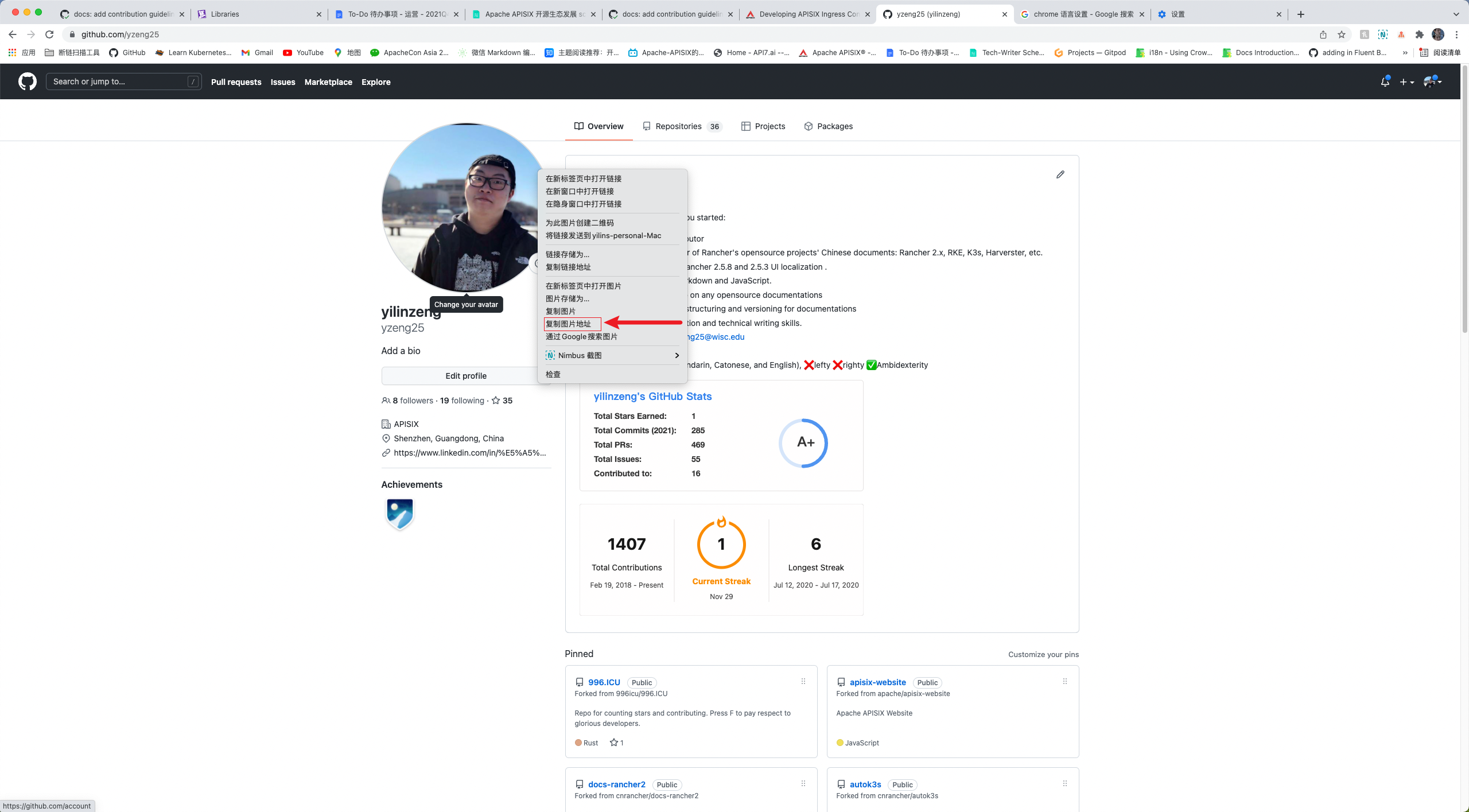
-1. Open Chrome or your preferred browser.
-2. Enter the author's GitHub address to access the author's GitHub home page.
-3. Right-click on the author's avatar, and click "copy image address".
-4. Paste image address to the authors.image_url field.
-
-
-#### truncate and overview
-
-```markdown
-> overview
-
-<!--truncate-->
-```
-
-An overview is entered starting with `>` and a space followed by texts. The
overview can be your summary of the article, or it can be the first paragraph
of the article with a summary description. When you are done, type `<!
--truncate-->`. `<! --truncate--->` serves to display the `<! --truncate--->`
above the blog overview, or if there is no overview, nothing will be displayed;
if there is an overview but no `<! --truncate--->`, it will show the whole
thing. For more information, pleas [...]
-
-#### Difference between Description and Overview
-
-Some people may ask: why should we add the same contents in two fields? First
of all, they are indeed both summary texts. Second, they are different in the
following way: description is used for SEO enhancements, the overview is used
to display content on the blog page.
-
-### Fix typos or formats
-
-1. Locate the file. Chinese blogs are located in
`website/i18n/zh/docusaurus-plugin-content-blog` directory. English blogs are
located in the `website/blog` directory.
-2. Fix the typos or formats.
-3. Submit a pull request to our repository.
-
-## Before you contribute
-
-### Commit message style
-
-1. The initial/first commit message should follow this style: `docs: type in
your actual commit message`. Otherwise, the CI tests would fail and you would
need to modify the commit message.
-2. The later commit messages would be nice if you follow these styles (it is
totally fine if you do it your way):
- 1. `update: type in your actual commit message`
- 2. `fix: type in your actual commit message`
-
-### Pull request title guide
-
-Pull request title is usually generated from the first commit message, this is
why we need a uniform message for the first commit message. It is easier to
maintain this way. Remember this is the repository for website and blog, titles
start with prefix `docs:` can help us track down particular pull requests.
-
-## How to contribute via git command line
-
-### Local repository configuration
-
-1. Open your browser and visit https://github.com/apache/apisix-website.
-2. Click 'fork' in the upper right corner to fork it to your repository.
-3. Copy your own remote repository address.
-4. Open your terminal, and type in the following commands. Change to your
desired directory to store the files, and git clone it from remote.
-
- ```sh
- cd {path or directory name} # change to your desired directory
- git clone 'https://github.com/{your GitHub Username}/apisix-website' #
After forking the repo to your own GitHub, please clone your own repo to local
- ```
-
-5. View the relationship between your repository and your remote repository.
The result should be two lines containing 'origin' messages only.
-
- ```sh
- git remote -v
- ```
-
-6. Now you need to add the main repository as 'upstream'.
+This is a required field used to enhance SEO performance.
- ```sh
- git remote add upstream https://github.com/apache/apisix-website.git
- ```
+Usually the first three keywords are "APISIX", "Apache APISIX" and "API
Gateway", and the last two are specific to the blog post.
- To verify that 'upstream' is added: run git remote -v , the result should
be 4 lines, 2 with 'origin' and 2 with 'upstream'.
-
-These steps conclude the process of adding and configuring a local repository.
Next, let's see how to add a new blog, modify content, and how to resolve
conflicts.
-
-### Add a new blog
-
-1. Switch to the apisix-website directory.
-
- ```sh
- cd apisix-website
- ```
-
-2. Then find out how many branches there are and which branch you are
currently in.
-
- ```sh
- git branch
- ```
-
- Ideally, there should be few branches and they should stay on the branch
where the last change was made or on the master branch.
-
-3. Create a new branch and specify that it is upstream of the master branch of
the GitHub master repository.
-
- ```sh
- git checkout -b {branch name} upstream/master # replace {branch name} with
actual branch name
- ```
-
-4. Pull the latest changes from the master branch in the main repository.
-
- ```sh
- git fetch upstream master
- ```
-
-5. Synchronize changes to the local branch.
-
- ```sh
- git rebase
- ```
-
-6. Add a new blog.
-
-7. When you're done editing blogs, run `git add` command to temporarily store
them.
-
- ```sh
- git add .
- ```
-
-8. Then run `git commit` to record your changes.
-
- ```sh
- git commit -m "docs: a brief message about this change" # message should
be concise and shorter than 50 characters
- ```
-
-9. Finally, run git push to push the changes to the remote repository.
-
- ```sh
- git push origin
- ```
-
-10. Visit the GitHub website in your browser, create a pull request, and edit
the change information.
-
-11. Complete your pull request.
-
-### Fix typos or formats
-
-1. First switch to the apisix-website path.
-
- ```sh
- cd apisix-website
- ```
-
-2. Then find out how many branches there are and which branch you are
currently in.
-
- ```sh
- git branch
- ```
-
- Ideally, there should be few branches and they should stay on the branch
where the last change was made or on the master branch.
-
-3. Create a new branch and specify that it is upstream of the master branch of
the GitHub master repository.
-
- ```sh
- git checkout -b {branch name} upstream/master # replace {branch name} with
actual branch name
- ```
-
-4. Pull the latest changes from the master branch in the main repository.
-
- ```sh
- git fetch upstream master
- ```
-
-5. Synchronize changes to the local branch.
-
- ```sh
- git rebase
- ```
-
-6. Fix typos or formats.
+##### description
-7. When you're done making changes, run `git add` command to temporarily store
them.
+This is also a required field used to enhance SEO performance.
- ```sh
- git add .
- ```
+A brief summary of the blog post would be a good description. A good rule of
thumb is to keep the number of characters in the description between 150 and
170.
-8. Then run `git commit` to record your changes.
+##### tags
- ```sh
- git commit -m "docs: a brief message about this change" # message should
be concise and shorter than 50 characters
- ```
+This is a required filed used to categorize the blog post.
-9. Finally, run git push to push the changes to the remote repository.
+Each post can have multiple tags. The tags used currently are given below and
each post usually fits into one or more of these tags.
- ```sh
- git push origin
- ```
+Each post can have more than one tag. The available tags and explanations are
as follows. If none of the tags below fits, please leave a comment in your pull
request, and we will handle it together. Please note that these tags and rules
of applying tags could change over time.
-10. Open the GitHub code repository in your browser, create the PR, and edit
the change information.
+- **Community**: Everything related to community, for example, "How to
contribute to an open source project without writing code?".
+- **Events**: Related to events, for example, live streams, event previews,
meetups and project meetings.
+- **Interview**: For example, Dr. Yang Li interview, Summer of Programming
interview.
+- **Practical Case**: Includes best practices to follow. This is easily
confused with **Technology**. The content of the article determines which tag
the post belongs to. For example, "Running Apache APISIX on the xxx platform"
would belong to the Practical Case tag and "Apache APISIX vs Envoy" would
belong to the Technology tag.
+- **Release**: Tag for release notes. Note that the release notes in blog
posts are polished whereas inline release notes are written by developers.
+- **Security**: Security vulnerability notifications and methods to bypass
security vulnerabilities. Currently there are [five
articles](/blog/tags/security/), and they generally have CVE-xxxxxxx in its
title.
+- **Technology**: Technical articles. Should not be confused with **Practical
Case** (see above).
+- **User Case**: Posts about using Apache APISIX. Tell us how you are using
Apache APISIX!
-11. Complete your pull request.
+Reviewers will help you find the right tags while reviewing your PR.
-### Resolving conflicts
+##### Obtaining authors.image_url
-#### Why does conflict occur
+1. Open your browser.
+2. Enter the url to author's GitHub page followed by a .png
(https://github.com/author-username.png).
+3. This will open the author's avatar image and you can copy the url to the
image.
+4. Paste this image url to the `authors.image_url` field.
-Conflict can occur when you submit a PR, and the reason for the conflict is
simple: when you make a local change, someone else has committed the PR and
merged it into master, and the master you pulled at the time is not the latest
version anymore. GitHub is confused because it has no way to determine which of
the two versions of the same file prevails. So it throws the problem to the
person who created it: whoever's pull request caused the conflict is in charge
of the problem.
+
-#### How to resolve conflict
+#### Truncate and summary
-##### Rebase is a good method
+```markdown
+title: "Blog's Title"
+---
+This is the summary.
-1. Since the master pulled at the time is out of date, then pull the latest
again.
+And this is also part of the summary.
- ```sh
- git fetch upstream master
- ```
+<!--truncate-->
-2. Sync the latest to this local branch.
+But this is not part of the summary.
+```
- ```sh
- git rebase
- ```
+You can use the `<!--truncate-->` marker in your posts to decide what will be
shown as the post summary in the list of posts page.
-3. Handle conflict locally.
+Anything above `<!--truncate-->` will be part of this summary.
-4. After you're done, run `git add`, `git commit`, and `git push -f` again.
+You can learn more from the [Docusaurus
docs](https://docusaurus.io/docs/blog#blog-list).
-##### Cherry-pick is an alternative
+##### Difference between Description and Summary
-1. Create a new branch locally.
+Summary and description could essentially be the same. Then why do we repeat
them on two fields?
- ```sh
- git checkout -b {new branch name} upstream/master
- ```
+Well, the description's primary purpose is for SEO enhancement and is mainly
read by computers where as the summary gives human readers an idea about the
content of the blog post.
-2. Pull the latest changes from the remote master repository.
+### Fixing typos, formatting and keeping up-to-date
- ```sh
- git fetch upstream master
- ```
+You can also make impactful contributions by fixing/updating the existing blog
posts.
-3. Move all changes from the original branch to the new branch.
+1. To start, locate the file for the blog post. Note that English blogs are
located in the `website/blog` directory and the Chinese blogs are located in
`website/i18n/zh/docusaurus-plugin-content-blog` directory.
+2. Once you locate the file, make the necessary changes.
+3. [Open a pull request](/docs/general/contributor-guide/#open-a-pull-request)
with the updated blog post.
- ```sh
- git cherry-pick {commit number}
- ```
+## Contributing Guide
-4. Handle conflict locally.
-5. Run `git add`, `git commit`, and `git push` once.
+Please make sure you follow the [Contributor
Guide](/docs/general/contributor-guide/) while you contribute blog posts.
diff --git a/website/docs/general/committer-guide.md
b/website/docs/general/committer-guide.md
index f14c9d2..43af648 100644
--- a/website/docs/general/committer-guide.md
+++ b/website/docs/general/committer-guide.md
@@ -6,68 +6,72 @@ keywords:
- APISIX
- Apache APISIX
- committer guide
-description: This article is a set of guidelines for Apache APISIX committers.
It provides general guideline of contritions, and the way of promoting from
contributors to commiter, and from committer to PMC.
+description: This article covers some guidelines for Apache APISIX committers.
It walks through the type of contributions and the contributor ladder and how
contributors can become committers and then PMC members.
---
-## What can I contribute?
+This article walks through the guidelines for Apache APISIX contributors.
-All forms of contributions are accepted, for example:
+See [Contributor Guide](/docs/general/contributor-guide/) to learn more about
the contributing process.
-1. Take a look at issues with a tag called Good first issue or Help wanted.
+## What Can I Contribute?
-2. Join the discussion on the mailing list.
+Any and all forms of contributions are welcome! For example you can,
-3. Answer questions on issues.
+- Fix issues tagged "[good first
issue](/docs/general/contributor-guide/#good-first-issues)" or "[help
wanted](https://github.com/apache/apisix/issues?q=is%3Aopen+label%3A%22help+wanted%22+sort%3Aupdated-desc)".
-4. Fix bugs reported on issues, and send us a pull request.
+- Join the discussions on the [mailing list](/docs/general/subscribe-guide/).
-5. Review the existing pull request.
+- Answer questions in [issues](https://github.com/apache/apisix/issues) and
[discussions](https://github.com/apache/apisix/discussions).
-6. Improve the website.
+- Review open [pull
requests](https://github.com/apache/apisix/pulls?q=is%3Apr+is%3Aopen+sort%3Aupdated-desc).
-7. Write a document or article.
+- Improve the website.
-8. Any form of contribution that is not mentioned above.
+- Improve documentation or write a blog post.
-If you would like to contribute, please send an email to
[email protected] to let us know!
+- Any other form of code or non-code contribution.
+
+If you would like to contribute, let us know by sending an email to
[email protected]!
## How to become an APISIX committer?
-Anyone can be a contributor to an Apache project. Being a contributor simply
means that you take an interest in the project and contribute in some way,
ranging from asking sensible questions (which documents the project and
provides feedback to developers) to provide new features as patches.
+Anyone can be a contributor to an Apache project. Being a contributor means
that you take an interest in the project and contribute to it in some way,
ranging from asking sensible questions (which documents the project and
provides feedback to developers) to working on new features and patches.
-If you become a valuable contributor to the project you may well be invited to
become a committer. Committer is a term used at the ASF to signify someone who
is committed to a particular project. It brings with it the privilege of
writing access to the project repository and resources.
+If you become a valuable contributor to the project you may be invited to
become a Committer. A Committer is a term used at the ASF to signify someone
who is committed to a particular project. It brings with it the privilege of
write access to the project repository and resources.
More details could be found [here](https://community.apache.org/contributors/).
## Promotion
-The Apache APISIX community follows the Apache Community’s process of
accepting a new committer. After a contributor participates in APISIX's
community actively, (P)PMC and Committers will make decisions to invite the
contributor to join Committers and (P)PMC.
+The Apache APISIX community follows the Apache Community’s process of
accepting a new committer. After a contributor participates in APISIX's
community actively, (P)PMC members will decide whether to invite the
contributor to join Committers and (P)PMC.
-Processes are:
+1. This process starts with a discussion and vote in @private. Only the
current PMC members can nominate a new committer or a PMC member. Each new
email in the discussion will extend the process for 72 hours. Please remain
patient as PMC members arrive at a decision.
-1. Start the discussion and vote in @private. Only current PMC members could
nominate
+2. If the vote passes, an offer letter is sent to the contributor to become a
committer with @private CC’ed.
-2. If the vote passes, send an offer to become a committer with @private CC’ed
+3. The new committer can then sign the
[ICLA](https://www.apache.org/licenses/contributor-agreements.html#clas) and
apply for an Apache ID and email address.
-3. New committer signs ICLA and apply Apache ID and email address
+4. You can now link your Apache account and your GitHub account via
[GitBox](https://gitbox.apache.org/setup/).
-4. Update the Team page.
+5. The [Team](/team) page is updated with the new committer.
## Responsibilities
-1. Develop new features
+The following are the expected responsibilities of an ASF Committer.
+
+1. Develop new features.
-2. Refactor codes
+2. Refactor code.
-3. Review PR reliably and in time
+3. Review pull requests reliably and in time.
-4. Consider and accept feature requests
+4. Consider and accept feature requests.
-5. Answer questions
+5. Answer questions.
-6. Update documentation and examples
+6. Update documentation and examples.
-7. Improve processes and tools
+7. Improve processes and tools.
8. Guide new contributors to join the community.
diff --git a/website/docs/general/community.md
b/website/docs/general/community.md
index 90efa0f..f1c0137 100644
--- a/website/docs/general/community.md
+++ b/website/docs/general/community.md
@@ -8,15 +8,16 @@ keywords:
description: This article provides useful information about Apache APISIX's
Community, including 2 ways to join the Slack channel.
---
-## Slack
+The Apache APISIX community communicates over Slack and a mailing list. Join
both to be in the loop for discussions related to the project and the community.
-Apache APISIX provides 2 ways to join the Slack channel.
+## Joining the Mailing List
-### Get help from Mailing List (recommended)
+See the [Subscription Guide](/docs/general/subscribe-guide) to learn more
about how you can subscribe to the Apache APISIX mailing list.
-1. Subscribe the mailing list according to [this guide](subscribe-guide.md);
-2. Send a mail to [[email protected]](mailto:[email protected]) and
wait for reply.
+## Joining the Slack Channel
-### Use the invitation link below
+You can join the Slack channel directly using [this
invite](https://join.slack.com/t/the-asf/shared_invite/zt-vlfbf7ch-HkbNHiU_uDlcH_RvaHv9gQ).
-Please use this link
[https://join.slack.com/t/the-asf/shared_invite/zt-vlfbf7ch-HkbNHiU_uDlcH_RvaHv9gQ](https://join.slack.com/t/the-asf/shared_invite/zt-vlfbf7ch-HkbNHiU_uDlcH_RvaHv9gQ).
If this link is expired, please use the mailing list way.
+_Please open an issue if this link is expired._
+
+You can also join via the [mailing list](/docs/general/subscribe-guide) by
sending an email to the list ([email protected]) asking for help to join.
diff --git a/website/docs/general/integrate-with-project-docs.md
b/website/docs/general/integrate-with-project-docs.md
index 41f2bca..769d563 100644
--- a/website/docs/general/integrate-with-project-docs.md
+++ b/website/docs/general/integrate-with-project-docs.md
@@ -1,6 +1,6 @@
---
id: integrate-with-project-docs
-title: Integrate with Project documentations
+title: Integrating Project Documentation
keywords:
- API gateway
- APISIX
@@ -11,7 +11,7 @@ description: This article explains Apache APISIX documents'
directory structure,
## Directory Structure
-Put all Markdown files into the latest directory
+The docs are organized as shown below. To create a new page, create a new file
in the latest folder of the language you are writing the doc in.
```text
/docs
@@ -36,13 +36,13 @@ Put all Markdown files into the latest directory
└── ...
```
-## Configuration file
+## Configuration File
-This file is located in `/docs/<locale>/latest/config.json`, where locale is
locale codes, please refer to
https://www.science.co.il/language/Locale-codes.php, locale is all lowercase.
Don't forget to remove the comment after copying JSON.
+The configuration file is located in `/docs/<locale>/latest/config.json` where
locale represents the locale code (language). Refer to [Locale
Codes](https://www.science.co.il/language/Locale-codes.php) for more info. Note
that locale is always all lowercase.
-More information about sidebar can be found at
https://v2.docusaurus.io/docs/next/sidebar
+You can learn more about the sidebar from the [Docusaurus
docs](https://v2.docusaurus.io/docs/next/sidebar).
-```jsonc
+```json
{
"version": 2.3,
"sidebar": [
@@ -77,10 +77,12 @@ More information about sidebar can be found at
https://v2.docusaurus.io/docs/nex
}
```
-## Markdown formatting restrictions
+## Markdown Formatting Guide
-- Use relative paths within Markdown files `../xxx/xxx`, not absolute paths
`/docs/en/xxx/xxx`. If you want to refer to files outside the docs directory,
please use `https://github.com/apache/apisix-xxx/blob/master/xxx/xxx.xxx`
+Please follow this guide while working with markdown files.
-- You need to use Markdown syntax when introducing images, i.e. ``. Images cannot be introduced using HTML tags, i.e.
`<img src=". /assets/xxxx.png" />`
+- Always use relative paths within markdown files `../xxx/xxx` and not
absolute paths `/docs/en/xxx/xxx`. To refer files outside the docs directory,
use the format `https://github.com/apache/apisix-xxx/blob/master/xxx/xxx.xxx`
-- If the Markdown file contains HTML tags within it, be sure to make sure the
tags are closed. For example `<br>` must be written as `<br/>`
+- Always use markdown syntax to include images (``). **Don't** use HTML tags as an alternative (`<img
src=". /assets/xxxx.png" />`).
+
+- Make sure to close the HTML tags if the markdown file has any. For example,
a `<br>` tag must be written as `<br/>`.
diff --git a/website/docs/general/subscribe-guide.md
b/website/docs/general/subscribe-guide.md
index b2baa94..5d773b5 100644
--- a/website/docs/general/subscribe-guide.md
+++ b/website/docs/general/subscribe-guide.md
@@ -1,23 +1,23 @@
---
id: subscribe-guide
slug: /subscribe-guide
-title: Subscribe Guide
+title: Subscription Guide
keywords:
- API gateway
- APISIX
- Apache APISIX
- Subscribe Guide
-description: During the process of using Apache APISIX, if there has any
problems, suggestion or new ideas, please feel free to use the Apache
mailing-list to participate in the community construction.
+description: Subscribe to the Apache APISIX mailing list to discuss issues,
suggest new ideas and participate in other community discussions.
---
-During the process of using Apache APISIX, if there has any problems,
suggestion or new ideas, please feel free to use the Apache mailing-list to
participate in the community construction.
+You can subscribe to the Apache APISIX mailing list to discuss issues, suggest
new ideas and participate in other community discussions.
-1. Send e-mail to subscribe the mailing-list first. Use your mailbox to send
an e-mail to [email protected] with any subjects or contents.
+1. To subscribe to the mailing list, first send an email to
[email protected].
-2. Receive and reply the confirmation e-mail. After Step 1, you will receive a
confirmation e-mail from [email protected] (if you can not receive
that, please check “RSS feeds”, “junk e-mail” or other items). Reply that
e-mail directly or click the link in e-mail to reply, with any subjects or
contents.
+2. Once you send the email, you will receive a confirmation e-mail from
[email protected].
-3. Receive the Welcome e-mail. After finishing the two steps above, an e-mail
with the subject of WELCOME to [email protected] will be sent to your
e-mail address. Congrats, you have succeeded in subscribing Apache APISIX
mailing-list.
+3. Reply to this email to confirm your subscription.
-4. At this stage, you can interact with community by your subscribed email or
track email conversations by Archived email list.
+4. Once you confirm, you will receive a welcome email with instructions on
using and communicating over the mailing list.
-5. To view the Archived email lists, check out [history
mailing-list](https://lists.apache.org/list.html?apisix.apache.org).
+5. To view archived emails from the mailing list, check out the
[history](https://lists.apache.org/list.html?apisix.apache.org).



