yzeng25 commented on a change in pull request #924:
URL: https://github.com/apache/apisix-website/pull/924#discussion_r818282383
##########
File path: website/blog/2022/03/01/apisix-integration-public-api-plugin.md
##########
@@ -0,0 +1,249 @@
+---
+title: "API Gateway Apache APISIX integration `public-api` plugin"
Review comment:
```suggestion
title: "API Gateway Apache APISIX provides enhancements on API Management"
```
##########
File path:
website/i18n/zh/docusaurus-plugin-content-blog/2022/03/01/apisix-integration-public-api-plugin.md
##########
@@ -0,0 +1,249 @@
+---
+title: "public API 处理能力再增强,API 网关 Apache APISIX 支持 `public-api` 插件"
Review comment:
”新插件上线,Apache APISIX 增强 public API 管理功能“ just a thought, title starting
with not capitalized letter looks lame.
##########
File path:
website/i18n/zh/docusaurus-plugin-content-blog/2022/03/01/apisix-integration-public-api-plugin.md
##########
@@ -0,0 +1,249 @@
+---
+title: "public API 处理能力再增强,API 网关 Apache APISIX 支持 `public-api` 插件"
+authors:
+ - name: "白泽平"
+ title: "Author"
+ url: "https://github.com/bzp2010";
+ image_url: "https://avatars.githubusercontent.com/u/8078418?v=4";
+ - name: "韩飞"
+ title: "Technical Writer"
+ url: "https://github.com/hf400159";
+ image_url: "https://avatars.githubusercontent.com/u/97138894?v=4";
+keywords:
+- Apache APISIX
+- API Gateway
+- Security
+- Ecosystem
+description: 本文为您介绍了 API 网关 Apache APISIX `public-api` 插件的原理及使用方法。
+tags: [Technology,Ecosystem]
+---
+
+> 本文为您介绍了 API 网关 Apache APISIX `public-api` 插件的原理及使用方法。
+
+<!--truncate-->
+
+## 背景信息
+
+Apache APISIX 是一个动态、实时、高性能的 API
网关,提供负载均衡、动态上游、灰度发布、服务熔断、身份认证、可观测性等丰富的流量管理功能。作为 API 网关,Apache APISIX
不仅拥有众多实用的插件,而且支持插件动态变更、热插拔和开发自定义插件。
+
+当前用户在 Apache APISIX 中开发自定义插件时,可以为插件定义一些 API(下称 public API),比如在当前的 `jwt-auth`
插件中,它实现并提供了一个 `/apisix/plugin/jwt/sign` 接口用于签发 JWT,由于此接口不是通过 Admin API
添加的,因此无法像管理 Route 一样管理此类接口。
+
+在实际应用场景中,提供的接口是面向内部调用的,而非开放在公网供任何人调用。为了应对这种场景,Apache APISIX 设计了
[`plugin-interceptors`](https://apisix.apache.org/zh/docs/apisix/plugin-interceptors/)
(插件拦截器),通过此功能可以让 public API 应用部分插件并实现请求过滤,但是当前仅支持
[`ip-restriction`](https://apisix.apache.org/zh/docs/apisix/plugins/ip-restriction)
插件。
+
+由上可以看出,Apache APISIX 对于 public API 的请求过滤能力是比较弱的,所以不能使用 Apache APISIX
中其他插件实现复杂的认证和授权能力。
+
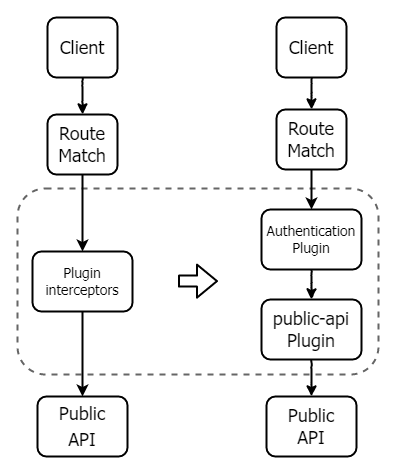
+因此,Apache APISIX 设计了 `public-api` 插件,它替换了功能有限且使用复杂的插件拦截器。通过这个插件,可以解决 public
API 使用过程中的痛点,您可以为 public API 设置自定义的 `uri`,可以配置任何类型的插件。下图展示了使用 `public-api`
前后的变化。
+
+
+
+## 初识 public-api
+
+本节以 jwt-auth 插件的 /apisix/plugin/jwt/sign 接口为例,为您介绍 `public-api`
插件两种使用方法和一种场景示例。。
+
+在使用 `public-api` 插件之前,如果在插件开发中使用 `_M.api()` 注册了 public API 后,APISIX
会默认将它暴露出来,您可以直接在 HTTP 端口调用这个 API。现在,您需要手动创建一个路由,配置 `public-api` 插件,才可以将 API 转发至
`public-api` 插件中。
+
+### 确认 API 是否被开放
+
+您可以通过下述命令请求 API 地址,通过返回结果可以看到 /apisix/plugin/jwt/sign 默认情况下并没有被暴露出来,是不可用的。
Review comment:
```suggestion
您可以通过下述命令请求 API 地址,通过返回结果可以看到 `/apisix/plugin/jwt/sign` 默认情况下并没有被暴露出来,是不可用的。
```
##########
File path: website/blog/2022/03/01/apisix-integration-public-api-plugin.md
##########
@@ -0,0 +1,249 @@
+---
+title: "API Gateway Apache APISIX integration `public-api` plugin"
Review comment:
That `public-api` does not display well on title.
##########
File path: website/blog/2022/03/01/apisix-integration-public-api-plugin.md
##########
@@ -0,0 +1,249 @@
+---
+title: "API Gateway Apache APISIX integration `public-api` plugin"
+authors:
+ - name: "Zeping Bai"
+ title: "Author"
+ url: "https://github.com/bzp2010";
+ image_url: "https://avatars.githubusercontent.com/u/8078418?v=4";
+ - name: "Fei Han"
+ title: "Technical Writer"
+ url: "https://github.com/hf400159";
+ image_url: "https://avatars.githubusercontent.com/u/97138894?v=4";
+keywords:
+- Apache APISIX
+- API Gateway
+- Security
+- Ecosystem
+description: This article introduces the principle and usage of API gateway
Apache APISIX native plugin public-API.
+tags: [Technology,Ecosystem]
+---
+
+> This article introduces the principle and usage of API gateway Apache APISIX
native plugin public-API.
+
+<!--truncate-->
+
+## Background Information
+
+Apache APISIX is a dynamic, real-time, high-performance API gateway that
provides rich traffic management features such as load balancing, dynamic
upstream, canary release, circuit breaking, authentication, observability, and
more. As an API gateway, Apache APISIX not only has many useful plug-ins, but
also supports dynamic plug-in change and hot plug.
+
+When users develop custom plugins in Apache APISIX, they can define some APIs
(hereinafter referred to as: public API) for the plugins. For example, the
`jwt-auth` plugin, which implements and provides the `/apisix/plugin/jwt/sign`
interface for signing JWT, because this interface is not added through the
Admin API, it can't be managed like a route.
+
+In practical application scenarios, the provided interface is for internal
calls, rather than being open on the public network for anyone to call. In
order to deal with this scenario, Apache APISIX designed
[`plugin-interceptors`](https://apisix.apache.org/zh/docs/apisix/plugin-interceptors/),
which allows the public API to apply some plugins and implement request
filtering, but currently only
[`ip-restriction`](https://apisix.apache.org/zh/docs/apisix/plugins/ip-restriction)
plugins are supported.
+
+It can be seen from the above that Apache APISIX's ability to request public
API for filtering is relatively weak, so it is impossible to use the other
plugins in Apache APISIX to achieve complex authentication and authorization.
+
+Therefore, Apache APISIX has designed a `public-api` plugin that replaces the
limited functionality and complex use of `plugin-interceptors`. With this
plugin, you can solve the pain points in using the public API. You can set a
custom URI for the public API and configure any type of plugin. The following
figure shows the changes before and after using `public-api`.
+
+
+
+## Initial knowledge `public-api`
Review comment:
```suggestion
## Initial Knowledge about `public-api`
```
##########
File path: website/blog/2022/03/01/apisix-integration-public-api-plugin.md
##########
@@ -0,0 +1,249 @@
+---
+title: "API Gateway Apache APISIX integration `public-api` plugin"
+authors:
+ - name: "Zeping Bai"
+ title: "Author"
+ url: "https://github.com/bzp2010";
+ image_url: "https://avatars.githubusercontent.com/u/8078418?v=4";
+ - name: "Fei Han"
+ title: "Technical Writer"
+ url: "https://github.com/hf400159";
+ image_url: "https://avatars.githubusercontent.com/u/97138894?v=4";
+keywords:
+- Apache APISIX
+- API Gateway
+- Security
+- Ecosystem
+description: This article introduces the principle and usage of API gateway
Apache APISIX native plugin public-API.
+tags: [Technology,Ecosystem]
+---
+
+> This article introduces the principle and usage of API gateway Apache APISIX
native plugin public-API.
+
+<!--truncate-->
+
+## Background Information
+
+Apache APISIX is a dynamic, real-time, high-performance API gateway that
provides rich traffic management features such as load balancing, dynamic
upstream, canary release, circuit breaking, authentication, observability, and
more. As an API gateway, Apache APISIX not only has many useful plug-ins, but
also supports dynamic plug-in change and hot plug.
+
+When users develop custom plugins in Apache APISIX, they can define some APIs
(hereinafter referred to as: public API) for the plugins. For example, the
`jwt-auth` plugin, which implements and provides the `/apisix/plugin/jwt/sign`
interface for signing JWT, because this interface is not added through the
Admin API, it can't be managed like a route.
+
+In practical application scenarios, the provided interface is for internal
calls, rather than being open on the public network for anyone to call. In
order to deal with this scenario, Apache APISIX designed
[`plugin-interceptors`](https://apisix.apache.org/zh/docs/apisix/plugin-interceptors/),
which allows the public API to apply some plugins and implement request
filtering, but currently only
[`ip-restriction`](https://apisix.apache.org/zh/docs/apisix/plugins/ip-restriction)
plugins are supported.
+
+It can be seen from the above that Apache APISIX's ability to request public
API for filtering is relatively weak, so it is impossible to use the other
plugins in Apache APISIX to achieve complex authentication and authorization.
+
+Therefore, Apache APISIX has designed a `public-api` plugin that replaces the
limited functionality and complex use of `plugin-interceptors`. With this
plugin, you can solve the pain points in using the public API. You can set a
custom URI for the public API and configure any type of plugin. The following
figure shows the changes before and after using `public-api`.
+
+
+
+## Initial knowledge `public-api`
+
+This section takes the `/apisix/plugin/jwt/sign` interface of the `jwt-auth`
plugin as an example to introduce two usage methods and a scenario example of
the `public-api` plugin.
+
+Before using the `public-api` plugin, if the public API is registered using
`_M.api()` in plugin development, APISIX will expose it by default and you can
call it directly on the HTTP port. Now you need to manually create a route and
configure the `public-api` plugin before you can forward the API to the
`public-api` plugin.
+
+### Confirm whether API is Open
Review comment:
```suggestion
### Confirm Whether the API is Open
```
##########
File path:
website/i18n/zh/docusaurus-plugin-content-blog/2022/03/01/apisix-integration-public-api-plugin.md
##########
@@ -0,0 +1,249 @@
+---
+title: "public API 处理能力再增强,API 网关 Apache APISIX 支持 `public-api` 插件"
+authors:
+ - name: "白泽平"
+ title: "Author"
+ url: "https://github.com/bzp2010";
+ image_url: "https://avatars.githubusercontent.com/u/8078418?v=4";
+ - name: "韩飞"
+ title: "Technical Writer"
+ url: "https://github.com/hf400159";
+ image_url: "https://avatars.githubusercontent.com/u/97138894?v=4";
+keywords:
+- Apache APISIX
+- API Gateway
+- Security
+- Ecosystem
+description: 本文为您介绍了 API 网关 Apache APISIX `public-api` 插件的原理及使用方法。
+tags: [Technology,Ecosystem]
+---
+
+> 本文为您介绍了 API 网关 Apache APISIX `public-api` 插件的原理及使用方法。
+
+<!--truncate-->
+
+## 背景信息
+
+Apache APISIX 是一个动态、实时、高性能的 API
网关,提供负载均衡、动态上游、灰度发布、服务熔断、身份认证、可观测性等丰富的流量管理功能。作为 API 网关,Apache APISIX
不仅拥有众多实用的插件,而且支持插件动态变更、热插拔和开发自定义插件。
+
+当前用户在 Apache APISIX 中开发自定义插件时,可以为插件定义一些 API(下称 public API),比如在当前的 `jwt-auth`
插件中,它实现并提供了一个 `/apisix/plugin/jwt/sign` 接口用于签发 JWT,由于此接口不是通过 Admin API
添加的,因此无法像管理 Route 一样管理此类接口。
+
+在实际应用场景中,提供的接口是面向内部调用的,而非开放在公网供任何人调用。为了应对这种场景,Apache APISIX 设计了
[`plugin-interceptors`](https://apisix.apache.org/zh/docs/apisix/plugin-interceptors/)
(插件拦截器),通过此功能可以让 public API 应用部分插件并实现请求过滤,但是当前仅支持
[`ip-restriction`](https://apisix.apache.org/zh/docs/apisix/plugins/ip-restriction)
插件。
+
+由上可以看出,Apache APISIX 对于 public API 的请求过滤能力是比较弱的,所以不能使用 Apache APISIX
中其他插件实现复杂的认证和授权能力。
+
+因此,Apache APISIX 设计了 `public-api` 插件,它替换了功能有限且使用复杂的插件拦截器。通过这个插件,可以解决 public
API 使用过程中的痛点,您可以为 public API 设置自定义的 `uri`,可以配置任何类型的插件。下图展示了使用 `public-api`
前后的变化。
+
+
+
+## 初识 public-api
+
+本节以 jwt-auth 插件的 /apisix/plugin/jwt/sign 接口为例,为您介绍 `public-api`
插件两种使用方法和一种场景示例。。
Review comment:
```suggestion
本节以 jwt-auth 插件的 `/apisix/plugin/jwt/sign` 接口为例,为您介绍 `public-api`
插件两种使用方法和一种场景示例。
```
##########
File path: website/blog/2022/03/01/apisix-integration-public-api-plugin.md
##########
@@ -0,0 +1,249 @@
+---
+title: "API Gateway Apache APISIX integration `public-api` plugin"
+authors:
+ - name: "Zeping Bai"
+ title: "Author"
+ url: "https://github.com/bzp2010";
+ image_url: "https://avatars.githubusercontent.com/u/8078418?v=4";
+ - name: "Fei Han"
+ title: "Technical Writer"
+ url: "https://github.com/hf400159";
+ image_url: "https://avatars.githubusercontent.com/u/97138894?v=4";
+keywords:
+- Apache APISIX
+- API Gateway
+- Security
+- Ecosystem
+description: This article introduces the principle and usage of API gateway
Apache APISIX native plugin public-API.
+tags: [Technology,Ecosystem]
+---
+
+> This article introduces the principle and usage of API gateway Apache APISIX
native plugin public-API.
+
+<!--truncate-->
+
+## Background Information
+
+Apache APISIX is a dynamic, real-time, high-performance API gateway that
provides rich traffic management features such as load balancing, dynamic
upstream, canary release, circuit breaking, authentication, observability, and
more. As an API gateway, Apache APISIX not only has many useful plug-ins, but
also supports dynamic plug-in change and hot plug.
+
+When users develop custom plugins in Apache APISIX, they can define some APIs
(hereinafter referred to as: public API) for the plugins. For example, the
`jwt-auth` plugin, which implements and provides the `/apisix/plugin/jwt/sign`
interface for signing JWT, because this interface is not added through the
Admin API, it can't be managed like a route.
+
+In practical application scenarios, the provided interface is for internal
calls, rather than being open on the public network for anyone to call. In
order to deal with this scenario, Apache APISIX designed
[`plugin-interceptors`](https://apisix.apache.org/zh/docs/apisix/plugin-interceptors/),
which allows the public API to apply some plugins and implement request
filtering, but currently only
[`ip-restriction`](https://apisix.apache.org/zh/docs/apisix/plugins/ip-restriction)
plugins are supported.
+
+It can be seen from the above that Apache APISIX's ability to request public
API for filtering is relatively weak, so it is impossible to use the other
plugins in Apache APISIX to achieve complex authentication and authorization.
+
+Therefore, Apache APISIX has designed a `public-api` plugin that replaces the
limited functionality and complex use of `plugin-interceptors`. With this
plugin, you can solve the pain points in using the public API. You can set a
custom URI for the public API and configure any type of plugin. The following
figure shows the changes before and after using `public-api`.
+
+
+
+## Initial knowledge `public-api`
+
+This section takes the `/apisix/plugin/jwt/sign` interface of the `jwt-auth`
plugin as an example to introduce two usage methods and a scenario example of
the `public-api` plugin.
+
+Before using the `public-api` plugin, if the public API is registered using
`_M.api()` in plugin development, APISIX will expose it by default and you can
call it directly on the HTTP port. Now you need to manually create a route and
configure the `public-api` plugin before you can forward the API to the
`public-api` plugin.
+
+### Confirm whether API is Open
+
+You can request the API path by following the command below and return the
result to see that `/apisix/plugin/jwt/sign` is not exposed by default and is
not available.
+
+```Shell
+curl -XGET 'http://127.0.0.1:9080/apisix/plugin/jwt/sign?key=user-key'
+
+{"error_msg":"404 Route Not Found"}
+```
+
+### Prerequisites
+
+You need to create a Consumer and enable the `jwt-auth` plugin to perform the
following steps.
+
+> For `jwt-auth` parameter configuration information in the example, you can
refer to the [Apache APISIX official
documentation](https://apisix.apache.org/zh/docs/apisix/plugins/jwt-auth).
+
+```Shell
+ curl -XPUT 'http://127.0.0.1:9080/apisix/admin/consumers' \
+ -H 'X-API-KEY: <api-key>' \
+ -H 'Content-Type: application/json' \
+ -d '{
+ "username": "APISIX",
+ "plugins": {
+ "jwt-auth": {
+ "key": "user-key",
+ "algorithm": "HS256"
+ }
+ }
+ }'
+```
+
+### Method 1: Basic Use
+
+1. Create and configure a Route.
+
+Create a Route based on the Consumer in the **Prerequisites**, set the `uri`
to the API address where the JWT is issued in the `jwt-auth` plugin, and open
the `public-api` plugin in the Route.
+
+```Shell
+ curl -XPUT 'http://127.0.0.1:9080/apisix/admin/routes/r1' \
+ -H 'X-API-KEY: <api-key>' \
+ -H 'Content-Type: application/json' \
+ -d'{
+ "uri": "/apisix/plugin/jwt/sign",
+ "plugins": {
+ "public-api": {}
+ }
+ }'
+```
+
+2. Test the Example.
+
+You can test with the following command, and if you see that the result is a
`JWT` string, this public API is ready to use.
+
+```Shell
+ curl -XGET 'http://127.0.0.1:9080/apisix/plugin/jwt/sign?key=user-key'
+
+ <header>.<payload>.<signature>
+```
+
+### Method 2: Customize the Path
+
+Before using the `public-api` plugin, it is difficult for users to modify a
`uri` that is open to the public API. Users of the `prometheus` plugin can
customize the `exporter uri` by modifying the configuration file, but for other
Apache APISIX plugins, this can only be done by modifying the plugin file,
which is difficult and risky in a production environment.
+
+Now you can use the `public-api` plugin to modify the URI that the public API
is open to the outside world, with the following examples.
+
+1. Create and configure a Route.
+
+Use the following command to modify the Route created in **Method 1**, set
`uri=/gen_token`, and configure the original `uri` to the `uri` field in the
`public-api` plugin.
+
+```Shell
+ curl -XPUT 'http://127.0.0.1:9080/apisix/admin/routes/r1' \
+ -H 'X-API-KEY: <api-key>' \
+ -H 'Content-Type: application/json' \
+ -d '{
+ "uri": "/gen_token",
+ "plugins": {
+ "public-api": {
+ "uri": "/apisix/plugin/jwt/sign"
+ }
+ }
+ }'
+```
+
+2. Test the Example.
+
+The public API is normally accessible with the new `uri`.
+
+```Shell
+ curl -XGET 'http://127.0.0.1:9080/gen_token?key=user-key'
+
+ <header>.<payload>.<signature>
+```
+
+The public API can't be accessed using the old `uri`.
+
+```Shell
+ curl -XGET 'http://127.0.0.1:9080/apisix/plugin/jwt/sign?key=user-key'
+
+ {"error_msg":"404 Route Not Found"}
+```
+
+### Scenario Example: Protecting Router
+
+This section describes how to use `public-api` plugin to address the business
pain of `plugin-interceptors` plugin.
+
+The following steps take the `key-auth` plugin as an example to show you how
to use the `public-api` plugin to protect the public API.
+
+> For `jwt-auth` parameter configuration information in the example, you can
refer to the [Apache APISIX official
documentation](https://apisix.apache.org/zh/docs/apisix/plugins/jwt-auth).
+
+1. Create and configure a Consumer.
+
+Create Consumer and configure the `key-auth` key.
+
+```Shell
+ curl -XPUT 'http://127.0.0.1:9080/apisix/admin/consumers' \
+ -H 'X-API-KEY: <api-key>' \
+ -H 'Content-Type: application/json' \
+ -d '{
+ "username": "APISIX",
+ "plugins": {
+ "key-auth": {
+ "key": "test-apikey"
+ }
+ }
+ }'
+```
+
+2. Create and configure a Route.
+
+Modify the route created in **Method 2** and open the key-auth plugin and
`public-api` plugin.
+
+```Shell
+ curl -XPUT 'http://127.0.0.1:9080/apisix/admin/routes/r1' \
+ -H 'X-API-KEY: <api-key>' \
+ -H 'Content-Type: application/json' \
+ -d '{
+ "uri": "/gen_token",
+ "plugins": {
+ "public-api": {
+ "uri": "/apisix/plugin/jwt/sign"
+ },
+ "key-auth": {}
+ }
+ }'
+```
+
+3. Test the Example.
+
+After testing, when the request carries the correct `apikey`, the public API
can respond normally. When the request does not carry the `apikey`, the `401`
unauthenticated status code will be returned. If the returned results of your
test are consistent with the sample status, it proves that the `key-auth`
plugin you just configured has taken effect.
+
+```Shell
+ # with corrent apikey
+ curl -XGET 'http://127.0.0.1:9080/gen_token?key=user-key'
+ -H "apikey: test-apikey"
+
+ <header>.<payload>.<signature>
+
+ # without apikey
+ curl -i -XGET 'http://127.0.0.1:9080/gen_token?key=user-key'
+
+ HTTP/1.1 401 UNAUTHORIZED
+```
+
+## Principle Explanation
+
+From the above example, you can see that the `public-api` plugin can solve the
defects of users when using the public API. This section introduces the
implementation principle in detail.
+
+The principle of `public-api` can be described in one sentence: the
`public-api` plugin transfers the previous separate public API route matching
to the plugin, and only performs public API matching for the routes that open
the plugin. The following will explain the principle in detail from two aspects.
+
+### Before Using `public-api` Plugin
+
+First, you need to understand how Apache APISIX realizes the function of
public API before integrating `public-api` plugin.
+
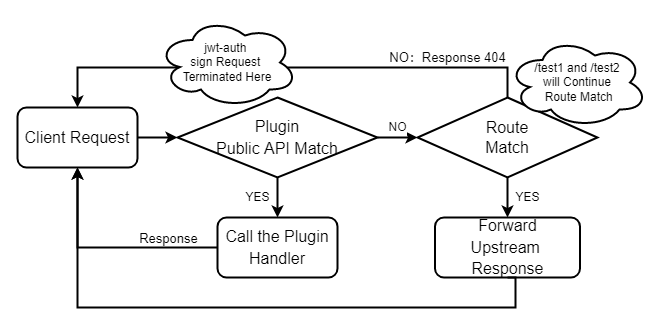
+- When apisix starts, it will load the custom plugin and build a radiotree
router using the route configuration obtained from etcd. It will be responsible
for matching the route according to the request information and calling the
correct `handler` to forward the request.
+- APISIX will create different routers for the public API of the custom plugin
and the Route created by users respectively (hereinafter referred to as public
API router and Route router).
+- When the external request arrives, the public API router first matches and
then the Route router matches. They are two completely separate parts of the
request processing flow.
+
+
+
+According to this process, if you want to apply the plugin for Route router to
the public API router, you need to manually maintain a list of plugins and
manually execute the plugin function after the public API router is matched. It
can be seen that such an architecture is complex and difficult to maintain, and
brings many problems, such as complex use (configuration based on
`plugin_metadata`), coarse grained configuration (it is difficult to implement
different policies for multiple public APIs provided in a plugin), etc.
+
+### After adding the `public-api` plugin
Review comment:
```suggestion
### After adding the `public-api` Plugin
```
--
This is an automated message from the Apache Git Service.
To respond to the message, please log on to GitHub and use the
URL above to go to the specific comment.
To unsubscribe, e-mail: [email protected]
For queries about this service, please contact Infrastructure at:
[email protected]


