yzeng25 commented on a change in pull request #930:
URL: https://github.com/apache/apisix-website/pull/930#discussion_r818330278
########## File path: website/blog/2022/03/02/apisix-integration-graphql-plugin.md ########## @@ -0,0 +1,347 @@ +--- +title: "How to Use GraphQL with API Gateway Apache APISIX" +authors: + - name: "JohnChever" + title: "Author" + url: "https://github.com/Chever-John"; + image_url: "https://avatars.githubusercontent.com/u/43690894?v=4"; + - name: "Fei Han" + title: "Technical Writer" + url: "https://github.com/hf400159"; + image_url: "https://avatars.githubusercontent.com/u/97138894?v=4"; +keywords: +- Apache APISIX +- API Gateway +- GraphQL +- Ecosystem +description: This article introduces the features of Apache APISIX and GraphQL, and how to use the API gateway Apache APISIX to proxy GraphQL requests, and proposes solutions to solve the pain points of practical scenarios. +tags: [Technology,Ecosystem] +--- + +> This article introduces the features of Apache APISIX and GraphQL, and how to use the API gateway Apache APISIX to proxy GraphQL requests, and proposes solutions to solve the pain points of practical scenarios. + +<!--truncate--> + +## Background Information + +GraphQL is an open source, API oriented data query operation language and corresponding running environment. Originally developed internally by Facebook in 2012 and publicly released in 2015. On November 7, 2018, Facebook transferred the GraphQL project to the newly established GraphQL foundation. + +You can understand GraphQL by analogy with SQL query statements. Compared with SQL query statements, GraphQL provides an easy to understand and complete description of the data in the API, so that the client can accurately obtain the data it needs through the customized description. This also allows the API to calmly face the development of increasingly complex interfaces and avoid eventually becoming a daunting complex interface. + +Apache APISIX is a dynamic, real-time, high-performance API gateway that provides rich traffic management features such as load balancing, dynamic upstream, canary release, circuit breaking, authentication, observability, and more. + +As a cloud native API gateway, Apache APISIX already has the matching ability to recognize GraphQL syntax at the beginning of its design. By efficiently matching GraphQL statements carried in requests, it can filter out abnormal traffic to further ensure security and improve system performance. + +### Scene Analysis + +We are in the era of big data and large traffic, Apache APISIX and GraphQL can be combined to form a win-win situation. The following is a detailed description of a scenario. + +This article will discuss the practical application of Apache APISIX and GraphQL in the context of microservice architecture. + +### Problems Encountered In the Actual Scene + +In the late stage of the project, business complexity and team mobility are often the problems. Micro service architecture has become a common solution to such problems. In microservice architecture, GraphQL exposes two kinds of interfaces: decentralized and centralized. However, only centralized interface design can maximize GraphQL's advantages. However, in centralized interface design, all microservices are exposed to the same interface. **So processing flow routing cannot simply forwarded according to the URL, but should be based on the request contained in different fields are forwarded.** + +Because NGINX only processes URLs and some parameters when processing requests, but only by parsing the query information in the request parameters can the resources accessed by the client be known, so as to perform routing forwarding, so this routing forwarding method cannot be completed through traditional NGINX. . In practical application scenarios, it is very dangerous to directly expose the GraphQL interface to the outside world, so a professional high-performance API gateway is required to protect the GraphQL interface. + +### Solution + +Based on the security, stability, and high performance of Apache APISIX, adding flexible routing matching rules to GraphQL is the best solution to GraphQL's centralized interface design. + +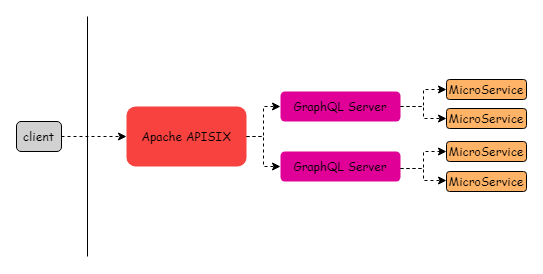 + +In this scheme, Apache APISIX is deployed before GraphQL Server as an API gateway, providing security for the whole backend system. In addition, Apache APISIX has GraphQL matching functions according to its own. Some of the requests are filtered and processed by the GraphQL Server, making the whole request resource process more efficient. + +Thanks to the dynamic features of Apache APISIX, you can enable plug-ins such as current limiting, authentication, and observability without restarting services, which further improves the operating efficiency of this solution and facilitates operation and maintenance. + +In addition, Apache APISIX can also perform different permission checks for different `graphql_operations`, and forward to different Upstream for different graphql_names. The details will be described below. + +**To sum up, the solution of Apache APISIX + GraphQL can fully utilize the advantages of GraphQL search and also have the security and stability of Apache APISIX as API gateway.** + +## Application of GraphQL In API Gateway + +### Basic Logic + +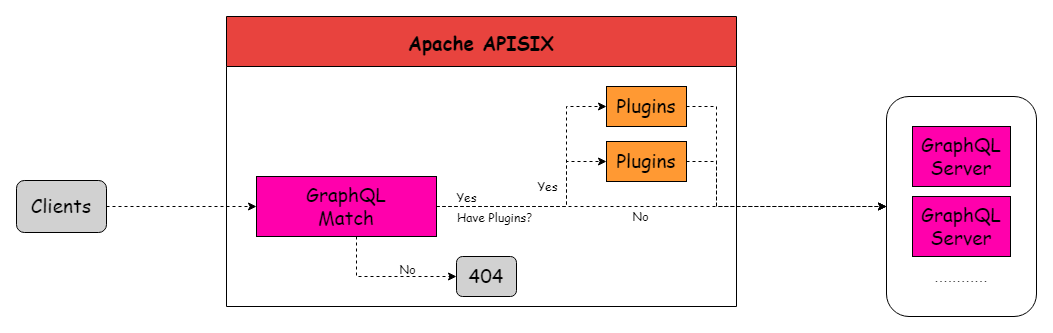 + +The execution logic of GraphQL in Apache APISIX is as follows: + +1. Clients to Apache APISIX initiated with GraphQL statements request; +2. Apache APISIX matching routing and extract the preset GraphQL data; +3. Apache APISIX matches the request data with the preset GraphQL data; + +- If the match is successful, Apache APISIX will continue to forward the request; +- If the match fails, Apache APISIX will immediately terminate the request. + +4. Whether plugins exist; + +- if the plug-in exists, the request will continue to be processed by the plug-in, and after the processing is completed, it will continue to be forwarded to the GraphQL Server; +- If no plug-in exists, the request will be forwarded directly to GraphQL Server. + +In the internal matching of APISIX core, Apache APISIX implements GraphQL support through the [`graphql-lua`](https://github.com/bjornbytes/graphql-lua) library. The Apache APISIX GraphQL parsing library will first parse the request carrying the GraphQL syntax, and then match the parsed request with the configuration data preset in the Apache APISIX database. If the match is successful, Apache APISIX will pass and forward the request, otherwise it will terminate the request. + +### Specific Configuration + +Apache APISIX currently supports filtering routes by some properties of GraphQL: + +- graphql_operation +- graphql_name +- graphql_root_fields + +The GraphQL properties correspond to the GraphQL query statement shown below: + +```Nginx +query getRepo { + owner { + name + } + repo { + created + } +} +``` + +- `graphql_operation` corresponds to `query` +- `graphql_name` corresponds to `getRepo` +- `graphql_root_fields` corresponds to `["owner", "repo"]` + +You can set up a route for Apache APISIX to verify GraphQL matching capabilities with the following example: + +```Shell +curl http://127.0.0.1:9080/apisix/admin/routes/1 \ + -H 'X-API-KEY: edd1c9f034335f136f87ad84b625c8f1' -X PUT -i -d ' + { + "methods": ["POST"], + "uri": "/_graphql", + "vars": [ + ["graphql_operation", "==", "query"], + ["graphql_name", "==", "getRepo"], + ["graphql_root_fields", "has", "owner"] + ], + "upstream": { + "type": "roundrobin", + "nodes": { + "192.168.1.200:4000": 1 + } + } + }' +``` + +Then use GraphQL statements request to visit: + +```Shell +curl -H 'content-type: application/graphql' \ +-X POST http://127.0.0.1:9080/graphql -d ' +query getRepo { + owner { + name + } + repo { + created + } +}' +``` + +If the match is successful, Apache APISIX proceeds to forward the request. + +```Shell +HTTP/1.1 200 OK +``` + +Otherwise, terminate the request. + +```Shell +HTTP/1.1 404 Not Found +``` + +## Advanced Operation + +Apache APISIX can forward to different Upstreams according to different `graphql_names`, and perform different permission checks according to different `graphql_operation`. The following will show you the code configuration for this feature. + +### Match Upstream with `graphql_name` + +1. Create the first Upstream: + +```Shell + curl http://192.168.1.200:9080/apisix/admin/upstreams/1 \ + -H 'X-API-KEY: edd1c9f034335f136f87ad84b625c8f1' -X PUT -d ' + { + "type": "chash", + "key": "remote_addr", + "nodes": { + "192.168.1.200:1980": 1 + } + }' +``` + +2. 2. Create GraphQL route bound to the first Upstream service with `graphql_name` set to `getRepo111`: + +```Shell + curl http://192.168.1.200:9080/apisix/admin/routes/1 \ + -H 'X-API-KEY: edd1c9f034335f136f87ad84b625c8f1' -X PUT -i -d ' + { + "methods": ["POST"], + "uri": "/graphql", + "vars": [ + ["graphql_operation", "==", "query"], + ["graphql_name", "==", "getRepo111"], + ["graphql_root_fields", "has", "owner"] + ], + "upstream_id": "1" + }' +``` + +3. 3. Create the second Upstream : Review comment: ```suggestion 3. Create the second Upstream: ``` ########## File path: website/blog/2022/03/02/apisix-integration-graphql-plugin.md ########## @@ -0,0 +1,347 @@ +--- +title: "How to Use GraphQL with API Gateway Apache APISIX" +authors: + - name: "JohnChever" + title: "Author" + url: "https://github.com/Chever-John"; + image_url: "https://avatars.githubusercontent.com/u/43690894?v=4"; + - name: "Fei Han" + title: "Technical Writer" + url: "https://github.com/hf400159"; + image_url: "https://avatars.githubusercontent.com/u/97138894?v=4"; +keywords: +- Apache APISIX +- API Gateway +- GraphQL +- Ecosystem +description: This article introduces the features of Apache APISIX and GraphQL, and how to use the API gateway Apache APISIX to proxy GraphQL requests, and proposes solutions to solve the pain points of practical scenarios. +tags: [Technology,Ecosystem] +--- + +> This article introduces the features of Apache APISIX and GraphQL, and how to use the API gateway Apache APISIX to proxy GraphQL requests, and proposes solutions to solve the pain points of practical scenarios. + +<!--truncate--> + +## Background Information + +GraphQL is an open source, API oriented data query operation language and corresponding running environment. Originally developed internally by Facebook in 2012 and publicly released in 2015. On November 7, 2018, Facebook transferred the GraphQL project to the newly established GraphQL foundation. + +You can understand GraphQL by analogy with SQL query statements. Compared with SQL query statements, GraphQL provides an easy to understand and complete description of the data in the API, so that the client can accurately obtain the data it needs through the customized description. This also allows the API to calmly face the development of increasingly complex interfaces and avoid eventually becoming a daunting complex interface. + +Apache APISIX is a dynamic, real-time, high-performance API gateway that provides rich traffic management features such as load balancing, dynamic upstream, canary release, circuit breaking, authentication, observability, and more. + +As a cloud native API gateway, Apache APISIX already has the matching ability to recognize GraphQL syntax at the beginning of its design. By efficiently matching GraphQL statements carried in requests, it can filter out abnormal traffic to further ensure security and improve system performance. + +### Scene Analysis + +We are in the era of big data and large traffic, Apache APISIX and GraphQL can be combined to form a win-win situation. The following is a detailed description of a scenario. + +This article will discuss the practical application of Apache APISIX and GraphQL in the context of microservice architecture. + +### Problems Encountered In the Actual Scene + +In the late stage of the project, business complexity and team mobility are often the problems. Micro service architecture has become a common solution to such problems. In microservice architecture, GraphQL exposes two kinds of interfaces: decentralized and centralized. However, only centralized interface design can maximize GraphQL's advantages. However, in centralized interface design, all microservices are exposed to the same interface. **So processing flow routing cannot simply forwarded according to the URL, but should be based on the request contained in different fields are forwarded.** + +Because NGINX only processes URLs and some parameters when processing requests, but only by parsing the query information in the request parameters can the resources accessed by the client be known, so as to perform routing forwarding, so this routing forwarding method cannot be completed through traditional NGINX. . In practical application scenarios, it is very dangerous to directly expose the GraphQL interface to the outside world, so a professional high-performance API gateway is required to protect the GraphQL interface. + +### Solution + +Based on the security, stability, and high performance of Apache APISIX, adding flexible routing matching rules to GraphQL is the best solution to GraphQL's centralized interface design. + + + +In this scheme, Apache APISIX is deployed before GraphQL Server as an API gateway, providing security for the whole backend system. In addition, Apache APISIX has GraphQL matching functions according to its own. Some of the requests are filtered and processed by the GraphQL Server, making the whole request resource process more efficient. + +Thanks to the dynamic features of Apache APISIX, you can enable plug-ins such as current limiting, authentication, and observability without restarting services, which further improves the operating efficiency of this solution and facilitates operation and maintenance. + +In addition, Apache APISIX can also perform different permission checks for different `graphql_operations`, and forward to different Upstream for different graphql_names. The details will be described below. + +**To sum up, the solution of Apache APISIX + GraphQL can fully utilize the advantages of GraphQL search and also have the security and stability of Apache APISIX as API gateway.** + +## Application of GraphQL In API Gateway + +### Basic Logic + + + +The execution logic of GraphQL in Apache APISIX is as follows: + +1. Clients to Apache APISIX initiated with GraphQL statements request; +2. Apache APISIX matching routing and extract the preset GraphQL data; +3. Apache APISIX matches the request data with the preset GraphQL data; + +- If the match is successful, Apache APISIX will continue to forward the request; +- If the match fails, Apache APISIX will immediately terminate the request. + +4. Whether plugins exist; + +- if the plug-in exists, the request will continue to be processed by the plug-in, and after the processing is completed, it will continue to be forwarded to the GraphQL Server; +- If no plug-in exists, the request will be forwarded directly to GraphQL Server. + +In the internal matching of APISIX core, Apache APISIX implements GraphQL support through the [`graphql-lua`](https://github.com/bjornbytes/graphql-lua) library. The Apache APISIX GraphQL parsing library will first parse the request carrying the GraphQL syntax, and then match the parsed request with the configuration data preset in the Apache APISIX database. If the match is successful, Apache APISIX will pass and forward the request, otherwise it will terminate the request. + +### Specific Configuration + +Apache APISIX currently supports filtering routes by some properties of GraphQL: + +- graphql_operation +- graphql_name +- graphql_root_fields + +The GraphQL properties correspond to the GraphQL query statement shown below: + +```Nginx +query getRepo { + owner { + name + } + repo { + created + } +} +``` + +- `graphql_operation` corresponds to `query` +- `graphql_name` corresponds to `getRepo` +- `graphql_root_fields` corresponds to `["owner", "repo"]` + +You can set up a route for Apache APISIX to verify GraphQL matching capabilities with the following example: + +```Shell +curl http://127.0.0.1:9080/apisix/admin/routes/1 \ + -H 'X-API-KEY: edd1c9f034335f136f87ad84b625c8f1' -X PUT -i -d ' + { + "methods": ["POST"], + "uri": "/_graphql", + "vars": [ + ["graphql_operation", "==", "query"], + ["graphql_name", "==", "getRepo"], + ["graphql_root_fields", "has", "owner"] + ], + "upstream": { + "type": "roundrobin", + "nodes": { + "192.168.1.200:4000": 1 + } + } + }' +``` + +Then use GraphQL statements request to visit: + +```Shell +curl -H 'content-type: application/graphql' \ +-X POST http://127.0.0.1:9080/graphql -d ' +query getRepo { + owner { + name + } + repo { + created + } +}' +``` + +If the match is successful, Apache APISIX proceeds to forward the request. + +```Shell +HTTP/1.1 200 OK +``` + +Otherwise, terminate the request. + +```Shell +HTTP/1.1 404 Not Found +``` + +## Advanced Operation + +Apache APISIX can forward to different Upstreams according to different `graphql_names`, and perform different permission checks according to different `graphql_operation`. The following will show you the code configuration for this feature. + +### Match Upstream with `graphql_name` + +1. Create the first Upstream: + +```Shell + curl http://192.168.1.200:9080/apisix/admin/upstreams/1 \ + -H 'X-API-KEY: edd1c9f034335f136f87ad84b625c8f1' -X PUT -d ' + { + "type": "chash", + "key": "remote_addr", + "nodes": { + "192.168.1.200:1980": 1 + } + }' +``` + +2. 2. Create GraphQL route bound to the first Upstream service with `graphql_name` set to `getRepo111`: + +```Shell + curl http://192.168.1.200:9080/apisix/admin/routes/1 \ + -H 'X-API-KEY: edd1c9f034335f136f87ad84b625c8f1' -X PUT -i -d ' + { + "methods": ["POST"], + "uri": "/graphql", + "vars": [ + ["graphql_operation", "==", "query"], + ["graphql_name", "==", "getRepo111"], + ["graphql_root_fields", "has", "owner"] + ], + "upstream_id": "1" + }' +``` + +3. 3. Create the second Upstream : + +```Shell + curl http://192.168.1.200:9080/apisix/admin/upstreams/2 \ + -H 'X-API-KEY: edd1c9f034335f136f87ad84b625c8f1' -X PUT -d ' + { + "type": "chash", + "key": "remote_addr", + "nodes": { + "192.168.1.200:1981": 1 + } + }' +``` + +4. Create a GraphQL route bound to the second upstream service with `graphql_name` set to `getRepo222`: + +```Shell + curl http://192.168.1.200:9080/apisix/admin/routes/2 \ + -H 'X-API-KEY: edd1c9f034335f136f87ad84b625c8f1' -X PUT -i -d ' + { + "methods": ["POST"], + "uri": "/graphql", + "vars": [ + ["graphql_operation", "==", "query"], + ["graphql_name", "==", "getRepo222"], + ["graphql_root_fields", "has", "owner"] + ], + "upstream_id": 2 + }' +``` + +5. Test Example + +Test with the two `graphql_name` services created earlier, you can find that Apache APISIX can automatically select the forwarded Upstream based on the different `graphql_names` in the request. Review comment: ```suggestion 5. Test with the two `graphql_name` services created earlier, you can find that Apache APISIX can automatically select the forwarded Upstream based on the different `graphql_names` in the request. ``` ########## File path: website/blog/2022/03/02/apisix-integration-graphql-plugin.md ########## @@ -0,0 +1,347 @@ +--- +title: "How to Use GraphQL with API Gateway Apache APISIX" +authors: + - name: "JohnChever" + title: "Author" + url: "https://github.com/Chever-John"; + image_url: "https://avatars.githubusercontent.com/u/43690894?v=4"; + - name: "Fei Han" + title: "Technical Writer" + url: "https://github.com/hf400159"; + image_url: "https://avatars.githubusercontent.com/u/97138894?v=4"; +keywords: +- Apache APISIX +- API Gateway +- GraphQL +- Ecosystem +description: This article introduces the features of Apache APISIX and GraphQL, and how to use the API gateway Apache APISIX to proxy GraphQL requests, and proposes solutions to solve the pain points of practical scenarios. +tags: [Technology,Ecosystem] +--- + +> This article introduces the features of Apache APISIX and GraphQL, and how to use the API gateway Apache APISIX to proxy GraphQL requests, and proposes solutions to solve the pain points of practical scenarios. + +<!--truncate--> + +## Background Information + +GraphQL is an open source, API oriented data query operation language and corresponding running environment. Originally developed internally by Facebook in 2012 and publicly released in 2015. On November 7, 2018, Facebook transferred the GraphQL project to the newly established GraphQL foundation. + +You can understand GraphQL by analogy with SQL query statements. Compared with SQL query statements, GraphQL provides an easy to understand and complete description of the data in the API, so that the client can accurately obtain the data it needs through the customized description. This also allows the API to calmly face the development of increasingly complex interfaces and avoid eventually becoming a daunting complex interface. + +Apache APISIX is a dynamic, real-time, high-performance API gateway that provides rich traffic management features such as load balancing, dynamic upstream, canary release, circuit breaking, authentication, observability, and more. + +As a cloud native API gateway, Apache APISIX already has the matching ability to recognize GraphQL syntax at the beginning of its design. By efficiently matching GraphQL statements carried in requests, it can filter out abnormal traffic to further ensure security and improve system performance. + +### Scene Analysis + +We are in the era of big data and large traffic, Apache APISIX and GraphQL can be combined to form a win-win situation. The following is a detailed description of a scenario. + +This article will discuss the practical application of Apache APISIX and GraphQL in the context of microservice architecture. + +### Problems Encountered In the Actual Scene + +In the late stage of the project, business complexity and team mobility are often the problems. Micro service architecture has become a common solution to such problems. In microservice architecture, GraphQL exposes two kinds of interfaces: decentralized and centralized. However, only centralized interface design can maximize GraphQL's advantages. However, in centralized interface design, all microservices are exposed to the same interface. **So processing flow routing cannot simply forwarded according to the URL, but should be based on the request contained in different fields are forwarded.** + +Because NGINX only processes URLs and some parameters when processing requests, but only by parsing the query information in the request parameters can the resources accessed by the client be known, so as to perform routing forwarding, so this routing forwarding method cannot be completed through traditional NGINX. . In practical application scenarios, it is very dangerous to directly expose the GraphQL interface to the outside world, so a professional high-performance API gateway is required to protect the GraphQL interface. + +### Solution + +Based on the security, stability, and high performance of Apache APISIX, adding flexible routing matching rules to GraphQL is the best solution to GraphQL's centralized interface design. + + + +In this scheme, Apache APISIX is deployed before GraphQL Server as an API gateway, providing security for the whole backend system. In addition, Apache APISIX has GraphQL matching functions according to its own. Some of the requests are filtered and processed by the GraphQL Server, making the whole request resource process more efficient. + +Thanks to the dynamic features of Apache APISIX, you can enable plug-ins such as current limiting, authentication, and observability without restarting services, which further improves the operating efficiency of this solution and facilitates operation and maintenance. + +In addition, Apache APISIX can also perform different permission checks for different `graphql_operations`, and forward to different Upstream for different graphql_names. The details will be described below. + +**To sum up, the solution of Apache APISIX + GraphQL can fully utilize the advantages of GraphQL search and also have the security and stability of Apache APISIX as API gateway.** + +## Application of GraphQL In API Gateway + +### Basic Logic + + + +The execution logic of GraphQL in Apache APISIX is as follows: + +1. Clients to Apache APISIX initiated with GraphQL statements request; +2. Apache APISIX matching routing and extract the preset GraphQL data; +3. Apache APISIX matches the request data with the preset GraphQL data; + +- If the match is successful, Apache APISIX will continue to forward the request; +- If the match fails, Apache APISIX will immediately terminate the request. + +4. Whether plugins exist; + +- if the plug-in exists, the request will continue to be processed by the plug-in, and after the processing is completed, it will continue to be forwarded to the GraphQL Server; +- If no plug-in exists, the request will be forwarded directly to GraphQL Server. + +In the internal matching of APISIX core, Apache APISIX implements GraphQL support through the [`graphql-lua`](https://github.com/bjornbytes/graphql-lua) library. The Apache APISIX GraphQL parsing library will first parse the request carrying the GraphQL syntax, and then match the parsed request with the configuration data preset in the Apache APISIX database. If the match is successful, Apache APISIX will pass and forward the request, otherwise it will terminate the request. + +### Specific Configuration + +Apache APISIX currently supports filtering routes by some properties of GraphQL: + +- graphql_operation +- graphql_name +- graphql_root_fields + +The GraphQL properties correspond to the GraphQL query statement shown below: + +```Nginx +query getRepo { + owner { + name + } + repo { + created + } +} +``` + +- `graphql_operation` corresponds to `query` +- `graphql_name` corresponds to `getRepo` +- `graphql_root_fields` corresponds to `["owner", "repo"]` + +You can set up a route for Apache APISIX to verify GraphQL matching capabilities with the following example: + +```Shell +curl http://127.0.0.1:9080/apisix/admin/routes/1 \ + -H 'X-API-KEY: edd1c9f034335f136f87ad84b625c8f1' -X PUT -i -d ' + { + "methods": ["POST"], + "uri": "/_graphql", + "vars": [ + ["graphql_operation", "==", "query"], + ["graphql_name", "==", "getRepo"], + ["graphql_root_fields", "has", "owner"] + ], + "upstream": { + "type": "roundrobin", + "nodes": { + "192.168.1.200:4000": 1 + } + } + }' +``` + +Then use GraphQL statements request to visit: + +```Shell +curl -H 'content-type: application/graphql' \ +-X POST http://127.0.0.1:9080/graphql -d ' +query getRepo { + owner { + name + } + repo { + created + } +}' +``` + +If the match is successful, Apache APISIX proceeds to forward the request. + +```Shell +HTTP/1.1 200 OK +``` + +Otherwise, terminate the request. + +```Shell +HTTP/1.1 404 Not Found +``` + +## Advanced Operation + +Apache APISIX can forward to different Upstreams according to different `graphql_names`, and perform different permission checks according to different `graphql_operation`. The following will show you the code configuration for this feature. + +### Match Upstream with `graphql_name` + +1. Create the first Upstream: + +```Shell + curl http://192.168.1.200:9080/apisix/admin/upstreams/1 \ + -H 'X-API-KEY: edd1c9f034335f136f87ad84b625c8f1' -X PUT -d ' + { + "type": "chash", + "key": "remote_addr", + "nodes": { + "192.168.1.200:1980": 1 + } + }' +``` + +2. 2. Create GraphQL route bound to the first Upstream service with `graphql_name` set to `getRepo111`: Review comment: ```suggestion 2. Create GraphQL route bound to the first Upstream service with `graphql_name` set to `getRepo111`: ``` -- This is an automated message from the Apache Git Service. To respond to the message, please log on to GitHub and use the URL above to go to the specific comment. To unsubscribe, e-mail: [email protected] For queries about this service, please contact Infrastructure at: [email protected]


