This is an automated email from the ASF dual-hosted git repository.

bzp2010 pushed a commit to branch master
in repository https://gitbox.apache.org/repos/asf/apisix-website.git
The following commit(s) were added to refs/heads/master by this push:
new 1ceb61f docs: add Gitpod blog (#934)
1ceb61f is described below
commit 1ceb61f831bfe27a522d37e7d3cf4710ee18c4c9
Author: homeward <[email protected]>
AuthorDate: Fri Mar 4 20:08:58 2022 +0800
docs: add Gitpod blog (#934)
---
.../blog/2022/03/03/develop-apisix-with-gitpod.md | 113 +++++++++++++++++++++
.../2022/03/03/develop-apisix-with-gitpod.md | 113 +++++++++++++++++++++
2 files changed, 226 insertions(+)
diff --git a/website/blog/2022/03/03/develop-apisix-with-gitpod.md
b/website/blog/2022/03/03/develop-apisix-with-gitpod.md
new file mode 100644
index 0000000..9665d9c
--- /dev/null
+++ b/website/blog/2022/03/03/develop-apisix-with-gitpod.md
@@ -0,0 +1,113 @@
+---
+title: "How to Use Gitpod to Develop API Gateway?"
+authors:
+ - name: "Yong Qian"
+ title: "Author"
+ url: "https://github.com/nic-6443";
+ image_url: "https://avatars.githubusercontent.com/u/22141303?v=4";
+ - name: "Sylvia"
+ title: "Technical Writer"
+ url: "https://github.com/SylviaBABY";
+ image_url: "https://avatars.githubusercontent.com/u/39793568?v=4";
+keywords:
+- Apache APISIX
+- API Gateway
+- Gitpod
+- IDE
+- Develop
+description: This article introduces the open source cloud IDE product -
Gitpod, and demonstrates how to use Gitpod to develop API gateway Apache APISIX
and solutions to common problems.
+tags: [Technology]
+---
+
+> This article introduces the open source cloud IDE product - Gitpod, and
demonstrates how to use Gitpod to develop API gateway Apache APISIX and
solutions to common problems.
+
+<!--truncate-->
+
+With the advent of the cloud-native wave, all aspects of the software
development process are being transformed, and one of the hottest directions is
"cloud IDE". The so-called "cloud IDE" is the use of cloud computing resources
as a development environment for software project development.
+
+This development model has many benefits for developers, such as:
+
+- Compute resources are available on demand, so that development efficiency is
not affected by hardware limitations.
+- Development environment standardization, each project's development
environment may have many software dependencies, these dependencies can be
standardized in the form of Docker images.
+- Quickly start or destroy a development environment for each project to avoid
problems such as dependency conflicts when multiple projects are developed in
parallel.
+- For pure Linux environments, it is sometimes more difficult for server-side
development students to toss some dependency differences between MacOS and
Windows than to develop project code.
+
+The two most popular IDEs are Jetbrain and VSCode, and both of these popular
development tools have cloud-based products, so it's clear that the "cloud IDE"
direction is favored by many developers.
+
+Apache APISIX is a dynamic, real-time, high-performance API gateway that
provides rich traffic management features such as load balancing, dynamic
upstream, canary release, circuit breaking, authentication, observability, and
more.
+
+Apache APISIX, as an open source cloud native API gateway, how to quickly
deploy the development environment is more important for developers. This
article will introduce an open source cloud IDE product -
[Gitpod](https://gitpod.io/), and demonstrate how to use Gitpod to develop
Apache APISIX.
+
+## Install the Gitpod Chrome Plugin
+
+Gitpod provides one-click launch capabilities for the three main code hosting
services GitLab, GitHub, and Bitbucket, and only requires the [Chrome
plugin](https://chrome.google.com/webstore/detail/gitpod-always-ready-to-co/dodmmooeoklaejobgleioelladacbeki)
to be installed for subsequent use.
+
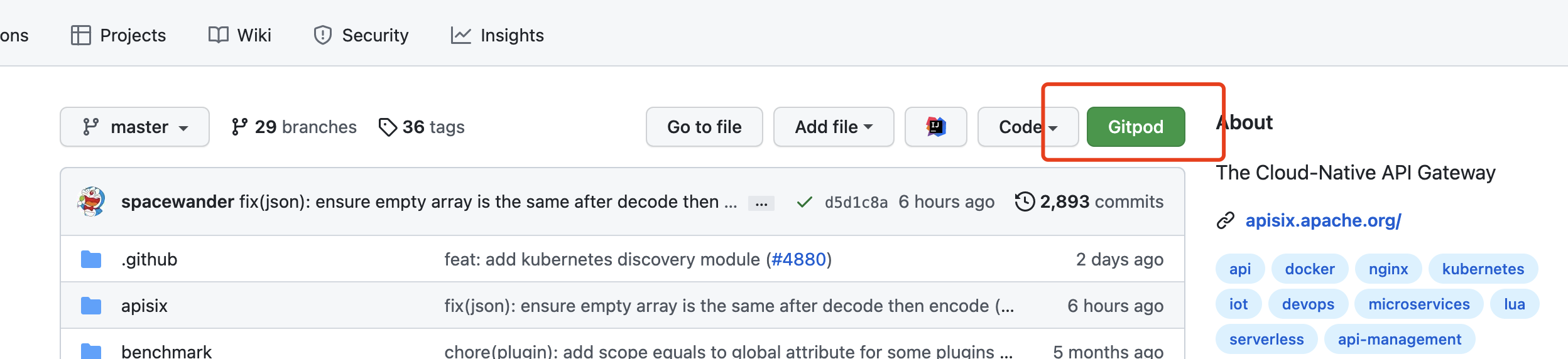
+Once installed, the plugin injects a launch button on the code repository
page, here we'll use GitHub as an example. After installing the plugin, open
the APISIX project address and you will see the relevant button.
+
+
+
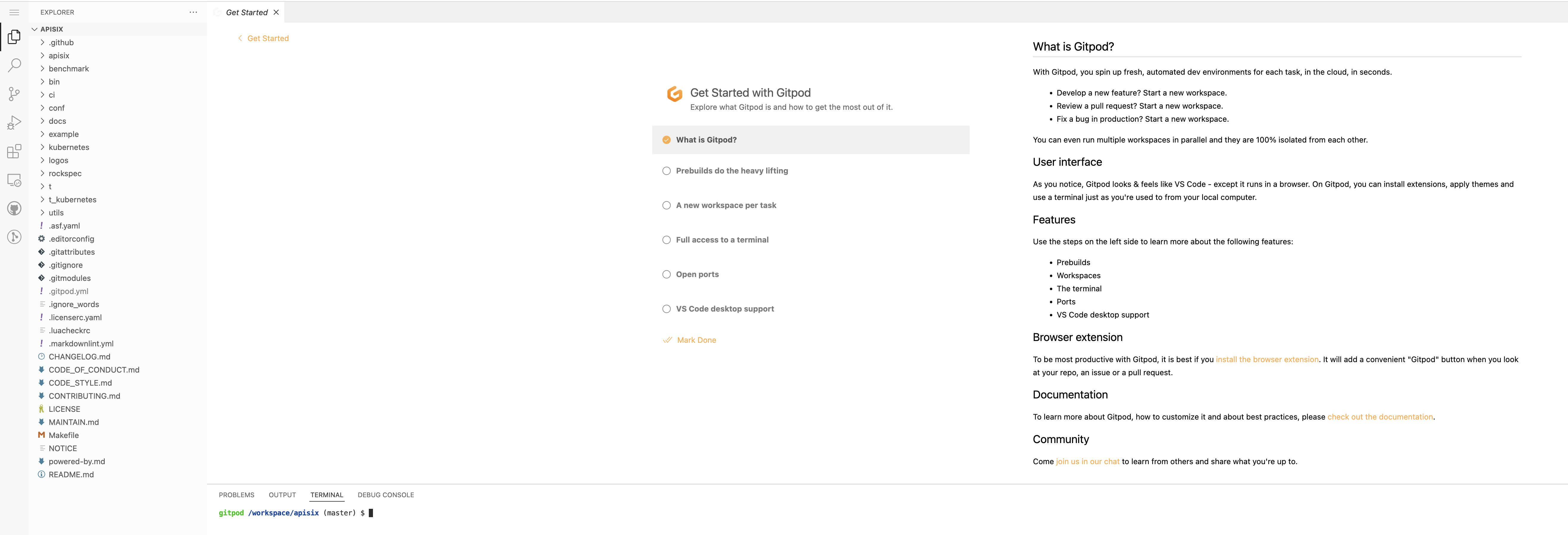
+Clicking the button will redirect you to the Gitpod page. After completing the
GitHub application authorization, you will be taken to the following screen.
+
+
+
+Does it look very familiar? Yes, this is VSCode, the most popular code editor.
+
+Gitpod maintains a branch of VSCode to implement an architecture that
separates the VSCode client from the server. As a VSCode that grows on the
cloud, it functions the same as the desktop version. The same plugins we use
for local development can be used on the cloud, but unlike local, VSCode on the
cloud has server-level computing resources and a network environment.
+
+## Set Up an APISIX Development Environment with Gitpod
+
+### Step 1: Execute Test Cases
+
+I'm sure many students who are new to open source have struggled with how to
build a development environment for open source projects. One of the major
differences between open source projects and enterprise development is that
open source projects often have a large number of test cases that are automated
to ensure the quality of the project, so running these test cases locally is
probably the first problem we encounter.
+
+Let's try running the APISIX test cases in Gitpod. Here's how to configure the
dependencies in the APISIX repository using [github
workflow](https://github.com/apache/apisix/blob/master/.github/workflows/build.yml).
Run the following steps in the Gitpod terminal.
+
+```Shell
+# Start the components that CI depends on
+make ci-env-up project_compose_ci=ci/pod/docker-compose.common.yml
+
+# Install compilation dependency
+sudo apt install -y cpanminus build-essential libncurses5-dev libreadline-dev
libssl-dev perl libpcre3 libpcre3-dev libldap2-dev
+
+# Compile and execute test cases
+sudo OPENRESTY_VERSION=default ./ci/linux_openresty_1_17_runner.sh do_install
+sudo ./ci/linux_openresty_1_17_runner.sh script
+```
+
+The whole process will be very silky smooth because there is a hidden
advantage here: Gitpod runs in a foreign environment, so downloading various
dependencies will be very fast and you won't encounter network problems.
+
+### Step 2: Accessing HTTP services
+
+So how do we access the HTTP services (e.g. APISIX) started in the project?
+
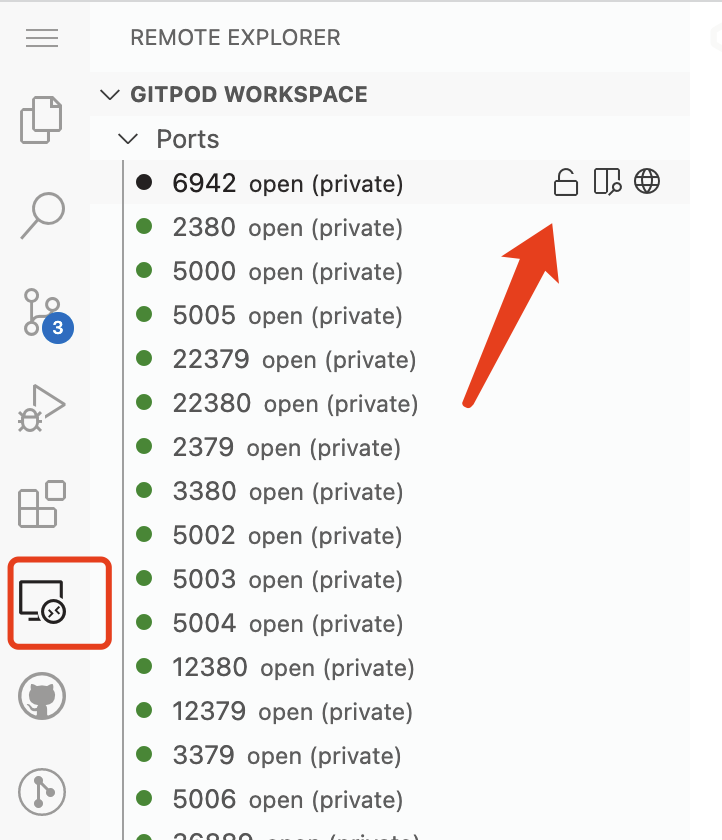
+Naturally, it is possible to access it through the terminal. But if you want
to access it through the page, you can also expose the open port to the public
network through Remote Explorer, as shown in the following figure.
+
+
+
+Then, by clicking on the browser icon next to the port, Gitpod will
automatically open a link to the service corresponding to that port.
+
+## FAQ Summary
+
+### Browser-Based Experience
+
+One of the major problems with using Gitpod in the browser is that many VSCode
shortcuts are captured by the browser, making it impossible to perform the
corresponding action.
+
+Here's how to do it.
+
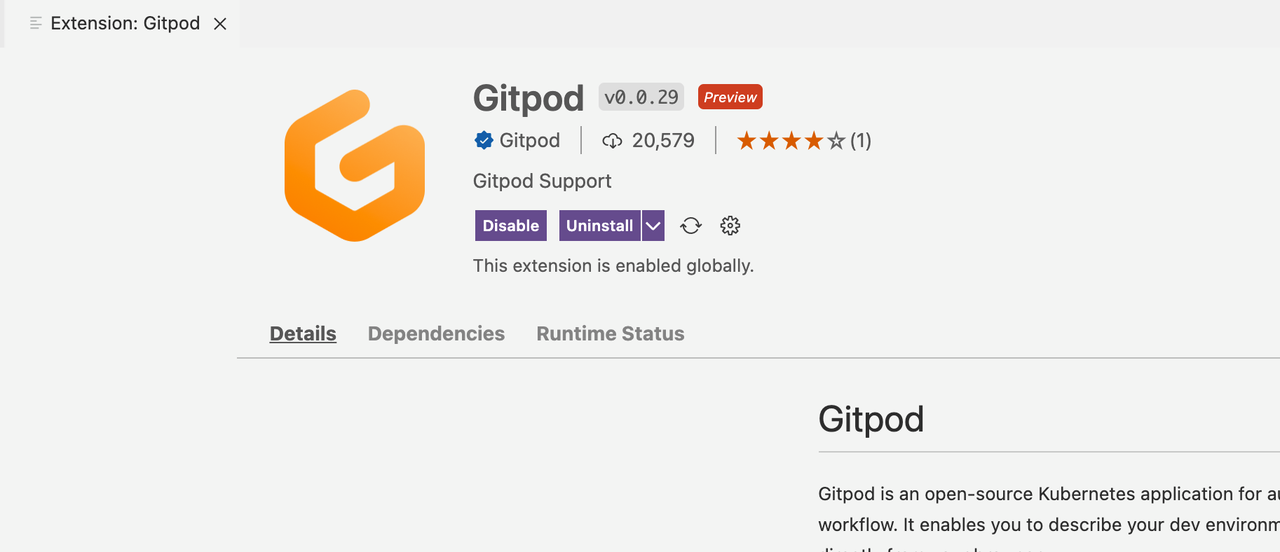
+1. Install the Gitpod plugin in VSCode's Plugin Marketplace.
+
+
+
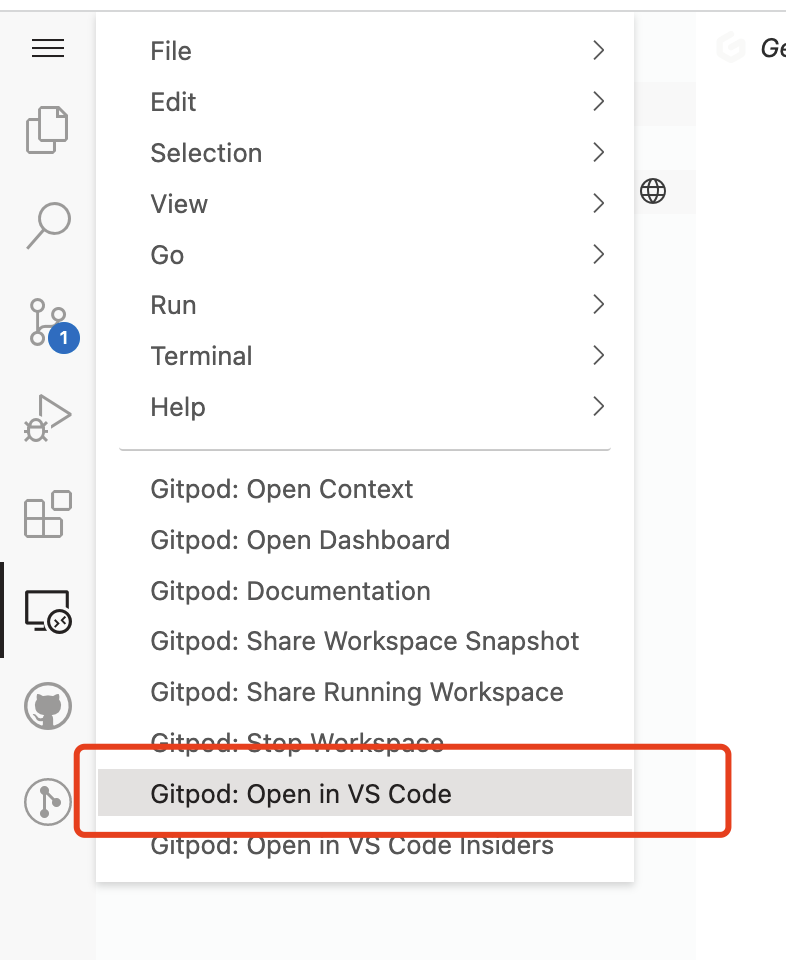
+2. Then click `Gitpod: Open in VS Code` on the Gitpod page in your browser.
You can then pull up your local VSCode as a client and connect to the Gitpod in
the cloud to get the same coding experience as the desktop version.
+
+
+
+### Private Deployment
+
+As we mentioned earlier, Gitpod is an open source product, so it is possible
to deploy it privately within your organization, so that you can use this great
development tool in your private repository. For more information on how to
deploy Gitpod, see the [official Gitpod documentation and
repository](https://github.com/gitpod-io/gitpod).
+
+## Summary
+
+The beauty of Gitpod is that it allows developers to get started with a
project quickly, which is very much in line with the needs of the open source
community. Because open source projects can often feel like a mystery to
developers who are new to open source, it can be a deterrent, but you'll find
that it's not.
+
+I hope that through the introduction and description of this article, every
developer interested in open source projects with the help of open source tools
can more easily join the open source community, so that the open source
ecosystem continues to prosper.
diff --git
a/website/i18n/zh/docusaurus-plugin-content-blog/2022/03/03/develop-apisix-with-gitpod.md
b/website/i18n/zh/docusaurus-plugin-content-blog/2022/03/03/develop-apisix-with-gitpod.md
new file mode 100644
index 0000000..06c5ea4
--- /dev/null
+++
b/website/i18n/zh/docusaurus-plugin-content-blog/2022/03/03/develop-apisix-with-gitpod.md
@@ -0,0 +1,113 @@
+---
+title: "开源云 IDE 产品新宠儿,如何使用 Gitpod 开发 API 网关 Apache APISIX?"
+authors:
+ - name: "钱勇"
+ title: "Author"
+ url: "https://github.com/nic-6443";
+ image_url: "https://avatars.githubusercontent.com/u/22141303?v=4";
+ - name: "苏钰"
+ title: "Technical Writer"
+ url: "https://github.com/SylviaBABY";
+ image_url: "https://avatars.githubusercontent.com/u/39793568?v=4";
+keywords:
+- Apache APISIX
+- API Gateway
+- Gitpod
+- IDE
+- Develop
+description: 本文介绍了开源的云原生 API 网关 Apache APISIX 和云 IDE 产品 Gitpod,并为大家演示如何使用
Gitpod 对 API 网关 Apache APISIX 进行开发及常见问题的解决方案。
+tags: [Technology]
+---
+
+> 本文介绍了开源的云原生 API 网关 Apache APISIX 和云 IDE 产品 Gitpod,并为大家演示了如何使用 Gitpod 对 API
网关 Apache APISIX 进行开发及常见问题的解决方案。
+
+<!--truncate-->
+
+随着云原生浪潮的来临,软件开发流程中的各个环节都在发生变革,其中有一个非常热门的方向就是“云 IDE”。所谓“云
IDE”就是使用云端的计算资源作为开发环境,进行软件项目的开发。
+
+这种开发模式对于开发者来说有很多好处,例如:
+
+- 计算资源予取予求,不会因为硬件限制影响开发效率;
+- 开发环境标准化,每个项目的开发环境可能有很多软件依赖,这些依赖可以通过 Docker 镜像的形式进行标准化;
+- 快速为每个项目启动或摧毁一个开发环境,避免多个项目并行开发时存在依赖冲突等问题;
+- 纯粹的 Linux 环境。对于服务端开发同学来说,MacOS 和 Windows 的依赖问题往往比开发项目代码还要困难;
+
+目前最流行的两种 IDE,非 Jetbrain 系和 VSCode 莫属,而这两种广受欢迎的开发工具都有相关的云产品面世,可见很多开发者看好“云
IDE”这个方向。
+
+Apache APISIX 是一个动态、实时、高性能的 API 网关,提供负载均衡、动态上游、灰度发布、服务熔断、身份认证、可观测性等丰富的流量管理功能。
+
+Apache APISIX 作为开源的云原生 API 网关,如何快速的部署 APISIX 的开发环境对于开发者是比较重要的。本文将为大家介绍如何使用
[Gitpod](https://gitpod.io/) 对 Apache APISIX 进行相关开发。
+
+## 安装 Gitpod Chrome 插件
+
+Gitpod 为三个主流代码托管服务 GitLab、GitHub 和 Bitbucket 提供了一键启动功能,您只需要安装 [Chrome
插件](https://chrome.google.com/webstore/detail/gitpod-always-ready-to-co/dodmmooeoklaejobgleioelladacbeki)即可进行后续使用。
+
+安装完成后,这个插件会在代码仓库页面注入一个启动按钮,以 GitHub 为例。安装插件后打开 APISIX 项目地址,可以看到相关按钮:
+
+
+
+单击 Gitpod 按钮会跳转到 Gitpod 的页面,完成 GitHub 应用授权后,进入以下界面:
+
+
+
+是不是非常熟悉? 对,这就是时下最流行的代码编辑器 VSCode。
+
+为了实现 VSCode 客户端与服务端分离的架构,Gitpod 维护一个 VSCode
的[分支](https://github.com/gitpod-io/openvscode-server)。作为一个云上的 VSCode
,它与桌面版的功能一致。我们在本地开发时常用的插件一样可以在云上使用,与本地不同的是,云上的 VSCode 有着服务器级别的计算资源和网络环境。
+
+## 使用 Gitpod 搭建 APISIX 开发环境
+
+### 步骤一:执行测试用例
+
+相信很多刚接触开源的同学,都为如何搭建开源项目的开发环境感到过困扰,因为开源项目往往都会存在大量自动化执行的测试用例来保证整个项目的质量,所以如何在开发者在本地运行这些测试用例,可能是我们遇到的第一个问题,这一点和企业内的开发可能有比较大的差异。
+
+下面我们尝试在 Gitpod 中运行 APISIX 的测试用例,这里可以参考 APISIX 仓库中的 [github
workflow](https://github.com/apache/apisix/blob/master/.github/workflows/build.yml)
配置依赖。在 Gitpod 的终端中执行如下步骤:
+
+```Shell
+# 启动CI依赖的组件
+make ci-env-up project_compose_ci=ci/pod/docker-compose.common.yml
+
+# 安装编译依赖
+sudo apt install -y cpanminus build-essential libncurses5-dev libreadline-dev
libssl-dev perl libpcre3 libpcre3-dev libldap2-dev
+
+# 进行编译和执行测试用例
+sudo OPENRESTY_VERSION=default ./ci/linux_openresty_1_17_runner.sh do_install
+sudo ./ci/linux_openresty_1_17_runner.sh script
+```
+
+整个过程会非常流畅,因为这里有一个隐藏的优势:Gitpod 运行环境是在国外的,所以下载各种依赖的速度会非常的快,不会遇到网络问题。
+
+### 步骤二:访问 HTTP 服务
+
+那么对于项目中启动的 HTTP 服务(例如 APISIX)我们要如何访问呢?
+
+通过终端访问自然是可以的,但如果你想要通过页面访问,也可以通过 Remote Explorer 将打开的端口暴露到公网上, 如下图所示:
+
+
+
+然后再通过单击端口右侧的浏览器图标,Gitpod 会自动打开一个链接,就可以访问到这个端口对应的服务了。
+
+## 常见问题汇总
+
+### 浏览器端体验
+
+在浏览器中使用 Gitpod 有一个很大的问题是,很多 VSCode 的快捷键会被浏览器捕获,导致无法执行对应的操作,这时我们就可以使用 VSCode 的
Gitpod 插件来实现更加原生的编码体验。
+
+具体方法如下:
+
+1. 在 VSCode 的插件市场,安装 Gitpod 插件。
+
+
+
+2. 在浏览器的 Gitpod 页面单击 `Gitpod: Open in VS Code` 就可以实现拉起本地的 VSCode 作为客户端连接到云端的
Gitpod ,达到与桌面版相同效果的编码体验。
+
+
+
+### 私有化部署
+
+前面我们提到 Gitpod
是一款开源产品,所以是完全可以在组织内部进行私有化部署服务的,这样就可以在私有代码仓库中使用上这款优秀的开发工具。具体部署方式可以参考 Gitpod
的[官方文档和仓库](https://github.com/gitpod-io/gitpod)。
+
+## 总结
+
+Gitpod
的优点是可以让开发者快速上手一个项目,这一点非常符合开源社区的需求。因为开源项目往往会给刚刚接触开源的开发者一种神秘莫测的感觉,让人望而却步,但真正接触后你会发现并不如此。
+
+希望通过本文的介绍和描述,可以让每一个对开源项目感兴趣的开发者借助开源工具加持下,都能更加轻松得加入到开源社区中去,让开源的生态持续繁荣。





