navendu-pottekkat commented on code in PR #6929:
URL: https://github.com/apache/apisix/pull/6929#discussion_r858441345
########## docs/en/latest/getting-started.md: ########## @@ -21,66 +25,64 @@ title: Getting Started # --> -## What is an API Gateway? +import Tabs from '@theme/Tabs'; +import TabItem from '@theme/TabItem'; -An [API gateway](https://microservices.io/patterns/apigateway.html) is an API management tool that acts as a mid layer service between a client and a number backend services. Typically, the API gateway receives the clients requests and processes it by summoning multiple microservices, aggregating the services and returning the appropriate results. +The guide walks you through the concepts, features and how you can get started with Apache APISIX. -## What is Apache APISIX? - -An [API gateway](https://microservices.io/patterns/apigateway.html) is an API management tool that acts as a mid-layer service between a client and a number of backend services. Typically, the API gateway receives the client's requests and processes them by summoning multiple microservices, aggregating the services, and returning the appropriate results. - -## What is Apache APISIX +You will learn: -Apache APISIX is an open-source, dynamic and high-performance cloud-native API gateway that delivers the ultimate performance for all your APIs and microservices. Think of APISIX as a service bus that connects APIs and microservices in your cloud-native architecture. -Apache APISIX facilitates interface traffic handling for Websites, Mobile and IoT applications by providing services such as load balancing, dynamic upstream, grayscale publishing, refined routing, current and speed limiting, and many more. +- What Apache APISIX is. +- Architecture and key concepts of APISIX. +- How to install and run APISIX in Docker. +- How to create your first Route and configure an Upstream using Admin API. +- How to use APISIX dashboard. +- Where you can reach out for help. -### The problem APISIX solves? +## What is Apache APISIX? - - Help enterprises to solve the difficulties in the transformation of traditional monolithic architecture, so as to achieve rapid iteration of business and products. - - Apache APISIX replaces NGINX and handles traditional north-south traffic. It also replaces Envoy to handle east-west traffic between services. - - Handles Layer 4 and Layer 7 traffic: HTTP, HTTPs, TCP, UDP, MQTT, Dubbo, gRPC, etc. - - It can also be used as a [K8s ingress controller](https://github.com/apache/apisix-ingress-controller). - - Use IdP plugin as Zero-Trust gateway - - Easy to use: APISIX also consists of a built-in low-code dashboard that offers a powerful and flexible interface. You can write your own custom plugins or use custom load balancing algorithms. +Apache APISIX is an open source, dynamic, scalable, and high-performance cloud native API gateway for all your APIs and microservices. -## Features +APISIX facilitates interface traffic handling for websites, mobile and IoT applications by providing services such as load balancing, dynamic upstream, grayscale publishing, refined routing, current and speed limiting, and many more. Review Comment: Made the changes. ########## docs/en/latest/getting-started.md: ########## @@ -21,66 +25,64 @@ title: Getting Started # --> -## What is an API Gateway? +import Tabs from '@theme/Tabs'; +import TabItem from '@theme/TabItem'; -An [API gateway](https://microservices.io/patterns/apigateway.html) is an API management tool that acts as a mid layer service between a client and a number backend services. Typically, the API gateway receives the clients requests and processes it by summoning multiple microservices, aggregating the services and returning the appropriate results. +The guide walks you through the concepts, features and how you can get started with Apache APISIX. -## What is Apache APISIX? - -An [API gateway](https://microservices.io/patterns/apigateway.html) is an API management tool that acts as a mid-layer service between a client and a number of backend services. Typically, the API gateway receives the client's requests and processes them by summoning multiple microservices, aggregating the services, and returning the appropriate results. - -## What is Apache APISIX +You will learn: -Apache APISIX is an open-source, dynamic and high-performance cloud-native API gateway that delivers the ultimate performance for all your APIs and microservices. Think of APISIX as a service bus that connects APIs and microservices in your cloud-native architecture. -Apache APISIX facilitates interface traffic handling for Websites, Mobile and IoT applications by providing services such as load balancing, dynamic upstream, grayscale publishing, refined routing, current and speed limiting, and many more. +- What Apache APISIX is. +- Architecture and key concepts of APISIX. +- How to install and run APISIX in Docker. +- How to create your first Route and configure an Upstream using Admin API. +- How to use APISIX dashboard. +- Where you can reach out for help. -### The problem APISIX solves? +## What is Apache APISIX? - - Help enterprises to solve the difficulties in the transformation of traditional monolithic architecture, so as to achieve rapid iteration of business and products. - - Apache APISIX replaces NGINX and handles traditional north-south traffic. It also replaces Envoy to handle east-west traffic between services. - - Handles Layer 4 and Layer 7 traffic: HTTP, HTTPs, TCP, UDP, MQTT, Dubbo, gRPC, etc. - - It can also be used as a [K8s ingress controller](https://github.com/apache/apisix-ingress-controller). - - Use IdP plugin as Zero-Trust gateway - - Easy to use: APISIX also consists of a built-in low-code dashboard that offers a powerful and flexible interface. You can write your own custom plugins or use custom load balancing algorithms. +Apache APISIX is an open source, dynamic, scalable, and high-performance cloud native API gateway for all your APIs and microservices. -## Features +APISIX facilitates interface traffic handling for websites, mobile and IoT applications by providing services such as load balancing, dynamic upstream, grayscale publishing, refined routing, current and speed limiting, and many more. -Apache APISIX not only covers the traditional functions of NGINX, but also deeply cooperates with different observability platforms, which greatly improves service governance capabilities. Other characteristics of the Apache APISIX gateway includes: +### Features - - Multi-Platform Support: - APISIX is a cloud native, open source API gateway. You can run APISIX from bare-metal to Kubernetes. Since APISIX supports ARM64, it avoids the lock-in challenge of the infrastructure technology. It also provides integration to cloud providers like AWS Lambda, Azure Functions, Lua functions and Apache OpenWhisk. +- Multi-platform support: APISIX can run from bare-metal machines to Kubernetes providing a vendor neutral, multi-platform solution. It also provides integration to cloud services like AWS Lambda, Azure Function, Lua functions and Apache OpenWhisk. +- Fully dynamic: APISIX supports hot-reloading, meaning you don't need to restart the service to reflect changes in the configuration. +- Fine-grained routing: APISIX supports using all built-in Nginx variables for routing. You can define custom matching functions to filter Routes. +- Ops-friendly: APISIX is renowned for its ops-friendliness by DevOps teams. It integrates with tools and platforms like [HashiCorp Vault](./plugins/jwt-auth.md#usage-with-hashicorp-vault), [Zipkin](./plugins/zipkin.md), [Apache SkyWalking](./plugins/skywalking.md), [Consul](./discovery/consul_kv.md), [Nacos](./discovery/nacos.md) and [Eureka](./discovery.md). With [APISIX Dashboard](https://github.com/apache/apisix-dashboard), operators can configure APISIX through an easy-to-use and intuitive UI. +- Multi-language Plugin support: APISIX supports multiple programming languages for Plugin development. Developers can choose a language-specific SDK to write custom Plugins. - - Full Dynamic: - The biggest feature of Apache APISIX is that it is fully dynamic. That includes routing, SSL certificates, plugins, upstream etc. It adopts hot-reloading so, every feature can be dynamically configured by the admin API, without having to restart the service at all. +## Key concepts - - Fine-Grained Routing: - Support all Nginx built-in variables as conditions for routing, so you can use cookie, args, etc. as routing conditions to implement canary release, A/B testing, etc. Apache APISIX provides operators that serve as judgment conditions for routing and a custom routing matching function. By using GraphQL attributes, APISIX allows you to filter routes. +Here is a high-level overview of APISIX's software architecture: - - OPS Friendly: - Apache APISIX has been adopted amongst organisation’s DevOps team because of it Ops-friendly strategy. it supports numerous tools and platforms like HashiCorp Vault, [Zipkin](https://github.com/Anita-ihuman/apisix/blob/Introduction/docs/en/latest/plugins/zipkin.md), [Apache SkyWalking](https://github.com/Anita-ihuman/apisix/blob/Introduction/docs/en/latest/plugins/skywalking.md), [Consul](https://github.com/Anita-ihuman/apisix/blob/Introduction/docs/en/latest/discovery/consul_kv.md), [Nacos](https://github.com/Anita-ihuman/apisix/blob/Introduction/docs/en/latest/discovery/nacos.md), [Eureka](https://github.com/Anita-ihuman/apisix/blob/Introduction/docs/en/latest/discovery.md), etc. With a user friendly [dashboard](https://github.com/apache/apisix-dashboard), Apache APISIX makes it is easy for users/admins to operate APISIX through a frontend interface. +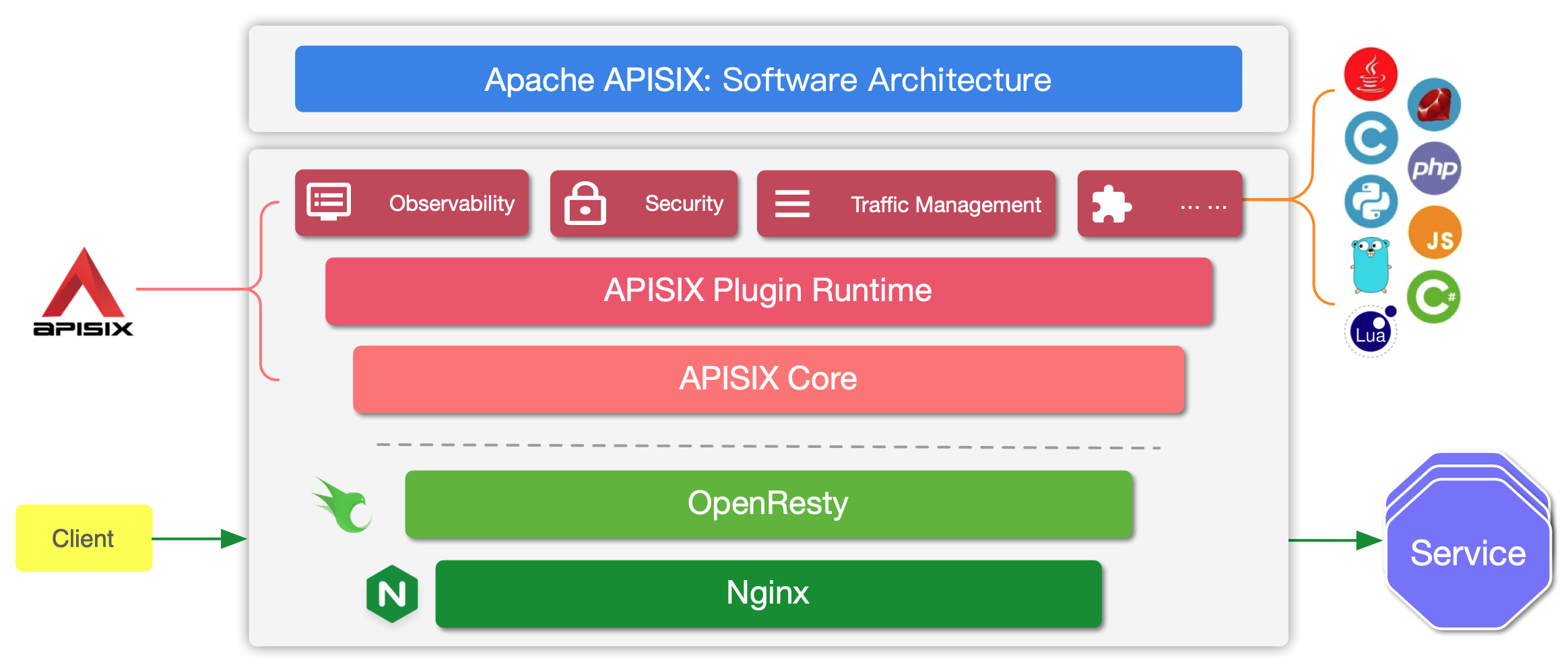 - - Multi-Language Support: - Apache APISIX is a multi-language gateway for plugin development and supports multiple languages via RPC and Wasm. Developers choose the language according to their needs and write the code according to the language-specific SDKs. The plugin can be integrated with APISIX by compiling it to Wasm (WebAssembly) bytecode. Optionally, developers can leverage the `plugin runners` to implement specific RPC methods (the actual business logic). Currently, APISIX supports plugin runners in Java, Golang, Python and Node.js. +The table below defines the key concepts and components of APISIX referenced in this guide: -## Summary +| Concept/Component | Description | +|-------------------|--------------------------------------------------------------------------------------------------------------------------------------------------------------------------| +| Route | Routes specify how requests to APISIX are forwarded to the Upstream. They match a client's request based on defined rules and loads and executes the configured Plugins. | +| Upstream | Upstream is the service to forward your requests to. They can be configured to a Route or abstracted out to an Upstream object. | +| Admin API | API that lets users control their deployed APISIX instance. | -This guide walks through how you can get up and running with Apache APISIX. +## Before you begin -The guide is divided into these three steps: +Before you start with APISIX, make sure you have the following tools installed: -1. Installing Apache APISIX -2. Creating a Route and binding it with an Upstream -3. Verifying the results after binding with `curl` +- [Docker](https://www.docker.com/) and [Docker Compose](https://docs.docker.com/compose/). +- [curl](https://curl.se/docs/manpage.html) for testing the API. Alternatively, you can use tools like [Hoppscotch](https://hoppscotch.io/). -This document also introduces some of the advanced features and operations in Apache APISIX like authentication, prefixing a Route, using the APISIX Dashboard, and troubleshooting. +The example Upstream service used here is [httpbin.org](https://httpbin.org) and you can use it for your testing. -The following `echo` endpoint is used as an example here. This endpoint will return the parameters we pass. +This is an echo service, meaning it will return back the parameters we pass in the request. **Request** The components of the request URL are shown and explained below: - +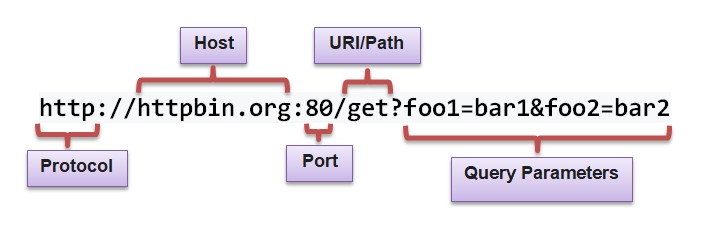 Review Comment: Updated all images to relative URLs. -- This is an automated message from the Apache Git Service. To respond to the message, please log on to GitHub and use the URL above to go to the specific comment. To unsubscribe, e-mail: [email protected] For queries about this service, please contact Infrastructure at: [email protected]


