    [
https://issues.apache.org/jira/browse/IOTDB-565?page=com.atlassian.jira.plugin.system.issuetabpanels:comment-tabpanel&focusedCommentId=17063783#comment-17063783
 ]
Xiangdong Huang commented on IOTDB-565:
---------------------------------------
Hi [~vesense],
Big +1 for this new feature!
> MQTT Protocol Support
> ---------------------
>
> Key: IOTDB-565
> URL: https://issues.apache.org/jira/browse/IOTDB-565
> Project: Apache IoTDB
> Issue Type: New Feature
> Reporter: Xin Wang
> Assignee: Xin Wang
> Priority: Major
> Labels: pull-request-available
> Time Spent: 10m
> Remaining Estimate: 0h
>
> h2. MQTT Protocol
> [MQTT]([http://mqtt.org/]) is a machine-to-machine (M2M)/"Internet of Things"
> connectivity protocol.
> It was designed as an extremely lightweight publish/subscribe messaging
> transport.
> It is useful for connections with remote locations where a small code
> footprint is required and/or network bandwidth is at a premium.
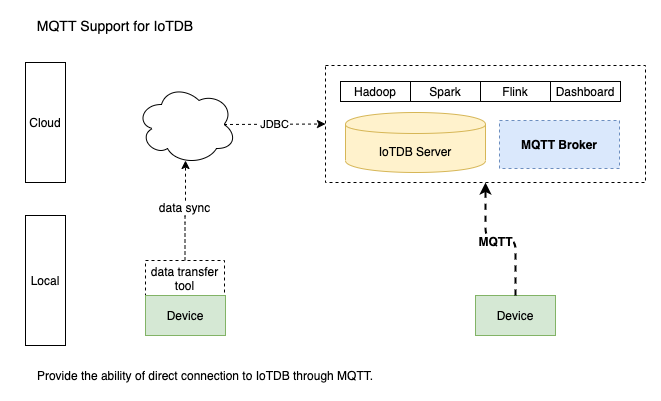
> The MQTT v3.1(an OASIS Standard) protocol support for IoTDB. This module
> includes the MQTT broker that allows remote devices send messages into IoTDB
> server directly.
> 
>
> h3. MQTT Broker
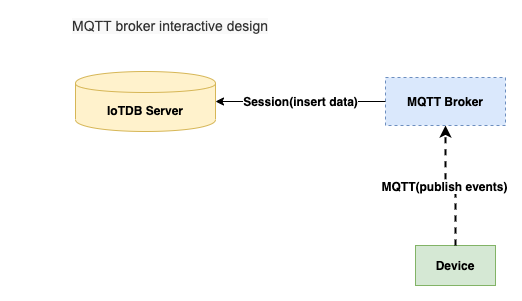
> The MQTT Broker provide the ability of direct connection to IoTDB through
> MQTT. It listen the publish messages from MQTT clients and then
> write the data into local or remote IoTDB server immediately.
> The messages payload can be format to events by `PayloadFormatter` which
> loaded by java SPI, and the default implementation is `JSONPayloadFormatter`.
> The configuration of the broker locate
> `${IOTDB_HOME}/${IOTDB_CONF}/iotdb-mqtt-broker.properties`, and the startup
> scripts locate`${IOTDB_HOME}/sbin/start-mqtt-broker.sh (.bat for windows
> platform)`
> 
>
> h3. MQTT Broker Configuration
> The MQTT Broker load configuration from local IoTDB server
> `${IOTDB_HOME}/${IOTDB_CONF}/iotdb-mqtt-broker.properties` by default.
> If the local config file not exists, then load from classpath
> `/iotdb-mqtt-broker.properties`. Otherwise, load from the system defaults.
> Configurations are as following:
> |NAME|DESCRIPTION|DEFAULT|
> |-------------|:-------------:|:------:|
> |mqtt_broker_host|the broker server address *Required*|0.0.0.0|
> |mqtt_broker_port|the broker port *Required*|1883|
> |mqtt_broker_user|the broker username *Required*|root|
> |mqtt_broker_password|the broker password *Required*|root|
> |mqtt_broker_handler_pool_size|the publish handler pool size|1|
> |mqtt_broker_payload_formatter|the message payload formatter|json|
> |iotdb_host|the iotdb address *Required*|127.0.0.1|
> |iotdb_port|the iotdb port *Required*|6667|
> |iotdb_user|the iotdb username *Required*|root|
> |iotdb_password|the iotdb password *Required*|root|
> h3. Examples
> The following is an example which a mqtt client send events to MQTT broker.
> {quote}MQTT mqtt = new MQTT();
> mqtt.setHost("127.0.0.1", 1883);
> mqtt.setUserName("root");
> mqtt.setPassword("root");
> BlockingConnection connection = mqtt.blockingConnection();
> connection.connect();
> Random random = new Random();
> for (int i = 0; i < 10; i++)
> Unknown macro: \{ Map<String,Object> tuple = new HashMap();
> tuple.put("device", "root.sg.d1"); tuple.put("timestamp",
> System.currentTimeMillis()); tuple.put("measurements", "s1");
> tuple.put("values", random.nextDouble()); String payload =
> JSON.toJSONString(tuple); connection.publish("root.sg.d1.s1",
> payload.getBytes(), QoS.AT_LEAST_ONCE, false); Thread.sleep(1000); }
> connection.disconnect();
> }
> {quote}
--
This message was sent by Atlassian Jira
(v8.3.4#803005)


