jtulach opened a new pull request, #3949:
URL: https://github.com/apache/netbeans/pull/3949
Often, when debugging, I hit a breakpoint, but I'd like to know what is going to happen later, when the method call returns. Stepping out, is an option, but not really pleasant when there is a deep stack in between top place and the desired frame. NetBeans already supports _method breakpoint_ - just placing it is huge pane. This PR simplifies that by adding _Add breakpoint..._ action to each `CallStackFrame`: 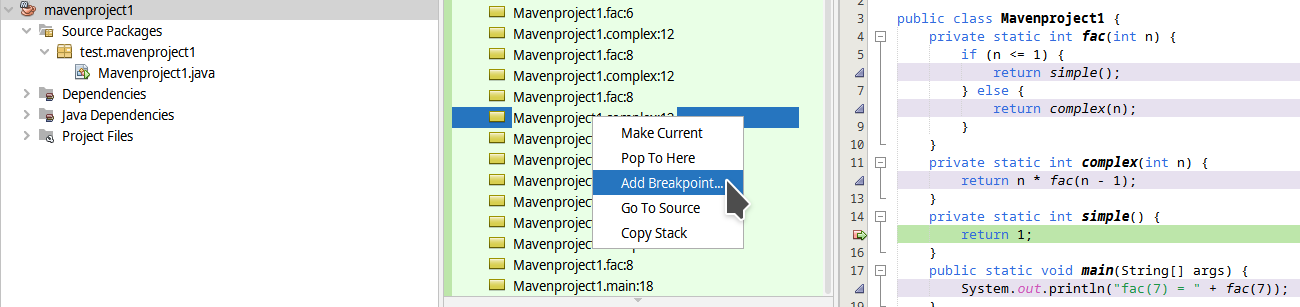 One the action is invoked a classical method breakpoint dialog is shown, but with pre-filled class and method names: 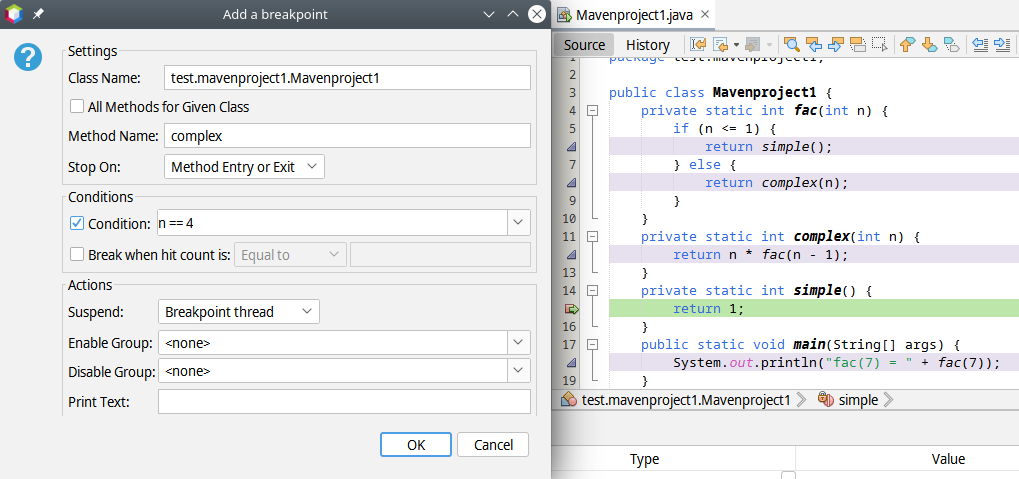 all one needs to do is to fill for example condition `n == 4` and press OK. When the execution continues, it stops in the desired frame. This is particularly useful when debugging application without a source code, or written in a different language than Java. -- This is an automated message from the Apache Git Service. To respond to the message, please log on to GitHub and use the URL above to go to the specific comment. To unsubscribe, e-mail: [email protected] For queries about this service, please contact Infrastructure at: [email protected] --------------------------------------------------------------------- To unsubscribe, e-mail: [email protected] For additional commands, e-mail: [email protected] For further information about the NetBeans mailing lists, visit: https://cwiki.apache.org/confluence/display/NETBEANS/Mailing+lists


