iajn opened a new issue, #5461:
URL: https://github.com/apache/netbeans/issues/5461
### Apache NetBeans version Apache NetBeans 17 release candidate ### What happened NB 17-rc3 Tried out the new Cupertino look and feels (which look fantastic!), and noticed some minor inconsistencies between them when using a custom accent color. See the images below, lafs are in order Cupertino Dark, Cupertino Light, FlatLaf Dark, FlatLaf Light. 1. Menu highlight color, Cupertino Dark still uses the default blue. Cupertino Light tones down the red very nicely. Regular FlatLaf Dark and Light seem normal, I'd like the same adjustment Cupertino Light does, but I guess its doable via the properties file manually.  2. Options menu category selection and search bar, Cupertino Dark uses blue again. Search bar doesn't use the correct accent for both Cupertino Light and Dark, but works for regular FlatLafs. Both Cupertino and regular Light laf use a non-accent color for the option category highlight, which I'm guessing works as intended? I'd still like if it was derived from the accent, but again, I guess its doable via the properties file. 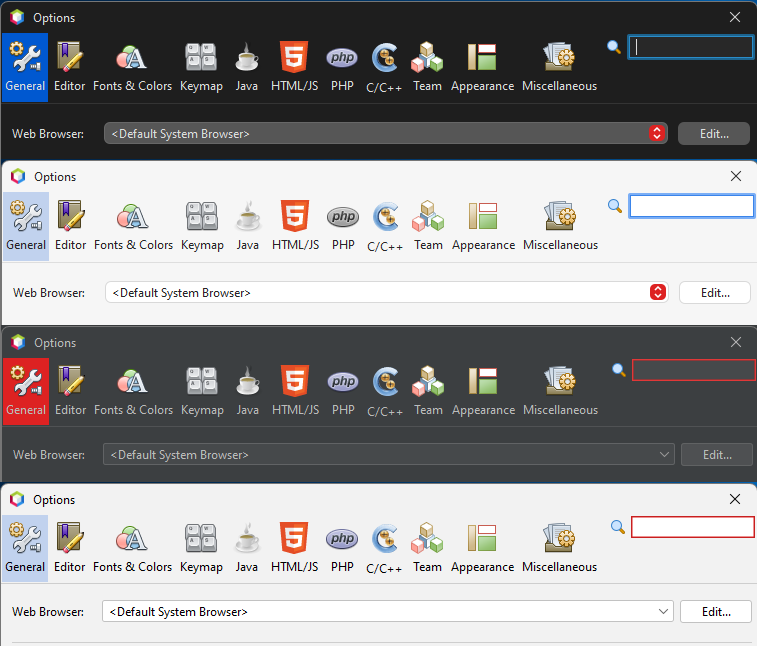 3. Options -> Team -> Versioning, system selection uses blue for both Cupertino lafs. I think the same list component is also used when creating new projects to select the category etc. 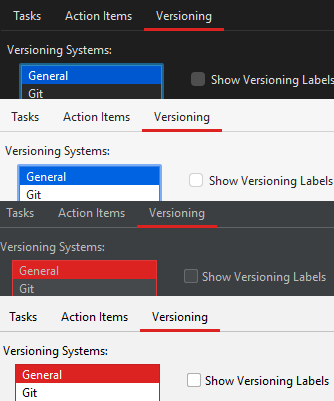 4. Focus highlight uses blue for both Cupertino lafs. Slightly surprised only regular FlatLaf Light uses a very light fill color. 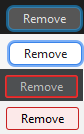 5. Filechooser dropdown behaves the same as regular menus, but the dropdown is also very rectangular compared to Cupertino otherwise, not sure if on purpose. Also managed to duplicate some menu entries when taking the screenshot for Cupertino Dark, no idea how. 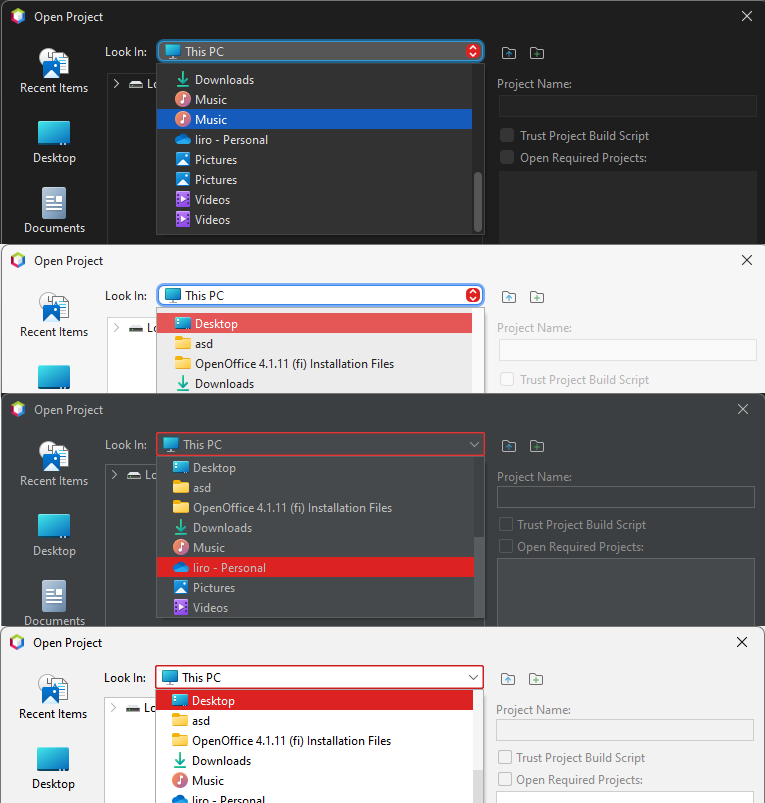 6. Cancel button clips a little bit in the progress popup for both Cupertino lafs. 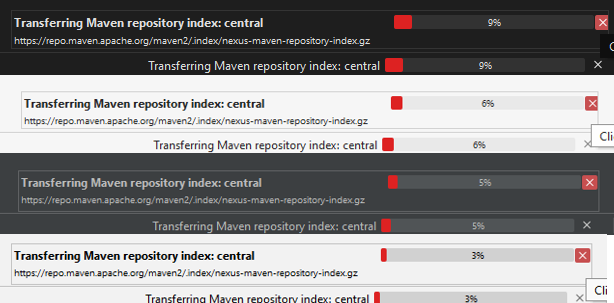 ### How to reproduce Change the FlatLaf accent color via Tools -> Options -> Appearance -> FlatLaf -> Edit custom properties, and inspect the change in different look and feels. I used the default example accent from the comment in the properties file that is opened in the editor, which is a _very_ vibrant red color. ``` @accentColor=#dd2222 # Also had these added, but they should not affect the outcome. # EditorTab.background=@background # EditorTab.activeBackground=@background ``` ### Did this work correctly in an earlier version? No / Don't know ### Operating System Windows 11 ### JDK JDK 17 ### Apache NetBeans packaging Apache NetBeans binary zip ### Anything else _No response_ ### Are you willing to submit a pull request? No ### Code of Conduct Yes -- This is an automated message from the Apache Git Service. To respond to the message, please log on to GitHub and use the URL above to go to the specific comment. To unsubscribe, e-mail: [email protected] For queries about this service, please contact Infrastructure at: [email protected] --------------------------------------------------------------------- To unsubscribe, e-mail: [email protected] For additional commands, e-mail: [email protected] For further information about the NetBeans mailing lists, visit: https://cwiki.apache.org/confluence/display/NETBEANS/Mailing+lists






