ducminh03 opened a new issue, #5606:
URL: https://github.com/apache/netbeans/issues/5606
### Apache NetBeans version Apache NetBeans 17 ### What happened There are two projects `root` and `sub`, both of which resides in the same folder. `root` includes `sub`. On IDEs like IntelliJ IDEA, it correctly recognises project `root` with modules `main` and `sub`. However, NetBeans does recognise that there is one subproject, but its name is not shown: 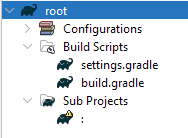 Double-click on that blank entry, and `sub` project will load, not as a subproject of project `root`, but as a standalone project (new root project). This causes problems when there are extra properties, version catalogues, etc... that `root` and `sub` share, which are defined in `root`'s `build.gradle` or `settings.gradle`. The subproject does not recognise `root` as its parent project, therefore `root` configurations does not apply to `sub`, which causes `sub` configuration errors. I realised that I can make `sub` project successfully recognise `root` as its parent project by moving `sub` folder into `root` folder and update `sub` project's path in `root`'s `settings.gradle`. ### How to reproduce **Step 1**. Create this directory tree: ``` root/ ├─ build.gradle ├─ settings.gradle sub/ ├─ build.gradle ``` root/settings.gradle ``` rootProject.name = 'root' include ':sub' project(':sub').projectDir = file('../sub') ``` root/build.gradle ``` plugins { id 'java-library' } allprojects { ext { str = 'Hello' } } dependencies { project ':sub' } println ext.str.length() ``` sub/build.gradle ``` plugins { id 'java-library' } println ext.str.length() ``` **Step 2**: Open project `root` by choosing `root` folder, and wait for project `root` to complete opening. In `root`'s `Sub Projects`, there is a blank line which represents unsuccessfully realised `sub` project. **Step 3**: Double-click on the blank line to open project `sub`. NetBeans would notify that the project is unsuccessfully loaded as follows:  `sub` project's `Build Scripts` would also not have `root`'s `build.gradle`. **Step 4**. Now, close those two projects. **Step 5**. Move the folder `sub` into the folder `root` and change the content of `root/settings.gradle` as follows: ``` rootProject.name = 'root' include ':sub' project(':sub').projectDir = file('./sub') ``` The directory tree should be as follows: ``` root/ ├─ build.gradle ├─ sub/ │ ├─ build.gradle ├─ settings.gradle ``` **Step 6**. Reopen `root` project. Now, `sub` project is listed as a subproject `:root:sub` in `root`'s `Sub Projects` ### Did this work correctly in an earlier version? No / Don't know ### Operating System Windows 11 Home (Build 22623.1037) ### JDK Oracle JDK 17 "17.0.6" 2023-01-17 LTS ### Apache NetBeans packaging Apache NetBeans provided installer ### Anything else _No response_ ### Are you willing to submit a pull request? No -- This is an automated message from the Apache Git Service. To respond to the message, please log on to GitHub and use the URL above to go to the specific comment. To unsubscribe, e-mail: [email protected] For queries about this service, please contact Infrastructure at: [email protected] --------------------------------------------------------------------- To unsubscribe, e-mail: [email protected] For additional commands, e-mail: [email protected] For further information about the NetBeans mailing lists, visit: https://cwiki.apache.org/confluence/display/NETBEANS/Mailing+lists


