This is an automated email from the ASF dual-hosted git repository.

duanzhengqiang pushed a commit to branch master
in repository https://gitbox.apache.org/repos/asf/shardingsphere.git
The following commit(s) were added to refs/heads/master by this push:
new 971d9f2b28c 2.22 upload articles (#24301)
971d9f2b28c is described below
commit 971d9f2b28cc73a4c7a3d032ee62aa6f114469fd
Author: FPokerFace <[email protected]>
AuthorDate: Fri Feb 24 10:39:19 2023 +0800
2.22 upload articles (#24301)
* Update Articles
Update 2 articles from medium.com
* Upload 2 articles
---
...,_Bringing_New_Cloud_Native_Possibilities.en.md | 533 +++++++++++++++++++++
...42\200\231s_Show_processlist_&_Kill_Work.en.md" | 410 ++++++++++++++++
...d,_Bringing_New_Cloud_Native_Possibilities1.png | Bin 0 -> 129419 bytes
...d,_Bringing_New_Cloud_Native_Possibilities2.png | Bin 0 -> 81328 bytes
...d,_Bringing_New_Cloud_Native_Possibilities3.png | Bin 0 -> 52843 bytes
...d,_Bringing_New_Cloud_Native_Possibilities4.png | Bin 0 -> 223522 bytes
...342\200\231s_Show_processlist_&_Kill_Work1.png" | Bin 0 -> 287782 bytes
7 files changed, 943 insertions(+)
diff --git
a/docs/blog/content/material/2022_09_08_Apache_ShardingSphere_5.2.0_is_Released,_Bringing_New_Cloud_Native_Possibilities.en.md
b/docs/blog/content/material/2022_09_08_Apache_ShardingSphere_5.2.0_is_Released,_Bringing_New_Cloud_Native_Possibilities.en.md
new file mode 100644
index 00000000000..baf11b56552
--- /dev/null
+++
b/docs/blog/content/material/2022_09_08_Apache_ShardingSphere_5.2.0_is_Released,_Bringing_New_Cloud_Native_Possibilities.en.md
@@ -0,0 +1,533 @@
++++
+title = "Apache ShardingSphere 5.2.0 is Released!"
+weight = 74
+chapter = true
++++
+
+Our new 5.2.0 release enhances features such as SQL audit, elastic migration,
SQL execution process management, and data governance on the cloud.
+
+### Introduction
+
+Since [Apache ShardingSphere](https://shardingsphere.apache.org/) released
version 5.1.2 at the end of June, our community has continued to optimize and
enhance its product features. The community merged 1,728 PRs from teams and
individuals around the world. The resulting 5.2.0 release has been optimized in
terms of its features, performance, testing, documentation, examples, etc.
+
+The establishment of the
[shardingsphere-on-cloud](https://github.com/apache/shardingsphere-on-cloud)
sub-project shows ShardingSphere’s commitment to being cloud native. We welcome
anyone interested in Go, database, and cloud to join the
shardingsphere-on-cloud community.
+
+**The 5.2.0 release brings the following highlights:**
+
+* SQL audit for data sharding.
+
+* Elastic data migration.
+
+* SQL execution process management.
+
+* Shardingsphere-on-cloud sub-project goes live.
+
+Newly added features, including SQL audit for data sharding and MySQL SHOW
PROCESSLIST & KILL, can enhance users’ capability to manage ShardingSphere.
+
+The SQL audit feature allows users to manage SQL audit to prevent the business
system from being disrupted by inefficient SQL. The MySQL SHOW PROCESSLIST &
KILL feature allows users to quickly view the SQL in execution through the SHOW
PROCESSLIST statement, and forcibly cancel slow SQL.
+
+**The new version also supports elastic data migration. It supports the
migration of data from [Oracle](https://www.oracle.com/index.html),
[MySQL](https://www.mysql.com/), and [PostgreSQL](https://www.postgresql.org/)
to the distributed database ecosystem composed of ShardingSphere + MySQL or
PostgreSQL, completing the transformation from a single database to a
distributed one.** The ShardingSphere community will support more features for
heterogeneous database migration in future relea [...]
+
+The new version also transferred Helm Charts from the ShardingSphere
repository to the **shardingsphere-on-cloud sub-project. It is designed to
provide distributed database solutions of ShardingSphere + MySQL or PostgreSQL
on the cloud.** This version significantly improves SQL parsing support for
different databases and upgrades
[DistSQL](https://shardingsphere.apache.org/document/5.1.0/en/concepts/distsql/)’s
parameter usage specifications. It removes the Memory operating mode from Sha
[...]
+
+### Highlights
+
+### SQL audit for data sharding
+
+In large-scale data sharding scenarios, if a user executes an SQL query
without the sharding feature, the SQL query will be routed to the underlying
database for execution.
+
+As a result, a large number of database connections will be occupied and
businesses will be severely affected by timeout or other issues. If the user
performs UPDATE/DELETE operations, a large amount of data may be incorrectly
updated or deleted.
+
+In response to the above problems, ShardingSphere 5.2.0 provides the SQL audit
for data sharding feature and allows users to configure audit strategies. The
strategy specifies multiple audit algorithms, and users can decide whether
audit rules should be disabled. If any audit algorithm fails to pass, SQL
execution will be prohibited. The configuration of SQL audit for data sharding
is as follows.
+
+ rules:
+ - !SHARDING
+ tables:
+ t_order:
+ actualDataNodes: ds_${0..1}.t_order_${0..1}
+ tableStrategy:
+ standard:
+ shardingColumn: order_id
+ shardingAlgorithmName: t_order_inline
+ auditStrategy:
+ auditorNames:
+ - sharding_key_required_auditor
+ allowHintDisable: true
+ defaultAuditStrategy:
+ auditorNames:
+ - sharding_key_required_auditor
+ allowHintDisable: true
+
+ auditors:
+ sharding_key_required_auditor:
+ type: DML_SHARDING_CONDITIONS
+
+In view of complex business scenarios, the new feature allows users to
dynamically disable the audit algorithm by using SQL hints so that the business
SQL that is allowable in partial scenarios can be executed. Currently,
ShardingSphere 5.2.0 has a built-in DML disables full-route audit algorithm.
Users can also implement ShardingAuditAlgorithm interface by themselves to
realize more advanced SQL audit functions.
+
+ /* ShardingSphere hint: disableAuditNames=sharding_key_required_auditor */
SELECT * FROM t_order;
+
+### Elastic data migration
+
+Data migration has always been a focus of the ShardingSphere community. Before
5.2.0, users needed to add an external table as a single sharding table, and
then modify the sharding rules to trigger the migration, which was too complex
and difficult for ordinary users.
+
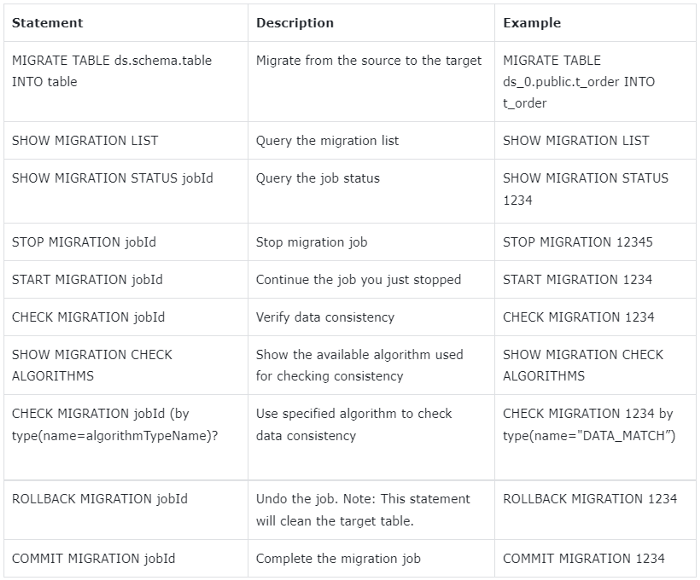
+To improve the ease of data migration, **ShardingSphere 5.2.0 provides a new
data migration feature, coupled with DistSQL for elastic migration. Users can
migrate data from the existing single database to the distributed database
system composed of ShardingSphere + MySQL or PostgreSQL in an SQL-like manner,
achieving the transformation from a single database to a distributed one.**
+
+
+
+The new feature is capable of migrating Oracle data to PostgreSQL. Users can
create sharding rules and sharding tables through DistSQL first, that is to
create new distributed databases and tables, and then run MIGRATE TABLE
ds.schema.table INTO table to trigger data migration.
+
+During the migration process, users can also use the dedicated DistSQL for
data migration in the table to manage the migration job status and data
consistency. For more information about the new feature, please refer to the
official document [[Data
Migration](https://shardingsphere.apache.org/document/current/en/user-manual/shardingsphere-proxy/migration/)].
+
+### SQL Execution Process Management
+
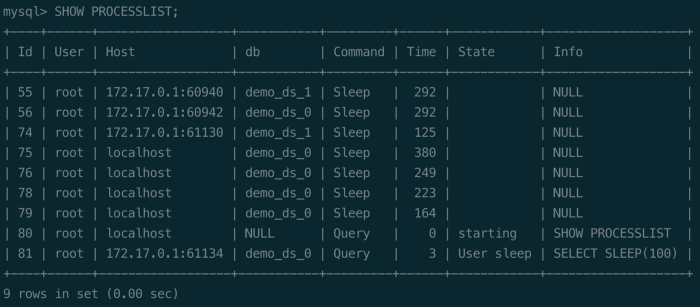
+The native MySQL database provides the SHOW PROCESSLIST statement, allowing
the user to view the currently running thread. Users can kill the thread with
the KILL statement for SQL that takes too long to be temporarily terminated.
+
+
+
+The SHOW PROCESSLIST and KILL statements are widely used in daily operation
and maintenance management. To enhance users’ ability to manage ShardingSphere,
version 5.2.0 supports the MySQL SHOW PROCESSLIST and KILL statements. When a
user executes a DDL/DML statement through ShardingSphere, ShardingSphere
automatically generates a unique UUID identifier as an ID and stores the SQL
execution information in each instance.
+
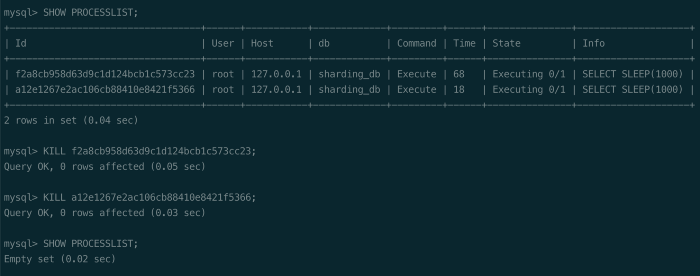
+The following figure shows the results while executing the SHOW PROCESSLIST
and KILL statements in ShardingSphere. When the user executes the SHOW
PROCESSLIST statement, ShardingSphere processes the SQL execution information
based on the current operating mode.
+
+If the current mode is cluster mode, ShardingSphere collects and synchronizes
the SQL execution information of each compute node through the governance
center, and then returns the summary to the user. If the current mode is the
standalone mode, ShardingSphere only returns SQL execution information in the
current compute node.
+
+**The user determines whether to execute the KILL statement based on the
result returned by the SHOW PROCESSLIST, and ShardingSphere cancels the SQL in
execution based on the ID in the KILL statement.**
+
+
+
+###
[Shardingsphere-on-cloud](https://github.com/apache/shardingsphere-on-cloud)
sub-project goes live
+
+Shardingsphere-on-cloud is a project of Apache ShardingSphere providing
cloud-oriented solutions. Version 0.1.0 has been released and it has been
officially voted as a sub-project of Apache ShardingSphere.
+
+Shardinsphere-on-cloud will continue to release various configuration
templates, deployment scripts, and other automation tools for ShardingSphere on
the cloud.
+
+It will also polish the engineering practices in terms of high availability,
data migration, observability, shadow DB, security, and audit, optimize the
delivery mode of Helm Charts, and continue to enhance its cloud native
management capabilities through Kubernetes Operator. Currently, there are
already introductory issues in the project repository to help those who are
interested in Go, Database, and Cloud to quickly get up and running.
+
+## Enhancement
+
+### Kernel
+
+The ShardingSphere community optimizes the SQL parsing capability of different
databases in this release, greatly improving ShardingSphere’s SQL compatibility.
+
+Detailed SQL parsing optimization can be seen in the update log section below.
It’s a long-term mission for the ShardingSphere community to improve SQL
parsing support. Anyone who is interested is welcome to work with us.
+
+Version 5.2.0 also supports the column-visible feature for MySQL, Oracle,
[SQLServer](https://www.microsoft.com/en-us/sql-server/sql-server-downloads),
and H2 databases, in a bid to meet the requirements of business SQL
compatibility during a system upgrade. The read/write splitting feature
supports the Cartesian product configuration, which greatly simplifies user
configurations.
+
+### Access Port
+
+In version 5.2.0,
[ShardingSphere-Proxy](https://shardingsphere.apache.org/document/current/en/quick-start/shardingsphere-proxy-quick-start/)
is capable of monitoring specified IP addresses and integrates openGauss
database drivers by default. [ShardingSphere-JDBC
](https://shardingsphere.apache.org/document/current/en/overview/#shardingsphere-jdbc)supports
c3p0 data sources, and Connection.prepareStatement can specify the columns.
+
+### Distributed Transaction
+
+In terms of distributed transactions, the original logical database-level
transaction manager is adjusted to a global manager, supporting distributed
transactions across multiple logical databases.
+
+At the same time, it removed the XA statement’s ability to control distributed
transactions as XA transactions are now automatically managed by
ShardingSphere, which simplifies the operation for users.
+
+## Update logs
+
+Below are all the update logs of ShardingSphere 5.2.0. To deliver a better
user experience, this release adjusted the API of part of the functions, which
can be seen from the API changes part below.
+
+### New Feature
+
+- Kernel: Support SQL audit for sharding feature
+
+- Kernel: Support MySQL show processlist and kill process list id feature
+
+- Scaling: Add dedicated DistSQL for data migration
+
+- Scaling: Basic support for migration of data to heterogeneous database
+
+- DistSQL: New syntax CREATE/ALTER/SHOW MIGRATION PROCESS CONFIGURATION
+
+- DistSQL: New syntax ALTER MIGRATION PROCESS CONFIGURATION
+
+- DistSQL: New syntax SHOW MIGRATION PROCESS CONFIGURATION
+
+- DistSQL: New syntax ADD MIGRATION SOURCE RESOURCE
+
+- DistSQL: New syntax SHOW SQL_TRANSLATOR RULE
+
+- DistSQL: New syntax CREATE SHARDING AUDITOR
+
+- DistSQL: New syntax ALTER SHARDING AUDITOR
+
+- DistSQL: New syntax SHOW SHARDING AUDIT ALGORITHMS
+
+### Enhancement
+
+- Kernel: Support column visible feature for MySQL, Oracle, SQLServer and H2
+
+- Kernel: Support cartesian product configuration for read/write splitting
+
+- Kernel: Support spring namespace and spring boot usage for sql translator
+
+- Kernel: Support JSR-310 Year and Month in IntervalShardingAlgorithm
+
+- Kernel: Support broadcast table update/delete limit statement
+
+- Kernel: Support create index on table(column) statement rewrite when config
encrypts
+
+- Kernel: Support openGauss cursor, fetch, move, close statement for sharding
and read/write splitting
+
+- Kernel: Support encrypt column rewrite when execute column is null in
predicate
+
+- Kernel: Support encrypt show create table return logic columns
+
+- Kernel: Support create table with index statement rewrite when config encrypt
+
+- Kernel: Support PostgreSQL create operator statement parse
+
+- Kernel: Support PostgreSQL create materialized view statement parse
+
+- Kernel: Support PostgreSQL nested comments parse
+
+- Kernel: Support PostgreSQL alter subscription statement parse
+
+- Kernel: Support PostgreSQL create group statement parse
+
+- Kernel: Support PostgreSQL alter statictics statement parse
+
+- Kernel: Support PostgreSQL create foreign table statement parse
+
+- Kernel: Support PostgreSQL alter server statement parse
+
+- Kernel: Support PostgreSQL create foreign data wrapper statement parse
+
+- Kernel: Support PostgreSQL create event trigger statement parse
+
+- Kernel: Support PostgreSQL security label statement parse
+
+- Kernel: Support PostgreSQL reindex statement parse
+
+- Kernel: Support PostgreSQL reassign owned statement and refresh materialized
view statement parse
+
+- Kernel: Support PostgreSQL prepare transaction statement parse
+
+- Kernel: Support PostgreSQL create collation statement parse
+
+- Kernel: Support PostgreSQL lock statement parse
+
+- Kernel: Support PostgreSQL alter rule statement parse
+
+- Kernel: Support PostgreSQL notify statement parse
+
+- Kernel: Support PostgreSQL unlisten statement parse
+
+- Kernel: Support Oracle alter function and alter hierarchy statement parse
+
+- Kernel: Support Oracle alter pluggable database statement parse
+
+- Kernel: Support Oracle alter materialized view log statement parse
+
+- Kernel: Support Oracle alter diskgroup statement parse
+
+- Kernel: Support Oracle alter operator statement parse
+
+- Kernel: Support oracle alter cluster statement parse
+
+- Kernel: Support oracle alter audit policy statement parse
+
+- Kernel: Support Oracle alter index type statement parse
+
+- Kernel: Support Oracle lock table statement parse
+
+- Kernel: Support Oracle alter java statement parse
+
+- Kernel: Support Oracle inline constraint statement parse
+
+- Kernel: Support openGauss geometric operator statement parse
+
+- Kernel: Optimize MySQL visible/invisible parse of create/alter table
statements
+
+- Kernel: Support scope of variable prefixed with @@ in MySQL SET statement
parse
+
+- Kernel: Support MySQL create procedure with create view parse
+
+- Kernel: Support column segments parse in create index on table statement
+
+- Kernel: Support openGauss cursor, fetch, move, close statement for sharding,
readwrite-splitting
+
+- Kernel: Support encrypt column rewrite when execute column is null in
predicate
+
+- Kernel: Support encrypt show create table return logic columns
+
+- Kernel: Support create table with index statement rewrite when config encrypt
+
+- Kernel: Support parsing ALTER LOCKDOWN PROFILE in Oracle
+
+- Kernel: Support parsing ALTER MATERIALIZED VIEW in Oracle
+
+- Kernel: Support parsing ALTER MATERIALIZED ZONEMAP in Oracle
+
+- Kernel: Support parsing ALTER LIBRARY in Oracle
+
+- Kernel: Support parsing ALTER INMEMORY JOIN GROUP in Oracle
+
+- Kernel: Support parsing DROP OPERATOR in Oracle
+
+- Kernel: Support parsing DROP RESTORE POINT in Oracle
+
+- Kernel: Support parsing CREATE RESTORE POINT in Oracle
+
+- Kernel: Support parsing DROP INMEMORY JOIN GROUP in Oracle
+
+- Kernel: Support parsing create_bit_xor_table in MySQL
+
+- Kernel: Support parsing MySQL DO statement
+
+- Kernel: Support parsing DropServer in openGauss
+
+- Kernel: Support parsing CREATE AGGREGATE In openGauss
+
+- Kernel: Support parsing ALTER ROUTINE in PostgreSQL
+
+- Kernel: Add PostgreSQL Create Cast Statement
+
+- Kernel: Add PostgreSQL Create Aggregate Statement
+
+- Kernel: Support fetch/move/close cursor statement in PostgreSQL
+
+- Kernel: Support Parsing ALTER PUBLICATION in PostgreSQL
+
+- Kernel: Add PostgreSQL Create Access Method Statement
+
+- Kernel: Support Parsing ALTER POLICY in PostgreSQL
+
+- Kernel: Support parsing ALTER OPERATOR in PostgreSQL
+
+- Kernel: Add PostgreSQL Copy Statement
+
+- Kernel: Add PostgreSQL Comment Statement
+
+- Kernel: Support listen statement in postgreSQL
+
+- Kernel: Support DECLARE cursor statement
+
+- Access port: Add default serverConfig in helm charts
+
+- Access port: Assemble openGauss JDBC Driver into Proxy distribution
+
+- Access port: ShardingSphere-Proxy listen on specified IP addresses
+
+- Access port: Support COM_STMT_SEND_LONG_DATA in MySQL Proxy
+
+- Access port: SELECT VERSION() support alias in MySQL Proxy
+
+- Access port: Fix openGauss Proxy could not be connected if no resource
defined
+
+- Access port: Support using JRE defined in JAVA_HOME in
ShardingSphere-Proxy’s startup script
+
+- Access port: Avoid client blocked when OOM occurred in ShardingSphere-Proxy
+
+- Access port: Support using c3p0 in ShardingSphere-JDBC
+
+- Access port: Support SET NAMES with value quoted by double-quote
+
+- Access port: Connection.prepareStatement with columns arguments is available
in ShardingSphere-JDBC
+
+- Scaling: Improve MySQL connect and reconnect
+
+- Scaling: Fix MySQL json column may cause leak at incremental task
+
+- Scaling: Add permission check for PostgreSQL data sources
+
+- Scaling: Incremental migration support for MySQL MGR mode
+
+- Scaling: Improve job progress persistence
+
+- Scaling: Start job DistSQL execute and return synchronously
+
+- Scaling: Inventory migration support table has primary key and unique key
+
+- Scaling: Close unerlying ElasticJob when stopping job
+
+- Scaling: Improve logical replication slot name generation for PostgreSQL and
openGauss
+
+- Scaling: Make query DistSQL could be executed when no database selected
+
+- DistSQL: Add worker_id to the result set of SHOW INSTANCE LIST & SHOW
INSTANCE INFO
+
+- DistSQL: Improve the result of EXPORT DATABASE CONFIG
+
+- DistSQL: Support more databases for FORMAT SQL
+
+- DistSQL: Optimize the execution logic of CREATE TRAFFIC RULE
+
+- DistSQL: Add paramter writeDataSourceQueryEnabled for RDL
READWRITE_SPLITTING RULE.
+
+- DistSQL: Support assistEncryptor for Encrypt RDL
+
+- DistSQL: Add sharding algorithm type check when CREATE SHARDING TABLE RULE
+
+- Distributed governance: Support database discovery to configure multiple
groups of high availability under the same logic database
+
+- Distributed governance: Support ShardingSphere-Proxy to start up under empty
logic library
+
+- Distributed governance: Support for isolating EventBus events by instance
+
+- Distributed governance: Support the database to detect changes in the master
node and restart the detection heartbeat task
+
+- Distributed governance: Support ShardingSphere-Proxy to generate new
worker-id when re-registering in cluster mode
+
+- Distributed governance: Thrown exception when inserting expression value in
shadow column on executing insert
+
+- Distributed governance: Support distributed transactions across multiple
logical databases
+
+- Distributed governance: Support executing truncate in XA & PostgreSQL
+
+- Distributed governance: Support alter local transaction rule with DistSQL
+
+- Distributed governance: Support global transaction manager
+
+- Distributed governance: Delete support for branch transaction on proxy
+
+### Bug Fix
+
+- Kernel: Fix single table metadata refresh error caused by filtering
DataSourceContainedRule
+
+- Kernel: Fix parsing exception caused by the null value of MySQL blob type
+
+- Kernel: Fix PostgreSQL/openGauss reset statement parse error
+
+- Kernel: Fix wrong parameter rewrite when use sharding and encrypt
+
+- Kernel: Fix the failed conversion of Month related classes on
IntervalShardingAlgorithm
+
+- Kernel: Fix NullPointerException when execute select union statement
contains subquery
+
+- Kernel: Fix wrong encrypt rewrite result due to incorrect order of metadata
+
+- Kernel: Fix MySQL trim function parse error
+
+- Kernel: Fix MySQL insert values with _binary parse error
+
+- Access port: Fix MySQL syntax error cannot be thrown to client
+
+- Access port: Avoid EventLoop blocked because of closing JDBC resources
+
+- Access port: Correct server status flags returned by MySQL Proxy
+
+- Access port: Fix a possible connection leak issue if Proxy client
disconnected in transaction
+
+- Access port: Fixed a possible consistency issue with the statement being
executed when the Proxy client is disconnected
+
+- Access port: Avoid pooled connection polluted by executing SET statements
+
+- Access port: Make SHOW TABLES FROM work in ShardingSphere-Proxy
+
+- Access port: Fix PostgreSQL DDL could not be executed by Extended Query
+
+- Access port: Fix SHOW VARIABLES could not be executed in PostgreSQL Proxy
without resource
+
+- Access port: Fix FileNotFoundException when use ShardingSphere Driver with
SpringBoot fatjar
+
+- Scaling: Fix the problem that the table contains both primary key and unique
index at inventory migration
+
+- Scaling: Improve incremental migration, support the latest position in the
middle of batch insert event
+
+- Scaling: Fix the error caused by null field value in openGauss incremental
migration
+
+- DistSQL: Fix incorrect strategy name in result of SHOW SHARDING TABLE RULES
+
+- DistSQL: Fix current rule config is modified in advance when ALTER SHARDING
TABLE RULE
+
+- DistSQL: Fix connection leak when ALTER RESOURCE
+
+- DistSQL: Fix CREATE TRAFFIC RULE failed when load balance algorithm is null
+
+- Distributed governance: Fix that the monitoring heartbeat task was not
stopped when the database was discovered and the logical library was deleted
+
+- Distributed governance: Fix cluster mode ShardingSphere-JDBC load all logic
database
+
+- Distributed governance: Fix worker-id generated by
SnowflakeKeyGenerateAlgorithm in cluster mode may exceed the maximum value
+
+- Shadow DB: Fix DistSQL adding shadow algorithm exception without shadow data
source
+
+- Distributed transaction: Fix cross-database data source confusion caused by
same data source name in multiple logical databases
+
+- Distributed transaction: Fix RUL DistSQL execution failure in transaction
+
+- Distributed transaction: Fix begin for PostgreSQL & openGauss
+
+- Agent: Fixed the error of null value in contextManager when collecting
metric data
+
+### Refactor
+
+- Kernel: ShardingSphere metadata refactoring for splitting actual metadata
and logical metadata
+
+- Kernel: Use ConnectionContext, QueryContext to remove ThreadLocal in
FetchOrderByValueQueuesHolder, TrafficContextHolder, SQLStatementDatabaseHolder
and TransactionHolder
+
+- Access port: Modify the default value of the ShardingSphere-Proxy version in
the helm chart
+
+- Access port: Docker container will exit if ShardingSphere-Proxy failed to
startup
+
+- Access port: Helm Charts in ShardingSphere repository are transferred to
sub-project shardingsphere-on-cloud
+
+- Scaling: Plenty of refactor for better code reuse
+
+- DistSQL: Add a new category named RUL
+
+- Distributed governance: Refactor the schedule module and split it into
cluster schedule and standalone schedule
+
+- Distributed governance: Remove memory mode, keep standalone mode and cluster
mode
+
+- Distributed governance: Refactoring metadata table loading logic and
persistence logic
+
+- Distributed governance: Refactoring distributed locks to retain the most
concise interface design
+
+- Testing: Refactor: Unify The Creation for Proxy Containers in IT from ENV
Modules
+
+- Testing: Refactor: Unify The Configuration for container created by
testcontainer
+
+### API Changes
+
+- Kernel: Remove SQL passthrough to data source feature
+
+- Kernel: Add new assistedQueryEncryptorName and remove
QueryAssistedEncryptAlgorithm interface
+
+- Kernel: Refactor readwrite-splitting api to improve user experience
+
+- Kernel: Remove check-duplicate-table-enabled configuration
+
+- Kernel: Remove useless config item show-process-list-enabled configuration
+
+- Scaling: Change keyword for part of data migration DistSQL
+
+- Scaling: Redesign part of data migration DistSQL
+
+- DistSQL: Unify parameter type specification
+
+- DistSQL: Split SHOW INSTANCE MODE to SHOW MODE INFO and SHOW INSTANCE INFO
+
+- DistSQL: Change DROP SCALING jobId to CLEAN MIGRATION jobId
+
+- DistSQL: Remove COUNT INSTANCE RULES
+
+- Distributed governance: Add database found that high availability supports
all the slave libraries to go offline, and the main library undertakes the read
traffic configuration
+
+- Distributed governance: SnowflakeKeyGenerateAlgorithm supports configuring
worker-id in standalone mode
+
+- Shadow DB: Replace sourceDataSourceName with productionDataSourceName in
Shadow API Configuration
+
+- Authority: Remove deprecated native authority provider
+
+## Relevant Links
+
+🔗 [Download
Link](https://shardingsphere.apache.org/document/current/en/downloads/)
+
+🔗 [Update
Logs](https://github.com/apache/shardingsphere/blob/master/RELEASE-NOTES.md)
+
+🔗 [Project Address](https://shardingsphere.apache.org/)
+
+🔗 [Cloud Sub-project
Address](https://github.com/apache/shardingsphere-on-cloud)
+
+## Community Contribution
+
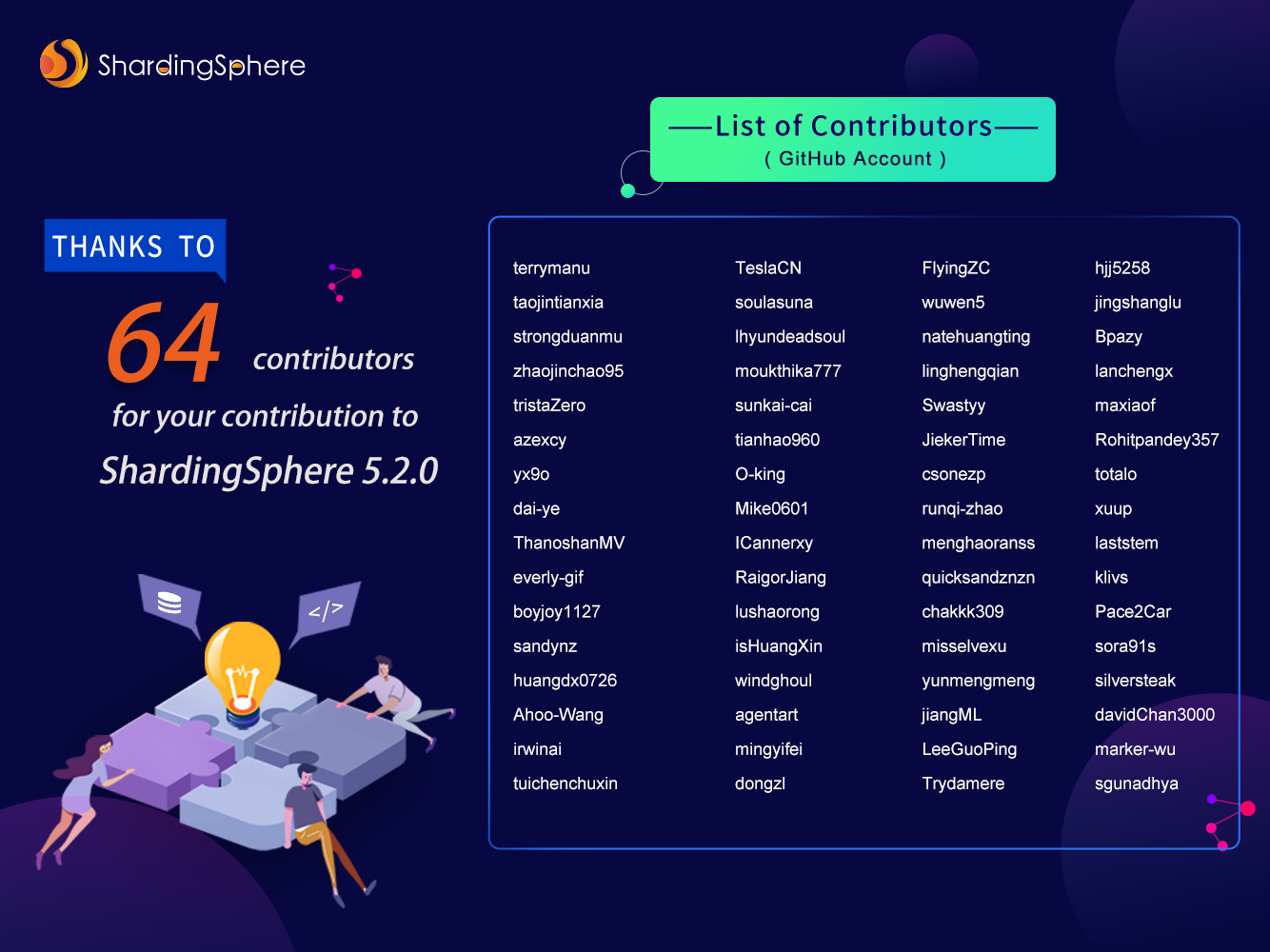
+The Apache ShardingSphere 5.2.0 release is the result of 1,728 merged PRs,
committed by 64 Contributors. Thank you for your efforts!
+
+
+
+## Author
+
+Duan Zhengqiang, a senior middleware development engineer at
[SphereEx](https://www.sphere-ex.com/en/) & Apache ShardingSphere PMC.
+
+He started to contribute to Apache ShardingSphere middleware in 2018 and used
to play a leading role in sharding practices dealing with massive data. With
rich practical experience, he loves open-source and is willing to contribute.
Now he focuses on the development of [Apache
ShardingSphere](https://shardingsphere.apache.org/) kernel module.
diff --git
"a/docs/blog/content/material/2022_09_22_How_does_ShardingSphere\342\200\231s_Show_processlist_&_Kill_Work.en.md"
"b/docs/blog/content/material/2022_09_22_How_does_ShardingSphere\342\200\231s_Show_processlist_&_Kill_Work.en.md"
new file mode 100644
index 00000000000..4b4da55717c
--- /dev/null
+++
"b/docs/blog/content/material/2022_09_22_How_does_ShardingSphere\342\200\231s_Show_processlist_&_Kill_Work.en.md"
@@ -0,0 +1,410 @@
++++
+title = "How does ShardingSphere’s Show processlist & Kill Work?"
+weight = 75
+chapter = true
++++
+
+For those of you who often use databases, you may wonder:
+
+1. How do I check what SQL is currently being executed by the database, and in
what state?
+
+2. How do I terminate abnormal SQL? For instance, if a `SELECT` statement used
to query a table with massive data does not carry query conditions, it would
drag down the performance of the entire database. This may push to want to
terminate this abnormal SQL.
+
+In response to the above issues, [Apache
ShardingSphere](https://shardingsphere.apache.org/) introduced functions such
as `Show processlist` and `Kill <processID>`.
+
+
+
+# 1. Introduction
+
+`Show processlist`: this command can display the list of SQL currently being
executed by ShardingSphere and the execution progress of each SQL. If
ShardingSphere is deployed in cluster mode, the `Show processlist` function
aggregates the SQL running for all Proxy instances in the cluster and then
displays the result, so you can always see all the SQL running at that moment.
+
+```
+mysql> show processlist \G;
+*************************** 1. row ***************************
+ Id: 82a67f254959e0a0807a00f3cd695d87
+ User: root
+ Host: 10.200.79.156
+ db: root
+Command: Execute
+ Time: 19
+ State: Executing 0/1
+ Info: update t_order set version = 456
+1 row in set (0.24 sec)
+```
+
+`Kill <processID>`: This command is implemented based on `Show processlist`
and can terminate the running SQL listed in the `Show processlist`.
+
+```
+mysql> kill 82a67f254959e0a0807a00f3cd695d87;
+Query OK, 0 rows affected (0.17 sec)
+```
+
+# 2. How do they work?
+
+Now that you understand the functions of `Show processlist` and `Kill
<processID>`, let's see how the two commands work. As the working principle
behind `Kill <processID>` is similar to that of `Show processlist`, we'll focus
on the interpretation of `Show processlist`.
+
+## 2.1 How is SQL saved and destroyed?
+
+Each SQL executed in ShardingSphere will generate an `ExecutionGroupContext`
object. The object contains all the information about this SQL, among which
there is an `executionID` field to ensure its uniqueness.
+
+When ShardingSphere receives a SQL command, the
`GovernanceExecuteProcessReporter# report` is called to store
`ExecutionGroupContext` information into the cache of `ConcurrentHashMap
`(currently only DML and DDL statements of MySQL are supported; other types of
databases will be supported in later versions. Query statements are also
classified into DML).
+
+```
+public final class GovernanceExecuteProcessReporter implements
ExecuteProcessReporter {
+
+ @Override
+ public void report(final QueryContext queryContext, final
ExecutionGroupContext<? extends SQLExecutionUnit> executionGroupContext,
+ final ExecuteProcessConstants constants, final
EventBusContext eventBusContext) {
+ ExecuteProcessContext executeProcessContext = new
ExecuteProcessContext(queryContext.getSql(), executionGroupContext, constants);
+
ShowProcessListManager.getInstance().putProcessContext(executeProcessContext.getExecutionID(),
executeProcessContext);
+
ShowProcessListManager.getInstance().putProcessStatement(executeProcessContext.getExecutionID(),
executeProcessContext.getProcessStatements());
+ }
+}@NoArgsConstructor(access = AccessLevel.PRIVATE)
+public final class ShowProcessListManager {
+
+ private static final ShowProcessListManager INSTANCE = new
ShowProcessListManager();
+
+ @Getter
+ private final Map<String, ExecuteProcessContext> processContexts = new
ConcurrentHashMap<>();
+
+ @Getter
+ private final Map<String, Collection<Statement>> processStatements = new
ConcurrentHashMap<>();
+
+ public static ShowProcessListManager getInstance() {
+ return INSTANCE;
+ }
+
+ public void putProcessContext(final String executionId, final
ExecuteProcessContext processContext) {
+ processContexts.put(executionId, processContext);
+ }
+
+ public void putProcessStatement(final String executionId, final
Collection<Statement> statements) {
+ if (statements.isEmpty()) {
+ return;
+ }
+ processStatements.put(executionId, statements);
+ }
+}
+```
+
+As shown above, the `ShowProcessListManager` class has two cache Maps, namely
`processContexts` and `processStatements`. The former stores the mapping
between `executionID` and `ExecuteProcessContext`.
+
+The latter contains the mapping between `executionID` and `Statement objects`
that may generate multiple statements after the SQL is overwritten.
+
+Every time ShardingSphere receives a SQL statement, the SQL information will
be cached into the two Maps. After SQL is executed, the cache of Map will be
deleted.
+
+```
+@RequiredArgsConstructor
+public final class ProxyJDBCExecutor {
+
+ private final String type;
+
+ private final ConnectionSession connectionSession;
+
+ private final JDBCDatabaseCommunicationEngine databaseCommunicationEngine;
+
+ private final JDBCExecutor jdbcExecutor;
+
+ public List<ExecuteResult> execute(final QueryContext queryContext, final
ExecutionGroupContext<JDBCExecutionUnit> executionGroupContext,
+ final boolean isReturnGeneratedKeys,
final boolean isExceptionThrown) throws SQLException {
+ try {
+ MetaDataContexts metaDataContexts =
ProxyContext.getInstance().getContextManager().getMetaDataContexts();
+ EventBusContext eventBusContext =
ProxyContext.getInstance().getContextManager().getInstanceContext().getEventBusContext();
+ ShardingSphereDatabase database =
metaDataContexts.getMetaData().getDatabase(connectionSession.getDatabaseName());
+ DatabaseType protocolType = database.getProtocolType();
+ DatabaseType databaseType =
database.getResource().getDatabaseType();
+ ExecuteProcessEngine.initialize(queryContext,
executionGroupContext, eventBusContext);
+ SQLStatementContext<?> context =
queryContext.getSqlStatementContext();
+ List<ExecuteResult> result =
jdbcExecutor.execute(executionGroupContext,
+ ProxyJDBCExecutorCallbackFactory.newInstance(type,
protocolType, databaseType, context.getSqlStatement(),
databaseCommunicationEngine, isReturnGeneratedKeys, isExceptionThrown,
+ true),
+ ProxyJDBCExecutorCallbackFactory.newInstance(type,
protocolType, databaseType, context.getSqlStatement(),
databaseCommunicationEngine, isReturnGeneratedKeys, isExceptionThrown,
+ false));
+
ExecuteProcessEngine.finish(executionGroupContext.getExecutionID(),
eventBusContext);
+ return result;
+ } finally {
+ ExecuteProcessEngine.clean();
+ }
+ }
+```
+
+As shown above, `ExecuteProcessEngine.initialize(queryContext,
executionGroupContext, eventBusContext);` will store the SQL information in the
two cache Maps. Finally, `ExecuteProcessEngine.clean();` in the code block will
clear up the Map in the cache.
+
+The SQL shown in the `Show processlist` was obtained from `processContexts`.
But this Map is just a local cache. If ShardingSphere is deployed in cluster
mode, how does `Show processlist` obtain SQL running on other machines in the
cluster? Let's see how ShardingSphere handles it.
+
+## 2.2 How does `Show processlist` work?
+
+When ShardingSphere receives the `Show process` command, it is sent to the
executor `ShowProcessListExecutor#execute` for processing. The implementation
of the `getQueryResult()` is the focus.
+
+```
+public final class ShowProcessListExecutor implements
DatabaseAdminQueryExecutor {
+
+ private Collection<String> batchProcessContexts;
+
+ @Getter
+ private QueryResultMetaData queryResultMetaData;
+
+ @Getter
+ private MergedResult mergedResult;
+
+ public ShowProcessListExecutor() {
+
ProxyContext.getInstance().getContextManager().getInstanceContext().getEventBusContext().register(this);
+ }
+
+ @Subscribe
+ public void receiveProcessListData(final ShowProcessListResponseEvent
event) {
+ batchProcessContexts = event.getBatchProcessContexts();
+ }
+
+ @Override
+ public void execute(final ConnectionSession connectionSession) {
+ queryResultMetaData = createQueryResultMetaData();
+ mergedResult = new TransparentMergedResult(getQueryResult());
+ }
+
+ private QueryResult getQueryResult() {
+
ProxyContext.getInstance().getContextManager().getInstanceContext().getEventBusContext().post(new
ShowProcessListRequestEvent());
+ if (null == batchProcessContexts || batchProcessContexts.isEmpty()) {
+ return new RawMemoryQueryResult(queryResultMetaData,
Collections.emptyList());
+ }
+ Collection<YamlExecuteProcessContext> processContexts = new
LinkedList<>();
+ for (String each : batchProcessContexts) {
+ processContexts.addAll(YamlEngine.unmarshal(each,
BatchYamlExecuteProcessContext.class).getContexts());
+ }
+ List<MemoryQueryResultDataRow> rows =
processContexts.stream().map(processContext -> {
+ List<Object> rowValues = new ArrayList<>(8);
+ rowValues.add(processContext.getExecutionID());
+ rowValues.add(processContext.getUsername());
+ rowValues.add(processContext.getHostname());
+ rowValues.add(processContext.getDatabaseName());
+ rowValues.add("Execute");
+
rowValues.add(TimeUnit.MILLISECONDS.toSeconds(System.currentTimeMillis() -
processContext.getStartTimeMillis()));
+ int processDoneCount =
processContext.getUnitStatuses().stream().map(each ->
ExecuteProcessConstants.EXECUTE_STATUS_DONE == each.getStatus() ? 1 :
0).reduce(0, Integer::sum);
+ String statePrefix = "Executing ";
+ rowValues.add(statePrefix + processDoneCount + "/" +
processContext.getUnitStatuses().size());
+ String sql = processContext.getSql();
+ if (null != sql && sql.length() > 100) {
+ sql = sql.substring(0, 100);
+ }
+ rowValues.add(null != sql ? sql : "");
+ return new MemoryQueryResultDataRow(rowValues);
+ }).collect(Collectors.toList());
+ return new RawMemoryQueryResult(queryResultMetaData, rows);
+ }
+
+ private QueryResultMetaData createQueryResultMetaData() {
+ List<RawQueryResultColumnMetaData> columns = new ArrayList<>();
+ columns.add(new RawQueryResultColumnMetaData("", "Id", "Id",
Types.VARCHAR, "VARCHAR", 20, 0));
+ columns.add(new RawQueryResultColumnMetaData("", "User", "User",
Types.VARCHAR, "VARCHAR", 20, 0));
+ columns.add(new RawQueryResultColumnMetaData("", "Host", "Host",
Types.VARCHAR, "VARCHAR", 64, 0));
+ columns.add(new RawQueryResultColumnMetaData("", "db", "db",
Types.VARCHAR, "VARCHAR", 64, 0));
+ columns.add(new RawQueryResultColumnMetaData("", "Command", "Command",
Types.VARCHAR, "VARCHAR", 64, 0));
+ columns.add(new RawQueryResultColumnMetaData("", "Time", "Time",
Types.VARCHAR, "VARCHAR", 10, 0));
+ columns.add(new RawQueryResultColumnMetaData("", "State", "State",
Types.VARCHAR, "VARCHAR", 64, 0));
+ columns.add(new RawQueryResultColumnMetaData("", "Info", "Info",
Types.VARCHAR, "VARCHAR", 120, 0));
+ return new RawQueryResultMetaData(columns);
+ }
+}
+```
+
+You’ll use the `guava` package's `EventBus` function, which is an information
publish/subscribe database that is an elegant implementation of the [Observer
pattern](https://en.wikipedia.org/wiki/Observer_pattern). `EventBus` decouples
classes from each other, and you'll find out more about it below.
+
+`getQueryResult()` method will post `ShowProcessListRequestEvent`.
`ProcessRegistrySubscriber#loadShowProcessListData` uses the `@Subscribe`
annotations to subscribe to the event.
+
+This method is the core to implementing `Show processlist`. Next, we'll
introduce specific procedures of this method.
+
+```
+public final class ProcessRegistrySubscriber {
+ @Subscribe
+ public void loadShowProcessListData(final ShowProcessListRequestEvent
event) {
+ String processListId = new
UUID(ThreadLocalRandom.current().nextLong(),
ThreadLocalRandom.current().nextLong()).toString().replace("-", "");
+ boolean triggerIsComplete = false;
+ // 1. Obtain the Process List path of all existing proxy nodes in
cluster mode
+ Collection<String> triggerPaths = getTriggerPaths(processListId);
+ try {
+ // 2. Iterate through the path and write an empty string to the
node, to trigger the node monitoring.
+ triggerPaths.forEach(each -> repository.persist(each, ""));
+ // 3. Lock and wait 5 seconds for each node to write the
information of currently running SQL to the persistence layer.
+ triggerIsComplete = waitAllNodeDataReady(processListId,
triggerPaths);
+ // 4. Fetch and aggregate the data written by each proxy node from
the persistence layer. Then EventBus will post a ShowProcessListResponseEvent
command, which means the operation is completed.
+ sendShowProcessList(processListId);
+ } finally {
+ // 5. Delete resources
+ repository.delete(ProcessNode.getProcessListIdPath(processListId));
+ if (!triggerIsComplete) {
+ triggerPaths.forEach(repository::delete);
+ }
+ }
+ }
+}
+```
+
+It contains five steps and steps 2 & 3 are the focus.
+
+### 2.2.1 Step 2: the cluster obtains the data implementation
+
+In this step, an empty string will be written to the node
`/nodes/compute_nodes/process_trigger/<instanceId>:<processlistId>`, which will
trigger ShardingSphere's monitoring logic.
+
+When ShardingSphere is started, the persistence layer will `watch` to monitor
a series of path changes, such as the addition, deletion, and modification
operations of the path `/nodes/compute_nodes`.
+
+However, monitoring is an asynchronous process and the main thread does not
block, so step 3 is required to lock and wait for each ShardingSphere node to
write its currently running SQL information into the persistence layer.
+
+Let's take a look at how the ShardingSphere handles the monitoring logic.
+
+```
+public final class ComputeNodeStateChangedWatcher implements
GovernanceWatcher<GovernanceEvent> {
+
+ @Override
+ public Collection<String> getWatchingKeys(final String databaseName) {
+ return Collections.singleton(ComputeNode.getComputeNodePath());
+ }
+
+ @Override
+ public Collection<Type> getWatchingTypes() {
+ return Arrays.asList(Type.ADDED, Type.UPDATED, Type.DELETED);
+ }
+
+ @SuppressWarnings("unchecked")
+ @Override
+ public Optional<GovernanceEvent> createGovernanceEvent(final
DataChangedEvent event) {
+ String instanceId =
ComputeNode.getInstanceIdByComputeNode(event.getKey());
+ if (!Strings.isNullOrEmpty(instanceId)) {
+ ...
+ } else if
(event.getKey().startsWith(ComputeNode.getOnlineInstanceNodePath())) {
+ return createInstanceEvent(event);
+ // show processlist
+ } else if
(event.getKey().startsWith(ComputeNode.getProcessTriggerNodePatch())) {
+ return createShowProcessListTriggerEvent(event);
+ // kill processlistId
+ } else if
(event.getKey().startsWith(ComputeNode.getProcessKillNodePatch())) {
+ return createKillProcessListIdEvent(event);
+ }
+ return Optional.empty();
+ }
+
+
+ private Optional<GovernanceEvent> createShowProcessListTriggerEvent(final
DataChangedEvent event) {
+ Matcher matcher = getShowProcessTriggerMatcher(event);
+ if (!matcher.find()) {
+ return Optional.empty();
+ }
+ if (Type.ADDED == event.getType()) {
+ return Optional.of(new
ShowProcessListTriggerEvent(matcher.group(1), matcher.group(2)));
+ }
+ if (Type.DELETED == event.getType()) {
+ return Optional.of(new
ShowProcessListUnitCompleteEvent(matcher.group(2)));
+ }
+ return Optional.empty();
+ }
+}
+```
+
+After `ComputeNodeStateChangedWatcher#createGovernanceEvent` monitored the
information, it would distinguish which event to create according to the path.
+
+As shown in the above code, it is a new node, so `ShowProcessListTriggerEvent`
will be posted. As each ShardingSphere instance will monitor
`/nodes/compute_nodes`, each instance will process
`ShowProcessListTriggerEvent`.
+
+In this case, single-machine processing is transformed into cluster
processing. Let's look at how ShardingSphere handles it.
+
+```
+public final class ClusterContextManagerCoordinator { @Subscribe
+ public synchronized void triggerShowProcessList(final
ShowProcessListTriggerEvent event) {
+ if
(!event.getInstanceId().equals(contextManager.getInstanceContext().getInstance().getMetaData().getId()))
{
+ return;
+ }
+ Collection<ExecuteProcessContext> processContexts =
ShowProcessListManager.getInstance().getAllProcessContext();
+ if (!processContexts.isEmpty()) {
+
registryCenter.getRepository().persist(ProcessNode.getProcessListInstancePath(event.getProcessListId(),
event.getInstanceId()),
+ YamlEngine.marshal(new
BatchYamlExecuteProcessContext(processContexts)));
+ }
+
registryCenter.getRepository().delete(ComputeNode.getProcessTriggerInstanceIdNodePath(event.getInstanceId(),
event.getProcessListId()));
+ }
+}
+```
+
+`ClusterContextManagerCoordinator#triggerShowProcessList` will subscribe to
`ShowProcessListTriggerEvent`, in which `processContext` data is processed by
itself. `ShowProcessListManager.getInstance().getAllProcessContext()` retrieves
the `processContext` that is currently running (here the data refers to the SQL
information that ShardingSphere stores in the Map before each SQL execution,
which is described at the beginning of the article) and transfers it to the
persistence layer. If the [...]
+
+When you delete the node, monitoring will also be triggered and
`ShowProcessListUnitCompleteEvent` will be posted. This event will finally
awake the pending lock.
+
+```
+public final class ClusterContextManagerCoordinator {
+
+ @Subscribe
+ public synchronized void completeUnitShowProcessList(final
ShowProcessListUnitCompleteEvent event) {
+ ShowProcessListSimpleLock simpleLock =
ShowProcessListManager.getInstance().getLocks().get(event.getProcessListId());
+ if (null != simpleLock) {
+ simpleLock.doNotify();
+ }
+ }
+}
+```
+
+### 2.2.2 Step 3: lock and wait for the data implementation
+
+ShardingSphere uses the `isReady(Paths)` method to determine whether all
instances have been processed. It returns `true` only when all instances have
been processed.
+
+There is a maximum waiting time of 5 seconds for data processing. If the
processing is not completed in 5 seconds, then `false` is returned.
+
+```
+public final class ClusterContextManagerCoordinator {
+
+ @Subscribe
+ public synchronized void completeUnitShowProcessList(final
ShowProcessListUnitCompleteEvent event) {
+ ShowProcessListSimpleLock simpleLock =
ShowProcessListManager.getInstance().getLocks().get(event.getProcessListId());
+ if (null != simpleLock) {
+ simpleLock.doNotify();
+ }
+ }
+}
+```
+
+### 2.2.3 Aggregate the `processList` data and return it
+
+After each instance processed the data, the instance that received the `Show
processlist` command needs to aggregate the data and then display the result.
+
+```
+public final class ProcessRegistrySubscriber {
+
+ private void sendShowProcessList(final String processListId) {
+ List<String> childrenKeys =
repository.getChildrenKeys(ProcessNode.getProcessListIdPath(processListId));
+ Collection<String> batchProcessContexts = new LinkedList<>();
+ for (String each : childrenKeys) {
+
batchProcessContexts.add(repository.get(ProcessNode.getProcessListInstancePath(processListId,
each)));
+ }
+ eventBusContext.post(new
ShowProcessListResponseEvent(batchProcessContexts));
+ }
+}
+```
+
+`ProcessRegistrySubscriber#sendShowProcessList` will aggregate the running SQL
data into `batchProcessContexts`, and then post `ShowProcessListResponseEvent`.
+
+This event will be consumed by
`ShowProcessListExecutor#receiveProcessListData`, and the `getQueryResult()`
method will proceed to show the `queryResult`.
+
+So far, we’ve completed the execution process of `Show processlist` command.
+
+## 2.3 How does `Kill <processId>` work?
+
+`Kill <processId>` shares a similar logic with `Show processlist`, that is to
combine `EventBus` with the `watch` mechanism.
+
+Since we do not know which SQL the `processId` belongs to, it is also
necessary to add empty nodes for each instance.
+
+Through the `watch` mechanism, each ShardingSphere instance watches to the new
node and checks whether the `processId` key is in the cache Map. If yes, fetch
the value corresponding to the key.
+
+The value is a `Collection<Statement>` collection. Then you only have to
iterate through the `Statement` collection and call `statement.cancel()` in
turn. The underlying layer is `java.sql.Statement#cancel()` method called to
cancel SQL execution.
+
+# 3. Conclusion
+
+Currently, Apache ShardingSphere can only implement the `Show processlist` and
`Kill <processId>` functions for [MySQL](https://www.mysql.com/) dialects.
+
+Once you get to know how they work, and if you’re interested, you‘re welcome
to participate in the development of related functions. Our community is very
open and anyone who is interested in contributing to open source code is
welcome.
+
+# Relevant Links:
+
+[Apache ShardingSphere Official Website](https://shardingsphere.apache.org/)
+
+[Apache ShardingSphere GitHub](https://github.com/apache/shardingsphere)
+
+[Apache ShardingSphere Slack Channel](https://apacheshardingsphere.slack.com/)
+
+# Author
+
+Xu Yang, a middleware R&D engineer at [Servyou
Group](https://www.crunchbase.com/organization/servyou-group). Responsible for
the table and database sharding with massive data. An open source enthusiast
and ShardingSphere contributor. Currently, he’s interested in developing the
kernel module of the ShardingSphere project.
diff --git
a/docs/blog/static/img/2022_09_08_Apache_ShardingSphere_5.2.0_is_Released,_Bringing_New_Cloud_Native_Possibilities1.png
b/docs/blog/static/img/2022_09_08_Apache_ShardingSphere_5.2.0_is_Released,_Bringing_New_Cloud_Native_Possibilities1.png
new file mode 100644
index 00000000000..9cf0d2ddedc
Binary files /dev/null and
b/docs/blog/static/img/2022_09_08_Apache_ShardingSphere_5.2.0_is_Released,_Bringing_New_Cloud_Native_Possibilities1.png
differ
diff --git
a/docs/blog/static/img/2022_09_08_Apache_ShardingSphere_5.2.0_is_Released,_Bringing_New_Cloud_Native_Possibilities2.png
b/docs/blog/static/img/2022_09_08_Apache_ShardingSphere_5.2.0_is_Released,_Bringing_New_Cloud_Native_Possibilities2.png
new file mode 100644
index 00000000000..2a9834565b8
Binary files /dev/null and
b/docs/blog/static/img/2022_09_08_Apache_ShardingSphere_5.2.0_is_Released,_Bringing_New_Cloud_Native_Possibilities2.png
differ
diff --git
a/docs/blog/static/img/2022_09_08_Apache_ShardingSphere_5.2.0_is_Released,_Bringing_New_Cloud_Native_Possibilities3.png
b/docs/blog/static/img/2022_09_08_Apache_ShardingSphere_5.2.0_is_Released,_Bringing_New_Cloud_Native_Possibilities3.png
new file mode 100644
index 00000000000..00015bc4313
Binary files /dev/null and
b/docs/blog/static/img/2022_09_08_Apache_ShardingSphere_5.2.0_is_Released,_Bringing_New_Cloud_Native_Possibilities3.png
differ
diff --git
a/docs/blog/static/img/2022_09_08_Apache_ShardingSphere_5.2.0_is_Released,_Bringing_New_Cloud_Native_Possibilities4.png
b/docs/blog/static/img/2022_09_08_Apache_ShardingSphere_5.2.0_is_Released,_Bringing_New_Cloud_Native_Possibilities4.png
new file mode 100644
index 00000000000..122acab3f59
Binary files /dev/null and
b/docs/blog/static/img/2022_09_08_Apache_ShardingSphere_5.2.0_is_Released,_Bringing_New_Cloud_Native_Possibilities4.png
differ
diff --git
"a/docs/blog/static/img/2022_09_22_How_does_ShardingSphere\342\200\231s_Show_processlist_&_Kill_Work1.png"
"b/docs/blog/static/img/2022_09_22_How_does_ShardingSphere\342\200\231s_Show_processlist_&_Kill_Work1.png"
new file mode 100644
index 00000000000..00793c26f48
Binary files /dev/null and
"b/docs/blog/static/img/2022_09_22_How_does_ShardingSphere\342\200\231s_Show_processlist_&_Kill_Work1.png"
differ





