This is an automated email from the ASF dual-hosted git repository.

zhonghongsheng pushed a commit to branch master
in repository https://gitbox.apache.org/repos/asf/shardingsphere.git
The following commit(s) were added to refs/heads/master by this push:
new 97e7da4a276 Upload 2 Blogs to Shardingsphere (#24571)
97e7da4a276 is described below
commit 97e7da4a276dbda4e5db810c36c38c62f9aee24b
Author: FPokerFace <[email protected]>
AuthorDate: Mon Mar 13 11:29:02 2023 +0800
Upload 2 Blogs to Shardingsphere (#24571)
* Upload 2 Blogs to Shardingsphere
* Update
2023_01_04_Refactoring_the_DistSQL_Syntax__ShardingSphere_5.3.0_Deep_Dive.en.md
* Update
2023_01_04_Refactoring_the_DistSQL_Syntax__ShardingSphere_5.3.0_Deep_Dive.en.md
---
...QL_Syntax__ShardingSphere_5.3.0_Deep_Dive.en.md | 337 +++++++++++++
...re_Proxy_High_Availability_Cluster_on_AWS.en.md | 547 +++++++++++++++++++++
...SQL_Syntax__ShardingSphere_5.3.0_Deep_Dive1.png | Bin 0 -> 155163 bytes
...QL_Syntax__ShardingSphere_5.3.0_Deep_Dive10.png | Bin 0 -> 37409 bytes
...QL_Syntax__ShardingSphere_5.3.0_Deep_Dive11.png | Bin 0 -> 60747 bytes
...QL_Syntax__ShardingSphere_5.3.0_Deep_Dive12.png | Bin 0 -> 37114 bytes
...QL_Syntax__ShardingSphere_5.3.0_Deep_Dive13.png | Bin 0 -> 89627 bytes
...QL_Syntax__ShardingSphere_5.3.0_Deep_Dive14.png | Bin 0 -> 36072 bytes
...SQL_Syntax__ShardingSphere_5.3.0_Deep_Dive2.png | Bin 0 -> 256403 bytes
...SQL_Syntax__ShardingSphere_5.3.0_Deep_Dive3.png | Bin 0 -> 354671 bytes
...SQL_Syntax__ShardingSphere_5.3.0_Deep_Dive4.png | Bin 0 -> 13940 bytes
...SQL_Syntax__ShardingSphere_5.3.0_Deep_Dive5.png | Bin 0 -> 12895 bytes
...SQL_Syntax__ShardingSphere_5.3.0_Deep_Dive6.png | Bin 0 -> 36926 bytes
...SQL_Syntax__ShardingSphere_5.3.0_Deep_Dive7.png | Bin 0 -> 52759 bytes
...SQL_Syntax__ShardingSphere_5.3.0_Deep_Dive8.png | Bin 0 -> 34262 bytes
...SQL_Syntax__ShardingSphere_5.3.0_Deep_Dive9.png | Bin 0 -> 56212 bytes
...ere_Proxy_High_Availability_Cluster_on_AWS1.png | Bin 0 -> 57557 bytes
...ere_Proxy_High_Availability_Cluster_on_AWS2.png | Bin 0 -> 105851 bytes
...ere_Proxy_High_Availability_Cluster_on_AWS3.png | Bin 0 -> 60171 bytes
19 files changed, 884 insertions(+)
diff --git
a/docs/blog/content/material/2023_01_04_Refactoring_the_DistSQL_Syntax__ShardingSphere_5.3.0_Deep_Dive.en.md
b/docs/blog/content/material/2023_01_04_Refactoring_the_DistSQL_Syntax__ShardingSphere_5.3.0_Deep_Dive.en.md
new file mode 100644
index 00000000000..fcc92d2dda6
--- /dev/null
+++
b/docs/blog/content/material/2023_01_04_Refactoring_the_DistSQL_Syntax__ShardingSphere_5.3.0_Deep_Dive.en.md
@@ -0,0 +1,337 @@
++++
+title = "Refactoring the DistSQL Syntax | ShardingSphere 5.3.0 Deep Dive"
+weight = 85
+chapter = true
++++
+
+
+
+# Background
+
+[DistSQL (Distributed
SQL)](https://shardingsphere.apache.org/document/5.1.0/en/concepts/distsql/) is
ShardingSphere's SQL-like functional language. Since we released[ version
5.0.0-Beta](https://shardingsphere.apache.org/blog/en/material/ss_5.0.0beta/),
we've been iterating rapidly and providing users with features including rule
management, cluster management, and metadata management. It was an incremental
improvement process including many steps.
+
+At the same time, DistSQL is still releatively young. The[
ShardingSphere](https://shardingsphere.apache.org/) community often receives
fresh ideas and suggestions about DistSQL, which means fast growth with lots of
possible different development directions.
+
+Before releasing [version
5.3.0](https://medium.com/faun/shardingsphere-5-3-0-is-released-new-features-and-improvements-bf4d1c43b09b?source=your_stories_page-------------------------------------),
our community refactored DistSQL systematically and optimized its syntax. This
blog post will illustrate those adjustments one by one.
+
+# Related Concepts
+
+We have sorted out objects managed by DistSQL and classified them into the
following categories according to their characteristics and scope of functions,
to facilitate the understanding and design of DistSQL syntax.
+
+## Node
+
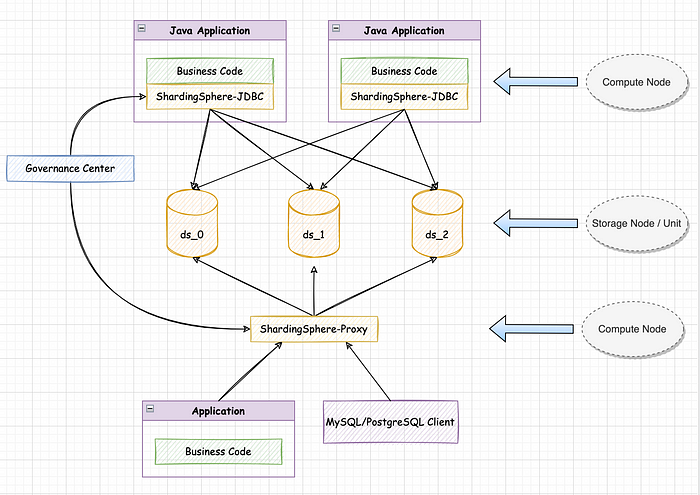
+The following is a typical hybrid architecture of ShardingSphere, among which:
+
+**Compute Node**
+
+ShardingSphere-JDBC and ShardingSphere-Proxy instances both provide computing
capabilities and they are called compute nodes.
+
+**Storage Node**
+
+Physical databases `ds_0`, `ds_1`, and `ds_2` provide data storage
capabilities and are called storage nodes. According to the different forms of
storage nodes, the instance-level node is called a **Storage Node** (such as a
MySQL instance), and the database-level node is called a **Storage Unit** (such
as a MySQL database). A storage node can provide multiple storage units.
+
+
+
+## Instance Object
+
+Instance objects can be applied to entire compute node instances, and their
capabilities affect operations in all logical databases.
+
+**Global Rules**
+
+Global rules include rule configurations that take effect globally in
ShardingSphere, such as Authority, Transaction, SQL Parser, and SQL Translator.
They control the authentication and authorization, distributed transaction, SQL
parser, SQL translator and other functional engines, and are the basic
configuration of compute node runtime.
+
+**Note:** all global rules in ShardingSphere have default values. If users
have no special needs, just keep the default values.
+
+**Distributed Variables**
+
+Distributed variables are a group of system-level variables in ShardingSphere,
whose configuration also affects the entire compute node. They're called Dist
Variables, so users can better distinguish them from the variables of the
storage node and avoid confusion.
+
+Additionally, if there are changes to distributed variable values, they are
synchronized to the entire compute node cluster, for a truly distributed
configuration.
+
+Dist variables include `SQL_SHOW`, `MAX_CONNECTIONS_SIZE_PER_QUERY`,
`SQL_FEDERATION_TYPE` and other commonly used compute node attributes,
completely covering the `props` configuration in `YAML`.
+
+**Job**
+
+Job refers to the asynchronous job capability provided by Proxy compute nodes.
For example, a migration job provides data migration for users. In the future,
it may also provide more asynchronous job functions.
+
+## Database Object
+
+Database objects are used to manage metadata in logical databases and provide
operations on metadata such as `REFRESH DATABASE METADATA` and `EXPORT DATABASE
CONFIGURATION`.
+
+## Table Object
+
+A table object is an object whose scope is a specific logical table. It can be
simply understood as table rule configurations.
+
+Table objects contain common rules such as Broadcast (broadcast table),
Encrypt (data encryption), Sharding (data sharding), and Single (single table),
which are often named the same as the logical table name.
+
+## Relation Object
+
+Relation objects are not used to manage a specific database or table. They are
used to describe the relationship between a set of objects.
+
+Currently, relation objects include two types: the `DB_Discovery Rule` which
describes the relationship between storage nodes, and the `Sharding Table
Reference Rule` which describes the relationship between sharding tables.
+
+## Traffic Object
+
+Traffic objects are used to manage data traffic in ShardingSphere, including
traffic rules such as `Readwrite-splitting Rule` and `Shadow Rule`.
+
+## Summary
+
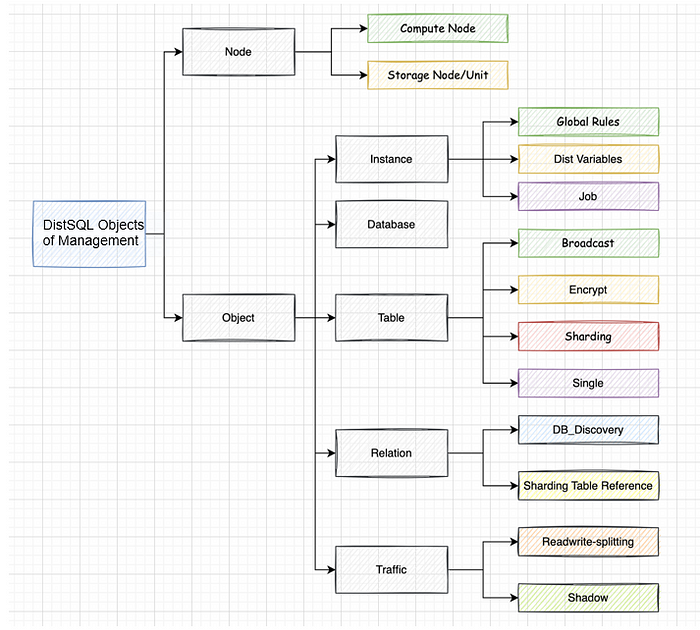
+Put the above concepts together and we'll get an architecture diagram about
DistSQL-managed objects, as shown below:
+
+
+
+This diagram helps us better categorize DistSQL and design its syntax
systematically.
+
+# Syntax Refactoring
+
+The new release 5.3.0 has upgraded DistSQL. We have completely sorted out and
refactored DistSQL statements in line with the long-term planning of the
ShardingSphere community, to make each one more targeted and more compatible.
This section shows the specific changes by comparing the content before and
after the adjustments.
+
+## Node
+
+**Compute Node**
+
+
+
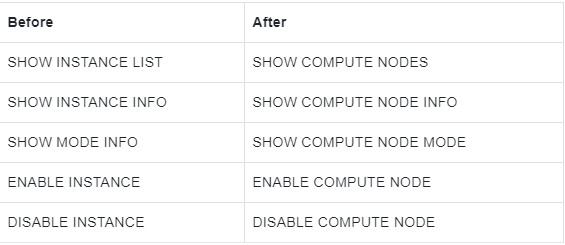
+> Description: keyword `INSTANCE` is updated to `COMPUTE NODE`.
+
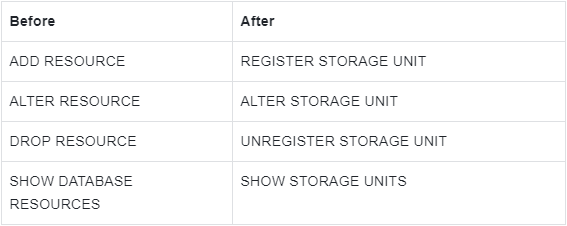
+**Storage Node**
+
+
+
+> Description:
+>
+> Keyword `RESOURCE` is updated to `STORAGE NODE / STORAGE UNIT`, which
corresponds to instance-level storage and database-level storage respectively.
+>
+> The `STORAGE NODE` is reserved and is not used currently.
+
+## Instance Object
+
+**Global Rules**
+
+Global rule syntax is not adjusted this time.
+
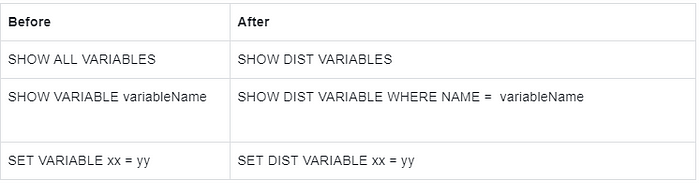
+**Dist Variables**
+
+
+
+> Description: DIST is added before VARIABLE to represent a distributed
variable.
+
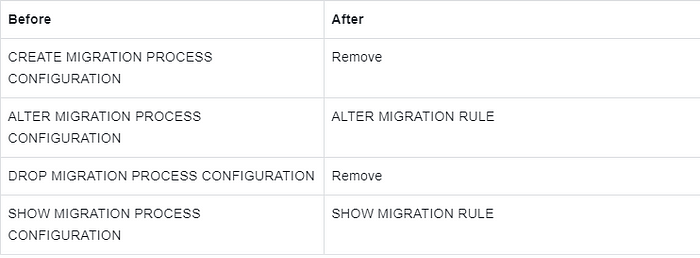
+**MIGRATION Job**
+
+
+
+> Description:
+>
+> `PROCESS CONFIGURATION` keyword is changed to `RULE`.
+>
+> Remove `CREATE` and `DROP` operations because `MIGRATION RULE` has default
values.
+>
+> Other syntax is not adjusted.
+
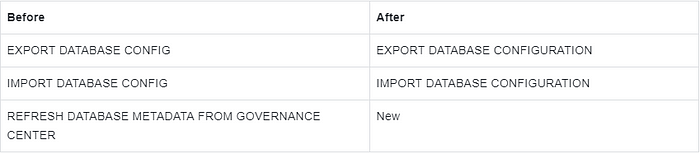
+## Database Object
+
+
+
+> Description:
+>
+> `CONFIG` is changed to `CONFIGURATION`, which is more accurate.
+>
+> The `REFRESH DATABASE METADATA `statement is added to pull the configuration
from the governance center to forcibly refresh the local metadata.
+
+## Table Object
+
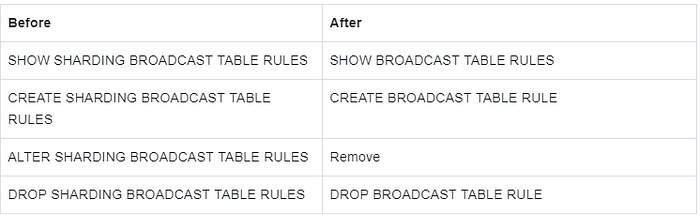
+**Broadcast Table**
+
+
+
+> Description: `SHARDING` keyword is removed from the broadcast table.
+
+**Data Encryption**
+
+The syntax related to data encryption is not adjusted this time. Please refer
to the official document [1].
+
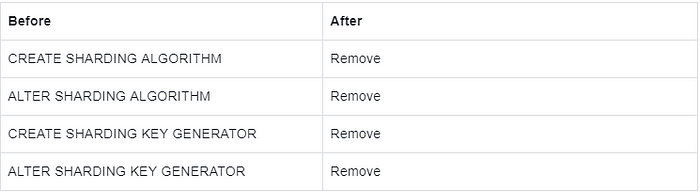
+**Sharding table**
+
+
+
+> Description:
+>
+> Remove the syntax for independently creating sharding algorithms and
distributed ID generators and integrate them into the rule definition of
`CREATE SHARDING TABLE RULE.`
+>
+> Other syntax is not adjusted.
+
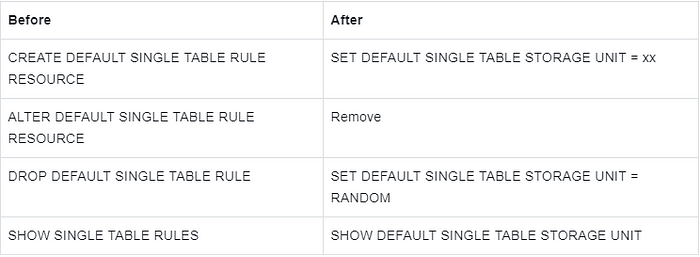
+**Single Table**
+
+
+
+> Description: by default, only one single-table router can be created. And
`CREATE` is updated to `SET`.
+
+## **Relation Object**
+
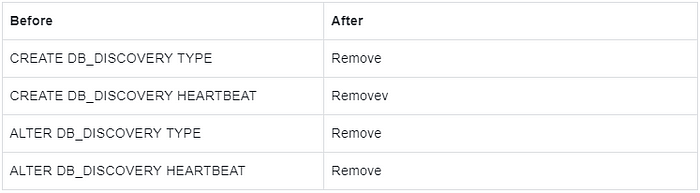
+**Database Discovery**
+
+
+
+> Description:
+>
+> Remove the syntax for creating a `DB_DISCOVERY TYPE` and `HEARTBEAT`
independently and integrate them into the rule definition of the `CREATE
DB_DISCOVERY RULE`.
+>
+> Other syntax is not adjusted.
+
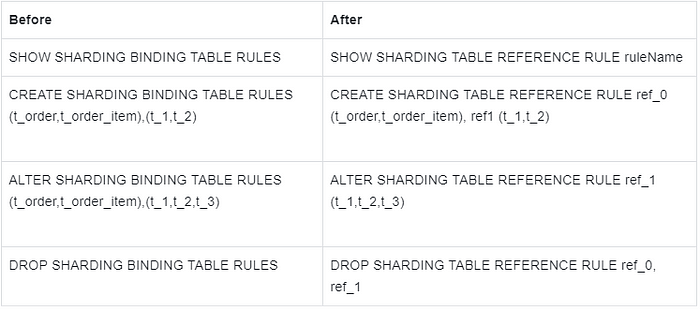
+**Binding Table**
+
+
+
+> Description: adjust the keyword and add `ruleName` for easier management.
+
+# Traffic Object
+
+**Read/write Splitting**
+
+Description: there is no major change to read/write splitting syntax. Only
`RESOURCE` is replaced with `STORAGE_UNIT` based on the keyword change of the
storage node. For example:
+
+```sql
+CREATE READWRITE_SPLITTING RULE ms_group_0 (
+WRITE_STORAGE_UNIT=write_ds,
+READ_STORAGE_UNITS(read_ds_0,read_ds_1),
+TYPE(NAME="random")
+);
+```
+
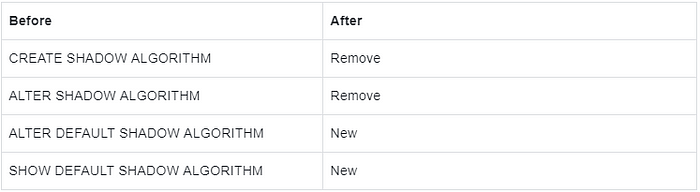
+**Shadow Database**
+
+
+
+> Description:
+>
+> Remove syntax for creating shadow algorithms independently and integrate it
into the rule definition of `CREATE SHADOW RULE`.
+>
+> Add statements to `ALTER` and `SHOW` default shadow algorithm, corresponding
to `CREATE DEFAULT SHADOW ALGORITHM`.
+
+# Property Specification Optimization
+
+In addition to the syntax refactoring, this update further simplifies the
operations of DistSQL for users, including:
+
+- When referring to the built-in strategy type or algorithm type, omit
quotation marks.
+- The value type in `PROPERTIES` is adjusted from `string` to `literal`, which
supports strings, integers, and booleans.
+
+## Example
+
+For example, when users create sharding rules, the algorithm must meet the
following rules:
+
+```sql
+TYPE(NAME="MOD",PROPERTIES("sharding-count"="4"))
+```
+
+- `"MOD"` is the name of the algorithm type and belongs to a string, so it
needs to be quoted;
+- Although the value of `PROPERTIES` is `"4"`, it is also a string and needs
to be quoted.
+
+After this optimization, you can omit quotes when referencing a built-in
algorithm type and the value of `PROPERTIES` can also omit quotes if it is not
a string.
+
+Therefore, the following is also rightful and equivalent:
+
+```sql
+TYPE(NAME="MOD",PROPERTIES("sharding-count"="4"))
+```
+
+# Demo
+
+In addition to the above changes, there are other minor tweaks.
+
+When using `CREATE SHARDING TABLE RULE` statement to create an automatic
sharding rule, we have to reference storage resources via `RESOURCES(ds_0,
ds_1)` mode. From now on, it is changed to `STORAGE_UNITS(ds_0, ds_1)`.
+
+Next, below is a demo of how to use the new DistSQL with a sharding scenario
as an example.
+
+- Create a logical database
+
+```sql
+CREATE DATABASE sharding_db;
+USE sharding_db;
+```
+
+- Register storage resources
+
+```sql
+REGISTER STORAGE UNIT ds_0 (
+ HOST="127.0.0.1",
+ PORT=3306,
+ DB="ds_0",
+ USER="root",
+ PASSWORD="root"
+),ds_1 (
+ HOST="127.0.0.1",
+ PORT=3306,
+ DB="ds_1",
+ USER="root",
+ PASSWORD="root"
+);
+```
+
+- Create sharding rules
+
+```sql
+CREATE SHARDING TABLE RULE t_order(
+STORAGE_UNITS(ds_0,ds_1),
+SHARDING_COLUMN=order_id,
+TYPE(NAME=MOD,PROPERTIES("sharding-count"=4)),
+KEY_GENERATE_STRATEGY(COLUMN=order_id,TYPE(NAME=SNOWFLAKE))
+);
+```
+
+- Create a sharding table
+
+```sql
+CREATE TABLE t_order (
+ `order_id` int NOT NULL,
+ `user_id` int NOT NULL,
+ `status` varchar(45) DEFAULT NULL,
+ PRIMARY KEY (`order_id`)
+);
+```
+
+- Data read and write
+
+```sql
+INSERT INTO t_order (order_id, user_id, status) VALUES
+(1,1,'OK'),
+(2,2,'OK'),
+(3,3,'OK');
+
+SELECT * FROM t_order;
+```
+
+- Delete the table
+
+```sql
+DROP TABLE IF EXISTS t_order;
+```
+
+- Delete sharding rules
+
+```sql
+DROP SHARDING TABLE RULE t_order;
+```
+
+- Remove the storage node
+
+```sql
+UNREGISTER STORAGE UNIT ds_0, ds_1;
+```
+
+- Delete the logical database
+
+```sql
+DROP DATABASE sharding_db;
+```
+
+# Conclusion
+
+That's all about the refactoring of DistSQL. Please refer to the official
document [1] for more information about the DistSQL syntax.
+
+If you have any questions or suggestions about [Apache
ShardingSphere](https://shardingsphere.apache.org/), you are welcome to submit
a GitHub issue [2] for discussion.
+
+# Reference
+
+[1] [DistSQL
Syntax](https://shardingsphere.apache.org/document/5.3.0/en/user-manual/shardingsphere-proxy/distsql/syntax/)
+
+[2] [GitHub Issue](https://github.com/apache/shardingsphere/issues)
diff --git
a/docs/blog/content/material/2023_02_09_Leverage_Terraform_to_Create_an_Apache_ShardingSphere_Proxy_High_Availability_Cluster_on_AWS.en.md
b/docs/blog/content/material/2023_02_09_Leverage_Terraform_to_Create_an_Apache_ShardingSphere_Proxy_High_Availability_Cluster_on_AWS.en.md
new file mode 100644
index 00000000000..0eb96babde2
--- /dev/null
+++
b/docs/blog/content/material/2023_02_09_Leverage_Terraform_to_Create_an_Apache_ShardingSphere_Proxy_High_Availability_Cluster_on_AWS.en.md
@@ -0,0 +1,547 @@
++++
+title = "Leverage Terraform to Create an [Apache
ShardingSphere](https://medium.com/u/b9760a2e8a07?source=post_page-----45d27a114904--------------------------------)
Proxy High Availability Cluster on AWS"
+weight = 86
+chapter = true
++++
+
+For this ShardingSphere blog entry, we want you to take advantage of the
benefits of IaC (Infrastructure as Code) by deploying and managing a
ShardingSphere Proxy cluster the IaC way.
+
+With this in mind, we plan to use Terraform to create a ShardingSphere-Proxy
high availability cluster with multiple availability zones.
+
+## **Background**
+
+## Terraform
+
+[Terraform](https://www.terraform.io/) is
[Hashicorp](https://www.hashicorp.com/)’s open source infrastructure automation
orchestration tool that uses IaC philosophy to manage infrastructure changes.
+
+It’s supported by public cloud vendors such as AWS, GCP, AZURE and a variety
of other providers from the community, and has become one of the most popular
practices in the “Infrastructure as Code” space.
+
+**Terraform has the following advantages:**
+
+> Support for multi-cloud deployments
+
+Terraform is suitable for multi-cloud scenarios, deploying similar
infrastructures such as Alibaba Cloud, or other cloud providers and local data
centres. Developers can use the same tools and similar profiles to manage
resources from different cloud providers simultaneously.
+
+> Automated management infrastructure
+
+Terraform’s ability to create reusable modules reduces human-induced
deployment and management errors.
+
+> Infrastructure as code
+
+Resources can be managed and maintained in code, allowing infrastructure state
to be saved. This enables users to track changes made to different components
of the system (infrastructure as code) and share these configurations with
others.
+
+## ShardingSphere-Proxy
+
+Apache ShardingSphere is a distributed database ecosystem that transforms any
database into a distributed database and enhances it with data sharding,
elastic scaling, encryption and other capabilities.
+
+ShardingSphere-Proxy is positioned as a transparent database proxy that
supports any client using MySQL, PostgreSQL, or openGauss protocols to manage
data, and is more friendly to heterogeneous languages and DevOps scenarios.
+
+ShardingSphere-Proxy is non-intrusive to the application code: users only need
to change the connection string of the database to achieve data sharding,
read/write separation, etc. As part of the data infrastructure, its high
availability will be key.
+
+# Deployment with Terraform
+
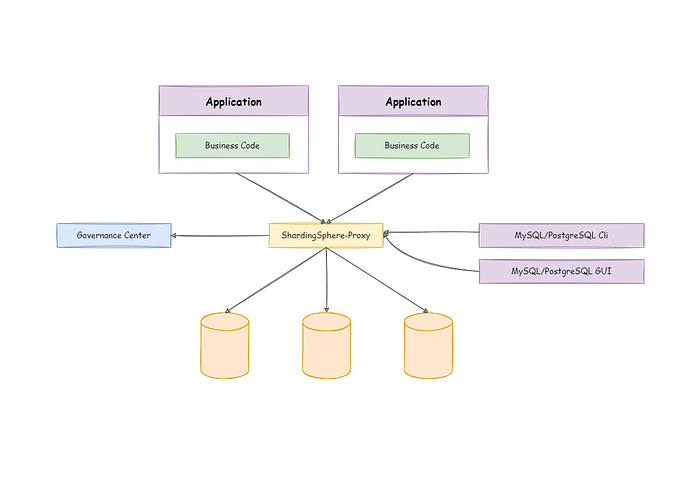
+Before we start writing the Terraform configuration, we need to understand the
basic architecture of the ShardingSphere-Proxy cluster
+
+
+
+We use ZooKeeper as the Governance Center.
+
+As you can see, ShardingSphere-Proxy itself is a stateless application, and in
a real world scenario, load balancing is provided externally, and the load
balancing is used to flexibly distribute traffic between the instances.
+
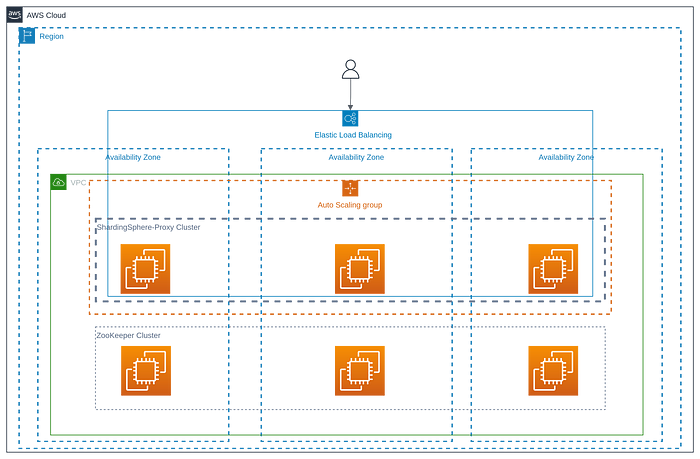
+To ensure high availability of the ZooKeeper and ShardingSphere-Proxy cluster,
the following architecture will be used:
+
+
+
+## ZooKeeper Cluster
+
+**Define Input Parameters**
+
+For the purpose of reusable configuration, a series of variables are defined,
as follows:
+
+```yaml
+variable "cluster_size" {
+ type = number
+ description = "The cluster size that same size as available_zones"
+}
+
+variable "key_name" {
+ type = string
+ description = "The ssh keypair for remote connection"
+}
+
+variable "instance_type" {
+ type = string
+ description = "The EC2 instance type"
+}
+
+variable "vpc_id" {
+ type = string
+ description = "The id of VPC"
+}
+
+variable "subnet_ids" {
+ type = list(string)
+ description = "List of subnets sorted by availability zone in your VPC"
+}
+
+variable "security_groups" {
+ type = list(string)
+ default = []
+ description = "List of the Security Group, it must be allow access 2181,
2888, 3888 port"
+}
+
+
+variable "hosted_zone_name" {
+ type = string
+ default = "shardingsphere.org"
+ description = "The name of the hosted private zone"
+}
+
+variable "tags" {
+ type = map(any)
+ description = "A map of zk instance resource, the default tag is
Name=zk-$${count.idx}"
+ default = {}
+}
+
+variable "zk_version" {
+ type = string
+ description = "The zookeeper version"
+ default = "3.7.1"
+}
+
+variable "zk_config" {
+ default = {
+ client_port = 2181
+ zk_heap = 1024
+ }
+
+ description = "The default config of zookeeper server"
+}
+```
+
+These variables can also be changed when installing the ShardingSphere-Proxy
cluster below.
+
+**Configure ZooKeeper Cluster**
+
+For instance of the ZooKeeper service, we have used the AWS native
`amzn2-ami-hvm` image.
+
+We used the `count` parameter to deploy the ZooKeeper service, which indicates
the number of nodes in the ZooKeeper cluster created by Terraform as
`var.cluster_size`.
+
+When creating a ZooKeeper instance, we use the `ignore_changes`parameter to
ignore artificial changes to the `tag` to avoid the instance being recreated
the next time Terraform is run.
+
+We use `cloud-init` to reboot the ZooKeeper-related configuration, as
described in
[here](https://raw.githubusercontent.com/apache/shardingsphere-on-cloud/main/terraform/amazon/zk/cloud-init.yml).
+
+We create a domain name for each ZooKeeper service and the application only
needs to use the domain name to avoid problems with changing the IP address
when the ZooKeeper service is restarted.
+
+```yaml
+data "aws_ami" "base" {
+ owners = ["amazon"]
+
+ filter {
+ name = "name"
+ values = ["amzn2-ami-hvm-*-x86_64-ebs"]
+ }
+
+ most_recent = true
+}
+
+data "aws_availability_zones" "available" {
+ state = "available"
+}
+
+resource "aws_network_interface" "zk" {
+ count = var.cluster_size
+ subnet_id = element(var.subnet_ids, count.index)
+ security_groups = var.security_groups
+}
+
+resource "aws_instance" "zk" {
+ count = var.cluster_size
+ ami = data.aws_ami.base.id
+ instance_type = var.instance_type
+ key_name = var.key_name
+
+ network_interface {
+ delete_on_termination = false
+ device_index = 0
+ network_interface_id = element(aws_network_interface.zk.*.id, count.index)
+ }
+
+ tags = merge(
+ var.tags,
+ {
+ Name = "zk-${count.index}"
+ }
+ )
+
+ user_data = base64encode(templatefile("${path.module}/cloud-init.yml", {
+ version = var.zk_version
+ nodes = range(1, var.cluster_size + 1)
+ domain = var.hosted_zone_name
+ index = count.index + 1
+ client_port = var.zk_config["client_port"]
+ zk_heap = var.zk_config["zk_heap"]
+ }))
+
+ lifecycle {
+ ignore_changes = [
+ # Ignore changes to tags.
+ tags
+ ]
+ }
+}
+
+data "aws_route53_zone" "zone" {
+ name = "${var.hosted_zone_name}."
+ private_zone = true
+}
+
+resource "aws_route53_record" "zk" {
+ count = var.cluster_size
+ zone_id = data.aws_route53_zone.zone.zone_id
+ name = "zk-${count.index + 1}"
+ type = "A"
+ ttl = 60
+ records = element(aws_network_interface.zk.*.private_ips, count.index)
+}
+```
+
+**Define Output**
+
+The IP of the ZooKeeper service instance and the corresponding domain name
will be output after a successful run of `terraform apply`.
+
+```yaml
+output "zk_node_private_ip" {
+ value = aws_instance.zk.*.private_ip
+ description = "The private ips of zookeeper instances"
+}
+
+output "zk_node_domain" {
+ value = [for v in aws_route53_record.zk.*.name : format("%s.%s", v,
var.hosted_zone_name)]
+ description = "The private domain names of zookeeper instances for use by
ShardingSphere Proxy"
+}
+```
+
+## ShardingSphere-Proxy Cluster
+
+**Define Input Parameters**
+
+The purpose of defining input parameters is also for the sake of configuration
reusability.
+
+```yaml
+variable "cluster_size" {
+ type = number
+ description = "The cluster size that same size as available_zones"
+}
+
+variable "shardingsphere_proxy_version" {
+ type = string
+ description = "The shardingsphere proxy version"
+}
+
+variable "shardingsphere_proxy_asg_desired_capacity" {
+ type = string
+ default = "3"
+ description = "The desired capacity is the initial capacity of the Auto
Scaling group at the time of its creation and the capacity it attempts to
maintain. see
https://docs.aws.amazon.com/AWSCloudFormation/latest/UserGuide/aws-properties-as-group.html#cfn-as-group-desiredcapacitytype,
The default value is 3"
+}
+
+variable "shardingsphere_proxy_asg_max_size" {
+ type = string
+ default = "6"
+ description = "The maximum size of ShardingSphere Proxy Auto Scaling Group.
The default values is 6"
+}
+
+variable "shardingsphere_proxy_asg_healthcheck_grace_period" {
+ type = number
+ default = 120
+ description = "The amount of time, in seconds, that Amazon EC2 Auto Scaling
waits before checking the health status of an EC2 instance that has come into
service and marking it unhealthy due to a failed health check. see
https://docs.aws.amazon.com/autoscaling/ec2/userguide/health-check-grace-period.html";
+}
+
+variable "image_id" {
+ type = string
+ description = "The AMI id"
+}
+
+variable "key_name" {
+ type = string
+ description = "the ssh keypair for remote connection"
+}
+
+variable "instance_type" {
+ type = string
+ description = "The EC2 instance type"
+}
+
+variable "vpc_id" {
+ type = string
+ description = "The id of your VPC"
+}
+
+variable "subnet_ids" {
+ type = list(string)
+ description = "List of subnets sorted by availability zone in your VPC"
+}
+
+variable "security_groups" {
+ type = list(string)
+ default = []
+ description = "List of The Security group IDs"
+}
+
+variable "lb_listener_port" {
+ type = string
+ description = "lb listener port"
+}
+
+variable "hosted_zone_name" {
+ type = string
+ default = "shardingsphere.org"
+ description = "The name of the hosted private zone"
+}
+
+variable "zk_servers" {
+ type = list(string)
+ description = "The Zookeeper servers"
+}
+```
+
+## Configure ShardingSphere-Proxy Cluster
+
+**Configure AutoScalingGroup**
+
+We’ll create an AutoScalingGroup to allow it to manage ShardingSphere-Proxy
instances. The health check type of the AutoScalingGroup is changed to “ELB” to
allow the AutoScalingGroup to move out bad nodes in time after load balancing
fails to perform a health check on the instance.
+
+The changes to `load_balancers` and `target_group_arns` are ignored when
creating the AutoScalingGroup.
+
+We also use `cloud-init` to configure the ShardingSphere-Proxy instance, as
described
[here](https://raw.githubusercontent.com/apache/shardingsphere-on-cloud/main/terraform/amazon/shardingsphere/cloud-init.yml).
+
+```yaml
+resource "aws_launch_template" "ss" {
+ name = "shardingsphere-proxy-launch-template"
+ image_id = var.image_id
+ instance_initiated_shutdown_behavior = "terminate"
+ instance_type = var.instance_type
+ key_name = var.key_name
+ iam_instance_profile {
+ name = aws_iam_instance_profile.ss.name
+ }
+
+ user_data = base64encode(templatefile("${path.module}/cloud-init.yml", {
+ version = var.shardingsphere_proxy_version
+ version_elems = split(".", var.shardingsphere_proxy_version)
+ zk_servers = join(",", var.zk_servers)
+ }))
+
+ metadata_options {
+ http_endpoint = "enabled"
+ http_tokens = "required"
+ http_put_response_hop_limit = 1
+ instance_metadata_tags = "enabled"
+ }
+
+ monitoring {
+ enabled = true
+ }
+
+ vpc_security_group_ids = var.security_groups
+
+ tag_specifications {
+ resource_type = "instance"
+
+ tags = {
+ Name = "shardingsphere-proxy"
+ }
+ }
+}
+
+resource "aws_autoscaling_group" "ss" {
+ name = "shardingsphere-proxy-asg"
+ availability_zones = data.aws_availability_zones.available.names
+ desired_capacity = var.shardingsphere_proxy_asg_desired_capacity
+ min_size = 1
+ max_size = var.shardingsphere_proxy_asg_max_size
+ health_check_grace_period =
var.shardingsphere_proxy_asg_healthcheck_grace_period
+ health_check_type = "ELB"
+
+ launch_template {
+ id = aws_launch_template.ss.id
+ version = "$Latest"
+ }
+
+ lifecycle {
+ ignore_changes = [load_balancers, target_group_arns]
+ }
+}
+```
+
+**Configure load balancing**
+
+The AutoScalingGroup created in the previous step is attached to the load
balancing and traffic passing through the load balancing is automatically
routed to the ShardingSphere-Proxy instance created by the AutoScalingGroup.
+
+```yaml
+resource "aws_lb_target_group" "ss_tg" {
+ name = "shardingsphere-proxy-lb-tg"
+ port = var.lb_listener_port
+ protocol = "TCP"
+ vpc_id = var.vpc_id
+ preserve_client_ip = false
+
+ health_check {
+ protocol = "TCP"
+ healthy_threshold = 2
+ unhealthy_threshold = 2
+ }
+
+ tags = {
+ Name = "shardingsphere-proxy"
+ }
+}
+
+resource "aws_autoscaling_attachment" "asg_attachment_lb" {
+ autoscaling_group_name = aws_autoscaling_group.ss.id
+ lb_target_group_arn = aws_lb_target_group.ss_tg.arn
+}
+
+
+resource "aws_lb_listener" "ss" {
+ load_balancer_arn = aws_lb.ss.arn
+ port = var.lb_listener_port
+ protocol = "TCP"
+
+ default_action {
+ type = "forward"
+ target_group_arn = aws_lb_target_group.ss_tg.arn
+ }
+
+ tags = {
+ Name = "shardingsphere-proxy"
+ }
+}
+```
+
+**Configure Domain Name**
+
+We will create an internal domain name that defaults to
`proxy.shardingsphere.org`, which actually points internally to the load
balancing created in the previous step.
+
+```yaml
+data "aws_route53_zone" "zone" {
+ name = "${var.hosted_zone_name}."
+ private_zone = true
+}
+
+resource "aws_route53_record" "ss" {
+ zone_id = data.aws_route53_zone.zone.zone_id
+ name = "proxy"
+ type = "A"
+
+ alias {
+ name = aws_lb.ss.dns_name
+ zone_id = aws_lb.ss.zone_id
+ evaluate_target_health = true
+ }
+```
+
+**Configure CloudWatch**
+
+We will go through the STS to create a role with CloudWatch permissions, which
will be attached to the ShardingSphere-Proxy instance created by
AutoScalingGroup.
+
+The runtime logs of the ShardingSphere-Proxy will be captured by the
CloudWatch Agent on CloudWatch. A `log_group` named `shardingsphere-proxy.log`
is created by default.
+
+The specific configuration of CloudWatch is described
[here](https://raw.githubusercontent.com/apache/shardingsphere-on-cloud/main/terraform/amazon/shardingsphere/cloudwatch-agent.json).
+
+```yaml
+resource "aws_iam_role" "sts" {
+ name = "shardingsphere-proxy-sts-role"
+
+ assume_role_policy = <<EOF
+{
+ "Version": "2012-10-17",
+ "Statement": [
+ {
+ "Action": "sts:AssumeRole",
+ "Principal": {
+ "Service": "ec2.amazonaws.com"
+ },
+ "Effect": "Allow",
+ "Sid": ""
+ }
+ ]
+}
+EOF
+}
+
+resource "aws_iam_role_policy" "ss" {
+ name = "sharidngsphere-proxy-policy"
+ role = aws_iam_role.sts.id
+
+ policy = <<EOF
+{
+ "Version": "2012-10-17",
+ "Statement": [
+ {
+ "Action": [
+ "cloudwatch:PutMetricData",
+ "ec2:DescribeTags",
+ "logs:PutLogEvents",
+ "logs:DescribeLogStreams",
+ "logs:DescribeLogGroups",
+ "logs:CreateLogStream",
+ "logs:CreateLogGroup"
+ ],
+ "Effect": "Allow",
+ "Resource": "*"
+ }
+ ]
+}
+EOF
+}
+
+resource "aws_iam_instance_profile" "ss" {
+ name = "shardingsphere-proxy-instance-profile"
+ role = aws_iam_role.sts.name
+}
+```
+
+## Deployment
+
+Once all Terraform configurations have been created, you’ll be ready to deploy
the ShardingSphere-Proxy cluster. Before actually deploying, it’s recommended
that you use the following command to check that the configuration performs as
expected.
+
+```markdown
+terraform plan
+```
+
+After confirming the plan, it’s time to go ahead and actually execute it by
running the following command
+
+```markdown
+terraform apply
+```
+
+The full code can be found
[here](https://github.com/apache/shardingsphere-on-cloud/tree/main/terraform/amazon).
Alternatively, check out our [website for
more](https://shardingsphere.apache.org/oncloud/current/en/overview/).
+
+## Test
+
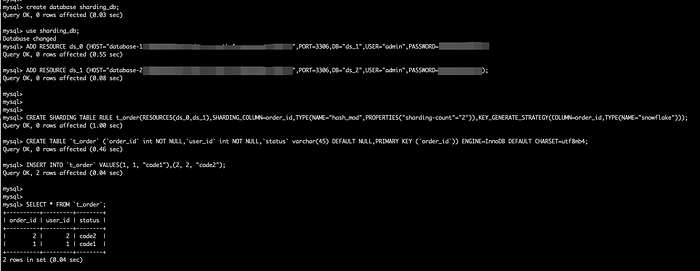
+The goal of the test is to prove that the cluster created is usable. We use a
simple case: we add two data sources and create a simple sharding rule using
DistSQL, then insert the data and the query returns the correct result.
+
+By default, we create an internal domain `proxy.shardingsphere.org` and the
username and password for the ShardingSphere-Proxy cluster are both root.
+
+
+
+**Description:**
+
+DistSQL (Distributed SQL) is Apache ShardingSphere’s SQL-like operational
language. It’s used in exactly the same way as standard SQL to provide
SQL-level manipulation capabilities for incremental functionality, as described
[here](https://shardingsphere.apache.org/document/current/cn/user-manual/shardingsphere-proxy/distsql/).
+
+# Conclusion
+
+Terraform is an excellent tool to help you implement IaC. Terraform will be
very useful for iterating over ShardingSphere-Proxy clusters. I hope this
article has helped anyone interested in ShardingSphere and Terraform.
+
+# Relevant Links:
+
+🔗 [ShardingSphere-on-Cloud
Github](https://github.com/apache/shardingsphere-on-cloud)
+
+🔗 [ShardingSphere-on-Cloud Official
Website](https://shardingsphere.apache.org/oncloud/)
+
+🔗 [Apache ShardingSphere GitHub](https://github.com/apache/shardingsphere)
+
+🔗 [Apache ShardingSphere Official Website](https://shardingsphere.apache.org/)
+
+🔗 [Apache ShardingSphere Slack
Channel](https://apacheshardingsphere.slack.com/)
diff --git
a/docs/blog/static/img/2023_01_04_Refactoring_the_DistSQL_Syntax__ShardingSphere_5.3.0_Deep_Dive1.png
b/docs/blog/static/img/2023_01_04_Refactoring_the_DistSQL_Syntax__ShardingSphere_5.3.0_Deep_Dive1.png
new file mode 100644
index 00000000000..cd3a6e0230e
Binary files /dev/null and
b/docs/blog/static/img/2023_01_04_Refactoring_the_DistSQL_Syntax__ShardingSphere_5.3.0_Deep_Dive1.png
differ
diff --git
a/docs/blog/static/img/2023_01_04_Refactoring_the_DistSQL_Syntax__ShardingSphere_5.3.0_Deep_Dive10.png
b/docs/blog/static/img/2023_01_04_Refactoring_the_DistSQL_Syntax__ShardingSphere_5.3.0_Deep_Dive10.png
new file mode 100644
index 00000000000..9bf02810fbd
Binary files /dev/null and
b/docs/blog/static/img/2023_01_04_Refactoring_the_DistSQL_Syntax__ShardingSphere_5.3.0_Deep_Dive10.png
differ
diff --git
a/docs/blog/static/img/2023_01_04_Refactoring_the_DistSQL_Syntax__ShardingSphere_5.3.0_Deep_Dive11.png
b/docs/blog/static/img/2023_01_04_Refactoring_the_DistSQL_Syntax__ShardingSphere_5.3.0_Deep_Dive11.png
new file mode 100644
index 00000000000..5e729ce0f12
Binary files /dev/null and
b/docs/blog/static/img/2023_01_04_Refactoring_the_DistSQL_Syntax__ShardingSphere_5.3.0_Deep_Dive11.png
differ
diff --git
a/docs/blog/static/img/2023_01_04_Refactoring_the_DistSQL_Syntax__ShardingSphere_5.3.0_Deep_Dive12.png
b/docs/blog/static/img/2023_01_04_Refactoring_the_DistSQL_Syntax__ShardingSphere_5.3.0_Deep_Dive12.png
new file mode 100644
index 00000000000..d1cb5d88424
Binary files /dev/null and
b/docs/blog/static/img/2023_01_04_Refactoring_the_DistSQL_Syntax__ShardingSphere_5.3.0_Deep_Dive12.png
differ
diff --git
a/docs/blog/static/img/2023_01_04_Refactoring_the_DistSQL_Syntax__ShardingSphere_5.3.0_Deep_Dive13.png
b/docs/blog/static/img/2023_01_04_Refactoring_the_DistSQL_Syntax__ShardingSphere_5.3.0_Deep_Dive13.png
new file mode 100644
index 00000000000..ea27d2ecc94
Binary files /dev/null and
b/docs/blog/static/img/2023_01_04_Refactoring_the_DistSQL_Syntax__ShardingSphere_5.3.0_Deep_Dive13.png
differ
diff --git
a/docs/blog/static/img/2023_01_04_Refactoring_the_DistSQL_Syntax__ShardingSphere_5.3.0_Deep_Dive14.png
b/docs/blog/static/img/2023_01_04_Refactoring_the_DistSQL_Syntax__ShardingSphere_5.3.0_Deep_Dive14.png
new file mode 100644
index 00000000000..338b490d72f
Binary files /dev/null and
b/docs/blog/static/img/2023_01_04_Refactoring_the_DistSQL_Syntax__ShardingSphere_5.3.0_Deep_Dive14.png
differ
diff --git
a/docs/blog/static/img/2023_01_04_Refactoring_the_DistSQL_Syntax__ShardingSphere_5.3.0_Deep_Dive2.png
b/docs/blog/static/img/2023_01_04_Refactoring_the_DistSQL_Syntax__ShardingSphere_5.3.0_Deep_Dive2.png
new file mode 100644
index 00000000000..6f2bf0d9a2b
Binary files /dev/null and
b/docs/blog/static/img/2023_01_04_Refactoring_the_DistSQL_Syntax__ShardingSphere_5.3.0_Deep_Dive2.png
differ
diff --git
a/docs/blog/static/img/2023_01_04_Refactoring_the_DistSQL_Syntax__ShardingSphere_5.3.0_Deep_Dive3.png
b/docs/blog/static/img/2023_01_04_Refactoring_the_DistSQL_Syntax__ShardingSphere_5.3.0_Deep_Dive3.png
new file mode 100644
index 00000000000..740a046fcfb
Binary files /dev/null and
b/docs/blog/static/img/2023_01_04_Refactoring_the_DistSQL_Syntax__ShardingSphere_5.3.0_Deep_Dive3.png
differ
diff --git
a/docs/blog/static/img/2023_01_04_Refactoring_the_DistSQL_Syntax__ShardingSphere_5.3.0_Deep_Dive4.png
b/docs/blog/static/img/2023_01_04_Refactoring_the_DistSQL_Syntax__ShardingSphere_5.3.0_Deep_Dive4.png
new file mode 100644
index 00000000000..c37fe9f1d35
Binary files /dev/null and
b/docs/blog/static/img/2023_01_04_Refactoring_the_DistSQL_Syntax__ShardingSphere_5.3.0_Deep_Dive4.png
differ
diff --git
a/docs/blog/static/img/2023_01_04_Refactoring_the_DistSQL_Syntax__ShardingSphere_5.3.0_Deep_Dive5.png
b/docs/blog/static/img/2023_01_04_Refactoring_the_DistSQL_Syntax__ShardingSphere_5.3.0_Deep_Dive5.png
new file mode 100644
index 00000000000..2ccf816a65b
Binary files /dev/null and
b/docs/blog/static/img/2023_01_04_Refactoring_the_DistSQL_Syntax__ShardingSphere_5.3.0_Deep_Dive5.png
differ
diff --git
a/docs/blog/static/img/2023_01_04_Refactoring_the_DistSQL_Syntax__ShardingSphere_5.3.0_Deep_Dive6.png
b/docs/blog/static/img/2023_01_04_Refactoring_the_DistSQL_Syntax__ShardingSphere_5.3.0_Deep_Dive6.png
new file mode 100644
index 00000000000..2e7c945f065
Binary files /dev/null and
b/docs/blog/static/img/2023_01_04_Refactoring_the_DistSQL_Syntax__ShardingSphere_5.3.0_Deep_Dive6.png
differ
diff --git
a/docs/blog/static/img/2023_01_04_Refactoring_the_DistSQL_Syntax__ShardingSphere_5.3.0_Deep_Dive7.png
b/docs/blog/static/img/2023_01_04_Refactoring_the_DistSQL_Syntax__ShardingSphere_5.3.0_Deep_Dive7.png
new file mode 100644
index 00000000000..1a26f288914
Binary files /dev/null and
b/docs/blog/static/img/2023_01_04_Refactoring_the_DistSQL_Syntax__ShardingSphere_5.3.0_Deep_Dive7.png
differ
diff --git
a/docs/blog/static/img/2023_01_04_Refactoring_the_DistSQL_Syntax__ShardingSphere_5.3.0_Deep_Dive8.png
b/docs/blog/static/img/2023_01_04_Refactoring_the_DistSQL_Syntax__ShardingSphere_5.3.0_Deep_Dive8.png
new file mode 100644
index 00000000000..6bea84e014c
Binary files /dev/null and
b/docs/blog/static/img/2023_01_04_Refactoring_the_DistSQL_Syntax__ShardingSphere_5.3.0_Deep_Dive8.png
differ
diff --git
a/docs/blog/static/img/2023_01_04_Refactoring_the_DistSQL_Syntax__ShardingSphere_5.3.0_Deep_Dive9.png
b/docs/blog/static/img/2023_01_04_Refactoring_the_DistSQL_Syntax__ShardingSphere_5.3.0_Deep_Dive9.png
new file mode 100644
index 00000000000..f4bd24f8546
Binary files /dev/null and
b/docs/blog/static/img/2023_01_04_Refactoring_the_DistSQL_Syntax__ShardingSphere_5.3.0_Deep_Dive9.png
differ
diff --git
a/docs/blog/static/img/2023_02_09_Leverage_Terraform_to_Create_an_Apache_ShardingSphere_Proxy_High_Availability_Cluster_on_AWS1.png
b/docs/blog/static/img/2023_02_09_Leverage_Terraform_to_Create_an_Apache_ShardingSphere_Proxy_High_Availability_Cluster_on_AWS1.png
new file mode 100644
index 00000000000..2f510d0671b
Binary files /dev/null and
b/docs/blog/static/img/2023_02_09_Leverage_Terraform_to_Create_an_Apache_ShardingSphere_Proxy_High_Availability_Cluster_on_AWS1.png
differ
diff --git
a/docs/blog/static/img/2023_02_09_Leverage_Terraform_to_Create_an_Apache_ShardingSphere_Proxy_High_Availability_Cluster_on_AWS2.png
b/docs/blog/static/img/2023_02_09_Leverage_Terraform_to_Create_an_Apache_ShardingSphere_Proxy_High_Availability_Cluster_on_AWS2.png
new file mode 100644
index 00000000000..0402be68fc2
Binary files /dev/null and
b/docs/blog/static/img/2023_02_09_Leverage_Terraform_to_Create_an_Apache_ShardingSphere_Proxy_High_Availability_Cluster_on_AWS2.png
differ
diff --git
a/docs/blog/static/img/2023_02_09_Leverage_Terraform_to_Create_an_Apache_ShardingSphere_Proxy_High_Availability_Cluster_on_AWS3.png
b/docs/blog/static/img/2023_02_09_Leverage_Terraform_to_Create_an_Apache_ShardingSphere_Proxy_High_Availability_Cluster_on_AWS3.png
new file mode 100644
index 00000000000..d6f41900b03
Binary files /dev/null and
b/docs/blog/static/img/2023_02_09_Leverage_Terraform_to_Create_an_Apache_ShardingSphere_Proxy_High_Availability_Cluster_on_AWS3.png
differ

















