This is an automated email from the ASF dual-hosted git repository.

jianglongtao pushed a commit to branch master
in repository https://gitbox.apache.org/repos/asf/shardingsphere.git
The following commit(s) were added to refs/heads/master by this push:
new d8248490543 Upload 2 blogs to ShardingSphere (#24887)
d8248490543 is described below
commit d8248490543f16f6f6c582a2b89655aac5eb2459
Author: FPokerFace <[email protected]>
AuthorDate: Wed Mar 29 11:54:00 2023 +0800
Upload 2 blogs to ShardingSphere (#24887)
---
...4_ShardingSphere_Operator_Practical_Guide.en.md | 192 ++++++++++
...SQL's_Export,_Import,_and_YAML_Conversion.en.md | 388 +++++++++++++++++++++
...14_ShardingSphere_Operator_Practical_Guide1.png | Bin 0 -> 110395 bytes
...4_ShardingSphere_Operator_Practical_Guide10.png | Bin 0 -> 69387 bytes
...4_ShardingSphere_Operator_Practical_Guide11.png | Bin 0 -> 49678 bytes
...4_ShardingSphere_Operator_Practical_Guide12.png | Bin 0 -> 31646 bytes
...4_ShardingSphere_Operator_Practical_Guide13.png | Bin 0 -> 79254 bytes
...4_ShardingSphere_Operator_Practical_Guide14.png | Bin 0 -> 67402 bytes
...4_ShardingSphere_Operator_Practical_Guide15.png | Bin 0 -> 51068 bytes
...4_ShardingSphere_Operator_Practical_Guide16.png | Bin 0 -> 149662 bytes
...14_ShardingSphere_Operator_Practical_Guide2.png | Bin 0 -> 122431 bytes
...14_ShardingSphere_Operator_Practical_Guide3.png | Bin 0 -> 62384 bytes
...14_ShardingSphere_Operator_Practical_Guide4.png | Bin 0 -> 17711 bytes
...14_ShardingSphere_Operator_Practical_Guide5.png | Bin 0 -> 38366 bytes
...14_ShardingSphere_Operator_Practical_Guide6.png | Bin 0 -> 4921 bytes
...14_ShardingSphere_Operator_Practical_Guide7.png | Bin 0 -> 23145 bytes
...14_ShardingSphere_Operator_Practical_Guide8.png | Bin 0 -> 22344 bytes
...14_ShardingSphere_Operator_Practical_Guide9.png | Bin 0 -> 24975 bytes
...tSQL's_Export,_Import,_and_YAML_Conversion1.png | Bin 0 -> 31042 bytes
...tSQL's_Export,_Import,_and_YAML_Conversion2.png | Bin 0 -> 141779 bytes
...tSQL's_Export,_Import,_and_YAML_Conversion3.png | Bin 0 -> 292888 bytes
21 files changed, 580 insertions(+)
diff --git
a/docs/blog/content/material/2023_03_14_ShardingSphere_Operator_Practical_Guide.en.md
b/docs/blog/content/material/2023_03_14_ShardingSphere_Operator_Practical_Guide.en.md
new file mode 100644
index 00000000000..44b7d54ea45
--- /dev/null
+++
b/docs/blog/content/material/2023_03_14_ShardingSphere_Operator_Practical_Guide.en.md
@@ -0,0 +1,192 @@
++++
+title = "ShardingSphere Operator Practical Guide"
+weight = 91
+chapter = true
++++
+
+# Apache ShardingSphere-on-Cloud sub-project
+
+ShardingSphere-on-Cloud is a sub-project of Apache ShardingSphere for cloud
solutions, covering verything from automated deployment scripts to virtual
machines in AWS, GCP, AliCloud, Huawei Cloud cloud environments such as
CloudFormation Stack templates, Terraform and more.
+
+The project also covers tools such as Helm Charts, Operator, and automatic
horizontal scaling in Kubernetes environments, and will gradually cover
ShardingSphere high-availability, observability, and security compliance in
cloud environments.
+
+- If you want to quickly understand, validate or use the features of
ShardingSphere-Proxy and don't have a Kubernetes environment, you can use AWS
CloudFormation or Terraform for on-demand deployments, as described in the
previous article "[Use AWS CloudFormation to create ShardingSphere HA
clusters](https://shardingsphere.apache.org/blog/en/material/2022_12_13_use_aws_cloudformation_to_create_shardingsphere_ha_clusters/)".
+- If you'd like to deploy in a Kubernetes environment, you can leverage the
Operator feature or install ShardingSphere-Proxy directly without using
Operator but with Helm Charts.
+
+For more information, please refer to the [official
documentation](https://shardingsphere.apache.org/oncloud/).
+
+## Why Do You Need ShardingSphere Operator
+
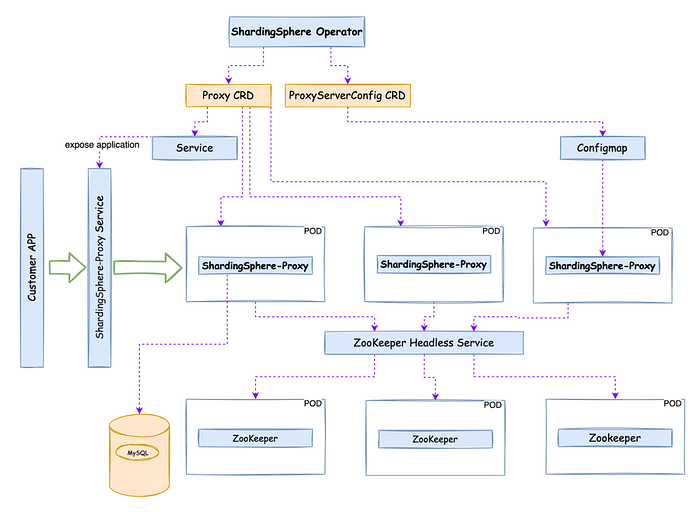
+Kubernetes provides a way to implement a "platform on top of a platform", the
Operator pattern, which leverages a custom `CustomResourceDefinition` with the
Kubernetes exposed Reconcile model framework.
+
+The Reconcile model framework exposed by Kubernetes enables developers to
quickly implement a declarative custom Ops tool for a given application, such
as Prometheus-Operator, Nats-Operator, etc.
+
+As a transparent database enhancement engine, Apache ShardingSphere supports
access to any client using MySQL, PostgreSQL, openGauss protocols, with
ShardingSphere-Proxy being more suitable to heterogeneous languages and
high-availability scenarios.
+
+Using Operator makes the deployment and maintenance of ShardingSphere-Proxy on
Kubernetes much easier and more efficient.
+
+
+
+# Using ShardingSphere Operator: An Example
+
+Before using ShardingSphere, you will need to prepare one or more compatible
databases as storage nodes.
+
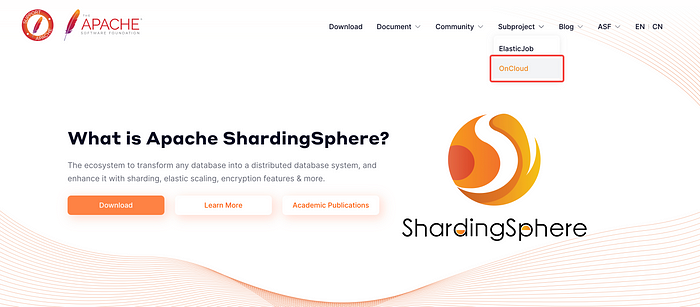
+Detailed instructions can be found in the [official
documentation](https://shardingsphere.apache.org/oncloud/current/en/operation-guide/operator/)
for the ShardingSphere-on-Cloud sub-project.
+
+
+
+## Install ShardingSphere-Operator
+
+Find the required configuration content and configuration [file directory for
installation
here](https://github.com/apache/shardingsphere-on-cloud/tree/main/charts/apache-shardingsphere-operator-charts).
+
+To facilitate the installation of Operator, our community provides an online
installation in addition to the source code installation. The two methods are
as follows:
+
+## Online Installation
+
+```less
+kubectl create ns shardingsphere-operator
+ helm repo add shardingsphere
https://apache.github.io/shardingsphere-on-cloud
+ helm repo update
+ helm install demo-release
shardingsphere/apache-shardingsphere-operator-charts -n shardingsphere-operator
+```
+
+Example of operation result:
+
+
+
+**Note:** please refer to the official documentation for source code
installation。
+
+At this point, you can see that the operator has injected the `crd `that
Operator will be working on into the Kubernetes cluster by using `kubectl get
crd`:
+
+
+
+As well as viewing the deployed ShardingSphere-Operator:
+
+
+
+## Deploy ShardingSphere-Proxy Clusters
+
+For a list of all the parameters that can be configured options, refer to the
[documentation
here](https://github.com/apache/shardingsphere-on-cloud/tree/main/charts/apache-shardingsphere-operator-charts#parameters).
+
+**Tip:** you need to provide an accessible ZooKeeper cluster before you can
run ShardingSphere-Proxy.
+
+To run a ShardingSphere-Proxy you need to write two `CustomResourceDefinition`
files: `shardingsphereproxy.yaml` and `shardingsphereproxyserverconfigs.yaml`,
examples of which are as follows:
+
+```yaml
+# shardingsphereproxy.yaml
+apiVersion: shardingsphere.apache.org/v1alpha1
+kind: ShardingSphereProxy
+metadata:
+ labels:
+ app: shardingsphere-proxy
+ name: shardingsphere-proxy
+ namespace: shardingsphere-demo
+spec:
+ mySQLDriver:
+ version: 5.1.47
+ port: 3307
+ proxyConfigName: shardingsphere-proxy-configuration
+ replicas: 3
+ serviceType:
+ type: ClusterIP
+ version: 5.3.0
+---
+# shardingsphereproxyserverconfigs.yaml
+apiVersion: shardingsphere.apache.org/v1alpha1
+kind: ShardingSphereProxyServerConfig
+metadata:
+ labels:
+ app: shardingsphere-proxy
+ name: shardingsphere-proxy-configuration
+ namespace: shardingsphere-demo
+spec:
+ authority:
+ privilege:
+ type: ALL_PERMITTED
+ users:
+ - password: root
+ user: root@%
+ mode:
+ repository:
+ props:
+ maxRetries: 3
+ namespace: governance_ds
+ operationTimeoutMilliseconds: 5000
+ retryIntervalMilliseconds: 500
+ server-lists: shardingsphere-proxy-zookeeper.shardingsphere:2181 #
This is an example and it should be modified to the real scenario.
+ timeToLiveSeconds: 600
+ type: ZooKeeper
+ type: Cluster
+ props:
+ proxy-frontend-database-protocol-type: MySQL
+```
+
+Operation examples:
+
+
+
+
+
+
+
+Then you can check the status of the Pod running under the
`shardingsphere-demo` namespace:
+
+
+
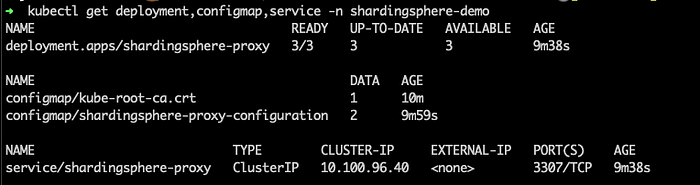
+Related resources created by the Operator can also be found at:
+
+
+
+# Configure ShardingSphere-Proxy for Data Encryption Capabilities
+
+ShardingSphere supports DistSQL to help DBAs quickly set up and run storage
node registration, rule configuration and more. You can find out more
[here](https://shardingsphere.apache.org/document/current/en/user-manual/shardingsphere-proxy/distsql/).
+
+As enterprises continue to transform digitally, increasing amounts of user
data are being communicated between all kinds of businesses. Various countries
and regions have introduced regulations and frameworks to ensure data security,
such as the EU's GDPR and others.
+
+Apache ShardingSphere offers multiple functions in data security such as data
encryption and decryption.
+
+Followings are examples of data encryption:
+
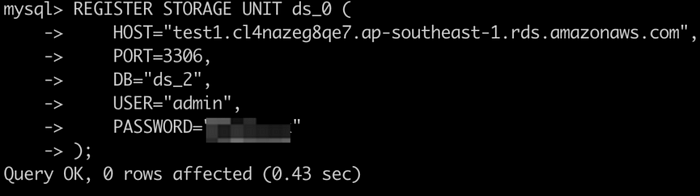
+1. Register storage nodes
+
+
+
+2. Create encryption rules
+
+
+
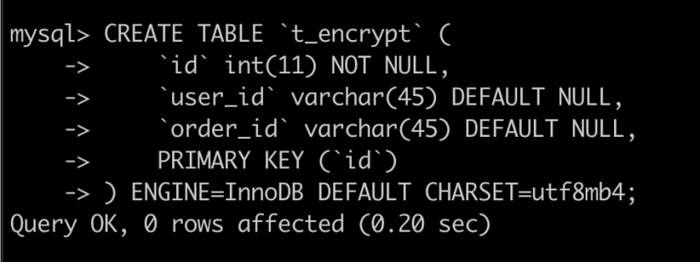
+3. Create logical tables
+
+
+
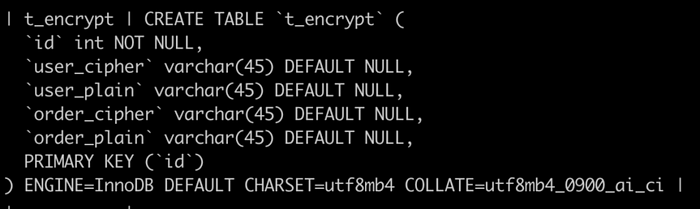
+4. View physical table properties
+
+
+
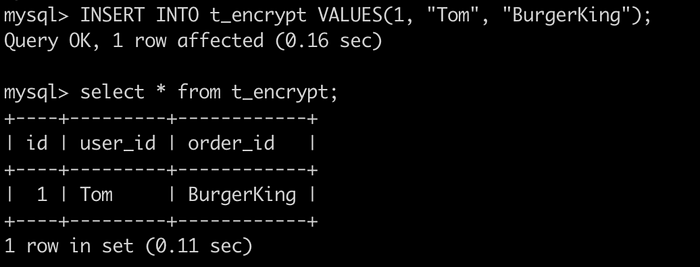
+5. Logical table insertion and query
+
+
+
+6. Data source physical table query
+
+You can find further details of the encryption features
[here](https://shardingsphere.apache.org/document/current/en/user-manual/shardingsphere-proxy/distsql/usage/encrypt-rule/).
+
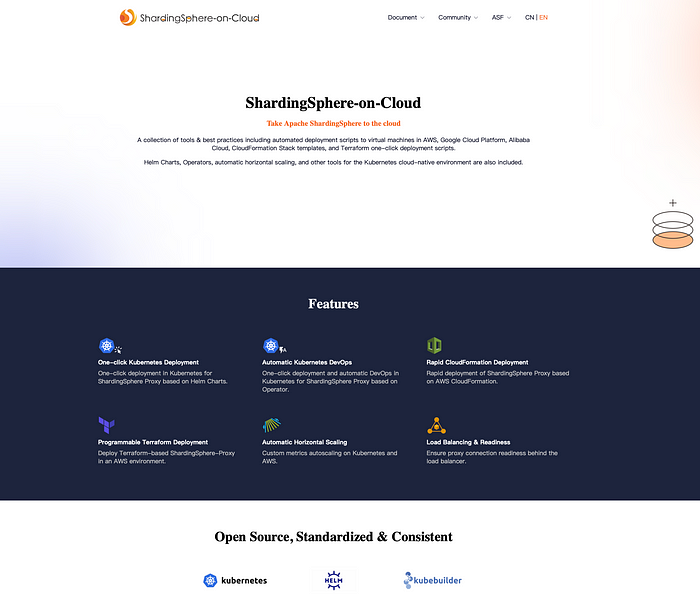
+# Good news! Our new ShardingSphere-on-Cloud is now live!
+
+With the migration of the ShardingSphere-on-Cloud sub-project to
https://github.com/apache/shardingsphere-on-cloud, we designed and launched a
new website.
+
+As the project grows, this will facilitate interested users or contributors
better understand the project and participate in the community, including
documentation for each version, an introduction to the community, information
about the Apache Foundation, community updates, information about the Apache
Foundation, and etc.
+
+
+
+# Relevant Links:
+
+🔗 [ShardingSphere-on-Cloud
Github](https://github.com/apache/shardingsphere-on-cloud)
+
+🔗 [ShardingSphere-on-Cloud Official
Website](https://shardingsphere.apache.org/oncloud/)
+
+🔗 [Apache ShardingSphere GitHub](https://github.com/apache/shardingsphere)
+
+🔗 [Apache ShardingSphere Official Website](https://shardingsphere.apache.org/)
+
+🔗 [Apache ShardingSphere Slack
Channel](https://apacheshardingsphere.slack.com/)
\ No newline at end of file
diff --git
a/docs/blog/content/material/2023_03_21_Streamlining_Database_Configuration_with_DistSQL's_Export,_Import,_and_YAML_Conversion.en.md
b/docs/blog/content/material/2023_03_21_Streamlining_Database_Configuration_with_DistSQL's_Export,_Import,_and_YAML_Conversion.en.md
new file mode 100644
index 00000000000..cbb4cb792f3
--- /dev/null
+++
b/docs/blog/content/material/2023_03_21_Streamlining_Database_Configuration_with_DistSQL's_Export,_Import,_and_YAML_Conversion.en.md
@@ -0,0 +1,388 @@
++++
+title = "Streamlining Database Configuration with DistSQL's Export, Import,
and YAML Conversion"
+weight = 92
+chapter = true
++++
+
+DistSQL, which stands for Distributed SQL, is a specialized operating language
exclusive to Apache ShardingSphere. This language provides users with a
simplified and powerful dynamic management system that allows them to operate
ShardingSphere like a traditional database.
+
+One of the key benefits of using DistSQL is the ability to define resources
and rules online without the need to modify YAML files and restart the system.
This streamlines the management process and reduces the potential for errors.
+
+
+
+As the capabilities of DistSQL have grown and users have become more familiar
with it, a number of questions have been raised about its use. In this post,
we'll explore some of these questions and discuss why they're relevant to
today's topic.
+
+Some of the most common questions about DistSQL include:
+
+- Where are the rules defined by DistSQL stored?
+- How to transfer a DistSQL defined configuration to a new environment when
there are multiple test environments?
+- How to write DistSQL syntax?
+
+## Where are the rules defined by DistSQL stored?
+
+When using DistSQL, a common question that arises is where the rules defined
by the language are stored. The answer is that these rules are stored in the
Governance Centre, which acts as a centralized repository for configuration
data.
+
+In cluster mode, users can choose to use either ZooKeeper or etcd as the
Governance Centre, while standalone mode allows users to specify their own
preferred persistence method. By default, DistSQL uses H2 non-persistent mode.
However, it's recommended that users utilize cluster mode to take full
advantage of the capabilities of DistSQL.
+
+By storing rules in a centralized location, DistSQL makes it easier to manage
and modify configurations. This enhances the overall user experience and
streamlines the management process, allowing users to focus on more important
tasks.
+
+## How to transfer a DistSQL defined configuration to a new environment when
there are multiple test environments?
+
+When using DistSQL, one potential challenge that users may face is
transferring data backups from the Governance Centre to a new environment. This
process can be complex and time-consuming, especially if the data is stored
across multiple nodes.
+
+To address this issue, DistSQL provides an `EXPORT` syntax that allows users
to export logical database configurations to YAML format. This makes it easier
to migrate data to a new environment and streamlines the backup process.
+
+Whether you're using standalone or clustered mode, the `EXPORT` syntax
provides a powerful tool for managing and migrating data. By simplifying the
backup process, DistSQL enhances the user experience and improves overall
efficiency.
+
+## We have a requirement to back up data on a regular basis. How to back up
the configuration of the logical database? Using DistSQL definitions.
+
+As we discussed in the previous question, using the `EXPORT` syntax in DistSQL
allows users to export logical database configurations to YAML format. This
functionality serves as a useful backup tool, as it enables users to easily
store and migrate data to a new environment.
+
+By exporting data as a YAML file, users can ensure that their data is safely
backed up and readily available in case of any unexpected issues or system
failures. This provides peace of mind and helps to ensure that important data
is never lost.
+
+Overall, the `EXPORT` syntax in DistSQL is a valuable tool that enhances the
management capabilities of the language. Whether you're using it to migrate
data to a new environment or simply to backup your data, the `EXPORT` syntax
streamlines the process and makes it easier to manage your data with confidence.
+
+## Does restarting the YAML format takes effect when putting it under a new
ShardingSphere instance?
+
+After exporting a YAML file using the `EXPORT` syntax in DistSQL, users have
several options for loading the data back into the system. One common approach
is to place the YAML file directly in the conf directory of the Proxy. However,
if the Proxy is already running, a restart may be required for the changes to
take effect.
+
+A more convenient alternative is to use the `IMPORT` statement to dynamically
load the data into the system. This approach allows the Proxy to write the data
to the Governance Center without requiring a restart, which can save time and
reduce disruptions to the system.
+
+By leveraging the `IMPORT` statement, users can take full advantage of the
dynamic management capabilities of DistSQL. This enables them to make changes
to the system on-the-fly, without the need for manual intervention or system
restarts. Overall, the ability to load data dynamically enhances the user
experience and makes it easier to manage and maintain a stable and reliable
system.
+
+## I have configured sharding and read/write separation rules. Can I only show
[2][3] separately when I query? Is there a way to show them together?
+
+In addition to serving as a backup tool, the `EXPORT` statement in DistSQL can
also be used to view logical database configurations quickly. By default, when
the TO FILE parameter is not specified, the results of `EXPORT` are output in
the query result set.
+
+This provides a convenient way for users to quickly access and view their
database configurations without needing to navigate through various files or
directories. By leveraging the `EXPORT` statement, users can gain a better
understanding of the overall state of their system and make more informed
decisions about how to manage and maintain it.
+
+## DistSQL looks good, but I used to configure it in YAML and don't know how
to write DistSQL syntax. Can anyone teach me?
+
+In addition to the `EXPORT` and `IMPORT` syntaxes we discussed earlier, the
community has also developed a `CONVERT` syntax that can be used to convert
YAML to DistSQL statements.
+
+The `CONVERT` syntax provides a convenient way for users to transform their
YAML configurations into DistSQL statements that can be learned against or
copied directly. This makes it easier for users to manage and maintain their
database configurations and ensures that they can quickly and easily make
changes to their system as needed.
+
+Overall, the combination of `EXPORT`, `IMPORT`, and `CONVERT` syntaxes in
DistSQL provides users with a robust set of tools for managing and maintaining
logical database configurations. Whether you're backing up your data, loading
it dynamically, or converting it to DistSQL statements, these syntaxes can help
you streamline your workflow and make it easier to manage your system with
confidence.
+
+# Grammatical Exclusion
+
+## EXPORT DATABASE CONFIGURATION
+
+One of the key syntaxes in DistSQL is `EXPORT DATABASE CONFIGURATION`, which
is used to export the configuration of a logical database, including data
sources and rules, into YAML format. By leveraging this syntax, users can
quickly and easily create backups of their system configurations and ensure
that they have a reliable and up-to-date record of their system settings.
+
+When executing `EXPORT DATABASE CONFIGURATION`, users can specify the location
and format of the exported file using the `TO FILE` parameter. If this
parameter is not specified, the results will be output in the query result set.
+
+```mysql
+EXPORT DATABASE CONFIGURATION (FROM databaseName)? (TO FILE filePath)?
+```
+
+Descriptions are as follows:
+
+```plain text
+FROM databaseName is used to specify the logical database to be exported.
+When FROM databaseName is not specified, the logical database currently in use
is exported.
+When the TO FILE filePath parameter is specified, the export information will
be exported to the target file.
+If the file does not exist, it will be created automatically; if it already
exists, it will be overwritten.
+filePath is of type STRING.
+```
+
+## IMPORT DATABASE CONFIGURATION
+
+Another important syntax in DistSQL is `IMPORT DATABASE CONFIGURATION`, which
is used to import configurations, including data sources and rules, from a YAML
file. This syntax provides users with a convenient and efficient way to load
their configurations into DistSQL without needing to manually define each
component.
+
+When executing `IMPORT DATABASE CONFIGURATION`, users can specify the location
of the YAML file using the `FROM FILE` parameter. By leveraging this syntax,
users can quickly and easily load their configurations into DistSQL and ensure
that their system is up-to-date and accurately reflects their settings.
+
+One of the key advantages of the `IMPORT DATABASE CONFIGURATION` syntax is
that it can be executed dynamically, without needing to restart the system.
This makes it easier to manage and maintain a system while it is running,
without needing to interrupt or disrupt normal operations.
+
+Import into the current logic database:
+
+```mysql
+IMPORT DATABASE CONFIGURATION FROM FILE filePath
+```
+
+Descriptions are as follows:
+
+```plain text
+The file to be imported must conform to the Proxy's YAML configuration format.
+The import target must be an empty logical database, i.e. the logical database
currently in use has no storage nodes and no rule configuration.
+The file must contain databaseName and be consistent with the name of the
logical repository being operated on.
+The file must contain the dataSources storage resource configuration.
+filePath is of type STRING.
+```
+
+## CONVERT YAML CONFIGURATION
+
+Used to convert YAML configurations to their corresponding DistSQL statements.
+
+```mysql
+CONVERT YAML CONFIGURATION FROM FILE filePath
+```
+
+Descriptions are as follows:
+
+- The file to be converted must conform to Proxy's YAML configuration format.
+- The **filePath** is type STRING.
+
+# Practical Demonstration
+
+To demonstrate the usage of the `IMPORT` and `EXPORT DATABASE CONFIGURATION
`syntaxes in DistSQL, we'll use a MySQL scenario with the ShardingSphere-Proxy
deployed in cluster mode. Before we get started, there are a few key steps we
need to take to prepare our environment:
+
+1. Create two databases, demo_ds_0 and demo_ds_1, in MySQL. These databases
will be used to store our data and test our configurations.
+2. Start the ZooKeeper service. This will provide us with the necessary
infrastructure to manage our system configurations.
+3. Configure the mode information in the server.yaml file of the
ShardingSphere-Proxy and start the proxy service. This will enable us to
connect to our MySQL databases and manage our configurations using DistSQL [4].
+
+With these steps completed, we're now ready to start working with the `IMPORT`
and `EXPORT DATABASE CONFIGURATION` syntaxes.
+
+## Configuration Logic Database
+
+1. Create logic database
+
+```mysql
+CREATE DATABASE sharding_db;
+USE sharding_db;
+```
+
+2. Register storage nodes
+
+```mysql
+REGISTER STORAGE UNIT ds_0 (
+
URL="jdbc:mysql://127.0.0.1:3306/demo_ds_0?serverTimezone=UTC&useSSL=false",
+ USER="root",
+ PASSWORD="123456",
+ PROPERTIES("maximumPoolSize"=10)
+),ds_1 (
+
URL="jdbc:mysql://127.0.0.1:3306/demo_ds_1?serverTimezone=UTC&useSSL=false",
+ USER="root",
+ PASSWORD="123456",
+ PROPERTIES("maximumPoolSize"=10)
+);
+```
+
+3. Creating sharding rules
+
+```mysql
+CREATE SHARDING TABLE RULE t_order (
+STORAGE_UNITS(ds_0,ds_1),
+SHARDING_COLUMN=order_id,TYPE(NAME=MOD,PROPERTIES("sharding-count"=4)),
+KEY_GENERATE_STRATEGY(COLUMN=order_id,TYPE(NAME="snowflake"))
+);
+```
+
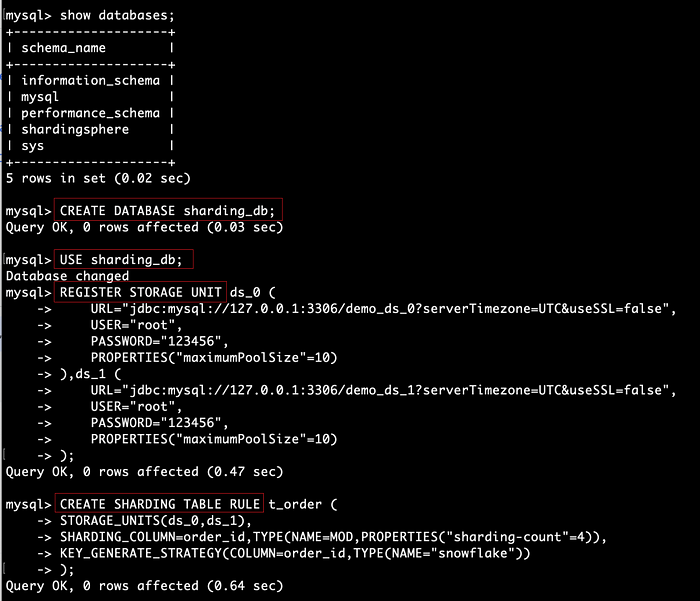
+The operation process is as follows:
+
+
+
+By doing this, we dynamically create a logical database `sharding_db` that
stores node information and sharding rules in the Governance Center ZooKeeper.
+
+## EXPORT DATABASE CONFIGURATION
+
+View configurations only
+
+```mysql
+EXPORT DATABASE CONFIGURATION;
+# or
+EXPORT DATABASE CONFIGURATION FROM sharding_db;
+```
+
+Execution example
+
+```yaml
+mysql> EXPORT DATABASE CONFIGURATION;
++-----------------------------------------------------------------------------------------------------------------------------------------------------------------------------------------------------------------------------------------------------------------------------------------------------------------------------------------------------------------------------------------------------------------------------------------------------------------------------------------------------------
[...]
+| result
[...]
++-----------------------------------------------------------------------------------------------------------------------------------------------------------------------------------------------------------------------------------------------------------------------------------------------------------------------------------------------------------------------------------------------------------------------------------------------------------------------------------------------------------
[...]
+| databaseName: sharding_db
+dataSources:
+ ds_1:
+ password: 123456
+ url: jdbc:mysql://127.0.0.1:3306/demo_ds_1?serverTimezone=UTC&useSSL=false
+ username: root
+ minPoolSize: 1
+ connectionTimeoutMilliseconds: 30000
+ maxLifetimeMilliseconds: 2100000
+ readOnly: false
+ idleTimeoutMilliseconds: 60000
+ maxPoolSize: 10
+ ds_0:
+ password: 123456
+ url: jdbc:mysql://127.0.0.1:3306/demo_ds_0?serverTimezone=UTC&useSSL=false
+ username: root
+ minPoolSize: 1
+ connectionTimeoutMilliseconds: 30000
+ maxLifetimeMilliseconds: 2100000
+ readOnly: false
+ idleTimeoutMilliseconds: 60000
+ maxPoolSize: 10
+rules:
+- !SHARDING
+ autoTables:
+ t_order:
+ actualDataSources: ds_0,ds_1
+ keyGenerateStrategy:
+ column: order_id
+ keyGeneratorName: t_order_snowflake
+ logicTable: t_order
+ shardingStrategy:
+ standard:
+ shardingAlgorithmName: t_order_mod
+ shardingColumn: order_id
+ keyGenerators:
+ t_order_snowflake:
+ type: snowflake
+ shardingAlgorithms:
+ t_order_mod:
+ props:
+ sharding-count: '4'
+ type: mod
+ |
++-----------------------------------------------------------------------------------------------------------------------------------------------------------------------------------------------------------------------------------------------------------------------------------------------------------------------------------------------------------------------------------------------------------------------------------------------------------------------------------------------------------
[...]
+1 row in set (0.03 sec)
+```
+
+After executing `EXPORT DATABASE CONFIGURATION`, the logical database
configuration is presented in the classic YAML format.
+
+## Export to YAML File
+
+```mysql
+EXPORT DATABASE CONFIGURATION TO FILE '/Users/xx/sharding_db.yaml';
+# or
+EXPORT DATABASE CONFIGURATION FROM sharding_db TO FILE
'/Users/xx/sharding_db.yaml';
+```
+
+Execution example
+
+```mysql
+mysql> EXPORT DATABASE CONFIGURATION TO FILE '/Users/xxx/sharding_db.yaml';
++------------------------------------------------------------------+
+| result |
++------------------------------------------------------------------+
+| Successfully exported to:'/Users/xxx/sharding_db.yaml' |
++------------------------------------------------------------------+
+1 row in set (0.01 sec)
+```
+
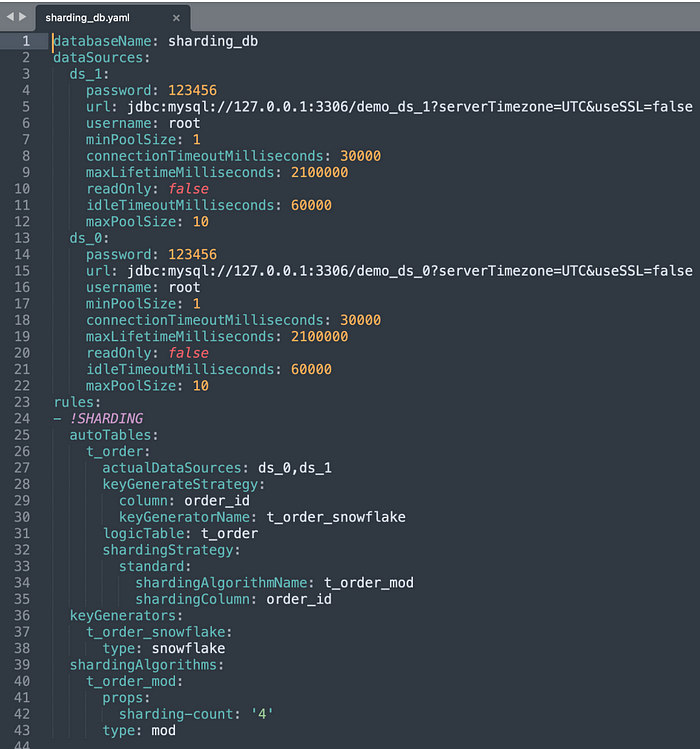
+After adding the `TO FILE` parameter, the results of `EXPORT DATABASE
CONFIGURATION` are output to the specified file. The following diagram shows
the contents of `sharding_db.yaml`.
+
+
+
+## IMPORT DATABASE CONFIGURATION
+
+Once we've successfully exported our database configurations using the `EXPORT
DATABASE CONFIGURATION` syntax, we can use the resulting YAML file (in this
case, `sharding_db.yaml`) to perform the import operation in any
ShardingSphere-Proxy.
+
+To demonstrate how this works, let's first remove the sharding_db metadata
from our current configuration. We can then use the `IMPORT` statement to
import the configuration from our YAML file and update our metadata with the
new information.
+
+By using the `IMPORT` statement in this way, we can easily transfer
configurations between different instances of ShardingSphere-Proxy, making it
simple to maintain consistency across our system and ensuring that our
configurations are always up-to-date and accurate.
+
+**Prepare the new database**
+
+```mysql
+USE shardingsphere;
+DROP DATABASE sharding_db;
+CREATE DATABASE sharding_db;
+EXPORT DATABASE CONFIGURATION FROM sharding_db;
+```
+
+Execution example
+
+```mysql
+mysql> USE shardingsphere;
+Database changed
+mysql> DROP DATABASE sharding_db;
+Query OK, 0 rows affected (0.02 sec)mysql> CREATE DATABASE sharding_db;
+Query OK, 0 rows affected (0.02 sec)mysql> EXPORT DATABASE CONFIGURATION FROM
sharding_db;
++----------------------------+
+| result |
++----------------------------+
+| databaseName: sharding_db
+ |
++----------------------------+
+1 row in set (0.01 sec)
+```
+
+By doing this, we have created a new logical database, `sharding_db`, which
does not contain any configuration information.
+
+## Import Logic Database
+
+```mysql
+USE sharding_db;
+IMPORT DATABASE CONFIGURATION FROM FILE '/Users/xx/sharding_db.yaml';
+```
+
+**Execution example**
+
+```mysql
+mysql> USE sharding_db;
+Database changed
+mysql> IMPORT DATABASE CONFIGURATION FROM FILE '/Users/xx/sharding_db.yaml';
+Query OK, 0 rows affected (1.06 sec)
+```
+
+Using the `IMPORT DATABASE CONFIGURATION` syntax, we can easily restore an
exported logical database configuration to an online instance of
ShardingSphere-Proxy. This process is quick and straightforward, allowing us to
keep our configurations up-to-date and ensuring consistency across our system.
+
+To confirm that the import has been successful, we can use the `SHOW
DATABASES` and `EXPORT DATABASE CONFIGURATION` statements. These statements
allow us to check the status of our configurations and ensure that everything
has been imported correctly.
+
+Overall, the combination of `EXPORT`, `IMPORT,` and `SHOW` statements provides
a powerful set of tools for managing and maintaining database configurations
with ShardingSphere-Proxy. By using these tools effectively, we can ensure that
our configurations are always accurate and up-to-date, enabling us to build
more robust and reliable systems.
+
+## CONVERT YAML CONFIGURATION
+
+The `CONVERT YAML CONFIGURATION` syntax is a powerful tool that enables us to
convert exported YAML configurations to DistSQL, making it easier for users to
manage and maintain their databases. This feature is particularly useful when
we need to migrate configurations between different environments.
+
+To demonstrate this functionality, let's convert the `sharding_db.yaml` file
that we exported earlier using the `EXPORT` statement. By converting the YAML
to DistSQL, we can migrate the configuration using a SQL client, which is more
convenient than copying files for import.
+
+The `CONVERT YAML CONFIGURATION` syntax allows us to easily convert the YAML
file to DistSQL. We can then use the resulting statements to migrate the
configuration to a new environment. This process is quick and straightforward,
allowing us to manage our configurations more efficiently.
+
+Overall, the `CONVERT YAML CONFIGURATION` syntax is a valuable tool for
managing and maintaining database configurations with ShardingSphere-Proxy. By
using this syntax effectively, we can simplify the process of migrating
configurations and ensure that our databases are always up-to-date and accurate.
+
+```mysql
+CONVERT YAML CONFIGURATION FROM FILE '/Users/xx/sharding_db.yaml';
+```
+
+**Execution example**
+
+```mysql
+mysql> CONVERT YAML CONFIGURATION FROM FILE '/Users/xx/sharding_db.yaml';
++-----------------------------------------------------------------------------------------------------------------------------------------------------------------------------------------------------------------------------------------------------------------------------------------------------------------------------------------------------------------------------------------------------------------------------------------------------------------------------------------------------------
[...]
+| dist_sql
[...]
++-----------------------------------------------------------------------------------------------------------------------------------------------------------------------------------------------------------------------------------------------------------------------------------------------------------------------------------------------------------------------------------------------------------------------------------------------------------------------------------------------------------
[...]
+| CREATE DATABASE sharding_db;
+USE sharding_db;
+REGISTER STORAGE UNIT ds_1 (
+URL='jdbc:mysql://127.0.0.1:3306/demo_ds_1?serverTimezone=UTC&useSSL=false',
+USER='root',
+PASSWORD='123456',
+PROPERTIES('minPoolSize'='1', 'connectionTimeoutMilliseconds'='30000',
'maxLifetimeMilliseconds'='2100000', 'readOnly'='false',
'idleTimeoutMilliseconds'='60000', 'maxPoolSize'='10')
+), ds_0 (
+URL='jdbc:mysql://127.0.0.1:3306/demo_ds_0?serverTimezone=UTC&useSSL=false',
+USER='root',
+PASSWORD='123456',
+PROPERTIES('minPoolSize'='1', 'connectionTimeoutMilliseconds'='30000',
'maxLifetimeMilliseconds'='2100000', 'readOnly'='false',
'idleTimeoutMilliseconds'='60000', 'maxPoolSize'='10')
+);CREATE SHARDING TABLE RULE t_order (
+STORAGE_UNITS(ds_0,ds_1),
+SHARDING_COLUMN=order_id,
+TYPE(NAME='mod', PROPERTIES('sharding-count'='4')),
+KEY_GENERATE_STRATEGY(COLUMN=order_id, TYPE(NAME='snowflake'))
+); |
++-----------------------------------------------------------------------------------------------------------------------------------------------------------------------------------------------------------------------------------------------------------------------------------------------------------------------------------------------------------------------------------------------------------------------------------------------------------------------------------------------------------
[...]
+1 row in set (0.01 sec)
+```
+
+# Conclusion
+
+In summary, we have explored the features and benefits of DistSQL in Apache
ShardingSphere, including the ability to dynamically manage resources and rules
through `Export`, `Import`, and `Convert` YAML Configuration syntax.
+
+By using these functions, users can easily back up, migrate, and manage
configurations in their distributed SQL environments.
+
+For more information on DistSQL, please refer to the official documentation
[1] and our GitHub repo [5].
+
+If you have any questions or feedback regarding Apache ShardingSphere, please
don't hesitate to ask on the GitHub issue list, or join our [Slack
channel](https://join.slack.com/t/apacheshardingsphere/shared_invite/zt-1qeqeecua-Tz7Um62TRPmxNY80Dq38kQ)
to discuss. We hope this article has been helpful and informative to you.
+
+# References
+
+```plain-text
+[1] DistSQL Documentation:
https://shardingsphere.apache.org/document/5.3.1/cn/user-manual/shardingsphere-proxy/distsql/
+[2] SHOW SHARDING TABLE RULE:
documentationhttps://shardingsphere.apache.org/document/5.3.1/cn/user-manual/shardingsphere-proxy/distsql/syntax/rql/rule-query/sharding/show-sharding-table-rule/
+[3] SHOW READWRITE_SPLITTING RULE:
https://shardingsphere.apache.org/document/5.3.1/cn/user-manual/shardingsphere-proxy/distsql/syntax/rql/rule-query/readwrite-splitting/show-readwrite-splitting-rule/
+[4] Using the ShardingSphere-Proxy binary release package:
https://shardingsphere.apache.org/document/5.3.1/cn/user-manual/shardingsphere-proxy/startup/bin/
+[5] GitHub issue list: https://github.com/apache/shardingsphere/issues
+```
+
diff --git
a/docs/blog/static/img/2023_03_14_ShardingSphere_Operator_Practical_Guide1.png
b/docs/blog/static/img/2023_03_14_ShardingSphere_Operator_Practical_Guide1.png
new file mode 100644
index 00000000000..eaf6f549673
Binary files /dev/null and
b/docs/blog/static/img/2023_03_14_ShardingSphere_Operator_Practical_Guide1.png
differ
diff --git
a/docs/blog/static/img/2023_03_14_ShardingSphere_Operator_Practical_Guide10.png
b/docs/blog/static/img/2023_03_14_ShardingSphere_Operator_Practical_Guide10.png
new file mode 100644
index 00000000000..65909e4e20a
Binary files /dev/null and
b/docs/blog/static/img/2023_03_14_ShardingSphere_Operator_Practical_Guide10.png
differ
diff --git
a/docs/blog/static/img/2023_03_14_ShardingSphere_Operator_Practical_Guide11.png
b/docs/blog/static/img/2023_03_14_ShardingSphere_Operator_Practical_Guide11.png
new file mode 100644
index 00000000000..a18699fbd16
Binary files /dev/null and
b/docs/blog/static/img/2023_03_14_ShardingSphere_Operator_Practical_Guide11.png
differ
diff --git
a/docs/blog/static/img/2023_03_14_ShardingSphere_Operator_Practical_Guide12.png
b/docs/blog/static/img/2023_03_14_ShardingSphere_Operator_Practical_Guide12.png
new file mode 100644
index 00000000000..b499fbe998e
Binary files /dev/null and
b/docs/blog/static/img/2023_03_14_ShardingSphere_Operator_Practical_Guide12.png
differ
diff --git
a/docs/blog/static/img/2023_03_14_ShardingSphere_Operator_Practical_Guide13.png
b/docs/blog/static/img/2023_03_14_ShardingSphere_Operator_Practical_Guide13.png
new file mode 100644
index 00000000000..907cc453691
Binary files /dev/null and
b/docs/blog/static/img/2023_03_14_ShardingSphere_Operator_Practical_Guide13.png
differ
diff --git
a/docs/blog/static/img/2023_03_14_ShardingSphere_Operator_Practical_Guide14.png
b/docs/blog/static/img/2023_03_14_ShardingSphere_Operator_Practical_Guide14.png
new file mode 100644
index 00000000000..e27afab470b
Binary files /dev/null and
b/docs/blog/static/img/2023_03_14_ShardingSphere_Operator_Practical_Guide14.png
differ
diff --git
a/docs/blog/static/img/2023_03_14_ShardingSphere_Operator_Practical_Guide15.png
b/docs/blog/static/img/2023_03_14_ShardingSphere_Operator_Practical_Guide15.png
new file mode 100644
index 00000000000..3e4a3c98d34
Binary files /dev/null and
b/docs/blog/static/img/2023_03_14_ShardingSphere_Operator_Practical_Guide15.png
differ
diff --git
a/docs/blog/static/img/2023_03_14_ShardingSphere_Operator_Practical_Guide16.png
b/docs/blog/static/img/2023_03_14_ShardingSphere_Operator_Practical_Guide16.png
new file mode 100644
index 00000000000..ac9e5b21ac5
Binary files /dev/null and
b/docs/blog/static/img/2023_03_14_ShardingSphere_Operator_Practical_Guide16.png
differ
diff --git
a/docs/blog/static/img/2023_03_14_ShardingSphere_Operator_Practical_Guide2.png
b/docs/blog/static/img/2023_03_14_ShardingSphere_Operator_Practical_Guide2.png
new file mode 100644
index 00000000000..55820d11190
Binary files /dev/null and
b/docs/blog/static/img/2023_03_14_ShardingSphere_Operator_Practical_Guide2.png
differ
diff --git
a/docs/blog/static/img/2023_03_14_ShardingSphere_Operator_Practical_Guide3.png
b/docs/blog/static/img/2023_03_14_ShardingSphere_Operator_Practical_Guide3.png
new file mode 100644
index 00000000000..44c21b5007a
Binary files /dev/null and
b/docs/blog/static/img/2023_03_14_ShardingSphere_Operator_Practical_Guide3.png
differ
diff --git
a/docs/blog/static/img/2023_03_14_ShardingSphere_Operator_Practical_Guide4.png
b/docs/blog/static/img/2023_03_14_ShardingSphere_Operator_Practical_Guide4.png
new file mode 100644
index 00000000000..14ac770bca8
Binary files /dev/null and
b/docs/blog/static/img/2023_03_14_ShardingSphere_Operator_Practical_Guide4.png
differ
diff --git
a/docs/blog/static/img/2023_03_14_ShardingSphere_Operator_Practical_Guide5.png
b/docs/blog/static/img/2023_03_14_ShardingSphere_Operator_Practical_Guide5.png
new file mode 100644
index 00000000000..baa69569af6
Binary files /dev/null and
b/docs/blog/static/img/2023_03_14_ShardingSphere_Operator_Practical_Guide5.png
differ
diff --git
a/docs/blog/static/img/2023_03_14_ShardingSphere_Operator_Practical_Guide6.png
b/docs/blog/static/img/2023_03_14_ShardingSphere_Operator_Practical_Guide6.png
new file mode 100644
index 00000000000..5c4fed9bc18
Binary files /dev/null and
b/docs/blog/static/img/2023_03_14_ShardingSphere_Operator_Practical_Guide6.png
differ
diff --git
a/docs/blog/static/img/2023_03_14_ShardingSphere_Operator_Practical_Guide7.png
b/docs/blog/static/img/2023_03_14_ShardingSphere_Operator_Practical_Guide7.png
new file mode 100644
index 00000000000..c1adc1d9590
Binary files /dev/null and
b/docs/blog/static/img/2023_03_14_ShardingSphere_Operator_Practical_Guide7.png
differ
diff --git
a/docs/blog/static/img/2023_03_14_ShardingSphere_Operator_Practical_Guide8.png
b/docs/blog/static/img/2023_03_14_ShardingSphere_Operator_Practical_Guide8.png
new file mode 100644
index 00000000000..18e8af04ac6
Binary files /dev/null and
b/docs/blog/static/img/2023_03_14_ShardingSphere_Operator_Practical_Guide8.png
differ
diff --git
a/docs/blog/static/img/2023_03_14_ShardingSphere_Operator_Practical_Guide9.png
b/docs/blog/static/img/2023_03_14_ShardingSphere_Operator_Practical_Guide9.png
new file mode 100644
index 00000000000..7cece8e90c2
Binary files /dev/null and
b/docs/blog/static/img/2023_03_14_ShardingSphere_Operator_Practical_Guide9.png
differ
diff --git
a/docs/blog/static/img/2023_03_21_Streamlining_Database_Configuration_with_DistSQL's_Export,_Import,_and_YAML_Conversion1.png
b/docs/blog/static/img/2023_03_21_Streamlining_Database_Configuration_with_DistSQL's_Export,_Import,_and_YAML_Conversion1.png
new file mode 100644
index 00000000000..408df7a82ff
Binary files /dev/null and
b/docs/blog/static/img/2023_03_21_Streamlining_Database_Configuration_with_DistSQL's_Export,_Import,_and_YAML_Conversion1.png
differ
diff --git
a/docs/blog/static/img/2023_03_21_Streamlining_Database_Configuration_with_DistSQL's_Export,_Import,_and_YAML_Conversion2.png
b/docs/blog/static/img/2023_03_21_Streamlining_Database_Configuration_with_DistSQL's_Export,_Import,_and_YAML_Conversion2.png
new file mode 100644
index 00000000000..ca9a21a0018
Binary files /dev/null and
b/docs/blog/static/img/2023_03_21_Streamlining_Database_Configuration_with_DistSQL's_Export,_Import,_and_YAML_Conversion2.png
differ
diff --git
a/docs/blog/static/img/2023_03_21_Streamlining_Database_Configuration_with_DistSQL's_Export,_Import,_and_YAML_Conversion3.png
b/docs/blog/static/img/2023_03_21_Streamlining_Database_Configuration_with_DistSQL's_Export,_Import,_and_YAML_Conversion3.png
new file mode 100644
index 00000000000..7f17b659361
Binary files /dev/null and
b/docs/blog/static/img/2023_03_21_Streamlining_Database_Configuration_with_DistSQL's_Export,_Import,_and_YAML_Conversion3.png
differ
















