This is an automated email from the ASF dual-hosted git repository.

panjuan pushed a commit to branch master
in repository https://gitbox.apache.org/repos/asf/shardingsphere.git
The following commit(s) were added to refs/heads/master by this push:
new 9161796 Change layout & normalized format (#7622)
9161796 is described below
commit 916179649a346bb54ed7d918b4936d9897ac2c0d
Author: yang-7777 <[email protected]>
AuthorDate: Mon Sep 28 11:02:35 2020 +0800
Change layout & normalized format (#7622)
* Update vote.en.md
Normalized format
* Update vote.cn.md
Normalized format
* Update committer.cn.md
Normalized format
* Update committer.cn.md
* Update committer.en.md
Normalized format.
* Update contributor.cn.md
* Update contributor.en.md
* Update icla.cn.md
* Update icla.en.md
* Update icla.cn.md
* Update committer.cn.md
* Update committer.en.md
* Update document-contributor.cn.md
* Update document-contributor.en.md
* Update document-contributor.cn.md
* Update release.cn.md
* Update release.en.md
* Update release_ui.cn.md
* Update release_ui.en.md
* Update release.cn.md
* Update release-elasticjob.cn.md
* Update release-elasticjob.en.md
* Update release-elasticjob-ui.cn.md
* Update release-elasticjob-ui.en.md
---
docs/community/content/contribute/committer.cn.md | 10 +--
docs/community/content/contribute/committer.en.md | 8 +--
.../community/content/contribute/contributor.cn.md | 16 ++---
.../community/content/contribute/contributor.en.md | 17 ++---
.../content/contribute/document-contributor.cn.md | 24 +++----
.../content/contribute/document-contributor.en.md | 18 ++---
docs/community/content/contribute/icla.cn.md | 16 ++---
docs/community/content/contribute/icla.en.md | 6 +-
.../content/contribute/release-elasticjob-ui.cn.md | 73 ++++++++++----------
.../content/contribute/release-elasticjob-ui.en.md | 72 ++++++++++----------
.../content/contribute/release-elasticjob.cn.md | 63 +++++++++--------
.../content/contribute/release-elasticjob.en.md | 65 +++++++++---------
docs/community/content/contribute/release.cn.md | 74 ++++++++++----------
docs/community/content/contribute/release.en.md | 79 +++++++++++-----------
docs/community/content/contribute/release_ui.cn.md | 49 +++++++-------
docs/community/content/contribute/release_ui.en.md | 49 +++++++-------
docs/community/content/contribute/vote.cn.md | 46 ++++++-------
docs/community/content/contribute/vote.en.md | 45 ++++++------
18 files changed, 359 insertions(+), 371 deletions(-)
diff --git a/docs/community/content/contribute/committer.cn.md
b/docs/community/content/contribute/committer.cn.md
index 0644d71..3bcdc85 100644
--- a/docs/community/content/contribute/committer.cn.md
+++ b/docs/community/content/contribute/committer.cn.md
@@ -7,7 +7,7 @@ chapter = true
## 提交者提名
ShardingSphere社区遵循[Apache Community’s
process](http://community.apache.org/newcommitter.html) 来接收新的提交者。
-当您积极参地与ShardingSphere社区之后,项目管理委员会和项目官方提交者会根据您的表现发起吸纳您成为官方提交者和项目管理委员会成员的流程。
+当您积极地参与ShardingSphere社区之后,项目管理委员会和项目官方提交者会根据您的表现发起吸纳您成为官方提交者和项目管理委员会成员的流程。
## 提交者责任
@@ -22,14 +22,14 @@ ShardingSphere社区遵循[Apache Community’s
process](http://community.apache
## 日常工作
-1. committer需要每天查看社区待处理的Pull Request和issue列表,指定给合适的committer,即assignee。
+1. Committer需要每天查看社区待处理的Pull Request和Issue列表,指定给合适的Committer,即Assignee。
-2. assignee在被分配issue后,需要进行如下判断:
+2. Assignee在被分配issue后,需要进行如下判断:
- 判断是否是长期issue,如是,则标记为pending。
- 判断issue类型,如:bug,enhancement,discussion等。
- 判断Milestone,并标记。
-**注意**
+3. Committer提交的PR,需要根据PR类型和时间标注label 和 milestone。
-无论是否是社区issue,都必须有assignee,直到issue完成。
+> 注意: 无论是否是社区issue,都必须有assignee,直到issue完成。
diff --git a/docs/community/content/contribute/committer.en.md
b/docs/community/content/contribute/committer.en.md
index 38e35c9..bc83c3b 100644
--- a/docs/community/content/contribute/committer.en.md
+++ b/docs/community/content/contribute/committer.en.md
@@ -7,7 +7,7 @@ chapter = true
## Committer Promotion
The ShardingSphere community follows the [Apache Community’s
process](http://community.apache.org/newcommitter.html) on accepting a new
committer.
-After a contributor participate ShardingSphere community actively, (P)PMC and
Committers will make decision to invite the contributor join Committers and
(P)PMC.
+After a contributor participate ShardingSphere community actively, PMC and
Committers will make decision to invite the contributor join Committers and PMC.
## Committer Responsibilities
@@ -30,7 +30,7 @@ After a contributor participate ShardingSphere community
actively, (P)PMC and Co
- Judge whether it is a long-term issue. If it is, please mark it as pending.
- Add issue labels, such as bug, enhancement, discussion, etc.
- Add Milestone labels.
+
+3. Pull Request that committer submits needs to mark labels and milestone
based on the type and time.
-**Notice**
-
-At least one committer is expected to be in the assignee list of that issue
before it is completed.
+> To be noticed: At least one committer is expected to be in the assignee list
of that issue before it is completed.
diff --git a/docs/community/content/contribute/contributor.cn.md
b/docs/community/content/contribute/contributor.cn.md
index 276e152..685517f 100644
--- a/docs/community/content/contribute/contributor.cn.md
+++ b/docs/community/content/contribute/contributor.cn.md
@@ -18,7 +18,7 @@ chapter = true
## 开发流程
-### Fork分支到本地,设置upstream
+**1. Fork分支到本地,设置upstream**
- 从shardingsphere的repo上fork一个分支到您自己的repo来开始工作,并设置upstream为shardingsphere的repo。
@@ -26,13 +26,13 @@ chapter = true
git remote add upstream https://github.com/apache/shardingsphere.git
```
-### 选择issue
+**2. 选择issue**
- 请在选择您要修改的issue。如果是您新发现的问题或想提供issue中没有的功能增强,请先新建一个issue并设置正确的标签。
- 在选中相关的issue之后,请回复以表明您当前正在这个issue上工作。并在回复的时候为自己设置一个deadline,添加至回复内容中。
- 在[开发者列表](/cn/contribute/contributor/)中找到一个导师,导师会在设计与功能实现上给予即时的反馈。
-### 创建分支
+**3. 创建分支**
- 切换到fork的master分支,拉取最新代码,创建本次的分支。
@@ -44,7 +44,7 @@ git checkout -b issueNo
**注意** :PR会按照squash的方式进行merge,如果不创建新分支,本地和远程的提交记录将不能保持同步。
-### 编码
+**4. 编码**
- 请您在开发过程中遵循ShardingSphere的[开发规范](/cn/contribute/code-conduct/)。并在准备提交pull
request之前完成相应的检查。
- 将修改的代码push到fork库的分支上。
@@ -55,13 +55,13 @@ git commit -m 'commit log'
git push origin issueNo
```
-### 提交PR
+**5. 提交PR**
- 发送一个pull request到ShardingSphere的master分支。
- 接着导师做CodeReview,然后他会与您讨论一些细节(包括设计,实现,性能等)。当导师对本次修改满意后,会将提交合并到当前开发版本的分支中。
- 最后,恭喜您已经成为了ShardingSphere的官方贡献者!
-### 删除分支
+**6. 删除分支**
- 在导师将pull
request合并到ShardingSphere的master分支中之后,您就可以将远程的分支(origin/issueNo)及与远程分支(origin/issueNo)关联的本地分支(issueNo)删除。
@@ -71,9 +71,7 @@ git branch -d issueNo
git push origin --delete issueNo
```
-### 注意
-
- 为了让您的id显示在contributor列表中,别忘了以下设置:
+**注意**: 为了让您的id显示在contributor列表中,别忘了以下设置:
```shell
git config --global user.name "username"
diff --git a/docs/community/content/contribute/contributor.en.md
b/docs/community/content/contribute/contributor.en.md
index 4a6a4d1..4b8936e 100644
--- a/docs/community/content/contribute/contributor.en.md
+++ b/docs/community/content/contribute/contributor.en.md
@@ -18,7 +18,7 @@ You can report a bug, submit a new function enhancement
suggestion, or submit a
## Developer Flow
-### Fork ShardingSphere repo
+**1. Fork ShardingSphere repo**
- Fork a `ShardingSphere` repo to your own repo to work, then setting
upstream.
@@ -26,13 +26,13 @@ You can report a bug, submit a new function enhancement
suggestion, or submit a
git remote add upstream https://github.com/apache/shardingsphere.git
```
-### Choose Issue
+**2. Choose Issue**
- Please choose the issue to be edited. If it is a new issue discovered or a
new function enhancement to offer, please create an issue and set the right
label for it.
- After choosing the relevant issue, please reply with a deadline to indicate
that you are working on it.
- Find a mentor from the [Developer List](/en/contribute/contributor/) and
he/she will give you feedback about the design and the implementation of
function in time.
-### Create Branch
+**3. Create Branch**
- Switch to forked master branch, pull codes from upstream, then create a new
branch.
@@ -44,7 +44,7 @@ git checkout -b issueNo
**Notice** :We will merge PR using squash, commit log will be different form
upstream if you use old branch.
-### Coding
+**4. Coding**
- Please obey the [Code of Conduct](/en/contribute/code-conduct/) during the
process of development and finish the check before submitting the pull request.
- push code to your fork repo.
@@ -55,13 +55,13 @@ git commit -m 'commit log'
git push origin issueNo
```
-### Submit Pull Request
+**5. Submit Pull Request**
- Send a pull request to the master branch.
- The mentor will do code review before discussing some details (including
the design, the implementation and the performance) with you. The request will
be merged into the branch of current development version after the edit is well
enough.
- At last, congratulate to be an official contributor of ShardingSphere
-### Delete Branch
+**6. Delete Branch**
- You can delete the remote branch (origin/issueNo) and the local branch
(issueNo) associated with the remote branch (origin/issueNo) after the mentor
merged the pull request into the master branch of ShardingSphere.
@@ -70,10 +70,7 @@ git checkout master
git branch -d issueNo
git push origin --delete issueNo
```
-
-### Notice
-
-Please note that in order to show your id in the contributor list, don't
forget the configurations below:
+**Notice**: Please note that in order to show your id in the contributor
list, don't forget the configurations below:
```shell
git config --global user.name "username"
diff --git a/docs/community/content/contribute/document-contributor.cn.md
b/docs/community/content/contribute/document-contributor.cn.md
index 6f298ee..a2fd572 100644
--- a/docs/community/content/contribute/document-contributor.cn.md
+++ b/docs/community/content/contribute/document-contributor.cn.md
@@ -6,7 +6,7 @@ chapter = true
如果您想帮助贡献ShardingSphere文档或网站,我们很乐意为您提供帮助!任何人都可以贡献,无论您是刚接触项目还是已经使用ShardingSphere很长时间,无论是自我认同的开发人员、最终用户,还是那些无法忍受错别字的人,都可以对文档或者网站进行贡献。
-在贡献者指南里,已经提到如何提交Issues与pull request,这里我们将要介绍如何给官方文档提交pull request。
+在贡献者指南里,已经提到如何提交Issues与Pull Request,这里我们将要介绍如何给官方文档提交Pull Request。
## 前置条件
@@ -80,34 +80,34 @@ ShardingSphere文档使用Markdown编写,并使用Hugo进行处理生成html
-
[官方教程最新版本](https://shardingsphere.apache.org/document/current/cn/overview/)源存储在`/document/`
-
[社区介绍及贡献](https://shardingsphere.apache.org/community/cn/contribute/)相关文档源都储存在`/community/content/`
-您可以从[Github](https://github.com/apache/shardingsphere/issues)网站上提交问题,编辑内容和查看其他人的更改
+您可以从[Github](https://github.com/apache/shardingsphere/issues)网站上提交问题,编辑内容和查看其他人的更改。
## 页面模板
-页面模板位于themes中的 `layouts/partials/` 目录中
+页面模板位于themes中的 `layouts/partials/` 目录中。
## 提出具体可查找的问题
任何拥有Github帐户的人都可以针对ShardingSphere文档提出问题(错误报告)。如果您发现错误,即使您不知道如何修复它,也应提出问题。
-### 如何提出问题
+**如何提出问题?**
-1. 附加出现问题的文档链接
+1. 附加出现问题的文档链接。
-1. 详细描述问题
+1. 详细描述问题。
-1. 描述问题对用户造成的困扰
+1. 描述问题对用户造成的困扰。
-1. 提出建议修复的方式
+1. 提出建议修复的方式。
-1. 在[Issues](https://github.com/apache/shardingsphere/issues)中`New issue`
提出您的问题
+1. 在[Issues](https://github.com/apache/shardingsphere/issues)中`New issue`
提出您的问题。
## 提交更改
-### 操作步骤
+**操作步骤如下:**
-1. 首先,你需要在master分支目录结构中定位出你要操作的文件
-1. 文件操作完成后,提pull request到master分支
+1. 首先,你需要在master分支目录结构中定位出你要操作的文件。
+1. 文件操作完成后,提pull request到master分支。
## 约定
diff --git a/docs/community/content/contribute/document-contributor.en.md
b/docs/community/content/contribute/document-contributor.en.md
index bf83ead..7f86502 100644
--- a/docs/community/content/contribute/document-contributor.en.md
+++ b/docs/community/content/contribute/document-contributor.en.md
@@ -9,10 +9,10 @@ In the contributor guide, we have mentioned how to submit
Issues and pull reques
## Precondition
-- Familiar with [Official website](https://shardingsphere.apache.org)
-- Familiar with [Collaborating with issues and pull
requests](https://help.github.com/categories/collaborating-with-issues-and-pull-requests/)
-- Familiar with [Markdown](https://www.markdownguide.org/getting-started)
-- Familiar with [Hugo](https://gohugo.io/)
+- Familiar with [Official website](https://shardingsphere.apache.org).
+- Familiar with [Collaborating with issues and pull
requests](https://help.github.com/categories/collaborating-with-issues-and-pull-requests/).
+- Familiar with [Markdown](https://www.markdownguide.org/getting-started).
+- Familiar with [Hugo](https://gohugo.io/).
## Fork document
Fork the master branch of
[ShardingSphere](https://github.com/apache/shardingsphere).
@@ -76,20 +76,20 @@ shardingsphere
The ShardingSphere document is written in markdown, processed in Hugo,
generated HTML, deployed in
[asf-site](https://github.com/apache/shardingsphere-doc/tree/asf-site)
branch, and the source code is located in
[Github](https://github.com/apache/shardingsphere/tree/master).
-- [Latest version Official
course](https://shardingsphere.apache.org/document/current/en/overview/) source
is stored in `/document/`
-- [Community introduction and
contribution](https://shardingsphere.apache.org/community/en/contribute/)
related document sources are stored in `/community/content/`
+- [Latest version Official
course](https://shardingsphere.apache.org/document/current/en/overview/) source
is stored in `/document/`.
+- [Community introduction and
contribution](https://shardingsphere.apache.org/community/en/contribute/)
related document sources are stored in `/community/content/`.
You can submit questions, edit content, and view other people's changes from
[Github](https://github.com/apache/shardingsphere/issues).
## Page template
-The page template is located in the `layouts/partials/` directory in themes
+The page template is located in the `layouts/partials/` directory in themes.
## Ask specific and searchable questions
Anyone with a GitHub account can ask questions (error reports) about
shardingsphere documents. If you find an error, ask questions even if you don't
know how to fix it.
-### How to ask questions
+**How to ask questions?**
1. Attach the problem document link.
1. Describe the problem in detail.
@@ -99,7 +99,7 @@ Anyone with a GitHub account can ask questions (error
reports) about shardingsph
## Submission changes
-### Operation steps
+**Operation steps:**
1. Locate the file you want to operate in the master branch directory
structure.
1. After the file operation is completed, pull request is raised to the master
branch.
diff --git a/docs/community/content/contribute/icla.cn.md
b/docs/community/content/contribute/icla.cn.md
index b429735..9dcab51 100644
--- a/docs/community/content/contribute/icla.cn.md
+++ b/docs/community/content/contribute/icla.cn.md
@@ -7,7 +7,7 @@ chapter = true
### Apache ICLA 签署流程指南
Apache CLA 全称 Apache Contributor License
Agreement,签署ICLA的目的是定义向ASF贡献的文档,保护知识产权,避免后续法律纠纷。ICLA在官方存档后生效,贡献者方可参与Apache项目。
-当我们需要签署ICLA时步骤如下
+当我们需要签署ICLA时步骤如下:
**1. 打开链接 [官网Licenses](https://www.apache.org/licenses/#clas) 在Contributor
License Agreements 下找到CLAs并进入页面。**
@@ -19,17 +19,17 @@ Apache CLA 全称 Apache Contributor License
Agreement,签署ICLA的目的是
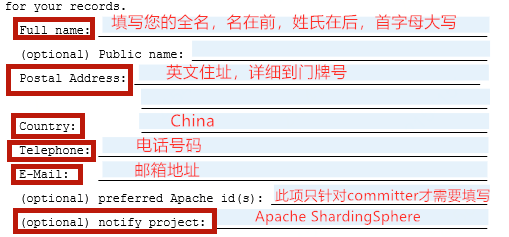
**3. 打开PDF,ICLA需要填写的是两个部分,均需要全英文填写。**
-> 注意事项:
-* 姓名需要填写拼音,姓与名之间空一格,首字母均为大写,名在前姓氏在后
-* committer相关的签署,则preferred Apache id(s)是必填项
+> 注意事项:
+> - 姓名需要填写拼音,姓与名之间空一格,首字母均为大写,名在前姓氏在后。
+> - Committer相关的签署,则preferred Apache id(s)是必填项。
-**4.文件最下方的署名**
-官方只接受手写或者gpg签名,这里只建议用手写的方式,可以打印文件进行手写签名或者使用电子笔进行签字
+**4.文件最下方的署名。**
+官方只接受手写或者gpg签名,这里只建议用手写的方式,可以打印文件进行手写签名或者使用电子笔进行签字。

## 提交文件
-* 如果您是新committer,请扫描签署后文件的所有页合并到一个PDF的文档,发送email 到 [email protected]
-* 其他情况,请联系需要您签署ICLA文档的负责人
+* 如果您是新Committer,请扫描签署后文件的所有页合并到一个PDF的文档,发送email 到 [email protected]。
+* 其他情况,请联系需要您签署ICLA文档的负责人。
diff --git a/docs/community/content/contribute/icla.en.md
b/docs/community/content/contribute/icla.en.md
index 13550a1..66dc905 100644
--- a/docs/community/content/contribute/icla.en.md
+++ b/docs/community/content/contribute/icla.en.md
@@ -7,7 +7,7 @@ chapter = true
Apache CLA short for Apache Contributor License Agreement, the purpose of this
agreement is to clearly define the terms under which intellectual property has
been contributed to the ASF and thereby allow us to defend the project should
there be a legal dispute regarding the software at some future time.
A signed ICLA is required to be on file before an individual is given commit
rights to any ASF project.
-When you required to submit ICLA,
+The process of submitting ICLA are:
**1. First, click the link [Apache
Licenses](https://www.apache.org/licenses/#clas) and find CLAs under the
Contributor License Agreements section.**
@@ -26,8 +26,8 @@ When you required to submit ICLA,
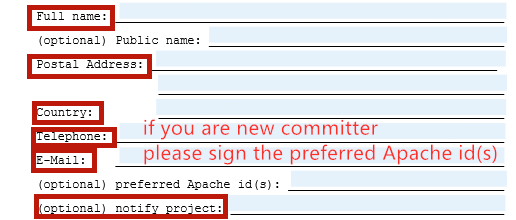
**4. The signature at the bottom of the document:**
- Apache only accept hand-written signature or gpg signature, here we
suggest to choose hand-written way.
- Print the document and sign your name on the paper, or use electric pen.
+Apache only accept hand-written signature or gpg signature, here we suggest to
choose hand-written way.
+Print the document and sign your name on the paper, or use electric pen.

diff --git a/docs/community/content/contribute/release-elasticjob-ui.cn.md
b/docs/community/content/contribute/release-elasticjob-ui.cn.md
index f5ec4dc..7574895 100644
--- a/docs/community/content/contribute/release-elasticjob-ui.cn.md
+++ b/docs/community/content/contribute/release-elasticjob-ui.cn.md
@@ -10,7 +10,7 @@ chapter = true
## 发布Apache Maven中央仓库
-### 设置settings.xml文件
+**1. 设置settings.xml文件**
将以下模板添加到 `~/.m2/settings.xml`中,所有密码需要加密后再填入。
加密设置可参考[这里](http://maven.apache.org/guides/mini/guide-encryption.html)。
@@ -32,13 +32,13 @@ chapter = true
</settings>
```
-### 更新版本说明
+**2. 更新版本说明**
```
https://github.com/apache/shardingsphere-elasticjob-ui/blob/master/RELEASE-NOTES.md
```
-### 创建发布分支
+**3. 创建发布分支**
假设从github下载的ElasticJob-UI源代码在`~/elasticjob-ui/`目录;假设即将发布的版本为`${RELEASE.VERSION}`。
创建`${RELEASE.VERSION}-release`分支,接下来的操作都在该分支进行。
@@ -52,7 +52,7 @@ git checkout -b ${RELEASE.VERSION}-release
git push origin ${RELEASE.VERSION}-release
```
-### 发布预校验
+**4. 发布预校验**
```shell
cd ~/elasticjob-ui
@@ -65,7 +65,7 @@ mvn release:prepare -Prelease -Darguments="-DskipTests"
-DautoVersionSubmodules=
-DdryRun=true:演练,即不产生版本号提交,不生成新的tag。
-### 准备发布
+**5. 准备发布**
首先清理发布预校验本地信息。
@@ -92,7 +92,7 @@ git push origin ${RELEASE.VERSION}-release
git push origin --tags
```
-### 部署发布
+**6. 部署发布**
```shell
cd ~/elasticjob-ui
@@ -101,7 +101,7 @@ mvn release:perform -Prelease -Darguments="-DskipTests"
-DautoVersionSubmodules=
## 发布Apache SVN仓库
-### 检出shardingsphere发布目录
+**1. 检出shardingsphere发布目录**
如无本地工作目录,则先创建本地工作目录。
@@ -117,7 +117,7 @@ svn --username=${APACHE LDAP 用户名} co
https://dist.apache.org/repos/dist/de
cd ~/ss_svn/dev/shardingsphere
```
-### 添加gpg公钥
+**2. 添加gpg公钥**
仅第一次部署的账号需要添加,只要`KEYS`中包含已经部署过的账户的公钥即可。
@@ -125,7 +125,7 @@ cd ~/ss_svn/dev/shardingsphere
gpg -a --export ${GPG用户名} >> KEYS
```
-### 将待发布的内容添加至SVN目录
+**3. 将待发布的内容添加至SVN目录**
创建版本号目录。
@@ -145,7 +145,7 @@ cp -f
~/elasticjob-ui/shardingsphere-elasticjob-ui-distribution/shardingsphere-e
cp -f
~/elasticjob-ui/shardingsphere-elasticjob-ui-distribution/shardingsphere-elasticjob-cloud-ui-bin-distribution/target/*.tar.gz.asc
~/ss_svn/dev/shardingsphere/elasticjob-ui-${RELEASE.VERSION}
```
-### 生成文件签名
+**4. 生成文件签名**
```shell
shasum -a 512 apache-shardingsphere-elasticjob-${RELEASE.VERSION}-ui-src.zip
>> apache-shardingsphere-elasticjob-${RELEASE.VERSION}-ui-src.zip.sha512
@@ -153,7 +153,7 @@ shasum -b -a 512
apache-shardingsphere-elasticjob-${RELEASE.VERSION}-lite-ui-bin
shasum -b -a 512
apache-shardingsphere-elasticjob-${RELEASE.VERSION}-cloud-ui-bin.tar.gz >>
apache-shardingsphere-elasticjob-${RELEASE.VERSION}-cloud-ui-bin.tar.gz.sha512
```
-### 提交Apache SVN
+**5. 提交Apache SVN**
```shell
cd ~/ss_svn/dev/shardingsphere/
@@ -162,7 +162,7 @@ svn --username=${APACHE LDAP 用户名} commit -m "release
elasticjob-ui-${RELEA
```
## 检查发布结果
-### 检查sha512哈希
+**检查sha512哈希**
```shell
shasum -c apache-shardingsphere-elasticjob-${RELEASE.VERSION}-ui-src.zip.sha512
@@ -170,7 +170,7 @@ shasum -c
apache-shardingsphere-elasticjob-${RELEASE.VERSION}-lite-ui-bin.tar.gz
shasum -c
apache-shardingsphere-elasticjob-${RELEASE.VERSION}-cloud-ui-bin.tar.gz.sha512
```
-### 检查gpg签名
+**检查gpg签名**
首先导入发布人公钥。从svn仓库导入KEYS到本地环境。(发布版本的人不需要再导入,帮助做验证的人需要导入,用户名填发版人的即可)
@@ -202,10 +202,9 @@ gpg --verify
apache-shardingsphere-elasticjob-${RELEASE.VERSION}-ui-src.zip.asc
gpg --verify
apache-shardingsphere-elasticjob-${RELEASE.VERSION}-lite-ui-bin.tar.gz.asc
apache-shardingsphere-elasticjob-${RELEASE.VERSION}-lite-ui-bin.tar.gz
gpg --verify
apache-shardingsphere-elasticjob-${RELEASE.VERSION}-cloud-ui-bin.tar.gz.asc
apache-shardingsphere-elasticjob-${RELEASE.VERSION}-cloud-ui-bin.tar.gz
```
+**检查发布文件内容**
-### 检查发布文件内容
-
-#### 对比源码包与Github上tag的内容差异
+**对比源码包与Github上tag的内容差异**
```
curl -Lo tag-elasticjob-ui-${RELEASE.VERSION}.zip
https://github.com/apache/shardingsphere-elasticjob-ui/archive/shardingsphere-elasticjob-ui-${RELEASE.VERSION}.zip
@@ -214,7 +213,7 @@ unzip
apache-shardingsphere-elasticjob-${RELEASE.VERSION}-ui-src.zip
diff -r apache-shardingsphere-elasticjob-${RELEASE.VERSION}-ui-src/
shardingsphere-elasticjob-ui-${RELEASE.VERSION}/
```
-#### 检查源码包的文件内容
+**检查源码包的文件内容**
- 检查源码包是否包含由于包含不必要文件,致使tarball过于庞大
- 存在`LICENSE`和`NOTICE`文件
@@ -224,7 +223,7 @@ diff -r
apache-shardingsphere-elasticjob-${RELEASE.VERSION}-ui-src/ shardingsphe
- 能够正确编译,单元测试可以通过 (./mvnw install)
- 检查是否有多余文件或文件夹,例如空文件夹等
-#### 检查二进制包的文件内容
+**检查二进制包的文件内容**
解压缩`apache-shardingsphere-elasticjob-${RELEASE.VERSION}-lite-ui-bin.tar.gz`和`apache-shardingsphere-elasticjob-${RELEASE.VERSION}-cloud-ui-bin.tar.gz`
进行如下检查:
@@ -240,14 +239,14 @@ diff -r
apache-shardingsphere-elasticjob-${RELEASE.VERSION}-ui-src/ shardingsphe
## 发起投票
-### 投票阶段
+**投票阶段**
1.
ShardingSphere社区投票,发起投票邮件到`[email protected]`。PMC需要先按照文档检查版本的正确性,然后再进行投票。
经过至少72小时并统计到3个`+1 PMC member`票后,即可进入下一阶段的投票。
2. 宣布投票结果,发起投票结果邮件到`[email protected]`。
-### 投票模板
+**投票模板**
1. ShardingSphere社区投票模板
@@ -337,7 +336,7 @@ I will process to publish the release and send ANNOUNCE.
## 完成发布
-### 将源码、二进制包以及KEYS从svn的dev目录移动到release目录
+**1. 将源码、二进制包以及KEYS从svn的dev目录移动到release目录**
```shell
svn mv
https://dist.apache.org/repos/dist/dev/shardingsphere/elasticjob-ui-${RELEASE.VERSION}
https://dist.apache.org/repos/dist/release/shardingsphere/ -m "transfer
packages for elasticjob-ui-${RELEASE.VERSION}"
@@ -345,7 +344,7 @@ svn delete
https://dist.apache.org/repos/dist/release/shardingsphere/KEYS -m "de
svn cp https://dist.apache.org/repos/dist/dev/shardingsphere/KEYS
https://dist.apache.org/repos/dist/release/shardingsphere/ -m "transfer KEYS
for elasticjob-ui-${RELEASE.VERSION}"
```
-### 合并Github的release分支到`master`, 合并完成后删除release分支
+**2. 合并Github的release分支到`master`, 合并完成后删除release分支**
```shell
git checkout master
@@ -356,7 +355,7 @@ git push --delete origin ${RELEASE.VERSION}-release
git branch -d ${RELEASE.VERSION}-release
```
-### 更新下载页面
+**3. 更新下载页面**
https://shardingsphere.apache.org/elasticjob/current/en/downloads/
@@ -366,13 +365,13 @@ GPG签名文件和哈希校验文件的下载连接应该使用这个前缀: `
`最新版本`中保留一个最新的版本。
-### 发布Docker (cloud-ui)
+## 发布Docker (cloud-ui)
-#### 准备工作
+**1. 准备工作**
本地安装Docker,并将Docker服务启动起来
-#### 编译Docker镜像
+**2. 编译Docker镜像**
```shell
git checkout ${RELEASE.VERSION}
@@ -380,7 +379,7 @@ cd
~/elasticjob-ui/shardingsphere-elasticjob-ui-distribution/shardingsphere-elas
mvn clean package -Prelease,docker
```
-#### 给本地Docker镜像打标记
+**3. 给本地Docker镜像打标记**
通过`docker images`查看到IMAGE ID,例如为:e9ea51023687
@@ -389,31 +388,31 @@ docker tag e9ea51023687
apache/shardingsphere-elasticjob-cloud-ui:latest
docker tag e9ea51023687
apache/shardingsphere-elasticjob-cloud-ui:${RELEASE.VERSION}
```
-#### 发布Docker镜像
+**4. 发布Docker镜像**
```shell
docker push apache/shardingsphere-elasticjob-cloud-ui:latest
docker push apache/shardingsphere-elasticjob-cloud-ui:${RELEASE_VERSION}
```
-#### 确认发布成功
+**5. 确认发布成功**
登录[Docker
Hub](https://hub.docker.com/r/apache/shardingsphere-elasticjob-cloud-ui/)查看是否有发布的镜像
-### 发布Docker (lite-ui)
+## 发布Docker (lite-ui)
-#### 准备工作
+**1. 准备工作**
本地安装Docker,并将Docker服务启动起来
-#### 编译Docker镜像
+**2. 编译Docker镜像**
```shell
cd
~/elasticjob-ui/shardingsphere-elasticjob-ui-distribution/shardingsphere-elasticjob-lite-ui-bin-distribution/
mvn clean package -Prelease,docker
```
-#### 给本地Docker镜像打标记
+**3. 给本地Docker镜像打标记**
通过`docker images`查看到IMAGE ID,例如为:e9ea51023687
@@ -422,24 +421,24 @@ docker tag e9ea51023687
apache/shardingsphere-elasticjob-lite-ui:latest
docker tag e9ea51023687
apache/shardingsphere-elasticjob-lite-ui:${RELEASE.VERSION}
```
-#### 发布Docker镜像
+**4. 发布Docker镜像**
```shell
docker push apache/shardingsphere-elasticjob-lite-ui:latest
docker push apache/shardingsphere-elasticjob-lite-ui:${RELEASE_VERSION}
```
-#### 确认发布成功
+**5. 确认发布成功**
登录[Docker
Hub](https://hub.docker.com/r/apache/shardingsphere-elasticjob-lite-ui/)查看是否有发布的镜像
-### GitHub版本发布
+## GitHub版本发布
在[GitHub
Releases](https://github.com/apache/shardingsphere-elasticjob-ui/releases)页面的`shardingsphere-elasticjob-ui-${RELEASE_VERSION}`版本上点击`Edit`
编辑版本号及版本说明,并点击`Publish release`
-### 发送邮件到`[email protected]`和`[email protected]`通知完成版本发布
+## 发送邮件到`[email protected]`和`[email protected]`通知完成版本发布
通知邮件模板:
diff --git a/docs/community/content/contribute/release-elasticjob-ui.en.md
b/docs/community/content/contribute/release-elasticjob-ui.en.md
index b42e5f0..e3fee8e 100644
--- a/docs/community/content/contribute/release-elasticjob-ui.en.md
+++ b/docs/community/content/contribute/release-elasticjob-ui.en.md
@@ -10,7 +10,7 @@ Please refer to [Release Guide](/en/contribute/release/).
## Apache Maven Central Repository Release
-### Set settings.xml
+**1. Set settings.xml**
Add the following template to `~/.m2/settings.xml`, all the passwords need to
be filled in after encryption.
For encryption settings, please see
[here](http://maven.apache.org/guides/mini/guide-encryption.html).
@@ -32,13 +32,13 @@ For encryption settings, please see
[here](http://maven.apache.org/guides/mini/g
</settings>
```
-### Update Release Notes
+**2. Update Release Notes**
```
https://github.com/apache/shardingsphere-elasticjob-ui/blob/master/RELEASE-NOTES.md
```
-### Create Release Branch
+**3. Create Release Branch**
Suppose ElasticJob-UI source codes downloaded from github is under
`~/elasticjob-ui/` directory and the version to be released is
`${RELEASE.VERSION}`.
Create `${RELEASE.VERSION}-release` branch, where all the following operations
are performed.
@@ -52,7 +52,7 @@ git checkout -b ${RELEASE.VERSION}-release
git push origin ${RELEASE.VERSION}-release
```
-### Pre-Release Check
+**4. Pre-Release Check**
```shell
cd ~/elasticjob-ui
@@ -65,7 +65,7 @@ mvn release:prepare -Prelease -Darguments="-DskipTests"
-DautoVersionSubmodules=
-DdryRun=true: rehearsal, which means not to generate or submit new version
number and new tag.
-### Prepare for the Release
+**5. Prepare for the Release**
First, clean local pre-release check information.
@@ -92,7 +92,7 @@ git push origin ${RELEASE.VERSION}-release
git push origin --tags
```
-### Deploy the Release
+**6. Deploy the Release**
```shell
cd ~/elasticjob-ui
@@ -101,7 +101,7 @@ mvn release:perform -Prelease -Darguments="-DskipTests"
-DautoVersionSubmodules=
## Apache SVN Repository Release
-### Checkout ShardingSphere Release Directory
+**1. Checkout ShardingSphere Release Directory**
If there is no local work directory, create one at first.
@@ -117,7 +117,7 @@ svn --username=${APACHE LDAP username} co
https://dist.apache.org/repos/dist/dev
cd ~/ss_svn/dev/shardingsphere
```
-### Add gpg Public Key
+**2. Add gpg Public Key**
Only the account in its first deployment needs to add that.
It is alright for `KEYS` to only include the public key of the deployed
account.
@@ -126,7 +126,7 @@ It is alright for `KEYS` to only include the public key of
the deployed account.
gpg -a --export ${GPG username} >> KEYS
```
-### Add the Release Content to SVN Directory
+**3. Add the Release Content to SVN Directory**
Create folder by version number.
@@ -146,7 +146,7 @@ cp -f
~/elasticjob-ui/shardingsphere-elasticjob-ui-distribution/shardingsphere-e
cp -f
~/elasticjob-ui/shardingsphere-elasticjob-ui-distribution/shardingsphere-elasticjob-cloud-ui-bin-distribution/target/*.tar.gz.asc
~/ss_svn/dev/shardingsphere/elasticjob-ui-${RELEASE.VERSION}
```
-### Generate sign files
+**4. Generate sign files**
```shell
shasum -a 512 apache-shardingsphere-elasticjob-${RELEASE.VERSION}-ui-src.zip
>> apache-shardingsphere-elasticjob-${RELEASE.VERSION}-ui-src.zip.sha512
@@ -154,7 +154,7 @@ shasum -b -a 512
apache-shardingsphere-elasticjob-${RELEASE.VERSION}-lite-ui-bin
shasum -b -a 512
apache-shardingsphere-elasticjob-${RELEASE.VERSION}-cloud-ui-bin.tar.gz >>
apache-shardingsphere-elasticjob-${RELEASE.VERSION}-cloud-ui-bin.tar.gz.sha512
```
-### Commit to Apache SVN
+**5. Commit to Apache SVN**
```shell
cd ~/ss_svn/dev/shardingsphere/
@@ -164,7 +164,7 @@ svn --username=${APACHE LDAP 用户名} commit -m "release
elasticjob-ui-${RELEA
## Check Release
-### Check sha512 hash
+**Check sha512 hash**
```shell
shasum -c apache-shardingsphere-elasticjob-${RELEASE.VERSION}-ui-src.zip.sha512
@@ -172,7 +172,7 @@ shasum -c
apache-shardingsphere-elasticjob-${RELEASE.VERSION}-lite-ui-bin.tar.gz
shasum -c
apache-shardingsphere-elasticjob-${RELEASE.VERSION}-cloud-ui-bin.tar.gz.sha512
```
-### Check gpg Signature
+**Check gpg Signature**
First, import releaser's public key.
Import KEYS from SVN repository to local. (The releaser does not need to
import again; the checking assistant needs to import it, with the user name
filled as the releaser's. )
@@ -206,9 +206,9 @@ gpg --verify
apache-shardingsphere-elasticjob-${RELEASE.VERSION}-lite-ui-bin.tar
gpg --verify
apache-shardingsphere-elasticjob-${RELEASE.VERSION}-cloud-ui-bin.tar.gz.asc
apache-shardingsphere-elasticjob-${RELEASE.VERSION}-cloud-ui-bin.tar.gz
```
-### Check Released Files
+**Check Released Files**
-#### compare release source with github tag
+**Compare release source with github tag**
```
curl -Lo tag-elasticjob-ui-${RELEASE.VERSION}.zip
https://github.com/apache/shardingsphere-elasticjob-ui/archive/shardingsphere-elasticjob-ui-${RELEASE.VERSION}.zip
@@ -217,7 +217,7 @@ unzip
apache-shardingsphere-elasticjob-${RELEASE.VERSION}-ui-src.zip
diff -r apache-shardingsphere-elasticjob-${RELEASE.VERSION}-ui-src/
shardingsphere-elasticjob-ui-${RELEASE.VERSION}/
```
-#### Check source package
+**Check source package**
* Check whether source tarball is oversized for including nonessential files
* `LICENSE` and `NOTICE` files exist
@@ -227,7 +227,7 @@ diff -r
apache-shardingsphere-elasticjob-${RELEASE.VERSION}-ui-src/ shardingsphe
* Codes can be compiled and pass the unit tests (./mvnw install)
* Check if there is any extra files or folders, empty folders for example
-#### Check binary packages
+**Check binary packages**
Decompress
`apache-shardingsphere-${RELEASE.VERSION}-shardingsphere-ui-bin.tar.gz` and
`apache-shardingsphere-elasticjob-${RELEASE.VERSION}-cloud-ui-bin.tar.gz`
to check the following items:
@@ -243,7 +243,7 @@ to check the following items:
## Call for a Vote
-### Vote procedure
+**Vote procedure**
1. ShardingSphere community vote: send the vote e-mail to
`[email protected]`.
PMC needs to check the rightness of the version according to the document
before they vote.
@@ -251,7 +251,7 @@ After at least 72 hours and with at least 3 `+1 PMC member`
votes, it can come t
2. Announce the vote result: send the result vote e-mail to
`[email protected]`.
-### Vote Templates
+**Vote Templates**
1. ShardingSphere Community Vote Template
@@ -343,7 +343,7 @@ I will process to publish the release and send ANNOUNCE.
## Finish the Release
-### Move source packages, binary packages and KEYS from the `dev` directory to
`release` directory
+**1. Move source packages, binary packages and KEYS from the `dev` directory
to `release` directory**
```shell
svn mv
https://dist.apache.org/repos/dist/dev/shardingsphere/elasticjob-ui-${RELEASE.VERSION}
https://dist.apache.org/repos/dist/release/shardingsphere/ -m "transfer
packages for elasticjob-ui-${RELEASE.VERSION}"
@@ -351,7 +351,7 @@ svn delete
https://dist.apache.org/repos/dist/release/shardingsphere/KEYS -m "de
svn cp https://dist.apache.org/repos/dist/dev/shardingsphere/KEYS
https://dist.apache.org/repos/dist/release/shardingsphere/ -m "transfer KEYS
for elasticjob-ui-${RELEASE.VERSION}"
```
-### Merge release branch to `master` and delete release branch on Github
+**2. Merge release branch to `master` and delete release branch on Github**
```shell
git checkout master
@@ -362,7 +362,7 @@ git push --delete origin ${RELEASE.VERSION}-release
git branch -d ${RELEASE.VERSION}-release
```
-### Update the download page
+**3. Update the download page**
https://shardingsphere.apache.org/elasticjob/current/en/downloads/
@@ -372,13 +372,13 @@ GPG signatures and hashes (SHA* etc) should use URL start
with `https://download
Keep one latest versions in `Latest releases`.
-### Docker Release (cloud-ui)
+## Docker Release (cloud-ui)
-#### Preparation
+**1. Preparation**
Install docker locally and start the docker service
-#### Compile Docker Image
+**2. Compile Docker Image**
```shell
git checkout ${RELEASE.VERSION}
@@ -386,7 +386,7 @@ cd
~/elasticjob-ui/shardingsphere-elasticjob-ui-distribution/shardingsphere-elas
mvn clean package -Prelease,docker
```
-#### Tag the local Docker Image
+**3. Tag the local Docker Image**
Check the image ID through `docker images`, for example: e9ea51023687
@@ -395,31 +395,31 @@ docker tag e9ea51023687
apache/shardingsphere-elasticjob-cloud-ui:latest
docker tag e9ea51023687
apache/shardingsphere-elasticjob-cloud-ui:${RELEASE.VERSION}
```
-#### Publish Docker Image
+**4. Publish Docker Image**
```shell
docker push apache/shardingsphere-elasticjob-cloud-ui:latest
docker push apache/shardingsphere-elasticjob-cloud-ui:${RELEASE_VERSION}
```
-#### Confirm the successful release
+**5. Confirm the successful release**
Login [Docker
Hub](https://hub.docker.com/r/apache/shardingsphere-elasticjob-cloud-ui/) to
check whether there are published images
-### Docker Release (lite-ui)
+## Docker Release (lite-ui)
-#### Preparation
+**1. Preparation**
Install docker locally and start the docker service
-#### Compile Docker Image
+**2. Compile Docker Image**
```shell
cd
~/elasticjob-ui/shardingsphere-elasticjob-ui-distribution/shardingsphere-elasticjob-lite-ui-bin-distribution/
mvn clean package -Prelease,docker
```
-#### Tag the local Docker Image
+**3. Tag the local Docker Image**
Check the image ID through `docker images`, for example: e9ea51023687
@@ -428,24 +428,24 @@ docker tag e9ea51023687
apache/shardingsphere-elasticjob-lite-ui:latest
docker tag e9ea51023687
apache/shardingsphere-elasticjob-lite-ui:${RELEASE.VERSION}
```
-#### Publish Docker Image
+**4. Publish Docker Image**
```shell
docker push apache/shardingsphere-elasticjob-lite-ui:latest
docker push apache/shardingsphere-elasticjob-lite-ui:${RELEASE_VERSION}
```
-#### Confirm the successful release
+**5. Confirm the successful release**
Login [Docker
Hub](https://hub.docker.com/r/apache/shardingsphere-elasticjob-lite-ui/) to
check whether there are published images
-### Publish release in GitHub
+## Publish release in GitHub
Click `Edit` in [GitHub
Releases](https://github.com/apache/shardingsphere-elasticjob-ui/releases)'s
`shardingsphere-elasticjob-ui-${RELEASE_VERSION}` version
Edit version number and release notes, click `Publish release`
-### Send e-mail to `[email protected]` and `[email protected]`
to announce the release is finished
+## Send e-mail to `[email protected]` and `[email protected]`
to announce the release is finished
Announcement e-mail template:
diff --git a/docs/community/content/contribute/release-elasticjob.cn.md
b/docs/community/content/contribute/release-elasticjob.cn.md
index e86290c..ab77666 100644
--- a/docs/community/content/contribute/release-elasticjob.cn.md
+++ b/docs/community/content/contribute/release-elasticjob.cn.md
@@ -10,7 +10,7 @@ chapter = true
## 发布Apache Maven中央仓库
-### 设置settings.xml文件
+**1. 设置settings.xml文件**
将以下模板添加到 `~/.m2/settings.xml`中,所有密码需要加密后再填入。
加密设置可参考[这里](http://maven.apache.org/guides/mini/guide-encryption.html)。
@@ -31,8 +31,7 @@ chapter = true
</servers>
</settings>
```
-
-### 更新版本说明
+**2. 更新版本说明**
在Github主干上更新如下文件,并提交PR到主干:
@@ -40,7 +39,7 @@ chapter = true
https://github.com/apache/shardingsphere-elasticjob/blob/master/RELEASE-NOTES.md
```
-### 创建发布分支
+**3. 创建发布分支**
假设从github下载的ElasticJob源代码在`~/elasticjob/`目录;假设即将发布的版本为`${RELEASE.VERSION}`。
创建`${RELEASE.VERSION}-release`分支,接下来的操作都在该分支进行。
@@ -54,7 +53,7 @@ git checkout -b ${RELEASE.VERSION}-release
git push origin ${RELEASE.VERSION}-release
```
-### 发布预校验
+**4. 发布预校验**
```shell
mvn release:prepare -Prelease -Darguments="-DskipTests"
-DautoVersionSubmodules=true -DdryRun=true -Dusername=${Github用户名}
@@ -66,7 +65,7 @@ mvn release:prepare -Prelease -Darguments="-DskipTests"
-DautoVersionSubmodules=
-DdryRun=true:演练,即不产生版本号提交,不生成新的tag。
-### 准备发布
+**5. 准备发布**
首先清理发布预校验本地信息。
@@ -91,7 +90,7 @@ git push origin ${RELEASE.VERSION}-release
git push origin --tags
```
-### 部署发布
+**6. 部署发布**
```shell
mvn release:perform -Prelease -Darguments="-DskipTests"
-DautoVersionSubmodules=true -Dusername=${Github用户名}
@@ -104,7 +103,7 @@ mvn release:perform -Prelease -Darguments="-DskipTests"
-DautoVersionSubmodules=
## 发布Apache SVN仓库
-### 检出shardingsphere发布目录
+**1. 检出shardingsphere发布目录**
如无本地工作目录,则先创建本地工作目录。
@@ -120,7 +119,7 @@ svn --username=${APACHE LDAP 用户名} co
https://dist.apache.org/repos/dist/de
cd ~/ss_svn/dev/shardingsphere
```
-### 添加gpg公钥
+**2. 添加gpg公钥**
仅第一次部署的账号需要添加,只要`KEYS`中包含已经部署过的账户的公钥即可。
@@ -128,7 +127,7 @@ cd ~/ss_svn/dev/shardingsphere
gpg -a --export ${GPG用户名} >> KEYS
```
-### 将待发布的内容添加至SVN目录
+**3. 将待发布的内容添加至SVN目录**
创建版本号目录。
@@ -150,7 +149,7 @@ cp -f
~/elasticjob/elasticjob-distribution/elasticjob-cloud-scheduler-distributi
cp -f
~/elasticjob/elasticjob-distribution/elasticjob-cloud-scheduler-distribution/target/*.tar.gz.asc
~/ss_svn/dev/shardingsphere/elasticjob-${RELEASE.VERSION}
```
-### 生成文件签名
+**4. 生成文件签名**
```shell
shasum -a 512 apache-shardingsphere-elasticjob-${RELEASE.VERSION}-src.zip >>
apache-shardingsphere-elasticjob-${RELEASE.VERSION}-src.zip.sha512
@@ -159,7 +158,7 @@ shasum -b -a 512
apache-shardingsphere-elasticjob-${RELEASE.VERSION}-cloud-execu
shasum -b -a 512
apache-shardingsphere-elasticjob-${RELEASE.VERSION}-cloud-scheduler-bin.tar.gz
>>
apache-shardingsphere-elasticjob-${RELEASE.VERSION}-cloud-scheduler-bin.tar.gz.sha512
```
-### 提交Apache SVN
+**5. 提交Apache SVN**
```shell
svn add *
@@ -168,7 +167,7 @@ svn --username=${APACHE LDAP 用户名} commit -m "release
elasticjob-${RELEASE.
## 检查发布结果
-### 检查sha512哈希
+**检查sha512哈希**
```shell
shasum -c apache-shardingsphere-elasticjob-${RELEASE.VERSION}-src.zip.sha512
@@ -177,7 +176,7 @@ shasum -c
apache-shardingsphere-elasticjob-${RELEASE.VERSION}-cloud-executor-bin
shasum -c
apache-shardingsphere-elasticjob-${RELEASE.VERSION}-cloud-scheduler-bin.tar.gz.sha512
```
-### 检查gpg签名
+**检查gpg签名**
首先导入发布人公钥。从svn仓库导入KEYS到本地环境。(发布版本的人不需要再导入,帮助做验证的人需要导入,用户名填发版人的即可)
@@ -211,9 +210,9 @@ gpg --verify
apache-shardingsphere-elasticjob-${RELEASE.VERSION}-cloud-executor-
gpg --verify
apache-shardingsphere-elasticjob-${RELEASE.VERSION}-cloud-scheduler-bin.tar.gz.asc
apache-shardingsphere-elasticjob-${RELEASE.VERSION}-cloud-scheduler-bin.tar.gz
```
-### 检查发布文件内容
+**检查发布文件内容**
-#### 对比源码包与Github上tag的内容差异
+**对比源码包与Github上tag的内容差异**
```
curl -Lo tag-${RELEASE.VERSION}.zip
https://github.com/apache/shardingsphere-elasticjob/archive/${RELEASE.VERSION}.zip
@@ -222,7 +221,7 @@ unzip
apache-shardingsphere-elasticjob-${RELEASE.VERSION}-src.zip
diff -r apache-shardingsphere-elasticjob-${RELEASE.VERSION}-src-release
shardingsphere-elasticjob-${RELEASE.VERSION}
```
-#### 检查源码包的文件内容
+**检查源码包的文件内容**
- 检查源码包是否包含由于包含不必要文件,致使tarball过于庞大
- 存在`LICENSE`和`NOTICE`文件
@@ -232,7 +231,7 @@ diff -r
apache-shardingsphere-elasticjob-${RELEASE.VERSION}-src-release sharding
- 能够正确编译,单元测试可以通过 (./mvnw install)
- 检查是否有多余文件或文件夹,例如空文件夹等
-#### 检查二进制包的文件内容
+**检查二进制包的文件内容**
解压缩`apache-shardingsphere-elasticjob-${RELEASE.VERSION}-lite-bin.tar.gz`,`apache-shardingsphere-elasticjob-${RELEASE.VERSION}-cloud-executor-bin.tar.gz`
和`apache-shardingsphere-elasticjob-${RELEASE.VERSION}-cloud-scheduler-bin.tar.gz`
@@ -249,14 +248,14 @@ diff -r
apache-shardingsphere-elasticjob-${RELEASE.VERSION}-src-release sharding
## 发起投票
-### 投票阶段
+**投票阶段**
1.
ShardingSphere社区投票,发起投票邮件到`[email protected]`。PMC需要先按照文档检查版本的正确性,然后再进行投票。
经过至少72小时并统计到3个`+1 PMC member`票后,即可进入下一阶段的投票。
2. 宣布投票结果,发起投票结果邮件到`[email protected]`。
-### 投票模板
+**投票模板**
1. ShardingSphere社区投票模板
@@ -349,7 +348,7 @@ I will process to publish the release and send ANNOUNCE.
## 完成发布
-### 将源码、二进制包以及KEYS从svn的dev目录移动到release目录
+**1. 将源码、二进制包以及KEYS从svn的dev目录移动到release目录**
```shell
svn mv
https://dist.apache.org/repos/dist/dev/shardingsphere/elasticjob-${RELEASE.VERSION}
https://dist.apache.org/repos/dist/release/shardingsphere/ -m "transfer
packages for elasticjob-${RELEASE.VERSION}"
@@ -357,9 +356,9 @@ svn delete
https://dist.apache.org/repos/dist/release/shardingsphere/KEYS -m "de
svn cp https://dist.apache.org/repos/dist/dev/shardingsphere/KEYS
https://dist.apache.org/repos/dist/release/shardingsphere/ -m "transfer KEYS
for elasticjob-${RELEASE.VERSION}"
```
-### 在Apache Staging仓库找到ShardingSphere并点击`Release`
+**2. 在Apache Staging仓库找到ShardingSphere并点击`Release`**
-### 合并Github的release分支到`master`, 合并完成后删除release分支
+**3. 合并Github的release分支到`master`, 合并完成后删除release分支**
```shell
git checkout master
@@ -370,7 +369,7 @@ git push --delete origin ${RELEASE.VERSION}-release
git branch -d ${RELEASE.VERSION}-release
```
-### 更新下载页面
+**4. 更新下载页面**
https://shardingsphere.apache.org/elasticjob/current/en/downloads/
@@ -380,13 +379,13 @@ GPG签名文件和哈希校验文件的下载连接应该使用这个前缀: `
`最新版本`中保留一个最新的版本。
-### 发布Docker
+## 发布Docker
-#### 准备工作
+**1. 准备工作**
本地安装Docker,并将Docker服务启动起来
-#### 编译Docker镜像
+**2. 编译Docker镜像**
```shell
git checkout ${RELEASE.VERSION}
@@ -394,7 +393,7 @@ cd
~/elasticjob/elasticjob-distribution/elasticjob-cloud-scheduler-distribution/
mvn clean package -Prelease,docker
```
-#### 给本地Docker镜像打标记
+**3. 给本地Docker镜像打标记**
通过`docker images`查看到IMAGE ID,例如为:e9ea51023687
@@ -403,24 +402,24 @@ docker tag e9ea51023687
apache/shardingsphere-elasticjob-cloud-scheduler:latest
docker tag e9ea51023687
apache/shardingsphere-elasticjob-cloud-scheduler:${RELEASE.VERSION}
```
-#### 发布Docker镜像
+**4. 发布Docker镜像**
```shell
docker push apache/shardingsphere-elasticjob-cloud-scheduler:latest
docker push apache/shardingsphere-elasticjob-cloud-scheduler:${RELEASE_VERSION}
```
-#### 确认发布成功
+**5. 确认发布成功**
登录[Docker
Hub](https://hub.docker.com/r/apache/shardingsphere-elasticjob-cloud-scheduler/)查看是否有发布的镜像
-### GitHub版本发布
+## GitHub版本发布
在[GitHub
Releases](https://github.com/apache/shardingsphere-elasticjob/releases)页面的`${RELEASE_VERSION}`版本上点击`Edit`
编辑版本号及版本说明,并点击`Publish release`
-### 发送邮件到`[email protected]`和`[email protected]`通知完成版本发布
+## 发送邮件到`[email protected]`和`[email protected]`通知完成版本发布
通知邮件模板:
diff --git a/docs/community/content/contribute/release-elasticjob.en.md
b/docs/community/content/contribute/release-elasticjob.en.md
index 0b0d8c1..cd8765d 100644
--- a/docs/community/content/contribute/release-elasticjob.en.md
+++ b/docs/community/content/contribute/release-elasticjob.en.md
@@ -10,7 +10,7 @@ Please refer to [Release Guide](/en/contribute/release/).
## Apache Maven Central Repository Release
-### Set settings.xml
+**1. Set settings.xml**
Add the following template to `~/.m2/settings.xml`, all the passwords need to
be filled in after encryption.
For encryption settings, please see
[here](http://maven.apache.org/guides/mini/guide-encryption.html).
@@ -32,7 +32,7 @@ For encryption settings, please see
[here](http://maven.apache.org/guides/mini/g
</settings>
```
-### Update Release Notes
+**2. Update Release Notes**
Update the following file in master branch, and submit a PR to master branch:
@@ -40,7 +40,7 @@ Update the following file in master branch, and submit a PR
to master branch:
https://github.com/apache/shardingsphere-elasticjob/blob/master/RELEASE-NOTES.md
```
-### Create Release Branch
+**3. Create Release Branch**
Suppose ElasticJob source codes downloaded from github is under
`~/elasticjob/` directory and the version to be released is
`${RELEASE.VERSION}`.
Create `${RELEASE.VERSION}-release` branch, where all the following operations
are performed.
@@ -54,7 +54,7 @@ git checkout -b ${RELEASE.VERSION}-release
git push origin ${RELEASE.VERSION}-release
```
-### Pre-Release Check
+**4. Pre-Release Check**
```shell
mvn release:prepare -Prelease -Darguments="-DskipTests"
-DautoVersionSubmodules=true -DdryRun=true -Dusername=${Github username}
@@ -66,7 +66,7 @@ mvn release:prepare -Prelease -Darguments="-DskipTests"
-DautoVersionSubmodules=
-DdryRun=true: rehearsal, which means not to generate or submit new version
number and new tag.
-### Prepare for the Release
+**5. Prepare for the Release**
First, clean local pre-release check information.
@@ -91,7 +91,7 @@ git push origin ${RELEASE.VERSION}-release
git push origin --tags
```
-### Deploy the Release
+**6. Deploy the Release**
```shell
mvn release:perform -Prelease -Darguments="-DskipTests"
-DautoVersionSubmodules=true -Dusername=${Github username}
@@ -104,7 +104,7 @@ If there is any problem in gpg signature, `Close` will
fail, but you can see the
## Apache SVN Repository Release
-### Checkout ShardingSphere Release Directory
+**1. Checkout ShardingSphere Release Directory**
If there is no local work directory, create one at first.
@@ -120,7 +120,7 @@ svn --username=${APACHE LDAP username} co
https://dist.apache.org/repos/dist/dev
cd ~/ss_svn/dev/shardingsphere
```
-### Add gpg Public Key
+**2. Add gpg Public Key**
Only the account in its first deployment needs to add that.
It is alright for `KEYS` to only include the public key of the deployed
account.
@@ -129,7 +129,7 @@ It is alright for `KEYS` to only include the public key of
the deployed account.
gpg -a --export ${GPG username} >> KEYS
```
-### Add the Release Content to SVN Directory
+**3. Add the Release Content to SVN Directory**
Create folder by version number.
@@ -151,7 +151,7 @@ cp -f
~/elasticjob/elasticjob-distribution/elasticjob-cloud-scheduler-distributi
cp -f
~/elasticjob/elasticjob-distribution/elasticjob-cloud-scheduler-distribution/target/*.tar.gz.asc
~/ss_svn/dev/shardingsphere/elasticjob-${RELEASE.VERSION}
```
-### Generate sign files
+**4. Generate sign files**
```shell
shasum -a 512 apache-shardingsphere-elasticjob-${RELEASE.VERSION}-src.zip >>
apache-shardingsphere-elasticjob-${RELEASE.VERSION}-src.zip.sha512
@@ -160,7 +160,7 @@ shasum -b -a 512
apache-shardingsphere-elasticjob-${RELEASE.VERSION}-cloud-execu
shasum -b -a 512
apache-shardingsphere-elasticjob-${RELEASE.VERSION}-cloud-scheduler-bin.tar.gz
>>
apache-shardingsphere-elasticjob-${RELEASE.VERSION}-cloud-scheduler-bin.tar.gz.sha512
```
-### Commit to Apache SVN
+**5. Commit to Apache SVN**
```shell
svn add *
@@ -169,7 +169,7 @@ svn --username=${APACHE LDAP username} commit -m "release
elasticjob-${RELEASE.V
## Check Release
-### Check sha512 hash
+**Check sha512 hash**
```shell
shasum -c apache-shardingsphere-elasticjob-${RELEASE.VERSION}-src.zip.sha512
@@ -178,10 +178,9 @@ shasum -c
apache-shardingsphere-elasticjob-${RELEASE.VERSION}-cloud-executor-bin
shasum -c
apache-shardingsphere-elasticjob-${RELEASE.VERSION}-cloud-scheduler-bin.tar.gz.sha512
```
-### Check gpg Signature
+**Check gpg Signature**
-First, import releaser's public key.
-Import KEYS from SVN repository to local. (The releaser does not need to
import again; the checking assistant needs to import it, with the user name
filled as the releaser's. )
+First, import releaser's public key. Import KEYS from SVN repository to local.
(The releaser does not need to import again; the checking assistant needs to
import it, with the user name filled as the releaser's. )
```shell
curl https://dist.apache.org/repos/dist/dev/shardingsphere/KEYS >> KEYS
@@ -213,9 +212,9 @@ gpg --verify
apache-shardingsphere-elasticjob-${RELEASE.VERSION}-cloud-executor-
gpg --verify
apache-shardingsphere-elasticjob-${RELEASE.VERSION}-cloud-scheduler-bin.tar.gz.asc
apache-shardingsphere-elasticjob-${RELEASE.VERSION}-cloud-scheduler-bin.tar.gz
```
-### Check Released Files
+**Check Released Files**
-#### compare release source with github tag
+**Compare release source with github tag**
```
curl -Lo tag-${RELEASE.VERSION}.zip
https://github.com/apache/shardingsphere-elasticjob/archive/${RELEASE.VERSION}.zip
@@ -224,7 +223,7 @@ unzip
apache-shardingsphere-elasticjob-${RELEASE.VERSION}-src.zip
diff -r apache-shardingsphere-elasticjob-${RELEASE.VERSION}-src-release
shardingsphere-elasticjob-${RELEASE.VERSION}
```
-#### Check source package
+**Check source package**
* Check whether source tarball is oversized for including nonessential files
* `LICENSE` and `NOTICE` files exist
@@ -234,7 +233,7 @@ diff -r
apache-shardingsphere-elasticjob-${RELEASE.VERSION}-src-release sharding
* Codes can be compiled and pass the unit tests (./mvnw install)
* Check if there is any extra files or folders, empty folders for example
-#### Check binary packages
+**Check binary packages**
Decompress
`apache-shardingsphere-elasticjob-${RELEASE.VERSION}-lite-bin.tar.gz`,
`apache-shardingsphere-elasticjob-${RELEASE.VERSION}-cloud-executor-bin.tar.gz`
and
`apache-shardingsphere-elasticjob-${RELEASE.VERSION}-cloud-scheduler-bin.tar.gz`
@@ -251,7 +250,7 @@ to check the following items:
## Call for a Vote
-### Vote procedure
+**Vote procedure**
1. ShardingSphere community vote: send the vote e-mail to
`[email protected]`.
PMC needs to check the rightness of the version according to the document
before they vote.
@@ -259,7 +258,7 @@ After at least 72 hours and with at least 3 `+1 PMC member`
votes, it can come t
2. Announce the vote result: send the result vote e-mail to
`[email protected]`.
-### Vote Templates
+**Vote Templates**
1. ShardingSphere Community Vote Template
@@ -354,7 +353,7 @@ I will process to publish the release and send ANNOUNCE.
## Finish the Release
-### Move source packages, binary packages and KEYS from the `dev` directory to
`release` directory
+**1. Move source packages, binary packages and KEYS from the `dev` directory
to `release` directory**
```shell
svn mv
https://dist.apache.org/repos/dist/dev/shardingsphere/elasticjob-${RELEASE.VERSION}
https://dist.apache.org/repos/dist/release/shardingsphere/ -m "transfer
packages for elasticjob-${RELEASE.VERSION}"
@@ -362,9 +361,9 @@ svn delete
https://dist.apache.org/repos/dist/release/shardingsphere/KEYS -m "de
svn cp https://dist.apache.org/repos/dist/dev/shardingsphere/KEYS
https://dist.apache.org/repos/dist/release/shardingsphere/ -m "transfer KEYS
for elasticjob-${RELEASE.VERSION}"
```
-### Find ShardingSphere in staging repository and click `Release`
+**2. Find ShardingSphere in staging repository and click `Release`**
-### Merge release branch to `master` and delete release branch on Github
+**3. Merge release branch to `master` and delete release branch on Github**
```shell
git checkout master
@@ -375,7 +374,7 @@ git push --delete origin ${RELEASE.VERSION}-release
git branch -d ${RELEASE.VERSION}-release
```
-### Update the download page
+**4. Update the download page**
https://shardingsphere.apache.org/elasticjob/current/en/downloads/
@@ -385,13 +384,13 @@ GPG signatures and hashes (SHA* etc) should use URL start
with `https://download
Keep one latest versions in `Latest releases`.
-### Docker Release
+## Docker Release
-#### Preparation
+**1. Preparation**
Install docker locally and start the docker service
-#### Compile Docker Image
+**2. Compile Docker Image**
```shell
git checkout ${RELEASE.VERSION}
@@ -399,7 +398,7 @@ cd
~/elasticjob/elasticjob-distribution/elasticjob-cloud-scheduler-distribution/
mvn clean package -Prelease,docker
```
-#### Tag the local Docker Image
+**3. Tag the local Docker Image**
Check the image ID through `docker images`, for example: e9ea51023687
@@ -408,24 +407,24 @@ docker tag e9ea51023687
apache/shardingsphere-elasticjob-cloud-scheduler:latest
docker tag e9ea51023687
apache/shardingsphere-elasticjob-cloud-scheduler:${RELEASE.VERSION}
```
-#### Publish Docker Image
+**4. Publish Docker Image**
```shell
docker push apache/shardingsphere-elasticjob-cloud-scheduler:latest
docker push apache/shardingsphere-elasticjob-cloud-scheduler:${RELEASE_VERSION}
```
-#### Confirm the successful release
+**5. Confirm the successful release**
Login [Docker
Hub](https://hub.docker.com/r/apache/shardingsphere-elasticjob-cloud-scheduler/)
to check whether there are published images
-### Publish release in GitHub
+## Publish release in GitHub
Click `Edit` in [GitHub
Releases](https://github.com/apache/shardingsphere-elasticjob/releases)'s
`${RELEASE_VERSION}` version
Edit version number and release notes, click `Publish release`
-### Send e-mail to `[email protected]` and `[email protected]`
to announce the release is finished
+## Send e-mail to `[email protected]` and `[email protected]`
to announce the release is finished
Announcement e-mail template:
diff --git a/docs/community/content/contribute/release.cn.md
b/docs/community/content/contribute/release.cn.md
index a1c2cce..78c7f8e 100644
--- a/docs/community/content/contribute/release.cn.md
+++ b/docs/community/content/contribute/release.cn.md
@@ -6,7 +6,7 @@ chapter = true
## GPG设置
-### 安装GPG
+**1. 安装GPG**
在[GnuPG官网](https://www.gnupg.org/download/index.html)下载安装包。
GnuPG的1.x版本和2.x版本的命令有细微差别,下列说明以`GnuPG-2.1.23`版本为例。
@@ -17,7 +17,7 @@ GnuPG的1.x版本和2.x版本的命令有细微差别,下列说明以`GnuPG-2.
gpg --version
```
-### 创建key
+**2. 创建key**
安装完成后,执行以下命令创建key。
@@ -35,7 +35,7 @@ gpg --gen-key
根据提示完成key:
-**注意:请使用Apache mail生成GPG的Key。**
+> 注意:请使用Apache mail生成GPG的Key。
```shell
gpg (GnuPG) 2.0.12; Copyright (C) 2009 Free Software Foundation, Inc.
@@ -73,7 +73,7 @@ Change (N)ame, (C)omment, (E)mail or (O)kay/(Q)uit? O
You need a Passphrase to protect your secret key. # 输入密码
```
-### 查看生成的key
+**3. 查看生成的key**
```shell
gpg --list-keys
@@ -89,7 +89,7 @@ sub 4096R/0B7EF5B2 2019-03-20
其中700E6065为公钥ID。
-### 将公钥同步到服务器
+**4. 将公钥同步到服务器**
命令如下:
@@ -101,7 +101,7 @@ gpg --keyserver hkp://pool.sks-keyservers.net --send-key
700E6065
## 发布Apache Maven中央仓库
-### 设置settings.xml文件
+**1. 设置settings.xml文件**
将以下模板添加到 `~/.m2/settings.xml`中,所有密码需要加密后再填入。
加密设置可参考[这里](http://maven.apache.org/guides/mini/guide-encryption.html)。
@@ -123,7 +123,7 @@ gpg --keyserver hkp://pool.sks-keyservers.net --send-key
700E6065
</settings>
```
-### 更新版本说明
+**2. 更新版本说明**
在Github主干上更新如下文件,并提交PR到主干:
@@ -131,7 +131,7 @@ gpg --keyserver hkp://pool.sks-keyservers.net --send-key
700E6065
https://github.com/apache/shardingsphere/blob/master/RELEASE-NOTES.md
```
-### 创建发布分支
+**3. 创建发布分支**
假设从github下载的ShardingSphere源代码在`~/shardingsphere/`目录;假设即将发布的版本为`${RELEASE.VERSION}`。
创建`${RELEASE.VERSION}-release`分支,接下来的操作都在该分支进行。
@@ -145,7 +145,7 @@ git checkout -b ${RELEASE.VERSION}-release
git push origin ${RELEASE.VERSION}-release
```
-### 发布预校验
+**4. 发布预校验**
```shell
mvn release:prepare -Prelease -Darguments="-DskipTests"
-DautoVersionSubmodules=true -DdryRun=true -Dusername=${Github用户名}
@@ -157,7 +157,7 @@ mvn release:prepare -Prelease -Darguments="-DskipTests"
-DautoVersionSubmodules=
-DdryRun=true:演练,即不产生版本号提交,不生成新的tag。
-### 准备发布
+**5. 准备发布**
首先清理发布预校验本地信息。
@@ -182,7 +182,7 @@ git push origin ${RELEASE.VERSION}-release
git push origin --tags
```
-### 部署发布
+**6. 部署发布**
```shell
mvn release:perform -Prelease -Darguments="-DskipTests"
-DautoVersionSubmodules=true -Dusername=${Github用户名}
@@ -195,7 +195,7 @@ mvn release:perform -Prelease -Darguments="-DskipTests"
-DautoVersionSubmodules=
## 发布Apache SVN仓库
-### 检出shardingsphere发布目录
+**1. 检出shardingsphere发布目录**
如无本地工作目录,则先创建本地工作目录。
@@ -211,7 +211,7 @@ svn --username=${APACHE LDAP 用户名} co
https://dist.apache.org/repos/dist/de
cd ~/ss_svn/dev/shardingsphere
```
-### 添加gpg公钥
+**2. 添加gpg公钥**
仅第一次部署的账号需要添加,只要`KEYS`中包含已经部署过的账户的公钥即可。
@@ -219,7 +219,7 @@ cd ~/ss_svn/dev/shardingsphere
gpg -a --export ${GPG用户名} >> KEYS
```
-### 将待发布的内容添加至SVN目录
+**3. 将待发布的内容添加至SVN目录**
创建版本号目录。
@@ -241,7 +241,7 @@ cp -f
~/shardingsphere/shardingsphere-distribution/shardingsphere-scaling-distri
cp -f
~/shardingsphere/shardingsphere-distribution/shardingsphere-scaling-distribution/target/*.tar.gz.asc
~/ss_svn/dev/shardingsphere/${RELEASE.VERSION}
```
-### 生成文件签名
+**4. 生成文件签名**
```shell
shasum -a 512 apache-shardingsphere-${RELEASE.VERSION}-src.zip >>
apache-shardingsphere-${RELEASE.VERSION}-src.zip.sha512
@@ -250,7 +250,7 @@ shasum -b -a 512
apache-shardingsphere-${RELEASE.VERSION}-shardingsphere-proxy-b
shasum -b -a 512
apache-shardingsphere-${RELEASE.VERSION}-shardingsphere-scaling-bin.tar.gz >>
apache-shardingsphere-${RELEASE.VERSION}-shardingsphere-scaling-bin.tar.gz.sha512
```
-### 提交Apache SVN
+**5. 提交Apache SVN**
```shell
svn add *
@@ -259,7 +259,7 @@ svn --username=${APACHE LDAP 用户名} commit -m "release
${RELEASE.VERSION}"
## 检查发布结果
-### 检查sha512哈希
+**检查sha512哈希**
```shell
shasum -c apache-shardingsphere-${RELEASE.VERSION}-src.zip.sha512
@@ -268,7 +268,7 @@ shasum -c
apache-shardingsphere-${RELEASE.VERSION}-shardingsphere-proxy-bin.tar.
shasum -c
apache-shardingsphere-${RELEASE.VERSION}-shardingsphere-scaling-bin.tar.gz.sha512
```
-### 检查gpg签名
+**检查gpg签名**
首先导入发布人公钥。从svn仓库导入KEYS到本地环境。(发布版本的人不需要再导入,帮助做验证的人需要导入,用户名填发版人的即可)
@@ -302,9 +302,9 @@ gpg --verify
apache-shardingsphere-${RELEASE.VERSION}-shardingsphere-proxy-bin.t
gpg --verify
apache-shardingsphere-${RELEASE.VERSION}-shardingsphere-scaling-bin.tar.gz.asc
apache-shardingsphere-${RELEASE.VERSION}-shardingsphere-scaling-bin.tar.gz
```
-### 检查发布文件内容
+**检查发布文件内容**
-#### 对比源码包与Github上tag的内容差异
+**对比源码包与Github上tag的内容差异**
```
curl -Lo tag-${RELEASE.VERSION}.zip
https://github.com/apache/shardingsphere/archive/${RELEASE.VERSION}.zip
@@ -313,7 +313,7 @@ unzip apache-shardingsphere-${RELEASE.VERSION}-src.zip
diff -r apache-shardingsphere-${RELEASE.VERSION}-src-release
shardingsphere-${RELEASE.VERSION}
```
-#### 检查源码包的文件内容
+**检查源码包的文件内容**
- 检查源码包是否包含由于包含不必要文件,致使tarball过于庞大
- 存在`LICENSE`和`NOTICE`文件
@@ -323,7 +323,7 @@ diff -r
apache-shardingsphere-${RELEASE.VERSION}-src-release shardingsphere-${RE
- 能够正确编译,单元测试可以通过 (./mvnw install)
- 检查是否有多余文件或文件夹,例如空文件夹等
-#### 检查二进制包的文件内容
+**检查二进制包的文件内容**
解压缩`apache-shardingsphere-${RELEASE.VERSION}-shardingsphere-jdbc-bin.tar.gz`,`apache-shardingsphere-${RELEASE.VERSION}-shardingsphere-proxy-bin.tar.gz`和
`apache-shardingsphere-${RELEASE.VERSION}-shardingsphere-scaling-bin.tar.gz`
@@ -340,14 +340,14 @@ diff -r
apache-shardingsphere-${RELEASE.VERSION}-src-release shardingsphere-${RE
## 发起投票
-### 投票阶段
+**投票阶段**
1.
ShardingSphere社区投票,发起投票邮件到`[email protected]`。PMC需要先按照文档检查版本的正确性,然后再进行投票。
经过至少72小时并统计到3个`+1 PMC member`票后,即可进入下一阶段的投票。
2. 宣布投票结果,发起投票结果邮件到`[email protected]`。
-### 投票模板
+**投票模板**
1. ShardingSphere社区投票模板
@@ -440,7 +440,7 @@ I will process to publish the release and send ANNOUNCE.
## 完成发布
-### 将源码、二进制包以及KEYS从svn的dev目录移动到release目录
+**1. 将源码、二进制包以及KEYS从svn的dev目录移动到release目录**
```shell
svn mv
https://dist.apache.org/repos/dist/dev/shardingsphere/${RELEASE.VERSION}
https://dist.apache.org/repos/dist/release/shardingsphere/ -m "transfer
packages for ${RELEASE.VERSION}"
@@ -448,9 +448,9 @@ svn delete
https://dist.apache.org/repos/dist/release/shardingsphere/KEYS -m "de
svn cp https://dist.apache.org/repos/dist/dev/shardingsphere/KEYS
https://dist.apache.org/repos/dist/release/shardingsphere/ -m "transfer KEYS
for ${RELEASE.VERSION}"
```
-### 在Apache Staging仓库找到ShardingSphere并点击`Release`
+**2. 在Apache Staging仓库找到ShardingSphere并点击`Release`**
-### 合并Github的release分支到`master`, 合并完成后删除release分支
+**3. 合并Github的release分支到`master`, 合并完成后删除release分支**
```shell
git checkout master
@@ -461,13 +461,13 @@ git push --delete origin ${RELEASE.VERSION}-release
git branch -d ${RELEASE.VERSION}-release
```
-### 修改README文件
+**4. 修改README文件**
将`README.md`和`README_ZH.md`里的`${PREVIOUS.RELEASE.VERSION}`修改为`${RELEASE.VERSION}`
将`MySQLServerInfo.java`中的`SERVER_VERSION`从`${RELEASE.VERSION}`修改为`${NEXT.RELEASE.VERSION}`
-### 更新下载页面
+**5. 更新下载页面**
https://shardingsphere.apache.org/document/current/en/downloads/
@@ -477,13 +477,13 @@ GPG签名文件和哈希校验文件的下载连接应该使用这个前缀: `
`最新版本`中保留一个最新的版本。Incubator阶段历史版本会自动归档到[Archive
repository](https://archive.apache.org/dist/incubator/shardingsphere/)
-### 发布Docker
+## 发布Docker
-#### 准备工作
+**1. 准备工作**
本地安装Docker,并将Docker服务启动起来
-#### 编译Docker镜像
+**2. 编译Docker镜像**
```shell
git checkout ${RELEASE.VERSION}
@@ -491,7 +491,7 @@ cd
~/shardingsphere/shardingsphere-distribution/shardingsphere-proxy-distributio
mvn clean package -Prelease,docker
```
-#### 给本地Docker镜像打标记
+**3. 给本地Docker镜像打标记**
通过`docker images`查看到IMAGE ID,例如为:e9ea51023687
@@ -500,24 +500,24 @@ docker tag e9ea51023687 apache/sharding-proxy:latest
docker tag e9ea51023687 apache/sharding-proxy:${RELEASE.VERSION}
```
-#### 发布Docker镜像
+**4. 发布Docker镜像**
```shell
docker push apache/sharding-proxy:latest
docker push apache/sharding-proxy:${RELEASE_VERSION}
```
-#### 确认发布成功
+**5. 确认发布成功**
登录[Docker Hub](https://hub.docker.com/r/apache/sharding-proxy/)查看是否有发布的镜像
-### GitHub版本发布
+## GitHub版本发布
在[GitHub
Releases](https://github.com/apache/shardingsphere/releases)页面的`${RELEASE_VERSION}`版本上点击`Edit`
编辑版本号及版本说明,并点击`Publish release`
-### 发送邮件到`[email protected]`和`[email protected]`通知完成版本发布
+## 发送邮件到`[email protected]`和`[email protected]`通知完成版本发布
通知邮件模板:
diff --git a/docs/community/content/contribute/release.en.md
b/docs/community/content/contribute/release.en.md
index a9a542e..ca6976b 100644
--- a/docs/community/content/contribute/release.en.md
+++ b/docs/community/content/contribute/release.en.md
@@ -6,7 +6,7 @@ chapter = true
## GPG Settings
-### Install GPG
+**1. Install GPG**
Download installation package on [official GnuPG
website](https://www.gnupg.org/download/index.html).
The command of GnuPG 1.x version can differ a little from that of 2.x version.
@@ -17,7 +17,7 @@ After the installation, execute the following command to
check the version numbe
gpg --version
```
-### Create Key
+**2. Create Key**
After the installation, execute the following command to create key.
@@ -35,7 +35,7 @@ gpg --gen-key
Finish the key creation according to instructions:
-**Notice: Please use Apache mail for key creation.**
+> To be noticed: Please use Apache mail for key creation.
```shell
gpg (GnuPG) 2.0.12; Copyright (C) 2009 Free Software Foundation, Inc.
@@ -73,7 +73,7 @@ Change (N)ame, (C)omment, (E)mail or (O)kay/(Q)uit? O
You need a Passphrase to protect your secret key. # Input passwords
```
-### Check Generated Key
+**3. Check Generated Key**
```shell
gpg --list-keys
@@ -89,7 +89,7 @@ sub 4096R/0B7EF5B2 2019-03-20
Among them, 700E6065 is public key ID.
-### Upload the Public Key to Key Server
+**4. Upload the Public Key to Key Server**
The command is as follows:
@@ -102,7 +102,7 @@ Each server will automatically synchronize with one
another, so it would be okay
## Apache Maven Central Repository Release
-### Set settings.xml
+**1. Set settings.xml**
Add the following template to `~/.m2/settings.xml`, all the passwords need to
be filled in after encryption.
For encryption settings, please see
[here](http://maven.apache.org/guides/mini/guide-encryption.html).
@@ -124,7 +124,7 @@ For encryption settings, please see
[here](http://maven.apache.org/guides/mini/g
</settings>
```
-### Update Release Notes
+**2. Update Release Notes**
Update the following file in master branch, and submit a PR to master branch:
@@ -132,7 +132,7 @@ Update the following file in master branch, and submit a PR
to master branch:
https://github.com/apache/shardingsphere/blob/master/RELEASE-NOTES.md
```
-### Create Release Branch
+**3. Create Release Branch**
Suppose ShardingSphere source codes downloaded from github is under
`~/shardingsphere/` directory and the version to be released is `4.0.0-RC`.
Create `${RELEASE.VERSION}-release` branch, where all the following operations
are performed.
@@ -146,7 +146,7 @@ git checkout -b ${RELEASE.VERSION}-release
git push origin ${RELEASE.VERSION}-release
```
-### Pre-Release Check
+**4. Pre-Release Check**
```shell
mvn release:prepare -Prelease -Darguments="-DskipTests"
-DautoVersionSubmodules=true -DdryRun=true -Dusername=${Github username}
@@ -158,7 +158,7 @@ mvn release:prepare -Prelease -Darguments="-DskipTests"
-DautoVersionSubmodules=
-DdryRun=true: rehearsal, which means not to generate or submit new version
number and new tag.
-### Prepare for the Release
+**5. Prepare for the Release**
First, clean local pre-release check information.
@@ -182,8 +182,7 @@ After making sure there is no mistake in local files,
submit them to GitHub.
git push origin ${RELEASE.VERSION}-release
git push origin --tags
```
-
-### Deploy the Release
+**6. Deploy the Release**
```shell
mvn release:perform -Prelease -Darguments="-DskipTests"
-DautoVersionSubmodules=true -Dusername=${Github username}
@@ -196,7 +195,7 @@ If there is any problem in gpg signature, `Close` will
fail, but you can see the
## Apache SVN Repository Release
-### Checkout ShardingSphere Release Directory
+**1. Checkout ShardingSphere Release Directory**
If there is no local work directory, create one at first.
@@ -212,7 +211,7 @@ svn --username=${APACHE LDAP username} co
https://dist.apache.org/repos/dist/dev
cd ~/ss_svn/dev/shardingsphere
```
-### Add gpg Public Key
+**2. Add gpg Public Key**
Only the account in its first deployment needs to add that.
It is alright for `KEYS` to only include the public key of the deployed
account.
@@ -221,7 +220,7 @@ It is alright for `KEYS` to only include the public key of
the deployed account.
gpg -a --export ${GPG username} >> KEYS
```
-### Add the Release Content to SVN Directory
+**3. Add the Release Content to SVN Directory**
Create folder by version number.
@@ -243,7 +242,7 @@ cp -f
~/shardingsphere/shardingsphere-distribution/shardingsphere-scaling-distri
cp -f
~/shardingsphere/shardingsphere-distribution/shardingsphere-scaling-distribution/target/*.tar.gz.asc
~/ss_svn/dev/shardingsphere/${RELEASE.VERSION}
```
-### Generate sign files
+**4. Generate sign files**
```shell
shasum -a 512 apache-shardingsphere-${RELEASE.VERSION}-src.zip >>
apache-shardingsphere-${RELEASE.VERSION}-src.zip.sha512
@@ -252,7 +251,7 @@ shasum -b -a 512
apache-shardingsphere-${RELEASE.VERSION}-shardingsphere-proxy-b
shasum -b -a 512
apache-shardingsphere-${RELEASE.VERSION}-shardingsphere-scaling-bin.tar.gz >>
apache-shardingsphere-${RELEASE.VERSION}-shardingsphere-scaling-bin.tar.gz.sha512
```
-### Commit to Apache SVN
+**5. Commit to Apache SVN**
```shell
svn add *
@@ -261,7 +260,7 @@ svn --username=${APACHE LDAP username} commit -m "release
${RELEASE.VERSION}"
## Check Release
-### Check sha512 hash
+**Check sha512 hash**
```shell
shasum -c apache-shardingsphere-${RELEASE.VERSION}-src.zip.sha512
@@ -270,10 +269,9 @@ shasum -c
apache-shardingsphere-${RELEASE.VERSION}-shardingsphere-proxy-bin.tar.
shasum -c
apache-shardingsphere-${RELEASE.VERSION}-shardingsphere-scaling-bin.tar.gz.sha512
```
-### Check gpg Signature
+**Check gpg Signature**
-First, import releaser's public key.
-Import KEYS from SVN repository to local. (The releaser does not need to
import again; the checking assistant needs to import it, with the user name
filled as the releaser's. )
+First, import releaser's public key. Import KEYS from SVN repository to local.
(The releaser does not need to import again; the checking assistant needs to
import it, with the user name filled as the releaser's. )
```shell
curl https://dist.apache.org/repos/dist/dev/shardingsphere/KEYS >> KEYS
@@ -305,9 +303,9 @@ gpg --verify
apache-shardingsphere-${RELEASE.VERSION}-shardingsphere-proxy-bin.t
gpg --verify
apache-shardingsphere-${RELEASE.VERSION}-shardingsphere-scaling-bin.tar.gz.asc
apache-shardingsphere-${RELEASE.VERSION}-shardingsphere-scaling-bin.tar.gz
```
-### Check Released Files
+**Check Released Files**
-#### compare release source with github tag
+**Compare release source with github tag**
```
curl -Lo tag-${RELEASE.VERSION}.zip
https://github.com/apache/shardingsphere/archive/${RELEASE.VERSION}.zip
@@ -316,7 +314,7 @@ unzip apache-shardingsphere-${RELEASE.VERSION}-src.zip
diff -r apache-shardingsphere-${RELEASE.VERSION}-src-release
shardingsphere-${RELEASE.VERSION}
```
-#### Check source package
+**Check source package**
* Check whether source tarball is oversized for including nonessential files
* `LICENSE` and `NOTICE` files exist
@@ -326,7 +324,7 @@ diff -r
apache-shardingsphere-${RELEASE.VERSION}-src-release shardingsphere-${RE
* Codes can be compiled and pass the unit tests (./mvnw install)
* Check if there is any extra files or folders, empty folders for example
-#### Check binary packages
+**Check binary packages**
Decompress
`apache-shardingsphere-${RELEASE.VERSION}-shardingsphere-jdbc-bin.tar.gz`,
`apache-shardingsphere-${RELEASE.VERSION}-shardingsphere-proxy-bin.tar.gz` and
`apache-shardingsphere-${RELEASE.VERSION}-shardingsphere-scaling-bin.tar.gz`
@@ -343,7 +341,7 @@ to check the following items:
## Call for a Vote
-### Vote procedure
+**Vote procedure**
1. ShardingSphere community vote: send the vote e-mail to
`[email protected]`.
PMC needs to check the rightness of the version according to the document
before they vote.
@@ -351,7 +349,7 @@ After at least 72 hours and with at least 3 `+1 PMC member`
votes, it can come t
2. Announce the vote result: send the result vote e-mail to
`[email protected]`.
-### Vote Templates
+**Vote Templates**
1. ShardingSphere Community Vote Template
@@ -446,7 +444,7 @@ I will process to publish the release and send ANNOUNCE.
## Finish the Release
-### Move source packages, binary packages and KEYS from the `dev` directory to
`release` directory
+**1. Move source packages, binary packages and KEYS from the `dev` directory
to `release` directory**
```shell
svn mv
https://dist.apache.org/repos/dist/dev/shardingsphere/${RELEASE.VERSION}
https://dist.apache.org/repos/dist/release/shardingsphere/ -m "transfer
packages for ${RELEASE.VERSION}"
@@ -454,9 +452,9 @@ svn delete
https://dist.apache.org/repos/dist/release/shardingsphere/KEYS -m "de
svn cp https://dist.apache.org/repos/dist/dev/shardingsphere/KEYS
https://dist.apache.org/repos/dist/release/shardingsphere/ -m "transfer KEYS
for ${RELEASE.VERSION}"
```
-### Find ShardingSphere in staging repository and click `Release`
+**2. Find ShardingSphere in staging repository and click `Release`**
-### Merge release branch to `master` and delete release branch on Github
+**3. Merge release branch to `master` and delete release branch on Github**
```shell
git checkout master
@@ -467,13 +465,13 @@ git push --delete origin ${RELEASE.VERSION}-release
git branch -d ${RELEASE.VERSION}-release
```
-### Update README files
+**4. Update README files**
Update `${PREVIOUS.RELEASE.VERSION}` to `${RELEASE.VERSION}` in README.md and
README_ZH.md
Update `${RELEASE.VERSION}` to `${NEXT.RELEASE.VERSION}` for `SERVER_VERSION`
in `MySQLServerInfo.java`
-### Update the download page
+**5. Update the download page**
https://shardingsphere.apache.org/document/current/en/downloads/
@@ -483,13 +481,12 @@ GPG signatures and hashes (SHA* etc) should use URL start
with `https://download
Keep one latest versions in `Latest releases`. Incubating stage versions will
be archived automatically in [Archive
repository](https://archive.apache.org/dist/incubator/shardingsphere/)
-### Docker Release
-
-#### Preparation
+## Docker Release
+**1. Preparation**
Install docker locally and start the docker service
-#### Compile Docker Image
+**2. Compile Docker Image**
```shell
git checkout ${RELEASE.VERSION}
@@ -497,7 +494,7 @@ cd
~/shardingsphere/shardingsphere-distribution/shardingsphere-proxy-distributio
mvn clean package -Prelease,docker
```
-#### Tag the local Docker Image
+**3. Tag the local Docker Image**
Check the image ID through `docker images`, for example: e9ea51023687
@@ -506,24 +503,24 @@ docker tag e9ea51023687 apache/sharding-proxy:latest
docker tag e9ea51023687 apache/sharding-proxy:${RELEASE.VERSION}
```
-#### Publish Docker Image
+**4. Publish Docker Image**
```shell
docker push apache/sharding-proxy:latest
docker push apache/sharding-proxy:${RELEASE_VERSION}
```
-#### Confirm the successful release
+**5. Confirm the successful release**
Login [Docker Hub](https://hub.docker.com/r/apache/sharding-proxy/) to check
whether there are published images
-### Publish release in GitHub
+## Publish release in GitHub
Click `Edit` in [GitHub
Releases](https://github.com/apache/shardingsphere/releases)'s
`${RELEASE_VERSION}` version
Edit version number and release notes, click `Publish release`
-### Send e-mail to `[email protected]` and `[email protected]`
to announce the release is finished
+## Send e-mail to `[email protected]` and `[email protected]`
to announce the release is finished
Announcement e-mail template:
diff --git a/docs/community/content/contribute/release_ui.cn.md
b/docs/community/content/contribute/release_ui.cn.md
index 90eaf2e..beb7efe 100644
--- a/docs/community/content/contribute/release_ui.cn.md
+++ b/docs/community/content/contribute/release_ui.cn.md
@@ -10,7 +10,7 @@ chapter = true
## 发布Apache Maven中央仓库
-### 设置settings.xml文件
+**1. 设置settings.xml文件**
将以下模板添加到 `~/.m2/settings.xml`中,所有密码需要加密后再填入。
加密设置可参考[这里](http://maven.apache.org/guides/mini/guide-encryption.html)。
@@ -32,13 +32,13 @@ chapter = true
</settings>
```
-### 更新版本说明
+**2. 更新版本说明**
```
https://github.com/apache/shardingsphere-ui/blob/master/RELEASE-NOTES.md
```
-### 创建发布分支
+**3. 创建发布分支**
假设从github下载的ShardingSphere源代码在`~/shardingsphere-ui/`目录;假设即将发布的版本为`${RELEASE.VERSION}`。
创建`${RELEASE.VERSION}-release`分支,接下来的操作都在该分支进行。
@@ -52,7 +52,7 @@ git checkout -b ${RELEASE.VERSION}-release
git push origin ${RELEASE.VERSION}-release
```
-### 发布预校验
+**4. 发布预校验**
```shell
cd ~/shardingsphere-ui
@@ -65,7 +65,7 @@ mvn release:prepare -Prelease -Darguments="-DskipTests"
-DautoVersionSubmodules=
-DdryRun=true:演练,即不产生版本号提交,不生成新的tag。
-### 准备发布
+**5. 准备发布**
首先清理发布预校验本地信息。
@@ -92,7 +92,7 @@ git push origin ${RELEASE.VERSION}-release
git push origin --tags
```
-### 部署发布
+**6. 部署发布**
```shell
cd ~/shardingsphere-ui
@@ -101,7 +101,7 @@ mvn release:perform -Prelease -Darguments="-DskipTests"
-DautoVersionSubmodules=
## 发布Apache SVN仓库
-### 检出shardingsphere发布目录
+**1. 检出shardingsphere发布目录**
如无本地工作目录,则先创建本地工作目录。
@@ -117,7 +117,7 @@ svn --username=${APACHE LDAP 用户名} co
https://dist.apache.org/repos/dist/de
cd ~/ss_svn/dev/shardingsphere
```
-### 添加gpg公钥
+**2. 添加gpg公钥**
仅第一次部署的账号需要添加,只要`KEYS`中包含已经部署过的账户的公钥即可。
@@ -125,7 +125,7 @@ cd ~/ss_svn/dev/shardingsphere
gpg -a --export ${GPG用户名} >> KEYS
```
-### 将待发布的内容添加至SVN目录
+**3. 将待发布的内容添加至SVN目录**
创建版本号目录。
@@ -143,30 +143,31 @@ cp -f
~/shardingsphere-ui/shardingsphere-ui-distribution/shardingsphere-ui-bin-d
cp -f
~/shardingsphere-ui/shardingsphere-ui-distribution/shardingsphere-ui-bin-distribution/target/*.tar.gz.asc
~/ss_svn/dev/shardingsphere/shardingsphere-ui-${RELEASE.VERSION}
```
-### 生成文件签名
+**4. 生成文件签名**
```shell
shasum -a 512
apache-shardingsphere-${RELEASE.VERSION}-shardingsphere-ui-src.zip >>
apache-shardingsphere-${RELEASE.VERSION}-shardingsphere-ui-src.zip.sha512
shasum -b -a 512
apache-shardingsphere-${RELEASE.VERSION}-shardingsphere-ui-bin.tar.gz >>
apache-shardingsphere-${RELEASE.VERSION}-shardingsphere-ui-bin.tar.gz.sha512
```
-### 提交Apache SVN
+**5. 提交Apache SVN**
```shell
cd ~/ss_svn/dev/shardingsphere/
svn add shardingsphere-ui-${RELEASE.VERSION}
svn --username=${APACHE LDAP 用户名} commit -m "release
shardingsphere-ui-${RELEASE.VERSION}"
```
+
## 检查发布结果
-### 检查sha512哈希
+**检查sha512哈希**
```shell
shasum -c
apache-shardingsphere-${RELEASE.VERSION}-shardingsphere-ui-src.zip.sha512
shasum -c
apache-shardingsphere-${RELEASE.VERSION}-shardingsphere-ui-bin.tar.gz.sha512
```
-### 检查gpg签名
+**检查gpg签名**
首先导入发布人公钥。从svn仓库导入KEYS到本地环境。(发布版本的人不需要再导入,帮助做验证的人需要导入,用户名填发版人的即可)
@@ -198,9 +199,9 @@ gpg --verify
apache-shardingsphere-${RELEASE.VERSION}-shardingsphere-ui-src.zip.
gpg --verify
apache-shardingsphere-${RELEASE.VERSION}-shardingsphere-ui-bin.tar.gz.asc
apache-shardingsphere-${RELEASE.VERSION}-shardingsphere-ui-bin.tar.gz
```
-### 检查发布文件内容
+**检查发布文件内容**
-#### 对比源码包与Github上tag的内容差异
+**对比源码包与Github上tag的内容差异**
```
curl -Lo tag-shardingsphere-ui-${RELEASE.VERSION}.zip
https://github.com/apache/shardingsphere-ui/archive/shardingsphere-ui-${RELEASE.VERSION}.zip
@@ -209,7 +210,7 @@ unzip
apache-shardingsphere-${RELEASE.VERSION}-shardingsphere-ui-src.zip
diff -r apache-shardingsphere-${RELEASE.VERSION}-shardingsphere-ui-src/
shardingsphere-shardingsphere-ui-${RELEASE.VERSION}/
```
-#### 检查源码包的文件内容
+**检查源码包的文件内容**
- 检查源码包是否包含由于包含不必要文件,致使tarball过于庞大
- 存在`LICENSE`和`NOTICE`文件
@@ -219,7 +220,7 @@ diff -r
apache-shardingsphere-${RELEASE.VERSION}-shardingsphere-ui-src/ sharding
- 能够正确编译,单元测试可以通过 (./mvnw install)
- 检查是否有多余文件或文件夹,例如空文件夹等
-#### 检查二进制包的文件内容
+**检查二进制包的文件内容**
解压缩`apache-shardingsphere-${RELEASE.VERSION}-shardingsphere-ui-bin.tar.gz`
进行如下检查:
@@ -235,14 +236,14 @@ diff -r
apache-shardingsphere-${RELEASE.VERSION}-shardingsphere-ui-src/ sharding
## 发起投票
-### 投票阶段
+**投票阶段**
1.
ShardingSphere社区投票,发起投票邮件到`[email protected]`。PMC需要先按照文档检查版本的正确性,然后再进行投票。
经过至少72小时并统计到3个`+1 PMC member`票后,即可进入下一阶段的投票。
2. 宣布投票结果,发起投票结果邮件到`[email protected]`。
-### 投票模板
+**投票模板**
1. ShardingSphere社区投票模板
@@ -332,7 +333,7 @@ I will process to publish the release and send ANNOUNCE.
## 完成发布
-### 将源码、二进制包以及KEYS从svn的dev目录移动到release目录
+**1. 将源码、二进制包以及KEYS从svn的dev目录移动到release目录**
```shell
svn mv
https://dist.apache.org/repos/dist/dev/shardingsphere/shardingsphere-ui-${RELEASE.VERSION}
https://dist.apache.org/repos/dist/release/shardingsphere/ -m "transfer
packages for shardingsphere-ui-${RELEASE.VERSION}"
@@ -340,7 +341,7 @@ svn delete
https://dist.apache.org/repos/dist/release/shardingsphere/KEYS -m "de
svn cp https://dist.apache.org/repos/dist/dev/shardingsphere/KEYS
https://dist.apache.org/repos/dist/release/shardingsphere/ -m "transfer KEYS
for shardingsphere-ui-${RELEASE.VERSION}"
```
-### 合并Github的release分支到`master`, 合并完成后删除release分支
+**2. 合并Github的release分支到`master`, 合并完成后删除release分支**
```shell
git checkout master
@@ -351,7 +352,7 @@ git push --delete origin ${RELEASE.VERSION}-release
git branch -d ${RELEASE.VERSION}-release
```
-### 更新下载页面
+**3. 更新下载页面**
https://shardingsphere.apache.org/document/current/en/downloads/
@@ -361,13 +362,13 @@ GPG签名文件和哈希校验文件的下载连接应该使用这个前缀: `
`最新版本`中保留一个最新的版本。Incubator阶段历史版本会自动归档到[Archive
repository](https://archive.apache.org/dist/incubator/shardingsphere/)
-### GitHub版本发布
+## GitHub版本发布
在[GitHub
Releases](https://github.com/apache/shardingsphere-ui/releases)页面的`shardingsphere-ui-${RELEASE_VERSION}`版本上点击`Edit`
编辑版本号及版本说明,并点击`Publish release`
-### 发送邮件到`[email protected]`和`[email protected]`通知完成版本发布
+## 发送邮件到`[email protected]`和`[email protected]`通知完成版本发布
通知邮件模板:
diff --git a/docs/community/content/contribute/release_ui.en.md
b/docs/community/content/contribute/release_ui.en.md
index 9c5dcb1..ba131b9 100644
--- a/docs/community/content/contribute/release_ui.en.md
+++ b/docs/community/content/contribute/release_ui.en.md
@@ -10,7 +10,7 @@ Please refer to [Release Guide](/en/contribute/release/).
## Apache Maven Central Repository Release
-### Set settings.xml
+**1. Set settings.xml**
Add the following template to `~/.m2/settings.xml`, all the passwords need to
be filled in after encryption.
For encryption settings, please see
[here](http://maven.apache.org/guides/mini/guide-encryption.html).
@@ -32,13 +32,13 @@ For encryption settings, please see
[here](http://maven.apache.org/guides/mini/g
</settings>
```
-### Update Release Notes
+**2. Update Release Notes**
```
https://github.com/apache/shardingsphere-ui/blob/master/RELEASE-NOTES.md
```
-### Create Release Branch
+**3. Create Release Branch**
Suppose ShardingSphere source codes downloaded from github is under
`~/shardingsphere-ui/` directory and the version to be released is
`${RELEASE.VERSION}`.
Create `${RELEASE.VERSION}-release` branch, where all the following operations
are performed.
@@ -52,7 +52,7 @@ git checkout -b ${RELEASE.VERSION}-release
git push origin ${RELEASE.VERSION}-release
```
-### Pre-Release Check
+**4. Pre-Release Check**
```shell
cd ~/shardingsphere-ui
@@ -65,7 +65,7 @@ mvn release:prepare -Prelease -Darguments="-DskipTests"
-DautoVersionSubmodules=
-DdryRun=true: rehearsal, which means not to generate or submit new version
number and new tag.
-### Prepare for the Release
+**5. Prepare for the Release**
First, clean local pre-release check information.
@@ -92,7 +92,7 @@ git push origin ${RELEASE.VERSION}-release
git push origin --tags
```
-### Deploy the Release
+**6.Deploy the Release**
```shell
cd ~/shardingsphere-ui
@@ -101,7 +101,7 @@ mvn release:perform -Prelease -Darguments="-DskipTests"
-DautoVersionSubmodules=
## Apache SVN Repository Release
-### Checkout ShardingSphere Release Directory
+**1. Checkout ShardingSphere Release Directory**
If there is no local work directory, create one at first.
@@ -117,7 +117,7 @@ svn --username=${APACHE LDAP username} co
https://dist.apache.org/repos/dist/dev
cd ~/ss_svn/dev/shardingsphere
```
-### Add gpg Public Key
+**2. Add gpg Public Key**
Only the account in its first deployment needs to add that.
It is alright for `KEYS` to only include the public key of the deployed
account.
@@ -126,7 +126,7 @@ It is alright for `KEYS` to only include the public key of
the deployed account.
gpg -a --export ${GPG username} >> KEYS
```
-### Add the Release Content to SVN Directory
+**3. Add the Release Content to SVN Directory**
Create folder by version number.
@@ -144,14 +144,13 @@ cp -f
~/shardingsphere-ui/shardingsphere-ui-distribution/shardingsphere-ui-bin-d
cp -f
~/shardingsphere-ui/shardingsphere-ui-distribution/shardingsphere-ui-bin-distribution/target/*.tar.gz.asc
~/ss_svn/dev/shardingsphere/shardingsphere-ui-${RELEASE.VERSION}
```
-### Generate sign files
+**4. Generate sign files**
```shell
shasum -a 512
apache-shardingsphere-${RELEASE.VERSION}-shardingsphere-ui-src.zip >>
apache-shardingsphere-${RELEASE.VERSION}-shardingsphere-ui-src.zip.sha512
shasum -b -a 512
apache-shardingsphere-${RELEASE.VERSION}-shardingsphere-ui-bin.tar.gz >>
apache-shardingsphere-${RELEASE.VERSION}-shardingsphere-ui-bin.tar.gz.sha512
```
-
-### Commit to Apache SVN
+**5. Commit to Apache SVN**
```shell
cd ~/ss_svn/dev/shardingsphere/
@@ -161,14 +160,14 @@ svn --username=${APACHE LDAP 用户名} commit -m "release
shardingsphere-ui-${R
## Check Release
-### Check sha512 hash
+**Check sha512 hash**
```shell
shasum -c
apache-shardingsphere-${RELEASE.VERSION}-shardingsphere-ui-src.zip.sha512
shasum -c
apache-shardingsphere-${RELEASE.VERSION}-shardingsphere-ui-bin.tar.gz.sha512
```
-### Check gpg Signature
+**Check gpg Signature**
First, import releaser's public key.
Import KEYS from SVN repository to local. (The releaser does not need to
import again; the checking assistant needs to import it, with the user name
filled as the releaser's. )
@@ -201,9 +200,9 @@ gpg --verify
apache-shardingsphere-${RELEASE.VERSION}-shardingsphere-ui-src.zip.
gpg --verify
apache-shardingsphere-${RELEASE.VERSION}-shardingsphere-ui-bin.tar.gz.asc
apache-shardingsphere-${RELEASE.VERSION}-shardingsphere-ui-bin.tar.gz
```
-### Check Released Files
+**Check Released Files**
-#### compare release source with github tag
+**Compare release source with github tag**
```
curl -Lo tag-shardingsphere-ui-${RELEASE.VERSION}.zip
https://github.com/apache/shardingsphere-ui/archive/shardingsphere-ui-${RELEASE.VERSION}.zip
@@ -212,7 +211,7 @@ unzip
apache-shardingsphere-${RELEASE.VERSION}-shardingsphere-ui-src.zip
diff -r apache-shardingsphere-${RELEASE.VERSION}-shardingsphere-ui-src/
shardingsphere-shardingsphere-ui-${RELEASE.VERSION}/
```
-#### Check source package
+**Check source package**
* Check whether source tarball is oversized for including nonessential files
* `LICENSE` and `NOTICE` files exist
@@ -222,7 +221,7 @@ diff -r
apache-shardingsphere-${RELEASE.VERSION}-shardingsphere-ui-src/ sharding
* Codes can be compiled and pass the unit tests (./mvnw install)
* Check if there is any extra files or folders, empty folders for example
-#### Check binary packages
+**Check binary packages**
Decompress
`apache-shardingsphere-${RELEASE.VERSION}-shardingsphere-ui-bin.tar.gz`
to check the following items:
@@ -238,7 +237,7 @@ to check the following items:
## Call for a Vote
-### Vote procedure
+**Vote procedure**
1. ShardingSphere community vote: send the vote e-mail to
`[email protected]`.
PMC needs to check the rightness of the version according to the document
before they vote.
@@ -246,7 +245,7 @@ After at least 72 hours and with at least 3 `+1 PMC member`
votes, it can come t
2. Announce the vote result: send the result vote e-mail to
`[email protected]`.
-### Vote Templates
+**Vote Templates**
1. ShardingSphere Community Vote Template
@@ -338,7 +337,7 @@ I will process to publish the release and send ANNOUNCE.
## Finish the Release
-### Move source packages, binary packages and KEYS from the `dev` directory to
`release` directory
+**1. Move source packages, binary packages and KEYS from the `dev` directory
to `release` directory**
```shell
svn mv
https://dist.apache.org/repos/dist/dev/shardingsphere/shardingsphere-ui-${RELEASE.VERSION}
https://dist.apache.org/repos/dist/release/shardingsphere/ -m "transfer
packages for shardingsphere-ui-${RELEASE.VERSION}"
@@ -346,7 +345,7 @@ svn delete
https://dist.apache.org/repos/dist/release/shardingsphere/KEYS -m "de
svn cp https://dist.apache.org/repos/dist/dev/shardingsphere/KEYS
https://dist.apache.org/repos/dist/release/shardingsphere/ -m "transfer KEYS
for shardingsphere-ui-${RELEASE.VERSION}"
```
-### Merge release branch to `master` and delete release branch on Github
+**2. Merge release branch to `master` and delete release branch on Github**
```shell
git checkout master
@@ -357,7 +356,7 @@ git push --delete origin ${RELEASE.VERSION}-release
git branch -d ${RELEASE.VERSION}-release
```
-### Update the download page
+**3. Update the download page**
https://shardingsphere.apache.org/document/current/en/downloads/
@@ -367,13 +366,13 @@ GPG signatures and hashes (SHA* etc) should use URL start
with `https://download
Keep one latest versions in `Latest releases`. Incubating stage versions will
be archived automatically in [Archive
repository](https://archive.apache.org/dist/incubator/shardingsphere/)
-### Publish release in GitHub
+## Publish release in GitHub
Click `Edit` in [GitHub
Releases](https://github.com/apache/shardingsphere-ui/releases)'s
`shardingsphere-ui-${RELEASE_VERSION}` version
Edit version number and release notes, click `Publish release`
-### Send e-mail to `[email protected]` and `[email protected]`
to announce the release is finished
+## Send e-mail to `[email protected]` and `[email protected]`
to announce the release is finished
Announcement e-mail template:
diff --git a/docs/community/content/contribute/vote.cn.md
b/docs/community/content/contribute/vote.cn.md
index f65d0dc..0885898 100644
--- a/docs/community/content/contribute/vote.cn.md
+++ b/docs/community/content/contribute/vote.cn.md
@@ -6,20 +6,20 @@ chapter = true
## 提交者选举流程
-**1. 在 @private 邮件列表讨论并投票,投票由现有的PMC成员发起,邮件内容主要陈述提名者的活动和社区贡献**
+**1. 在 @private 邮件列表讨论并投票,投票由现有的PMC成员发起,邮件内容主要陈述提名者的活动和社区贡献。**
```
例如:
To:[email protected]
-Title: [VOTE] New committer: (提名者)
+Title: [VOTE] New committer: (提名者)
Content:
Hi, everyone
-This is ^a formal vote^ about inviting (提名者)as our new committer.
+This is ^a formal vote^ about inviting (提名者) as our new committer.
He/She really made an effort to improve ShardingSphere Parser and fix many
issues.
The following links will direct you to his/her work.
@@ -30,16 +30,16 @@ https://github.com/apache/shardingsphere/pull/6211
[^ means these words are subject to change in different case]
```
-**2. 等待3*24h社区Committer投票**
+**2. 等待3*24h社区Committer投票。**
-**3. PMC成员总结社区投票结果并发布邮件**
+**3. PMC成员总结社区投票结果并发布邮件。**
```
例如:
To: [email protected]
-Title: [RESULT] [VOTE] New committer: (提名者)
+Title: [RESULT] [VOTE] New committer: (提名者)
Content:
@@ -48,21 +48,21 @@ Hi all PMCs,
I am glad to receive your votes, and the voting result is,
6 +1 votes, 0 +/-1 votes, 0 -1 votes
-Therefore, I will send the invitation to (提名者).
+Therefore, I will send the invitation to (提名者).
```
-**4. 如果投票通过,对提名者发布邀请函并抄送@private 邮件列表给发送邀请函**
+**4. 如果投票通过,对提名者发布邀请函并抄送@private 邮件列表给发送邀请函。**
```
-To: 提名者邮箱
+To: (提名者邮箱)
cc: [email protected]
-Title: Invitation to become ShardingSphere committer: (提名者)
+Title: Invitation to become ShardingSphere committer: (提名者)
Content:
-Hello (提名者),
+Hello (提名者),
The ShardingSphere Project Management Committee (PMC) hereby offers you
committer privileges to the project. These privileges are offered on the
understanding that you'll use them reasonably and with common sense. We like to
work on trust
rather than unnecessary constraints.
@@ -84,9 +84,9 @@ Best wishes,
(PMC)
```
-**5. 准Committer回复邀请函内容,回复表达同意与感谢**
+**5. 准Committer回复邀请函内容,回复表达同意与感谢。**
-**6. PMC做出回复**
+**6. PMC做出回复。**
```
Hi (提名者),
@@ -96,7 +96,7 @@ You need to send a Contributor License Agreement to the ASF.
Normally you would
http://www.apache.org/licenses/#clas
You need to choose a preferred ASF user name and alternatives. In order to
ensure it is available you can view a list of taken ids at
-http://people.apache.org/committer-inde(.ht
+http://people.apache.org/committer-index.html
Please notify us when you have submitted the CLA and by what means you did so.
This will enable us to monitor its progress.
We will arrange for your Apache user account when the CLA has been recorded.
@@ -116,33 +116,33 @@ https://www.apache.org/foundation/policies/conduct.html
Here is the guideline for all of the ShardingSphere committers:
https://shardingsphere.apache.org/community/en/contribute/committer/
```
-**7. 准Committer签署iCLA
具体步骤参考[签署iCLA指南](https://shardingsphere.apache.org/community/cn/contribute/icla/)**
+**7. 准Committer签署iCLA
具体步骤参考[签署iCLA指南](https://shardingsphere.apache.org/community/cn/contribute/icla/)。**
-**8. 等待Secretary通知创建账户**
+**8. 等待Secretary通知创建账户。**
-**9.
PMC添加新Committer到[roster](https://whimsy.apache.org/roster/committee/shardingsphere)**
+**9.
PMC添加新Committer到[roster](https://whimsy.apache.org/roster/committee/shardingsphere)。**
-**10. 新Committer开通github权限,完成[Setup](https://gitbox.apache.org/setup/)内容**
+**10. 新Committer开通github权限,完成[Setup](https://gitbox.apache.org/setup/)内容。**
-**11. PMC在社区宣布并欢迎新的Committer加入**
+**11. PMC在社区宣布并欢迎新的Committer加入。**
```
To: [email protected]
-Title: [ANNOUNCE] New committer: (提名者)
+Title: [ANNOUNCE] New committer: (提名者)
Content:
Hi community,
The Project Management Committee (PMC) for Apache ShardingSphere
-has invited (提名者)to become a committer and we are pleased
+has invited (提名者) to become a committer and we are pleased
to announce that he has accepted.
-(提名者) is active in ShardingSphere community, hope see your further
interactions with the community!
+(提名者) is active in ShardingSphere community, hope see your further
interactions with the community!
Thanks for your contributions.
```
-**12. 新Commiter更新[提交者名单](/cn/team/)**
+**12. 新Commiter更新[提交者名单](/cn/team/)。**
diff --git a/docs/community/content/contribute/vote.en.md
b/docs/community/content/contribute/vote.en.md
index cf6fc60..e520046 100644
--- a/docs/community/content/contribute/vote.en.md
+++ b/docs/community/content/contribute/vote.en.md
@@ -6,20 +6,20 @@ chapter = true
## Voting process of becoming a new committer
-**1. Start the discussion and vote in @private. Only current PMC member could
nominate**
+**1. Start the discussion and vote in @private. Only current PMC member could
nominate.**
```
Example:
To:[email protected]
-Title: [VOTE] New committer: (nominee)
+Title: [VOTE] New committer:(nominee)
Content:
Hi, everyone
-This is ^a formal vote^ about inviting (nominee)as our new committer.
+This is ^a formal vote^ about inviting (nominee)as our new committer.
He/She really made an effort to improve ShardingSphere Parser and fix many
issues.
The following links will direct you to his/her work.
@@ -31,16 +31,16 @@ https://github.com/apache/shardingsphere/pull/6211
[^ means these words are subject to change in different case]
```
-**2. Wait 3*24 hours to get vote result from commiunity committers**
+**2. Wait 3*24 hours to get vote result from commiunity committers.**
-**3. PMC sends vote result over email**
+**3. PMC sends vote result over email.**
```
Example:
To: [email protected]
-Title: [RESULT] [VOTE] New committer: (nominee)
+Title: [RESULT] [VOTE] New committer: (nominee)
Content:
@@ -49,21 +49,21 @@ Hi all PMCs,
I am glad to receive your votes, and the voting result is,
6 +1 votes, 0 +/-1 votes, 0 -1 votes
-Therefore, I will send the invitation to (nomiee).
+Therefore, I will send the invitation to (nominee).
```
-**4. If the vote passes, send an offer to become a committer with @private
CC’ed**
+**4. If the vote passes, send an offer to become a committer with @private
CC’ed.**
```
To: (nominee email address)
cc: [email protected]
-Title Invitation to become ShardingSphere committer: (nominee)
+Title Invitation to become ShardingSphere committer: (nominee)
Content:
-Hello (nominee),
+Hello (nominee),
The ShardingSphere Project Management Committee (PMC) hereby offers you
committer privileges to the project. These privileges are offered on the
understanding that you'll use them reasonably and with common sense. We like to
work on trust
rather than unnecessary constraints.
@@ -85,9 +85,9 @@ Best wishes,
(PMC)
```
-**5. Nominee replies the invitation, including content like accept the offer
and give thanks**
+**5. Nominee replies the invitation, including content like accept the offer
and give thanks.**
-**6. PMC replies the email**
+**6. PMC replies the email.**
```
Hi (nominee),
@@ -97,7 +97,7 @@ You need to send a Contributor License Agreement to the ASF.
Normally you would
http://www.apache.org/licenses/#clas
You need to choose a preferred ASF user name and alternatives. In order to
ensure it is available you can view a list of taken ids at
-http://people.apache.org/committer-inde(.ht
+http://people.apache.org/committer-index.html
Please notify us when you have submitted the CLA and by what means you did so.
This will enable us to monitor its progress.
We will arrange for your Apache user account when the CLA has been recorded.
@@ -117,33 +117,32 @@ https://www.apache.org/foundation/policies/conduct.html
Here is the guideline for all of the ShardingSphere committers:
https://shardingsphere.apache.org/community/en/contribute/committer/
```
-**7. New committer signs iCLA, this step refers to [Sign ICLA
Guide](https://shardingsphere.apache.org/community/en/contribute/icla/)**
+**7. New committer signs iCLA, this step refers to [Sign ICLA
Guide](https://shardingsphere.apache.org/community/en/contribute/icla/).**
-**8. New committer waits for secretary to create a new account**
+**8. New committer waits for secretary to create a new account.**
-**9. PMC adds new committer in
[roster](https://whimsy.apache.org/roster/committee/shardingsphere)**
+**9. PMC adds new committer in
[roster](https://whimsy.apache.org/roster/committee/shardingsphere).**
-**10. New committer could setup an account, refers to [apache
setup](https://gitbox.apache.org/setup/)**
+**10. New committer could setup an account, refers to [apache
setup](https://gitbox.apache.org/setup/).**
-**11. PMC announces new committer in the community**
+**11. PMC announces new committer in the community.**
```
To: [email protected]
-Title: [ANNOUNCE] New committer: (nominee)
+Title: [ANNOUNCE] New committer: (nominee)
Content:
Hi community,
The Project Management Committee (PMC) for Apache ShardingSphere
-has invited (nominee)to become a committer and we are pleased
-to announce that he has accepted.
+has invited (nominee) to become a committer and we are pleased to announce
that he has accepted.
-(nominee) is active in ShardingSphere community, hope see your further
interactions with the community!
+(nominee) is active in ShardingSphere community, hope see your further
interactions with the community!
Thanks for your contributions.
```
-**12. New Committer updates [Team](/en/team/) list**
+**12. New Committer updates [Team](/en/team/) list.**




