This is an automated email from the ASF dual-hosted git repository.

zhaojinchao pushed a commit to branch master
in repository https://gitbox.apache.org/repos/asf/shardingsphere.git
The following commit(s) were added to refs/heads/master by this push:
new 5b7994c Improve unreasonable formatting in documents (#16274)
5b7994c is described below
commit 5b7994c2ed68434d8296a22b24e551fc61881103
Author: 龙台 Long Tai <[email protected]>
AuthorDate: Tue Mar 22 22:27:41 2022 +0800
Improve unreasonable formatting in documents (#16274)
* Improve unreasonable formatting in documents
* Improve unreasonable formatting in documents
---
README_ZH.md | 2 +-
.../content/contribute/document-contributor.cn.md | 10 +--
.../content/contribute/document-contributor.en.md | 10 +--
docs/community/content/contribute/release.cn.md | 20 +++---
docs/community/content/contribute/release.en.md | 20 +++---
docs/community/content/contribute/subscribe.cn.md | 6 +-
docs/community/content/contribute/subscribe.en.md | 6 +-
docs/document/content/dev-manual/scaling.cn.md | 8 +--
.../content/features/shadow/use-norms.cn.md | 2 +-
.../sharding/concept/inline-expression.cn.md | 8 +--
.../content/features/sharding/use-norms/sql.cn.md | 2 +-
docs/document/content/overview/_index.cn.md | 2 +-
.../shardingsphere-jdbc-quick-start.cn.md | 2 +-
.../shardingsphere-proxy-quick-start.cn.md | 4 +-
.../shardingsphere-jdbc/spring-boot-starter.cn.md | 6 +-
.../spring-namespace-configuration.cn.md | 74 +++++++++++-----------
.../shardingsphere-jdbc/yaml-configuration.cn.md | 20 +++---
.../shardingsphere-proxy/_index.cn.md | 10 +--
.../content/reference/encrypt/_index.cn.md | 14 ++--
docs/document/content/reference/faq/_index.cn.md | 30 +++++----
.../content/reference/scaling/_index.cn.md | 26 ++++----
.../content/reference/scaling/_index.en.md | 12 ++--
.../document/content/reference/shadow/_index.cn.md | 7 +-
.../reference/test/integration-test/_index.cn.md | 2 +-
.../test/performance-test/performance-test.cn.md | 4 +-
.../test/performance-test/performance-test.en.md | 2 +-
.../builtin-algorithm/load-balance.cn.md | 2 +-
.../shardingsphere-jdbc/java-api/rules/mix.cn.md | 2 +-
.../java-api/rules/sql-parser.cn.md | 4 +-
.../special-api/observability/agent.cn.md | 2 +-
.../special-api/sharding/hint.cn.md | 4 +-
.../spring-namespace/rules/sharding.cn.md | 2 +-
.../shardingsphere-jdbc/unsupported.cn.md | 28 ++++----
.../yaml-config/rules/sharding.cn.md | 2 +-
.../distsql/syntax/rdl/resource-definition.cn.md | 20 +++---
.../syntax/rdl/rule-definition/db-discovery.cn.md | 12 ++--
.../syntax/rdl/rule-definition/encrypt.cn.md | 8 +--
.../rdl/rule-definition/readwrite-splitting.cn.md | 8 +--
.../syntax/rdl/rule-definition/shadow.cn.md | 14 ++--
.../syntax/rdl/rule-definition/sharding.cn.md | 24 +++----
.../syntax/rdl/rule-definition/single-table.cn.md | 2 +-
.../distsql/syntax/rql/rule-query/encrypt.cn.md | 2 +-
.../distsql/syntax/rql/rule-query/shadow.cn.md | 6 +-
.../distsql/syntax/rql/rule-query/sharding.cn.md | 4 +-
.../distsql/usage/_index.cn.md | 16 ++---
.../shardingsphere-proxy/startup/bin.cn.md | 28 ++++----
.../shardingsphere-proxy/startup/bin.en.md | 24 +++----
.../yaml-config/authentication.cn.md | 6 +-
.../user-manual/shardingsphere-scaling/build.cn.md | 2 +-
.../user-manual/shardingsphere-scaling/usage.cn.md | 10 +--
50 files changed, 271 insertions(+), 270 deletions(-)
diff --git a/README_ZH.md b/README_ZH.md
index 938b6d4..9df21f3 100644
--- a/README_ZH.md
+++ b/README_ZH.md
@@ -27,7 +27,7 @@
Apache ShardingSphere 产品定位为 `Database Plus`,旨在构建异构数据库上层的标准和生态。
它关注如何充分合理地利用数据库的计算和存储能力,而并非实现一个全新的数据库。ShardingSphere
站在数据库的上层视角,关注他们之间的协作多于数据库自身。
-`连接`、`增强`和`可插拔`是 Apache ShardingSphere 的核心概念。
+`连接`、`增强` 和 `可插拔` 是 Apache ShardingSphere 的核心概念。
- `连接:`通过对数据库协议、SQL 方言以及数据库存储的灵活适配,快速的连接应用与多模式的异构数据库;
-
`增强:`获取数据库的访问流量,并提供流量重定向(数据分片、读写分离、影子库)、流量变形(数据加密、数据脱敏)、流量鉴权(安全、审计、权限)、流量治理(熔断、限流)以及流量分析(服务质量分析、可观察性)等透明化增强功能;
diff --git a/docs/community/content/contribute/document-contributor.cn.md
b/docs/community/content/contribute/document-contributor.cn.md
index eff51fa..2a7a0d7 100644
--- a/docs/community/content/contribute/document-contributor.cn.md
+++ b/docs/community/content/contribute/document-contributor.cn.md
@@ -98,20 +98,20 @@ ShardingSphere 文档使用 Markdown 编写,并使用 Hugo 进行处理生成
1. 附加出现问题的文档链接。
-1. 详细描述问题。
+2. 详细描述问题。
-1. 描述问题对用户造成的困扰。
+3. 描述问题对用户造成的困扰。
-1. 提出建议修复的方式。
+4. 提出建议修复的方式。
-1. 在 [Issues](https://github.com/apache/shardingsphere/issues) 中 `New issue`
提出您的问题。
+5. 在 [Issues](https://github.com/apache/shardingsphere/issues) 中 `New issue`
提出您的问题。
## 提交更改
**操作步骤如下:**
1. 首先,你需要在 master 分支目录结构中定位出你要操作的文件。
-1. 文件操作完成后,提 pull request 到 master 分支。
+2. 文件操作完成后,提 pull request 到 master 分支。
## 约定
diff --git a/docs/community/content/contribute/document-contributor.en.md
b/docs/community/content/contribute/document-contributor.en.md
index fce11ce..e89cb1f 100644
--- a/docs/community/content/contribute/document-contributor.en.md
+++ b/docs/community/content/contribute/document-contributor.en.md
@@ -96,17 +96,17 @@ Anyone with a GitHub account can ask questions (error
reports) about shardingsph
**How to ask questions?**
1. Attach the problem document link.
-1. Describe the problem in detail.
-1. Describe the problems caused to users.
-1. Propose the repair method.
-1. In [Issues](https://github.com/apache/shardingsphere/issues),`New issue `
asks your question.
+2. Describe the problem in detail.
+3. Describe the problems caused to users.
+4. Propose the repair method.
+5. In [Issues](https://github.com/apache/shardingsphere/issues),`New issue `
asks your question.
## Submission changes
**Operation steps:**
1. Locate the file you want to operate in the master branch directory
structure.
-1. After the file operation is completed, pull request is raised to the master
branch.
+2. After the file operation is completed, pull request is raised to the master
branch.
## Appointment
diff --git a/docs/community/content/contribute/release.cn.md
b/docs/community/content/contribute/release.cn.md
index c40e0d8..82560a3 100644
--- a/docs/community/content/contribute/release.cn.md
+++ b/docs/community/content/contribute/release.cn.md
@@ -11,38 +11,38 @@ chapter = true
Release Note 需提供中文/英文两种版本,确认中文描述是否明确,英文翻译是否准确,并按以下标签进行分类:
1. 新功能
-1. API 变更
-1. 功能增强
-1. 重构
-1. 漏洞修复
+2. API 变更
+3. 功能增强
+4. 重构
+5. 漏洞修复
**2. 确认 Issue 列表**
打开 [Github Issues](https://github.com/apache/shardingsphere/issues) ,过滤
Milestone 为 `${RELEASE.VERSION}` 且状态为打开的 Issue:
1. 关闭已完成的 Issue
-1. 未完成的 Issue 与负责人进行沟通,如果不影响本次发版,修改 Milestone 为下一个版本
-1. 确认发布版本的 Milestone 下没有打开状态的 Issue
+2. 未完成的 Issue 与负责人进行沟通,如果不影响本次发版,修改 Milestone 为下一个版本
+3. 确认发布版本的 Milestone 下没有打开状态的 Issue
**3. 确认 Pull request 列表**
打开 [Github Pull requests](https://github.com/apache/shardingsphere/pulls) ,过滤
Milestone 为 `${RELEASE.VERSION}` 且状态为打开的 Pull request:
1. 对打开的 Pull request 进行 Review 并且 Merge
-1. 无法 Merge 且不影响本次发版的 Pull request,修改 Milestone 为下一个版本
-1. 确认发布版本的 Milestone 下没有打开状态的 Pull request
+2. 无法 Merge 且不影响本次发版的 Pull request,修改 Milestone 为下一个版本
+3. 确认发布版本的 Milestone 下没有打开状态的 Pull request
**4. 关闭 Milestone**
打开 [Github Milestone](https://github.com/apache/shardingsphere/milestones)
1. 确认 `${RELEASE.VERSION}` 的 Milestone 完成状态为 100%
-1. 点击 `Close` 关闭 Milestone
+2. 点击 `Close` 关闭 Milestone
**5. 发送讨论邮件**
1. 发送邮件至 `[email protected]`,在邮件正文中描述或链接 Release Note
-1. 关注邮件列表,确认社区开发者对 Release Note 没有任何疑问
+2. 关注邮件列表,确认社区开发者对 Release Note 没有任何疑问
## GPG 设置
diff --git a/docs/community/content/contribute/release.en.md
b/docs/community/content/contribute/release.en.md
index d182e82..9c606db 100644
--- a/docs/community/content/contribute/release.en.md
+++ b/docs/community/content/contribute/release.en.md
@@ -12,38 +12,38 @@ The release note should be provided in Chinese / English,
confirm whether the
and shall be classified according to the following labels:
1. New Feature
-1. API Change
-1. Enhancement
-1. Refactor
-1. Bug Fix
+2. API Change
+3. Enhancement
+4. Refactor
+5. Bug Fix
**2. Confirm issue list**
Open [GitHub issues](https://github.com/apache/shardingsphere/issues), filter
the issue whose milestone is `${RELEASE.VERSION}` and status is open:
1. Close the completed issue
-1. For outstanding issues, communicate with the developer in charge. If this
release is not affected, modify milestone to the next version
-1. Confirm that there is no issue in open status under milestone of release
version
+2. For outstanding issues, communicate with the developer in charge. If this
release is not affected, modify milestone to the next version
+3. Confirm that there is no issue in open status under milestone of release
version
**3. Confirm pull request list**
Open [GitHub pull requests](https://github.com/apache/shardingsphere/pulls),
filter pull requests whose milestone is `${RELEASE.VERSION}` and status is open:
1. Review the open pull request and merge
-1. For pull requests that cannot merge and do not affect this release, modify
milestone to the next version
-1. Confirm that there is no open pull request under milestone of release
version
+2. For pull requests that cannot merge and do not affect this release, modify
milestone to the next version
+3. Confirm that there is no open pull request under milestone of release
version
**4. Close milestone**
Open [GitHub milestone](https://github.com/apache/shardingsphere/milestones)
1. Confirm that the milestone completion status of `${RELEASE.VERSION}` is 100%
-1. Click `close` to close milestone
+2. Click `close` to close milestone
**5. Call for a discussion**
1. Send email to` [email protected] `, describe or link the
release note in the message body
-1. Follow the mailing list and confirm that the community developers have no
questions about the release note
+2. Follow the mailing list and confirm that the community developers have no
questions about the release note
## GPG Settings
diff --git a/docs/community/content/contribute/subscribe.cn.md
b/docs/community/content/contribute/subscribe.cn.md
index e4318aa..a954ddb 100644
--- a/docs/community/content/contribute/subscribe.cn.md
+++ b/docs/community/content/contribute/subscribe.cn.md
@@ -9,10 +9,10 @@ chapter = true
1. 发送订阅邮件。
用自己的邮箱向
[[email protected]](mailto:[email protected])
发送一封邮件,主题和内容任意。
-1. 接收确认邮件并回复。
+2. 接收确认邮件并回复。
完成步骤1后,您将收到一封来自
[[email protected]](mailto:[email protected])
的确认邮件(如未收到,请确认该邮件是否已被拦截,或已经被自动归入订阅邮件、垃圾邮件、推广邮件等文件夹)。直接回复该邮件,或点击邮件里的链接快捷回复即可,主题和内容任意。
-1. 接收欢迎邮件。
+3. 接收欢迎邮件。
完成以上步骤后,您会收到一封主题为 `WELCOME to [email protected]` 的欢迎邮件,至此您已成功订阅
Apache ShardingSphere 的邮件列表。
-1.
至此,您可以通过订阅的邮箱接收及回复邮件,或通过查看[归档邮件](https://lists.apache.org/[email protected])来跟踪邮件对话。
+4.
至此,您可以通过订阅的邮箱接收及回复邮件,或通过查看[归档邮件](https://lists.apache.org/[email protected])来跟踪邮件对话。
diff --git a/docs/community/content/contribute/subscribe.en.md
b/docs/community/content/contribute/subscribe.en.md
index bd212e0..e0e0aca 100644
--- a/docs/community/content/contribute/subscribe.en.md
+++ b/docs/community/content/contribute/subscribe.en.md
@@ -11,10 +11,10 @@ To join the mailing list:
1. Send an e-mail to subscribe.
Use your mailbox to send an e-mail to
[[email protected]](mailto:[email protected])
with any subject or content.
-1. Receive and reply the confirmation e-mail.
+2. Receive and reply the confirmation e-mail.
After Step 1, you will receive a confirmation e-mail from
[[email protected]](mailto:[email protected])
(if you have not received the email, please check “RSS feeds”, “junk e-mail” or
other items). Reply to that e-mail directly or click the link in the e-mail to
reply, with any subject or content.
-1. Receive the welcome e-mail.
+3. Receive the welcome e-mail.
After finishing the two steps above, an e-mail with the subject of `WELCOME to
[email protected]` will be sent to your e-mail address. You'll
have then succeeded in subscribing to the Apache ShardingSphere mailing-list.
-1. You now can interact with community by your subscribed email or track email
conversations by [Archived email
list](https://lists.apache.org/[email protected]) or
[Slack](https://app.slack.com/client/T026JKU2DPF/C026MLH7F34).
+4. You now can interact with community by your subscribed email or track email
conversations by [Archived email
list](https://lists.apache.org/[email protected]) or
[Slack](https://app.slack.com/client/T026JKU2DPF/C026MLH7F34).
diff --git a/docs/document/content/dev-manual/scaling.cn.md
b/docs/document/content/dev-manual/scaling.cn.md
index 74e2ee4..2557336 100644
--- a/docs/document/content/dev-manual/scaling.cn.md
+++ b/docs/document/content/dev-manual/scaling.cn.md
@@ -35,8 +35,8 @@ chapter = true
| *已知实现类* | *详细说明*
|
| ------------------------------------------- |
---------------------------------------------------- |
-| DataMatchDataConsistencyCheckAlgorithm | 基于数据匹配的一致性校验算法。类型名:DATA_MATCH。
|
-| CRC32MatchDataConsistencyCheckAlgorithm | 基于数据 CRC32
匹配的一致性校验算法。类型名:CRC32_MATCH。 |
+| DataMatchDataConsistencyCheckAlgorithm | 基于数据匹配的一致性校验算法。类型名:DATA_MATCH
|
+| CRC32MatchDataConsistencyCheckAlgorithm | 基于数据 CRC32
匹配的一致性校验算法。类型名:CRC32_MATCH |
## SingleTableDataCalculator
@@ -46,5 +46,5 @@ chapter = true
| *已知实现类* | *详细说明*
|
| ------------------------------------------- |
---------------------------------------------------------------------- |
-| DataMatchSingleTableDataCalculator | 给 DATA_MATCH
数据一致性校验算法使用的单表数据计算算法。适用于所有数据库。 |
-| CRC32MatchMySQLSingleTableDataCalculator | 给 CRC32_MATCH
数据一致性校验算法使用的单表数据计算算法。适用于 MySQL。 |
+| DataMatchSingleTableDataCalculator | 给 DATA_MATCH
数据一致性校验算法使用的单表数据计算算法。适用于所有数据库 |
+| CRC32MatchMySQLSingleTableDataCalculator | 给 CRC32_MATCH
数据一致性校验算法使用的单表数据计算算法。适用于 MySQL |
diff --git a/docs/document/content/features/shadow/use-norms.cn.md
b/docs/document/content/features/shadow/use-norms.cn.md
index bf2b2cc..9d6003c 100644
--- a/docs/document/content/features/shadow/use-norms.cn.md
+++ b/docs/document/content/features/shadow/use-norms.cn.md
@@ -12,7 +12,7 @@ weight = 2
### 基于 Hint 的影子算法
-* 无
+* 无。
### 基于列的影子算法
diff --git
a/docs/document/content/features/sharding/concept/inline-expression.cn.md
b/docs/document/content/features/sharding/concept/inline-expression.cn.md
index 12d35f2..b9f8436 100644
--- a/docs/document/content/features/sharding/concept/inline-expression.cn.md
+++ b/docs/document/content/features/sharding/concept/inline-expression.cn.md
@@ -59,7 +59,7 @@ db1
db${0..1}.t_order${0..1}
```
-或者
+或者:
```
db$->{0..1}.t_order$->{0..1}
@@ -83,7 +83,7 @@ db1
db0.t_order${0..1},db1.t_order${2..4}
```
-或者
+或者:
```
db0.t_order$->{0..1},db1.t_order$->{2..4}
@@ -145,7 +145,7 @@ db1
db${0..1}.t_order_0${0..9}, db${0..1}.t_order_${10..20}
```
-或者
+或者:
```
db$->{0..1}.t_order_0$->{0..9}, db$->{0..1}.t_order_$->{10..20}
@@ -163,7 +163,7 @@ db$->{0..1}.t_order_0$->{0..9},
db$->{0..1}.t_order_$->{10..20}
ds${id % 10}
```
-或者
+或者:
```
ds$->{id % 10}
diff --git a/docs/document/content/features/sharding/use-norms/sql.cn.md
b/docs/document/content/features/sharding/use-norms/sql.cn.md
index 8535f4a..b5656d6 100644
--- a/docs/document/content/features/sharding/use-norms/sql.cn.md
+++ b/docs/document/content/features/sharding/use-norms/sql.cn.md
@@ -61,7 +61,7 @@ SELECT * FROM (SELECT row_.*, rownum rownum_ FROM (SELECT *
FROM t_order) row_ W
#### 运算表达式中包含分片键
-当分片键处于运算表达式中时,无法通过 SQL `字面`提取用于分片的值,将导致全路由。
+当分片键处于运算表达式中时,无法通过 SQL `字面` 提取用于分片的值,将导致全路由。
例如,假设 `create_time` 为分片键:
diff --git a/docs/document/content/overview/_index.cn.md
b/docs/document/content/overview/_index.cn.md
index 8032022..4e3ce99 100644
--- a/docs/document/content/overview/_index.cn.md
+++ b/docs/document/content/overview/_index.cn.md
@@ -21,7 +21,7 @@ chapter = true
Apache ShardingSphere 产品定位为 `Database Plus`,旨在构建异构数据库上层的标准和生态。
它关注如何充分合理地利用数据库的计算和存储能力,而并非实现一个全新的数据库。ShardingSphere
站在数据库的上层视角,关注他们之间的协作多于数据库自身。
-`连接`、`增量`和`可插拔`是 Apache ShardingSphere 的核心概念。
+`连接`、`增量` 和 `可插拔` 是 Apache ShardingSphere 的核心概念。
- `连接`:通过对数据库协议、SQL 方言以及数据库存储的灵活适配,快速的连接应用与多模式的异构数据库;
-
`增量`:获取数据库的访问流量,并提供流量重定向(数据分片、读写分离、影子库)、流量变形(数据加密、数据脱敏)、流量鉴权(安全、审计、权限)、流量治理(熔断、限流)以及流量分析(服务质量分析、可观察性)等透明化增量功能;
diff --git
a/docs/document/content/quick-start/shardingsphere-jdbc-quick-start.cn.md
b/docs/document/content/quick-start/shardingsphere-jdbc-quick-start.cn.md
index 7fcd065..eb8d041 100644
--- a/docs/document/content/quick-start/shardingsphere-jdbc-quick-start.cn.md
+++ b/docs/document/content/quick-start/shardingsphere-jdbc-quick-start.cn.md
@@ -18,7 +18,7 @@ weight = 1
## 规则配置
-ShardingSphere-JDBC 可以通过 `Java`,`YAML`,`Spring 命名空间`和 `Spring Boot Starter` 这
4 种方式进行配置,开发者可根据场景选择适合的配置方式。
+ShardingSphere-JDBC 可以通过 `Java`,`YAML`,`Spring 命名空间` 和 `Spring Boot Starter` 这
4 种方式进行配置,开发者可根据场景选择适合的配置方式。
详情请参见[用户手册](/cn/user-manual/shardingsphere-jdbc/)。
## 创建数据源
diff --git
a/docs/document/content/quick-start/shardingsphere-proxy-quick-start.cn.md
b/docs/document/content/quick-start/shardingsphere-proxy-quick-start.cn.md
index 43d8b56..9976cb2 100644
--- a/docs/document/content/quick-start/shardingsphere-proxy-quick-start.cn.md
+++ b/docs/document/content/quick-start/shardingsphere-proxy-quick-start.cn.md
@@ -6,9 +6,9 @@ weight = 2
## 规则配置
-编辑`%SHARDINGSPHERE_PROXY_HOME%/conf/config-xxx.yaml`。
+编辑 `%SHARDINGSPHERE_PROXY_HOME%/conf/config-xxx.yaml`。
-编辑`%SHARDINGSPHERE_PROXY_HOME%/conf/server.yaml`。
+编辑 `%SHARDINGSPHERE_PROXY_HOME%/conf/server.yaml`。
> %SHARDINGSPHERE_PROXY_HOME% 为 Proxy 解压后的路径,例:/opt/shardingsphere-proxy-bin/
diff --git
a/docs/document/content/reference/api-change-history/shardingsphere-jdbc/spring-boot-starter.cn.md
b/docs/document/content/reference/api-change-history/shardingsphere-jdbc/spring-boot-starter.cn.md
index e393d47..7f26819 100644
---
a/docs/document/content/reference/api-change-history/shardingsphere-jdbc/spring-boot-starter.cn.md
+++
b/docs/document/content/reference/api-change-history/shardingsphere-jdbc/spring-boot-starter.cn.md
@@ -162,7 +162,7 @@
spring.shardingsphere.sharding.tables.<logic-table-name>.table-strategy.xxx= #
spring.shardingsphere.sharding.tables.<logic-table-name>.key-generator.column=
# 自增列名称,缺省表示不使用自增主键生成器
spring.shardingsphere.sharding.tables.<logic-table-name>.key-generator.type= #
自增列值生成器类型,缺省表示使用默认自增列值生成器。可使用用户自定义的列值生成器或选择内置类型:SNOWFLAKE/UUID
-spring.shardingsphere.sharding.tables.<logic-table-name>.key-generator.props.<property-name>=
# 属性配置, 注意:使用 SNOWFLAKE 算法,需要配置 max.tolerate.time.difference.milliseconds
属性。若使用此算法生成值作分片值,建议配置 max.vibration.offset 属性
+spring.shardingsphere.sharding.tables.<logic-table-name>.key-generator.props.<property-name>=
# 属性配置,注意:使用 SNOWFLAKE 算法,需要配置 max.tolerate.time.difference.milliseconds
属性。若使用此算法生成值作分片值,建议配置 max.vibration.offset 属性
spring.shardingsphere.sharding.binding-tables[0]= # 绑定表规则列表
spring.shardingsphere.sharding.binding-tables[1]= # 绑定表规则列表
@@ -176,7 +176,7 @@ spring.shardingsphere.sharding.default-data-source-name= #
未配置分片规则
spring.shardingsphere.sharding.default-database-strategy.xxx= # 默认数据库分片策略,同分库策略
spring.shardingsphere.sharding.default-table-strategy.xxx= # 默认表分片策略,同分表策略
spring.shardingsphere.sharding.default-key-generator.type= # 默认自增列值生成器类型,缺省将使用
org.apache.shardingsphere.core.keygen.generator.impl.SnowflakeKeyGenerator。可使用用户自定义的列值生成器或选择内置类型:SNOWFLAKE/UUID
-spring.shardingsphere.sharding.default-key-generator.props.<property-name>= #
自增列值生成器属性配置, 比如 SNOWFLAKE 算法的 max.tolerate.time.difference.milliseconds
+spring.shardingsphere.sharding.default-key-generator.props.<property-name>= #
自增列值生成器属性配置,比如 SNOWFLAKE 算法的 max.tolerate.time.difference.milliseconds
spring.shardingsphere.sharding.master-slave-rules.<master-slave-data-source-name>.master-data-source-name=
# 详见读写分离部分
spring.shardingsphere.sharding.master-slave-rules.<master-slave-data-source-name>.slave-data-source-names[0]=
# 详见读写分离部分
@@ -216,7 +216,7 @@ spring.shardingsphere.props.check.table.metadata.enabled= #
是否在启动时
# 省略数据源配置,与数据分片一致
spring.shardingsphere.encrypt.encryptors.<encryptor-name>.type= #
加解密器类型,可自定义或选择内置类型:MD5/AES
-spring.shardingsphere.encrypt.encryptors.<encryptor-name>.props.<property-name>=
# 属性配置, 注意:使用 AES 加密器,需要配置 AES 加密器的 KEY 属性:aes.key.value
+spring.shardingsphere.encrypt.encryptors.<encryptor-name>.props.<property-name>=
# 属性配置,注意:使用 AES 加密器,需要配置 AES 加密器的 KEY 属性:aes.key.value
spring.shardingsphere.encrypt.tables.<table-name>.columns.<logic-column-name>.plainColumn=
# 存储明文的字段
spring.shardingsphere.encrypt.tables.<table-name>.columns.<logic-column-name>.cipherColumn=
# 存储密文的字段
spring.shardingsphere.encrypt.tables.<table-name>.columns.<logic-column-name>.assistedQueryColumn=
# 辅助查询字段,针对 ShardingQueryAssistedEncryptor 类型的加解密器进行辅助查询
diff --git
a/docs/document/content/reference/api-change-history/shardingsphere-jdbc/spring-namespace-configuration.cn.md
b/docs/document/content/reference/api-change-history/shardingsphere-jdbc/spring-namespace-configuration.cn.md
index 166f5e5..b978d20 100644
---
a/docs/document/content/reference/api-change-history/shardingsphere-jdbc/spring-namespace-configuration.cn.md
+++
b/docs/document/content/reference/api-change-history/shardingsphere-jdbc/spring-namespace-configuration.cn.md
@@ -36,7 +36,7 @@ weight = 3
| *名称* | *类型* | *说明* |
| ------------------------- | ----- | --------------- |
| logic-table | 属性 | 逻辑表名称 |
-| actual-data-nodes | 属性 | 由数据源名 +
表名组成,以小数点分隔。多个表以逗号分隔,支持inline表达式。缺省表示使用已知数据源与逻辑表名称生成数据节点,用于广播表(即每个库中都需要一个同样的表用于关联查询,多为字典表)或只分库不分表且所有库的表结构完全一致的情况
|
+| actual-data-nodes | 属性 | 由数据源名 + 表名组成,以小数点分隔。多个表以逗号分隔,支持 inline
表达式。缺省表示使用已知数据源与逻辑表名称生成数据节点,用于广播表(即每个库中都需要一个同样的表用于关联查询,多为字典表)或只分库不分表且所有库的表结构完全一致的情况
|
| database-strategy-ref | 属性 | 标准分片表分库策略名称 |
| table-strategy-ref | 属性 | 标准分片表分表策略名称 |
| key-generate-strategy-ref | 属性 | 分布式序列策略名称 |
@@ -270,13 +270,13 @@ weight = 3
| *名称* | *类型* | *说明*
|
| --------------------------------- | ------ |
------------------------------------------------------------ |
-| data-source-names | 属性 | 数据源Bean列表,多个Bean以逗号分隔
|
+| data-source-names | 属性 | 数据源 Bean 列表,多个 Bean 以逗号分隔
|
| table-rules | 标签 | 表分片规则配置对象
|
| binding-table-rules (?) | 标签 | 绑定表规则列表
|
| broadcast-table-rules (?) | 标签 | 广播表规则列表
|
| default-data-source-name (?) | 属性 | 未配置分片规则的表将通过默认数据源定位
|
-| default-database-strategy-ref (?) | 属性 | 默认数据库分片策略,对应
\<sharding:xxx-strategy> 中的策略Id,缺省表示不分库 |
-| default-table-strategy-ref (?) | 属性 | 默认表分片策略,对应
\<sharding:xxx-strategy> 中的策略Id,缺省表示不分表 |
+| default-database-strategy-ref (?) | 属性 | 默认数据库分片策略,对应
\<sharding:xxx-strategy> 中的策略 Id,缺省表示不分库 |
+| default-table-strategy-ref (?) | 属性 | 默认表分片策略,对应
\<sharding:xxx-strategy> 中的策略 Id,缺省表示不分表 |
| default-key-generator-ref (?) | 属性 | 默认自增列值生成器引用,缺省使用 <span
style='background:
#FFF7DD'>org.apache.shardingsphere.core.keygen.generator.impl.SnowflakeKeyGenerator</span>
|
| encrypt-rule (?) | 标签 | 脱敏规则
|
@@ -291,9 +291,9 @@ weight = 3
| *名称* | *类型* | *说明*
|
| ------------------------- | ------ |
------------------------------------------------------------ |
| logic-table | 属性 | 逻辑表名称
|
-| actual-data-nodes (?) | 属性 | 由数据源名 +
表名组成,以小数点分隔。多个表以逗号分隔,支持inline表达式。缺省表示使用已知数据源与逻辑表名称生成数据节点,用于广播表(即每个库中都需要一个同样的表用于关联查询,多为字典表)或只分库不分表且所有库的表结构完全一致的情况
|
-| database-strategy-ref (?) | 属性 | 数据库分片策略,对应 \<sharding:xxx-strategy>
中的策略Id,缺省表示使用 <sharding:sharding-rule /> 配置的默认数据库分片策略 |
-| table-strategy-ref (?) | 属性 | 表分片策略,对应 \<sharding:xxx-strategy>
中的策略Id,缺省表示使用 \<sharding:sharding-rule /> 配置的默认表分片策略 |
+| actual-data-nodes (?) | 属性 | 由数据源名 + 表名组成,以小数点分隔。多个表以逗号分隔,支持 inline
表达式。缺省表示使用已知数据源与逻辑表名称生成数据节点,用于广播表(即每个库中都需要一个同样的表用于关联查询,多为字典表)或只分库不分表且所有库的表结构完全一致的情况
|
+| database-strategy-ref (?) | 属性 | 数据库分片策略,对应 \<sharding:xxx-strategy> 中的策略
Id,缺省表示使用 <sharding:sharding-rule /> 配置的默认数据库分片策略 |
+| table-strategy-ref (?) | 属性 | 表分片策略,对应 \<sharding:xxx-strategy> 中的策略
Id,缺省表示使用 \<sharding:sharding-rule /> 配置的默认表分片策略 |
| key-generator-ref (?) | 属性 | 自增列值生成器引用,缺省表示使用默认自增列值生成器 |
\<sharding:binding-table-rules />
@@ -327,8 +327,8 @@ weight = 3
| ----------------------- | ------ |
------------------------------------------------------------ |
| id | 属性 | Spring Bean Id
|
| sharding-column | 属性 | 分片列名称
|
-| precise-algorithm-ref | 属性 |
精确分片算法引用,用于=和IN。该类需实现PreciseShardingAlgorithm接口 |
-| range-algorithm-ref (?) | 属性 |
范围分片算法引用,用于BETWEEN。该类需实现RangeShardingAlgorithm接口 |
+| precise-algorithm-ref | 属性 | 精确分片算法引用,用于 = 和 IN。该类需实现
PreciseShardingAlgorithm 接口 |
+| range-algorithm-ref (?) | 属性 | 范围分片算法引用,用于 BETWEEN。该类需实现
RangeShardingAlgorithm 接口 |
\<sharding:complex-strategy />
@@ -336,7 +336,7 @@ weight = 3
| ------------------------ | ------ | ---------- |
| id | 属性 | Spring Bean Id |
| sharding-columns | 属性 | 分片列名称,多个列以逗号分隔 |
-| algorithm-ref | 属性 | 复合分片算法引用。该类需实现ComplexKeysShardingAlgorithm接口 |
+| algorithm-ref | 属性 | 复合分片算法引用。该类需实现 ComplexKeysShardingAlgorithm 接口 |
\<sharding:inline-strategy />
@@ -351,7 +351,7 @@ weight = 3
| *名称* | *类型* | *说明* |
| ------------- | ------ | ------------------------------------------------- |
| id | 属性 | Spring Bean Id |
-| algorithm-ref | 属性 | Hint分片算法。该类需实现HintShardingAlgorithm接口 |
+| algorithm-ref | 属性 | Hint 分片算法。该类需实现 HintShardingAlgorithm 接口 |
\<sharding:none-strategy />
@@ -375,8 +375,8 @@ weight = 3
| *名称* | *类型* | *说明*
|
| --------------------------------------------- | ------ |
------------------------------------------------------------ |
-| max.tolerate.time.difference.milliseconds (?) | long |
最大容忍时钟回退时间,单位:毫秒。默认为10毫秒 |
-| max.vibration.offset (?) | int | 最大抖动上限值,范围[0,
4096),默认为1。注:若使用此算法生成值作分片值,建议配置此属性。此算法在不同毫秒内所生成的key取模2^n (2^n一般为分库或分表数)
之后结果总为0或1。为防止上述分片问题,建议将此属性值配置为(2^n)-1 |
+| max.tolerate.time.difference.milliseconds (?) | long |
最大容忍时钟回退时间,单位:毫秒。默认为 10 毫秒 |
+| max.vibration.offset (?) | int | 最大抖动上限值,范围[0,
4096),默认为 1。注:若使用此算法生成值作分片值,建议配置此属性。此算法在不同毫秒内所生成的 key 取模 2^n (2^n一般为分库或分表数)
之后结果总为 0 或 1。为防止上述分片问题,建议将此属性值配置为 (2^n)-1 |
\<sharding:encrypt-rule />
@@ -389,7 +389,7 @@ weight = 3
| *名称* | *类型* | *说明* |
| ----------------------- | ------ | ---------- |
| sql.show (?) | 属性 | 是否开启SQL显示,默认值: false |
-| executor.size (?) | 属性 | 工作线程数量,默认值: CPU核数 |
+| executor.size (?) | 属性 | 工作线程数量,默认值: CPU 核数 |
| max.connections.size.per.query (?) | 属性 | 每个物理数据库为每次查询分配的最大连接数量。默认值: 1 |
| check.table.metadata.enabled (?) | 属性 | 是否在启动时检查分表元数据一致性,默认值: false |
| query.with.cipher.column (?) | 属性 | 当存在明文列时,是否使用密文列查询,默认值: true |
@@ -405,9 +405,9 @@ weight = 3
| *名称* | *类型* | *说明*
|
| ----------------------- | ------ |
------------------------------------------------------------ |
| id | 属性 | Spring Bean Id
|
-| master-data-source-name | 属性 | 主库数据源Bean Id
|
-| slave-data-source-names | 属性 | 从库数据源Bean Id列表,多个Bean以逗号分隔
|
-| strategy-ref (?) | 属性 |
从库负载均衡算法引用。该类需实现MasterSlaveLoadBalanceAlgorithm接口 |
+| master-data-source-name | 属性 | 主库数据源 Bean Id
|
+| slave-data-source-names | 属性 | 从库数据源 Bean Id 列表,多个 Bean 以逗号分隔
|
+| strategy-ref (?) | 属性 | 从库负载均衡算法引用。该类需实现
MasterSlaveLoadBalanceAlgorithm 接口 |
| strategy-type (?) | 属性 | 从库负载均衡算法类型,可选值:ROUND_ROBIN,RANDOM。若 <span
style='background: #FFF7DD'>strategy-ref</span> 存在则忽略该配置 |
| props (?) | 标签 | 属性配置
|
@@ -455,7 +455,7 @@ weight = 3
| --------- | ------ |
------------------------------------------------------------ |
| id | 属性 | 加密器的名称 |
| type | 属性 | 加解密器类型,可自定义或选择内置类型:MD5/AES |
-| props-ref | 属性 | 属性配置, 注意:使用AES加密器,需要配置AES加密器的KEY属性:aes.key.value |
+| props-ref | 属性 | 属性配置,注意:使用AES加密器,需要配置AES加密器的KEY属性:aes.key.value |
\<encrypt:tables />
@@ -498,8 +498,8 @@ weight = 3
| *名称* | *类型* | *说明*
|
| ------------------- | ------ |
------------------------------------------------------------ |
| id | 属性 | ID
|
-| data-source-ref (?) | 属性 | 被治理的数据库id
|
-| registry-center-ref | 属性 | 注册中心id
|
+| data-source-ref (?) | 属性 | 被治理的数据库 id
|
+| registry-center-ref | 属性 | 注册中心 id
|
| overwrite | 属性 | 本地配置是否覆盖注册中心配置。如果可覆盖,每次启动都以本地配置为准。缺省为不覆盖 |
#### 读写分离 + 治理
@@ -513,8 +513,8 @@ weight = 3
| *名称* | *类型* | *说明*
|
| ------------------- | ------ |
------------------------------------------------------------ |
| id | 属性 | ID
|
-| data-source-ref (?) | 属性 | 被治理的数据库id
|
-| registry-center-ref | 属性 | 注册中心id
|
+| data-source-ref (?) | 属性 | 被治理的数据库 id
|
+| registry-center-ref | 属性 | 注册中心 id
|
| overwrite | 属性 | 本地配置是否覆盖注册中心配置。如果可覆盖,每次启动都以本地配置为准。缺省为不覆盖 |
#### 数据脱敏 + 治理
@@ -528,8 +528,8 @@ weight = 3
| *名称* | *类型* | *说明*
|
| ------------------- | ------ |
------------------------------------------------------------ |
| id | 属性 | ID
|
-| data-source-ref (?) | 属性 | 被治理的数据库id
|
-| registry-center-ref | 属性 | 注册中心id
|
+| data-source-ref (?) | 属性 | 被治理的数据库 id
|
+| registry-center-ref | 属性 | 注册中心 id
|
| overwrite | 属性 | 本地配置是否覆盖注册中心配置。如果可覆盖,每次启动都以本地配置为准。缺省为不覆盖 |
#### 治理注册中心
@@ -547,10 +547,10 @@ weight = 3
| server-lists | 属性 |
连接注册中心服务器的列表,包括IP地址和端口号,多个地址用逗号分隔。如: host1:2181,host2:2181 |
| namespace (?) | 属性 | 注册中心的命名空间
|
| digest (?) | 属性 | 连接注册中心的权限令牌。缺省为不需要权限验证
|
-| operation-timeout-milliseconds (?) | 属性 | 操作超时的毫秒数,默认500毫秒
|
-| max-retries (?) | 属性 | 连接失败后的最大重试次数,默认3次
|
-| retry-interval-milliseconds (?) | 属性 | 重试间隔毫秒数,默认500毫秒
|
-| time-to-live-seconds (?) | 属性 | 临时节点存活秒数,默认60秒
|
+| operation-timeout-milliseconds (?) | 属性 | 操作超时的毫秒数,默认 500 毫秒
|
+| max-retries (?) | 属性 | 连接失败后的最大重试次数,默认 3 次
|
+| retry-interval-milliseconds (?) | 属性 | 重试间隔毫秒数,默认 500 毫秒
|
+| time-to-live-seconds (?) | 属性 | 临时节点存活秒数,默认 60 秒
|
| props-ref (?) | 属性 | 配置中心其它属性
|
## ShardingSphere-3.x
@@ -574,13 +574,13 @@ weight = 3
| *名称* | *类型* | *说明*
|
| --------------------------------- | ------ |
------------------------------------------------------------ |
-| data-source-names | 属性 | 数据源Bean列表,多个Bean以逗号分隔
|
+| data-source-names | 属性 | 数据源 Bean 列表,多个 Bean 以逗号分隔
|
| table-rules | 标签 | 表分片规则配置对象
|
| binding-table-rules (?) | 标签 | 绑定表规则列表
|
| broadcast-table-rules (?) | 标签 | 广播表规则列表
|
| default-data-source-name (?) | 属性 | 未配置分片规则的表将通过默认数据源定位
|
-| default-database-strategy-ref (?) | 属性 | 默认数据库分片策略,对应
\<sharding:xxx-strategy> 中的策略Id,缺省表示不分库 |
-| default-table-strategy-ref (?) | 属性 | 默认表分片策略,对应
\<sharding:xxx-strategy> 中的策略Id,缺省表示不分表 |
+| default-database-strategy-ref (?) | 属性 | 默认数据库分片策略,对应
\<sharding:xxx-strategy> 中的策略 Id,缺省表示不分库 |
+| default-table-strategy-ref (?) | 属性 | 默认表分片策略,对应
\<sharding:xxx-strategy> 中的策略 Id,缺省表示不分表 |
| default-key-generator-ref (?) | 属性 | 默认自增列值生成器引用,缺省使用 <span
style='background:
#FFF7DD'>io.shardingsphere.core.keygen.DefaultKeyGenerator</span>。该类需实现KeyGenerator接口
|
\<sharding:table-rules />
@@ -594,12 +594,12 @@ weight = 3
| *名称* | *类型* | *说明*
|
| ---------------------------- | ------ |
------------------------------------------------------------ |
| logic-table | 属性 | 逻辑表名称
|
-| actual-data-nodes (?) | 属性 | 由数据源名 +
表名组成,以小数点分隔。多个表以逗号分隔,支持inline表达式。缺省表示使用已知数据源与逻辑表名称生成数据节点。用于广播表(即每个库中都需要一个同样的表用于关联查询,多为字典表)或只分库不分表且所有库的表结构完全一致的情况
|
-| database-strategy-ref (?) | 属性 | 数据库分片策略,对应 \<sharding:xxx-strategy>
中的策略Id,缺省表示使用 \<sharding:sharding-rule /> 配置的默认数据库分片策略 |
-| table-strategy-ref (?) | 属性 | 表分片策略,对应 \<sharding:xxx-strategy>
中的策略Id,缺省表示使用 \<sharding:sharding-rule /> 配置的默认表分片策略 |
+| actual-data-nodes (?) | 属性 | 由数据源名 + 表名组成,以小数点分隔。多个表以逗号分隔,支持 inline
表达式。缺省表示使用已知数据源与逻辑表名称生成数据节点。用于广播表(即每个库中都需要一个同样的表用于关联查询,多为字典表)或只分库不分表且所有库的表结构完全一致的情况
|
+| database-strategy-ref (?) | 属性 | 数据库分片策略,对应 \<sharding:xxx-strategy>
中的策略 Id,缺省表示使用 \<sharding:sharding-rule /> 配置的默认数据库分片策略 |
+| table-strategy-ref (?) | 属性 | 表分片策略,对应 \<sharding:xxx-strategy> 中的策略
Id,缺省表示使用 \<sharding:sharding-rule /> 配置的默认表分片策略 |
| generate-key-column-name (?) | 属性 | 自增列名称,缺省表示不使用自增主键生成器
|
-| key-generator-ref (?) | 属性 |
自增列值生成器引用,缺省表示使用默认自增列值生成器.该类需实现KeyGenerator接口 |
-| logic-index (?) | 属性 | 逻辑索引名称,对于分表的Oracle/PostgreSQL数据库中DROP
INDEX XXX语句,需要通过配置逻辑索引名称定位所执行SQL的真实分表 |
+| key-generator-ref (?) | 属性 | 自增列值生成器引用,缺省表示使用默认自增列值生成器.该类需实现
KeyGenerator 接口 |
+| logic-index (?) | 属性 | 逻辑索引名称,对于分表的 Oracle/PostgreSQL 数据库中
DROP INDEX XXX 语句,需要通过配置逻辑索引名称定位所执行 SQL 的真实分表 |
\<sharding:binding-table-rules />
@@ -780,7 +780,7 @@ weight = 3
| *名称* | *类型* | *数据类型* | *必填* | *说明*
|
| --------------------- | ------ | ---------- | ------ |
------------------------------------------------------------ |
| logic-table | 属性 | String | 是 | 逻辑表名
|
-| actual-data-nodes (?) | 属性 | String | 否 |
真实数据节点,由数据源名(读写分离引用[master-slave:data-source](master-slave:data-source)中的id属性)
+ 表名组成,以小数点分隔。多个表以逗号分隔,支持inline表达式。不填写表示将为现有已知的数据源 +
逻辑表名称生成真实数据节点。用于广播表(即每个库中都需要一个同样的表用于关联查询,多为字典表)或只分库不分表且所有库的表结构完全一致的情况。 |
+| actual-data-nodes (?) | 属性 | String | 否 |
真实数据节点,由数据源名(读写分离引用[master-slave:data-source](master-slave:data-source)中的id属性)
+ 表名组成,以小数点分隔。多个表以逗号分隔,支持 inline 表达式。不填写表示将为现有已知的数据源 +
逻辑表名称生成真实数据节点。用于广播表(即每个库中都需要一个同样的表用于关联查询,多为字典表)或只分库不分表且所有库的表结构完全一致的情况。 |
| database-strategy-ref (?) | 属性 | String | 否 | 分库策略,对应
\<sharding:xxx-strategy> 中的策略id,不填则使用 \<sharding:sharding-rule/>
配置的default-database-strategy-ref |
| table-strategy-ref (?) | 属性 | String | 否 | 分表策略,对应
\<sharding:xxx-strategy> 中的略id,不填则使用 \<sharding:sharding-rule/>
配置的default-table-strategy-ref |
| logic-index (?) | 属性 | String | 否 |
逻辑索引名称,对于分表的Oracle/PostgreSQL数据库中DROP INDEX XXX语句,需要通过配置逻辑索引名称定位所执行SQL的真实分表 |
diff --git
a/docs/document/content/reference/api-change-history/shardingsphere-jdbc/yaml-configuration.cn.md
b/docs/document/content/reference/api-change-history/shardingsphere-jdbc/yaml-configuration.cn.md
index 268eec7..c88d8a6 100644
---
a/docs/document/content/reference/api-change-history/shardingsphere-jdbc/yaml-configuration.cn.md
+++
b/docs/document/content/reference/api-change-history/shardingsphere-jdbc/yaml-configuration.cn.md
@@ -22,7 +22,7 @@ rules:
shardingColumn: # 分片列名称
shardingAlgorithmName: # 分片算法名称
complex: # 用于多分片键的复合分片场景
- shardingColumns: #分片列名称,多个列以逗号分隔
+ shardingColumns: # 分片列名称,多个列以逗号分隔
shardingAlgorithmName: # 分片算法名称
hint: # Hint 分片策略
shardingAlgorithmName: # 分片算法名称
@@ -180,8 +180,8 @@ shardingRule:
databaseStrategy: # 分库策略,缺省表示使用默认分库策略,以下的分片策略只能选其一
standard: # 用于单分片键的标准分片场景
shardingColumn: # 分片列名称
- preciseAlgorithmClassName: # 精确分片算法类名称,用于 = 和 IN。。该类需实现
PreciseShardingAlgorithm 接口并提供无参数的构造器
- rangeAlgorithmClassName: # 范围分片算法类名称,用于 BETWEEN,可选。。该类需实现
RangeShardingAlgorithm 接口并提供无参数的构造器
+ preciseAlgorithmClassName: # 精确分片算法类名称,用于 = 和 IN。该类需实现
PreciseShardingAlgorithm 接口并提供无参数的构造器
+ rangeAlgorithmClassName: # 范围分片算法类名称,用于 BETWEEN,可选。该类需实现
RangeShardingAlgorithm 接口并提供无参数的构造器
complex: # 用于多分片键的复合分片场景
shardingColumns: # 分片列名称,多个列以逗号分隔
algorithmClassName: # 复合分片算法类名称。该类需实现 ComplexKeysShardingAlgorithm
接口并提供无参数的构造器
@@ -195,7 +195,7 @@ shardingRule:
keyGenerator:
column: # 自增列名称,缺省表示不使用自增主键生成器
type: # 自增列值生成器类型,缺省表示使用默认自增列值生成器。可使用用户自定义的列值生成器或选择内置类型:SNOWFLAKE/UUID
- props: # 属性配置, 注意:使用 SNOWFLAKE 算法,需要配置
max.tolerate.time.difference.milliseconds 属性。若使用此算法生成值作分片值,建议配置
max.vibration.offset 属性
+ props: # 属性配置, 注意:使用 SNOWFLAKE 算法,需要配置
max.tolerate.time.difference.milliseconds 属性。若使用此算法生成值作分片值,建议配置
max.vibration.offset 属性
<property-name>: # 属性名称
bindingTables: # 绑定表规则列表
@@ -210,10 +210,10 @@ shardingRule:
defaultDataSourceName: # 未配置分片规则的表将通过默认数据源定位
defaultDatabaseStrategy: # 默认数据库分片策略,同分库策略
defaultTableStrategy: # 默认表分片策略,同分库策略
- defaultKeyGenerator: # 默认的主键生成算法 如果没有设置,默认为 SNOWFLAKE 算法
+ defaultKeyGenerator: # 默认的主键生成算法,如果没有设置,默认为 SNOWFLAKE 算法
type: # 默认自增列值生成器类型,缺省将使用
org.apache.shardingsphere.core.keygen.generator.impl.SnowflakeKeyGenerator。可使用用户自定义的列值生成器或选择内置类型:SNOWFLAKE/UUID
props:
- <property-name>: # 自增列值生成器属性配置, 比如 SNOWFLAKE 算法的
max.tolerate.time.difference.milliseconds
+ <property-name>: # 自增列值生成器属性配置,比如 SNOWFLAKE 算法的
max.tolerate.time.difference.milliseconds
masterSlaveRules: # 读写分离规则,详见读写分离部分
<data_source_name>: # 数据源名称,需要与真实数据源匹配,可配置多个 data_source_name
@@ -226,7 +226,7 @@ shardingRule:
props: # 属性配置
sql.show: # 是否开启 SQL 显示,默认值: false
executor.size: # 工作线程数量,默认值: CPU 核数
- max.connections.size.per.query: # 每个查询可以打开的最大连接数量,默认为 1
+ max.connections.size.per.query: # 每个查询可以打开的最大连接数量,默认为 1
check.table.metadata.enabled: # 是否在启动时检查分表元数据一致性,默认值: false
```
@@ -266,7 +266,7 @@ encryptRule:
encryptors:
<encryptor-name>:
type: # 加解密器类型,可自定义或选择内置类型:MD5/AES
- props: # 属性配置, 注意:使用 AES 加密器,需要配置 AES 加密器的 KEY 属性:aes.key.value
+ props: # 属性配置,注意:使用 AES 加密器,需要配置 AES 加密器的 KEY 属性:aes.key.value
aes.key.value:
tables:
<table-name>:
@@ -388,7 +388,7 @@ shardingRule: # sharding 的配置
preciseShardingAlgorithm: # preciseShardingAlgorithm 接口的实现类
rangeShardingAlgorithm: # rangeShardingAlgorithm 接口的实现类
defaultTableStrategy: # 配置参考 defaultDatabaseShardingStrategy,区别在于,inline
算法的配置中,algorithmExpression 的配置算法结果需要是实际的物理表名称,而非数据源名称
- defaultKeyGenerator: # 默认的主键生成算法 如果没有设置,默认为 SNOWFLAKE 算法
+ defaultKeyGenerator: # 默认的主键生成算法,如果没有设置,默认为 SNOWFLAKE 算法
column: # 自增键对应的列名称
type: # 自增键的类型,主要用于调用内置的主键生成算法有三个可用值:SNOWFLAKE(时间戳 +worker id+ 自增
id),UUID(java.util.UUID 类生成的随机 UUID),LEAF,其中 Snowflake 算法与 UUID 算法已经实现,LEAF
目前(2018-01-14)尚未实现
className: # 非内置的其他实现了 KeyGenerator 接口的类,需要注意,如果设置这个,就不能设置 type,否则 type
的设置会覆盖 class 的设置
@@ -551,7 +551,7 @@ shardingRule:
2. 独立使用读写分离支持 SQL 透传。
3. 同一线程且同一数据库连接内,如有写入操作,以后的读操作均从主库读取,用于保证数据一致性。
4. Spring 命名空间。
-5. 基于 Hin t的强制主库路由。
+5. 基于 Hint 的强制主库路由。
#### 不支持范围
diff --git
a/docs/document/content/reference/api-change-history/shardingsphere-proxy/_index.cn.md
b/docs/document/content/reference/api-change-history/shardingsphere-proxy/_index.cn.md
index 58004c4..13ea2da 100644
---
a/docs/document/content/reference/api-change-history/shardingsphere-proxy/_index.cn.md
+++
b/docs/document/content/reference/api-change-history/shardingsphere-proxy/_index.cn.md
@@ -171,7 +171,7 @@ encryptRule:
encryptors:
<encryptor-name>:
type: # 加解密器类型,可自定义或选择内置类型:MD5/AES
- props: # 属性配置, 注意:使用 AES 加密器,需要配置 AES 加密器的KEY属性:aes.key.value
+ props: # 属性配置,注意:使用 AES 加密器,需要配置 AES 加密器的KEY属性:aes.key.value
aes.key.value:
tables:
<table-name>:
@@ -197,11 +197,11 @@ props:
# 省略与 Sharding-JDBC 一致的配置属性
props:
- acceptor.size: # 用于设置接收客户端请求的工作线程个数,默认为 CPU 核数 *2
+ acceptor.size: # 用于设置接收客户端请求的工作线程个数,默认为 CPU 核数 * 2
proxy.transaction.type: # 默认为 LOCAL 事务,允许 LOCAL,XA,BASE 三个值,XA 采用 Atomikos
作为事务管理器,BASE 类型需要拷贝实现 ShardingTransactionManager 的接口的 jar 包至 lib 目录中
proxy.opentracing.enabled: #
是否开启链路追踪功能,默认为不开启。详情请参见[链路追踪](/cn/features/orchestration/apm/)
check.table.metadata.enabled: # 是否在启动时检查分表元数据一致性,默认值: false
- proxy.frontend.flush.threshold: # 对于单个大查询,每多少个网络包返回一次
+ proxy.frontend.flush.threshold: # 对于单个大查询,每多少个网络包返回一次
```
#### 权限验证
@@ -263,8 +263,8 @@ masterSlaveRule: # 省略读写分离配置,与 Sharding-JDBC 配置一致
# 省略与 Sharding-JDBC 一致的配置属性
props:
- acceptor.size: # 用于设置接收客户端请求的工作线程个数,默认为 CPU 核数 *2
- proxy.transaction.enabled: # 是否开启事务, 目前仅支持XA事务,默认为不开启
+ acceptor.size: # 用于设置接收客户端请求的工作线程个数,默认为 CPU 核数 * 2
+ proxy.transaction.enabled: # 是否开启事务,目前仅支持XA事务,默认为不开启
proxy.opentracing.enabled: #
是否开启链路追踪功能,默认为不开启。详情请参见[链路追踪](/cn/features/orchestration/apm/)
check.table.metadata.enabled: # 是否在启动时检查分表元数据一致性,默认值: false
```
diff --git a/docs/document/content/reference/encrypt/_index.cn.md
b/docs/document/content/reference/encrypt/_index.cn.md
index 94f1bfb..f232555 100644
--- a/docs/document/content/reference/encrypt/_index.cn.md
+++ b/docs/document/content/reference/encrypt/_index.cn.md
@@ -104,7 +104,7 @@ Apache ShardingSphere 接收到该 SQL,通过用户提供的加密配置,发
在对比一段时间无误后,可以夜间操作将生产流量切到预发环境中。
此方案相对安全可靠,只是时间、人力、资金、成本较高,主要包括:预发环境搭建、生产代码整改、相关辅助工具开发等。
-业务开发人员最希望的做法是:减少资金费用的承担、最好不要修改业务代码、能够安全平滑迁移系统。于是,ShardingSphere的加密功能模块便应运而生。可分为
3 步进行:
+业务开发人员最希望的做法是:减少资金费用的承担、最好不要修改业务代码、能够安全平滑迁移系统。于是,ShardingSphere
的加密功能模块便应运而生。可分为 3 步进行:
1. 系统迁移前
@@ -130,7 +130,7 @@ Apache ShardingSphere 接收到该 SQL,通过用户提供的加密配置,发
依据上述加密规则可知,首先需要在数据库表 `t_user` 里新增一个字段叫做 `pwd_cipher`,即
cipherColumn,用于存放密文数据,同时我们把 plainColumn 设置为 `pwd`,用于存放明文数据,而把 logicColumn 也设置为
`pwd`。
由于之前的代码 SQL 就是使用 `pwd` 进行编写,即面向逻辑列进行 SQL 编写,所以业务代码无需改动。
-通过 Apache ShardingSphere,针对新增的数据,会把明文写到pwd列,并同时把明文进行加密存储到 `pwd_cipher` 列。
+通过 Apache ShardingSphere,针对新增的数据,会把明文写到 pwd 列,并同时把明文进行加密存储到 `pwd_cipher` 列。
此时,由于 `queryWithCipherColumn` 设置为 false,对业务应用来说,依旧使用 `pwd`
这一明文列进行查询存储,却在底层数据库表 `pwd_cipher` 上额外存储了新增数据的密文数据,其处理流程如下图所示:
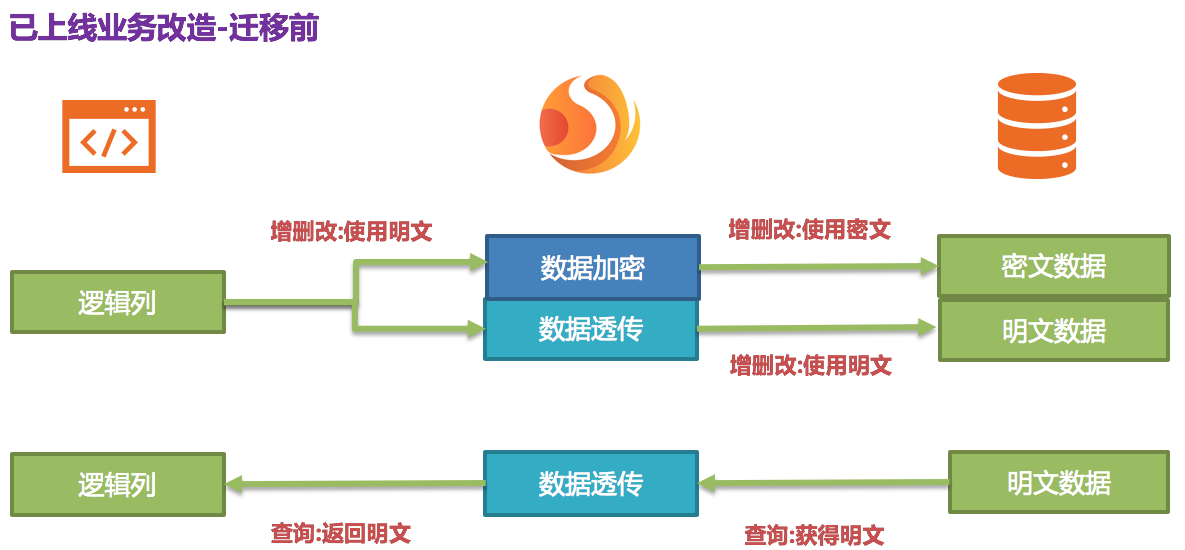
@@ -160,7 +160,7 @@ Apache ShardingSphere 接收到该 SQL,通过用户提供的加密配置,发
即我们需要在系统迁移后将 plainColumn,即 pwd 进行删除。那问题来了,现在业务代码都是面向pwd进行编写 SQL
的,把底层数据表中的存放明文的 pwd 删除了,
换用 pwd_cipher 进行解密得到原文数据,那岂不是意味着业务方需要整改所有 SQL,从而不使用即将要被删除的 pwd 列?还记得我们 Apache
ShardingSphere 的核心意义所在吗?
-> 这也正是 Apache ShardingSphere 核心意义所在,即依据用户提供的加密规则,将用户 SQL
与底层数据库表结构割裂开来,使得用户的SQL编写不再依赖于真实的数据库表结构。
+> 这也正是 Apache ShardingSphere 核心意义所在,即依据用户提供的加密规则,将用户 SQL 与底层数据库表结构割裂开来,使得用户的
SQL 编写不再依赖于真实的数据库表结构。
而用户与底层数据库之间的衔接、映射、转换交由 Apache ShardingSphere 进行处理。
是的,因为有 logicColumn 存在,用户的编写 SQL 都面向这个虚拟列,Apache ShardingSphere
就可以把这个逻辑列和底层数据表中的密文列进行映射转换。于是迁移后的加密配置即为:
@@ -189,7 +189,7 @@ Apache ShardingSphere 接收到该 SQL,通过用户提供的加密配置,发
## 中间件加密服务优势
-1. 自动化&透明化数据加密过程,用户无需关注加密中间实现细节。
+1. 自动化 & 透明化数据加密过程,用户无需关注加密中间实现细节。
2. 提供多种内置、第三方(AKS)的加密算法,用户仅需简单配置即可使用。
3. 提供加密算法 API 接口,用户可实现接口,从而使用自定义加密算法进行数据加密。
4. 支持切换不同的加密算法。
@@ -205,8 +205,8 @@ Apache ShardingSphere 提供了两种加密算法用于数据加密,这两种
### EncryptAlgorithm
-该解决方案通过提供 `encrypt()`, `decrypt()` 两种方法对需要加密的数据进行加解密。
-在用户进行 `INSERT`, `DELETE`, `UPDATE` 时,ShardingSphere会按照用户配置,对SQL进行解析、改写、路由,并调用
`encrypt()` 将数据加密后存储到数据库,
+该解决方案通过提供 `encrypt()`,`decrypt()` 两种方法对需要加密的数据进行加解密。
+在用户进行 `INSERT`,`DELETE`,`UPDATE` 时,ShardingSphere会按照用户配置,对SQL进行解析、改写、路由,并调用
`encrypt()` 将数据加密后存储到数据库,
而在 `SELECT` 时,则调用 `decrypt()` 方法将从数据库中取出的加密数据进行逆向解密,最终将原始数据返回给用户。
当前,Apache ShardingSphere 针对这种类型的加密解决方案提供了三种具体实现类,分别是
MD5(不可逆),AES(可逆),RC4(可逆),用户只需配置即可使用这三种内置的方案。
@@ -215,7 +215,7 @@ Apache ShardingSphere 提供了两种加密算法用于数据加密,这两种
相比较于第一种加密方案,该方案更为安全和复杂。它的理念是:即使是相同的数据,如两个用户的密码相同,它们在数据库里存储的加密数据也应当是不一样的。这种理念更有利于保护用户信息,防止撞库成功。
-它提供三种函数进行实现,分别是 `encrypt()`, `decrypt()`, `queryAssistedEncrypt()`。在
`encrypt()` 阶段,用户通过设置某个变动种子,例如时间戳。
+它提供三种函数进行实现,分别是 `encrypt()`,`decrypt()`,`queryAssistedEncrypt()`。在 `encrypt()`
阶段,用户通过设置某个变动种子,例如时间戳。
针对原始数据+变动种子组合的内容进行加密,就能保证即使原始数据相同,也因为有变动种子的存在,致使加密后的加密数据是不一样的。在 `decrypt()`
可依据之前规定的加密算法,利用种子数据进行解密。
虽然这种方式确实可以增加数据的保密性,但是另一个问题却随之出现:相同的数据在数据库里存储的内容是不一样的,那么当用户按照这个加密列进行等值查询(`SELECT
FROM table WHERE encryptedColumnn = ?`)时会发现无法将所有相同的原始数据查询出来。
diff --git a/docs/document/content/reference/faq/_index.cn.md
b/docs/document/content/reference/faq/_index.cn.md
index 82f721b..c79190d 100644
--- a/docs/document/content/reference/faq/_index.cn.md
+++ b/docs/document/content/reference/faq/_index.cn.md
@@ -83,7 +83,7 @@ DROP SCHEMA sharding_db;
回答:
-行表达式标识符可以使用`${...}`或`$->{...}`,但前者与 Spring 本身的属性文件占位符冲突,因此在 Spring
环境中使用行表达式标识符建议使用`$->{...}`。
+行表达式标识符可以使用 `${...}` 或 `$->{...}`,但前者与 Spring 本身的属性文件占位符冲突,因此在 Spring
环境中使用行表达式标识符建议使用 `$->{...}`。
## [分片] inline 表达式返回结果为何出现浮点数?
@@ -116,7 +116,7 @@ Java的整数相除结果是整数,但是对于 inline 表达式中的 Groovy
ShardingSphere 采用 snowflake
算法作为默认的分布式自增主键策略,用于保证分布式的情况下可以无中心化的生成不重复的自增序列。因此自增主键可以保证递增,但无法保证连续。
-而 snowflake
算法的最后4位是在同一毫秒内的访问递增值。因此,如果毫秒内并发度不高,最后4位为零的几率则很大。因此并发度不高的应用生成偶数主键的几率会更高。
+而 snowflake 算法的最后 4 位是在同一毫秒内的访问递增值。因此,如果毫秒内并发度不高,最后 4
位为零的几率则很大。因此并发度不高的应用生成偶数主键的几率会更高。
在 3.1.0
版本中,尾数大多为偶数的问题已彻底解决,参见:https://github.com/apache/shardingsphere/issues/1617
@@ -126,8 +126,8 @@ ShardingSphere 采用 snowflake 算法作为默认的分布式自增主键策略
1. 需要使用 4.1.0 或更高版本。
2. 调整以下配置项(需要注意的是,此时所有的范围查询将会使用广播的方式查询每一个分表):
-- 4.x版本:`allow.range.query.with.inline.sharding` 设置为 true 即可(默认为 false)。
-- 5.x版本:在 InlineShardingStrategy 中将 `allow-range-query-with-inline-sharding`
设置为 true 即可(默认为 false)。
+- 4.x 版本:`allow.range.query.with.inline.sharding` 设置为 true 即可(默认为 false)。
+- 5.x 版本:在 InlineShardingStrategy 中将 `allow-range-query-with-inline-sharding`
设置为 true 即可(默认为 false)。
## [分片] 为什么我实现了 `KeyGenerateAlgorithm` 接口,也配置了 Type,但是自定义的分布式主键依然不生效?
@@ -151,11 +151,11 @@ ShardingSphere 采用 snowflake 算法作为默认的分布式自增主键策略
回答:
-由于数据加密的 DDL 尚未开发完成,因此对于自动生成 DDL 语句的 JPA 与 数据加密一起使用时,会导致 JPA 的实体类(Entity)
无法同时满足 DDL 和 DML 的情况。
+由于数据加密的 DDL 尚未开发完成,因此对于自动生成 DDL 语句的 JPA 与 数据加密一起使用时,会导致 JPA 的实体类(Entity)无法同时满足
DDL 和 DML 的情况。
解决方案如下:
-1. 以需要加密的逻辑列名编写 JPA 的实体类(Entity)。
+1. 以需要加密的逻辑列名编写 JPA 的实体类(Entity)。
2. 关闭 JPA 的 auto-ddl,如 auto-ddl=none。
3. 手动建表,建表时应使用数据加密配置的 `cipherColumn`,`plainColumn` 和 `assistedQueryColumn`
代替逻辑列。
@@ -165,15 +165,15 @@ ShardingSphere 采用 snowflake 算法作为默认的分布式自增主键策略
1. 如需自定义 JDBC 参数,请使用 `urlSource` 的方式定义 `dataSource`。
2. ShardingSphere 预置了必要的连接池参数,如 `maxPoolSize`、`idleTimeout` 等。如需增加或覆盖参数配置,请在
`dataSource` 中通过 `PROPERTIES` 指定。
-3. 以上规则请参考
[相关介绍](/cn/user-manual/shardingsphere-proxy/distsql/syntax/rdl/resource-definition/)
+3. 以上规则请参考
[相关介绍](/cn/user-manual/shardingsphere-proxy/distsql/syntax/rdl/resource-definition/)。
## [DistSQL] 使用 `DistSQL` 删除资源时,出现 `Resource [xxx] is still used by
[SingleTableRule]`。
回答:
-1. 被规则引用的资源将无法被删除
+1. 被规则引用的资源将无法被删除。
-2. 若资源只被 single table rule 引用,且用户确认可以忽略该限制,则可以添加可选参数 ignore single tables
进行强制删除
+2. 若资源只被 single table rule 引用,且用户确认可以忽略该限制,则可以添加可选参数 ignore single tables
进行强制删除。
## [DistSQL] 使用 `DistSQL` 添加资源时,出现 `Failed to get driver instance for
jdbcURL=xxx`。
@@ -188,13 +188,13 @@ ShardingSphere-Proxy 在部署过程中没有添加 jdbc 驱动,需要将 jdbc
在 ShardingSphere-Proxy 以及 ShardingSphere-JDBC 1.5.0 版本之后提供了 `sql.show`
的配置,可以将解析上下文和改写后的 SQL 以及最终路由至的数据源的细节信息全部打印至 info 日志。
`sql.show` 配置默认关闭,如果需要请通过配置开启。
-> 注意:5.x版本以后,`sql.show`参数调整为 `sql-show`。
+> 注意:5.x版本以后,`sql.show` 参数调整为 `sql-show`。
## [其他] 阅读源码时为什么会出现编译错误? IDEA 不索引生成的代码?
回答:
-ShardingSphere 使用 lombok
实现极简代码。关于更多使用和安装细节,请参考[lombok官网](https://projectlombok.org/download.html)。
+ShardingSphere 使用 lombok 实现极简代码。关于更多使用和安装细节,请参考
[lombok官网](https://projectlombok.org/download.html)。
`org.apache.shardingsphere.sql.parser.autogen` 包下的代码由 ANTLR 生成,可以执行以下命令快速生成:
@@ -203,7 +203,7 @@ ShardingSphere 使用 lombok 实现极简代码。关于更多使用和安装细
```
生成的代码例如
`org.apache.shardingsphere.sql.parser.autogen.PostgreSQLStatementParser` 等 Java
文件由于较大,默认配置的 IDEA 可能不会索引该文件。
-可以调整 IDEA 的属性:`idea.max.intellisense.filesize=10000`
+可以调整 IDEA 的属性:`idea.max.intellisense.filesize=10000`。
## [其他] 使用 SQLSever 和 PostgreSQL 时,聚合列不加别名会抛异常?
@@ -228,8 +228,10 @@ SELECT SUM(num) AS sum_num, SUM(num2) AS sum_num2 FROM
tablexxx;
回答:
针对上面问题解决方式有两种:
-1.配置启动 JVM 参数 “-oracle.jdbc.J2EE13Compliant=true”
-2.通过代码在项目初始化时设置
System.getProperties().setProperty("oracle.jdbc.J2EE13Compliant", "true");
+
+1. 配置启动 JVM 参数 “-oracle.jdbc.J2EE13Compliant=true”
+
+2. 通过代码在项目初始化时设置
System.getProperties().setProperty("oracle.jdbc.J2EE13Compliant", "true");
原因如下:
diff --git a/docs/document/content/reference/scaling/_index.cn.md
b/docs/document/content/reference/scaling/_index.cn.md
index 33ea225..9c5c054 100644
--- a/docs/document/content/reference/scaling/_index.cn.md
+++ b/docs/document/content/reference/scaling/_index.cn.md
@@ -12,21 +12,21 @@ weight = 4
这种实现方式有以下优点:
-1. 伸缩过程中,原始数据没有任何影响
-1. 伸缩失败无风险
-1. 不受分片策略限制
+1. 伸缩过程中,原始数据没有任何影响;
+2. 伸缩失败无风险;
+3. 不受分片策略限制。
同时也存在一定的缺点:
-1. 在一定时间内存在冗余服务器
-1. 所有数据都需要移动
+1. 在一定时间内存在冗余服务器;
+2. 所有数据都需要移动。
-弹性伸缩模块会通过解析旧分片规则,提取配置中的数据源、数据节点等信息,之后创建伸缩作业工作流,将一次弹性伸缩拆解为4个主要阶段
+弹性伸缩模块会通过解析旧分片规则,提取配置中的数据源、数据节点等信息,之后创建伸缩作业工作流,将一次弹性伸缩拆解为 4 个主要阶段:
-1. 准备阶段
-1. 存量数据迁移阶段
-1. 增量数据同步阶段
-1. 规则切换阶段
+1. 准备阶段;
+2. 存量数据迁移阶段;
+3. 增量数据同步阶段;
+4. 规则切换阶段。

@@ -45,14 +45,14 @@ weight = 4
由于存量数据迁移耗费的时间受到数据量和并行度等因素影响,此时需要对这段时间内业务新增的数据进行同步。
不同的数据库使用的技术细节不同,但总体上均为基于复制协议或 WAL 日志实现的变更数据捕获功能。
-- MySQL:订阅并解析 binlog
-- PostgreSQL:采用官方逻辑复制
[test_decoding](https://www.postgresql.org/docs/9.4/test-decoding.html)
+- MySQL:订阅并解析 binlog;
+- PostgreSQL:采用官方逻辑复制
[test_decoding](https://www.postgresql.org/docs/9.4/test-decoding.html)。
这些捕获的增量数据,同样会由弹性伸缩模块根据新规则写入到新数据节点中。当增量数据基本同步完成时(由于业务系统未停止,增量数据是不断的),则进入规则切换阶段。
### 规则切换阶段
-在此阶段,可能存在一定时间的业务只读窗口期,通过设置数据库只读或ShardingSphere的熔断机制,让旧数据节点中的数据短暂静态,确保增量同步已完全完成。
+在此阶段,可能存在一定时间的业务只读窗口期,通过设置数据库只读或 ShardingSphere
的熔断机制,让旧数据节点中的数据短暂静态,确保增量同步已完全完成。
这个窗口期时间短则数秒,长则数分钟,取决于数据量和用户是否需要对数据进行强校验。
确认完成后,Apache ShardingSphere 可通过配置中心修改配置,将业务导向新规则的集群,弹性伸缩完成。
diff --git a/docs/document/content/reference/scaling/_index.en.md
b/docs/document/content/reference/scaling/_index.en.md
index ecb8400..8b2bea9 100644
--- a/docs/document/content/reference/scaling/_index.en.md
+++ b/docs/document/content/reference/scaling/_index.en.md
@@ -13,21 +13,21 @@ Consider about these challenges of ShardingSphere-Scaling,
the solution is: Use
Advantages:
1. No effect for origin data during scaling.
-1. No risk for scaling failure.
-1. No limited by sharding strategies.
+2. No risk for scaling failure.
+3. No limited by sharding strategies.
Disadvantages:
1. Redundant servers during scaling.
-1. All data needs to be moved.
+2. All data needs to be moved.
ShardingSphere-Scaling will analyze the sharding rules and extract information
like datasource and data nodes.
According the sharding rules, ShardingSphere-Scaling create a scaling job with
4 main phases.
1. Preparing Phase.
-1. Inventory Phase.
-1. Incremental Phase.
-1. Switching Phase.
+2. Inventory Phase.
+3. Incremental Phase.
+4. Switching Phase.

diff --git a/docs/document/content/reference/shadow/_index.cn.md
b/docs/document/content/reference/shadow/_index.cn.md
index 0fc4e67..15293c8 100644
--- a/docs/document/content/reference/shadow/_index.cn.md
+++ b/docs/document/content/reference/shadow/_index.cn.md
@@ -26,9 +26,8 @@ Apache ShardingSphere 通过解析 SQL,对传入的 SQL 进行影子判定,
## 路由过程
-以 INSERT 语句为例,在写入数据时,Apache ShardingSphere 会对 SQL
进行解析,再根据配置文件中的规则,构造一条路由链。在当前版本的功能中,
-影子功能处于路由链中的最后一个执行单元,即,如果有其他需要路由的规则存在,如分片,Apache ShardingSphere
会首先根据分片规则,路由到某一个数据库,再
-执行影子路由判定流程,判定执行SQL满足影子规则的配置,数据路由到与之对应的影子库,生产数据则维持不变。
+以 INSERT 语句为例,在写入数据时,Apache ShardingSphere 会对 SQL 进行解析,再根据配置文件中的规则,构造一条路由链。
+在当前版本的功能中,影子功能处于路由链中的最后一个执行单元,即,如果有其他需要路由的规则存在,如分片,Apache ShardingSphere
会首先根据分片规则,路由到某一个数据库,再执行影子路由判定流程,判定执行SQL满足影子规则的配置,数据路由到与之对应的影子库,生产数据则维持不变。
## 影子判定流程
影子库功能对执行的 SQL 语句进行影子判定。影子判定支持两种类型算法,用户可根据实际业务需求选择一种或者组合使用。
@@ -271,7 +270,7 @@ simple-note-algorithm:
foo: bar
```
-如当前 props 项中配置了 1 条配置,在sql中可以匹配的写法有如下:
+如当前 props 项中配置了 1 条配置,在 SQL 中可以匹配的写法有如下:
```sql
SELECT * FROM t_xxx_2 WHERE order_id = xxx /*foo:foo*/
diff --git a/docs/document/content/reference/test/integration-test/_index.cn.md
b/docs/document/content/reference/test/integration-test/_index.cn.md
index 31d9dc3..a656157 100644
--- a/docs/document/content/reference/test/integration-test/_index.cn.md
+++ b/docs/document/content/reference/test/integration-test/_index.cn.md
@@ -133,7 +133,7 @@ it.run.additional.cases=false
# 配置环境类型,只支持单值。可选值:docker或空,默认值:空
it.cluster.env.type=${it.env}
-# 待测试的接入端类型,多个值可用逗号分隔。可选值:jdbc, proxy,默认值:jdbc
+# 待测试的接入端类型,多个值可用逗号分隔。可选值:jdbc, proxy, 默认值:jdbc
it.cluster.adapters=jdbc
# 场景类型,多个值可用逗号分隔。可选值:H2, MySQL, Oracle, SQLServer, PostgreSQL
diff --git
a/docs/document/content/reference/test/performance-test/performance-test.cn.md
b/docs/document/content/reference/test/performance-test/performance-test.cn.md
index 0010e57..c5ad537 100644
---
a/docs/document/content/reference/test/performance-test/performance-test.cn.md
+++
b/docs/document/content/reference/test/performance-test/performance-test.cn.md
@@ -34,7 +34,7 @@ weight = 1
### 数据库表结构
-此处表结构参考 sysbench 的 sbtest 表
+此处表结构参考 sysbench 的 sbtest 表。
```shell
CREATE TABLE `tbl` (
@@ -398,7 +398,7 @@ DELETE FROM tbl1 WHERE id=?
### 压测类
-参考 [ shardingsphere-benchmark
](https://github.com/apache/shardingsphere-benchmark/tree/master/shardingsphere-benchmark)
实现,注意阅读其中的注释
+参考 [ shardingsphere-benchmark
](https://github.com/apache/shardingsphere-benchmark/tree/master/shardingsphere-benchmark)
实现,注意阅读其中的注释。
### 编译
diff --git
a/docs/document/content/reference/test/performance-test/performance-test.en.md
b/docs/document/content/reference/test/performance-test/performance-test.en.md
index a6fe2fb..532cf36 100644
---
a/docs/document/content/reference/test/performance-test/performance-test.en.md
+++
b/docs/document/content/reference/test/performance-test/performance-test.en.md
@@ -34,7 +34,7 @@ While as a comparison, MySQL runs with INSERT & UPDATE &
DELETE statement and fu
### Table Structure of Database
-The structure of table here refer to `sbtest` in `sysbench`
+The structure of table here refer to `sbtest` in `sysbench`.
```shell
CREATE TABLE `tbl` (
diff --git
a/docs/document/content/user-manual/shardingsphere-jdbc/builtin-algorithm/load-balance.cn.md
b/docs/document/content/user-manual/shardingsphere-jdbc/builtin-algorithm/load-balance.cn.md
index a3b2366..676237e 100644
---
a/docs/document/content/user-manual/shardingsphere-jdbc/builtin-algorithm/load-balance.cn.md
+++
b/docs/document/content/user-manual/shardingsphere-jdbc/builtin-algorithm/load-balance.cn.md
@@ -25,4 +25,4 @@ weight = 4
| *属性名称* | *数据类型* | *说明*
|
| ------------------------------ | ---------- |
---------------------------------------------- |
-| \- <read-data_source-name> (+) | double |
属性名字使用读库名字,参数填写读库对应的权重值。权重参数范围最小值>0,合计<=Double.MAX_VALUE。 |
+| \- <read-data_source-name> (+) | double |
属性名字使用读库名字,参数填写读库对应的权重值。权重参数范围最小值 > 0,合计 <= Double.MAX_VALUE。 |
diff --git
a/docs/document/content/user-manual/shardingsphere-jdbc/java-api/rules/mix.cn.md
b/docs/document/content/user-manual/shardingsphere-jdbc/java-api/rules/mix.cn.md
index a730a93..c09bbe8 100644
---
a/docs/document/content/user-manual/shardingsphere-jdbc/java-api/rules/mix.cn.md
+++
b/docs/document/content/user-manual/shardingsphere-jdbc/java-api/rules/mix.cn.md
@@ -95,7 +95,7 @@ readwriteProps2.setProperty("write-data-source-name",
"write_ds0");
readwriteProps2.setProperty("read-data-source-names", "write_ds1_read0,
write_ds1_read1");
ReadwriteSplittingDataSourceRuleConfiguration dataSourceConfiguration2 = new
ReadwriteSplittingDataSourceRuleConfiguration("ds_1", "Static",
readwriteProps2, "roundRobin");
-//负载均衡算法
+// 负载均衡算法
Map<String, ShardingSphereAlgorithmConfiguration> loadBalanceMaps = new
HashMap<>(1);
loadBalanceMaps.put("roundRobin", new
ShardingSphereAlgorithmConfiguration("ROUND_ROBIN", new Properties()));
diff --git
a/docs/document/content/user-manual/shardingsphere-jdbc/java-api/rules/sql-parser.cn.md
b/docs/document/content/user-manual/shardingsphere-jdbc/java-api/rules/sql-parser.cn.md
index 6cb0474..82668ea 100644
---
a/docs/document/content/user-manual/shardingsphere-jdbc/java-api/rules/sql-parser.cn.md
+++
b/docs/document/content/user-manual/shardingsphere-jdbc/java-api/rules/sql-parser.cn.md
@@ -23,6 +23,6 @@ weight = 6
| *名称* | *数据类型* | *说明*
| *默认值* |
|-------------------------|-------------|---------------------------------------------|--------------------------------------------|
-| initialCapacity | int | 本地缓存初始容量
| 语法树本地缓存默认值128,SQL 语句缓存默认值2000 |
-| maximumSize | long | 本地缓存最大容量
| 语法树本地缓存默认值1024,SQL 语句缓存默认值65535 |
+| initialCapacity | int | 本地缓存初始容量
| 语法树本地缓存默认值 128,SQL 语句缓存默认值 2000 |
+| maximumSize | long | 本地缓存最大容量
| 语法树本地缓存默认值 1024,SQL 语句缓存默认值 65535 |
| concurrencyLevel | int | 本地缓存并发级别,最多允许线程并发更新的个数 | 4
|
diff --git
a/docs/document/content/user-manual/shardingsphere-jdbc/special-api/observability/agent.cn.md
b/docs/document/content/user-manual/shardingsphere-jdbc/special-api/observability/agent.cn.md
index a6bd57a..cbb03f0 100644
---
a/docs/document/content/user-manual/shardingsphere-jdbc/special-api/observability/agent.cn.md
+++
b/docs/document/content/user-manual/shardingsphere-jdbc/special-api/observability/agent.cn.md
@@ -12,7 +12,7 @@ weight = 1
> mvn clean install
```
-### 远程下载(暂未发布)
+### 远程下载(暂未发布)
```
> weget http://xxxxx/shardingsphere-agent.tar.gz
diff --git
a/docs/document/content/user-manual/shardingsphere-jdbc/special-api/sharding/hint.cn.md
b/docs/document/content/user-manual/shardingsphere-jdbc/special-api/sharding/hint.cn.md
index 1f8cdb8..9819f40 100644
---
a/docs/document/content/user-manual/shardingsphere-jdbc/special-api/sharding/hint.cn.md
+++
b/docs/document/content/user-manual/shardingsphere-jdbc/special-api/sharding/hint.cn.md
@@ -135,7 +135,7 @@ try (HintManager hintManager = HintManager.getInstance();
##### 使用规范
SQL Hint 功能需要用户提前开启解析注释的配置,设置 `sqlCommentParseEnabled` 为 `true`。
-注释格式暂时只支持`/* */`,内容需要以 `ShardingSphere hint:`开始,属性名为 `writeRouteOnly`。
+注释格式暂时只支持 `/* */`,内容需要以 `ShardingSphere hint:` 开始,属性名为 `writeRouteOnly`。
##### 完整示例
```sql
@@ -176,7 +176,7 @@ try (HintManager hintManager = HintManager.getInstance();
##### 使用规范
SQL Hint 功能需要用户提前开启解析注释的配置,设置 `sqlCommentParseEnabled` 为 `true`,目前只支持路由至一个数据源。
-注释格式暂时只支持`/* */`,内容需要以 `ShardingSphere hint:`开始,属性名为 `dataSourceName`。
+注释格式暂时只支持 `/* */`,内容需要以 `ShardingSphere hint:` 开始,属性名为 `dataSourceName`。
##### 完整示例
```sql
diff --git
a/docs/document/content/user-manual/shardingsphere-jdbc/spring-namespace/rules/sharding.cn.md
b/docs/document/content/user-manual/shardingsphere-jdbc/spring-namespace/rules/sharding.cn.md
index 0934615..8f892a8 100644
---
a/docs/document/content/user-manual/shardingsphere-jdbc/spring-namespace/rules/sharding.cn.md
+++
b/docs/document/content/user-manual/shardingsphere-jdbc/spring-namespace/rules/sharding.cn.md
@@ -26,7 +26,7 @@ weight = 1
| *名称* | *类型* | *说明* |
| ------------------------- | ----- | --------------- |
| logic-table | 属性 | 逻辑表名称 |
-| actual-data-nodes | 属性 | 由数据源名 +
表名组成,以小数点分隔。多个表以逗号分隔,支持inline表达式。缺省表示使用已知数据源与逻辑表名称生成数据节点,用于广播表(即每个库中都需要一个同样的表用于关联查询,多为字典表)或只分库不分表且所有库的表结构完全一致的情况
|
+| actual-data-nodes | 属性 | 由数据源名 + 表名组成,以小数点分隔。多个表以逗号分隔,支持 inline
表达式。缺省表示使用已知数据源与逻辑表名称生成数据节点,用于广播表(即每个库中都需要一个同样的表用于关联查询,多为字典表)或只分库不分表且所有库的表结构完全一致的情况
|
| actual-data-sources | 属性 | 自动分片表数据源名 |
| database-strategy-ref | 属性 | 标准分片表分库策略名称 |
| table-strategy-ref | 属性 | 标准分片表分表策略名称 |
diff --git
a/docs/document/content/user-manual/shardingsphere-jdbc/unsupported.cn.md
b/docs/document/content/user-manual/shardingsphere-jdbc/unsupported.cn.md
index c030d4c..02baa8b 100644
--- a/docs/document/content/user-manual/shardingsphere-jdbc/unsupported.cn.md
+++ b/docs/document/content/user-manual/shardingsphere-jdbc/unsupported.cn.md
@@ -5,31 +5,31 @@ weight = 8
## DataSource 接口
-* 不支持 timeout 相关操作
+* 不支持 timeout 相关操作。
## Connection 接口
-* 不支持存储过程,函数,游标的操作
-* 不支持执行 native SQL
-* 不支持 savepoint 相关操作
-* 不支持 Schema/Catalog 的操作
-* 不支持自定义类型映射
+* 不支持存储过程,函数,游标的操作;
+* 不支持执行 native SQL;
+* 不支持 savepoint 相关操作;
+* 不支持 Schema/Catalog 的操作;
+* 不支持自定义类型映射。
## Statement 和 PreparedStatement 接口
-* 不支持返回多结果集的语句(即存储过程,非 SELECT 多条数据)
-* 不支持国际化字符的操作
+* 不支持返回多结果集的语句(即存储过程,非 SELECT 多条数据);
+* 不支持国际化字符的操作。
## ResultSet 接口
-* 不支持对于结果集指针位置判断
-* 不支持通过非 next 方法改变结果指针位置
-* 不支持修改结果集内容
-* 不支持获取国际化字符
-* 不支持获取 Array
+* 不支持对于结果集指针位置判断;
+* 不支持通过非 next 方法改变结果指针位置;
+* 不支持修改结果集内容;
+* 不支持获取国际化字符;
+* 不支持获取 Array。
## JDBC 4.1
-* 不支持 JDBC 4.1 接口新功能
+* 不支持 JDBC 4.1 接口新功能。
查询所有未支持方法,请阅读 `org.apache.shardingsphere.driver.jdbc.unsupported` 包。
diff --git
a/docs/document/content/user-manual/shardingsphere-jdbc/yaml-config/rules/sharding.cn.md
b/docs/document/content/user-manual/shardingsphere-jdbc/yaml-config/rules/sharding.cn.md
index 0053c24..5aec0c1 100644
---
a/docs/document/content/user-manual/shardingsphere-jdbc/yaml-config/rules/sharding.cn.md
+++
b/docs/document/content/user-manual/shardingsphere-jdbc/yaml-config/rules/sharding.cn.md
@@ -16,7 +16,7 @@ rules:
shardingColumn: # 分片列名称
shardingAlgorithmName: # 分片算法名称
complex: # 用于多分片键的复合分片场景
- shardingColumns: #分片列名称,多个列以逗号分隔
+ shardingColumns: # 分片列名称,多个列以逗号分隔
shardingAlgorithmName: # 分片算法名称
hint: # Hint 分片策略
shardingAlgorithmName: # 分片算法名称
diff --git
a/docs/document/content/user-manual/shardingsphere-proxy/distsql/syntax/rdl/resource-definition.cn.md
b/docs/document/content/user-manual/shardingsphere-proxy/distsql/syntax/rdl/resource-definition.cn.md
index 7e8f7ee..b9a6367 100644
---
a/docs/document/content/user-manual/shardingsphere-proxy/distsql/syntax/rdl/resource-definition.cn.md
+++
b/docs/document/content/user-manual/shardingsphere-proxy/distsql/syntax/rdl/resource-definition.cn.md
@@ -25,16 +25,16 @@ poolProperty:
"key"= ("value" | value)
```
-- 添加资源前请确认已经创建分布式数据库,并执行 `use` 命令成功选择一个数据库
-- 确认增加的资源是可以正常连接的, 否则将不能添加成功
-- 重复的 `dataSourceName` 不允许被添加
-- 在同一 `dataSource` 的定义中,`simpleSource` 和 `urlSource` 语法不可混用
-- `poolProperty` 用于自定义连接池参数,`key` 必须和连接池参数名一致,`value` 支持 int 和 String 类型
-- `ALTER RESOURCE` 修改资源时不允许改变该资源关联的真实数据源
-- `ALTER RESOURCE` 修改资源时会发生连接池的切换,这个操作可能对进行中的业务造成影响,请谨慎使用
-- `DROP RESOURCE` 只会删除逻辑资源,不会删除真实的数据源
-- 被规则引用的资源将无法被删除
-- 若资源只被 `single table rule` 引用,且用户确认可以忽略该限制,则可以添加可选参数 `ignore single tables`
进行强制删除
+- 添加资源前请确认已经创建分布式数据库,并执行 `use` 命令成功选择一个数据库;
+- 确认增加的资源是可以正常连接的, 否则将不能添加成功;
+- 重复的 `dataSourceName` 不允许被添加;
+- 在同一 `dataSource` 的定义中,`simpleSource` 和 `urlSource` 语法不可混用;
+- `poolProperty` 用于自定义连接池参数,`key` 必须和连接池参数名一致,`value` 支持 int 和 String 类型;
+- `ALTER RESOURCE` 修改资源时不允许改变该资源关联的真实数据源;
+- `ALTER RESOURCE` 修改资源时会发生连接池的切换,这个操作可能对进行中的业务造成影响,请谨慎使用;
+- `DROP RESOURCE` 只会删除逻辑资源,不会删除真实的数据源;
+- 被规则引用的资源将无法被删除;
+- 若资源只被 `single table rule` 引用,且用户确认可以忽略该限制,则可以添加可选参数 `ignore single tables`
进行强制删除。
## 示例
diff --git
a/docs/document/content/user-manual/shardingsphere-proxy/distsql/syntax/rdl/rule-definition/db-discovery.cn.md
b/docs/document/content/user-manual/shardingsphere-proxy/distsql/syntax/rdl/rule-definition/db-discovery.cn.md
index 47ac3dc..b91fbd0 100644
---
a/docs/document/content/user-manual/shardingsphere-proxy/distsql/syntax/rdl/rule-definition/db-discovery.cn.md
+++
b/docs/document/content/user-manual/shardingsphere-proxy/distsql/syntax/rdl/rule-definition/db-discovery.cn.md
@@ -55,11 +55,11 @@ property:
key=value
```
-- `discoveryType` 指定数据库发现服务类型,`ShardingSphere` 内置支持 `MGR`
-- 重复的 `ruleName` 将无法被创建
-- 正在被使用的 `discoveryType` 和 `discoveryHeartbeat` 无法被删除
-- 带有 `-` 的命名在改动时需要使用 `" "`
-- 移除 `discoveryRule` 时不会移除被该 `discoveryRule` 使用的 `discoveryType` 和
`discoveryHeartbeat`
+- `discoveryType` 指定数据库发现服务类型,`ShardingSphere` 内置支持 `MGR`;
+- 重复的 `ruleName` 将无法被创建;
+- 正在被使用的 `discoveryType` 和 `discoveryHeartbeat` 无法被删除;
+- 带有 `-` 的命名在改动时需要使用 `" "`;
+- 移除 `discoveryRule` 时不会移除被该 `discoveryRule` 使用的 `discoveryType` 和
`discoveryHeartbeat`。
## 示例
@@ -122,4 +122,4 @@ DROP DB_DISCOVERY RULE db_discovery_group_1;
DROP DB_DISCOVERY TYPE db_discovery_group_1_mgr;
DROP DB_DISCOVERY HEARTBEAT db_discovery_group_1_heartbeat;
-```
\ No newline at end of file
+```
diff --git
a/docs/document/content/user-manual/shardingsphere-proxy/distsql/syntax/rdl/rule-definition/encrypt.cn.md
b/docs/document/content/user-manual/shardingsphere-proxy/distsql/syntax/rdl/rule-definition/encrypt.cn.md
index 8070ddb..f86030b 100644
---
a/docs/document/content/user-manual/shardingsphere-proxy/distsql/syntax/rdl/rule-definition/encrypt.cn.md
+++
b/docs/document/content/user-manual/shardingsphere-proxy/distsql/syntax/rdl/rule-definition/encrypt.cn.md
@@ -27,10 +27,10 @@ algorithmProperties:
algorithmProperty:
key=value
```
-- `PLAIN` 指定明文数据列,`CIPHER` 指定密文数据列
-- `encryptAlgorithmType` 指定加密算法类型,请参考
[加密算法](/cn/user-manual/shardingsphere-jdbc/builtin-algorithm/encrypt/)
-- 重复的 `tableName` 将无法被创建
-- `queryWithCipherColumn` 支持大写或小写的 true 或 false
+- `PLAIN` 指定明文数据列,`CIPHER` 指定密文数据列;
+- `encryptAlgorithmType` 指定加密算法类型,请参考
[加密算法](/cn/user-manual/shardingsphere-jdbc/builtin-algorithm/encrypt/);
+- 重复的 `tableName` 将无法被创建;
+- `queryWithCipherColumn` 支持大写或小写的 true 或 false。
## 示例
diff --git
a/docs/document/content/user-manual/shardingsphere-proxy/distsql/syntax/rdl/rule-definition/readwrite-splitting.cn.md
b/docs/document/content/user-manual/shardingsphere-proxy/distsql/syntax/rdl/rule-definition/readwrite-splitting.cn.md
index 7cb6290..9ffc774 100644
---
a/docs/document/content/user-manual/shardingsphere-proxy/distsql/syntax/rdl/rule-definition/readwrite-splitting.cn.md
+++
b/docs/document/content/user-manual/shardingsphere-proxy/distsql/syntax/rdl/rule-definition/readwrite-splitting.cn.md
@@ -32,10 +32,10 @@ algorithmProperty:
key=value
```
-- 支持创建静态读写分离规则和动态读写分离规则
-- 动态读写分离规则依赖于数据库发现规则
-- `loadBanlancerType` 指定负载均衡算法类型,请参考
[负载均衡算法](/cn/user-manual/shardingsphere-jdbc/builtin-algorithm/load-balance/)
-- 重复的 `ruleName` 将无法被创建
+- 支持创建静态读写分离规则和动态读写分离规则;
+- 动态读写分离规则依赖于数据库发现规则;
+- `loadBanlancerType` 指定负载均衡算法类型,请参考
[负载均衡算法](/cn/user-manual/shardingsphere-jdbc/builtin-algorithm/load-balance/);
+- 重复的 `ruleName` 将无法被创建。
## 示例
diff --git
a/docs/document/content/user-manual/shardingsphere-proxy/distsql/syntax/rdl/rule-definition/shadow.cn.md
b/docs/document/content/user-manual/shardingsphere-proxy/distsql/syntax/rdl/rule-definition/shadow.cn.md
index d3e88c4..3a97226 100644
---
a/docs/document/content/user-manual/shardingsphere-proxy/distsql/syntax/rdl/rule-definition/shadow.cn.md
+++
b/docs/document/content/user-manual/shardingsphere-proxy/distsql/syntax/rdl/rule-definition/shadow.cn.md
@@ -33,13 +33,13 @@ algorithmProperties: algorithmProperty [,
algorithmProperty] ...
algorithmProperty: key=value
```
-- 重复的`ruleName`无法被创建
-- `resourceMapping` 指定源数据库和影子库的映射关系,需使用 RDL 管理的 `resource` ,请参考
[数据源资源](/cn/user-manual/shardingsphere-proxy/distsql/syntax/rdl/resource-definition/)
-- `shadowAlgorithm` 可同时作用于多个 `shadowTableRule`
-- `algorithmName` 未指定时会根据 `ruleName`、`tableName` 和 `shadowAlgorithmType` 自动生成
-- `shadowAlgorithmType` 目前支持 `VALUE_MATCH`、`REGEX_MATCH` 和 `SIMPLE_HINT`
-- `shadowTableRule` 能够被不同的 `shadowRuleDefinition` 复用,因此在执行 `DROP SHADOW RULE`
时,对应的 `shadowTableRule` 不会被移除
-- `shadowAlgorithm` 能够被不同的 `shadowTableRule` 复用,因此在执行 `ALTER SHADOW RULE`
时,对应的 `shadowAlgorithm` 不会被移除
+- 重复的`ruleName`无法被创建;
+- `resourceMapping` 指定源数据库和影子库的映射关系,需使用 RDL 管理的 `resource` ,请参考
[数据源资源](/cn/user-manual/shardingsphere-proxy/distsql/syntax/rdl/resource-definition/);
+- `shadowAlgorithm` 可同时作用于多个 `shadowTableRule`;
+- `algorithmName` 未指定时会根据 `ruleName`、`tableName` 和 `shadowAlgorithmType` 自动生成;
+- `shadowAlgorithmType` 目前支持 `VALUE_MATCH`、`REGEX_MATCH` 和 `SIMPLE_HINT`;
+- `shadowTableRule` 能够被不同的 `shadowRuleDefinition` 复用,因此在执行 `DROP SHADOW RULE`
时,对应的 `shadowTableRule` 不会被移除;
+- `shadowAlgorithm` 能够被不同的 `shadowTableRule` 复用,因此在执行 `ALTER SHADOW RULE`
时,对应的 `shadowAlgorithm` 不会被移除。
## 示例
diff --git
a/docs/document/content/user-manual/shardingsphere-proxy/distsql/syntax/rdl/rule-definition/sharding.cn.md
b/docs/document/content/user-manual/shardingsphere-proxy/distsql/syntax/rdl/rule-definition/sharding.cn.md
index 03b306f..1878481 100644
---
a/docs/document/content/user-manual/shardingsphere-proxy/distsql/syntax/rdl/rule-definition/sharding.cn.md
+++
b/docs/document/content/user-manual/shardingsphere-proxy/distsql/syntax/rdl/rule-definition/sharding.cn.md
@@ -104,15 +104,15 @@ algorithmProperty:
keyGeneratorDefinition:
keyGeneratorName (algorithmDefinition)
```
-- `RESOURCES` 需使用 RDL 管理的数据源资源
-- `shardingAlgorithmType` 指定自动分片算法类型,请参考
[自动分片算法](/cn/user-manual/shardingsphere-jdbc/builtin-algorithm/sharding/)
-- `keyGenerateStrategyType` 指定分布式主键生成策略,请参考
[分布式主键](/cn/user-manual/shardingsphere-jdbc/builtin-algorithm/keygen/)
-- 重复的 `tableName` 将无法被创建
-- `shardingAlgorithm` 能够被不同的 `Sharding Table Rule` 复用,因此在执行 `DROP SHARDING
TABLE RULE` 时,对应的 `shardingAlgorithm` 不会被移除
-- 如需移除 `shardingAlgorithm`,请执行 `DROP SHARDING ALGORITHM`
-- `strategyType`
指定分片策略,请参考[分片策略](/cn/features/sharding/concept/sharding/#%E5%88%86%E7%89%87%E7%AD%96%E7%95%A5)
-- `Sharding Table Rule` 同时支持 `Auto Table` 和 `Table` 两种类型,两者在语法上有所差异,对应配置文件请参考
[数据分片](/cn/user-manual/shardingsphere-jdbc/yaml-config/rules/sharding/)
-- 使用 `autoCreativeAlgorithm` 方式指定 `shardingStrategy` 时,将会自动创建新的分片算法,算法命名规则为
`tableName_strategyType_shardingAlgorithmType`,如 `t_order_database_inline`
+- `RESOURCES` 需使用 RDL 管理的数据源资源;
+- `shardingAlgorithmType` 指定自动分片算法类型,请参考
[自动分片算法](/cn/user-manual/shardingsphere-jdbc/builtin-algorithm/sharding/);
+- `keyGenerateStrategyType` 指定分布式主键生成策略,请参考
[分布式主键](/cn/user-manual/shardingsphere-jdbc/builtin-algorithm/keygen/);
+- 重复的 `tableName` 将无法被创建;
+- `shardingAlgorithm` 能够被不同的 `Sharding Table Rule` 复用,因此在执行 `DROP SHARDING
TABLE RULE` 时,对应的 `shardingAlgorithm` 不会被移除;
+- 如需移除 `shardingAlgorithm`,请执行 `DROP SHARDING ALGORITHM`;
+- `strategyType`
指定分片策略,请参考[分片策略](/cn/features/sharding/concept/sharding/#%E5%88%86%E7%89%87%E7%AD%96%E7%95%A5);
+- `Sharding Table Rule` 同时支持 `Auto Table` 和 `Table` 两种类型,两者在语法上有所差异,对应配置文件请参考
[数据分片](/cn/user-manual/shardingsphere-jdbc/yaml-config/rules/sharding/) ;
+- 使用 `autoCreativeAlgorithm` 方式指定 `shardingStrategy` 时,将会自动创建新的分片算法,算法命名规则为
`tableName_strategyType_shardingAlgorithmType`,如 `t_order_database_inline`。
### Sharding Binding Table Rule
@@ -180,9 +180,9 @@ batchSize:
intValue:
INT
```
-- `ENABLE` 用于设置启用哪个弹性伸缩配置
-- `DISABLE` 将禁用当前正在使用的配置
-- 创建 schema 中第一个弹性伸缩配置时,默认启用
+- `ENABLE` 用于设置启用哪个弹性伸缩配置;
+- `DISABLE` 将禁用当前正在使用的配置;
+- 创建 schema 中第一个弹性伸缩配置时,默认启用。
## 示例
diff --git
a/docs/document/content/user-manual/shardingsphere-proxy/distsql/syntax/rdl/rule-definition/single-table.cn.md
b/docs/document/content/user-manual/shardingsphere-proxy/distsql/syntax/rdl/rule-definition/single-table.cn.md
index f9a4ae8..1bcac1b 100644
---
a/docs/document/content/user-manual/shardingsphere-proxy/distsql/syntax/rdl/rule-definition/single-table.cn.md
+++
b/docs/document/content/user-manual/shardingsphere-proxy/distsql/syntax/rdl/rule-definition/single-table.cn.md
@@ -15,7 +15,7 @@ DROP DEFAULT SINGLE TABLE RULE
singleTableRuleDefinition:
RESOURCE = resourceName
```
-- `RESOURCE` 需使用 RDL 管理的数据源资源
+- `RESOURCE` 需使用 RDL 管理的数据源资源。
## 示例
diff --git
a/docs/document/content/user-manual/shardingsphere-proxy/distsql/syntax/rql/rule-query/encrypt.cn.md
b/docs/document/content/user-manual/shardingsphere-proxy/distsql/syntax/rql/rule-query/encrypt.cn.md
index f8c598b..2257766 100644
---
a/docs/document/content/user-manual/shardingsphere-proxy/distsql/syntax/rql/rule-query/encrypt.cn.md
+++
b/docs/document/content/user-manual/shardingsphere-proxy/distsql/syntax/rql/rule-query/encrypt.cn.md
@@ -10,7 +10,7 @@ SHOW ENCRYPT RULES [FROM schemaName]
SHOW ENCRYPT TABLE RULE tableName [from schemaName]
```
-- 支持查询所有的数据加密规则和指定逻辑表名查询
+- 支持查询所有的数据加密规则和指定逻辑表名查询。
## 返回值说明
diff --git
a/docs/document/content/user-manual/shardingsphere-proxy/distsql/syntax/rql/rule-query/shadow.cn.md
b/docs/document/content/user-manual/shardingsphere-proxy/distsql/syntax/rql/rule-query/shadow.cn.md
index 886ba41..d11f273 100644
---
a/docs/document/content/user-manual/shardingsphere-proxy/distsql/syntax/rql/rule-query/shadow.cn.md
+++
b/docs/document/content/user-manual/shardingsphere-proxy/distsql/syntax/rql/rule-query/shadow.cn.md
@@ -15,9 +15,9 @@ SHOW SHADOW ALGORITHMS [FROM schemaName]
shadowRule:
RULE ruleName
```
-- 支持查询所有影子规则和指定表查询
-- 支持查询所有表规则
-- 支持查询所有影子算法
+- 支持查询所有影子规则和指定表查询;
+- 支持查询所有表规则;
+- 支持查询所有影子算法。
## 返回值说明
diff --git
a/docs/document/content/user-manual/shardingsphere-proxy/distsql/syntax/rql/rule-query/sharding.cn.md
b/docs/document/content/user-manual/shardingsphere-proxy/distsql/syntax/rql/rule-query/sharding.cn.md
index d380c90..ddb8d3b 100644
---
a/docs/document/content/user-manual/shardingsphere-proxy/distsql/syntax/rql/rule-query/sharding.cn.md
+++
b/docs/document/content/user-manual/shardingsphere-proxy/distsql/syntax/rql/rule-query/sharding.cn.md
@@ -27,8 +27,8 @@ SHOW SHARDING TABLE NODES;
tableRule:
RULE tableName
```
-- 支持查询所有数据分片规则和指定表查询
-- 支持查询所有分片算法
+- 支持查询所有数据分片规则和指定表查询;
+- 支持查询所有分片算法。
### Sharding Binding Table Rule
diff --git
a/docs/document/content/user-manual/shardingsphere-proxy/distsql/usage/_index.cn.md
b/docs/document/content/user-manual/shardingsphere-proxy/distsql/usage/_index.cn.md
index e800d6e..ac0bebf 100644
---
a/docs/document/content/user-manual/shardingsphere-proxy/distsql/usage/_index.cn.md
+++
b/docs/document/content/user-manual/shardingsphere-proxy/distsql/usage/_index.cn.md
@@ -11,22 +11,22 @@ chapter = true
以 MySQL 为例,其他数据库可直接替换。
1. 启动 MySQL 服务;
-1. 创建待注册资源的 MySQL 数据库;
-1. 在 MySQL 中为 ShardingSphere-Proxy 创建一个拥有创建权限的角色或者用户;
-1. 启动 ZooKeeper 服务;
-1. 添加 `mode` 和 `authentication` 配置参数到 `server.yaml`;
-1. 启动 ShardingSphere-Proxy;
-1. 通过应用程序或终端连接到 ShardingSphere-Proxy;
+2. 创建待注册资源的 MySQL 数据库;
+3. 在 MySQL 中为 ShardingSphere-Proxy 创建一个拥有创建权限的角色或者用户;
+4. 启动 ZooKeeper 服务;
+5. 添加 `mode` 和 `authentication` 配置参数到 `server.yaml`;
+6. 启动 ShardingSphere-Proxy;
+7. 通过应用程序或终端连接到 ShardingSphere-Proxy;
## 创建数据库
-1. 创建逻辑库
+1. 创建逻辑库。
```sql
CREATE DATABASE foo_db;
```
-2. 使用新创建的逻辑库
+2. 使用新创建的逻辑库。
```sql
USE foo_db;
diff --git
a/docs/document/content/user-manual/shardingsphere-proxy/startup/bin.cn.md
b/docs/document/content/user-manual/shardingsphere-proxy/startup/bin.cn.md
index 7af972f..980614e 100644
--- a/docs/document/content/user-manual/shardingsphere-proxy/startup/bin.cn.md
+++ b/docs/document/content/user-manual/shardingsphere-proxy/startup/bin.cn.md
@@ -6,24 +6,24 @@ weight = 1
## 启动步骤
1. 下载 ShardingSphere-Proxy 的最新发行版。
-1. 解压缩后修改 `conf/server.yaml` 和以 `config-` 前缀开头的文件,如:`conf/config-xxx.yaml`
文件,进行分片规则、读写分离规则配置。配置方式请参考[配置手册](/cn/user-manual/shardingsphere-proxy/yaml-config/)。
-1. Linux 操作系统请运行 `bin/start.sh`,Windows 操作系统请运行 `bin/start.bat` 启动
ShardingSphere-Proxy。如需配置启动端口、配置文件位置,可参考[快速入门](/cn/quick-start/shardingsphere-proxy-quick-start/)。
+2. 解压缩后修改 `conf/server.yaml` 和以 `config-` 前缀开头的文件,如:`conf/config-xxx.yaml`
文件,进行分片规则、读写分离规则配置。配置方式请参考[配置手册](/cn/user-manual/shardingsphere-proxy/yaml-config/)。
+3. Linux 操作系统请运行 `bin/start.sh`,Windows 操作系统请运行 `bin/start.bat` 启动
ShardingSphere-Proxy。如需配置启动端口、配置文件位置,可参考[快速入门](/cn/quick-start/shardingsphere-proxy-quick-start/)。
## 选择数据库协议
### 使用 PostgreSQL
-1. 使用任何 PostgreSQL 的客户端连接。如: `psql -U root -h 127.0.0.1 -p 3307`
+1. 使用任何 PostgreSQL 的客户端连接。如: `psql -U root -h 127.0.0.1 -p 3307`。
### 使用 MySQL
1. 将 MySQL 的 JDBC 驱动程序复制至目录 `ext-lib/`。
-1. 使用任何 MySQL 的客户端连接。如: `mysql -u root -h 127.0.0.1 -P 3307`
+2. 使用任何 MySQL 的客户端连接。如: `mysql -u root -h 127.0.0.1 -P 3307`。
### 使用 openGauss
1. 将以 `org.opengauss` 包名为前缀的 openGauss 的 JDBC 驱动程序复制至目录 `ext-lib/`。
-1. 使用任何 openGauss 的客户端连接。如: `gsql -U root -h 127.0.0.1 -p 3307`
+2. 使用任何 openGauss 的客户端连接。如: `gsql -U root -h 127.0.0.1 -p 3307`。
## 选择元数据持久化仓库
@@ -45,15 +45,15 @@ weight = 1
当用户需要使用自定义的算法类时,可通过以下方式配置使用自定义算法,以分片为例:
1. 实现 `ShardingAlgorithm` 接口定义的算法实现类。
-1. 在项目 `resources` 目录下创建 `META-INF/services` 目录。
-1. 在 `META-INF/services` 目录下新建文件
`org.apache.shardingsphere.sharding.spi.ShardingAlgorithm`
-1. 将实现类的绝对路径写入至文件 `org.apache.shardingsphere.sharding.spi.ShardingAlgorithm`
-1. 将上述 Java 文件打包成 jar 包。
-1. 将上述 jar 包拷贝至 ShardingSphere-Proxy 解压后的 `ext-lib/` 目录。
-1. 将上述自定义算法实现类的 Java 文件引用配置在 YAML
文件中,具体可参考[配置规则](/cn/user-manual/shardingsphere-proxy/yaml-config/)。
+2. 在项目 `resources` 目录下创建 `META-INF/services` 目录。
+3. 在 `META-INF/services` 目录下新建文件
`org.apache.shardingsphere.sharding.spi.ShardingAlgorithm`
+4. 将实现类的绝对路径写入至文件 `org.apache.shardingsphere.sharding.spi.ShardingAlgorithm`
+5. 将上述 Java 文件打包成 jar 包。
+6. 将上述 jar 包拷贝至 ShardingSphere-Proxy 解压后的 `ext-lib/` 目录。
+7. 将上述自定义算法实现类的 Java 文件引用配置在 YAML
文件中,具体可参考[配置规则](/cn/user-manual/shardingsphere-proxy/yaml-config/)。
## 注意事项
-1. ShardingSphere-Proxy 默认使用 `3307` 端口,可以通过启动脚本追加参数作为启动端口号。如: `bin/start.sh
3308`
-1. ShardingSphere-Proxy 使用 `conf/server.yaml` 配置注册中心、认证信息以及公用属性。
-1. ShardingSphere-Proxy 支持多逻辑数据源,每个以 `config-` 前缀命名的 YAML 配置文件,即为一个逻辑数据源。
+1. ShardingSphere-Proxy 默认使用 `3307` 端口,可以通过启动脚本追加参数作为启动端口号。如: `bin/start.sh
3308`。
+2. ShardingSphere-Proxy 使用 `conf/server.yaml` 配置注册中心、认证信息以及公用属性。
+3. ShardingSphere-Proxy 支持多逻辑数据源,每个以 `config-` 前缀命名的 YAML 配置文件,即为一个逻辑数据源。
diff --git
a/docs/document/content/user-manual/shardingsphere-proxy/startup/bin.en.md
b/docs/document/content/user-manual/shardingsphere-proxy/startup/bin.en.md
index f28e56d..21a40b0 100644
--- a/docs/document/content/user-manual/shardingsphere-proxy/startup/bin.en.md
+++ b/docs/document/content/user-manual/shardingsphere-proxy/startup/bin.en.md
@@ -6,8 +6,8 @@ weight = 1
## Startup Steps
1. Download the latest version of ShardingSphere-Proxy.
-1. After the decompression, revise `conf/server.yaml` and documents begin with
`config-` prefix, `conf/config-xxx.yaml` for example, to configure sharding
rules and readwrite-splitting rules. Please refer to [Configuration
Manual](/en/user-manual/shardingsphere-proxy/yaml-config/) for the
configuration method.
-1. Please run `bin/start.sh` for Linux operating system; run `bin/start.bat`
for Windows operating system to start ShardingSphere-Proxy. To configure start
port and document location, please refer to [Quick
Start](/en/quick-start/shardingsphere-proxy-quick-start/).
+2. After the decompression, revise `conf/server.yaml` and documents begin with
`config-` prefix, `conf/config-xxx.yaml` for example, to configure sharding
rules and readwrite-splitting rules. Please refer to [Configuration
Manual](/en/user-manual/shardingsphere-proxy/yaml-config/) for the
configuration method.
+3. Please run `bin/start.sh` for Linux operating system; run `bin/start.bat`
for Windows operating system to start ShardingSphere-Proxy. To configure start
port and document location, please refer to [Quick
Start](/en/quick-start/shardingsphere-proxy-quick-start/).
## Using database protocol
@@ -18,12 +18,12 @@ weight = 1
### Using MySQL
1. Copy MySQL's JDBC driver to folder `ext-lib/`.
-1. Use any MySQL terminal to connect, such as `mysql -u root -h 127.0.0.1 -P
3307`.
+2. Use any MySQL terminal to connect, such as `mysql -u root -h 127.0.0.1 -P
3307`.
### Using openGauss
1. Copy openGauss's JDBC driver whose package prefixed with `org.opengauss` to
folder `ext-lib/`.
-1. Use any openGauss terminal to connect, such as `gsql -U root -h 127.0.0.1
-p 3307`.
+2. Use any openGauss terminal to connect, such as `gsql -U root -h 127.0.0.1
-p 3307`.
## Using metadata persist repository
@@ -45,15 +45,15 @@ please refer to [Distributed
Transaction](/en/user-manual/shardingsphere-jdbc/sp
When developer need to use user-defined algorithm, should use the way below to
configure algorithm, use sharding algorithm as example.
1. Implement `ShardingAlgorithm` interface.
-1. Create `META-INF/services` directory in the `resources` directory.
-1. Create a new file
`org.apache.shardingsphere.sharding.spi.ShardingAlgorithm` in the
`META-INF/services` directory.
-1. Absolute path of the implementation class are write to the file
`org.apache.shardingsphere.sharding.spi.ShardingAlgorithm`
-1. Package Java file to jar.
-1. Copy jar to ShardingSphere-Proxy's `ext-lib/` folder.
-1. Configure user-defined Java class into YAML file. Please refer to
[Configuration Manual](/en/user-manual/shardingsphere-proxy/yaml-config/) for
more details.
+2. Create `META-INF/services` directory in the `resources` directory.
+3. Create a new file
`org.apache.shardingsphere.sharding.spi.ShardingAlgorithm` in the
`META-INF/services` directory.
+4. Absolute path of the implementation class are write to the file
`org.apache.shardingsphere.sharding.spi.ShardingAlgorithm`
+5. Package Java file to jar.
+6. Copy jar to ShardingSphere-Proxy's `ext-lib/` folder.
+7. Configure user-defined Java class into YAML file. Please refer to
[Configuration Manual](/en/user-manual/shardingsphere-proxy/yaml-config/) for
more details.
## Notices
1. ShardingSphere-Proxy uses `3307` port in default. Users can start the
script parameter as the start port number, like `bin/start.sh 3308`.
-1. ShardingSphere-Proxy uses `conf/server.yaml` to configure the registry
center, authentication information and public properties.
-1. ShardingSphere-Proxy supports multi-logic data sources, with each yaml
configuration document named by `config-` prefix as a logic data source.
+2. ShardingSphere-Proxy uses `conf/server.yaml` to configure the registry
center, authentication information and public properties.
+3. ShardingSphere-Proxy supports multi-logic data sources, with each yaml
configuration document named by `config-` prefix as a logic data source.
diff --git
a/docs/document/content/user-manual/shardingsphere-proxy/yaml-config/authentication.cn.md
b/docs/document/content/user-manual/shardingsphere-proxy/yaml-config/authentication.cn.md
index 6704f92..01aafa8 100644
---
a/docs/document/content/user-manual/shardingsphere-proxy/yaml-config/authentication.cn.md
+++
b/docs/document/content/user-manual/shardingsphere-proxy/yaml-config/authentication.cn.md
@@ -42,8 +42,8 @@ rules:
user-schema-mappings: root@=sharding_db, root@=test_db,
[email protected]=sharding_db
```
以上配置表示:
-- root 用户从任意主机连接时,可访问 `sharding_db`
-- root 用户从任意主机连接时,可访问 `test_db`
-- my_user 用户仅当从 127.0.0.1 连接时,可访问 `sharding_db`
+- root 用户从任意主机连接时,可访问 `sharding_db`。
+- root 用户从任意主机连接时,可访问 `test_db` 。
+- my_user 用户仅当从 127.0.0.1 连接时,可访问 `sharding_db`。
权限提供者具体实现可以参考 [权限提供者](/cn/dev-manual/proxy)。
diff --git
a/docs/document/content/user-manual/shardingsphere-scaling/build.cn.md
b/docs/document/content/user-manual/shardingsphere-scaling/build.cn.md
index 444763d..a57ef8b 100644
--- a/docs/document/content/user-manual/shardingsphere-scaling/build.cn.md
+++ b/docs/document/content/user-manual/shardingsphere-scaling/build.cn.md
@@ -42,7 +42,7 @@ mode:
overwrite: false
```
-4. 开启 scaling
+4. 开启 scaling。
方法1:修改配置文件 `conf/config-sharding.yaml` 的 `scalingName` 和 `scaling` 部分。
diff --git
a/docs/document/content/user-manual/shardingsphere-scaling/usage.cn.md
b/docs/document/content/user-manual/shardingsphere-scaling/usage.cn.md
index 32e3011..a816866 100644
--- a/docs/document/content/user-manual/shardingsphere-scaling/usage.cn.md
+++ b/docs/document/content/user-manual/shardingsphere-scaling/usage.cn.md
@@ -90,9 +90,9 @@ SHOW GRANTS 'user';
#### PostgreSQL
-1. 开启 [test_decoding](https://www.postgresql.org/docs/9.4/test-decoding.html)
+1. 开启 [test_decoding](https://www.postgresql.org/docs/9.4/test-decoding.html)。
-2. 调整 WAL 配置
+2. 调整 WAL 配置。
`postgresql.conf` 示例配置:
```
@@ -127,7 +127,7 @@ mysql> preview select count(1) from t_order;
#### 创建迁移任务
-1. 添加新的数据源
+1. 添加新的数据源。
详情请参见 [RDL
#数据源资源](/cn/user-manual/shardingsphere-proxy/distsql/syntax/rdl/resource-definition/)。
@@ -153,13 +153,13 @@ ADD RESOURCE ds_2 (
);
```
-2. 修改所有表的分片规则
+2. 修改所有表的分片规则。
目前只有通过执行 `ALTER SHARDING TABLE RULE` DistSQL 来触发迁移。
详情请参见 [RDL
#数据分片](/cn/user-manual/shardingsphere-proxy/distsql/syntax/rdl/rule-definition/sharding/)。
-`SHARDING TABLE RULE` 支持 2 种类型:`TableRule`和`AutoTableRule`。以下是两种分片规则的对比:
+`SHARDING TABLE RULE` 支持 2 种类型:`TableRule` 和 `AutoTableRule`。以下是两种分片规则的对比:
| 类型 | AutoTableRule(自动分片) |
TableRule(自定义分片) |
| ----------- | ------------------------------------------------------------ |
------------------------------------------------------------ |



