This is an automated email from the ASF dual-hosted git repository.

wuweijie pushed a commit to branch master
in repository https://gitbox.apache.org/repos/asf/shardingsphere.git
The following commit(s) were added to refs/heads/master by this push:
new c50c9deabef feat(blog): add new blogs (#19787)
c50c9deabef is described below
commit c50c9deabeff84889c455033ff36dd3c8fd3f499
Author: Yumeiya <[email protected]>
AuthorDate: Thu Aug 4 10:41:06 2022 +0800
feat(blog): add new blogs (#19787)
* add articles and images
* Update
2022_03_18_Executor_Engine_Performance_Optimization_Showcase_with_Apache_ShardingSphere_5.1.0.en.md
* add weight
* Update
2022_03_23_Apache_ShardingSphere_Proxy_Performance_with_PostgreSQL_is_Improved_26.8%_with_Version_5.1.0.en.md
* Update
2022_03_16_Create_a_Distributed_Database_with_High_Availability_with_Apache_ShardingSphere.en.md
* Update
2022_03_18_Executor_Engine_Performance_Optimization_Showcase_with_Apache_ShardingSphere_5.1.0.en.md
* Update
2022_03_25_A_Deep_Dive_Into_Observability_Apache_ShardingSphere_Agent.en.md
* Update
2022_03_23_Apache_ShardingSphere_Proxy_Performance_with_PostgreSQL_is_Improved_26.8%_with_Version_5.1.0.en.md
* Update
2022_03_16_Create_a_Distributed_Database_with_High_Availability_with_Apache_ShardingSphere.en.md
* Update
2022_03_16_Create_a_Distributed_Database_with_High_Availability_with_Apache_ShardingSphere.en.md
* Update
2022_03_23_Apache_ShardingSphere_Proxy_Performance_with_PostgreSQL_is_Improved_26.8%_with_Version_5.1.0.en.md
---
...h_Availability_with_Apache_ShardingSphere.en.md | 460 +++++++++++++++++++
...Showcase_with_Apache_ShardingSphere_5.1.0.en.md | 500 +++++++++++++++++++++
...eSQL_is_Improved_26.8%_with_Version_5.1.0.en.md | 310 +++++++++++++
...Observability_Apache_ShardingSphere_Agent.en.md | 241 ++++++++++
...e_ShardingSphere_ Enterprise_Applications.en.md | 81 ++++
...gh_Availability_with_Apache_ShardingSphere1.png | Bin 0 -> 147863 bytes
...gh_Availability_with_Apache_ShardingSphere2.png | Bin 0 -> 229379 bytes
...gh_Availability_with_Apache_ShardingSphere3.png | Bin 0 -> 794212 bytes
...gh_Availability_with_Apache_ShardingSphere4.png | Bin 0 -> 121193 bytes
...h_Availability_with_Apache_ShardingSphere6.jpeg | Bin 0 -> 360961 bytes
..._Showcase_with_Apache_ShardingSphere_5.1.01.png | Bin 0 -> 422809 bytes
..._Showcase_with_Apache_ShardingSphere_5.1.02.png | Bin 0 -> 55857 bytes
...Showcase_with_Apache_ShardingSphere_5.1.0_3.png | Bin 0 -> 151810 bytes
...Showcase_with_Apache_ShardingSphere_5.1.0_4.png | Bin 0 -> 100940 bytes
...Showcase_with_Apache_ShardingSphere_5.1.0_5.png | Bin 0 -> 17911 bytes
...Showcase_with_Apache_ShardingSphere_5.1.0_6.png | Bin 0 -> 14124 bytes
...Showcase_with_Apache_ShardingSphere_5.1.0_7.png | Bin 0 -> 34576 bytes
...Showcase_with_Apache_ShardingSphere_5.1.0_8.png | Bin 0 -> 19727 bytes
...Showcase_with_Apache_ShardingSphere_5.1.0_9.png | Bin 0 -> 326997 bytes
...eSQL_is_Improved_26.8%_with_Version_5.1.0_1.png | Bin 0 -> 270882 bytes
...eSQL_is_Improved_26.8%_with_Version_5.1.0_2.png | Bin 0 -> 125824 bytes
...eSQL_is_Improved_26.8%_with_Version_5.1.0_3.png | Bin 0 -> 28420 bytes
...eSQL_is_Improved_26.8%_with_Version_5.1.0_4.png | Bin 0 -> 58060 bytes
...eSQL_is_Improved_26.8%_with_Version_5.1.0_5.png | Bin 0 -> 450852 bytes
..._Observability_Apache_ShardingSphere_Agent1.png | Bin 0 -> 60028 bytes
...Observability_Apache_ShardingSphere_Agent10.png | Bin 0 -> 54856 bytes
...Observability_Apache_ShardingSphere_Agent11.png | Bin 0 -> 8339 bytes
...Observability_Apache_ShardingSphere_Agent12.png | Bin 0 -> 11169 bytes
..._Observability_Apache_ShardingSphere_Agent2.png | Bin 0 -> 21962 bytes
..._Observability_Apache_ShardingSphere_Agent3.png | Bin 0 -> 18004 bytes
..._Observability_Apache_ShardingSphere_Agent4.png | Bin 0 -> 41198 bytes
..._Observability_Apache_ShardingSphere_Agent5.png | Bin 0 -> 178291 bytes
..._Observability_Apache_ShardingSphere_Agent6.png | Bin 0 -> 23500 bytes
..._Observability_Apache_ShardingSphere_Agent7.png | Bin 0 -> 68153 bytes
..._Observability_Apache_ShardingSphere_Agent8.png | Bin 0 -> 83983 bytes
..._Observability_Apache_ShardingSphere_Agent9.png | Bin 0 -> 13149 bytes
...he_ShardingSphere_ Enterprise_Applications1.png | Bin 0 -> 836076 bytes
...he_ShardingSphere_ Enterprise_Applications2.png | Bin 0 -> 500549 bytes
38 files changed, 1592 insertions(+)
diff --git
a/docs/blog/content/material/2022_03_16_Create_a_Distributed_Database_with_High_Availability_with_Apache_ShardingSphere.en.md
b/docs/blog/content/material/2022_03_16_Create_a_Distributed_Database_with_High_Availability_with_Apache_ShardingSphere.en.md
new file mode 100644
index 00000000000..6c883ecb30d
--- /dev/null
+++
b/docs/blog/content/material/2022_03_16_Create_a_Distributed_Database_with_High_Availability_with_Apache_ShardingSphere.en.md
@@ -0,0 +1,460 @@
++++
+title = "Create a Distributed Database with High Availability with Apache
ShardingSphere"
+weight = 42
+chapter = true
++++
+
+## What is Database High Availability (HA)?
+Inthe digital age, modern business systems have to be highly available,
reliable, and stable. As the cornerstone of the modern business system,
databases are supposed to embrace high availability.
+
+HA allows databases to switch over services between primary and secondary
databases and to automatically select `Master`, so it can pick the best node as
the master when the previous one crashes.
+
+## MySQL High Availability
+There are plenty of MySQL high availability options, but each of them has its
pros and cons. Below are several common high availability options:
+
+- [Orchestrator](https://github.com/openark/orchestrator) is a MySQL HA and
replication topology management tool written in Go. Its advantage lies in its
support for manual adjustment of primary-secondary topology, automatic
failover, automatic or manual recovery of master nodes through the Web visual
console. However, the program needs to be deployed separately, and also has a
steep learning curve due to the complex configurations.
+
+- [MHA](https://www.percona.com/blog/2016/09/02/mha-quickstart-guide/) is
another mature solution. It provides primary/secondary switching and failover
capabilities. The good thing about it is that it can ensure the least data loss
in the switching process while it can work with semi-synchronous and
asynchronous replication frameworks. However, after MHA starts, only `Master`
is monitored, and MHA doesn’t provide the load balancing feature for the read
database.
+- [MGR](https://dev.mysql.com/doc/refman/8.0/en/group-replication.html)
implements group replication based on the distributed Paxos protocol to ensure
data consistency. It is an official HA component provided by MySQL and no extra
deployment program is required. Instead, users only need to install MGR Plugin
in each data source node. The tool features high consistency, high fault
tolerance, high scalability, and high flexibility.
+
+## Apache ShardingSphere High Availability
+Apache ShardingSphere’s architecture actually separates storage from
computing. The storage node represents the underlying database, such as MySQL,
PostgreSQL, openGauss, etc., while compute node refers to
[ShardingSphere-JDBC](https://shardingsphere.apache.org/document/current/en/quick-start/shardingsphere-jdbc-quick-start/)
or
[ShardingSphere-Proxy](https://shardingsphere.apache.org/document/current/en/quick-start/shardingsphere-proxy-quick-start/).
+
+Accordingly, the high availability solutions for storage nodes and compute
nodes are different. For stateless compute nodes, while they need to perceive
the changes in storage nodes, they also need to set up separate load balancers
and have the capabilities of service discovery and request distribution.
Stateful storage nodes need to be equipped with the capabilities of data
synchronization, connection testing, electing a master node, and so on.
+
+Although ShardingSphere doesn’t provide a database with high availability, it
can help users integrate database HA solutions such as primary-secondary
switchover, faults discovery, traffic switching governance, and so on with the
help of the database HA and through its capabilities of database discovery and
dynamic perception.
+
+When combined with the primary-secondary flow control feature in distributed
scenarios, ShardingSphere can provide better high availability read/write
splitting solutions. **It will be easier to operate and manage ShardingSphere
clusters if we use [DistSQL](https://opensource.com/article/21/9/distsql)’s
dynamic high availability adjustment rules to get primary/secondary nodes'
information.**
+
+## Best Practices
+Apache ShardingSphere adopts a plugin-oriented architecture, so all its
enhanced capabilities can be used independently or together. Its high
availability function is often used together with read/write splitting to
distribute query requests to the slave databases according to the load
balancing algorithm to ensure system HA, relieve primary database pressure, and
improve business system throughput.
+
+Here, we take HA+read/write splitting configuration with ShardingSphere
DistSQL RAL statements as an example.
+
+**One thing to point out here is that ShardingSphere HA implementation leans
on its distributed governance capability.** Therefore, it can only be used
under the cluster mode for the time being. Meanwhile, read/write splitting
rules are revised in ShardingSphere 5.1.0. For details, please refer to the
official documentation about [read/write
splitting](https://shardingsphere.apache.org/document/current/cn/user-manual/shardingsphere-jdbc/yaml-config/rules/readwrite-splitting/).
+
+> **Configuration**
+
+```yaml
+schemaName: database_discovery_db
+
+dataSources:
+ ds_0:
+ url:
jdbc:mysql://127.0.0.1:1231/demo_primary_ds?serverTimezone=UTC&useSSL=false
+ username: root
+ password: 123456
+ connectionTimeoutMilliseconds: 3000
+ idleTimeoutMilliseconds: 60000
+ maxLifetimeMilliseconds: 1800000
+ maxPoolSize: 50
+ minPoolSize: 1
+ ds_1:
+ url:
jdbc:mysql://127.0.0.1:1232/demo_primary_ds?serverTimezone=UTC&useSSL=false
+ username: root
+ password: 123456
+ connectionTimeoutMilliseconds: 3000
+ idleTimeoutMilliseconds: 60000
+ maxLifetimeMilliseconds: 1800000
+ maxPoolSize: 50
+ minPoolSize: 1
+ ds_2:
+ url:
jdbc:mysql://127.0.0.1:1233/demo_primary_ds?serverTimezone=UTC&useSSL=false
+ username: root
+ password: 123456
+ connectionTimeoutMilliseconds: 3000
+ idleTimeoutMilliseconds: 50000
+ maxLifetimeMilliseconds: 1300000
+ maxPoolSize: 50
+ minPoolSize: 1
+
+rules:
+ - !READWRITE_SPLITTING
+ dataSources:
+ replication_ds:
+ type: Dynamic
+ props:
+ auto-aware-data-source-name: mgr_replication_ds
+ - !DB_DISCOVERY
+ dataSources:
+ mgr_replication_ds:
+ dataSourceNames:
+ - ds_0
+ - ds_1
+ - ds_2
+ discoveryHeartbeatName: mgr-heartbeat
+ discoveryTypeName: mgr
+ discoveryHeartbeats:
+ mgr-heartbeat:
+ props:
+ keep-alive-cron: '0/5 * * * * ?'
+ discoveryTypes:
+ mgr:
+ type: MGR
+ props:
+ group-name: b13df29e-90b6-11e8-8d1b-525400fc3996
+```
+
+> **Requirements**
+
+- ShardingSphere-Proxy 5.1.0 (Cluster mode + HA + dynamic read/write splitting
rule)
+- Zookeeper 3.7.0
+- MySQL MGR cluster
+
+> **SQL script**
+
+```sql
+CREATE TABLE `t_user` (
+ `id` int(8) NOT NULL,
+ `mobile` char(20) NOT NULL,
+ `idcard` varchar(18) NOT NULL,
+ PRIMARY KEY (`id`)
+) ENGINE=InnoDB DEFAULT CHARSET=utf8mb4;
+```
+
+> **View the primary-secondary relationship**
+
+```
+mysql> SHOW READWRITE_SPLITTING RULES;
++----------------+-----------------------------+------------------------+------------------------+--------------------+---------------------+
+| name | auto_aware_data_source_name | write_data_source_name |
read_data_source_names | load_balancer_type | load_balancer_props |
++----------------+-----------------------------+------------------------+------------------------+--------------------+---------------------+
+| replication_ds | mgr_replication_ds | ds_0 |
ds_1,ds_2 | NULL | |
++----------------+-----------------------------+------------------------+------------------------+--------------------+---------------------+
+1 row in set (0.09 sec)
+```
+
+> **View the secondary database state**
+
+```
+mysql> SHOW READWRITE_SPLITTING READ RESOURCES;
++----------+---------+
+| resource | status |
++----------+---------+
+| ds_1 | enabled |
+| ds_2 | enabled |
++----------+---------+
+```
+
+We can learn from the results shown above that, currently, the primary
database is `ds_0`, while secondary databases are `ds_1` and `ds_2`.
+
+Let’s test `INSERT`:
+
+```
+mysql> INSERT INTO t_user(id, mobile, idcard) value (10000, '13718687777',
'141121xxxxx');
+Query OK, 1 row affected (0.10 sec)
+```
+
+View the ShardingSphere-Proxy log and see if the route node is the primary
database `ds_0`.
+
+```
+[INFO ] 2022-02-28 15:28:21.495 [ShardingSphere-Command-2] ShardingSphere-SQL
- Logic SQL: INSERT INTO t_user(id, mobile, idcard) value (10000,
'13718687777', '141121xxxxx')
+[INFO ] 2022-02-28 15:28:21.495 [ShardingSphere-Command-2] ShardingSphere-SQL
- SQLStatement: MySQLInsertStatement(setAssignment=Optional.empty,
onDuplicateKeyColumns=Optional.empty)
+[INFO ] 2022-02-28 15:28:21.495 [ShardingSphere-Command-2] ShardingSphere-SQL
- Actual SQL: ds_0 ::: INSERT INTO t_user(id, mobile, idcard) value (10000,
'13718687777', '141121xxxxx')
+```
+
+Let’s test `SELECT` (repeat it twice):
+```
+mysql> SELECT id, mobile, idcard FROM t_user WHERE id = 10000;
+```
+
+View the ShardingSphere-Proxy log and see if the route node is `ds_1` or
`ds_2`.
+
+```
+[INFO ] 2022-02-28 15:34:07.912 [ShardingSphere-Command-4] ShardingSphere-SQL
- Logic SQL: SELECT id, mobile, idcard FROM t_user WHERE id = 10000
+[INFO ] 2022-02-28 15:34:07.913 [ShardingSphere-Command-4] ShardingSphere-SQL
- SQLStatement: MySQLSelectStatement(table=Optional.empty,
limit=Optional.empty, lock=Optional.empty, window=Optional.empty)
+[INFO ] 2022-02-28 15:34:07.913 [ShardingSphere-Command-4] ShardingSphere-SQL
- Actual SQL: ds_1 ::: SELECT id, mobile, idcard FROM t_user WHERE id = 10000
+[INFO ] 2022-02-28 15:34:21.501 [ShardingSphere-Command-4] ShardingSphere-SQL
- Logic SQL: SELECT id, mobile, idcard FROM t_user WHERE id = 10000
+[INFO ] 2022-02-28 15:34:21.502 [ShardingSphere-Command-4] ShardingSphere-SQL
- SQLStatement: MySQLSelectStatement(table=Optional.empty,
limit=Optional.empty, lock=Optional.empty, window=Optional.empty)
+[INFO ] 2022-02-28 15:34:21.502 [ShardingSphere-Command-4] ShardingSphere-SQL
- Actual SQL: ds_2 ::: SELECT id, mobile, idcard FROM t_user WHERE id = 10000
+```
+
+> **Switch to the primary database**
+
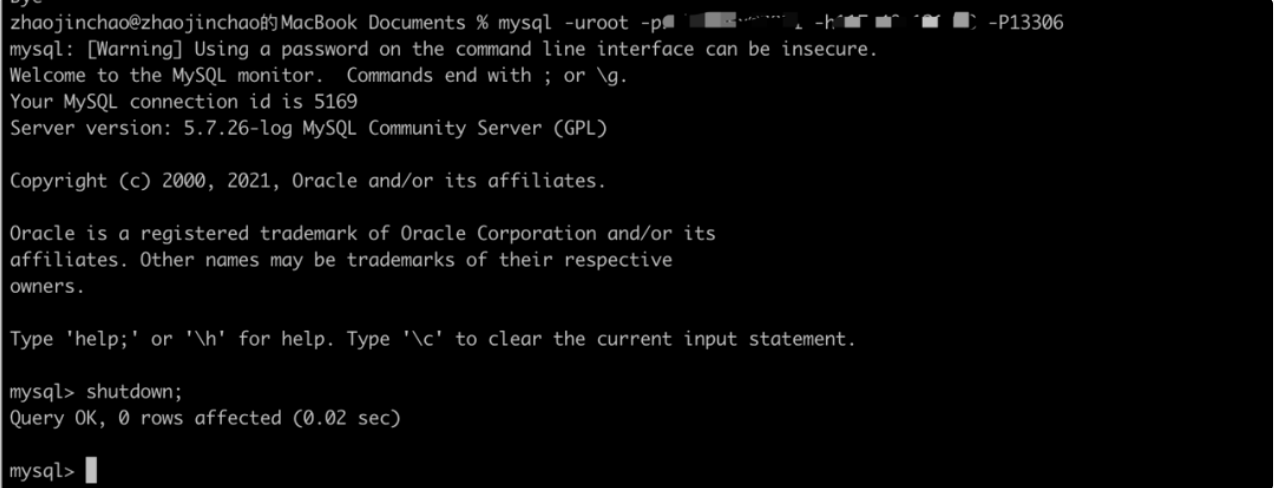
+Close the master database `ds_0`:
+
+
+View if the primary database has changed and if the secondary database state
is correct through `DistSQL`.
+
+```
+mysql> SHOW READWRITE_SPLITTING RULES;
++----------------+-----------------------------+------------------------+------------------------+--------------------+---------------------+
+| name | auto_aware_data_source_name | write_data_source_name |
read_data_source_names | load_balancer_type | load_balancer_props |
++----------------+-----------------------------+------------------------+------------------------+--------------------+---------------------+
+| replication_ds | mgr_replication_ds | ds_1 | ds_2
| NULL | |
++----------------+-----------------------------+------------------------+------------------------+--------------------+---------------------+
+1 row in set (0.01 sec)
+
+mysql> SHOW READWRITE_SPLITTING READ RESOURCES;
++----------+----------+
+| resource | status |
++----------+----------+
+| ds_2 | enabled |
+| ds_0 | disabled |
++----------+----------+
+2 rows in set (0.01 sec)
+```
+
+Now, let’s INSERT another line of data:
+
+```
+mysql> INSERT INTO t_user(id, mobile, idcard) value (10001, '13521207777',
'110xxxxx');
+Query OK, 1 row affected (0.04 sec)
+```
+
+View the ShardingSphere-Proxy log and see if the route node is the primary
database `ds_1`.
+
+```
+[INFO ] 2022-02-28 15:40:26.784 [ShardingSphere-Command-6] ShardingSphere-SQL
- Logic SQL: INSERT INTO t_user(id, mobile, idcard) value (10001,
'13521207777', '110xxxxx')
+[INFO ] 2022-02-28 15:40:26.784 [ShardingSphere-Command-6] ShardingSphere-SQL
- SQLStatement: MySQLInsertStatement(setAssignment=Optional.empty,
onDuplicateKeyColumns=Optional.empty)
+[INFO ] 2022-02-28 15:40:26.784 [ShardingSphere-Command-6] ShardingSphere-SQL
- Actual SQL: ds_1 ::: INSERT INTO t_user(id, mobile, idcard) value (10001,
'13521207777', '110xxxxx')
+```
+
+Lastly, let’s test `SELECT(repeat it twice):
+
+```
+mysql> SELECT id, mobile, idcard FROM t_user WHERE id = 10001;
+```
+
+View the ShardingSphere-Proxy log and see if the route node is `ds_2`.
+
+```
+[INFO ] 2022-02-28 15:42:00.651 [ShardingSphere-Command-7] ShardingSphere-SQL
- Logic SQL: SELECT id, mobile, idcard FROM t_user WHERE id = 10001
+[INFO ] 2022-02-28 15:42:00.651 [ShardingSphere-Command-7] ShardingSphere-SQL
- SQLStatement: MySQLSelectStatement(table=Optional.empty,
limit=Optional.empty, lock=Optional.empty, window=Optional.empty)
+[INFO ] 2022-02-28 15:42:00.651 [ShardingSphere-Command-7] ShardingSphere-SQL
- Actual SQL: ds_2 ::: SELECT id, mobile, idcard FROM t_user WHERE id = 10001
+[INFO ] 2022-02-28 15:42:02.148 [ShardingSphere-Command-7] ShardingSphere-SQL
- Logic SQL: SELECT id, mobile, idcard FROM t_user WHERE id = 10001
+[INFO ] 2022-02-28 15:42:02.149 [ShardingSphere-Command-7] ShardingSphere-SQL
- SQLStatement: MySQLSelectStatement(table=Optional.empty,
limit=Optional.empty, lock=Optional.empty, window=Optional.empty)
+[INFO ] 2022-02-28 15:42:02.149 [ShardingSphere-Command-7] ShardingSphere-SQL
- Actual SQL: ds_2 ::: SELECT id, mobile, idcard FROM t_user WHERE id = 10001
+```
+
+
+View the latest primary-secondary relationship changes through `DistSQL`. The
state of `ds_0` node is recovered as enabled, while `ds_0` is integrated to
`read_data_source_names`:
+
+```
+mysql> SHOW READWRITE_SPLITTING RULES;
++----------------+-----------------------------+------------------------+------------------------+--------------------+---------------------+
+| name | auto_aware_data_source_name | write_data_source_name |
read_data_source_names | load_balancer_type | load_balancer_props |
++----------------+-----------------------------+------------------------+------------------------+--------------------+---------------------+
+| replication_ds | mgr_replication_ds | ds_1 |
ds_0,ds_2 | NULL | |
++----------------+-----------------------------+------------------------+------------------------+--------------------+---------------------+
+1 row in set (0.01 sec)
+
+mysql> SHOW READWRITE_SPLITTING READ RESOURCES;
++----------+---------+
+| resource | status |
++----------+---------+
+| ds_0 | enabled |
+| ds_2 | enabled |
++----------+---------+
+2 rows in set (0.00 sec)
+```
+
+Based on the above-mentioned example, you now know more about ShardingSphere's
high availability and dynamic read/write splitting.
+
+Next, we will introduce the principles behind the HA plans regarding the
underlying database, also known as the storage nodes.
+
+## Principles
+ShardingSphere’s high availability solutions allow users to further customize
it and make extensions. Currently, we have completed two HA plans: a MySQL high
availability solution based on MGR, and openGauss database high availability
solution contributed by some community committers. The principles of the two
solutions are basically the same.
+
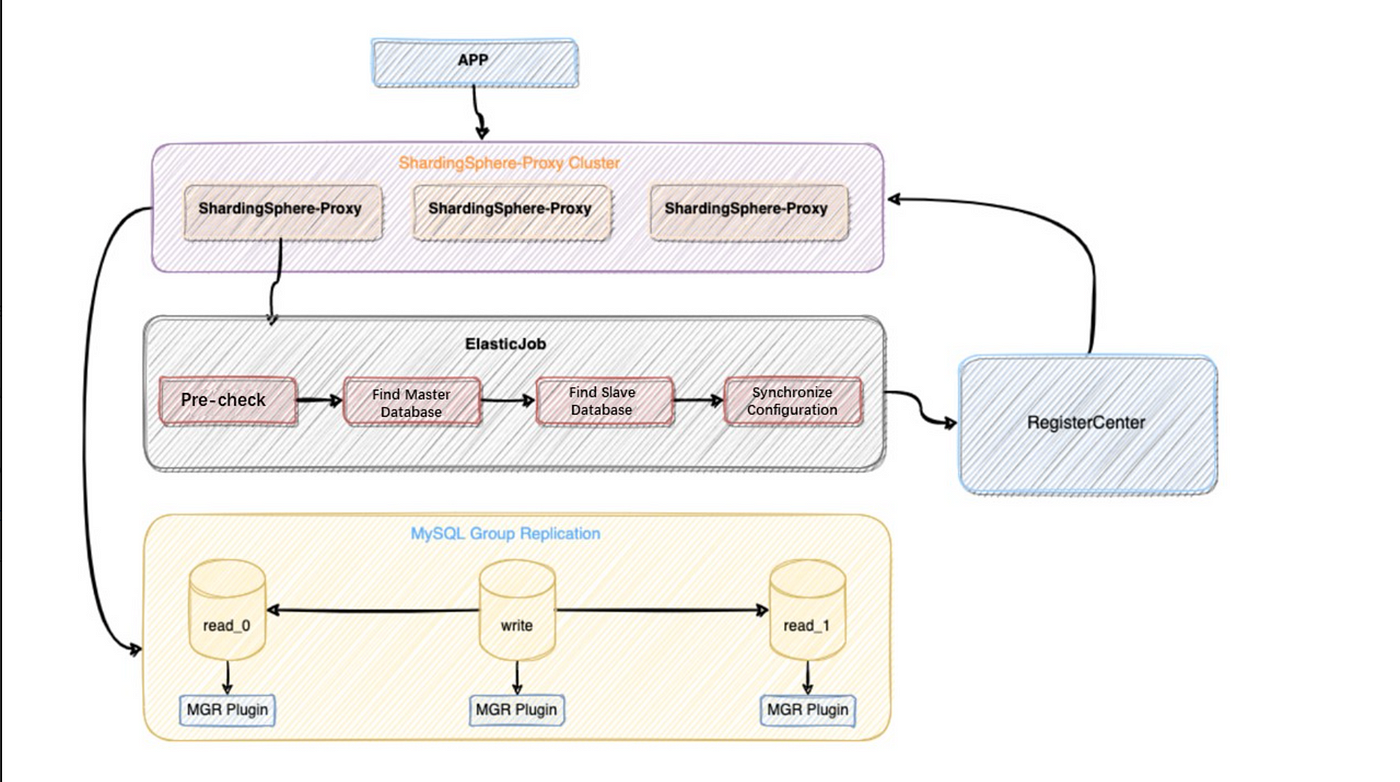
+Below is why and how ShardingSphere can achieve database high availability
with MySQL as an example.
+
+
+## Prerequisite
+ShardingSphere checks if the underlying MySQL cluster environment is ready by
executing the following SQL statement. ShardingSphere cannot be started if any
of the tests fail.
+
+- Check if MGR is installed:
+
+```sql
+SELECT * FROM information_schema.PLUGINS WHERE PLUGIN_NAME='group_replication'
+```
+
+
+- View the MGR group member number:
+The underlying MGR cluster should consist of at least three nodes:
+
+```sql
+SELECT count(*) FROM performance_schema.replication_group_members
+```
+
+
+- Check whether the MGR cluster’s group name is consistent with that in the
configuration:
+group name is the marker of a MGR group, and each group of a MGR cluster only
has one group name.
+
+```sql
+SELECT * FROM performance_schema.global_variables WHERE
VARIABLE_NAME='group_replication_group_name'
+```
+
+
+- Check if the current MGR is set as the single primary mode:
+
+Currently, ShardingSphere does not support dual-write or multi-write
scenarios. It only supports single-write mode:
+
+```sql
+SELECT * FROM performance_schema.global_variables WHERE
VARIABLE_NAME='group_replication_single_primary_mode'
+```
+
+
+- Query all the node hosts, ports, and states in the MGR group cluster to
check if the data source we configured is correct:
+
+```sql
+SELECT MEMBER_HOST, MEMBER_PORT, MEMBER_STATE FROM
performance_schema.replication_group_members
+```
+
+
+> Dynamic primary database discovery
+
+- ShardingSphere finds the primary database URL according to the query master
database SQL command provided by MySQL.
+
+```java
+private String findPrimaryDataSourceURL(final Map<String, DataSource>
dataSourceMap) {
+ String result = "";
+ String sql = "SELECT MEMBER_HOST, MEMBER_PORT FROM
performance_schema.replication_group_members WHERE MEMBER_ID = "
+ + "(SELECT VARIABLE_VALUE FROM performance_schema.global_status
WHERE VARIABLE_NAME = 'group_replication_primary_member')";
+ for (DataSource each : dataSourceMap.values()) {
+ try (Connection connection = each.getConnection();
+ Statement statement = connection.createStatement();
+ ResultSet resultSet = statement.executeQuery(sql)) {
+ if (resultSet.next()) {
+ return String.format("%s:%s",
resultSet.getString("MEMBER_HOST"), resultSet.getString("MEMBER_PORT"));
+ }
+ } catch (final SQLException ex) {
+ log.error("An exception occurred while find primary data source
url", ex);
+ }
+ }
+ return result;
+}
+```
+
+
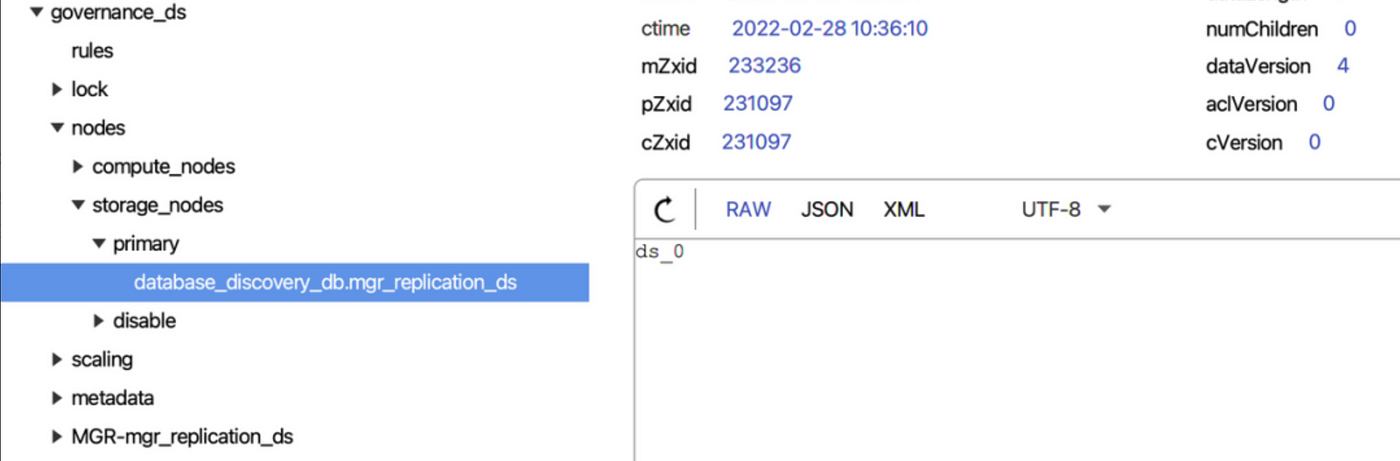
+- Compare the primary database URLs found above one by one with the
`dataSources` URLs we configured. The matched data source is the primary
database and it will be updated to the current ShardingSphere memory and be
perpetuated to the registry center, through which it will be distributed to
other compute nodes in the cluster.
+
+
+> **Dynamic secondary database discovery**
+
+There are two types of secondary database states in ShardingSpherez: enable
and disable. The secondary database state will be synchronized to the
ShardingSphere memory to ensure that read traffic can be routed correctly.
+
+- Get all the nodes in the MGR group:
+```sql
+SELECT MEMBER_HOST, MEMBER_PORT, MEMBER_STATE FROM
performance_schema.replication_group_members
+```
+
+
+- Disable secondary databases:
+
+```java
+private void determineDisabledDataSource(final String schemaName, final
Map<String, DataSource> activeDataSourceMap,
+ final List<String>
memberDataSourceURLs, final Map<String, String> dataSourceURLs) {
+ for (Entry<String, DataSource> entry : activeDataSourceMap.entrySet()) {
+ boolean disable = true;
+ String url = null;
+ try (Connection connection = entry.getValue().getConnection()) {
+ url = connection.getMetaData().getURL();
+ for (String each : memberDataSourceURLs) {
+ if (null != url && url.contains(each)) {
+ disable = false;
+ break;
+ }
+ }
+ } catch (final SQLException ex) {
+ log.error("An exception occurred while find data source urls", ex);
+ }
+ if (disable) {
+ ShardingSphereEventBus.getInstance().post(new
DataSourceDisabledEvent(schemaName, entry.getKey(), true));
+ } else if (!url.isEmpty()) {
+ dataSourceURLs.put(entry.getKey(), url);
+ }
+ }
+}
+```
+
+
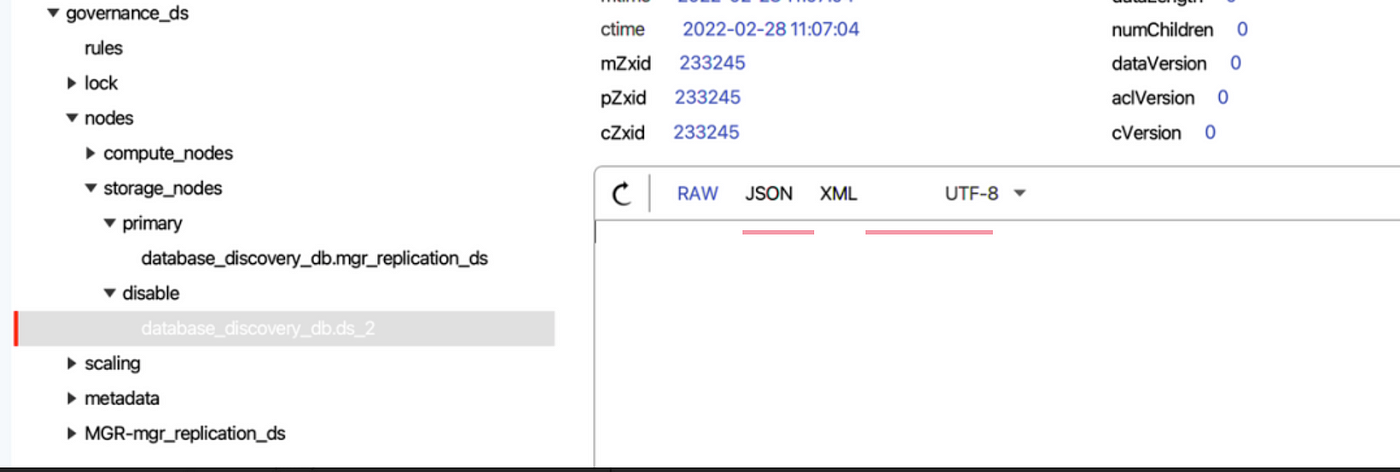
+Whether the secondary database is disabled is based on the data source we
configured and all the nodes in the MGR group.
+
+ShardingSphere can check one by one whether the data source we configured can
obtain `Connection` properly, and verify whether the data source URL contains
nodes of the MGR group.
+
+If `Connection` cannot be obtained or the verification fails, ShardingSphere
will disable the data source by an event trigger and synchronize it to the
registry center.
+
+
+- Enable secondary databases:
+
+```java
+private void determineEnabledDataSource(final Map<String, DataSource>
dataSourceMap, final String schemaName,
+ final List<String>
memberDataSourceURLs, final Map<String, String> dataSourceURLs) {
+ for (String each : memberDataSourceURLs) {
+ boolean enable = true;
+ for (Entry<String, String> entry : dataSourceURLs.entrySet()) {
+ if (entry.getValue().contains(each)) {
+ enable = false;
+ break;
+ }
+ }
+ if (!enable) {
+ continue;
+ }
+ for (Entry<String, DataSource> entry : dataSourceMap.entrySet()) {
+ String url;
+ try (Connection connection = entry.getValue().getConnection()) {
+ url = connection.getMetaData().getURL();
+ if (null != url && url.contains(each)) {
+ ShardingSphereEventBus.getInstance().post(new
DataSourceDisabledEvent(schemaName, entry.getKey(), false));
+ break;
+ }
+ } catch (final SQLException ex) {
+ log.error("An exception occurred while find enable data source
urls", ex);
+ }
+ }
+ }
+}
+```
+
+
+After the crashed secondary database is recovered and added to the MGR group,
our configuration will be checked to see whether the recovered data source is
used. If yes, the event trigger will tell ShardingSphere that the data source
needs to be enabled.
+
+> **Heartbeat Mechanism**
+
+To ensure that the primary-secondary states are synchronized in real-time, the
heartbeat mechanism is introduced to the HA module.
+
+By integrating the ShardingSphere sub-project ElasticJob, the above processes
are executed by the [ElasticJob](https://shardingsphere.apache.org/elasticjob/)
scheduler framework in a form of Job when the HA module is initialized, thus
achieving the separation of function development and job scheduling.
+
+Even if developers need to extend the HA function, they do not need to care
about how jobs are developed and operated.
+
+```java
+private void initHeartBeatJobs(final String schemaName, final Map<String,
DataSource> dataSourceMap) {
+ Optional<ModeScheduleContext> modeScheduleContext =
ModeScheduleContextFactory.getInstance().get();
+ if (modeScheduleContext.isPresent()) {
+ for (Entry<String, DatabaseDiscoveryDataSourceRule> entry :
dataSourceRules.entrySet()) {
+ Map<String, DataSource> dataSources =
dataSourceMap.entrySet().stream().filter(dataSource ->
!entry.getValue().getDisabledDataSourceNames().contains(dataSource.getKey()))
+ .collect(Collectors.toMap(Entry::getKey, Entry::getValue));
+ CronJob job = new
CronJob(entry.getValue().getDatabaseDiscoveryType().getType() + "-" +
entry.getValue().getGroupName(),
+ each -> new HeartbeatJob(schemaName, dataSources,
entry.getValue().getGroupName(), entry.getValue().getDatabaseDiscoveryType(),
entry.getValue().getDisabledDataSourceNames())
+ .execute(null),
entry.getValue().getHeartbeatProps().getProperty("keep-alive-cron"));
+ modeScheduleContext.get().startCronJob(job);
+ }
+ }
+}
+```
+
+
+## Conclusion
+So far Apache ShardingSphere’s HA feature has proven to be applicable for
MySQL and openGauss HA solutions.
+
+Moving forward, it will integrate more MySQL HA products and support more
database HA solutions.
+
+As always, if you’re interested, you’re more than welcome to join us and
contribute to the Apache ShardingSphere project.
+
+## Apache ShardingSphere Project Links:
+[ShardingSphere
Github](https://github.com/apache/shardingsphere/issues?page=1&q=is%3Aopen+is%3Aissue+label%3A%22project%3A+OpenForce+2022%22)
+
+[ShardingSphere Twitter](https://twitter.com/ShardingSphere)
+
+[ShardingSphere
Slack](https://join.slack.com/t/apacheshardingsphere/shared_invite/zt-sbdde7ie-SjDqo9~I4rYcR18bq0SYTg)
+
+[Contributor Guide](https://shardingsphere.apache.org/community/cn/contribute/)
+
+## Author
+
+**Zhao Jinchao**
+
+SphereEx Middleware Engineer & Apache ShardingSphere Committer
+
+Currently, Zhao concentrates on developing the feature High Availability of
Apache ShardingSphere.
+
diff --git
a/docs/blog/content/material/2022_03_18_Executor_Engine_Performance_Optimization_Showcase_with_Apache_ShardingSphere_5.1.0.en.md
b/docs/blog/content/material/2022_03_18_Executor_Engine_Performance_Optimization_Showcase_with_Apache_ShardingSphere_5.1.0.en.md
new file mode 100644
index 00000000000..9e82ddebf6c
--- /dev/null
+++
b/docs/blog/content/material/2022_03_18_Executor_Engine_Performance_Optimization_Showcase_with_Apache_ShardingSphere_5.1.0.en.md
@@ -0,0 +1,500 @@
++++
+title = "Executor Engine: Performance Optimization Showcase with
+Apache ShardingSphere
+ 5.1.0"
+weight = 43
+chapter = true
++++
+
+Our community’s previous two blog posts about the [SQL Format function and
High Availability (HA)
](https://medium.com/codex/sql-parse-format-function-a-technical-deep-dive-by-apache-shardingsphere-f5183e1de215)introduced
a comprehensive overview of Apache ShardingSphere’s updates.
+
+Apart from many new practical features, we also have been optimizing overall
performance.
+In this post, our community author is going to showcase with specific SQL
examples how Apache ShardingSphere’s Executor Engine performance is greatly
optimized.
+
+In this post, our community author is going to showcase with specific SQL
examples how Apache ShardingSphere’s Executor Engine performance is greatly
optimized.
+
+## Problem
+Take the `t_order` table with 10 shards in a database as an example and
`max-connections-size-per-query` uses the default configuration 1.
+
+If the user executes the `SELECT * FROM t_order` statement, it will result in
full routing. Since only one database connection is allowed to be created on
the same database for each query, the underlying actual SQL results will be
loaded in advance into memory for processing. This scenario not only imposes a
restriction on database connection resource consumption but also occupies more
memory resources.
+
+However, if the user adjusts the value of `max-connections-size-per-query` to
10, then ten database connections can be created while executing actual SQL.
Since database connections can hold result sets, no additional memory resources
are occupied in this scenario. Yet, this method requires more database
connection resources.
+
+In order to better solve the issue, we optimized the performance of SQL
Executor Engine in the just-released 5.1.0 version: SQL Rewriter Engine now
supports optimization-oriented rewriting, which means multiple real SQL
statements on the same data source can be merged through the `UNION ALL
`statement.
+
+The updates effectively reduce the consumed database connection resources in
the Executor Engine and avoid occurrent memory merging, further improving SQL
query performance in Online Transaction Processing (OLTP) scenarios.
+
+## What’s the Mechanism of Apache ShardingSphere Executor Engine?
+
+First, it’s better to review Apache ShardingSphere’s microkernel and the
principle that explains how the Executor Engine works in the processes. As
shown in the figure below, the Apache ShardingSphere microkernel includes core
processes: SQL Parser, SQL Router, SQL Rewriter, SQL Executor, and Result
Merger.
+
+
+
+SQL Parser Engine can parse the SQL statements entered by the user and
generate SQL Statements containing contextual information.
+
+SQL Router Engine then extracts the sharding conditions according to the
context, combines the sharding rules configured by the user to calculate the
data source that the actual SQL needs for execution, and then generates routing
results.
+
+SQL Rewriter Engine rewrites the original SQL according to the results
returned by SQL Router Engine. There are two rewrite types,
correctness-oriented and optimization-oriented.
+
+SQL Executor Engine can safely and efficiently send the SQL returned by SQL
Router and Rewriter to the underlying data source for execution.
+
+The result set will eventually be processed by Merger Engine, which can
generate and return a unified result set to the user.
+
+From the execution process, it is clear that the SQL executor engine can
directly interact with the underlying database and hold the executed result
set. Since the performance and resource consumption of the entire Apache
ShardingSphere is attributed to those of the Executor Engine, the community
decided to adopt an automatic SQL executor engine to balance execution
performance and resource consumption.
+
+In terms of execution performance, assigning an independent database
connection to the execution statement of each shard can make full use of
multi-threading to improve execution performance, and also process I/O
consumption in parallel.
+
+In addition, this method can also help avoid prematurely loading the query
result set into memory. The independent database connection can hold a
reference to the cursor position of the query result set and thus when it’s
necessary to get the data, the user only needs to move the cursor.
+
+When it comes to resource management, the number of connections for business
access to the database should be limited to prevent a business from occupying
too many database connection resources and further affecting the normal data
access of other businesses. When there are many table shards in a database
instance, a virtual SQL statement without a sharding key can generate a large
number of actual SQL statements placed in different tables of the same
database. If each actual SQL occupie [...]
+
+In order to solve the conflict between execution performance and resource
control, Apache ShardingSphere proposes the concept of `Connection Mode`. Here
is the definition of `Connection Mode` in the source code.
+
+```
+/**
+ * Connection Mode.
+ */
+public enum ConnectionMode {
+
+ MEMORY_STRICTLY, CONNECTION_STRICTLY
+}
+```
+Based on the member names in the `Connection Mode` enumeration class, we can
see that the SQL Executor Engine divides database connection into two modes:
`MEMORY_STRICTLY` and `CONNECTION_STRICTLY`.
+
+- `MEMORY_STRICTLY` is the memory limit mode. When the user chooses the mode,
for example for the same data source, if a virtual table corresponds to 10 real
tables, the SQL Executor Engine will create 10 connections for execution in
parallel. Since all result sets of shards are held by their connections, there
is no need to load the result sets into memory in advance, thus effectively
reducing memory usage;
+
+- `CONNECTION_STRICTLY`is used to limit connections. When the connection limit
mode is used, the SQL Executor Engine will only create one connection on a data
source to strictly control the consumption of database connection resources.
However, the result set is loaded into memory right after the real SQL is
executed, so it will occupy some memory space.
+
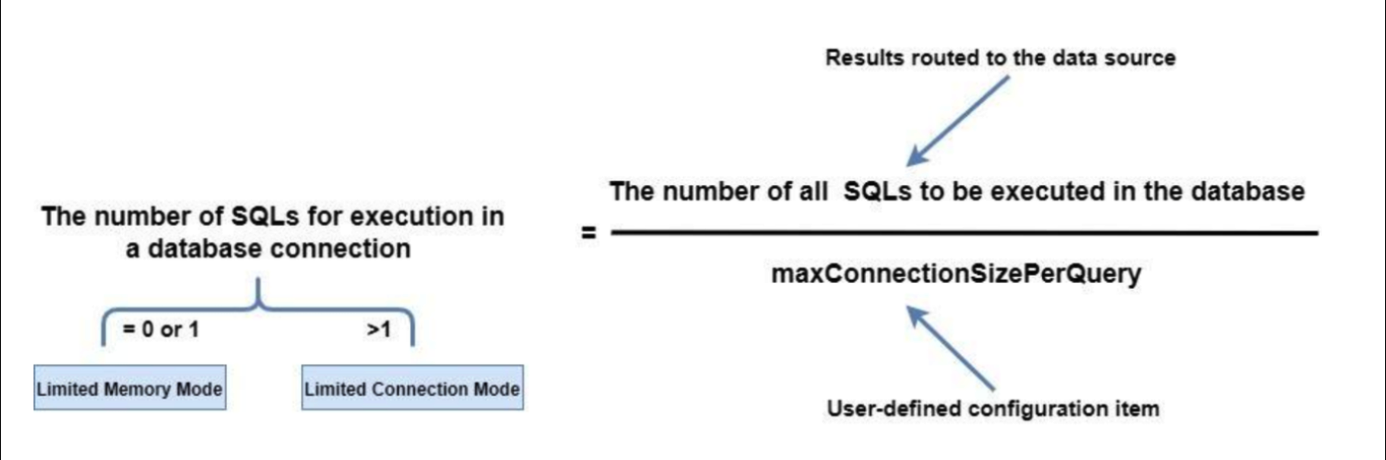
+How does the Apache ShardingSphere SQL executor engine help the user choose an
appropriate connection mode? The principle behind it is shown in the figure
below:
+
+
+
+Users can specify the maximum connections allowed on the same data source for
each statement by configuring `maxConnectionSizePerQuery.` According to the
calculation formula above, when the number of SQL statements to be executed by
each database connection is less than or equal to 1, each actual SQL statement
is allocated an independent database connection. At this time, the memory limit
mode will be selected and a database source allows the creation of multiple
database connections for [...]
+
+## What is Optimized?
+According to the mechanism mentioned above, when the user chooses the memory
limit mode, more database connections will be consumed, but better performance
can be obtained due to concurrent execution. With the connection limit mode,
users can effectively control the connection resources, although there is too
much-occupied memory and the execution performance will be less satisfying.
+
+_**So, is it possible to use as few database connections and memory as
possible for execution?**_
+
+It’s obvious that the main factor in selecting an execution mode is the number
of routing results on the same data source. Therefore, the most direct
optimization is to merge the routing results on the same data source. SQL
statements support merging multiple query statements through `UNION ALL`, so we
use `UNION ALL` as an optimization method: multiple real SQL statements in the
same data source are rewritten into one SQL statement, which is an
optimization-oriented rewriting. The metho [...]
+
+Considering that different database dialects have restrictions on the `UNION
ALL` statement, we need to analyze the documents of MySQL, PostgreSQL, Oracle,
and SQL Server, and then we get the following information:
+
+### MySQL: UNION ALL
+
+For MySQL, the tips for using UNION ALL include:
+
+- Column names after` UNION` shall use the column name of the first `SELECT
`statement.
+
+- When a `UNION `statement contains `ORDER BY `and `LIMIT`, the user needs to
use parentheses to enclose each query statement. Since `UNION` cannot guarantee
the correct order of the final result sets. If you need to sort the `UNION`
result set, it’s required to add the `ORDER BY LIMIT` clause at the end of the
`UNION` statement.
+
+```
+# The UNION result set order is not guaranteed
+(SELECT a FROM t1 WHERE a=10 AND B=1 ORDER BY a LIMIT 10) UNION (SELECT a FROM
t2 WHERE a=11 AND B=2 ORDER BY a LIMIT 10);
+# The UNION result set order is guaranteed
+(SELECT a FROM t1 WHERE a=10 AND B=1) UNION (SELECT a FROM t2 WHERE a=11 AND
B=2) ORDER BY a LIMIT 10;
+```
+
+- `UNION` does not support `SELECT HIGH_PRIORITY` and `SELECT INTO` file
statements.
+
+### PostgreSQL: UNION ALL
+
+- Column names after `UNION` should be the column names of the first `SELECT`
statement.
+
+- When a `UNION `statement contains `ORDER BY` and `LIMIT`, the user needs to
use parentheses to enclose each query statement. The last `UNION` clause can
not have parentheses. Without parentheses, the` ORDER BY LIMIT` clause is
applied to the entire `UNION` result.
+
+- The `UNION` statement does not support `FOR NO KEY UPDATE`,` FOR UPDATE`,
`FOR SHARE` and `FOR KEY SHARE`.
+
+### Oracle: UNION ALL
+
+- The `UNION` statement does not support BLOB, `CLOB`, `BFILE`,` VARRAY`,
`LONG` types or nested tables.
+
+- The `UNION `statement does not support `for_update_clause`.
+
+- The `UNION` statement does not support `order_by_clause` in the selection
clause. The user can only add `order_by_clause` at the end of the UNION
statement.
+
+```
+SELECT product_id FROM order_items UNION SELECT product_id FROM inventories
ORDER BY product_id;
+```
+
+- The `UNION` statement does not support `SELECT` statements with `TABLE`
collection expressions;
+
+
+> **SQL Server: UNION ALL**
+
+- When the `ORDER BY` clause is used in a `UNION` statement, it must be placed
above the last `SELECT` clause to sort the `UNION` results.
+Based on the standards mentioned above, we can see that different database
dialects can support the simple `SELECT * FROM table WHERE` statement, and with
syntax adjustment, the `ORDER BY LIMIT` statement can also be supported as well
(however, there are some syntax differences).
+
+Considering that optimization-oriented rewriting requires SQL compatibility,
Apache ShardingSphere 5.1.0 is only developed to rewrite the simple statement
`SELECT * FROM table WHERE` to quickly improve query performance in OLTP
scenarios.
+
+Here is the latest logic behind the RouteSQLRewriteEngine Rewriter Engine. In
Apache ShardingSphere 5.1.0, the optimal rewriting logic for the `SELECT * FROM
table WHERE` statement is added: first, `NeedAggregateRewrite` is used to judge
rows, and only when the number of routing results in the same data source is
greater than 1 and when the actual SQL statement follows the `SELECT * FROM
table WHERE` structure, rewriting it into a `UNION ALL` statement will be
performed.
+
+```
+/**
+ * Rewrite SQL and parameters.
+ *
+ * @param sqlRewriteContext SQL rewrite context
+ * @param routeContext route context
+ * @return SQL rewrite result
+ */
+public RouteSQLRewriteResult rewrite(final SQLRewriteContext
sqlRewriteContext, final RouteContext routeContext) {
+ Map<RouteUnit, SQLRewriteUnit> result = new
LinkedHashMap<>(routeContext.getRouteUnits().size(), 1);
+ for (Entry<String, Collection<RouteUnit>> entry :
aggregateRouteUnitGroups(routeContext.getRouteUnits()).entrySet()) {
+ Collection<RouteUnit> routeUnits = entry.getValue();
+ if (isNeedAggregateRewrite(sqlRewriteContext.getSqlStatementContext(),
routeUnits)) {
+ result.put(routeUnits.iterator().next(),
createSQLRewriteUnit(sqlRewriteContext, routeContext, routeUnits));
+ } else {
+ result.putAll(createSQLRewriteUnits(sqlRewriteContext,
routeContext, routeUnits));
+ }
+ }
+ return new RouteSQLRewriteResult(result);
+}
+```
+
+Due to the `UNION ALL` rewriting function, the judgment logic for
`queryResults` in Merger Engine also needs to be adjusted synchronously.
Originally, multiple `queryResults` may be merged into one `queryResults` by
`UNION ALL`. In this scenario, merging still needs to be executed.
+
+```
+@Override
+public MergedResult merge(final List<QueryResult> queryResults, final
SQLStatementContext<?> sqlStatementContext, final ShardingSphereSchema schema)
throws SQLException {
+ if (1 == queryResults.size() &&
!isNeedAggregateRewrite(sqlStatementContext)) {
+ return new IteratorStreamMergedResult(queryResults);
+ }
+ Map<String, Integer> columnLabelIndexMap =
getColumnLabelIndexMap(queryResults.get(0));
+ SelectStatementContext selectStatementContext = (SelectStatementContext)
sqlStatementContext;
+ selectStatementContext.setIndexes(columnLabelIndexMap);
+ MergedResult mergedResult = build(queryResults, selectStatementContext,
columnLabelIndexMap, schema);
+ return decorate(queryResults, selectStatementContext, mergedResult);
+}
+```
+
+In order to make it easier for you to understand the optimization, we use the
following sharding configuration and `SELECT * FROM t_order` to show the
optimization effect. In the example below, the `max-connections-size-per-query`
parameter is the default value 1.
+
+```
+rules:
+- !SHARDING
+ tables:
+ t_order:
+ actualDataNodes: ds_${0..1}.t_order_${0..1}
+ tableStrategy:
+ standard:
+ shardingColumn: order_id
+ shardingAlgorithmName: t_order_inline
+ databaseStrategy:
+ standard:
+ shardingColumn: user_id
+ shardingAlgorithmName: database_inline
+
+ shardingAlgorithms:
+ database_inline:
+ type: INLINE
+ props:
+ algorithm-expression: ds_${user_id % 2}
+ t_order_inline:
+ type: INLINE
+ props:
+ algorithm-expression: t_order_${order_id % 2}
+```
+
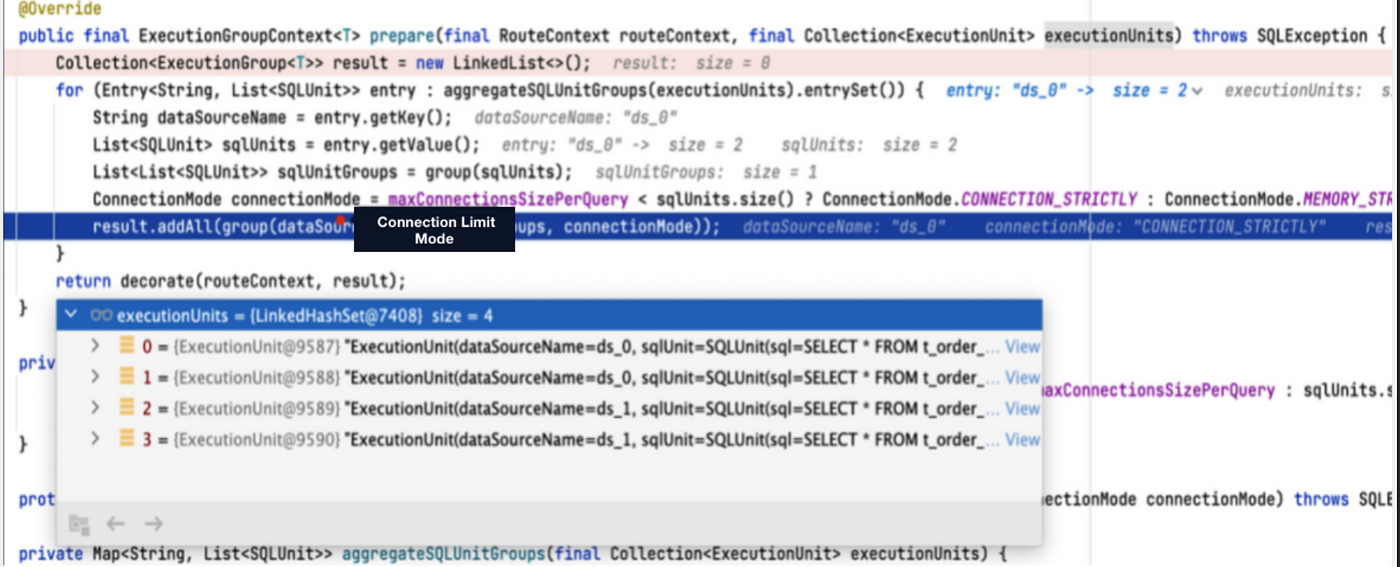
+In Apache ShardingSphere Version 5.0.0, after we execute the `SELECT * FROM
t_order` statement, we can get the following routing result: there are two data
sources, `ds_0` and `ds_1`, and each of them contains two routing results.
Since `max-connections-size-per -query` is set to 1, it is impossible for each
real SQL statement to have a database connection, so the connection limit mode
is chosen.
+
+
+Since the connection limit mode is used at the same time, the result set is
loaded into the memory after parallel execution, and the
`JDBCMemoryQueryResult` is used for storage. Therefore, when the user result
set is large, it will occupy more memory. The use of in-memory result sets also
results in only in-memory merging, but not streaming merging.
+
+```
+private QueryResult createQueryResult(final ResultSet resultSet, final
ConnectionMode connectionMode) throws SQLException {
+ return ConnectionMode.MEMORY_STRICTLY == connectionMode ? new
JDBCStreamQueryResult(resultSet) : new JDBCMemoryQueryResult(resultSet);
+}
+```
+
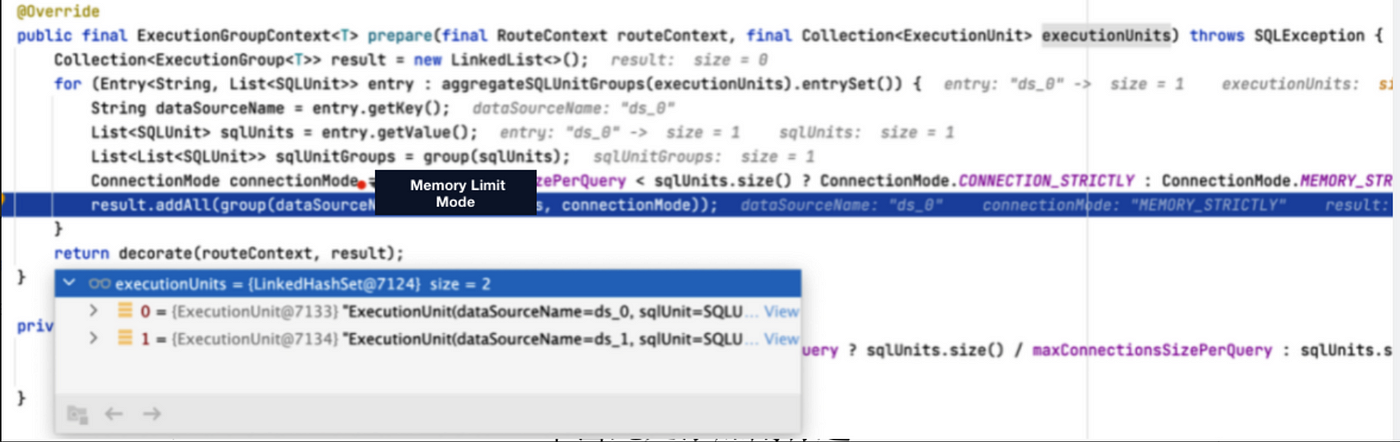
+Now, in version 5.1.0, we can use `UNION ALL` to optimize the executed SQL:
multiple routing results in the same data source are combined into one SQL for
execution. The memory limit mode is chosen because one database connection can
hold one result set. Under the memory limit mode, the streaming result set
`JDBCStreamQueryResult` object is used to hold the result set, so the data in
question can be queried by the streaming query method.
+
+
+## Performance Testing
+From the example in the previous session, we’ve learned how UNION ALL used for
optimization-oriented rewriting can effectively reduce the consumption of
database connections, and avoid excessive memory usage by converting in-memory
result sets into streaming result sets.
+
+We conducted a stress testing to better measure performance improvement. The
implementation details are as follows:
+
+
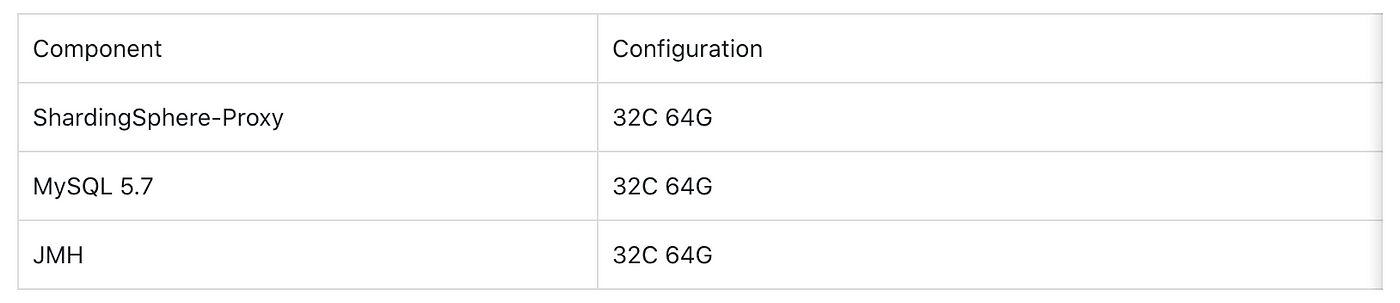
+The machine configurations are as follows:
+
+
+Referring to the sysbench table structure, we created 10 table shards, i.e.
sbtest1~sbtest10. Each table shard is divided into 5 databases, and each
database is divided into 10 tables.
+
+The `config-sharding.yaml configuration` file is as follows.
+
+```
+schemaName: sbtest_sharding
+dataSources:
+ ds_0:
+ url:
jdbc:mysql://127.0.0.1:3306/sbtest?useSSL=false&useServerPrepStmts=true&cachePrepStmts=true&prepStmtCacheSize=8192&prepStmtCacheSqlLimit=1024
+ username: root
+ password: 123456
+ connectionTimeoutMilliseconds: 10000
+ idleTimeoutMilliseconds: 60000
+ maxLifetimeMilliseconds: 1800000
+ maxPoolSize: 50
+ minPoolSize: 1
+ ds_1:
+ url:
jdbc:mysql://127.0.0.1:3306/sbtest?useSSL=false&useServerPrepStmts=true&cachePrepStmts=true&prepStmtCacheSize=8192&prepStmtCacheSqlLimit=1024
+ username: root
+ password: 123456
+ connectionTimeoutMilliseconds: 10000
+ idleTimeoutMilliseconds: 60000
+ maxLifetimeMilliseconds: 1800000
+ maxPoolSize: 50
+ minPoolSize: 1
+ ds_2:
+ url:
jdbc:mysql://127.0.0.1:3306/sbtest?useSSL=false&useServerPrepStmts=true&cachePrepStmts=true&prepStmtCacheSize=8192&prepStmtCacheSqlLimit=1024
+ username: root
+ password: 123456
+ connectionTimeoutMilliseconds: 10000
+ idleTimeoutMilliseconds: 60000
+ maxLifetimeMilliseconds: 1800000
+ maxPoolSize: 50
+ minPoolSize: 1
+ ds_3:
+ url:
jdbc:mysql://127.0.0.1:3306/sbtest?useSSL=false&useServerPrepStmts=true&cachePrepStmts=true&prepStmtCacheSize=8192&prepStmtCacheSqlLimit=1024
+ username: root
+ password: 123456
+ connectionTimeoutMilliseconds: 10000
+ idleTimeoutMilliseconds: 60000
+ maxLifetimeMilliseconds: 1800000
+ maxPoolSize: 50
+ minPoolSize: 1
+ ds_4:
+ url:
jdbc:mysql://127.0.0.1:3306/sbtest?useSSL=false&useServerPrepStmts=true&cachePrepStmts=true&prepStmtCacheSize=8192&prepStmtCacheSqlLimit=1024
+ username: root
+ password: 123456
+ connectionTimeoutMilliseconds: 10000
+ idleTimeoutMilliseconds: 60000
+ maxLifetimeMilliseconds: 1800000
+ maxPoolSize: 50
+ minPoolSize: 1
+
+rules:
+- !SHARDING
+ tables:
+ sbtest1:
+ actualDataNodes: ds_${0..4}.sbtest1_${0..9}
+ tableStrategy:
+ standard:
+ shardingColumn: id
+ shardingAlgorithmName: table_inline_1
+ keyGenerateStrategy:
+ column: id
+ keyGeneratorName: snowflake
+ sbtest2:
+ actualDataNodes: ds_${0..4}.sbtest2_${0..9}
+ tableStrategy:
+ standard:
+ shardingColumn: id
+ shardingAlgorithmName: table_inline_2
+ keyGenerateStrategy:
+ column: id
+ keyGeneratorName: snowflake
+ sbtest3:
+ actualDataNodes: ds_${0..4}.sbtest3_${0..9}
+ tableStrategy:
+ standard:
+ shardingColumn: id
+ shardingAlgorithmName: table_inline_3
+ keyGenerateStrategy:
+ column: id
+ keyGeneratorName: snowflake
+ sbtest4:
+ actualDataNodes: ds_${0..4}.sbtest4_${0..9}
+ tableStrategy:
+ standard:
+ shardingColumn: id
+ shardingAlgorithmName: table_inline_4
+ keyGenerateStrategy:
+ column: id
+ keyGeneratorName: snowflake
+ sbtest5:
+ actualDataNodes: ds_${0..4}.sbtest5_${0..9}
+ tableStrategy:
+ standard:
+ shardingColumn: id
+ shardingAlgorithmName: table_inline_5
+ keyGenerateStrategy:
+ column: id
+ keyGeneratorName: snowflake
+ sbtest6:
+ actualDataNodes: ds_${0..4}.sbtest6_${0..9}
+ tableStrategy:
+ standard:
+ shardingColumn: id
+ shardingAlgorithmName: table_inline_6
+ keyGenerateStrategy:
+ column: id
+ keyGeneratorName: snowflake
+ sbtest7:
+ actualDataNodes: ds_${0..4}.sbtest7_${0..9}
+ tableStrategy:
+ standard:
+ shardingColumn: id
+ shardingAlgorithmName: table_inline_7
+ keyGenerateStrategy:
+ column: id
+ keyGeneratorName: snowflake
+ sbtest8:
+ actualDataNodes: ds_${0..4}.sbtest8_${0..9}
+ tableStrategy:
+ standard:
+ shardingColumn: id
+ shardingAlgorithmName: table_inline_8
+ keyGenerateStrategy:
+ column: id
+ keyGeneratorName: snowflake
+ sbtest9:
+ actualDataNodes: ds_${0..4}.sbtest9_${0..9}
+ tableStrategy:
+ standard:
+ shardingColumn: id
+ shardingAlgorithmName: table_inline_9
+ keyGenerateStrategy:
+ column: id
+ keyGeneratorName: snowflake
+ sbtest10:
+ actualDataNodes: ds_${0..4}.sbtest10_${0..9}
+ tableStrategy:
+ standard:
+ shardingColumn: id
+ shardingAlgorithmName: table_inline_10
+ keyGenerateStrategy:
+ column: id
+ keyGeneratorName: snowflake
+
+ defaultDatabaseStrategy:
+ standard:
+ shardingColumn: id
+ shardingAlgorithmName: database_inline
+
+ shardingAlgorithms:
+ database_inline:
+ type: INLINE
+ props:
+ algorithm-expression: ds_${id % 5}
+ allow-range-query-with-inline-sharding: true
+ table_inline_1:
+ type: INLINE
+ props:
+ algorithm-expression: sbtest1_${id % 10}
+ allow-range-query-with-inline-sharding: true
+ table_inline_2:
+ type: INLINE
+ props:
+ algorithm-expression: sbtest2_${id % 10}
+ allow-range-query-with-inline-sharding: true
+ table_inline_3:
+ type: INLINE
+ props:
+ algorithm-expression: sbtest3_${id % 10}
+ allow-range-query-with-inline-sharding: true
+ table_inline_4:
+ type: INLINE
+ props:
+ algorithm-expression: sbtest4_${id % 10}
+ allow-range-query-with-inline-sharding: true
+ table_inline_5:
+ type: INLINE
+ props:
+ algorithm-expression: sbtest5_${id % 10}
+ allow-range-query-with-inline-sharding: true
+ table_inline_6:
+ type: INLINE
+ props:
+ algorithm-expression: sbtest6_${id % 10}
+ allow-range-query-with-inline-sharding: true
+ table_inline_7:
+ type: INLINE
+ props:
+ algorithm-expression: sbtest7_${id % 10}
+ allow-range-query-with-inline-sharding: true
+ table_inline_8:
+ type: INLINE
+ props:
+ algorithm-expression: sbtest8_${id % 10}
+ allow-range-query-with-inline-sharding: true
+ table_inline_9:
+ type: INLINE
+ props:
+ algorithm-expression: sbtest9_${id % 10}
+ allow-range-query-with-inline-sharding: true
+ table_inline_10:
+ type: INLINE
+ props:
+ algorithm-expression: sbtest10_${id % 10}
+ allow-range-query-with-inline-sharding: true
+ keyGenerators:
+ snowflake:
+ type: SNOWFLAKE
+ props:
+ worker-id: 123
+```
+
+We use the JMH test program to test different CASEs:
+
+```
+@State(Scope.Thread)
+public class QueryOptimizationTest {
+
+ private PreparedStatement unionAllForCaseOneStatement;
+
+ private PreparedStatement unionAllForCaseTwoStatement;
+
+ @Setup(Level.Trial)
+ public void setup() throws Exception {
+ Connection connection =
DriverManager.getConnection("jdbc:mysql://127.0.0.1:3307/sharding_db?useSSL=false",
"root", "123456");
+ // CASE 1
+ unionAllForCaseOneStatement = connection.prepareStatement("SELECT
COUNT(k) AS countK FROM sbtest1 WHERE id < ?;");
+ // CASE 2
+ unionAllForCaseTwoStatement = connection.prepareStatement("SELECT
SUM(k) AS sumK FROM sbtest1 WHERE id < ?;");
+ }
+
+ @Benchmark
+ public void testUnionAllForCaseOne() throws SQLException {
+ unionAllForCaseOneStatement.setInt(1, 200);
+ unionAllForCaseOneStatement.executeQuery();
+ }
+
+ @Benchmark
+ public void testUnionAllForCaseTwo() throws SQLException {
+ unionAllForCaseTwoStatement.setInt(1, 200);
+ unionAllForCaseTwoStatement.executeQuery();
+ }
+}
+```
+
+In the performance test, each `CASE` needed to test 3 groups and then an
average value was taken.
+
+Then we switched to the old version,
`aab226b72ba574061748d8f94c461ea469f9168f` to for compiling and packaging, and
we also tested 3 groups and took the average value.
+
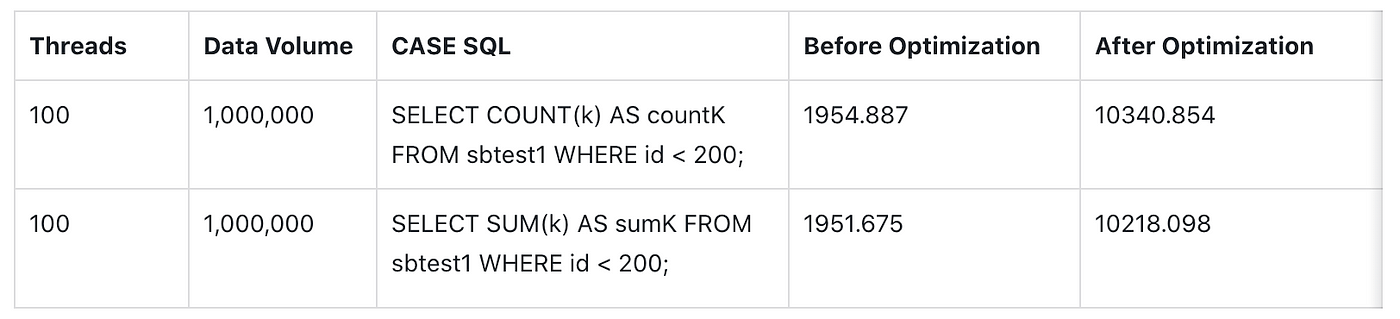
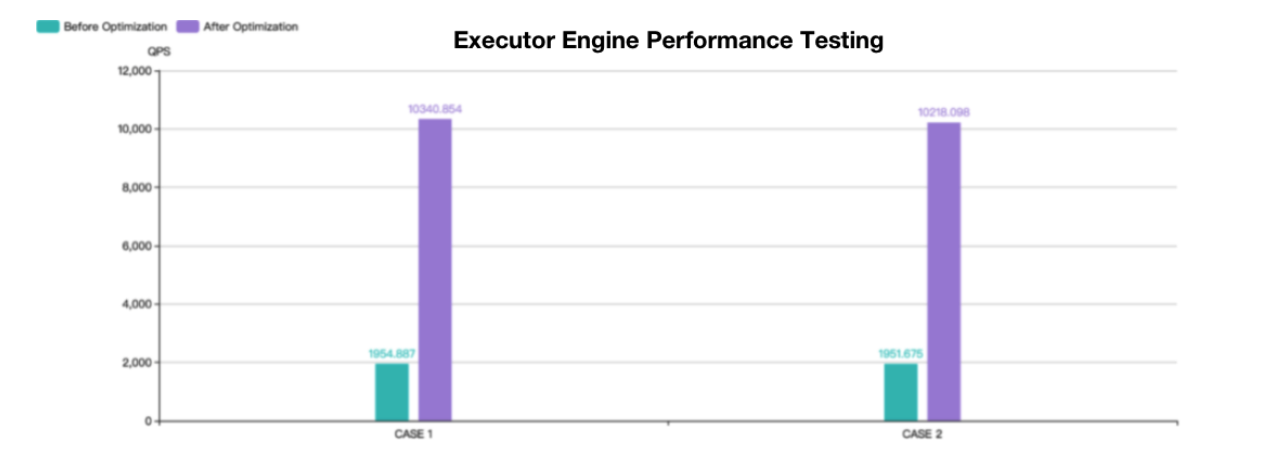
+The final test results are shown below.
+
+
+
+Both CASE 1 and CASE 2 tests are based on the `sysbench` table structure with
a data volume of 1 million. The number of shards in the test tables is
relatively large but the overall performance is still improved by about 4
times. Theoretically, the more shards, the better the performance.
+
+## Summary
+Apache ShardingSphere 5.1.0 has achieved a lot of performance optimizations at
both the protocol layer and the kernel layer.
+
+This blog only covers the SQL Executor Engine and its optimizations. In the
future, the community will produce more comprehensive guides for performance
optimizations.
+
+## References
+-
https://shardingsphere.apache.org/document/current/en/reference/sharding/execute/
+- https://github.com/apache/shardingsphere/issues/13942
+- **MySQL UNION:** https://dev.mysql.com/doc/refman/8.0/en/union.html
+- **PostgreSQL UNION:**https://www.postgresql.org/docs/14/sql-select.html
+- **Oracle UNION:**
https://docs.oracle.com/en/database/oracle/oracle-database/21/sqlrf/The-UNION-ALL-INTERSECT-MINUS-Operators.html
+- **SQL Server UNION:**
https://docs.microsoft.com/en-us/sql/t-sql/language-elements/set-operators-union-transact-sql?view=sql-server-ver15
+-
+## Author
+**Duan Zhengqiang**
+
+> SphereEx Senior Middleware Engineer & Apache ShardingSphere Committer
+
+Duan has been contributing to Apache ShardingSphere since 2018, and previously
was an engineering lead at numerous data sharding projects.
+
+He loves open source and sharing his tech stories and experiences with fellow
developers. He now devotes himself to developing the Apache ShardingSphere
kernel module.
+
diff --git
a/docs/blog/content/material/2022_03_23_Apache_ShardingSphere_Proxy_Performance_with_PostgreSQL_is_Improved_26.8%_with_Version_5.1.0.en.md
b/docs/blog/content/material/2022_03_23_Apache_ShardingSphere_Proxy_Performance_with_PostgreSQL_is_Improved_26.8%_with_Version_5.1.0.en.md
new file mode 100644
index 00000000000..f9c90850e9d
--- /dev/null
+++
b/docs/blog/content/material/2022_03_23_Apache_ShardingSphere_Proxy_Performance_with_PostgreSQL_is_Improved_26.8%_with_Version_5.1.0.en.md
@@ -0,0 +1,310 @@
++++
+title = "Apache ShardingSphere -Proxy Performance with PostgreSQL is Improved
26.8% with Version 5.1.0"
+weight = 43
+chapter = true
++++
+
+Increasing Apache ShardingSphere adoption across various industries, has
allowed our community to receive valuable feedback for our latest release.
+Our team has made numerous performance optimizations to the ShardingSphere
Kernel, interface and etc. since the release of Version 5.0.0. This article
introduces some of the performance optimizations at the code level, and
showcases the optimized results of ShardingSphere-Proxy TPC-C benchmark tests.
+
+## Optimizations
+**Correct the Use of Optional**
+
+java.util.Optional, introduced by Java 8, it makes the code cleaner. For
example, it can avoid methods returningnull values. Optionalis commonly used in
two situations:
+
+```java
+public T orElse(T other) {
+ return value != null ? value : other;
+}
+
+public T orElseGet(Supplier<? extends T> other) {
+ return value != null ? value : other.get();
+}
+```
+In ShardingSphere item
`org.apache.shardingsphere.infra.binder.segment.select.orderby.engine.OrderByContextEngine`,
an Optional code is used as:
+
+```java
+Optional<OrderByContext> result = // Omit codes...
+return result.orElse(getDefaultOrderByContextWithoutOrderBy(groupByContext));
+
+```
+In the `orElse` statement above, the `orElse` methods will be called even if
the result isn’t null. If the `orElse` method involves modification operations,
accidents might occur. In the case of method calls, the statement should be
adjusted accordingly:
+
+```java
+Optional<OrderByContext> result = // Omit codes...
+return result.orElseGet(() ->
getDefaultOrderByContextWithoutOrderBy(groupByContext));
+```
+
+Lambda is used to provide a `Supplier` to `orElseGet`. This way,
`theorElseGet` method will only be called when the result is null.
+
+> Relevant PR:https://github.com/apache/shardingsphere/pull/11459/files
+
+**Avoid Frequent Concurrent calls for Java 8 ConcurrentHashMap’s
computeIfAbsent**
+
+`java.util.concurrent.ConcurrentHashMap` is commonly used in concurrent
situations. Compared to `java.util.Hashtable`, which modifies all operations
with synchronized, `ConcurrentHashMap` can provide better performance while
ensuring thread security.
+
+However, in the Java 8 implementation even if the key exists, the method
`computeIfAbsent` of `ConcurrentHashMap` still retrieves the value in the
`synchronized` code snippet. Frequent calls of `computeIfAbsent` by the same
key will greatly compromise concurrent performance.
+
+> Reference:https://bugs.openjdk.java.net/browse/JDK-8161372
+
+This problem has been solved in Java 9. However, to avoid this problem and
ensure concurrent performance in Java 8, we have adjusted the syntax in
ShardingSphere’s code.
+Taking a frequently called ShardingSphere class
`org.apache.shardingsphere.infra.executor.sql.prepare.driver.DriverExecutionPrepareEngine`
as an example:
+
+```java
+ // Omit some code...
+ private static final Map<String, SQLExecutionUnitBuilder>
TYPE_TO_BUILDER_MAP = new ConcurrentHashMap<>(8, 1);
+ // Omit some code...
+ public DriverExecutionPrepareEngine(final String type, final int
maxConnectionsSizePerQuery, final ExecutorDriverManager<C, ?, ?>
executorDriverManager,
+ final StorageResourceOption option,
final Collection<ShardingSphereRule> rules) {
+ super(maxConnectionsSizePerQuery, rules);
+ this.executorDriverManager = executorDriverManager;
+ this.option = option;
+ sqlExecutionUnitBuilder = TYPE_TO_BUILDER_MAP.computeIfAbsent(type,
+ key ->
TypedSPIRegistry.getRegisteredService(SQLExecutionUnitBuilder.class, key, new
Properties()));
+ }
+```
+
+In the code above, only two `type` will be passed into `computeIfAbsent`, and
most SQL execution must adopt this code. As a result, there will be frequent
concurrent calls of `computeIfAbsent` by the same key, hindering concurrent
performance. The following method is adopted to avoid this problem:
+
+```java
+SQLExecutionUnitBuilder result;
+if (null == (result = TYPE_TO_BUILDER_MAP.get(type))) {
+ result = TYPE_TO_BUILDER_MAP.computeIfAbsent(type, key ->
TypedSPIRegistry.getRegisteredService(SQLExecutionUnitBuilder.class, key, new
Properties()));
+}
+return result;
+```
+
+> Relevant PR:https://github.com/apache/shardingsphere/pull/13275/files
+
+**Avoid Frequent Calls of java.util.Properties**
+
+`java.util.Properties` is one of the commonly used ShardingSphere
configuration classes. `Properties` inherites `java.util.Hashtable` and it's
therefore necessary to avoid frequent calls of `Properties` under concurrent
situations.
+
+We found that there is a logic frequently calling `getProperty` in
`org.apache.shardingsphere.sharding.algorithm.sharding.inline.InlineShardingAlgorithm`,
a ShardingSphere data sharding class, resulting in limited concurrent
performance. To solve this problem, we put the logic that calls `Properties`
under the `init` of `InlineShardingAlgorithm`, which avoids the calculation of
concurrent performance in the sharding algorithm.
+
+> Relevant PR:https://github.com/apache/shardingsphere/pull/13282/files
+
+**Avoid the Use of Collections.synchronizedMap**
+While examining the ShardingSphere’s Monitor Blocked, we found a frequently
called Map in
`org.apache.shardingsphere.infra.metadata.schema.model.TableMetaData`, which is
modified by `Collections.synchronizedMap`.
+
+This affects concurrent performance. Modification operations only exist at the
initial phase of the modified Map, and the rest are all reading operations,
therefore, `Collections.synchronizedMap` modification method can directly be
removed.
+
+> Relevant PR: https://github.com/apache/shardingsphere/pull/13264/files
+
+**Replace unnecessary String.format with string concatenation**
+There ShardingSphere item
`org.apache.shardingsphere.sql.parser.sql.common.constant.QuoteCharacter` has
the following logic:
+
+```java
+ public String wrap(final String value) {
+ return String.format("%s%s%s", startDelimiter, value, endDelimiter);
+ }
+```
+
+The logic above is obviously a string concatenation, but the use of
`String.format` means it costs more than direct string concatenation. It's
adjusted as follows:
+
+```java
+public String wrap(final String value) {
+ return startDelimiter + value + endDelimiter;
+ }
+```
+
+We use JMH to do a simple test. Here are the testing results:
+
+```
+# JMH version: 1.33
+# VM version: JDK 17.0.1, Java HotSpot(TM) 64-Bit Server VM, 17.0.1+12-LTS-39
+# Blackhole mode: full + dont-inline hint (default, use
-Djmh.blackhole.autoDetect=true to auto-detect)
+# Warmup: 3 iterations, 5 s each
+# Measurement: 3 iterations, 5 s each
+# Timeout: 10 min per iteration
+# Threads: 16 threads, will synchronize iterations
+# Benchmark mode: Throughput, ops/time
+Benchmark Mode Cnt Score Error
Units
+StringConcatBenchmark.benchFormat thrpt 9 28490416.644 ± 1377409.528
ops/s
+StringConcatBenchmark.benchPlus thrpt 9 163475708.153 ± 1748461.858
ops/s
+```
+
+It’s obvious that `String.format` costs more than `+` string concatenation,
and direct string concatenation's performance has been optimized since Java 9.
This shows the importance of choosing the right string concatenation method.
+
+> Relevant PR:https://github.com/apache/shardingsphere/pull/11291/files
+
+## Replace Frequent Stream with For-each
+`java.util.stream.Stream `frequently appears in ShardingSphere 5. X's code.
+In a previous BenchmarkSQL (TPC-C test for Java implementation) press testing
— ShardingSphere-JDBC + openGauss performance test, we found significant
performance improvements in ShardingSphere-JDBC when all the frequent streams
were replaced by `for-each`.
+
+
+
+> NOTE:ShardingSphere-JDBC and openGauss are on two separate 128-core aarch64
machines, using Bisheng JDK 8.
+
+The testing results above may be related to aarch64 and JDK, but the stream
itself does carry some overheads, and the performance varies greatly under
different scenarios. We recommend `for-each` for logics that are frequently
called and uncertain if their performances can be optimized through steam.
+
+> Relevant PR:https://github.com/apache/shardingsphere/pull/13845/files
+
+**Avoid Unnecessary Logic (Repetitive) calls**
+
+There are many cases of avoiding unnecessary logic repetitive calls:
+
+- hashCode calculation
+The ShardingSphere class
`org.apache.shardingsphere.sharding.route.engine.condition.Column` implements
the `equals` and `hashCode` methods:
+
+```java
+@RequiredArgsConstructor
+@Getter
+@ToString
+public final class Column {
+
+ private final String name;
+
+ private final String tableName;
+
+ @Override
+ public boolean equals(final Object obj) {...}
+
+ @Override
+ public int hashCode() {
+ return Objects.hashCode(name.toUpperCase(), tableName.toUpperCase());
+ }
+}
+```
+
+Obviously, the class above is unchangeable, but it calculates `hashCode` every
time in `hashCode` implementation. If the instance is frequently put into or
withdrawn from `Map` or `Set`, it will cause a lot of unnecessary calculation
expenses.
+
+After adjustment:
+
+```java
+@Getter
+@ToString
+public final class Column {
+
+ private final String name;
+
+ private final String tableName;
+
+ private final int hashCode;
+
+ public Column(final String name, final String tableName) {
+ this.name = name;
+ this.tableName = tableName;
+ hashCode = Objects.hash(name.toUpperCase(), tableName.toUpperCase());
+ }
+
+ @Override
+ public boolean equals(final Object obj) {...}
+
+ @Override
+ public int hashCode() {
+ return hashCode;
+ }
+}
+```
+
+> Relevant PR:https://github.com/apache/shardingsphere/pull/11760/files
+
+**Replace Reflection Calls with Lambda**
+In ShardingSphere’s source code, the following scenarios require you to log
methods and parameters calls, and replay method calls to the targets when
needed.
+
+1. Send `begin` and other syntaxes to ShardingSphere-Proxy.
+2. Use `ShardingSpherePreparedStatement` to set placeholder parameters for
specific positions.
+
+Take the following code as an example. Before reconstruction, it uses
reflection to log method calls and replay. The reflection calls approach
requires some overheads, and the code lacks readability.
+
+```java
+@Override
+public void begin() {
+ recordMethodInvocation(Connection.class, "setAutoCommit", new
Class[]{boolean.class}, new Object[]{false});
+}
+```
+
+After reconstruction, the overheads of the reflection calls method are avoided:
+
+```java
+@Override
+public void begin() {
+ connection.getConnectionPostProcessors().add(target -> {
+ try {
+ target.setAutoCommit(false);
+ } catch (final SQLException ex) {
+ throw new RuntimeException(ex);
+ }
+ });
+}
+```
+
+> Relevant PR:
+https://github.com/apache/shardingsphere/pull/10466/files
+https://github.com/apache/shardingsphere/pull/11415/files
+
+**Netty Epoll’s Support to aarch64**
+
+Since `4.1.50.Final`, [Netty’s Epoll
](https://netty.io/wiki/native-transports.html)has been available in Linux
environments with [aarch64](https://en.wikipedia.org/wiki/AArch64)
architecture. Under an aarch64 Linux environment, compared to [Netty
NIO](https://netty.io/) API, performance can be greatly enhanced with the use
of Netty Epoll API.
+
+> Reference:https://stackoverflow.com/a/23465481/7913731
+
+**ShardingSphere-Proxy TPC-C Performance Test Comparison between 5.1.0 and
5.0.0 versions**
+
+We use TPC-C to conduct the ShardingSphere-Proxy benchmark test, to verify the
performance optimization results. Due to limited support for
[PostgreSQL](https://www.postgresql.org/) in earlier versions of
ShardingSphere-Proxy, TPC-C testing could not be performed, so the comparison
is made between Versions 5.0.0 and 5.0.1.
+
+To highlight the performance loss of ShardingSphere-Proxy itself, this test
will use ShardingSphere-Proxy with sharding data (1 shard) against PostgreSQL
14.2.
+
+The test is conducted following the official file [BenchmarkSQL Performance
Test](https://shardingsphere.apache.org/document/current/cn/reference/test/performance-test/benchmarksql-test/),
and the configuration is reduced from 4 shards to 1 shard.
+
+**Testing Environment**
+
+
+**Testing Parameters**
+BenchmarkSQL Parameters
+
+- warehouses=192 (Data volume)
+- terminals=192 (Concurrent numbers)
+- terminalWarehouseFixed=false
+- Operation time 30 mins
+
+PostgreSQL JDBC Parameters
+
+- defaultRowFetchSize=50
+- reWriteBatchedInserts=true
+
+ShardingSphere-Proxy JVM Partial options
+
+- -Xmx16g
+- -Xms16g
+- -Xmn12g
+- -XX:AutoBoxCacheMax=4096
+- -XX:+UseNUMA
+- -XX:+DisableExplicitGC
+- -XX:LargePageSizeInBytes=128m
+- -XX:+SegmentedCodeCache
+- -XX:+AggressiveHeap
+
+**Testing Results**
+
+
+The results drawn from the context and environment of this article are:
+
+- With ShardingSphere-Proxy 5.0.0 + PostgreSQL as the benchmark, the
performance of Apache ShardingSphere Version 5.1.0 is improved by 26.8%.
+- Based on the direct connection to PostgreSQL, ShardingSphere-Proxy 5.1.0
reduces 15% loss compared to Version 5.0.0, from 42.7% to 27.4%.
+
+The testing results above do not cover all optimization points since detailed
code optimizations have been made throughout ShardingSphere modules.
+
+**How to Look at the Performance Issue**
+From time to time, people may ask, “How is ShardingSphere’s performance? How
much is the loss?”
+
+I believe that performance is good as long as it meets the demands.
Performance is a complex issue, affected by numerous factors. There is no
silver bullet for all situations. Depending on different environments and
scenarios, ShardingSphere’s performance loss can be less than 1% or as high as
50%.
+
+Moreover, ShardingSphere as an infrastructure, its performance is one of the
key considerations in the R&D process. Teams and individuals in the
ShardingSphere community will double down on pushing ShardingSphere performance
to its limits.
+
+Apache ShardingSphere Open Source Project Links:
+[ShardingSphere Github](https://github.com/apache/shardingsphere)
+[ShardingSphere Twitter](https://twitter.com/ShardingSphere)
+[ShardingSphere Slack
Channel](https://apacheshardingsphere.slack.com/ssb/redirect)
+[Contributor Guide](https://shardingsphere.apache.org/community/cn/contribute/)
+
+### Author
+Wu Weijie
+
+> SphereEx Infrastructure R&D Engineer & Apache ShardingSphere Committer
+
+Wu now focuses on the research and development of Apache ShardingSphere and
its sub-project ElasticJob.
+
+
+
diff --git
a/docs/blog/content/material/2022_03_25_A_Deep_Dive_Into_Observability_Apache_ShardingSphere_Agent.en.md
b/docs/blog/content/material/2022_03_25_A_Deep_Dive_Into_Observability_Apache_ShardingSphere_Agent.en.md
new file mode 100644
index 00000000000..a2dfceb5e60
--- /dev/null
+++
b/docs/blog/content/material/2022_03_25_A_Deep_Dive_Into_Observability_Apache_ShardingSphere_Agent.en.md
@@ -0,0 +1,241 @@
++++
+title = "A Deep Dive Into Observability —Apache ShardingSphere Agent"
+weight = 45
+chapter = true
++++
+
+[Apache ShardingSphere](https://github.com/apache/shardingsphere) follows
Database Plus — our community’s guiding development concept for creating a
complete data service ecosystem that allows you to transform any database into
a distributed database system, and easily enhance it with sharding, elastic
scaling, data encryption features & more.
+
+Users often need to monitor Apache ShardingSphere’s performance in a real
application scenario to find specific problems.
+
+It’s a given that Application Performance Monitoring (APM) can monitor and
diagnose system performance by collecting, storing, and analyzing observable
data. It also integrates functions such as performance metrics, tracing
analysis, application topology mapping, etc.
+
+It retrieves the observable data from system operations by utilizing Tracing,
Metrics and Logging. Apache ShardingSphere provides the Observability function
for users.
+
+## Purposes
+Apache ShardingSphere allows developers to configure logging output. The main
objective of the current Observability feature is to provide necessary metrics
and tracing data for users.
+
+## Design
+We chose the common Agent method to perfectly implement Observability, with
ByteBuddy (a code generation library that allows developers to modify Java
classes (arbitrary included) during application runtime without using a
compiler and Java Agent.
+
+We adopt the plugin-oriented design to better support different frameworks or
systems with Metrics and Tracing. Accordingly, users are allowed to customize
the feature or develop more business-specific components by themselves.
+
+Currently, the Agent module of Apache ShardingSphere supports Prometheus,
Zipkin, Jaeger, SkyWalking, and OpenTelemetry.
+
+## Example
+In the following instance, we deploy Prometheus and Zipkin observable data
plugins on Apache ShardingSphere-Proxy to showcase how to use the Apache
ShardingSphere Agent module.
+
+**Step 1: Install the Required Software**
+`prometheus-2.32.1.linux-amd64.tar.gz `(https://prometheus.io/download)
+
+`zipkin-server-2.23.9-exec.jar` (https://zipkin.io/pages/quickstart.html)
+
+`apache-shardingsphere-5.1.0-SNAPSHOT-shardingsphere-proxy-bin.tar.gz`
+
+`apache-shardingsphere-5.1.0-SNAPSHOT-shardingsphere-agent-bin.tar.gz`
+
+MySQL 5.7.34
+
+**Step 2: Deploy**
+**Port**
+Prometheus Server:9090
+Zipkin Server:9411
+Apache ShardingSphere-Proxy:3307
+Apache ShardingSphere Agent(Prometheus Plugin):9000
+
+**Prometheus**
+First, add monitoring objects to Prometheus. In this case, we need to add the
Apache ShardingSphere Agent port address 9000 to the Prometheus configuration
file `prometheus.yml`.
+
+```
+vi prometheus.yml
+```
+
+Add the following code under `static_configs` in the file:
+
+```
+- targets: ["localhost:9000"]
+```
+
+Then, initiate:
+
+```
+./prometheus &
+```
+
+**Zipkin**
+Zipkin is easier to use. Initiate it by input the following command in the
Zipkin Server directory:
+
+```
+java -jar Zipkin-server-2.23.9-exec.jar &
+```
+
+**Apache ShardingSphere**
+To deploy Apache ShardingSphere-Proxy and Agent, please refer to the official
related [user guide](https://shardingsphere.apache.org/).
+
+Assuming Proxy and Agent are both in the `/tmp` directory, below are the
specific Agent deployment steps:
+
+**Modify Configurations**
+
+Modify the `agent.yaml` configuration file.
+
+Then, initiate Prometheus and Zipkin plugins and change the Prometheus port
data to 9000 in line with the above-mentioned port settings:
+
+```
+applicationName: shardingsphere-agent
+ignoredPluginNames:
+ - Jaeger
+ - OpenTracing
+ - OpenTelemetry
+ - Logging
+
+plugins:
+ Prometheus:
+ host: "localhost"
+ port: 9000
+ props:
+ JVM_INFORMATION_COLLECTOR_ENABLED : "true"
+ Jaeger:
+ host: "localhost"
+ port: 5775
+ props:
+ SERVICE_NAME: "shardingsphere-agent"
+ JAEGER_SAMPLER_TYPE: "const"
+ JAEGER_SAMPLER_PARAM: "1"
+ Zipkin:
+ host: "localhost"
+ port: 9411
+ props:
+ SERVICE_NAME: "shardingsphere-agent"
+ URL_VERSION: "/api/v2/spans"
+ SAMPLER_TYPE: "const"
+ SAMPLER_PARAM: "1"
+ OpenTracing:
+ props:
+ OPENTRACING_TRACER_CLASS_NAME:
"org.apache.skywalking.apm.toolkit.opentracing.SkywalkingTracer"
+ OpenTelemetry:
+ props:
+ otel.resource.attributes: "service.name=shardingsphere-agent"
+ otel.traces.exporter: "zipkin"
+ Logging:
+ props:
+ LEVEL: "INFO"
+```
+
+**Add to Start Command**
+Modify the file
`/tmp/apache-shardingsphere-5.1.0-shardingsphere-proxy-bin/bin/start.sh` and
add the absolute path of Agent’s `shardingsphere-agent.jar` to the startup
script.
+
+Before
+```
+nohup java ${JAVA_OPTS} ${JAVA_MEM_OPTS} \
+-classpath ${CLASS_PATH}**** ${MAIN_CLASS} >> ${STDOUT_FILE} 2>&1 &
+```
+After
+```
+nohup java ${JAVA_OPTS} ${JAVA_MEM_OPTS} \
+-javaagent:/tmp/apache-shardingsphere-5.1.0-shardingsphere-agent-bin/shardingsphere-agent.jar
\
+-classpath ${CLASS_PATH} ${MAIN_CLASS} >> ${STDOUT_FILE} 2>&1 &
+```
+
+**Initiate**
+Now we’re ready to initiate them under the Proxy directory:
+
+```
+bin/start.sh
+```
+
+Step 3: Test Accesses
+
+**Metrics and Tracing Data**
+We use `config-sharding.yaml`, the default sharding configuration scenario
provided by Apache ShardingSphere-Proxy, to test access and display data.
+
+- Connect to the initiated ShardingSphere-Proxy with MySQL command lines.
+
+
+
+
+- Examine the data results in Prometheus Server and Zipkin Server
+Query `proxy_info` and get the data results through Prometheus Web.
+
+
+
+- View Zipkin Web tracing information after connecting to the MySQL client:
+
+
+- Query data through MySQL command line:
+
+
+- Examine the data results of Prometheus Server and Zipkin Server
+Query `parse_sql_dml_select_total `data results through Prometheus Web.
+
+
+Query tracing information via Zipkin Web:
+
+
+Through a careful search of Span, we can check the tracing status of SQL
statement `select * from t_order`.
+
+
+## Topology Mapping
+We cannot find topology mappings when we check dependencies through Zipkin Web.
+
+So, we need to configure them:
+
+**Download files**
+
+First, download the following Zipkin dependencies, and copy them to the lib
directory of Proxy.
+
+**Modify Configurations**
+Configure the data source configuration file `config-sharding.yaml`, which is
in the `conf` directory of the Proxy, and add the following configuration to
the URL corresponding to the lower data source of the config-sharding.YAML
`dataSources` node:
+
+MySQL 5.x:`statementInterceptors=brave.mysql.TracingStatementInterceptor`
+
+Or MySQL 8.x:`queryInterceptors=brave.mysql8.TracingQueryInterceptor`
+
+- Restart ShardingSphere-Proxy
+After performing the same access test as before, we can view dependencies
through Zipkin Web and see the following topology mappings:
+
+
+
+
+
+## Sampling Rate
+The Observability plugin also enables users to set differnt sampling rate
configured to suit different scenarios. Zipkin plugins support various sampling
rate type configurations including const, counting, rate limiting, and boundary.
+
+For scenarios with a high volume of requests, we suggest you to choose the
boundary type and configure it with the appropriate sampling rate to reduce the
collect volume of tracing data.
+
+```
+Zipkin:
+ host: "localhost"
+ port: 9411
+ props:
+ SERVICE_NAME: "shardingsphere-agent"
+ URL_VERSION: "/api/v2/spans"
+ SAMPLER_TYPE: "boundary"
+ SAMPLER_PARAM: "0.001"
+```
+
+## Summary
+With the Observability plugin compatible with many common monitoring
frameworks and systems by default, users can easily monitor and manage Apache
ShardingSphere.
+
+In the future, we will continue to enhance the monitoring capability.
+
+## Apache ShardingSphere Open Source Project Links:
+[ShardingSphere
Github](https://github.com/apache/shardingsphere/issues?page=1&q=is%3Aopen+is%3Aissue+label%3A%22project%3A+OpenForce+2022%22)
+
+[ShardingSphere Twitter](https://twitter.com/ShardingSphere)
+
+[ShardingSphere Slack](https://twitter.com/ShardingSphere)
+
+[Contributor
Guideline](https://shardingsphere.apache.org/community/cn/contribute/)
+
+## Co-Authors
+
+
+Pingchuan JIANG
+_SphereEx Senior Middleware Engineer, Apache Tomcat & Apache ShardingSphere
Contributor._
+
+An open source technology enthusiast, Pingchuan devotes himself to developing
SphereEx-Console and SphereEx-Boot.
+
+
+
+Maolin JIANG
+_SphereEx Senior Middleware Engineer & Apache ShardingSphere Contributor._
diff --git
a/docs/blog/content/material/2022_03_29_CITIC_Industrial_Cloud_Apache_ShardingSphere_
Enterprise_Applications.en.md
b/docs/blog/content/material/2022_03_29_CITIC_Industrial_Cloud_Apache_ShardingSphere_
Enterprise_Applications.en.md
new file mode 100644
index 00000000000..8b32f7993e3
--- /dev/null
+++
b/docs/blog/content/material/2022_03_29_CITIC_Industrial_Cloud_Apache_ShardingSphere_
Enterprise_Applications.en.md
@@ -0,0 +1,81 @@
++++
+title = "CITIC Industrial Cloud — Apache ShardingSphere Enterprise
Applications"
+weight = 46
+chapter = true
++++
+
+_To further understand application scenarios, and enterprises’ needs, and
improve dev teams’ understanding of Apache ShardingSphere, our community
launched the “Enterprise Visits” series._
+
+On February 28, the Apache ShardingSphere core development team visited CITIC
Industrial Cloud Co., Ltd at the invitation of the company. During the meetup,
Zhang Liang, Apache ShardingSphere PMC Chair and SphereEx Founder provided
details on open source ecosystem building, and ShardingSphere production
scenario-oriented solutions.
+
+[CITIC Group](https://www.citic.com/en/#Businesses) is China’s largest
conglomerate. It is engaged in a wide variety of businesses, from property
development to heavy industry to resources, though its primary focus is the
financial sector, including banking and securities.
+
+[CITIC Industrial Cloud Co.,
Ltd](https://www.citictel-cpc.com/en-eu/product-category/cloud-computing),
fully owned by CITIC Group, has developed an open service platform providing
industrial internet applications and services in multiple fields such as IoT,
smart cities, smart water services — with a desire to promote the digital
transformation of traditional industries.
+
+Now, CITIC Industrial Cloud is exploring how to innovate with existing
database systems, to support the innovative development of multiple industries.
+
+As one of the most prominent open source middleware projects, with its
ever-expanding ecosystem,[Apache
ShardingSphere](https://shardingsphere.apache.org/) can meet some of CITIC
Industrial Cloud’s technology needs in its development roadmap.
+
+
+
+## Ensuring Data Consistency in Data Migration
+
+Enterprises are challenged by ever expanding data related issues. Luckily,
Scale-out can solve this problem.
+
+Apache ShardingSphere allows online elastic scaling through its [Scaling tool
](https://shardingsphere.apache.org/document/current/en/features/scaling/)and
provides multiple built-in data consistency verification algorithms, to ensure
the consistency between data source and data on the client-side.
+
+[CRC32](https://crc32.online/) is used by default to strike a balance between
speed and consistency; while the verification algorithm supports user-defined
SPI.
+
+Since the time data migration takes is proportional to data volumes, to ensure
data consistency, a downtime window is required to make the log level. Data
will be verified through Scaling, at the business layer, and database layer.
+
+Apache ShardingSphere can divide data migration into multiple sessions and
execute them at the same time, merge modification operations of the same
record, and execute a line command after configuration to stop write into the
primary database, so the database is read-only.
+
+Additionally, SQL execution is suspended during the read-only period since the
data is globally consistent when write is disabled. Accordingly, the impact on
system usability will be reduced when performing database switches.
+
+## JDBC and Proxy are Designed for Different Core Users
+Apache ShardingSphere now supports access through JDBC and Proxy together with
Mesh in the cloud (TODO). Users can choose the product that can best suit their
needs to perform operations such as data sharding, read/write splitting, and
data migration on original clusters.
+
+[ShardingSphere-JDBC](https://shardingsphere.apache.org/document/current/en/overview/#shardingsphere-jdbc)
is designed for Java developers. It’s positioned as a lightweight Java
framework, or as an enhanced JDBC driver with higher performance. If the
performance loss is between 2% and 7%, and you want to optimize the
performance, ShardingSphere-JDBC can help reduce the loss to less than 0.1%.
Developers can directly access databases through the JDBC client and the
service is provided in [...]
+
+[ShardingSphere-Proxy](https://shardingsphere.apache.org/document/current/en/overview/#shardingsphere-proxy)
is a database management proxy designed for operation and maintenance
personnel. Generally, when users need to access databases through Proxy, the
network connection may lead to a 30% to 70% performance loss. Therefore, the
performance of ShardingSphere-JDBC is much better than that of
ShardingSphere-Proxy.
+
+However, the plugin-oriented architecture of ShardingSphere provides dozens of
extension points based on SPIs. On the basis of these extension points,
ShardingSphere by default implements functions such as data sharding,
read/write splitting, data encryption, shadow database stress testing and high
availability, and allows developers to extend these functions at will.
+
+ShardingSphere-JDBC adopts a decentralized architecture, applicable to
high-performance, lightweight OLTP Java applications.
+
+ShardingSphere-Proxy provides static access and supports all languages,
suitable for OLAP applications and sharding database management and operations.
+
+While JDBC can boost development efficiency, Proxy can deliver better O&M
performance. Through
[DistSQL](https://medium.com/nerd-for-tech/intro-to-distsql-an-open-source-more-powerful-sql-bada4099211),
you can leverage Apache ShardingSphere as if you were using a database
natively. This helps improve the development capabilities of Ops teams and
enterprises’ data management capabilities.
+
+Thanks to the combination of ShardingSphere-JDBC and ShardingSphere-Proxy,
while adopting the same sharding strategy in one registry center,
ShardingSphere can create an application system suitable for all scenarios.
This database gateway-like model allows users to manage all underlying database
clusters through Proxy and observe distributed cluster status through SQL, and
it can, therefore, enable maintainers and architects to adjust the system
architecture to the one that can perfectly [...]
+
+## ShardingSphere Federated Queries
+SQL Federation queries are a query mode providing cross-database querying
capabilities. Users can execute queries without storing the data in the same
database.
+
+The SQL Federation engine contains processes such as SQL Parser, SQL Binder,
SQL Optimizer, Data Fetcher and Operator Calculator, suitable for dealing with
co-related queries and subqueries cross multiple database instances. At the
underlying layer, it uses [Calcite](https://calcite.apache.org/) to implement
RBO (Rule Based Optimizer) and CBO (Cost Based Optimizer) based on relational
algebra, and query the results through the optimal execution plan.
+
+As concepts such as data warehouse and data lake are gaining popularity, the
applications of ShardingSphere SQL Federation are multiple.
+
+If the user needs to perform a Federation query in a relational database, it
can be easily implemented by ShardingSphere. Although data lake deployment is
rather complex, ShardingSphere allows federated computations for data inside
and outside the data lake by docking with databases, achieving `LEFT OUTER
JOIN`,` RIGHT OUTER JOIN`, complex aggregate queries, etc.
+
+## Apache ShardingSphere Project Links:
+[ShardingSphere
Github](https://github.com/apache/shardingsphere/issues?page=1&q=is%3Aopen+is%3Aissue+label%3A%22project%3A+OpenForce+2022%22)
+
+[ShardingSphere Twitter](https://twitter.com/ShardingSphere)
+
+[ShardingSphere Slack](https://apacheshardingsphere.slack.com/ssb/redirect)
+[
+Contributor Guide](https://shardingsphere.apache.org/community/cn/contribute/)
+
+Author
+Yacine Si Tayeb
+
+SphereEx Head of International Operations
+Apache ShardingSphere Contributor
+Passionate about technology and innovation, Yacine moved to Beijing to pursue
his Ph.D. in Business Administration and fell in awe of the local startup and
tech scene. His career path has so far been shaped by opportunities at the
intersection of technology and business. Recently he took on a keen interest in
the development of the ShardingSphere database middleware ecosystem and
Open-Source community building.
+
+
+
+
+
+
diff --git
a/docs/blog/static/img/2022_03_16_Create_a_Distributed_Database_with_High_Availability_with_Apache_ShardingSphere1.png
b/docs/blog/static/img/2022_03_16_Create_a_Distributed_Database_with_High_Availability_with_Apache_ShardingSphere1.png
new file mode 100644
index 00000000000..299e6c59ba0
Binary files /dev/null and
b/docs/blog/static/img/2022_03_16_Create_a_Distributed_Database_with_High_Availability_with_Apache_ShardingSphere1.png
differ
diff --git
a/docs/blog/static/img/2022_03_16_Create_a_Distributed_Database_with_High_Availability_with_Apache_ShardingSphere2.png
b/docs/blog/static/img/2022_03_16_Create_a_Distributed_Database_with_High_Availability_with_Apache_ShardingSphere2.png
new file mode 100644
index 00000000000..02a899bc72c
Binary files /dev/null and
b/docs/blog/static/img/2022_03_16_Create_a_Distributed_Database_with_High_Availability_with_Apache_ShardingSphere2.png
differ
diff --git
a/docs/blog/static/img/2022_03_16_Create_a_Distributed_Database_with_High_Availability_with_Apache_ShardingSphere3.png
b/docs/blog/static/img/2022_03_16_Create_a_Distributed_Database_with_High_Availability_with_Apache_ShardingSphere3.png
new file mode 100644
index 00000000000..89087c1b766
Binary files /dev/null and
b/docs/blog/static/img/2022_03_16_Create_a_Distributed_Database_with_High_Availability_with_Apache_ShardingSphere3.png
differ
diff --git
a/docs/blog/static/img/2022_03_16_Create_a_Distributed_Database_with_High_Availability_with_Apache_ShardingSphere4.png
b/docs/blog/static/img/2022_03_16_Create_a_Distributed_Database_with_High_Availability_with_Apache_ShardingSphere4.png
new file mode 100644
index 00000000000..bf22a782da0
Binary files /dev/null and
b/docs/blog/static/img/2022_03_16_Create_a_Distributed_Database_with_High_Availability_with_Apache_ShardingSphere4.png
differ
diff --git
a/docs/blog/static/img/2022_03_16_Create_a_Distributed_Database_with_High_Availability_with_Apache_ShardingSphere6.jpeg
b/docs/blog/static/img/2022_03_16_Create_a_Distributed_Database_with_High_Availability_with_Apache_ShardingSphere6.jpeg
new file mode 100644
index 00000000000..abf36a42f91
Binary files /dev/null and
b/docs/blog/static/img/2022_03_16_Create_a_Distributed_Database_with_High_Availability_with_Apache_ShardingSphere6.jpeg
differ
diff --git
a/docs/blog/static/img/2022_03_18_Executor_Engine_Performance_Optimization_Showcase_with_Apache_ShardingSphere_5.1.01.png
b/docs/blog/static/img/2022_03_18_Executor_Engine_Performance_Optimization_Showcase_with_Apache_ShardingSphere_5.1.01.png
new file mode 100644
index 00000000000..7580f703773
Binary files /dev/null and
b/docs/blog/static/img/2022_03_18_Executor_Engine_Performance_Optimization_Showcase_with_Apache_ShardingSphere_5.1.01.png
differ
diff --git
a/docs/blog/static/img/2022_03_18_Executor_Engine_Performance_Optimization_Showcase_with_Apache_ShardingSphere_5.1.02.png
b/docs/blog/static/img/2022_03_18_Executor_Engine_Performance_Optimization_Showcase_with_Apache_ShardingSphere_5.1.02.png
new file mode 100644
index 00000000000..9a46ff5de75
Binary files /dev/null and
b/docs/blog/static/img/2022_03_18_Executor_Engine_Performance_Optimization_Showcase_with_Apache_ShardingSphere_5.1.02.png
differ
diff --git
a/docs/blog/static/img/2022_03_18_Executor_Engine_Performance_Optimization_Showcase_with_Apache_ShardingSphere_5.1.0_3.png
b/docs/blog/static/img/2022_03_18_Executor_Engine_Performance_Optimization_Showcase_with_Apache_ShardingSphere_5.1.0_3.png
new file mode 100644
index 00000000000..f87184d7e7c
Binary files /dev/null and
b/docs/blog/static/img/2022_03_18_Executor_Engine_Performance_Optimization_Showcase_with_Apache_ShardingSphere_5.1.0_3.png
differ
diff --git
a/docs/blog/static/img/2022_03_18_Executor_Engine_Performance_Optimization_Showcase_with_Apache_ShardingSphere_5.1.0_4.png
b/docs/blog/static/img/2022_03_18_Executor_Engine_Performance_Optimization_Showcase_with_Apache_ShardingSphere_5.1.0_4.png
new file mode 100644
index 00000000000..cb9b6207e73
Binary files /dev/null and
b/docs/blog/static/img/2022_03_18_Executor_Engine_Performance_Optimization_Showcase_with_Apache_ShardingSphere_5.1.0_4.png
differ
diff --git
a/docs/blog/static/img/2022_03_18_Executor_Engine_Performance_Optimization_Showcase_with_Apache_ShardingSphere_5.1.0_5.png
b/docs/blog/static/img/2022_03_18_Executor_Engine_Performance_Optimization_Showcase_with_Apache_ShardingSphere_5.1.0_5.png
new file mode 100644
index 00000000000..772424dd193
Binary files /dev/null and
b/docs/blog/static/img/2022_03_18_Executor_Engine_Performance_Optimization_Showcase_with_Apache_ShardingSphere_5.1.0_5.png
differ
diff --git
a/docs/blog/static/img/2022_03_18_Executor_Engine_Performance_Optimization_Showcase_with_Apache_ShardingSphere_5.1.0_6.png
b/docs/blog/static/img/2022_03_18_Executor_Engine_Performance_Optimization_Showcase_with_Apache_ShardingSphere_5.1.0_6.png
new file mode 100644
index 00000000000..1ebe73c0536
Binary files /dev/null and
b/docs/blog/static/img/2022_03_18_Executor_Engine_Performance_Optimization_Showcase_with_Apache_ShardingSphere_5.1.0_6.png
differ
diff --git
a/docs/blog/static/img/2022_03_18_Executor_Engine_Performance_Optimization_Showcase_with_Apache_ShardingSphere_5.1.0_7.png
b/docs/blog/static/img/2022_03_18_Executor_Engine_Performance_Optimization_Showcase_with_Apache_ShardingSphere_5.1.0_7.png
new file mode 100644
index 00000000000..0fe5698e465
Binary files /dev/null and
b/docs/blog/static/img/2022_03_18_Executor_Engine_Performance_Optimization_Showcase_with_Apache_ShardingSphere_5.1.0_7.png
differ
diff --git
a/docs/blog/static/img/2022_03_18_Executor_Engine_Performance_Optimization_Showcase_with_Apache_ShardingSphere_5.1.0_8.png
b/docs/blog/static/img/2022_03_18_Executor_Engine_Performance_Optimization_Showcase_with_Apache_ShardingSphere_5.1.0_8.png
new file mode 100644
index 00000000000..4db9975aa7d
Binary files /dev/null and
b/docs/blog/static/img/2022_03_18_Executor_Engine_Performance_Optimization_Showcase_with_Apache_ShardingSphere_5.1.0_8.png
differ
diff --git
a/docs/blog/static/img/2022_03_18_Executor_Engine_Performance_Optimization_Showcase_with_Apache_ShardingSphere_5.1.0_9.png
b/docs/blog/static/img/2022_03_18_Executor_Engine_Performance_Optimization_Showcase_with_Apache_ShardingSphere_5.1.0_9.png
new file mode 100644
index 00000000000..b611ce9eb59
Binary files /dev/null and
b/docs/blog/static/img/2022_03_18_Executor_Engine_Performance_Optimization_Showcase_with_Apache_ShardingSphere_5.1.0_9.png
differ
diff --git
a/docs/blog/static/img/2022_03_23_Apache_ShardingSphere_Proxy_Performance_with_PostgreSQL_is_Improved_26.8%_with_Version_5.1.0_1.png
b/docs/blog/static/img/2022_03_23_Apache_ShardingSphere_Proxy_Performance_with_PostgreSQL_is_Improved_26.8%_with_Version_5.1.0_1.png
new file mode 100644
index 00000000000..16f1d47cc53
Binary files /dev/null and
b/docs/blog/static/img/2022_03_23_Apache_ShardingSphere_Proxy_Performance_with_PostgreSQL_is_Improved_26.8%_with_Version_5.1.0_1.png
differ
diff --git
a/docs/blog/static/img/2022_03_23_Apache_ShardingSphere_Proxy_Performance_with_PostgreSQL_is_Improved_26.8%_with_Version_5.1.0_2.png
b/docs/blog/static/img/2022_03_23_Apache_ShardingSphere_Proxy_Performance_with_PostgreSQL_is_Improved_26.8%_with_Version_5.1.0_2.png
new file mode 100644
index 00000000000..74e4eb8abdf
Binary files /dev/null and
b/docs/blog/static/img/2022_03_23_Apache_ShardingSphere_Proxy_Performance_with_PostgreSQL_is_Improved_26.8%_with_Version_5.1.0_2.png
differ
diff --git
a/docs/blog/static/img/2022_03_23_Apache_ShardingSphere_Proxy_Performance_with_PostgreSQL_is_Improved_26.8%_with_Version_5.1.0_3.png
b/docs/blog/static/img/2022_03_23_Apache_ShardingSphere_Proxy_Performance_with_PostgreSQL_is_Improved_26.8%_with_Version_5.1.0_3.png
new file mode 100644
index 00000000000..f8994e4cdc1
Binary files /dev/null and
b/docs/blog/static/img/2022_03_23_Apache_ShardingSphere_Proxy_Performance_with_PostgreSQL_is_Improved_26.8%_with_Version_5.1.0_3.png
differ
diff --git
a/docs/blog/static/img/2022_03_23_Apache_ShardingSphere_Proxy_Performance_with_PostgreSQL_is_Improved_26.8%_with_Version_5.1.0_4.png
b/docs/blog/static/img/2022_03_23_Apache_ShardingSphere_Proxy_Performance_with_PostgreSQL_is_Improved_26.8%_with_Version_5.1.0_4.png
new file mode 100644
index 00000000000..eb0ddf61b75
Binary files /dev/null and
b/docs/blog/static/img/2022_03_23_Apache_ShardingSphere_Proxy_Performance_with_PostgreSQL_is_Improved_26.8%_with_Version_5.1.0_4.png
differ
diff --git
a/docs/blog/static/img/2022_03_23_Apache_ShardingSphere_Proxy_Performance_with_PostgreSQL_is_Improved_26.8%_with_Version_5.1.0_5.png
b/docs/blog/static/img/2022_03_23_Apache_ShardingSphere_Proxy_Performance_with_PostgreSQL_is_Improved_26.8%_with_Version_5.1.0_5.png
new file mode 100644
index 00000000000..aba77005152
Binary files /dev/null and
b/docs/blog/static/img/2022_03_23_Apache_ShardingSphere_Proxy_Performance_with_PostgreSQL_is_Improved_26.8%_with_Version_5.1.0_5.png
differ
diff --git
a/docs/blog/static/img/2022_03_25_A_Deep_Dive_Into_Observability_Apache_ShardingSphere_Agent1.png
b/docs/blog/static/img/2022_03_25_A_Deep_Dive_Into_Observability_Apache_ShardingSphere_Agent1.png
new file mode 100644
index 00000000000..b485dbdd921
Binary files /dev/null and
b/docs/blog/static/img/2022_03_25_A_Deep_Dive_Into_Observability_Apache_ShardingSphere_Agent1.png
differ
diff --git
a/docs/blog/static/img/2022_03_25_A_Deep_Dive_Into_Observability_Apache_ShardingSphere_Agent10.png
b/docs/blog/static/img/2022_03_25_A_Deep_Dive_Into_Observability_Apache_ShardingSphere_Agent10.png
new file mode 100644
index 00000000000..b448d5a80e0
Binary files /dev/null and
b/docs/blog/static/img/2022_03_25_A_Deep_Dive_Into_Observability_Apache_ShardingSphere_Agent10.png
differ
diff --git
a/docs/blog/static/img/2022_03_25_A_Deep_Dive_Into_Observability_Apache_ShardingSphere_Agent11.png
b/docs/blog/static/img/2022_03_25_A_Deep_Dive_Into_Observability_Apache_ShardingSphere_Agent11.png
new file mode 100644
index 00000000000..016c1ef52a7
Binary files /dev/null and
b/docs/blog/static/img/2022_03_25_A_Deep_Dive_Into_Observability_Apache_ShardingSphere_Agent11.png
differ
diff --git
a/docs/blog/static/img/2022_03_25_A_Deep_Dive_Into_Observability_Apache_ShardingSphere_Agent12.png
b/docs/blog/static/img/2022_03_25_A_Deep_Dive_Into_Observability_Apache_ShardingSphere_Agent12.png
new file mode 100644
index 00000000000..27f1278b6ed
Binary files /dev/null and
b/docs/blog/static/img/2022_03_25_A_Deep_Dive_Into_Observability_Apache_ShardingSphere_Agent12.png
differ
diff --git
a/docs/blog/static/img/2022_03_25_A_Deep_Dive_Into_Observability_Apache_ShardingSphere_Agent2.png
b/docs/blog/static/img/2022_03_25_A_Deep_Dive_Into_Observability_Apache_ShardingSphere_Agent2.png
new file mode 100644
index 00000000000..c64b9593bea
Binary files /dev/null and
b/docs/blog/static/img/2022_03_25_A_Deep_Dive_Into_Observability_Apache_ShardingSphere_Agent2.png
differ
diff --git
a/docs/blog/static/img/2022_03_25_A_Deep_Dive_Into_Observability_Apache_ShardingSphere_Agent3.png
b/docs/blog/static/img/2022_03_25_A_Deep_Dive_Into_Observability_Apache_ShardingSphere_Agent3.png
new file mode 100644
index 00000000000..ea0153ad308
Binary files /dev/null and
b/docs/blog/static/img/2022_03_25_A_Deep_Dive_Into_Observability_Apache_ShardingSphere_Agent3.png
differ
diff --git
a/docs/blog/static/img/2022_03_25_A_Deep_Dive_Into_Observability_Apache_ShardingSphere_Agent4.png
b/docs/blog/static/img/2022_03_25_A_Deep_Dive_Into_Observability_Apache_ShardingSphere_Agent4.png
new file mode 100644
index 00000000000..e0c035bcf48
Binary files /dev/null and
b/docs/blog/static/img/2022_03_25_A_Deep_Dive_Into_Observability_Apache_ShardingSphere_Agent4.png
differ
diff --git
a/docs/blog/static/img/2022_03_25_A_Deep_Dive_Into_Observability_Apache_ShardingSphere_Agent5.png
b/docs/blog/static/img/2022_03_25_A_Deep_Dive_Into_Observability_Apache_ShardingSphere_Agent5.png
new file mode 100644
index 00000000000..516e5b20e01
Binary files /dev/null and
b/docs/blog/static/img/2022_03_25_A_Deep_Dive_Into_Observability_Apache_ShardingSphere_Agent5.png
differ
diff --git
a/docs/blog/static/img/2022_03_25_A_Deep_Dive_Into_Observability_Apache_ShardingSphere_Agent6.png
b/docs/blog/static/img/2022_03_25_A_Deep_Dive_Into_Observability_Apache_ShardingSphere_Agent6.png
new file mode 100644
index 00000000000..0cf7aa48ac8
Binary files /dev/null and
b/docs/blog/static/img/2022_03_25_A_Deep_Dive_Into_Observability_Apache_ShardingSphere_Agent6.png
differ
diff --git
a/docs/blog/static/img/2022_03_25_A_Deep_Dive_Into_Observability_Apache_ShardingSphere_Agent7.png
b/docs/blog/static/img/2022_03_25_A_Deep_Dive_Into_Observability_Apache_ShardingSphere_Agent7.png
new file mode 100644
index 00000000000..a8d8d08283d
Binary files /dev/null and
b/docs/blog/static/img/2022_03_25_A_Deep_Dive_Into_Observability_Apache_ShardingSphere_Agent7.png
differ
diff --git
a/docs/blog/static/img/2022_03_25_A_Deep_Dive_Into_Observability_Apache_ShardingSphere_Agent8.png
b/docs/blog/static/img/2022_03_25_A_Deep_Dive_Into_Observability_Apache_ShardingSphere_Agent8.png
new file mode 100644
index 00000000000..4ff324cd067
Binary files /dev/null and
b/docs/blog/static/img/2022_03_25_A_Deep_Dive_Into_Observability_Apache_ShardingSphere_Agent8.png
differ
diff --git
a/docs/blog/static/img/2022_03_25_A_Deep_Dive_Into_Observability_Apache_ShardingSphere_Agent9.png
b/docs/blog/static/img/2022_03_25_A_Deep_Dive_Into_Observability_Apache_ShardingSphere_Agent9.png
new file mode 100644
index 00000000000..be50216100e
Binary files /dev/null and
b/docs/blog/static/img/2022_03_25_A_Deep_Dive_Into_Observability_Apache_ShardingSphere_Agent9.png
differ
diff --git
a/docs/blog/static/img/2022_03_29_CITIC_Industrial_Cloud_Apache_ShardingSphere_
Enterprise_Applications1.png
b/docs/blog/static/img/2022_03_29_CITIC_Industrial_Cloud_Apache_ShardingSphere_
Enterprise_Applications1.png
new file mode 100644
index 00000000000..bbbd3d85b4e
Binary files /dev/null and
b/docs/blog/static/img/2022_03_29_CITIC_Industrial_Cloud_Apache_ShardingSphere_
Enterprise_Applications1.png differ
diff --git
a/docs/blog/static/img/2022_03_29_CITIC_Industrial_Cloud_Apache_ShardingSphere_
Enterprise_Applications2.png
b/docs/blog/static/img/2022_03_29_CITIC_Industrial_Cloud_Apache_ShardingSphere_
Enterprise_Applications2.png
new file mode 100644
index 00000000000..cb65010e045
Binary files /dev/null and
b/docs/blog/static/img/2022_03_29_CITIC_Industrial_Cloud_Apache_ShardingSphere_
Enterprise_Applications2.png differ


















