hanahmily commented on code in PR #507:
URL:
https://github.com/apache/skywalking-banyandb/pull/507#discussion_r1704693781
########## docs/interacting/web-ui.md: ########## @@ -0,0 +1,35 @@ +# Web application + +The web application is hosted at [skywalking-banyandb-webapp](http://localhost:17913/) when you boot up the BanyanDB server. +The web ui could use to query data stored in streams, measures, and properties. + Review Comment: The first section should be the dashboard. You could copy the [screenshot](https://github.com/apache/skywalking-banyandb/blob/main/docs/installation/cluster.md#self-observability-dashboard) here ########## docs/interacting/bydbctl/query/measure.md: ########## @@ -0,0 +1,221 @@ +# Query [Measures](../../../concept/data-model.md#measures) Review Comment: We need a page that describes how to set the topNAggregation and retrieve the result. ########## docs/interacting/web-ui.md: ########## @@ -0,0 +1,35 @@ +# Web application + +The web application is hosted at [skywalking-banyandb-webapp](http://localhost:17913/) when you boot up the BanyanDB server. +The web ui could use to query data stored in streams, measures, and properties. + +## Stream +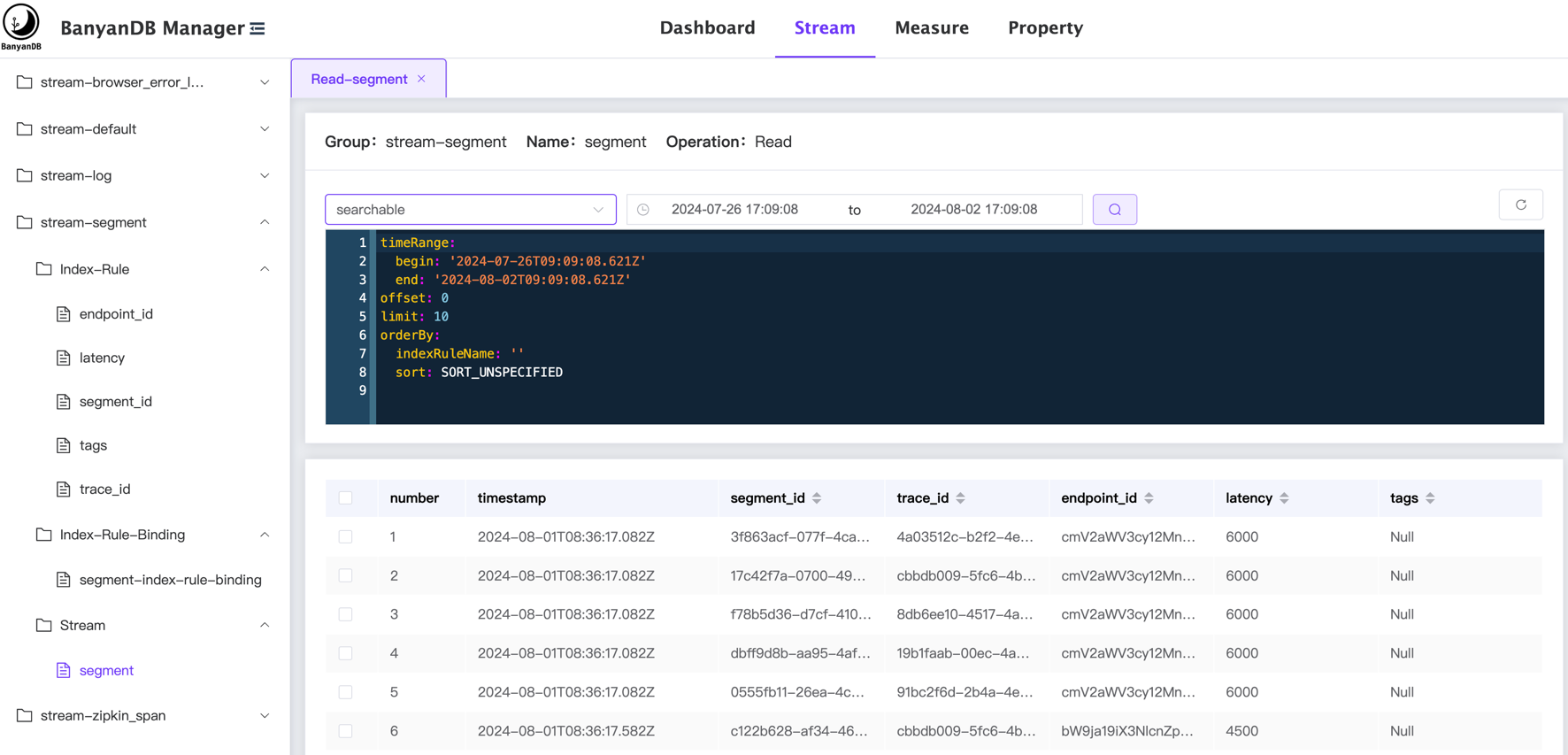 + +The stream page shows the data stored in the stream. The menu on the left side shows the list of streams, index-rule, index-rule-binding and organized by their groups. + +The user can select the stream to view the data, the data is displayed in a table format and can query/filter the data by the following: +- Select the `Time Range` to be queried. +- Select the `Tag Families` to be queried. +- Modify/Write the query config directly on the page. The config can refer to the [bydbctl query stream](./bydbctl/query/stream.md). + +## Measure +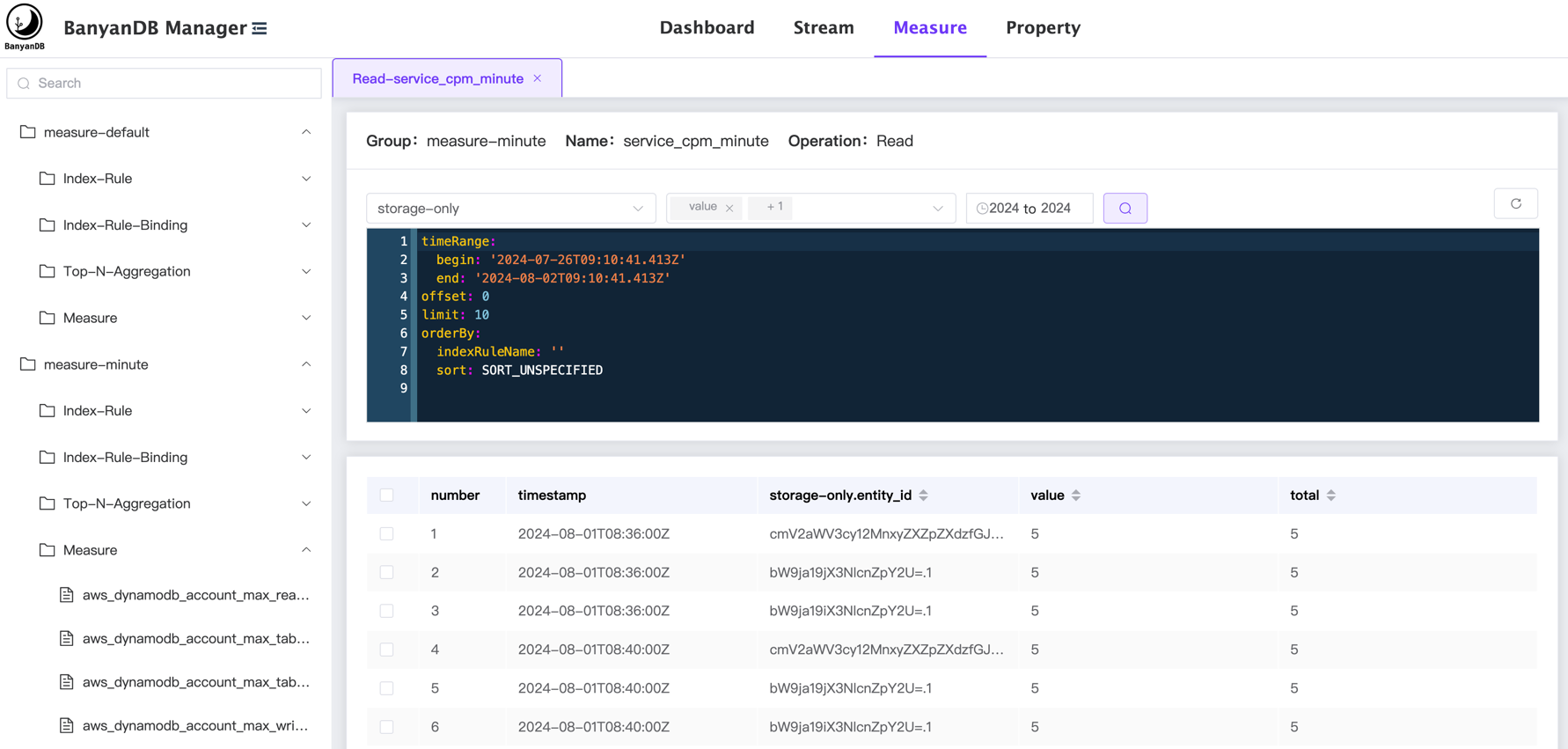 + +The measure page shows the data stored in the measure. The menu on the left side shows the list of measures, index-rule, index-rule-binding and organized by their groups. + +The user can select the measure to view the data, the data is displayed in a table format and can query/filter the data by the following: +- Select the `Time Range` to be queried. +- Select the `Tag Families` to be queried. +- Select the `Fields` to be queried. +- Modify/Write the query config directly on the page. The config can refer to the [bydbctl query measure](./bydbctl/query/measure.md). + +## Property +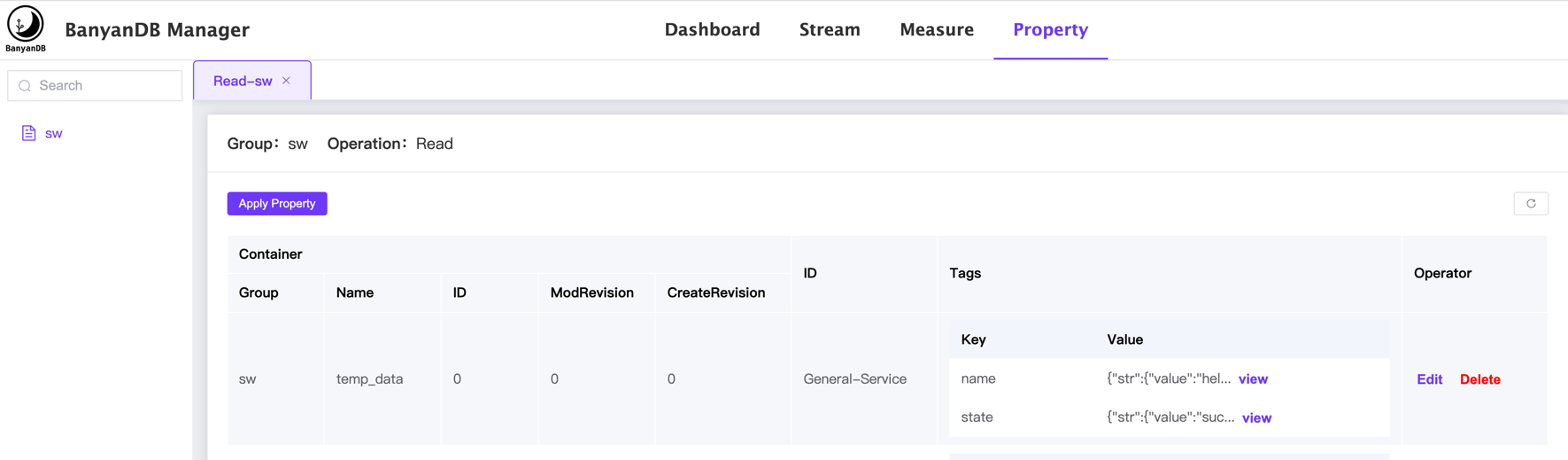 + +The property page shows the data stored in the property. The menu on the left side shows the list of properties, index-rule, index-rule-binding and organized by their groups. Review Comment: ```suggestion The property page shows the data stored in the property. The menu on the left side shows the list of properties and organized by their groups. ``` ########## docs/interacting/web-ui.md: ########## @@ -0,0 +1,35 @@ +# Web application + +The web application is hosted at [skywalking-banyandb-webapp](http://localhost:17913/) when you boot up the BanyanDB server. +The web ui could use to query data stored in streams, measures, and properties. + +## Stream Review Comment: Add, edit, and delete a specific stream on this page. Please add relevant operations here. ########## docs/interacting/web-ui.md: ########## @@ -0,0 +1,35 @@ +# Web application + +The web application is hosted at [skywalking-banyandb-webapp](http://localhost:17913/) when you boot up the BanyanDB server. +The web ui could use to query data stored in streams, measures, and properties. + +## Stream Review Comment: You can also view and manage the index-rule and index-rule-binding in a stream group in this page. ########## docs/interacting/web-ui.md: ########## @@ -0,0 +1,35 @@ +# Web application + +The web application is hosted at [skywalking-banyandb-webapp](http://localhost:17913/) when you boot up the BanyanDB server. +The web ui could use to query data stored in streams, measures, and properties. + +## Stream + + +The stream page shows the data stored in the stream. The menu on the left side shows the list of streams, index-rule, index-rule-binding and organized by their groups. + +The user can select the stream to view the data, the data is displayed in a table format and can query/filter the data by the following: +- Select the `Time Range` to be queried. +- Select the `Tag Families` to be queried. +- Modify/Write the query config directly on the page. The config can refer to the [bydbctl query stream](./bydbctl/query/stream.md). + +## Measure + Review Comment: Like the `Stream,` schema-relevant operations are supported on this page. ########## docs/interacting/bydbctl/query/measure.md: ########## @@ -0,0 +1,221 @@ +# Query [Measures](../../../concept/data-model.md#measures) + +Query operation queries the data in a measure. + +[bydbctl](../bydbctl.md) is the command line tool in examples. + +The input contains two parts: + +* Request: a YAML-based text which is defined by the [API](#api-reference) +* Time Range: YAML and CLI's flags both support it. + +## Time Range + +The query specification contains `time_range` field. The request should set absolute times to it. +`bydbctl` also provides `start` and `end` flags to support passing absolute and relative times. + +"start" and "end" specify a time range during which the query is performed, they can be an absolute time like ["2006-01-02T15:04:05Z07:00"](https://www.rfc-editor.org/rfc/rfc3339), +or relative time (to the current time) like "-30m", or "30m". +They are both optional and their default values follow the rules below: + +* when "start" and "end" are both absent, "start = now - 30 minutes" and "end = now", +namely past 30 minutes; +* when "start" is absent and "end" is present, this command calculates "start" (minus 30 units), +e.g. "end = 2022-11-09T12:34:00Z", so "start = end - 30 minutes = 2022-11-09T12:04:00Z"; +* when "start" is present and "end" is absent, this command calculates "end" (plus 30 units), +e.g. "start = 2022-11-09T12:04:00Z", so "end = start + 30 minutes = 2022-11-09T12:34:00Z". + +## Understand the schema you are querying +Before querying the data, you need to know the measure name and the tag families and fields in the measure. You can use the `bydbctl measure get` command to get the measure schema. +If you want to get the schema of a measure named `service_cpm_minute` in the group `measure-minute`, you can use the below command: +```shell +bydbctl measure get -g measure-minute -n service_cpm_minute +``` +```shell +measure: + entity: + tagNames: + - entity_id + fields: + - compressionMethod: COMPRESSION_METHOD_ZSTD + encodingMethod: ENCODING_METHOD_GORILLA + fieldType: FIELD_TYPE_INT + name: value + - compressionMethod: COMPRESSION_METHOD_ZSTD + encodingMethod: ENCODING_METHOD_GORILLA + fieldType: FIELD_TYPE_INT + name: total + interval: 1m + metadata: + createRevision: "206" + group: measure-minute + id: 0 + modRevision: "206" + name: service_cpm_minute + tagFamilies: + - name: storage-only + tags: + - indexedOnly: false + name: entity_id + type: TAG_TYPE_STRING + updatedAt: null +``` + +## Examples +The following examples use above schema to show how to query data in a measure and cover some common use cases: + +### Query between specific time range +To retrieve a series of data points between `2022-10-15T22:32:48Z` and `2022-10-15T23:32:48Z` could use the below command. These data points contain tags: `id` and `entity_id` that belong to a family `default`. They also choose fields: `total` and `value`. + +```shell +bydbctl measure query -f - <<EOF +name: "service_cpm_minute" +groups: ["measure-minute"] +tagProjection: + tagFamilies: + - name: "storage-only" + tags: ["entity_id"] +fieldProjection: + names: ["total", "value"] +timeRange: + begin: 2022-10-15T22:32:48Z + end: 2022-10-15T23:32:48Z +EOF +``` + +### Query using relative time duration +The below command could query data in the last 30 minutes using relative time duration : + +```shell +bydbctl measure query --start -30m -f - <<EOF +name: "service_cpm_minute" +groups: ["measure-minute"] +tagProjection: + tagFamilies: + - name: "storage-only" + tags: ["entity_id"] +fieldProjection: + names: ["total", "value"] +EOF +``` + +### Query with filter Review Comment: We need more examples of `criteria` 1. logical expression: `and`, `or` 2. sub expression: like subquery of a SQL ```yaml criteria: le: op: "LOGICAL_OP_OR" left: condition: name: "entity_id" op: "BINARY_OP_EQ" value: str: value: "entity_4" right: le: op: "LOGICAL_OP_OR" left: condition: name: "entity_id" op: "BINARY_OP_EQ" value: str: value: "entity_5" ``` 4. more binary operations: - Not equal: NE - Numbric: GT, GE, LT, LE - Having & In - Match: How to set the analyzer to the index rule. 5. Order by time or an index. ########## docs/interacting/web-ui.md: ########## @@ -0,0 +1,35 @@ +# Web application + +The web application is hosted at [skywalking-banyandb-webapp](http://localhost:17913/) when you boot up the BanyanDB server. +The web ui could use to query data stored in streams, measures, and properties. + +## Stream + + +The stream page shows the data stored in the stream. The menu on the left side shows the list of streams, index-rule, index-rule-binding and organized by their groups. + +The user can select the stream to view the data, the data is displayed in a table format and can query/filter the data by the following: +- Select the `Time Range` to be queried. +- Select the `Tag Families` to be queried. +- Modify/Write the query config directly on the page. The config can refer to the [bydbctl query stream](./bydbctl/query/stream.md). + +## Measure + Review Comment: More than the index-rule and index-rule-binding, topn-aggregation could be managed in this page. -- This is an automated message from the Apache Git Service. To respond to the message, please log on to GitHub and use the URL above to go to the specific comment. To unsubscribe, e-mail: [email protected] For queries about this service, please contact Infrastructure at: [email protected]



