This is an automated email from the ASF dual-hosted git repository.

hanahmily pushed a commit to branch main
in repository https://gitbox.apache.org/repos/asf/skywalking-banyandb.git
The following commit(s) were added to refs/heads/main by this push:
new a20d7aeb Add bydbctl and web-ui interacting guide. (#507)
a20d7aeb is described below
commit a20d7aeb1ac41a96a2dac9d354622309e8c11c2e
Author: Wan Kai <[email protected]>
AuthorDate: Fri Aug 9 06:44:04 2024 +0800
Add bydbctl and web-ui interacting guide. (#507)
* Add bydbctl and web-ui interacting guide.
---
CHANGES.md | 2 +
docs/concept/data-model.md | 2 +-
docs/crud/measure/query.md | 65 ------
docs/crud/stream/query.md | 61 ------
docs/interacting/bydbctl/bydbctl.md | 20 ++
docs/{crud => interacting/bydbctl}/property.md | 7 +-
docs/interacting/bydbctl/query/filter-operation.md | 92 +++++++++
docs/interacting/bydbctl/query/measure.md | 223 +++++++++++++++++++++
docs/interacting/bydbctl/query/stream.md | 205 +++++++++++++++++++
docs/{crud => interacting/bydbctl/schema}/group.md | 6 +-
.../bydbctl/schema/index-rule-binding.md} | 6 +-
.../bydbctl/schema/index-rule.md} | 20 +-
.../bydbctl/schema/measure.md} | 6 +-
.../bydbctl/schema/stream.md} | 6 +-
.../bydbctl/schema/top-n-aggregation.md | 20 ++
docs/interacting/java-client.md | 3 +
docs/interacting/web-ui/dashboard.md | 9 +
docs/interacting/web-ui/property.md | 11 +
docs/interacting/web-ui/query/measure.md | 17 ++
docs/interacting/web-ui/query/stream.md | 13 ++
docs/interacting/web-ui/schema/group.md | 18 ++
.../web-ui/schema/index-rule-binding.md | 17 ++
docs/interacting/web-ui/schema/index-rule.md | 17 ++
docs/interacting/web-ui/schema/measure.md | 20 ++
docs/interacting/web-ui/schema/stream.md | 20 ++
.../interacting/web-ui/schema/top-n-aggregation.md | 16 ++
docs/menu.yml | 118 ++++++-----
27 files changed, 830 insertions(+), 190 deletions(-)
diff --git a/CHANGES.md b/CHANGES.md
index 7389aaae..255c30dd 100644
--- a/CHANGES.md
+++ b/CHANGES.md
@@ -43,6 +43,8 @@ Release Notes.
- Introduce new doc menu structure.
- Add installation on Docker and Kubernetes.
- Add quick-start guide.
+- Add web-ui interacting guide.
+- Add bydbctl interacting guide.
### Chores
diff --git a/docs/concept/data-model.md b/docs/concept/data-model.md
index 732119f7..06726eb3 100644
--- a/docs/concept/data-model.md
+++ b/docs/concept/data-model.md
@@ -6,7 +6,7 @@ This chapter introduces BanyanDB's data models and covers the
following:
* data model
* data retrieval
-You can also find [examples](../crud/) of how to interact with BanyanDB using
[bydbctl](../clients.md#command-line), how to create and drop groups, or how to
create, read, update and drop streams/measures.
+You can also find [examples](../interacting/bydbctl/schema) of how to interact
with BanyanDB using [bydbctl](../interacting/bydbctl/bydbctl.md), how to create
and drop groups, or how to create, read, update and drop streams/measures.
## Structure of BanyanDB
diff --git a/docs/crud/measure/query.md b/docs/crud/measure/query.md
deleted file mode 100644
index e4a5dcc5..00000000
--- a/docs/crud/measure/query.md
+++ /dev/null
@@ -1,65 +0,0 @@
-# Query Measures
-
-Query operation queries the data in a measure.
-
-[`bydbctl`](../../clients.md#command-line) is the command line tool in
examples.
-
-The input contains two parts:
-
-* Request: a YAML-based text which is defined by the [API](#api-reference)
-* Time Range: YAML and CLI's flags both support it.
-
-## Time Range
-
-The query specification contains `time_range` field. The request should set
absolute times to it.
-`bydbctl` also provides `start` and `end` flags to support passing absolute
and relative times.
-
-"start" and "end" specify a time range during which the query is performed,
they can be an absolute time like
["2006-01-02T15:04:05Z07:00"](https://www.rfc-editor.org/rfc/rfc3339),
-or relative time (to the current time) like "-30m", or "30m".
-They are both optional and their default values follow the rules below:
-
-* when "start" and "end" are both absent, "start = now - 30 minutes" and "end
= now",
-namely past 30 minutes;
-* when "start" is absent and "end" is present, this command calculates "start"
(minus 30 units),
-e.g. "end = 2022-11-09T12:34:00Z", so "start = end - 30 minutes =
2022-11-09T12:04:00Z";
-* when "start" is present and "end" is absent, this command calculates "end"
(plus 30 units),
-e.g. "start = 2022-11-09T12:04:00Z", so "end = start + 30 minutes =
2022-11-09T12:34:00Z".
-
-## Examples
-
-To retrieve a series of data points between `2022-10-15T22:32:48Z` and
`2022-10-15T23:32:48Z` could use the below command. These data points contain
tags: `id` and `entity_id` that belong to a family `default`. They also choose
fields: `total` and `value`.
-
-```shell
-bydbctl measure query -f - <<EOF
-name: "service_cpm_minute"
-groups: ["measure-minute"]
-tagProjection:
- tagFamilies:
- - name: "default"
- tags: ["entity_id"]
-fieldProjection:
- names: ["total", "value"]
-timeRange:
- begin: 2022-10-15T22:32:48Z
- end: 2022-10-15T23:32:48Z
-EOF
-```
-
-The below command could query data in the last 10 minutes using relative time
duration :
-
-```shell
-bydbctl measure query --start -10m -f - <<EOF
-name: "service_cpm_minute"
-groups: ["measure-minute"]
-tagProjection:
- tagFamilies:
- - name: "default"
- tags: ["entity_id"]
-fieldProjection:
- names: ["total", "value"]
-EOF
-```
-
-## API Reference
-
-[MeasureService v1](../../api-reference.md#measureservice)
diff --git a/docs/crud/stream/query.md b/docs/crud/stream/query.md
deleted file mode 100644
index 3cf9fc37..00000000
--- a/docs/crud/stream/query.md
+++ /dev/null
@@ -1,61 +0,0 @@
-# Query Streams
-
-Query operation queries the data in a stream.
-
-[`bydbctl`](../../clients.md#command-line) is the command line tool in
examples.
-
-The input contains two parts:
-
-* Request: a YAML-based text which is defined by the [API](#api-reference)
-* Time Range: YAML and CLI's flags both support it.
-
-## Time Range
-
-The query specification contains `time_range` field. The request should set
absolute times to it.
-`bydbctl` also provides `start` and `end` flags to support passing absolute
and relative times.
-
-"start" and "end" specify a time range during which the query is performed,
they can be an absolute time like
["2006-01-02T15:04:05Z07:00"](https://www.rfc-editor.org/rfc/rfc3339),
-or relative time (to the current time) like "-30m", or "30m".
-They are both optional and their default values follow the rules below:
-
-* when "start" and "end" are both absent, "start = now - 30 minutes" and "end
= now",
-namely past 30 minutes;
-* when "start" is absent and "end" is present, this command calculates "start"
(minus 30 units),
-e.g. "end = 2022-11-09T12:34:00Z", so "start = end - 30 minutes =
2022-11-09T12:04:00Z";
-* when "start" is present and "end" is absent, this command calculates "end"
(plus 30 units),
-e.g. "start = 2022-11-09T12:04:00Z", so "end = start + 30 minutes =
2022-11-09T12:34:00Z".
-
-## Examples
-
-To retrieve elements in a stream named `sw` between `2022-10-15T22:32:48Z` and
`2022-10-15T23:32:48Z` could use the below command. These elements also choose
a tag `trace_id` which lives in a family named `searchable`.
-
-```shell
-bydbctl stream query -f - <<EOF
-groups: ["stream-segment"]
-name: "segment"
-projection:
- tagFamilies:
- - name: "searchable"
- tags: ["trace_id"]
-timeRange:
- begin: 2022-10-15T22:32:48+08:00
- end: 2022-10-15T23:32:48+08:00
-EOF
-```
-
-The below command could query data in the last 30 minutes using relative time
duration :
-
-```shell
-bydbctl stream query --start -30m -f - <<EOF
-groups: ["stream-segment"]
-name: "segment"
-projection:
- tagFamilies:
- - name: "searchable"
- tags: ["trace_id"]
-EOF
-```
-
-## API Reference
-
-[StreamService v1](../../api-reference.md#streamservice)
diff --git a/docs/interacting/bydbctl/bydbctl.md
b/docs/interacting/bydbctl/bydbctl.md
new file mode 100644
index 00000000..90c0f466
--- /dev/null
+++ b/docs/interacting/bydbctl/bydbctl.md
@@ -0,0 +1,20 @@
+# bydbctl
+`bydbctl` is the command line tool for interacting with BanyanDB. It is a
powerful tool that can be used to create, update, read, and delete schemas. It
can also be used to query data stored in streams, measures, and properties.
+
+These are several ways to install:
+
+* Get binaries from [download](https://skywalking.apache.org/downloads/).
+* Build from
[sources](https://github.com/apache/skywalking-banyandb/tree/main/bydbctl) to
get latest features.
+
+The config file named `.bydbctl.yaml` will be created in `$HOME` folder after
the first CRUD command is applied.
+```shell
+> more ~/.bydbctl.yaml
+addr: http://127.0.0.1:17913
+group: ""
+```
+
+`bydbctl` leverages HTTP endpoints to retrieve data instead of gRPC.
+
+## HTTP client
+
+Users could select any HTTP client to access the HTTP based endpoints. The
default address is `localhost:17913/api`
\ No newline at end of file
diff --git a/docs/crud/property.md b/docs/interacting/bydbctl/property.md
similarity index 94%
rename from docs/crud/property.md
rename to docs/interacting/bydbctl/property.md
index 2b2d5804..2aec93f5 100644
--- a/docs/crud/property.md
+++ b/docs/interacting/bydbctl/property.md
@@ -1,10 +1,10 @@
-# CRUD Property
+# CRUD [Property](../../concept/data-model.md#properties)
CRUD operations create/update, read and delete property.
Property stores the user defined data.
-[`bydbctl`](../clients.md#command-line) is the command line tool in examples.
+[bydbctl](bydbctl.md) is the command line tool in examples.
## Apply (Create/Update) operation
@@ -76,6 +76,7 @@ tags:
str:
value: "failed"
ttl: "1h"
+EOF
```
## Get operation
@@ -169,4 +170,4 @@ bydbctl property keepalive --lease_id 1
## API Reference
-[MeasureService v1](../api-reference.md#PropertyService)
+[PropertyService v1](../../api-reference.md#propertyservice)
diff --git a/docs/interacting/bydbctl/query/filter-operation.md
b/docs/interacting/bydbctl/query/filter-operation.md
new file mode 100644
index 00000000..7283c7e5
--- /dev/null
+++ b/docs/interacting/bydbctl/query/filter-operation.md
@@ -0,0 +1,92 @@
+# Filter Operation
+
+Filter operation is a part of the query configuration. It is used to filter
the data based on the given condition for [Stream](stream.md) and
[Measure](measure.md) queries.
+
+The condition is a combination of the tag name, operation, and value.
+The operation's root is Criteria which is defined in the [API
Reference](../../../api-reference.md#criteria).
+
+The following are the examples of filter operations:
+
+## [Condition.BinaryOp](../../../api-reference.md#conditionbinaryop)
+
+### EQ, NE, LT, GT, LE and GE
+EQ, NE, LT, GT, LE and GE, only one operand should be given, i.e. one-to-one
relationship.
+
+```shell
+criteria:
+ condition:
+ name: "entity_id"
+ op: "BINARY_OP_EQ"
+ value:
+ str:
+ value: "entity_1"
+```
+
+### IN and NOT_IN
+HAVING and NOT_HAVING allow multi-value to be the operand such as
array/vector, i.e. one-to-many relationship.
+
+```shell
+criteria:
+ condition:
+ name: "entity_id"
+ op: "BINARY_OP_IN"
+ value:
+ str_array:
+ value: ["entity_1", "entity_2", "unknown"]
+```
+
+### HAVING and NOT_HAVING
+HAVING and NOT_HAVING allow multi-value to be the operand such as
array/vector, i.e. one-to-many relationship. For example, "keyA" contains
"valueA" and "valueB"
+
+```shell
+criteria:
+ condition:
+ name: "extended_tags"
+ op: "BINARY_OP_HAVING"
+ value:
+ strArray:
+ value: ["c", "b"]
+```
+
+### MATCH
+MATCH performances a full-text search if the tag is analyzed.
+The string value applies to the same analyzer as the tag, but string array
value does not.
+Each item in a string array is seen as a token instead of a query expression.
+
+How to set the analyzer for a tag can find in the
[IndexRules](../schema/index-rule.md).
+
+```shell
+criteria:
+ condition:
+ name: "name"
+ op: "BINARY_OP_MATCH"
+ value:
+ str:
+ value: "us"
+```
+
+##
[LogicalExpression.LogicalOp](../../../api-reference.md#logicalexpressionlogicalop)
+Logical operation is used to combine multiple conditions.
+
+### AND, OR
+The following example queries the data where the `id` is `1` and the
`service_id` is `service_1`
+
+```shell
+criteria:
+ le:
+ op: "LOGICAL_OP_AND"
+ right:
+ condition:
+ name: "id"
+ op: "BINARY_OP_EQ"
+ value:
+ str:
+ value: "1"
+ left:
+ condition:
+ name: "service_id"
+ op: "BINARY_OP_EQ"
+ value:
+ str:
+ value: "service_1"
+```
diff --git a/docs/interacting/bydbctl/query/measure.md
b/docs/interacting/bydbctl/query/measure.md
new file mode 100644
index 00000000..5baa76ba
--- /dev/null
+++ b/docs/interacting/bydbctl/query/measure.md
@@ -0,0 +1,223 @@
+# Query [Measures](../../../concept/data-model.md#measures)
+
+Query operation queries the data in a measure.
+
+[bydbctl](../bydbctl.md) is the command line tool in examples.
+
+The input contains two parts:
+
+* Request: a YAML-based text which is defined by the [API](#api-reference)
+* Time Range: YAML and CLI's flags both support it.
+
+## Time Range
+
+The query specification contains `time_range` field. The request should set
absolute times to it.
+`bydbctl` also provides `start` and `end` flags to support passing absolute
and relative times.
+
+"start" and "end" specify a time range during which the query is performed,
they can be an absolute time like
["2006-01-02T15:04:05Z07:00"](https://www.rfc-editor.org/rfc/rfc3339),
+or relative time (to the current time) like "-30m", or "30m".
+They are both optional and their default values follow the rules below:
+
+* when "start" and "end" are both absent, "start = now - 30 minutes" and "end
= now",
+namely past 30 minutes;
+* when "start" is absent and "end" is present, this command calculates "start"
(minus 30 units),
+e.g. "end = 2022-11-09T12:34:00Z", so "start = end - 30 minutes =
2022-11-09T12:04:00Z";
+* when "start" is present and "end" is absent, this command calculates "end"
(plus 30 units),
+e.g. "start = 2022-11-09T12:04:00Z", so "end = start + 30 minutes =
2022-11-09T12:34:00Z".
+
+## Understand the schema you are querying
+Before querying the data, you need to know the measure name and the tag
families and fields in the measure. You can use the `bydbctl measure get`
command to get the measure schema.
+If you want to get the schema of a measure named `service_cpm_minute` in the
group `measure-minute`, you can use the below command:
+```shell
+bydbctl measure get -g measure-minute -n service_cpm_minute
+```
+```shell
+measure:
+ entity:
+ tagNames:
+ - entity_id
+ fields:
+ - compressionMethod: COMPRESSION_METHOD_ZSTD
+ encodingMethod: ENCODING_METHOD_GORILLA
+ fieldType: FIELD_TYPE_INT
+ name: value
+ - compressionMethod: COMPRESSION_METHOD_ZSTD
+ encodingMethod: ENCODING_METHOD_GORILLA
+ fieldType: FIELD_TYPE_INT
+ name: total
+ interval: 1m
+ metadata:
+ createRevision: "206"
+ group: measure-minute
+ id: 0
+ modRevision: "206"
+ name: service_cpm_minute
+ tagFamilies:
+ - name: storage-only
+ tags:
+ - indexedOnly: false
+ name: entity_id
+ type: TAG_TYPE_STRING
+ updatedAt: null
+```
+
+## Examples
+The following examples use above schema to show how to query data in a measure
and cover some common use cases:
+
+### Query between specific time range
+To retrieve a series of data points between `2022-10-15T22:32:48Z` and
`2022-10-15T23:32:48Z` could use the below command. These data points contain
tags: `id` and `entity_id` that belong to a family `default`. They also choose
fields: `total` and `value`.
+
+```shell
+bydbctl measure query -f - <<EOF
+name: "service_cpm_minute"
+groups: ["measure-minute"]
+tagProjection:
+ tagFamilies:
+ - name: "storage-only"
+ tags: ["entity_id"]
+fieldProjection:
+ names: ["total", "value"]
+timeRange:
+ begin: 2022-10-15T22:32:48Z
+ end: 2022-10-15T23:32:48Z
+EOF
+```
+
+### Query using relative time duration
+The below command could query data in the last 30 minutes using relative time
duration :
+
+```shell
+bydbctl measure query --start -30m -f - <<EOF
+name: "service_cpm_minute"
+groups: ["measure-minute"]
+tagProjection:
+ tagFamilies:
+ - name: "storage-only"
+ tags: ["entity_id"]
+fieldProjection:
+ names: ["total", "value"]
+EOF
+```
+
+### Query with filter
+The below command could query data with a filter where the entity_id is
`bW9ja19iX3NlcnZpY2U=.1`:
+
+```shell
+bydbctl measure query -f - <<EOF
+name: "service_cpm_minute"
+groups: ["measure-minute"]
+tagProjection:
+ tagFamilies:
+ - name: "storage-only"
+ tags: ["entity_id"]
+fieldProjection:
+ names: ["total", "value"]
+criteria:
+ condition:
+ name: "entity_id"
+ op: "BINARY_OP_EQ"
+ value:
+ str:
+ value: "bW9ja19iX3NlcnZpY2U=.1"
+EOF
+```
+
+More filter operations can be found in [here](filter-operation.md).
+
+### Query ordered by time-series
+The below command could query data order by time-series in descending
[order](../../../api-reference.md#sort) :
+
+```shell
+bydbctl measure query -f - <<EOF
+name: "service_cpm_minute"
+groups: ["measure-minute"]
+tagProjection:
+ tagFamilies:
+ - name: "storage-only"
+ tags: ["entity_id"]
+fieldProjection:
+ names: ["total", "value"]
+orderBy:
+ sort: "SORT_DESC"
+EOF
+```
+
+### Query limit result
+The below command could query ordered data and return the first two results:
+
+```shell
+bydbctl measure query -f - <<EOF
+name: "service_cpm_minute"
+groups: ["measure-minute"]
+tagProjection:
+ tagFamilies:
+ - name: "storage-only"
+ tags: ["entity_id"]
+fieldProjection:
+ names: ["total", "value"]
+orderBy:
+ sort: "SORT_DESC"
+limit: 2
+offset: 0
+EOF
+```
+
+### Aggregation Query Max
+The below command could query data with aggregate by entity_id and get `MAX`
value:
+
+```shell
+bydbctl measure query -f - <<EOF
+name: "service_cpm_minute"
+groups: ["measure-minute"]
+tagProjection:
+ tagFamilies:
+ - name: "storage-only"
+ tags: ["entity_id"]
+fieldProjection:
+ names: ["total", "value"]
+groupBy:
+ tagProjection:
+ tagFamilies:
+ - name: "storage-only"
+ tags: ["entity_id"]
+ fieldName: "value"
+agg:
+ function: "AGGREGATION_FUNCTION_MAX"
+ fieldName: "value"
+EOF
+```
+
+### Aggregation Query TopN
+The below command could query data with aggregate by entity_id and get `AVG`
top 3 value:
+
+```shell
+bydbctl measure query -f - <<EOF
+name: "service_cpm_minute"
+groups: ["measure-minute"]
+tagProjection:
+ tagFamilies:
+ - name: "storage-only"
+ tags: ["entity_id"]
+fieldProjection:
+ names: ["value"]
+groupBy:
+ tagProjection:
+ tagFamilies:
+ - name: "storage-only"
+ tags: ["entity_id"]
+ fieldName: "value"
+agg:
+ function: "AGGREGATION_FUNCTION_MEAN"
+ fieldName: "value"
+top:
+ number: 3
+ fieldName: "value"
+ fieldValueSort: "SORT_DESC"
+EOF
+```
+
+### More examples can be found in
[here](https://github.com/apache/skywalking-banyandb/tree/main/test/cases/measure/data/input).
+
+## API Reference
+
+[MeasureService v1](../../../api-reference.md#measureservice)
diff --git a/docs/interacting/bydbctl/query/stream.md
b/docs/interacting/bydbctl/query/stream.md
new file mode 100644
index 00000000..c2d56a62
--- /dev/null
+++ b/docs/interacting/bydbctl/query/stream.md
@@ -0,0 +1,205 @@
+# Query [Streams](../../../concept/data-model.md#streams)
+
+Query operation queries the data in a stream.
+
+[bydbctl](../bydbctl.md) is the command line tool in examples.
+
+The input contains two parts:
+
+* Request: a YAML-based text which is defined by the [API](#api-reference)
+* Time Range: YAML and CLI's flags both support it.
+
+## Time Range
+
+The query specification contains `time_range` field. The request should set
absolute times to it.
+`bydbctl` also provides `start` and `end` flags to support passing absolute
and relative times.
+
+"start" and "end" specify a time range during which the query is performed,
they can be an absolute time like
["2006-01-02T15:04:05Z07:00"](https://www.rfc-editor.org/rfc/rfc3339),
+or relative time (to the current time) like "-30m", or "30m".
+They are both optional and their default values follow the rules below:
+
+* when "start" and "end" are both absent, "start = now - 30 minutes" and "end
= now",
+ namely past 30 minutes;
+* when "start" is absent and "end" is present, this command calculates "start"
(minus 30 units),
+ e.g. "end = 2022-11-09T12:34:00Z", so "start = end - 30 minutes =
2022-11-09T12:04:00Z";
+* when "start" is present and "end" is absent, this command calculates "end"
(plus 30 units),
+ e.g. "start = 2022-11-09T12:04:00Z", so "end = start + 30 minutes =
2022-11-09T12:34:00Z".
+
+
+## Understand the schema you are querying
+Before querying the data, you need to know the stream name and the tag
families and fields in the stream. You can use the `bydbctl stream get` command
to get the stream schema.
+for example, if you want to get the schema of a stream named `segment` in the
group `stream-segment`, you can use the below command:
+```shell
+bydbctl stream get -g stream-segment -n segment
+```
+```shell
+stream:
+ entity:
+ tagNames:
+ - service_id
+ - service_instance_id
+ - is_error
+ metadata:
+ createRevision: "100"
+ group: stream-segment
+ id: 0
+ modRevision: "100"
+ name: segment
+ tagFamilies:
+ - name: storage-only
+ tags:
+ - indexedOnly: false
+ name: service_id
+ type: TAG_TYPE_STRING
+ - indexedOnly: false
+ name: service_instance_id
+ type: TAG_TYPE_STRING
+ - indexedOnly: false
+ name: start_time
+ type: TAG_TYPE_INT
+ - indexedOnly: false
+ name: is_error
+ type: TAG_TYPE_INT
+ - indexedOnly: false
+ name: data_binary
+ type: TAG_TYPE_DATA_BINARY
+ - name: searchable
+ tags:
+ - indexedOnly: false
+ name: segment_id
+ type: TAG_TYPE_STRING
+ - indexedOnly: false
+ name: trace_id
+ type: TAG_TYPE_STRING
+ - indexedOnly: false
+ name: endpoint_id
+ type: TAG_TYPE_STRING
+ - indexedOnly: false
+ name: latency
+ type: TAG_TYPE_INT
+ - indexedOnly: true
+ name: tags
+ type: TAG_TYPE_STRING_ARRAY
+ updatedAt: null
+```
+
+## Examples
+The following examples use above schema to show how to query data in a stream
and cover some common use cases:
+
+### Query between specific time range
+To retrieve elements in a stream named `sw` between `2022-10-15T22:32:48Z` and
`2022-10-15T23:32:48Z` could use the below command. These elements also choose
a tag `trace_id` which lives in a family named `searchable`.
+
+```shell
+bydbctl stream query -f - <<EOF
+groups: ["stream-segment"]
+name: "segment"
+projection:
+ tagFamilies:
+ - name: "searchable"
+ tags: ["trace_id"]
+timeRange:
+ begin: 2022-10-15T22:32:48+08:00
+ end: 2022-10-15T23:32:48+08:00
+EOF
+```
+
+### Query using relative time duration
+The below command could query data in the last 30 minutes using relative time
duration :
+
+```shell
+bydbctl stream query --start -30m -f - <<EOF
+groups: ["stream-segment"]
+name: "segment"
+projection:
+ tagFamilies:
+ - name: "searchable"
+ tags: ["trace_id"]
+EOF
+```
+
+### Query with filter
+The below command could query data with a filter where the service_id is
`bW9ja19iX3NlcnZpY2U=.1`:
+
+```shell
+bydbctl stream query -f - <<EOF
+name: "segment"
+groups: ["stream-segment"]
+projection:
+ tagFamilies:
+ - name: "searchable"
+ tags: ["service_id", "trace_id", "latency"]
+criteria:
+ condition:
+ name: "service_id"
+ op: "BINARY_OP_EQ"
+ value:
+ str:
+ value: "bW9ja19iX3NlcnZpY2U=.1"
+EOF
+```
+
+More filter operations can be found in [here](filter-operation.md).
+
+### Query ordered by time-series
+The below command could query data order by time-series in descending
[order](../../../api-reference.md#sort) :
+
+```shell
+bydbctl stream query -f - <<EOF
+name: "segment"
+groups: ["stream-segment"]
+projection:
+ tagFamilies:
+ - name: "searchable"
+ tags: ["trace_id", "latency"]
+ - name: "storage-only"
+ tags: ["start_time", "data_binary"]
+orderBy:
+ sort: "SORT_DESC"
+EOF
+```
+
+### Query ordered by index (searchable tag)
+The below command could query data order by index in descending
[order](../../../api-reference.md#sort) :
+
+```shell
+bydbctl stream query -f - <<EOF
+name: "segment"
+groups: ["stream-segment"]
+projection:
+ tagFamilies:
+ - name: "searchable"
+ tags: ["trace_id", "latency"]
+ - name: "storage-only"
+ tags: ["start_time", "data_binary"]
+orderBy:
+ indexRuleName: "latency"
+ sort: "SORT_DESC"
+EOF
+```
+
+### Query limit result
+The below command could query ordered data and return the first two results:
+
+```shell
+bydbctl stream query -f - <<EOF
+name: "segment"
+groups: ["stream-segment"]
+projection:
+ tagFamilies:
+ - name: "searchable"
+ tags: ["trace_id", "latency"]
+ - name: "storage-only"
+ tags: ["start_time", "data_binary"]
+orderBy:
+ indexRuleName: "latency"
+ sort: "SORT_DESC"
+limit: 2
+offset: 0
+EOF
+```
+
+### More examples can be found in
[here](https://github.com/apache/skywalking-banyandb/tree/main/test/cases/stream/data/input).
+
+## API Reference
+
+[StreamService v1](../../../api-reference.md#streamservice)
diff --git a/docs/crud/group.md b/docs/interacting/bydbctl/schema/group.md
similarity index 88%
rename from docs/crud/group.md
rename to docs/interacting/bydbctl/schema/group.md
index b61e56cb..e4f9c51c 100644
--- a/docs/crud/group.md
+++ b/docs/interacting/bydbctl/schema/group.md
@@ -1,10 +1,10 @@
-# CRUD Groups
+# CRUD [Groups](../../../concept/data-model.md#groups)
CRUD operations create, read, update and delete groups.
The group represents a collection of a class of resources. Each resource has a
name unique to a group.
-[`bydbctl`](../clients.md#command-line) is the command line tool in examples.
+[bydbctl](../bydbctl.md) is the command line tool in examples.
## Create operation
@@ -87,4 +87,4 @@ bydbctl group list
```
## API Reference
-[GroupService v1](../api-reference.md#groupservice)
+[Group Registration Operations](../../../api-reference.md#groupregistryservice)
diff --git a/docs/crud/index_rule_binding.md
b/docs/interacting/bydbctl/schema/index-rule-binding.md
similarity index 92%
rename from docs/crud/index_rule_binding.md
rename to docs/interacting/bydbctl/schema/index-rule-binding.md
index 79c01c2a..22345834 100644
--- a/docs/crud/index_rule_binding.md
+++ b/docs/interacting/bydbctl/schema/index-rule-binding.md
@@ -1,11 +1,11 @@
-# CRUD IndexRuleBindings
+# CRUD
[IndexRuleBindings](../../../concept/data-model.md#indexrule--indexrulebinding)
CRUD operations create, read, update and delete index rule bindings.
An index rule binding is a bridge to connect several index rules to a subject.
This binding is valid between `begin_at_nanoseconds` and
`expire_at_nanoseconds`, that provides flexible strategies to control how to
generate time series indices.
-[`bydbctl`](../clients.md#command-line) is the command line tool in examples.
+[bydbctl](../bydbctl.md) is the command line tool in examples.
## Create operation
@@ -134,4 +134,4 @@ bydbctl indexRuleBinding list -g sw_stream
## API Reference
-[indexRuleBindingService
v1](../api-reference.md#IndexRuleBindingRegistryService)
\ No newline at end of file
+[IndexRuleBinding Registration
Operations](../../../api-reference.md#indexrulebindingregistryservice)
\ No newline at end of file
diff --git a/docs/crud/index_rule.md
b/docs/interacting/bydbctl/schema/index-rule.md
similarity index 76%
rename from docs/crud/index_rule.md
rename to docs/interacting/bydbctl/schema/index-rule.md
index 842d5a0a..c15d8ff4 100644
--- a/docs/crud/index_rule.md
+++ b/docs/interacting/bydbctl/schema/index-rule.md
@@ -1,11 +1,11 @@
-# CRUD IndexRules
+# CRUD [IndexRules](../../../concept/data-model.md#indexrule--indexrulebinding)
CRUD operations create, read, update and delete index rules.
IndexRule defines how to generate indices based on tags and the index type.
IndexRule should bind to a subject(stream or measure) through an
IndexRuleBinding to generate proper indices.
-[`bydbctl`](../clients.md#command-line) is the command line tool in examples.
+[bydbctl](../bydbctl.md) is the command line tool in examples.
## Create operation
@@ -53,6 +53,20 @@ EOF
This YAML creates an index rule which uses the tag `trace_id` to generate a
`TYPE_INVERTED` index.
+The `analyzer` field is optional. If it is not set, the default value is
`ANALYZER_UNSPECIFIED`.
+We can set it to `ANALYZER_KEYWORD` to specify the analyzer. More analyzers
can refer to the [API Reference](../../../api-reference.md#indexruleanalyzer).
+```shell
+bydbctl indexRule create -f - <<EOF
+metadata:
+ name: trace_id
+ group: sw_stream
+tags:
+- trace_id
+type: TYPE_INVERTED
+analyzer: ANALYZER_KEYWORD
+EOF
+```
+
## Get operation
Get(Read) operation gets an index rule's schema.
@@ -105,4 +119,4 @@ bydbctl indexRule list -g sw_stream
## API Reference
-[indexRuleService v1](../api-reference.md#IndexRuleRegistryService)
+[IndexRule Registration
Operations](../../../api-reference.md#indexruleregistryservice)
diff --git a/docs/crud/measure/schema.md
b/docs/interacting/bydbctl/schema/measure.md
similarity index 91%
rename from docs/crud/measure/schema.md
rename to docs/interacting/bydbctl/schema/measure.md
index 9de09086..698a1f74 100644
--- a/docs/crud/measure/schema.md
+++ b/docs/interacting/bydbctl/schema/measure.md
@@ -1,8 +1,8 @@
-# CRUD Measures
+# CRUD [Measures](../../../concept/data-model.md#measures)
CRUD operations create, read, update and delete measures.
-[`bydbctl`](../../clients.md#command-line) is the command line tool in
examples.
+[bydbctl](../bydbctl.md) is the command line tool in examples.
## Create operation
@@ -120,4 +120,4 @@ bydbctl measure list -g sw_metric
## API Reference
-[MeasureService v1](../../api-reference.md#MeasureService)
+[Measure Registration
Operations](../../../api-reference.md#measureregistryservice)
diff --git a/docs/crud/stream/schema.md
b/docs/interacting/bydbctl/schema/stream.md
similarity index 90%
rename from docs/crud/stream/schema.md
rename to docs/interacting/bydbctl/schema/stream.md
index d9375dd5..8ae9da01 100644
--- a/docs/crud/stream/schema.md
+++ b/docs/interacting/bydbctl/schema/stream.md
@@ -1,8 +1,8 @@
-# CRUD Streams
+# CRUD [Streams](../../../concept/data-model.md#streams)
CRUD operations create, read, update and delete streams.
-[`bydbctl`](../../clients.md#command-line) is the command line tool in
examples.
+[bydbctl](../bydbctl.md) is the command line tool in examples.
Stream intends to store streaming data, for example, traces or logs.
## Create operation
@@ -109,4 +109,4 @@ bydbctl stream list -g default
## API Reference
-[StreamService v1](../../api-reference.md#streamservice)
+[Stream Registration
Operations](../../../api-reference.md#streamregistryservice)
diff --git a/docs/interacting/bydbctl/schema/top-n-aggregation.md
b/docs/interacting/bydbctl/schema/top-n-aggregation.md
new file mode 100644
index 00000000..a6b4e70e
--- /dev/null
+++ b/docs/interacting/bydbctl/schema/top-n-aggregation.md
@@ -0,0 +1,20 @@
+# CRUD [TopNAggregation](../../../concept/data-model.md#topnaggregation) on
the Web UI
+
+CRUD operations create, read, update and delete groups.
+
+The group represents a collection of a class of resources. Each resource has a
name unique to a group.
+
+[bydbctl](../bydbctl.md) is the command line tool in examples.
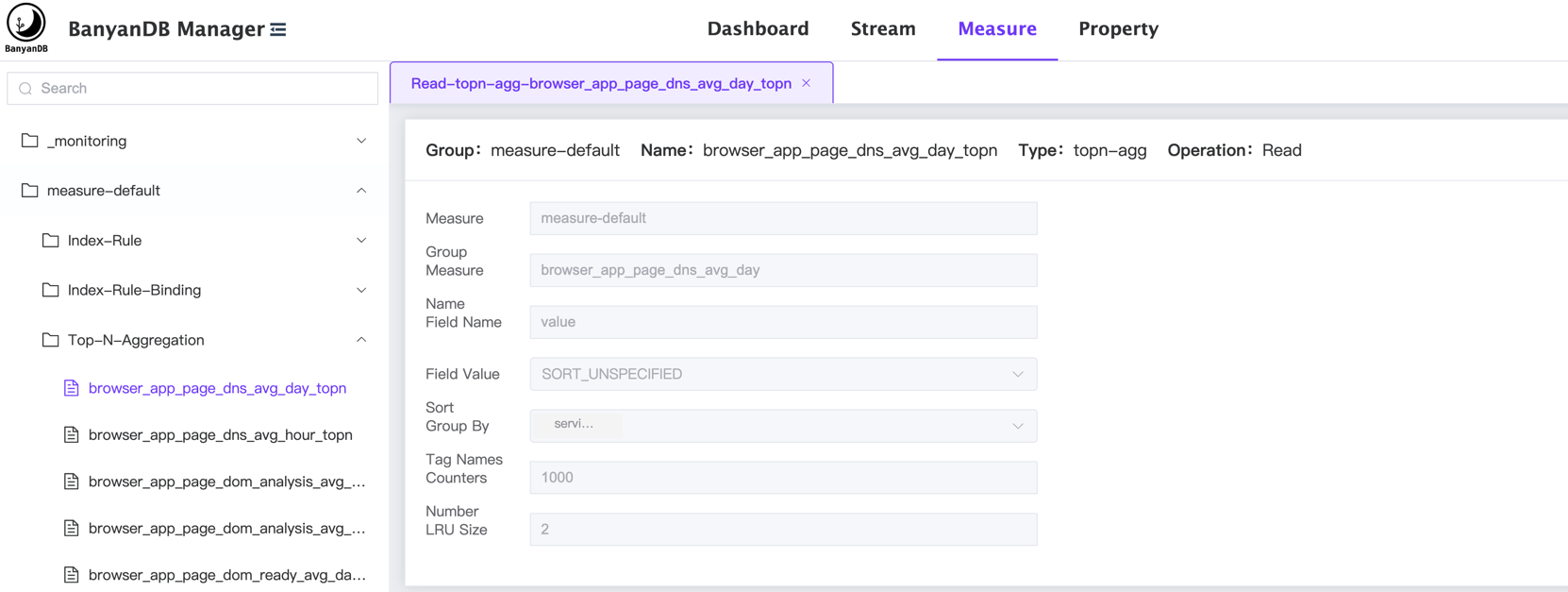
+When you in the `Measure` tab, you can view the list of top-n-aggregations in
the specific group.
+
+
+
+## Create Top-N-Aggregation
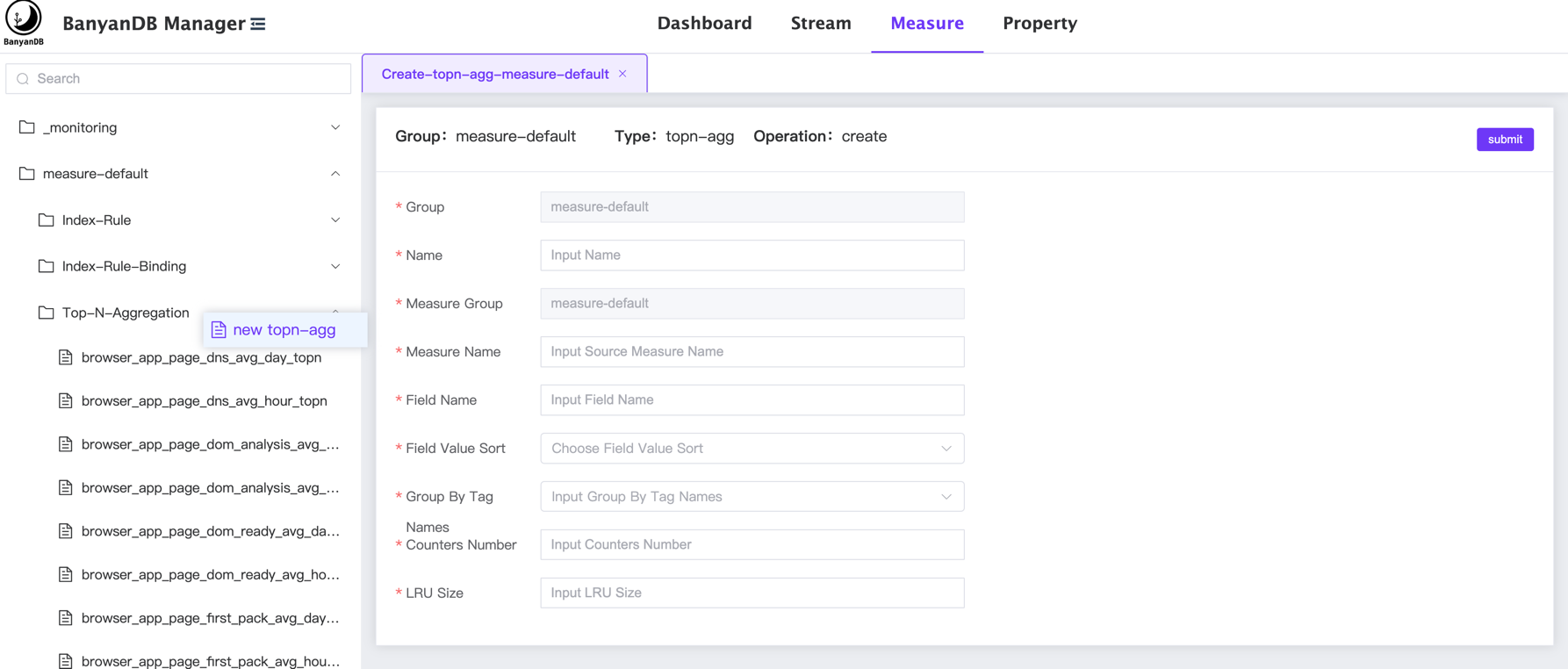
+You can create a new top-n-aggregation by clicking the right button of the
mouse on the `Top-N-Aggregation` category and select the `new topn-agg` button.
+
+
+
+## Update/Delete Top-N-Aggregation
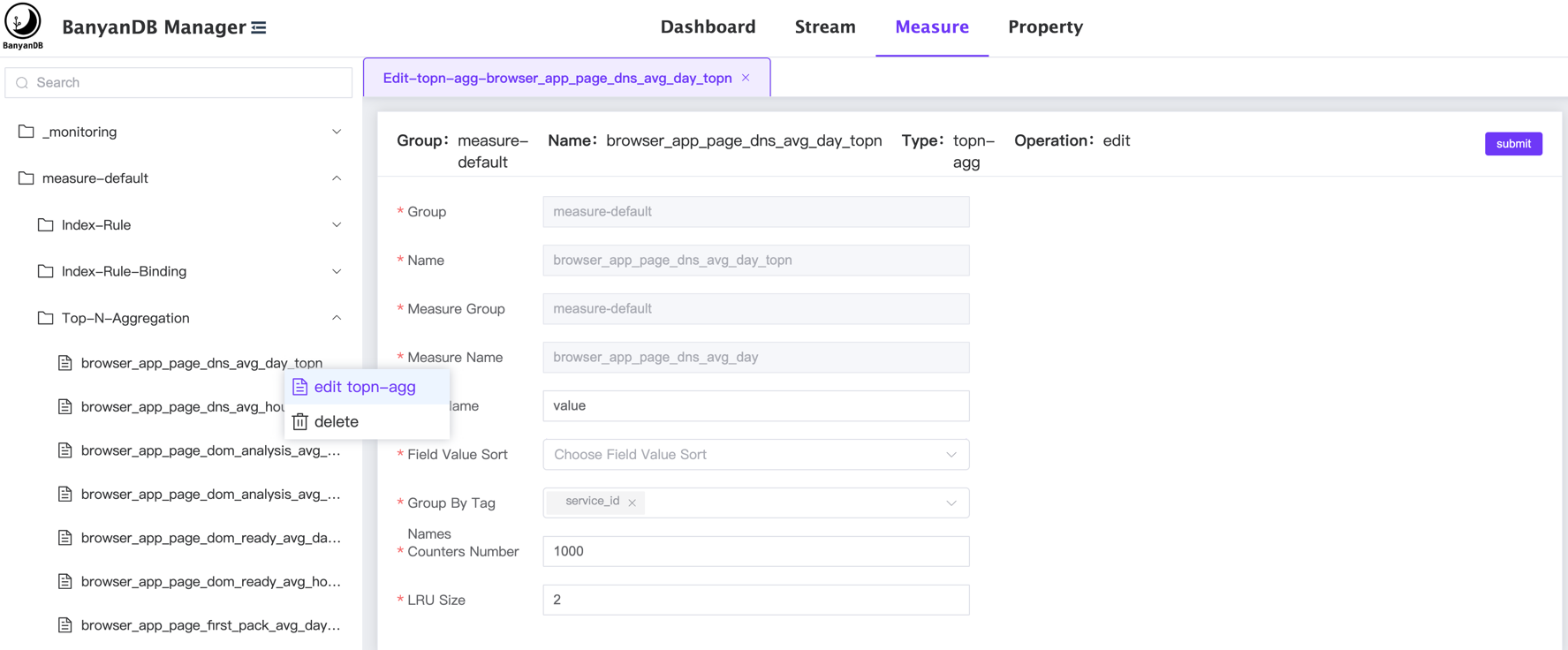
+You can click the `edit topn-agg/delete` button on a specific
top-n-aggregation to modify/delete the top-n-aggregation:
+
+
\ No newline at end of file
diff --git a/docs/interacting/java-client.md b/docs/interacting/java-client.md
new file mode 100644
index 00000000..338fa48a
--- /dev/null
+++ b/docs/interacting/java-client.md
@@ -0,0 +1,3 @@
+# Java Client
+
+The java native client is hosted at
[skywalking-banyandb-java-client](https://github.com/apache/skywalking-banyandb-java-client).
\ No newline at end of file
diff --git a/docs/interacting/web-ui/dashboard.md
b/docs/interacting/web-ui/dashboard.md
new file mode 100644
index 00000000..d74f31b0
--- /dev/null
+++ b/docs/interacting/web-ui/dashboard.md
@@ -0,0 +1,9 @@
+# Dashboard
+The Web UI is hosted at [skywalking-banyandb-webapp](http://localhost:17913/)
when you boot up the BanyanDB server.
+
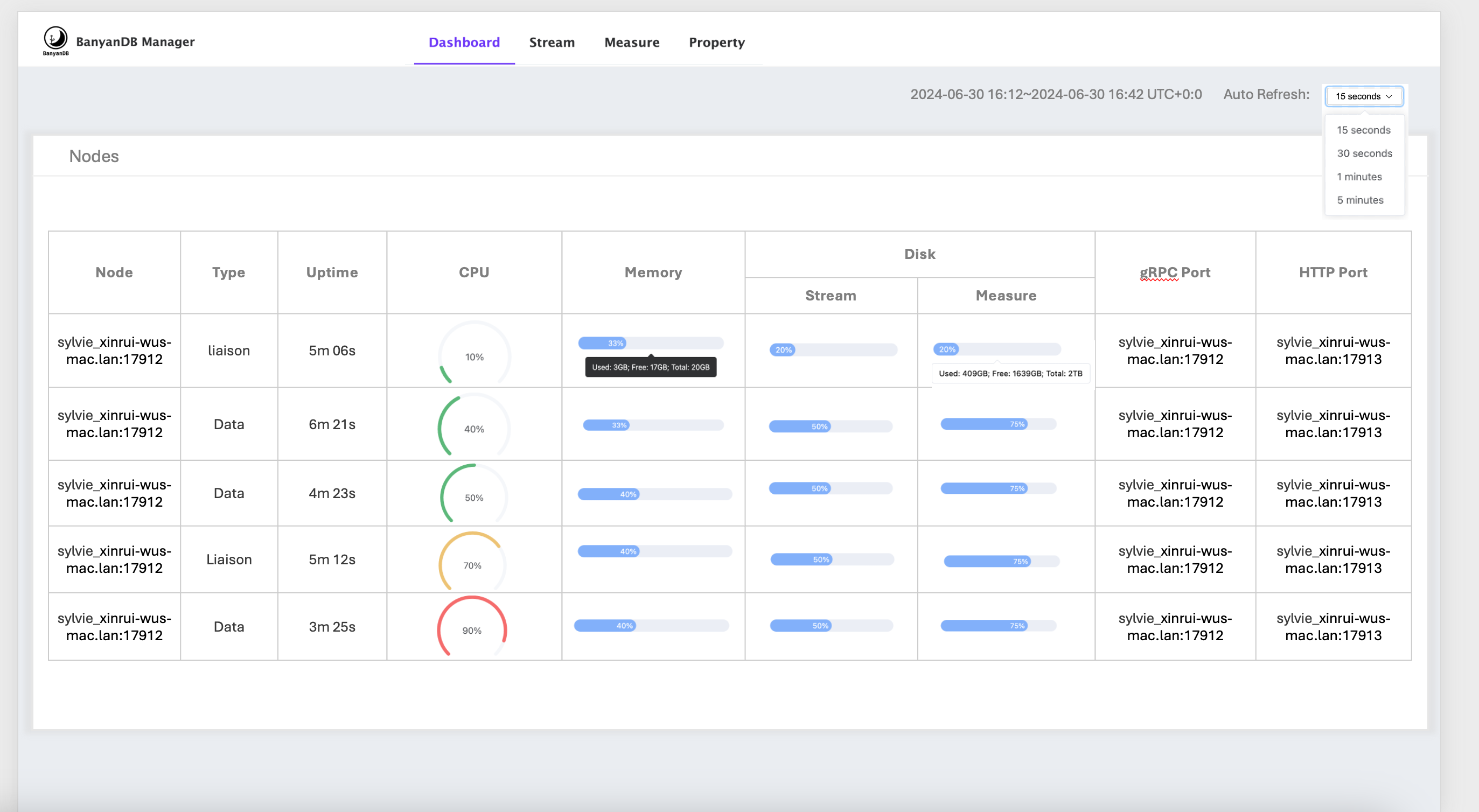
+On the dashboard page, You can view the BanyanDB running status, including the
nodes' info and resource usage.
+This feature requires setting the `observability-modes` flag to `native` when
starting the BanyanDB server. More details can be found in the
[observability](../../observability.md) document.
+
+
+
+
diff --git a/docs/interacting/web-ui/property.md
b/docs/interacting/web-ui/property.md
new file mode 100644
index 00000000..858a1468
--- /dev/null
+++ b/docs/interacting/web-ui/property.md
@@ -0,0 +1,11 @@
+# CRUD [Property](../../concept/data-model.md#Properties) on the Web UI
+The Web UI is hosted at [skywalking-banyandb-webapp](http://localhost:17913/)
when you boot up the BanyanDB server.
+
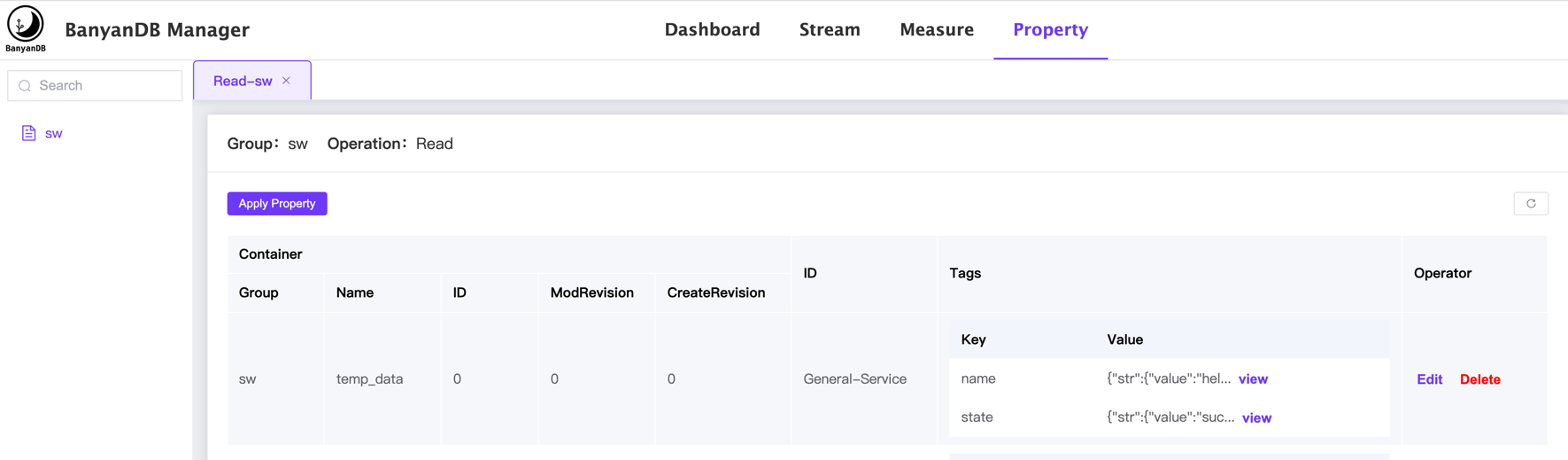
+
+
+The property page shows the data stored in the property. The menu on the left
side shows the list of properties organized by the groups.
+
+You can select the group to view the property data, the data is displayed in a
table format and can view/edit/delete the property by the following:
+- Click the `View` to show the value in the specific property and key.
+- Click the `Edit` to `add/update/delete` the tags in the specific property.
+- Click the `Delete` to delete the specific property.
\ No newline at end of file
diff --git a/docs/interacting/web-ui/query/measure.md
b/docs/interacting/web-ui/query/measure.md
new file mode 100644
index 00000000..2b3e1106
--- /dev/null
+++ b/docs/interacting/web-ui/query/measure.md
@@ -0,0 +1,17 @@
+# Query [Measures](../../../concept/data-model.md#measures) on the Web UI
+The Web UI is hosted at [skywalking-banyandb-webapp](http://localhost:17913/)
when you boot up the BanyanDB server.
+
+You can query the data stored in the measure on the Web UI.
+
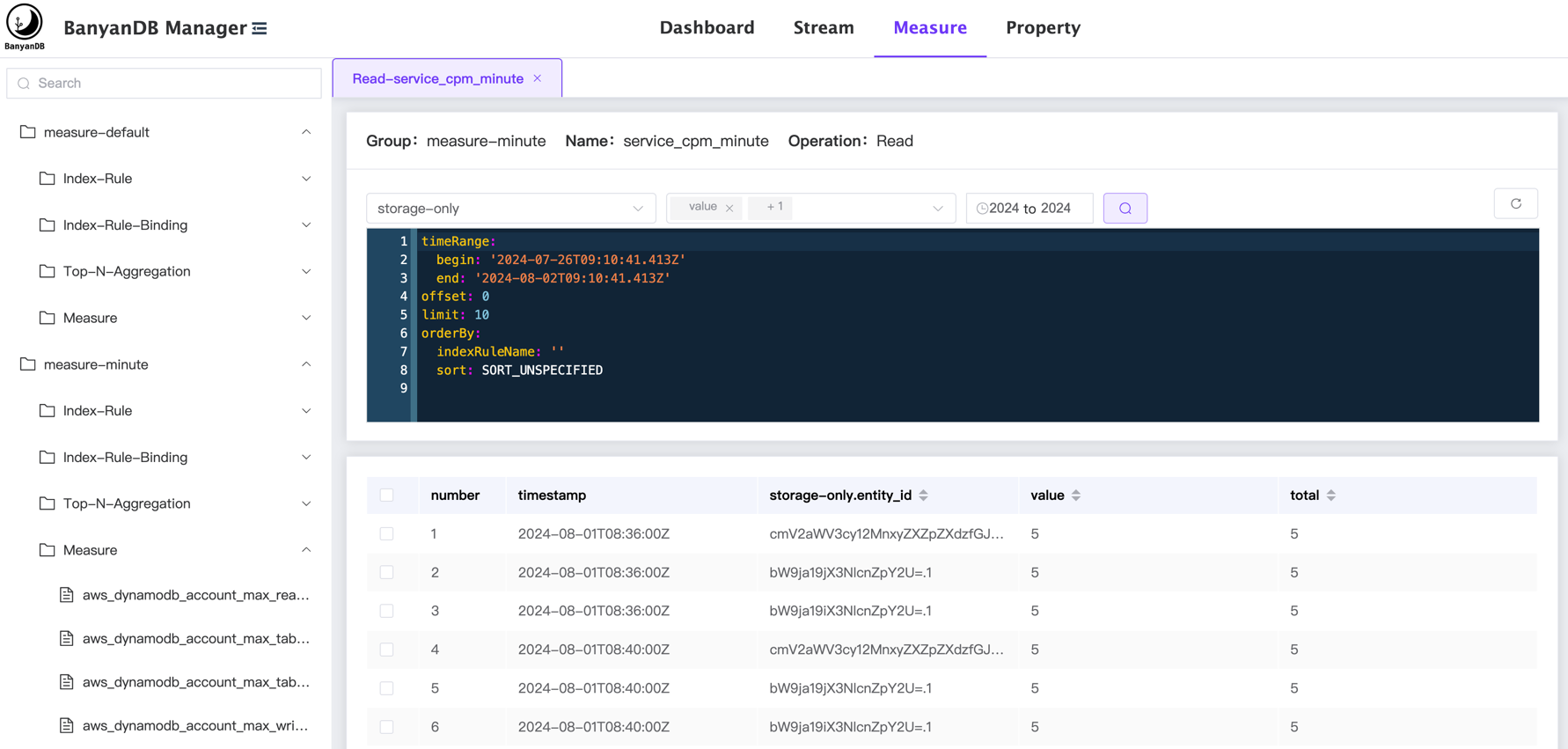
+When you select the `Measure` on the top tab, the left side menu will show the
list of measure groups.
+Under the group, in the `Measure` category, you can view the list of measure
in the group.
+
+
+
+The measure page shows the data stored in the measure. The menu on the left
side shows the list of measures, index-rule, index-rule-binding and organized
by their groups.
+
+You can select the specific measure to view the data, the data is displayed in
a table format and can query/filter the data by the following:
+- Select the `Time Range` to be queried.
+- Select the `Tag Families` to be queried.
+- Select the `Fields` to be queried.
+- Modify/Write the query config directly on the page. The config can refer to
the [bydbctl query measure](../../bydbctl/query/measure.md).
\ No newline at end of file
diff --git a/docs/interacting/web-ui/query/stream.md
b/docs/interacting/web-ui/query/stream.md
new file mode 100644
index 00000000..b17114e9
--- /dev/null
+++ b/docs/interacting/web-ui/query/stream.md
@@ -0,0 +1,13 @@
+# Query [Streams](../../../concept/data-model.md#streams)
+The Web UI is hosted at [skywalking-banyandb-webapp](http://localhost:17913/)
when you boot up the BanyanDB server.
+
+You can query the data stored in the stream on the Web UI.
+
+When you select the `Stream` on the top tab, the left side menu will show the
list of stream groups.
+Under the group, in the `Stream` category, you can view the list of streams in
the group.
+
+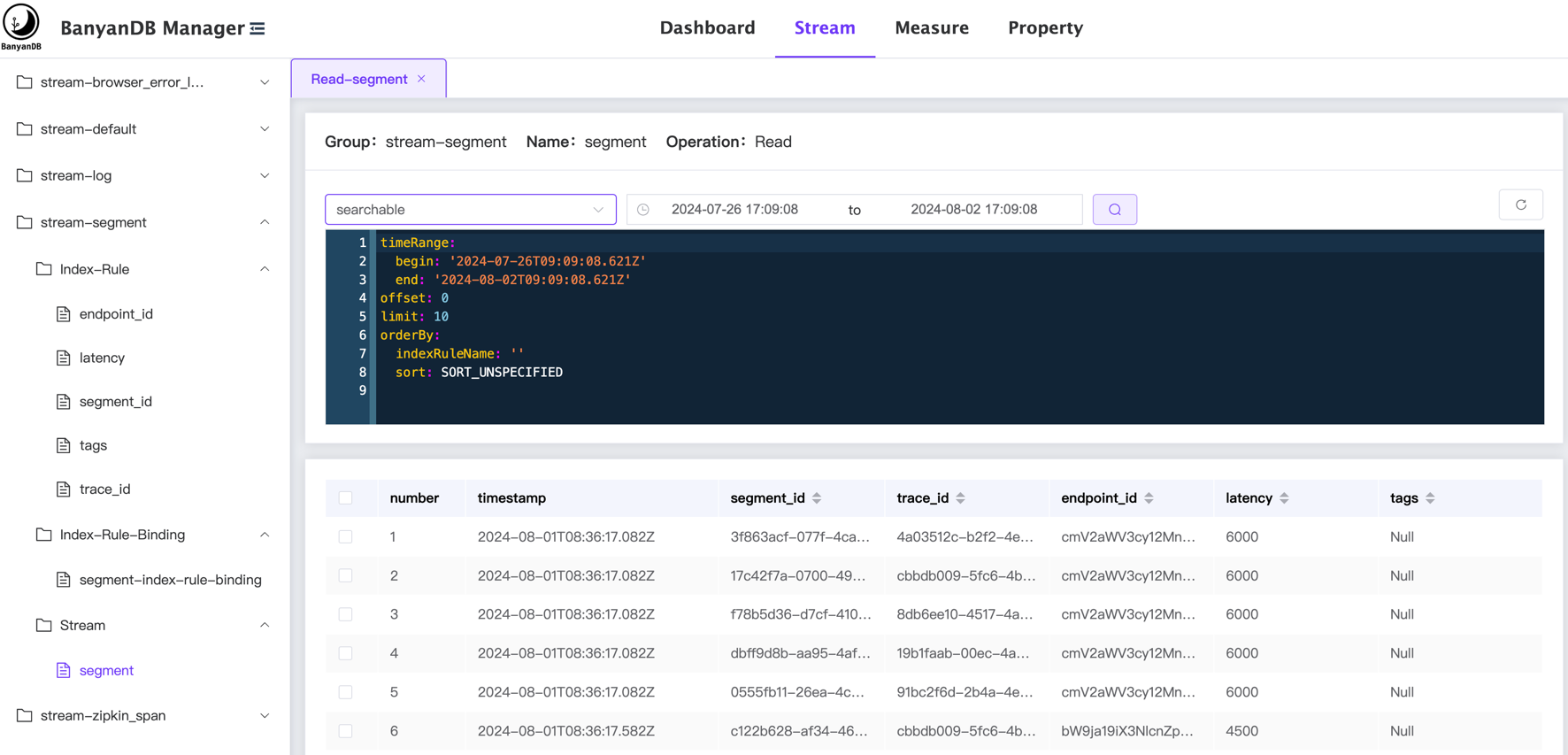
+You can select the specific stream to view the data, the data is displayed in
a table format and can query/filter the data by the following:
+- Select the `Time Range` to be queried.
+- Select the `Tag Families` to be queried.
+- Modify/Write the query config directly on the page. The config can refer to
the [bydbctl query stream](../../bydbctl/query/stream.md).
\ No newline at end of file
diff --git a/docs/interacting/web-ui/schema/group.md
b/docs/interacting/web-ui/schema/group.md
new file mode 100644
index 00000000..82b704a0
--- /dev/null
+++ b/docs/interacting/web-ui/schema/group.md
@@ -0,0 +1,18 @@
+# CRUD [Groups](../../../concept/data-model.md#groups) on the Web UI
+The Web UI is hosted at [skywalking-banyandb-webapp](http://localhost:17913/)
when you boot up the BanyanDB server.
+
+## Get Groups
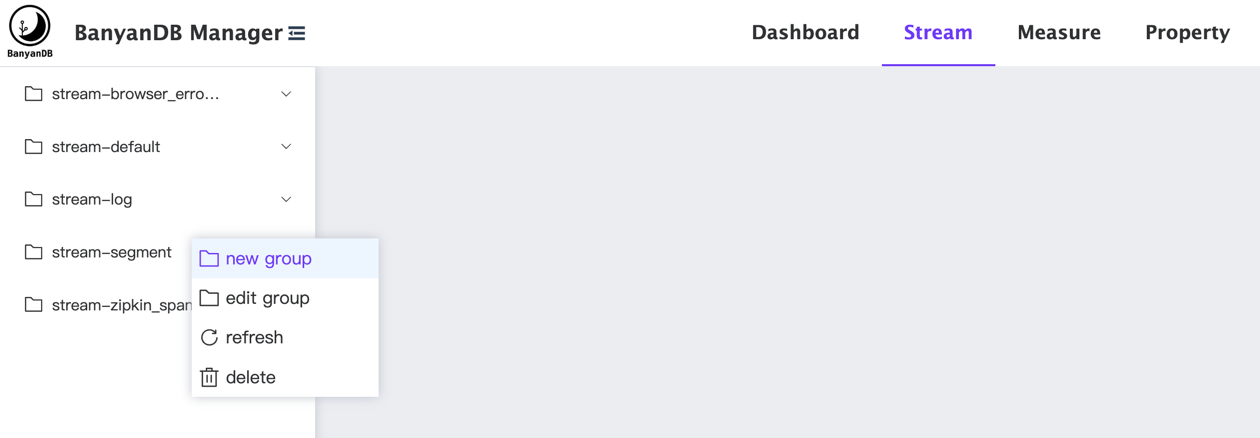
+When you select the `Stream`, `Measure`, or `Property` on the top tab, the
left side menu will show the list of groups.
+
+You can click the right button of the mouse on the group to
`creat/update/refresh/delete` the group.
+
+
+## Create Group
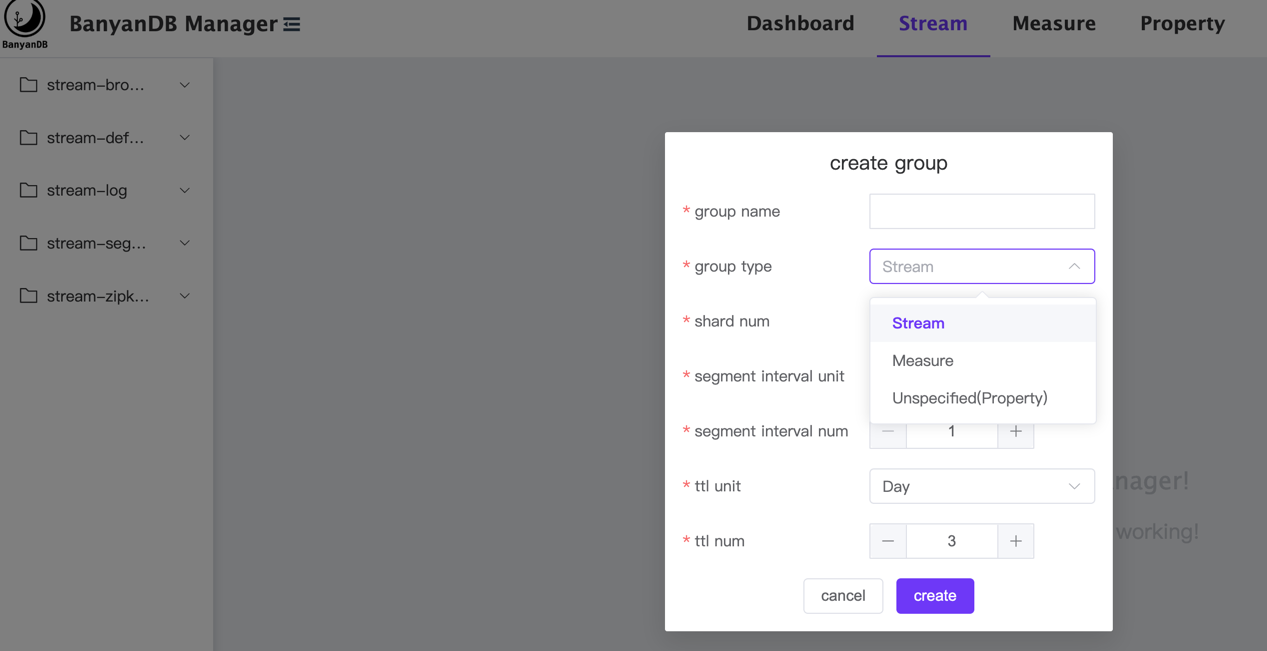
+You can click the `new group` button to add a group. The group type can be
`stream`, `measure`, or `property`.
+
+
+
+## Update/Delete Group
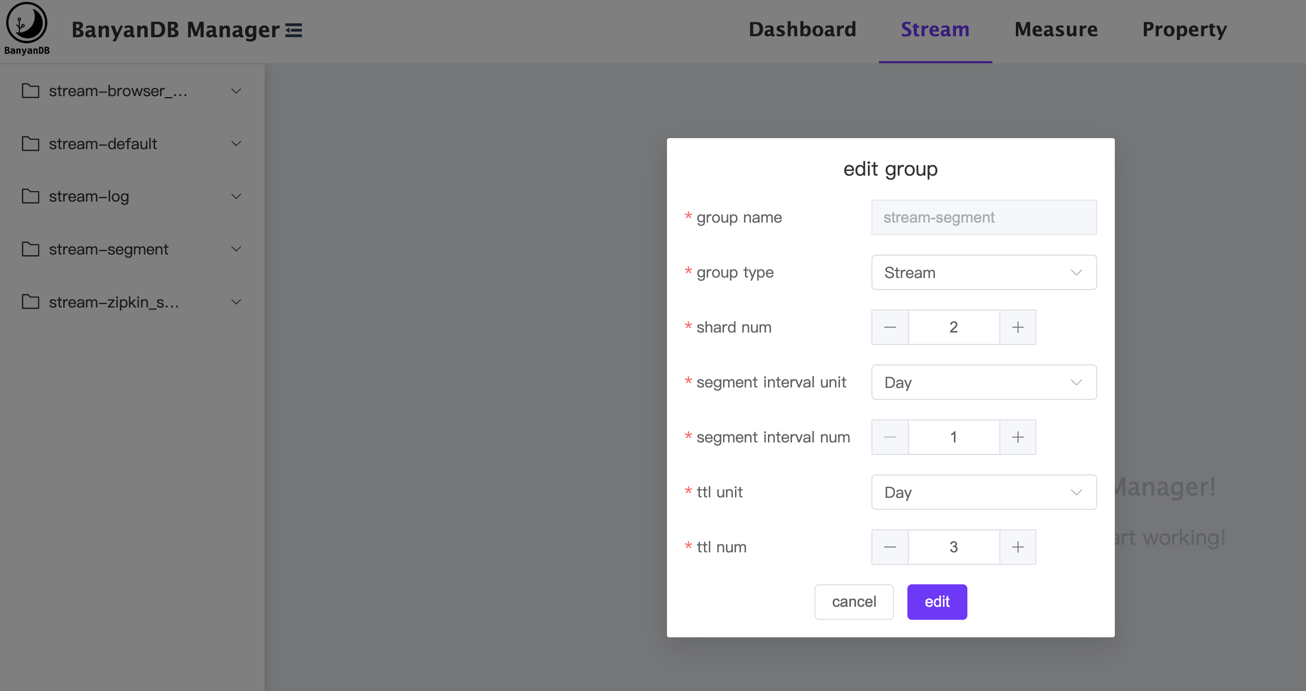
+You can click the `edit group/delete` button on a specific group to
modify/delete the group:
+
+
\ No newline at end of file
diff --git a/docs/interacting/web-ui/schema/index-rule-binding.md
b/docs/interacting/web-ui/schema/index-rule-binding.md
new file mode 100644
index 00000000..120b613a
--- /dev/null
+++ b/docs/interacting/web-ui/schema/index-rule-binding.md
@@ -0,0 +1,17 @@
+# CRUD
[IndexRuleBindings](../../../concept/data-model.md#indexrule--indexrulebinding)
on the Web UI
+The Web UI is hosted at [skywalking-banyandb-webapp](http://localhost:17913/)
when you boot up the BanyanDB server.
+
+## Get IndexRuleBindings
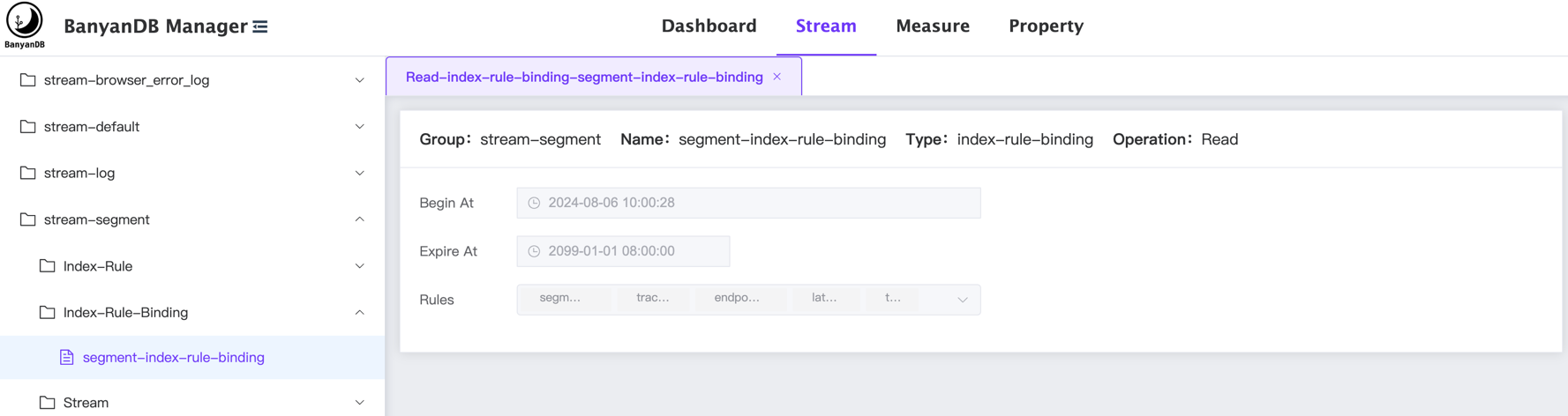
+When you in the `Stream` or `Measure` tab, you can view the list of
index-rule-bindings in the specific group.
+
+
+
+## Create IndexRuleBinding
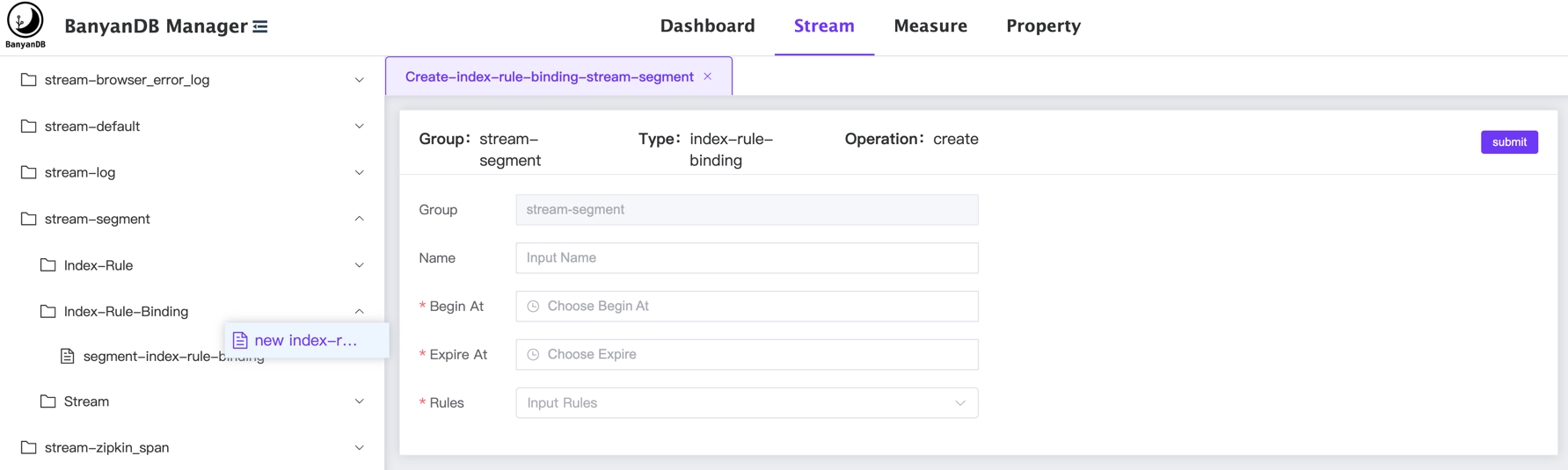
+You can create a new index-rule-binding by clicking the right button of the
mouse on the `index-rule-binding` category and select the `new
index-rule-binding` button.
+
+
+
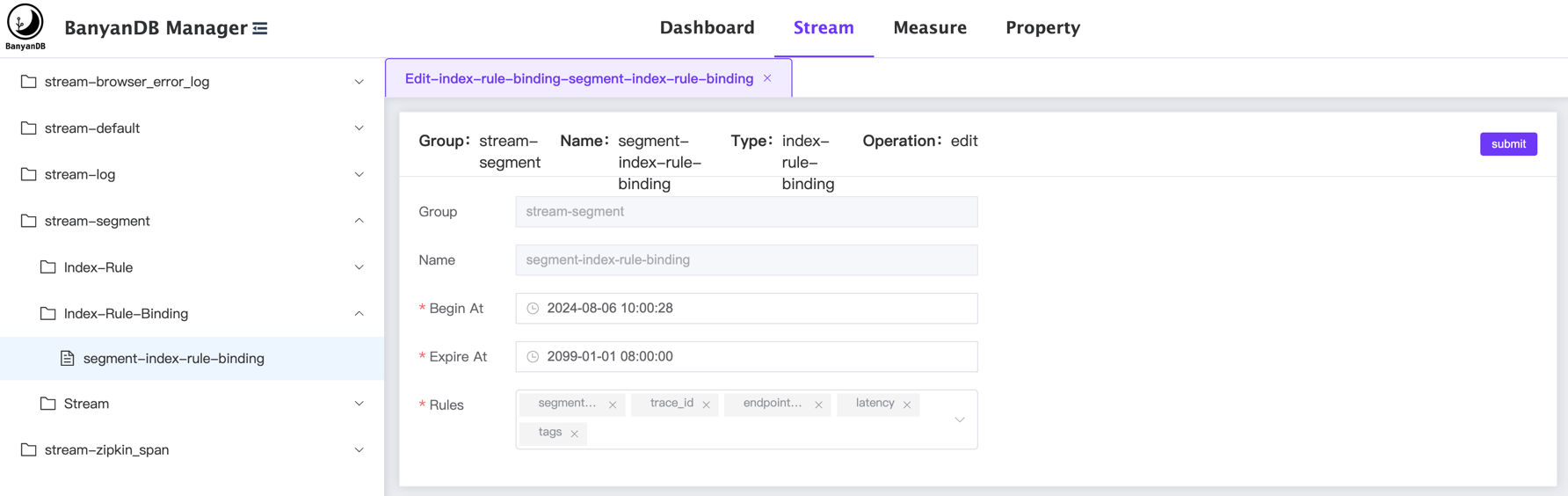
+## Update/Delete IndexRuleBinding
+You can click the `edit index-rule-binding/delete` button on a specific
index-rule-binding to modify/delete the index-rule-binding:
+
+
\ No newline at end of file
diff --git a/docs/interacting/web-ui/schema/index-rule.md
b/docs/interacting/web-ui/schema/index-rule.md
new file mode 100644
index 00000000..57f3a23c
--- /dev/null
+++ b/docs/interacting/web-ui/schema/index-rule.md
@@ -0,0 +1,17 @@
+# CRUD
[IndexRules](../../../concept/data-model.md#indexrule--indexrulebinding) on the
Web UI
+The Web UI is hosted at [skywalking-banyandb-webapp](http://localhost:17913/)
when you boot up the BanyanDB server.
+
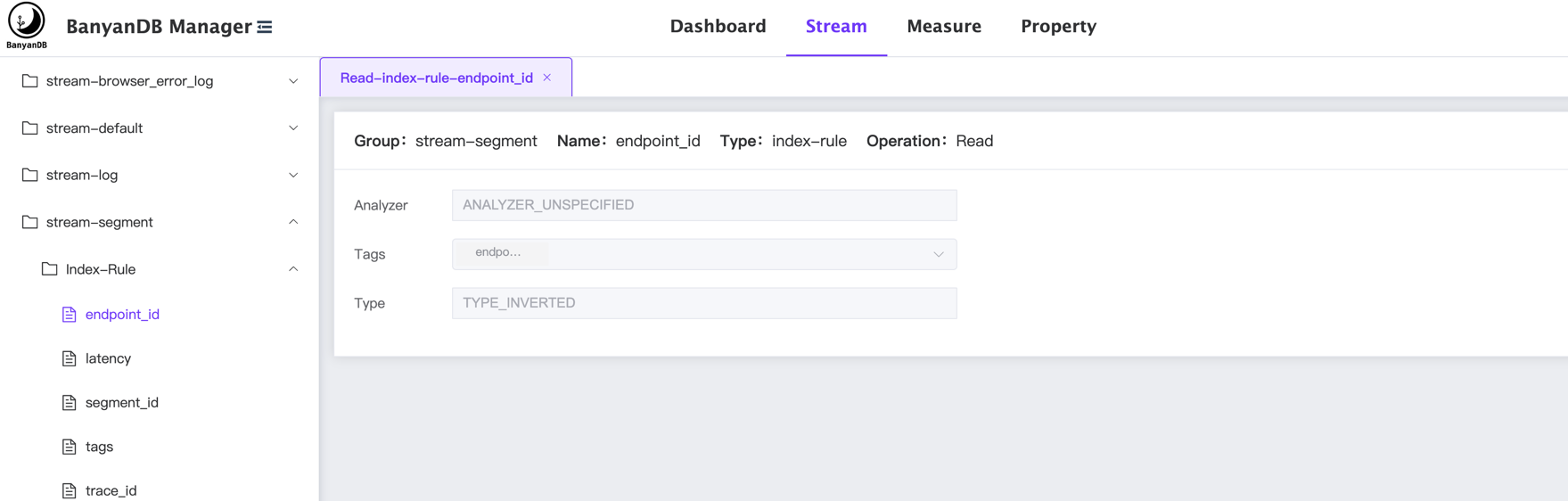
+## Get IndexRules
+When you in the `Stream` or `Measure` tab, you can view the list of
index-rules in the specific group.
+
+
+
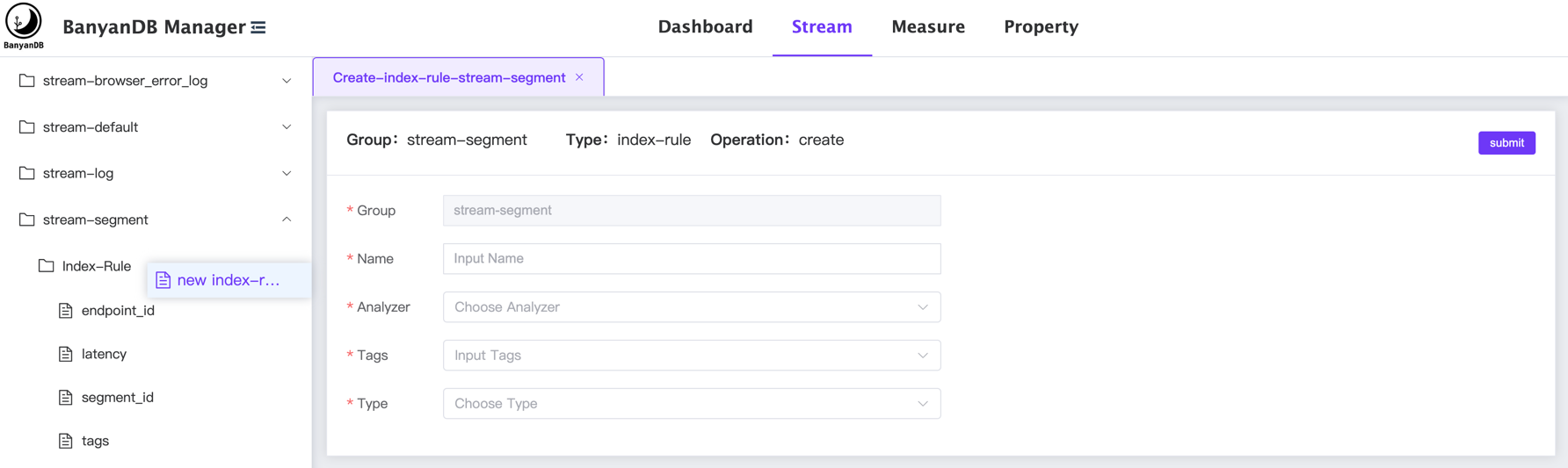
+## Create IndexRule
+You can create a new index-rule by clicking the right button of the mouse on
the `index-rule` category and select the `new index-rule` button.
+
+
+
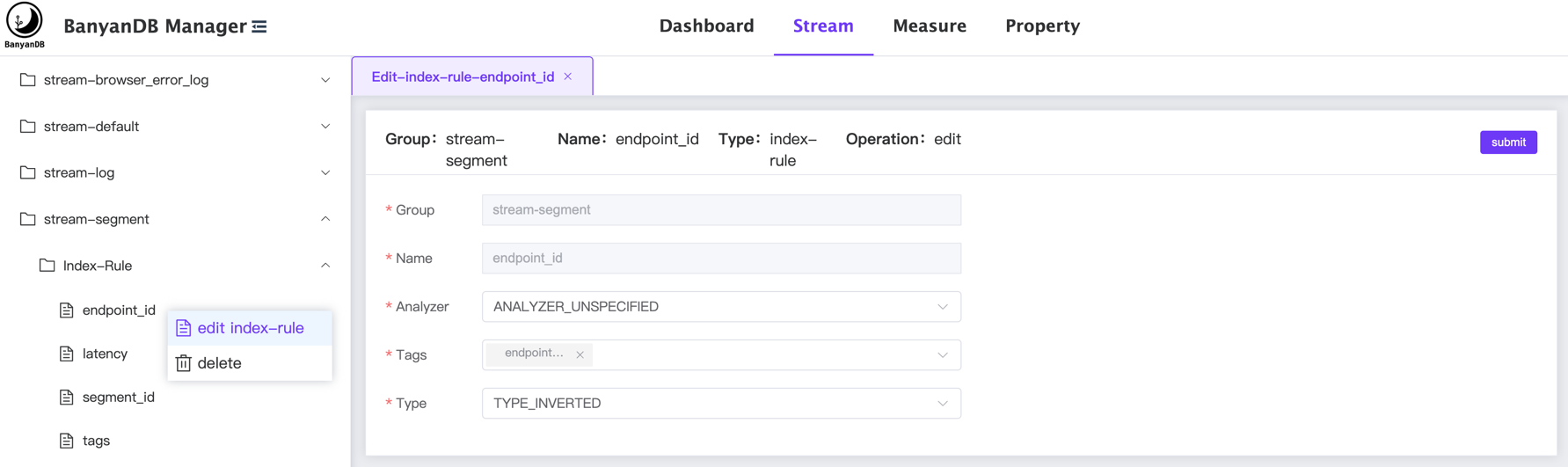
+## Update/Delete IndexRule
+You can click the `edit index-rule/delete` button on a specific index-rule to
modify/delete the index-rule:
+
+
\ No newline at end of file
diff --git a/docs/interacting/web-ui/schema/measure.md
b/docs/interacting/web-ui/schema/measure.md
new file mode 100644
index 00000000..a85d1730
--- /dev/null
+++ b/docs/interacting/web-ui/schema/measure.md
@@ -0,0 +1,20 @@
+# CRUD [Measures](../../../concept/data-model.md#measures) on the Web UI
+The Web UI is hosted at [skywalking-banyandb-webapp](http://localhost:17913/)
when you boot up the BanyanDB server.
+
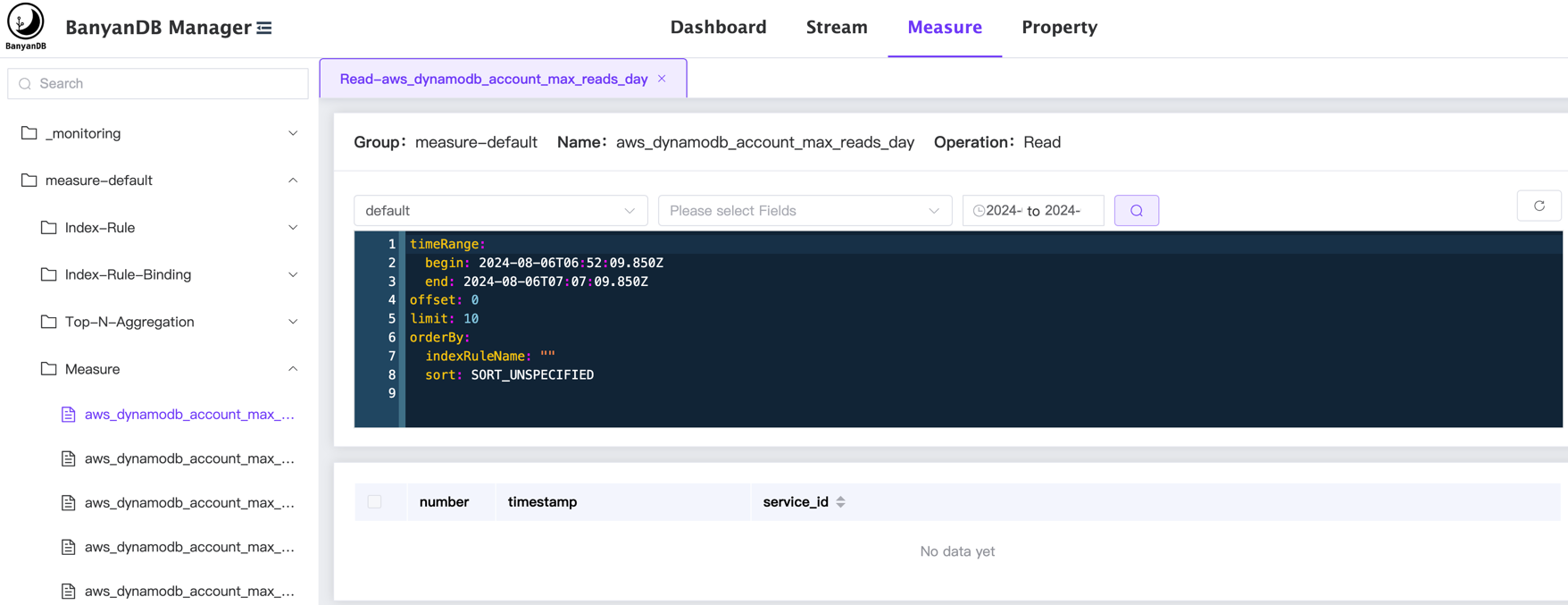
+## Get Measures
+When you select the `Measure` on the top tab, the left side menu will show the
list of measure groups.
+Under the group, in the `Measure` category, you can view the list of measure
in the group.
+
+
+
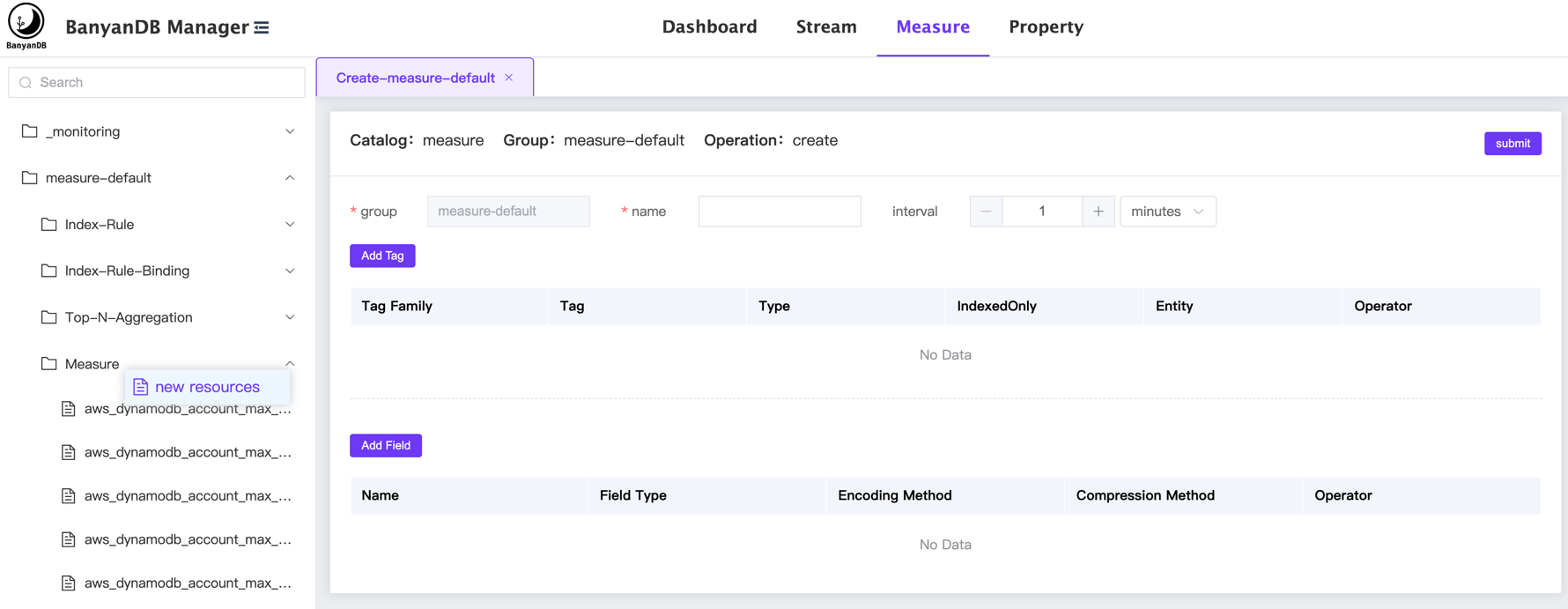
+## Create Measure
+You can create a new measure by clicking the right button of the mouse on the
`measure` category and select the `new resources` button.
+
+
+
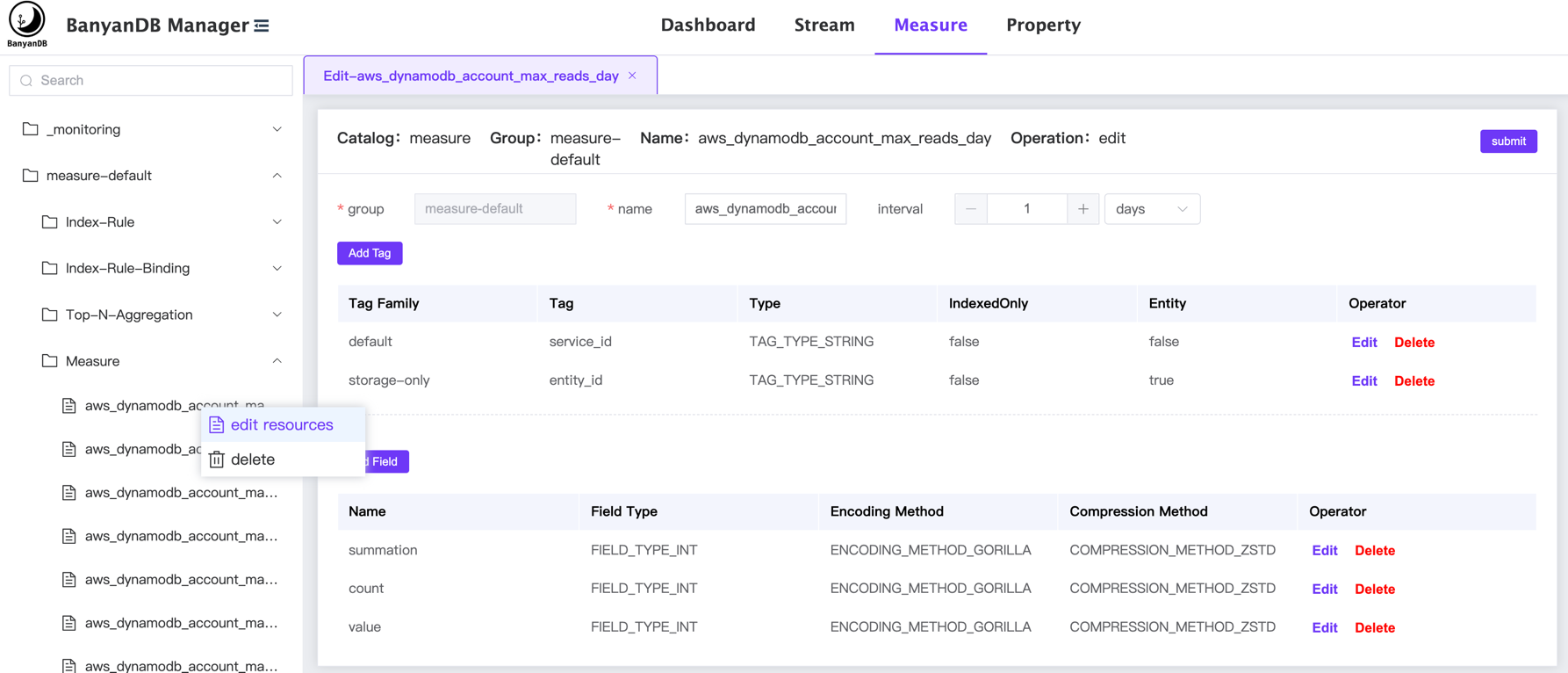
+## Update/Delete Measure
+You can click the `edit resources/delete` button on a specific stream to
modify/delete the schema:
+
+
+
+In this page, you can `add/edit/delete` the tag families and fields in the
measure.
\ No newline at end of file
diff --git a/docs/interacting/web-ui/schema/stream.md
b/docs/interacting/web-ui/schema/stream.md
new file mode 100644
index 00000000..085f6c22
--- /dev/null
+++ b/docs/interacting/web-ui/schema/stream.md
@@ -0,0 +1,20 @@
+# CRUD [Streams](../../../concept/data-model.md#streams) on the Web UI
+The Web UI is hosted at [skywalking-banyandb-webapp](http://localhost:17913/)
when you boot up the BanyanDB server.
+
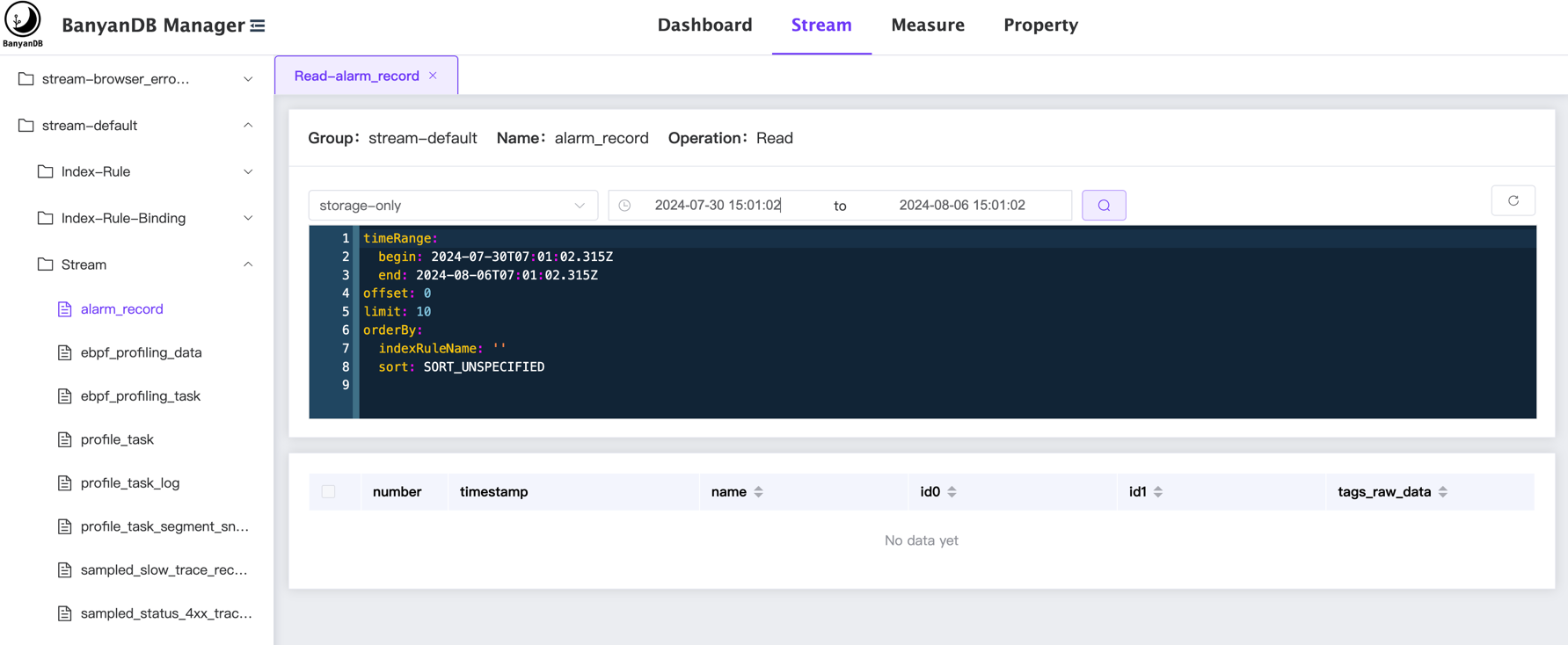
+## Get Streams
+When you select the `Stream` on the top tab, the left side menu will show the
list of stream groups.
+Under the group, in the `Stream` category, you can view the list of streams in
the group.
+
+
+
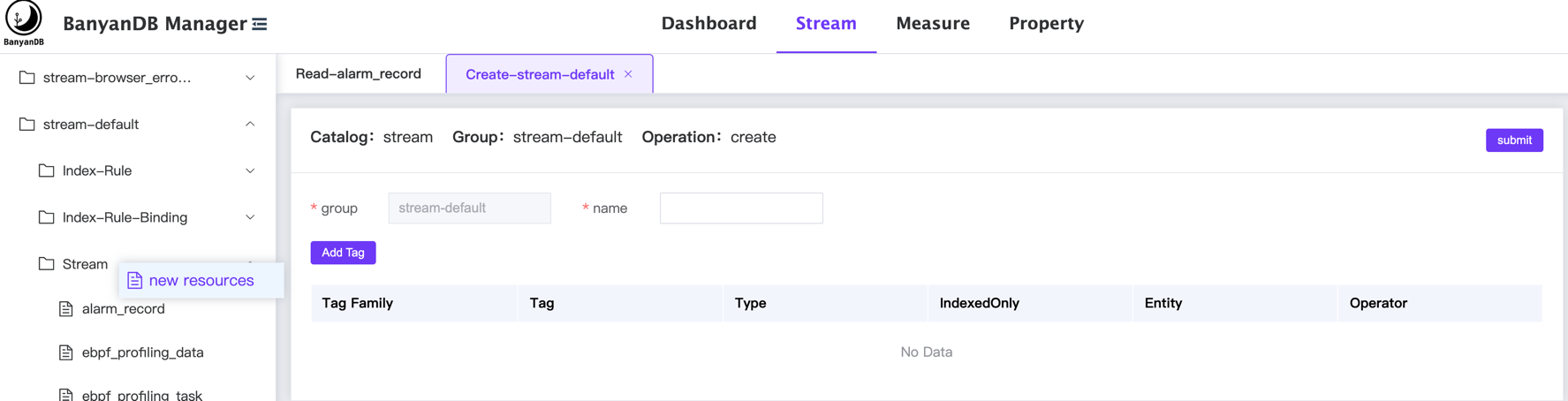
+## Create Stream
+You can create a new stream by clicking the right button of the mouse on the
`stream` category and select the `new resources` button.
+
+
+
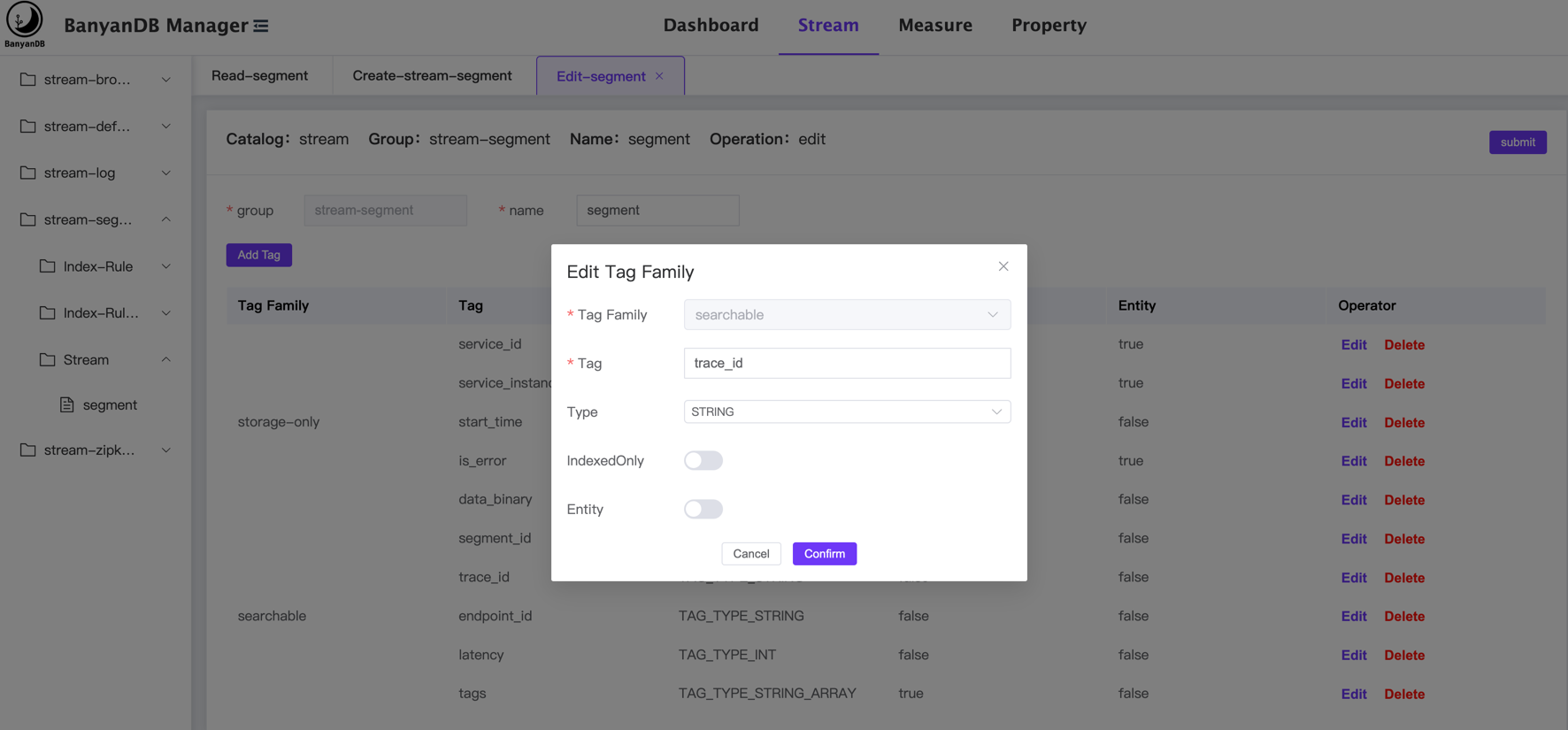
+## Update/Delete Stream
+You can click the `edit resources/delete` button on a specific stream to
modify/delete the schema:
+
+
+
+In this page, you can `add/edit/delete` the tag families in the stream.
\ No newline at end of file
diff --git a/docs/interacting/web-ui/schema/top-n-aggregation.md
b/docs/interacting/web-ui/schema/top-n-aggregation.md
new file mode 100644
index 00000000..94afaa13
--- /dev/null
+++ b/docs/interacting/web-ui/schema/top-n-aggregation.md
@@ -0,0 +1,16 @@
+# CRUD [TopNAggregation](../../../concept/data-model.md#topnaggregation) on
the Web UI
+
+## Get Top-N-Aggregation
+When you in the `Measure` tab, you can view the list of top-n-aggregations in
the specific group.
+
+
+
+## Create Top-N-Aggregation
+You can create a new top-n-aggregation by clicking the right button of the
mouse on the `Top-N-Aggregation` category and select the `new topn-agg` button.
+
+
+
+## Update/Delete Top-N-Aggregation
+You can click the `edit topn-agg/delete` button on a specific
top-n-aggregation to modify/delete the top-n-aggregation:
+
+
\ No newline at end of file
diff --git a/docs/menu.yml b/docs/menu.yml
index 539747a0..071524b5 100644
--- a/docs/menu.yml
+++ b/docs/menu.yml
@@ -20,56 +20,84 @@ catalog:
path: "/readme"
- name: "User Guide"
catalog:
- - name: "Installation"
- catalog:
- - name: "Get Binaries"
- path: "/installation/binaries"
- - name: "Standalone Mode"
- path: "/installation/standalone"
- - name: "Cluster Mode"
- path: "/installation/cluster"
- - name: "Installation On Docker"
- path: "/installation/docker"
- - name: "Installation On Kubernetes"
- path: "/installation/kubernetes"
- - name: "Basic Concepts and Terminology"
- catalog:
- - name: "Data Model"
- path: "/concept/data-model"
- - name: "Quick Start Tutorial"
- path: "/guides/quick-start/quick-start"
+ - name: "Installation"
+ catalog:
+ - name: "Get Binaries"
+ path: "/installation/binaries"
+ - name: "Standalone Mode"
+ path: "/installation/standalone"
+ - name: "Cluster Mode"
+ path: "/installation/cluster"
+ - name: "Installation On Docker"
+ path: "/installation/docker"
+ - name: "Installation On Kubernetes"
+ path: "/installation/kubernetes"
+ - name: "Basic Concepts and Terminology"
+ catalog:
+ - name: "Data Model"
+ path: "/concept/data-model"
+ - name: "Quick Start Tutorial"
+ path: "/guides/quick-start/quick-start"
- name: "Interacting"
catalog:
- - name: "Clients"
- path: "/clients"
- - name: "Insert and Update Data"
- path: ""
- - name: "Querying Data"
- path: ""
- - name: "Deleting Data"
- path: ""
- - name: "CRUD Operations"
+ - name: "CLI"
+ catalog:
+ - name: "bydbctl"
+ path: "/interacting/bydbctl/bydbctl"
+ - name: "CRUD Schema"
+ catalog:
+ - name: "Group"
+ path: "/interacting/bydbctl/schema/group"
+ - name: "Measure"
+ path: "/interacting/bydbctl/schema/measure"
+ - name: "Stream"
+ path: "/interacting/bydbctl/schema/stream"
+ - name: "IndexRule"
+ path: "/interacting/bydbctl/schema/index-rule"
+ - name: "IndexRuleBinding"
+ path: "/interacting/bydbctl/schema/index-rule-binding"
+ - name: "Querying Data"
+ catalog:
+ - name: "Measure"
+ path: "/interacting/bydbctl/query/measure"
+ - name: "Stream"
+ path: "/interacting/bydbctl/query/stream"
+ - name: "Filter Operation"
+ path: "/interacting/bydbctl/query/filter-operation"
+ - name: "CRUD Property"
+ path: "/interacting/bydbctl/property"
+ - name: "Java Client"
+ path: "/interacting/java-client"
+ - name: "Web UI"
catalog:
- - name: "Group"
- path: "/crud/group"
- - name: "Measure"
+ - name: "Dashboard"
+ path: "/interacting/web-ui/dashboard"
+ - name: "CRUD Schema"
catalog:
- - name: "Schema"
- path: "/crud/measure/schema"
- - name: "Query"
- path: "/crud/measure/query"
- - name: "Stream"
+ - name: "Group"
+ path: "/interacting/web-ui/schema/group"
+ - name: "Measure"
+ path: "/interacting/web-ui/schema/measure"
+ - name: "Stream"
+ path: "/interacting/web-ui/schema/stream"
+ - name: "IndexRule"
+ path: "/interacting/web-ui/schema/index-rule"
+ - name: "IndexRuleBinding"
+ path: "/interacting/web-ui/schema/index-rule-binding"
+ - name: "Top N Aggregation"
+ path: "/interacting/web-ui/schema/top-n-aggregation"
+ - name: "Querying Data"
catalog:
- - name: "Schema"
- path: "/crud/stream/schema"
- - name: "Query"
- path: "/crud/stream/query"
- - name: "IndexRule"
- path: "/crud/index_rule"
- - name: "IndexRuleBinding"
- path: "/crud/index_rule_binding"
- - name: "Property"
- path: "/crud/property"
+ - name: "Measure"
+ path: "/interacting/web-ui/query/measure"
+ - name: "Stream"
+ path: "/interacting/web-ui/query/stream"
+ - name: "CRUD Property"
+ path: "/interacting/web-ui/property"
+ - name: "Java Client"
+ path: "/interacting/java-client"
+ - name: "Web UI"
+ path: "/interacting/web-ui"
- name: "Operation and Maintenance"
catalog:
- name: "Configure BanyanDB"






















