betodealmeida opened a new issue #14909:
URL: https://github.com/apache/superset/issues/14909
## [SIP] A better model for Datasets This document proposes the creation of new set of SQLAlchemy models to better represent **datasets** in Superset and build the foundation for a powerful semantic layer: - A `Column` model, for table columns, dataset metrics, and dataset derived columns; - A `Table` model, representing physical tables or VIEWs in a given database; - A `Dataset` model, representing the current concept of _physical_ and _virtual_ datasets. These would replace the following existing 9 models: - `BaseDatasource`, `DruidDatasource`, and `SqlaTable`. These models currently are used to represent Druid datasources (to be deprecated), as well as physical and virtual datasets built on SQLAlchemy. - `BaseColumn`, `DruidColumn`, `TableColumn`, representing columns in Druid or SQLAlchemy. - `BaseMetric`, `DruidMetric`, `SqlMetric`, representing metrics in Druid or SQLAlchemy. (Note that Superset currently doesn't have a distinction between a table in a database and a dataset enriched with metadata. Because of this, it's hard to infer relationships between objects such as a virtual dataset and the tables it references, even though Superset is already able to extract that relationship from the SQL.) There's an additional 10th model that is out-of-scope for this SIP: `AnnotationDatasource`. Eventually it would be nice to allow any dataset to be used as an annotation, removing the need for a custom model. ### Motivation The current semantic model in Superset is very simple. Originally, Superset was built as a UI to explore Druid *datasources* (tables). At the time Druid didn't support SQL, and queries had to be done using a native JSON-based interface. Because of the lack of SQL support, when adding a datasource to Superset the column types had to be inferred from their names, and users could manually override them. Also, because of the nature of Druid's storage, users also had to indicate a temporal column, which columns were filterable, and which ones were groupable, in order to prevent expensive queries from running. Users could also add new metrics and derived columns to a datasource, which was an important feature because they couldn't simply be defined on-the-fly through SQL. The metrics, columns, and metadata describing columns were (and still are) stored in a model called `DruidDatasource`. **This description of the the underlying table and the additional metadata became Superset's semantic layer**. Once support for SQL was added, a new model was introduced, called `SqlaTable`. The new model represents a table in a database supported by SQLAlchemy, and contains additional metadata similar to the Druid counterpart: column types, labels, properties (groupable/filterable/temporal), as well as additional metrics and columns defined using SQL. In this document we'll focus on the SQLAlchemy tables and datasets, since Druid is proposed to be deprecated in Superset 2.0 ([SIP-11](https://github.com/apache/superset/issues/6032)). One of the main problems with the current implementation of datasets is that they are not distinct enough from tables, with datasets being just a *very thin layer* around tables. Datasets can't be named, and instead inherit the name of the underlying table. Because of that, it's not possible to have two datasets pointing to the same table. Because they are so tightly coupled users don't understand the difference between a table and a dataset, and a common source of confusion is why a user can query a table in SQL Lab but can't visualize it in the Explore view — unless they create a dataset first. Some of these shortcomings were solved by the introduction of *virtual datasets*, datasets that instead of pointing to a table are defined by a SQL expression. Virtual datasets can be named, and multiple virtual datasets can point to the same table, allowing different teams to curate datasets that tailor their needs. While clearly a step in the right direction, virtual datasets are also not a separate entity in the code base (they still use the `SqlaTable` model!), and there's still a lot of confusion between them and physical datasets, and them and database `VIEW`s. Additionally, the process of creating a virtual dataset is unclear: users need to go to SQL Lab, write a query, execute it, and click "Explore" to create a dataset. During that process, they have very little control over the dataset that is being created, being allowed only to choose a name, though they can edit it later. Other than this flow, clicking "+ Dataset" only allows the creation of physical datasets, but not virtual. To improve the semantic layer of Superset we want to make datasets an entity of their own, distinct from tables. Users should think of datasets not simply as a table in a database with some additional metadata. Instead, users should see them as a way of preparing curated datasets for specific use cases, making it easy for analysts to explore data without having to write SQL. Datasets are the foundation of the semantic layer, and should be treated as a first class citizen in Superset. ### Proposed Change This diagram depicts the current SQLAlchemy dataset model (`SqlaTable`), as well as related entities. Models are represented by bold boxes: 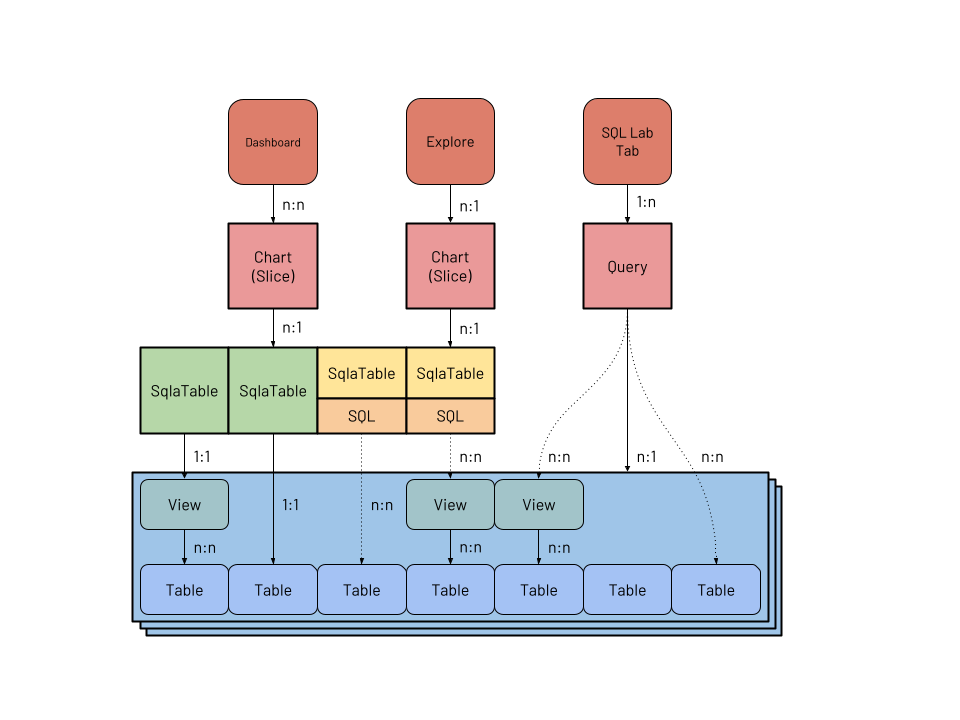 A few things of note: 1. Physical datasets have a 1:1 relationship with views and tables in a given database (in blue). 2. Virtual datasets, like queries, have **implicit** n:n relationships with views and tables, represented as dotted lines. Because there's no `Table` model the relationship exists only in the SQL query present in these models. Superset is already able to parse the SQL and extract the tables referenced for security reasons, so it should be straightforward to represent this relationship explicitly. 3. Columns and metrics, while not depicted here, are very similar to datasets. A column object can point directly to a column in a given table, similar to how physical datasets work; and a derived column has an implicit n:n relationship to columns. 4. Most charts have a 1:n relationship with datasets. The "Multiple Line Charts" and "deck.gl Multiple Layers" also have a n:n relationship to charts, but they are a special case so the relationship is not represented in the diagram. These are the proposed new models: 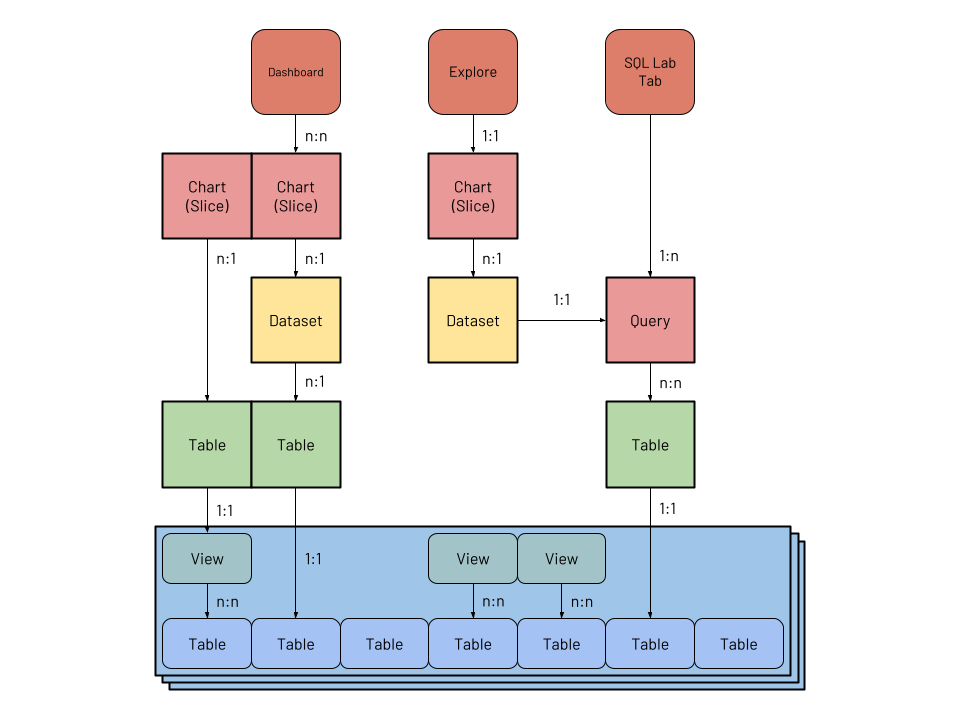 The new implementation adds explicit models for `Dataset`, `Table` and `Column`: 1. A `Table` has a 1:1 relationship with a physical table or `VIEW`, and is a direct representation of a database construct without any extra metadata. It has a 1:n relationship to physical `Column`s. 2. A `Dataset` has a n:1 relationship to `Table` (what today is called _physical_ dataset), or a 1:1 relationship to a `Query` (_virtual_ dataset). This allows multiple datasets with different names to be built on top of the same tables. Virtual datasets point to a `Query` model. 3. A `Column` is defined essentially by an expression, and can point to a table column or a SQL snippet defining a metric or derived column. Columns also have extra metadata that support data exploration. ### New or Changed Public Interfaces This solution involves implementing new models, specially `Table` and `Dataset`. The former will represent tables (or views) in databases, while the latter will represent datasets. In this proposal datasets are virtual-first, and physical datasets are a particular case of virtual datasets. The data currently stored in the `SqlaTable` model will be migrated and split between the two new models, in addition to a `Column` model for metrics and columns. The `Table` model represents the physical table stored in the database, and is pretty straightforward: ```python class Table(Model): id: int uuid: UUID database_id: int catalog: str # this will allow better support for Presto et al. schema: str name: str columns: List[Column] # 1:n relationship to Column model ``` While the dataset stores additional metadata: ```python class Dataset(Model): id: int uuid: UUID name: str columns: List[Column] # calculated and inherited columns owners: List[User] source_type: Literal["table", "saved_query"] source_id: int ``` Here, source_type and source_id represent the source of the data, either a saved query or a table object. When exploring a dataset, as today, the will be used to build a subquery, using either the table name or the saved SQL: ```sql SELECT COUNT(*) AS metric, dim1, dim2 FROM ($table_or_query) source GROUP BY 2, 3 ``` We'll remove the distinction between physical and virtual datasets, calling them simply datasets, and reinforce the idea that a dataset should be an enriched slice of data built on top of one or more tables, instead of simply a reference to a table. Datasets also have columns, with rich metadata that helps exploring them: ```python class Column(Model): id: int uuid: UUID name: str type: str table_id: int # this points to a physical column, or is a SQL expression expression: str is_physical: bool # for visualizing data on a map is_temporal: bool # for timeseries is_spatial: bool # for scheduling queries is_partition: bool # indicates is this is a metric is_aggregation: bool # indicates which aggregations can be performed is_additive: bool # superset compute-cardinality db.schema.table.column cardinality: int # for chart labels description: str units: str # for auto-joins dimension: Dimension dimension_relationship: Union[Relationship.ManyToOne, ...] # for sampled data, allows to extrapolate values weight: float # 100 # or: sample_rate: float # 0.01 ``` Note that the columns are defined by an expression, which can point to: 1. A physical column, eg, `country`; 2. An aggregation, eg, `COUNT(*)`, in which case the column represents a metric; 3. A non-aggregating expression, in which case it represents a derived column. The extra metadata can be used to orient the user when exploring the dataset. For example, if a given column is non-additive (`COUNT(DISTINCT user_id)`) we know that it can't be used in a metric using a `SUM()`. If a given column has the `is_spatial` attribute we know it can be used in [Deck.gl](http://deck.gl) visualizations. The `weight` attribute can be used to extrapolate metrics from unevenly sampled data. The dimension and dimension relationship can potentially be leveraged in the future, allowing additional dimension attributes to be automatically included when slicing and dicing the dataset. For example, if a user annotates a column `user_id` as referencing the `User` dimension, they should now be able to filter or group by `country` when exploring the dataset, and Superset will automatically perform the joins needed for the query. To accentuate the difference between tables and datasets in this option we will leverage a new dataset editor, as well as allowing tables to be explored without having to create a dataset beforehand. These are described in detail below. #### Editing datasets To encourage users to create well curated datasets we want to offer a dataset editor that is easy to use, while still targeting power users. This should be available in the main call-to-action in the Superset UI for content creation — the "+" button that currently allow users to create queries, charts and dashboards. In addition to those items, we should also allow users to create datasets. The new dataset creation flow should allow users to create a new dataset from an existing table, like the current existing flow. But the new flow should also encourage users to select only the columns that they're interested in, annotating columns with additional metadata and creating metrics, reinforcing the fact that the dataset is more than just a table. For power users we will leverage the fact that the new export capabilities of Superset produce readable YAML, and provide a YAML editor so that users can create and update datasets quickly, with the possibility of using source control for versioning and storage. Instead of implementing the editor from scratch it's possible to embed the [Monaco editor](https://www.npmjs.com/package/react-monaco-editor) in Superset, which provides support for editing YAML. For both cases, ideally the editor would allow us to integrate tightly with SQL Lab, providing: - syntax validation; - rich autocomplete when writing SQL definitions for metrics, columns and sources; - the ability to preview sample rows from the dataset. This way, creating a dataset becomes a **conscious action**, instead of the current flow where it's a necessity (creating physical datasets in order to explore them) or a byproduct (exploring a SQL Lab query). Describe any new additions to the model, views or `REST` endpoints. Describe any changes to existing visualizations, dashboards and React components. Describe changes that affect the Superset CLI and how Superset is deployed. #### Exploring tables One common source of confusion in Superset is that many users (including developers!) don't understand the need to add a table as a dataset before being able to explore it. One way to solve this problem while reinforcing the difference between a dataset and a table is allowing users to explore tables directly, without having to create datasets. This is straightforward because a table can be considered a dataset without custom metrics or derived columns, with a `source` point directly to the table — similar to a newly added physical dataset in the current workflow. With this capability we can start making a clear distinction between a **table**, representing data in a database, and a **dataset**, representing a cut of data enriched with metadata and curated for custom needs. Users would only need to create a dataset when they want to leverage the semantic layer. ### New dependencies No new dependencies are anticipated. ### Migration Plan and Compatibility The implementation is planned to be done in 5 steps: 1. Implement the `Table` and `Column` models. 2. Update `SqlaTable` to have a relationship to `SavedQuery` (virtual dataset) or `Table` (physical dataset). `SavedQuery` will point to 1+ `Table` models. This sets up the relationships that the `Dataset` model will have. Note that in the migration introducing the models we probably don't want to parse existing queries to map the relationship with saved queries and tables, since that might be too expensive. 3. Remove Druid models. 4. Add `Dataset` model, replacing the `SqlaTable` model. APIs should remain unchanged. 5. Update frontend, adding support for exploring tables (creating a dataset on the fly) and a modal for adding/editing datasets. ### Rejected Alternatives Describe alternative approaches that were considered and rejected. TBD -- This is an automated message from the Apache Git Service. To respond to the message, please log on to GitHub and use the URL above to go to the specific comment. For queries about this service, please contact Infrastructure at: [email protected] --------------------------------------------------------------------- To unsubscribe, e-mail: [email protected] For additional commands, e-mail: [email protected]


