jessicaxyl opened a new issue #15291:
URL: https://github.com/apache/superset/issues/15291
I've realized there is an option of "null" for the select filter in the Dashboard's Native Filter. However, when null was clicked as a filter, it does not show the correct output on the charts. Whereas when I try selecting null in the Filter Box created using Explore, it works. I'm using the same dataset for all the charts, filter box, and dashboard native filter. ### Expected results I expect that the Dashboard Native Filter works the same as a Filter Box. In this case, when you click the "null" option shown in the Dashboard Native Filter, it should apply the condition = null for all the charts in the dashboard if they have the specific column, just like how a filter box would do it. ### Actual results When you click "null" option in the Dashboard Native Filter, it just shows "No Data" / count(*) is 0 in the charts, as if there's no null values for the column. what actually happens. 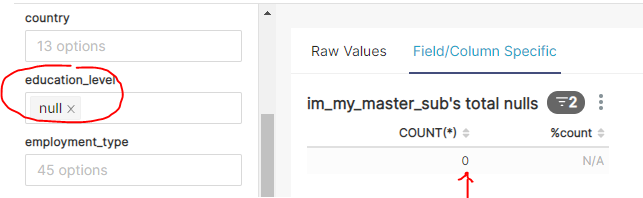 #### Screenshots This screenshot is from a Filter Box created through Explore, and it shows the correct result.  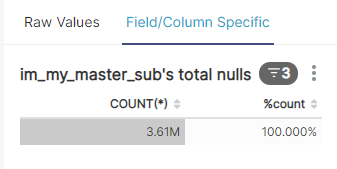 #### How to reproduce the bug 1. Display a chart in dashboard where there are null values for a column 2. Select the column for both Native Filter and Filter Box in the dashboard 3. Choose "null" in Dashboard Native Filter to simulate "where column is null", you will see that the result of the chart would be "No Data", which is wrong. 4. Remove the null filter in the Dashboard Native Filter. 5. Choose "null" in the Filter Box and click apply. The results of the chart is correct. @junlincc -- This is an automated message from the Apache Git Service. To respond to the message, please log on to GitHub and use the URL above to go to the specific comment. For queries about this service, please contact Infrastructure at: [email protected] --------------------------------------------------------------------- To unsubscribe, e-mail: [email protected] For additional commands, e-mail: [email protected]



