jesperct opened a new pull request, #41005:
URL: https://github.com/apache/superset/pull/41005
### SUMMARY The matched-prefix highlight in the Ace autocomplete popup (`.ace_completion-highlight`) was only styled in SQL Lab, which adds its own global rule. Every other Ace editor falls back to Ace's built-in `color: #000`. The Custom SQL editor in Explore (metrics and filters) is one of those, so its autocomplete highlight renders black. On the dark autocomplete popup that prefix is black on dark and nearly invisible, and the two editors end up looking different from each other. This moves the theme-aware highlight rule into the shared `AsyncAceEditor` global block so every Ace editor picks it up, and drops the now-redundant copy from SQL Lab's `EditorWrapper`. ### BEFORE/AFTER SCREENSHOTS OR ANIMATED GIF Explore, Custom SQL metric, dark mode, autocomplete open. The typed `SP` prefix goes from black (invisible) to the theme color, matching SQL Lab. Before: 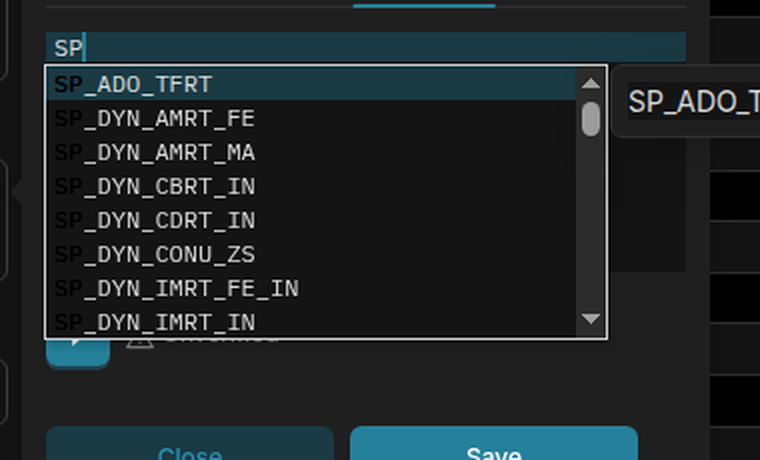 After: 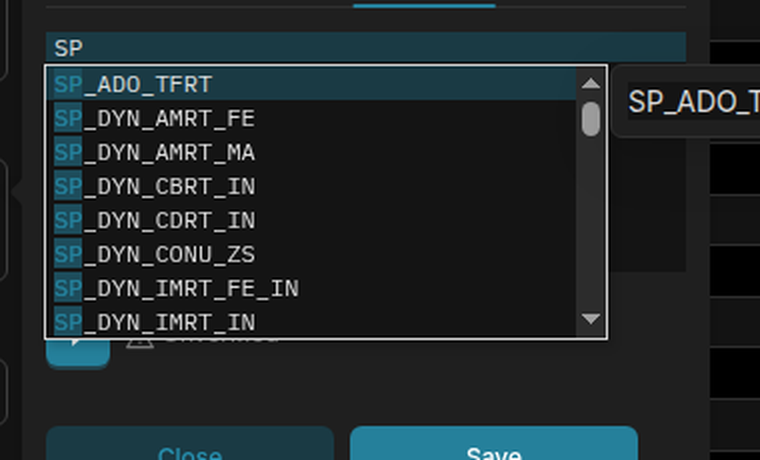 ### TESTING INSTRUCTIONS 1. Switch to dark mode. 2. In Explore, click a metric, open the Custom SQL tab, and type a prefix that matches a column (e.g. `SP`). The matched prefix in the autocomplete dropdown should be visible, not black. 3. Do the same in SQL Lab. The highlight should look the same in both editors. 4. `AsyncAceEditor.test.tsx` has a unit test covering the rule. ### ADDITIONAL INFORMATION - [ ] Has associated issue: - [ ] Required feature flags: - [x] Changes UI - [ ] Introduces new feature or API - [ ] Removes existing feature or API -- This is an automated message from the Apache Git Service. To respond to the message, please log on to GitHub and use the URL above to go to the specific comment. To unsubscribe, e-mail: [email protected] For queries about this service, please contact Infrastructure at: [email protected] --------------------------------------------------------------------- To unsubscribe, e-mail: [email protected] For additional commands, e-mail: [email protected]


