eugene-belarus opened a new issue #10832:
URL: https://github.com/apache/incubator-superset/issues/10832
There's no **Ctrl + r** hot key & **Ctrl + s** invokes default Chrome save page in Explore. **Ctrl + t** invokes default Chrome new tab in SQL Lab. _There's one Chromium issue about Ctrl + t_ > Issue 33056: Ctrl keys: Ctrl-N, Ctrl-T and Ctrl-W no longer available to client side JavaScript in Chrome4 > In Chrome 4 it works similary to Firefox, except some keyboard combination: > > - Ctrl + N > - Ctrl + Shift + N > - Ctrl + T > - Ctrl + Shift + T > - Ctrl + W > - Ctrl + Shift + W > > These combinations cannot get captured by Javascript. ### Expected results All shortcuts work. ### Actual results Explore hot key **Ctrl + r** does not exist. Explore hot key **Ctrl + s** invokes default Chrome save page. SQL Lab hot key **Ctrl + t** invokes default Chrome new tab. #### Screenshots Explore hot keys 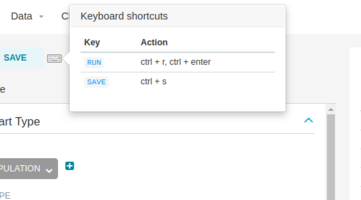 SQL LAb hot keys 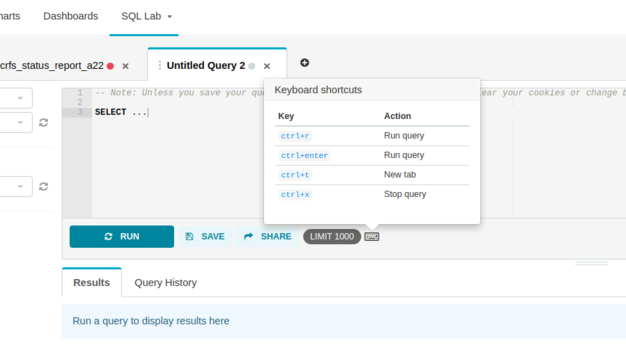 #### How to reproduce the bug 1 1. Go to a chart 2. Press **Ctrl + r** & **Ctrl + s** 3. Hot key **Ctrl + r** does not exist 4. Hot key **Ctrl + s** invokes default Chrome save page #### How to reproduce the bug 2 1. Go to SQL Lab 2. Press **Ctrl + t** 3. Hot key **Ctrl + t** invokes default Chrome new tab ---------------------------------------------------------------- This is an automated message from the Apache Git Service. To respond to the message, please log on to GitHub and use the URL above to go to the specific comment. For queries about this service, please contact Infrastructure at: [email protected] --------------------------------------------------------------------- To unsubscribe, e-mail: [email protected] For additional commands, e-mail: [email protected]


