ovidiu-dancila opened a new issue #11486:
URL: https://github.com/apache/incubator-superset/issues/11486
I created a Hive database and I tried to use the SQL Editor to run some queries. The queries are working perfectly, but when I try to select a table from the drop-down list on the left side to see the table schema, the options shown are not the actual table names but the schema name (database name) multiple times. Furthermore, If I select one of the tables with the wrong name from the drop-down list, I get `An error occurred while fetching table metadata` because the table does not exist (as the logs from the Hive engine reveal: `org.apache.spark.sql.AnalysisException: Table or view not found: default.default; line 1 pos 0;`) ### Expected results These are my tables:  So I expect that the drop-down list should contain `employee` and `test_delta` (not `default`, `default`) and by selecting one table the table metadata should be shown in the same way it works for a PostgreSQL database. ### Actual results The drop-down list contains the schema name twice, instead of the table names. Also, selecting one of the items in the drop-down list produces errors because a table name with the same name as the schema does not exist. 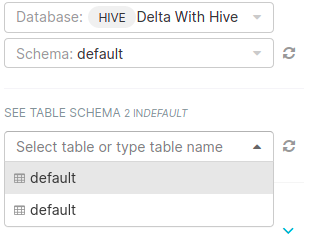 Logs from the Hive engine: ``` 20/10/29 15:37:28 INFO SparkExecuteStatementOperation: Submitting query 'DESCRIBE default.default' with 77a64a30-f6e7-4e4f-a7a0-294a525b0d6f 20/10/29 15:37:28 INFO SparkExecuteStatementOperation: Running query with 77a64a30-f6e7-4e4f-a7a0-294a525b0d6f 20/10/29 15:37:28 INFO ThriftCLIService: Client protocol version: HIVE_CLI_SERVICE_PROTOCOL_V6 20/10/29 15:37:28 INFO DAGScheduler: Asked to cancel job group 77a64a30-f6e7-4e4f-a7a0-294a525b0d6f 20/10/29 15:37:28 ERROR SparkExecuteStatementOperation: Error executing query with 77a64a30-f6e7-4e4f-a7a0-294a525b0d6f, currentState RUNNING, org.apache.spark.sql.AnalysisException: Table or view not found: default.default; line 1 pos 0; 'DescribeRelation false +- 'UnresolvedTableOrView [default, default] ``` #### How to reproduce the bug 1. Add Hive database; 2. Go to SQL Lab > SQL Editor 3. Select the Hive database in the first drop-down list from the left side. 4. Select a schema that contains tables from the Hive database in the second drop-down list. 5. In the third drop-down list you will see the wrong table names ### Environment - superset version: `0.37.2` - python version: `3.7.9` - node.js version: `12.19.0` - npm version: `6.14.8` ---------------------------------------------------------------- This is an automated message from the Apache Git Service. To respond to the message, please log on to GitHub and use the URL above to go to the specific comment. For queries about this service, please contact Infrastructure at: [email protected] --------------------------------------------------------------------- To unsubscribe, e-mail: [email protected] For additional commands, e-mail: [email protected]


