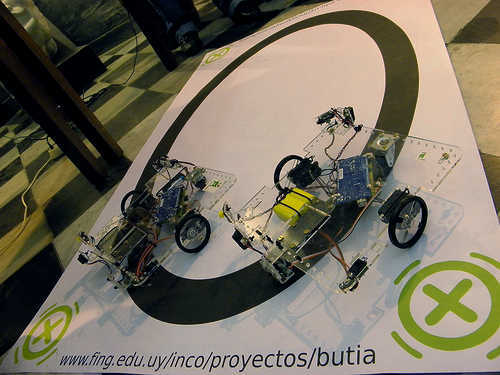
WOW! Thank you, Jorge

1) I looooove the connectors for the USBButiá.
8-wire ethernet. Once a standard exists :-), makes compatibility in
development by the many a viable option, i.e, I or anyone can develop a
motor or sensor, and it will work with the Butiá. VERY powerful!
exchangebale parts, the birth of the Industrial Age. Exchangeable
circuits, possibly a jumping point (salto cualitativo, decía un otro
Jorge) for mechatronics in education, and then in national development!
http://www.fing.edu.uy/inco/proyectos/butia/mediawiki/index.php/Usb4butia
closeup:
http://www.fing.edu.uy/inco/proyectos/butia/mediawiki/index.php/Archivo:Usb4butia2.jpg
1.b) I do not like digital servos, adds enormously to the cost IMHO,
*have* to be purchased, but then, they /do /have advantages. Askjerry
gets feedback from a LED/sensor pair. So far I have only used dead reckoning
2) hmmm. I guess that Butiá can run either with an Arduino *or* with a
USBButiá, the latter connected direct to an XO?
So the USBButiá has an MCU with some pretty good code! aha, a PIC
18F4550. I assume that you falsh them... Could you please point us to
more details? Source code seems to be here
<http://www.fing.edu.uy/inco/proyectos/butia/mediawiki/index.php/Git_Butia>,
I guess I'll have to take a look. How expensive is it to get the stuff
(PIC programmer)to flash?
Does Eneka sell ready-made PCBs? PCB fab is something that the folks at
Kidbot could help, I will check, some of our people seem to have good
connections for that sort of stuff (maybe $1.50 for each at this
complexity, in smallish quantities).
I must admit this is more advanced than where I am right now in my own
skills and hacks.
I merely can flsh 430s with an XO, and would totally love to be able to
have real i/o XO<->MCU. Hope we can follow up and I can learn. (of
course I can flash arduino with a Linux PC, but I feel that is cheating
- anything that needs more than an XO is, an ideology issue for me :-) )
Jorge, could you point me to suitable resources I could learn from? Thanks!

Yama


On 09/27/2012 01:08 PM, Jorge wrote:
On 27/09/12 13:35, Yama Ploskonka wrote:> 1) I wouldn't say better...
rather, complementary, and certainly
> cheaper. Visiting the Butiá pages, the only picture I see showing an
MCU
> http://www.fing.edu.uy/inco/proyectos/butia/images/pistaButia.jpg is
> showing an Arduino. Add a motor driver, and we are well above $30, plus
> shipping. The USBButiá board is maybe cheaper IF done in quantity by
> experts (then add labor).
Besides the microcontroller the USBButiá board provides standard
connectors for attaching sensors. It allows autodetecting what sensor
you connected and were (something like the NXT brick, but with a wider
spectrum of attacheable stuff, more connectors, easier to hack, and
plug&play).
We sidestepped the motor driver issue using digital servos.

> MSP430 + (L293D OR some darlington array) can be "free" if you get them
> as samples from TI, or less than $5 when purchased, /plus shipping/,
the
> old bane. the advantage of using a darlington driver is that then you
> may use plain DC motors, which can be free if lucky with old electronic
> parts (beautiful gear system available in old CDROM drives)
>
> 2) yop - the XO "drives" the vehicle with the MSP430 option also.
Now, I
> put quote marks as I have no idea - yet - on how to send data direct
> realtime from the XO to the robot, bypassing the MCU. What seems to be
> happening is that Butiá depends on sending code/program to the Arduino,
> and the the 'duino does the brains of the robot.
Nop, the control runs fully on the XO. MCU only interfaces
sensors&motors and supports the plug&play functionality. No user logic
runs on the MCU.
The user programs on the XO access sensors/actuators connected the MCU
and whatever the XO provides (mic, cam, accelerometer if there is one)
transparently. The most frequent programming environment is TurtleArte
(kisds already know it), but there are also Python and Lua
environments for when the problem or the user outgrows Turtle Art.
In my opinion, what MCU is used is not actually important. What is
important is the programming environment, how it interfaces with
whatever your robot offers, and the mechanism you provide for adapting
your robot for solving different problems.
Jorge
_______________________________________________
Lista olpc-Sur
[email protected]
http://lists.laptop.org/listinfo/olpc-sur