Hello Aline,

I have tested as your description with latest code of trunk and stable
branch.
Its working fine as expected.
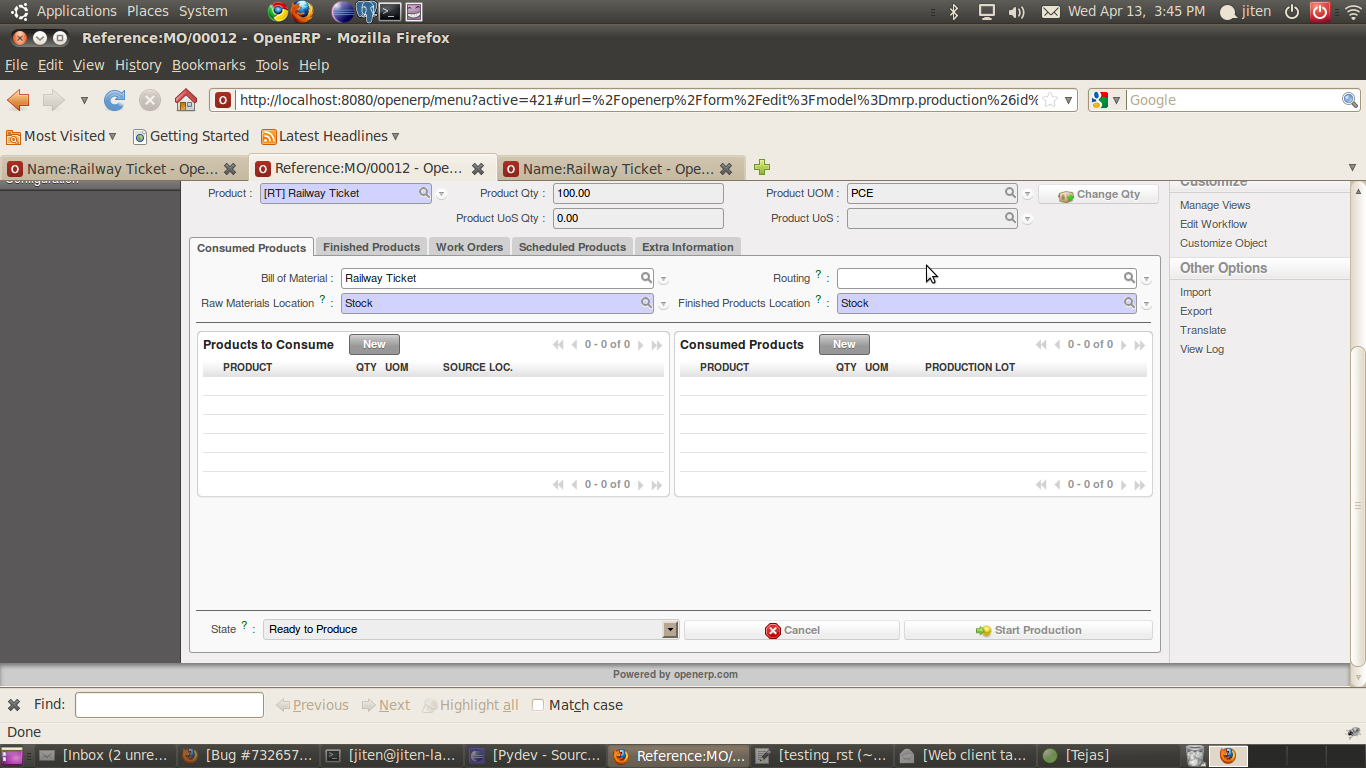
Check it with attachment screenshot, Flow Buttons like 'cancel' and 'Start
Production' is appear in MO.


Thanks.

** Attachment added: "Screenshot_MO.png"

https://bugs.launchpad.net/openobject-client-web/+bug/732657/+attachment/2029401/+files/Screenshot_MO.png

** Changed in: openobject-client-web
       Status: Confirmed => Fix Released

--
You received this bug notification because you are a member of OpenERP
SA's Web Client R&D, which is a bug assignee.
https://bugs.launchpad.net/bugs/732657

Title:
  where are flow button in manufacturing order

Status in OpenERP Web Client:
  Fix Released

Bug description:
  in web client, button in manufacturing order are desappear. if the MO
  come from a procurement. To test :

  - create a product stockable (product type) and to produce (supply) methode
  - create a BoM for this product  with consumable product (from rigt pannel or
Manufacturing / Master Data / Bill of Materials)
  - create a minimum stock rule for this product (from right pannel or
Warehouse / Configuration /Automatic Action / Minimum Stock Rules) (min 20
max100)
  - launch the scheduler (Warehouse / Schedulers / Compute Shedulers).
  - go to manufacturing order (manufacturing / manufacturing/ manufacturing
order) and click on on line in order to go in form view

  -> there are not buttons to process the MO

  In GTK, there are at least  buttons  "Cance" and "Start Production"

_______________________________________________
Mailing list: https://launchpad.net/~openerp-dev-web
Post to     : [email protected]
Unsubscribe : https://launchpad.net/~openerp-dev-web
More help   : https://help.launchpad.net/ListHelp