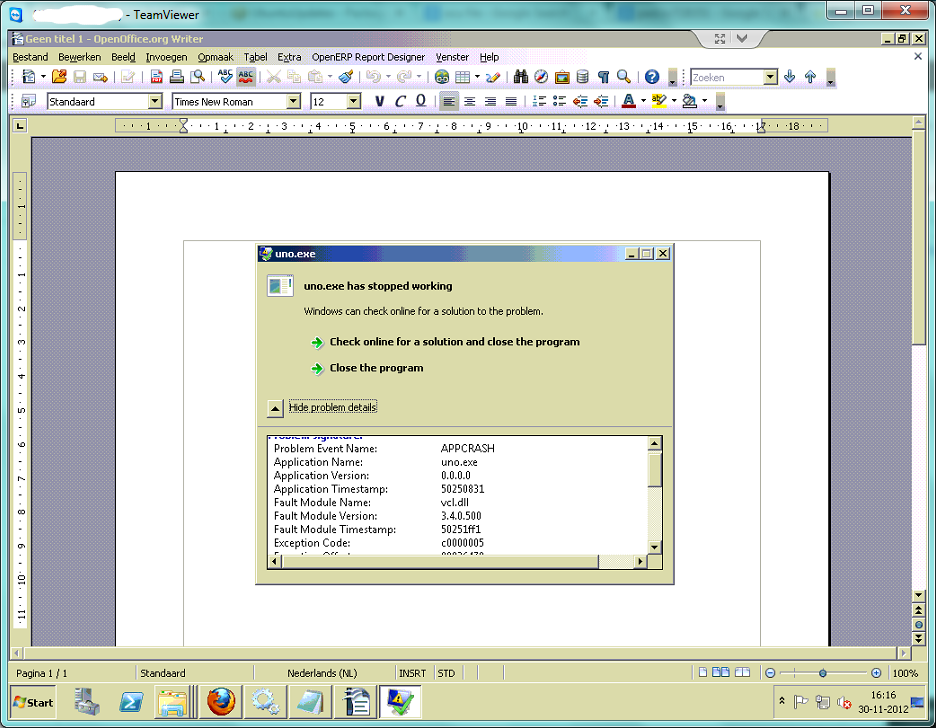
I experienced a very similar problem on a client machine running windows
server 2008 R2 64bit, OpenOffice and the OpenERP report designer plugin.
After installing the plugin and restarting OO, clicking any button of
the plugin would cause the attached error message to appear (Uno.exe has
stopped working). Afterwards, clicking any button resulted in no visible
result.

Closing and reopening OO did not seem to fix this issue. When I tried to
disable the plugin I got several error messages about UDP bridges being
closed already (presumerably because it was trying to close something
that uno.exe had opened, which was closed when uno.exe crashed).

Trying to uninstall the plugin resulted in nothing. The only way to
restart uno was to reinstall the plugin from the same zip, while it was
already installed, then restarting OO. I would then get the same error.

For other people's reference, the workaround was to manually upload the
sxw/rml files to the server and manually create the report and action
binding objects. Just make sure they have a unique service name and that
you restart the server after creating them!

** Attachment added: "image.png"

https://bugs.launchpad.net/openobject-addons/+bug/728351/+attachment/3450347/+files/image.png

** Changed in: openobject-addons
       Status: Invalid => New

--
You received this bug notification because you are a member of OpenERP
Indian Team, which is subscribed to OpenERP Addons.
https://bugs.launchpad.net/bugs/728351

Title:
  Report Designer Plugin crashes with error "uno.exe has stopped
  responding" on 64 bits Windows

Status in OpenERP Addons (modules):
  New

Bug description:
  Hi,

  I'm trying to install the 'Report Designer Module'

  Whilst doing so, I fail to complete the Installation and Configuration
  Steps:

  * Save the OpenERP Report Designer Plug-in.
    * Follow these steps to install plug-in
      1. Open Extension Manager window from Menu Bar of Openoffice writer, Open
Tools > Extension Menu --> OK
      2. Click on "Add" button. --> OK
      3. Select path where the openerp report_designer.zip is located. --> OK
      4. On the completion of adding package you will get: your package under
'Extension Manager' and the status of your package become 'Enabled'. --> OK
      5. Restart openoffice writer. --> OK
    * Follow the steps to configure OpenERP Report Designer plug-in in
OpenOffice writer.
      1. Connect OpenERP Server from Menu bar, OpenERP Report Designer. --> NOK
      2. Select Server url, database and provide user name and password
      3. Click 'Connect'.
      4. if your connection success, a message appears like 'You can start
creating your report in current document.'.

  When I click on the Server Settings menu item, the following bug apears:
       "uno.exe has encountered a problem and needs to close."
  Error signature:
  AppName: uno.exe       AppVer: 0.0.0.0         ModName: vclmi.dll
  ModVer: 3.3.9556.500   Offset: 0000d44a

  Operating System: Windows XP SP3
  OpenOffice Writer: 3.3.0 (OOO330m20)
  OpenERP Client GTK: v6.0.1

  Please let me know if you need more input.

  Thanks!

  Best regards,

  Leen Geudens

To manage notifications about this bug go to:
https://bugs.launchpad.net/openobject-addons/+bug/728351/+subscriptions

_______________________________________________
Mailing list: https://launchpad.net/~openerp-india
Post to     : [email protected]
Unsubscribe : https://launchpad.net/~openerp-india
More help   : https://help.launchpad.net/ListHelp