Hi Joe,

thanks for the heads up! Live migration is not strictly necessary. And
with enabling the Nova account to log in and fixing all the SSH key
stuff / mixed up home directories a normal migration is now working.
Thanks again
Greetings
-Sascha-

Am 24.01.2014 18:23, schrieb Joe Topjian:
> Hi Sascha,
>
> Just a heads up that live migration will not work in multi-host
> environments unless share_dhcp_address is set to True. I ran into this
> issue last week:
>
> http://lists.openstack.org/pipermail/openstack/2014-January/004684.html
> http://lists.openstack.org/pipermail/openstack/2014-January/004811.html
>
> If your bridge is connected through a tunnel, then you might be in an
> environment that doesn't support migration anyway, but just wanted to
> send a quick note.
>
> Joe
>
>
> On Fri, Jan 24, 2014 at 3:55 PM, Sascha Vogt <[email protected]
> <mailto:[email protected]>> wrote:
>
>     Hi Ritesh,
>
>     I was missing the share_dhcp_address=True option in nova.conf, setting
>     that to False solves the issue.
>
>     The network was specified as multi-host T and the bridge IS created
>     automatically. The issue was the IP which was assigned to the bridge. It
>     was the same on all nodes (which is bad, as the bridge is connected
>     through tunnels)
>
>     Greetings
>     -Sascha-
>
>     Am 24.01.2014 15:41, schrieb Ritesh nanda:
>     > Hello Sascha,
>     >
>     > Its an multi host nova-network setup depicted there, so nova-network
>     > will handle network of its compute node.
>     >
>     > While creating a network specify multi-host T , in that case when a
>     > machine is created on a compute node bridge would be automatically
>     > created on each compute node.
>     >
>     > Regards,
>     > Ritesh nanda
>     >
>     ------------------------------------------------------------------------
>     > From: Sascha Vogt <mailto:[email protected]
>     <mailto:[email protected]>>
>     > Sent: 24-01-2014 07:06 PM
>     > To: [email protected]
>     <mailto:[email protected]>
>     <mailto:[email protected]
>     <mailto:[email protected]>>
>     > Subject: [Openstack] Havana / nova-network - Multi-Node setup, dnsmasq
>     > usesthe same IP on multiple nodes
>     >
>     > Hi all,
>     >
>     > I have a Multi-Node, Single-NIC setup. All machines only have a single
>     > NIC. I created a virtual network (using gretap tunnels - aka
>     > layer2-over-layer3 tunnel) to connect all machines and have one br-int
>     > bridge which all VMs are attached to.
>     >
>     > nova-network runs on all machines and correctly binds dnsmasq to the
>     > hosts bridge itself, though I noticed that each host-bridge gets
>     the .1
>     > IP. This seems to work, because dnsmasq is configured by
>     nova-network to
>     > only answer to DHCP requests the specific instance has a MAC address
>     > for, though I find it a bit irritating.
>     >
>     > I try to give a picture of it:
>     >
>     > controller
>     >     - br-int (dnsmasq with .1 address)
>     >         - gretap tunnel to compute-1 (using the static IPs of eth0)
>     >         - gretap tunnel to compute-2 (using the static IPs of eth0)
>     >         - vnet1-n (instances running on this host)
>     >     - eth0 (routes between external network and br-int, NAT / ip
>     >             forwarding active, static IP used also for OpenStack
>     >             managing)
>     >
>     > compute-1
>     >     - br-int (dnsmasq with .1 address)
>     >         - gretap tunnel to controller (using the static IPs of eth0)
>     >         - vnet1-n (instances running on this host)
>     >     - eth0 (OpenStack managing)
>     >
>     > compute-2
>     >     - br-int (dnsmasq with .1 address)
>     >         - gretap tunnel to controller (using the static IPs of eth0)
>     >         - vnet1-n (instances running on this host)
>     >     - eth0 (OpenStack managing)
>     >
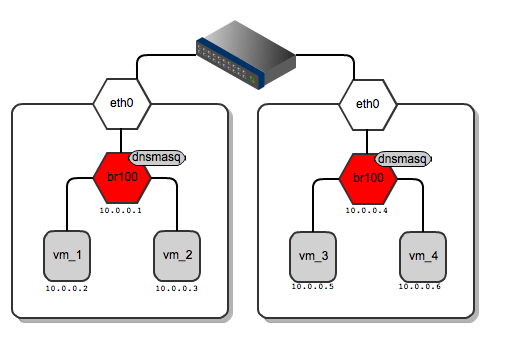
>     > I'm using the FlatDHCPManager, and if you substitue eth0/the-switch in
>     > this picture
>     >
>
> http://www.mirantis.com/wp-content/uploads/2012/07/flat-dhcp-networking-diagrams-4.png
>     > with the gretap tunnels I basically have that topology. In that
>     picture
>     > the dnsmasqs/br100 have different IPs. How did they get that? ;)
>     >
>     > Greetings
>     > -Sascha-
>
>
>     _______________________________________________
>     Mailing list:
>     http://lists.openstack.org/cgi-bin/mailman/listinfo/openstack
>     Post to     : [email protected]
>     <mailto:[email protected]>
>     Unsubscribe :
>     http://lists.openstack.org/cgi-bin/mailman/listinfo/openstack
>
>


_______________________________________________
Mailing list: http://lists.openstack.org/cgi-bin/mailman/listinfo/openstack
Post to     : [email protected]
Unsubscribe : http://lists.openstack.org/cgi-bin/mailman/listinfo/openstack